Digital Graphics 
File Formats 
Alex Walker
Raster Graphics 
• Raster graphics are made up of Bitmaps or Pixels. 
• Bitmaps have a fixed resolution, so resizing these 
images can resort in distortion. 
• Each pixel records colour information. 
• Megapixels make a better picture because there 
are more pixels. 
• 14 megapixels=14,000,000 pixels. 
• Raster images are saved in varying formats.
Vector Graphics 
• Vector graphics are made of vectors or paths. 
• It is a mathematical calculation, so this makes 
the image more precise. 
• Vectors are defined by start and end points 
with curves, points and angles between. 
• From this information means that they can 
become a line or a curvy shape. 
• Vectors can be scaled easier so make good 
company logos.
Raster Graphics
JPEG 
Stands For Joint Photographic Experts Group 
Used For/Example Photos and Web formats. 
Advantage • Jpegs can be compressed so take up 
less space than other files. 
• Jpegs will work for most devices 
because the makers made it decided on 
the best format to avoid confusion. 
Disadvantage • With each compression, the image 
loses quality.
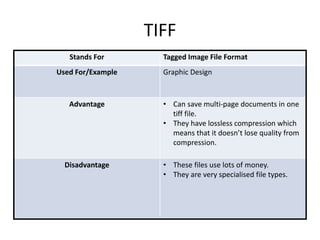
TIFF 
Stands For Tagged Image File Format 
Used For/Example Graphic Design 
Advantage • Can save multi-page documents in one 
tiff file. 
• They have lossless compression which 
means that it doesn’t lose quality from 
compression. 
Disadvantage • These files use lots of money. 
• They are very specialised file types.
GIF 
Stands For Graphic Interchange Format 
Used For/Example Its used for short digital animations and on 
the internet. 
Advantage • Its easier than making an animation. 
• Its low quality so its smaller. 
Disadvantage • Its low quality.
BMP 
Stands For Bitmap 
Used For/Example Image file, similar to a tiff and jpeg. 
Advantage • No loss in compression. 
Disadvantage • Large file size.
Vector Graphics
PSD 
Stands For Photoshop Document 
Used For/Example Its used for image manipulation. E.g. Front 
cover images for a magazine. 
Advantage • You can edit and apply edits to just one 
layer. 
• Supports transparency. 
• It can create shapes. 
Disadvantage • Very few things will open or preview 
this type of file. This means you have to 
save it to another format. 
• It is a huge file size.
AI 
Stands For Adobe Illustrator 
Used For/Example It is used for logo creation. 
Advantage • It can be scaled without loss of 
definition. 
Disadvantage • It takes specialist software to open and 
close this type of file.
FLA 
Stands For Flash file 
Used For/Example Its used for animations and games. 
Advantage • The file sizes are small but of a high 
quality. 
• These files can include sound and 
video. 
Disadvantage • It takes time to gain the skill to use the 
software as it is specialist.
WMF 
Stands For Windows Metafile 
Used For/Example They are very similar to AL files in the way 
they are high quality but small files. They 
are used for logos. 
Advantage • They can be scaled multiple times and 
with no loss of definition. 
• Use both vector and bitmap 
components. 
Disadvantage • Clip art- doesn’t look professional and 
the quality is sometimes bad due to the 
use of bitmaps.
File Format Capture 
and Optimising
Compression 
Definition “Lossy compression” is the way files are 
reduced in size by reducing the amount of 
information saved into the file. 
Advantage This means that when the file sizes are 
reduced, there is more memory space 
because it isn’t taking up as much room as 
it would if it wasn’t reduced in size. 
Disadvantage The effect of this however, is that the 
more times it is saved/compressed, the 
more pixelated it will become as it will 
have lost information or bitmaps/pixels.
Image Capture 
Method Scanner 
How is it used for image capture of 
graphics 
Digitised physical images like sketches, 
physical 
Method Digital Camera 
How is it used for image capture of 
graphics 
By taking photos from real life and being 
able to have them instantly and digitally to 
edit. 
Method Graphics Tablet 
How is it used for image capture of 
graphics 
There is a more enhanced control over 
drawing.
Optimising 
Why would you optimise? You would optimise to make sure there 
was easy viewing on the internet after you 
loaded the image up there. If they aren’t 
then the image takes longer to download 
due to the file size being too large. 
How can you optimise? • Reducing size. 
• Reducing the amount of pixels or bit 
depth. 
• Reducing the resolution. 
• Compressing the image. 
Advantage to optimising • Easier viewing on the internet. 
• Smaller file size. 
• Faster to download. 
Disadvantage to optimising • Its harder to find an earlier published 
post. 
• It is complicated to do unless you know 
what you’re doing.

File types pro forma

  • 1.
    Digital Graphics FileFormats Alex Walker
  • 2.
    Raster Graphics •Raster graphics are made up of Bitmaps or Pixels. • Bitmaps have a fixed resolution, so resizing these images can resort in distortion. • Each pixel records colour information. • Megapixels make a better picture because there are more pixels. • 14 megapixels=14,000,000 pixels. • Raster images are saved in varying formats.
  • 3.
    Vector Graphics •Vector graphics are made of vectors or paths. • It is a mathematical calculation, so this makes the image more precise. • Vectors are defined by start and end points with curves, points and angles between. • From this information means that they can become a line or a curvy shape. • Vectors can be scaled easier so make good company logos.
  • 4.
  • 5.
    JPEG Stands ForJoint Photographic Experts Group Used For/Example Photos and Web formats. Advantage • Jpegs can be compressed so take up less space than other files. • Jpegs will work for most devices because the makers made it decided on the best format to avoid confusion. Disadvantage • With each compression, the image loses quality.
  • 6.
    TIFF Stands ForTagged Image File Format Used For/Example Graphic Design Advantage • Can save multi-page documents in one tiff file. • They have lossless compression which means that it doesn’t lose quality from compression. Disadvantage • These files use lots of money. • They are very specialised file types.
  • 7.
    GIF Stands ForGraphic Interchange Format Used For/Example Its used for short digital animations and on the internet. Advantage • Its easier than making an animation. • Its low quality so its smaller. Disadvantage • Its low quality.
  • 8.
    BMP Stands ForBitmap Used For/Example Image file, similar to a tiff and jpeg. Advantage • No loss in compression. Disadvantage • Large file size.
  • 9.
  • 10.
    PSD Stands ForPhotoshop Document Used For/Example Its used for image manipulation. E.g. Front cover images for a magazine. Advantage • You can edit and apply edits to just one layer. • Supports transparency. • It can create shapes. Disadvantage • Very few things will open or preview this type of file. This means you have to save it to another format. • It is a huge file size.
  • 11.
    AI Stands ForAdobe Illustrator Used For/Example It is used for logo creation. Advantage • It can be scaled without loss of definition. Disadvantage • It takes specialist software to open and close this type of file.
  • 12.
    FLA Stands ForFlash file Used For/Example Its used for animations and games. Advantage • The file sizes are small but of a high quality. • These files can include sound and video. Disadvantage • It takes time to gain the skill to use the software as it is specialist.
  • 13.
    WMF Stands ForWindows Metafile Used For/Example They are very similar to AL files in the way they are high quality but small files. They are used for logos. Advantage • They can be scaled multiple times and with no loss of definition. • Use both vector and bitmap components. Disadvantage • Clip art- doesn’t look professional and the quality is sometimes bad due to the use of bitmaps.
  • 14.
    File Format Capture and Optimising
  • 15.
    Compression Definition “Lossycompression” is the way files are reduced in size by reducing the amount of information saved into the file. Advantage This means that when the file sizes are reduced, there is more memory space because it isn’t taking up as much room as it would if it wasn’t reduced in size. Disadvantage The effect of this however, is that the more times it is saved/compressed, the more pixelated it will become as it will have lost information or bitmaps/pixels.
  • 16.
    Image Capture MethodScanner How is it used for image capture of graphics Digitised physical images like sketches, physical Method Digital Camera How is it used for image capture of graphics By taking photos from real life and being able to have them instantly and digitally to edit. Method Graphics Tablet How is it used for image capture of graphics There is a more enhanced control over drawing.
  • 17.
    Optimising Why wouldyou optimise? You would optimise to make sure there was easy viewing on the internet after you loaded the image up there. If they aren’t then the image takes longer to download due to the file size being too large. How can you optimise? • Reducing size. • Reducing the amount of pixels or bit depth. • Reducing the resolution. • Compressing the image. Advantage to optimising • Easier viewing on the internet. • Smaller file size. • Faster to download. Disadvantage to optimising • Its harder to find an earlier published post. • It is complicated to do unless you know what you’re doing.