

File Sharing / Folder Collaboration
in SyncBlaze
A Simple Guide
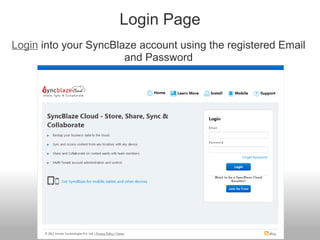
Login Page
Login into your SyncBlaze account using the registered Email
and Password
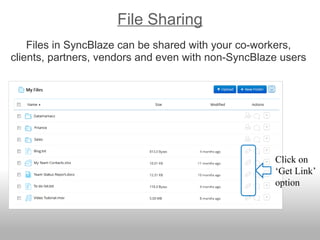
File Sharing
Files in SyncBlaze can be shared with your co-workers,
clients, partners, vendors and even with non-SyncBlaze users
Click on
‘Get Link’
option
File Sharing
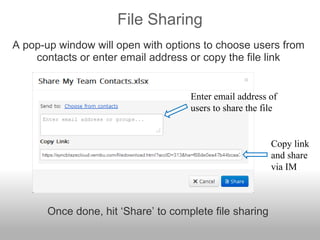
A pop-up window will open with options to choose users from
contacts or enter email address or copy the file link
Copy link
and share
via IM
Enter email address of
users to share the file
Once done, hit ‘Share’ to complete file sharing
Folder Collaboration
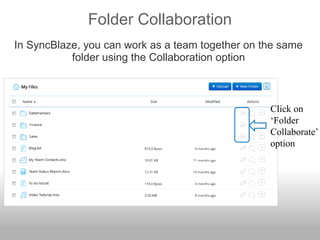
In SyncBlaze, you can work as a team together on the same
folder using the Collaboration option
Click on
‘Folder
Collaborate’
option
Folder Collaboration
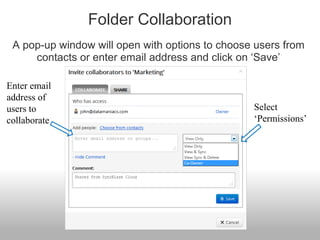
A pop-up window will open with options to choose users from
contacts or enter email address and click on ‘Save’
Enter email
address of
users to
collaborate
Select
‘Permissions’
Folder Sharing
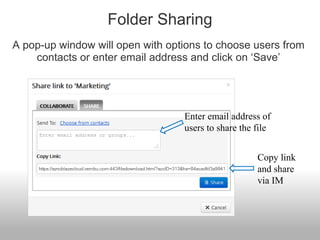
A pop-up window will open with options to choose users from
contacts or enter email address and click on ‘Save’
Copy link
and share
via IM
Enter email address of
users to share the file
Work as a team and increase productivity
Start Experiencing SyncBlaze
www.syncblaze.com
www.syncblaze.com

File Sharing & Folder Collaboration

  • 1.
    File Sharing /Folder Collaboration in SyncBlaze A Simple Guide
  • 2.
    Login Page Login intoyour SyncBlaze account using the registered Email and Password
  • 3.
    File Sharing Files inSyncBlaze can be shared with your co-workers, clients, partners, vendors and even with non-SyncBlaze users Click on ‘Get Link’ option
  • 4.
    File Sharing A pop-upwindow will open with options to choose users from contacts or enter email address or copy the file link Copy link and share via IM Enter email address of users to share the file Once done, hit ‘Share’ to complete file sharing
  • 5.
    Folder Collaboration In SyncBlaze,you can work as a team together on the same folder using the Collaboration option Click on ‘Folder Collaborate’ option
  • 6.
    Folder Collaboration A pop-upwindow will open with options to choose users from contacts or enter email address and click on ‘Save’ Enter email address of users to collaborate Select ‘Permissions’
  • 7.
    Folder Sharing A pop-upwindow will open with options to choose users from contacts or enter email address and click on ‘Save’ Copy link and share via IM Enter email address of users to share the file
  • 8.
    Work as ateam and increase productivity Start Experiencing SyncBlaze
  • 9.
  • 10.