
https://www.facebook.com/Oxus20 
oxus20@gmail.com 
Fal-e Hafez (Omens of Hafez) Cards in Persian Using JAVA 
File I/O Concept 
Random Concept 
Scanner Concept 
Component Orientation Concept 
Prepared By: Fereshteh Narowziyan 
Edited By: Abdul Rahman Sherzad
Topics 
»Introduction to Hafez Omen 
»File I/O Concept 
»Random Concept 
»Scanner Concept 
»Component Orientation Concept 
»Hafez Omen Implementation 
2 
https://www.facebook.com/Oxus20
Hafez Biography 
»Khajeh Shamseddin Mohammad Hafez Shirazi (Persian: سمش هجاوخ نیدلا یزاریش ظفاح دمحم ,)known by his pen name Hafez (حافظ also Hafiz) was a Persian poet. 
»His collected works composed of series of Persian literature are to be found in the homes of most people in Afghanistan and Iran who learn his poems by heart and use them as proverbs and sayings to this day. 
»His life and poems have been the subject of much analysis, commentary and interpretation, influencing post-fourteenth century Persian writing more than any other author. 
3 
https://www.facebook.com/Oxus20
Omens of Hafez 
»In the Persian tradition, whenever one faces a difficulty or a fork in the road, or even if one has a general question in mind, one would hold that question in mind, and then ask the Oracle of "Khajeh Shamseddin Mohammad Hafez-s Shirazi" for guidance. 
4 
https://www.facebook.com/Oxus20
Omens of Hafez 
»There are several applications which are coded by different programming languages such as: 
˃Java languages for Desktops and Mobiles 
˃HTML and CSS and PHP for Web Pages 
»that it shows the importance of Omens of Hafez among the Persian people. 
5 
https://www.facebook.com/Oxus20
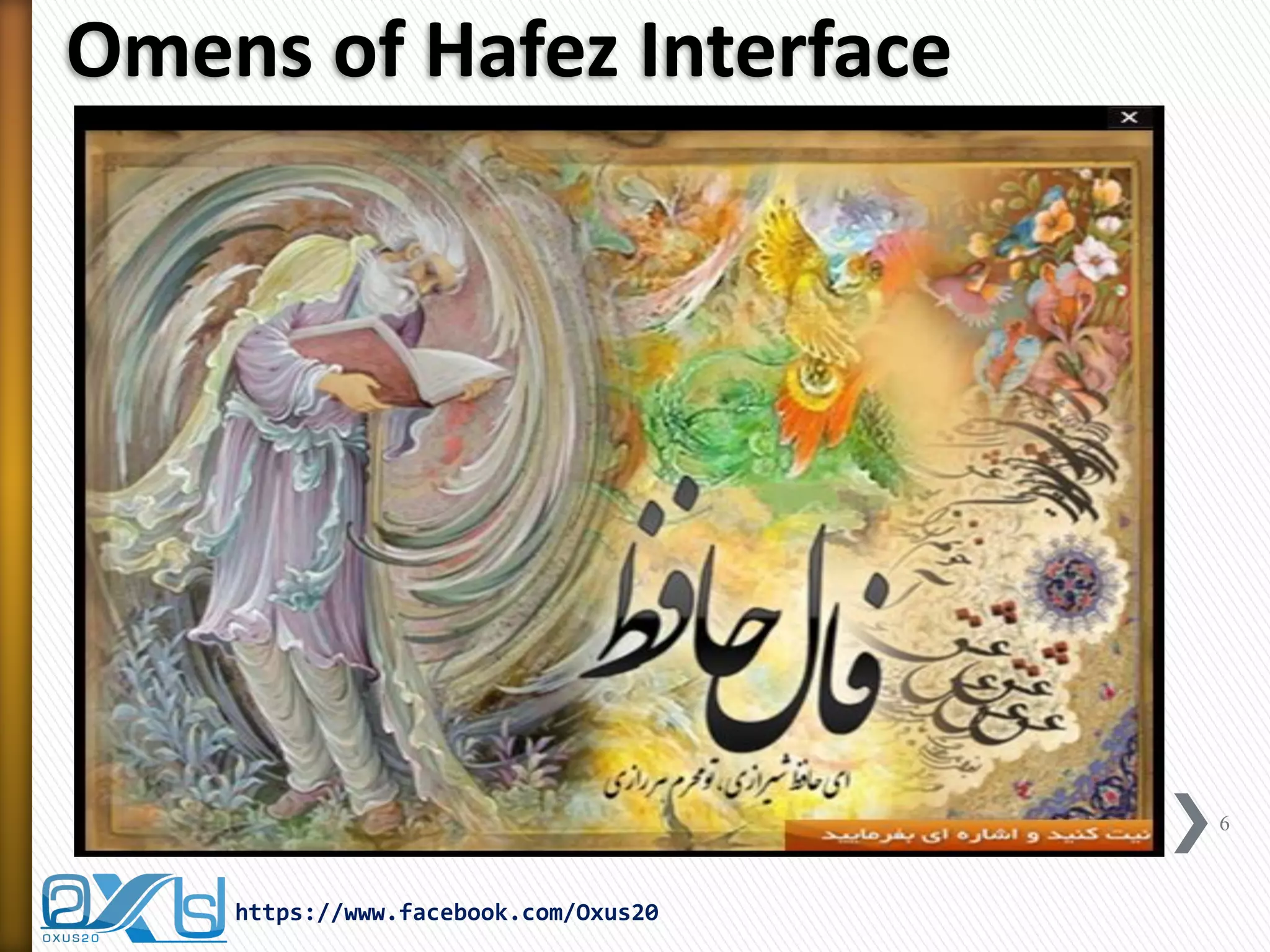
Omens of Hafez Interface 
6 
https://www.facebook.com/Oxus20
Omens of Hafez Interface 
»This application is made by using Java Language with the help of following classes: 
˃File I/O Class 
˃Random Class 
˃Scanner Class 
˃Exception Handling 
7 
https://www.facebook.com/Oxus20
Streams 
»A stream is an object that enables the flow of data between a program and some I/O device or file 
˃If the data flows into a program, then the stream is called an input stream 
˃If the data flows out of a program, then the stream is called an output stream 
https://www.facebook.com/Oxus20 
8
Streams 
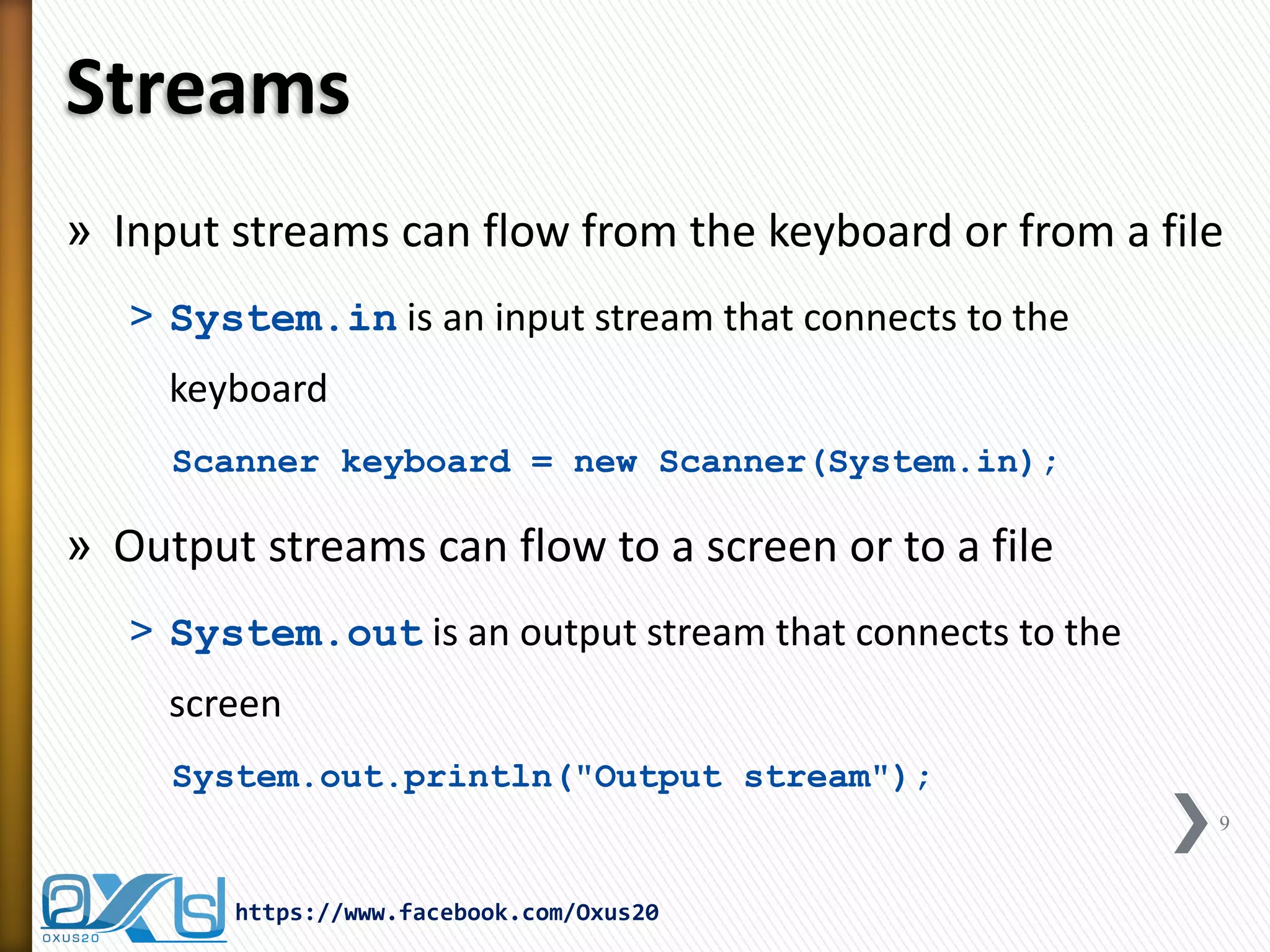
»Input streams can flow from the keyboard or from a file 
˃System.in is an input stream that connects to the keyboard 
Scanner keyboard = new Scanner(System.in); 
»Output streams can flow to a screen or to a file 
˃System.out is an output stream that connects to the screen 
System.out.println("Output stream"); 
https://www.facebook.com/Oxus20 
9
Text Files 
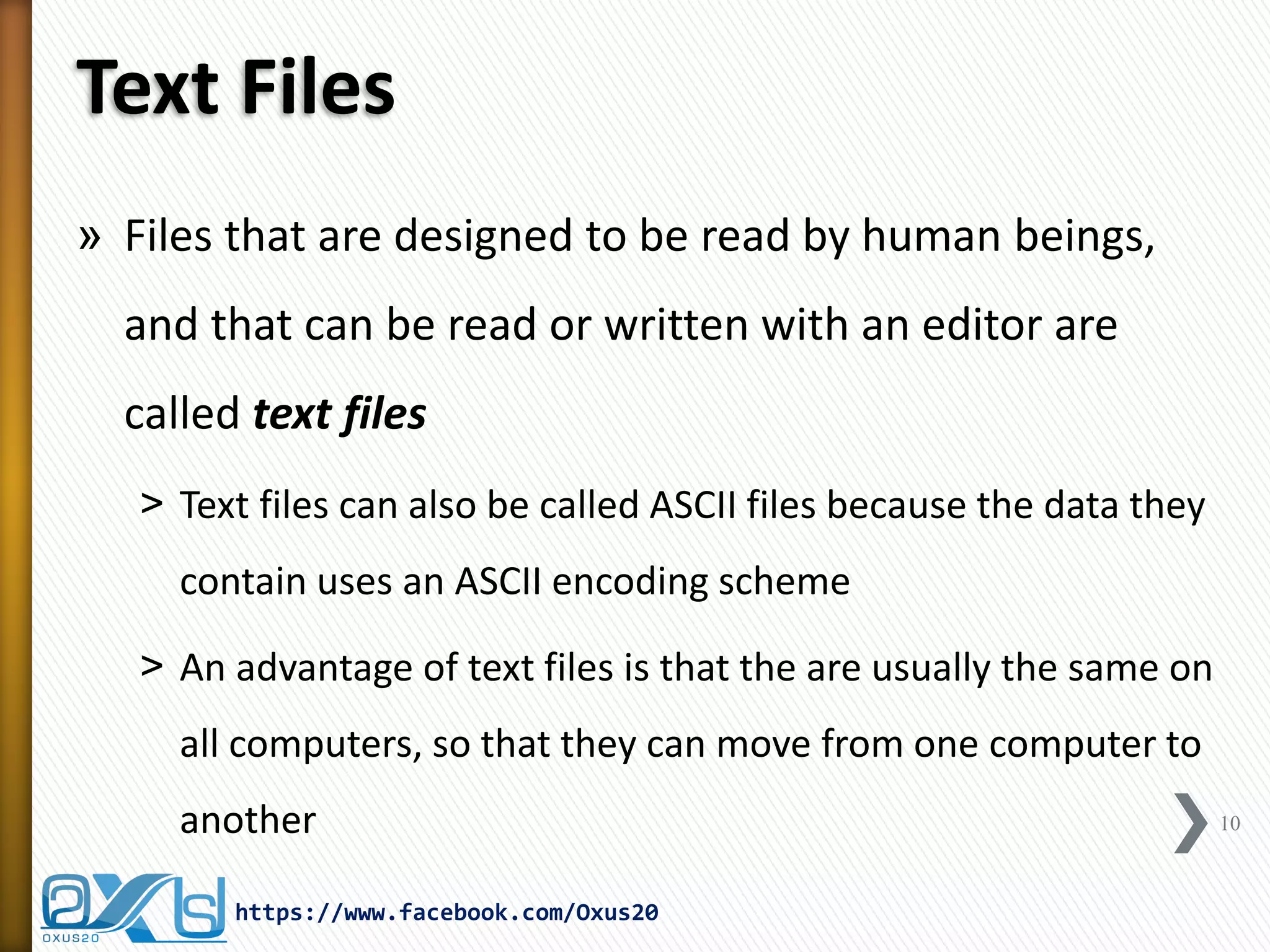
»Files that are designed to be read by human beings, and that can be read or written with an editor are called text files 
˃Text files can also be called ASCII files because the data they contain uses an ASCII encoding scheme 
˃An advantage of text files is that the are usually the same on all computers, so that they can move from one computer to another 
https://www.facebook.com/Oxus20 
10
File and Directory Management 
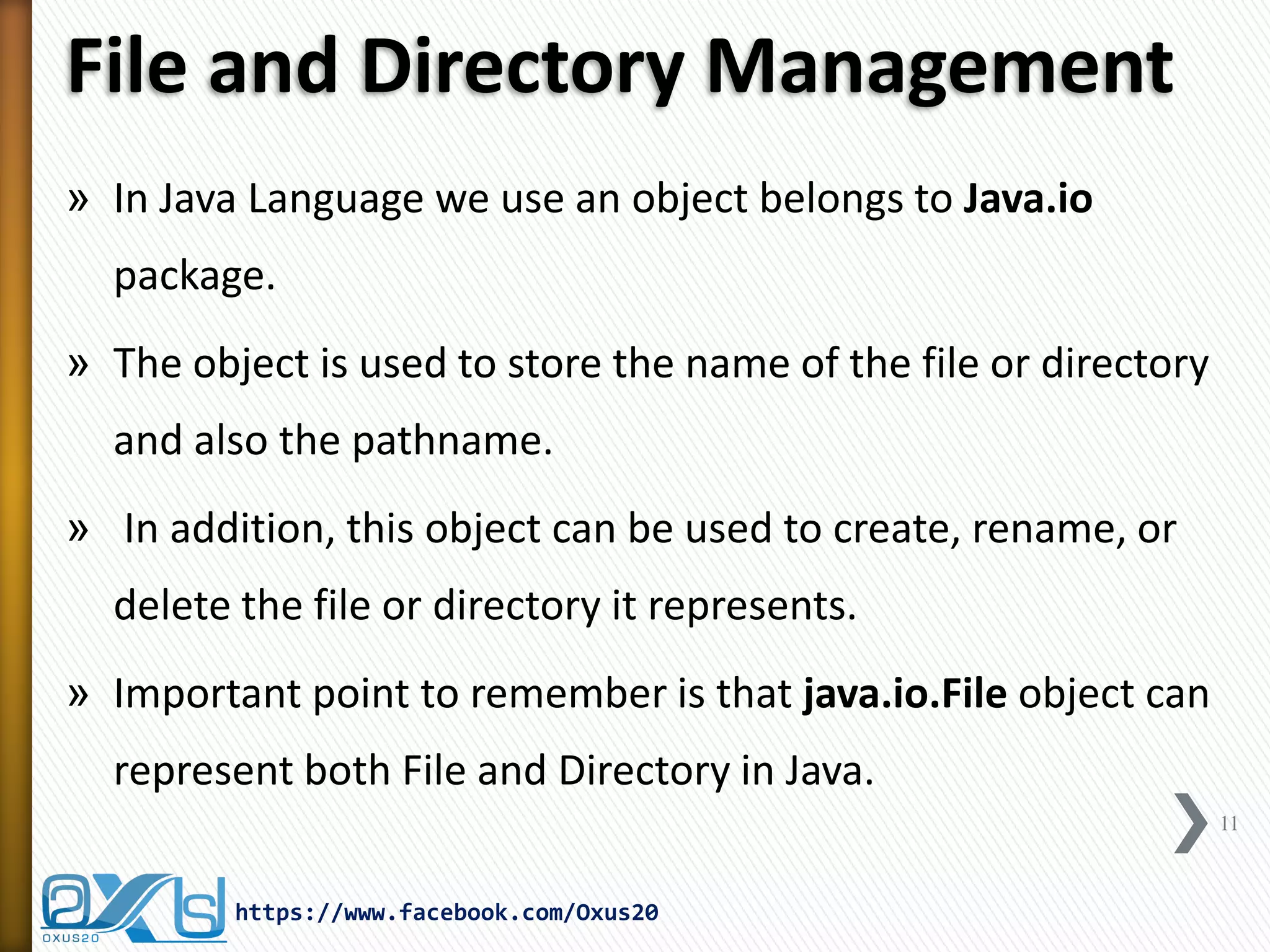
»In Java Language we use an object belongs to Java.io package. 
»The object is used to store the name of the file or directory and also the pathname. 
» In addition, this object can be used to create, rename, or delete the file or directory it represents. 
»Important point to remember is that java.io.File object can represent both File and Directory in Java. 
11 
https://www.facebook.com/Oxus20
File Class Constructors 
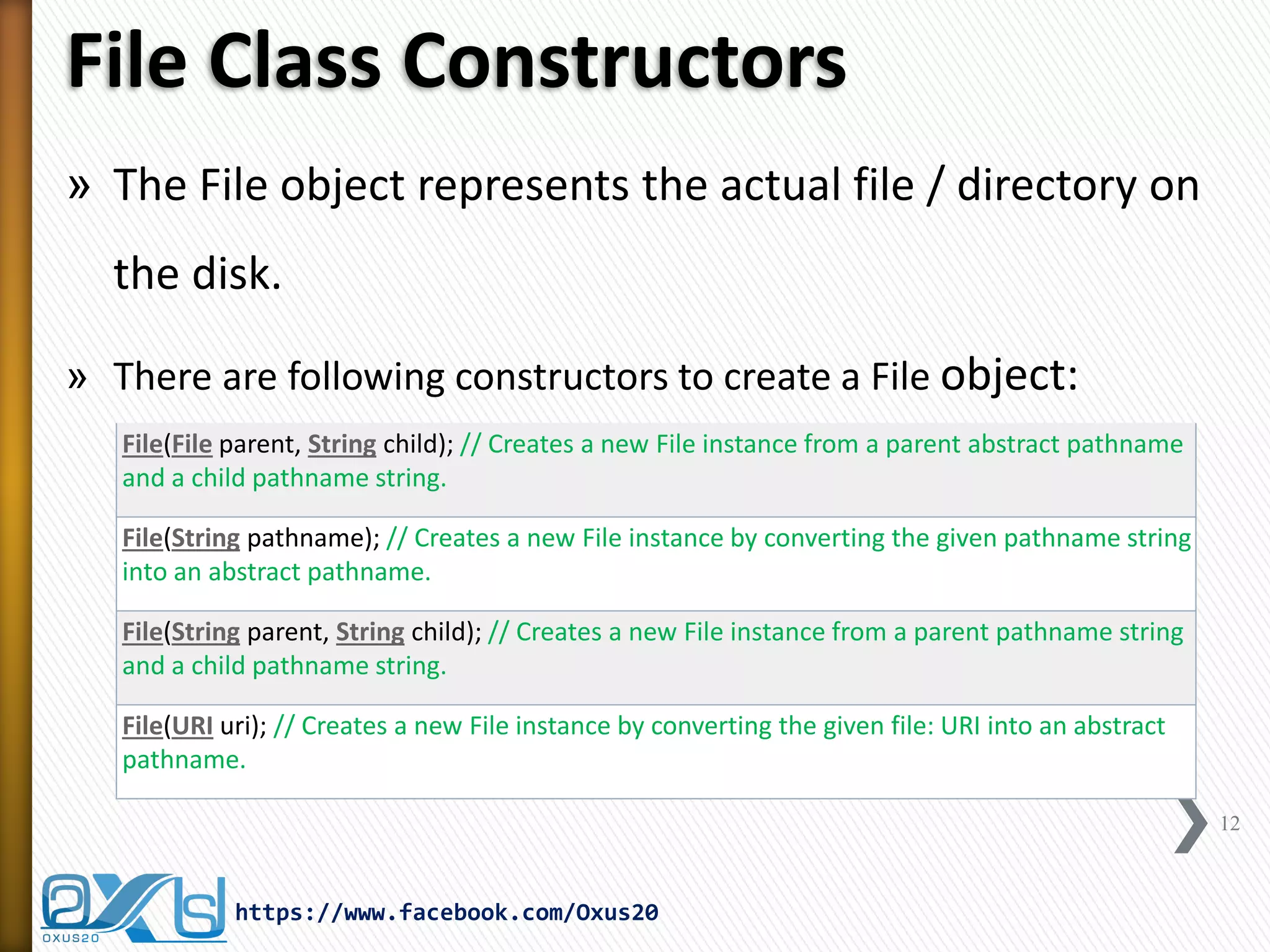
»The File object represents the actual file / directory on the disk. 
»There are following constructors to create a File object: 
12 
https://www.facebook.com/Oxus20 
File(File parent, String child); // Creates a new File instance from a parent abstract pathname and a child pathname string. 
File(String pathname); // Creates a new File instance by converting the given pathname string into an abstract pathname. 
File(String parent, String child); // Creates a new File instance from a parent pathname string and a child pathname string. 
File(URI uri); // Creates a new File instance by converting the given file: URI into an abstract pathname.
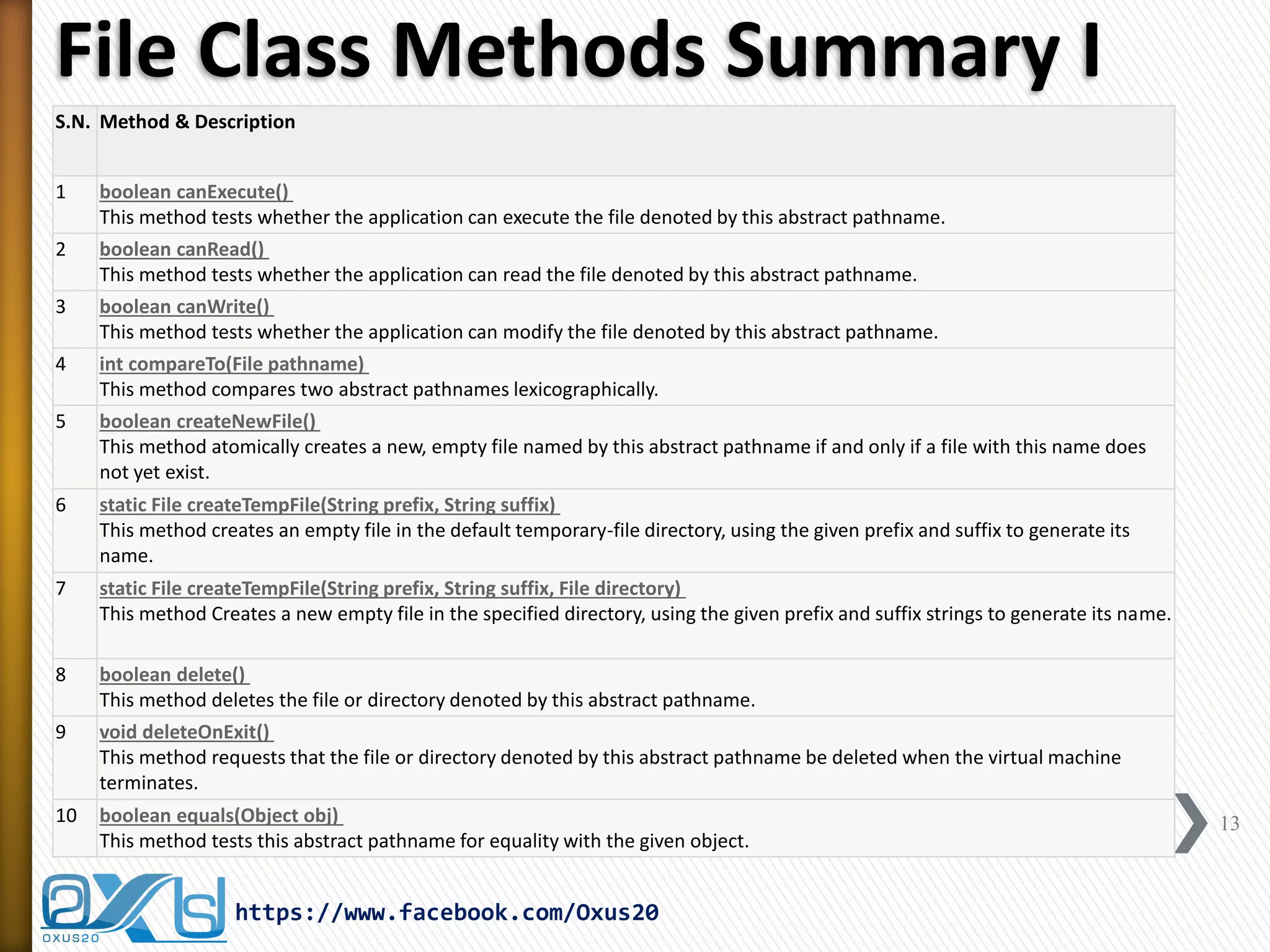
File Class Methods Summary I 
13 
https://www.facebook.com/Oxus20 
S.N. 
Method & Description 
1 
boolean canExecute() This method tests whether the application can execute the file denoted by this abstract pathname. 
2 
boolean canRead() This method tests whether the application can read the file denoted by this abstract pathname. 
3 
boolean canWrite() This method tests whether the application can modify the file denoted by this abstract pathname. 
4 
int compareTo(File pathname) This method compares two abstract pathnames lexicographically. 
5 
boolean createNewFile() This method atomically creates a new, empty file named by this abstract pathname if and only if a file with this name does not yet exist. 
6 
static File createTempFile(String prefix, String suffix) This method creates an empty file in the default temporary-file directory, using the given prefix and suffix to generate its name. 
7 
static File createTempFile(String prefix, String suffix, File directory) This method Creates a new empty file in the specified directory, using the given prefix and suffix strings to generate its name. 
8 
boolean delete() This method deletes the file or directory denoted by this abstract pathname. 
9 
void deleteOnExit() This method requests that the file or directory denoted by this abstract pathname be deleted when the virtual machine terminates. 
10 
boolean equals(Object obj) This method tests this abstract pathname for equality with the given object.
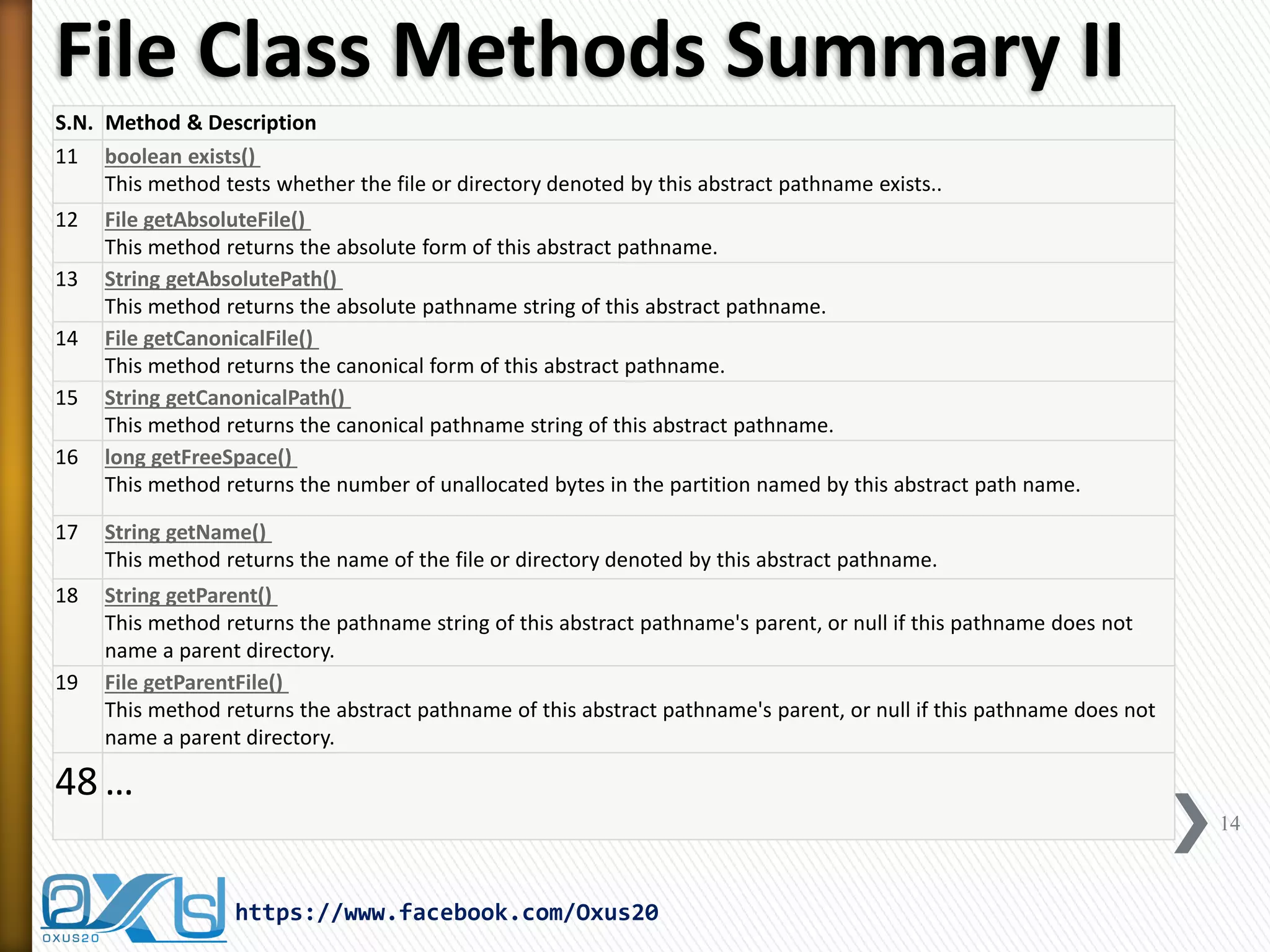
File Class Methods Summary II 
14 
https://www.facebook.com/Oxus20 
S.N. 
Method & Description 
11 
boolean exists() This method tests whether the file or directory denoted by this abstract pathname exists.. 
12 
File getAbsoluteFile() This method returns the absolute form of this abstract pathname. 
13 
String getAbsolutePath() This method returns the absolute pathname string of this abstract pathname. 
14 
File getCanonicalFile() This method returns the canonical form of this abstract pathname. 
15 
String getCanonicalPath() This method returns the canonical pathname string of this abstract pathname. 
16 
long getFreeSpace() This method returns the number of unallocated bytes in the partition named by this abstract path name. 
17 
String getName() This method returns the name of the file or directory denoted by this abstract pathname. 
18 
String getParent() This method returns the pathname string of this abstract pathname's parent, or null if this pathname does not name a parent directory. 
19 
File getParentFile() This method returns the abstract pathname of this abstract pathname's parent, or null if this pathname does not name a parent directory. 
48 
…
File Creation Demo 
15 
https://www.facebook.com/Oxus20 
import java.io.File; 
public class FileCreationDemo { 
public static void main(String[] args) { 
File f = null; 
boolean bool = false; 
try { 
// create new file 
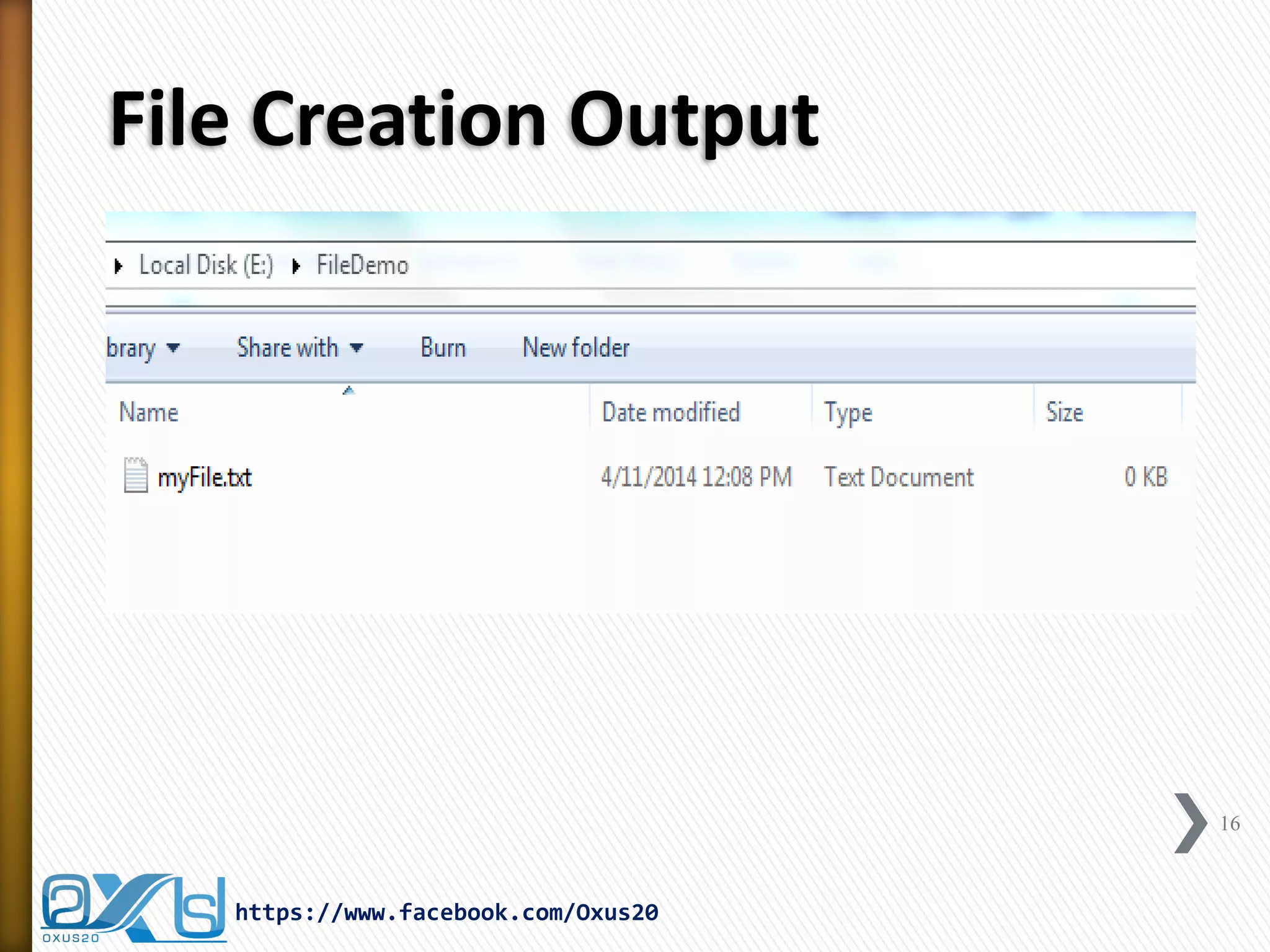
f = new File("E:FileDemomyFile.txt"); 
// tries to create new file in the system 
bool = f.createNewFile(); 
// prints 
System.out.println("File created: " + bool); 
} catch (Exception e) { 
System.err.println("Error creating the file!"); 
} 
} 
}
File Creation Output 
16 
https://www.facebook.com/Oxus20
Direction Creation Demo 
17 
https://www.facebook.com/Oxus20 
import java.io.File; 
public class DirectoryCreationDemo { 
public static void main(String[] args) { 
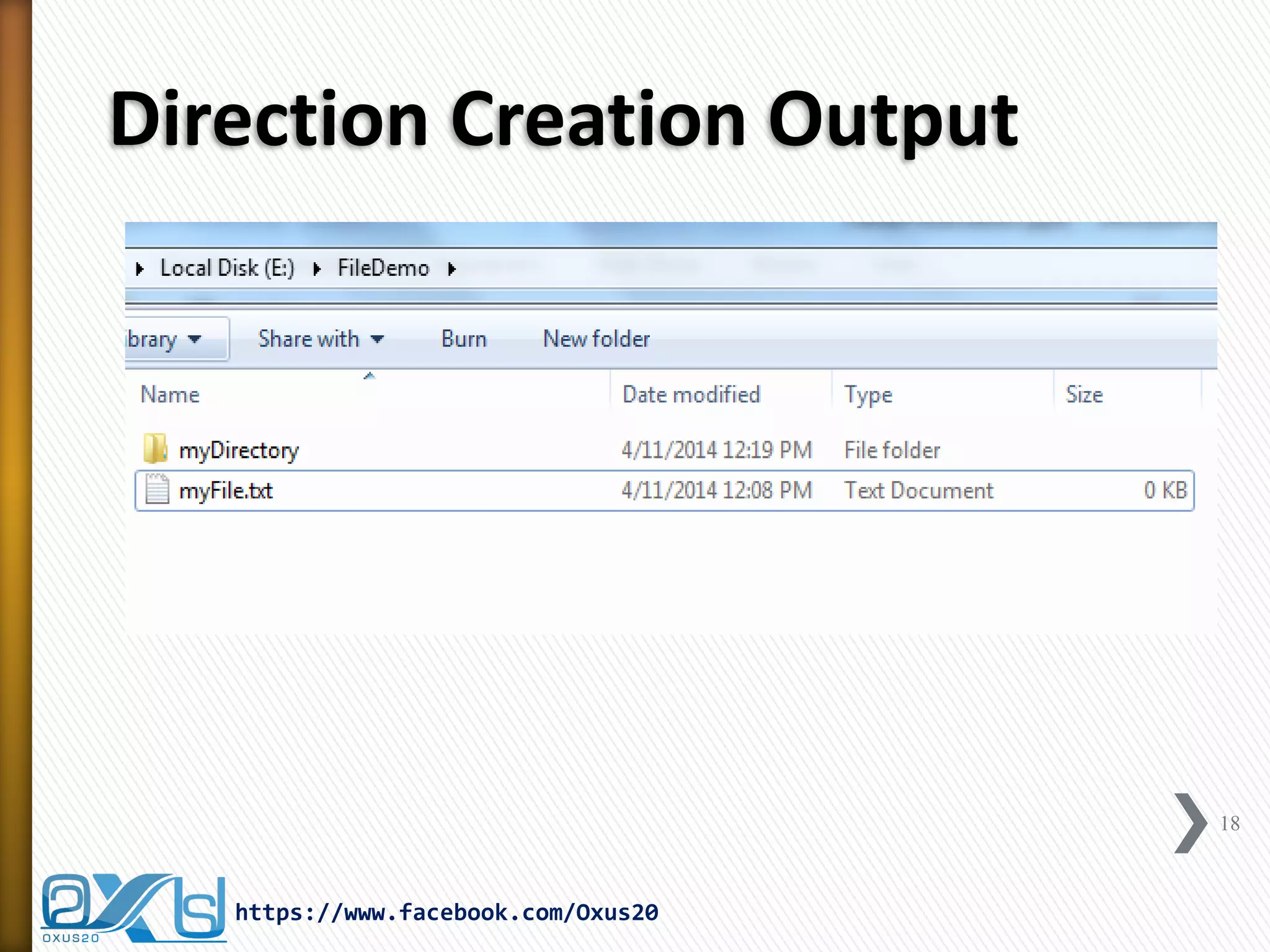
File file = new File("E:FileDemomyDirectory"); 
if (!file.exists()) { 
if (file.mkdir()) { 
System.out.println("Directory is created!"); 
} else { 
System.out.println("Failed to create directory!"); 
} 
} 
} 
}
Direction Creation Output 
18 
https://www.facebook.com/Oxus20
File Methods Demo 
import java.io.File; 
public class FileMethodsDemo { 
public static void main(String[] args) { 
File f = new File("E:FileDemomyFile.txt"); 
if (f.exists()) { 
System.out.println(f.getName() + " exists."); 
System.out.println(f.getName() + " size is " + f.length() + " bytes"); 
if (f.canRead()) 
System.out.println(f.getName() + " can be read."); 
if (f.canWrite()) 
System.out.println(f.getName() + " can be write."); 
if (f.isFile()) 
System.out.println(f.getName() + " is a file."); 
} else { 
System.out.println(f.getName() + " does not exists!"); 
} 
} 
} 
19 
https://www.facebook.com/Oxus20
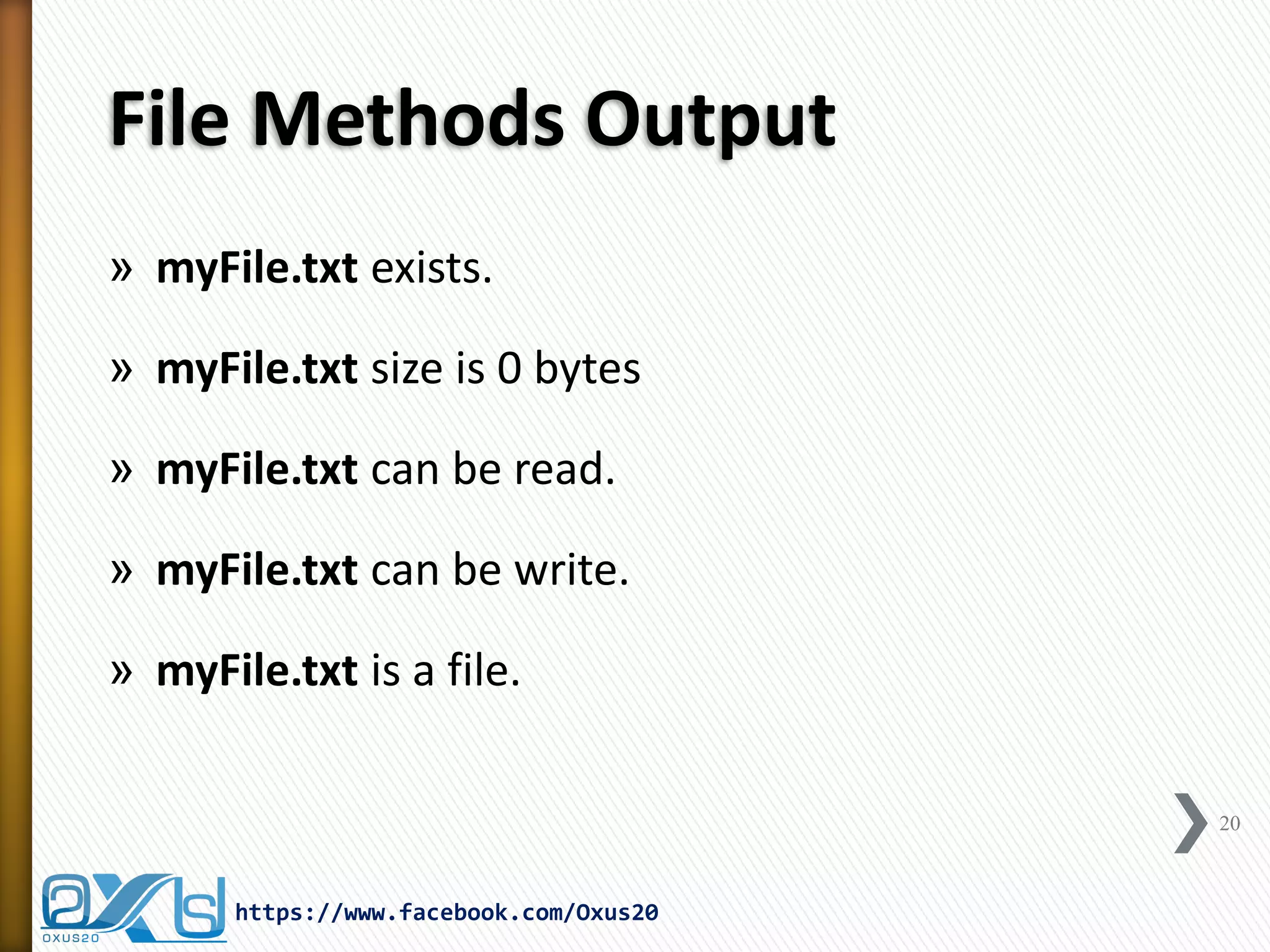
File Methods Output 
»myFile.txt exists. 
»myFile.txt size is 0 bytes 
»myFile.txt can be read. 
»myFile.txt can be write. 
»myFile.txt is a file. 
20 
https://www.facebook.com/Oxus20
Introduction to Random 
»java.util.Random class generates a stream of pseudo- random numbers. 
»To create a new random number generator, use one of the following methods: 
˃new Random(); //This creates a new random number generator 
˃new Random(long seed); //This creates a new random number generator using a single long seed 
»Using of Random Class: 
˃Random class has many usages in many programs and application which need selecting randomly without prior planning, such as: 
+Lottery Games and Applications 
+Quotes and Speech of the Day 
+Random Advertisements 
21 
https://www.facebook.com/Oxus20
Some Methods of Random Class 
»protected int next(int bits) 
˃This method generates the next pseudorandom number. 
»Boolean nextBoolean() 
˃This method returns the next pseudorandom, uniformly distributed Boolean value from this random number generator's sequence. 
»void nextBytes(byte[] bytes) 
˃This method generates random bytes and places them into a user-supplied byte array. 
»double nextDouble() 
˃This method returns the next pseudorandom, uniformly distributed double value between 0.0 and 1.0 from this random number generator's sequence. 
»loat nextFloat() 
˃This method returns the next pseudorandom, uniformly distributed float value between 0.0 and 1.0 from this random number generator's sequence 
»long nextLong() 
˃This method returns the next pseudorandom, uniformly distributed long value from this random number generator's sequence. 
22 
https://www.facebook.com/Oxus20
Random Demo 
import java.util.Random; 
public class RandomDemo { 
public static void main(String args[]) { 
Random r = new Random(); 
int arr[] = new int[25]; 
for (int i = 0; i < 1000; i++) { 
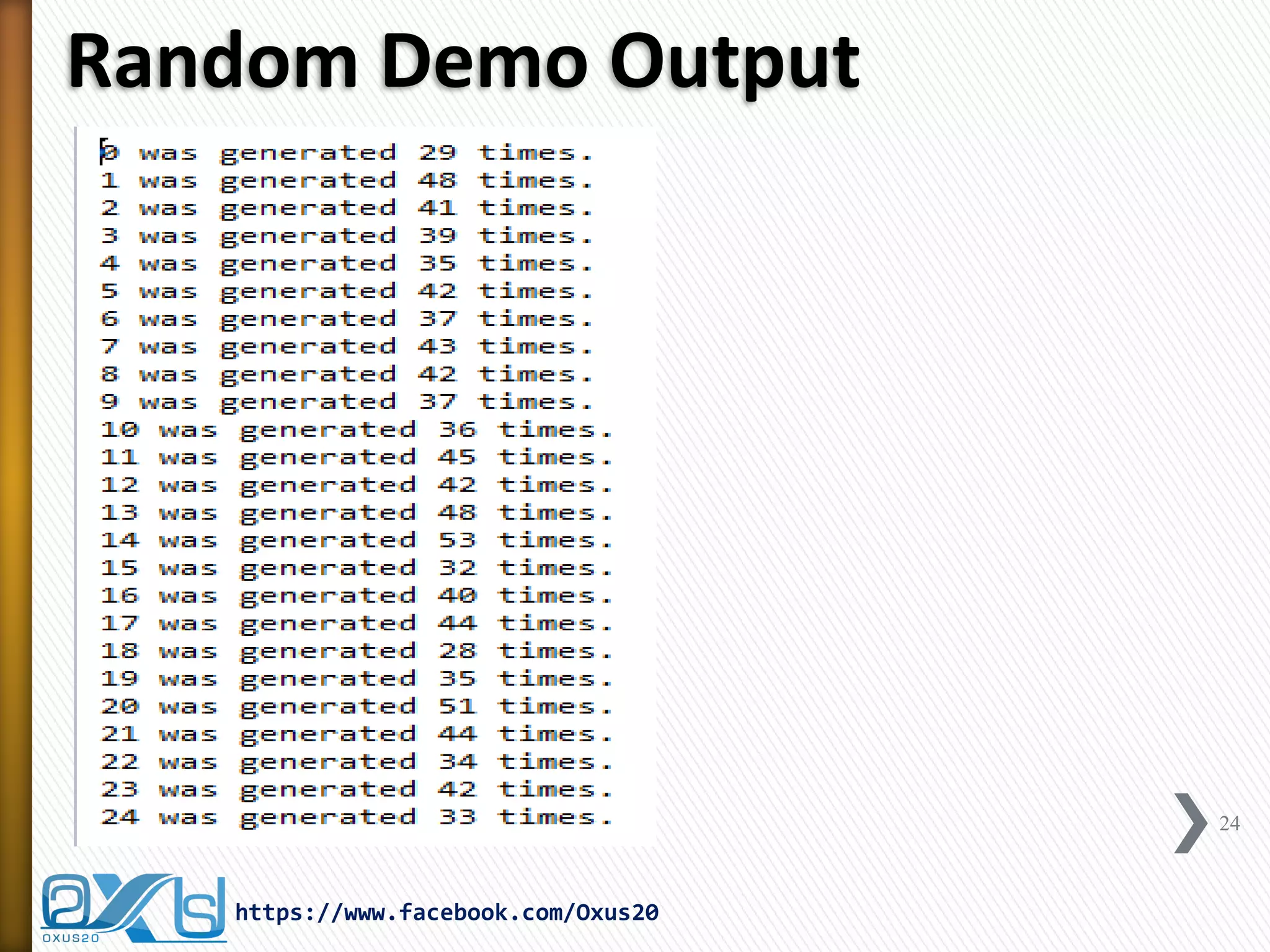
arr[r.nextInt(25)]++; 
} 
for (int i = 0; i < 25; i++) { 
System.out.println(i + " was generated " + arr[i] + " times."); 
} 
} //end of main 
} //end of class 
23 
https://www.facebook.com/Oxus20
Random Demo Output 
24 
https://www.facebook.com/Oxus20
Scanner Class 
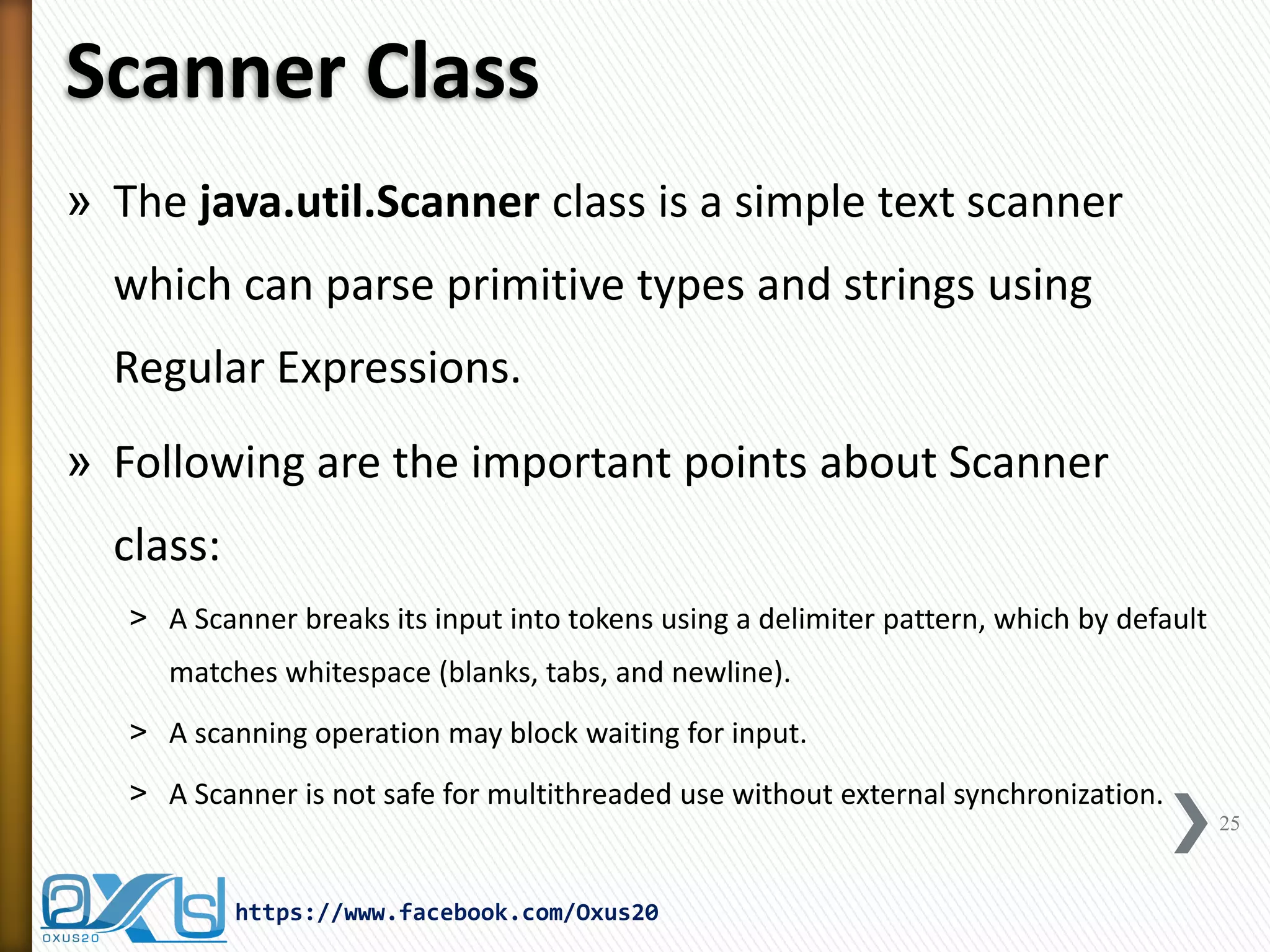
»The java.util.Scanner class is a simple text scanner which can parse primitive types and strings using Regular Expressions. 
»Following are the important points about Scanner class: 
˃A Scanner breaks its input into tokens using a delimiter pattern, which by default matches whitespace (blanks, tabs, and newline). 
˃A scanning operation may block waiting for input. 
˃A Scanner is not safe for multithreaded use without external synchronization. 
25 
https://www.facebook.com/Oxus20
Scanner Read File Demo 
import java.io.File; 
import java.io.FileNotFoundException; 
import java.util.Scanner; 
public class ScannerReadFileDemo { 
public static void main(String[] args) { 
String output = ""; 
Scanner in = null; 
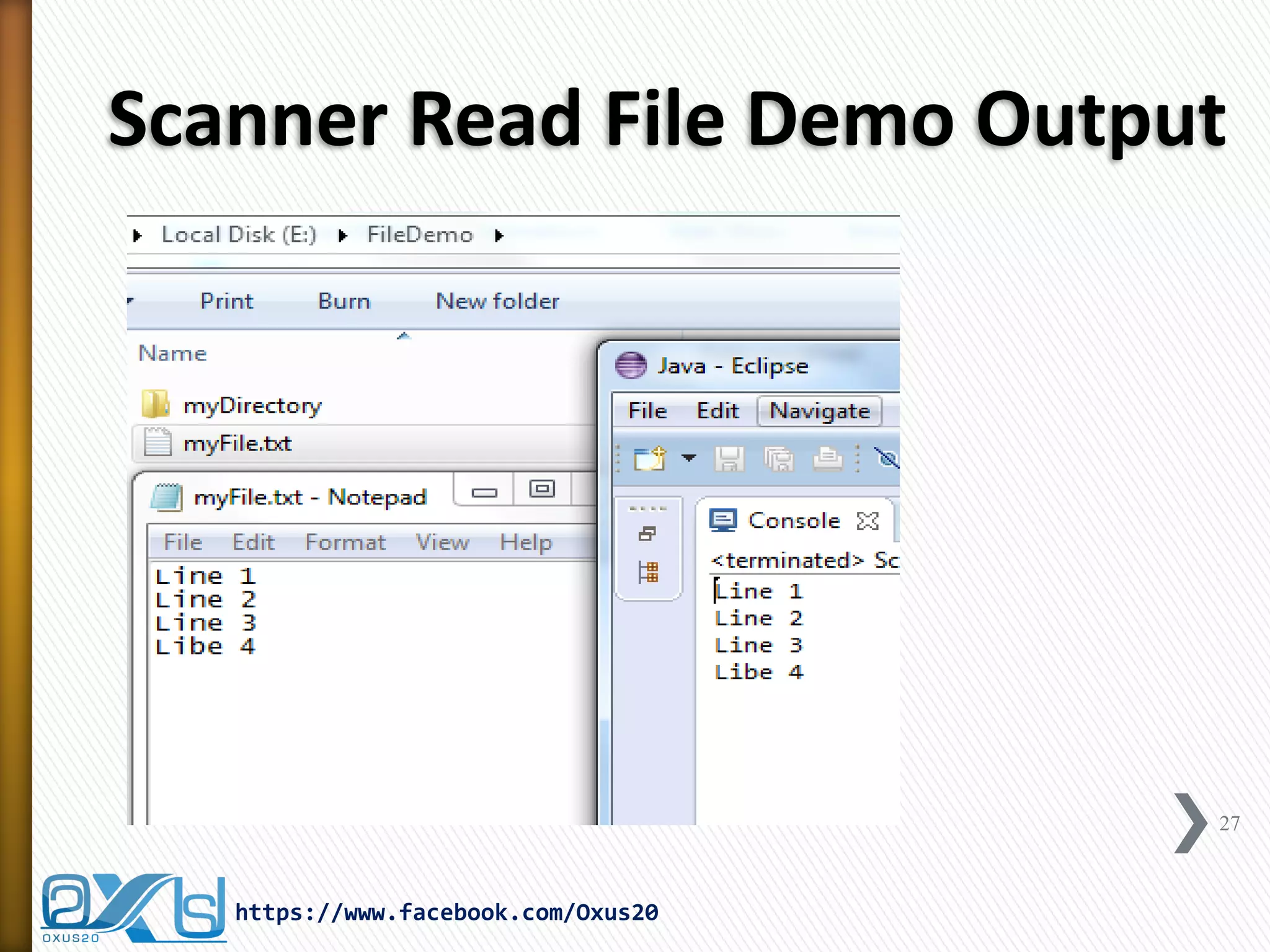
String fn = "E:FileDemomyFile.txt"; 
try { 
in = new Scanner(new File(fn)); 
while (in.hasNext()) { 
output += in.nextLine(); 
output += "n"; 
} 
} catch (FileNotFoundException e) { 
System.out.println("File does not exist !"); 
} finally { 
in.close(); 
} 
System.out.println(output); 
} 
} 
26 
https://www.facebook.com/Oxus20
Scanner Read File Demo Output 
27 
https://www.facebook.com/Oxus20
Scanner Read Keyboard Demo 
import java.util.Scanner; 
public class ScannerReadKeyboardDemo { 
public static void main(String[] args) { 
Scanner keyboard = new Scanner(System.in); 
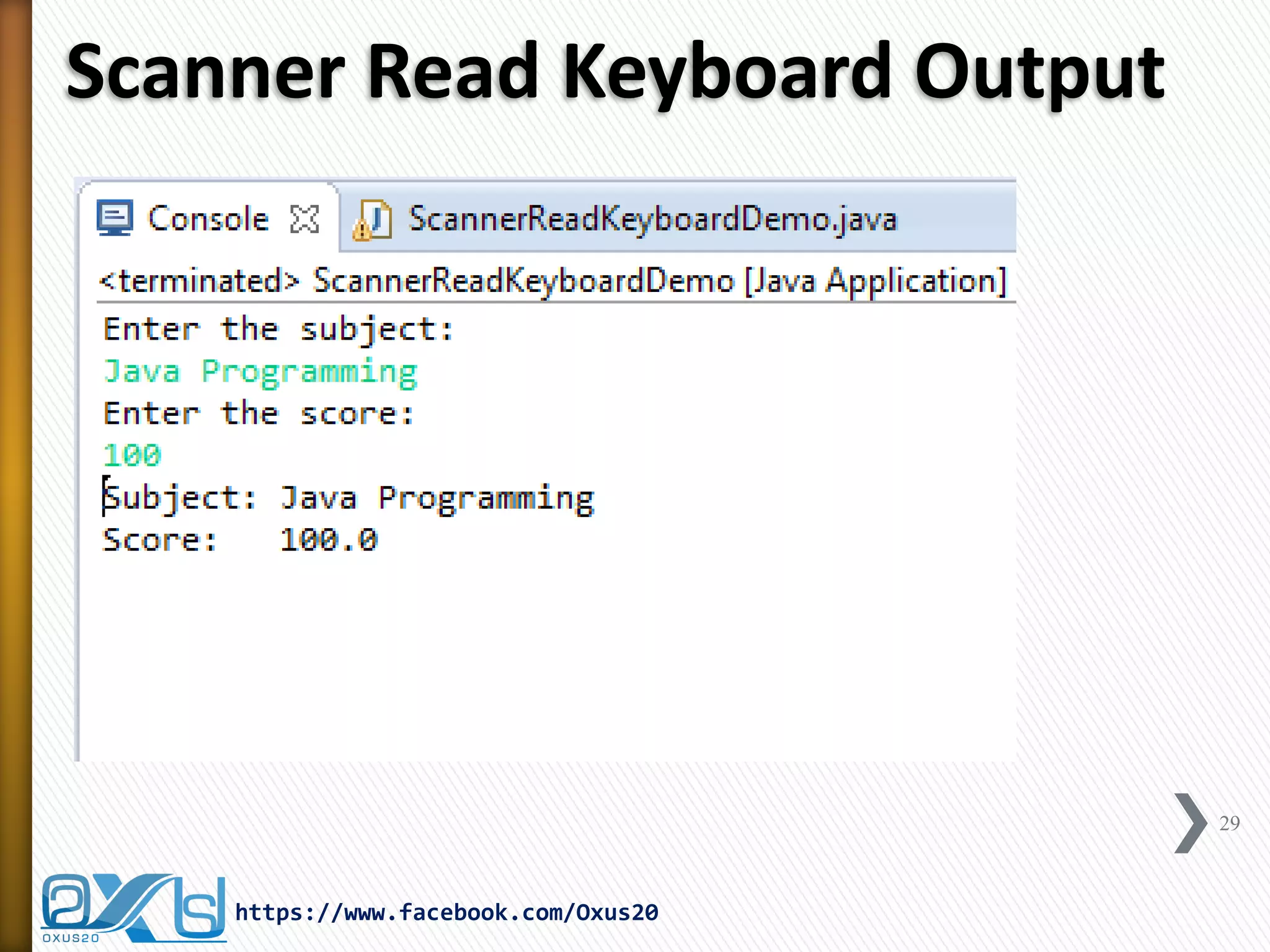
System.out.println("Enter the subject:"); 
String subject = keyboard.nextLine(); 
System.out.println("Enter the score:"); 
double score = keyboard.nextDouble(); 
System.out.println("Subject: " + subject); 
System.out.println("Score: " + score); 
} 
} 
28 
https://www.facebook.com/Oxus20
Scanner Read Keyboard Output 
29 
https://www.facebook.com/Oxus20
Introduction to ComponentOrientation 
»java.awt.ComponentOrientation allows components to encapsulate language-sensitive orientation information. 
»Followings are the capability of this Class is: 
˃Vertically alignment 
˃Horizontally alignment 
˃Left-to-right 
˃Right-to-left 
»Therefore, by using this class capabilities we can make and develop multi-lingual applications in JAVA. 
30 
https://www.facebook.com/Oxus20
ComponentOrientation Demo 
import java.awt.ComponentOrientation; 
import java.awt.Font; 
import javax.swing.JFrame; 
import javax.swing.JTextArea; 
public class ComponentOrintationDemo extends JFrame { 
JTextArea txtArea; 
public ComponentOrintationDemo() { 
setTitle("Component Orintation Demo"); 
setDefaultCloseOperation(JFrame.EXIT_ON_CLOSE); 
setLocationRelativeTo(null); 
setSize(300, 300); 
txtArea = new JTextArea(); 
txtArea.setComponentOrientation(ComponentOrientation.RIGHT_TO_LEFT); 
txtArea.setFont(new Font("arial", Font.BOLD, 27)); 
add(txtArea); 
setVisible(true); 
} 
public static void main(String[] args) { 
new ComponentOrintationDemo(); 
} 
} 
31 
https://www.facebook.com/Oxus20
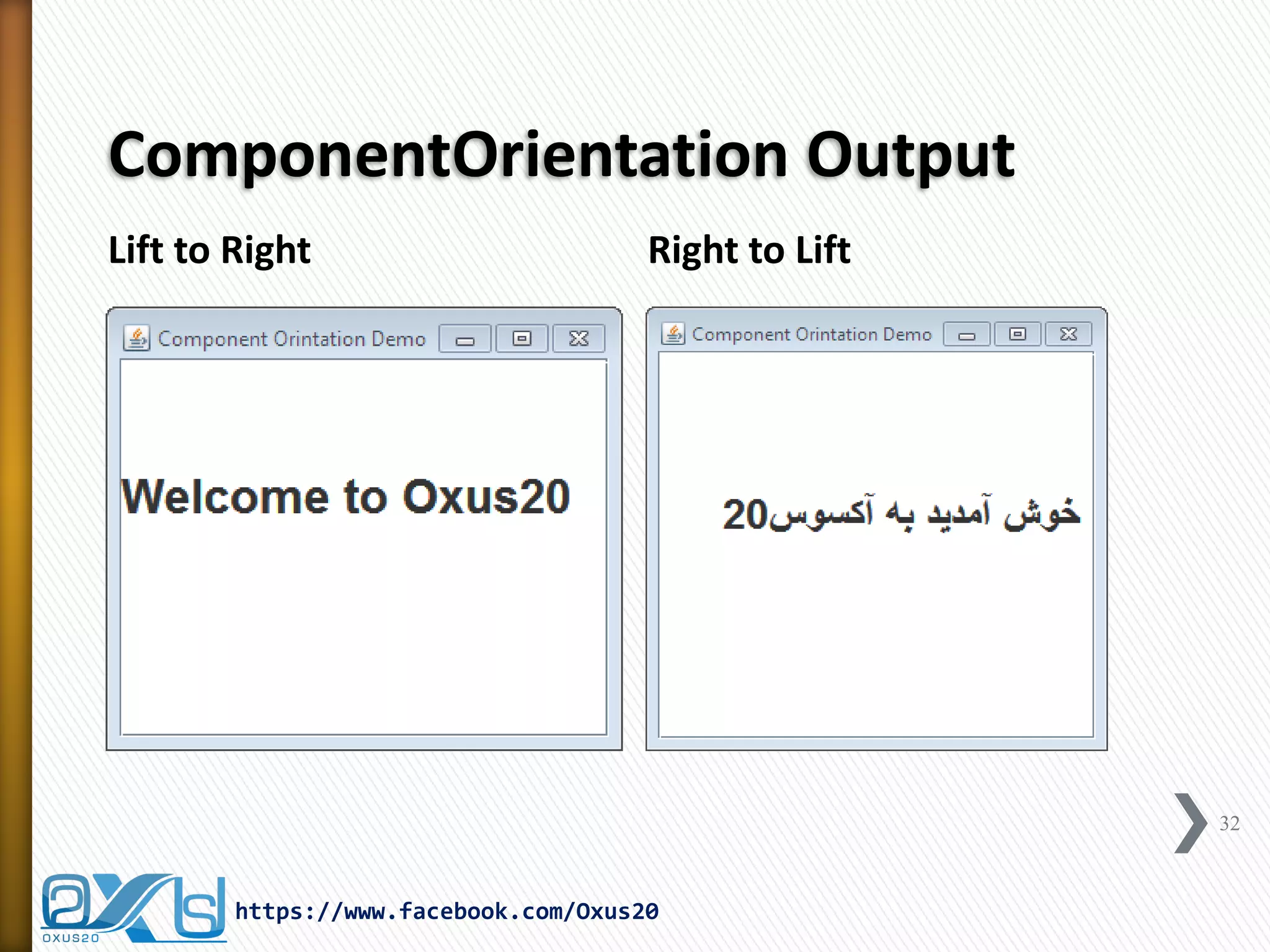
ComponentOrientation Output 
Lift to Right 
Right to Lift 
32 
https://www.facebook.com/Oxus20
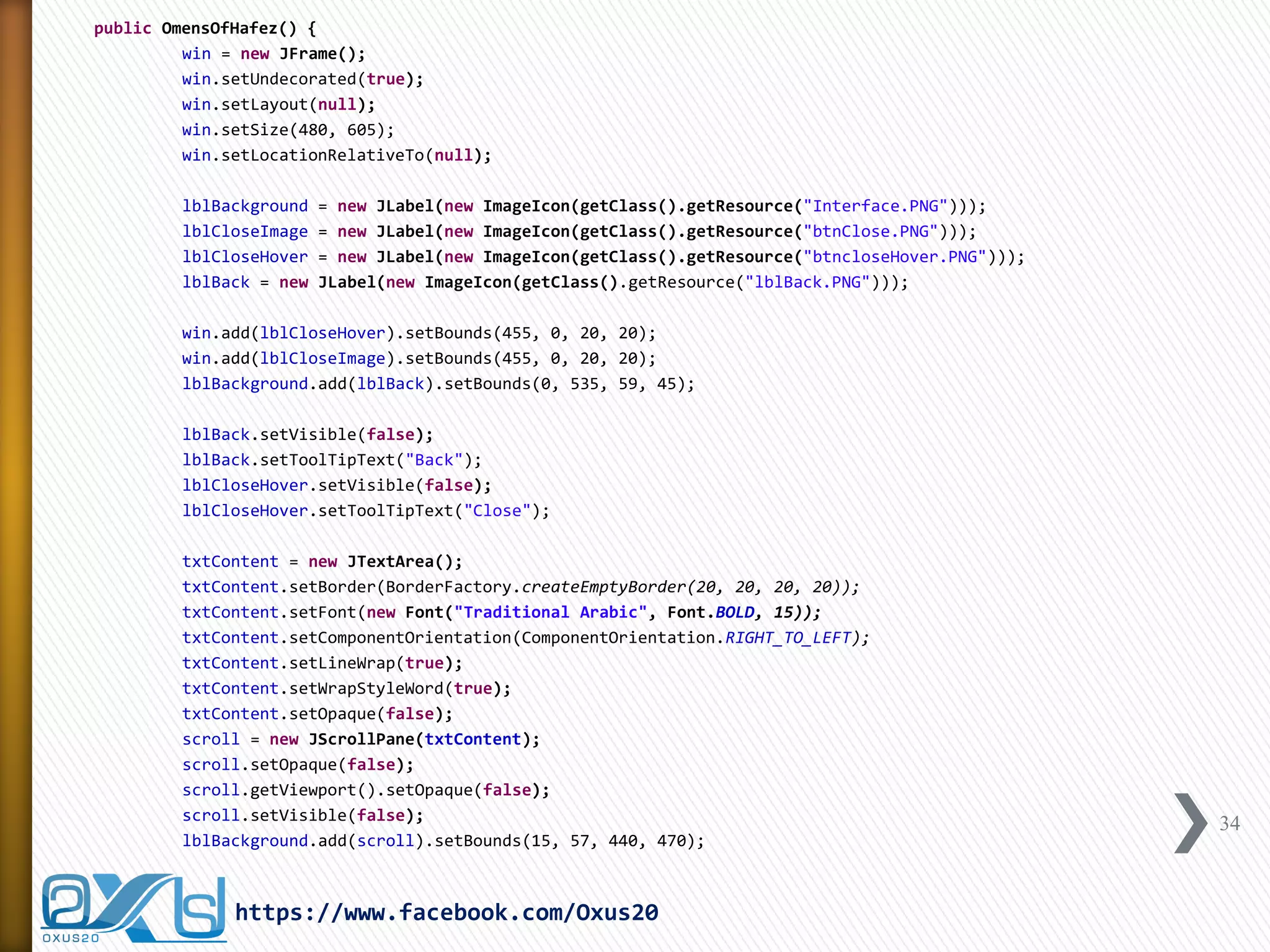
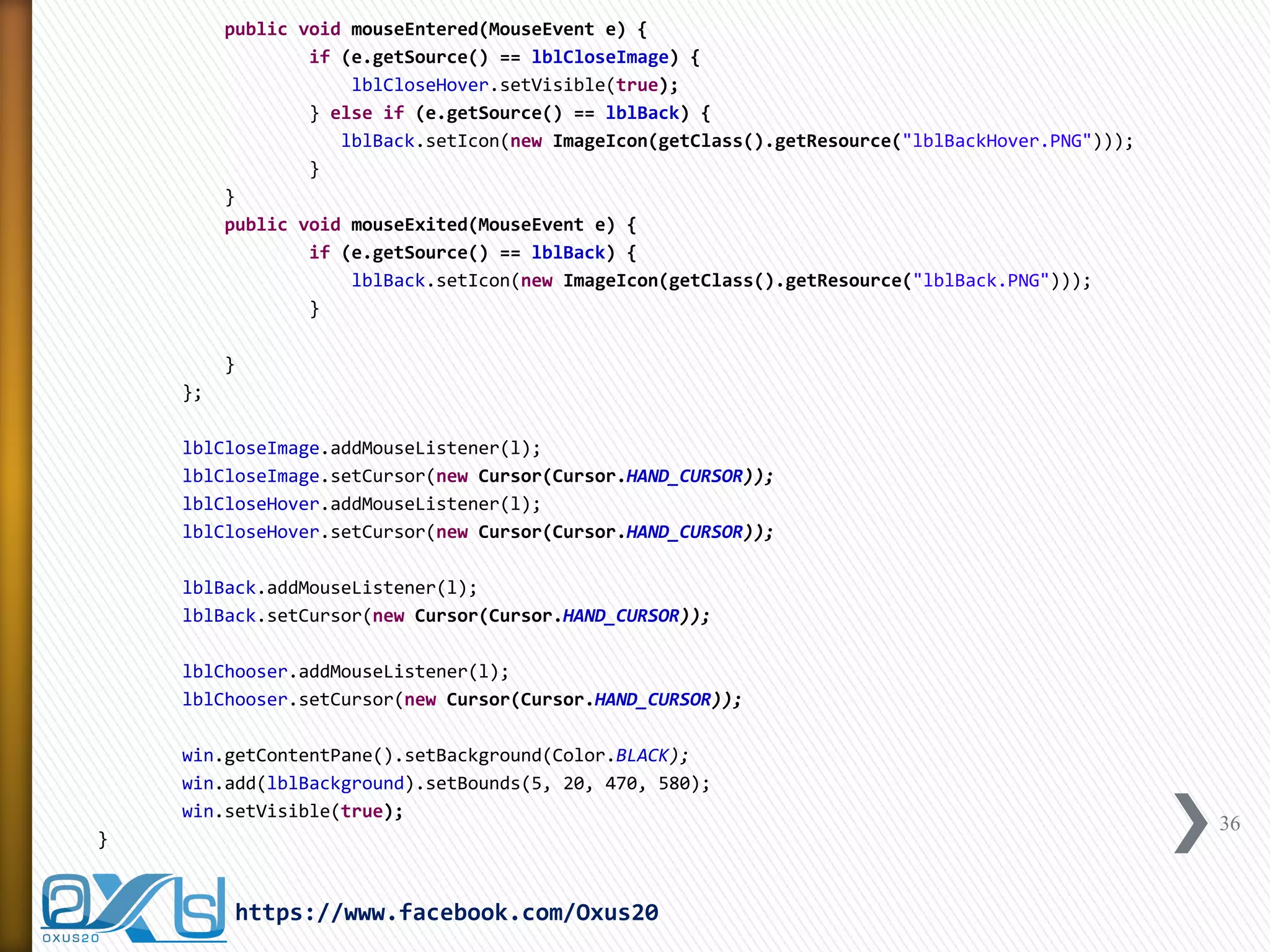
Omens of Hafez Implementation 
package OmensOfHafez; 
import java.awt.Color; 
import java.awt.ComponentOrientation; 
import java.awt.Cursor; 
import java.awt.Font; 
import java.awt.event.MouseAdapter; 
import java.awt.event.MouseEvent; 
import java.awt.event.MouseListener; 
import java.io.File; 
import java.io.FileNotFoundException; 
import java.util.Random; 
import java.util.Scanner; 
import javax.swing.BorderFactory; 
import javax.swing.ImageIcon; 
import javax.swing.JFrame; 
import javax.swing.JLabel; 
import javax.swing.JScrollPane; 
import javax.swing.JTextArea; 
public class OmensOfHafez { 
private JFrame win; 
private JTextArea txtContent; 
private JScrollPane scroll; 
private JLabel lblCloseImage, lblCloseHover, lblBackground, lblChooser, lblBack; 
private String filenames[] = { "1", "2", "3", "4", "5" }; 
33 
https://www.facebook.com/Oxus20
public OmensOfHafez() { 
win = new JFrame(); 
win.setUndecorated(true); 
win.setLayout(null); 
win.setSize(480, 605); 
win.setLocationRelativeTo(null); 
lblBackground = new JLabel(new ImageIcon(getClass().getResource("Interface.PNG"))); 
lblCloseImage = new JLabel(new ImageIcon(getClass().getResource("btnClose.PNG"))); 
lblCloseHover = new JLabel(new ImageIcon(getClass().getResource("btncloseHover.PNG"))); 
lblBack = new JLabel(new ImageIcon(getClass().getResource("lblBack.PNG"))); 
win.add(lblCloseHover).setBounds(455, 0, 20, 20); 
win.add(lblCloseImage).setBounds(455, 0, 20, 20); 
lblBackground.add(lblBack).setBounds(0, 535, 59, 45); 
lblBack.setVisible(false); 
lblBack.setToolTipText("Back"); 
lblCloseHover.setVisible(false); 
lblCloseHover.setToolTipText("Close"); 
txtContent = new JTextArea(); 
txtContent.setBorder(BorderFactory.createEmptyBorder(20, 20, 20, 20)); 
txtContent.setFont(new Font("Traditional Arabic", Font.BOLD, 15)); 
txtContent.setComponentOrientation(ComponentOrientation.RIGHT_TO_LEFT); 
txtContent.setLineWrap(true); 
txtContent.setWrapStyleWord(true); 
txtContent.setOpaque(false); 
scroll = new JScrollPane(txtContent); 
scroll.setOpaque(false); 
scroll.getViewport().setOpaque(false); 
scroll.setVisible(false); 
lblBackground.add(scroll).setBounds(15, 57, 440, 470); 
34 
https://www.facebook.com/Oxus20
lblChooser = new JLabel(new ImageIcon(getClass().getResource("lblchooser.png"))); 
lblBackground.add(lblChooser).setBounds(275, 520, 230, 100); 
MouseListener l = new MouseAdapter() { 
public void mousePressed(MouseEvent e) { 
if (e.getSource() == lblCloseHover) { 
System.exit(0); 
} else if (e.getSource() == lblChooser) { 
lblBackground.setIcon(new ImageIcon(getClass().getResource("BackroundImage.PNG"))); 
scroll.setVisible(true); 
Random random = new Random(); 
int t = random.nextInt(filenames.length); 
txtContent.setText(getContent(filenames[t])); 
lblChooser.setVisible(false); 
lblBack.setVisible(true); 
// Fix the scroll area for the JTextArea 
javax.swing.SwingUtilities.invokeLater(new Runnable() { 
public void run() { 
scroll.getVerticalScrollBar().setValue(0); 
} 
}); 
} else if (e.getSource() == lblBack) { 
lblBackground.setIcon(new ImageIcon(getClass().getResource("Interface.PNG"))); 
scroll.setVisible(false); 
lblBack.setVisible(false); 
lblChooser.setVisible(true); 
} 
} 
35 
https://www.facebook.com/Oxus20
public void mouseEntered(MouseEvent e) { 
if (e.getSource() == lblCloseImage) { 
lblCloseHover.setVisible(true); 
} else if (e.getSource() == lblBack) { 
lblBack.setIcon(new ImageIcon(getClass().getResource("lblBackHover.PNG"))); 
} 
} 
public void mouseExited(MouseEvent e) { 
if (e.getSource() == lblBack) { 
lblBack.setIcon(new ImageIcon(getClass().getResource("lblBack.PNG"))); 
} 
} 
}; 
lblCloseImage.addMouseListener(l); 
lblCloseImage.setCursor(new Cursor(Cursor.HAND_CURSOR)); 
lblCloseHover.addMouseListener(l); 
lblCloseHover.setCursor(new Cursor(Cursor.HAND_CURSOR)); 
lblBack.addMouseListener(l); 
lblBack.setCursor(new Cursor(Cursor.HAND_CURSOR)); 
lblChooser.addMouseListener(l); 
lblChooser.setCursor(new Cursor(Cursor.HAND_CURSOR)); 
win.getContentPane().setBackground(Color.BLACK); 
win.add(lblBackground).setBounds(5, 20, 470, 580); 
win.setVisible(true); 
} 
36 
https://www.facebook.com/Oxus20
private String getContent(Object filename) { 
String output = ""; 
Scanner in = null; 
String fn = filename.toString() + ".txt"; 
try { 
in = new Scanner(new File(fn)); 
while (in.hasNext()) { 
output += in.nextLine(); 
output += "n"; 
} 
} catch (FileNotFoundException e) { 
System.out.println(filename + ".txt does not exist !"); 
} finally { 
in.close(); 
} 
return output; 
} 
public static void main(String[] args) { 
new OmensOfHafez(); 
} 
} 
37 
https://www.facebook.com/Oxus20
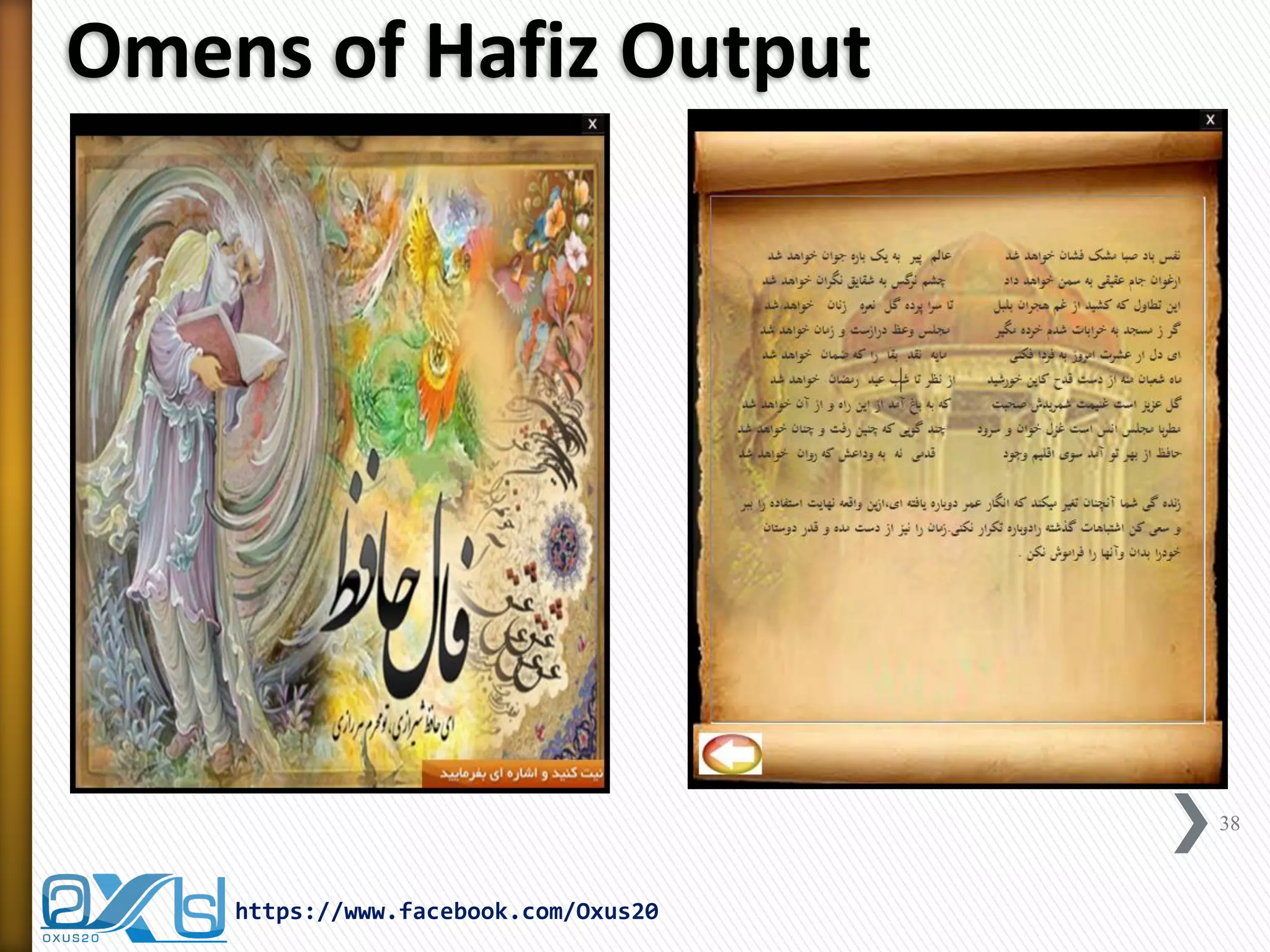
Omens of Hafiz Output 
https://www.facebook.com/Oxus20 
38

Fal-e-Hafez (Omens of Hafez) Cards in Persian using Java

  • 1.
    https://www.facebook.com/Oxus20 oxus20@gmail.com Fal-eHafez (Omens of Hafez) Cards in Persian Using JAVA File I/O Concept Random Concept Scanner Concept Component Orientation Concept Prepared By: Fereshteh Narowziyan Edited By: Abdul Rahman Sherzad
  • 2.
    Topics »Introduction toHafez Omen »File I/O Concept »Random Concept »Scanner Concept »Component Orientation Concept »Hafez Omen Implementation 2 https://www.facebook.com/Oxus20
  • 3.
    Hafez Biography »KhajehShamseddin Mohammad Hafez Shirazi (Persian: سمش هجاوخ نیدلا یزاریش ظفاح دمحم ,)known by his pen name Hafez (حافظ also Hafiz) was a Persian poet. »His collected works composed of series of Persian literature are to be found in the homes of most people in Afghanistan and Iran who learn his poems by heart and use them as proverbs and sayings to this day. »His life and poems have been the subject of much analysis, commentary and interpretation, influencing post-fourteenth century Persian writing more than any other author. 3 https://www.facebook.com/Oxus20
  • 4.
    Omens of Hafez »In the Persian tradition, whenever one faces a difficulty or a fork in the road, or even if one has a general question in mind, one would hold that question in mind, and then ask the Oracle of "Khajeh Shamseddin Mohammad Hafez-s Shirazi" for guidance. 4 https://www.facebook.com/Oxus20
  • 5.
    Omens of Hafez »There are several applications which are coded by different programming languages such as: ˃Java languages for Desktops and Mobiles ˃HTML and CSS and PHP for Web Pages »that it shows the importance of Omens of Hafez among the Persian people. 5 https://www.facebook.com/Oxus20
  • 6.
    Omens of HafezInterface 6 https://www.facebook.com/Oxus20
  • 7.
    Omens of HafezInterface »This application is made by using Java Language with the help of following classes: ˃File I/O Class ˃Random Class ˃Scanner Class ˃Exception Handling 7 https://www.facebook.com/Oxus20
  • 8.
    Streams »A streamis an object that enables the flow of data between a program and some I/O device or file ˃If the data flows into a program, then the stream is called an input stream ˃If the data flows out of a program, then the stream is called an output stream https://www.facebook.com/Oxus20 8
  • 9.
    Streams »Input streamscan flow from the keyboard or from a file ˃System.in is an input stream that connects to the keyboard Scanner keyboard = new Scanner(System.in); »Output streams can flow to a screen or to a file ˃System.out is an output stream that connects to the screen System.out.println("Output stream"); https://www.facebook.com/Oxus20 9
  • 10.
    Text Files »Filesthat are designed to be read by human beings, and that can be read or written with an editor are called text files ˃Text files can also be called ASCII files because the data they contain uses an ASCII encoding scheme ˃An advantage of text files is that the are usually the same on all computers, so that they can move from one computer to another https://www.facebook.com/Oxus20 10
  • 11.
    File and DirectoryManagement »In Java Language we use an object belongs to Java.io package. »The object is used to store the name of the file or directory and also the pathname. » In addition, this object can be used to create, rename, or delete the file or directory it represents. »Important point to remember is that java.io.File object can represent both File and Directory in Java. 11 https://www.facebook.com/Oxus20
  • 12.
    File Class Constructors »The File object represents the actual file / directory on the disk. »There are following constructors to create a File object: 12 https://www.facebook.com/Oxus20 File(File parent, String child); // Creates a new File instance from a parent abstract pathname and a child pathname string. File(String pathname); // Creates a new File instance by converting the given pathname string into an abstract pathname. File(String parent, String child); // Creates a new File instance from a parent pathname string and a child pathname string. File(URI uri); // Creates a new File instance by converting the given file: URI into an abstract pathname.
  • 13.
    File Class MethodsSummary I 13 https://www.facebook.com/Oxus20 S.N. Method & Description 1 boolean canExecute() This method tests whether the application can execute the file denoted by this abstract pathname. 2 boolean canRead() This method tests whether the application can read the file denoted by this abstract pathname. 3 boolean canWrite() This method tests whether the application can modify the file denoted by this abstract pathname. 4 int compareTo(File pathname) This method compares two abstract pathnames lexicographically. 5 boolean createNewFile() This method atomically creates a new, empty file named by this abstract pathname if and only if a file with this name does not yet exist. 6 static File createTempFile(String prefix, String suffix) This method creates an empty file in the default temporary-file directory, using the given prefix and suffix to generate its name. 7 static File createTempFile(String prefix, String suffix, File directory) This method Creates a new empty file in the specified directory, using the given prefix and suffix strings to generate its name. 8 boolean delete() This method deletes the file or directory denoted by this abstract pathname. 9 void deleteOnExit() This method requests that the file or directory denoted by this abstract pathname be deleted when the virtual machine terminates. 10 boolean equals(Object obj) This method tests this abstract pathname for equality with the given object.
  • 14.
    File Class MethodsSummary II 14 https://www.facebook.com/Oxus20 S.N. Method & Description 11 boolean exists() This method tests whether the file or directory denoted by this abstract pathname exists.. 12 File getAbsoluteFile() This method returns the absolute form of this abstract pathname. 13 String getAbsolutePath() This method returns the absolute pathname string of this abstract pathname. 14 File getCanonicalFile() This method returns the canonical form of this abstract pathname. 15 String getCanonicalPath() This method returns the canonical pathname string of this abstract pathname. 16 long getFreeSpace() This method returns the number of unallocated bytes in the partition named by this abstract path name. 17 String getName() This method returns the name of the file or directory denoted by this abstract pathname. 18 String getParent() This method returns the pathname string of this abstract pathname's parent, or null if this pathname does not name a parent directory. 19 File getParentFile() This method returns the abstract pathname of this abstract pathname's parent, or null if this pathname does not name a parent directory. 48 …
  • 15.
    File Creation Demo 15 https://www.facebook.com/Oxus20 import java.io.File; public class FileCreationDemo { public static void main(String[] args) { File f = null; boolean bool = false; try { // create new file f = new File("E:FileDemomyFile.txt"); // tries to create new file in the system bool = f.createNewFile(); // prints System.out.println("File created: " + bool); } catch (Exception e) { System.err.println("Error creating the file!"); } } }
  • 16.
    File Creation Output 16 https://www.facebook.com/Oxus20
  • 17.
    Direction Creation Demo 17 https://www.facebook.com/Oxus20 import java.io.File; public class DirectoryCreationDemo { public static void main(String[] args) { File file = new File("E:FileDemomyDirectory"); if (!file.exists()) { if (file.mkdir()) { System.out.println("Directory is created!"); } else { System.out.println("Failed to create directory!"); } } } }
  • 18.
    Direction Creation Output 18 https://www.facebook.com/Oxus20
  • 19.
    File Methods Demo import java.io.File; public class FileMethodsDemo { public static void main(String[] args) { File f = new File("E:FileDemomyFile.txt"); if (f.exists()) { System.out.println(f.getName() + " exists."); System.out.println(f.getName() + " size is " + f.length() + " bytes"); if (f.canRead()) System.out.println(f.getName() + " can be read."); if (f.canWrite()) System.out.println(f.getName() + " can be write."); if (f.isFile()) System.out.println(f.getName() + " is a file."); } else { System.out.println(f.getName() + " does not exists!"); } } } 19 https://www.facebook.com/Oxus20
  • 20.
    File Methods Output »myFile.txt exists. »myFile.txt size is 0 bytes »myFile.txt can be read. »myFile.txt can be write. »myFile.txt is a file. 20 https://www.facebook.com/Oxus20
  • 21.
    Introduction to Random »java.util.Random class generates a stream of pseudo- random numbers. »To create a new random number generator, use one of the following methods: ˃new Random(); //This creates a new random number generator ˃new Random(long seed); //This creates a new random number generator using a single long seed »Using of Random Class: ˃Random class has many usages in many programs and application which need selecting randomly without prior planning, such as: +Lottery Games and Applications +Quotes and Speech of the Day +Random Advertisements 21 https://www.facebook.com/Oxus20
  • 22.
    Some Methods ofRandom Class »protected int next(int bits) ˃This method generates the next pseudorandom number. »Boolean nextBoolean() ˃This method returns the next pseudorandom, uniformly distributed Boolean value from this random number generator's sequence. »void nextBytes(byte[] bytes) ˃This method generates random bytes and places them into a user-supplied byte array. »double nextDouble() ˃This method returns the next pseudorandom, uniformly distributed double value between 0.0 and 1.0 from this random number generator's sequence. »loat nextFloat() ˃This method returns the next pseudorandom, uniformly distributed float value between 0.0 and 1.0 from this random number generator's sequence »long nextLong() ˃This method returns the next pseudorandom, uniformly distributed long value from this random number generator's sequence. 22 https://www.facebook.com/Oxus20
  • 23.
    Random Demo importjava.util.Random; public class RandomDemo { public static void main(String args[]) { Random r = new Random(); int arr[] = new int[25]; for (int i = 0; i < 1000; i++) { arr[r.nextInt(25)]++; } for (int i = 0; i < 25; i++) { System.out.println(i + " was generated " + arr[i] + " times."); } } //end of main } //end of class 23 https://www.facebook.com/Oxus20
  • 24.
    Random Demo Output 24 https://www.facebook.com/Oxus20
  • 25.
    Scanner Class »Thejava.util.Scanner class is a simple text scanner which can parse primitive types and strings using Regular Expressions. »Following are the important points about Scanner class: ˃A Scanner breaks its input into tokens using a delimiter pattern, which by default matches whitespace (blanks, tabs, and newline). ˃A scanning operation may block waiting for input. ˃A Scanner is not safe for multithreaded use without external synchronization. 25 https://www.facebook.com/Oxus20
  • 26.
    Scanner Read FileDemo import java.io.File; import java.io.FileNotFoundException; import java.util.Scanner; public class ScannerReadFileDemo { public static void main(String[] args) { String output = ""; Scanner in = null; String fn = "E:FileDemomyFile.txt"; try { in = new Scanner(new File(fn)); while (in.hasNext()) { output += in.nextLine(); output += "n"; } } catch (FileNotFoundException e) { System.out.println("File does not exist !"); } finally { in.close(); } System.out.println(output); } } 26 https://www.facebook.com/Oxus20
  • 27.
    Scanner Read FileDemo Output 27 https://www.facebook.com/Oxus20
  • 28.
    Scanner Read KeyboardDemo import java.util.Scanner; public class ScannerReadKeyboardDemo { public static void main(String[] args) { Scanner keyboard = new Scanner(System.in); System.out.println("Enter the subject:"); String subject = keyboard.nextLine(); System.out.println("Enter the score:"); double score = keyboard.nextDouble(); System.out.println("Subject: " + subject); System.out.println("Score: " + score); } } 28 https://www.facebook.com/Oxus20
  • 29.
    Scanner Read KeyboardOutput 29 https://www.facebook.com/Oxus20
  • 30.
    Introduction to ComponentOrientation »java.awt.ComponentOrientation allows components to encapsulate language-sensitive orientation information. »Followings are the capability of this Class is: ˃Vertically alignment ˃Horizontally alignment ˃Left-to-right ˃Right-to-left »Therefore, by using this class capabilities we can make and develop multi-lingual applications in JAVA. 30 https://www.facebook.com/Oxus20
  • 31.
    ComponentOrientation Demo importjava.awt.ComponentOrientation; import java.awt.Font; import javax.swing.JFrame; import javax.swing.JTextArea; public class ComponentOrintationDemo extends JFrame { JTextArea txtArea; public ComponentOrintationDemo() { setTitle("Component Orintation Demo"); setDefaultCloseOperation(JFrame.EXIT_ON_CLOSE); setLocationRelativeTo(null); setSize(300, 300); txtArea = new JTextArea(); txtArea.setComponentOrientation(ComponentOrientation.RIGHT_TO_LEFT); txtArea.setFont(new Font("arial", Font.BOLD, 27)); add(txtArea); setVisible(true); } public static void main(String[] args) { new ComponentOrintationDemo(); } } 31 https://www.facebook.com/Oxus20
  • 32.
    ComponentOrientation Output Liftto Right Right to Lift 32 https://www.facebook.com/Oxus20
  • 33.
    Omens of HafezImplementation package OmensOfHafez; import java.awt.Color; import java.awt.ComponentOrientation; import java.awt.Cursor; import java.awt.Font; import java.awt.event.MouseAdapter; import java.awt.event.MouseEvent; import java.awt.event.MouseListener; import java.io.File; import java.io.FileNotFoundException; import java.util.Random; import java.util.Scanner; import javax.swing.BorderFactory; import javax.swing.ImageIcon; import javax.swing.JFrame; import javax.swing.JLabel; import javax.swing.JScrollPane; import javax.swing.JTextArea; public class OmensOfHafez { private JFrame win; private JTextArea txtContent; private JScrollPane scroll; private JLabel lblCloseImage, lblCloseHover, lblBackground, lblChooser, lblBack; private String filenames[] = { "1", "2", "3", "4", "5" }; 33 https://www.facebook.com/Oxus20
  • 34.
    public OmensOfHafez() { win = new JFrame(); win.setUndecorated(true); win.setLayout(null); win.setSize(480, 605); win.setLocationRelativeTo(null); lblBackground = new JLabel(new ImageIcon(getClass().getResource("Interface.PNG"))); lblCloseImage = new JLabel(new ImageIcon(getClass().getResource("btnClose.PNG"))); lblCloseHover = new JLabel(new ImageIcon(getClass().getResource("btncloseHover.PNG"))); lblBack = new JLabel(new ImageIcon(getClass().getResource("lblBack.PNG"))); win.add(lblCloseHover).setBounds(455, 0, 20, 20); win.add(lblCloseImage).setBounds(455, 0, 20, 20); lblBackground.add(lblBack).setBounds(0, 535, 59, 45); lblBack.setVisible(false); lblBack.setToolTipText("Back"); lblCloseHover.setVisible(false); lblCloseHover.setToolTipText("Close"); txtContent = new JTextArea(); txtContent.setBorder(BorderFactory.createEmptyBorder(20, 20, 20, 20)); txtContent.setFont(new Font("Traditional Arabic", Font.BOLD, 15)); txtContent.setComponentOrientation(ComponentOrientation.RIGHT_TO_LEFT); txtContent.setLineWrap(true); txtContent.setWrapStyleWord(true); txtContent.setOpaque(false); scroll = new JScrollPane(txtContent); scroll.setOpaque(false); scroll.getViewport().setOpaque(false); scroll.setVisible(false); lblBackground.add(scroll).setBounds(15, 57, 440, 470); 34 https://www.facebook.com/Oxus20
  • 35.
    lblChooser = newJLabel(new ImageIcon(getClass().getResource("lblchooser.png"))); lblBackground.add(lblChooser).setBounds(275, 520, 230, 100); MouseListener l = new MouseAdapter() { public void mousePressed(MouseEvent e) { if (e.getSource() == lblCloseHover) { System.exit(0); } else if (e.getSource() == lblChooser) { lblBackground.setIcon(new ImageIcon(getClass().getResource("BackroundImage.PNG"))); scroll.setVisible(true); Random random = new Random(); int t = random.nextInt(filenames.length); txtContent.setText(getContent(filenames[t])); lblChooser.setVisible(false); lblBack.setVisible(true); // Fix the scroll area for the JTextArea javax.swing.SwingUtilities.invokeLater(new Runnable() { public void run() { scroll.getVerticalScrollBar().setValue(0); } }); } else if (e.getSource() == lblBack) { lblBackground.setIcon(new ImageIcon(getClass().getResource("Interface.PNG"))); scroll.setVisible(false); lblBack.setVisible(false); lblChooser.setVisible(true); } } 35 https://www.facebook.com/Oxus20
  • 36.
    public void mouseEntered(MouseEvente) { if (e.getSource() == lblCloseImage) { lblCloseHover.setVisible(true); } else if (e.getSource() == lblBack) { lblBack.setIcon(new ImageIcon(getClass().getResource("lblBackHover.PNG"))); } } public void mouseExited(MouseEvent e) { if (e.getSource() == lblBack) { lblBack.setIcon(new ImageIcon(getClass().getResource("lblBack.PNG"))); } } }; lblCloseImage.addMouseListener(l); lblCloseImage.setCursor(new Cursor(Cursor.HAND_CURSOR)); lblCloseHover.addMouseListener(l); lblCloseHover.setCursor(new Cursor(Cursor.HAND_CURSOR)); lblBack.addMouseListener(l); lblBack.setCursor(new Cursor(Cursor.HAND_CURSOR)); lblChooser.addMouseListener(l); lblChooser.setCursor(new Cursor(Cursor.HAND_CURSOR)); win.getContentPane().setBackground(Color.BLACK); win.add(lblBackground).setBounds(5, 20, 470, 580); win.setVisible(true); } 36 https://www.facebook.com/Oxus20
  • 37.
    private String getContent(Objectfilename) { String output = ""; Scanner in = null; String fn = filename.toString() + ".txt"; try { in = new Scanner(new File(fn)); while (in.hasNext()) { output += in.nextLine(); output += "n"; } } catch (FileNotFoundException e) { System.out.println(filename + ".txt does not exist !"); } finally { in.close(); } return output; } public static void main(String[] args) { new OmensOfHafez(); } } 37 https://www.facebook.com/Oxus20
  • 38.
    Omens of HafizOutput https://www.facebook.com/Oxus20 38