https://www.facebook.com/Oxus20 
oxus20@gmail.com 
Everything about Database JOINS and Relationships 
»Definitions 
»JOINS 
»INNER JOIN 
»LEFT JOIN 
»RIGHT JOIN 
»FULL JOIN 
»CROSS JOIN 
»SELF JOIN 
Abdul Rahman Sherzad
Database Definition 
»A database is a set of related data that has a regular structure and that is organized in such a way that a computer can easily find the desired information. 
»A database is a collection of information that is organized so that it can easily be accessed, managed, and updated. 
»A database is a collection logically related data. 
2 
https://www.facebook.com/Oxus20
DBMS Definition 
»A DBMS (Database Management System) is a set of software programs or a tools which helps the user to perform all related operations i.e. to store, access, and process data or facts into useful information. 
»A DBMS guarantees security, integrity, and privacy by providing a centralized control of database. 
3 
https://www.facebook.com/Oxus20
DBMS Examples 
»Free and Open Source 
˃MySQL 
˃PostgreSQL 
˃SQLite 
˃Firebird 
»Proprietary and Closed Source 
˃Microsoft SQL Server (MS SQL) 
˃Oracle 
˃Microsoft Access 
˃DB2 
4 
https://www.facebook.com/Oxus20
Application Program Definition 
»An application program (sometimes shortened to application) accesses the database by sending queries or requests to the DBMS via a GUI (Graphical User Interface). 
5 
https://www.facebook.com/Oxus20
Database System Definition 
»The database, the DBMS software, and the application program together are called a database system. 
˃Computerized Library Systems 
˃ATM (Automated Teller Machines) 
˃Flight Reservation Systems 
˃Computerized Human Resource Systems 
6 
https://www.facebook.com/Oxus20
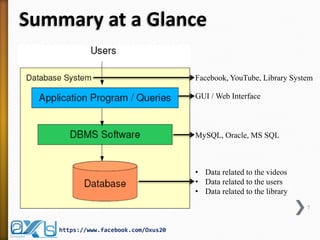
Summary at a Glance 
7 
https://www.facebook.com/Oxus20 
GUI / Web Interface 
MySQL, Oracle, MS SQL 
Facebook, YouTube, Library System 
•Data related to the videos 
•Data related to the users 
•Data related to the library
Relationship Definition 
»When creating a database, common sense dictates that we use separate tables for different types of entities to reduce and overcome redundancy. 
»We need to establish relationships between these separated tables to provide useful information. 
»A relationship exists between two database tables when one table has a foreign key that references the primary key of another table. 
8 
https://www.facebook.com/Oxus20
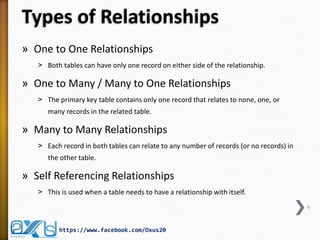
Types of Relationships 
»One to One Relationships 
˃Both tables can have only one record on either side of the relationship. 
»One to Many / Many to One Relationships 
˃The primary key table contains only one record that relates to none, one, or many records in the related table. 
»Many to Many Relationships 
˃Each record in both tables can relate to any number of records (or no records) in the other table. 
»Self Referencing Relationships 
˃This is used when a table needs to have a relationship with itself. 
9 
https://www.facebook.com/Oxus20
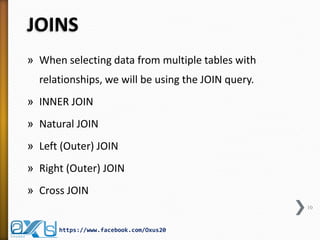
JOINS 
»When selecting data from multiple tables with relationships, we will be using the JOIN query. 
»INNER JOIN 
»Natural JOIN 
»Left (Outer) JOIN 
»Right (Outer) JOIN 
»Cross JOIN 
10 
https://www.facebook.com/Oxus20
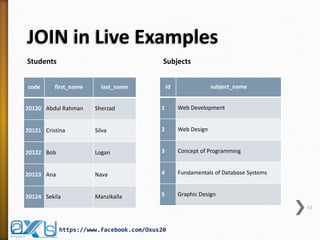
JOIN in Live Examples 
Students 
Subjects 
code 
first_name 
last_name 
20120 
Abdul Rahman 
Sherzad 
20121 
Cristina 
Silva 
20122 
Bob 
Logan 
20123 
Ana 
Nava 
20124 
Sekila 
Manzikalla 
id 
subject_name 
1 
Web Development 
2 
Web Design 
3 
Concept of Programming 
4 
Fundamentals of Database Systems 
5 
Graphic Design 
11 
https://www.facebook.com/Oxus20
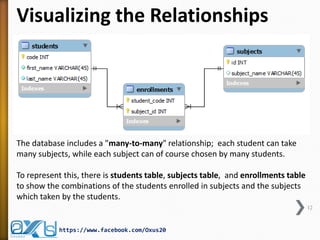
Visualizing the Relationships 
12 
https://www.facebook.com/Oxus20 
The database includes a "many-to-many" relationship; each student can take many subjects, while each subject can of course chosen by many students. 
To represent this, there is students table, subjects table, and enrollments table to show the combinations of the students enrolled in subjects and the subjects which taken by the students.
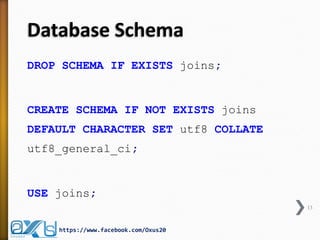
Database Schema 
DROP SCHEMA IF EXISTS joins; 
CREATE SCHEMA IF NOT EXISTS joins DEFAULT CHARACTER SET utf8 COLLATE utf8_general_ci; 
USE joins; 
13 
https://www.facebook.com/Oxus20
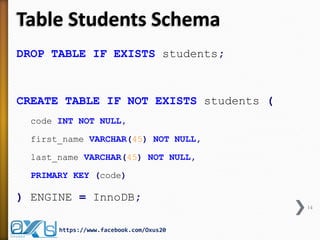
Table Students Schema 
DROP TABLE IF EXISTS students; 
CREATE TABLE IF NOT EXISTS students ( 
code INT NOT NULL, 
first_name VARCHAR(45) NOT NULL, 
last_name VARCHAR(45) NOT NULL, 
PRIMARY KEY (code) 
) ENGINE = InnoDB; 
14 
https://www.facebook.com/Oxus20
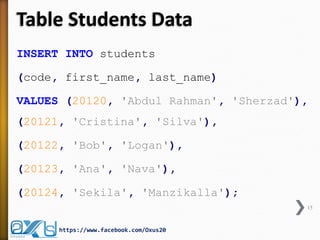
Table Students Data 
INSERT INTO students 
(code, first_name, last_name) 
VALUES (20120, 'Abdul Rahman', 'Sherzad'), (20121, 'Cristina', 'Silva'), 
(20122, 'Bob', 'Logan'), 
(20123, 'Ana', 'Nava'), 
(20124, 'Sekila', 'Manzikalla'); 
15 
https://www.facebook.com/Oxus20
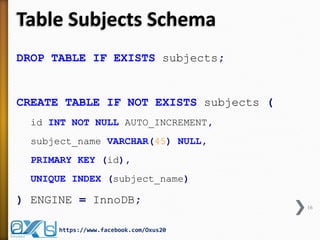
Table Subjects Schema 
DROP TABLE IF EXISTS subjects; 
CREATE TABLE IF NOT EXISTS subjects ( 
id INT NOT NULL AUTO_INCREMENT, 
subject_name VARCHAR(45) NULL, 
PRIMARY KEY (id), 
UNIQUE INDEX (subject_name) 
) ENGINE = InnoDB; 
16 
https://www.facebook.com/Oxus20
Table Subjects Data 
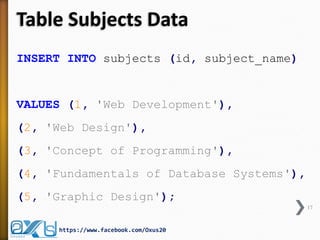
INSERT INTO subjects (id, subject_name) 
VALUES (1, 'Web Development'), 
(2, 'Web Design'), 
(3, 'Concept of Programming'), 
(4, 'Fundamentals of Database Systems'), 
(5, 'Graphic Design'); 
17 
https://www.facebook.com/Oxus20
Table Enrollments Schema 
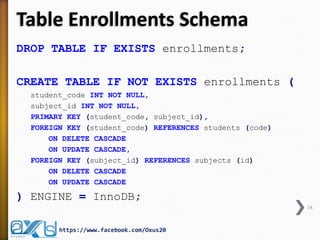
DROP TABLE IF EXISTS enrollments; 
CREATE TABLE IF NOT EXISTS enrollments ( 
student_code INT NOT NULL, 
subject_id INT NOT NULL, 
PRIMARY KEY (student_code, subject_id), 
FOREIGN KEY (student_code) REFERENCES students (code) 
ON DELETE CASCADE 
ON UPDATE CASCADE, 
FOREIGN KEY (subject_id) REFERENCES subjects (id) 
ON DELETE CASCADE 
ON UPDATE CASCADE 
) ENGINE = InnoDB; 
18 
https://www.facebook.com/Oxus20
Table Enrollments Data 
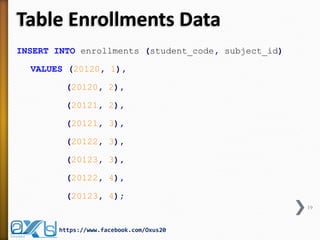
INSERT INTO enrollments (student_code, subject_id) 
VALUES (20120, 1), 
(20120, 2), 
(20121, 2), 
(20121, 3), 
(20122, 3), 
(20123, 3), 
(20122, 4), 
(20123, 4); 
19 
https://www.facebook.com/Oxus20
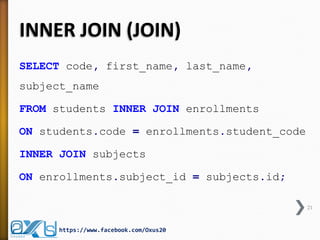
INNER JOIN (JOIN) 
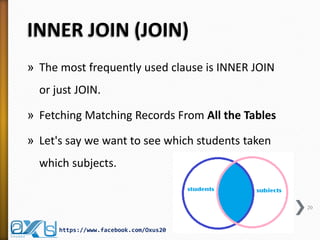
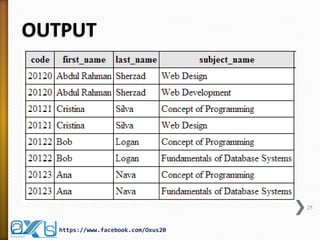
»The most frequently used clause is INNER JOIN or just JOIN. 
»Fetching Matching Records From All the Tables 
»Let's say we want to see which students taken which subjects. 
20 
https://www.facebook.com/Oxus20
INNER JOIN (JOIN) 
SELECT code, first_name, last_name, subject_name 
FROM students INNER JOIN enrollments 
ON students.code = enrollments.student_code 
INNER JOIN subjects 
ON enrollments.subject_id = subjects.id; 
21 
https://www.facebook.com/Oxus20
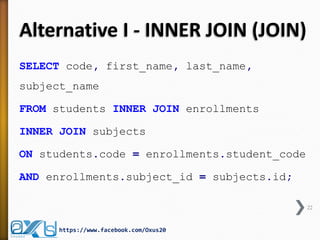
Alternative I - INNER JOIN (JOIN) 
SELECT code, first_name, last_name, subject_name 
FROM students INNER JOIN enrollments 
INNER JOIN subjects 
ON students.code = enrollments.student_code 
AND enrollments.subject_id = subjects.id; 
22 
https://www.facebook.com/Oxus20
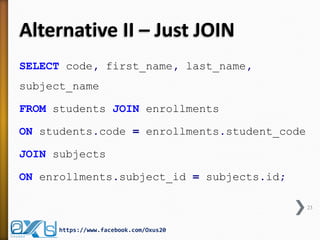
Alternative II – Just JOIN 
SELECT code, first_name, last_name, subject_name 
FROM students JOIN enrollments 
ON students.code = enrollments.student_code 
JOIN subjects 
ON enrollments.subject_id = subjects.id; 
23 
https://www.facebook.com/Oxus20
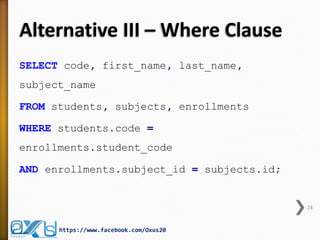
Alternative III – Where Clause 
SELECT code, first_name, last_name, subject_name 
FROM students, subjects, enrollments 
WHERE students.code = enrollments.student_code 
AND enrollments.subject_id = subjects.id; 
24 
https://www.facebook.com/Oxus20
OUTPUT 
25 
https://www.facebook.com/Oxus20
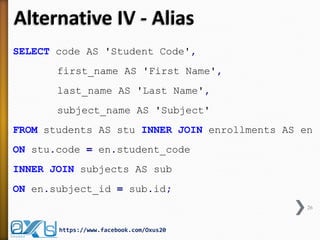
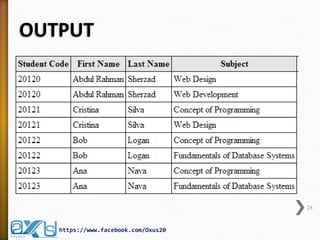
Alternative IV - Alias 
SELECT code AS 'Student Code', 
first_name AS 'First Name', 
last_name AS 'Last Name', 
subject_name AS 'Subject' 
FROM students AS stu INNER JOIN enrollments AS en 
ON stu.code = en.student_code 
INNER JOIN subjects AS sub 
ON en.subject_id = sub.id; 
26 
https://www.facebook.com/Oxus20
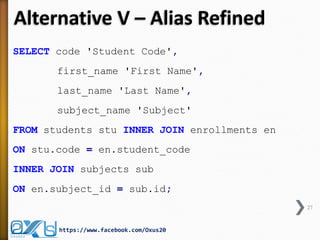
Alternative V – Alias Refined 
SELECT code 'Student Code', 
first_name 'First Name', 
last_name 'Last Name', 
subject_name 'Subject' 
FROM students stu INNER JOIN enrollments en 
ON stu.code = en.student_code 
INNER JOIN subjects sub 
ON en.subject_id = sub.id; 
27 
https://www.facebook.com/Oxus20
OUTPUT 
28 
https://www.facebook.com/Oxus20
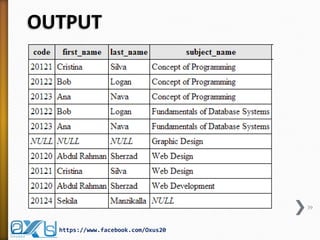
RIGHT JOIN (RIGHT OUTER JOIN) 
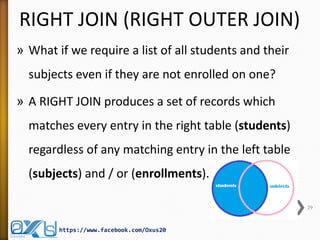
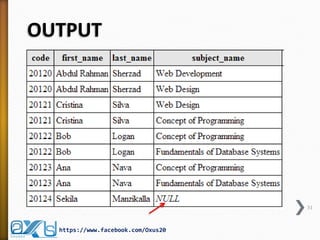
»What if we require a list of all students and their subjects even if they are not enrolled on one? 
»A RIGHT JOIN produces a set of records which matches every entry in the right table (students) regardless of any matching entry in the left table (subjects) and / or (enrollments). 
29 
https://www.facebook.com/Oxus20
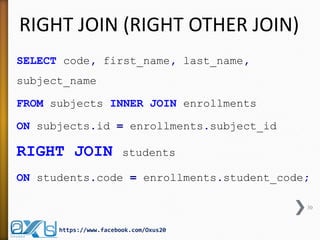
RIGHT JOIN (RIGHT OTHER JOIN) 
SELECT code, first_name, last_name, subject_name 
FROM subjects INNER JOIN enrollments 
ON subjects.id = enrollments.subject_id RIGHT JOIN students 
ON students.code = enrollments.student_code; 
30 
https://www.facebook.com/Oxus20
OUTPUT 
31 
https://www.facebook.com/Oxus20
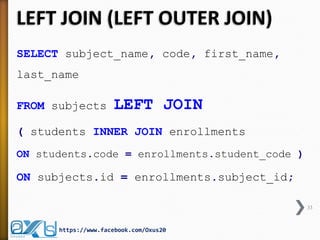
LEFT JOIN (LEFT OUTER JOIN) 
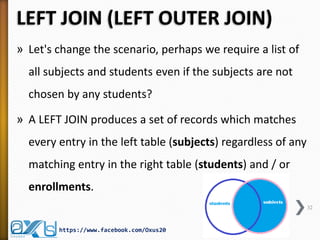
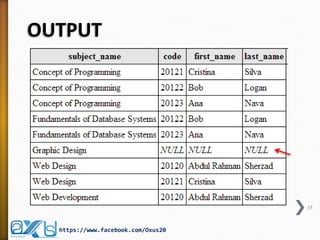
»Let's change the scenario, perhaps we require a list of all subjects and students even if the subjects are not chosen by any students? 
»A LEFT JOIN produces a set of records which matches every entry in the left table (subjects) regardless of any matching entry in the right table (students) and / or enrollments. 
32 
https://www.facebook.com/Oxus20
LEFT JOIN (LEFT OUTER JOIN) 
SELECT subject_name, code, first_name, last_name 
FROM subjects LEFT JOIN 
( students INNER JOIN enrollments 
ON students.code = enrollments.student_code ) 
ON subjects.id = enrollments.subject_id; 
33 
https://www.facebook.com/Oxus20
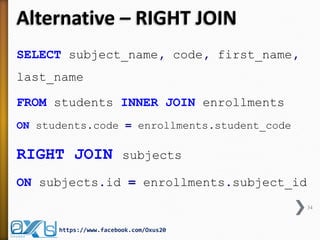
Alternative – RIGHT JOIN 
SELECT subject_name, code, first_name, last_name 
FROM students INNER JOIN enrollments 
ON students.code = enrollments.student_code 
RIGHT JOIN subjects 
ON subjects.id = enrollments.subject_id 
34 
https://www.facebook.com/Oxus20
OUTPUT 
35 
https://www.facebook.com/Oxus20
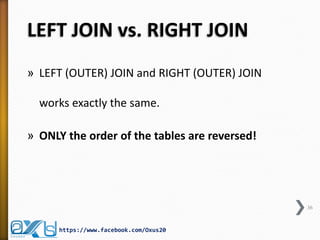
LEFT JOIN vs. RIGHT JOIN 
»LEFT (OUTER) JOIN and RIGHT (OUTER) JOIN works exactly the same. 
»ONLY the order of the tables are reversed! 
36 
https://www.facebook.com/Oxus20
FULL JOIN (or FULL OUTER JOIN) 
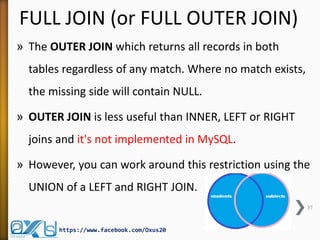
»The OUTER JOIN which returns all records in both tables regardless of any match. Where no match exists, the missing side will contain NULL. 
»OUTER JOIN is less useful than INNER, LEFT or RIGHT joins and it's not implemented in MySQL. 
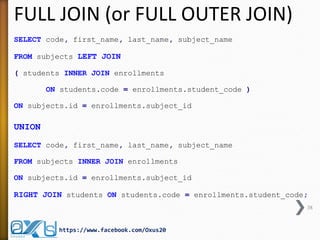
»However, you can work around this restriction using the UNION of a LEFT and RIGHT JOIN. 
37 
https://www.facebook.com/Oxus20
FULL JOIN (or FULL OUTER JOIN) 
SELECT code, first_name, last_name, subject_name 
FROM subjects LEFT JOIN 
( students INNER JOIN enrollments 
ON students.code = enrollments.student_code ) 
ON subjects.id = enrollments.subject_id 
UNION 
SELECT code, first_name, last_name, subject_name 
FROM subjects INNER JOIN enrollments 
ON subjects.id = enrollments.subject_id 
RIGHT JOIN students ON students.code = enrollments.student_code; 
38 
https://www.facebook.com/Oxus20
OUTPUT 
39 
https://www.facebook.com/Oxus20
Cross Join 
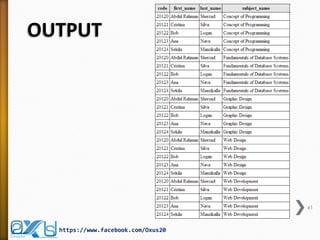
»This is the default type of JOIN query when no condition is specified. 
»The result is a so called "Cartesian Product" of the tables. 
»It means that each row from the first table is matched with each row of the second table. 
»Since each table had 5 rows, we ended up getting a result of 25 rows. 
40 
https://www.facebook.com/Oxus20
Cross Join 
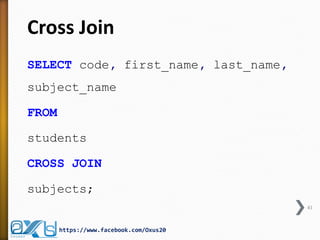
SELECT code, first_name, last_name, subject_name 
FROM 
students 
CROSS JOIN 
subjects; 
41 
https://www.facebook.com/Oxus20
Cross Join - Alternative 
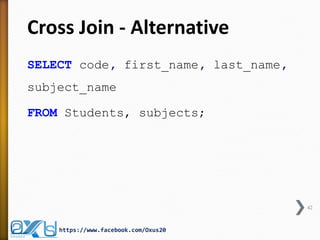
SELECT code, first_name, last_name, subject_name 
FROM Students, subjects; 
42 
https://www.facebook.com/Oxus20
OUTPUT 
43 
https://www.facebook.com/Oxus20
SELF JOIN 
»The SELF JOIN is used to join a table to itself as if the table were two tables; temporarily renaming at least one table in the SQL statement. 
»You can view SELF JOIN as two identical tables. But in normalization you cannot create two copies of the table so you just simulate having two tables with SELF JOIN. 
44 
https://www.facebook.com/Oxus20
SELF JOIN 
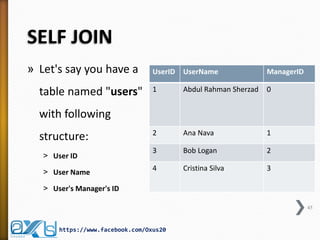
»Let's say you have a table named "users" with following structure: 
˃User ID 
˃User Name 
˃User's Manager's ID 
UserID 
UserName 
ManagerID 
1 
Abdul Rahman Sherzad 
0 
2 
Ana Nava 
1 
3 
Bob Logan 
2 
4 
Cristina Silva 
3 
https://www.facebook.com/Oxus20 
45
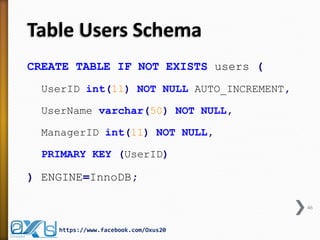
Table Users Schema 
CREATE TABLE IF NOT EXISTS users ( 
UserID int(11) NOT NULL AUTO_INCREMENT, 
UserName varchar(50) NOT NULL, 
ManagerID int(11) NOT NULL, 
PRIMARY KEY (UserID) 
) ENGINE=InnoDB; 
46 
https://www.facebook.com/Oxus20
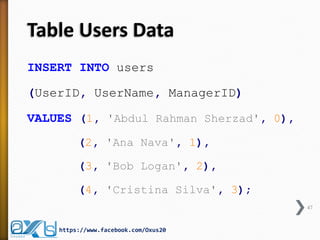
Table Users Data 
INSERT INTO users 
(UserID, UserName, ManagerID) 
VALUES (1, 'Abdul Rahman Sherzad', 0), 
(2, 'Ana Nava', 1), 
(3, 'Bob Logan', 2), 
(4, 'Cristina Silva', 3); 
47 
https://www.facebook.com/Oxus20
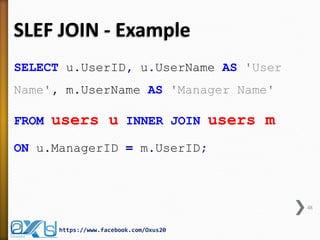
SLEF JOIN - Example 
SELECT u.UserID, u.UserName AS 'User Name', m.UserName AS 'Manager Name' 
FROM users u INNER JOIN users m 
ON u.ManagerID = m.UserID; 
48 
https://www.facebook.com/Oxus20
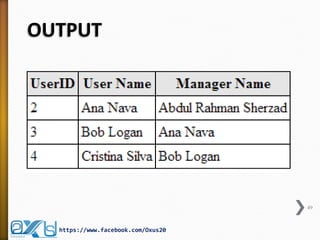
OUTPUT 
49 
https://www.facebook.com/Oxus20
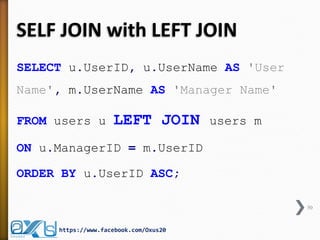
SELF JOIN with LEFT JOIN 
SELECT u.UserID, u.UserName AS 'User Name', m.UserName AS 'Manager Name' 
FROM users u LEFT JOIN users m 
ON u.ManagerID = m.UserID 
ORDER BY u.UserID ASC; 
50 
https://www.facebook.com/Oxus20
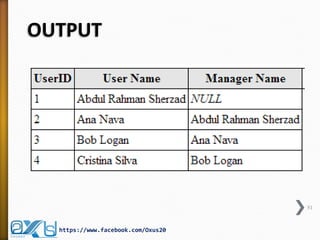
OUTPUT 
51 
https://www.facebook.com/Oxus20
Conclusion 
»Thank you for reading this presentation. I hope you that it gives you a better understanding of JOINS and helps you write more efficient SQL queries as well as enjoyed it! 
»Please leave your comments and questions, and have a great day  
52 
https://www.facebook.com/Oxus20
END 
https://www.facebook.com/Oxus20 
53

Everything about Database JOINS and Relationships

  • 1.
    https://www.facebook.com/Oxus20 oxus20@gmail.com Everythingabout Database JOINS and Relationships »Definitions »JOINS »INNER JOIN »LEFT JOIN »RIGHT JOIN »FULL JOIN »CROSS JOIN »SELF JOIN Abdul Rahman Sherzad
  • 2.
    Database Definition »Adatabase is a set of related data that has a regular structure and that is organized in such a way that a computer can easily find the desired information. »A database is a collection of information that is organized so that it can easily be accessed, managed, and updated. »A database is a collection logically related data. 2 https://www.facebook.com/Oxus20
  • 3.
    DBMS Definition »ADBMS (Database Management System) is a set of software programs or a tools which helps the user to perform all related operations i.e. to store, access, and process data or facts into useful information. »A DBMS guarantees security, integrity, and privacy by providing a centralized control of database. 3 https://www.facebook.com/Oxus20
  • 4.
    DBMS Examples »Freeand Open Source ˃MySQL ˃PostgreSQL ˃SQLite ˃Firebird »Proprietary and Closed Source ˃Microsoft SQL Server (MS SQL) ˃Oracle ˃Microsoft Access ˃DB2 4 https://www.facebook.com/Oxus20
  • 5.
    Application Program Definition »An application program (sometimes shortened to application) accesses the database by sending queries or requests to the DBMS via a GUI (Graphical User Interface). 5 https://www.facebook.com/Oxus20
  • 6.
    Database System Definition »The database, the DBMS software, and the application program together are called a database system. ˃Computerized Library Systems ˃ATM (Automated Teller Machines) ˃Flight Reservation Systems ˃Computerized Human Resource Systems 6 https://www.facebook.com/Oxus20
  • 7.
    Summary at aGlance 7 https://www.facebook.com/Oxus20 GUI / Web Interface MySQL, Oracle, MS SQL Facebook, YouTube, Library System •Data related to the videos •Data related to the users •Data related to the library
  • 8.
    Relationship Definition »Whencreating a database, common sense dictates that we use separate tables for different types of entities to reduce and overcome redundancy. »We need to establish relationships between these separated tables to provide useful information. »A relationship exists between two database tables when one table has a foreign key that references the primary key of another table. 8 https://www.facebook.com/Oxus20
  • 9.
    Types of Relationships »One to One Relationships ˃Both tables can have only one record on either side of the relationship. »One to Many / Many to One Relationships ˃The primary key table contains only one record that relates to none, one, or many records in the related table. »Many to Many Relationships ˃Each record in both tables can relate to any number of records (or no records) in the other table. »Self Referencing Relationships ˃This is used when a table needs to have a relationship with itself. 9 https://www.facebook.com/Oxus20
  • 10.
    JOINS »When selectingdata from multiple tables with relationships, we will be using the JOIN query. »INNER JOIN »Natural JOIN »Left (Outer) JOIN »Right (Outer) JOIN »Cross JOIN 10 https://www.facebook.com/Oxus20
  • 11.
    JOIN in LiveExamples Students Subjects code first_name last_name 20120 Abdul Rahman Sherzad 20121 Cristina Silva 20122 Bob Logan 20123 Ana Nava 20124 Sekila Manzikalla id subject_name 1 Web Development 2 Web Design 3 Concept of Programming 4 Fundamentals of Database Systems 5 Graphic Design 11 https://www.facebook.com/Oxus20
  • 12.
    Visualizing the Relationships 12 https://www.facebook.com/Oxus20 The database includes a "many-to-many" relationship; each student can take many subjects, while each subject can of course chosen by many students. To represent this, there is students table, subjects table, and enrollments table to show the combinations of the students enrolled in subjects and the subjects which taken by the students.
  • 13.
    Database Schema DROPSCHEMA IF EXISTS joins; CREATE SCHEMA IF NOT EXISTS joins DEFAULT CHARACTER SET utf8 COLLATE utf8_general_ci; USE joins; 13 https://www.facebook.com/Oxus20
  • 14.
    Table Students Schema DROP TABLE IF EXISTS students; CREATE TABLE IF NOT EXISTS students ( code INT NOT NULL, first_name VARCHAR(45) NOT NULL, last_name VARCHAR(45) NOT NULL, PRIMARY KEY (code) ) ENGINE = InnoDB; 14 https://www.facebook.com/Oxus20
  • 15.
    Table Students Data INSERT INTO students (code, first_name, last_name) VALUES (20120, 'Abdul Rahman', 'Sherzad'), (20121, 'Cristina', 'Silva'), (20122, 'Bob', 'Logan'), (20123, 'Ana', 'Nava'), (20124, 'Sekila', 'Manzikalla'); 15 https://www.facebook.com/Oxus20
  • 16.
    Table Subjects Schema DROP TABLE IF EXISTS subjects; CREATE TABLE IF NOT EXISTS subjects ( id INT NOT NULL AUTO_INCREMENT, subject_name VARCHAR(45) NULL, PRIMARY KEY (id), UNIQUE INDEX (subject_name) ) ENGINE = InnoDB; 16 https://www.facebook.com/Oxus20
  • 17.
    Table Subjects Data INSERT INTO subjects (id, subject_name) VALUES (1, 'Web Development'), (2, 'Web Design'), (3, 'Concept of Programming'), (4, 'Fundamentals of Database Systems'), (5, 'Graphic Design'); 17 https://www.facebook.com/Oxus20
  • 18.
    Table Enrollments Schema DROP TABLE IF EXISTS enrollments; CREATE TABLE IF NOT EXISTS enrollments ( student_code INT NOT NULL, subject_id INT NOT NULL, PRIMARY KEY (student_code, subject_id), FOREIGN KEY (student_code) REFERENCES students (code) ON DELETE CASCADE ON UPDATE CASCADE, FOREIGN KEY (subject_id) REFERENCES subjects (id) ON DELETE CASCADE ON UPDATE CASCADE ) ENGINE = InnoDB; 18 https://www.facebook.com/Oxus20
  • 19.
    Table Enrollments Data INSERT INTO enrollments (student_code, subject_id) VALUES (20120, 1), (20120, 2), (20121, 2), (20121, 3), (20122, 3), (20123, 3), (20122, 4), (20123, 4); 19 https://www.facebook.com/Oxus20
  • 20.
    INNER JOIN (JOIN) »The most frequently used clause is INNER JOIN or just JOIN. »Fetching Matching Records From All the Tables »Let's say we want to see which students taken which subjects. 20 https://www.facebook.com/Oxus20
  • 21.
    INNER JOIN (JOIN) SELECT code, first_name, last_name, subject_name FROM students INNER JOIN enrollments ON students.code = enrollments.student_code INNER JOIN subjects ON enrollments.subject_id = subjects.id; 21 https://www.facebook.com/Oxus20
  • 22.
    Alternative I -INNER JOIN (JOIN) SELECT code, first_name, last_name, subject_name FROM students INNER JOIN enrollments INNER JOIN subjects ON students.code = enrollments.student_code AND enrollments.subject_id = subjects.id; 22 https://www.facebook.com/Oxus20
  • 23.
    Alternative II –Just JOIN SELECT code, first_name, last_name, subject_name FROM students JOIN enrollments ON students.code = enrollments.student_code JOIN subjects ON enrollments.subject_id = subjects.id; 23 https://www.facebook.com/Oxus20
  • 24.
    Alternative III –Where Clause SELECT code, first_name, last_name, subject_name FROM students, subjects, enrollments WHERE students.code = enrollments.student_code AND enrollments.subject_id = subjects.id; 24 https://www.facebook.com/Oxus20
  • 25.
  • 26.
    Alternative IV -Alias SELECT code AS 'Student Code', first_name AS 'First Name', last_name AS 'Last Name', subject_name AS 'Subject' FROM students AS stu INNER JOIN enrollments AS en ON stu.code = en.student_code INNER JOIN subjects AS sub ON en.subject_id = sub.id; 26 https://www.facebook.com/Oxus20
  • 27.
    Alternative V –Alias Refined SELECT code 'Student Code', first_name 'First Name', last_name 'Last Name', subject_name 'Subject' FROM students stu INNER JOIN enrollments en ON stu.code = en.student_code INNER JOIN subjects sub ON en.subject_id = sub.id; 27 https://www.facebook.com/Oxus20
  • 28.
  • 29.
    RIGHT JOIN (RIGHTOUTER JOIN) »What if we require a list of all students and their subjects even if they are not enrolled on one? »A RIGHT JOIN produces a set of records which matches every entry in the right table (students) regardless of any matching entry in the left table (subjects) and / or (enrollments). 29 https://www.facebook.com/Oxus20
  • 30.
    RIGHT JOIN (RIGHTOTHER JOIN) SELECT code, first_name, last_name, subject_name FROM subjects INNER JOIN enrollments ON subjects.id = enrollments.subject_id RIGHT JOIN students ON students.code = enrollments.student_code; 30 https://www.facebook.com/Oxus20
  • 31.
  • 32.
    LEFT JOIN (LEFTOUTER JOIN) »Let's change the scenario, perhaps we require a list of all subjects and students even if the subjects are not chosen by any students? »A LEFT JOIN produces a set of records which matches every entry in the left table (subjects) regardless of any matching entry in the right table (students) and / or enrollments. 32 https://www.facebook.com/Oxus20
  • 33.
    LEFT JOIN (LEFTOUTER JOIN) SELECT subject_name, code, first_name, last_name FROM subjects LEFT JOIN ( students INNER JOIN enrollments ON students.code = enrollments.student_code ) ON subjects.id = enrollments.subject_id; 33 https://www.facebook.com/Oxus20
  • 34.
    Alternative – RIGHTJOIN SELECT subject_name, code, first_name, last_name FROM students INNER JOIN enrollments ON students.code = enrollments.student_code RIGHT JOIN subjects ON subjects.id = enrollments.subject_id 34 https://www.facebook.com/Oxus20
  • 35.
  • 36.
    LEFT JOIN vs.RIGHT JOIN »LEFT (OUTER) JOIN and RIGHT (OUTER) JOIN works exactly the same. »ONLY the order of the tables are reversed! 36 https://www.facebook.com/Oxus20
  • 37.
    FULL JOIN (orFULL OUTER JOIN) »The OUTER JOIN which returns all records in both tables regardless of any match. Where no match exists, the missing side will contain NULL. »OUTER JOIN is less useful than INNER, LEFT or RIGHT joins and it's not implemented in MySQL. »However, you can work around this restriction using the UNION of a LEFT and RIGHT JOIN. 37 https://www.facebook.com/Oxus20
  • 38.
    FULL JOIN (orFULL OUTER JOIN) SELECT code, first_name, last_name, subject_name FROM subjects LEFT JOIN ( students INNER JOIN enrollments ON students.code = enrollments.student_code ) ON subjects.id = enrollments.subject_id UNION SELECT code, first_name, last_name, subject_name FROM subjects INNER JOIN enrollments ON subjects.id = enrollments.subject_id RIGHT JOIN students ON students.code = enrollments.student_code; 38 https://www.facebook.com/Oxus20
  • 39.
  • 40.
    Cross Join »Thisis the default type of JOIN query when no condition is specified. »The result is a so called "Cartesian Product" of the tables. »It means that each row from the first table is matched with each row of the second table. »Since each table had 5 rows, we ended up getting a result of 25 rows. 40 https://www.facebook.com/Oxus20
  • 41.
    Cross Join SELECTcode, first_name, last_name, subject_name FROM students CROSS JOIN subjects; 41 https://www.facebook.com/Oxus20
  • 42.
    Cross Join -Alternative SELECT code, first_name, last_name, subject_name FROM Students, subjects; 42 https://www.facebook.com/Oxus20
  • 43.
  • 44.
    SELF JOIN »TheSELF JOIN is used to join a table to itself as if the table were two tables; temporarily renaming at least one table in the SQL statement. »You can view SELF JOIN as two identical tables. But in normalization you cannot create two copies of the table so you just simulate having two tables with SELF JOIN. 44 https://www.facebook.com/Oxus20
  • 45.
    SELF JOIN »Let'ssay you have a table named "users" with following structure: ˃User ID ˃User Name ˃User's Manager's ID UserID UserName ManagerID 1 Abdul Rahman Sherzad 0 2 Ana Nava 1 3 Bob Logan 2 4 Cristina Silva 3 https://www.facebook.com/Oxus20 45
  • 46.
    Table Users Schema CREATE TABLE IF NOT EXISTS users ( UserID int(11) NOT NULL AUTO_INCREMENT, UserName varchar(50) NOT NULL, ManagerID int(11) NOT NULL, PRIMARY KEY (UserID) ) ENGINE=InnoDB; 46 https://www.facebook.com/Oxus20
  • 47.
    Table Users Data INSERT INTO users (UserID, UserName, ManagerID) VALUES (1, 'Abdul Rahman Sherzad', 0), (2, 'Ana Nava', 1), (3, 'Bob Logan', 2), (4, 'Cristina Silva', 3); 47 https://www.facebook.com/Oxus20
  • 48.
    SLEF JOIN -Example SELECT u.UserID, u.UserName AS 'User Name', m.UserName AS 'Manager Name' FROM users u INNER JOIN users m ON u.ManagerID = m.UserID; 48 https://www.facebook.com/Oxus20
  • 49.
  • 50.
    SELF JOIN withLEFT JOIN SELECT u.UserID, u.UserName AS 'User Name', m.UserName AS 'Manager Name' FROM users u LEFT JOIN users m ON u.ManagerID = m.UserID ORDER BY u.UserID ASC; 50 https://www.facebook.com/Oxus20
  • 51.
  • 52.
    Conclusion »Thank youfor reading this presentation. I hope you that it gives you a better understanding of JOINS and helps you write more efficient SQL queries as well as enjoyed it! »Please leave your comments and questions, and have a great day  52 https://www.facebook.com/Oxus20
  • 53.