Facebook for Parents	Parenting Across Social MediaMonday, November 9thWinchester Public Library
IntroductionHi! I’m Amelia Peloquin and I work as a technology consultant for libraries, nonprofits and small businesses.My areas of focus include budget-friendly web design, training and support, social media marketing and project management.Find me at:TechWithoutWalls.com
Please Note:For your reference, this slide presentation, associated handouts & links are available here:http://facebook.techwithoutwalls.com
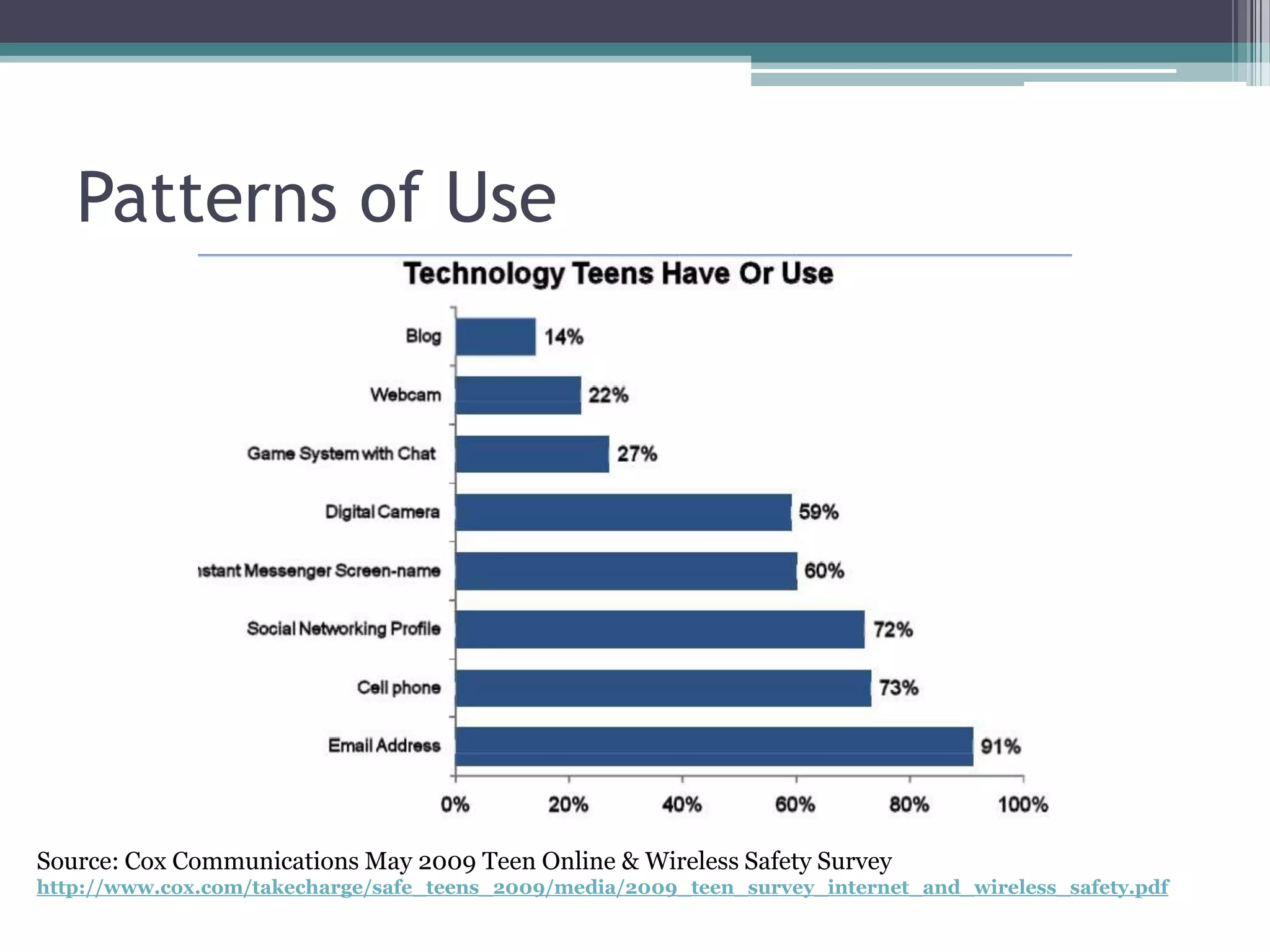
Kids are ConnectedSocial media is omnipresent, and the majority of teens have an account on Facebook, MySpace, or Twitter.Teens are also spending lots of time texting and using the Internet with cell phones and other mobile devices (iPod touch, psp, etc.)
Patterns of UseSource: Cox Communications May 2009 Teen Online & Wireless Safety Surveyhttp://www.cox.com/takecharge/safe_teens_2009/media/2009_teen_survey_internet_and_wireless_safety.pdf
Concerns for Parents
Age-Appropriate Internet UseMainstream social sites like Facebook require users to be 13+ but it’s easy to lie about age.Many parenting experts think teens are too young to use these sites safely—parental guidance is recommended!Seek kid-friendly sites (Club Penguin, Webkins) for younger children.
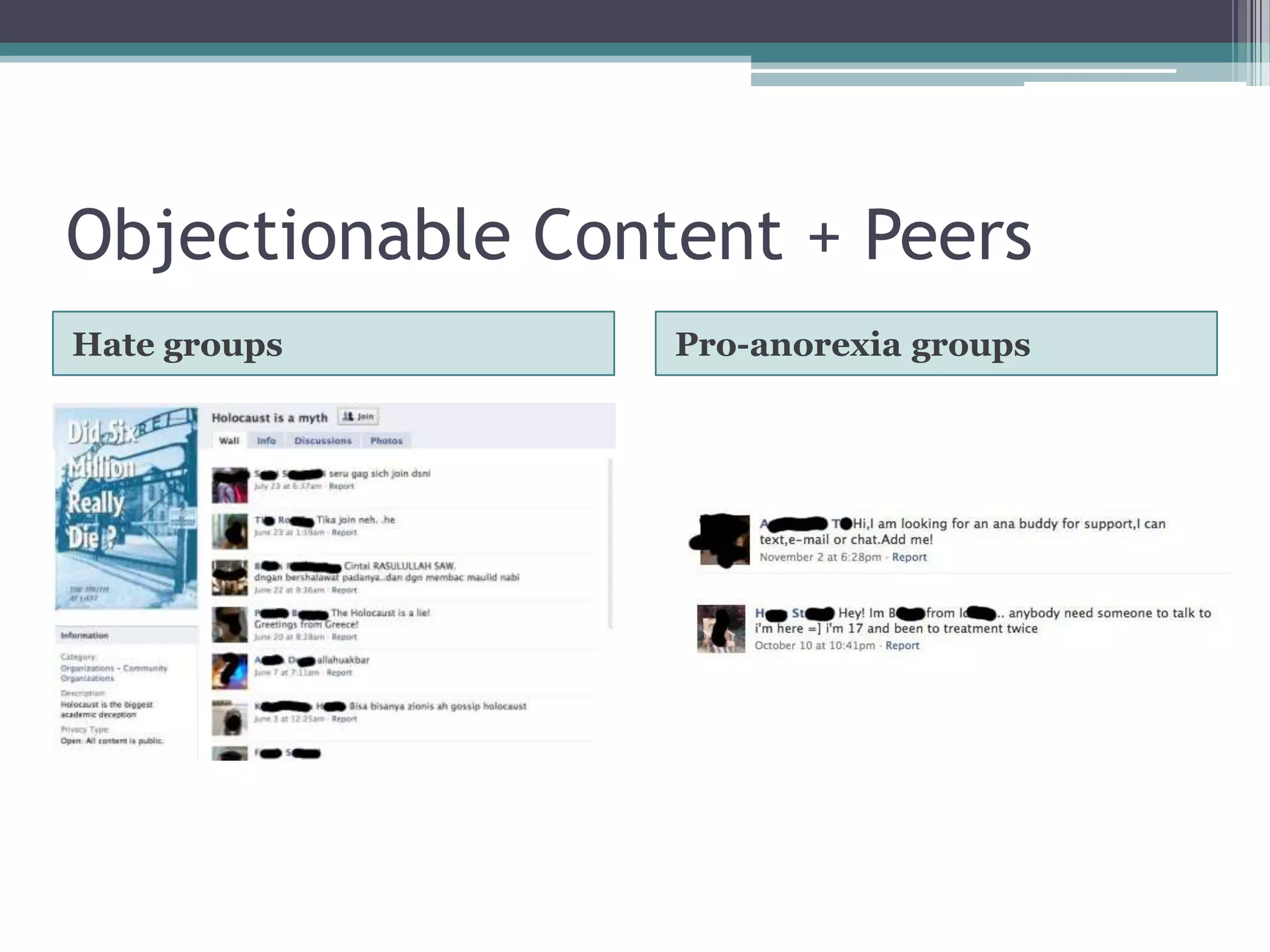
Objectionable Content + PeersHate groupsPro-anorexia groups
Cyberbullying:abusive behavior among peers that is perpetrated through electronic means (cell phones, social network sites, Instant Messenger, etc.)
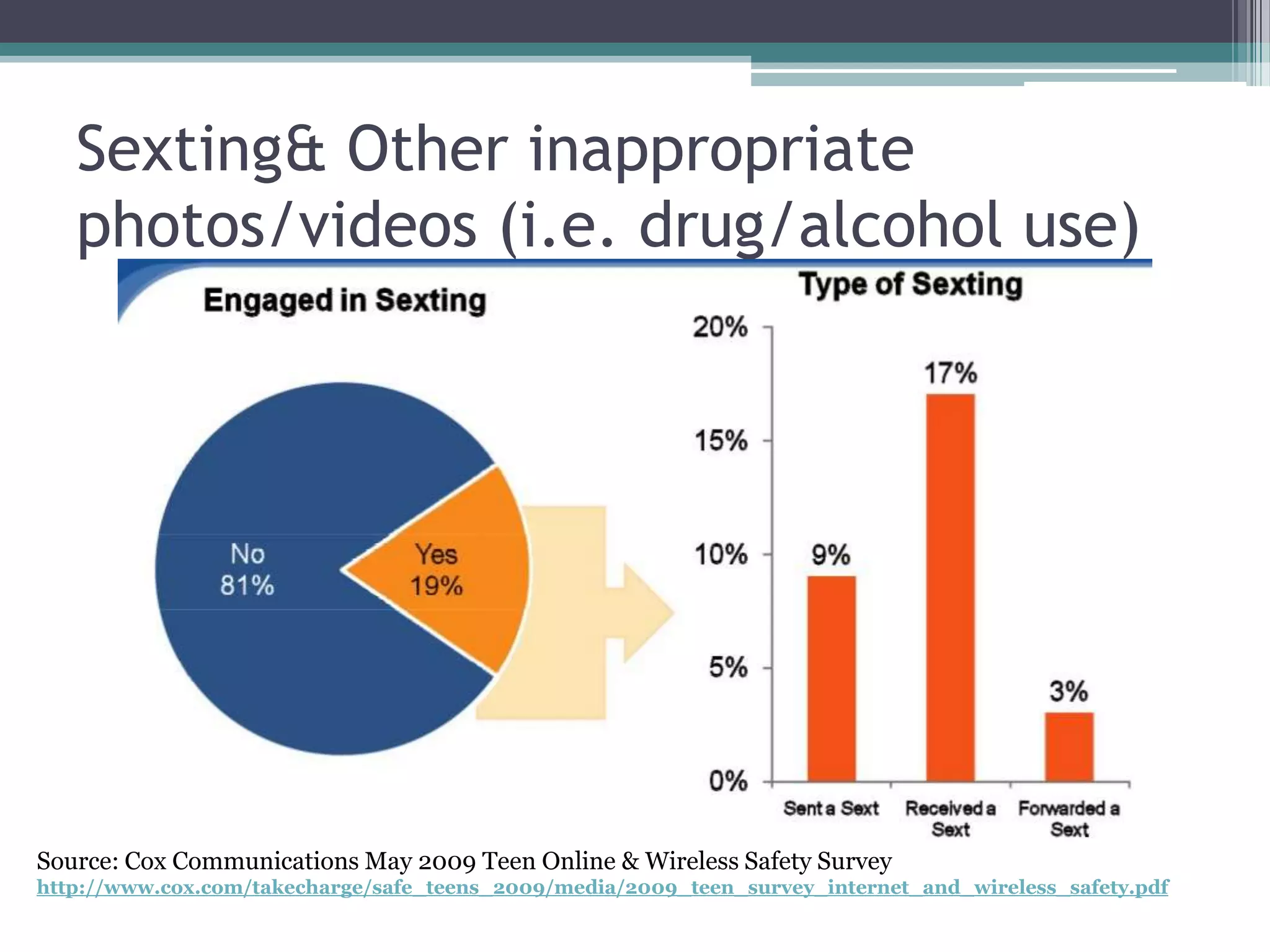
Sexting & Other inappropriate photos/videos (i.e. drug/alcohol use)Source: Cox Communications May 2009 Teen Online & Wireless Safety Surveyhttp://www.cox.com/takecharge/safe_teens_2009/media/2009_teen_survey_internet_and_wireless_safety.pdf
Predators & Other CreepsCan be overblown in the media, but stranger danger is real.(That being said, kids are more likely to be bullied/harassed online by someone they know in person.)
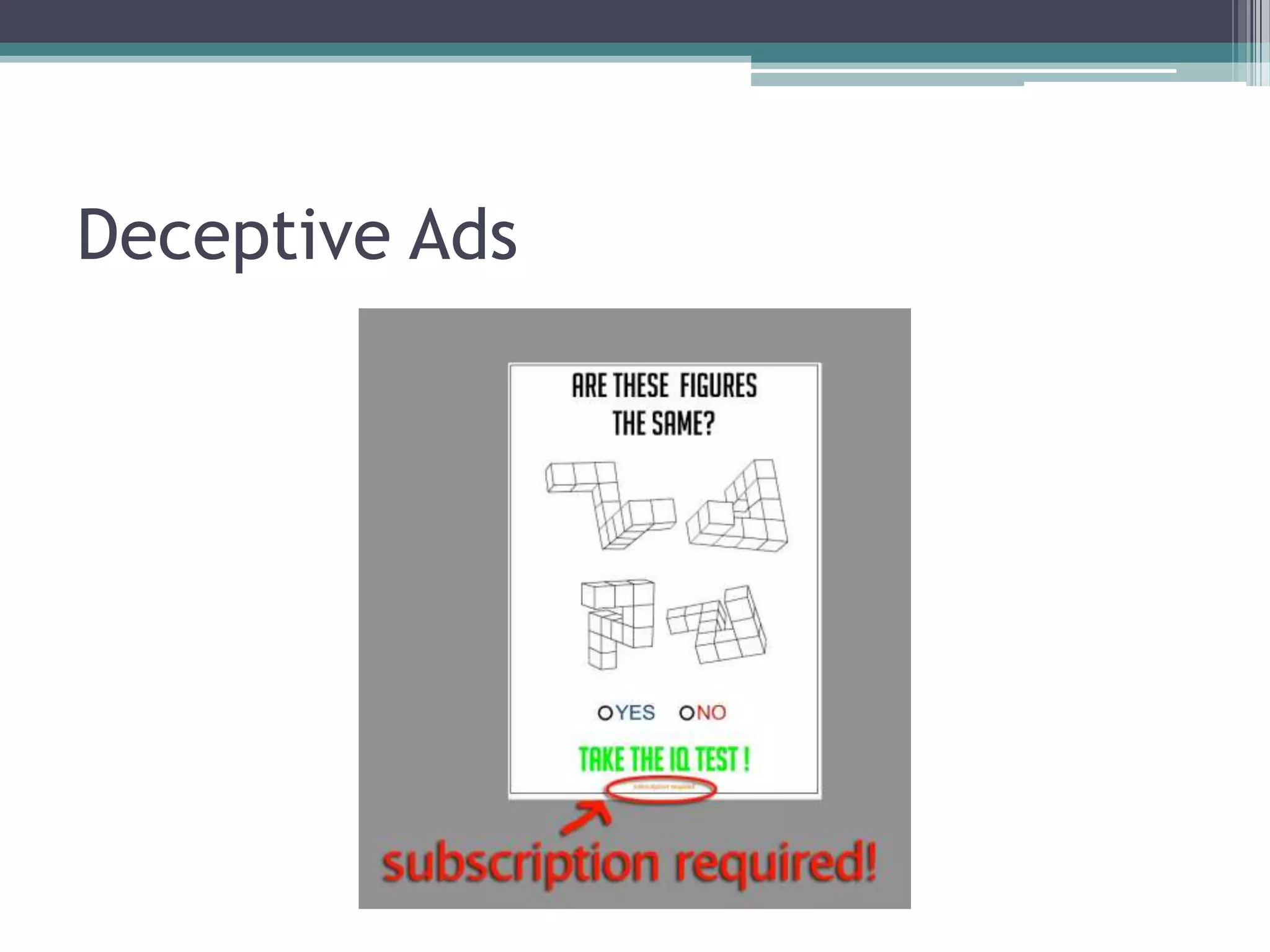
Phishing, ID Theft, Viruses/SpywareMany kids don’t know the basics about protecting your computer, email & other accounts.It can be easy to get tricked into giving up personal info.Most ads for “free” music downloads, ringtones, personality tests, etc are scams.
Deceptive Ads
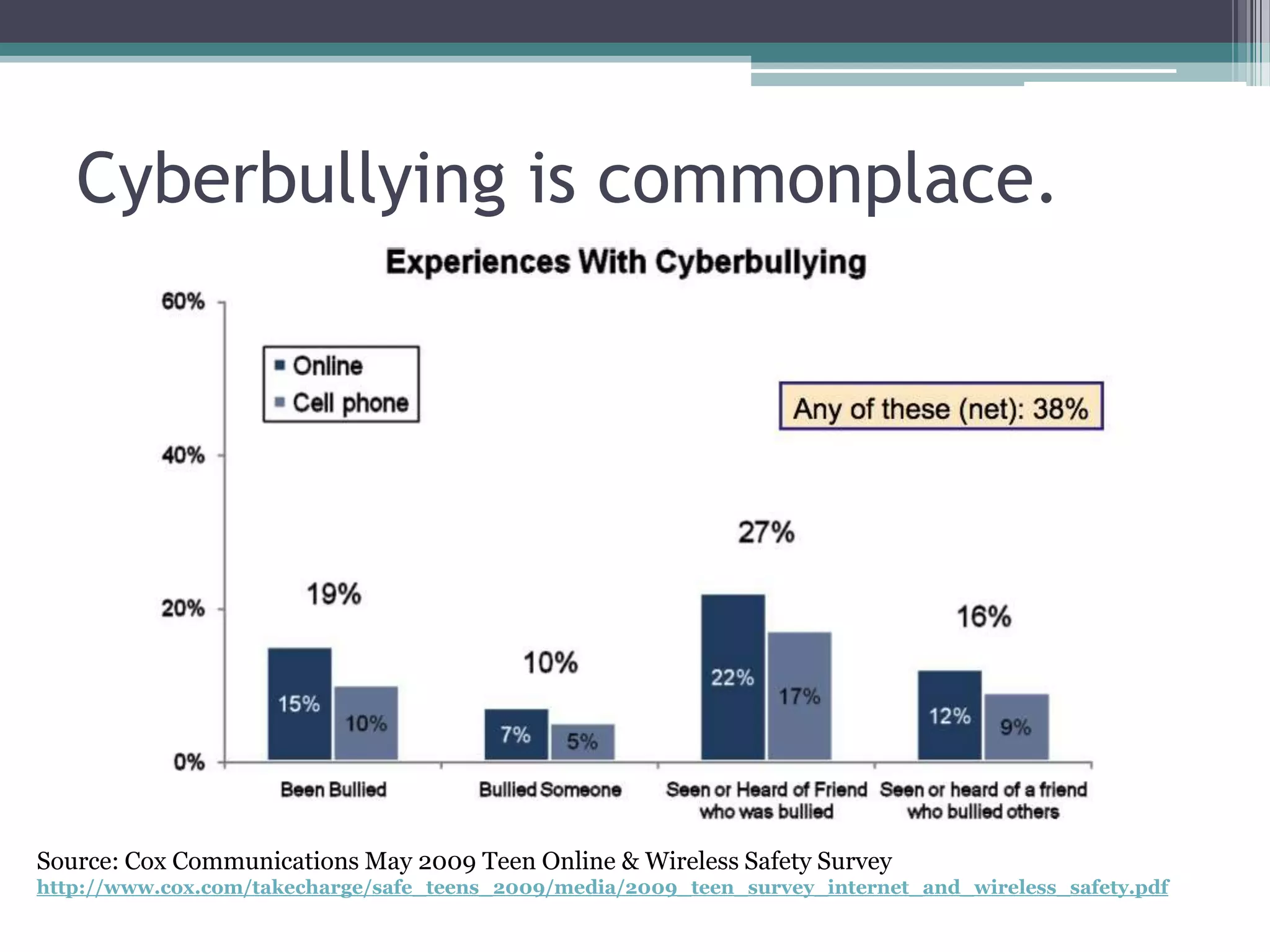
Cyberbullying
What is Cyberbullying?Name-calling, threatening language & other verbal harassment
Spreading embarrassing photos or video
Sharing secrets without permission
spreading rumors online
Can involve trickery, exclusion, impersonationCyberbullying is commonplace.Source: Cox Communications May 2009 Teen Online & Wireless Safety Surveyhttp://www.cox.com/takecharge/safe_teens_2009/media/2009_teen_survey_internet_and_wireless_safety.pdf
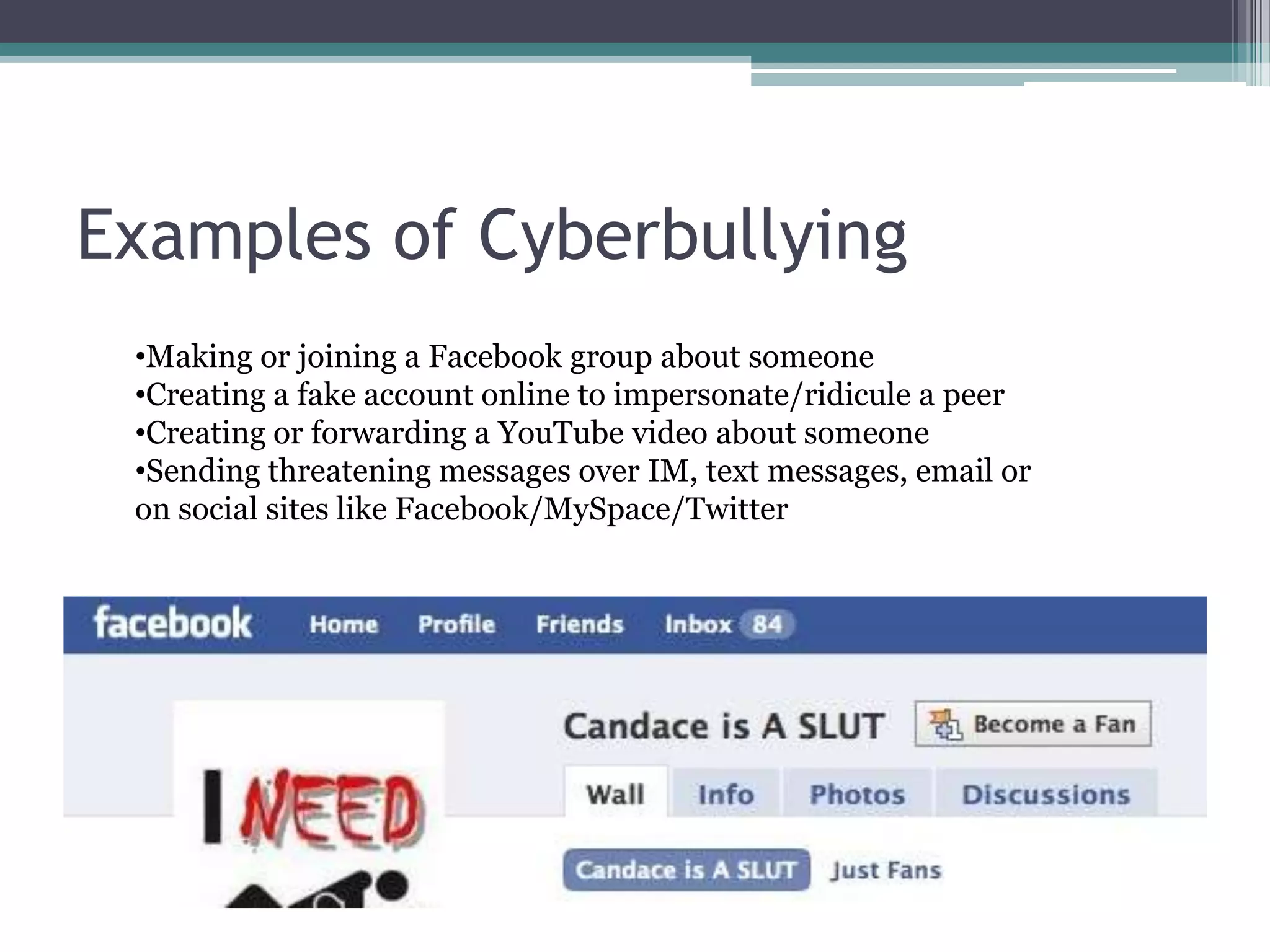
Examples of CyberbullyingMaking or joining a Facebook group about someone
Creating a fake account online to impersonate/ridicule a peer
Creating or forwarding a YouTube video about someone
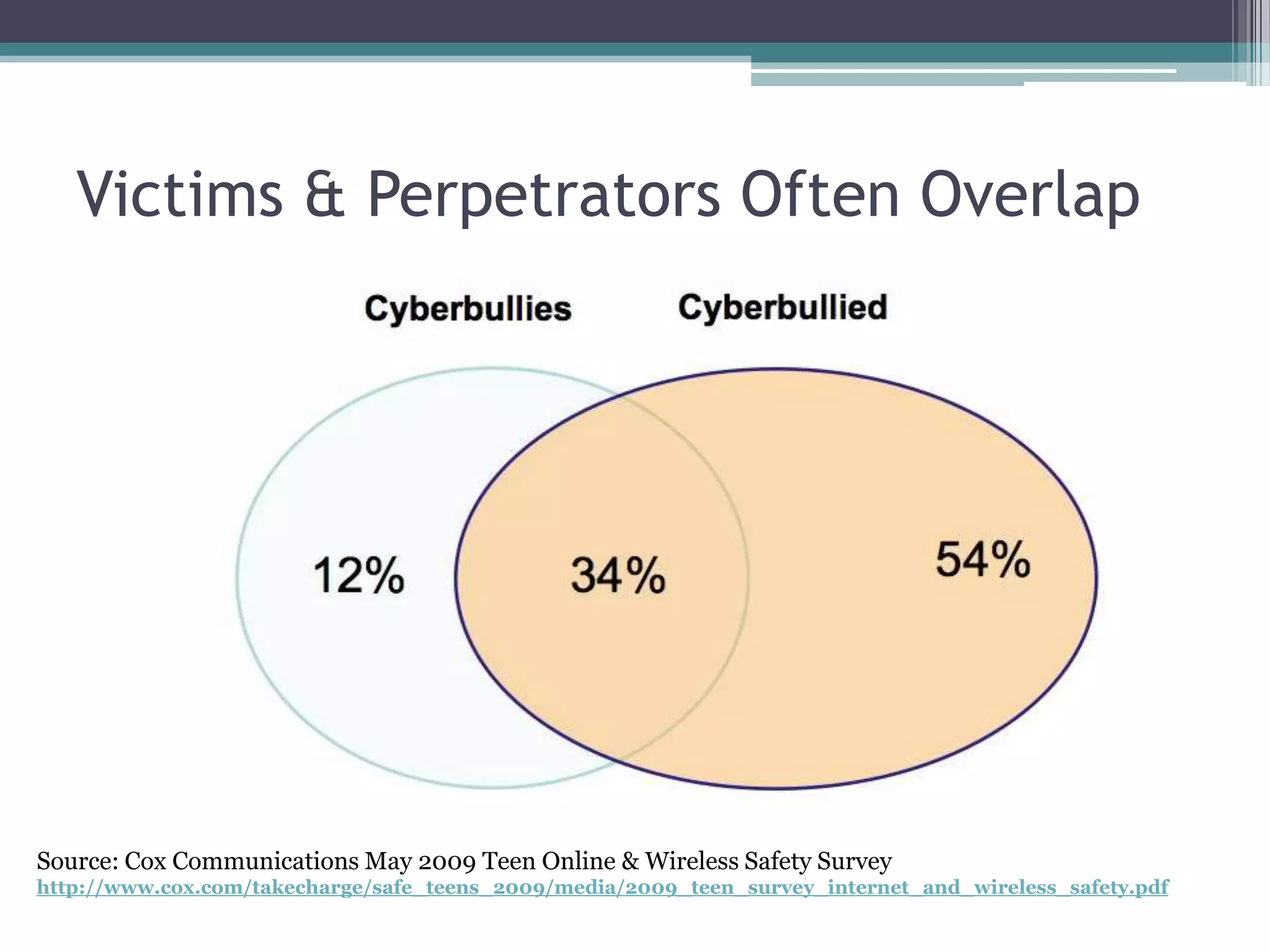
Sending threatening messages over IM, text messages, email or on social sites like Facebook/MySpace/TwitterVictims & Perpetrators Often OverlapSource: Cox Communications May 2009 Teen Online & Wireless Safety Surveyhttp://www.cox.com/takecharge/safe_teens_2009/media/2009_teen_survey_internet_and_wireless_safety.pdf
Stop it before it startsTalk to your child about ethical and responsible online behaviorSet expectations for appropriate use of Internet & mobile devicesHelp your child recognize harassment and know what to do if victimized by peers online
Know how to address the issueKnow how to block cyberbullies on Facebook/MySpace/Twitter   		(see “Locking it Down” handout)Know how to report abusive content on social networking sites and photo/video sharing sitesConsider talking to teachers and school administrators.
Parenting Connected Kids
General Advice for All AgesUnderstand what kids are doing onlineKnow the risks and decide what’s appropriateCommunicate your expectations with your childBe present!
Parents of Young ChildrenTalk about basic online safetyDon’t talk to strangers onlineDon’t share passwords with anyone except parentsDon’t share personal info like address, phone number, or name of school
Parents of Young ChildrenCreate a “fenced-in” online spaceUse web browsers designed specifically for kidsLimit social networking to age-appropriate sites like Club Penguin or Webkinz
Parents of Young ChildrenActively supervise your child’s Internet useIf you can’t sit and supervise, consider parental control options:OS-based parental controlsFiltering home network traffic with Open DNSFiltering/monitoring software options
Parents of Middle SchoolersReview Internet Safety basicsSet specific guidelines and rulesDon’t fill out forms from ads; “free” offers are usually scamsPeer-to-peer software like Limewire generally leads to spyware and viruses
Parents of Middle SchoolersOn social sites like Facebook and MySpaceNo Strangers & don’t share personal infoSet strict privacy settings!  The default privacy settings on these sites are not private at all.Be a part of their online social networkKnow how to block harassing users & report abusive/inappropriate material
Discuss public vs. private and consequences of inappropriate useDespite privacy controls, nothing posted online is ever really privateEmails/IMs can be cut and pastedEmbarrassing/Inappropriate photos and video can be easily forwarded to other people
Talk about CyberbullyingKnow how to recognize and respond to incidents of cyberbullyingBlock users & report abuseDon’t retaliatePromote responsible technology useTalk about ethical and responsible online behaviorSet ground rules and expectations
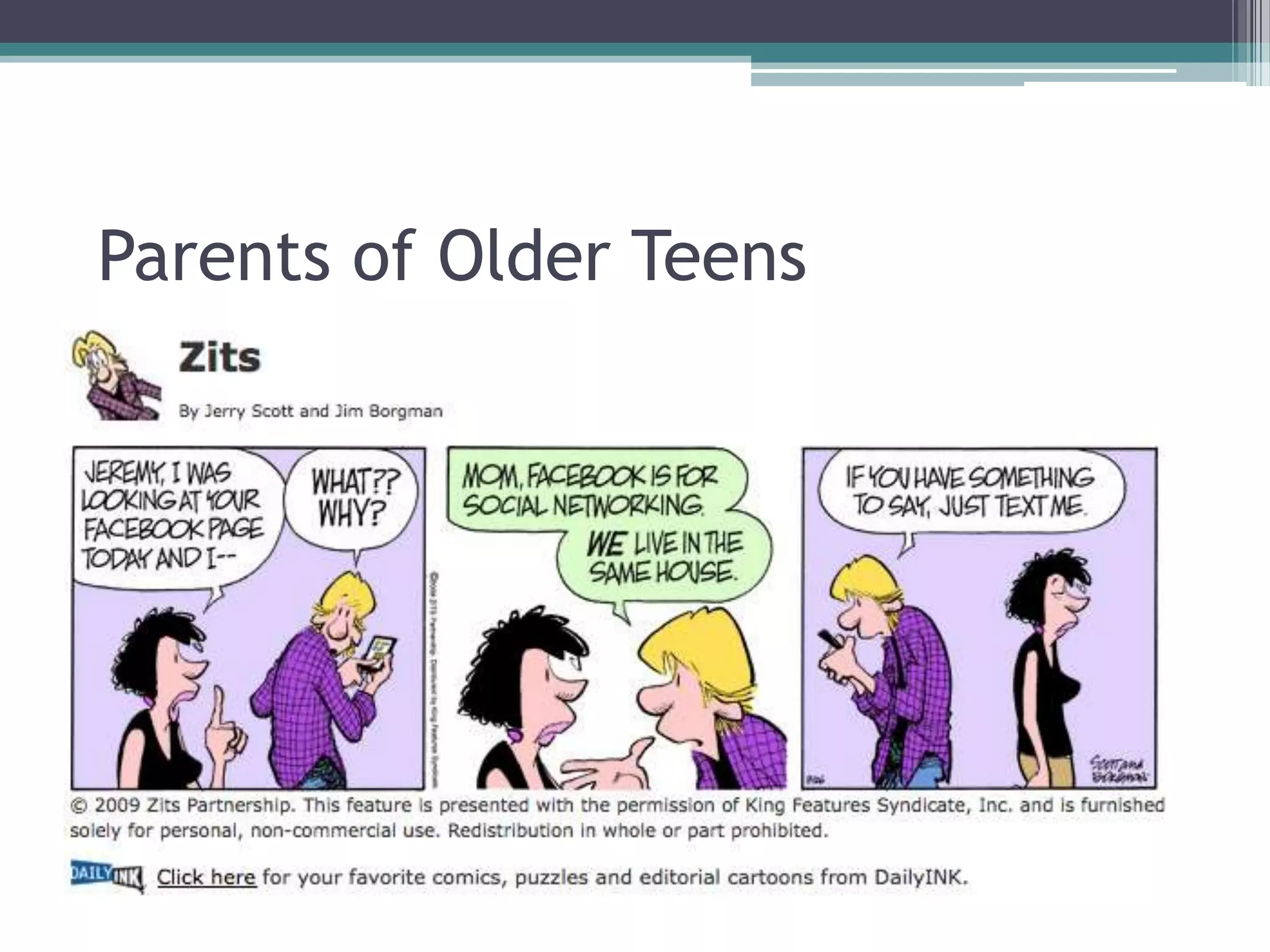
Parents of Older Teens
Parents of Older TeensAsk to see their sites—			they’re still under your roof.Reality check: If they’re posting photos & info they don’t want parents to see, they probably shouldn’t be posting it online in the first place.
Parents of Older TeensDiscuss Online ReputationPotential long-term consequences of inappropriate material on the internet: college admissions, future employment opportunities, etc…
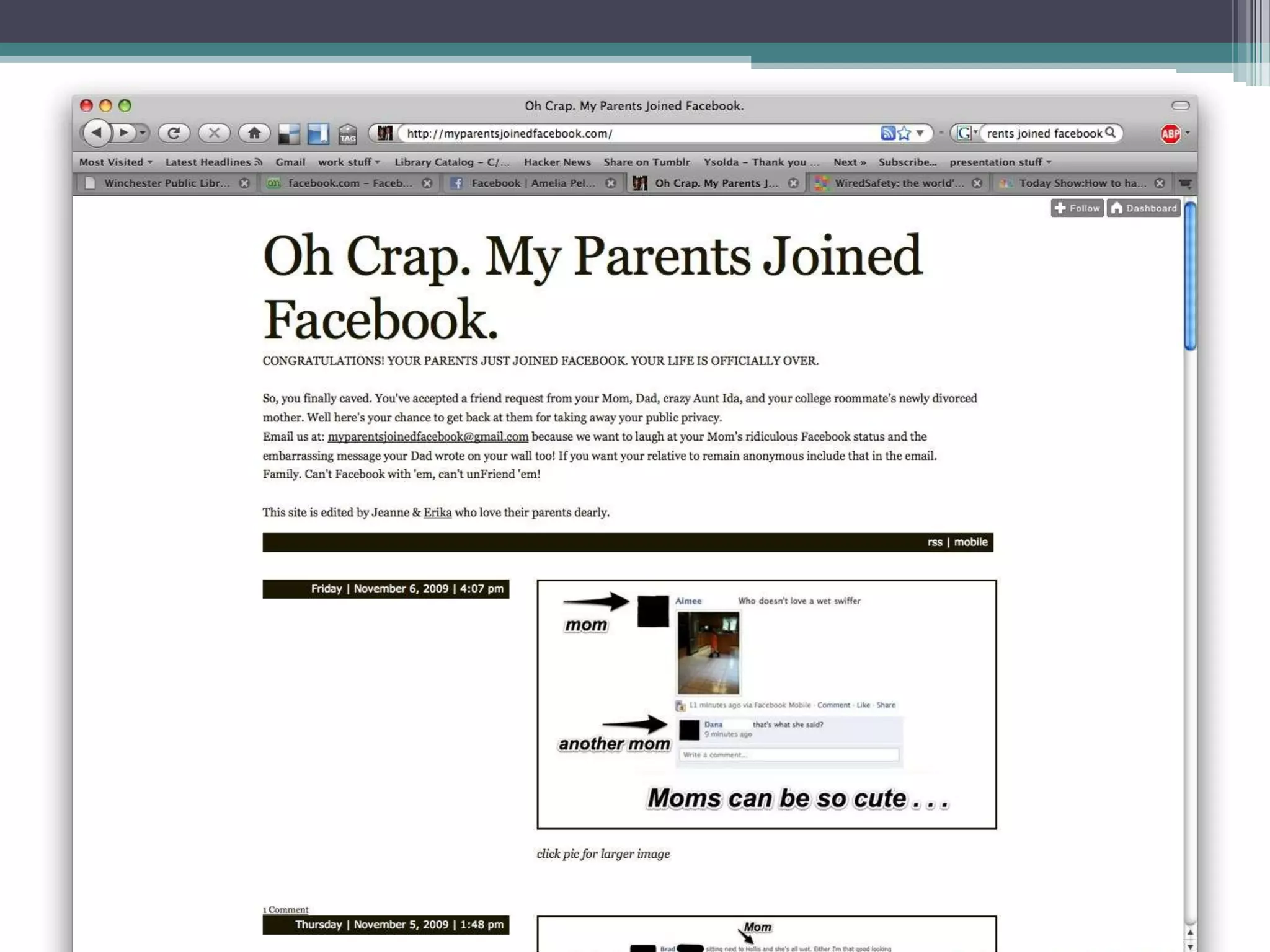
College and BeyondAlthough Facebook has gained popularity with older users over the last two years, many young people see the social web as “theirs.”Across our culture, we’re experiencing a lot of awkwardness and boundary issues.
Parental Control Options
Parental Control OptionsParental controls within Windows and Mac OSHome Network controls with Open DNSSpecial browsers for young childrenFiltering/Monitoring Software (?)

Facebook for Parents

  • 1.
    Facebook for Parents ParentingAcross Social MediaMonday, November 9thWinchester Public Library
  • 2.
    IntroductionHi! I’m AmeliaPeloquin and I work as a technology consultant for libraries, nonprofits and small businesses.My areas of focus include budget-friendly web design, training and support, social media marketing and project management.Find me at:TechWithoutWalls.com
  • 3.
    Please Note:For yourreference, this slide presentation, associated handouts & links are available here:http://facebook.techwithoutwalls.com
  • 4.
    Kids are ConnectedSocialmedia is omnipresent, and the majority of teens have an account on Facebook, MySpace, or Twitter.Teens are also spending lots of time texting and using the Internet with cell phones and other mobile devices (iPod touch, psp, etc.)
  • 5.
    Patterns of UseSource:Cox Communications May 2009 Teen Online & Wireless Safety Surveyhttp://www.cox.com/takecharge/safe_teens_2009/media/2009_teen_survey_internet_and_wireless_safety.pdf
  • 6.
  • 7.
    Age-Appropriate Internet UseMainstreamsocial sites like Facebook require users to be 13+ but it’s easy to lie about age.Many parenting experts think teens are too young to use these sites safely—parental guidance is recommended!Seek kid-friendly sites (Club Penguin, Webkins) for younger children.
  • 8.
    Objectionable Content +PeersHate groupsPro-anorexia groups
  • 9.
    Cyberbullying:abusive behavior amongpeers that is perpetrated through electronic means (cell phones, social network sites, Instant Messenger, etc.)
  • 10.
    Sexting & Otherinappropriate photos/videos (i.e. drug/alcohol use)Source: Cox Communications May 2009 Teen Online & Wireless Safety Surveyhttp://www.cox.com/takecharge/safe_teens_2009/media/2009_teen_survey_internet_and_wireless_safety.pdf
  • 11.
    Predators & OtherCreepsCan be overblown in the media, but stranger danger is real.(That being said, kids are more likely to be bullied/harassed online by someone they know in person.)
  • 12.
    Phishing, ID Theft,Viruses/SpywareMany kids don’t know the basics about protecting your computer, email & other accounts.It can be easy to get tricked into giving up personal info.Most ads for “free” music downloads, ringtones, personality tests, etc are scams.
  • 13.
  • 14.
  • 15.
    What is Cyberbullying?Name-calling,threatening language & other verbal harassment
  • 16.
  • 17.
  • 18.
  • 19.
    Can involve trickery,exclusion, impersonationCyberbullying is commonplace.Source: Cox Communications May 2009 Teen Online & Wireless Safety Surveyhttp://www.cox.com/takecharge/safe_teens_2009/media/2009_teen_survey_internet_and_wireless_safety.pdf
  • 20.
    Examples of CyberbullyingMakingor joining a Facebook group about someone
  • 21.
    Creating a fakeaccount online to impersonate/ridicule a peer
  • 22.
    Creating or forwardinga YouTube video about someone
  • 23.
    Sending threatening messagesover IM, text messages, email or on social sites like Facebook/MySpace/TwitterVictims & Perpetrators Often OverlapSource: Cox Communications May 2009 Teen Online & Wireless Safety Surveyhttp://www.cox.com/takecharge/safe_teens_2009/media/2009_teen_survey_internet_and_wireless_safety.pdf
  • 24.
    Stop it beforeit startsTalk to your child about ethical and responsible online behaviorSet expectations for appropriate use of Internet & mobile devicesHelp your child recognize harassment and know what to do if victimized by peers online
  • 25.
    Know how toaddress the issueKnow how to block cyberbullies on Facebook/MySpace/Twitter (see “Locking it Down” handout)Know how to report abusive content on social networking sites and photo/video sharing sitesConsider talking to teachers and school administrators.
  • 26.
  • 27.
    General Advice forAll AgesUnderstand what kids are doing onlineKnow the risks and decide what’s appropriateCommunicate your expectations with your childBe present!
  • 28.
    Parents of YoungChildrenTalk about basic online safetyDon’t talk to strangers onlineDon’t share passwords with anyone except parentsDon’t share personal info like address, phone number, or name of school
  • 29.
    Parents of YoungChildrenCreate a “fenced-in” online spaceUse web browsers designed specifically for kidsLimit social networking to age-appropriate sites like Club Penguin or Webkinz
  • 30.
    Parents of YoungChildrenActively supervise your child’s Internet useIf you can’t sit and supervise, consider parental control options:OS-based parental controlsFiltering home network traffic with Open DNSFiltering/monitoring software options
  • 31.
    Parents of MiddleSchoolersReview Internet Safety basicsSet specific guidelines and rulesDon’t fill out forms from ads; “free” offers are usually scamsPeer-to-peer software like Limewire generally leads to spyware and viruses
  • 32.
    Parents of MiddleSchoolersOn social sites like Facebook and MySpaceNo Strangers & don’t share personal infoSet strict privacy settings! The default privacy settings on these sites are not private at all.Be a part of their online social networkKnow how to block harassing users & report abusive/inappropriate material
  • 33.
    Discuss public vs.private and consequences of inappropriate useDespite privacy controls, nothing posted online is ever really privateEmails/IMs can be cut and pastedEmbarrassing/Inappropriate photos and video can be easily forwarded to other people
  • 34.
    Talk about CyberbullyingKnowhow to recognize and respond to incidents of cyberbullyingBlock users & report abuseDon’t retaliatePromote responsible technology useTalk about ethical and responsible online behaviorSet ground rules and expectations
  • 35.
  • 36.
    Parents of OlderTeensAsk to see their sites— they’re still under your roof.Reality check: If they’re posting photos & info they don’t want parents to see, they probably shouldn’t be posting it online in the first place.
  • 37.
    Parents of OlderTeensDiscuss Online ReputationPotential long-term consequences of inappropriate material on the internet: college admissions, future employment opportunities, etc…
  • 38.
    College and BeyondAlthoughFacebook has gained popularity with older users over the last two years, many young people see the social web as “theirs.”Across our culture, we’re experiencing a lot of awkwardness and boundary issues.
  • 40.
  • 41.
    Parental Control OptionsParentalcontrols within Windows and Mac OSHome Network controls with Open DNSSpecial browsers for young childrenFiltering/Monitoring Software (?)
  • 42.
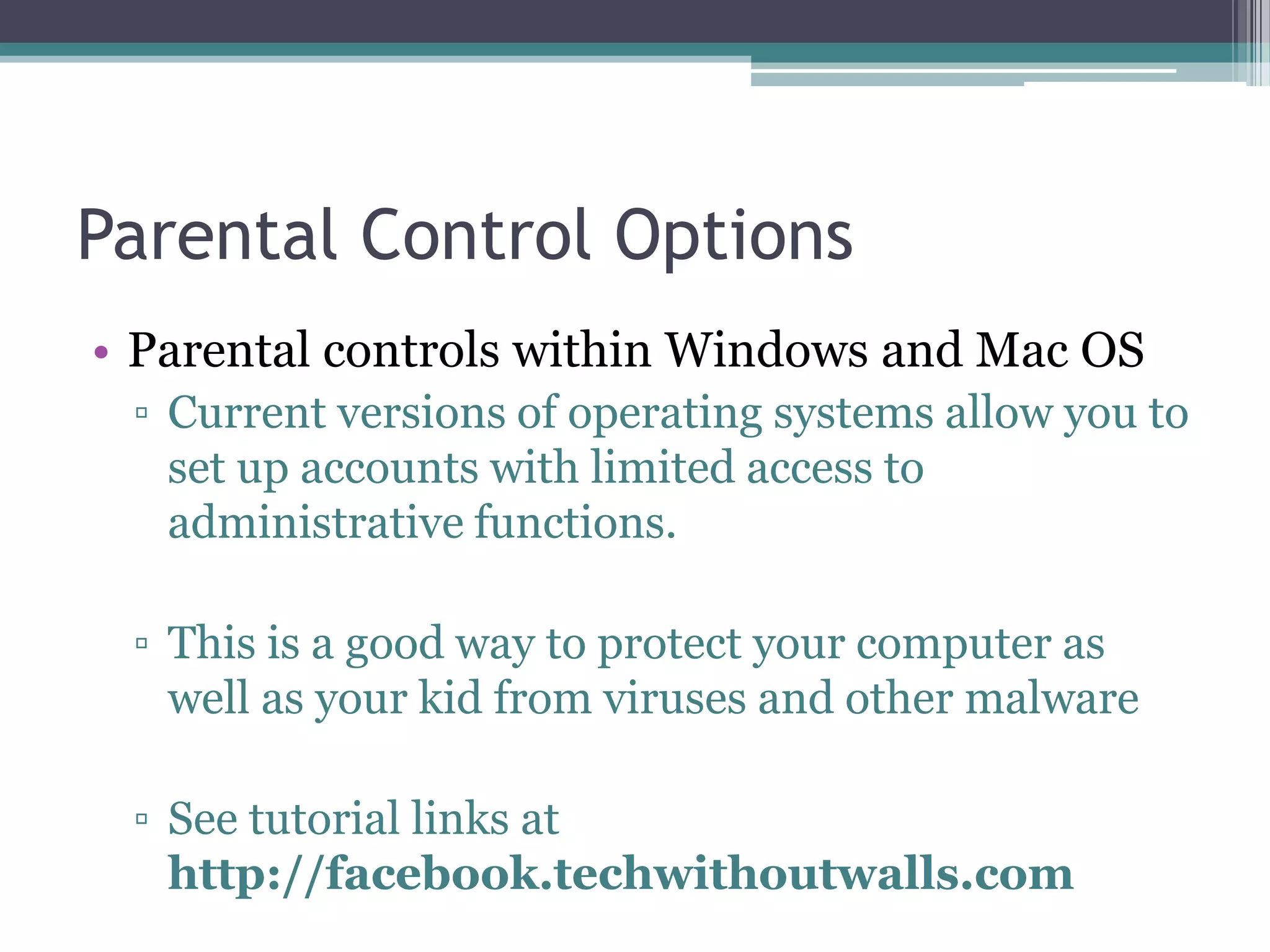
    Parental Control OptionsParentalcontrols within Windows and Mac OSCurrent versions of operating systems allow you to set up accounts with limited access to administrative functions.This is a good way to protect your computer as well as your kid from viruses and other malwareSee tutorial links at http://facebook.techwithoutwalls.com
  • 43.
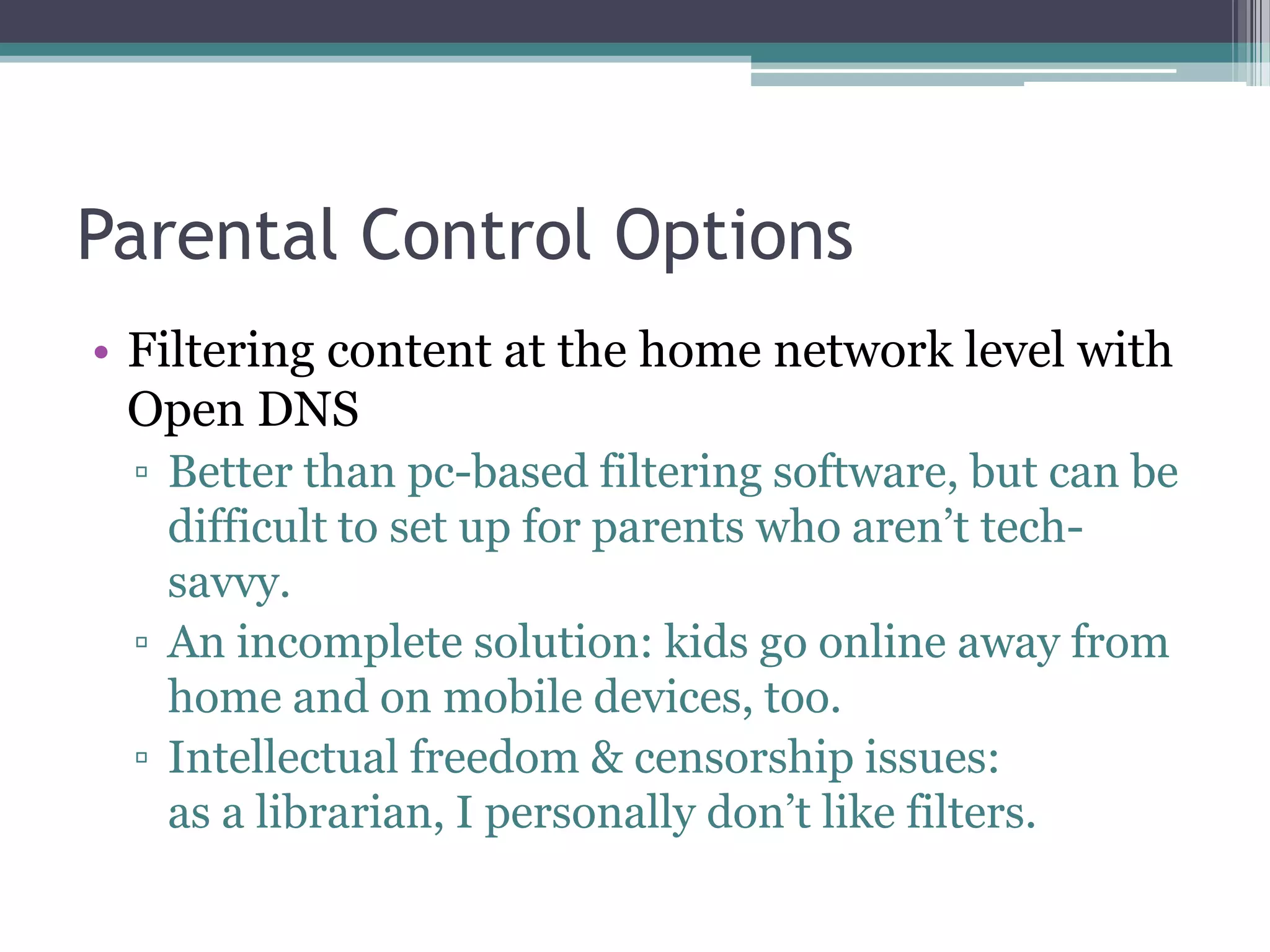
    Parental Control OptionsFilteringcontent at the home network level with Open DNSBetter than pc-based filtering software, but can be difficult to set up for parents who aren’t tech-savvy.An incomplete solution: kids go online away from home and on mobile devices, too.Intellectual freedom & censorship issues: as a librarian, I personally don’t like filters.
  • 44.
    Parental Control OptionsPC-BasedFiltering & Monitoring SoftwareGood to consider if there’s been inappropriate behavior & repeated violations of trustCan be ProblematicKids use the Internet away from home + on mobilesCan block access to legitimate sitesTech-savvy teens can circumvent itUsing spy software can be detrimental to your relationship with your teen
  • 45.
    In ConclusionEducate yourselfas best as you can.Decide what you consider age-appropriate + set limits/boundaries accordingly.Be present and involved.Find what works for your family.
  • 46.
    Questions/Comments? Feedback?I’d loveto know what you think of this workshop!Please fill out the (brief!) feedback survey athttp://facebook.techwithoutwalls.comor email me at:amelia@techwithoutwalls.com