Extracting text from
PDF
How far does the rabbit hole go?
Kaz Yoshikawa

kaz@digitallynx.com
May 2016
How to extract text
from PDF on iOS?
🤔
I know some say 

"extracting text from PDF is really hard"

Just exaggerated, isn't it?
References
References
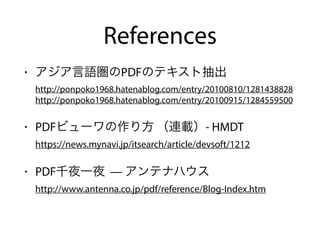
• アジア言語圏のPDFのテキスト抽出

http://ponpoko1968.hatenablog.com/entry/20100810/1281438828

http://ponpoko1968.hatenablog.com/entry/20100915/1284559500
• PDFビューワの作り方 (連載)- HMDT

https://news.mynavi.jp/itsearch/article/devsoft/1212
• PDF千夜一夜 — アンテナハウス

http://www.antenna.co.jp/pdf/reference/Blog-Index.htm
References
• PDFKitten

https://github.com/KurtCode/PDFKitten
What is hard? Really?
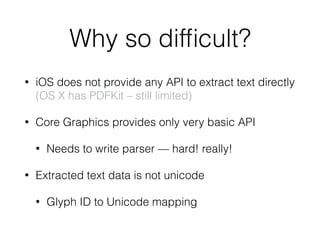
Why so difficult?
• iOS does not provide any API to extract text directly

(OS X has PDFKit – still limited)
• Core Graphics provides only very basic API
• Needs to write parser — hard! really!
• Extracted text data is not unicode
• Glyph ID to Unicode mapping
Understanding PDF
Structure
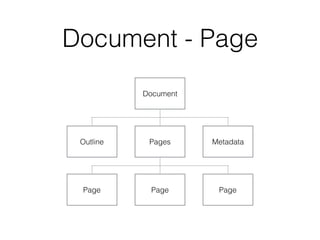
Document - Page
Outline Pages
Document
Metadata
PagePage Page
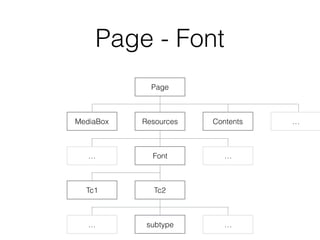
Page - Font
MediaBox Resources
Page
Contents
… Font …
Tc1 Tc2
…
subtype… …
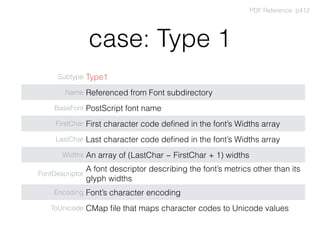
case: Type 1
Subtype Type1
Name Referenced from Font subdirectory
BaseFont PostScript font name
FirstChar First character code defined in the font’s Widths array
LastChar Last character code defined in the font’s Widths array
Widths An array of (LastChar − FirstChar + 1) widths
FontDescriptor
A font descriptor describing the font’s metrics other than its
glyph widths
Encoding Font’s character encoding
ToUnicode CMap file that maps character codes to Unicode values
PDF Reference: p412
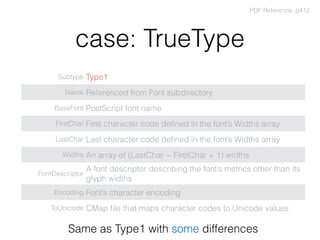
case: TrueType
Subtype Type1
Name Referenced from Font subdirectory
BaseFont PostScript font name
FirstChar First character code defined in the font’s Widths array
LastChar Last character code defined in the font’s Widths array
Widths An array of (LastChar − FirstChar + 1) widths
FontDescriptor
A font descriptor describing the font’s metrics other than its
glyph widths
Encoding Font’s character encoding
ToUnicode CMap file that maps character codes to Unicode values
PDF Reference: p412
Same as Type1 with some differences
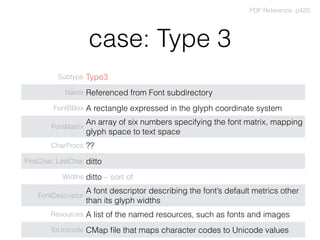
case: Type 3
Subtype Type3
Name Referenced from Font subdirectory
FontBBox A rectangle expressed in the glyph coordinate system
FontMatrix
An array of six numbers specifying the font matrix, mapping
glyph space to text space
CharProcs ??
FirstChar, LastChar ditto
Widths ditto – sort of
FontDescriptor
A font descriptor describing the font’s default metrics other
than its glyph widths
Resources A list of the named resources, such as fonts and images
ToUnicode CMap file that maps character codes to Unicode values
PDF Reference: p420
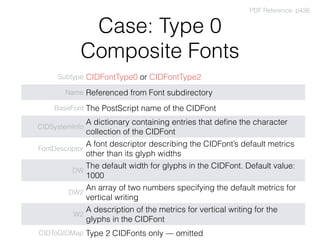
Case: Type 0 

Composite Fonts
Subtype CIDFontType0 or CIDFontType2
Name Referenced from Font subdirectory
BaseFont The PostScript name of the CIDFont
CIDSystemInfo
A dictionary containing entries that define the character
collection of the CIDFont
FontDescriptor
A font descriptor describing the CIDFont’s default metrics
other than its glyph widths
DW
The default width for glyphs in the CIDFont. Default value:
1000
DW2
An array of two numbers specifying the default metrics for
vertical writing
W2
A description of the metrics for vertical writing for the
glyphs in the CIDFont
CIDToGIDMap Type 2 CIDFonts only — omitted
PDF Reference: p436
😏
OK, PDF structure is pretty complex.
Is there any tools?
Tools
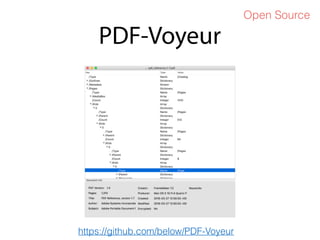
PDF-Voyeur
Open Source
https://github.com/below/PDF-Voyeur
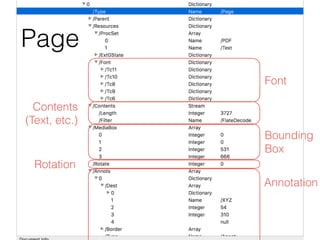
Font
Contents

(Text, etc.)
Bounding

Box
Rotation
Annotation
Page
Understanding how
PDFs are rendered?
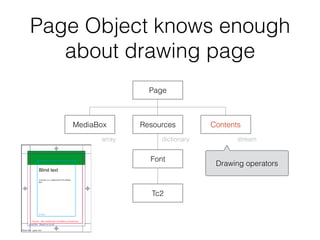
Page Object knows enough
about drawing page
MediaBox Resources
Page
Contents
Font
Tc2
dictionaryarray stream
Drawing operators
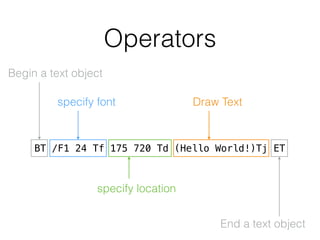
Operators
Begin a text object
BT /F1 24 Tf 175 720 Td (Hello World!)Tj ET
End a text object
specify font
specify location
Draw Text
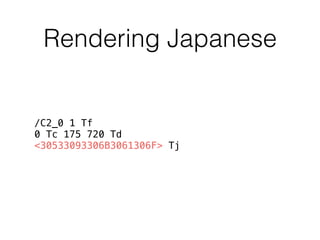
Rendering Japanese
/C2_0 1 Tf
0 Tc 175 720 Td 

<30533093306B3061306F> Tj
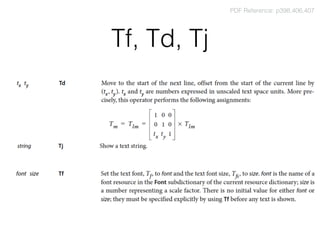
Tf, Td, Tj
PDF Reference: p398,406,407
Decoding Text
case 1

Has 'ToUnicode' entry
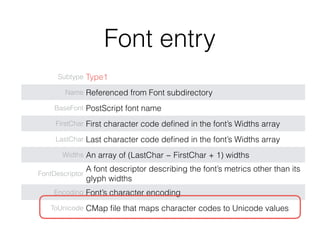
Font entry
Subtype Type1
Name Referenced from Font subdirectory
BaseFont PostScript font name
FirstChar First character code defined in the font’s Widths array
LastChar Last character code defined in the font’s Widths array
Widths An array of (LastChar − FirstChar + 1) widths
FontDescriptor
A font descriptor describing the font’s metrics other than its
glyph widths
Encoding Font’s character encoding
ToUnicode CMap file that maps character codes to Unicode values
Parsing CMap
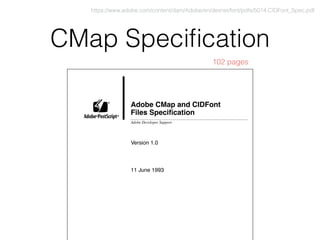
CMap Specification
Adobe CMap and CIDFont
Files Specification
Version 1.0
11 June 1993
Adobe Developer Support
®
® ®
https://www.adobe.com/content/dam/Adobe/en/devnet/font/pdfs/5014.CIDFont_Spec.pdf
102 pages
CMap example
%!PS-Adobe-3.0 Resource-CMap
%%Version: 1
/CIDInit /ProcSet findresource begin
12 dict begin
begincmap
/CIDSystemInfo 3 dict dup begin
/Registry (Adobe) def
/Ordering (Japan1) def
/Supplement 0 def
end def
/CMapName /83pv-RKSJ-H def
/CMapVersion 1 def
/CMapType 0 def
/UIDOffset 0 def
/XUID [1 10 25324] def
/WMode 0 def
4 begincodespacerange
<00> <80>
<8140> <9ffc>
<a0> <df>
<e040> <fbfc>
endcodespacerange
1 beginnotdefrange
<00> <1f> 1
endnotdefrange
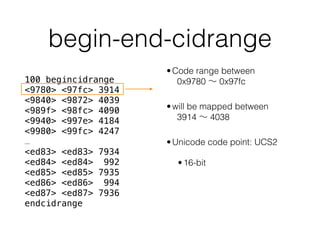
100 begincidrange
<9780> <97fc> 3914
<9840> <9872> 4039
<989f> <98fc> 4090
<9940> <997e> 4184
<9980> <99fc> 4247
<< 90 ranges missing >>
<ed83> <ed83> 7934
<ed84> <ed84> 992
<ed85> <ed85> 7935
<ed86> <ed86> 994
<ed87> <ed87> 7936
endcidrange
17 begincidrange
<ed88> <ed8d> 996
<ed8e> <ed8e> 7937
<< 13 ranges missing >>
<ee9a> <ee9a> 768
<ee9b> <ee9c> 7631
endcidrange
endcmap
CMapName currentdict /CMap defineresource pop
end
end
%%EndResource
%%EOF
←Adobe Japan 1-0
←Horizontal/Vertical
←CID Range
←CID Range
begin-end-cidrange
100 begincidrange
<9780> <97fc> 3914
<9840> <9872> 4039
<989f> <98fc> 4090
<9940> <997e> 4184
<9980> <99fc> 4247
…
<ed83> <ed83> 7934
<ed84> <ed84> 992
<ed85> <ed85> 7935
<ed86> <ed86> 994
<ed87> <ed87> 7936
endcidrange
•Code range between 

  0x9780 ∼ 0x97fc
•will be mapped between

  3914 ∼ 4038
•Unicode code point: UCS2
•16-bit
Some others
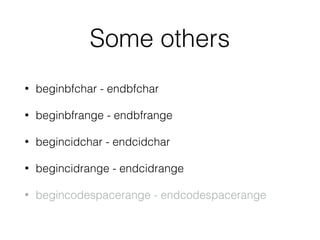
• beginbfchar - endbfchar
• beginbfrange - endbfrange
• begincidchar - endcidchar
• begincidrange - endcidrange
• begincodespacerange - endcodespacerange
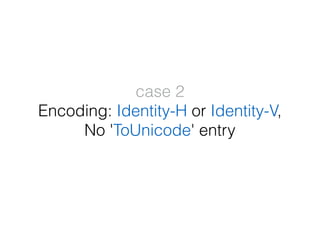
case 2

Encoding: Identity-H or Identity-V,

No 'ToUnicode' entry

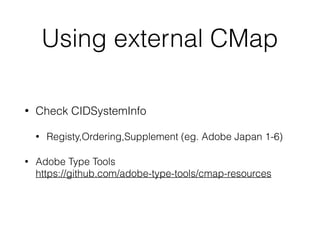
Using external CMap
• Check CIDSystemInfo
• Registy,Ordering,Supplement (eg. Adobe Japan 1-6)
• Adobe Type Tools

https://github.com/adobe-type-tools/cmap-resources
Adobe Japan 1-6
%!PS-Adobe-3.0 Resource-CMap
/CIDInit /ProcSet findresource begin
12 dict begin
begincmap
/CIDSystemInfo 3 dict dup begin
/Registry (Adobe) def
/Ordering (Japan1) def
/Supplement 6 def
end def
/CMapName /Adobe-Japan1-6 def
/CMapVersion 1.005 def
/CMapType 1 def
/XUID [1 10 25614] def
/WMode 0 def
/CIDCount 23058 def
1 begincodespacerange
<0000> <5AFF>
endcodespacerange
91 begincidrange
<0000> <00ff> 0
<0100> <01ff> 256
<0200> <02ff> 512
<0300> <03ff> 768
<0400> <04ff> 1024
<0500> <05ff> 1280
<0600> <06ff> 1536
<0700> <07ff> 1792
<0800> <08ff> 2048
<0900> <09ff> 2304
…
<5300> <53ff> 21248
<5400> <54ff> 21504
<5500> <55ff> 21760
<5600> <56ff> 22016
<5700> <57ff> 22272
<5800> <58ff> 22528
<5900> <59ff> 22784
<5a00> <5a11> 23040
endcidrange
endcmap
CMapName currentdict /CMap defineresource
pop
end
end
https://github.com/adobe-type-tools/cmap-resources/blob/master/cmapresources_japan1-6/CMap/Adobe-Japan1-6
Be careful, character code may not be Unicode.
case 3

No 'ToUnicode' entry,

Encoding: "WinAnsiEncoding" etc.
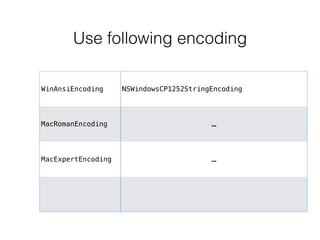
Use following encoding
WinAnsiEncoding NSWindowsCP1252StringEncoding
MacRomanEncoding …
MacExpertEncoding …
Enough Talk…

Let's code
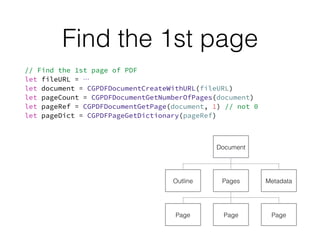
Find the 1st page


Outline Pages
Document
Metadata
PagePage Page
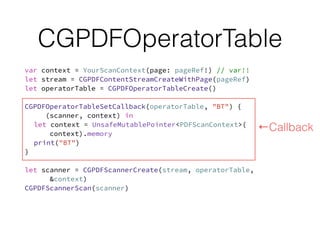
CGPDFOperatorTable


←Callback
Some Tips
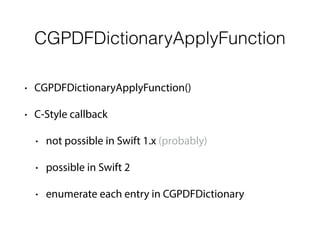
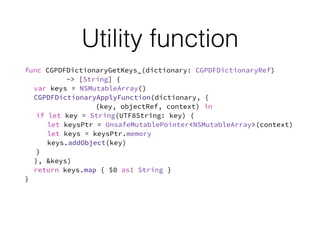
CGPDFDictionaryApplyFunction
• CGPDFDictionaryApplyFunction()
• C-Style callback
• not possible in Swift 1.x (probably)
• possible in Swift 2
• enumerate each entry in CGPDFDictionary
Utility function
DEMO
Wrap up
• Understanding PDF Structure
• Too many encodings — hard to find test data
• Too complex –– documentation is not always clear
• Yah, Parsing PDF is hard, really…
Thank You
Kaz Yoshikawa
kaz@digitallynx.com

Extracting text from PDF (iOS)

  • 1.
    Extracting text from PDF Howfar does the rabbit hole go? Kaz Yoshikawa
 kaz@digitallynx.com May 2016
  • 2.
    How to extracttext from PDF on iOS?
  • 3.
    🤔 I know somesay 
 "extracting text from PDF is really hard"
 Just exaggerated, isn't it?
  • 4.
  • 5.
    References • アジア言語圏のPDFのテキスト抽出
 http://ponpoko1968.hatenablog.com/entry/20100810/1281438828
 http://ponpoko1968.hatenablog.com/entry/20100915/1284559500 • PDFビューワの作り方(連載)- HMDT
 https://news.mynavi.jp/itsearch/article/devsoft/1212 • PDF千夜一夜 — アンテナハウス
 http://www.antenna.co.jp/pdf/reference/Blog-Index.htm
  • 6.
  • 7.
  • 8.
    Why so difficult? •iOS does not provide any API to extract text directly
 (OS X has PDFKit – still limited) • Core Graphics provides only very basic API • Needs to write parser — hard! really! • Extracted text data is not unicode • Glyph ID to Unicode mapping
  • 9.
  • 10.
    Document - Page OutlinePages Document Metadata PagePage Page
  • 11.
    Page - Font MediaBoxResources Page Contents … Font … Tc1 Tc2 … subtype… …
  • 12.
    case: Type 1 SubtypeType1 Name Referenced from Font subdirectory BaseFont PostScript font name FirstChar First character code defined in the font’s Widths array LastChar Last character code defined in the font’s Widths array Widths An array of (LastChar − FirstChar + 1) widths FontDescriptor A font descriptor describing the font’s metrics other than its glyph widths Encoding Font’s character encoding ToUnicode CMap file that maps character codes to Unicode values PDF Reference: p412
  • 13.
    case: TrueType Subtype Type1 NameReferenced from Font subdirectory BaseFont PostScript font name FirstChar First character code defined in the font’s Widths array LastChar Last character code defined in the font’s Widths array Widths An array of (LastChar − FirstChar + 1) widths FontDescriptor A font descriptor describing the font’s metrics other than its glyph widths Encoding Font’s character encoding ToUnicode CMap file that maps character codes to Unicode values PDF Reference: p412 Same as Type1 with some differences
  • 14.
    case: Type 3 SubtypeType3 Name Referenced from Font subdirectory FontBBox A rectangle expressed in the glyph coordinate system FontMatrix An array of six numbers specifying the font matrix, mapping glyph space to text space CharProcs ?? FirstChar, LastChar ditto Widths ditto – sort of FontDescriptor A font descriptor describing the font’s default metrics other than its glyph widths Resources A list of the named resources, such as fonts and images ToUnicode CMap file that maps character codes to Unicode values PDF Reference: p420
  • 15.
    Case: Type 0
 Composite Fonts Subtype CIDFontType0 or CIDFontType2 Name Referenced from Font subdirectory BaseFont The PostScript name of the CIDFont CIDSystemInfo A dictionary containing entries that define the character collection of the CIDFont FontDescriptor A font descriptor describing the CIDFont’s default metrics other than its glyph widths DW The default width for glyphs in the CIDFont. Default value: 1000 DW2 An array of two numbers specifying the default metrics for vertical writing W2 A description of the metrics for vertical writing for the glyphs in the CIDFont CIDToGIDMap Type 2 CIDFonts only — omitted PDF Reference: p436
  • 16.
    😏 OK, PDF structureis pretty complex. Is there any tools?
  • 17.
  • 18.
  • 19.
  • 20.
  • 21.
    Page Object knowsenough about drawing page MediaBox Resources Page Contents Font Tc2 dictionaryarray stream Drawing operators
  • 22.
    Operators Begin a textobject BT /F1 24 Tf 175 720 Td (Hello World!)Tj ET End a text object specify font specify location Draw Text
  • 23.
    Rendering Japanese /C2_0 1Tf 0 Tc 175 720 Td 
 <30533093306B3061306F> Tj
  • 24.
    Tf, Td, Tj PDFReference: p398,406,407
  • 25.
  • 26.
  • 27.
    Font entry Subtype Type1 NameReferenced from Font subdirectory BaseFont PostScript font name FirstChar First character code defined in the font’s Widths array LastChar Last character code defined in the font’s Widths array Widths An array of (LastChar − FirstChar + 1) widths FontDescriptor A font descriptor describing the font’s metrics other than its glyph widths Encoding Font’s character encoding ToUnicode CMap file that maps character codes to Unicode values
  • 28.
  • 29.
    CMap Specification Adobe CMapand CIDFont Files Specification Version 1.0 11 June 1993 Adobe Developer Support ® ® ® https://www.adobe.com/content/dam/Adobe/en/devnet/font/pdfs/5014.CIDFont_Spec.pdf 102 pages
  • 30.
    CMap example %!PS-Adobe-3.0 Resource-CMap %%Version:1 /CIDInit /ProcSet findresource begin 12 dict begin begincmap /CIDSystemInfo 3 dict dup begin /Registry (Adobe) def /Ordering (Japan1) def /Supplement 0 def end def /CMapName /83pv-RKSJ-H def /CMapVersion 1 def /CMapType 0 def /UIDOffset 0 def /XUID [1 10 25324] def /WMode 0 def 4 begincodespacerange <00> <80> <8140> <9ffc> <a0> <df> <e040> <fbfc> endcodespacerange 1 beginnotdefrange <00> <1f> 1 endnotdefrange 100 begincidrange <9780> <97fc> 3914 <9840> <9872> 4039 <989f> <98fc> 4090 <9940> <997e> 4184 <9980> <99fc> 4247 << 90 ranges missing >> <ed83> <ed83> 7934 <ed84> <ed84> 992 <ed85> <ed85> 7935 <ed86> <ed86> 994 <ed87> <ed87> 7936 endcidrange 17 begincidrange <ed88> <ed8d> 996 <ed8e> <ed8e> 7937 << 13 ranges missing >> <ee9a> <ee9a> 768 <ee9b> <ee9c> 7631 endcidrange endcmap CMapName currentdict /CMap defineresource pop end end %%EndResource %%EOF ←Adobe Japan 1-0 ←Horizontal/Vertical ←CID Range ←CID Range
  • 31.
    begin-end-cidrange 100 begincidrange <9780> <97fc>3914 <9840> <9872> 4039 <989f> <98fc> 4090 <9940> <997e> 4184 <9980> <99fc> 4247 … <ed83> <ed83> 7934 <ed84> <ed84> 992 <ed85> <ed85> 7935 <ed86> <ed86> 994 <ed87> <ed87> 7936 endcidrange •Code range between 
   0x9780 ∼ 0x97fc •will be mapped between
   3914 ∼ 4038 •Unicode code point: UCS2 •16-bit
  • 32.
    Some others • beginbfchar- endbfchar • beginbfrange - endbfrange • begincidchar - endcidchar • begincidrange - endcidrange • begincodespacerange - endcodespacerange
  • 33.
    case 2
 Encoding: Identity-Hor Identity-V,
 No 'ToUnicode' entry

  • 34.
    Using external CMap •Check CIDSystemInfo • Registy,Ordering,Supplement (eg. Adobe Japan 1-6) • Adobe Type Tools
 https://github.com/adobe-type-tools/cmap-resources
  • 35.
    Adobe Japan 1-6 %!PS-Adobe-3.0Resource-CMap /CIDInit /ProcSet findresource begin 12 dict begin begincmap /CIDSystemInfo 3 dict dup begin /Registry (Adobe) def /Ordering (Japan1) def /Supplement 6 def end def /CMapName /Adobe-Japan1-6 def /CMapVersion 1.005 def /CMapType 1 def /XUID [1 10 25614] def /WMode 0 def /CIDCount 23058 def 1 begincodespacerange <0000> <5AFF> endcodespacerange 91 begincidrange <0000> <00ff> 0 <0100> <01ff> 256 <0200> <02ff> 512 <0300> <03ff> 768 <0400> <04ff> 1024 <0500> <05ff> 1280 <0600> <06ff> 1536 <0700> <07ff> 1792 <0800> <08ff> 2048 <0900> <09ff> 2304 … <5300> <53ff> 21248 <5400> <54ff> 21504 <5500> <55ff> 21760 <5600> <56ff> 22016 <5700> <57ff> 22272 <5800> <58ff> 22528 <5900> <59ff> 22784 <5a00> <5a11> 23040 endcidrange endcmap CMapName currentdict /CMap defineresource pop end end https://github.com/adobe-type-tools/cmap-resources/blob/master/cmapresources_japan1-6/CMap/Adobe-Japan1-6 Be careful, character code may not be Unicode.
  • 36.
    case 3
 No 'ToUnicode'entry,
 Encoding: "WinAnsiEncoding" etc.
  • 37.
    Use following encoding WinAnsiEncodingNSWindowsCP1252StringEncoding MacRomanEncoding … MacExpertEncoding …
  • 38.
  • 39.
    Find the 1stpage 
 
 Outline Pages Document Metadata PagePage Page
  • 40.
  • 41.
  • 42.
    CGPDFDictionaryApplyFunction • CGPDFDictionaryApplyFunction() • C-Stylecallback • not possible in Swift 1.x (probably) • possible in Swift 2 • enumerate each entry in CGPDFDictionary
  • 43.
  • 44.
  • 45.
    Wrap up • UnderstandingPDF Structure • Too many encodings — hard to find test data • Too complex –– documentation is not always clear • Yah, Parsing PDF is hard, really…
  • 46.