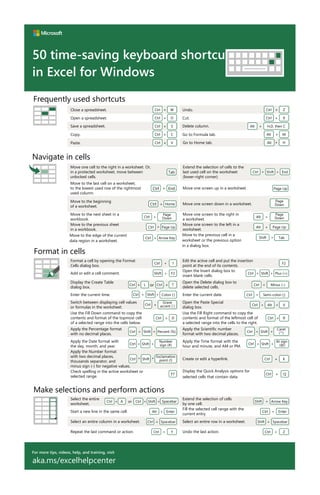
For more tips, videos, help, and training, visit
aka.ms/excelhelpcenter
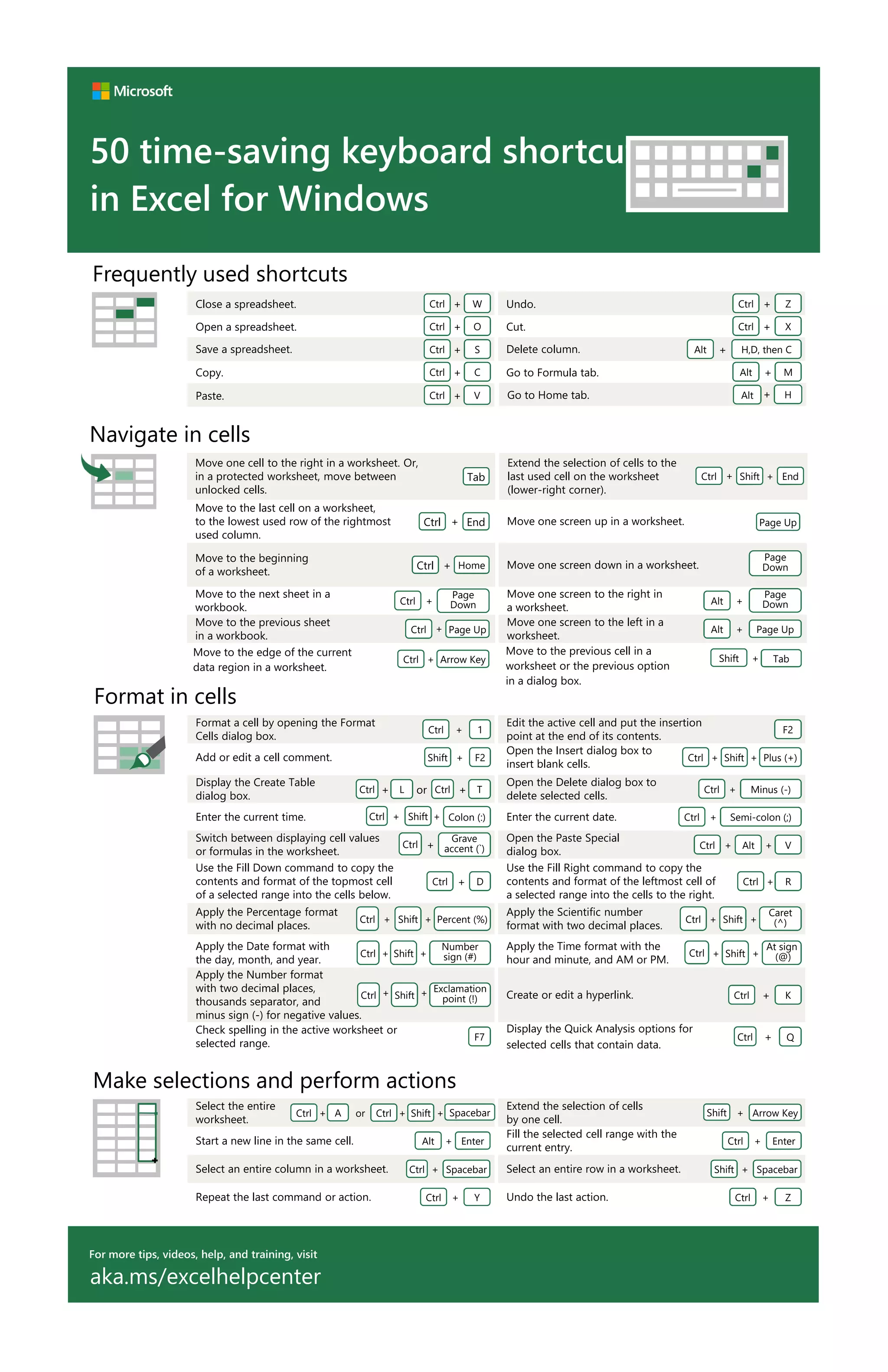
50 time-saving keyboard shortcuts
in Excel for Windows
Navigate in cells
Move one screen down in a worksheet.
Move to the beginning
of a worksheet.
Page
Down
Home
+
Ctrl
Move one screen to the right in
a worksheet.
Move to the next sheet in a
workbook.
+
Alt
Page
Down
Page
Down
+
Ctrl
Extend the selection of cells to the
last used cell on the worksheet
(lower-right corner).
Move to the last cell on a worksheet,
to the lowest used row of the rightmost
used column.
Shift
+ End
+
Ctrl
End
+
Ctrl
Move one screen to the left in a
worksheet.
Move one screen up in a worksheet.
+
Alt Page Up
Page Up
Move to the previous sheet
in a workbook.
+
Ctrl Page Up
Move to the edge of the current
data region in a worksheet.
Move one cell to the right in a worksheet. Or,
in a protected worksheet, move between
unlocked cells.
+
Ctrl Arrow Key
Tab
Make selections and perform actions
Start a new line in the same cell. Enter
+
Alt
Fill the selected cell range with the
current entry.
Enter
+
Ctrl
Extend the selection of cells
by one cell.
Select the entire
worksheet.
+
Shift Arrow Key
or
A
+
Ctrl +
Ctrl Shift Spacebar
+
Select an entire column in a worksheet. Ctrl Spacebar
+ Select an entire row in a worksheet. Shift + Spacebar
Repeat the last command or action. Ctrl + Y Undo the last action. Ctrl + Z
Format in cells
Display the Create Table
dialog box.
L
+
Ctrl T
+
Ctrl
or
Format a cell by opening the Format
Cells dialog box.
Edit the active cell and put the insertion
point at the end of its contents.
1
+
Ctrl F2
Add or edit a cell comment. F2
+
Shift
Open the Insert dialog box to
insert blank cells.
+
Shift
+
Ctrl Plus (+)
Open the Delete dialog box to
delete selected cells.
+
Ctrl Minus (-)
Enter the current time. Colon (:)
+
Shift
+
Ctrl Enter the current date. +
Ctrl Semi-colon (;)
Switch between displaying cell values
or formulas in the worksheet.
Grave
accent (`)
+
Ctrl
Open the Paste Special
dialog box.
+
Ctrl +
Alt V
Use the Fill Down command to copy the
contents and format of the topmost cell
of a selected range into the cells below.
+
Ctrl D
Use the Fill Right command to copy the
contents and format of the leftmost cell of
a selected range into the cells to the right.
+
Ctrl R
Apply the Percentage format
with no decimal places.
Percent (%)
+
Shift
+
Ctrl
Apply the Scientific number
format with two decimal places.
+
Shift
+
Ctrl
Caret
(^)
Apply the Date format with
the day, month, and year.
Number
sign (#)
+
Shift
+
Ctrl
Apply the Time format with the
hour and minute, and AM or PM.
+
Shift
+
Ctrl
At sign
(@)
Apply the Number format
with two decimal places,
thousands separator, and
minus sign (-) for negative values.
Exclamation
point (!)
+
Shift
+
Ctrl Create or edit a hyperlink. +
Ctrl K
Check spelling in the active worksheet or
selected range.
F7
Display the Quick Analysis options for
selected cells that contain data.
+
Ctrl Q
Undo. Z
+
Ctrl
Close a spreadsheet. W
+
Ctrl
Cut. X
+
Ctrl
Open a spreadsheet. O
+
Ctrl
Delete column. H,D, then C
+
Alt
Save a spreadsheet. S
+
Ctrl
Go to Formula tab. M
+
Alt
Copy. C
+
Ctrl
Paste. V
+
Ctrl
Frequently used shortcuts
Go to Home tab. Alt + H
Move to the previous cell in a
worksheet or the previous option
in a dialog box.
+
Shift Tab

Excel%20basic%202 123

  • 1.
    For more tips,videos, help, and training, visit aka.ms/excelhelpcenter 50 time-saving keyboard shortcuts in Excel for Windows Navigate in cells Move one screen down in a worksheet. Move to the beginning of a worksheet. Page Down Home + Ctrl Move one screen to the right in a worksheet. Move to the next sheet in a workbook. + Alt Page Down Page Down + Ctrl Extend the selection of cells to the last used cell on the worksheet (lower-right corner). Move to the last cell on a worksheet, to the lowest used row of the rightmost used column. Shift + End + Ctrl End + Ctrl Move one screen to the left in a worksheet. Move one screen up in a worksheet. + Alt Page Up Page Up Move to the previous sheet in a workbook. + Ctrl Page Up Move to the edge of the current data region in a worksheet. Move one cell to the right in a worksheet. Or, in a protected worksheet, move between unlocked cells. + Ctrl Arrow Key Tab Make selections and perform actions Start a new line in the same cell. Enter + Alt Fill the selected cell range with the current entry. Enter + Ctrl Extend the selection of cells by one cell. Select the entire worksheet. + Shift Arrow Key or A + Ctrl + Ctrl Shift Spacebar + Select an entire column in a worksheet. Ctrl Spacebar + Select an entire row in a worksheet. Shift + Spacebar Repeat the last command or action. Ctrl + Y Undo the last action. Ctrl + Z Format in cells Display the Create Table dialog box. L + Ctrl T + Ctrl or Format a cell by opening the Format Cells dialog box. Edit the active cell and put the insertion point at the end of its contents. 1 + Ctrl F2 Add or edit a cell comment. F2 + Shift Open the Insert dialog box to insert blank cells. + Shift + Ctrl Plus (+) Open the Delete dialog box to delete selected cells. + Ctrl Minus (-) Enter the current time. Colon (:) + Shift + Ctrl Enter the current date. + Ctrl Semi-colon (;) Switch between displaying cell values or formulas in the worksheet. Grave accent (`) + Ctrl Open the Paste Special dialog box. + Ctrl + Alt V Use the Fill Down command to copy the contents and format of the topmost cell of a selected range into the cells below. + Ctrl D Use the Fill Right command to copy the contents and format of the leftmost cell of a selected range into the cells to the right. + Ctrl R Apply the Percentage format with no decimal places. Percent (%) + Shift + Ctrl Apply the Scientific number format with two decimal places. + Shift + Ctrl Caret (^) Apply the Date format with the day, month, and year. Number sign (#) + Shift + Ctrl Apply the Time format with the hour and minute, and AM or PM. + Shift + Ctrl At sign (@) Apply the Number format with two decimal places, thousands separator, and minus sign (-) for negative values. Exclamation point (!) + Shift + Ctrl Create or edit a hyperlink. + Ctrl K Check spelling in the active worksheet or selected range. F7 Display the Quick Analysis options for selected cells that contain data. + Ctrl Q Undo. Z + Ctrl Close a spreadsheet. W + Ctrl Cut. X + Ctrl Open a spreadsheet. O + Ctrl Delete column. H,D, then C + Alt Save a spreadsheet. S + Ctrl Go to Formula tab. M + Alt Copy. C + Ctrl Paste. V + Ctrl Frequently used shortcuts Go to Home tab. Alt + H Move to the previous cell in a worksheet or the previous option in a dialog box. + Shift Tab