Bertrand Drouvot









Oracle DBA since 1999
OCP 9i,10g,11g
Rac certified Expert
Exadata certified implementation specialist
Blogger since 2012
@bertranddrouvot
BasketBall fan








Some examples of R usage with the oracle
database
From a DBA point of view
Retrieve system statistics/wait events with
some AWR queries
Real time Data
Dashboard of the database activity




R installation
R programing
R studio (powerful and productive user
interface for R)




Because R is a powerful tool for statistical
analysis with graphing and plotting packages
built in.
Furthermore, R can connect to Oracle via a
JDBC package which makes importing data
very easy.


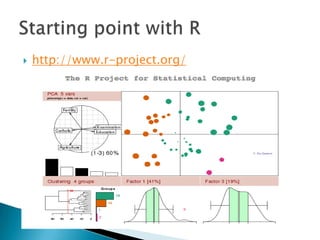
http://www.r-project.org/







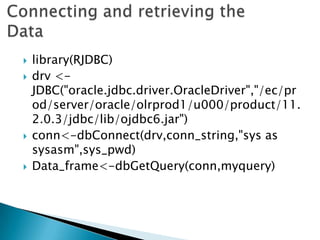
library(RJDBC)
drv <JDBC("oracle.jdbc.driver.OracleDriver","/ec/pr
od/server/oracle/olrprod1/u000/product/11.
2.0.3/jdbc/lib/ojdbc6.jar")
conn<-dbConnect(drv,conn_string,"sys as
sysasm",sys_pwd)
Data_frame<-dbGetQuery(conn,myquery)
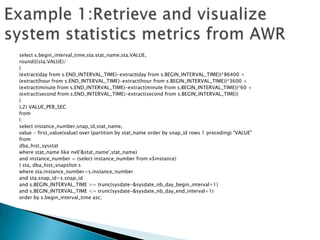
select s.begin_interval_time,sta.stat_name,sta.VALUE,
round(((sta.VALUE)/
(
(extract(day from s.END_INTERVAL_TIME)-extract(day from s.BEGIN_INTERVAL_TIME))*86400 +
(extract(hour from s.END_INTERVAL_TIME)-extract(hour from s.BEGIN_INTERVAL_TIME))*3600 +
(extract(minute from s.END_INTERVAL_TIME)-extract(minute from s.BEGIN_INTERVAL_TIME))*60 +
(extract(second from s.END_INTERVAL_TIME)-extract(second from s.BEGIN_INTERVAL_TIME))
)
),2) VALUE_PER_SEC
from
(
select instance_number,snap_id,stat_name,
value - first_value(value) over (partition by stat_name order by snap_id rows 1 preceding) "VALUE"
from
dba_hist_sysstat
where stat_name like nvl('&stat_name',stat_name)
and instance_number = (select instance_number from v$instance)
) sta, dba_hist_snapshot s
where sta.instance_number=s.instance_number
and sta.snap_id=s.snap_id
and s.BEGIN_INTERVAL_TIME >= trunc(sysdate-&sysdate_nb_day_begin_interval+1)
and s.BEGIN_INTERVAL_TIME <= trunc(sysdate-&sysdate_nb_day_end_interval+1)
order by s.begin_interval_time asc;










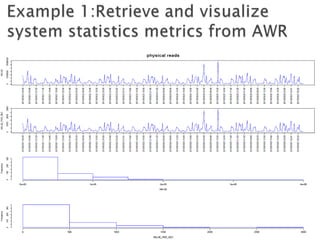
# Plot the 4 graphs
par(mfrow =c(4,1))
plot(sqstat[,'DATEEVT'],sqstat[,'VALUE'],type="l",col="blue"
,xaxt="n",main=stat_name,cex.main=2,xlab="",ylab="VAL
UE")
Axis(side=1,at=sqstat$DATEEVT,round(skip),format="%Y/
%m/%d %H:%M")
plot(sqstat[,'DATEEVT'],sqstat[,'VALUE_PER_SEC'],type="l",c
ol="blue",xaxt="n",xlab="",ylab="VALUE_PER_SEC")
Axis(side=1,at=sqstat$DATEEVT,round(skip),format="%Y/
%m/%d %H:%M")
hist(sqstat[,'VALUE'],xlab="VALUE",main=NULL,border="bl
ue")
hist(sqstat[,'VALUE_PER_SEC'],xlab="VALUE_PER_SEC",main
=NULL,border="blue")
select e.WAIT_CLASS,e.event_name,s.begin_interval_time,e.TOTAL_WAITS,e.TIME_WAITED_MS,e.TIME_WAITED_MS /
TOTAL_WAITS "MS_PER_WAIT"
from
(
select instance_number,snap_id,WAIT_CLASS,event_name,
total_waits - first_value(total_waits) over (partition by event_name order by snap_id rows 1 preceding)
"TOTAL_WAITS",
(time_waited_micro - first_value(time_waited_micro) over (partition by event_name order by snap_id rows 1
preceding))/1000 "TIME_WAITED_MS"
from
dba_hist_system_event
where
WAIT_CLASS like nvl('&WAIT_CLASS',WAIT_CLASS)
and event_name like nvl('&event_name',event_name)
and instance_number = (select instance_number from v$instance)
) e, dba_hist_snapshot s
where e.TIME_WAITED_MS > 0
and e.instance_number=s.instance_number
and e.snap_id=s.snap_id
and s.BEGIN_INTERVAL_TIME >= trunc(sysdate-&sysdate_nb_day_begin_interval+1)
and s.BEGIN_INTERVAL_TIME <= trunc(sysdate-&sysdate_nb_day_end_interval+1) order by 1











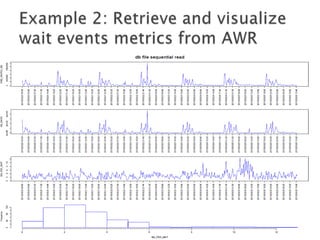
# Plot the 4 graphs
par(mfrow =c(4,1))
plot(sqevent[,'DATEEVT'],sqevent[,'TIME_WAITED_MS'],type="l",col="blue"
,xaxt="n",main=event,cex.main=2,xlab="",ylab="TIME_WAITED_MS")
Axis(side=1,at=sqevent$DATEEVT,round(skip),format="%Y/%m/%d
%H:%M")
plot(sqevent[,'DATEEVT'],sqevent[,'TOTAL_WAITS'],type="l",col="blue",xa
xt="n",xlab="",ylab="NB_WAITS")
Axis(side=1,at=sqevent$DATEEVT,round(skip),format="%Y/%m/%d
%H:%M")
plot(sqevent[,'DATEEVT'],sqevent[,'MS_PER_WAIT'],type="l",col="blue",xa
xt="n",xlab="",ylab="MS_PER_WAIT")
Axis(side=1,at=sqevent$DATEEVT,round(skip),format="%Y/%m/%d
%H:%M")
hist(sqevent[,'MS_PER_WAIT'],xlab="MS_PER_WAIT",main=NULL,border="
blue")


Query is a little bit complicated (comes from
OEM)




















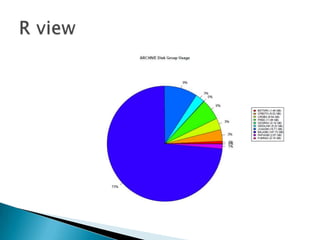
# compute percentages
pct <- round(dg_space[,'SIZE_GB']/sum(dg_space[,'SIZE_GB'])*100)
# add %
pct <- paste(pct,"%",sep="")
# Add db size to db_name
db_name_size<-paste(dg_space[,'DB_NAME']," (",sep="")
db_name_size<-paste(db_name_size,dg_space[,'SIZE_GB'],sep="")
db_name_size<-paste(db_name_size," GB)",sep="")

# Set the colors
colors<-rainbow(length(dg_space[,'DB_NAME']))
# Plot
pie(dg_space[,'SIZE_GB'], labels = pct, col=colors, main=paste(dg," Disk Group Usage",sep=""))
# Add a legend
legend(x=1.2,y=0.5,legend=db_name_size,fill=colors,cex=0.8)


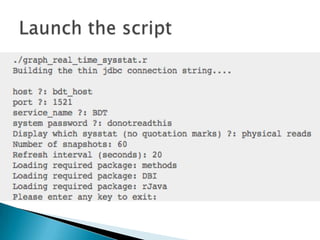
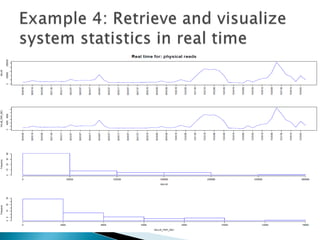
Basically the script takes a snapshot based on
the v$sysstat view then computes and graphs
the delta with the previous snapshot.
myquery<-"
Select to_char(sysdate,'YYYY/MM/DD HH24:MI:SS') as DATEEVT, NAME,VALUE,1 VALUE_PER_SEC
from v$sysstat
where name='"
# Keep them
prev_date<<-qoutput[,'DATEEVT']
prev_value<<-qoutput[,'VALUE']
# Launch the loop for the real-time graph
nb_refresh <- as.integer(nb_refresh)
for(i in seq(nb_refresh)) {
# Get the new data
Sys.sleep(refresh_interval)
qoutput<-dbGetQuery(conn,myquery)
# Keep the current value
current_date<-qoutput[,'DATEEVT']
current_value<-qoutput[,'VALUE']
# compute difference between snap for value and value per sec
#qoutput[,'DATEEVT']<-current_date
qoutput[,'VALUE']<-current_value-prev_value


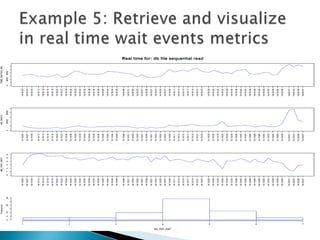
Basically the script takes a snapshot based on
the v$system_event view then computes and
graphs the delta with the previous snapshot.
myquery<-"
Select to_char(sysdate,'YYYY/MM/DD HH24:MI:SS') as
DATEEVT, EVENT,TOTAL_WAITS,TIME_WAITED_MICRO/1000 as TIME_WAITED_MS,1 MS_PER_WAIT
from v$system_event
where event='"
# Keep them
prev_tw<<-qoutput[,'TIME_WAITED_MS']
prev_twaits<<-qoutput[,'TOTAL_WAITS']
# So we want 4 graphs
par(mfrow =c(4,1))
# Launch the loop for the real-time graph
nb_refresh <- as.integer(nb_refresh)
for(i in seq(nb_refresh)) {
# Get the new data
Sys.sleep(refresh_interval)
qoutput<-dbGetQuery(conn,myquery)
# compute difference between snap for time_waited_ms, total_waits and then compute ms_per_wait
qoutput[,'TIME_WAITED_MS']<-current_tw-prev_tw
qoutput[,'TOTAL_WAITS']<-current_twaits-prev_twaits
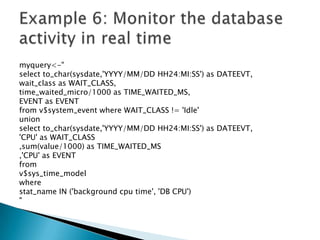
myquery<-"
select to_char(sysdate,'YYYY/MM/DD HH24:MI:SS') as DATEEVT,
wait_class as WAIT_CLASS,
time_waited_micro/1000 as TIME_WAITED_MS,
EVENT as EVENT
from v$system_event where WAIT_CLASS != 'Idle'
union
select to_char(sysdate,'YYYY/MM/DD HH24:MI:SS') as DATEEVT,
'CPU' as WAIT_CLASS
,sum(value/1000) as TIME_WAITED_MS
,'CPU' as EVENT
from
v$sys_time_model
where
stat_name IN ('background cpu time', 'DB CPU')
"


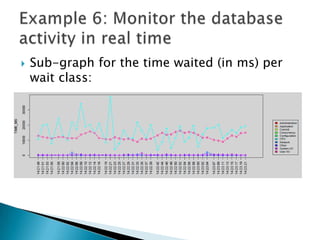
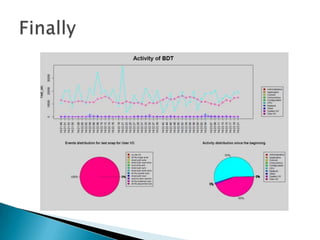
Sub-graph for the time waited (in ms) per
wait class:


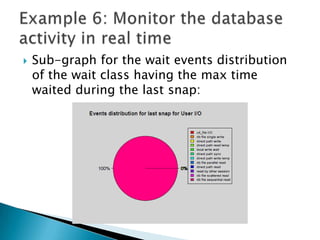
Sub-graph for the wait events distribution
of the wait class having the max time
waited during the last snap:


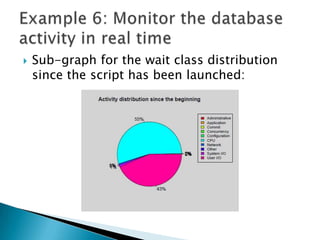
Sub-graph for the wait class distribution
since the script has been launched:







# Split the screen
no_display<-split.screen( figs = c( 2, 1 ) )
# Split the second screen
no_display<-split.screen( figs = c( 1, 2
), screen=2 )
Much more complicated: source code is
available through my blog.




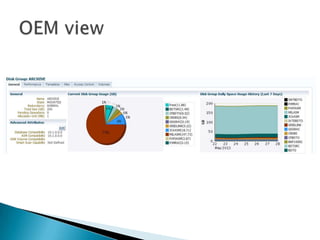
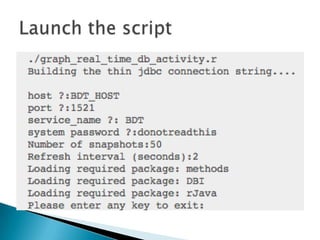
Retrieve and visualize in real time the output
of my asm_metrics.pl utility.
What is yours ?

Example R usage for oracle DBA UKOUG 2013

  • 1.
  • 2.
           Oracle DBA since1999 OCP 9i,10g,11g Rac certified Expert Exadata certified implementation specialist Blogger since 2012 @bertranddrouvot BasketBall fan
  • 3.
         Some examples ofR usage with the oracle database From a DBA point of view Retrieve system statistics/wait events with some AWR queries Real time Data Dashboard of the database activity
  • 4.
       R installation R programing Rstudio (powerful and productive user interface for R)
  • 5.
      Because R isa powerful tool for statistical analysis with graphing and plotting packages built in. Furthermore, R can connect to Oracle via a JDBC package which makes importing data very easy.
  • 6.
  • 7.
  • 8.
    select s.begin_interval_time,sta.stat_name,sta.VALUE, round(((sta.VALUE)/ ( (extract(day froms.END_INTERVAL_TIME)-extract(day from s.BEGIN_INTERVAL_TIME))*86400 + (extract(hour from s.END_INTERVAL_TIME)-extract(hour from s.BEGIN_INTERVAL_TIME))*3600 + (extract(minute from s.END_INTERVAL_TIME)-extract(minute from s.BEGIN_INTERVAL_TIME))*60 + (extract(second from s.END_INTERVAL_TIME)-extract(second from s.BEGIN_INTERVAL_TIME)) ) ),2) VALUE_PER_SEC from ( select instance_number,snap_id,stat_name, value - first_value(value) over (partition by stat_name order by snap_id rows 1 preceding) "VALUE" from dba_hist_sysstat where stat_name like nvl('&stat_name',stat_name) and instance_number = (select instance_number from v$instance) ) sta, dba_hist_snapshot s where sta.instance_number=s.instance_number and sta.snap_id=s.snap_id and s.BEGIN_INTERVAL_TIME >= trunc(sysdate-&sysdate_nb_day_begin_interval+1) and s.BEGIN_INTERVAL_TIME <= trunc(sysdate-&sysdate_nb_day_end_interval+1) order by s.begin_interval_time asc;
  • 11.
            # Plot the4 graphs par(mfrow =c(4,1)) plot(sqstat[,'DATEEVT'],sqstat[,'VALUE'],type="l",col="blue" ,xaxt="n",main=stat_name,cex.main=2,xlab="",ylab="VAL UE") Axis(side=1,at=sqstat$DATEEVT,round(skip),format="%Y/ %m/%d %H:%M") plot(sqstat[,'DATEEVT'],sqstat[,'VALUE_PER_SEC'],type="l",c ol="blue",xaxt="n",xlab="",ylab="VALUE_PER_SEC") Axis(side=1,at=sqstat$DATEEVT,round(skip),format="%Y/ %m/%d %H:%M") hist(sqstat[,'VALUE'],xlab="VALUE",main=NULL,border="bl ue") hist(sqstat[,'VALUE_PER_SEC'],xlab="VALUE_PER_SEC",main =NULL,border="blue")
  • 12.
    select e.WAIT_CLASS,e.event_name,s.begin_interval_time,e.TOTAL_WAITS,e.TIME_WAITED_MS,e.TIME_WAITED_MS / TOTAL_WAITS"MS_PER_WAIT" from ( select instance_number,snap_id,WAIT_CLASS,event_name, total_waits - first_value(total_waits) over (partition by event_name order by snap_id rows 1 preceding) "TOTAL_WAITS", (time_waited_micro - first_value(time_waited_micro) over (partition by event_name order by snap_id rows 1 preceding))/1000 "TIME_WAITED_MS" from dba_hist_system_event where WAIT_CLASS like nvl('&WAIT_CLASS',WAIT_CLASS) and event_name like nvl('&event_name',event_name) and instance_number = (select instance_number from v$instance) ) e, dba_hist_snapshot s where e.TIME_WAITED_MS > 0 and e.instance_number=s.instance_number and e.snap_id=s.snap_id and s.BEGIN_INTERVAL_TIME >= trunc(sysdate-&sysdate_nb_day_begin_interval+1) and s.BEGIN_INTERVAL_TIME <= trunc(sysdate-&sysdate_nb_day_end_interval+1) order by 1
  • 14.
             # Plot the4 graphs par(mfrow =c(4,1)) plot(sqevent[,'DATEEVT'],sqevent[,'TIME_WAITED_MS'],type="l",col="blue" ,xaxt="n",main=event,cex.main=2,xlab="",ylab="TIME_WAITED_MS") Axis(side=1,at=sqevent$DATEEVT,round(skip),format="%Y/%m/%d %H:%M") plot(sqevent[,'DATEEVT'],sqevent[,'TOTAL_WAITS'],type="l",col="blue",xa xt="n",xlab="",ylab="NB_WAITS") Axis(side=1,at=sqevent$DATEEVT,round(skip),format="%Y/%m/%d %H:%M") plot(sqevent[,'DATEEVT'],sqevent[,'MS_PER_WAIT'],type="l",col="blue",xa xt="n",xlab="",ylab="MS_PER_WAIT") Axis(side=1,at=sqevent$DATEEVT,round(skip),format="%Y/%m/%d %H:%M") hist(sqevent[,'MS_PER_WAIT'],xlab="MS_PER_WAIT",main=NULL,border=" blue")
  • 15.
     Query is alittle bit complicated (comes from OEM)
  • 19.
                  # compute percentages pct<- round(dg_space[,'SIZE_GB']/sum(dg_space[,'SIZE_GB'])*100) # add % pct <- paste(pct,"%",sep="") # Add db size to db_name db_name_size<-paste(dg_space[,'DB_NAME']," (",sep="") db_name_size<-paste(db_name_size,dg_space[,'SIZE_GB'],sep="") db_name_size<-paste(db_name_size," GB)",sep="") # Set the colors colors<-rainbow(length(dg_space[,'DB_NAME'])) # Plot pie(dg_space[,'SIZE_GB'], labels = pct, col=colors, main=paste(dg," Disk Group Usage",sep="")) # Add a legend legend(x=1.2,y=0.5,legend=db_name_size,fill=colors,cex=0.8)
  • 20.
     Basically the scripttakes a snapshot based on the v$sysstat view then computes and graphs the delta with the previous snapshot.
  • 23.
    myquery<-" Select to_char(sysdate,'YYYY/MM/DD HH24:MI:SS')as DATEEVT, NAME,VALUE,1 VALUE_PER_SEC from v$sysstat where name='" # Keep them prev_date<<-qoutput[,'DATEEVT'] prev_value<<-qoutput[,'VALUE'] # Launch the loop for the real-time graph nb_refresh <- as.integer(nb_refresh) for(i in seq(nb_refresh)) { # Get the new data Sys.sleep(refresh_interval) qoutput<-dbGetQuery(conn,myquery) # Keep the current value current_date<-qoutput[,'DATEEVT'] current_value<-qoutput[,'VALUE'] # compute difference between snap for value and value per sec #qoutput[,'DATEEVT']<-current_date qoutput[,'VALUE']<-current_value-prev_value
  • 24.
     Basically the scripttakes a snapshot based on the v$system_event view then computes and graphs the delta with the previous snapshot.
  • 26.
    myquery<-" Select to_char(sysdate,'YYYY/MM/DD HH24:MI:SS')as DATEEVT, EVENT,TOTAL_WAITS,TIME_WAITED_MICRO/1000 as TIME_WAITED_MS,1 MS_PER_WAIT from v$system_event where event='" # Keep them prev_tw<<-qoutput[,'TIME_WAITED_MS'] prev_twaits<<-qoutput[,'TOTAL_WAITS'] # So we want 4 graphs par(mfrow =c(4,1)) # Launch the loop for the real-time graph nb_refresh <- as.integer(nb_refresh) for(i in seq(nb_refresh)) { # Get the new data Sys.sleep(refresh_interval) qoutput<-dbGetQuery(conn,myquery) # compute difference between snap for time_waited_ms, total_waits and then compute ms_per_wait qoutput[,'TIME_WAITED_MS']<-current_tw-prev_tw qoutput[,'TOTAL_WAITS']<-current_twaits-prev_twaits
  • 27.
    myquery<-" select to_char(sysdate,'YYYY/MM/DD HH24:MI:SS')as DATEEVT, wait_class as WAIT_CLASS, time_waited_micro/1000 as TIME_WAITED_MS, EVENT as EVENT from v$system_event where WAIT_CLASS != 'Idle' union select to_char(sysdate,'YYYY/MM/DD HH24:MI:SS') as DATEEVT, 'CPU' as WAIT_CLASS ,sum(value/1000) as TIME_WAITED_MS ,'CPU' as EVENT from v$sys_time_model where stat_name IN ('background cpu time', 'DB CPU') "
  • 29.
     Sub-graph for thetime waited (in ms) per wait class:
  • 30.
     Sub-graph for thewait events distribution of the wait class having the max time waited during the last snap:
  • 31.
     Sub-graph for thewait class distribution since the script has been launched:
  • 33.
         # Split thescreen no_display<-split.screen( figs = c( 2, 1 ) ) # Split the second screen no_display<-split.screen( figs = c( 1, 2 ), screen=2 ) Much more complicated: source code is available through my blog.
  • 34.
      Retrieve and visualizein real time the output of my asm_metrics.pl utility. What is yours ?