Binding (with
processor_group_name) versus
Caging: Facts, Observations and
Customer cases
Bertrand Drouvot
About Me
 Oracle DBA since 1999
 Working for the Accenture Enkitec Group
 OCP 9i,10g,11g
 Rac certified Expert
 Exadata certified implementation specialist
 Blogger since 2012
 Oracle ACE
 @bertranddrouvot
 BasketBall fan
Introduction (1/2)
 Nowadays it is very common to consolidate multiple databases on
the same server.
 One could want to limit the CPU usage of databases and/or ensure
guarantee CPU for some databases. I would like to compare two
methods to achieve this.
 Instance Caging (available since 11.2).
 processor_group_name (available since 12.1).
Introduction (2/2)
 Facts: Describing the features and a quick overview on how to
implement them.
 Observations: What I observed on my lab server. You should
observe the same on your environment for most of them.
 OEM and AWR views for Instance Caging and
processor_group_name with CPU pressure.
 Customer cases: I cover all the cases I faced so far.
Facts: Instance Caging
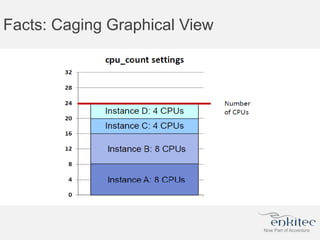
 Instance caging: Purpose is to Limit or “cage” the amount of CPU
that a database instance can use at any time. It can be enabled
online (no need to restart the database) in 2 steps:
 SQL> alter system set cpu_count = 2;
 SQL> alter system set resource_manager_plan =
‘default_plan’;
Facts: Caging Graphical View
Facts: Binding (1/3)
 processor_group_name: Bind a database instance to specific
CPUs / NUMA nodes.
 On Linux x86-64, the named subset of CPUs is created through a
Linux feature called control groups (cgroups).
 On Oracle Solaris 11 SRU 4, the named subset of CPUs is created
through a feature called resource pools.
 It is enabled in 4 steps on my RedHat 6.5 machine.
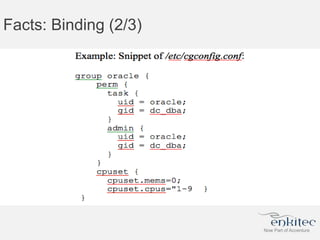
1. Specify the CPUs or NUMA nodes by creating a “processor group”:
Facts: Binding (2/3)
Facts: Binding (3/3)
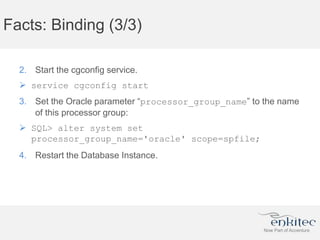
2. Start the cgconfig service.
 service cgconfig start
3. Set the Oracle parameter “processor_group_name” to the name
of this processor group:
 SQL> alter system set
processor_group_name='oracle' scope=spfile;
4. Restart the Database Instance.
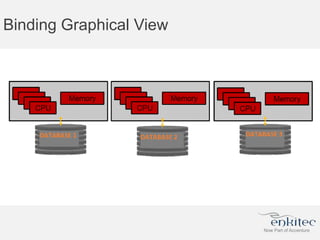
Binding Graphical View
Facts: Availability
 The Instance caging can be enabled online.
 For cgroups/processor_group_name the database needs to
be stopped and started.
Observations
 For brevity, “Caging” is used for “Instance Caging” and “Binding” for
“cgroups/processor_group_name” usages.
 Also “CPU” is used when CPU threads are referred to, which is the
actual granularity for caging and binding.
 The observations have been made on a 12.1.0.2 database using
large pages (use_large_pages=only). I will not cover the “non
large pages” case as not using large pages is not an option for me.
Observations: binding, NUMA memory, CPUs
locality & LIO performance (1/3)
 The SGA will be allocated according to
the cpuset.mems parameter.
 The processes will be bind to the CPUs according to
the cpuset.cpus parameter.
Observations: binding, NUMA memory, CPUs
locality & LIO performance (2/3)
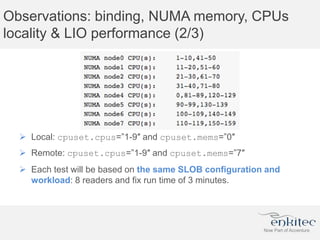
 Local: cpuset.cpus=”1-9″ and cpuset.mems=”0″
 Remote: cpuset.cpus=”1-9″ and cpuset.mems=”7″
 Each test will be based on the same SLOB configuration and
workload: 8 readers and fix run time of 3 minutes.
Observations: binding, NUMA memory, CPUs
locality & LIO performance (3/3)
 Remote is about 2.15 times slower than with the local NUMA node
access.
 Then pay attention to configure the group correctly
with cpuset.cpus and cpuset.mems to ensure local
NUMA node access.
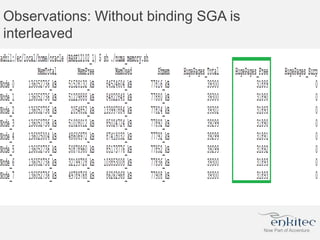
Observations: Without binding SGA is
interleaved
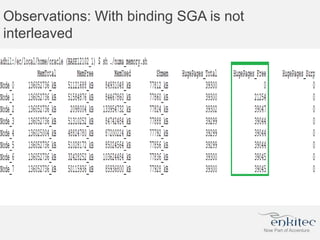
Observations: With binding SGA is not
interleaved
Observations: During LIO pressure, Instance
Caging less performant on my lab server (1/2)
 Test 1: Curiosity, launch the SLOB runs (9 readers) without cpu
binding and without Instance caging (without LIO pressure).
 Test 2: Instance caging (6) in place and LIO pressure (9 SLOB
readers).
 Test 3: cpu binding in place (6 cpus same numa node) and LIO
pressure (9 SLOB readers).
 Test 4: cpu binding (9 cpus same numa node) and Instance caging
(6) in place with LIO pressure (9 SLOB readers) due to the caging.
 Test 5: Curiosity, launch the SLOB (9 readers) runs with cpu binding
(9 cpus) and without Instance caging (without LIO pressure).
Observations: During LIO pressure, Instance
Caging less performant on my lab server (2/2)
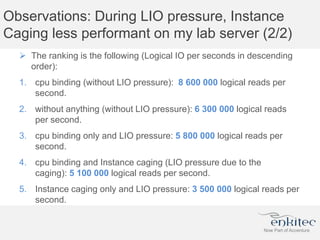
 The ranking is the following (Logical IO per seconds in descending
order):
1. cpu binding (without LIO pressure): 8 600 000 logical reads per
second.
2. without anything (without LIO pressure): 6 300 000 logical reads
per second.
3. cpu binding only and LIO pressure: 5 800 000 logical reads per
second.
4. cpu binding and Instance caging (LIO pressure due to the
caging): 5 100 000 logical reads per second.
5. Instance caging only and LIO pressure: 3 500 000 logical reads per
second.
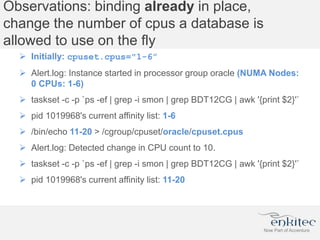
Observations: binding already in place,
change the number of cpus a database is
allowed to use on the fly
 Initially: cpuset.cpus="1-6”
 Alert.log: Instance started in processor group oracle (NUMA Nodes:
0 CPUs: 1-6)
 taskset -c -p `ps -ef | grep -i smon | grep BDT12CG | awk '{print $2}'`
 pid 1019968's current affinity list: 1-6
 /bin/echo 11-20 > /cgroup/cpuset/oracle/cpuset.cpus
 Alert.log: Detected change in CPU count to 10.
 taskset -c -p `ps -ef | grep -i smon | grep BDT12CG | awk '{print $2}'`
 pid 1019968's current affinity list: 11-20
Observations: Summary
 Pay attention to configure the group correctly
with cpuset.cpus and cpuset.mems to ensure local NUMA node
access.
 With the binding the SGA is not interleaved.
 With Caging the SGA is interleaved (unless on top of the Binding).
 Instance caging has been less performant (compare to the cpu
binding) during LIO pressure.
 With cpu binding already in place (using
processor_group_name) we are able to change the number of
cpus a database is allowed to use on the fly.
 All above mentioned observations are related to performance.
CPU pressure with Caging: OEM view
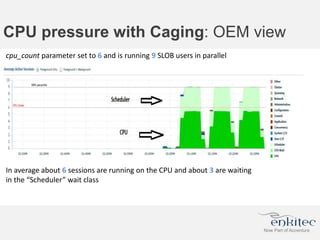
cpu_count parameter set to 6 and is running 9 SLOB users in parallel
In average about 6 sessions are running on the CPU and about 3 are waiting
in the “Scheduler” wait class
CPU pressure with Caging: AWR view
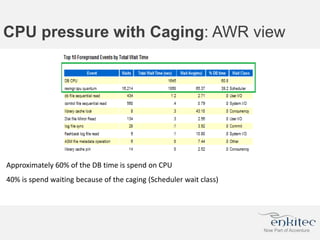
Approximately 60% of the DB time is spend on CPU
40% is spend waiting because of the caging (Scheduler wait class)
CPU pressure with Binding: OEM view
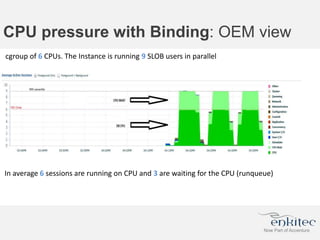
cgroup of 6 CPUs. The Instance is running 9 SLOB users in parallel
In average 6 sessions are running on CPU and 3 are waiting for the CPU (runqueue)
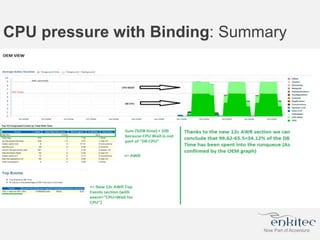
CPU pressure with Binding: AWR view
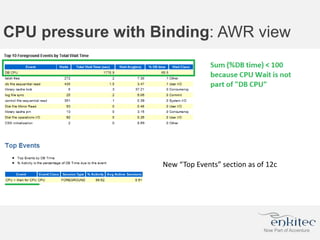
New “Top Events” section as of 12c
CPU pressure with Binding: Summary
Case number 1: One database uses too
much CPU and affects other instances’
performance
 Then we want to limit its CPU usage.
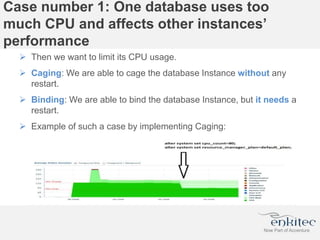
 Caging: We are able to cage the database Instance without any
restart.
 Binding: We are able to bind the database Instance, but it needs a
restart.
 Example of such a case by implementing Caging:
Case number 1: One database uses too
much CPU and affects other instances’
performance: What to choose?
 The caging is the best choice in this case (as it is the easiest and we
don’t need to restart the database).
For the following cases we need to define 2
categories of database
 The paying ones: Customer paid for guaranteed CPU resources
available.
 The non-paying ones: Customer did not pay for guaranteed CPU
resources available.
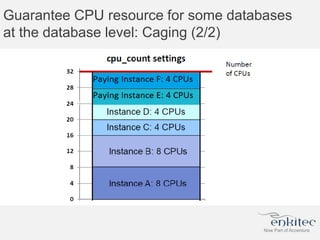
Guarantee CPU resource for some databases
at the database level: Caging (1/2)
 All the databases need to be caged (if not, there is no guaranteed
resources availability as one non-caged could take all the CPU).
 As a consequence, you can’t mix paying and non-paying customer
without caging the non-paying ones.
 You have to know how to cage each database individually to be sure
that sum(cpu_count) <= Total number of threads (If not, CPU
resources can’t be guaranteed).
 Be sure that sum(cpu_count) of non-paid <= “CPU Total – number of
paid CPU” (If not, CPU resources can’t be guaranteed).
 There are a maximum number of databases that you can put on a
machine: As cpu_count >=2 (see facts) then the maximum number
of databases = Total number of threads /2
Guarantee CPU resource for some databases
at the database level: Caging (2/2)
Guarantee CPU resource for some databases
at the database level: Binding (1/2)
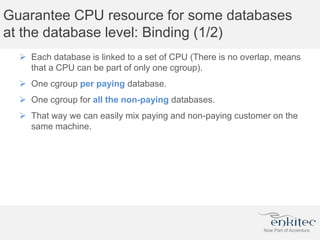
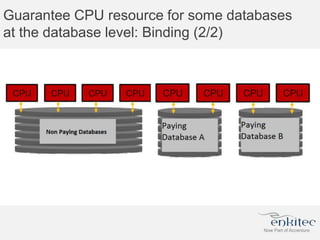
 Each database is linked to a set of CPU (There is no overlap, means
that a CPU can be part of only one cgroup).
 One cgroup per paying database.
 One cgroup for all the non-paying databases.
 That way we can easily mix paying and non-paying customer on the
same machine.
Guarantee CPU resource for some databases
at the database level: Binding (2/2)
Guarantee CPU resource for some databases
at the database level: Binding + Caging Mix
(1/2)
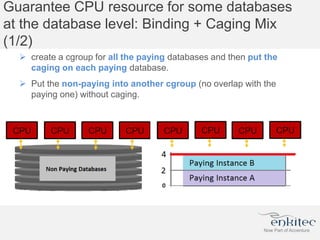
 create a cgroup for all the paying databases and then put the
caging on each paying database.
 Put the non-paying into another cgroup (no overlap with the
paying one) without caging.
Guarantee CPU resource for some databases
at the database level: What to choose?
 No “best choice”.
 It all depends of the number of database we are talking about (For a
large number of databases I would use the mix approach).
 don’t forget that with the caging option your can’t put more than
number of threads/2 databases.
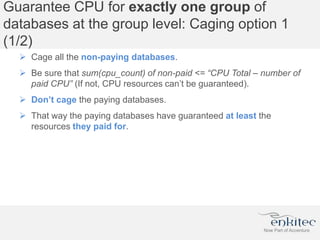
Guarantee CPU for exactly one group of
databases at the group level: Caging option 1
(1/2)
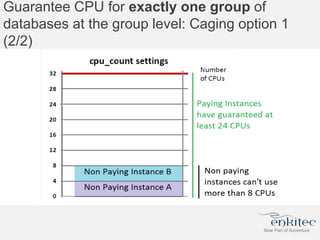
 Cage all the non-paying databases.
 Be sure that sum(cpu_count) of non-paid <= “CPU Total – number of
paid CPU” (If not, CPU resources can’t be guaranteed).
 Don’t cage the paying databases.
 That way the paying databases have guaranteed at least the
resources they paid for.
Guarantee CPU for exactly one group of
databases at the group level: Caging option 1
(2/2)
Guarantee CPU for exactly one group of
databases at the group level: Caging option 2
(1/2)
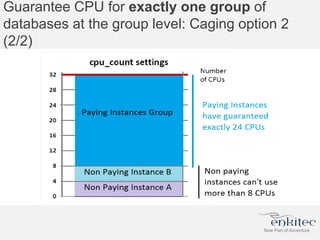
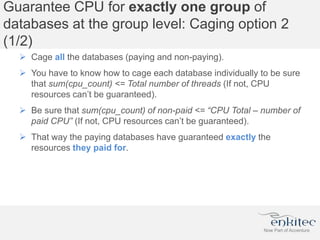
 Cage all the databases (paying and non-paying).
 You have to know how to cage each database individually to be sure
that sum(cpu_count) <= Total number of threads (If not, CPU
resources can’t be guaranteed).
 Be sure that sum(cpu_count) of non-paid <= “CPU Total – number of
paid CPU” (If not, CPU resources can’t be guaranteed).
 That way the paying databases have guaranteed exactly the
resources they paid for.
Guarantee CPU for exactly one group of
databases at the group level: Caging option 2
(2/2)
Guarantee CPU for exactly one group of
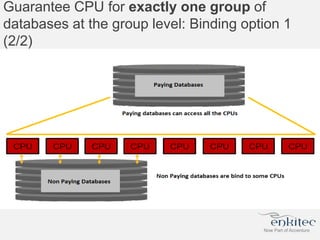
databases at the group level: Binding option 1
(1/2)
 Put all the non-paying databases into a “CPU Total – number of
paid CPU ” cgroup.
 Allow all the CPUs to be used by the paying databases (don’t
create a cgroup for the paying databases).
 That way the paying group has guaranteed at least the resources it
paid for.
Guarantee CPU for exactly one group of
databases at the group level: Binding option 1
(2/2)
Guarantee CPU for exactly one group of
databases at the group level: Binding option 2
(1/2)
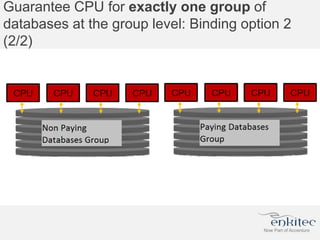
 Put all the paying databases into a cgroup.
 Put all the non-paying databases into another cgroup (no
overlap with the paying cgroup).
 That way the paying databases have guaranteed exactly the
resources they paid for.
Guarantee CPU for exactly one group of
databases at the group level: Binding option 2
(2/2)
Guarantee CPU for exactly one group of
databases at the group level: What to choose?
 I like the option 1) in both cases as it allows customer to get more
than what they paid for (with the guarantee of what they paid for).
 Then the choice between caging and binding really depends of the
number of databases we are talking about (binding is preferable and
easily manageable for large number of databases).
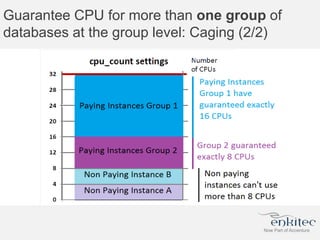
Guarantee CPU for more than one group of
databases at the group level: Caging (1/2)
 All the databases need to be caged (if not, there is no guaranteed
resources availability as one non-caged could take all the CPU).
 As a consequence, you can’t mix paying and non-paying customer
without caging the non-paying ones.
 You have to know how to cage each database individually to be sure
that sum(cpu_count) <= Total number of threads (If not, CPU
resources can’t be guaranteed).
 Be sure that sum(cpu_count) of non-paid <= “CPU Total – number of
paid CPU” (If not, CPU resources can’t be guaranteed).
 There are a maximum number of databases that you can put on a
machine: As cpu_count >=2 (see facts) then the maximum number
of databases = Total number of threads /2
Guarantee CPU for more than one group of
databases at the group level: Caging (2/2)
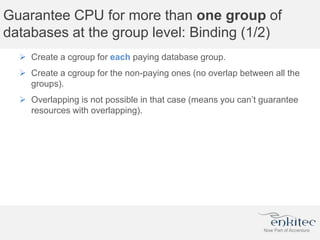
Guarantee CPU for more than one group of
databases at the group level: Binding (1/2)
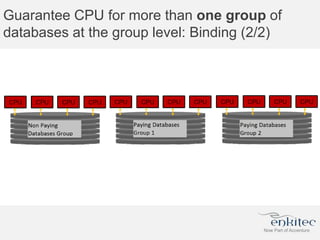
 Create a cgroup for each paying database group.
 Create a cgroup for the non-paying ones (no overlap between all the
groups).
 Overlapping is not possible in that case (means you can’t guarantee
resources with overlapping).
Guarantee CPU for more than one group of
databases at the group level: Binding (2/2)
Guarantee CPU for more than one group of
databases at the group level: What to choose?
 It really depends of the number of databases and groups we are
talking about (binding is preferable and easily manageable for large
number of databases).
Remarks
 If you see (or faced) more cases, then feel free to share and to
comment on the blog post.
 I did not pay attention on potential impacts on LIO performance
linked to any possible choice (caging vs binding with or without
NUMA).
 I just mentioned them into the observations, but did not include them
into the use cases (I just discussed the feasibility of the
implementation).
 I really like the options 1 into the case with exactly one group. This
option has been proposed by Karl Arao during a tweeter
conversation.
Conclusion
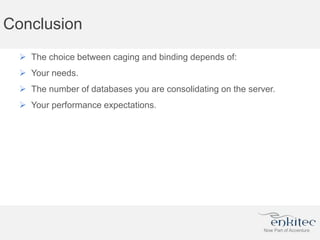
 The choice between caging and binding depends of:
 Your needs.
 The number of databases you are consolidating on the server.
 Your performance expectations.
Questions

Oracle: Binding versus caging

  • 1.
    Binding (with processor_group_name) versus Caging:Facts, Observations and Customer cases Bertrand Drouvot
  • 2.
    About Me  OracleDBA since 1999  Working for the Accenture Enkitec Group  OCP 9i,10g,11g  Rac certified Expert  Exadata certified implementation specialist  Blogger since 2012  Oracle ACE  @bertranddrouvot  BasketBall fan
  • 3.
    Introduction (1/2)  Nowadaysit is very common to consolidate multiple databases on the same server.  One could want to limit the CPU usage of databases and/or ensure guarantee CPU for some databases. I would like to compare two methods to achieve this.  Instance Caging (available since 11.2).  processor_group_name (available since 12.1).
  • 4.
    Introduction (2/2)  Facts:Describing the features and a quick overview on how to implement them.  Observations: What I observed on my lab server. You should observe the same on your environment for most of them.  OEM and AWR views for Instance Caging and processor_group_name with CPU pressure.  Customer cases: I cover all the cases I faced so far.
  • 5.
    Facts: Instance Caging Instance caging: Purpose is to Limit or “cage” the amount of CPU that a database instance can use at any time. It can be enabled online (no need to restart the database) in 2 steps:  SQL> alter system set cpu_count = 2;  SQL> alter system set resource_manager_plan = ‘default_plan’;
  • 6.
  • 7.
    Facts: Binding (1/3) processor_group_name: Bind a database instance to specific CPUs / NUMA nodes.  On Linux x86-64, the named subset of CPUs is created through a Linux feature called control groups (cgroups).  On Oracle Solaris 11 SRU 4, the named subset of CPUs is created through a feature called resource pools.  It is enabled in 4 steps on my RedHat 6.5 machine. 1. Specify the CPUs or NUMA nodes by creating a “processor group”:
  • 8.
  • 9.
    Facts: Binding (3/3) 2.Start the cgconfig service.  service cgconfig start 3. Set the Oracle parameter “processor_group_name” to the name of this processor group:  SQL> alter system set processor_group_name='oracle' scope=spfile; 4. Restart the Database Instance.
  • 10.
  • 11.
    Facts: Availability  TheInstance caging can be enabled online.  For cgroups/processor_group_name the database needs to be stopped and started.
  • 12.
    Observations  For brevity,“Caging” is used for “Instance Caging” and “Binding” for “cgroups/processor_group_name” usages.  Also “CPU” is used when CPU threads are referred to, which is the actual granularity for caging and binding.  The observations have been made on a 12.1.0.2 database using large pages (use_large_pages=only). I will not cover the “non large pages” case as not using large pages is not an option for me.
  • 13.
    Observations: binding, NUMAmemory, CPUs locality & LIO performance (1/3)  The SGA will be allocated according to the cpuset.mems parameter.  The processes will be bind to the CPUs according to the cpuset.cpus parameter.
  • 14.
    Observations: binding, NUMAmemory, CPUs locality & LIO performance (2/3)  Local: cpuset.cpus=”1-9″ and cpuset.mems=”0″  Remote: cpuset.cpus=”1-9″ and cpuset.mems=”7″  Each test will be based on the same SLOB configuration and workload: 8 readers and fix run time of 3 minutes.
  • 15.
    Observations: binding, NUMAmemory, CPUs locality & LIO performance (3/3)  Remote is about 2.15 times slower than with the local NUMA node access.  Then pay attention to configure the group correctly with cpuset.cpus and cpuset.mems to ensure local NUMA node access.
  • 16.
  • 17.
    Observations: With bindingSGA is not interleaved
  • 18.
    Observations: During LIOpressure, Instance Caging less performant on my lab server (1/2)  Test 1: Curiosity, launch the SLOB runs (9 readers) without cpu binding and without Instance caging (without LIO pressure).  Test 2: Instance caging (6) in place and LIO pressure (9 SLOB readers).  Test 3: cpu binding in place (6 cpus same numa node) and LIO pressure (9 SLOB readers).  Test 4: cpu binding (9 cpus same numa node) and Instance caging (6) in place with LIO pressure (9 SLOB readers) due to the caging.  Test 5: Curiosity, launch the SLOB (9 readers) runs with cpu binding (9 cpus) and without Instance caging (without LIO pressure).
  • 19.
    Observations: During LIOpressure, Instance Caging less performant on my lab server (2/2)  The ranking is the following (Logical IO per seconds in descending order): 1. cpu binding (without LIO pressure): 8 600 000 logical reads per second. 2. without anything (without LIO pressure): 6 300 000 logical reads per second. 3. cpu binding only and LIO pressure: 5 800 000 logical reads per second. 4. cpu binding and Instance caging (LIO pressure due to the caging): 5 100 000 logical reads per second. 5. Instance caging only and LIO pressure: 3 500 000 logical reads per second.
  • 20.
    Observations: binding alreadyin place, change the number of cpus a database is allowed to use on the fly  Initially: cpuset.cpus="1-6”  Alert.log: Instance started in processor group oracle (NUMA Nodes: 0 CPUs: 1-6)  taskset -c -p `ps -ef | grep -i smon | grep BDT12CG | awk '{print $2}'`  pid 1019968's current affinity list: 1-6  /bin/echo 11-20 > /cgroup/cpuset/oracle/cpuset.cpus  Alert.log: Detected change in CPU count to 10.  taskset -c -p `ps -ef | grep -i smon | grep BDT12CG | awk '{print $2}'`  pid 1019968's current affinity list: 11-20
  • 21.
    Observations: Summary  Payattention to configure the group correctly with cpuset.cpus and cpuset.mems to ensure local NUMA node access.  With the binding the SGA is not interleaved.  With Caging the SGA is interleaved (unless on top of the Binding).  Instance caging has been less performant (compare to the cpu binding) during LIO pressure.  With cpu binding already in place (using processor_group_name) we are able to change the number of cpus a database is allowed to use on the fly.  All above mentioned observations are related to performance.
  • 22.
    CPU pressure withCaging: OEM view cpu_count parameter set to 6 and is running 9 SLOB users in parallel In average about 6 sessions are running on the CPU and about 3 are waiting in the “Scheduler” wait class
  • 23.
    CPU pressure withCaging: AWR view Approximately 60% of the DB time is spend on CPU 40% is spend waiting because of the caging (Scheduler wait class)
  • 24.
    CPU pressure withBinding: OEM view cgroup of 6 CPUs. The Instance is running 9 SLOB users in parallel In average 6 sessions are running on CPU and 3 are waiting for the CPU (runqueue)
  • 25.
    CPU pressure withBinding: AWR view New “Top Events” section as of 12c
  • 26.
    CPU pressure withBinding: Summary
  • 27.
    Case number 1:One database uses too much CPU and affects other instances’ performance  Then we want to limit its CPU usage.  Caging: We are able to cage the database Instance without any restart.  Binding: We are able to bind the database Instance, but it needs a restart.  Example of such a case by implementing Caging:
  • 28.
    Case number 1:One database uses too much CPU and affects other instances’ performance: What to choose?  The caging is the best choice in this case (as it is the easiest and we don’t need to restart the database).
  • 29.
    For the followingcases we need to define 2 categories of database  The paying ones: Customer paid for guaranteed CPU resources available.  The non-paying ones: Customer did not pay for guaranteed CPU resources available.
  • 30.
    Guarantee CPU resourcefor some databases at the database level: Caging (1/2)  All the databases need to be caged (if not, there is no guaranteed resources availability as one non-caged could take all the CPU).  As a consequence, you can’t mix paying and non-paying customer without caging the non-paying ones.  You have to know how to cage each database individually to be sure that sum(cpu_count) <= Total number of threads (If not, CPU resources can’t be guaranteed).  Be sure that sum(cpu_count) of non-paid <= “CPU Total – number of paid CPU” (If not, CPU resources can’t be guaranteed).  There are a maximum number of databases that you can put on a machine: As cpu_count >=2 (see facts) then the maximum number of databases = Total number of threads /2
  • 31.
    Guarantee CPU resourcefor some databases at the database level: Caging (2/2)
  • 32.
    Guarantee CPU resourcefor some databases at the database level: Binding (1/2)  Each database is linked to a set of CPU (There is no overlap, means that a CPU can be part of only one cgroup).  One cgroup per paying database.  One cgroup for all the non-paying databases.  That way we can easily mix paying and non-paying customer on the same machine.
  • 33.
    Guarantee CPU resourcefor some databases at the database level: Binding (2/2)
  • 34.
    Guarantee CPU resourcefor some databases at the database level: Binding + Caging Mix (1/2)  create a cgroup for all the paying databases and then put the caging on each paying database.  Put the non-paying into another cgroup (no overlap with the paying one) without caging.
  • 35.
    Guarantee CPU resourcefor some databases at the database level: What to choose?  No “best choice”.  It all depends of the number of database we are talking about (For a large number of databases I would use the mix approach).  don’t forget that with the caging option your can’t put more than number of threads/2 databases.
  • 36.
    Guarantee CPU forexactly one group of databases at the group level: Caging option 1 (1/2)  Cage all the non-paying databases.  Be sure that sum(cpu_count) of non-paid <= “CPU Total – number of paid CPU” (If not, CPU resources can’t be guaranteed).  Don’t cage the paying databases.  That way the paying databases have guaranteed at least the resources they paid for.
  • 37.
    Guarantee CPU forexactly one group of databases at the group level: Caging option 1 (2/2)
  • 38.
    Guarantee CPU forexactly one group of databases at the group level: Caging option 2 (1/2)  Cage all the databases (paying and non-paying).  You have to know how to cage each database individually to be sure that sum(cpu_count) <= Total number of threads (If not, CPU resources can’t be guaranteed).  Be sure that sum(cpu_count) of non-paid <= “CPU Total – number of paid CPU” (If not, CPU resources can’t be guaranteed).  That way the paying databases have guaranteed exactly the resources they paid for.
  • 39.
    Guarantee CPU forexactly one group of databases at the group level: Caging option 2 (2/2)
  • 40.
    Guarantee CPU forexactly one group of databases at the group level: Binding option 1 (1/2)  Put all the non-paying databases into a “CPU Total – number of paid CPU ” cgroup.  Allow all the CPUs to be used by the paying databases (don’t create a cgroup for the paying databases).  That way the paying group has guaranteed at least the resources it paid for.
  • 41.
    Guarantee CPU forexactly one group of databases at the group level: Binding option 1 (2/2)
  • 42.
    Guarantee CPU forexactly one group of databases at the group level: Binding option 2 (1/2)  Put all the paying databases into a cgroup.  Put all the non-paying databases into another cgroup (no overlap with the paying cgroup).  That way the paying databases have guaranteed exactly the resources they paid for.
  • 43.
    Guarantee CPU forexactly one group of databases at the group level: Binding option 2 (2/2)
  • 44.
    Guarantee CPU forexactly one group of databases at the group level: What to choose?  I like the option 1) in both cases as it allows customer to get more than what they paid for (with the guarantee of what they paid for).  Then the choice between caging and binding really depends of the number of databases we are talking about (binding is preferable and easily manageable for large number of databases).
  • 45.
    Guarantee CPU formore than one group of databases at the group level: Caging (1/2)  All the databases need to be caged (if not, there is no guaranteed resources availability as one non-caged could take all the CPU).  As a consequence, you can’t mix paying and non-paying customer without caging the non-paying ones.  You have to know how to cage each database individually to be sure that sum(cpu_count) <= Total number of threads (If not, CPU resources can’t be guaranteed).  Be sure that sum(cpu_count) of non-paid <= “CPU Total – number of paid CPU” (If not, CPU resources can’t be guaranteed).  There are a maximum number of databases that you can put on a machine: As cpu_count >=2 (see facts) then the maximum number of databases = Total number of threads /2
  • 46.
    Guarantee CPU formore than one group of databases at the group level: Caging (2/2)
  • 47.
    Guarantee CPU formore than one group of databases at the group level: Binding (1/2)  Create a cgroup for each paying database group.  Create a cgroup for the non-paying ones (no overlap between all the groups).  Overlapping is not possible in that case (means you can’t guarantee resources with overlapping).
  • 48.
    Guarantee CPU formore than one group of databases at the group level: Binding (2/2)
  • 49.
    Guarantee CPU formore than one group of databases at the group level: What to choose?  It really depends of the number of databases and groups we are talking about (binding is preferable and easily manageable for large number of databases).
  • 50.
    Remarks  If yousee (or faced) more cases, then feel free to share and to comment on the blog post.  I did not pay attention on potential impacts on LIO performance linked to any possible choice (caging vs binding with or without NUMA).  I just mentioned them into the observations, but did not include them into the use cases (I just discussed the feasibility of the implementation).  I really like the options 1 into the case with exactly one group. This option has been proposed by Karl Arao during a tweeter conversation.
  • 51.
    Conclusion  The choicebetween caging and binding depends of:  Your needs.  The number of databases you are consolidating on the server.  Your performance expectations.
  • 52.

Editor's Notes

  • #4 processor_group_name supported on Linux x86-64 2.6.24 and Solaris 11 SRU 4 and later
  • #7 Database Instance can access any cpus. Limitation is done at the database level through resource manager.
  • #11 This graphical view represents the ideal configuration, where a database is bound to specific CPUs and NUMA local memory (If you need more details, see the observation number 1 later on).
  • #17 SGA is 100 GB
  • #18 Binding on node 0 and 1. SGA is 100 GB
  • #20 Only ranks 3, 4 and 5 are of interest regarding the initial goal of this post. And only 3 and 4 are valuable comparison. So, comparing 3 and 4 ranks, I can conclude that the Instance caging has been less performant (compare to the cpu binding) by about 10% during LIO pressure
  • #21 Don’t forget to update the /etc/cgconfig.conf file accordingly (If not, the restart of the cgconfig service will overwrite your changes) cpuset.mems value or changing numa node, needs instance restart 
  • #32 If you need to add a new database (a paying one or a non-paying one) and you are already in a situation where “sum(cpu_count) = Total number of threads” then you have to review the caging of all non-paying databases (to not over allocate the machine)
  • #34 If you need to add a new database then, if this is: A non-paying one: Put it into the non-paying group. A paying one: Create a new cgroup for it, assigning CPU taken away from non-paying ones if needed.
  • #35 If you need to add a new database then, if this is: A non-paying one: Put it into the non-paying group. A paying one: Extend the paying group if needed (taking CPU away from non-paying ones) and cage it accordingly.
  • #38 If you need to add a new database then, if this is: A non-paying one: Cage it but you may need to re-cage all the non-paying ones to guarantee the paying ones still get its “minimum” resource. A paying one: Nothing to do
  • #40 If you need to add a new database (a paying one or a non-paying one) and you are already in a situation where “sum(cpu_count) = Total number of threads” then you have to review the caging of all non-paying databases (to not over allocate the machine)
  • #42 If you need to add a new database then, if this is: A non-paying one: Put it in the non-paying cgroup. A paying one: Create it outside the non-paying cgroup
  • #44 If you need to add a new database, then if this is: A non-paying one: Put it in the non-paying cgroup. A paying one: Put it in the paying cgroup
  • #47 If you need to add a new database (a paying one or a non-paying one) and you are already in a situation where “sum(cpu_count) = Total number of threads” then you have to review the caging of all non-paying databases (to not over allocate the machine) Overlapping is not possible in that case (means you can’t guarantee resources with overlapping).
  • #49 If you need to add a database, then simply put it in the right group.