Mining the AWR repository for 
Capacity Planning, Visualization, 
    & other real world stuff
Who am I?
•   Karl Arao, Oracle ACE, OCP‐DBA, RHCE
•   Currently @ Enkitec ‐ Senior Technical Consultant 
•   Formerly @ SQL*Wizard ‐ Solutions Architect
•   Blog: http://karlarao.wordpress.com
•   Wiki: http://karlarao.tiddlyspot.com
• Twitter: http://twitter.com/karlarao
What will I talk about?
Overwhelming
DBA_HIST_* views
My first close encounter
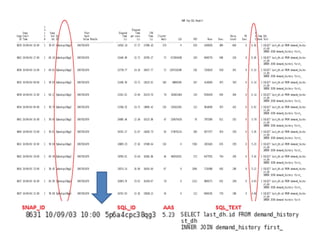
gc block lost – sudden slow down


http://karlarao.wordpress.com/2009/06/07/diagnosing-and-resolving-gc-block-lost
gc block lost – sudden slow down


http://karlarao.wordpress.com/2009/06/07/diagnosing-and-resolving-gc-block-lost
gc block lost – sudden slow down


http://karlarao.wordpress.com/2009/06/07/diagnosing-and-resolving-gc-block-lost
gc block lost – sudden slow down


http://karlarao.wordpress.com/2009/06/07/diagnosing-and-resolving-gc-block-lost
After gc block lost – normal workload


http://karlarao.wordpress.com/2009/06/07/diagnosing-and-resolving-gc-block-lost
Utilization = Requirement / Capacity
Double Y Axis Graph
t1 ‐‐‐‐‐‐‐‐‐‐‐‐‐‐‐‐‐‐‐‐‐‐‐‐‐‐‐‐‐‐‐‐‐‐‐‐‐> t0
    335 – 336 – 337 – 338 – 339
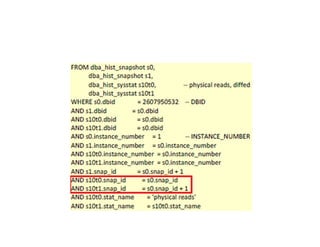
delta issue
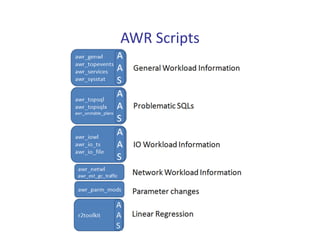
AWR Scripts
Visualization
Can’t go back in time?
AAS – Average Active Sessions
Kyle Hailey: http://www.perfvision.com/ftp/class/02_AAS.ppt


     Max CPU


   Max CPU
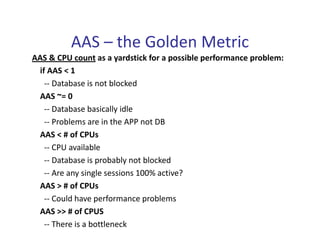
AAS – the Golden Metric
AAS & CPU count as a yardstick for a possible performance problem:
  if AAS < 1 
    ‐‐ Database is not blocked
  AAS ~= 0 
    ‐‐ Database basically idle
    ‐‐ Problems are in the APP not DB
  AAS < # of CPUs
    ‐‐ CPU available
    ‐‐ Database is probably not blocked
    ‐‐ Are any single sessions 100% active?
 AAS > # of CPUs
    ‐‐ Could have performance problems
 AAS >> # of CPUS
    ‐‐ There is a bottleneck
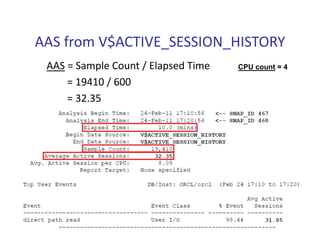
AAS from V$ACTIVE_SESSION_HISTORY
 AAS = Sample Count / Elapsed Time   CPU count = 4

     = 19410 / 600
     = 32.35
AAS from DBA_HIST_ACTIVE_SESS_HISTORY
 AAS = (Sample Count * 10) / Elapsed Time   CPU count = 4
     = (1950 * 10) / 600
     = 32.5 
AAS from AWR Report
AAS = DB Time / Elapsed Time   CPU count = 4
    = 291.81 / 9.10
    = 32.07
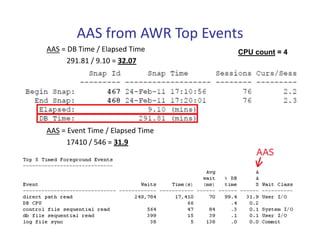
AAS from AWR Top Events
AAS = DB Time / Elapsed Time      CPU count = 4
      291.81 / 9.10 = 32.07


AAS = Event Time / Elapsed Time
      17410 / 546 = 31.9
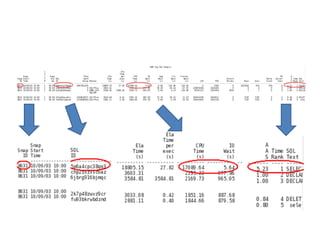
awr_topevents.sql
Textual trends
AAS throughout the AWR retention 
                     period!


http://karlarao.wordpress.com/2010/07/25/graphing-the-aas-with-perfsheet-a-la-enterprise-manager
Capacity Planning
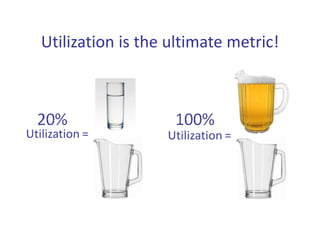
Utilization is the ultimate metric!
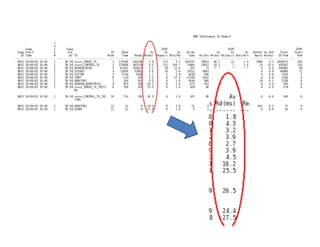
awr_genwl.sql
http://karlarao.wordpress.com/2010/01/31/workload-characterization-using-dba_hist-tables-and-ksar
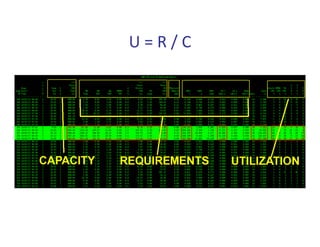
U = R / C
where aas > 1
Filter the data points
•   AAS range
           aas > 1

•   Per SNAP_ID or range of SNAP_IDs
           id in (336)
           where id >= 336 and  id <= 340

•   Oracle CPU Utilization
           oracpupct > 50

•   OS CPU Utilization
          oscpupct > 50

•   Workload periods

      AND TO_CHAR(s0.END_INTERVAL_TIME,'D') >= 1     ‐‐ Day of week: 1=Sunday 7=Saturday
      AND TO_CHAR(s0.END_INTERVAL_TIME,'D') <= 7
      AND TO_CHAR(s0.END_INTERVAL_TIME,'HH24MI') >= 0900     ‐‐ Hour
      AND TO_CHAR(s0.END_INTERVAL_TIME,'HH24MI') <= 1800
      AND s0.END_INTERVAL_TIME >= TO_DATE('2010‐jan‐17 00:00:00','yyyy‐mon‐dd hh24:mi:ss')  ‐‐ Data range
      AND s0.END_INTERVAL_TIME <= TO_DATE('2010‐aug‐22 23:59:59','yyyy‐mon‐dd hh24:mi:ss‘)
core need = # of cores * utilization * 1.25
                               Database Consolidation Best Practices
    http://husnusensoy.files.wordpress.com/2010/05/database‐consolidation‐best‐practices.pdf
Total disk IOPS = (IOPS * Read Ratio) + (IOPS * Write Ratio * RAID penalty)
Number of disk = Total disk IOPS / IOPS per disk
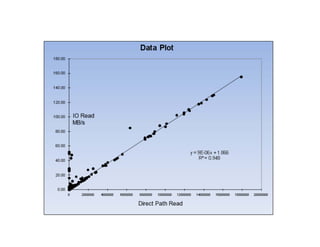
awr_iowl.sql
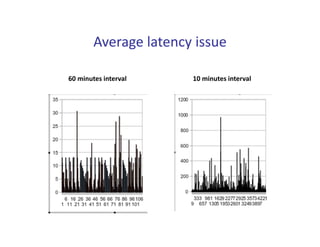
Average latency issue

60 minutes interval    10 minutes interval
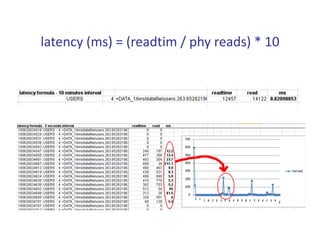
latency (ms) = (readtim / phy reads) * 10
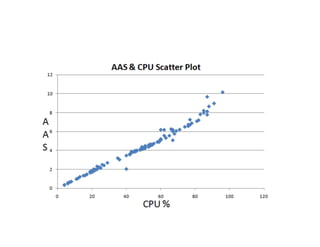
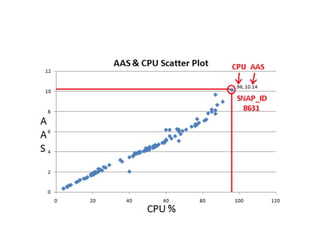
Linear Regression
x data (CPU) = is the "independent value", used to predict the value of y

y data (AAS) = is the "dependent value", variable whose value is to be predicted
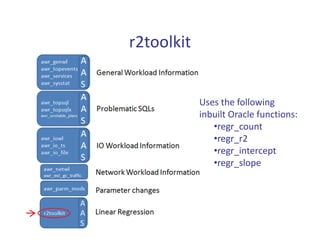
r2toolkit


            Uses the following 
            inbuilt Oracle functions:
               •regr_count
               •regr_r2
               •regr_intercept
               •regr_slope
r2toolkit
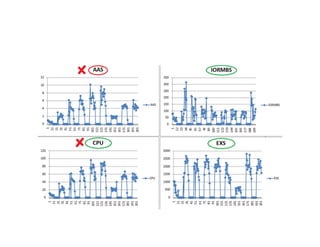
Linear Regression – what’s the value?
Linear Regression on 2 node RAC
     http://karlarao.tiddlyspot.com/#r2project


   racnode1                                racnode2
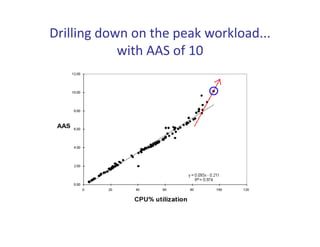
Drilling down on the peak workload... 
            with AAS of 10
Drilling down on the peak workload... 
            with AAS of 10
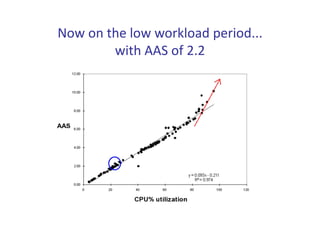
Now on the low workload period... 
        with AAS of 2.2
Now on the low workload period... 
        with AAS of 2.2
Recap
• Mine the beautiful data set

• Visualization tell a story immediately

• Statistics to make sense of data
Let the 
    AWR data set 
change your mind set!
Thank you!
References and Tools
•   http://karlarao.wordpress.com
     – http://karlarao.tiddlyspot.com/#%5B%5BStorage%20IOPS%2Ccapacity%2Cperformance
       %2Ccost%5D%5D
     – http://karlarao.tiddlyspot.com/#Statistics
     – http://karlarao.tiddlyspot.com/#OraclePerformance
•   Tanel Poder @ http://blog.tanelpoder.com
     – http://www.tanelpoder.com/files/TPT_public.zip
     – http://www.tanelpoder.com/files/PerfSheet.zip
     – Neil Gunther & Tanel Poder ‐ Multidimensional Visualization of Oracle Performance 
       using Barry007 http://arxiv.org/pdf/0809.2532
•   Kyle Hailey @ http://ashmasters.com , http://www.perfvision.com
•   Craig Shallahamer @ orapub.com
     – Introduction To Oracle Server Consolidation
     http://resources.orapub.com/product_p/server_consolidation_ppt.htm
•   Husnu Sensoy @ husnusensoy.wordpress.com 
     – Database Consolidation Best Practices
     http://husnusensoy.files.wordpress.com/2010/05/database‐consolidation‐best‐
        practices.pdf
•   Andy Rivenes @ http://www.appsdba.com/pubs.htm
•   Neeraj Bhatia @ www.nioug.org/files/Linear_Regression.pdf
Contact me through:

 karl.arao@enkitec.com

VirtaThon 2011 - Mining the AWR