HOW DID YOU USE NEW MEDIA TECHNOLOGIES IN THE
CONSTRUCTION AND RESEARCH, PLANNING AND
EVALUATION STAGES?
Evaluation Question - Four
RESEARCH
Google
• Google is an American multinational technology company that
specialises in Internet-related services and products, which include
online advertising technologies, search engine, cloud computing,
software, and hardware.
• I used google as it allowed myself to search accurately and effectively
the information I required to help myself progress during research.
Youtube
• YouTube is a free video sharing website that makes it easy to watch
online videos. You can even create and upload your own videos to
share with others. Originally created in 2005, it is now one of the most
popular sites on the Web, with visitors watching around 6 billion hours
of video every month.
• I used YouTube to research as it allowed me to watch short films related
to my genre which I analysed.
BBFC
• The BBFC publishes short but detailed information about all the films
and videos they rate. This is called BBFCinsight. It gives parents a clear
idea of how and why films have been rated and what issues the films
contain. BBFCinsight helps parents, carers and other viewers make
informed choices about what they watch.
• I used the BBFC during research to gain an understanding on
classification and outline possible classifications relating to my film
ideas.
Audience Feedback
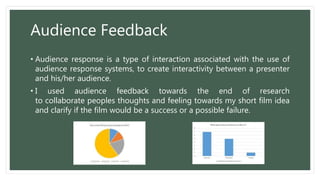
• Audience response is a type of interaction associated with the use of
audience response systems, to create interactivity between a presenter
and his/her audience.
• I used audience feedback towards the end of research
to collaborate peoples thoughts and feeling towards my short film idea
and clarify if the film would be a success or a possible failure.
PLANNING
Blogger
• Blogger is a blog-publishing service that allows multi-
user blogs with time-stamped entries. It was
developed by Pyra Labs, which was bought by Google
in 2003. Generally, the blogs are hosted by Google at
a subdomain of blogspot.com.
• When it came to planning, we put all of our research
onto Blogger and our planning to keep it all in the
same place and allowing us to collectively progress
effectively as a group with our ideas and planning
strategies being together to be seen by us all when
needed.
Facebook Messenger
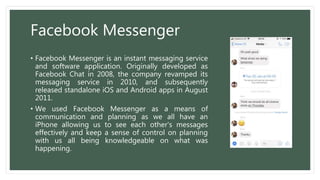
• Facebook Messenger is an instant messaging service
and software application. Originally developed as
Facebook Chat in 2008, the company revamped its
messaging service in 2010, and subsequently
released standalone iOS and Android apps in August
2011.
• We used Facebook Messenger as a means of
communication and planning as we all have an
iPhone allowing us to see each other's messages
effectively and keep a sense of control on planning
with us all being knowledgeable on what was
happening.
Celtx
• Celtx is media pre-production software, designed
for creating and organising media projects like
screenplays, films, videos, stage plays, audio plays,
documentaries, machinima, comics, games, and
podcasts.
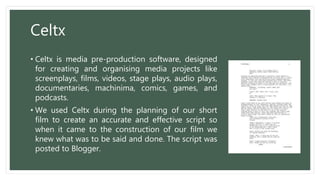
• We used Celtx during the planning of our short
film to create an accurate and effective script so
when it came to the construction of our film we
knew what was to be said and done. The script was
posted to Blogger.
Adobe Premiere Pro
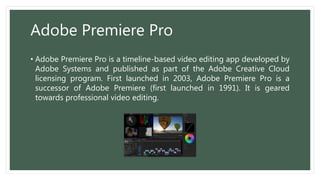
• Adobe Premiere Pro is a timeline-based video editing app developed by
Adobe Systems and published as part of the Adobe Creative Cloud
licensing program. First launched in 2003, Adobe Premiere Pro is a
successor of Adobe Premiere (first launched in 1991). It is geared
towards professional video editing.
Location Photo's
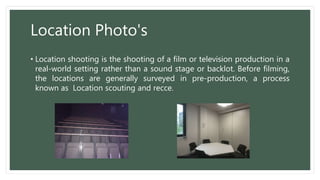
• Location shooting is the shooting of a film or television production in a
real-world setting rather than a sound stage or backlot. Before filming,
the locations are generally surveyed in pre-production, a process
known as Location scouting and recce.
Apple Weather
• The weather forecast extends out to 10 days
showing information for morning, afternoon
and overnight.
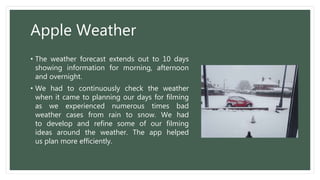
• We had to continuously check the weather
when it came to planning our days for filming
as we experienced numerous times bad
weather cases from rain to snow. We had
to develop and refine some of our filming
ideas around the weather. The app helped
us plan more efficiently.
CONSTRUCTION
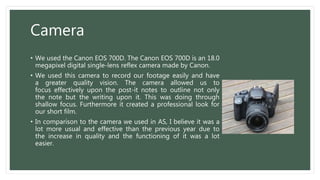
Camera
• We used the Canon EOS 700D. The Canon EOS 700D is an 18.0
megapixel digital single-lens reflex camera made by Canon.
• We used this camera to record our footage easily and have
a greater quality vision. The camera allowed us to
focus effectively upon the post-it notes to outline not only
the note but the writing upon it. This was doing through
shallow focus. Furthermore it created a professional look for
our short film.
• In comparison to the camera we used in AS, I believe it was a
lot more usual and effective than the previous year due to
the increase in quality and the functioning of it was a lot
easier.
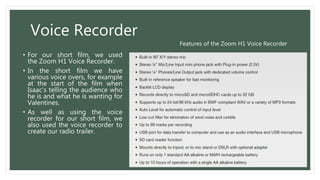
Voice Recorder
• For our short film, we used
the Zoom H1 Voice Recorder.
• In the short film we have
various voice overs, for example
at the start of the film when
Isaac's telling the audience who
he is and what he is wanting for
Valentines.
• As well as using the voice
recorder for our short film, we
also used the voice recorder to
create our radio trailer.
Features of the Zoom H1 Voice Recorder
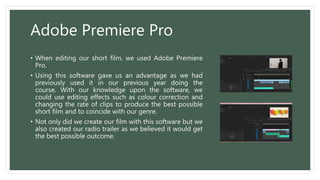
Adobe Premiere Pro
• When editing our short film, we used Adobe Premiere
Pro.
• Using this software gave us an advantage as we had
previously used it in our previous year doing the
course. With our knowledge upon the software, we
could use editing effects such as colour correction and
changing the rate of clips to produce the best possible
short film and to coincide with our genre.
• Not only did we create our film with this software but we
also created our radio trailer as we believed it would get
the best possible outcome.
EVALUATION
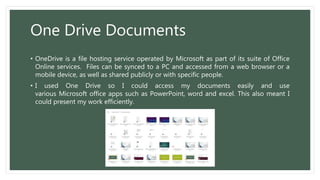
One Drive Documents
• OneDrive is a file hosting service operated by Microsoft as part of its suite of Office
Online services. Files can be synced to a PC and accessed from a web browser or a
mobile device, as well as shared publicly or with specific people.
• I used One Drive so I could access my documents easily and use
various Microsoft office apps such as PowerPoint, word and excel. This also meant I
could present my work efficiently.

Evaluation | Rendezvous | Question Four

  • 1.
    HOW DID YOUUSE NEW MEDIA TECHNOLOGIES IN THE CONSTRUCTION AND RESEARCH, PLANNING AND EVALUATION STAGES? Evaluation Question - Four
  • 2.
  • 3.
    Google • Google isan American multinational technology company that specialises in Internet-related services and products, which include online advertising technologies, search engine, cloud computing, software, and hardware. • I used google as it allowed myself to search accurately and effectively the information I required to help myself progress during research.
  • 4.
    Youtube • YouTube isa free video sharing website that makes it easy to watch online videos. You can even create and upload your own videos to share with others. Originally created in 2005, it is now one of the most popular sites on the Web, with visitors watching around 6 billion hours of video every month. • I used YouTube to research as it allowed me to watch short films related to my genre which I analysed.
  • 5.
    BBFC • The BBFCpublishes short but detailed information about all the films and videos they rate. This is called BBFCinsight. It gives parents a clear idea of how and why films have been rated and what issues the films contain. BBFCinsight helps parents, carers and other viewers make informed choices about what they watch. • I used the BBFC during research to gain an understanding on classification and outline possible classifications relating to my film ideas.
  • 6.
    Audience Feedback • Audienceresponse is a type of interaction associated with the use of audience response systems, to create interactivity between a presenter and his/her audience. • I used audience feedback towards the end of research to collaborate peoples thoughts and feeling towards my short film idea and clarify if the film would be a success or a possible failure.
  • 7.
  • 8.
    Blogger • Blogger isa blog-publishing service that allows multi- user blogs with time-stamped entries. It was developed by Pyra Labs, which was bought by Google in 2003. Generally, the blogs are hosted by Google at a subdomain of blogspot.com. • When it came to planning, we put all of our research onto Blogger and our planning to keep it all in the same place and allowing us to collectively progress effectively as a group with our ideas and planning strategies being together to be seen by us all when needed.
  • 9.
    Facebook Messenger • FacebookMessenger is an instant messaging service and software application. Originally developed as Facebook Chat in 2008, the company revamped its messaging service in 2010, and subsequently released standalone iOS and Android apps in August 2011. • We used Facebook Messenger as a means of communication and planning as we all have an iPhone allowing us to see each other's messages effectively and keep a sense of control on planning with us all being knowledgeable on what was happening.
  • 10.
    Celtx • Celtx ismedia pre-production software, designed for creating and organising media projects like screenplays, films, videos, stage plays, audio plays, documentaries, machinima, comics, games, and podcasts. • We used Celtx during the planning of our short film to create an accurate and effective script so when it came to the construction of our film we knew what was to be said and done. The script was posted to Blogger.
  • 11.
    Adobe Premiere Pro •Adobe Premiere Pro is a timeline-based video editing app developed by Adobe Systems and published as part of the Adobe Creative Cloud licensing program. First launched in 2003, Adobe Premiere Pro is a successor of Adobe Premiere (first launched in 1991). It is geared towards professional video editing.
  • 12.
    Location Photo's • Locationshooting is the shooting of a film or television production in a real-world setting rather than a sound stage or backlot. Before filming, the locations are generally surveyed in pre-production, a process known as Location scouting and recce.
  • 13.
    Apple Weather • Theweather forecast extends out to 10 days showing information for morning, afternoon and overnight. • We had to continuously check the weather when it came to planning our days for filming as we experienced numerous times bad weather cases from rain to snow. We had to develop and refine some of our filming ideas around the weather. The app helped us plan more efficiently.
  • 14.
  • 15.
    Camera • We usedthe Canon EOS 700D. The Canon EOS 700D is an 18.0 megapixel digital single-lens reflex camera made by Canon. • We used this camera to record our footage easily and have a greater quality vision. The camera allowed us to focus effectively upon the post-it notes to outline not only the note but the writing upon it. This was doing through shallow focus. Furthermore it created a professional look for our short film. • In comparison to the camera we used in AS, I believe it was a lot more usual and effective than the previous year due to the increase in quality and the functioning of it was a lot easier.
  • 16.
    Voice Recorder • Forour short film, we used the Zoom H1 Voice Recorder. • In the short film we have various voice overs, for example at the start of the film when Isaac's telling the audience who he is and what he is wanting for Valentines. • As well as using the voice recorder for our short film, we also used the voice recorder to create our radio trailer. Features of the Zoom H1 Voice Recorder
  • 17.
    Adobe Premiere Pro •When editing our short film, we used Adobe Premiere Pro. • Using this software gave us an advantage as we had previously used it in our previous year doing the course. With our knowledge upon the software, we could use editing effects such as colour correction and changing the rate of clips to produce the best possible short film and to coincide with our genre. • Not only did we create our film with this software but we also created our radio trailer as we believed it would get the best possible outcome.
  • 18.
  • 19.
    One Drive Documents •OneDrive is a file hosting service operated by Microsoft as part of its suite of Office Online services. Files can be synced to a PC and accessed from a web browser or a mobile device, as well as shared publicly or with specific people. • I used One Drive so I could access my documents easily and use various Microsoft office apps such as PowerPoint, word and excel. This also meant I could present my work efficiently.