How did you use new media
technologies in the construction and
research, planning and evaluation
stages?
Group 1: Shekarie James (6088)
What was leant in Pre-production and
Post-production?
 We learnt about new documenting tools for example Youtube, Slideshare,
Prezi and Powtoons. This enabled our work to be both informative as well as
interesting.
 We were able to document our research and planning that we did in the pre
production stage , but also in multiple different formats.
 We also learnt how to tag and use labels in our posts this made our work more
organised especially when looking through our posts and finding out what to
do as well as the progress made.
Blogger
Advantages
 Easy to use when sharing picture and videos.
 Personal source of sharing your work.
 Its free
 Theme is easy to change
 Easy to embed power points, prezis and slide share.

Disadvantages
 Blog ownership remains with blogger
 Blogs can crash deleting all of the work which is scaring if you work is not
backed up we went through this twice.
YouTube
Advantages
 It is a free
 Easy to share your videos on other sites(embedding)
 It allow you to give our opinion in the comment section
 It allows you to get feedback from people who watch your videos
 You can personally brand yourself
Disadvantages
 Videos take a long time to upload depending on the quantity.
 Limited editing control
 There are limits for new accounts
 YouTube severs can crash and leave some videos inaccessible.
Prezi
Advantages
 A free unique way of presenting information.
 Prezi allows creators to link text and images to movement.
 It saves backup online and can be embedded anywhere
 It allows you to zoom in and out of the information which is unique.
 Prezi is a very easy program to use and you learn fast how to use it.
Disadvantages
 Prezi can be time consuming
 Limited printing options
 Web based so the
 can be lost if its not saved properly before it crashes.
 Can cause dizziness and audio is hard to upload.
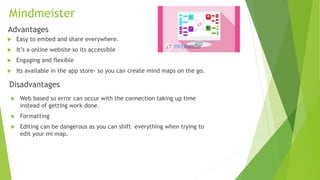
My Favourite Post
Mindmeister
Advantages
 Easy to embed and share everywhere.
 It’s a online website so its accessible
 Engaging and flexible
 Its available in the app store- so you can create mind maps on the go.
Disadvantages
 Web based so error can occur with the connection taking up time
instead of getting work done.
 Formatting
 Editing can be dangerous as you can shift everything when trying to
edit your mi map.
What we learned about documenting
technologies:
 We learned a variety of new way to document our research and planning on
different platforms. We learned how to edit and improve our blogs by learning
to label our posts and tags our selves making our blogs more efficient.
Furthermore we learned how to edit the time and date of our posts so that
we can have all our posts organised and looking presentable.
 We learned different way to present our work for example prezi, slide share
and YouTube. And these enabled us to uniquely make our work different but
also interesting.
Microphone
Advantages
 The microphone helped to enhance the quality of the sound and blocked out most of
the ambient sound.
 Overall the microphone made our better for example in dialogue between the main
characters which was clear because the microphone got rid of the ambient sound.
Disadvantages
 The microphone could not block out all sound so we had to get rid of the sounds that the
microphone was not able to block out the post production stage by editing the sound out.
 We had to make sure that the micro phone was attached.
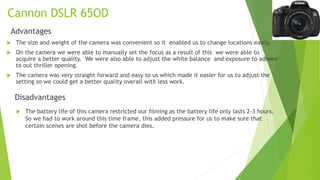
Cannon DSLR 65OD
Advantages
 The size and weight of the camera was convenient so it enabled us to change locations easily.
 On the camera we were able to manually set the focus as a result of this we were able to
acquire a better quality. We were also able to adjust the white balance and exposure to adhere
to out thriller opening.
 The camera was very straight forward and easy to us which made it easier for us to adjust the
setting so we could get a better quality overall with less work.
Disadvantages
 The battery life of this camera restricted our filming as the battery life only lasts 2-3 hours.
So we had to work around this time frame, this added pressure for us to make sure that
certain scenes are shot before the camera dies.
Camera lens
Advantages
 The camera lens made its easier to have a sharp focus on certain shots for example the montage
were there was multiple close ups which are clearly seem because of the sharp focus.
 The lens is a compact and a lightweight.
Disadvantages
 However, for some scenes despite continuously trying to focus the lens some of the
shots were still a bit blurry.
Challenges in the production process
and how we overcame these problems:
 We faced a number of challenges one of which is;
 The key lighting was really bright so in the post production process we had to
dim the light so that the characters could be seen and so that the shadow looked
more faint.
 Another problem we faced is that because the camera on the tripod prevented
us to get and extreme close up. Therefore we had to use a hand help camera to
get the close up shot we needed.
What we learnt about the technologies
when filming:
 When filming we leaned many things about media technologies. One of these is
the camera and how advanced it is when shooting but mostly the setting in the
camera for example when shooting we wanted to get the main character in the
centre. And we then had to go into the camera settings and set the grids on so we
could centre the characters face and it would be right in the middle. This added
more professionalism to our full product and highlighted the character more.
 Another setting on the camera that we were able to utilise is the lighting in order
to enhance the natural colours of our scene we had to set the white balance
manually to improve our quality which also enhanced the quality our full product.
 The microphone is another technology that really made a difference to or full
product we learnt that it can make a huge difference in terms of the sound quality
and clarity. Furthermore, the fact the it can block out some ambient sound.
 We also learned the way to zoom in and get extreme close ups through the camera
lens when adjusting the lens by twisting it we learnt you could zoom and focus to
get a more detailed shot.
Post production
 The tools came in handy more at the post production stage when we were
constructing and editing our final media texts for example the synergistic link
and our website.
 We used the iMacs to run the applications for example Final Cut Pro,
Fireworks and Photoshop. Final Cut Pro enabled us to edit and create a
narrative.
 Fireworks and Photoshop allowed us to produce the synergistic link between
our products.
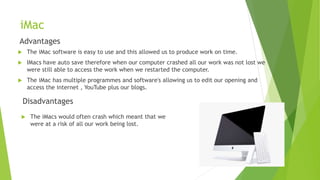
iMac
Advantages
 The iMac software is easy to use and this allowed us to produce work on time.
 IMacs have auto save therefore when our computer crashed all our work was not lost we
were still able to access the work when we restarted the computer.
 The iMac has multiple programmes and software's allowing us to edit our opening and
access the internet , YouTube plus our blogs.
Disadvantages
 The iMacs would often crash which meant that we
were at a risk of all our work being lost.
How we used Photoshop ?
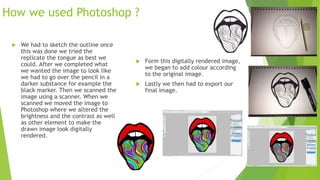
 We had to sketch the outline once
this was done we tried the
replicate the tongue as best we
could. After we completed what
we wanted the image to look like
we had to go over the pencil in a
darker substance for example the
black marker. Then we scanned the
image using a scanner. When we
scanned we moved the image to
Photoshop where we altered the
brightness and the contrast as well
as other element to make the
drawn image look digitally
rendered.
 Form this digitally rendered image,
we began to add colour according
to the original image.
 Lastly we then had to export our
final image.
Final Cut Pro
Advantages
 It allowed us to easily to adjust an fix the challenges we faced with the colour and
lighting so the brightness and saturation can be changed.
 It offers a variety of transitions like fades and dissolves between each cut this made our
thriller opening flow better. For example, the transition of the title for our opening
which fades.
Disadvantages
 Final Cut Pro has a lot of editing features in comparison to iMovie. However, this
made it more difficult for the us to use as it was a bit to complex at first.
 Final Cut Pro at one point corrupted our file and crashed which then lead to all
of our work becoming frozen and malfunctioning. And to save our work, we had
to save our file every 5 minutes, just to make sure that our work didn’t get
corrupt again.
Photoshop and Firework
Advantages
 Fireworks has pages and states instead of just layers. This is great for creating multi-page
or multi-state designs and walking through the design w/o having to turn layers on and off
to demo.
 The software allowed us to construct our own image for the Logo
 The software was relatively easy to use yet produce professional work.
 Images could be resized without creating a loss of quality, therefore allowing us to both
design a small logo for our music video and then resize it for our website and our magazine
advert.
Disadvantages
 Fireworks doesn't work well for printing your designs. Since the dpi is natively lower
(you can change it, but most people don't), the images come out a little bitmapped.
How we handled the challenges?
 Our first opening sequence came from Final Cut Pro which we edited and
made ours through adjusting the saturation and the pace. However it was a
found image so we could not use it so, we had to create a new one using Fire
work and Dreamweaver the challenge of this is that we had to use another
editing source to create our opening now. We had to learn how to use
Firework properly.
 When filming some of our shots they were unstable which meant that we had
to stabilise certain shots on Final Cut Pro.
 We ensured that our work was backed up so in case anything was to happen
we wouldn’t have to start from the top luckily, because this came in handy
when our iMac deleted some of our footage we used the back up to regain
the footage.
 We edited out all ambient sounds through Final Cut Pro
What we learnt about editing:
 We learned that the editing process is where you can fix any problems which
have gone wrong in the production stage. For instance the ambient sound
which can be edited out. We also noticed that the post- production stage is
one of the most vital stages because we were able to turn raw footage into
the product it is now. Without the editing process the opening would just be
plain and unshaped. This process also taught us the affect of certain audios
and or soundtrack and the influence this can have on a shot. In terms of the
atmosphere which this creates mystery , tension , build up and climax
especially if the audio matches the action going on in the opening.

Evaluation 4

  • 1.
    How did youuse new media technologies in the construction and research, planning and evaluation stages? Group 1: Shekarie James (6088)
  • 2.
    What was leantin Pre-production and Post-production?  We learnt about new documenting tools for example Youtube, Slideshare, Prezi and Powtoons. This enabled our work to be both informative as well as interesting.  We were able to document our research and planning that we did in the pre production stage , but also in multiple different formats.  We also learnt how to tag and use labels in our posts this made our work more organised especially when looking through our posts and finding out what to do as well as the progress made.
  • 3.
    Blogger Advantages  Easy touse when sharing picture and videos.  Personal source of sharing your work.  Its free  Theme is easy to change  Easy to embed power points, prezis and slide share.  Disadvantages  Blog ownership remains with blogger  Blogs can crash deleting all of the work which is scaring if you work is not backed up we went through this twice.
  • 4.
    YouTube Advantages  It isa free  Easy to share your videos on other sites(embedding)  It allow you to give our opinion in the comment section  It allows you to get feedback from people who watch your videos  You can personally brand yourself Disadvantages  Videos take a long time to upload depending on the quantity.  Limited editing control  There are limits for new accounts  YouTube severs can crash and leave some videos inaccessible.
  • 5.
    Prezi Advantages  A freeunique way of presenting information.  Prezi allows creators to link text and images to movement.  It saves backup online and can be embedded anywhere  It allows you to zoom in and out of the information which is unique.  Prezi is a very easy program to use and you learn fast how to use it. Disadvantages  Prezi can be time consuming  Limited printing options  Web based so the  can be lost if its not saved properly before it crashes.  Can cause dizziness and audio is hard to upload. My Favourite Post
  • 6.
    Mindmeister Advantages  Easy toembed and share everywhere.  It’s a online website so its accessible  Engaging and flexible  Its available in the app store- so you can create mind maps on the go. Disadvantages  Web based so error can occur with the connection taking up time instead of getting work done.  Formatting  Editing can be dangerous as you can shift everything when trying to edit your mi map.
  • 7.
    What we learnedabout documenting technologies:  We learned a variety of new way to document our research and planning on different platforms. We learned how to edit and improve our blogs by learning to label our posts and tags our selves making our blogs more efficient. Furthermore we learned how to edit the time and date of our posts so that we can have all our posts organised and looking presentable.  We learned different way to present our work for example prezi, slide share and YouTube. And these enabled us to uniquely make our work different but also interesting.
  • 8.
    Microphone Advantages  The microphonehelped to enhance the quality of the sound and blocked out most of the ambient sound.  Overall the microphone made our better for example in dialogue between the main characters which was clear because the microphone got rid of the ambient sound. Disadvantages  The microphone could not block out all sound so we had to get rid of the sounds that the microphone was not able to block out the post production stage by editing the sound out.  We had to make sure that the micro phone was attached.
  • 9.
    Cannon DSLR 65OD Advantages The size and weight of the camera was convenient so it enabled us to change locations easily.  On the camera we were able to manually set the focus as a result of this we were able to acquire a better quality. We were also able to adjust the white balance and exposure to adhere to out thriller opening.  The camera was very straight forward and easy to us which made it easier for us to adjust the setting so we could get a better quality overall with less work. Disadvantages  The battery life of this camera restricted our filming as the battery life only lasts 2-3 hours. So we had to work around this time frame, this added pressure for us to make sure that certain scenes are shot before the camera dies.
  • 10.
    Camera lens Advantages  Thecamera lens made its easier to have a sharp focus on certain shots for example the montage were there was multiple close ups which are clearly seem because of the sharp focus.  The lens is a compact and a lightweight. Disadvantages  However, for some scenes despite continuously trying to focus the lens some of the shots were still a bit blurry.
  • 11.
    Challenges in theproduction process and how we overcame these problems:  We faced a number of challenges one of which is;  The key lighting was really bright so in the post production process we had to dim the light so that the characters could be seen and so that the shadow looked more faint.  Another problem we faced is that because the camera on the tripod prevented us to get and extreme close up. Therefore we had to use a hand help camera to get the close up shot we needed.
  • 12.
    What we learntabout the technologies when filming:  When filming we leaned many things about media technologies. One of these is the camera and how advanced it is when shooting but mostly the setting in the camera for example when shooting we wanted to get the main character in the centre. And we then had to go into the camera settings and set the grids on so we could centre the characters face and it would be right in the middle. This added more professionalism to our full product and highlighted the character more.  Another setting on the camera that we were able to utilise is the lighting in order to enhance the natural colours of our scene we had to set the white balance manually to improve our quality which also enhanced the quality our full product.  The microphone is another technology that really made a difference to or full product we learnt that it can make a huge difference in terms of the sound quality and clarity. Furthermore, the fact the it can block out some ambient sound.  We also learned the way to zoom in and get extreme close ups through the camera lens when adjusting the lens by twisting it we learnt you could zoom and focus to get a more detailed shot.
  • 13.
    Post production  Thetools came in handy more at the post production stage when we were constructing and editing our final media texts for example the synergistic link and our website.  We used the iMacs to run the applications for example Final Cut Pro, Fireworks and Photoshop. Final Cut Pro enabled us to edit and create a narrative.  Fireworks and Photoshop allowed us to produce the synergistic link between our products.
  • 14.
    iMac Advantages  The iMacsoftware is easy to use and this allowed us to produce work on time.  IMacs have auto save therefore when our computer crashed all our work was not lost we were still able to access the work when we restarted the computer.  The iMac has multiple programmes and software's allowing us to edit our opening and access the internet , YouTube plus our blogs. Disadvantages  The iMacs would often crash which meant that we were at a risk of all our work being lost.
  • 15.
    How we usedPhotoshop ?  We had to sketch the outline once this was done we tried the replicate the tongue as best we could. After we completed what we wanted the image to look like we had to go over the pencil in a darker substance for example the black marker. Then we scanned the image using a scanner. When we scanned we moved the image to Photoshop where we altered the brightness and the contrast as well as other element to make the drawn image look digitally rendered.  Form this digitally rendered image, we began to add colour according to the original image.  Lastly we then had to export our final image.
  • 16.
    Final Cut Pro Advantages It allowed us to easily to adjust an fix the challenges we faced with the colour and lighting so the brightness and saturation can be changed.  It offers a variety of transitions like fades and dissolves between each cut this made our thriller opening flow better. For example, the transition of the title for our opening which fades. Disadvantages  Final Cut Pro has a lot of editing features in comparison to iMovie. However, this made it more difficult for the us to use as it was a bit to complex at first.  Final Cut Pro at one point corrupted our file and crashed which then lead to all of our work becoming frozen and malfunctioning. And to save our work, we had to save our file every 5 minutes, just to make sure that our work didn’t get corrupt again.
  • 17.
    Photoshop and Firework Advantages Fireworks has pages and states instead of just layers. This is great for creating multi-page or multi-state designs and walking through the design w/o having to turn layers on and off to demo.  The software allowed us to construct our own image for the Logo  The software was relatively easy to use yet produce professional work.  Images could be resized without creating a loss of quality, therefore allowing us to both design a small logo for our music video and then resize it for our website and our magazine advert. Disadvantages  Fireworks doesn't work well for printing your designs. Since the dpi is natively lower (you can change it, but most people don't), the images come out a little bitmapped.
  • 18.
    How we handledthe challenges?  Our first opening sequence came from Final Cut Pro which we edited and made ours through adjusting the saturation and the pace. However it was a found image so we could not use it so, we had to create a new one using Fire work and Dreamweaver the challenge of this is that we had to use another editing source to create our opening now. We had to learn how to use Firework properly.  When filming some of our shots they were unstable which meant that we had to stabilise certain shots on Final Cut Pro.  We ensured that our work was backed up so in case anything was to happen we wouldn’t have to start from the top luckily, because this came in handy when our iMac deleted some of our footage we used the back up to regain the footage.  We edited out all ambient sounds through Final Cut Pro
  • 19.
    What we learntabout editing:  We learned that the editing process is where you can fix any problems which have gone wrong in the production stage. For instance the ambient sound which can be edited out. We also noticed that the post- production stage is one of the most vital stages because we were able to turn raw footage into the product it is now. Without the editing process the opening would just be plain and unshaped. This process also taught us the affect of certain audios and or soundtrack and the influence this can have on a shot. In terms of the atmosphere which this creates mystery , tension , build up and climax especially if the audio matches the action going on in the opening.