How did you use media technologies in the construction, planning, research and evaluation stages?
InternetWe used the internet via Firefox, Safari etc for initial planning through film shorts websites such as www.virginshorts.com and through www.google.co.uk for images and research of posters etc, and also for information via www.wikipedia.org on genre for example and for other research.
Hi def cameras, HD storageUsing the high definition cameras on our short film gave us the professional advantage, and on the Apple Macs we had access to HD storage and easy software to edit our film to a professional standard such as:Final Cut ProFinal Cut Pro is used by professionals in the film industry so we had access to thebest software available, like when you edit posts you can give them voiceovers or add other text posts straight away. You can also add posts from Adobe Photoshop easily and effectively.
GaragebandWe used Garageband to produce our soundtrack to our short film via Final Cut Pro,  we also added extra sounds to the film such as alarm clock noises and an extra piece of music for our party scene. It was easy and also vital to put this onto our film.
Adobe CS4We used Adobe CS4 and it’s products such as Photoshop to create all of the print work to a professional standard, such as the three teaser posters, the article and the final film poster.
Digital SLR CamerasWe used Digital SLR Cameras to create highquality photos, we then edited the photos on the Apple Macs and from a Polaroid website called www.polaroid.net. Using both of these made it really easy to create                                                                                                     .         images of a great quality.
BlogWith www.blogger.com it allowed us to present our work as a journey, embedding videos and images, creating text posts of each part of the process of making our short film.
Video SitesUsing video sites in for our planning of the short film was necessary as it allowed us to gain understanding of other videos within our genre, and it also allowed us to collect audience feedback for our film making it easier for us to know what people thought about our film and if it was successful or not.
E-mailUsing the e-mailing system via www.pursglove.ac.uk/mymail and windows live hotmail allowed us to communicate with our teachers, colleagues etc about filming schedules, arranging times to meet and edit our film etc. This made it easier to end up getting our film completed easily and efficiently.
Presenting WorkWhen using Blogger we used a variety of ways for presenting our work like Prezi, Slideshare for creating PowerPoint presentations and Xtranormal for creating interviews in a more interactive yet creative way. This allowed our blog to have a more visual outlook instead of using just writing all of the time, making it look and feel more interesting.
Web 2.0Web 2.0 introduced us to more ways to present our work through more and more social websites, including You Tube, Google, Facebook etc.Experiencing ProblemsThe only real problem with using the Apple Macs was when it crashed, causing the colour wheel to appear. But this was overcome within a small time period showing it was easy to use the computers and the software available and that there was no major problems encountered when making our film.
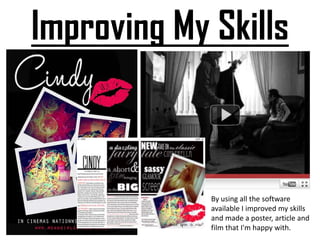
Improving My SkillsBy using all the software available I improved my skills and made a poster, article and film that I'm happy with.

Question 4

  • 1.
    How did youuse media technologies in the construction, planning, research and evaluation stages?
  • 2.
    InternetWe used theinternet via Firefox, Safari etc for initial planning through film shorts websites such as www.virginshorts.com and through www.google.co.uk for images and research of posters etc, and also for information via www.wikipedia.org on genre for example and for other research.
  • 3.
    Hi def cameras,HD storageUsing the high definition cameras on our short film gave us the professional advantage, and on the Apple Macs we had access to HD storage and easy software to edit our film to a professional standard such as:Final Cut ProFinal Cut Pro is used by professionals in the film industry so we had access to thebest software available, like when you edit posts you can give them voiceovers or add other text posts straight away. You can also add posts from Adobe Photoshop easily and effectively.
  • 4.
    GaragebandWe used Garagebandto produce our soundtrack to our short film via Final Cut Pro, we also added extra sounds to the film such as alarm clock noises and an extra piece of music for our party scene. It was easy and also vital to put this onto our film.
  • 5.
    Adobe CS4We usedAdobe CS4 and it’s products such as Photoshop to create all of the print work to a professional standard, such as the three teaser posters, the article and the final film poster.
  • 6.
    Digital SLR CamerasWeused Digital SLR Cameras to create highquality photos, we then edited the photos on the Apple Macs and from a Polaroid website called www.polaroid.net. Using both of these made it really easy to create . images of a great quality.
  • 7.
    BlogWith www.blogger.com itallowed us to present our work as a journey, embedding videos and images, creating text posts of each part of the process of making our short film.
  • 8.
    Video SitesUsing videosites in for our planning of the short film was necessary as it allowed us to gain understanding of other videos within our genre, and it also allowed us to collect audience feedback for our film making it easier for us to know what people thought about our film and if it was successful or not.
  • 9.
    E-mailUsing the e-mailingsystem via www.pursglove.ac.uk/mymail and windows live hotmail allowed us to communicate with our teachers, colleagues etc about filming schedules, arranging times to meet and edit our film etc. This made it easier to end up getting our film completed easily and efficiently.
  • 10.
    Presenting WorkWhen usingBlogger we used a variety of ways for presenting our work like Prezi, Slideshare for creating PowerPoint presentations and Xtranormal for creating interviews in a more interactive yet creative way. This allowed our blog to have a more visual outlook instead of using just writing all of the time, making it look and feel more interesting.
  • 11.
    Web 2.0Web 2.0introduced us to more ways to present our work through more and more social websites, including You Tube, Google, Facebook etc.Experiencing ProblemsThe only real problem with using the Apple Macs was when it crashed, causing the colour wheel to appear. But this was overcome within a small time period showing it was easy to use the computers and the software available and that there was no major problems encountered when making our film.
  • 12.
    Improving My SkillsByusing all the software available I improved my skills and made a poster, article and film that I'm happy with.