Question 4
How did you use media
technologies in the construction
and research, planning and
evaluation stages?
Rachel Allen
Technologies I Have Used
In the construction and
research, planning and
evaluation stages I have
learnt and developed my
skills further when
operating new
technologies. This has
helped get my final piece
to the highest standard
and to make it look as
professional as possible.
• iPhone
• Blogger
• Apple Mac Computers
• Cannon Video Camera/Cannon Camera
• USB
• iMovie
• Photoshop
• Garage band
• YouTube
• Facebook
YouTube
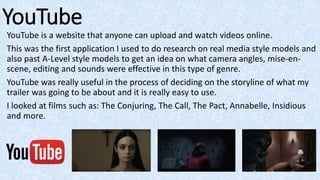
YouTube is a website that anyone can upload and watch videos online.
This was the first application I used to do research on real media style models and
also past A-Level style models to get an idea on what camera angles, mise-en-
scene, editing and sounds were effective in this type of genre.
YouTube was really useful in the process of deciding on the storyline of what my
trailer was going to be about and it is really easy to use.
I looked at films such as: The Conjuring, The Call, The Pact, Annabelle, Insidious
and more.
Blogger
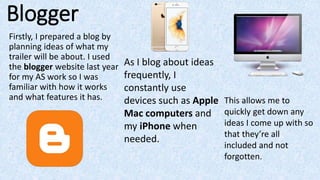
Firstly, I prepared a blog by
planning ideas of what my
trailer will be about. I used
the blogger website last year
for my AS work so I was
familiar with how it works
and what features it has.
As I blog about ideas
frequently, I
constantly use
devices such as Apple
Mac computers and
my iPhone when
needed.
This allows me to
quickly get down any
ideas I come up with so
that they’re all
included and not
forgotten.
Cannon Cameras
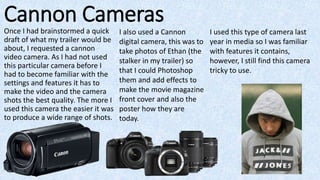
Once I had brainstormed a quick
draft of what my trailer would be
about, I requested a cannon
video camera. As I had not used
this particular camera before I
had to become familiar with the
settings and features it has to
make the video and the camera
shots the best quality. The more I
used this camera the easier it was
to produce a wide range of shots.
I also used a Cannon
digital camera, this was to
take photos of Ethan (the
stalker in my trailer) so
that I could Photoshop
them and add effects to
make the movie magazine
front cover and also the
poster how they are
today.
I used this type of camera last
year in media so I was familiar
with features it contains,
however, I still find this camera
tricky to use.
iMovie
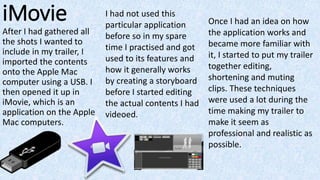
After I had gathered all
the shots I wanted to
include in my trailer, I
imported the contents
onto the Apple Mac
computer using a USB. I
then opened it up in
iMovie, which is an
application on the Apple
Mac computers.
Once I had an idea on how
the application works and
became more familiar with
it, I started to put my trailer
together editing,
shortening and muting
clips. These techniques
were used a lot during the
time making my trailer to
make it seem as
professional and realistic as
possible.
I had not used this
particular application
before so in my spare
time I practised and got
used to its features and
how it generally works
by creating a storyboard
before I started editing
the actual contents I had
videoed.
iMovie
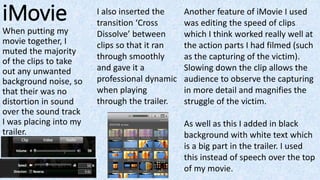
When putting my
movie together, I
muted the majority
of the clips to take
out any unwanted
background noise, so
that their was no
distortion in sound
over the sound track
I was placing into my
trailer.
I also inserted the
transition ‘Cross
Dissolve’ between
clips so that it ran
through smoothly
and gave it a
professional dynamic
when playing
through the trailer.
Another feature of iMovie I used
was editing the speed of clips
which I think worked really well at
the action parts I had filmed (such
as the capturing of the victim).
Slowing down the clip allows the
audience to observe the capturing
in more detail and magnifies the
struggle of the victim.
As well as this I added in black
background with white text which
is a big part in the trailer. I used
this instead of speech over the top
of my movie.
PhotoshopAnother application I
chose to use was
Photoshop. I had used
this application last year
when completing my AS
work so I had a familiar
idea on how it works and
developed my skills
further by exploring
different tools.
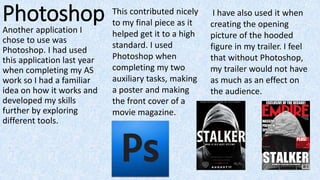
This contributed nicely
to my final piece as it
helped get it to a high
standard. I used
Photoshop when
completing my two
auxiliary tasks, making
a poster and making
the front cover of a
movie magazine.
I have also used it when
creating the opening
picture of the hooded
figure in my trailer. I feel
that without Photoshop,
my trailer would not have
as much as an effect on
the audience.
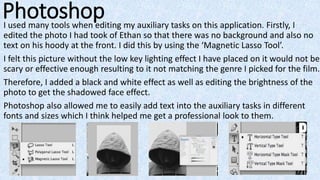
PhotoshopI used many tools when editing my auxiliary tasks on this application. Firstly, I
edited the photo I had took of Ethan so that there was no background and also no
text on his hoody at the front. I did this by using the ‘Magnetic Lasso Tool’.
I felt this picture without the low key lighting effect I have placed on it would not be
scary or effective enough resulting to it not matching the genre I picked for the film.
Therefore, I added a black and white effect as well as editing the brightness of the
photo to get the shadowed face effect.
Photoshop also allowed me to easily add text into the auxiliary tasks in different
fonts and sizes which I think helped me get a professional look to them.
Overall, the use of media technologies in the
construction and research, planning and
evaluation stages helped massively in the
build up to creating my trailer. Without these
technologies it would not be possible to
achieve high quality work.

Evaluation Question 4

  • 1.
    Question 4 How didyou use media technologies in the construction and research, planning and evaluation stages? Rachel Allen
  • 2.
    Technologies I HaveUsed In the construction and research, planning and evaluation stages I have learnt and developed my skills further when operating new technologies. This has helped get my final piece to the highest standard and to make it look as professional as possible. • iPhone • Blogger • Apple Mac Computers • Cannon Video Camera/Cannon Camera • USB • iMovie • Photoshop • Garage band • YouTube • Facebook
  • 3.
    YouTube YouTube is awebsite that anyone can upload and watch videos online. This was the first application I used to do research on real media style models and also past A-Level style models to get an idea on what camera angles, mise-en- scene, editing and sounds were effective in this type of genre. YouTube was really useful in the process of deciding on the storyline of what my trailer was going to be about and it is really easy to use. I looked at films such as: The Conjuring, The Call, The Pact, Annabelle, Insidious and more.
  • 4.
    Blogger Firstly, I prepareda blog by planning ideas of what my trailer will be about. I used the blogger website last year for my AS work so I was familiar with how it works and what features it has. As I blog about ideas frequently, I constantly use devices such as Apple Mac computers and my iPhone when needed. This allows me to quickly get down any ideas I come up with so that they’re all included and not forgotten.
  • 5.
    Cannon Cameras Once Ihad brainstormed a quick draft of what my trailer would be about, I requested a cannon video camera. As I had not used this particular camera before I had to become familiar with the settings and features it has to make the video and the camera shots the best quality. The more I used this camera the easier it was to produce a wide range of shots. I also used a Cannon digital camera, this was to take photos of Ethan (the stalker in my trailer) so that I could Photoshop them and add effects to make the movie magazine front cover and also the poster how they are today. I used this type of camera last year in media so I was familiar with features it contains, however, I still find this camera tricky to use.
  • 6.
    iMovie After I hadgathered all the shots I wanted to include in my trailer, I imported the contents onto the Apple Mac computer using a USB. I then opened it up in iMovie, which is an application on the Apple Mac computers. Once I had an idea on how the application works and became more familiar with it, I started to put my trailer together editing, shortening and muting clips. These techniques were used a lot during the time making my trailer to make it seem as professional and realistic as possible. I had not used this particular application before so in my spare time I practised and got used to its features and how it generally works by creating a storyboard before I started editing the actual contents I had videoed.
  • 7.
    iMovie When putting my movietogether, I muted the majority of the clips to take out any unwanted background noise, so that their was no distortion in sound over the sound track I was placing into my trailer. I also inserted the transition ‘Cross Dissolve’ between clips so that it ran through smoothly and gave it a professional dynamic when playing through the trailer. Another feature of iMovie I used was editing the speed of clips which I think worked really well at the action parts I had filmed (such as the capturing of the victim). Slowing down the clip allows the audience to observe the capturing in more detail and magnifies the struggle of the victim. As well as this I added in black background with white text which is a big part in the trailer. I used this instead of speech over the top of my movie.
  • 8.
    PhotoshopAnother application I choseto use was Photoshop. I had used this application last year when completing my AS work so I had a familiar idea on how it works and developed my skills further by exploring different tools. This contributed nicely to my final piece as it helped get it to a high standard. I used Photoshop when completing my two auxiliary tasks, making a poster and making the front cover of a movie magazine. I have also used it when creating the opening picture of the hooded figure in my trailer. I feel that without Photoshop, my trailer would not have as much as an effect on the audience.
  • 9.
    PhotoshopI used manytools when editing my auxiliary tasks on this application. Firstly, I edited the photo I had took of Ethan so that there was no background and also no text on his hoody at the front. I did this by using the ‘Magnetic Lasso Tool’. I felt this picture without the low key lighting effect I have placed on it would not be scary or effective enough resulting to it not matching the genre I picked for the film. Therefore, I added a black and white effect as well as editing the brightness of the photo to get the shadowed face effect. Photoshop also allowed me to easily add text into the auxiliary tasks in different fonts and sizes which I think helped me get a professional look to them.
  • 10.
    Overall, the useof media technologies in the construction and research, planning and evaluation stages helped massively in the build up to creating my trailer. Without these technologies it would not be possible to achieve high quality work.