© 1996-2009 Operation Technology, Inc. – Workshop Notes: Control Circuit System
Control System Diagram
(CSD)
Slide 2© 1996-2009 Operation Technology, Inc. – Workshop Notes: Control Circuit System
Control System Elements
• Switchgear Protection and Control Circuit
– Circuit breaker trip and closing coils
– Circuit breaker closing spring charging motors
– Relays coils and timer
• Motor Starter, Speed Control, and Protection
– Starter coil circuit
– Control relays
– Can be either AC or DC control circuit
Slide 3© 1996-2009 Operation Technology, Inc. – Workshop Notes: Control Circuit System
Control System Elements
• Miscellaneous DC Loads
– Relays
– Solenoids
• Other Purpose
– Auxiliary devices and special control circuits
– Regulator and regulating systems
Slide 4© 1996-2009 Operation Technology, Inc. – Workshop Notes: Control Circuit System
CSD Modes
Edit Mode
•Add/Delete Elements
•Change Connections
•Modify Engineering Data
Simulation Mode
•Run Simulations – Simulation Triggered by Manual Action or
Clicking the Run Button
•Update Source Duty Cycle
•Generate Event View, Alert View, and Report
Slide 5© 1996-2009 Operation Technology, Inc. – Workshop Notes: Control Circuit System
CSD Setup
CSD Elements
•Device – Coil, Solenoid, General Load and Light
•Contact – Fixed and Form-C; Macro-Controlled Contact
•Branch – Wire and Impedance
•Bus and Node
•PD – CB and Fuse
CSD Source
•Elementary Diagram (ED) brought in from DC System
•Each ED can be placed in only one CSD
Slide 6© 1996-2009 Operation Technology, Inc. – Workshop Notes: Control Circuit System
Control Cable Schedule
•Cable Used only in Control System Diagram
•Can Have Multiple Wires for Different Wires in CSD
•Assigned, Reserved, and Available Wire
•Parameter Entered from Editor or Retrieved from Library
•Parameter Change Affects All Wires
Wire Impedance Value
•Editor Entered Data
•Cable Library Data – Data Cashed in at Selection Time
•Control Cable Schedule Data – Dynamically Retrieved from
Cable Schedule
•Dynamically Linked to Library – Dynamically Retrieving Data
from Library at Calculation Time
Slide 7© 1996-2009 Operation Technology, Inc. – Workshop Notes: Control Circuit System
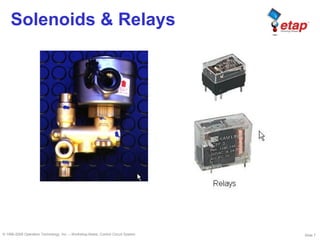
Solenoids & Relays
Slide 8© 1996-2009 Operation Technology, Inc. – Workshop Notes: Control Circuit System
Device Property
Device Rating
•Burden Rating and Inrush Rating
•Burden Rating Can be Constant P, Z, or I
•Inrush Rating Always Modeled as Constant Z
•Inrush Duration – length of Time Applying Inrush Rating
•Vpickup & Vdropout – Editor and Study Case Options
Device Duty Cycle
•Model Device as a Time Varying Load
•Each Section Can be Constant P, Z, or I – Model Motor in CSD
Device Model Type
•Option in Study Case
•If Duty Cycle Is Used, a Device Draws Current When It is
Energized and Amp > 0 by Duty Cycle
Slide 9© 1996-2009 Operation Technology, Inc. – Workshop Notes: Control Circuit System
Control Logic
Control Logic Setup
•A Coil/Solenoid Can Control State of Multiple Contacts
•Library Contact, Library Overwrite Contact & User Defined Contact
•Macro Controlled Contact – Time Varying Switch
Contact Property
•Data Hold by Controlling Device
•Top – Time Taken for Contact Switching to Off-Normal State
when V >= Vpickup is maintained for controlling device.
•Trelease – Time Taken for Contact Retuning to Normal State
when V <= Vdeopout is maintanined for controlling device.
•Each contact has its own Top and Trelealse
Special Conditions
•If Duty Cycle Model Used for a Device, Control Logical Does
Not Apply.
Slide 10© 1996-2009 Operation Technology, Inc. – Workshop Notes: Control Circuit System
CSD Simulation
Initial Steady State
•Switching Device in Specified State, Macro-Controlled Contact
in Initial State, and Contact In Normal State
•CSD Find Initial Steady state
•V Limit Not Checked When Switching Mode
•V Limit Checked When Clicking Run Button
Simulations
•CSD Behaves as A Simulator
•One Action Triggering Simulation – From Current Steady State
to Next Steady State
•When Run Button Clicked, Simulation Starts from the Initial
Steady State and Then Simulate Duty Cycle Actions
Slide 11© 1996-2009 Operation Technology, Inc. – Workshop Notes: Control Circuit System
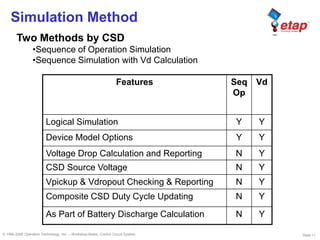
Simulation Method
Two Methods by CSD
•Sequence of Operation Simulation
•Sequence Simulation with Vd Calculation
Features Seq
Op
Vd
Logical Simulation Y Y
Device Model Options Y Y
Voltage Drop Calculation and Reporting N Y
CSD Source Voltage N Y
Vpickup & Vdropout Checking & Reporting N Y
Composite CSD Duty Cycle Updating N Y
As Part of Battery Discharge Calculation N Y
Slide 12© 1996-2009 Operation Technology, Inc. – Workshop Notes: Control Circuit System
Study Case Options
Device Model
•Global Options – Rating or Duty Cycle
•Individual Editor Options
Device Voltage Limit
•For Vpickup and Vdropout
•Global Option Provided due to Lack of Data from Manufacturers
Alert
•Voltage Alert – Base Defined in Voltage Limit Section
•Current Alert – for Device, Contact, and Wire
Adjustment
•R Adjustment for Contact and PDs
•Temperature Adjustment for Wire R
•Length Adjustment for Wire
•Burden Rating Adjustment for Coil and Solenoid
CSD Source Voltage Options
•ED Rated V, Terminal Bus V, Battery Discharge V
Slide 13© 1996-2009 Operation Technology, Inc. – Workshop Notes: Control Circuit System
Simulation Result Report
Event View
•Detailed Steps of Sequence Simulation
•State Changes of Each Element
•Voltage Check Results
Crystal Report
•Input Data
•Voltage Drop and Power Flow Report for Each Step
•All Alerts
•Report is Generated only for Simulation with Vd Calculation
Alert View
•Critical and Marginal Violation of Pickup and Dropout Voltage
•Critical and Marginal Current Violation of Devices, Contact, and
Wire
•Alerts are Generated only for Simulation with Vd Calculation
Slide 14© 1996-2009 Operation Technology, Inc. – Workshop Notes: Control Circuit System
Duty Cycle Update
Composite CSD Duty Cycle Update
•Update to the Specified Duty Cycle Category
•Initial Time Shift to Set to New Time Reference
CSD Source Voltage
•Modeled as Constant Voltage Source for a Time Moment
•Can Use Bus Voltage Calculated by Battery Discharge – Value
not Saved When Closing Project
•Time Offset for Adjusting Time Reference
Slide 15© 1996-2009 Operation Technology, Inc. – Workshop Notes: Control Circuit System
Configuration & Revision
Configuration
•Configuration Is Not Supported in CSD
Revision
•Revision is Not Supported for All the Data in Device Contact
Page
•Revision May Not Be Supported for Cable Schedule Data and
Wire Impedance Page Data
•All Other CSD Data Are Supported by Revision
Slide 16© 1996-2009 Operation Technology, Inc. – Workshop Notes: Control Circuit System
Composite CSD Duty Cycle in ED
Duty Cycle Entered in ED Editor
•Each Section Can Be Constant P, Z, or I
•Load Sections Can Overlap in Time
•Random and Non-Random Load
Duty Cycle Updated Individually from CSD Simulation
•Run CSD Simulation to Update ED Duty Cycle
•Time Reference Adjustable for Individual CSD
•May Be Time Consuming
Slide 17© 1996-2009 Operation Technology, Inc. – Workshop Notes: Control Circuit System
CSD Vd Calculation in BS
CSD Vd Calculation
•Option to Perform Vd Calculation in BS Study Case
•Vd Calculation Conducted for Each CSD with Bus Voltage from BS
•Vd Calc Results for all CSDs Saved in One Report
•CSD Vd Alert Also Available
•All CSDs Use Same Time Reference as Battery Discharge
Bus Voltage from Battery Discharge
•Bus Voltage Profile Saved Each Time Battery Discharge
Conducted
•Bus Voltage Profile Available for Individual CSD Simulation with
Different Time Reference
•Bus Voltage Profile Not Saved When Closing Project File
Slide 18© 1996-2009 Operation Technology, Inc. – Workshop Notes: Control Circuit System
Auto-Calc CSD Duty Cycle in BS
CSD Duty Cycle Calc in Battery Discharge
•Each CSD Duty Cycle Calculated
•Device Model Specified In Study Case
•Vpickup & Vdropout Checked in Calculation
•CSD Duty Cycle Updated to ED Separated by Load Type (P, Z, I)
Special Considerations
•Switching Events Must Be Triggered by Macro Controlled
Switch

ETAP - csd - Control System Diagram

  • 1.
    © 1996-2009 OperationTechnology, Inc. – Workshop Notes: Control Circuit System Control System Diagram (CSD)
  • 2.
    Slide 2© 1996-2009Operation Technology, Inc. – Workshop Notes: Control Circuit System Control System Elements • Switchgear Protection and Control Circuit – Circuit breaker trip and closing coils – Circuit breaker closing spring charging motors – Relays coils and timer • Motor Starter, Speed Control, and Protection – Starter coil circuit – Control relays – Can be either AC or DC control circuit
  • 3.
    Slide 3© 1996-2009Operation Technology, Inc. – Workshop Notes: Control Circuit System Control System Elements • Miscellaneous DC Loads – Relays – Solenoids • Other Purpose – Auxiliary devices and special control circuits – Regulator and regulating systems
  • 4.
    Slide 4© 1996-2009Operation Technology, Inc. – Workshop Notes: Control Circuit System CSD Modes Edit Mode •Add/Delete Elements •Change Connections •Modify Engineering Data Simulation Mode •Run Simulations – Simulation Triggered by Manual Action or Clicking the Run Button •Update Source Duty Cycle •Generate Event View, Alert View, and Report
  • 5.
    Slide 5© 1996-2009Operation Technology, Inc. – Workshop Notes: Control Circuit System CSD Setup CSD Elements •Device – Coil, Solenoid, General Load and Light •Contact – Fixed and Form-C; Macro-Controlled Contact •Branch – Wire and Impedance •Bus and Node •PD – CB and Fuse CSD Source •Elementary Diagram (ED) brought in from DC System •Each ED can be placed in only one CSD
  • 6.
    Slide 6© 1996-2009Operation Technology, Inc. – Workshop Notes: Control Circuit System Control Cable Schedule Control Cable Schedule •Cable Used only in Control System Diagram •Can Have Multiple Wires for Different Wires in CSD •Assigned, Reserved, and Available Wire •Parameter Entered from Editor or Retrieved from Library •Parameter Change Affects All Wires Wire Impedance Value •Editor Entered Data •Cable Library Data – Data Cashed in at Selection Time •Control Cable Schedule Data – Dynamically Retrieved from Cable Schedule •Dynamically Linked to Library – Dynamically Retrieving Data from Library at Calculation Time
  • 7.
    Slide 7© 1996-2009Operation Technology, Inc. – Workshop Notes: Control Circuit System Solenoids & Relays
  • 8.
    Slide 8© 1996-2009Operation Technology, Inc. – Workshop Notes: Control Circuit System Device Property Device Rating •Burden Rating and Inrush Rating •Burden Rating Can be Constant P, Z, or I •Inrush Rating Always Modeled as Constant Z •Inrush Duration – length of Time Applying Inrush Rating •Vpickup & Vdropout – Editor and Study Case Options Device Duty Cycle •Model Device as a Time Varying Load •Each Section Can be Constant P, Z, or I – Model Motor in CSD Device Model Type •Option in Study Case •If Duty Cycle Is Used, a Device Draws Current When It is Energized and Amp > 0 by Duty Cycle
  • 9.
    Slide 9© 1996-2009Operation Technology, Inc. – Workshop Notes: Control Circuit System Control Logic Control Logic Setup •A Coil/Solenoid Can Control State of Multiple Contacts •Library Contact, Library Overwrite Contact & User Defined Contact •Macro Controlled Contact – Time Varying Switch Contact Property •Data Hold by Controlling Device •Top – Time Taken for Contact Switching to Off-Normal State when V >= Vpickup is maintained for controlling device. •Trelease – Time Taken for Contact Retuning to Normal State when V <= Vdeopout is maintanined for controlling device. •Each contact has its own Top and Trelealse Special Conditions •If Duty Cycle Model Used for a Device, Control Logical Does Not Apply.
  • 10.
    Slide 10© 1996-2009Operation Technology, Inc. – Workshop Notes: Control Circuit System CSD Simulation Initial Steady State •Switching Device in Specified State, Macro-Controlled Contact in Initial State, and Contact In Normal State •CSD Find Initial Steady state •V Limit Not Checked When Switching Mode •V Limit Checked When Clicking Run Button Simulations •CSD Behaves as A Simulator •One Action Triggering Simulation – From Current Steady State to Next Steady State •When Run Button Clicked, Simulation Starts from the Initial Steady State and Then Simulate Duty Cycle Actions
  • 11.
    Slide 11© 1996-2009Operation Technology, Inc. – Workshop Notes: Control Circuit System Simulation Method Two Methods by CSD •Sequence of Operation Simulation •Sequence Simulation with Vd Calculation Features Seq Op Vd Logical Simulation Y Y Device Model Options Y Y Voltage Drop Calculation and Reporting N Y CSD Source Voltage N Y Vpickup & Vdropout Checking & Reporting N Y Composite CSD Duty Cycle Updating N Y As Part of Battery Discharge Calculation N Y
  • 12.
    Slide 12© 1996-2009Operation Technology, Inc. – Workshop Notes: Control Circuit System Study Case Options Device Model •Global Options – Rating or Duty Cycle •Individual Editor Options Device Voltage Limit •For Vpickup and Vdropout •Global Option Provided due to Lack of Data from Manufacturers Alert •Voltage Alert – Base Defined in Voltage Limit Section •Current Alert – for Device, Contact, and Wire Adjustment •R Adjustment for Contact and PDs •Temperature Adjustment for Wire R •Length Adjustment for Wire •Burden Rating Adjustment for Coil and Solenoid CSD Source Voltage Options •ED Rated V, Terminal Bus V, Battery Discharge V
  • 13.
    Slide 13© 1996-2009Operation Technology, Inc. – Workshop Notes: Control Circuit System Simulation Result Report Event View •Detailed Steps of Sequence Simulation •State Changes of Each Element •Voltage Check Results Crystal Report •Input Data •Voltage Drop and Power Flow Report for Each Step •All Alerts •Report is Generated only for Simulation with Vd Calculation Alert View •Critical and Marginal Violation of Pickup and Dropout Voltage •Critical and Marginal Current Violation of Devices, Contact, and Wire •Alerts are Generated only for Simulation with Vd Calculation
  • 14.
    Slide 14© 1996-2009Operation Technology, Inc. – Workshop Notes: Control Circuit System Duty Cycle Update Composite CSD Duty Cycle Update •Update to the Specified Duty Cycle Category •Initial Time Shift to Set to New Time Reference CSD Source Voltage •Modeled as Constant Voltage Source for a Time Moment •Can Use Bus Voltage Calculated by Battery Discharge – Value not Saved When Closing Project •Time Offset for Adjusting Time Reference
  • 15.
    Slide 15© 1996-2009Operation Technology, Inc. – Workshop Notes: Control Circuit System Configuration & Revision Configuration •Configuration Is Not Supported in CSD Revision •Revision is Not Supported for All the Data in Device Contact Page •Revision May Not Be Supported for Cable Schedule Data and Wire Impedance Page Data •All Other CSD Data Are Supported by Revision
  • 16.
    Slide 16© 1996-2009Operation Technology, Inc. – Workshop Notes: Control Circuit System Composite CSD Duty Cycle in ED Duty Cycle Entered in ED Editor •Each Section Can Be Constant P, Z, or I •Load Sections Can Overlap in Time •Random and Non-Random Load Duty Cycle Updated Individually from CSD Simulation •Run CSD Simulation to Update ED Duty Cycle •Time Reference Adjustable for Individual CSD •May Be Time Consuming
  • 17.
    Slide 17© 1996-2009Operation Technology, Inc. – Workshop Notes: Control Circuit System CSD Vd Calculation in BS CSD Vd Calculation •Option to Perform Vd Calculation in BS Study Case •Vd Calculation Conducted for Each CSD with Bus Voltage from BS •Vd Calc Results for all CSDs Saved in One Report •CSD Vd Alert Also Available •All CSDs Use Same Time Reference as Battery Discharge Bus Voltage from Battery Discharge •Bus Voltage Profile Saved Each Time Battery Discharge Conducted •Bus Voltage Profile Available for Individual CSD Simulation with Different Time Reference •Bus Voltage Profile Not Saved When Closing Project File
  • 18.
    Slide 18© 1996-2009Operation Technology, Inc. – Workshop Notes: Control Circuit System Auto-Calc CSD Duty Cycle in BS CSD Duty Cycle Calc in Battery Discharge •Each CSD Duty Cycle Calculated •Device Model Specified In Study Case •Vpickup & Vdropout Checked in Calculation •CSD Duty Cycle Updated to ED Separated by Load Type (P, Z, I) Special Considerations •Switching Events Must Be Triggered by Macro Controlled Switch