C# FOR BEGINNERS
LESSON 5
MICHEAL OGUNDERO
CONTACT :
EMAIL – OGUNDEROAYODEJI@GMAIL.COM
Escape Sequences, Substitution Markers and
SubstitutionValues.
ESCAPE SEQUENCES…
• C# string literals can include various unprintable control characters,
such as tab, newline, or carriage-return.
• You cannot directly type these as a literal value instead C# escape
sequences must be used.
• An escape sequence is represented by a backslash (), followed by a
specific character that has special meaning to the compiler. For
example, “n” represents a newline in a double-quoted string.
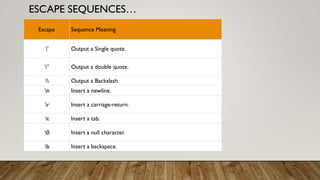
ESCAPE SEQUENCES…
Escape Sequence Meaning
’ Output a Single quote.
” Output a double quote.
 Output a Backslash.
n Insert a newline.
r Insert a carriage-return.
t Insert a tab.
0 Insert a null character.
b Insert a backspace.
ESCAPE SEQUENCES…
• To print a string that contains a newline, the escape character “n” is used.
Class Program
{
public static void Main(string [] args)
{
string welcomeMessage = "HellonAvero";
Console.WriteLine(welcomeMessage);
}
}
OUTPUT:
Hello
Avero
It’s time to try out others from the table.
C#VERBATIM STRINGS @
• Trying to embed all those double backslashes when you need single
backslash is annoying and hard to read.
• To avoid this problem, most programmers use an alternate technique
called verbatim string literals.
• You prefix a string literal with an at-sign (@) to create a verbatim
string.
• Adding @ symbol before the string disables the support of escape
sequences and a string is interpreted as is.
C#VERBATIM STRINGS
Class Program
{
public static void Main(string [] args)
{
string welcomeMessage = @"HellonAvero";
Console.WriteLine(welcomeMessage);
}
}
OUTPUT:
HellonPirzada
C#VERBATIM STRINGS
• A verbatim identifier can also be used to split a statement across multiple lines
in the source code without the use of “n” escape character.
Class Program
{
public static void Main(string [] args)
{
string welcomeMessage = @"Hello
Avero";
Console.WriteLine(welcomeMessage);
}
}
ANOTHER ONE FOR THE CLASS!
• You can directly insert a double quote into a literal string just by doubling the
quotes (“”).This will interpret as a single quotation mark (“).
Class Program
{
public static void Main(string [] args)
{
string welcomeMessage = @"I am an "”Engineer"".";
Console.WriteLine(welcomeMessage);
}
}
OUTPUT:
I am an “Engineer”.
SUBSTITUTION MARKERS ANDVALUES…
• Substitution values are used to display the values of program
data and variables.
• A substitution marker marks the position in the format string
where a value should be substituted in the output string.
• It consists of an integer enclosed in a set of matching curly
braces.
• The integer is the numeric position of the substitution value to
be used.
SUBSTITUTION MARKERS ANDVALUES
• where parameter 0 is first (value ”Avero"), parameter 1 is second (
value ”Ire"), and parameter 2 is third (value ”Bisi").
Class Program
{
public static void Main(string [] args)
{
string first = ”Avero"; string second = ”Ire";
string third = ”Bisi";
Console.WriteLine("{0} {1}, {0} {1}, {2}.", first, second, third);
}
}
Avero Ire,Avero Ire, Bisi.
ANOTHER ONE FOR THE CLASS!
Class Program
{
public static void Main(string [] args)
{
int x = 2; int y = 4;
Console.WriteLine("{0} plus {1} = {2}; {0} times {1} = {3}.", x, y, x+y, x*y);
}
}
READING INPUT FROM USERS…
Class Program
{
public static void Main(string [] args)
{
Console.WriteLine ("What is your name?");
string name = Console.ReadLine ();
Console.WriteLine ("Hello, " + name + "!")
}
}
Notice the “+” sign instead of the usual substitution markers.
The
“Console.ReadLine”
takes user input
READING INPUT FROM USER
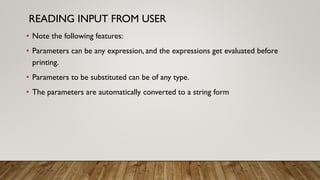
• Note the following features:
• Parameters can be any expression, and the expressions get evaluated before
printing.
• Parameters to be substituted can be of any type.
• The parameters are automatically converted to a string form
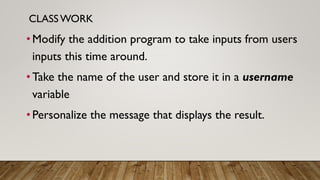
CLASSWORK
•Modify the addition program to take inputs from users
inputs this time around.
•Take the name of the user and store it in a username
variable
•Personalize the message that displays the result.
CLASSWORK
•What is the difference between
“Console.Write” and
“Console.WriteLine”?
CLASSWORK
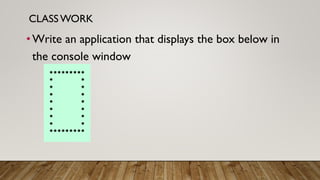
•Write an application that displays the box below in
the console window
ASSIGNMENT
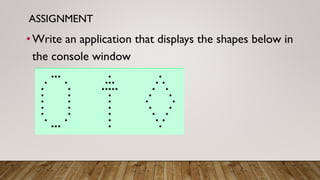
•Write an application that displays the shapes below in
the console window
REFERENCES
• Visual C# How to Program (6th Edition) (Deitel Series)
• Illustrated C# 2005 by Daniel Solis
• https://www.codebuns.com/csharp/escape-sequences/

escape sequences and substitution markers

  • 1.
    C# FOR BEGINNERS LESSON5 MICHEAL OGUNDERO CONTACT : EMAIL – OGUNDEROAYODEJI@GMAIL.COM Escape Sequences, Substitution Markers and SubstitutionValues.
  • 2.
    ESCAPE SEQUENCES… • C#string literals can include various unprintable control characters, such as tab, newline, or carriage-return. • You cannot directly type these as a literal value instead C# escape sequences must be used. • An escape sequence is represented by a backslash (), followed by a specific character that has special meaning to the compiler. For example, “n” represents a newline in a double-quoted string.
  • 3.
    ESCAPE SEQUENCES… Escape SequenceMeaning ’ Output a Single quote. ” Output a double quote. Output a Backslash. n Insert a newline. r Insert a carriage-return. t Insert a tab. 0 Insert a null character. b Insert a backspace.
  • 4.
    ESCAPE SEQUENCES… • Toprint a string that contains a newline, the escape character “n” is used. Class Program { public static void Main(string [] args) { string welcomeMessage = "HellonAvero"; Console.WriteLine(welcomeMessage); } } OUTPUT: Hello Avero It’s time to try out others from the table.
  • 5.
    C#VERBATIM STRINGS @ •Trying to embed all those double backslashes when you need single backslash is annoying and hard to read. • To avoid this problem, most programmers use an alternate technique called verbatim string literals. • You prefix a string literal with an at-sign (@) to create a verbatim string. • Adding @ symbol before the string disables the support of escape sequences and a string is interpreted as is.
  • 6.
    C#VERBATIM STRINGS Class Program { publicstatic void Main(string [] args) { string welcomeMessage = @"HellonAvero"; Console.WriteLine(welcomeMessage); } } OUTPUT: HellonPirzada
  • 7.
    C#VERBATIM STRINGS • Averbatim identifier can also be used to split a statement across multiple lines in the source code without the use of “n” escape character. Class Program { public static void Main(string [] args) { string welcomeMessage = @"Hello Avero"; Console.WriteLine(welcomeMessage); } }
  • 8.
    ANOTHER ONE FORTHE CLASS! • You can directly insert a double quote into a literal string just by doubling the quotes (“”).This will interpret as a single quotation mark (“). Class Program { public static void Main(string [] args) { string welcomeMessage = @"I am an "”Engineer""."; Console.WriteLine(welcomeMessage); } } OUTPUT: I am an “Engineer”.
  • 9.
    SUBSTITUTION MARKERS ANDVALUES… •Substitution values are used to display the values of program data and variables. • A substitution marker marks the position in the format string where a value should be substituted in the output string. • It consists of an integer enclosed in a set of matching curly braces. • The integer is the numeric position of the substitution value to be used.
  • 10.
    SUBSTITUTION MARKERS ANDVALUES •where parameter 0 is first (value ”Avero"), parameter 1 is second ( value ”Ire"), and parameter 2 is third (value ”Bisi"). Class Program { public static void Main(string [] args) { string first = ”Avero"; string second = ”Ire"; string third = ”Bisi"; Console.WriteLine("{0} {1}, {0} {1}, {2}.", first, second, third); } } Avero Ire,Avero Ire, Bisi.
  • 11.
    ANOTHER ONE FORTHE CLASS! Class Program { public static void Main(string [] args) { int x = 2; int y = 4; Console.WriteLine("{0} plus {1} = {2}; {0} times {1} = {3}.", x, y, x+y, x*y); } }
  • 12.
    READING INPUT FROMUSERS… Class Program { public static void Main(string [] args) { Console.WriteLine ("What is your name?"); string name = Console.ReadLine (); Console.WriteLine ("Hello, " + name + "!") } } Notice the “+” sign instead of the usual substitution markers. The “Console.ReadLine” takes user input
  • 13.
    READING INPUT FROMUSER • Note the following features: • Parameters can be any expression, and the expressions get evaluated before printing. • Parameters to be substituted can be of any type. • The parameters are automatically converted to a string form
  • 14.
    CLASSWORK •Modify the additionprogram to take inputs from users inputs this time around. •Take the name of the user and store it in a username variable •Personalize the message that displays the result.
  • 15.
    CLASSWORK •What is thedifference between “Console.Write” and “Console.WriteLine”?
  • 16.
    CLASSWORK •Write an applicationthat displays the box below in the console window
  • 17.
    ASSIGNMENT •Write an applicationthat displays the shapes below in the console window
  • 18.
    REFERENCES • Visual C#How to Program (6th Edition) (Deitel Series) • Illustrated C# 2005 by Daniel Solis • https://www.codebuns.com/csharp/escape-sequences/