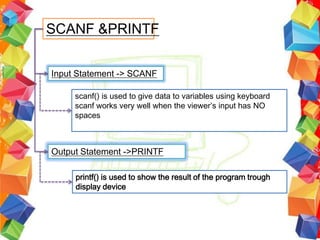
SCANF &PRINTF


Input Statement -> SCANF

     scanf() is used to give data to variables using keyboard
     scanf works very well when the viewer’s input has NO
     spaces


Output Statement ->PRINTF

     printf() is used to show the result of the program trough
     display device
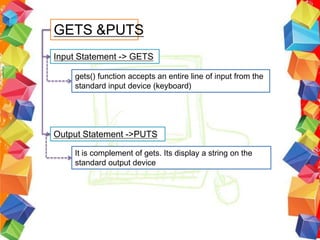
GETS &PUTS
Input Statement -> GETS

    gets() function accepts an entire line of input from the
    standard input device (keyboard)


Output Statement ->PUTS

    It is complement of gets. Its display a string on the
    standard output device
REVISE LAB 3
Exercise 1
a.   #include<stdio.h>
     #include<conio.h>
     main()
     {
                                                  Enter subject name: Computer Programming
         char subject[20];
                                                  Your name is: Computer
         printf("Enter subject name:");
         scanf("%s", &subject);
         printf("Your name is: %s n",subject);
         getch();
               }


b.   #include<stdio.h>
     #include<conio.h>
     main()
     {
                                                  Enter subject name: Computer Programming
         char subject[20];
                                                  Your name is:
         printf("Enter a subject name:");
                                                  Computer Programming
         gets(subject);
         printf("Your name is: n");
         puts(subject);
         getch();
         }
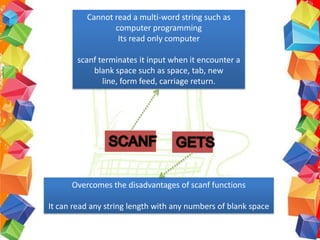
Cannot read a multi-word string such as
                 computer programming
                  Its read only computer

        scanf terminates it input when it encounter a
            blank space such as space, tab, new
               line, form feed, carriage return.


      Overcomes the disadvantages of scanf functions

It can read any string length with any numbers of blank space
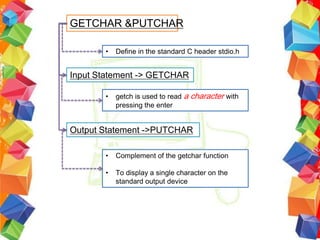
GETCHAR &PUTCHAR

       •   Define in the standard C header stdio.h


Input Statement -> GETCHAR

       •   getch is used to read a character with
           pressing the enter


Output Statement ->PUTCHAR

       •   Complement of the getchar function

       •   To display a single character on the
           standard output device
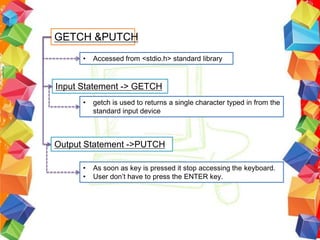
GETCH &PUTCH
      •   Accessed from <stdio.h> standard library


Input Statement -> GETCH
      •   getch is used to returns a single character typed in from the
          standard input device


Output Statement ->PUTCH

      •   As soon as key is pressed it stop accessing the keyboard.
      •   User don’t have to press the ENTER key.
REVISE LAB 3
Exercise 1
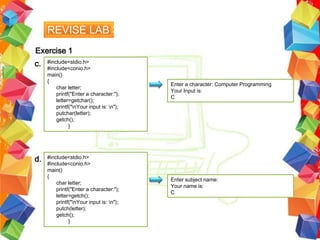
c.   #include<stdio.h>
     #include<conio.h>
     main()
     {
                                          Enter a character: Computer Programming
         char letter;
                                          Your Input is:
         printf("Enter a character:");
                                          C
         letter=getchar();
         printf("nYour input is: n");
         putchar(letter);
         getch();
               }


d.   #include<stdio.h>
     #include<conio.h>
     main()
     {
                                          Enter subject name:
         char letter;
                                          Your name is:
         printf("Enter a character:");
                                          C
         letter=getch();
         printf("nYour input is: n");
         putch(letter);
         getch();
               }
What is a STRING??
    a string is a character variable with more than
    one character.


    Strings can be
    abbreviations, words, phrases, sentences, or
    even paragraphs
Can be said as :

   Format specifier
   Format string
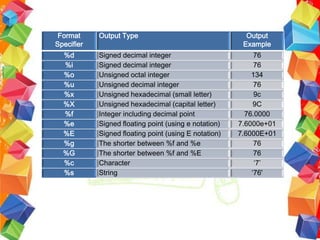
Format     Output Type                                  Output
Specifier                                               Example
  %d        Signed decimal integer                          76
  %i        Signed decimal integer                          76
  %o        Unsigned octal integer                         134
  %u        Unsigned decimal integer                        76
  %x        Unsigned hexadecimal (small letter)             9c
  %X        Unsigned hexadecimal (capital letter)           9C
  %f        Integer including decimal point              76.0000
  %e        Signed floating point (using e notation)   7.6000e+01
  %E        Signed floating point (using E notation)   7.6000E+01
  %g        The shorter between %f and %e                   76
  %G        The shorter between %f and %E                   76
  %c        Character                                       ‘7’
  %s        String                                         ‘76'
Why Use Format Specifier??


       Nature of c requires that I/0 operations
       be associated with specifier data types.
       This association is made with format and
       conversion specifiers.


       When use with the input statements,
       conversion specifiers tell what kind of
       variable is being read
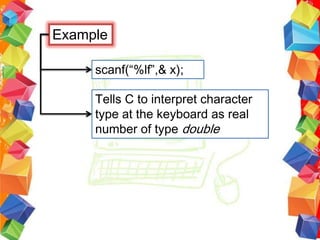
Example

     scanf(“%lf”,& x);

     Tells C to interpret character
     type at the keyboard as real
     number of type double
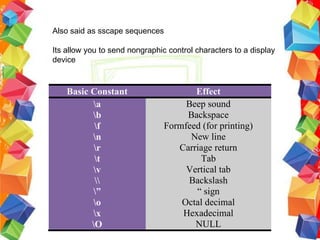
Also said as sscape sequences

Its allow you to send nongraphic control characters to a display
device


    Basic Constant                     Effect
          a                         Beep sound
          b                         Backspace
           f                   Formfeed (for printing)
          n                          New line
           r                      Carriage return
           t                           Tab
          v                         Vertical tab
                                   Backslash
          ”                           “ sign
          o                        Octal decimal
          x                        Hexadecimal
          O                           NULL

Basic Input and Output

  • 3.
    SCANF &PRINTF Input Statement-> SCANF scanf() is used to give data to variables using keyboard scanf works very well when the viewer’s input has NO spaces Output Statement ->PRINTF printf() is used to show the result of the program trough display device
  • 4.
    GETS &PUTS Input Statement-> GETS gets() function accepts an entire line of input from the standard input device (keyboard) Output Statement ->PUTS It is complement of gets. Its display a string on the standard output device
  • 5.
    REVISE LAB 3 Exercise1 a. #include<stdio.h> #include<conio.h> main() { Enter subject name: Computer Programming char subject[20]; Your name is: Computer printf("Enter subject name:"); scanf("%s", &subject); printf("Your name is: %s n",subject); getch(); } b. #include<stdio.h> #include<conio.h> main() { Enter subject name: Computer Programming char subject[20]; Your name is: printf("Enter a subject name:"); Computer Programming gets(subject); printf("Your name is: n"); puts(subject); getch(); }
  • 6.
    Cannot read amulti-word string such as computer programming Its read only computer scanf terminates it input when it encounter a blank space such as space, tab, new line, form feed, carriage return. Overcomes the disadvantages of scanf functions It can read any string length with any numbers of blank space
  • 7.
    GETCHAR &PUTCHAR • Define in the standard C header stdio.h Input Statement -> GETCHAR • getch is used to read a character with pressing the enter Output Statement ->PUTCHAR • Complement of the getchar function • To display a single character on the standard output device
  • 8.
    GETCH &PUTCH • Accessed from <stdio.h> standard library Input Statement -> GETCH • getch is used to returns a single character typed in from the standard input device Output Statement ->PUTCH • As soon as key is pressed it stop accessing the keyboard. • User don’t have to press the ENTER key.
  • 9.
    REVISE LAB 3 Exercise1 c. #include<stdio.h> #include<conio.h> main() { Enter a character: Computer Programming char letter; Your Input is: printf("Enter a character:"); C letter=getchar(); printf("nYour input is: n"); putchar(letter); getch(); } d. #include<stdio.h> #include<conio.h> main() { Enter subject name: char letter; Your name is: printf("Enter a character:"); C letter=getch(); printf("nYour input is: n"); putch(letter); getch(); }
  • 10.
    What is aSTRING?? a string is a character variable with more than one character. Strings can be abbreviations, words, phrases, sentences, or even paragraphs
  • 11.
    Can be saidas : Format specifier Format string
  • 12.
    Format Output Type Output Specifier Example %d Signed decimal integer 76 %i Signed decimal integer 76 %o Unsigned octal integer 134 %u Unsigned decimal integer 76 %x Unsigned hexadecimal (small letter) 9c %X Unsigned hexadecimal (capital letter) 9C %f Integer including decimal point 76.0000 %e Signed floating point (using e notation) 7.6000e+01 %E Signed floating point (using E notation) 7.6000E+01 %g The shorter between %f and %e 76 %G The shorter between %f and %E 76 %c Character ‘7’ %s String ‘76'
  • 13.
    Why Use FormatSpecifier?? Nature of c requires that I/0 operations be associated with specifier data types. This association is made with format and conversion specifiers. When use with the input statements, conversion specifiers tell what kind of variable is being read
  • 14.
    Example scanf(“%lf”,& x); Tells C to interpret character type at the keyboard as real number of type double
  • 16.
    Also said assscape sequences Its allow you to send nongraphic control characters to a display device Basic Constant Effect a Beep sound b Backspace f Formfeed (for printing) n New line r Carriage return t Tab v Vertical tab Backslash ” “ sign o Octal decimal x Hexadecimal O NULL