C# FOR BEGINNERS
LESSON 6
MICHEAL OGUNDERO
CONTACT :
EMAIL – OGUNDEROAYODEJI@GMAIL.COM
Control Structures I: Selection Structures
CHECKER!
Just before we go into today’s business
Write a program that reads a first name and a last name from
the user as two separate inputs and concatenates the first
name and last name, but separated by a space. Display the
concatenated name at the command prompt.
INTRODUCTION
Before writing a program to solve a problem, it is essential to have a thorough
understanding of the problem and a carefully planned approach.
Any computing problem can be solved by executing a series of actions in a specific
order.
A procedure for solving a problem can be broken down in terms of
1.The actions to be executed and
2. the order in which these actions are to be executed (algorithm).
An algorithm produces the same output information given the same input
information, and several short algorithms can be combined to perform complex
tasks such as writing a computer program.
INTRODUCTION
All programs can be written in terms of only three control
structures, namely, the sequence structure, the selection structure
and the repetition structure.
The sequence structure is built into C#. Unless directed
otherwise, the computer executes C# statements one after the
other in the order in which they appear in a program.
SELECTION STRUCTURES
A selection statement causes the program control to be transferred to a
specific flow based upon whether a certain condition is true or not.
It can be divided into subdivisions namely:
i. Single Selection Structure
ii. Double Selection Structure and
iii. Multiple Selection Structure
SINGLE SELECTION STRUCTURE : IF STATEMENT
If you set the integer
ourValue to 10, you will
see some output. If
ourValue is not equal to
10, it will exit the
section and move on to
do nothing.
Class Program
{
public static void Main(string [] args)
{
int ourValue = 10;
if (ourValue == 10)
{
Console.WriteLine(“Our value is 10”);
}
}
}
This statement simply checks that the conditions are true and does something based on that.
DOUBLE SELECTION STRUCTURE : IF-ELSE STATEMENTS…
A more common use is the if-else statement.This will check the
conditions you present and do one thing if it is true, and another if it’s
false.
This is very useful because you can nest “if” statements to control
program flow in powerful ways.
DOUBLE SELECTION STRUCTURE : IF-ELSE STATEMENTS
Class Program
{
public static void Main(string [] args)
{
int ourValue = 10;
if (ourValue == 10)
{
Console.WriteLine(“Our value is 10”);
}
else
{
Console.WriteLine(“Our value is not 10”);
}
}
MULTIPLE SELECTION STRUCTURE
MULTIPLE IF-ELSE STATEMENTS
what if we have a multiple condition to test and execute one of the many block
of code.
Class Program
{
public static void Main(string [] args)
{
int number= int.Parse(Console.ReadLine());
if (number < 10)
{
Console.WriteLine(“Your number is less than 10”);
}
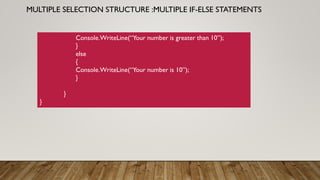
else if (number > 10)
{
MULTIPLE SELECTION STRUCTURE :MULTIPLE IF-ELSE STATEMENTS
Console.WriteLine(“Your number is greater than 10”);
}
else
{
Console.WriteLine(“Your number is 10”);
}
}
}
MULTIPLE SELECTION STRUCTURE
SWITCH STATEMENT
Switch is a control statement that works with multiple options and tries
to make a match, then executes the code with that “case”. Here is what
it looks like:
MULTIPLE SELECTION STRUCTURE : SWITCH STATEMENTS
Class Program
{
public static void Main(string [] args)
{
Console.WriteLine("Mascot Finder - Find your Mascot Now");
Console.WriteLine("Please Choose which university you plan to attend:");
Console.WriteLine("(1) Oregon State University");
Console.WriteLine("(2) University of Oregon");
Console.WriteLine("(3) University of Washington");
string ourState = Console.ReadLine();
// continue on next slide
}
}
MULTIPLE SELECTION STRUCTURE : SWITCH STATEMENTS
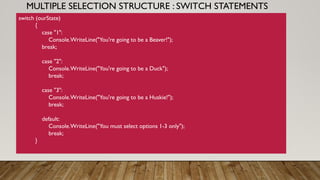
switch (ourState)
{
case "1":
Console.WriteLine("You're going to be a Beaver!");
break;
case "2":
Console.WriteLine("You're going to be a Duck");
break;
case "3":
Console.WriteLine("You're going to be a Huskie!");
break;
default:
Console.WriteLine("You must select options 1-3 only");
break;
}
MULTIPLE SELECTION STRUCTURE : SWITCH STATEMENTS
The switch statement takes ourState as a parameter and
matches it against each case. If there is a match it runs the code
within that case then breaks out of it. If there are no matches, it
goes to a “default” case that lets you know none of the options
were selected.
ASSIGNMENT (FOR BATCH A)
Write an application that reads in two integers and
determines and prints whether the first is a multiple of
the second. For example, if the user inputs 15 and 3, the
first number is a multiple of the second. If the user inputs
2 and 4, the first number is not a multiple of the second.
[Hint: Use the modulus operator.]
ASSIGNMENT (FOR BATCH B)
Write an application that inputs one number consisting of five
digits from the user, separates the number into its individual
digits and prints the digits separated from one another by
three spaces each. For example, if the user types in the
number 42339, the program should print
REFERENCES
• Visual C# How to Program (6th Edition) (Deitel Series)
• Illustrated C# 2005 by Daniel Solis
• https://www.jeremymorgan.com/tutorials/c-sharp/how-to-learn-c-sharp-5-selection-statements/
• https://www.codebuns.com/csharp/escape-sequences/

selection structures

  • 1.
    C# FOR BEGINNERS LESSON6 MICHEAL OGUNDERO CONTACT : EMAIL – OGUNDEROAYODEJI@GMAIL.COM Control Structures I: Selection Structures
  • 2.
    CHECKER! Just before wego into today’s business Write a program that reads a first name and a last name from the user as two separate inputs and concatenates the first name and last name, but separated by a space. Display the concatenated name at the command prompt.
  • 3.
    INTRODUCTION Before writing aprogram to solve a problem, it is essential to have a thorough understanding of the problem and a carefully planned approach. Any computing problem can be solved by executing a series of actions in a specific order. A procedure for solving a problem can be broken down in terms of 1.The actions to be executed and 2. the order in which these actions are to be executed (algorithm). An algorithm produces the same output information given the same input information, and several short algorithms can be combined to perform complex tasks such as writing a computer program.
  • 4.
    INTRODUCTION All programs canbe written in terms of only three control structures, namely, the sequence structure, the selection structure and the repetition structure. The sequence structure is built into C#. Unless directed otherwise, the computer executes C# statements one after the other in the order in which they appear in a program.
  • 5.
    SELECTION STRUCTURES A selectionstatement causes the program control to be transferred to a specific flow based upon whether a certain condition is true or not. It can be divided into subdivisions namely: i. Single Selection Structure ii. Double Selection Structure and iii. Multiple Selection Structure
  • 6.
    SINGLE SELECTION STRUCTURE: IF STATEMENT If you set the integer ourValue to 10, you will see some output. If ourValue is not equal to 10, it will exit the section and move on to do nothing. Class Program { public static void Main(string [] args) { int ourValue = 10; if (ourValue == 10) { Console.WriteLine(“Our value is 10”); } } } This statement simply checks that the conditions are true and does something based on that.
  • 7.
    DOUBLE SELECTION STRUCTURE: IF-ELSE STATEMENTS… A more common use is the if-else statement.This will check the conditions you present and do one thing if it is true, and another if it’s false. This is very useful because you can nest “if” statements to control program flow in powerful ways.
  • 8.
    DOUBLE SELECTION STRUCTURE: IF-ELSE STATEMENTS Class Program { public static void Main(string [] args) { int ourValue = 10; if (ourValue == 10) { Console.WriteLine(“Our value is 10”); } else { Console.WriteLine(“Our value is not 10”); } }
  • 9.
    MULTIPLE SELECTION STRUCTURE MULTIPLEIF-ELSE STATEMENTS what if we have a multiple condition to test and execute one of the many block of code. Class Program { public static void Main(string [] args) { int number= int.Parse(Console.ReadLine()); if (number < 10) { Console.WriteLine(“Your number is less than 10”); } else if (number > 10) {
  • 10.
    MULTIPLE SELECTION STRUCTURE:MULTIPLE IF-ELSE STATEMENTS Console.WriteLine(“Your number is greater than 10”); } else { Console.WriteLine(“Your number is 10”); } } }
  • 11.
    MULTIPLE SELECTION STRUCTURE SWITCHSTATEMENT Switch is a control statement that works with multiple options and tries to make a match, then executes the code with that “case”. Here is what it looks like:
  • 12.
    MULTIPLE SELECTION STRUCTURE: SWITCH STATEMENTS Class Program { public static void Main(string [] args) { Console.WriteLine("Mascot Finder - Find your Mascot Now"); Console.WriteLine("Please Choose which university you plan to attend:"); Console.WriteLine("(1) Oregon State University"); Console.WriteLine("(2) University of Oregon"); Console.WriteLine("(3) University of Washington"); string ourState = Console.ReadLine(); // continue on next slide } }
  • 13.
    MULTIPLE SELECTION STRUCTURE: SWITCH STATEMENTS switch (ourState) { case "1": Console.WriteLine("You're going to be a Beaver!"); break; case "2": Console.WriteLine("You're going to be a Duck"); break; case "3": Console.WriteLine("You're going to be a Huskie!"); break; default: Console.WriteLine("You must select options 1-3 only"); break; }
  • 14.
    MULTIPLE SELECTION STRUCTURE: SWITCH STATEMENTS The switch statement takes ourState as a parameter and matches it against each case. If there is a match it runs the code within that case then breaks out of it. If there are no matches, it goes to a “default” case that lets you know none of the options were selected.
  • 15.
    ASSIGNMENT (FOR BATCHA) Write an application that reads in two integers and determines and prints whether the first is a multiple of the second. For example, if the user inputs 15 and 3, the first number is a multiple of the second. If the user inputs 2 and 4, the first number is not a multiple of the second. [Hint: Use the modulus operator.]
  • 16.
    ASSIGNMENT (FOR BATCHB) Write an application that inputs one number consisting of five digits from the user, separates the number into its individual digits and prints the digits separated from one another by three spaces each. For example, if the user types in the number 42339, the program should print
  • 17.
    REFERENCES • Visual C#How to Program (6th Edition) (Deitel Series) • Illustrated C# 2005 by Daniel Solis • https://www.jeremymorgan.com/tutorials/c-sharp/how-to-learn-c-sharp-5-selection-statements/ • https://www.codebuns.com/csharp/escape-sequences/