ERP Finance Module
In this course, we'll explore the capabilities of Finance Module in ERP
systems that enable organizations to improve financial control and
reporting, streamline processes, and generate insightful business
intelligence.
Sean Olabode Badiru
Overview of ERP Finance Module
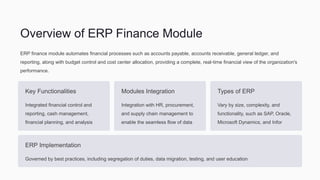
ERP finance module automates financial processes such as accounts payable, accounts receivable, general ledger, and
reporting, along with budget control and cost center allocation, providing a complete, real-time financial view of the organization's
performance.
Key Functionalities
Integrated financial control and
reporting, cash management,
financial planning, and analysis
Modules Integration
Integration with HR, procurement,
and supply chain management to
enable the seamless flow of data
Types of ERP
Vary by size, complexity, and
functionality, such as SAP, Oracle,
Microsoft Dynamics, and Infor
ERP Implementation
Governed by best practices, including segregation of duties, data migration, testing, and user education
In-Depth Exploration of Finance Module in ERP
Systems
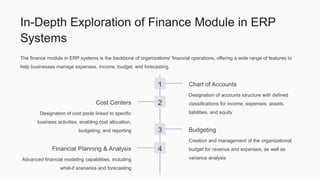
The finance module in ERP systems is the backbone of organizations' financial operations, offering a wide range of features to
help businesses manage expenses, income, budget, and forecasting.
1 Chart of Accounts
Designation of accounts structure with defined
classifications for income, expenses, assets,
liabilities, and equity
2
Cost Centers
Designation of cost pools linked to specific
business activities, enabling cost allocation,
budgeting, and reporting 3 Budgeting
Creation and management of the organizational
budget for revenue and expenses, as well as
variance analysis
4
Financial Planning & Analysis
Advanced financial modeling capabilities, including
what-if scenarios and forecasting
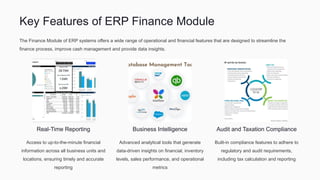
Key Features of ERP Finance Module
The Finance Module of ERP systems offers a wide range of operational and financial features that are designed to streamline the
finance process, improve cash management and provide data insights.
Real-Time Reporting
Access to up-to-the-minute financial
information across all business units and
locations, ensuring timely and accurate
reporting
Business Intelligence
Advanced analytical tools that generate
data-driven insights on financial, inventory
levels, sales performance, and operational
metrics
Audit and Taxation Compliance
Built-in compliance features to adhere to
regulatory and audit requirements,
including tax calculation and reporting
Benefits of Implementing ERP Finance Module
Implementing Finance Module of an ERP system can help organizations to standardize financial processes, promote collaboration, and
enable greater data insights to optimize business strategy.
1 Increased Productivity
Automation of time-consuming and
manual financial processes to
reduce errors, delays, and
interruptions
2 Better Decision-Making
Improved visibility of financial
performance, cash flow, and
profitability to support strategic and
operational decision making
3 Improved Compliance
Built-in compliance features to
adhere to regulatory and audit
requirements, including tax
calculation and reporting
4 Cost Control
Improved visibility and control of financial spending, revenue growth, and budget management to reduce costs and improve margins
Challenges of Implementing ERP Finance Module
While implementing an ERP finance module can improve business performance, the process is often complex, requires resource
investment, and can face organizational resistance.
Resources Investment
Requires significant financial, time,
and personnel investment to choose,
implement and maintain the system
Organizational Change
Requires significant changes in how
the organization manages financials,
including processes, roles, and
responsibilities
Integration Issues
The integration of modules within the
ERP and with existing systems may
pose technical difficulties that require
technical support
Real-World Examples of Successful Implementation
Several leading organizations have successfully implemented ERP finance modules to improve their financial management,
streamline processes, and generate real-time data insights. Here are a few examples:
Cisco Systems
Reduced its close cycle by 50%,
improved financial visibility
Siemens AG
Unified financial data across its
global operations and improved
operational efficiency
The University of West Virginia
Improved financial reporting,
eliminated errors, and significantly
shortened the turnaround time for
reporting
Samsung
Modernized its financial reporting and management model, providing better visibility and control while reducing costs and errors
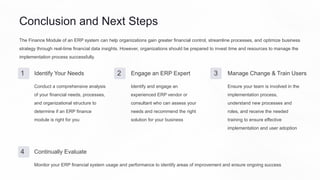
Conclusion and Next Steps
The Finance Module of an ERP system can help organizations gain greater financial control, streamline processes, and optimize business
strategy through real-time financial data insights. However, organizations should be prepared to invest time and resources to manage the
implementation process successfully.
1 Identify Your Needs
Conduct a comprehensive analysis
of your financial needs, processes,
and organizational structure to
determine if an ERP finance
module is right for you
2 Engage an ERP Expert
Identify and engage an
experienced ERP vendor or
consultant who can assess your
needs and recommend the right
solution for your business
3 Manage Change & Train Users
Ensure your team is involved in the
implementation process,
understand new processes and
roles, and receive the needed
training to ensure effective
implementation and user adoption
4 Continually Evaluate
Monitor your ERP financial system usage and performance to identify areas of improvement and ensure ongoing success
Sean Bode Badiru
bodebadiru

ERP Finance Module

  • 1.
    ERP Finance Module Inthis course, we'll explore the capabilities of Finance Module in ERP systems that enable organizations to improve financial control and reporting, streamline processes, and generate insightful business intelligence. Sean Olabode Badiru
  • 2.
    Overview of ERPFinance Module ERP finance module automates financial processes such as accounts payable, accounts receivable, general ledger, and reporting, along with budget control and cost center allocation, providing a complete, real-time financial view of the organization's performance. Key Functionalities Integrated financial control and reporting, cash management, financial planning, and analysis Modules Integration Integration with HR, procurement, and supply chain management to enable the seamless flow of data Types of ERP Vary by size, complexity, and functionality, such as SAP, Oracle, Microsoft Dynamics, and Infor ERP Implementation Governed by best practices, including segregation of duties, data migration, testing, and user education
  • 3.
    In-Depth Exploration ofFinance Module in ERP Systems The finance module in ERP systems is the backbone of organizations' financial operations, offering a wide range of features to help businesses manage expenses, income, budget, and forecasting. 1 Chart of Accounts Designation of accounts structure with defined classifications for income, expenses, assets, liabilities, and equity 2 Cost Centers Designation of cost pools linked to specific business activities, enabling cost allocation, budgeting, and reporting 3 Budgeting Creation and management of the organizational budget for revenue and expenses, as well as variance analysis 4 Financial Planning & Analysis Advanced financial modeling capabilities, including what-if scenarios and forecasting
  • 4.
    Key Features ofERP Finance Module The Finance Module of ERP systems offers a wide range of operational and financial features that are designed to streamline the finance process, improve cash management and provide data insights. Real-Time Reporting Access to up-to-the-minute financial information across all business units and locations, ensuring timely and accurate reporting Business Intelligence Advanced analytical tools that generate data-driven insights on financial, inventory levels, sales performance, and operational metrics Audit and Taxation Compliance Built-in compliance features to adhere to regulatory and audit requirements, including tax calculation and reporting
  • 5.
    Benefits of ImplementingERP Finance Module Implementing Finance Module of an ERP system can help organizations to standardize financial processes, promote collaboration, and enable greater data insights to optimize business strategy. 1 Increased Productivity Automation of time-consuming and manual financial processes to reduce errors, delays, and interruptions 2 Better Decision-Making Improved visibility of financial performance, cash flow, and profitability to support strategic and operational decision making 3 Improved Compliance Built-in compliance features to adhere to regulatory and audit requirements, including tax calculation and reporting 4 Cost Control Improved visibility and control of financial spending, revenue growth, and budget management to reduce costs and improve margins
  • 6.
    Challenges of ImplementingERP Finance Module While implementing an ERP finance module can improve business performance, the process is often complex, requires resource investment, and can face organizational resistance. Resources Investment Requires significant financial, time, and personnel investment to choose, implement and maintain the system Organizational Change Requires significant changes in how the organization manages financials, including processes, roles, and responsibilities Integration Issues The integration of modules within the ERP and with existing systems may pose technical difficulties that require technical support
  • 7.
    Real-World Examples ofSuccessful Implementation Several leading organizations have successfully implemented ERP finance modules to improve their financial management, streamline processes, and generate real-time data insights. Here are a few examples: Cisco Systems Reduced its close cycle by 50%, improved financial visibility Siemens AG Unified financial data across its global operations and improved operational efficiency The University of West Virginia Improved financial reporting, eliminated errors, and significantly shortened the turnaround time for reporting Samsung Modernized its financial reporting and management model, providing better visibility and control while reducing costs and errors
  • 8.
    Conclusion and NextSteps The Finance Module of an ERP system can help organizations gain greater financial control, streamline processes, and optimize business strategy through real-time financial data insights. However, organizations should be prepared to invest time and resources to manage the implementation process successfully. 1 Identify Your Needs Conduct a comprehensive analysis of your financial needs, processes, and organizational structure to determine if an ERP finance module is right for you 2 Engage an ERP Expert Identify and engage an experienced ERP vendor or consultant who can assess your needs and recommend the right solution for your business 3 Manage Change & Train Users Ensure your team is involved in the implementation process, understand new processes and roles, and receive the needed training to ensure effective implementation and user adoption 4 Continually Evaluate Monitor your ERP financial system usage and performance to identify areas of improvement and ensure ongoing success
  • 9.