ERP Accounting –
Tips and Tricks
2017 AFS USER CONFERENCE
“Practical Analytics for Everyday Decision Making”
©2017 AFSTechnologies, Inc.,Confidential Information
Speaker Introduction
Brenda Spanier, Sr Implementation
Consultant and Trainer
• More than 25 years of experience as a financial
controller in a variety of industries including:
Food Distribution, Food Retail and Professional
Services.
• 9 years as a Software Implementation
Consultant/Trainer in various ERP systems.
©2017 AFSTechnologies, Inc.,Confidential Information
Agenda
• Collections – Turn AR into
• Reconciling Subsidiaries
• Bank Reconciliation
• Year-end
• Fiscal Periods
• Tips & Tricks
©2017 AFSTechnologies, Inc.,Confidential Information
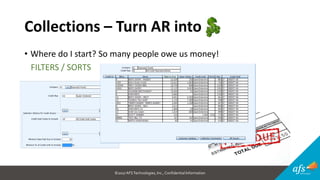
Collections – Turn AR into
• Where do I start? So many people owe us money!
FILTERS / SORTS
©2017 AFSTechnologies, Inc.,Confidential Information
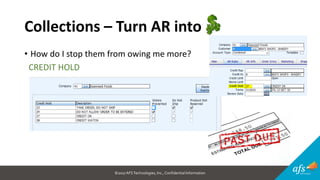
Collections – Turn AR into
• How do I stop them from owing me more?
CREDIT HOLD
©2017 AFSTechnologies, Inc.,Confidential Information
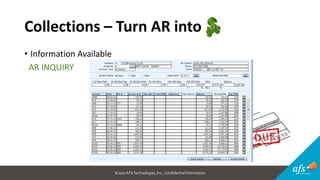
Collections – Turn AR into
• Information Available
AR INQUIRY
©2017 AFSTechnologies, Inc.,Confidential Information
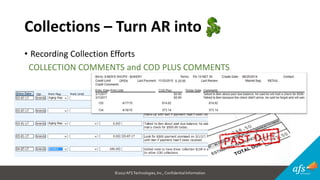
Collections – Turn AR into
• Recording Collection Efforts
COLLECTION COMMENTS and COD PLUS COMMENTS
©2017 AFSTechnologies, Inc.,Confidential Information
Collections – Turn AR into
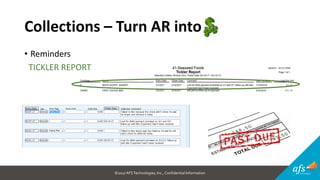
• Reminders
TICKLER REPORT
©2017 AFSTechnologies, Inc.,Confidential Information
Reconciling Subsidiaries
• Accounts to Reconcile
• Why should I reconcile?
• What causes it to be “out-of-balance?”
• What are all these different dates?
©2017 AFSTechnologies, Inc.,Confidential Information
Reconciling Subsidiaries
• Accounts to Reconcile
• Accounts Receivable
• Vendor AR
• Inventory
• Accounts Payable
• Clearing Accounts (Inventory, Freight and Cost Elements)
• Cash
• Sales
• Cost of Goods
©2017 AFSTechnologies, Inc.,Confidential Information
Reconciling Subsidiaries
• When should I reconcile?
• After all postings are done
• No one should be posting when running reports
• Monthly at a minimum
• Why should I reconcile?
• To catch a variance before too much time goes back
• To understand how, when and why transactions impact the GL
• To verify that entries are posted to correct accounts
©2017 AFSTechnologies, Inc.,Confidential Information
Reconciling Subsidiaries
• What causes it to be “out-of-balance?”
• Human Error
• System going down during posting
• Code files set-up with incorrect GL mapping
• Not completing AP/PO tieback
• Selecting incorrect dates when running reports
• Selecting incorrect dates for transactions
• Creating journal entries in these accounts
• Entries no posted
©2017 AFSTechnologies, Inc.,Confidential Information
Reconciling Subsidiaries
• What are all these different dates?
• Entry Date – the date that the event was entered
into the system
• Transaction Date – the date the event actually occurred
• Fiscal Period - timeframe that items go into the GL for reporting purposes.
In many cases, you are not asked for a fiscal period so the system uses the
Transaction Date to determine the fiscal period.
©2017 AFSTechnologies, Inc.,Confidential Information
Reconciling Subsidiaries
• Reports to Run
• Detailed Journal Reports (Exclude Consolidated Journals)
• Unposted Consolidated Journal Reports
• Summary Trial Balance
• AP Aging Report
• Receiving Clearing Reports
• AR Aging
• Vendor AR Aging
• Inventory Value (set-up on scheduler)
• Sales Margin
©2017 AFSTechnologies, Inc.,Confidential Information
Reconciling Subsidiaries
• What to check?
• Look for entries that didn’t consolidate or post
• Make sure reports are run for the same period of time
• Print Detailed Trial Balance for account that is off
• Look for manual journal entries
• Look at transactions and then print Detailed Journal Reports Grouped by-1 “Transaction
Date” and Group by-2 “Entry Date” to see if you have entries in the wrong period
• If you have checked everything, then contact AFS Support.
©2017 AFSTechnologies, Inc.,Confidential Information
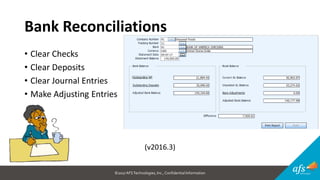
Bank Reconciliations
• Clear Checks
• Clear Deposits
• Clear Journal Entries
• Make Adjusting Entries
(v2016.3)
©2017 AFSTechnologies, Inc.,Confidential Information
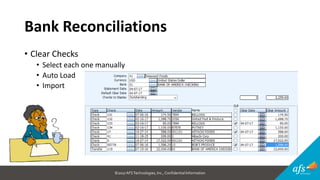
Bank Reconciliations
• Clear Checks
• Select each one manually
• Auto Load
• Import
©2017 AFSTechnologies, Inc.,Confidential Information
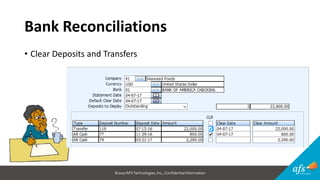
Bank Reconciliations
• Clear Deposits and Transfers
©2017 AFSTechnologies, Inc.,Confidential Information
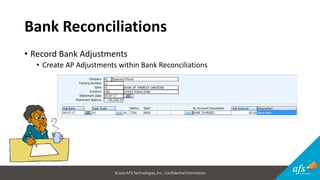
Bank Reconciliations
• Record Bank Adjustments
• Create AP Adjustments within Bank Reconciliations
©2017 AFSTechnologies, Inc.,Confidential Information
Bank Reconciliations
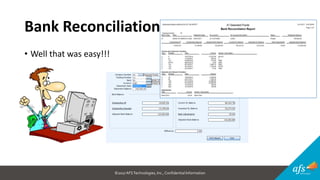
• Well that was easy!!!
©2017 AFSTechnologies, Inc.,Confidential Information
Year-End Close
• Create Closing Journals
• Makes an entry to clear all Income/Expense Accounts and record to
Retained Earnings
• Post Closing Journals
• Posts the journal entry created above
• Close the Fiscal Period
• This will prevent any transactions from going into the prior year
©2017 AFSTechnologies, Inc.,Confidential Information
Year-End Close
• What if you have more entries?
• Re-open the period
• Make the entries
• Close the year-end again
• Why should I do this instead of a manual journal entry?
• Less room for errors
• No missing year-end entries
• Better audit because it is system driven instead of manual entries
©2017 AFSTechnologies, Inc.,Confidential Information
Fiscal Periods
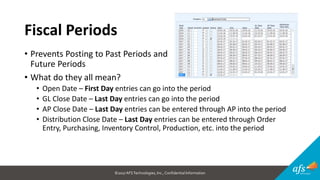
• Prevents Posting to Past Periods and
Future Periods
• What do they all mean?
• Open Date – First Day entries can go into the period
• GL Close Date – Last Day entries can go into the period
• AP Close Date – Last Day entries can be entered through AP into the period
• Distribution Close Date – Last Day entries can be entered through Order
Entry, Purchasing, Inventory Control, Production, etc. into the period
©2017 AFSTechnologies, Inc.,Confidential Information
Tips and Tricks
• Export to File
• Search Capabilities
• My Favorites
• My Applications
• Short-cut Keys
©2017 AFSTechnologies, Inc.,Confidential Information
Tips and Tricks
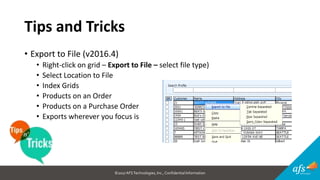
• Export to File (v2016.4)
• Right-click on grid – Export to File – select file type)
• Select Location to File
• Index Grids
• Products on an Order
• Products on a Purchase Order
• Exports wherever you focus is
©2017 AFSTechnologies, Inc.,Confidential Information
Tips and Tricks
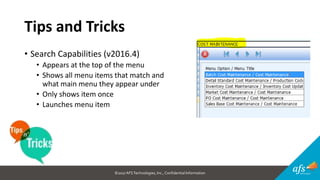
• Search Capabilities (v2016.4)
• Appears at the top of the menu
• Shows all menu items that match and
what main menu they appear under
• Only shows item once
• Launches menu item
©2017 AFSTechnologies, Inc.,Confidential Information
Tips and Tricks
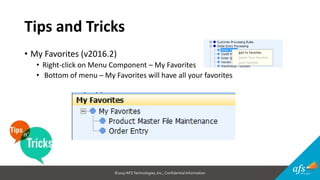
• My Favorites (v2016.2)
• Right-click on Menu Component – My Favorites
• Bottom of menu – My Favorites will have all your favorites
©2017 AFSTechnologies, Inc.,Confidential Information
Tips and Tricks
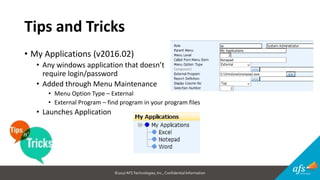
• My Applications (v2016.02)
• Any windows application that doesn’t
require login/password
• Added through Menu Maintenance
• Menu Option Type – External
• External Program – find program in your program files
• Launches Application
©2017 AFSTechnologies, Inc.,Confidential Information
Tips and Tricks
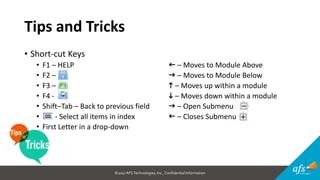
• Short-cut Keys
• F1 – HELP f – Moves to Module Above
• F2 – g – Moves to Module Below
• F3 – h – Moves up within a module
• F4 - i – Moves down within a module
• Shift–Tab – Back to previous field g – Open Submenu
• - Select all items in index f – Closes Submenu
• First Letter in a drop-down
©2017 AFSTechnologies, Inc.,Confidential Information
THANK YOU!
Q & A
Join our ERP/OMS LinkedIn Group
Next Session: TOPGOLF ACTIVITY – Transportation 6:15 pm

ERP Accounting - Tips and Tricks

  • 1.
    ERP Accounting – Tipsand Tricks 2017 AFS USER CONFERENCE “Practical Analytics for Everyday Decision Making”
  • 2.
    ©2017 AFSTechnologies, Inc.,ConfidentialInformation Speaker Introduction Brenda Spanier, Sr Implementation Consultant and Trainer • More than 25 years of experience as a financial controller in a variety of industries including: Food Distribution, Food Retail and Professional Services. • 9 years as a Software Implementation Consultant/Trainer in various ERP systems.
  • 3.
    ©2017 AFSTechnologies, Inc.,ConfidentialInformation Agenda • Collections – Turn AR into • Reconciling Subsidiaries • Bank Reconciliation • Year-end • Fiscal Periods • Tips & Tricks
  • 4.
    ©2017 AFSTechnologies, Inc.,ConfidentialInformation Collections – Turn AR into • Where do I start? So many people owe us money! FILTERS / SORTS
  • 5.
    ©2017 AFSTechnologies, Inc.,ConfidentialInformation Collections – Turn AR into • How do I stop them from owing me more? CREDIT HOLD
  • 6.
    ©2017 AFSTechnologies, Inc.,ConfidentialInformation Collections – Turn AR into • Information Available AR INQUIRY
  • 7.
    ©2017 AFSTechnologies, Inc.,ConfidentialInformation Collections – Turn AR into • Recording Collection Efforts COLLECTION COMMENTS and COD PLUS COMMENTS
  • 8.
    ©2017 AFSTechnologies, Inc.,ConfidentialInformation Collections – Turn AR into • Reminders TICKLER REPORT
  • 9.
    ©2017 AFSTechnologies, Inc.,ConfidentialInformation Reconciling Subsidiaries • Accounts to Reconcile • Why should I reconcile? • What causes it to be “out-of-balance?” • What are all these different dates?
  • 10.
    ©2017 AFSTechnologies, Inc.,ConfidentialInformation Reconciling Subsidiaries • Accounts to Reconcile • Accounts Receivable • Vendor AR • Inventory • Accounts Payable • Clearing Accounts (Inventory, Freight and Cost Elements) • Cash • Sales • Cost of Goods
  • 11.
    ©2017 AFSTechnologies, Inc.,ConfidentialInformation Reconciling Subsidiaries • When should I reconcile? • After all postings are done • No one should be posting when running reports • Monthly at a minimum • Why should I reconcile? • To catch a variance before too much time goes back • To understand how, when and why transactions impact the GL • To verify that entries are posted to correct accounts
  • 12.
    ©2017 AFSTechnologies, Inc.,ConfidentialInformation Reconciling Subsidiaries • What causes it to be “out-of-balance?” • Human Error • System going down during posting • Code files set-up with incorrect GL mapping • Not completing AP/PO tieback • Selecting incorrect dates when running reports • Selecting incorrect dates for transactions • Creating journal entries in these accounts • Entries no posted
  • 13.
    ©2017 AFSTechnologies, Inc.,ConfidentialInformation Reconciling Subsidiaries • What are all these different dates? • Entry Date – the date that the event was entered into the system • Transaction Date – the date the event actually occurred • Fiscal Period - timeframe that items go into the GL for reporting purposes. In many cases, you are not asked for a fiscal period so the system uses the Transaction Date to determine the fiscal period.
  • 14.
    ©2017 AFSTechnologies, Inc.,ConfidentialInformation Reconciling Subsidiaries • Reports to Run • Detailed Journal Reports (Exclude Consolidated Journals) • Unposted Consolidated Journal Reports • Summary Trial Balance • AP Aging Report • Receiving Clearing Reports • AR Aging • Vendor AR Aging • Inventory Value (set-up on scheduler) • Sales Margin
  • 15.
    ©2017 AFSTechnologies, Inc.,ConfidentialInformation Reconciling Subsidiaries • What to check? • Look for entries that didn’t consolidate or post • Make sure reports are run for the same period of time • Print Detailed Trial Balance for account that is off • Look for manual journal entries • Look at transactions and then print Detailed Journal Reports Grouped by-1 “Transaction Date” and Group by-2 “Entry Date” to see if you have entries in the wrong period • If you have checked everything, then contact AFS Support.
  • 16.
    ©2017 AFSTechnologies, Inc.,ConfidentialInformation Bank Reconciliations • Clear Checks • Clear Deposits • Clear Journal Entries • Make Adjusting Entries (v2016.3)
  • 17.
    ©2017 AFSTechnologies, Inc.,ConfidentialInformation Bank Reconciliations • Clear Checks • Select each one manually • Auto Load • Import
  • 18.
    ©2017 AFSTechnologies, Inc.,ConfidentialInformation Bank Reconciliations • Clear Deposits and Transfers
  • 19.
    ©2017 AFSTechnologies, Inc.,ConfidentialInformation Bank Reconciliations • Record Bank Adjustments • Create AP Adjustments within Bank Reconciliations
  • 20.
    ©2017 AFSTechnologies, Inc.,ConfidentialInformation Bank Reconciliations • Well that was easy!!!
  • 21.
    ©2017 AFSTechnologies, Inc.,ConfidentialInformation Year-End Close • Create Closing Journals • Makes an entry to clear all Income/Expense Accounts and record to Retained Earnings • Post Closing Journals • Posts the journal entry created above • Close the Fiscal Period • This will prevent any transactions from going into the prior year
  • 22.
    ©2017 AFSTechnologies, Inc.,ConfidentialInformation Year-End Close • What if you have more entries? • Re-open the period • Make the entries • Close the year-end again • Why should I do this instead of a manual journal entry? • Less room for errors • No missing year-end entries • Better audit because it is system driven instead of manual entries
  • 23.
    ©2017 AFSTechnologies, Inc.,ConfidentialInformation Fiscal Periods • Prevents Posting to Past Periods and Future Periods • What do they all mean? • Open Date – First Day entries can go into the period • GL Close Date – Last Day entries can go into the period • AP Close Date – Last Day entries can be entered through AP into the period • Distribution Close Date – Last Day entries can be entered through Order Entry, Purchasing, Inventory Control, Production, etc. into the period
  • 24.
    ©2017 AFSTechnologies, Inc.,ConfidentialInformation Tips and Tricks • Export to File • Search Capabilities • My Favorites • My Applications • Short-cut Keys
  • 25.
    ©2017 AFSTechnologies, Inc.,ConfidentialInformation Tips and Tricks • Export to File (v2016.4) • Right-click on grid – Export to File – select file type) • Select Location to File • Index Grids • Products on an Order • Products on a Purchase Order • Exports wherever you focus is
  • 26.
    ©2017 AFSTechnologies, Inc.,ConfidentialInformation Tips and Tricks • Search Capabilities (v2016.4) • Appears at the top of the menu • Shows all menu items that match and what main menu they appear under • Only shows item once • Launches menu item
  • 27.
    ©2017 AFSTechnologies, Inc.,ConfidentialInformation Tips and Tricks • My Favorites (v2016.2) • Right-click on Menu Component – My Favorites • Bottom of menu – My Favorites will have all your favorites
  • 28.
    ©2017 AFSTechnologies, Inc.,ConfidentialInformation Tips and Tricks • My Applications (v2016.02) • Any windows application that doesn’t require login/password • Added through Menu Maintenance • Menu Option Type – External • External Program – find program in your program files • Launches Application
  • 29.
    ©2017 AFSTechnologies, Inc.,ConfidentialInformation Tips and Tricks • Short-cut Keys • F1 – HELP f – Moves to Module Above • F2 – g – Moves to Module Below • F3 – h – Moves up within a module • F4 - i – Moves down within a module • Shift–Tab – Back to previous field g – Open Submenu • - Select all items in index f – Closes Submenu • First Letter in a drop-down
  • 30.
    ©2017 AFSTechnologies, Inc.,ConfidentialInformation THANK YOU! Q & A Join our ERP/OMS LinkedIn Group Next Session: TOPGOLF ACTIVITY – Transportation 6:15 pm