Plus
Introduction Version Need for AcME Plus Impact of AcME 2.0 on Plus
The Essentiality Difference between Real Accounts System & NGOs Accounting System Normal Corporate companies see for Profit or Loss NGOs are Non Profit Oriented organizations At the end of Financial year, these organizations are liable for the excess of project fund and vice versa
AcME Versions AcME 1.0 and 2.0 support mainly Salesians and Religious’ Accounting System AcME Plus extends support to Non Governmental and Non Profitable Organizations
What is new? Project Based Accounting System  Supports Coded and Codeless Systems Journal Entry Automatic Depreciation Voucher Printing Exclusive Reports for NGOs Data Security System
Features  Project-wise Locking Facility  Registers Audit Information Board of Executive Committee Authorization of High Natured Amount in Transaction Analyze Previous and Current Year Account  User Friendliness User Work Log Facility ...
Features contd. Module-wise User Rights Address Book Backtracking any Transaction from Reports Consolidated Reports Facility to Import and Export Account Primary Information
General Reports Abstracts Journals Bank Accounts Ledgers Receipts and Payments Income and Expenditure Cost Centers Final Accounts Foreign Contributions
Flexibility Features Security Measures in Transaction Different Vouchers for Projects Multiple Database Handling Power Search for Transactions Macro for Narrations  Facility to switch between Code & Codeless System
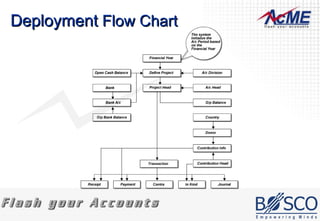
Deployment Procedure Define the Financial Year Define the Projects along with A/c Division Along with A/c Division define the Cash Balance if needed Define A/c Heads Attach needed A/c Heads to the Projects and it is referred as Project Head Define A/c Head wise O/p Balance for the Project Head if needed
Deployment  Procedure contd. Define Bank Define Bank A/c and its O/p Balance Attach the Bank A/c to the Project (Unless there is a Bank A/c for the Project, Bank Transaction Can’t be made) Define Country (Unless there is no Country, Donor Can’t be defined) Define Donor (Unless there is no Donor, Contribution Info Can’t be made) Now the system is ready for all the Transactions and Reports
Deployment  Flow Chart
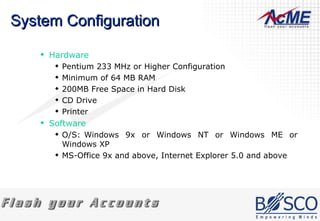
System Configuration Hardware Pentium 233 MHz or Higher Configuration  Minimum of 64 MB RAM  200MB Free Space in Hard Disk  CD Drive  Printer  Software O/S: Windows 9x or Windows NT or Windows ME or Windows XP MS-Office 9x and above, Internet Explorer 5.0 and above
Installation Procedure The Setup.exe file will be executed automatically, if the CD is having the Auto Run facility. Otherwise run the Setup.exe file to install AcME Plus. And follow the Setup.exe files instruction. When the Software is successfully installed, it is ready to launch
Troubleshooting While Launching Cause To run the setup program windows requires IE 5.0 or higher version.  ODBC Driver not Installed Solutions Refer the AcME Plus Software requirements
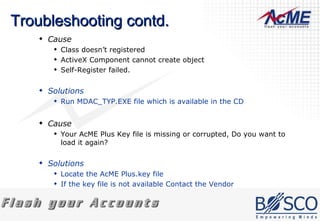
Troubleshooting contd. Cause Class doesn’t registered  ActiveX Component cannot create object  Self-Register failed.  Solutions Run MDAC_TYP.EXE file which is available in the CD  Cause Your AcME Plus Key file is missing or corrupted, Do you want to load it again?  Solutions Locate the AcME Plus.key file  If the key file is not available Contact the Vendor
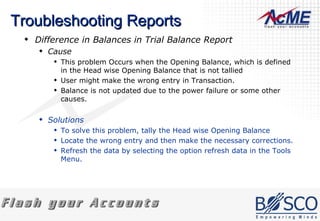
Troubleshooting Reports Difference in Balances in Trial Balance Report  Cause This problem Occurs when the Opening Balance, which is defined in the Head wise Opening Balance that is not tallied  User might make the wrong entry in Transaction.  Balance is not updated due to the power failure or some other causes.  Solutions To solve this problem, tally the Head wise Opening Balance Locate the wrong entry and then make the necessary corrections. Refresh the data by selecting the option refresh data in the Tools Menu.
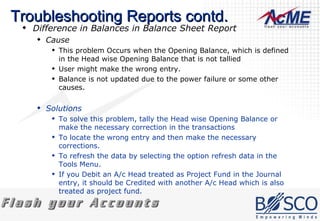
Troubleshooting Reports contd. Difference in Balances in Balance Sheet Report  Cause This problem Occurs when the Opening Balance, which is defined in the Head wise Opening Balance that is not tallied  User might make the wrong entry.  Balance is not updated due to the power failure or some other causes.  Solutions To solve this problem, tally the Head wise Opening Balance or make the necessary correction in the transactions  To locate the wrong entry and then make the necessary corrections.  To refresh the data by selecting the option refresh data in the Tools Menu.  If you Debit an A/c Head treated as Project Fund in the Journal entry, it should be Credited with another A/c Head which is also treated as project fund.
Contact Bosco InfoTech Pvt Ltd, 231/8, S.H.C Shopping Complex, Vaniyambadi Road,  Tirupattur – 635601. Phone : +91 96 26 800 800 Email :  [email_address]
Thank You

Acme plus

  • 1.
  • 2.
    Introduction Version Needfor AcME Plus Impact of AcME 2.0 on Plus
  • 3.
    The Essentiality Differencebetween Real Accounts System & NGOs Accounting System Normal Corporate companies see for Profit or Loss NGOs are Non Profit Oriented organizations At the end of Financial year, these organizations are liable for the excess of project fund and vice versa
  • 4.
    AcME Versions AcME1.0 and 2.0 support mainly Salesians and Religious’ Accounting System AcME Plus extends support to Non Governmental and Non Profitable Organizations
  • 5.
    What is new?Project Based Accounting System Supports Coded and Codeless Systems Journal Entry Automatic Depreciation Voucher Printing Exclusive Reports for NGOs Data Security System
  • 6.
    Features Project-wiseLocking Facility Registers Audit Information Board of Executive Committee Authorization of High Natured Amount in Transaction Analyze Previous and Current Year Account User Friendliness User Work Log Facility ...
  • 7.
    Features contd. Module-wiseUser Rights Address Book Backtracking any Transaction from Reports Consolidated Reports Facility to Import and Export Account Primary Information
  • 8.
    General Reports AbstractsJournals Bank Accounts Ledgers Receipts and Payments Income and Expenditure Cost Centers Final Accounts Foreign Contributions
  • 9.
    Flexibility Features SecurityMeasures in Transaction Different Vouchers for Projects Multiple Database Handling Power Search for Transactions Macro for Narrations Facility to switch between Code & Codeless System
  • 10.
    Deployment Procedure Definethe Financial Year Define the Projects along with A/c Division Along with A/c Division define the Cash Balance if needed Define A/c Heads Attach needed A/c Heads to the Projects and it is referred as Project Head Define A/c Head wise O/p Balance for the Project Head if needed
  • 11.
    Deployment Procedurecontd. Define Bank Define Bank A/c and its O/p Balance Attach the Bank A/c to the Project (Unless there is a Bank A/c for the Project, Bank Transaction Can’t be made) Define Country (Unless there is no Country, Donor Can’t be defined) Define Donor (Unless there is no Donor, Contribution Info Can’t be made) Now the system is ready for all the Transactions and Reports
  • 12.
  • 13.
    System Configuration HardwarePentium 233 MHz or Higher Configuration Minimum of 64 MB RAM 200MB Free Space in Hard Disk CD Drive Printer Software O/S: Windows 9x or Windows NT or Windows ME or Windows XP MS-Office 9x and above, Internet Explorer 5.0 and above
  • 14.
    Installation Procedure TheSetup.exe file will be executed automatically, if the CD is having the Auto Run facility. Otherwise run the Setup.exe file to install AcME Plus. And follow the Setup.exe files instruction. When the Software is successfully installed, it is ready to launch
  • 15.
    Troubleshooting While LaunchingCause To run the setup program windows requires IE 5.0 or higher version. ODBC Driver not Installed Solutions Refer the AcME Plus Software requirements
  • 16.
    Troubleshooting contd. CauseClass doesn’t registered ActiveX Component cannot create object Self-Register failed. Solutions Run MDAC_TYP.EXE file which is available in the CD Cause Your AcME Plus Key file is missing or corrupted, Do you want to load it again? Solutions Locate the AcME Plus.key file If the key file is not available Contact the Vendor
  • 17.
    Troubleshooting Reports Differencein Balances in Trial Balance Report Cause This problem Occurs when the Opening Balance, which is defined in the Head wise Opening Balance that is not tallied User might make the wrong entry in Transaction. Balance is not updated due to the power failure or some other causes. Solutions To solve this problem, tally the Head wise Opening Balance Locate the wrong entry and then make the necessary corrections. Refresh the data by selecting the option refresh data in the Tools Menu.
  • 18.
    Troubleshooting Reports contd.Difference in Balances in Balance Sheet Report Cause This problem Occurs when the Opening Balance, which is defined in the Head wise Opening Balance that is not tallied User might make the wrong entry. Balance is not updated due to the power failure or some other causes. Solutions To solve this problem, tally the Head wise Opening Balance or make the necessary correction in the transactions To locate the wrong entry and then make the necessary corrections. To refresh the data by selecting the option refresh data in the Tools Menu. If you Debit an A/c Head treated as Project Fund in the Journal entry, it should be Credited with another A/c Head which is also treated as project fund.
  • 19.
    Contact Bosco InfoTechPvt Ltd, 231/8, S.H.C Shopping Complex, Vaniyambadi Road, Tirupattur – 635601. Phone : +91 96 26 800 800 Email : [email_address]
  • 20.

Editor's Notes

  • #6 Project Based Accounting System AcME works as an Project Based Accounting System Coded and Codeless System A Code and Codeless System which has the facility to switch between Code and Codeless system anytime when there is a need Journal Entry This newly added feature help in passing Journal Entries easily by selecting the heads and keying the amount and at the same time it works in the same style of passing journal entries manually which is known to the accountant and office assistant. Automatic Depreciation Less complexities in applying Depreciation with AcME and also it will automatic generate Journal entry for depreciation applied. Exclusive reports for NGOs There are reports in AcME which fulfills the need of NGOs and extends this fulfillment to NPOs. Data Security System This feature helps in securing the transactions by locking the transactions and allowing accessible user by allotting user rights.
  • #7 Project-wise Locking Facility Project can be locked from editing its transactions and records by providing a reason and it can be removed on need Registers Audit Information Able to maintain the information of the Project Audited date and name of the auditor Board of Executive Committee This is the provision to maintain the information of the Executive members in the organization Authorization of High Natured Amount in Transaction High Natured amount can be fixed for the transactions which should not exceed the fixed amount in the environment settings. It will be only enabled in Payments screen Analyze Previous and Current Year Account The reports has the feature of comparing the accounts of Previous year with the current year User Friendliness The features provided in acme 3.0 is very much user friendly and can attain the need easily User Work Log Facility This feature tracks the user and the changes made by him which will very much useful for the Adminstrator as well as for the accounts executives
  • #8 Module-wise User Rights Provision to fix rights for each user and it can able to alter these rights to module(s) any time. There is also password facility for each user Address Book Address Book to maintain the address of the Auditors, Donors, Executive members etc., it possible to categorize these address according to donors, Auditors and executive members. Search by alphabets is also possible Backtracking any Transaction from Reports This facility helps you to alter the transactions from the report if need. Import and Export Facility of Accounts Primary Information The primary information according to AcME like Creation of Projects, Heads etc., can export to other database with this feature. For Example : If an organization has a branch in other place which follows the same procedures and policies than these facility can be used there to avoid doing the same work there.
  • #9 Abstracts Journals Bank Account Ledgers Receipts and Payments Income and Expenditure Cost Centers Final Accounts Foreign Contribution
  • #10 Project Remainder Shifting between Project and Vouchers Multiple Database Handling Power Search for Transactions Macro for Narrations Facility of switching between Code & Codeless System