Waterwork Management Model :
          EPANET


                                   Jinrui Ding
                             학번 : 200916158
             Department of Chemical Engineering
OUTLINE
   Introduction

       Hydraulic and Water Quality Theory

         Numerical Method

         Input Data

        Output Data

      Example Network

 ArcGIS Exercises
                   2/19
What is EPANET ?
   EPANET is a computer program that performs extended period simulation of
   hydraulic and water quality behavior within pressurized pipe networks.
       The modeled network can consist of:
             Nodes:                                    Links:
                  •    Pipe junctions                        •    Pipes
                  •    Storage tanks                         •    Pumps
                  •    Reservoirs                            •    Valves
       EPANET models:
             •   Flow of water in pipes                  •       Concentration of a chemical
             •   Pressure at junctions                   •       Water age
             •   Height of water in tanks                •       Source tracing

    EPANET is designed to be a research tool for improving our understanding of the
    movement and fate of drinking water constituents within distribution systems.

It can be used for many different kinds of applications in distribution systems analysis, such as:
              Sampling program design                   Chlorine residual analysis
              Hydraulic model calibration               Consumer exposure assessment …

                                                 3/19
OUTLINE
   Introduction

       Hydraulic and Water Quality Theory

         Numerical Method

         Input Data

        Output Data

      Example Network

 ArcGIS Exercises
                   4/19
Hydraulic Model
    A water supply distribution system consists of a complex network of interconnected
    pipes, service reservoirs and pumps that deliver water from the treatment plant to a
    consumer. The distribution of water through the network is governed by complex,
    non-linear, non-convex and discontinuous hydraulic equations.

    Two equations, which are used to determine if a network is hydraulically balanced,
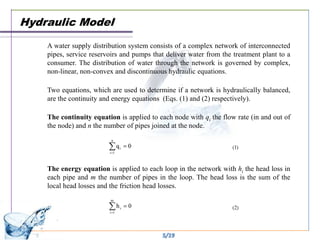
    are the continuity and energy equations (Eqs. (1) and (2) respectively).

    The continuity equation is applied to each node with qi the flow rate (in and out of
    the node) and n the number of pipes joined at the node.


    The energy equation is applied to each loop in the network with hi the head loss in
    each pipe and m the number of pipes in the loop. The head loss is the sum of the
    local head losses and the friction head losses.


                                           5/19
Water Quality
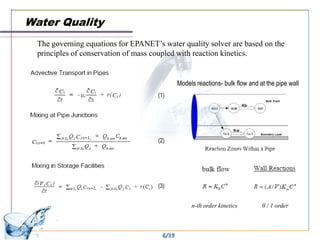
  The governing equations for EPANET’s water quality solver are based on the
  principles of conservation of mass coupled with reaction kinetics.


                                              Models reactions- bulk flow and at the pipe wall
                                      (1)


                                      (2)


                                      (3)


                                                   n-th order kinetics         0 / 1 order


                                       6/19
OUTLINE
   Introduction

       Hydraulic and Water Quality Theory

         Numerical Method

         Input Data

        Output Data

      Example Network

 ArcGIS Exercises
                   7/19
Analysis Algorithms

     The method used in EPANET to solve the flow continuity and headloss equations that
    characterize the hydraulic state of the pipe network at a given point in time can be termed a
    hybrid node-loop approach —— The "Gradient Solution Method".
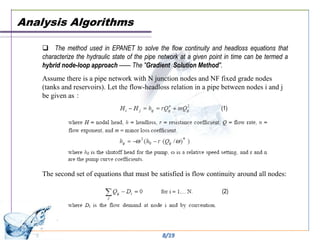
    Assume there is a pipe network with N junction nodes and NF fixed grade nodes
    (tanks and reservoirs). Let the flow-headloss relation in a pipe between nodes i and j
    be given as:
                                                                       (1)


    The second set of equations that must be satisfied is flow continuity around all nodes:

                                                                        (2)


                                                 8/19
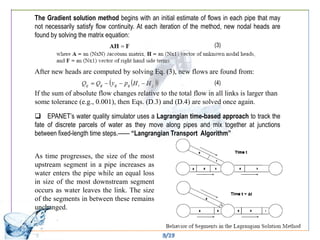
The Gradient solution method begins with an initial estimate of flows in each pipe that may
not necessarily satisfy flow continuity. At each iteration of the method, new nodal heads are
found by solving the matrix equation:
                                                                    (3)


After new heads are computed by solving Eq. (3), new flows are found from:
                                                                    (4)
If the sum of absolute flow changes relative to the total flow in all links is larger than
some tolerance (e.g., 0.001), then Eqs. (D.3) and (D.4) are solved once again.

 EPANET’s water quality simulator uses a Lagrangian time-based approach to track the
fate of discrete parcels of water as they move along pipes and mix together at junctions
between fixed-length time steps.—— “Langrangian Transport Algorithm”


As time progresses, the size of the most
upstream segment in a pipe increases as
water enters the pipe while an equal loss
in size of the most downstream segment
occurs as water leaves the link. The size
of the segments in between these remains
unchanged.


                                                9/19
OUTLINE
   Introduction

       Hydraulic and Water Quality Theory

         Numerical Method

         Input Data

        Output Data

      Example Network

 ArcGIS Exercises
                   10/19
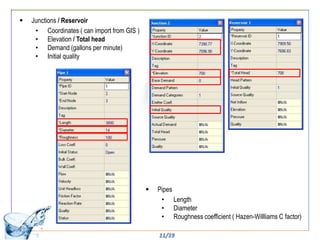
   Junctions / Reservoir
     • Coordinates ( can import from GIS )
     • Elevation / Total head
     • Demand (gallons per minute)
     • Initial quality


                                                Pipes
                                                  • Length
                                                  • Diameter
                                                  • Roughness coefficient ( Hazen-Willliams C factor)

                                                 11/19
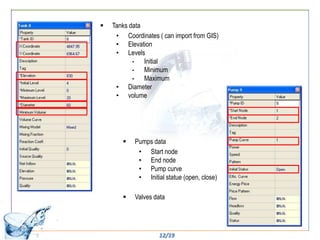
   Tanks data
     • Coordinates ( can import from GIS)
     • Elevation
     • Levels
           •   Initial
           •   Minimum
           •   Maximum
     • Diameter
     • volume


          Pumps data
            • Start node
            • End node
            • Pump curve
            • Initial statue (open, close)

          Valves data


                    12/19
OUTLINE
   Introduction

       Hydraulic and Water Quality Theory

         Numerical Method

         Input Data

        Output Data

      Example Network

 ArcGIS Exercises
                   13/19
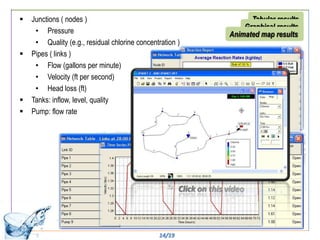
   Junctions ( nodes )                                         Tabular results
                                                              Graphical results
     • Pressure                                           Animated map results
     • Quality (e.g., residual chlorine concentration )
   Pipes ( links )
     • Flow (gallons per minute)
     • Velocity (ft per second)
     • Head loss (ft)
   Tanks: inflow, level, quality
   Pump: flow rate


                                               14/19
OUTLINE
   Introduction

       Hydraulic and Water Quality Theory

         Numerical Method

         Input Data

        Output Data

      Example Network

 ArcGIS Exercises
                   15/19
16/19
OUTLINE
   Introduction

       Hydraulic and Water Quality Theory

         Numerical Method

         Input Data

        Output Data

      Example Network

 ArcGIS Exercises
                   17/19
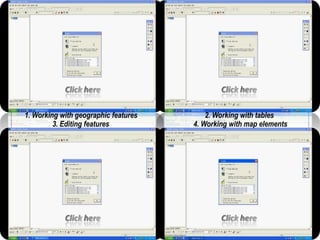
1. Working with geographic features       2. Working with tables
         3. Editing features          4. Working with map elements
Epanet for e.s. class 2011 6-21

Epanet for e.s. class 2011 6-21

  • 1.
    Waterwork Management Model: EPANET Jinrui Ding 학번 : 200916158 Department of Chemical Engineering
  • 2.
    OUTLINE Introduction  Hydraulic and Water Quality Theory  Numerical Method  Input Data  Output Data  Example Network  ArcGIS Exercises 2/19
  • 3.
    What is EPANET? EPANET is a computer program that performs extended period simulation of hydraulic and water quality behavior within pressurized pipe networks. The modeled network can consist of:  Nodes:  Links: • Pipe junctions • Pipes • Storage tanks • Pumps • Reservoirs • Valves EPANET models: • Flow of water in pipes • Concentration of a chemical • Pressure at junctions • Water age • Height of water in tanks • Source tracing EPANET is designed to be a research tool for improving our understanding of the movement and fate of drinking water constituents within distribution systems. It can be used for many different kinds of applications in distribution systems analysis, such as:  Sampling program design  Chlorine residual analysis  Hydraulic model calibration  Consumer exposure assessment … 3/19
  • 4.
    OUTLINE Introduction  Hydraulic and Water Quality Theory  Numerical Method  Input Data  Output Data  Example Network  ArcGIS Exercises 4/19
  • 5.
    Hydraulic Model A water supply distribution system consists of a complex network of interconnected pipes, service reservoirs and pumps that deliver water from the treatment plant to a consumer. The distribution of water through the network is governed by complex, non-linear, non-convex and discontinuous hydraulic equations. Two equations, which are used to determine if a network is hydraulically balanced, are the continuity and energy equations (Eqs. (1) and (2) respectively). The continuity equation is applied to each node with qi the flow rate (in and out of the node) and n the number of pipes joined at the node. The energy equation is applied to each loop in the network with hi the head loss in each pipe and m the number of pipes in the loop. The head loss is the sum of the local head losses and the friction head losses. 5/19
  • 6.
    Water Quality The governing equations for EPANET’s water quality solver are based on the principles of conservation of mass coupled with reaction kinetics. Models reactions- bulk flow and at the pipe wall (1) (2) (3) n-th order kinetics 0 / 1 order 6/19
  • 7.
    OUTLINE Introduction  Hydraulic and Water Quality Theory  Numerical Method  Input Data  Output Data  Example Network  ArcGIS Exercises 7/19
  • 8.
    Analysis Algorithms  The method used in EPANET to solve the flow continuity and headloss equations that characterize the hydraulic state of the pipe network at a given point in time can be termed a hybrid node-loop approach —— The "Gradient Solution Method". Assume there is a pipe network with N junction nodes and NF fixed grade nodes (tanks and reservoirs). Let the flow-headloss relation in a pipe between nodes i and j be given as: (1) The second set of equations that must be satisfied is flow continuity around all nodes: (2) 8/19
  • 9.
    The Gradient solutionmethod begins with an initial estimate of flows in each pipe that may not necessarily satisfy flow continuity. At each iteration of the method, new nodal heads are found by solving the matrix equation: (3) After new heads are computed by solving Eq. (3), new flows are found from: (4) If the sum of absolute flow changes relative to the total flow in all links is larger than some tolerance (e.g., 0.001), then Eqs. (D.3) and (D.4) are solved once again.  EPANET’s water quality simulator uses a Lagrangian time-based approach to track the fate of discrete parcels of water as they move along pipes and mix together at junctions between fixed-length time steps.—— “Langrangian Transport Algorithm” As time progresses, the size of the most upstream segment in a pipe increases as water enters the pipe while an equal loss in size of the most downstream segment occurs as water leaves the link. The size of the segments in between these remains unchanged. 9/19
  • 10.
    OUTLINE Introduction  Hydraulic and Water Quality Theory  Numerical Method  Input Data  Output Data  Example Network  ArcGIS Exercises 10/19
  • 11.
    Junctions / Reservoir • Coordinates ( can import from GIS ) • Elevation / Total head • Demand (gallons per minute) • Initial quality  Pipes • Length • Diameter • Roughness coefficient ( Hazen-Willliams C factor) 11/19
  • 12.
    Tanks data • Coordinates ( can import from GIS) • Elevation • Levels • Initial • Minimum • Maximum • Diameter • volume  Pumps data • Start node • End node • Pump curve • Initial statue (open, close)  Valves data 12/19
  • 13.
    OUTLINE Introduction  Hydraulic and Water Quality Theory  Numerical Method  Input Data  Output Data  Example Network  ArcGIS Exercises 13/19
  • 14.
    Junctions ( nodes ) Tabular results Graphical results • Pressure Animated map results • Quality (e.g., residual chlorine concentration )  Pipes ( links ) • Flow (gallons per minute) • Velocity (ft per second) • Head loss (ft)  Tanks: inflow, level, quality  Pump: flow rate 14/19
  • 15.
    OUTLINE Introduction  Hydraulic and Water Quality Theory  Numerical Method  Input Data  Output Data  Example Network  ArcGIS Exercises 15/19
  • 16.
  • 17.
    OUTLINE Introduction  Hydraulic and Water Quality Theory  Numerical Method  Input Data  Output Data  Example Network  ArcGIS Exercises 17/19
  • 18.
    1. Working withgeographic features 2. Working with tables 3. Editing features 4. Working with map elements