Online Platforms
for ICT Content
Development
Prepared by: Mark Jhon C. Oxillo
What is an Online
Platform?
• are technologies that are
grouped to be used as a
base upon which other
applications processes or
technologies are developed
Examples of Online Platform
a. Presentation/Visualization
b. Cloud Computing
c. Social Media
d. Web Page Creation
e. File Management
f. Mapping
a. Presentation / Visualization
• communicates
information clearly and
efficiently via statistical
graphics, plots and
information graphics
Examples of Presentation /
Visualization
• Prezi – helping to reinvent
the art of presentation
• Zoho – an online project
management app that helps
you plan your work and
keep track of your progress
Examples of Presentation /
Visualization
• SlideShare – to build
quickly from concise, well-
presented content from top
experts
• MindMeister – an online
mind-mapping tool that lets
you capture, develop and
share ideas visually
b. Cloud Computing
• the practice of using a
network of remote servers
hosted on the internet to
store, manage, and process
data, rather than a local
server or a personal
computer
Examples of Cloud Computing:
• Google Drive – keep all
work in one secure place
with online file storage
• Dropbox – keeps your files
safe, synced, and easy to
share
c. Social Media
• are computer-mediated tools
that allow people, companies
and other organizations to
create, share, or exchange
information, career interests,
ideas, and pictures/videos in
virtual communities and
networks
Examples of Social Media
• Twitter – online social
networking service that
enables users to send
and read short 140-
character messages
called “tweets”
Examples of Social Media
• Facebook – is for-profit
corporation and online
social networking service
• Tumblr – a micro-blogging
platform and social
networking website
d. Web Page Creation
• encompasses a number
of important elements
including color, layout,
and overall graphical
appearance.
Examples Web Page Creation
• Wix – a cloud-based web
development platform that
allows users to create
HTML5 websites and mobile
sites through the use of
their online drag and drop
tools
Examples Web Page Creation
• Weebly – a web-hosting
service featuring a drag-
and-drop website builder.
e. File Management
• is the storing, naming,
sorting and handling
computer files
Examples of File Management
• Zamzar – web application
to convert files
• word2pdf – convert Word
files to PDF (Portable
Document Format) with this
online tool
f. Mapping
• a transformation taking
the points of one space
into the points of the
same or another space
Examples of Mapping
• Google Maps – a
desktop web mapping
service developed by
Google
CONTENT
MANAGEMENT
SYSTEM
Content Management System (CMS)
• is a computer application
(sometimes online or browser-

based) that allows you to
publish, edit and manipulate,
organize and delete web
content. CMS is used in blogs,
news websites, and shopping
Blogs
• is a discussion or informational
website published on the web
consisting of discrete, often
informal diary-style text entries
("posts"). Posts are typically
displayed in reverse chronological
order, so that the most recent post
appears first, at the top of the web
page
Examples of Blogging Sites:
• WordPress (wordpress.com)
• Blogger (blogger.com or
blogspot.com)
• Blog.com
• Medium.com
• Squarespace.com
WEB DESIGN
PRINCIPLES
AND ELEMENTS
WEB DESIGN PRINCIPLES AND
ELEMENTS:
1. Consider the audience and goals.
2. It is advisable to plan the site on paper
first.
3. Strive for consistency
4. Provide a rich set of links within a site.
5. Don’t hide important information.
6. Provide opportunities for interaction.
7. Avoid text-only pages.
8. Don’t sacrifice elegance.
WEB DESIGN PRINCIPLES AND
ELEMENTS:
9. Provide a link for every URL used in the site.
10. Give a descriptive title of the site.
11. Include a brief introduction.
12. Make the site’s home page as useful a starting
point as possible.
13. Make sure the text is legible.
14. Make sure the site is platform independent.
15. Consider the needs of the viewers.
16. Thoroughly test the site and carefully
proofread.
WEBSITE
TEMPLATE
Website Template
• or web template, is a pre-
designed webpage, simply by
adding your text and
customization to create your
desired web page. It is usually
built with HTML and CSS
code.
Back in the day, you actually
need to learn HTML and CSS
to be able to create a decent
website, but today, we use a
WYSIWYG editor. It allows
you to create and design a
web page without any coding
knowledge.
WYSIWYG
• the acronym for “What You See Is
What You Get”
• this means that whatever you type,
insert, draw, place, rearrange, and
everything you do on a page is what
the audience will see. It shows and
prints whatever you type on the
screen.
Basic
Web Page
Creation
Creating a Website using
Microsoft Word
1. Open Microsoft Word.
2. Type anything on the page
like “Hello World!”
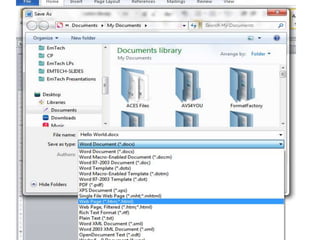
3. Click on File > Save As >
Type any file name.
4. In the Save as Type, select
“Web page (*.htm, *.html)”
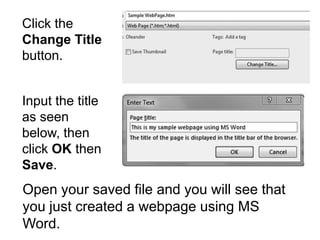
Click the
Change Title
button.
Input the title
as seen
below, then
click OK then
Save.
Open your saved file and you will see that
you just created a webpage using MS
Word.
SEO
SEARCH ENGINE OPTIMIZATION
• or SEO
• a feature that maximizes
the search engine
optimization feature so
visitors can easily locate
your website

Online Platforms for ICT Content Development - Empowerment Technologies

  • 1.
    Online Platforms for ICTContent Development Prepared by: Mark Jhon C. Oxillo
  • 2.
    What is anOnline Platform? • are technologies that are grouped to be used as a base upon which other applications processes or technologies are developed
  • 3.
    Examples of OnlinePlatform a. Presentation/Visualization b. Cloud Computing c. Social Media d. Web Page Creation e. File Management f. Mapping
  • 4.
    a. Presentation /Visualization • communicates information clearly and efficiently via statistical graphics, plots and information graphics
  • 5.
    Examples of Presentation/ Visualization • Prezi – helping to reinvent the art of presentation • Zoho – an online project management app that helps you plan your work and keep track of your progress
  • 6.
    Examples of Presentation/ Visualization • SlideShare – to build quickly from concise, well- presented content from top experts • MindMeister – an online mind-mapping tool that lets you capture, develop and share ideas visually
  • 7.
    b. Cloud Computing •the practice of using a network of remote servers hosted on the internet to store, manage, and process data, rather than a local server or a personal computer
  • 8.
    Examples of CloudComputing: • Google Drive – keep all work in one secure place with online file storage • Dropbox – keeps your files safe, synced, and easy to share
  • 9.
    c. Social Media •are computer-mediated tools that allow people, companies and other organizations to create, share, or exchange information, career interests, ideas, and pictures/videos in virtual communities and networks
  • 10.
    Examples of SocialMedia • Twitter – online social networking service that enables users to send and read short 140- character messages called “tweets”
  • 11.
    Examples of SocialMedia • Facebook – is for-profit corporation and online social networking service • Tumblr – a micro-blogging platform and social networking website
  • 12.
    d. Web PageCreation • encompasses a number of important elements including color, layout, and overall graphical appearance.
  • 13.
    Examples Web PageCreation • Wix – a cloud-based web development platform that allows users to create HTML5 websites and mobile sites through the use of their online drag and drop tools
  • 14.
    Examples Web PageCreation • Weebly – a web-hosting service featuring a drag- and-drop website builder.
  • 15.
    e. File Management •is the storing, naming, sorting and handling computer files
  • 16.
    Examples of FileManagement • Zamzar – web application to convert files • word2pdf – convert Word files to PDF (Portable Document Format) with this online tool
  • 17.
    f. Mapping • atransformation taking the points of one space into the points of the same or another space
  • 18.
    Examples of Mapping •Google Maps – a desktop web mapping service developed by Google
  • 19.
  • 20.
    Content Management System(CMS) • is a computer application (sometimes online or browser- based) that allows you to publish, edit and manipulate, organize and delete web content. CMS is used in blogs, news websites, and shopping
  • 21.
    Blogs • is adiscussion or informational website published on the web consisting of discrete, often informal diary-style text entries ("posts"). Posts are typically displayed in reverse chronological order, so that the most recent post appears first, at the top of the web page
  • 22.
    Examples of BloggingSites: • WordPress (wordpress.com) • Blogger (blogger.com or blogspot.com) • Blog.com • Medium.com • Squarespace.com
  • 23.
  • 24.
    WEB DESIGN PRINCIPLESAND ELEMENTS: 1. Consider the audience and goals. 2. It is advisable to plan the site on paper first. 3. Strive for consistency 4. Provide a rich set of links within a site. 5. Don’t hide important information. 6. Provide opportunities for interaction. 7. Avoid text-only pages. 8. Don’t sacrifice elegance.
  • 25.
    WEB DESIGN PRINCIPLESAND ELEMENTS: 9. Provide a link for every URL used in the site. 10. Give a descriptive title of the site. 11. Include a brief introduction. 12. Make the site’s home page as useful a starting point as possible. 13. Make sure the text is legible. 14. Make sure the site is platform independent. 15. Consider the needs of the viewers. 16. Thoroughly test the site and carefully proofread.
  • 26.
  • 27.
    Website Template • orweb template, is a pre- designed webpage, simply by adding your text and customization to create your desired web page. It is usually built with HTML and CSS code.
  • 28.
    Back in theday, you actually need to learn HTML and CSS to be able to create a decent website, but today, we use a WYSIWYG editor. It allows you to create and design a web page without any coding knowledge.
  • 29.
    WYSIWYG • the acronymfor “What You See Is What You Get” • this means that whatever you type, insert, draw, place, rearrange, and everything you do on a page is what the audience will see. It shows and prints whatever you type on the screen.
  • 30.
  • 31.
    Creating a Websiteusing Microsoft Word 1. Open Microsoft Word. 2. Type anything on the page like “Hello World!” 3. Click on File > Save As > Type any file name. 4. In the Save as Type, select “Web page (*.htm, *.html)”
  • 33.
    Click the Change Title button. Inputthe title as seen below, then click OK then Save. Open your saved file and you will see that you just created a webpage using MS Word.
  • 34.
  • 35.
    SEARCH ENGINE OPTIMIZATION •or SEO • a feature that maximizes the search engine optimization feature so visitors can easily locate your website

Editor's Notes

  • #32 Execute the steps simultaneously with the students.