














I
Contextualized online search and research skills
LEARNING COMPETENCIES
• Use the Internet as a tool for credible research and information
gathering to best achieve specific class objectives or address
situational.
• Students will be better users of search engines. In particular, they can
be more deeply aware of search techniques that will give results that
are useful for their academic and chosen career.
TOPICS
• MEDIA & INFORMATION SOURCE
• SEARCHTOOLS, SKILLS & ENGINE
• INFORMATION EVALUATION
• PLAGIARISM
GOOGLE YOURSELF
FORMATIVE ASSESSMENT
GOOGLE YOURSELF
1. Students will do a Google search using their own personal name.
2. They will show to the class the search result of their entry.
3. Students will identify if this information should be shown in public.
FORMATIVE ASSESSMENT
1.What did you observe about the activity?
2. Are the search reliable?Why?
3. Is the search result affronted your privacy?
MEDIA & INFORMATION SOURCE
INDIGENOUS KNOWLEDGE, LIBRARY, INTERNET
INDIGENOUS KNOWLEDGE
• Local knowledge
• Knowledge that is unique to a given culture or society.
• IK contrasts with the international knowledge system
universities, research institutions and private firms. (Warren
• Characteristics
• oral tradition of communication
• store information in memories
• information exchange is face-to-face
• information are contain within the border of the community
Example: Benguet Province (Municipality of Tublay)
LIBRARY
TYPES OF LIBRARY
Library are often classified in four groups
(these libraries may be either digital or
physical in form ):
•Academic
•Public
•School
•Special
TYPES OF LIBRARY
Characteristics of libraries in terms of
reliability, accuracy and value:
•Libraries of published books are often
considered highly reliable, accurate, and
valuable.
•Books and documents from dominant
sources are often peer reviewed.
•ISSN or ISBN registration ensures that
standards were followed in producing these
materials.
INTERNET
INFORMATION ON THE INTERNET
• Information found on the Internet may be quite varied in form and
content.
• It is more difficult to determine its reliability and accuracy.
• Accessing information on the Internet is easy, but requires more
discipline to check and validate.
• Factual & fictitious data are often merge.
• Information should be always validated.
ONLINE SEARCH AND RESEARCH
• Also known as Internet Research.
• More than just googling (typing a word in Google and
then clicking the search button).
• A skill needed to be improve to get factual
information.
EVALUATING
INFORMATION
ACCURACY
Content is grammatically correct, verifiable and cited when
necessary
AUTHOR
Defines who created the content, the individual or group’s
credential/expertise and provides contact information.
DOMAIN TYPES
Domain types are:
• .com (commercial)
• .org (organization)
• .edu (education)
• .gov (government)
• .net (network)
• .mil (military)
• .ph (country domain)
This is used to further evaluate a website.
CURRENCY
Information is current & updated frequently.
FAIRNESS
Content is balanced, presenting all sides of an issue and multiple
points of view.
USE OF SEVERAL SEARCH ENGINES
• Search Engines are programs that look for documents based
from specified keywords and return these documents where the
keyword were found.
• Major Search Engine:
• Google
• Yahoo (uses google)
• AltaVista
• Bing
• Lycos
RELEVANCE
Content is relevant to your topic or research.
SEARCH SKILLS
SEARCH TOOLS
SAFE SEARCH
• Helps you block inappropriate or explicit images from your Google
Search results.
• The SafeSearch filter isn’t 100% accurate, but it helps you avoid
most adult content.
RESTRICTED MODE
• an opt-in setting available on the computer and mobile site
that helps screen out potentially objectionable content that
you may prefer not to see or don't want others in your family
to stumble across while enjoyingYouTube.
• A parental control setting forYouTube.
GOOGLE SCHOLAR
• Provides a simple way to broadly search for scholarly
literature. From one place, you can search across many
disciplines and sources: articles, theses, books, abstracts
and court opinions, from academic publishers, professional
societies, online repositories, universities and other web
sites.
REVERSE IMAGE SEARCH
• use a picture as your search to find related images from around the
web.
SEARCH OPERATORS
SEARCH OPERATORS
• use search operators and other punctuation to get
optimize search.
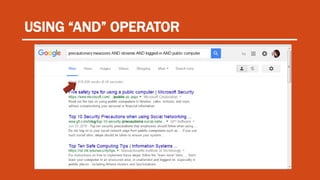
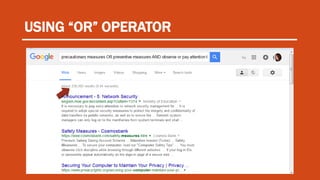
• AND & OR operator
• For conditional searching
• Search result must agree on the given condition
• The operator AND narrows the search by retrieving only records contain both terms.
• The operator OR broadens the search to include records containing either keyword, or
both.
USING “AND” OPERATOR
USING “OR” OPERATOR
SEARCH OPERATORS
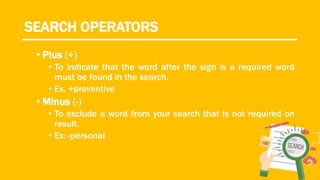
• Plus (+)
• To indicate that the word after the sign is a required word
must be found in the search.
• Ex. +preventive
• Minus (-)
• To exclude a word from your search that is not required on
result.
• Ex: -personal
SEARCH OPERATORS
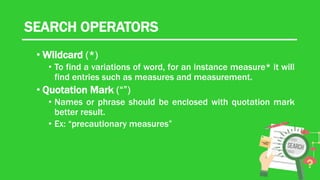
• Wildcard (*)
• To find a variations of word, for an instance measure* it will
find entries such as measures and measurement.
• Quotation Mark (“”)
• Names or phrase should be enclosed with quotation mark
better result.
• Ex: “precautionary measures”
PLAGIARISM
PLAGIARISM
• an act or instance of using or closely imitating the language
and thoughts of another author without authorization; the
representation of that author's work as one's own, as by
not crediting the original.
• Using other people’s words and ideas without clearly
acknowledging the source of the information
HOW TO AVOID PLAGIARISM
• You need to cite the things you copy on the internet.
• Put quotation marks around everything that comes
directly from the text and cite the source.
• Paraphrase, but be sure that you are not simply
rearranging or replacing a few words and cite the
source.
• Use the style manual in properly citing sources.
Thank you for
Listening.

Contextualized Online Search and Research Skills

  • 1.
    I Contextualized online searchand research skills
  • 2.
    LEARNING COMPETENCIES • Usethe Internet as a tool for credible research and information gathering to best achieve specific class objectives or address situational. • Students will be better users of search engines. In particular, they can be more deeply aware of search techniques that will give results that are useful for their academic and chosen career.
  • 3.
    TOPICS • MEDIA &INFORMATION SOURCE • SEARCHTOOLS, SKILLS & ENGINE • INFORMATION EVALUATION • PLAGIARISM
  • 4.
  • 5.
    GOOGLE YOURSELF 1. Studentswill do a Google search using their own personal name. 2. They will show to the class the search result of their entry. 3. Students will identify if this information should be shown in public.
  • 6.
    FORMATIVE ASSESSMENT 1.What didyou observe about the activity? 2. Are the search reliable?Why? 3. Is the search result affronted your privacy?
  • 7.
    MEDIA & INFORMATIONSOURCE INDIGENOUS KNOWLEDGE, LIBRARY, INTERNET
  • 8.
  • 9.
    INDIGENOUS KNOWLEDGE • Localknowledge • Knowledge that is unique to a given culture or society. • IK contrasts with the international knowledge system universities, research institutions and private firms. (Warren • Characteristics • oral tradition of communication • store information in memories • information exchange is face-to-face • information are contain within the border of the community Example: Benguet Province (Municipality of Tublay)
  • 10.
  • 11.
    TYPES OF LIBRARY Libraryare often classified in four groups (these libraries may be either digital or physical in form ): •Academic •Public •School •Special
  • 12.
    TYPES OF LIBRARY Characteristicsof libraries in terms of reliability, accuracy and value: •Libraries of published books are often considered highly reliable, accurate, and valuable. •Books and documents from dominant sources are often peer reviewed. •ISSN or ISBN registration ensures that standards were followed in producing these materials.
  • 13.
  • 14.
    INFORMATION ON THEINTERNET • Information found on the Internet may be quite varied in form and content. • It is more difficult to determine its reliability and accuracy. • Accessing information on the Internet is easy, but requires more discipline to check and validate. • Factual & fictitious data are often merge. • Information should be always validated.
  • 15.
    ONLINE SEARCH ANDRESEARCH • Also known as Internet Research. • More than just googling (typing a word in Google and then clicking the search button). • A skill needed to be improve to get factual information.
  • 16.
  • 17.
    ACCURACY Content is grammaticallycorrect, verifiable and cited when necessary
  • 18.
    AUTHOR Defines who createdthe content, the individual or group’s credential/expertise and provides contact information.
  • 19.
    DOMAIN TYPES Domain typesare: • .com (commercial) • .org (organization) • .edu (education) • .gov (government) • .net (network) • .mil (military) • .ph (country domain) This is used to further evaluate a website.
  • 20.
    CURRENCY Information is current& updated frequently.
  • 21.
    FAIRNESS Content is balanced,presenting all sides of an issue and multiple points of view.
  • 22.
    USE OF SEVERALSEARCH ENGINES • Search Engines are programs that look for documents based from specified keywords and return these documents where the keyword were found. • Major Search Engine: • Google • Yahoo (uses google) • AltaVista • Bing • Lycos
  • 23.
    RELEVANCE Content is relevantto your topic or research.
  • 24.
  • 25.
  • 26.
    SAFE SEARCH • Helpsyou block inappropriate or explicit images from your Google Search results. • The SafeSearch filter isn’t 100% accurate, but it helps you avoid most adult content.
  • 27.
    RESTRICTED MODE • anopt-in setting available on the computer and mobile site that helps screen out potentially objectionable content that you may prefer not to see or don't want others in your family to stumble across while enjoyingYouTube. • A parental control setting forYouTube.
  • 28.
    GOOGLE SCHOLAR • Providesa simple way to broadly search for scholarly literature. From one place, you can search across many disciplines and sources: articles, theses, books, abstracts and court opinions, from academic publishers, professional societies, online repositories, universities and other web sites.
  • 29.
    REVERSE IMAGE SEARCH •use a picture as your search to find related images from around the web.
  • 30.
  • 32.
    SEARCH OPERATORS • usesearch operators and other punctuation to get optimize search. • AND & OR operator • For conditional searching • Search result must agree on the given condition • The operator AND narrows the search by retrieving only records contain both terms. • The operator OR broadens the search to include records containing either keyword, or both.
  • 33.
  • 34.
  • 35.
    SEARCH OPERATORS • Plus(+) • To indicate that the word after the sign is a required word must be found in the search. • Ex. +preventive • Minus (-) • To exclude a word from your search that is not required on result. • Ex: -personal
  • 36.
    SEARCH OPERATORS • Wildcard(*) • To find a variations of word, for an instance measure* it will find entries such as measures and measurement. • Quotation Mark (“”) • Names or phrase should be enclosed with quotation mark better result. • Ex: “precautionary measures”
  • 37.
  • 38.
    PLAGIARISM • an actor instance of using or closely imitating the language and thoughts of another author without authorization; the representation of that author's work as one's own, as by not crediting the original. • Using other people’s words and ideas without clearly acknowledging the source of the information
  • 39.
    HOW TO AVOIDPLAGIARISM • You need to cite the things you copy on the internet. • Put quotation marks around everything that comes directly from the text and cite the source. • Paraphrase, but be sure that you are not simply rearranging or replacing a few words and cite the source. • Use the style manual in properly citing sources.
  • 40.

Editor's Notes

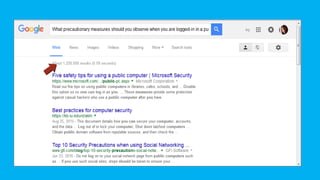
  • #32 Do not type the whole question in the search box. Typing the whole question often leads to a large number of and inappropriate search results. what precautionary measures should you observe when using a public computer?
  • #34 Put the word “AND” between each keyword to create a search string.
  • #35 Identify synonyms of the key words. Not all databases or articles use the same words to describe a topic. Group similar words together by using the word “OR” for a quick and relevant search.