EDSMF2192IB
.K:ö
Ä.K:öä
Communication Manual
EtherCAT®
l
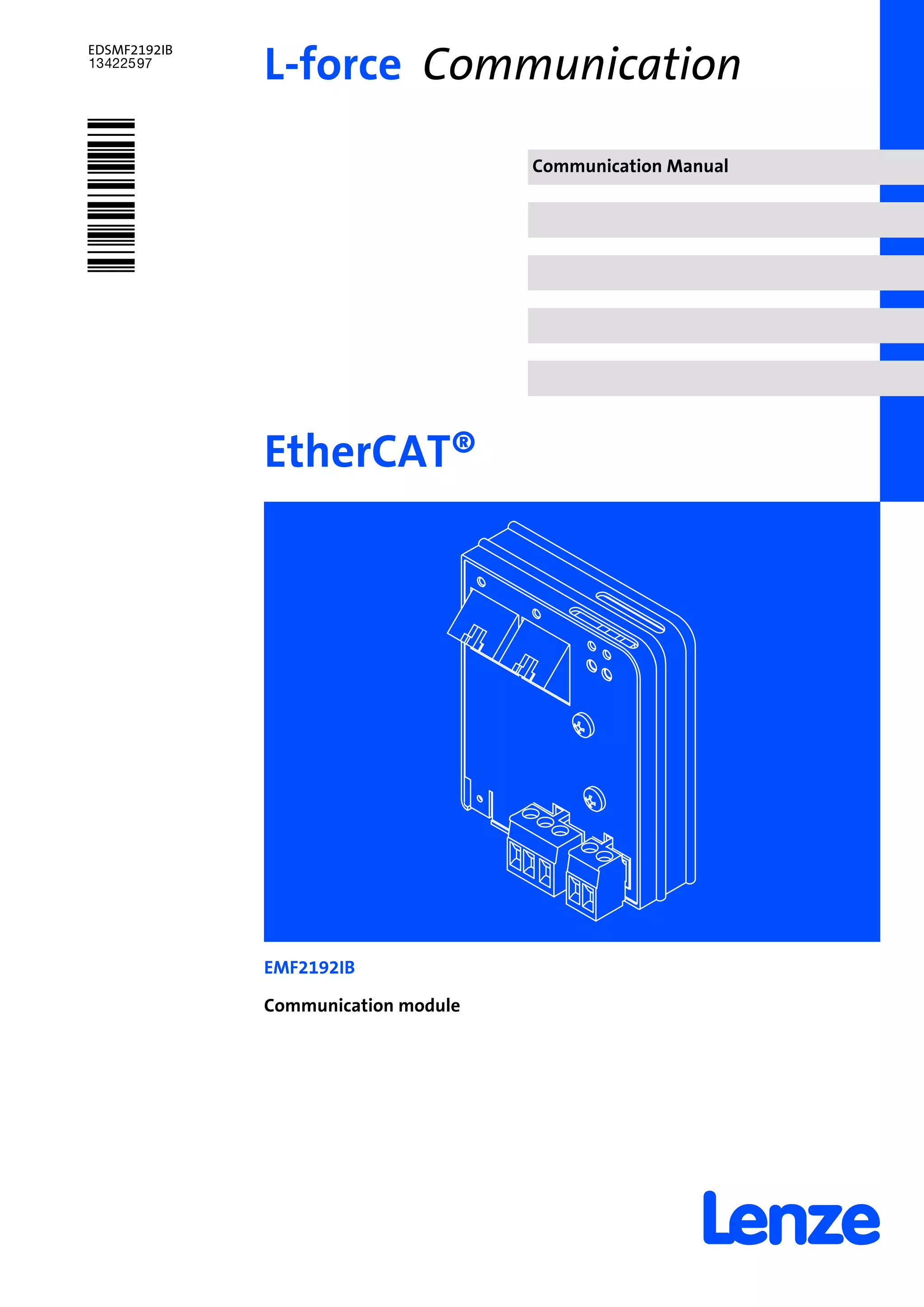
EMF2192IB
Communication module
L−force Communication
Contentsi
l2 EDSMF2192IB EN 3.1
1 About this documentation 4. . . . . . . . . . . . . . . . . . . . . . . . . . . . . . . . . . . . . . . . . . . . . . . . . .
1.1 Document history 6. . . . . . . . . . . . . . . . . . . . . . . . . . . . . . . . . . . . . . . . . . . . . . . . . . . .
1.2 Conventions used 7. . . . . . . . . . . . . . . . . . . . . . . . . . . . . . . . . . . . . . . . . . . . . . . . . . . .
1.3 Terminology used 8. . . . . . . . . . . . . . . . . . . . . . . . . . . . . . . . . . . . . . . . . . . . . . . . . . . .
1.4 Notes used 9. . . . . . . . . . . . . . . . . . . . . . . . . . . . . . . . . . . . . . . . . . . . . . . . . . . . . . . . . .
2 Safety instructions 10. . . . . . . . . . . . . . . . . . . . . . . . . . . . . . . . . . . . . . . . . . . . . . . . . . . . . . . .
2.1 General safety information 10. . . . . . . . . . . . . . . . . . . . . . . . . . . . . . . . . . . . . . . . . . . .
2.2 Device− and application−specific safety instructions 11. . . . . . . . . . . . . . . . . . . . . . . .
2.3 Residual hazards 11. . . . . . . . . . . . . . . . . . . . . . . . . . . . . . . . . . . . . . . . . . . . . . . . . . . . .
3 Product description 12. . . . . . . . . . . . . . . . . . . . . . . . . . . . . . . . . . . . . . . . . . . . . . . . . . . . . . . .
3.1 Application as directed 12. . . . . . . . . . . . . . . . . . . . . . . . . . . . . . . . . . . . . . . . . . . . . . . .
3.2 Identification 13. . . . . . . . . . . . . . . . . . . . . . . . . . . . . . . . . . . . . . . . . . . . . . . . . . . . . . . .
3.3 Product features 14. . . . . . . . . . . . . . . . . . . . . . . . . . . . . . . . . . . . . . . . . . . . . . . . . . . . .
3.4 Connections and interfaces 15. . . . . . . . . . . . . . . . . . . . . . . . . . . . . . . . . . . . . . . . . . . .
4 Technical data 16. . . . . . . . . . . . . . . . . . . . . . . . . . . . . . . . . . . . . . . . . . . . . . . . . . . . . . . . . . . .
4.1 General data and operating conditions 16. . . . . . . . . . . . . . . . . . . . . . . . . . . . . . . . .
4.2 Protective insulation 17. . . . . . . . . . . . . . . . . . . . . . . . . . . . . . . . . . . . . . . . . . . . . . . . . .
4.3 Communication time 18. . . . . . . . . . . . . . . . . . . . . . . . . . . . . . . . . . . . . . . . . . . . . . . . .
4.4 Dimensions 19. . . . . . . . . . . . . . . . . . . . . . . . . . . . . . . . . . . . . . . . . . . . . . . . . . . . . . . . .
5 Installation 20. . . . . . . . . . . . . . . . . . . . . . . . . . . . . . . . . . . . . . . . . . . . . . . . . . . . . . . . . . . . . . .
5.1 Mechanical installation 21. . . . . . . . . . . . . . . . . . . . . . . . . . . . . . . . . . . . . . . . . . . . . . .
5.2 Electrical installation 22. . . . . . . . . . . . . . . . . . . . . . . . . . . . . . . . . . . . . . . . . . . . . . . . . .
5.2.1 Wiring according to EMC (CE−typical drive system) 22. . . . . . . . . . . . . . . . .
5.2.2 Network topology 23. . . . . . . . . . . . . . . . . . . . . . . . . . . . . . . . . . . . . . . . . . . .
5.2.3 EtherCAT connection 24. . . . . . . . . . . . . . . . . . . . . . . . . . . . . . . . . . . . . . . . .
5.2.4 Specification of the Ethernet cable 25. . . . . . . . . . . . . . . . . . . . . . . . . . . . . .
5.2.5 Voltage supply 27. . . . . . . . . . . . . . . . . . . . . . . . . . . . . . . . . . . . . . . . . . . . . .
5.2.6 Synchronisation of the standard device 29. . . . . . . . . . . . . . . . . . . . . . . . .
Contents i
l 3EDSMF2192IB EN 3.1
6 Commissioning 30. . . . . . . . . . . . . . . . . . . . . . . . . . . . . . . . . . . . . . . . . . . . . . . . . . . . . . . . . . .
6.1 Before switching on 30. . . . . . . . . . . . . . . . . . . . . . . . . . . . . . . . . . . . . . . . . . . . . . . . . .
6.2 Configuring the host system (master) 31. . . . . . . . . . . . . . . . . . . . . . . . . . . . . . . . . .
6.2.1 Installing device description files 31. . . . . . . . . . . . . . . . . . . . . . . . . . . . . . . .
6.2.2 Automatic device detection 31. . . . . . . . . . . . . . . . . . . . . . . . . . . . . . . . . . . .
6.2.3 Configuring process data 32. . . . . . . . . . . . . . . . . . . . . . . . . . . . . . . . . . . . . .
6.2.4 Defining the cycle time 32. . . . . . . . . . . . . . . . . . . . . . . . . . . . . . . . . . . . . . . .
6.2.5 Address allocation 32. . . . . . . . . . . . . . . . . . . . . . . . . . . . . . . . . . . . . . . . . . . .
6.2.6 Specifying the station alias 32. . . . . . . . . . . . . . . . . . . . . . . . . . . . . . . . . . . . .
6.3 Synchronisation with "Distributed clocks" (DC) 33. . . . . . . . . . . . . . . . . . . . . . . . . . .
6.3.1 Preparation / installation 34. . . . . . . . . . . . . . . . . . . . . . . . . . . . . . . . . . . . . .
6.3.2 DC configuration in the master 34. . . . . . . . . . . . . . . . . . . . . . . . . . . . . . . . .
6.3.3 DC configuration in the standard device (slave) 34. . . . . . . . . . . . . . . . . . . .
6.3.4 Behaviour of the Lenze EtherCAT nodes during start−up 35. . . . . . . . . . . .
6.4 Initial switch−on 36. . . . . . . . . . . . . . . . . . . . . . . . . . . . . . . . . . . . . . . . . . . . . . . . . . . . . .
7 Data transfer 37. . . . . . . . . . . . . . . . . . . . . . . . . . . . . . . . . . . . . . . . . . . . . . . . . . . . . . . . . . . . .
7.1 EtherCAT frame structure 38. . . . . . . . . . . . . . . . . . . . . . . . . . . . . . . . . . . . . . . . . . . . . .
7.2 EtherCAT datagrams 39. . . . . . . . . . . . . . . . . . . . . . . . . . . . . . . . . . . . . . . . . . . . . . . . . .
7.3 EtherCAT state machine 40. . . . . . . . . . . . . . . . . . . . . . . . . . . . . . . . . . . . . . . . . . . . . . .
8 Process data transfer 41. . . . . . . . . . . . . . . . . . . . . . . . . . . . . . . . . . . . . . . . . . . . . . . . . . . . . . .
9 Parameter data transfer 42. . . . . . . . . . . . . . . . . . . . . . . . . . . . . . . . . . . . . . . . . . . . . . . . . . . .
9.1 Connection establishment between master and slave 42. . . . . . . . . . . . . . . . . . . . . .
9.2 Reading and writing parameters 43. . . . . . . . . . . . . . . . . . . . . . . . . . . . . . . . . . . . . . . .
9.2.1 Reading parameters (expedited upload) 44. . . . . . . . . . . . . . . . . . . . . . . . . .
9.2.2 Writing parameters (expedited download) 48. . . . . . . . . . . . . . . . . . . . . . .
9.3 SDO abort codes 52. . . . . . . . . . . . . . . . . . . . . . . . . . . . . . . . . . . . . . . . . . . . . . . . . . . . .
10 Diagnostics 53. . . . . . . . . . . . . . . . . . . . . . . . . . . . . . . . . . . . . . . . . . . . . . . . . . . . . . . . . . . . . . .
10.1 LED status displays 53. . . . . . . . . . . . . . . . . . . . . . . . . . . . . . . . . . . . . . . . . . . . . . . . . .
10.2 Emergency requests / emergency messages 54. . . . . . . . . . . . . . . . . . . . . . . . . . . . . .
11 Appendix 55. . . . . . . . . . . . . . . . . . . . . . . . . . . . . . . . . . . . . . . . . . . . . . . . . . . . . . . . . . . . . . . .
11.1 Implemented CoE objects 55. . . . . . . . . . . . . . . . . . . . . . . . . . . . . . . . . . . . . . . . . . . . . .
11.2 Codes 57. . . . . . . . . . . . . . . . . . . . . . . . . . . . . . . . . . . . . . . . . . . . . . . . . . . . . . . . . . . . . .
11.3 Product codes of the Lenze standard devices 61. . . . . . . . . . . . . . . . . . . . . . . . . . . . . .
12 Index 62. . . . . . . . . . . . . . . . . . . . . . . . . . . . . . . . . . . . . . . . . . . . . . . . . . . . . . . . . . . . . . . . . . . .
About this documentation1
l4 EDSMF2192IB EN 3.1
0Fig. 0Tab. 0
1 About this documentation
Contents
This documentation only contains descriptions for the EMF2192IB communication
module (EtherCAT).
) Note!
This documentation supplements the mounting instructions supplied with the
communication module and the documentations for the standard devices
used.
The mounting instructions contain safety instructions which must be
observed!
The features and functions of the communication module are described in detail.
Examples illustrate typical applications.
Furthermore this documentation contains the following:
ƒ Safety instructions that must be observed.
ƒ Key technical data relating to the communication module
ƒ Information on versions of Lenze standard devices to be used.
ƒ Notes on troubleshooting and fault elimination
The theoretical correlations are only explained in so far as they are necessary for
comprehending the function of the communication module.
This documentation does not describe the software of an original equipment
manufacturer. No responsibility is taken for corresponding information given in this
manual. Information on how to use the software can be obtained from the documents of
the host system (master).
All brand names mentioned in this manual are trademarks of their respective companies.
I Tip!
Detailed information on EtherCAT can be found on the website of the
EtherCAT Technology Group:
http://www.EtherCAT.org
About this documentation 1
l 5EDSMF2192IB EN 3.1
Target group
This documentation is intended for all persons who plan, install, commission and maintain
the networking and remote service of a machine.
I Tip!
Information and auxiliary devices related to the Lenze products can be found
in the download area at
http://www.Lenze.com
Validity information
The information given in this documentation is valid for the following devices:
Extension module Type designation From hardware version
upwards
From software version
upwards
EtherCAT communication
module
EMF2192IB VA 1.0
About this documentation
Document history
1
l6 EDSMF2192IB EN 3.1
1.1 Document history
Version Description
1.0 10/2009 TD17 First edition
2.0 09/2010 TD14 General revision
3.0 06/2011 TD17 General revision
3.1 11/2012 TD17 EtherCAT® is a registered trademark by Beckhoff Automation GmbH,
Germany.
Your opinion is important to us!
These instructions were created to the best of our knowledge and belief to give you the
best possible support for handling our product.
If you have suggestions for improvement, please e−mail us to:
feedback−docu@Lenze.de
Thank you for your support.
Your Lenze documentation team
About this documentation
Conventions used
1
l 7EDSMF2192IB EN 3.1
1.2 Conventions used
This documentation uses the following conventions to distinguish between different
types of information:
Type of information Identification Examples/notes
Spelling of numbers
Decimal separator Point In general, the decimal point is used.
For instance: 1234.56
Decimal Standard notation For example: 1234
Hexadecimal 0x[0 ... 9, A ... F] For example: 0x60F4
Binary
l Nibble
In quotation marks
Point
For example: ´100´
For example: ´0110.0100´
Text
Program name » « PC software
For example: »Engineer«, »Global Drive
Control« (GDC)
Icons
Page reference ^ Reference to another page with additional
information
For instance: ^ 16 = see page 16
About this documentation
Terminology used
1
l8 EDSMF2192IB EN 3.1
1.3 Terminology used
Term Meaning
EtherCAT® EtherCAT® is a real−time capable Ethernet system with top performance.
EtherCAT® is a registered trademark and patented technology, licensed by Beckhoff
Automation GmbH, Germany.
Standard device Lenze controllers with which the communication module can be used.
^ 12Controller
»Global Drive Control« /
»GDC«
Lenze PC software which supports you in "engineering" (parameterisation, diagnostics
and configuration) throughout the whole life cycle, i.e. from planning to maintenance
of the commissioned machine.»Engineer«
»PLC Designer«
»TwinCAT« EtherCAT configuration software by Beckhoff Automation GmbH, Germany
Code Parameter used for controller parameterisation or monitoring. The term is usually
called "index".
Subcode If a code contains several parameters, the individual parameters are stored under
"subcodes".
This manual uses a slash "/" as a separator between code and subcode (e.g. "C118/3").
The term is usually called "subindex".
Lenze setting This setting is the default factory setting of the device.
Basic setting
HW Hardware
SW Software
ESI EtherCAT Slave Information (device description file in XML format)
CoE CANopen over EtherCAT
I−1600.20 CoE index (hexadecimal representation)
l In the example: Index 0x1600, subindex 0x20
DC "Distributed clocks" for EtherCAT synchronisation
PDO Process data object
SDO Service data object
"Hot connect" This feature enables the slave nodes to be coupled/decoupled during operation.
About this documentation
Notes used
1
l 9EDSMF2192IB EN 3.1
1.4 Notes used
The following pictographs and signal words are used in this documentation to indicate
dangers and important information:
Safety instructions
Structure of safety instructions:
} Danger!
(characterises the type and severity of danger)
Note
(describes the danger and gives information about how to prevent dangerous
situations)
Pictograph and signal word Meaning
{ Danger!
Danger of personal injury through dangerous electrical voltage.
Reference to an imminent danger that may result in death or
serious personal injury if the corresponding measures are not
taken.
} Danger!
Danger of personal injury through a general source of danger.
Reference to an imminent danger that may result in death or
serious personal injury if the corresponding measures are not
taken.
( Stop!
Danger of property damage.
Reference to a possible danger that may result in property
damage if the corresponding measures are not taken.
Application notes
Pictograph and signal word Meaning
) Note! Important note to ensure troublefree operation
I Tip! Useful tip for simple handling
, Reference to another documentation
Safety instructions
General safety information
2
l10 EDSMF2192IB EN 3.1
2 Safety instructions
) Note!
It is absolutely vital that the stated safety measures are implemented in order
to prevent serious injury to persons and damage to material assets.
Always keep this documentation to hand in the vicinity of the product during
operation.
2.1 General safety information
} Danger!
Disregarding the following basic safety measures may lead to severe personal
injury and damage to material assets!
ƒ Lenze drive and automation components ...
... must only be used for the intended purpose.
... must never be operated if damaged.
... must never be subjected to technical modifications.
... must never be operated unless completely assembled.
... must never be operated without the covers/guards.
... can − depending on their degree of protection − have live, movable or rotating parts
during or after operation. Surfaces can be hot.
ƒ For Lenze drive components ...
... only use permitted accessories.
... only use original manufacturer spare parts.
ƒ All specifications of the corresponding enclosed documentation must be observed.
This is vital for a safe and trouble−free operation and for achieving the specified product
features.
The procedural notes and circuit details provided in this document are proposals which
the user must check for suitability for his application. The manufacturer does not
accept any liability for the suitability of the specified procedures and circuit proposals.
ƒ Only qualified skilled personnel are permitted to work with or on Lenze drive and
automation components.
According to IEC 60364 or CENELEC HD 384, these are persons ...
... who are familiar with the installation, assembly, commissioning and operation of
the product,
... possess the appropriate qualifications for their work,
... and are acquainted with and can apply all the accident prevent regulations, directives
and laws applicable at the place of use.
Safety instructions
Device− and application−specific safety instructions
2
l 11EDSMF2192IB EN 3.1
2.2 Device− and application−specific safety instructions
ƒ During operation, the communication module must be securely connected to the
standard device.
ƒ With external voltage supply, always use a separate power supply unit, safely
separated in accordance with EN 61800−5−1 in every control cabinet ("SELV" /
"PELV").
ƒ Only use cables that comply with the given specifications (¶ 25).
, Documentation for the standard device, control system, system/machine
All the other measures prescribed in this documentation must also be
implemented. Observe the safety instructions and application notes stated in
this manual.
2.3 Residual hazards
Protection of persons
ƒ If the controllers are used on a phase earthed mains with a rated mains voltage
³ 400 V, protection against accidental contact is not ensured without implementing
external measures. (See chapter "4.2", ^ 17)
Device protection
ƒ The module contains electronic components that can be damaged or destroyed by
electrostatic discharge.
Product description
Application as directed
3
l12 EDSMF2192IB EN 3.1
3 Product description
3.1 Application as directed
The communication module ...
ƒ is a device intended for use in industrial power systems.
ƒ is only to be used in EtherCAT networks.
ƒ can be used in connection with the following standard devices (nameplate data):
Device type Design Version Variant Explanation
HW SW 1)
82EVxxxxxBxxxXX ³ Vx ³ 1x 8200 vector
82CVxxxxxBxxxXX ³ Vx ³ 1x 8200 vector, cold plate
82DVxxxKxBxxxXX ³ Vx ³ 1x 8200 vector, thermally
separated
EPL 10200 E ³ 1x ³ 1x Drive PLC
33.93xx xE. ³ 2x ³ 1x Vxxx 9321 − 9332 vector
33.938X xE. ³ 1x ³ 0x 9381 − 9383 vector
33.93xx xC. ³ 2x ³ 1x Vxxx 9321 − 9332, vector with cold
plate design
33.93xx EI / ET ³ 2x ³ 1x Vxxx 9300 Servo PLC
33.93xx CI / CT ³ 2x ³ 1x Vxxx 9300 Servo PLC, cold plate
ECSxSxxxx4xxxxXX ³ 1A ³ 7.0 ECSxS "Speed & Torque"
ECSxPxxxx4xxxxXX ³ 1A ³ 7.0 ECSxP "Posi & Shaft"
ECSxMxxxx4xxxxXX ³ 1A ³ 7.0 ECSxM "Motion"
ECSxAxxxx4xxxxXX ³ 1A ³ 7.0 ECSxA "Application"
ECSxExxxx4xxxxXX ³ VA ³ 5.0 ECSxE power supply module
1) Operating system software versions of the controllers
Any other use shall be deemed inappropriate!
Product description
Identification
3
l 13EDSMF2192IB EN 3.1
3.2 Identification
E82AF000P0B201XX
L
Type
Id.-No.
Prod.-No.

2192ECAT013
Type code  W 33.2192IB VA 1.0
Device series
Hardware version
Software version
Product description
Product features
3
l14 EDSMF2192IB EN 3.1
3.3 Product features
ƒ Interface module for the EtherCAT communication system to the AIF slots of the
Lenze device series 8200 vector, 9300, and ECS (¶ 12)
ƒ Support of the EtherCAT slave functionality
ƒ External 24V supply for maintaining the EtherCAT network if the standard device
fails
ƒ Support of the "Distributed clocks" (DC) functionality for synchronisation via the
fieldbus
ƒ PDO transfer with CoE (CANopen over EtherCAT)
ƒ Access to all Lenze parameters with CoE (CANopen over EtherCAT)
Front panel connector elements
ƒ Two sockets (RJ45) for the connection to EtherCAT
ƒ 2−pin plug connector for the external supply of the communication module
ƒ 3−pin plug connector (electrically isolated) for the synchronisation of the standard
device
Front panel LED status displays
ƒ Voltage supply of the communication module
ƒ Connection from the communication module to the EtherCAT bus system
ƒ Connection from the communication module to the standard device
ƒ Bus state according to EtherCAT specification
Product description
Connections and interfaces
3
l 15EDSMF2192IB EN 3.1
3.4 Connections and interfaces
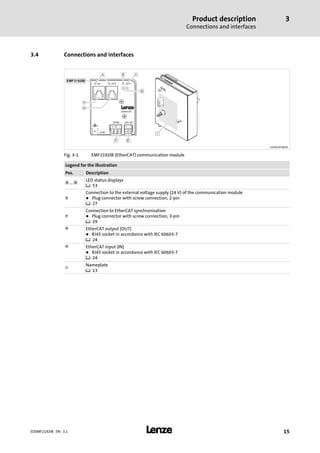
2192ECAT001B
Fig. 3−1 EMF2192IB (EtherCAT) communication module
Legend for the illustration
Pos. Description
0 ... 3
LED status displays
^ 53
4
Connection to the external voltage supply (24 V) of the communication module
l Plug connector with screw connection, 2−pin
^ 27
5
Connection to EtherCAT synchronisation
l Plug connector with screw connection, 3−pin
^ 29
6 EtherCAT output (OUT)
l RJ45 socket in accordance with IEC 60603−7
^ 24
7 EtherCAT input (IN)
l RJ45 socket in accordance with IEC 60603−7
^ 24
8
Nameplate
^ 13
Technical data
General data and operating conditions
4
l16 EDSMF2192IB EN 3.1
4 Technical data
4.1 General data and operating conditions
Area Values
Order designation EMF2192IB
Communication profile EtherCAT
Supported device profile and
mailbox protocol
CANopen over EtherCAT (CoE)
Communication medium S/FTP (Screened Foiled Twisted Pair, ISO/IEC 11801 or EN 50173), CAT 5e
Interface for communication RJ45, standard Ethernet (acc. to IEEE 802.3), 100Base−TX (Fast Ethernet)
Network topology Line, switch
Node type EtherCAT slave
Number of nodes max. 65535 (in the entire network)
Cable length between two
EtherCAT nodes
max. 100 m (typical)
Cycle times 1 ms or an integer multiple of 1 ms,
max. 15 ms when "Distributed clocks" (DC) are used
Vendor−ID 0x3B
Product−ID depending on the standard device used
Revision−ID depending on the main software version of the EtherCAT module
Baud rate 100 Mbps, full duplex
Voltage supply External supply via separate external power supply unit
l Terminal "+": U = 24 V DC (20.4 V − 0 % ... 28.8 V + 0 %)
I = 140 mA
l Terminal "−": Reference potential for external voltage supply
Conformities, approvals CE
, Documentation for Lenze series of devices 8200 vector, 9300 and ECS
Here you can find the ambient conditions and the electromagnetic
compatibility (EMC) specifications applying to the communication module.
Technical data
Protective insulation
4
l 17EDSMF2192IB EN 3.1
4.2 Protective insulation
{ Danger!
Dangerous electrical voltage
If Lenze controllers are used on a phase earthed mains with a rated mains
voltage ³ 400 V, protection against accidental contact is not ensured without
implementing external measures.
Possible consequences:
ƒ Death or serious injury
Protective measures:
ƒ If protection against accidental contact is required for the control terminals
of the controller and the connections of the plugged device modules, ...
– a double isolating distance must exist.
– the components to be connected must be provided with the second
isolating distance.
Insulation between bus and ... Type of insulation
(in accordance with EN 61800−5−1)
l Earth reference / PE Functional insulation
l With external supply Functional insulation
l Power stage
– 8200 vector Reinforced insulation
– 9300 servo inverter Reinforced insulation
– 93xx servo position controller Reinforced insulation
– 93xx servo register control Reinforced insulation
– 93xx servo cam profiler Reinforced insulation
– 9300 vector / Servo PLC Reinforced insulation
– ECS devices Reinforced insulation
l Control terminals
– 8200 vector Functional insulation
– 9300 servo inverter Basic insulation
– 93xx servo position controller Basic insulation
– 93xx servo register control Basic insulation
– 93xx servo cam profiler Basic insulation
– 9300 vector / Servo PLC Basic insulation
– ECS devices Basic insulation
Technical data
Communication time
4
l18 EDSMF2192IB EN 3.1
4.3 Communication time
Processing times in the controller
The parameter data and process data are independent of each other.
Processing times Parameter data Process data
Processing time within the
controller
l Approx. 30 ms + a tolerance of 20 ms
for parameters within the controller
l In the case of some codes the
processing time can be longer. (See
documentation for the controller)
l In the case of ECS devices the
processing time depends on the
application loaded (duration of the
system task).
l Time for 8200 vector: approx. 3 ms +
tolerance of 2 ms
l Time for devices of the 9300 series:
approx. 2 ms + tolerance of 1 ms
(depending on the basic cycle time in
each case)
l Time for ECS devices:
– In synchronous operation a
minimum of 1 ms (AIF
communication) or according to
the fastest task
– Otherwise 1 ms + task cycle time
l A synchronisation depends on the
controller used ( 61) and has to be
configured accordingly ( 33 et
seqq.).
Additional times outside
the controller
l Communication transmission times
l Communication processing times of the transmitting node
Technical data
Dimensions
4
l 19EDSMF2192IB EN 3.1
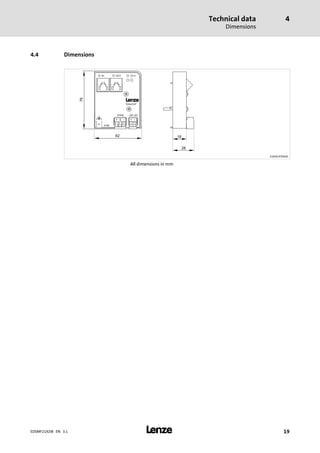
4.4 Dimensions
2192ECAT001B
All dimensions in mm
Installation5
l20 EDSMF2192IB EN 3.1
5 Installation
} Danger!
Inappropriate handling of the communication module and the standard device
can cause serious personal injury and material damage.
Observe the safety instructions and residual hazards described in the
documentation for the standard device.
( Stop!
The device contains components that can be destroyed by electrostatic
discharge!
Before working on the device, the personnel must ensure that they are free of
electrostatic charge by using appropriate measures.
Installation
Mechanical installation
5
l 21EDSMF2192IB EN 3.1
5.1 Mechanical installation
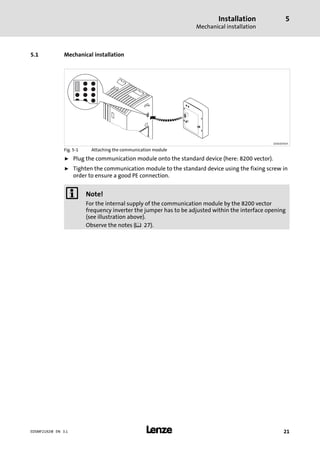
2102LEC014
Fig. 5−1 Attaching the communication module
ƒ Plug the communication module onto the standard device (here: 8200 vector).
ƒ Tighten the communication module to the standard device using the fixing screw in
order to ensure a good PE connection.
) Note!
For the internal supply of the communication module by the 8200 vector
frequency inverter the jumper has to be adjusted within the interface opening
(see illustration above).
Observe the notes (¶ 27).
Installation
Electrical installation
Wiring according to EMC (CE−typical drive system)
5
l22 EDSMF2192IB EN 3.1
5.2 Electrical installation
5.2.1 Wiring according to EMC (CE−typical drive system)
For wiring according to EMC requirements observe the following points:
) Note!
ƒ Separate control cables/data lines from motor cables.
ƒ Connect the shields of control cables/data lines at both ends in the case of
digital signals.
ƒ Use an equalizing conductor with a cross−section of at least 16 mm2
(reference: PE) to avoid potential differences between the bus nodes.
ƒ Observe the other notes concerning EMC−compliant wiring given in the
documentation for the standard device.
Wiring procedure
1. Comply with bus topology, thus do not use stubs.
2. Observe notes and wiring instructions in the documents for the control system.
3. Only use cables that comply with the given specifications (¶ 25).
4. Observe notes for the voltage supply of the module (¶ 27).
Installation
Electrical installation
Network topology
5
l 23EDSMF2192IB EN 3.1
5.2.2 Network topology
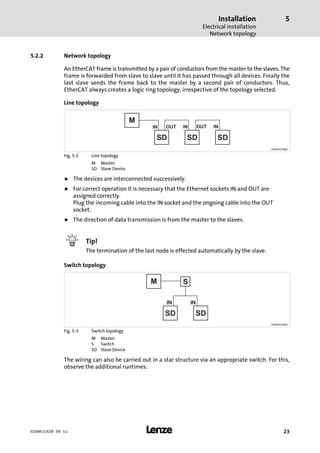
An EtherCAT frame is transmitted by a pair of conductors from the master to the slaves. The
frame is forwarded from slave to slave until it has passed through all devices. Finally the
last slave sends the frame back to the master by a second pair of conductors. Thus,
EtherCAT always creates a logic ring topology, irrespective of the topology selected.
Line topology
M
SD SD SD
IN INOUT INOUT
E94AYCET006
Fig. 5−2 Line topology
M Master
SD Slave Device
ƒ The devices are interconnected successively.
ƒ For correct operation it is necessary that the Ethernet sockets IN and OUT are
assigned correctly.
Plug the incoming cable into the IN socket and the ongoing cable into the OUT
socket.
ƒ The direction of data transmission is from the master to the slaves.
I Tip!
The termination of the last node is effected automatically by the slave.
Switch topology
M S
SD SD
M
IN IN
E94AYCET007
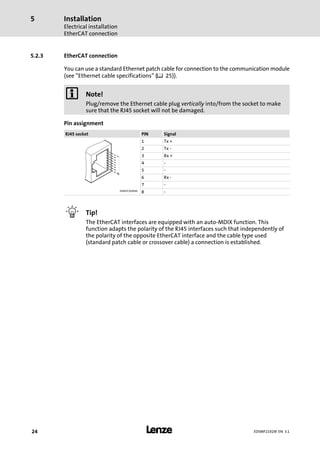
Fig. 5−3 Switch topology
M Master
S Switch
SD Slave Device
The wiring can also be carried out in a star structure via an appropriate switch. For this,
observe the additional runtimes.
Installation
Electrical installation
EtherCAT connection
5
l24 EDSMF2192IB EN 3.1
5.2.3 EtherCAT connection
You can use a standard Ethernet patch cable for connection to the communication module
(see "Ethernet cable specifications" (¶ 25)).
) Note!
Plug/remove the Ethernet cable plug vertically into/from the socket to make
sure that the RJ45 socket will not be damaged.
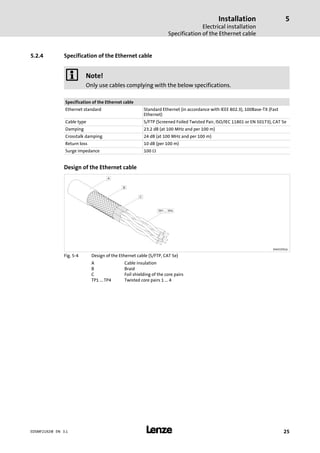
Pin assignment
RJ45 socket PIN Signal
1 Tx +
2 Tx −
3 Rx +
4 −
5 −
6 Rx −
7 −
E94AYCXX004C
8 −
I Tip!
The EtherCAT interfaces are equipped with an auto−MDIX function. This
function adapts the polarity of the RJ45 interfaces such that independently of
the polarity of the opposite EtherCAT interface and the cable type used
(standard patch cable or crossover cable) a connection is established.
Installation
Electrical installation
Specification of the Ethernet cable
5
l 25EDSMF2192IB EN 3.1
5.2.4 Specification of the Ethernet cable
) Note!
Only use cables complying with the below specifications.
Specification of the Ethernet cable
Ethernet standard Standard Ethernet (in accordance with IEEE 802.3), 100Base−TX (Fast
Ethernet)
Cable type S/FTP (Screened Foiled Twisted Pair, ISO/IEC 11801 or EN 50173), CAT 5e
Damping 23.2 dB (at 100 MHz and per 100 m)
Crosstalk damping 24 dB (at 100 MHz and per 100 m)
Return loss 10 dB (per 100 m)
Surge impedance 100 W
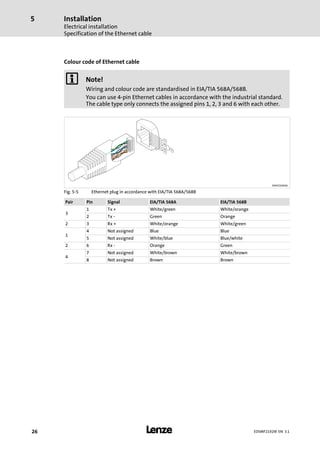
Design of the Ethernet cable
E94YCEP016
Fig. 5−4 Design of the Ethernet cable (S/FTP, CAT 5e)
A Cable insulation
B Braid
C Foil shielding of the core pairs
TP1 ... TP4 Twisted core pairs 1 ... 4
Installation
Electrical installation
Specification of the Ethernet cable
5
l26 EDSMF2192IB EN 3.1
Colour code of Ethernet cable
) Note!
Wiring and colour code are standardised in EIA/TIA 568A/568B.
You can use 4−pin Ethernet cables in accordance with the industrial standard.
The cable type only connects the assigned pins 1, 2, 3 and 6 with each other.
E94YCEI004A
Fig. 5−5 Ethernet plug in accordance with EIA/TIA 568A/568B
Pair Pin Signal EIA/TIA 568A EIA/TIA 568B
3
1 Tx + White/green White/orange
2 Tx − Green Orange
2 3 Rx + White/orange White/green
1
4 Not assigned Blue Blue
5 Not assigned White/blue Blue/white
2 6 Rx − Orange Green
4
7 Not assigned White/brown White/brown
8 Not assigned Brown Brown
Installation
Electrical installation
Voltage supply
5
l 27EDSMF2192IB EN 3.1
5.2.5 Voltage supply
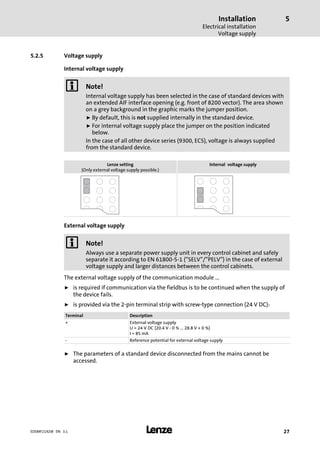
Internal voltage supply
) Note!
Internal voltage supply has been selected in the case of standard devices with
an extended AIF interface opening (e.g. front of 8200 vector). The area shown
on a grey background in the graphic marks the jumper position.
ƒ By default, this is not supplied internally in the standard device.
ƒ For internal voltage supply place the jumper on the position indicated
below.
In the case of all other device series (9300, ECS), voltage is always supplied
from the standard device.
Lenze setting
(Only external voltage supply possible.)
Internal voltage supply
External voltage supply
) Note!
Always use a separate power supply unit in every control cabinet and safely
separate it according to EN 61800−5−1 ("SELV"/"PELV") in the case of external
voltage supply and larger distances between the control cabinets.
The external voltage supply of the communication module ...
ƒ is required if communication via the fieldbus is to be continued when the supply of
the device fails.
ƒ is provided via the 2−pin terminal strip with screw−type connection (24 V DC):
Terminal Description
+ External voltage supply
U = 24 V DC (20.4 V − 0 % ... 28.8 V + 0 %)
I = 85 mA
− Reference potential for external voltage supply
ƒ The parameters of a standard device disconnected from the mains cannot be
accessed.
Installation
Electrical installation
Voltage supply
5
l28 EDSMF2192IB EN 3.1
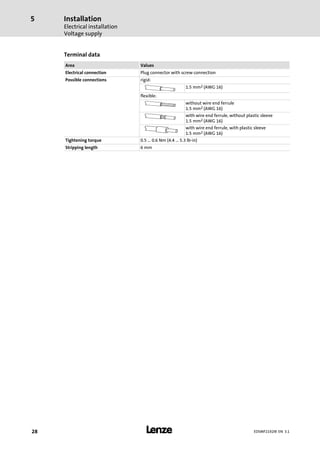
Terminal data
Area Values
Electrical connection Plug connector with screw connection
Possible connections rigid:
1.5 mm2 (AWG 16)
flexible:
without wire end ferrule
1.5 mm2 (AWG 16)
with wire end ferrule, without plastic sleeve
1.5 mm2 (AWG 16)
with wire end ferrule, with plastic sleeve
1.5 mm2 (AWG 16)
Tightening torque 0.5 ... 0.6 Nm (4.4 ... 5.3 lb−in)
Stripping length 6 mm
Installation
Electrical installation
Synchronisation of the standard device
5
l 29EDSMF2192IB EN 3.1
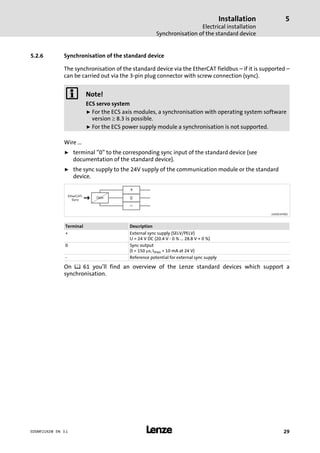
5.2.6 Synchronisation of the standard device
The synchronisation of the standard device via the EtherCAT fieldbus ˘ if it is supported ˘
can be carried out via the 3−pin plug connector with screw connection (sync).
) Note!
ECS servo system
ƒ For the ECS axis modules, a synchronisation with operating system software
version ³ 8.3 is possible.
ƒ For the ECS power supply module a synchronisation is not supported.
Wire ...
ƒ terminal "0" to the corresponding sync input of the standard device (see
documentation of the standard device).
ƒ the sync supply to the 24V supply of the communication module or the standard
device.
Opto 0
EtherCAT-
Sync W
2192ECAT002
Terminal Description
+ External sync supply (SELV/PELV)
U = 24 V DC (20.4 V − 0 % ... 28.8 V + 0 %)
0 Sync output
(t = 150 ms, Imax = 10 mA at 24 V)
− Reference potential for external sync supply
On ^ 61 you’ll find an overview of the Lenze standard devices which support a
synchronisation.
Commissioning
Before switching on
6
l30 EDSMF2192IB EN 3.1
6 Commissioning
During commissioning, system−dependent data as e.g. motor parameters, operating
parameters, responses and parameters for fieldbus communication are selected for the
controller.
In Lenze devices, this is done via codes. The codes are stored in numerically ascending order
in the Lenze controllers and in the plugged−in communication/function modules.
In addition to these configuration codes, there are codes for diagnosing and monitoring
the bus devices.
6.1 Before switching on
( Stop!
Before switching on the standard device with the communication module for
the first time, check the entire wiring for completeness, short circuit and earth
fault.
Commissioning
Configuring the host system (master)
Installing device description files
6
l 31EDSMF2192IB EN 3.1
6.2 Configuring the host system (master)
For communication with the communication module, first the host system (master) must
be configured.
For configuring EtherCAT networks. a configuration software is always required for the
host system (master), e.g.:
ƒ Lenze »PLC Designer«
ƒ »TwinCAT« by the company Beckhoff
These are software systems for programming control programs, EtherCAT configuration,
real−time execution and diagnostics.
ƒ The basic parameters of the communication module are stored in the internal
configuration memory and can be used by the master for the node detection.
ƒ During the search for nodes (fieldbus scan) the corresponding device descriptions of
the Lenze device family are used.
6.2.1 Installing device description files
The current XML device description file Lenze_AIF−Vxzz−ddmmyy.xmlrequired for the
EMF2192IB (EtherCAT) communication module can be found on the in the download area
under:
http://www.Lenze.com
Wildcard in the file name "Lenze_AIF−Vxzz−ddmmyy.xml"
x Major version of the XML device description file used
zz Minor version of the XML device description file used
dd Day
mm Month
yy Year
6.2.2 Automatic device detection
ƒ For an error−free integration of the EtherCAT slaves into a master configuration it is
required to select the correct Lenze device in the EtherCAT configuration software.
ƒ An EtherCAT node is clearly identified via the configuration software by the product
code (identical with the CoE object I−1018.2), the manufacturer’s identification mark
(0x3B) and the main software version of the communication module.
ƒ In order that the configuration software selects the configuration from the device
description file specific to the Ether−CAT nodes, the product code is automatically set
in the identity object and updated after switch−on or each application download.
ƒ During the initialisation, the product code is transmitted to the EtherCAT master.
With this identification, the master can adopt the corresponding settings from the
device description.
Commissioning
Configuring the host system (master)
Configuring process data
6
l32 EDSMF2192IB EN 3.1
6.2.3 Configuring process data
ƒ The process data configuration is defined during the initialisation phase of the
master (PDO mapping).
ƒ The process data configuration predefined application−specifically in the device
description files and can be adapted by the user if required.
6.2.4 Defining the cycle time
The process data objects (PDO) are transmitted cyclically between the EtherCAT master
and the slaves (controllers). The cycle time is set using the EtherCAT configuration
software.
6.2.5 Address allocation
Usually, the EtherCAT nodes are addressed via a permanent 16−bit address defined by the
EtherCAT master. At the start, this address is assigned to each node by the master
depending on the physical sequence in the EtherCAT network. The address is not saved and
gets lost after the device is switched off.
Additionally there is the possibility of allocating a fixed station alias address
(chapter 6.2.6).
6.2.6 Specifying the station alias
By means of the station alias, a permanent address is assigned to the EtherCAT slave.
ƒ For this, carry out the setting via the 0x58C5 object or code C1850 > 0.
ƒ In addition, specify the use of the fixed addressing on the master.
) Note!
ƒ The station alias must only be set if the node is a member of a "hot connect"
group.
ƒ The station alias must be non−ambiguous and may only be assigned once in
the EtherCAT network.
ƒ Use the same station alias in the EtherCAT master and the slave.
Commissioning
Synchronisation with "Distributed clocks" (DC)
6
l 33EDSMF2192IB EN 3.1
6.3 Synchronisation with "Distributed clocks" (DC)
The "Distributed clocks" (DC) functionality enables an exact time adjustment for
applications where several auxiliary axes carry out a coordinated movement at the same
time. The data is accepted synchronously with the PLC program. With the DC
synchronisation, all slaves are synchronised with a reference clock, the so−called "DC
master".
) Note!
ƒ Motion applications always require DC synchronisation.
ƒ DC synchronisation can also be used for logic applications.
ƒ Some slaves do not support the DC functionality.
– In order to be able to use the DC functionality, the first slave connected to
the EtherCAT master (e.g. L−force Controller) must be DC master−capable.
– In the arrangement of the slaves following then, DC−capable and
non−DC−capable devices can be mixed.
ƒ The first EtherCAT node after the EtherCAT master must be the DC master
which provides the exact time to the other EtherCAT nodes (incl. EtherCAT
master).
2192ECAT020
Fig. 6−1 Distributed clocks (DC)
The settings for DC synchronisation are made using the EtherCAT configuration software.
(¶ 31).
Commissioning
Synchronisation with "Distributed clocks" (DC)
Preparation / installation
6
l34 EDSMF2192IB EN 3.1
, " EtherCAT control technology" communication manual
Here you’ll find detailed information on the EtherCAT configuration and
commissioning of Lenze devices in the EtherCAT network.
6.3.1 Preparation / installation
) Note!
Lenze devices without an external sync terminal input do not support DC
synchronisation.
Connect the sync terminal block of the EtherCAT communication module to the voltage
supply and the corresponding input terminal of the standard device (see ¶ 29 and the
documentation for the standard device).
6.3.2 DC configuration in the master
ƒ The use of the DC synchronisation is deactivated in the device description (¶ 31) by
default.
ƒ Parameterise the DC synchronisation in the EtherCAT configuration software.
ƒ Specify the synchronisation cycle time in the master. It significantly complies with
the processing time of the master and slaves.
6.3.3 DC configuration in the standard device (slave)
ƒ In order to be able to use the DC synchronisation via EtherCAT in the standard
device, select the "AIF" sync source with standard device code C1120.
ƒ Set the cycle time of the standard device in milliseconds with code C1121.
ƒ Depending on the standard device, it may be required to also select a corresponding
operating mode and control interface for EtherCAT communication via code.
Information on this can be found in the documentation for the standard device.
Commissioning
Synchronisation with "Distributed clocks" (DC)
Behaviour of the Lenze EtherCAT nodes during start−up
6
l 35EDSMF2192IB EN 3.1
6.3.4 Behaviour of the Lenze EtherCAT nodes during start−up
If the DC synchronisation is used, the communication module first changes to the
"Operational" state if the standard device has adapted its phase position to the DC signal.
This process can take several seconds.
) Note!
ƒ If the communication module does not change to "Operational", there
possibly is an error in the configuration or the EtherCAT wiring.
ƒ The communication module compares the cycle time specified by the
EtherCAT master to the cycle time of the standard device set in C1121. The
synchronisation cycle time in the master has to be equal to the cycle time of
the standard device.
ƒ Moreover it is checked whether the selection of the sync source in the
standard device code C01120 is correct.
ƒ Further information can be gathered from the master as status information
or an emergency message.
Commissioning
Initial switch−on
6
l36 EDSMF2192IB EN 3.1
6.4 Initial switch−on
Switch on the drive and check its readiness for operation by means of the diagnostic LEDs
on the front of the communication module.
ƒ Red diagnostic LEDs must not be lit.
ƒ The following signalling should show:
LED Description
Pos. Colour Status
0 green blinking
on
l The EtherCAT connection has been established.
l Data communication of the EtherCAT connection is active.
1 green on
The communication module is supplied with voltage and is connected to the
standard device.
2 green The EtherCAT state machine controls the LED.
blinking
"Pre−operational" or "Safe−operational" state active.
on
The communication module is in the "Operational" status.
Data transfer 7
l 37EDSMF2192IB EN 3.1
7 Data transfer
With EtherCAT, data is transmitted in "EtherCAT frames". The EtherCAT nodes only take
the data determined for them while the EtherCAT frame passes through the device.
Output data are entered in the frame the same way during the passage. Read and write
accesses are only executed in a small section of the total EtherCAT frame, the datagrams.
Thus, a frame does not need to be received completely before being processed. Processing
starts as early as possible.
EtherCAT transmits process data, parameter data, configuration data and diagnostic data
between the host system (master) and the controllers connected to the fieldbus (slaves).
The data is transmitted via corresponding communication channels depending on their
time−critical behaviour
(see chapter "Process data transfer" (¶ 41) and chapter "Parameter data
transfer" (¶ 42).
Data transfer
EtherCAT frame structure
7
l38 EDSMF2192IB EN 3.1
7.1 EtherCAT frame structure
EtherCAT frames have the following structure:
Ethernet header Ethernet data FCS
48 bits 48 bits 16 bits 11 bits 1 bit 4 bits 48 ... 1498 bytes 32 bits
Destination Source EtherType Frame header Datagrams
Length Reserved Type
Ethernet header
The Ethernet header contains the following information:
ƒ Target address of the EtherCAT frame (destination)
ƒ Source address of the EtherCAT frame (source)
ƒ Type of EtherCAT frame (EtherType = 0x88A4)
Ethernet data
The Ethernet data contain the following information:
ƒ Length of the datagrams within the EtherCAT frame (length)
ƒ A reserved bit (reserved)
ƒ Type of datagrams within the EtherCAT frames (type)
ƒ EtherCAT datagrams (datagrams)
FCS
ƒ Checksum of the EtherCAT frame
Data transfer
EtherCAT datagrams
7
l 39EDSMF2192IB EN 3.1
7.2 EtherCAT datagrams
EtherCAT datagrams have the following structure:
EtherCAT
Command header
Data WKC
10 bytes Max. 1486 bytes 2 bytes
EtherCAT command header
The EtherCAT command header contains the following information:
Command to be executed
Addressing information
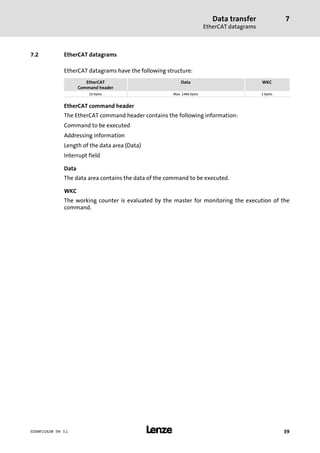
Length of the data area (Data)
Interrupt field
Data
The data area contains the data of the command to be executed.
WKC
The working counter is evaluated by the master for monitoring the execution of the
command.
Data transfer
EtherCAT state machine
7
l40 EDSMF2192IB EN 3.1
7.3 EtherCAT state machine
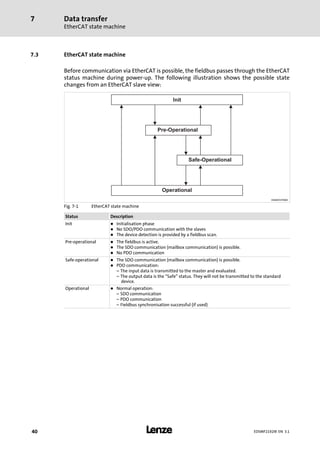
Before communication via EtherCAT is possible, the fieldbus passes through the EtherCAT
status machine during power−up. The following illustration shows the possible state
changes from an EtherCAT slave view:
Operational
Pre-Operational
Init
Safe-Operational
E94AYCET009
Fig. 7−1 EtherCAT state machine
Status Description
Init l Initialisation phase
l No SDO/PDO communication with the slaves
l The device detection is provided by a fieldbus scan.
Pre−operational l The fieldbus is active.
l The SDO communication (mailbox communication) is possible.
l No PDO communication
Safe−operational l The SDO communication (mailbox communication) is possible.
l PDO communication:
– The input data is transmitted to the master and evaluated.
– The output data is the "Safe" status. They will not be transmitted to the standard
device.
Operational l Normal operation:
– SDO communication
– PDO communication
– Fieldbus synchronisation successful (if used)
Process data transfer 8
l 41EDSMF2192IB EN 3.1
8 Process data transfer
ƒ The process data are transmitted by means of "EtherCAT datagrams" (¶ 39) via the
CoE process data channel.
ƒ By means of the process data the controller is operated.
ƒ The transmission of process data is time−critical.
ƒ Process data are transmitted cyclically between the host system (master) and the
controllers (slaves) (permanent exchange of current input and output data).
ƒ The master can directly access the process data. In the PLC for instance, the data are
directly stored in the I/O area.
ƒ Process data are not stored in the controller.
ƒ Process data, for instance, are setpoints, actual values, control words and status
words.
Parameter data transfer
Connection establishment between master and slave
9
l42 EDSMF2192IB EN 3.1
9 Parameter data transfer
Parameter data are transmitted via the fieldbus as SDOs (Service Data Objects). The SDO
services allow for the writing and reading access to the object directory.
ƒ Via the SDO channel, access to all implemented CoE objects (¶ 55) and Lenze codes
(¶ 57) is enabled with the CoE protocol.
ƒ When a "CiA402" technology application is used in the controller, the access to all
implemented CANopen CiA402 objects is enabled.
ƒ The transmission of parameter data usually is not time−critical.
ƒ Parameter data for instance are operating parameters, diagnostic information,
motor data.
9.1 Connection establishment between master and slave
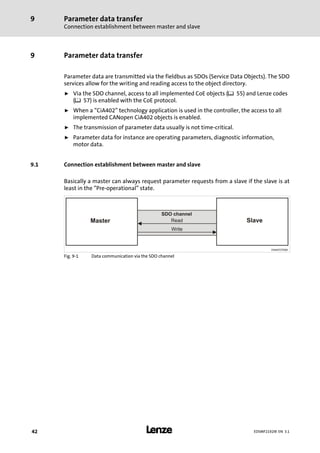
Basically a master can always request parameter requests from a slave if the slave is at
least in the "Pre−operational" state.
E94AYCET008
Fig. 9−1 Data communication via the SDO channel
Parameter data transfer
Reading and writing parameters
9
l 43EDSMF2192IB EN 3.1
9.2 Reading and writing parameters
Parameters ...
ƒ are set, for instance, for one−time system settings or if materials are changed within
a machine.
ƒ are transmitted with a low priority.
In the case of Lenze controllers, the parameters to be changed are contained in codes or in
the case of the CANopen device profile "CiA402" as device profile objects.
Indexing of the Lenze codes
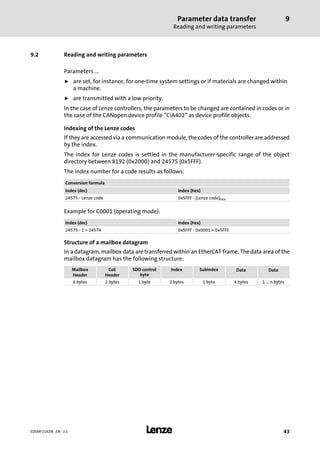
If they are accessed via a communication module, the codes of the controller are addressed
by the index.
The index for Lenze codes is settled in the manufacturer−specific range of the object
directory between 8192 (0x2000) and 24575 (0x5FFF).
The index number for a code results as follows:
Conversion formula
Index (dec) Index (hex)
24575 − Lenze code 0x5FFF − (Lenze code)hex
Example for C0001 (operating mode):
Index (dec) Index (hex)
24575 − 1 = 24574 0x5FFF − 0x0001 = 0x5FFE
Structure of a mailbox datagram
In a datagram, mailbox data are transferred within an EtherCAT frame. The data area of the
mailbox datagram has the following structure:
Mailbox
Header
CoE
Header
SDO control
byte
Index Subindex Data Data
6 bytes 2 bytes 1 byte 2 bytes 1 byte 4 bytes 1 ... n bytes
Parameter data transfer
Reading and writing parameters
Reading parameters (expedited upload)
9
l44 EDSMF2192IB EN 3.1
9.2.1 Reading parameters (expedited upload)
1. The master transmits "Initiate Domain Upload Request".
2. The slave acknowledges the request with a positive response ("Initiate Domain
Upload Response").
In the event of an error the slave responds with "Abort Domain Transfer".
) Note!
In the case of jobs for the controller, please make sure that you convert the
code into an index (¶ 43).
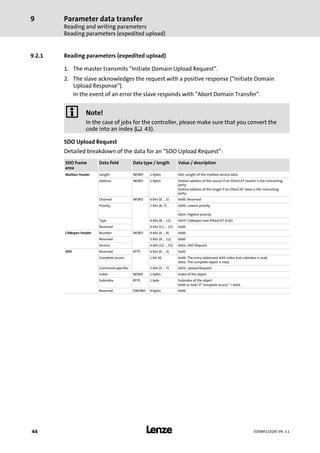
SDO Upload Request
Detailed breakdown of the data for an "SDO Upload Request":
SDO frame
area
Data field Data type / length Value / description
Mailbox Header Length WORD 2 bytes 0x0: Length of the mailbox service data
Address WORD 2 bytes Station address of the source if an EtherCAT master is the instructing
party.
Station address of the target if an EtherCAT slave is the instructing
party.
Channel WORD 6 bits (0 ... 5) 0x00: Reserved
Priority 2 bits (6, 7) 0x00: Lowest priority
...
0x03: Highest priority
Type 4 bits (8 ... 11) 0x03: CANopen over EtherCAT (CoE)
Reserved 4 bits (12 ... 15) 0x00
CANopen Header Number WORD 9 bits (0 ... 8) 0x00
Reserved 3 bits (9 ... 11) 0x00
Service 4 bits (12 ... 15) 0x02: SDO Request
SDO Reserved BYTE 4 bits (0 ... 3) 0x00
Complete access 1 bit (4) 0x00: The entry addressed with index and subindex is read.
0x01: The complete object is read.
Command specifier 3 bits (5 ... 7) 0x02: Upload Request
Index WORD 2 bytes Index of the object
Subindex BYTE 1 byte Subindex of the object
0x00 or 0x01 if "complete access" = 0x01.
Reserved DWORD 4 bytes 0x00
Parameter data transfer
Reading and writing parameters
Reading parameters (expedited upload)
9
l 45EDSMF2192IB EN 3.1
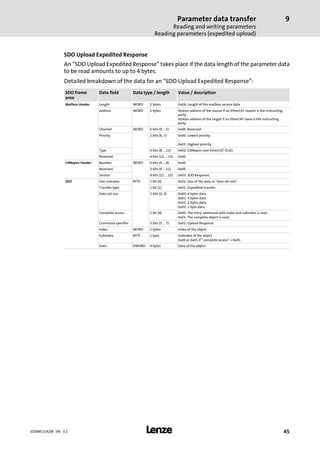
SDO Upload Expedited Response
An "SDO Upload Expedited Response" takes place if the data length of the parameter data
to be read amounts to up to 4 bytes.
Detailed breakdown of the data for an "SDO Upload Expedited Response":
SDO frame
area
Data field Data type / length Value / description
Mailbox Header Length WORD 2 bytes 0x0A: Length of the mailbox service data
Address WORD 2 bytes Station address of the source if an EtherCAT master is the instructing
party.
Station address of the target if an EtherCAT slave is the instructing
party.
Channel WORD 6 bits (0 ... 5) 0x00: Reserved
Priority 2 bits (6, 7) 0x00: Lowest priority
...
0x03: Highest priority
Type 4 bits (8 ... 11) 0x03: CANopen over EtherCAT (CoE)
Reserved 4 bits (12 ... 15) 0x00
CANopen Header Number WORD 9 bits (0 ... 8) 0x00
Reserved 3 bits (9 ... 11) 0x00
Service 4 bits (12 ... 15) 0x03: SDO Response
SDO Size indicator BYTE 1 bit (0) 0x01: Size of the data in "data set size"
Transfer type 1 bit (1) 0x01: Expedited transfer
Data set size 2 bits (2, 3) 0x00: 4 bytes data
0x01: 3 bytes data
0x02: 2 bytes data
0x03: 1 byte data
Complete access 1 bit (4) 0x00: The entry addressed with index and subindex is read.
0x01: The complete object is read.
Command specifier 3 bits (5 ... 7) 0x02: Upload Response
Index WORD 2 bytes Index of the object
Subindex BYTE 1 byte Subindex of the object
0x00 or 0x01 if "complete access" = 0x01.
Data DWORD 4 bytes Data of the object
Parameter data transfer
Reading and writing parameters
Reading parameters (expedited upload)
9
l46 EDSMF2192IB EN 3.1
SDO Upload Normal Response
An "SDO Upload Normal" takes place if the data length of the parameter data to be read
amounts to ³ 4 bytes.
Detailed breakdown of the data for an "SDO Upload Normal Response":
SDO frame
area
Data field Data type / length Value [hex] / description
Mailbox Header Length WORD 2 bytes n ³ 0x0A: Length of the mailbox service data
Address WORD 2 bytes Station address of the source if an EtherCAT master is the instructing
party.
Station address of the target if an EtherCAT slave is the instructing
party.
Channel WORD 6 bits (0 ... 5) 0x00: Reserved
Priority 2 bits (6, 7) 0x00: Lowest priority
...
0x03: Highest priority
Type 4 bits (8 ... 11) 0x03: CANopen over EtherCAT (CoE)
Reserved 4 bits (12 ... 15) 0x00
CANopen Header Number WORD 9 bits (0 ... 8) 0x00
Reserved 3 bits (9 ... 11) 0x00
Service 4 bits (12 ... 15) 0x03: SDO Response
SDO Size indicator BYTE 1 bit (0) 0x01
Transfer type 1 bit (1) 0x00: Normal transfer
Data set size 2 bits (2, 3) 0x00
Complete access 1 bit (4) 0x00: The entry addressed with index and subindex is read.
0x01: The complete object is read.
Command specifier 3 bits (5 ... 7) 0x02: Upload Response
Index WORD 2 bytes Index of the object
Subindex BYTE 1 byte Subindex of the object
0x00 or 0x01 if "complete access" = 0x01.
Complete size DWORD 4 bytes Total data length of the object
Data BYTE n − 10 bytes Data of the object
Parameter data transfer
Reading and writing parameters
Reading parameters (expedited upload)
9
l 47EDSMF2192IB EN 3.1
Example
The transmitted response structure in case of an upload to the index 0x5FD8 (standard
value of C00039/1 = 0x0FA0) contains the following data:
SDO frame
area
Data field Data type / length Value [hex] / description
Mailbox Header Length WORD 2 bytes 0x0A: Length of the mailbox service data
Address WORD 2 bytes 0x00
Channel WORD 6 bits (0 ... 5) 0x00: Reserved
Priority 2 bits (6, 7) 0x00: Lowest priority
Type 4 bits (8 ... 11) 0x03: CANopen over EtherCAT (CoE)
Reserved 4 bits (12 ... 15) 0x00
CANopen Header Number WORD 9 bits (0 ... 8) 0x00
Reserved 3 bits (9 ... 11) 0x00
Service 4 bits (12 ... 15) 0x03: SDO Response
SDO Size indicator BYTE 1 bit (0) 0x01: Length of the data in "Data set size"
Transfer type 1 bit (1) 0x01: Expedited transfer
Data set size 2 bits (2, 3) 0x02: 2 bytes data
Complete access 1 bit (4) 0x00: The entry addressed with index and subindex is read.
Command specifier 3 bits (5 ... 7) 0x02: Upload Response
Index WORD 2 bytes 0xD8: Index low byte of the object
0x5F: Index high byte of the object
Subindex BYTE 1 byte 0x01
Data DWORD 2 bytes 0x0FA0
Parameter data transfer
Reading and writing parameters
Writing parameters (expedited download)
9
l48 EDSMF2192IB EN 3.1
9.2.2 Writing parameters (expedited download)
1. The master transmits "Initiate Domain Download Request".
2. The slave acknowledges the request with a positive response ("Initiate Domain
Download Response").
In the event of an error the slave responds with "Abort Domain Transfer".
) Note!
In the case of jobs for the controller, please make sure that you convert the
code into an index (¶ 43).
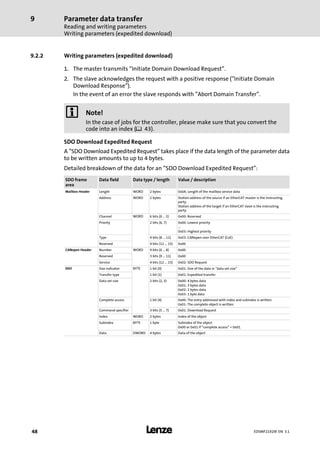
SDO Download Expedited Request
A "SDO Download Expedited Request" takes place if the data length of the parameter data
to be written amounts to up to 4 bytes.
Detailed breakdown of the data for an "SDO Download Expedited Request":
SDO frame
area
Data field Data type / length Value / description
Mailbox Header Length WORD 2 bytes 0x0A: Length of the mailbox service data
Address WORD 2 bytes Station address of the source if an EtherCAT master is the instructing
party.
Station address of the target if an EtherCAT slave is the instructing
party.
Channel WORD 6 bits (0 ... 5) 0x00: Reserved
Priority 2 bits (6, 7) 0x00: Lowest priority
...
0x03: Highest priority
Type 4 bits (8 ... 11) 0x03: CANopen over EtherCAT (CoE)
Reserved 4 bits (12 ... 15) 0x00
CANopen Header Number WORD 9 bits (0 ... 8) 0x00
Reserved 3 bits (9 ... 11) 0x00
Service 4 bits (12 ... 15) 0x02: SDO Request
SDO Size indicator BYTE 1 bit (0) 0x01: Size of the data in "data set size"
Transfer type 1 bit (1) 0x01: Expedited transfer
Data set size 2 bits (2, 3) 0x00: 4 bytes data
0x01: 3 bytes data
0x02: 2 bytes data
0x03: 1 byte data
Complete access 1 bit (4) 0x00: The entry addressed with index and subindex is written.
0x01: The complete object is written.
Command specifier 3 bits (5 ... 7) 0x01: Download Request
Index WORD 2 bytes Index of the object
Subindex BYTE 1 byte Subindex of the object
0x00 or 0x01 if "complete access" = 0x01.
Data DWORD 4 bytes Data of the object
Parameter data transfer
Reading and writing parameters
Writing parameters (expedited download)
9
l 49EDSMF2192IB EN 3.1
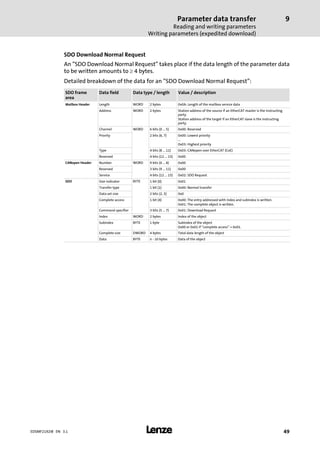
SDO Download Normal Request
An "SDO Download Normal Request" takes place if the data length of the parameter data
to be written amounts to ³ 4 bytes.
Detailed breakdown of the data for an "SDO Download Normal Request":
SDO frame
area
Data field Data type / length Value / description
Mailbox Header Length WORD 2 bytes 0x0A: Length of the mailbox service data
Address WORD 2 bytes Station address of the source if an EtherCAT master is the instructing
party.
Station address of the target if an EtherCAT slave is the instructing
party.
Channel WORD 6 bits (0 ... 5) 0x00: Reserved
Priority 2 bits (6, 7) 0x00: Lowest priority
...
0x03: Highest priority
Type 4 bits (8 ... 11) 0x03: CANopen over EtherCAT (CoE)
Reserved 4 bits (12 ... 15) 0x00
CANopen Header Number WORD 9 bits (0 ... 8) 0x00
Reserved 3 bits (9 ... 11) 0x00
Service 4 bits (12 ... 15) 0x02: SDO Request
SDO Size indicator BYTE 1 bit (0) 0x01
Transfer type 1 bit (1) 0x00: Normal transfer
Data set size 2 bits (2, 3) 0x0
Complete access 1 bit (4) 0x00: The entry addressed with index and subindex is written.
0x01: The complete object is written.
Command specifier 3 bits (5 ... 7) 0x01: Download Request
Index WORD 2 bytes Index of the object
Subindex BYTE 1 byte Subindex of the object
0x00 or 0x01 if "complete access" = 0x01.
Complete size DWORD 4 bytes Total data length of the object
Data BYTE n − 10 bytes Data of the object
Parameter data transfer
Reading and writing parameters
Writing parameters (expedited download)
9
l50 EDSMF2192IB EN 3.1
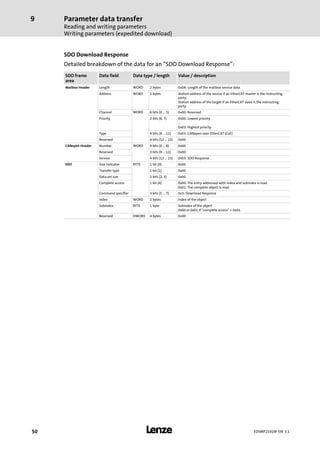
SDO Download Response
Detailed breakdown of the data for an "SDO Download Response":
SDO frame
area
Data field Data type / length Value / description
Mailbox Header Length WORD 2 bytes 0x0A: Length of the mailbox service data
Address WORD 2 bytes Station address of the source if an EtherCAT master is the instructing
party.
Station address of the target if an EtherCAT slave is the instructing
party.
Channel WORD 6 bits (0 ... 5) 0x00: Reserved
Priority 2 bits (6, 7) 0x00: Lowest priority
...
0x03: Highest priority
Type 4 bits (8 ... 11) 0x03: CANopen over EtherCAT (CoE)
Reserved 4 bits (12 ... 15) 0x00
CANopen Header Number WORD 9 bits (0 ... 8) 0x00
Reserved 3 bits (9 ... 11) 0x00
Service 4 bits (12 ... 15) 0x03: SDO Response
SDO Size indicator BYTE 1 bit (0) 0x00
Transfer type 1 bit (1) 0x00
Data set size 2 bits (2, 3) 0x00
Complete access 1 bit (4) 0x00: The entry addressed with index and subindex is read.
0x01: The complete object is read.
Command specifier 3 bits (5 ... 7) 0x3: Download Response
Index WORD 2 bytes Index of the object
Subindex BYTE 1 byte Subindex of the object
0x00 or 0x01 if "complete access" = 0x01.
Reserved DWORD 4 bytes 0x00
Parameter data transfer
Reading and writing parameters
Writing parameters (expedited download)
9
l 51EDSMF2192IB EN 3.1
Example
The transmitted request structure in case of a download from the index 0x1600 contains
the following data:
SDO frame
area
Data field Data type / length Value [hex] / description
Mailbox Header Length WORD 2 bytes 0xA: Length of the mailbox service data
Address WORD 2 bytes 0x0
Channel WORD 6 bits (0 ... 5) 0x0: Reserved
Priority 2 bits (6, 7) 0x0: Lowest priority
Type 4 bits (8 ... 11) 0x3: CANopen over EtherCAT (CoE)
Reserved 4 bits (12 ... 15) 0x0
CANopen Header Number WORD 9 bits (0 ...8) 0x0
Reserved 3 bits (9... 11) 0x0
Service 4 bits (12 ... 15) 0x2: SDO request
SDO Size indicator BYTE 1 bit (0) 0x01: Size of the data in "data set size"
Transfer type 1 bit (1) 0x01: Expedited transfer
Data set size 2 bits (2, 3) 0x00: 4 bytes data
Complete access 1 bit (4) 0x00: The entry addressed with index and subindex is written.
Command specifier 3 bits (5 ... 7) 0x01: Download Request
Index WORD 2 bytes 0x00: Index low byte of the object
0x16: Index high byte of the object
Subindex BYTE 1 byte 0x01: Subindex of the object
Data DWORD 4 bytes 0x5C930110
Parameter data transfer
Reading and writing parameters
SDO abort codes
9
l52 EDSMF2192IB EN 3.1
9.3 SDO abort codes
If an SDO request is evaluated negatively, a corresponding error code is output.
Index [hex] Description
0x00000000 No error
0x05030000 The status of the toggle bit has not changed.
0x05040000 SDO protocol time−out
0x05040001 Invalid or unknown specification symbol for the client/server command
0x05040002 The data block length is too great.
0x05040005 The space in the main memory is not sufficient.
0x06010000 Access to object not supported
0x06010001 Read access to a write−protected object
0x06010002 Write access to a write−protected object
0x06020000 Object is not listed in the object directory.
0x06040041 An object cannot be mapped into the PDO.
0x06040042 The number and/or length of the mapped objects would exceed the PDO length.
0x06040043 General parameter incompatibility
0x06040047 General internal device incompatibility
0x06060000 Access has failed because of hardware errors.
0x06070010 Wrong data type or parameter length.
0x06070012 Incorrect data type (The parameter length is too big)
0x06070013 Wrong data type (parameter length is too small).
0x06090011 Subindex does not exist.
0x06090030 The value range for parameters is too large (only for write access).
0x06090031 The parameter value is too high.
0x06090032 The parameter value is too low.
0x06090036 The maximum value is lower than the minimum value.
0x08000000 General error
0x08000020 Data cannot be transferred to the application or stored in the application.
0x08000021 Due to local control, data cannot be transferred to the application or stored in the
application.
0x08000022 Data cannot be transferred to or saved in the application because of current device state.
0x08000023 Dynamic object directory generation has failed or no object directory available.
Diagnostics
LED status displays
10
l 53EDSMF2192IB EN 3.1
10 Diagnostics
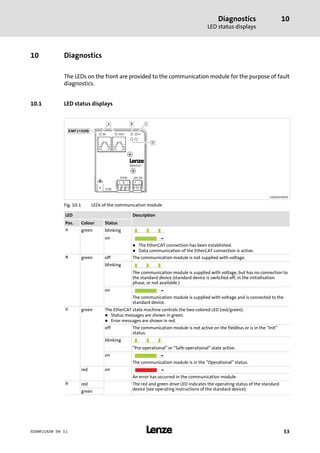
The LEDs on the front are provided to the communication module for the purpose of fault
diagnostics.
10.1 LED status displays
2192ECAT001B
Fig. 10−1 LEDs of the communication module
LED Description
Pos. Colour Status
0 green blinking
on
l The EtherCAT connection has been established.
l Data communication of the EtherCAT connection is active.
1 green off The communication module is not supplied with voltage.
blinking
The communication module is supplied with voltage, but has no connection to
the standard device (standard device is switched off, in the initialisation
phase, or not available.)
on
The communication module is supplied with voltage and is connected to the
standard device.
2 green The EtherCAT state machine controls the two−colored LED (red/green):
l Status messages are shown in green.
l Error messages are shown in red.
off The communication module is not active on the fieldbus or is in the "Init"
status.
blinking
"Pre−operational" or "Safe−operational" state active.
on
The communication module is in the "Operational" status.
red on
An error has occurred in the communication module.
3 red The red and green drive LED indicates the operating status of the standard
device (see operating instructions of the standard device).green
Diagnostics
Emergency requests / emergency messages
10
l54 EDSMF2192IB EN 3.1
10.2 Emergency requests / emergency messages
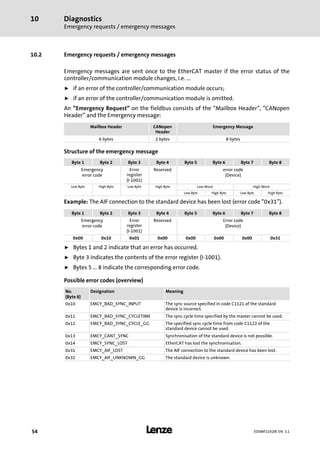
Emergency messages are sent once to the EtherCAT master if the error status of the
controller/communication module changes, i.e. ...
ƒ if an error of the controller/communication module occurs;
ƒ if an error of the controller/communication module is omitted.
An "Emergency Request" on the fieldbus consists of the "Mailbox Header", "CANopen
Header" and the Emergency message:
Mailbox Header CANopen
Header
Emergency Message
6 bytes 2 bytes 8 bytes
Structure of the emergency message
Byte 1 Byte 2 Byte 3 Byte 4 Byte 5 Byte 6 Byte 7 Byte 8
Emergency
error code
Error
register
(I−1001)
Reserved error code
(Device)
Low Byte High Byte Low Byte High Byte Low Word High Word
Low Byte High Byte Low Byte High Byte
Example: The AIF connection to the standard device has been lost (error code "0x31").
Byte 1 Byte 2 Byte 3 Byte 4 Byte 5 Byte 6 Byte 7 Byte 8
Emergency
error code
Error
register
(I−1001)
Reserved Error code
(Device)
0x00 0x10 0x01 0x00 0x00 0x00 0x00 0x31
ƒ Bytes 1 and 2 indicate that an error has occurred.
ƒ Byte 3 indicates the contents of the error register (I−1001).
ƒ Bytes 5 ... 8 indicate the corresponding error code.
Possible error codes (overview)
No.
(Byte 8)
Designation Meaning
0x10 EMCY_BAD_SYNC_INPUT The sync source specified in code C1121 of the standard
device is incorrect.
0x11 EMCY_BAD_SYNC_CYCLETIME The sync cycle time specified by the master cannot be used.
0x12 EMCY_BAD_SYNC_CYCLE_GG The specified sync cycle time from code C1122 of the
standard device cannot be used.
0x13 EMCY_CANT_SYNC Synchronisation of the standard device is not possible.
0x14 EMCY_SYNC_LOST EtherCAT has lost the synchronisation.
0x31 EMCY_AIF_LOST The AIF connection to the standard device has been lost.
0x32 EMCY_AIF_UNKNOWN_GG The standard device is unknown.
Appendix
Implemented CoE objects
11
l 55EDSMF2192IB EN 3.1
11 Appendix
11.1 Implemented CoE objects
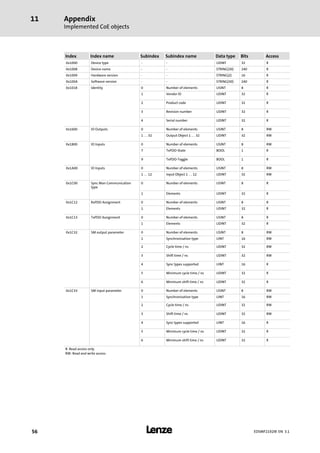
Lenze devices can be parameterised with Lenze codes and with the
manufacturer−independent "CoE objects". In order to obtain a complete
EtherCAT−compliant communication, only the CoE objects may be used for
parameterisation. The CoE objects described in this documentation are defined in the
"EtherCAT Specification, Part 6 ˘ Application Layer Protocol Specification".
Appendix
Implemented CoE objects
11
l56 EDSMF2192IB EN 3.1
Index Index name Subindex Subindex name Data type Bits Access
0x1000 Device type − − UDINT 32 R
0x1008 Device name − − STRING(30) 240 R
0x1009 Hardware version − − STRING(2) 16 R
0x100A Software version − − STRING(30) 240 R
0x1018 Identity 0 Number of elements USINT 8 R
1 Vendor ID UDINT 32 R
2 Product code UDINT 32 R
3 Revision number UDINT 32 R
4 Serial number UDINT 32 R
0x1600 IO Outputs 0 Number of elements USINT 8 RW
1 … 32 Output Object 1 … 32 UDINT 32 RW
0x1800 IO Inputs 0 Number of elements USINT 8 RW
7 TxPDO−State BOOL 1 R
9 TxPDO−Toggle BOOL 1 R
0x1A00 IO Inputs 0 Number of elements USINT 8 RW
1 … 12 Input Object 1 … 12 UDINT 32 RW
0x1C00 Sync Man Communication
type
0 Number of elements USINT 8 R
1 Elements UDINT 32 R
0x1C12 RxPDO Assignment 0 Number of elements USINT 8 R
1 Elements UDINT 32 R
0x1C13 TxPDO Assignment 0 Number of elements USINT 8 R
1 Elements UDINT 32 R
0x1C32 SM output parameter 0 Number of elements USINT 8 RW
1 Synchronization type UINT 16 RW
2 Cycle time / ns UDINT 32 RW
3 Shift time / ns UDINT 32 RW
4 Sync types supported UINT 16 R
5 Minimum cycle time / ns UDINT 32 R
6 Minimum shift time / ns UDINT 32 R
0x1C33 SM input parameter 0 Number of elements USINT 8 RW
1 Synchronization type UINT 16 RW
2 Cycle time / ns UDINT 32 RW
3 Shift time / ns UDINT 32 RW
4 Sync types supported UINT 16 R
5 Minimum cycle time / ns UDINT 32 R
6 Minimum shift time / ns UDINT 32 R
R: Read access only
RW: Read and write access
Appendix
Codes
11
l 57EDSMF2192IB EN 3.1
11.2 Codes
The objects specified in the table can be accessed via EtherCAT fieldbus. The objects are
implemented in the Lenze code structure. Writable codes are stored permanently and are
maintained after the communication module is switched off.
I Tip!
The codes are visible in the object directory of the EtherCAT configuration tool.
Object Code Subcode Designation Access Information
Index
[hex]
Subindex
0x58ED − C1810 − Software identification of the module R ^ 58
0x58EC C1811 − Software creation date R ^ 58
0x58E1 1 ... n C1822 1 ... n AIF input words (to the standard device) R ^ 58
0x58E0 1 ... n C1823 1 ... n AIF output words (from the standard device) R ^ 58
0x58DF 1 ... n C1824 1 ... n AIF input double words (to the standard device) R ^ 58
0x58DE 1 ... n C1825 1 ... n AIF output double words (from the standard device) R ^ 59
0x58D9 − C1830 − Bus status R ^ 59
0x58C5 − C1850 − Station alias address RW ^ 59
0x58A5 − C1882 − Response when exiting "Operational" RW ^ 59
0x58A4 − C1883 − Monitoring time when exiting "Operational" RW ^ 60
R: Read access only
RW: Read and write access
Appendix
Codes
11
l58 EDSMF2192IB EN 3.1
Code description
Parameter
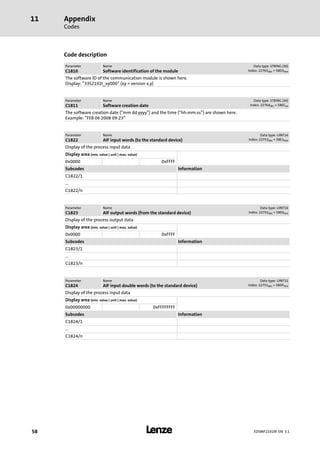
C1810
Name
Software identification of the module
Data type: STRING (30)
Index: 22765dec = 58EDhex
The software ID of the communication module is shown here.
Display: "33S2192I_xy000" (xy = version x.y)
Parameter
C1811
Name
Software creation date
Data type: STRING (30)
Index: 22764dec = 58ECex
The software creation date ("mm dd yyyy") and the time ("hh:mm:ss") are shown here.
Example: "FEB 06 2008 09:23"
Parameter
C1822
Name
AIF input words (to the standard device)
Data type: UINT16
Index: 22753dec = 58E1hex
Display of the process input data
Display area (min. value | unit | max. value)
0x0000 0xFFFF
Subcodes Information
C1822/1
...
C1822/n
Parameter
C1823
Name
AIF output words (from the standard device)
Data type: UINT16
Index: 22752dec = 58E0hex
Display of the process output data
Display area (min. value | unit | max. value)
0x0000 0xFFFF
Subcodes Information
C1823/1
...
C1823/n
Parameter
C1824
Name
AIF input double words (to the standard device)
Data type: UINT32
Index: 22751dec = 58DFhex
Display of the process input data
Display area (min. value | unit | max. value)
0x00000000 0xFFFFFFFF
Subcodes Information
C1824/1
...
C1824/n
Appendix
Codes
11
l 59EDSMF2192IB EN 3.1
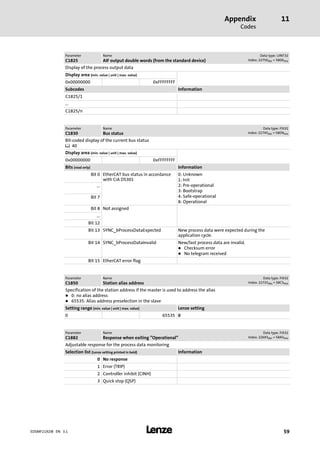
Parameter
C1825
Name
AIF output double words (from the standard device)
Data type: UINT32
Index: 22750dec = 58DEhex
Display of the process output data
Display area (min. value | unit | max. value)
0x00000000 0xFFFFFFFF
Subcodes Information
C1825/1
...
C1825/n
Parameter
C1830
Name
Bus status
Data type: FIX32
Index: 22745dec = 58D9hex
Bit−coded display of the current bus status
^ 40
Display area (min. value | unit | max. value)
0x00000000 0xFFFFFFFF
Bits (read only) Information
Bit 0 EtherCAT bus status in accordance
with CiA DS301
0: Unknown
1: Init
2: Pre−operational
3: Bootstrap
4: Safe−operational
8: Operational
...
Bit 7
Bit 8 Not assigned
...
Bit 12
Bit 13 SYNC_bProcessDataExpected New process data were expected during the
application cycle.
Bit 14 SYNC_bProcessDataInvalid New/last process data are invalid.
l Checksum error
l No telegram received
Bit 15 EtherCAT error flag
Parameter
C1850
Name
Station alias address
Data type: FIX32
Index: 22725dec = 58C5hex
Specification of the station address if the master is used to address the alias
l 0: no alias address
l 65535: Alias address preselection in the slave
Setting range (min. value | unit | max. value) Lenze setting
0 65535 0
Parameter
C1882
Name
Response when exiting "Operational"
Data type: FIX32
Index: 22693dec = 58A5hex
Adjustable response for the process data monitoring
Selection list (Lenze setting printed in bold) Information
0 No response
1 Error (TRIP)
2 Controller inhibit (CINH)
3 Quick stop (QSP)
Appendix
Codes
11
l60 EDSMF2192IB EN 3.1
Parameter
C1883
Name
Monitoring time when exiting "Operational"
Data type: FIX32
Index: 22692dec = 58A4hex
If the "Operational" status is exited, the response parameterised with C1882 occurs after the time set here has
elapsed.
l With the value = 65535 monitoring is deactivated.
l With the value = 0 the immediate response is effected after the internal bus status watchdog time has
elapsed
l A change in monitoring is effective immediately.
Setting range (min. value | unit | max. value) Lenze setting
0 ms 65535 65535 ms
Appendix
Product codes of the Lenze standard devices
11
l 61EDSMF2192IB EN 3.1
11.3 Product codes of the Lenze standard devices
Product code
[decimal]
Meaning Sync
support
Number
Process data
words
AIF status/
control word
21920000 Generic − − −
21920100 8200 vector − 3 −
21920101 8200 vector
in combination with an application
I/O function module
− 3 −
21920102 8200 vector
in combination with a
DeviceNet/CANopen function
module
− 3 −
21920103 8200 vector
in combination with an INTERBUS
function module
− 3 −
21920104 8200 vector
in combination with a LECOM−B
function module
− 3 −
21920105 8200 vector
in combination with a PROFIBUS I/O
function module
− 3 −
21920106 8200 vector
in combination with a PROFIBUS
function module
− 3 −
21920107 8200 vector
in combination with a CANopen
function module
− 3 −
21920108 8200 vector
in combination with a DeviceNet
function module
− 3 −
21920200 9300 servo inverter ü 4 −
21920202 93xx servo position controller ü 4 −
21920204 93xx servo register control ü 4 −
21920206 93xx servo cam profiler ü 4 −
21920301 9300 hoist − 4 −
21920400 9300 vector − 4 −
21920500 9300 Servo PLC ü 12 ü
21920600 Drive PLC ü 12 ü
21920700 ECSxA axis module "Application" ü 12 ü
21920701 ECSxM axis module "Motion" ü 12 ü
21920702 ECSxP axis module "Posi & Shaft" ü 12 ü
21920703 ECSxS axis module "Speed &
Torque"
ü 12 ü
21920711 ECSxE power supply module − 3 −
) Note!
ECS servo system
From operating system software version 8.3 onwards, a synchronisation is
possible for the ECS axis modules.
Index12
l62 EDSMF2192IB EN 3.1
12 Index
A
Abort codes, 52
Address allocation, 32
Application as directed, 12
Approvals, 16
Automatic device detection, 31
B
Baud rate, 16
Behaviour of the Lenze EtherCAT nodes during start−up,
35
C
Cable length, 16
Cable specification, 25
CE−typical drive system, 22
Code description, 58
Codes, 57
CoE objects, 55
Colour code of Ethernet cable, 26
Command header, 39
Commissioning, 30
− Initial switch−on, 36
Communication medium, 16
Communication profile, 16
Communication time, 18
Configuring process data, 32
Conformities, 16
Connection establishment between master and slave, 42
Connections, 15
Cycle time (C1121), 34
Cycle times, 16
D
Data, 39
Data transfer, 37
Datagrams, 39
DC configuration in the master, 34
DC configuration in the standard device (slave), 34
Defining the cycle time, 32
Definition of notes used, 9
Definitions, 8
Design of the Ethernet cable, 25
Device detection, 31
Device profile, 16
Device protection, 11 , 20
Diagnostics, 53
Distributed clocks (DC), synchronisation, 33
E
Electrical installation, 22
Emergency message (structure), 54
Emergency requests / emergency messages, 54
Error codes, 54
EtherCAT datagrams, 39
EtherCAT frame structure, 38
EtherCAT state machine, 40
Ethernet cable specification, 25
Ethernet cable, colour code , 26
Ethernet cable, design, 25
Ethernet connection, 24
Ethernet data, 38
Ethernet header, 38
External voltage supply, 27
F
FCS, 38
Frame structure, 38
H
Hardware version, type code, 13
I
Identification, 13
Implemented CoE objects, 55
Indexing of the Lenze codes, 43
Initial switch−on, 36
Installation, 20
− electrical, 22
− mechanical, 21
Index 12
l 63EDSMF2192IB EN 3.1
Installing device description files, 31
Interface for communication, 16
Interfaces, 15
Internal voltage supply, 27
L
LED status displays, 53
LEDs, 53
Line topology, 23
M
Mailbox datagram, 43
Mailbox protocol, 16
Mechanical installation, 21
N
Nameplate, 13
Network topology, 16
Node type, 16
Notes, definition, 9
Number of nodes, 16
O
Order designation, 16
P
Parameter data transfer, 42
PLC Designer, 31
Process data transfer, 41
Processing time, 18
Product codes of the Lenze standard devices, 61
Product description, 12
− Application as directed, 12
Product features, 14
Product features of the communication module, 14
Product−ID, 16
Protection of persons, 11
Protective insulation, 17
R
Reading and writing parameters, 43
Reading parameters (expedited upload), 44
Residual hazards, 11
Revision−ID, 16
S
Safety instructions, 10
− Application as directed, 12
− definition, 9
− device− and application−specific, 11
− layout, 9
SDO abort codes, 52
Software version, type code, 13
Specification of the Ethernet cable, 25
Specifying the station alias, 32
State machine, 40
Status displays, 53
Switch on, initial, 36
Switch topology, 23
Synchronisation of the standard device, 29
Synchronisation with "Distributed clocks" (DC), 33
T
Technical data, 16
Terminal data, 28
TwinCAT, 31
Type code, 13
− finding, 13
V
Validity of the documentation, 5
Vendor−ID, 16
Voltage supply, 27
− internal, 27
Voltage supply: external, 27
W
Wiring according to EMC, 22
Working Counter (WKC), 39
Writing parameters (expedited download), 48
Q
© 11/2012
F Lenze Automation GmbH
Hans−Lenze−Str. 1
D−31855 Aerzen
Germany
Service Lenze Service GmbH
Breslauer Straße 3
D−32699 Extertal
Germany
( +49 (0)51 54 / 82−0 ( 00 80 00 / 24 4 68 77 (24 h helpline)
Ê +49 (0)51 54 / 82 − 28 00 Ê +49 (0)51 54 / 82−11 12
š Lenze@Lenze.de š Service@Lenze.de
ü www.Lenze.com
EDSMF2192IB § .K:ö § EN § 3.1 § TD17
10 9 8 7 6 5 4 3 2 1

Emf2192 ib _ethercat aif module__v3-1__en

  • 1.
  • 2.
    Contentsi l2 EDSMF2192IB EN3.1 1 About this documentation 4. . . . . . . . . . . . . . . . . . . . . . . . . . . . . . . . . . . . . . . . . . . . . . . . . . 1.1 Document history 6. . . . . . . . . . . . . . . . . . . . . . . . . . . . . . . . . . . . . . . . . . . . . . . . . . . . 1.2 Conventions used 7. . . . . . . . . . . . . . . . . . . . . . . . . . . . . . . . . . . . . . . . . . . . . . . . . . . . 1.3 Terminology used 8. . . . . . . . . . . . . . . . . . . . . . . . . . . . . . . . . . . . . . . . . . . . . . . . . . . . 1.4 Notes used 9. . . . . . . . . . . . . . . . . . . . . . . . . . . . . . . . . . . . . . . . . . . . . . . . . . . . . . . . . . 2 Safety instructions 10. . . . . . . . . . . . . . . . . . . . . . . . . . . . . . . . . . . . . . . . . . . . . . . . . . . . . . . . 2.1 General safety information 10. . . . . . . . . . . . . . . . . . . . . . . . . . . . . . . . . . . . . . . . . . . . 2.2 Device− and application−specific safety instructions 11. . . . . . . . . . . . . . . . . . . . . . . . 2.3 Residual hazards 11. . . . . . . . . . . . . . . . . . . . . . . . . . . . . . . . . . . . . . . . . . . . . . . . . . . . . 3 Product description 12. . . . . . . . . . . . . . . . . . . . . . . . . . . . . . . . . . . . . . . . . . . . . . . . . . . . . . . . 3.1 Application as directed 12. . . . . . . . . . . . . . . . . . . . . . . . . . . . . . . . . . . . . . . . . . . . . . . . 3.2 Identification 13. . . . . . . . . . . . . . . . . . . . . . . . . . . . . . . . . . . . . . . . . . . . . . . . . . . . . . . . 3.3 Product features 14. . . . . . . . . . . . . . . . . . . . . . . . . . . . . . . . . . . . . . . . . . . . . . . . . . . . . 3.4 Connections and interfaces 15. . . . . . . . . . . . . . . . . . . . . . . . . . . . . . . . . . . . . . . . . . . . 4 Technical data 16. . . . . . . . . . . . . . . . . . . . . . . . . . . . . . . . . . . . . . . . . . . . . . . . . . . . . . . . . . . . 4.1 General data and operating conditions 16. . . . . . . . . . . . . . . . . . . . . . . . . . . . . . . . . 4.2 Protective insulation 17. . . . . . . . . . . . . . . . . . . . . . . . . . . . . . . . . . . . . . . . . . . . . . . . . . 4.3 Communication time 18. . . . . . . . . . . . . . . . . . . . . . . . . . . . . . . . . . . . . . . . . . . . . . . . . 4.4 Dimensions 19. . . . . . . . . . . . . . . . . . . . . . . . . . . . . . . . . . . . . . . . . . . . . . . . . . . . . . . . . 5 Installation 20. . . . . . . . . . . . . . . . . . . . . . . . . . . . . . . . . . . . . . . . . . . . . . . . . . . . . . . . . . . . . . . 5.1 Mechanical installation 21. . . . . . . . . . . . . . . . . . . . . . . . . . . . . . . . . . . . . . . . . . . . . . . 5.2 Electrical installation 22. . . . . . . . . . . . . . . . . . . . . . . . . . . . . . . . . . . . . . . . . . . . . . . . . . 5.2.1 Wiring according to EMC (CE−typical drive system) 22. . . . . . . . . . . . . . . . . 5.2.2 Network topology 23. . . . . . . . . . . . . . . . . . . . . . . . . . . . . . . . . . . . . . . . . . . . 5.2.3 EtherCAT connection 24. . . . . . . . . . . . . . . . . . . . . . . . . . . . . . . . . . . . . . . . . 5.2.4 Specification of the Ethernet cable 25. . . . . . . . . . . . . . . . . . . . . . . . . . . . . . 5.2.5 Voltage supply 27. . . . . . . . . . . . . . . . . . . . . . . . . . . . . . . . . . . . . . . . . . . . . . 5.2.6 Synchronisation of the standard device 29. . . . . . . . . . . . . . . . . . . . . . . . .
  • 3.
    Contents i l 3EDSMF2192IBEN 3.1 6 Commissioning 30. . . . . . . . . . . . . . . . . . . . . . . . . . . . . . . . . . . . . . . . . . . . . . . . . . . . . . . . . . . 6.1 Before switching on 30. . . . . . . . . . . . . . . . . . . . . . . . . . . . . . . . . . . . . . . . . . . . . . . . . . 6.2 Configuring the host system (master) 31. . . . . . . . . . . . . . . . . . . . . . . . . . . . . . . . . . 6.2.1 Installing device description files 31. . . . . . . . . . . . . . . . . . . . . . . . . . . . . . . . 6.2.2 Automatic device detection 31. . . . . . . . . . . . . . . . . . . . . . . . . . . . . . . . . . . . 6.2.3 Configuring process data 32. . . . . . . . . . . . . . . . . . . . . . . . . . . . . . . . . . . . . . 6.2.4 Defining the cycle time 32. . . . . . . . . . . . . . . . . . . . . . . . . . . . . . . . . . . . . . . . 6.2.5 Address allocation 32. . . . . . . . . . . . . . . . . . . . . . . . . . . . . . . . . . . . . . . . . . . . 6.2.6 Specifying the station alias 32. . . . . . . . . . . . . . . . . . . . . . . . . . . . . . . . . . . . . 6.3 Synchronisation with "Distributed clocks" (DC) 33. . . . . . . . . . . . . . . . . . . . . . . . . . . 6.3.1 Preparation / installation 34. . . . . . . . . . . . . . . . . . . . . . . . . . . . . . . . . . . . . . 6.3.2 DC configuration in the master 34. . . . . . . . . . . . . . . . . . . . . . . . . . . . . . . . . 6.3.3 DC configuration in the standard device (slave) 34. . . . . . . . . . . . . . . . . . . . 6.3.4 Behaviour of the Lenze EtherCAT nodes during start−up 35. . . . . . . . . . . . 6.4 Initial switch−on 36. . . . . . . . . . . . . . . . . . . . . . . . . . . . . . . . . . . . . . . . . . . . . . . . . . . . . . 7 Data transfer 37. . . . . . . . . . . . . . . . . . . . . . . . . . . . . . . . . . . . . . . . . . . . . . . . . . . . . . . . . . . . . 7.1 EtherCAT frame structure 38. . . . . . . . . . . . . . . . . . . . . . . . . . . . . . . . . . . . . . . . . . . . . . 7.2 EtherCAT datagrams 39. . . . . . . . . . . . . . . . . . . . . . . . . . . . . . . . . . . . . . . . . . . . . . . . . . 7.3 EtherCAT state machine 40. . . . . . . . . . . . . . . . . . . . . . . . . . . . . . . . . . . . . . . . . . . . . . . 8 Process data transfer 41. . . . . . . . . . . . . . . . . . . . . . . . . . . . . . . . . . . . . . . . . . . . . . . . . . . . . . . 9 Parameter data transfer 42. . . . . . . . . . . . . . . . . . . . . . . . . . . . . . . . . . . . . . . . . . . . . . . . . . . . 9.1 Connection establishment between master and slave 42. . . . . . . . . . . . . . . . . . . . . . 9.2 Reading and writing parameters 43. . . . . . . . . . . . . . . . . . . . . . . . . . . . . . . . . . . . . . . . 9.2.1 Reading parameters (expedited upload) 44. . . . . . . . . . . . . . . . . . . . . . . . . . 9.2.2 Writing parameters (expedited download) 48. . . . . . . . . . . . . . . . . . . . . . . 9.3 SDO abort codes 52. . . . . . . . . . . . . . . . . . . . . . . . . . . . . . . . . . . . . . . . . . . . . . . . . . . . . 10 Diagnostics 53. . . . . . . . . . . . . . . . . . . . . . . . . . . . . . . . . . . . . . . . . . . . . . . . . . . . . . . . . . . . . . . 10.1 LED status displays 53. . . . . . . . . . . . . . . . . . . . . . . . . . . . . . . . . . . . . . . . . . . . . . . . . . 10.2 Emergency requests / emergency messages 54. . . . . . . . . . . . . . . . . . . . . . . . . . . . . . 11 Appendix 55. . . . . . . . . . . . . . . . . . . . . . . . . . . . . . . . . . . . . . . . . . . . . . . . . . . . . . . . . . . . . . . . 11.1 Implemented CoE objects 55. . . . . . . . . . . . . . . . . . . . . . . . . . . . . . . . . . . . . . . . . . . . . . 11.2 Codes 57. . . . . . . . . . . . . . . . . . . . . . . . . . . . . . . . . . . . . . . . . . . . . . . . . . . . . . . . . . . . . . 11.3 Product codes of the Lenze standard devices 61. . . . . . . . . . . . . . . . . . . . . . . . . . . . . . 12 Index 62. . . . . . . . . . . . . . . . . . . . . . . . . . . . . . . . . . . . . . . . . . . . . . . . . . . . . . . . . . . . . . . . . . . .
  • 4.
    About this documentation1 l4EDSMF2192IB EN 3.1 0Fig. 0Tab. 0 1 About this documentation Contents This documentation only contains descriptions for the EMF2192IB communication module (EtherCAT). ) Note! This documentation supplements the mounting instructions supplied with the communication module and the documentations for the standard devices used. The mounting instructions contain safety instructions which must be observed! The features and functions of the communication module are described in detail. Examples illustrate typical applications. Furthermore this documentation contains the following: ƒ Safety instructions that must be observed. ƒ Key technical data relating to the communication module ƒ Information on versions of Lenze standard devices to be used. ƒ Notes on troubleshooting and fault elimination The theoretical correlations are only explained in so far as they are necessary for comprehending the function of the communication module. This documentation does not describe the software of an original equipment manufacturer. No responsibility is taken for corresponding information given in this manual. Information on how to use the software can be obtained from the documents of the host system (master). All brand names mentioned in this manual are trademarks of their respective companies. I Tip! Detailed information on EtherCAT can be found on the website of the EtherCAT Technology Group: http://www.EtherCAT.org
  • 5.
    About this documentation1 l 5EDSMF2192IB EN 3.1 Target group This documentation is intended for all persons who plan, install, commission and maintain the networking and remote service of a machine. I Tip! Information and auxiliary devices related to the Lenze products can be found in the download area at http://www.Lenze.com Validity information The information given in this documentation is valid for the following devices: Extension module Type designation From hardware version upwards From software version upwards EtherCAT communication module EMF2192IB VA 1.0
  • 6.
    About this documentation Documenthistory 1 l6 EDSMF2192IB EN 3.1 1.1 Document history Version Description 1.0 10/2009 TD17 First edition 2.0 09/2010 TD14 General revision 3.0 06/2011 TD17 General revision 3.1 11/2012 TD17 EtherCAT® is a registered trademark by Beckhoff Automation GmbH, Germany. Your opinion is important to us! These instructions were created to the best of our knowledge and belief to give you the best possible support for handling our product. If you have suggestions for improvement, please e−mail us to: feedback−docu@Lenze.de Thank you for your support. Your Lenze documentation team
  • 7.
    About this documentation Conventionsused 1 l 7EDSMF2192IB EN 3.1 1.2 Conventions used This documentation uses the following conventions to distinguish between different types of information: Type of information Identification Examples/notes Spelling of numbers Decimal separator Point In general, the decimal point is used. For instance: 1234.56 Decimal Standard notation For example: 1234 Hexadecimal 0x[0 ... 9, A ... F] For example: 0x60F4 Binary l Nibble In quotation marks Point For example: ´100´ For example: ´0110.0100´ Text Program name » « PC software For example: »Engineer«, »Global Drive Control« (GDC) Icons Page reference ^ Reference to another page with additional information For instance: ^ 16 = see page 16
  • 8.
    About this documentation Terminologyused 1 l8 EDSMF2192IB EN 3.1 1.3 Terminology used Term Meaning EtherCAT® EtherCAT® is a real−time capable Ethernet system with top performance. EtherCAT® is a registered trademark and patented technology, licensed by Beckhoff Automation GmbH, Germany. Standard device Lenze controllers with which the communication module can be used. ^ 12Controller »Global Drive Control« / »GDC« Lenze PC software which supports you in "engineering" (parameterisation, diagnostics and configuration) throughout the whole life cycle, i.e. from planning to maintenance of the commissioned machine.»Engineer« »PLC Designer« »TwinCAT« EtherCAT configuration software by Beckhoff Automation GmbH, Germany Code Parameter used for controller parameterisation or monitoring. The term is usually called "index". Subcode If a code contains several parameters, the individual parameters are stored under "subcodes". This manual uses a slash "/" as a separator between code and subcode (e.g. "C118/3"). The term is usually called "subindex". Lenze setting This setting is the default factory setting of the device. Basic setting HW Hardware SW Software ESI EtherCAT Slave Information (device description file in XML format) CoE CANopen over EtherCAT I−1600.20 CoE index (hexadecimal representation) l In the example: Index 0x1600, subindex 0x20 DC "Distributed clocks" for EtherCAT synchronisation PDO Process data object SDO Service data object "Hot connect" This feature enables the slave nodes to be coupled/decoupled during operation.
  • 9.
    About this documentation Notesused 1 l 9EDSMF2192IB EN 3.1 1.4 Notes used The following pictographs and signal words are used in this documentation to indicate dangers and important information: Safety instructions Structure of safety instructions: } Danger! (characterises the type and severity of danger) Note (describes the danger and gives information about how to prevent dangerous situations) Pictograph and signal word Meaning { Danger! Danger of personal injury through dangerous electrical voltage. Reference to an imminent danger that may result in death or serious personal injury if the corresponding measures are not taken. } Danger! Danger of personal injury through a general source of danger. Reference to an imminent danger that may result in death or serious personal injury if the corresponding measures are not taken. ( Stop! Danger of property damage. Reference to a possible danger that may result in property damage if the corresponding measures are not taken. Application notes Pictograph and signal word Meaning ) Note! Important note to ensure troublefree operation I Tip! Useful tip for simple handling , Reference to another documentation
  • 10.
    Safety instructions General safetyinformation 2 l10 EDSMF2192IB EN 3.1 2 Safety instructions ) Note! It is absolutely vital that the stated safety measures are implemented in order to prevent serious injury to persons and damage to material assets. Always keep this documentation to hand in the vicinity of the product during operation. 2.1 General safety information } Danger! Disregarding the following basic safety measures may lead to severe personal injury and damage to material assets! ƒ Lenze drive and automation components ... ... must only be used for the intended purpose. ... must never be operated if damaged. ... must never be subjected to technical modifications. ... must never be operated unless completely assembled. ... must never be operated without the covers/guards. ... can − depending on their degree of protection − have live, movable or rotating parts during or after operation. Surfaces can be hot. ƒ For Lenze drive components ... ... only use permitted accessories. ... only use original manufacturer spare parts. ƒ All specifications of the corresponding enclosed documentation must be observed. This is vital for a safe and trouble−free operation and for achieving the specified product features. The procedural notes and circuit details provided in this document are proposals which the user must check for suitability for his application. The manufacturer does not accept any liability for the suitability of the specified procedures and circuit proposals. ƒ Only qualified skilled personnel are permitted to work with or on Lenze drive and automation components. According to IEC 60364 or CENELEC HD 384, these are persons ... ... who are familiar with the installation, assembly, commissioning and operation of the product, ... possess the appropriate qualifications for their work, ... and are acquainted with and can apply all the accident prevent regulations, directives and laws applicable at the place of use.
  • 11.
    Safety instructions Device− andapplication−specific safety instructions 2 l 11EDSMF2192IB EN 3.1 2.2 Device− and application−specific safety instructions ƒ During operation, the communication module must be securely connected to the standard device. ƒ With external voltage supply, always use a separate power supply unit, safely separated in accordance with EN 61800−5−1 in every control cabinet ("SELV" / "PELV"). ƒ Only use cables that comply with the given specifications (¶ 25). , Documentation for the standard device, control system, system/machine All the other measures prescribed in this documentation must also be implemented. Observe the safety instructions and application notes stated in this manual. 2.3 Residual hazards Protection of persons ƒ If the controllers are used on a phase earthed mains with a rated mains voltage ³ 400 V, protection against accidental contact is not ensured without implementing external measures. (See chapter "4.2", ^ 17) Device protection ƒ The module contains electronic components that can be damaged or destroyed by electrostatic discharge.
  • 12.
    Product description Application asdirected 3 l12 EDSMF2192IB EN 3.1 3 Product description 3.1 Application as directed The communication module ... ƒ is a device intended for use in industrial power systems. ƒ is only to be used in EtherCAT networks. ƒ can be used in connection with the following standard devices (nameplate data): Device type Design Version Variant Explanation HW SW 1) 82EVxxxxxBxxxXX ³ Vx ³ 1x 8200 vector 82CVxxxxxBxxxXX ³ Vx ³ 1x 8200 vector, cold plate 82DVxxxKxBxxxXX ³ Vx ³ 1x 8200 vector, thermally separated EPL 10200 E ³ 1x ³ 1x Drive PLC 33.93xx xE. ³ 2x ³ 1x Vxxx 9321 − 9332 vector 33.938X xE. ³ 1x ³ 0x 9381 − 9383 vector 33.93xx xC. ³ 2x ³ 1x Vxxx 9321 − 9332, vector with cold plate design 33.93xx EI / ET ³ 2x ³ 1x Vxxx 9300 Servo PLC 33.93xx CI / CT ³ 2x ³ 1x Vxxx 9300 Servo PLC, cold plate ECSxSxxxx4xxxxXX ³ 1A ³ 7.0 ECSxS "Speed & Torque" ECSxPxxxx4xxxxXX ³ 1A ³ 7.0 ECSxP "Posi & Shaft" ECSxMxxxx4xxxxXX ³ 1A ³ 7.0 ECSxM "Motion" ECSxAxxxx4xxxxXX ³ 1A ³ 7.0 ECSxA "Application" ECSxExxxx4xxxxXX ³ VA ³ 5.0 ECSxE power supply module 1) Operating system software versions of the controllers Any other use shall be deemed inappropriate!
  • 13.
    Product description Identification 3 l 13EDSMF2192IBEN 3.1 3.2 Identification E82AF000P0B201XX L Type Id.-No. Prod.-No.  2192ECAT013 Type code  W 33.2192IB VA 1.0 Device series Hardware version Software version
  • 14.
    Product description Product features 3 l14EDSMF2192IB EN 3.1 3.3 Product features ƒ Interface module for the EtherCAT communication system to the AIF slots of the Lenze device series 8200 vector, 9300, and ECS (¶ 12) ƒ Support of the EtherCAT slave functionality ƒ External 24V supply for maintaining the EtherCAT network if the standard device fails ƒ Support of the "Distributed clocks" (DC) functionality for synchronisation via the fieldbus ƒ PDO transfer with CoE (CANopen over EtherCAT) ƒ Access to all Lenze parameters with CoE (CANopen over EtherCAT) Front panel connector elements ƒ Two sockets (RJ45) for the connection to EtherCAT ƒ 2−pin plug connector for the external supply of the communication module ƒ 3−pin plug connector (electrically isolated) for the synchronisation of the standard device Front panel LED status displays ƒ Voltage supply of the communication module ƒ Connection from the communication module to the EtherCAT bus system ƒ Connection from the communication module to the standard device ƒ Bus state according to EtherCAT specification
  • 15.
    Product description Connections andinterfaces 3 l 15EDSMF2192IB EN 3.1 3.4 Connections and interfaces 2192ECAT001B Fig. 3−1 EMF2192IB (EtherCAT) communication module Legend for the illustration Pos. Description 0 ... 3 LED status displays ^ 53 4 Connection to the external voltage supply (24 V) of the communication module l Plug connector with screw connection, 2−pin ^ 27 5 Connection to EtherCAT synchronisation l Plug connector with screw connection, 3−pin ^ 29 6 EtherCAT output (OUT) l RJ45 socket in accordance with IEC 60603−7 ^ 24 7 EtherCAT input (IN) l RJ45 socket in accordance with IEC 60603−7 ^ 24 8 Nameplate ^ 13
  • 16.
    Technical data General dataand operating conditions 4 l16 EDSMF2192IB EN 3.1 4 Technical data 4.1 General data and operating conditions Area Values Order designation EMF2192IB Communication profile EtherCAT Supported device profile and mailbox protocol CANopen over EtherCAT (CoE) Communication medium S/FTP (Screened Foiled Twisted Pair, ISO/IEC 11801 or EN 50173), CAT 5e Interface for communication RJ45, standard Ethernet (acc. to IEEE 802.3), 100Base−TX (Fast Ethernet) Network topology Line, switch Node type EtherCAT slave Number of nodes max. 65535 (in the entire network) Cable length between two EtherCAT nodes max. 100 m (typical) Cycle times 1 ms or an integer multiple of 1 ms, max. 15 ms when "Distributed clocks" (DC) are used Vendor−ID 0x3B Product−ID depending on the standard device used Revision−ID depending on the main software version of the EtherCAT module Baud rate 100 Mbps, full duplex Voltage supply External supply via separate external power supply unit l Terminal "+": U = 24 V DC (20.4 V − 0 % ... 28.8 V + 0 %) I = 140 mA l Terminal "−": Reference potential for external voltage supply Conformities, approvals CE , Documentation for Lenze series of devices 8200 vector, 9300 and ECS Here you can find the ambient conditions and the electromagnetic compatibility (EMC) specifications applying to the communication module.
  • 17.
    Technical data Protective insulation 4 l17EDSMF2192IB EN 3.1 4.2 Protective insulation { Danger! Dangerous electrical voltage If Lenze controllers are used on a phase earthed mains with a rated mains voltage ³ 400 V, protection against accidental contact is not ensured without implementing external measures. Possible consequences: ƒ Death or serious injury Protective measures: ƒ If protection against accidental contact is required for the control terminals of the controller and the connections of the plugged device modules, ... – a double isolating distance must exist. – the components to be connected must be provided with the second isolating distance. Insulation between bus and ... Type of insulation (in accordance with EN 61800−5−1) l Earth reference / PE Functional insulation l With external supply Functional insulation l Power stage – 8200 vector Reinforced insulation – 9300 servo inverter Reinforced insulation – 93xx servo position controller Reinforced insulation – 93xx servo register control Reinforced insulation – 93xx servo cam profiler Reinforced insulation – 9300 vector / Servo PLC Reinforced insulation – ECS devices Reinforced insulation l Control terminals – 8200 vector Functional insulation – 9300 servo inverter Basic insulation – 93xx servo position controller Basic insulation – 93xx servo register control Basic insulation – 93xx servo cam profiler Basic insulation – 9300 vector / Servo PLC Basic insulation – ECS devices Basic insulation
  • 18.
    Technical data Communication time 4 l18EDSMF2192IB EN 3.1 4.3 Communication time Processing times in the controller The parameter data and process data are independent of each other. Processing times Parameter data Process data Processing time within the controller l Approx. 30 ms + a tolerance of 20 ms for parameters within the controller l In the case of some codes the processing time can be longer. (See documentation for the controller) l In the case of ECS devices the processing time depends on the application loaded (duration of the system task). l Time for 8200 vector: approx. 3 ms + tolerance of 2 ms l Time for devices of the 9300 series: approx. 2 ms + tolerance of 1 ms (depending on the basic cycle time in each case) l Time for ECS devices: – In synchronous operation a minimum of 1 ms (AIF communication) or according to the fastest task – Otherwise 1 ms + task cycle time l A synchronisation depends on the controller used ( 61) and has to be configured accordingly ( 33 et seqq.). Additional times outside the controller l Communication transmission times l Communication processing times of the transmitting node
  • 19.
    Technical data Dimensions 4 l 19EDSMF2192IBEN 3.1 4.4 Dimensions 2192ECAT001B All dimensions in mm
  • 20.
    Installation5 l20 EDSMF2192IB EN3.1 5 Installation } Danger! Inappropriate handling of the communication module and the standard device can cause serious personal injury and material damage. Observe the safety instructions and residual hazards described in the documentation for the standard device. ( Stop! The device contains components that can be destroyed by electrostatic discharge! Before working on the device, the personnel must ensure that they are free of electrostatic charge by using appropriate measures.
  • 21.
    Installation Mechanical installation 5 l 21EDSMF2192IBEN 3.1 5.1 Mechanical installation 2102LEC014 Fig. 5−1 Attaching the communication module ƒ Plug the communication module onto the standard device (here: 8200 vector). ƒ Tighten the communication module to the standard device using the fixing screw in order to ensure a good PE connection. ) Note! For the internal supply of the communication module by the 8200 vector frequency inverter the jumper has to be adjusted within the interface opening (see illustration above). Observe the notes (¶ 27).
  • 22.
    Installation Electrical installation Wiring accordingto EMC (CE−typical drive system) 5 l22 EDSMF2192IB EN 3.1 5.2 Electrical installation 5.2.1 Wiring according to EMC (CE−typical drive system) For wiring according to EMC requirements observe the following points: ) Note! ƒ Separate control cables/data lines from motor cables. ƒ Connect the shields of control cables/data lines at both ends in the case of digital signals. ƒ Use an equalizing conductor with a cross−section of at least 16 mm2 (reference: PE) to avoid potential differences between the bus nodes. ƒ Observe the other notes concerning EMC−compliant wiring given in the documentation for the standard device. Wiring procedure 1. Comply with bus topology, thus do not use stubs. 2. Observe notes and wiring instructions in the documents for the control system. 3. Only use cables that comply with the given specifications (¶ 25). 4. Observe notes for the voltage supply of the module (¶ 27).
  • 23.
    Installation Electrical installation Network topology 5 l23EDSMF2192IB EN 3.1 5.2.2 Network topology An EtherCAT frame is transmitted by a pair of conductors from the master to the slaves. The frame is forwarded from slave to slave until it has passed through all devices. Finally the last slave sends the frame back to the master by a second pair of conductors. Thus, EtherCAT always creates a logic ring topology, irrespective of the topology selected. Line topology M SD SD SD IN INOUT INOUT E94AYCET006 Fig. 5−2 Line topology M Master SD Slave Device ƒ The devices are interconnected successively. ƒ For correct operation it is necessary that the Ethernet sockets IN and OUT are assigned correctly. Plug the incoming cable into the IN socket and the ongoing cable into the OUT socket. ƒ The direction of data transmission is from the master to the slaves. I Tip! The termination of the last node is effected automatically by the slave. Switch topology M S SD SD M IN IN E94AYCET007 Fig. 5−3 Switch topology M Master S Switch SD Slave Device The wiring can also be carried out in a star structure via an appropriate switch. For this, observe the additional runtimes.
  • 24.
    Installation Electrical installation EtherCAT connection 5 l24EDSMF2192IB EN 3.1 5.2.3 EtherCAT connection You can use a standard Ethernet patch cable for connection to the communication module (see "Ethernet cable specifications" (¶ 25)). ) Note! Plug/remove the Ethernet cable plug vertically into/from the socket to make sure that the RJ45 socket will not be damaged. Pin assignment RJ45 socket PIN Signal 1 Tx + 2 Tx − 3 Rx + 4 − 5 − 6 Rx − 7 − E94AYCXX004C 8 − I Tip! The EtherCAT interfaces are equipped with an auto−MDIX function. This function adapts the polarity of the RJ45 interfaces such that independently of the polarity of the opposite EtherCAT interface and the cable type used (standard patch cable or crossover cable) a connection is established.
  • 25.
    Installation Electrical installation Specification ofthe Ethernet cable 5 l 25EDSMF2192IB EN 3.1 5.2.4 Specification of the Ethernet cable ) Note! Only use cables complying with the below specifications. Specification of the Ethernet cable Ethernet standard Standard Ethernet (in accordance with IEEE 802.3), 100Base−TX (Fast Ethernet) Cable type S/FTP (Screened Foiled Twisted Pair, ISO/IEC 11801 or EN 50173), CAT 5e Damping 23.2 dB (at 100 MHz and per 100 m) Crosstalk damping 24 dB (at 100 MHz and per 100 m) Return loss 10 dB (per 100 m) Surge impedance 100 W Design of the Ethernet cable E94YCEP016 Fig. 5−4 Design of the Ethernet cable (S/FTP, CAT 5e) A Cable insulation B Braid C Foil shielding of the core pairs TP1 ... TP4 Twisted core pairs 1 ... 4
  • 26.
    Installation Electrical installation Specification ofthe Ethernet cable 5 l26 EDSMF2192IB EN 3.1 Colour code of Ethernet cable ) Note! Wiring and colour code are standardised in EIA/TIA 568A/568B. You can use 4−pin Ethernet cables in accordance with the industrial standard. The cable type only connects the assigned pins 1, 2, 3 and 6 with each other. E94YCEI004A Fig. 5−5 Ethernet plug in accordance with EIA/TIA 568A/568B Pair Pin Signal EIA/TIA 568A EIA/TIA 568B 3 1 Tx + White/green White/orange 2 Tx − Green Orange 2 3 Rx + White/orange White/green 1 4 Not assigned Blue Blue 5 Not assigned White/blue Blue/white 2 6 Rx − Orange Green 4 7 Not assigned White/brown White/brown 8 Not assigned Brown Brown
  • 27.
    Installation Electrical installation Voltage supply 5 l27EDSMF2192IB EN 3.1 5.2.5 Voltage supply Internal voltage supply ) Note! Internal voltage supply has been selected in the case of standard devices with an extended AIF interface opening (e.g. front of 8200 vector). The area shown on a grey background in the graphic marks the jumper position. ƒ By default, this is not supplied internally in the standard device. ƒ For internal voltage supply place the jumper on the position indicated below. In the case of all other device series (9300, ECS), voltage is always supplied from the standard device. Lenze setting (Only external voltage supply possible.) Internal voltage supply External voltage supply ) Note! Always use a separate power supply unit in every control cabinet and safely separate it according to EN 61800−5−1 ("SELV"/"PELV") in the case of external voltage supply and larger distances between the control cabinets. The external voltage supply of the communication module ... ƒ is required if communication via the fieldbus is to be continued when the supply of the device fails. ƒ is provided via the 2−pin terminal strip with screw−type connection (24 V DC): Terminal Description + External voltage supply U = 24 V DC (20.4 V − 0 % ... 28.8 V + 0 %) I = 85 mA − Reference potential for external voltage supply ƒ The parameters of a standard device disconnected from the mains cannot be accessed.
  • 28.
    Installation Electrical installation Voltage supply 5 l28EDSMF2192IB EN 3.1 Terminal data Area Values Electrical connection Plug connector with screw connection Possible connections rigid: 1.5 mm2 (AWG 16) flexible: without wire end ferrule 1.5 mm2 (AWG 16) with wire end ferrule, without plastic sleeve 1.5 mm2 (AWG 16) with wire end ferrule, with plastic sleeve 1.5 mm2 (AWG 16) Tightening torque 0.5 ... 0.6 Nm (4.4 ... 5.3 lb−in) Stripping length 6 mm
  • 29.
    Installation Electrical installation Synchronisation ofthe standard device 5 l 29EDSMF2192IB EN 3.1 5.2.6 Synchronisation of the standard device The synchronisation of the standard device via the EtherCAT fieldbus ˘ if it is supported ˘ can be carried out via the 3−pin plug connector with screw connection (sync). ) Note! ECS servo system ƒ For the ECS axis modules, a synchronisation with operating system software version ³ 8.3 is possible. ƒ For the ECS power supply module a synchronisation is not supported. Wire ... ƒ terminal "0" to the corresponding sync input of the standard device (see documentation of the standard device). ƒ the sync supply to the 24V supply of the communication module or the standard device. Opto 0 EtherCAT- Sync W 2192ECAT002 Terminal Description + External sync supply (SELV/PELV) U = 24 V DC (20.4 V − 0 % ... 28.8 V + 0 %) 0 Sync output (t = 150 ms, Imax = 10 mA at 24 V) − Reference potential for external sync supply On ^ 61 you’ll find an overview of the Lenze standard devices which support a synchronisation.
  • 30.
    Commissioning Before switching on 6 l30EDSMF2192IB EN 3.1 6 Commissioning During commissioning, system−dependent data as e.g. motor parameters, operating parameters, responses and parameters for fieldbus communication are selected for the controller. In Lenze devices, this is done via codes. The codes are stored in numerically ascending order in the Lenze controllers and in the plugged−in communication/function modules. In addition to these configuration codes, there are codes for diagnosing and monitoring the bus devices. 6.1 Before switching on ( Stop! Before switching on the standard device with the communication module for the first time, check the entire wiring for completeness, short circuit and earth fault.
  • 31.
    Commissioning Configuring the hostsystem (master) Installing device description files 6 l 31EDSMF2192IB EN 3.1 6.2 Configuring the host system (master) For communication with the communication module, first the host system (master) must be configured. For configuring EtherCAT networks. a configuration software is always required for the host system (master), e.g.: ƒ Lenze »PLC Designer« ƒ »TwinCAT« by the company Beckhoff These are software systems for programming control programs, EtherCAT configuration, real−time execution and diagnostics. ƒ The basic parameters of the communication module are stored in the internal configuration memory and can be used by the master for the node detection. ƒ During the search for nodes (fieldbus scan) the corresponding device descriptions of the Lenze device family are used. 6.2.1 Installing device description files The current XML device description file Lenze_AIF−Vxzz−ddmmyy.xmlrequired for the EMF2192IB (EtherCAT) communication module can be found on the in the download area under: http://www.Lenze.com Wildcard in the file name "Lenze_AIF−Vxzz−ddmmyy.xml" x Major version of the XML device description file used zz Minor version of the XML device description file used dd Day mm Month yy Year 6.2.2 Automatic device detection ƒ For an error−free integration of the EtherCAT slaves into a master configuration it is required to select the correct Lenze device in the EtherCAT configuration software. ƒ An EtherCAT node is clearly identified via the configuration software by the product code (identical with the CoE object I−1018.2), the manufacturer’s identification mark (0x3B) and the main software version of the communication module. ƒ In order that the configuration software selects the configuration from the device description file specific to the Ether−CAT nodes, the product code is automatically set in the identity object and updated after switch−on or each application download. ƒ During the initialisation, the product code is transmitted to the EtherCAT master. With this identification, the master can adopt the corresponding settings from the device description.
  • 32.
    Commissioning Configuring the hostsystem (master) Configuring process data 6 l32 EDSMF2192IB EN 3.1 6.2.3 Configuring process data ƒ The process data configuration is defined during the initialisation phase of the master (PDO mapping). ƒ The process data configuration predefined application−specifically in the device description files and can be adapted by the user if required. 6.2.4 Defining the cycle time The process data objects (PDO) are transmitted cyclically between the EtherCAT master and the slaves (controllers). The cycle time is set using the EtherCAT configuration software. 6.2.5 Address allocation Usually, the EtherCAT nodes are addressed via a permanent 16−bit address defined by the EtherCAT master. At the start, this address is assigned to each node by the master depending on the physical sequence in the EtherCAT network. The address is not saved and gets lost after the device is switched off. Additionally there is the possibility of allocating a fixed station alias address (chapter 6.2.6). 6.2.6 Specifying the station alias By means of the station alias, a permanent address is assigned to the EtherCAT slave. ƒ For this, carry out the setting via the 0x58C5 object or code C1850 > 0. ƒ In addition, specify the use of the fixed addressing on the master. ) Note! ƒ The station alias must only be set if the node is a member of a "hot connect" group. ƒ The station alias must be non−ambiguous and may only be assigned once in the EtherCAT network. ƒ Use the same station alias in the EtherCAT master and the slave.
  • 33.
    Commissioning Synchronisation with "Distributedclocks" (DC) 6 l 33EDSMF2192IB EN 3.1 6.3 Synchronisation with "Distributed clocks" (DC) The "Distributed clocks" (DC) functionality enables an exact time adjustment for applications where several auxiliary axes carry out a coordinated movement at the same time. The data is accepted synchronously with the PLC program. With the DC synchronisation, all slaves are synchronised with a reference clock, the so−called "DC master". ) Note! ƒ Motion applications always require DC synchronisation. ƒ DC synchronisation can also be used for logic applications. ƒ Some slaves do not support the DC functionality. – In order to be able to use the DC functionality, the first slave connected to the EtherCAT master (e.g. L−force Controller) must be DC master−capable. – In the arrangement of the slaves following then, DC−capable and non−DC−capable devices can be mixed. ƒ The first EtherCAT node after the EtherCAT master must be the DC master which provides the exact time to the other EtherCAT nodes (incl. EtherCAT master). 2192ECAT020 Fig. 6−1 Distributed clocks (DC) The settings for DC synchronisation are made using the EtherCAT configuration software. (¶ 31).
  • 34.
    Commissioning Synchronisation with "Distributedclocks" (DC) Preparation / installation 6 l34 EDSMF2192IB EN 3.1 , " EtherCAT control technology" communication manual Here you’ll find detailed information on the EtherCAT configuration and commissioning of Lenze devices in the EtherCAT network. 6.3.1 Preparation / installation ) Note! Lenze devices without an external sync terminal input do not support DC synchronisation. Connect the sync terminal block of the EtherCAT communication module to the voltage supply and the corresponding input terminal of the standard device (see ¶ 29 and the documentation for the standard device). 6.3.2 DC configuration in the master ƒ The use of the DC synchronisation is deactivated in the device description (¶ 31) by default. ƒ Parameterise the DC synchronisation in the EtherCAT configuration software. ƒ Specify the synchronisation cycle time in the master. It significantly complies with the processing time of the master and slaves. 6.3.3 DC configuration in the standard device (slave) ƒ In order to be able to use the DC synchronisation via EtherCAT in the standard device, select the "AIF" sync source with standard device code C1120. ƒ Set the cycle time of the standard device in milliseconds with code C1121. ƒ Depending on the standard device, it may be required to also select a corresponding operating mode and control interface for EtherCAT communication via code. Information on this can be found in the documentation for the standard device.
  • 35.
    Commissioning Synchronisation with "Distributedclocks" (DC) Behaviour of the Lenze EtherCAT nodes during start−up 6 l 35EDSMF2192IB EN 3.1 6.3.4 Behaviour of the Lenze EtherCAT nodes during start−up If the DC synchronisation is used, the communication module first changes to the "Operational" state if the standard device has adapted its phase position to the DC signal. This process can take several seconds. ) Note! ƒ If the communication module does not change to "Operational", there possibly is an error in the configuration or the EtherCAT wiring. ƒ The communication module compares the cycle time specified by the EtherCAT master to the cycle time of the standard device set in C1121. The synchronisation cycle time in the master has to be equal to the cycle time of the standard device. ƒ Moreover it is checked whether the selection of the sync source in the standard device code C01120 is correct. ƒ Further information can be gathered from the master as status information or an emergency message.
  • 36.
    Commissioning Initial switch−on 6 l36 EDSMF2192IBEN 3.1 6.4 Initial switch−on Switch on the drive and check its readiness for operation by means of the diagnostic LEDs on the front of the communication module. ƒ Red diagnostic LEDs must not be lit. ƒ The following signalling should show: LED Description Pos. Colour Status 0 green blinking on l The EtherCAT connection has been established. l Data communication of the EtherCAT connection is active. 1 green on The communication module is supplied with voltage and is connected to the standard device. 2 green The EtherCAT state machine controls the LED. blinking "Pre−operational" or "Safe−operational" state active. on The communication module is in the "Operational" status.
  • 37.
    Data transfer 7 l37EDSMF2192IB EN 3.1 7 Data transfer With EtherCAT, data is transmitted in "EtherCAT frames". The EtherCAT nodes only take the data determined for them while the EtherCAT frame passes through the device. Output data are entered in the frame the same way during the passage. Read and write accesses are only executed in a small section of the total EtherCAT frame, the datagrams. Thus, a frame does not need to be received completely before being processed. Processing starts as early as possible. EtherCAT transmits process data, parameter data, configuration data and diagnostic data between the host system (master) and the controllers connected to the fieldbus (slaves). The data is transmitted via corresponding communication channels depending on their time−critical behaviour (see chapter "Process data transfer" (¶ 41) and chapter "Parameter data transfer" (¶ 42).
  • 38.
    Data transfer EtherCAT framestructure 7 l38 EDSMF2192IB EN 3.1 7.1 EtherCAT frame structure EtherCAT frames have the following structure: Ethernet header Ethernet data FCS 48 bits 48 bits 16 bits 11 bits 1 bit 4 bits 48 ... 1498 bytes 32 bits Destination Source EtherType Frame header Datagrams Length Reserved Type Ethernet header The Ethernet header contains the following information: ƒ Target address of the EtherCAT frame (destination) ƒ Source address of the EtherCAT frame (source) ƒ Type of EtherCAT frame (EtherType = 0x88A4) Ethernet data The Ethernet data contain the following information: ƒ Length of the datagrams within the EtherCAT frame (length) ƒ A reserved bit (reserved) ƒ Type of datagrams within the EtherCAT frames (type) ƒ EtherCAT datagrams (datagrams) FCS ƒ Checksum of the EtherCAT frame
  • 39.
    Data transfer EtherCAT datagrams 7 l39EDSMF2192IB EN 3.1 7.2 EtherCAT datagrams EtherCAT datagrams have the following structure: EtherCAT Command header Data WKC 10 bytes Max. 1486 bytes 2 bytes EtherCAT command header The EtherCAT command header contains the following information: Command to be executed Addressing information Length of the data area (Data) Interrupt field Data The data area contains the data of the command to be executed. WKC The working counter is evaluated by the master for monitoring the execution of the command.
  • 40.
    Data transfer EtherCAT statemachine 7 l40 EDSMF2192IB EN 3.1 7.3 EtherCAT state machine Before communication via EtherCAT is possible, the fieldbus passes through the EtherCAT status machine during power−up. The following illustration shows the possible state changes from an EtherCAT slave view: Operational Pre-Operational Init Safe-Operational E94AYCET009 Fig. 7−1 EtherCAT state machine Status Description Init l Initialisation phase l No SDO/PDO communication with the slaves l The device detection is provided by a fieldbus scan. Pre−operational l The fieldbus is active. l The SDO communication (mailbox communication) is possible. l No PDO communication Safe−operational l The SDO communication (mailbox communication) is possible. l PDO communication: – The input data is transmitted to the master and evaluated. – The output data is the "Safe" status. They will not be transmitted to the standard device. Operational l Normal operation: – SDO communication – PDO communication – Fieldbus synchronisation successful (if used)
  • 41.
    Process data transfer8 l 41EDSMF2192IB EN 3.1 8 Process data transfer ƒ The process data are transmitted by means of "EtherCAT datagrams" (¶ 39) via the CoE process data channel. ƒ By means of the process data the controller is operated. ƒ The transmission of process data is time−critical. ƒ Process data are transmitted cyclically between the host system (master) and the controllers (slaves) (permanent exchange of current input and output data). ƒ The master can directly access the process data. In the PLC for instance, the data are directly stored in the I/O area. ƒ Process data are not stored in the controller. ƒ Process data, for instance, are setpoints, actual values, control words and status words.
  • 42.
    Parameter data transfer Connectionestablishment between master and slave 9 l42 EDSMF2192IB EN 3.1 9 Parameter data transfer Parameter data are transmitted via the fieldbus as SDOs (Service Data Objects). The SDO services allow for the writing and reading access to the object directory. ƒ Via the SDO channel, access to all implemented CoE objects (¶ 55) and Lenze codes (¶ 57) is enabled with the CoE protocol. ƒ When a "CiA402" technology application is used in the controller, the access to all implemented CANopen CiA402 objects is enabled. ƒ The transmission of parameter data usually is not time−critical. ƒ Parameter data for instance are operating parameters, diagnostic information, motor data. 9.1 Connection establishment between master and slave Basically a master can always request parameter requests from a slave if the slave is at least in the "Pre−operational" state. E94AYCET008 Fig. 9−1 Data communication via the SDO channel
  • 43.
    Parameter data transfer Readingand writing parameters 9 l 43EDSMF2192IB EN 3.1 9.2 Reading and writing parameters Parameters ... ƒ are set, for instance, for one−time system settings or if materials are changed within a machine. ƒ are transmitted with a low priority. In the case of Lenze controllers, the parameters to be changed are contained in codes or in the case of the CANopen device profile "CiA402" as device profile objects. Indexing of the Lenze codes If they are accessed via a communication module, the codes of the controller are addressed by the index. The index for Lenze codes is settled in the manufacturer−specific range of the object directory between 8192 (0x2000) and 24575 (0x5FFF). The index number for a code results as follows: Conversion formula Index (dec) Index (hex) 24575 − Lenze code 0x5FFF − (Lenze code)hex Example for C0001 (operating mode): Index (dec) Index (hex) 24575 − 1 = 24574 0x5FFF − 0x0001 = 0x5FFE Structure of a mailbox datagram In a datagram, mailbox data are transferred within an EtherCAT frame. The data area of the mailbox datagram has the following structure: Mailbox Header CoE Header SDO control byte Index Subindex Data Data 6 bytes 2 bytes 1 byte 2 bytes 1 byte 4 bytes 1 ... n bytes
  • 44.
    Parameter data transfer Readingand writing parameters Reading parameters (expedited upload) 9 l44 EDSMF2192IB EN 3.1 9.2.1 Reading parameters (expedited upload) 1. The master transmits "Initiate Domain Upload Request". 2. The slave acknowledges the request with a positive response ("Initiate Domain Upload Response"). In the event of an error the slave responds with "Abort Domain Transfer". ) Note! In the case of jobs for the controller, please make sure that you convert the code into an index (¶ 43). SDO Upload Request Detailed breakdown of the data for an "SDO Upload Request": SDO frame area Data field Data type / length Value / description Mailbox Header Length WORD 2 bytes 0x0: Length of the mailbox service data Address WORD 2 bytes Station address of the source if an EtherCAT master is the instructing party. Station address of the target if an EtherCAT slave is the instructing party. Channel WORD 6 bits (0 ... 5) 0x00: Reserved Priority 2 bits (6, 7) 0x00: Lowest priority ... 0x03: Highest priority Type 4 bits (8 ... 11) 0x03: CANopen over EtherCAT (CoE) Reserved 4 bits (12 ... 15) 0x00 CANopen Header Number WORD 9 bits (0 ... 8) 0x00 Reserved 3 bits (9 ... 11) 0x00 Service 4 bits (12 ... 15) 0x02: SDO Request SDO Reserved BYTE 4 bits (0 ... 3) 0x00 Complete access 1 bit (4) 0x00: The entry addressed with index and subindex is read. 0x01: The complete object is read. Command specifier 3 bits (5 ... 7) 0x02: Upload Request Index WORD 2 bytes Index of the object Subindex BYTE 1 byte Subindex of the object 0x00 or 0x01 if "complete access" = 0x01. Reserved DWORD 4 bytes 0x00
  • 45.
    Parameter data transfer Readingand writing parameters Reading parameters (expedited upload) 9 l 45EDSMF2192IB EN 3.1 SDO Upload Expedited Response An "SDO Upload Expedited Response" takes place if the data length of the parameter data to be read amounts to up to 4 bytes. Detailed breakdown of the data for an "SDO Upload Expedited Response": SDO frame area Data field Data type / length Value / description Mailbox Header Length WORD 2 bytes 0x0A: Length of the mailbox service data Address WORD 2 bytes Station address of the source if an EtherCAT master is the instructing party. Station address of the target if an EtherCAT slave is the instructing party. Channel WORD 6 bits (0 ... 5) 0x00: Reserved Priority 2 bits (6, 7) 0x00: Lowest priority ... 0x03: Highest priority Type 4 bits (8 ... 11) 0x03: CANopen over EtherCAT (CoE) Reserved 4 bits (12 ... 15) 0x00 CANopen Header Number WORD 9 bits (0 ... 8) 0x00 Reserved 3 bits (9 ... 11) 0x00 Service 4 bits (12 ... 15) 0x03: SDO Response SDO Size indicator BYTE 1 bit (0) 0x01: Size of the data in "data set size" Transfer type 1 bit (1) 0x01: Expedited transfer Data set size 2 bits (2, 3) 0x00: 4 bytes data 0x01: 3 bytes data 0x02: 2 bytes data 0x03: 1 byte data Complete access 1 bit (4) 0x00: The entry addressed with index and subindex is read. 0x01: The complete object is read. Command specifier 3 bits (5 ... 7) 0x02: Upload Response Index WORD 2 bytes Index of the object Subindex BYTE 1 byte Subindex of the object 0x00 or 0x01 if "complete access" = 0x01. Data DWORD 4 bytes Data of the object
  • 46.
    Parameter data transfer Readingand writing parameters Reading parameters (expedited upload) 9 l46 EDSMF2192IB EN 3.1 SDO Upload Normal Response An "SDO Upload Normal" takes place if the data length of the parameter data to be read amounts to ³ 4 bytes. Detailed breakdown of the data for an "SDO Upload Normal Response": SDO frame area Data field Data type / length Value [hex] / description Mailbox Header Length WORD 2 bytes n ³ 0x0A: Length of the mailbox service data Address WORD 2 bytes Station address of the source if an EtherCAT master is the instructing party. Station address of the target if an EtherCAT slave is the instructing party. Channel WORD 6 bits (0 ... 5) 0x00: Reserved Priority 2 bits (6, 7) 0x00: Lowest priority ... 0x03: Highest priority Type 4 bits (8 ... 11) 0x03: CANopen over EtherCAT (CoE) Reserved 4 bits (12 ... 15) 0x00 CANopen Header Number WORD 9 bits (0 ... 8) 0x00 Reserved 3 bits (9 ... 11) 0x00 Service 4 bits (12 ... 15) 0x03: SDO Response SDO Size indicator BYTE 1 bit (0) 0x01 Transfer type 1 bit (1) 0x00: Normal transfer Data set size 2 bits (2, 3) 0x00 Complete access 1 bit (4) 0x00: The entry addressed with index and subindex is read. 0x01: The complete object is read. Command specifier 3 bits (5 ... 7) 0x02: Upload Response Index WORD 2 bytes Index of the object Subindex BYTE 1 byte Subindex of the object 0x00 or 0x01 if "complete access" = 0x01. Complete size DWORD 4 bytes Total data length of the object Data BYTE n − 10 bytes Data of the object
  • 47.
    Parameter data transfer Readingand writing parameters Reading parameters (expedited upload) 9 l 47EDSMF2192IB EN 3.1 Example The transmitted response structure in case of an upload to the index 0x5FD8 (standard value of C00039/1 = 0x0FA0) contains the following data: SDO frame area Data field Data type / length Value [hex] / description Mailbox Header Length WORD 2 bytes 0x0A: Length of the mailbox service data Address WORD 2 bytes 0x00 Channel WORD 6 bits (0 ... 5) 0x00: Reserved Priority 2 bits (6, 7) 0x00: Lowest priority Type 4 bits (8 ... 11) 0x03: CANopen over EtherCAT (CoE) Reserved 4 bits (12 ... 15) 0x00 CANopen Header Number WORD 9 bits (0 ... 8) 0x00 Reserved 3 bits (9 ... 11) 0x00 Service 4 bits (12 ... 15) 0x03: SDO Response SDO Size indicator BYTE 1 bit (0) 0x01: Length of the data in "Data set size" Transfer type 1 bit (1) 0x01: Expedited transfer Data set size 2 bits (2, 3) 0x02: 2 bytes data Complete access 1 bit (4) 0x00: The entry addressed with index and subindex is read. Command specifier 3 bits (5 ... 7) 0x02: Upload Response Index WORD 2 bytes 0xD8: Index low byte of the object 0x5F: Index high byte of the object Subindex BYTE 1 byte 0x01 Data DWORD 2 bytes 0x0FA0
  • 48.
    Parameter data transfer Readingand writing parameters Writing parameters (expedited download) 9 l48 EDSMF2192IB EN 3.1 9.2.2 Writing parameters (expedited download) 1. The master transmits "Initiate Domain Download Request". 2. The slave acknowledges the request with a positive response ("Initiate Domain Download Response"). In the event of an error the slave responds with "Abort Domain Transfer". ) Note! In the case of jobs for the controller, please make sure that you convert the code into an index (¶ 43). SDO Download Expedited Request A "SDO Download Expedited Request" takes place if the data length of the parameter data to be written amounts to up to 4 bytes. Detailed breakdown of the data for an "SDO Download Expedited Request": SDO frame area Data field Data type / length Value / description Mailbox Header Length WORD 2 bytes 0x0A: Length of the mailbox service data Address WORD 2 bytes Station address of the source if an EtherCAT master is the instructing party. Station address of the target if an EtherCAT slave is the instructing party. Channel WORD 6 bits (0 ... 5) 0x00: Reserved Priority 2 bits (6, 7) 0x00: Lowest priority ... 0x03: Highest priority Type 4 bits (8 ... 11) 0x03: CANopen over EtherCAT (CoE) Reserved 4 bits (12 ... 15) 0x00 CANopen Header Number WORD 9 bits (0 ... 8) 0x00 Reserved 3 bits (9 ... 11) 0x00 Service 4 bits (12 ... 15) 0x02: SDO Request SDO Size indicator BYTE 1 bit (0) 0x01: Size of the data in "data set size" Transfer type 1 bit (1) 0x01: Expedited transfer Data set size 2 bits (2, 3) 0x00: 4 bytes data 0x01: 3 bytes data 0x02: 2 bytes data 0x03: 1 byte data Complete access 1 bit (4) 0x00: The entry addressed with index and subindex is written. 0x01: The complete object is written. Command specifier 3 bits (5 ... 7) 0x01: Download Request Index WORD 2 bytes Index of the object Subindex BYTE 1 byte Subindex of the object 0x00 or 0x01 if "complete access" = 0x01. Data DWORD 4 bytes Data of the object
  • 49.
    Parameter data transfer Readingand writing parameters Writing parameters (expedited download) 9 l 49EDSMF2192IB EN 3.1 SDO Download Normal Request An "SDO Download Normal Request" takes place if the data length of the parameter data to be written amounts to ³ 4 bytes. Detailed breakdown of the data for an "SDO Download Normal Request": SDO frame area Data field Data type / length Value / description Mailbox Header Length WORD 2 bytes 0x0A: Length of the mailbox service data Address WORD 2 bytes Station address of the source if an EtherCAT master is the instructing party. Station address of the target if an EtherCAT slave is the instructing party. Channel WORD 6 bits (0 ... 5) 0x00: Reserved Priority 2 bits (6, 7) 0x00: Lowest priority ... 0x03: Highest priority Type 4 bits (8 ... 11) 0x03: CANopen over EtherCAT (CoE) Reserved 4 bits (12 ... 15) 0x00 CANopen Header Number WORD 9 bits (0 ... 8) 0x00 Reserved 3 bits (9 ... 11) 0x00 Service 4 bits (12 ... 15) 0x02: SDO Request SDO Size indicator BYTE 1 bit (0) 0x01 Transfer type 1 bit (1) 0x00: Normal transfer Data set size 2 bits (2, 3) 0x0 Complete access 1 bit (4) 0x00: The entry addressed with index and subindex is written. 0x01: The complete object is written. Command specifier 3 bits (5 ... 7) 0x01: Download Request Index WORD 2 bytes Index of the object Subindex BYTE 1 byte Subindex of the object 0x00 or 0x01 if "complete access" = 0x01. Complete size DWORD 4 bytes Total data length of the object Data BYTE n − 10 bytes Data of the object
  • 50.
    Parameter data transfer Readingand writing parameters Writing parameters (expedited download) 9 l50 EDSMF2192IB EN 3.1 SDO Download Response Detailed breakdown of the data for an "SDO Download Response": SDO frame area Data field Data type / length Value / description Mailbox Header Length WORD 2 bytes 0x0A: Length of the mailbox service data Address WORD 2 bytes Station address of the source if an EtherCAT master is the instructing party. Station address of the target if an EtherCAT slave is the instructing party. Channel WORD 6 bits (0 ... 5) 0x00: Reserved Priority 2 bits (6, 7) 0x00: Lowest priority ... 0x03: Highest priority Type 4 bits (8 ... 11) 0x03: CANopen over EtherCAT (CoE) Reserved 4 bits (12 ... 15) 0x00 CANopen Header Number WORD 9 bits (0 ... 8) 0x00 Reserved 3 bits (9 ... 11) 0x00 Service 4 bits (12 ... 15) 0x03: SDO Response SDO Size indicator BYTE 1 bit (0) 0x00 Transfer type 1 bit (1) 0x00 Data set size 2 bits (2, 3) 0x00 Complete access 1 bit (4) 0x00: The entry addressed with index and subindex is read. 0x01: The complete object is read. Command specifier 3 bits (5 ... 7) 0x3: Download Response Index WORD 2 bytes Index of the object Subindex BYTE 1 byte Subindex of the object 0x00 or 0x01 if "complete access" = 0x01. Reserved DWORD 4 bytes 0x00
  • 51.
    Parameter data transfer Readingand writing parameters Writing parameters (expedited download) 9 l 51EDSMF2192IB EN 3.1 Example The transmitted request structure in case of a download from the index 0x1600 contains the following data: SDO frame area Data field Data type / length Value [hex] / description Mailbox Header Length WORD 2 bytes 0xA: Length of the mailbox service data Address WORD 2 bytes 0x0 Channel WORD 6 bits (0 ... 5) 0x0: Reserved Priority 2 bits (6, 7) 0x0: Lowest priority Type 4 bits (8 ... 11) 0x3: CANopen over EtherCAT (CoE) Reserved 4 bits (12 ... 15) 0x0 CANopen Header Number WORD 9 bits (0 ...8) 0x0 Reserved 3 bits (9... 11) 0x0 Service 4 bits (12 ... 15) 0x2: SDO request SDO Size indicator BYTE 1 bit (0) 0x01: Size of the data in "data set size" Transfer type 1 bit (1) 0x01: Expedited transfer Data set size 2 bits (2, 3) 0x00: 4 bytes data Complete access 1 bit (4) 0x00: The entry addressed with index and subindex is written. Command specifier 3 bits (5 ... 7) 0x01: Download Request Index WORD 2 bytes 0x00: Index low byte of the object 0x16: Index high byte of the object Subindex BYTE 1 byte 0x01: Subindex of the object Data DWORD 4 bytes 0x5C930110
  • 52.
    Parameter data transfer Readingand writing parameters SDO abort codes 9 l52 EDSMF2192IB EN 3.1 9.3 SDO abort codes If an SDO request is evaluated negatively, a corresponding error code is output. Index [hex] Description 0x00000000 No error 0x05030000 The status of the toggle bit has not changed. 0x05040000 SDO protocol time−out 0x05040001 Invalid or unknown specification symbol for the client/server command 0x05040002 The data block length is too great. 0x05040005 The space in the main memory is not sufficient. 0x06010000 Access to object not supported 0x06010001 Read access to a write−protected object 0x06010002 Write access to a write−protected object 0x06020000 Object is not listed in the object directory. 0x06040041 An object cannot be mapped into the PDO. 0x06040042 The number and/or length of the mapped objects would exceed the PDO length. 0x06040043 General parameter incompatibility 0x06040047 General internal device incompatibility 0x06060000 Access has failed because of hardware errors. 0x06070010 Wrong data type or parameter length. 0x06070012 Incorrect data type (The parameter length is too big) 0x06070013 Wrong data type (parameter length is too small). 0x06090011 Subindex does not exist. 0x06090030 The value range for parameters is too large (only for write access). 0x06090031 The parameter value is too high. 0x06090032 The parameter value is too low. 0x06090036 The maximum value is lower than the minimum value. 0x08000000 General error 0x08000020 Data cannot be transferred to the application or stored in the application. 0x08000021 Due to local control, data cannot be transferred to the application or stored in the application. 0x08000022 Data cannot be transferred to or saved in the application because of current device state. 0x08000023 Dynamic object directory generation has failed or no object directory available.
  • 53.
    Diagnostics LED status displays 10 l53EDSMF2192IB EN 3.1 10 Diagnostics The LEDs on the front are provided to the communication module for the purpose of fault diagnostics. 10.1 LED status displays 2192ECAT001B Fig. 10−1 LEDs of the communication module LED Description Pos. Colour Status 0 green blinking on l The EtherCAT connection has been established. l Data communication of the EtherCAT connection is active. 1 green off The communication module is not supplied with voltage. blinking The communication module is supplied with voltage, but has no connection to the standard device (standard device is switched off, in the initialisation phase, or not available.) on The communication module is supplied with voltage and is connected to the standard device. 2 green The EtherCAT state machine controls the two−colored LED (red/green): l Status messages are shown in green. l Error messages are shown in red. off The communication module is not active on the fieldbus or is in the "Init" status. blinking "Pre−operational" or "Safe−operational" state active. on The communication module is in the "Operational" status. red on An error has occurred in the communication module. 3 red The red and green drive LED indicates the operating status of the standard device (see operating instructions of the standard device).green
  • 54.
    Diagnostics Emergency requests /emergency messages 10 l54 EDSMF2192IB EN 3.1 10.2 Emergency requests / emergency messages Emergency messages are sent once to the EtherCAT master if the error status of the controller/communication module changes, i.e. ... ƒ if an error of the controller/communication module occurs; ƒ if an error of the controller/communication module is omitted. An "Emergency Request" on the fieldbus consists of the "Mailbox Header", "CANopen Header" and the Emergency message: Mailbox Header CANopen Header Emergency Message 6 bytes 2 bytes 8 bytes Structure of the emergency message Byte 1 Byte 2 Byte 3 Byte 4 Byte 5 Byte 6 Byte 7 Byte 8 Emergency error code Error register (I−1001) Reserved error code (Device) Low Byte High Byte Low Byte High Byte Low Word High Word Low Byte High Byte Low Byte High Byte Example: The AIF connection to the standard device has been lost (error code "0x31"). Byte 1 Byte 2 Byte 3 Byte 4 Byte 5 Byte 6 Byte 7 Byte 8 Emergency error code Error register (I−1001) Reserved Error code (Device) 0x00 0x10 0x01 0x00 0x00 0x00 0x00 0x31 ƒ Bytes 1 and 2 indicate that an error has occurred. ƒ Byte 3 indicates the contents of the error register (I−1001). ƒ Bytes 5 ... 8 indicate the corresponding error code. Possible error codes (overview) No. (Byte 8) Designation Meaning 0x10 EMCY_BAD_SYNC_INPUT The sync source specified in code C1121 of the standard device is incorrect. 0x11 EMCY_BAD_SYNC_CYCLETIME The sync cycle time specified by the master cannot be used. 0x12 EMCY_BAD_SYNC_CYCLE_GG The specified sync cycle time from code C1122 of the standard device cannot be used. 0x13 EMCY_CANT_SYNC Synchronisation of the standard device is not possible. 0x14 EMCY_SYNC_LOST EtherCAT has lost the synchronisation. 0x31 EMCY_AIF_LOST The AIF connection to the standard device has been lost. 0x32 EMCY_AIF_UNKNOWN_GG The standard device is unknown.
  • 55.
    Appendix Implemented CoE objects 11 l55EDSMF2192IB EN 3.1 11 Appendix 11.1 Implemented CoE objects Lenze devices can be parameterised with Lenze codes and with the manufacturer−independent "CoE objects". In order to obtain a complete EtherCAT−compliant communication, only the CoE objects may be used for parameterisation. The CoE objects described in this documentation are defined in the "EtherCAT Specification, Part 6 ˘ Application Layer Protocol Specification".
  • 56.
    Appendix Implemented CoE objects 11 l56EDSMF2192IB EN 3.1 Index Index name Subindex Subindex name Data type Bits Access 0x1000 Device type − − UDINT 32 R 0x1008 Device name − − STRING(30) 240 R 0x1009 Hardware version − − STRING(2) 16 R 0x100A Software version − − STRING(30) 240 R 0x1018 Identity 0 Number of elements USINT 8 R 1 Vendor ID UDINT 32 R 2 Product code UDINT 32 R 3 Revision number UDINT 32 R 4 Serial number UDINT 32 R 0x1600 IO Outputs 0 Number of elements USINT 8 RW 1 … 32 Output Object 1 … 32 UDINT 32 RW 0x1800 IO Inputs 0 Number of elements USINT 8 RW 7 TxPDO−State BOOL 1 R 9 TxPDO−Toggle BOOL 1 R 0x1A00 IO Inputs 0 Number of elements USINT 8 RW 1 … 12 Input Object 1 … 12 UDINT 32 RW 0x1C00 Sync Man Communication type 0 Number of elements USINT 8 R 1 Elements UDINT 32 R 0x1C12 RxPDO Assignment 0 Number of elements USINT 8 R 1 Elements UDINT 32 R 0x1C13 TxPDO Assignment 0 Number of elements USINT 8 R 1 Elements UDINT 32 R 0x1C32 SM output parameter 0 Number of elements USINT 8 RW 1 Synchronization type UINT 16 RW 2 Cycle time / ns UDINT 32 RW 3 Shift time / ns UDINT 32 RW 4 Sync types supported UINT 16 R 5 Minimum cycle time / ns UDINT 32 R 6 Minimum shift time / ns UDINT 32 R 0x1C33 SM input parameter 0 Number of elements USINT 8 RW 1 Synchronization type UINT 16 RW 2 Cycle time / ns UDINT 32 RW 3 Shift time / ns UDINT 32 RW 4 Sync types supported UINT 16 R 5 Minimum cycle time / ns UDINT 32 R 6 Minimum shift time / ns UDINT 32 R R: Read access only RW: Read and write access
  • 57.
    Appendix Codes 11 l 57EDSMF2192IB EN3.1 11.2 Codes The objects specified in the table can be accessed via EtherCAT fieldbus. The objects are implemented in the Lenze code structure. Writable codes are stored permanently and are maintained after the communication module is switched off. I Tip! The codes are visible in the object directory of the EtherCAT configuration tool. Object Code Subcode Designation Access Information Index [hex] Subindex 0x58ED − C1810 − Software identification of the module R ^ 58 0x58EC C1811 − Software creation date R ^ 58 0x58E1 1 ... n C1822 1 ... n AIF input words (to the standard device) R ^ 58 0x58E0 1 ... n C1823 1 ... n AIF output words (from the standard device) R ^ 58 0x58DF 1 ... n C1824 1 ... n AIF input double words (to the standard device) R ^ 58 0x58DE 1 ... n C1825 1 ... n AIF output double words (from the standard device) R ^ 59 0x58D9 − C1830 − Bus status R ^ 59 0x58C5 − C1850 − Station alias address RW ^ 59 0x58A5 − C1882 − Response when exiting "Operational" RW ^ 59 0x58A4 − C1883 − Monitoring time when exiting "Operational" RW ^ 60 R: Read access only RW: Read and write access
  • 58.
    Appendix Codes 11 l58 EDSMF2192IB EN3.1 Code description Parameter C1810 Name Software identification of the module Data type: STRING (30) Index: 22765dec = 58EDhex The software ID of the communication module is shown here. Display: "33S2192I_xy000" (xy = version x.y) Parameter C1811 Name Software creation date Data type: STRING (30) Index: 22764dec = 58ECex The software creation date ("mm dd yyyy") and the time ("hh:mm:ss") are shown here. Example: "FEB 06 2008 09:23" Parameter C1822 Name AIF input words (to the standard device) Data type: UINT16 Index: 22753dec = 58E1hex Display of the process input data Display area (min. value | unit | max. value) 0x0000 0xFFFF Subcodes Information C1822/1 ... C1822/n Parameter C1823 Name AIF output words (from the standard device) Data type: UINT16 Index: 22752dec = 58E0hex Display of the process output data Display area (min. value | unit | max. value) 0x0000 0xFFFF Subcodes Information C1823/1 ... C1823/n Parameter C1824 Name AIF input double words (to the standard device) Data type: UINT32 Index: 22751dec = 58DFhex Display of the process input data Display area (min. value | unit | max. value) 0x00000000 0xFFFFFFFF Subcodes Information C1824/1 ... C1824/n
  • 59.
    Appendix Codes 11 l 59EDSMF2192IB EN3.1 Parameter C1825 Name AIF output double words (from the standard device) Data type: UINT32 Index: 22750dec = 58DEhex Display of the process output data Display area (min. value | unit | max. value) 0x00000000 0xFFFFFFFF Subcodes Information C1825/1 ... C1825/n Parameter C1830 Name Bus status Data type: FIX32 Index: 22745dec = 58D9hex Bit−coded display of the current bus status ^ 40 Display area (min. value | unit | max. value) 0x00000000 0xFFFFFFFF Bits (read only) Information Bit 0 EtherCAT bus status in accordance with CiA DS301 0: Unknown 1: Init 2: Pre−operational 3: Bootstrap 4: Safe−operational 8: Operational ... Bit 7 Bit 8 Not assigned ... Bit 12 Bit 13 SYNC_bProcessDataExpected New process data were expected during the application cycle. Bit 14 SYNC_bProcessDataInvalid New/last process data are invalid. l Checksum error l No telegram received Bit 15 EtherCAT error flag Parameter C1850 Name Station alias address Data type: FIX32 Index: 22725dec = 58C5hex Specification of the station address if the master is used to address the alias l 0: no alias address l 65535: Alias address preselection in the slave Setting range (min. value | unit | max. value) Lenze setting 0 65535 0 Parameter C1882 Name Response when exiting "Operational" Data type: FIX32 Index: 22693dec = 58A5hex Adjustable response for the process data monitoring Selection list (Lenze setting printed in bold) Information 0 No response 1 Error (TRIP) 2 Controller inhibit (CINH) 3 Quick stop (QSP)
  • 60.
    Appendix Codes 11 l60 EDSMF2192IB EN3.1 Parameter C1883 Name Monitoring time when exiting "Operational" Data type: FIX32 Index: 22692dec = 58A4hex If the "Operational" status is exited, the response parameterised with C1882 occurs after the time set here has elapsed. l With the value = 65535 monitoring is deactivated. l With the value = 0 the immediate response is effected after the internal bus status watchdog time has elapsed l A change in monitoring is effective immediately. Setting range (min. value | unit | max. value) Lenze setting 0 ms 65535 65535 ms
  • 61.
    Appendix Product codes ofthe Lenze standard devices 11 l 61EDSMF2192IB EN 3.1 11.3 Product codes of the Lenze standard devices Product code [decimal] Meaning Sync support Number Process data words AIF status/ control word 21920000 Generic − − − 21920100 8200 vector − 3 − 21920101 8200 vector in combination with an application I/O function module − 3 − 21920102 8200 vector in combination with a DeviceNet/CANopen function module − 3 − 21920103 8200 vector in combination with an INTERBUS function module − 3 − 21920104 8200 vector in combination with a LECOM−B function module − 3 − 21920105 8200 vector in combination with a PROFIBUS I/O function module − 3 − 21920106 8200 vector in combination with a PROFIBUS function module − 3 − 21920107 8200 vector in combination with a CANopen function module − 3 − 21920108 8200 vector in combination with a DeviceNet function module − 3 − 21920200 9300 servo inverter ü 4 − 21920202 93xx servo position controller ü 4 − 21920204 93xx servo register control ü 4 − 21920206 93xx servo cam profiler ü 4 − 21920301 9300 hoist − 4 − 21920400 9300 vector − 4 − 21920500 9300 Servo PLC ü 12 ü 21920600 Drive PLC ü 12 ü 21920700 ECSxA axis module "Application" ü 12 ü 21920701 ECSxM axis module "Motion" ü 12 ü 21920702 ECSxP axis module "Posi & Shaft" ü 12 ü 21920703 ECSxS axis module "Speed & Torque" ü 12 ü 21920711 ECSxE power supply module − 3 − ) Note! ECS servo system From operating system software version 8.3 onwards, a synchronisation is possible for the ECS axis modules.
  • 62.
    Index12 l62 EDSMF2192IB EN3.1 12 Index A Abort codes, 52 Address allocation, 32 Application as directed, 12 Approvals, 16 Automatic device detection, 31 B Baud rate, 16 Behaviour of the Lenze EtherCAT nodes during start−up, 35 C Cable length, 16 Cable specification, 25 CE−typical drive system, 22 Code description, 58 Codes, 57 CoE objects, 55 Colour code of Ethernet cable, 26 Command header, 39 Commissioning, 30 − Initial switch−on, 36 Communication medium, 16 Communication profile, 16 Communication time, 18 Configuring process data, 32 Conformities, 16 Connection establishment between master and slave, 42 Connections, 15 Cycle time (C1121), 34 Cycle times, 16 D Data, 39 Data transfer, 37 Datagrams, 39 DC configuration in the master, 34 DC configuration in the standard device (slave), 34 Defining the cycle time, 32 Definition of notes used, 9 Definitions, 8 Design of the Ethernet cable, 25 Device detection, 31 Device profile, 16 Device protection, 11 , 20 Diagnostics, 53 Distributed clocks (DC), synchronisation, 33 E Electrical installation, 22 Emergency message (structure), 54 Emergency requests / emergency messages, 54 Error codes, 54 EtherCAT datagrams, 39 EtherCAT frame structure, 38 EtherCAT state machine, 40 Ethernet cable specification, 25 Ethernet cable, colour code , 26 Ethernet cable, design, 25 Ethernet connection, 24 Ethernet data, 38 Ethernet header, 38 External voltage supply, 27 F FCS, 38 Frame structure, 38 H Hardware version, type code, 13 I Identification, 13 Implemented CoE objects, 55 Indexing of the Lenze codes, 43 Initial switch−on, 36 Installation, 20 − electrical, 22 − mechanical, 21
  • 63.
    Index 12 l 63EDSMF2192IBEN 3.1 Installing device description files, 31 Interface for communication, 16 Interfaces, 15 Internal voltage supply, 27 L LED status displays, 53 LEDs, 53 Line topology, 23 M Mailbox datagram, 43 Mailbox protocol, 16 Mechanical installation, 21 N Nameplate, 13 Network topology, 16 Node type, 16 Notes, definition, 9 Number of nodes, 16 O Order designation, 16 P Parameter data transfer, 42 PLC Designer, 31 Process data transfer, 41 Processing time, 18 Product codes of the Lenze standard devices, 61 Product description, 12 − Application as directed, 12 Product features, 14 Product features of the communication module, 14 Product−ID, 16 Protection of persons, 11 Protective insulation, 17 R Reading and writing parameters, 43 Reading parameters (expedited upload), 44 Residual hazards, 11 Revision−ID, 16 S Safety instructions, 10 − Application as directed, 12 − definition, 9 − device− and application−specific, 11 − layout, 9 SDO abort codes, 52 Software version, type code, 13 Specification of the Ethernet cable, 25 Specifying the station alias, 32 State machine, 40 Status displays, 53 Switch on, initial, 36 Switch topology, 23 Synchronisation of the standard device, 29 Synchronisation with "Distributed clocks" (DC), 33 T Technical data, 16 Terminal data, 28 TwinCAT, 31 Type code, 13 − finding, 13 V Validity of the documentation, 5 Vendor−ID, 16 Voltage supply, 27 − internal, 27 Voltage supply: external, 27 W Wiring according to EMC, 22 Working Counter (WKC), 39 Writing parameters (expedited download), 48
  • 64.
    Q © 11/2012 F LenzeAutomation GmbH Hans−Lenze−Str. 1 D−31855 Aerzen Germany Service Lenze Service GmbH Breslauer Straße 3 D−32699 Extertal Germany ( +49 (0)51 54 / 82−0 ( 00 80 00 / 24 4 68 77 (24 h helpline) Ê +49 (0)51 54 / 82 − 28 00 Ê +49 (0)51 54 / 82−11 12 š Lenze@Lenze.de š Service@Lenze.de ü www.Lenze.com EDSMF2192IB § .K:ö § EN § 3.1 § TD17 10 9 8 7 6 5 4 3 2 1