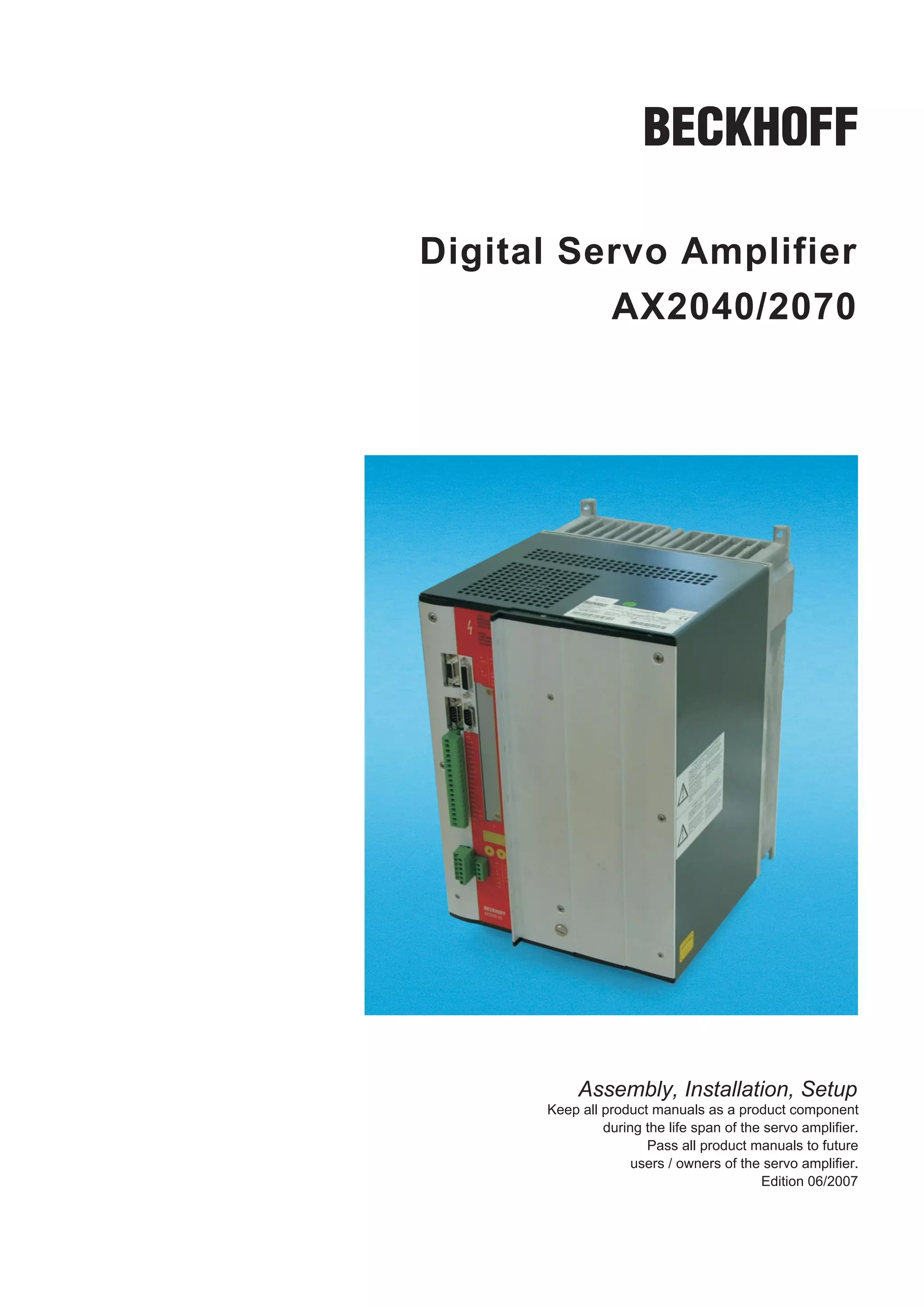
Digital Servo Amplifier
          AX2040/2070


           Assembly, Installation, Setup
      Keep all product manuals as a product component
               during the life span of the servo amplifier.
                      Pass all product manuals to future
                    users / owners of the servo amplifier.
                                          Edition 06/2007
Previous versions :

Edition      Remarks
09/05        First edition
             Chapter 1 updated, motor choke added, DeviceNet, SynqNet and EtherCat expansion cards added, chap-
02/06
             ter 6 restructured, feedback section updated, cross section (awg)
             Part number scheme new, shock-hazard protection new, servo system graphics / different mains supply
             networks expanded&removed, feedback expanded, enc. emulation, switch-on and switch-off behavior ex-
06/07
             panded, AS expanded, accessories removed, DC Bus link expanded, timing diagramm motor brake, dispo-
             sal acc. to WEEE-2002/96/EG, new structure, SynqNet removed, Quickstart integrated, warnings updated


WINDOWS is a registered trademark of Microsoft Corp.
HIPERFACE is a registered trademark of Max Stegmann GmbH
EnDat is a registered trademark of Dr. Johannes Heidenhain GmbH


Technical changes which improve the performance of the equipment may be made without prior notice !
Printed in the Federal Republic of Germany
All rights reserved. No part of this work may be reproduced in any form (by printing, photocopying, microfilm or
any other method) or stored, processed, copied or distributed by electronic means without the written permission of
BECKHOFF.
BECKHOFF                                                                            06/2007                                                                        Contents
                                                                                                                                                                              Page

1         General
    1.1        About this manual . . . . . . . . . . . . . . . . . . . . . . . . . . . . . . . . . . . . . . . . . . . . . . . . . . . . . . . . . . . . . . . . . . . . . . .        7
    1.2        Hints for the online edition (PDF format) . . . . . . . . . . . . . . . . . . . . . . . . . . . . . . . . . . . . . . . . . . . . . . . . . . . . . .                  7
    1.3        Symbols used. . . . . . . . . . . . . . . . . . . . . . . . . . . . . . . . . . . . . . . . . . . . . . . . . . . . . . . . . . . . . . . . . . . . . . . . . . .      7
    1.4        Abbreviations used. . . . . . . . . . . . . . . . . . . . . . . . . . . . . . . . . . . . . . . . . . . . . . . . . . . . . . . . . . . . . . . . . . . . . . .        8
2         Safety
    2.1        Safety Instructions . . . . . . . . . . . . . . . . . . . . . . . . . . . . . . . . . . . . . . . . . . . . . . . . . . . . . . . . . . . . . . . . . . . . . . . 9
    2.2        Use as directed . . . . . . . . . . . . . . . . . . . . . . . . . . . . . . . . . . . . . . . . . . . . . . . . . . . . . . . . . . . . . . . . . . . . . . . . 10
3         Standards
    3.1       European directives and standards . . . . . . . . . . . . . . . . . . . . . . . . . . . . . . . . . . . . . . . . . . . . . . . . . . . . . . . . .                     11
    3.2       American Directives and Standards . . . . . . . . . . . . . . . . . . . . . . . . . . . . . . . . . . . . . . . . . . . . . . . . . . . . . . . . .                     11
    3.3       Asian Directives and Standards . . . . . . . . . . . . . . . . . . . . . . . . . . . . . . . . . . . . . . . . . . . . . . . . . . . . . . . . . . . .                  11
    3.4       Approvals . . . . . . . . . . . . . . . . . . . . . . . . . . . . . . . . . . . . . . . . . . . . . . . . . . . . . . . . . . . . . . . . . . . . . . . . . . . . .     12
          3.4.1     CE - conformance . . . . . . . . . . . . . . . . . . . . . . . . . . . . . . . . . . . . . . . . . . . . . . . . . . . . . . . . . . . . . . . . .                12
          3.4.2     UL and cUL- Conformance . . . . . . . . . . . . . . . . . . . . . . . . . . . . . . . . . . . . . . . . . . . . . . . . . . . . . . . . . .                       12
4         Handling
    4.1        Transport . . . . . . . . . . . . . . . . . . . . . . . . . . . . . . . . . . . . . . . . . . . . . . . . . . . . . . . . . . . . . . . . . . . . . . . . . . . . .    13
    4.2        Packaging . . . . . . . . . . . . . . . . . . . . . . . . . . . . . . . . . . . . . . . . . . . . . . . . . . . . . . . . . . . . . . . . . . . . . . . . . . . .      13
    4.3        Storage . . . . . . . . . . . . . . . . . . . . . . . . . . . . . . . . . . . . . . . . . . . . . . . . . . . . . . . . . . . . . . . . . . . . . . . . . . . . . .    13
    4.4        Maintenance. . . . . . . . . . . . . . . . . . . . . . . . . . . . . . . . . . . . . . . . . . . . . . . . . . . . . . . . . . . . . . . . . . . . . . . . . . .       13
    4.5        Disposal . . . . . . . . . . . . . . . . . . . . . . . . . . . . . . . . . . . . . . . . . . . . . . . . . . . . . . . . . . . . . . . . . . . . . . . . . . . . . .   13
5         Package
    5.1        Package supplied. . . . . . . . . . . . . . . . . . . . . . . . . . . . . . . . . . . . . . . . . . . . . . . . . . . . . . . . . . . . . . . . . . . . . . . 14
    5.2        Nameplate . . . . . . . . . . . . . . . . . . . . . . . . . . . . . . . . . . . . . . . . . . . . . . . . . . . . . . . . . . . . . . . . . . . . . . . . . . . . 14
    5.3        Part number scheme . . . . . . . . . . . . . . . . . . . . . . . . . . . . . . . . . . . . . . . . . . . . . . . . . . . . . . . . . . . . . . . . . . . . 15
6         Technical description
    6.1     The digital servo amplifiers of the series AX2040/2070 . . . . . . . . . . . . . . . . . . . . . . . . . . . . . . . . . . . . . . . . . .                                16
    6.2     Technical data . . . . . . . . . . . . . . . . . . . . . . . . . . . . . . . . . . . . . . . . . . . . . . . . . . . . . . . . . . . . . . . . . . . . . . . . .          18
        6.2.1     Recommended torques . . . . . . . . . . . . . . . . . . . . . . . . . . . . . . . . . . . . . . . . . . . . . . . . . . . . . . . . . . . . .                       19
        6.2.2     Fusing . . . . . . . . . . . . . . . . . . . . . . . . . . . . . . . . . . . . . . . . . . . . . . . . . . . . . . . . . . . . . . . . . . . . . . . . . .          19
        6.2.3     Ambient conditions, ventilation, mounting position. . . . . . . . . . . . . . . . . . . . . . . . . . . . . . . . . . . . . . . . .                                 19
        6.2.4     Conductor cross-sections. . . . . . . . . . . . . . . . . . . . . . . . . . . . . . . . . . . . . . . . . . . . . . . . . . . . . . . . . . . .                     20
    6.3     LED display . . . . . . . . . . . . . . . . . . . . . . . . . . . . . . . . . . . . . . . . . . . . . . . . . . . . . . . . . . . . . . . . . . . . . . . . . . .         20
    6.4     Grounding system . . . . . . . . . . . . . . . . . . . . . . . . . . . . . . . . . . . . . . . . . . . . . . . . . . . . . . . . . . . . . . . . . . . . . .              20
    6.5     Control for motor holding brake . . . . . . . . . . . . . . . . . . . . . . . . . . . . . . . . . . . . . . . . . . . . . . . . . . . . . . . . . . . .                   21
    6.6     Regen circuit . . . . . . . . . . . . . . . . . . . . . . . . . . . . . . . . . . . . . . . . . . . . . . . . . . . . . . . . . . . . . . . . . . . . . . . . . .         22
    6.7     Switch-on and switch-off behavior . . . . . . . . . . . . . . . . . . . . . . . . . . . . . . . . . . . . . . . . . . . . . . . . . . . . . . . . . .                     23
        6.7.1     Behavior in standard operation . . . . . . . . . . . . . . . . . . . . . . . . . . . . . . . . . . . . . . . . . . . . . . . . . . . . . . .                        24
        6.7.2     Behavior in the event of an error (with standard setting) . . . . . . . . . . . . . . . . . . . . . . . . . . . . . . . . . . . .                                   25
    6.8     Stop/Emergency Stop Function to EN 60204. . . . . . . . . . . . . . . . . . . . . . . . . . . . . . . . . . . . . . . . . . . . . . . . . .                               26
        6.8.1     Stop: Standards . . . . . . . . . . . . . . . . . . . . . . . . . . . . . . . . . . . . . . . . . . . . . . . . . . . . . . . . . . . . . . . . . . .               26
        6.8.2     Emergency Stop: Standards . . . . . . . . . . . . . . . . . . . . . . . . . . . . . . . . . . . . . . . . . . . . . . . . . . . . . . . . .                         27
        6.8.3     Implementation of the Stop Category 0 . . . . . . . . . . . . . . . . . . . . . . . . . . . . . . . . . . . . . . . . . . . . . . . . .                             28
        6.8.4     Implementation of the Stop Category 1 . . . . . . . . . . . . . . . . . . . . . . . . . . . . . . . . . . . . . . . . . . . . . . . . .                             29
        6.8.5     Implementation of the Stop Category 2 . . . . . . . . . . . . . . . . . . . . . . . . . . . . . . . . . . . . . . . . . . . . . . . . .                             30
    6.9     Shock-hazard protection . . . . . . . . . . . . . . . . . . . . . . . . . . . . . . . . . . . . . . . . . . . . . . . . . . . . . . . . . . . . . . . . .                 31
        6.9.1     Leakage current . . . . . . . . . . . . . . . . . . . . . . . . . . . . . . . . . . . . . . . . . . . . . . . . . . . . . . . . . . . . . . . . . . .               31
        6.9.2     Residual-current circuit breakers (FI). . . . . . . . . . . . . . . . . . . . . . . . . . . . . . . . . . . . . . . . . . . . . . . . . . .                         31
        6.9.3     Isolating transformers . . . . . . . . . . . . . . . . . . . . . . . . . . . . . . . . . . . . . . . . . . . . . . . . . . . . . . . . . . . . . .                  32


AX2040/2070 Product Manual                                                                                                                                                            3
Contents                                                                          06/2007                                                                      BECKHOFF
                                                                                                                                                                           Page
7         Mechanical Installation
    7.1       Important notes . . . . . . . . . . . . . . . . . . . . . . . . . . . . . . . . . . . . . . . . . . . . . . . . . . . . . . . . . . . . . . . . . . . . . . . .       33
    7.2       Guide to mechanical installation. . . . . . . . . . . . . . . . . . . . . . . . . . . . . . . . . . . . . . . . . . . . . . . . . . . . . . . . . . . .               33
    7.3       Assembly . . . . . . . . . . . . . . . . . . . . . . . . . . . . . . . . . . . . . . . . . . . . . . . . . . . . . . . . . . . . . . . . . . . . . . . . . . . . .    34
    7.4       Dimensions . . . . . . . . . . . . . . . . . . . . . . . . . . . . . . . . . . . . . . . . . . . . . . . . . . . . . . . . . . . . . . . . . . . . . . . . . . .      35
8         Electrical Installation
    8.1     Important Notes . . . . . . . . . . . . . . . . . . . . . . . . . . . . . . . . . . . . . . . . . . . . . . . . . . . . . . . . . . . . . . . . . . . . . . . .         37
    8.2     Guide to electrical installation. . . . . . . . . . . . . . . . . . . . . . . . . . . . . . . . . . . . . . . . . . . . . . . . . . . . . . . . . . . . . .             38
    8.3     Wiring. . . . . . . . . . . . . . . . . . . . . . . . . . . . . . . . . . . . . . . . . . . . . . . . . . . . . . . . . . . . . . . . . . . . . . . . . . . . . . . .   39
        8.3.1     Important notes . . . . . . . . . . . . . . . . . . . . . . . . . . . . . . . . . . . . . . . . . . . . . . . . . . . . . . . . . . . . . . . . . . .             39
        8.3.2     Shielding connection to the front panel . . . . . . . . . . . . . . . . . . . . . . . . . . . . . . . . . . . . . . . . . . . . . . . . .                         40
        8.3.3     Technical data for cables . . . . . . . . . . . . . . . . . . . . . . . . . . . . . . . . . . . . . . . . . . . . . . . . . . . . . . . . . . . .                 41
    8.4     Components of a servo system . . . . . . . . . . . . . . . . . . . . . . . . . . . . . . . . . . . . . . . . . . . . . . . . . . . . . . . . . . . .                    42
    8.5     Block diagram . . . . . . . . . . . . . . . . . . . . . . . . . . . . . . . . . . . . . . . . . . . . . . . . . . . . . . . . . . . . . . . . . . . . . . . . .         43
    8.6     Pin assignments. . . . . . . . . . . . . . . . . . . . . . . . . . . . . . . . . . . . . . . . . . . . . . . . . . . . . . . . . . . . . . . . . . . . . . . .          44
    8.7     Connection diagram (overview) . . . . . . . . . . . . . . . . . . . . . . . . . . . . . . . . . . . . . . . . . . . . . . . . . . . . . . . . . . . .                   45
    8.8     Power supply . . . . . . . . . . . . . . . . . . . . . . . . . . . . . . . . . . . . . . . . . . . . . . . . . . . . . . . . . . . . . . . . . . . . . . . . . .        46
        8.8.1     Connection to various mains supply networks . . . . . . . . . . . . . . . . . . . . . . . . . . . . . . . . . . . . . . . . . . . .                               46
        8.8.2     Mains supply connection (X0) . . . . . . . . . . . . . . . . . . . . . . . . . . . . . . . . . . . . . . . . . . . . . . . . . . . . . . . .                      47
        8.8.3     24V auxiliary supply (X4) . . . . . . . . . . . . . . . . . . . . . . . . . . . . . . . . . . . . . . . . . . . . . . . . . . . . . . . . . . . .                 47
        8.8.4     DC bus link (X0). . . . . . . . . . . . . . . . . . . . . . . . . . . . . . . . . . . . . . . . . . . . . . . . . . . . . . . . . . . . . . . . . . .             47
    8.9     Motor connection with brake (X0, X4) . . . . . . . . . . . . . . . . . . . . . . . . . . . . . . . . . . . . . . . . . . . . . . . . . . . . . . .                      48
    8.10 External regen resistor (X0) . . . . . . . . . . . . . . . . . . . . . . . . . . . . . . . . . . . . . . . . . . . . . . . . . . . . . . . . . . . . . . .                 48
    8.11 Feedback . . . . . . . . . . . . . . . . . . . . . . . . . . . . . . . . . . . . . . . . . . . . . . . . . . . . . . . . . . . . . . . . . . . . . . . . . . . . .         49
        8.11.1    Resolver (X2) . . . . . . . . . . . . . . . . . . . . . . . . . . . . . . . . . . . . . . . . . . . . . . . . . . . . . . . . . . . . . . . . . . . . .           50
        8.11.2    Sine encoder with BISS (X1) . . . . . . . . . . . . . . . . . . . . . . . . . . . . . . . . . . . . . . . . . . . . . . . . . . . . . . . . .                     51
        8.11.3    Sine Encoder with EnDat 2.1 or HIPERFACE (X1) . . . . . . . . . . . . . . . . . . . . . . . . . . . . . . . . . . . . . . . .                                     52
        8.11.4    Sine Encoder without data channel (X1) . . . . . . . . . . . . . . . . . . . . . . . . . . . . . . . . . . . . . . . . . . . . . . . .                            53
        8.11.5    Incremental or sine encoder with hall sensors (X1) . . . . . . . . . . . . . . . . . . . . . . . . . . . . . . . . . . . . . . . .                                54
        8.11.6    Incremental Encoder (X5) . . . . . . . . . . . . . . . . . . . . . . . . . . . . . . . . . . . . . . . . . . . . . . . . . . . . . . . . . . .                    55
    8.12 Electronic Gearing, Master-slave operation . . . . . . . . . . . . . . . . . . . . . . . . . . . . . . . . . . . . . . . . . . . . . . . . . . .                           56
        8.12.1    Connection to a AX20 master, 5 V signal level (X5). . . . . . . . . . . . . . . . . . . . . . . . . . . . . . . . . . . . . . . .                                 57
        8.12.2    Connection to incremental encoder master with 24 V signal level (X3) . . . . . . . . . . . . . . . . . . . . . . . . .                                            57
        8.12.3    Connection to a sine-cosine encoder master (X1) . . . . . . . . . . . . . . . . . . . . . . . . . . . . . . . . . . . . . . . . .                                 58
        8.12.4    Connection to a SSI encoder (X5) . . . . . . . . . . . . . . . . . . . . . . . . . . . . . . . . . . . . . . . . . . . . . . . . . . . . .                        59
        8.12.5    Connection to stepper-motor controllers (step and direction). . . . . . . . . . . . . . . . . . . . . . . . . . . . . . . . .                                     59
            8.12.5.1 Step/Direction with 5 V signal level (X5) . . . . . . . . . . . . . . . . . . . . . . . . . . . . . . . . . . . . . . . . . . . . .                            60
            8.12.5.2 Step/Direction with 24 V signal level (X3) . . . . . . . . . . . . . . . . . . . . . . . . . . . . . . . . . . . . . . . . . . . .                             60
    8.13 Encoder emulations . . . . . . . . . . . . . . . . . . . . . . . . . . . . . . . . . . . . . . . . . . . . . . . . . . . . . . . . . . . . . . . . . . . . .               61
        8.13.1    Incremental encoder output - A quad B (X5) . . . . . . . . . . . . . . . . . . . . . . . . . . . . . . . . . . . . . . . . . . . . .                              61
        8.13.2    SSI output (X5) . . . . . . . . . . . . . . . . . . . . . . . . . . . . . . . . . . . . . . . . . . . . . . . . . . . . . . . . . . . . . . . . . . .             62
    8.14 Digital and analog inputs and outputs . . . . . . . . . . . . . . . . . . . . . . . . . . . . . . . . . . . . . . . . . . . . . . . . . . . . . . .                        63
        8.14.1    Analog inputs (X3) . . . . . . . . . . . . . . . . . . . . . . . . . . . . . . . . . . . . . . . . . . . . . . . . . . . . . . . . . . . . . . . . .              63
        8.14.2    Analog outputs (X3) . . . . . . . . . . . . . . . . . . . . . . . . . . . . . . . . . . . . . . . . . . . . . . . . . . . . . . . . . . . . . . . .               64
        8.14.3    Digital inputs (X3). . . . . . . . . . . . . . . . . . . . . . . . . . . . . . . . . . . . . . . . . . . . . . . . . . . . . . . . . . . . . . . . . .            65
        8.14.4    Digital outputs (X3) . . . . . . . . . . . . . . . . . . . . . . . . . . . . . . . . . . . . . . . . . . . . . . . . . . . . . . . . . . . . . . . .              66
    8.15 RS232 interface, PC connection (X6) . . . . . . . . . . . . . . . . . . . . . . . . . . . . . . . . . . . . . . . . . . . . . . . . . . . . . . .                          67
    8.16 CANopen interface (X6) . . . . . . . . . . . . . . . . . . . . . . . . . . . . . . . . . . . . . . . . . . . . . . . . . . . . . . . . . . . . . . . . . .                 68
    8.17 Restart lock -AS- . . . . . . . . . . . . . . . . . . . . . . . . . . . . . . . . . . . . . . . . . . . . . . . . . . . . . . . . . . . . . . . . . . . . . . .            69
        8.17.1    Safety instructions . . . . . . . . . . . . . . . . . . . . . . . . . . . . . . . . . . . . . . . . . . . . . . . . . . . . . . . . . . . . . . . . .             69
        8.17.2    Use as directed . . . . . . . . . . . . . . . . . . . . . . . . . . . . . . . . . . . . . . . . . . . . . . . . . . . . . . . . . . . . . . . . . . .             70
        8.17.3    Block diagram . . . . . . . . . . . . . . . . . . . . . . . . . . . . . . . . . . . . . . . . . . . . . . . . . . . . . . . . . . . . . . . . . . . .             70
        8.17.4    Functional description . . . . . . . . . . . . . . . . . . . . . . . . . . . . . . . . . . . . . . . . . . . . . . . . . . . . . . . . . . . . . .                71
        8.17.5    Signal diagram (sequence) . . . . . . . . . . . . . . . . . . . . . . . . . . . . . . . . . . . . . . . . . . . . . . . . . . . . . . . . . .                     71
        8.17.6    Functional test . . . . . . . . . . . . . . . . . . . . . . . . . . . . . . . . . . . . . . . . . . . . . . . . . . . . . . . . . . . . . . . . . . . .           72
        8.17.7    Connection diagram (principle) . . . . . . . . . . . . . . . . . . . . . . . . . . . . . . . . . . . . . . . . . . . . . . . . . . . . . . .                      72
        8.17.8    Application example category 1 according to EN 954-1. . . . . . . . . . . . . . . . . . . . . . . . . . . . . . . . . . . . .                                     73
            8.17.8.1 Control circuit . . . . . . . . . . . . . . . . . . . . . . . . . . . . . . . . . . . . . . . . . . . . . . . . . . . . . . . . . . . . . . . . .              73
            8.17.8.2 Mains supply circuit . . . . . . . . . . . . . . . . . . . . . . . . . . . . . . . . . . . . . . . . . . . . . . . . . . . . . . . . . . . . .                 73
        8.17.9    Application example category 3 according to EN 954-1. . . . . . . . . . . . . . . . . . . . . . . . . . . . . . . . . . . . .                                     74


4                                                                                                               AX2040/2070 Product Manual
BECKHOFF                                                                          06/2007                                                                     Contents
                                                                                                                                                                        Page
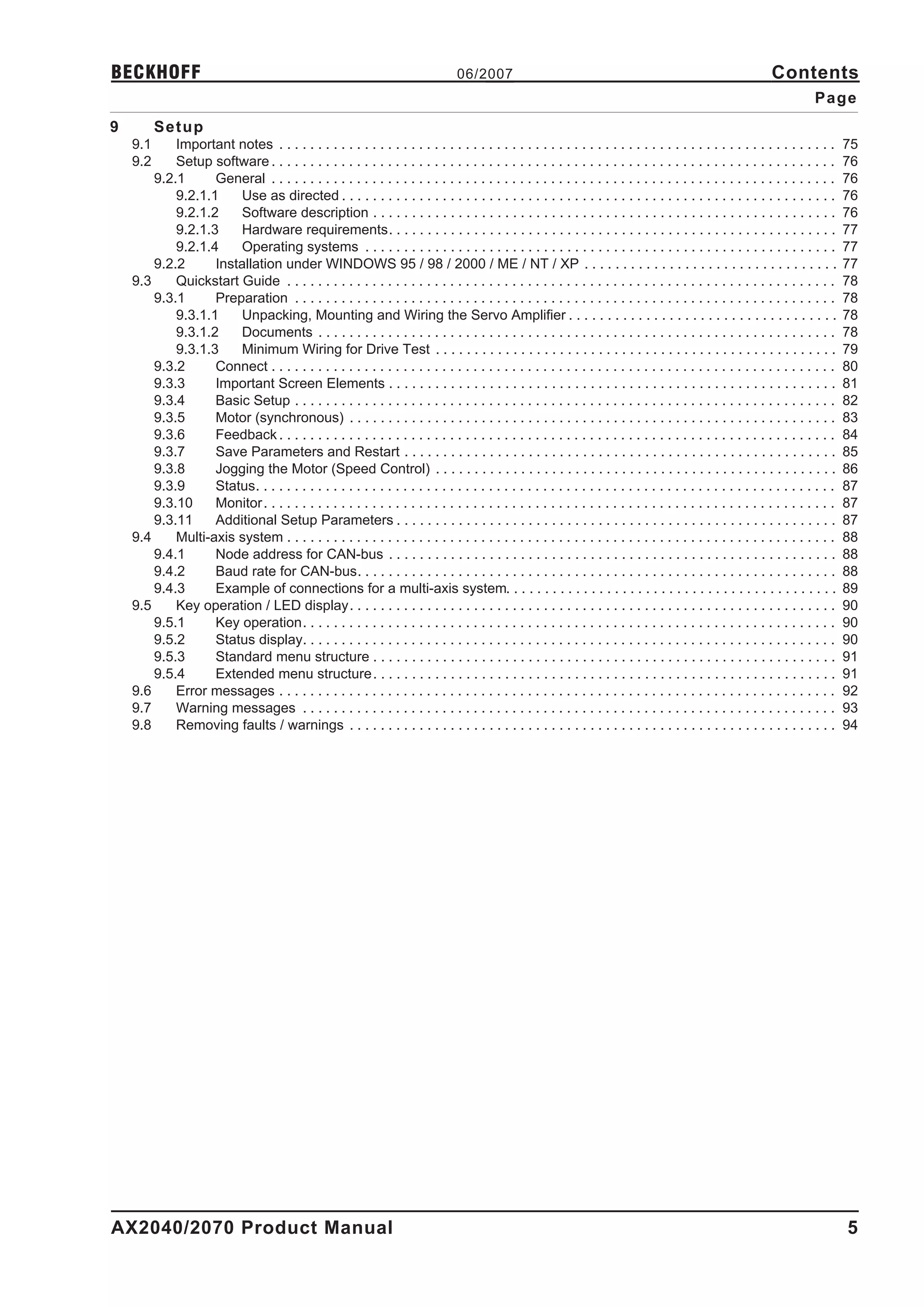
9         Setup
    9.1     Important notes . . . . . . . . . . . . . . . . . . . . . . . . . . . . . . . . . . . . . . . . . . . . . . . . . . . . . . . . . . . . . . . . . . . . . . . .      75
    9.2     Setup software . . . . . . . . . . . . . . . . . . . . . . . . . . . . . . . . . . . . . . . . . . . . . . . . . . . . . . . . . . . . . . . . . . . . . . . . .     76
        9.2.1      General . . . . . . . . . . . . . . . . . . . . . . . . . . . . . . . . . . . . . . . . . . . . . . . . . . . . . . . . . . . . . . . . . . . . . . . . .     76
            9.2.1.1    Use as directed . . . . . . . . . . . . . . . . . . . . . . . . . . . . . . . . . . . . . . . . . . . . . . . . . . . . . . . . . . . . . . . .           76
            9.2.1.2    Software description . . . . . . . . . . . . . . . . . . . . . . . . . . . . . . . . . . . . . . . . . . . . . . . . . . . . . . . . . . . .              76
            9.2.1.3    Hardware requirements. . . . . . . . . . . . . . . . . . . . . . . . . . . . . . . . . . . . . . . . . . . . . . . . . . . . . . . . . .                  77
            9.2.1.4    Operating systems . . . . . . . . . . . . . . . . . . . . . . . . . . . . . . . . . . . . . . . . . . . . . . . . . . . . . . . . . . . . .               77
        9.2.2      Installation under WINDOWS 95 / 98 / 2000 / ME / NT / XP . . . . . . . . . . . . . . . . . . . . . . . . . . . . . . . . .                                    77
    9.3     Quickstart Guide . . . . . . . . . . . . . . . . . . . . . . . . . . . . . . . . . . . . . . . . . . . . . . . . . . . . . . . . . . . . . . . . . . . . . . .       78
        9.3.1      Preparation . . . . . . . . . . . . . . . . . . . . . . . . . . . . . . . . . . . . . . . . . . . . . . . . . . . . . . . . . . . . . . . . . . . . . .       78
            9.3.1.1    Unpacking, Mounting and Wiring the Servo Amplifier . . . . . . . . . . . . . . . . . . . . . . . . . . . . . . . . . . .                                  78
            9.3.1.2    Documents . . . . . . . . . . . . . . . . . . . . . . . . . . . . . . . . . . . . . . . . . . . . . . . . . . . . . . . . . . . . . . . . . . .           78
            9.3.1.3    Minimum Wiring for Drive Test . . . . . . . . . . . . . . . . . . . . . . . . . . . . . . . . . . . . . . . . . . . . . . . . . . . .                     79
        9.3.2      Connect . . . . . . . . . . . . . . . . . . . . . . . . . . . . . . . . . . . . . . . . . . . . . . . . . . . . . . . . . . . . . . . . . . . . . . . . .     80
        9.3.3      Important Screen Elements . . . . . . . . . . . . . . . . . . . . . . . . . . . . . . . . . . . . . . . . . . . . . . . . . . . . . . . . . .                 81
        9.3.4      Basic Setup . . . . . . . . . . . . . . . . . . . . . . . . . . . . . . . . . . . . . . . . . . . . . . . . . . . . . . . . . . . . . . . . . . . . . .       82
        9.3.5      Motor (synchronous) . . . . . . . . . . . . . . . . . . . . . . . . . . . . . . . . . . . . . . . . . . . . . . . . . . . . . . . . . . . . . . .             83
        9.3.6      Feedback . . . . . . . . . . . . . . . . . . . . . . . . . . . . . . . . . . . . . . . . . . . . . . . . . . . . . . . . . . . . . . . . . . . . . . . .      84
        9.3.7      Save Parameters and Restart . . . . . . . . . . . . . . . . . . . . . . . . . . . . . . . . . . . . . . . . . . . . . . . . . . . . . . . .                   85
        9.3.8      Jogging the Motor (Speed Control) . . . . . . . . . . . . . . . . . . . . . . . . . . . . . . . . . . . . . . . . . . . . . . . . . . . .                     86
        9.3.9      Status. . . . . . . . . . . . . . . . . . . . . . . . . . . . . . . . . . . . . . . . . . . . . . . . . . . . . . . . . . . . . . . . . . . . . . . . . . .   87
        9.3.10     Monitor . . . . . . . . . . . . . . . . . . . . . . . . . . . . . . . . . . . . . . . . . . . . . . . . . . . . . . . . . . . . . . . . . . . . . . . . . .   87
        9.3.11     Additional Setup Parameters . . . . . . . . . . . . . . . . . . . . . . . . . . . . . . . . . . . . . . . . . . . . . . . . . . . . . . . . .                 87
    9.4     Multi-axis system . . . . . . . . . . . . . . . . . . . . . . . . . . . . . . . . . . . . . . . . . . . . . . . . . . . . . . . . . . . . . . . . . . . . . . .      88
        9.4.1      Node address for CAN-bus . . . . . . . . . . . . . . . . . . . . . . . . . . . . . . . . . . . . . . . . . . . . . . . . . . . . . . . . . .                  88
        9.4.2      Baud rate for CAN-bus. . . . . . . . . . . . . . . . . . . . . . . . . . . . . . . . . . . . . . . . . . . . . . . . . . . . . . . . . . . . . .              88
        9.4.3      Example of connections for a multi-axis system. . . . . . . . . . . . . . . . . . . . . . . . . . . . . . . . . . . . . . . . . . .                           89
    9.5     Key operation / LED display. . . . . . . . . . . . . . . . . . . . . . . . . . . . . . . . . . . . . . . . . . . . . . . . . . . . . . . . . . . . . . .             90
        9.5.1      Key operation. . . . . . . . . . . . . . . . . . . . . . . . . . . . . . . . . . . . . . . . . . . . . . . . . . . . . . . . . . . . . . . . . . . . .        90
        9.5.2      Status display. . . . . . . . . . . . . . . . . . . . . . . . . . . . . . . . . . . . . . . . . . . . . . . . . . . . . . . . . . . . . . . . . . . . .       90
        9.5.3      Standard menu structure . . . . . . . . . . . . . . . . . . . . . . . . . . . . . . . . . . . . . . . . . . . . . . . . . . . . . . . . . . . .               91
        9.5.4      Extended menu structure . . . . . . . . . . . . . . . . . . . . . . . . . . . . . . . . . . . . . . . . . . . . . . . . . . . . . . . . . . . .               91
    9.6     Error messages . . . . . . . . . . . . . . . . . . . . . . . . . . . . . . . . . . . . . . . . . . . . . . . . . . . . . . . . . . . . . . . . . . . . . . . .       92
    9.7     Warning messages . . . . . . . . . . . . . . . . . . . . . . . . . . . . . . . . . . . . . . . . . . . . . . . . . . . . . . . . . . . . . . . . . . . . .           93
    9.8     Removing faults / warnings . . . . . . . . . . . . . . . . . . . . . . . . . . . . . . . . . . . . . . . . . . . . . . . . . . . . . . . . . . . . . . .             94


AX2040/2070 Product Manual                                                                                                                                                       5
Contents                                                                           06/2007                                                                     BECKHOFF
                                                                                                                                                                           Page
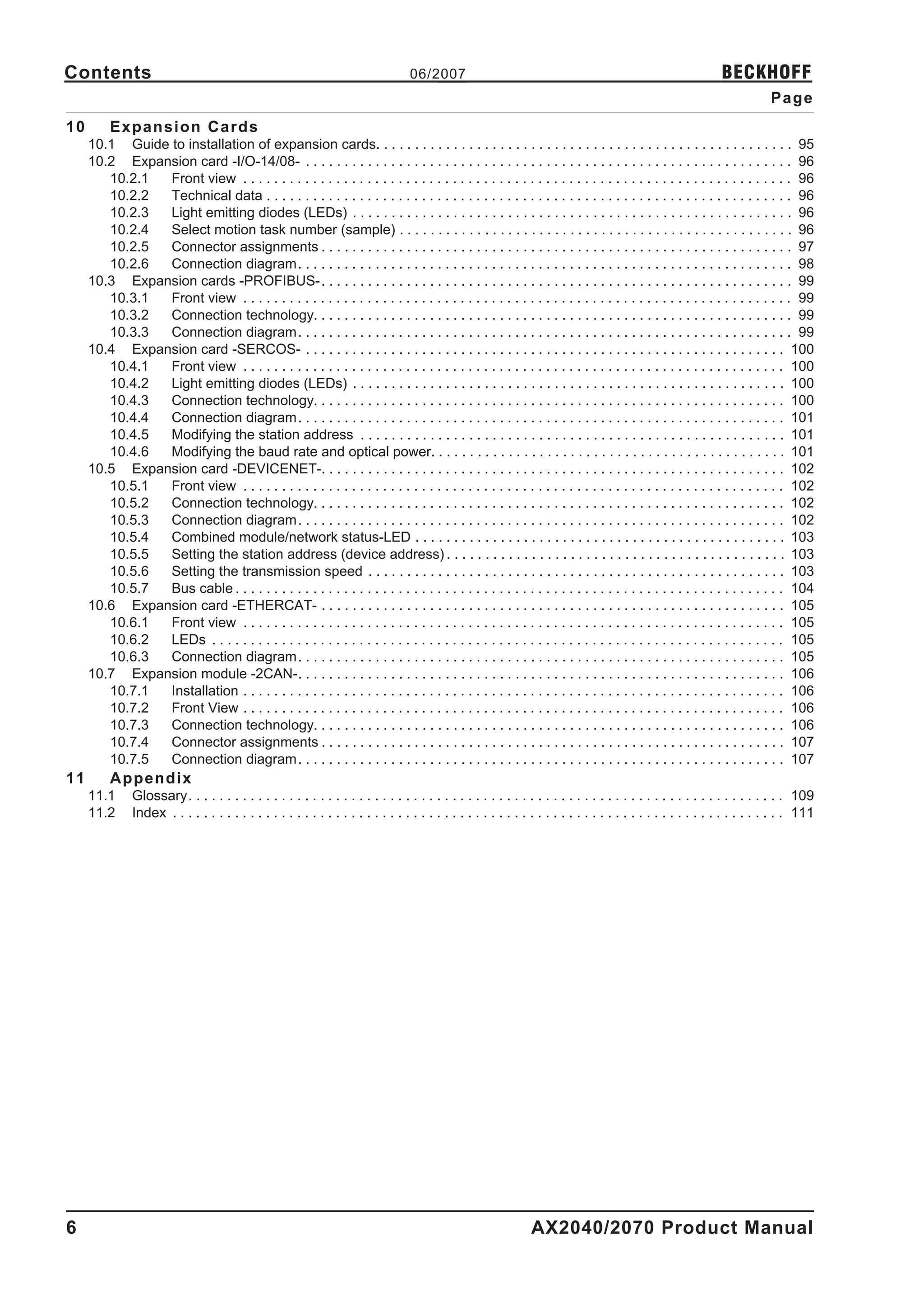
10        Expansion Cards
     10.1 Guide to installation of expansion cards. . . . . . . . . . . . . . . . . . . . . . . . . . . . . . . . . . . . . . . . . . . . . . . . . . . . . . 95
     10.2 Expansion card -I/O-14/08- . . . . . . . . . . . . . . . . . . . . . . . . . . . . . . . . . . . . . . . . . . . . . . . . . . . . . . . . . . . . . . . 96
        10.2.1  Front view . . . . . . . . . . . . . . . . . . . . . . . . . . . . . . . . . . . . . . . . . . . . . . . . . . . . . . . . . . . . . . . . . . . . . . . 96
        10.2.2  Technical data . . . . . . . . . . . . . . . . . . . . . . . . . . . . . . . . . . . . . . . . . . . . . . . . . . . . . . . . . . . . . . . . . . . . 96
        10.2.3  Light emitting diodes (LEDs) . . . . . . . . . . . . . . . . . . . . . . . . . . . . . . . . . . . . . . . . . . . . . . . . . . . . . . . . . 96
        10.2.4  Select motion task number (sample) . . . . . . . . . . . . . . . . . . . . . . . . . . . . . . . . . . . . . . . . . . . . . . . . . . . 96
        10.2.5  Connector assignments . . . . . . . . . . . . . . . . . . . . . . . . . . . . . . . . . . . . . . . . . . . . . . . . . . . . . . . . . . . . . 97
        10.2.6  Connection diagram. . . . . . . . . . . . . . . . . . . . . . . . . . . . . . . . . . . . . . . . . . . . . . . . . . . . . . . . . . . . . . . . 98
     10.3 Expansion cards -PROFIBUS-. . . . . . . . . . . . . . . . . . . . . . . . . . . . . . . . . . . . . . . . . . . . . . . . . . . . . . . . . . . . . 99
        10.3.1  Front view . . . . . . . . . . . . . . . . . . . . . . . . . . . . . . . . . . . . . . . . . . . . . . . . . . . . . . . . . . . . . . . . . . . . . . . 99
        10.3.2  Connection technology. . . . . . . . . . . . . . . . . . . . . . . . . . . . . . . . . . . . . . . . . . . . . . . . . . . . . . . . . . . . . . 99
        10.3.3  Connection diagram. . . . . . . . . . . . . . . . . . . . . . . . . . . . . . . . . . . . . . . . . . . . . . . . . . . . . . . . . . . . . . . . 99
     10.4 Expansion card -SERCOS- . . . . . . . . . . . . . . . . . . . . . . . . . . . . . . . . . . . . . . . . . . . . . . . . . . . . . . . . . . . . . . 100
        10.4.1  Front view . . . . . . . . . . . . . . . . . . . . . . . . . . . . . . . . . . . . . . . . . . . . . . . . . . . . . . . . . . . . . . . . . . . . . . 100
        10.4.2  Light emitting diodes (LEDs) . . . . . . . . . . . . . . . . . . . . . . . . . . . . . . . . . . . . . . . . . . . . . . . . . . . . . . . . 100
        10.4.3  Connection technology. . . . . . . . . . . . . . . . . . . . . . . . . . . . . . . . . . . . . . . . . . . . . . . . . . . . . . . . . . . . . 100
        10.4.4  Connection diagram. . . . . . . . . . . . . . . . . . . . . . . . . . . . . . . . . . . . . . . . . . . . . . . . . . . . . . . . . . . . . . . 101
        10.4.5  Modifying the station address . . . . . . . . . . . . . . . . . . . . . . . . . . . . . . . . . . . . . . . . . . . . . . . . . . . . . . . 101
        10.4.6  Modifying the baud rate and optical power. . . . . . . . . . . . . . . . . . . . . . . . . . . . . . . . . . . . . . . . . . . . . . 101
     10.5 Expansion card -DEVICENET-. . . . . . . . . . . . . . . . . . . . . . . . . . . . . . . . . . . . . . . . . . . . . . . . . . . . . . . . . . . . 102
        10.5.1  Front view . . . . . . . . . . . . . . . . . . . . . . . . . . . . . . . . . . . . . . . . . . . . . . . . . . . . . . . . . . . . . . . . . . . . . . 102
        10.5.2  Connection technology. . . . . . . . . . . . . . . . . . . . . . . . . . . . . . . . . . . . . . . . . . . . . . . . . . . . . . . . . . . . . 102
        10.5.3  Connection diagram. . . . . . . . . . . . . . . . . . . . . . . . . . . . . . . . . . . . . . . . . . . . . . . . . . . . . . . . . . . . . . . 102
        10.5.4  Combined module/network status-LED . . . . . . . . . . . . . . . . . . . . . . . . . . . . . . . . . . . . . . . . . . . . . . . . 103
        10.5.5  Setting the station address (device address) . . . . . . . . . . . . . . . . . . . . . . . . . . . . . . . . . . . . . . . . . . . . 103
        10.5.6  Setting the transmission speed . . . . . . . . . . . . . . . . . . . . . . . . . . . . . . . . . . . . . . . . . . . . . . . . . . . . . . 103
        10.5.7  Bus cable . . . . . . . . . . . . . . . . . . . . . . . . . . . . . . . . . . . . . . . . . . . . . . . . . . . . . . . . . . . . . . . . . . . . . . . 104
     10.6 Expansion card -ETHERCAT- . . . . . . . . . . . . . . . . . . . . . . . . . . . . . . . . . . . . . . . . . . . . . . . . . . . . . . . . . . . . 105
        10.6.1  Front view . . . . . . . . . . . . . . . . . . . . . . . . . . . . . . . . . . . . . . . . . . . . . . . . . . . . . . . . . . . . . . . . . . . . . . 105
        10.6.2  LEDs . . . . . . . . . . . . . . . . . . . . . . . . . . . . . . . . . . . . . . . . . . . . . . . . . . . . . . . . . . . . . . . . . . . . . . . . . . 105
        10.6.3  Connection diagram. . . . . . . . . . . . . . . . . . . . . . . . . . . . . . . . . . . . . . . . . . . . . . . . . . . . . . . . . . . . . . . 105
     10.7 Expansion module -2CAN-. . . . . . . . . . . . . . . . . . . . . . . . . . . . . . . . . . . . . . . . . . . . . . . . . . . . . . . . . . . . . . . 106
        10.7.1  Installation . . . . . . . . . . . . . . . . . . . . . . . . . . . . . . . . . . . . . . . . . . . . . . . . . . . . . . . . . . . . . . . . . . . . . . 106
        10.7.2  Front View . . . . . . . . . . . . . . . . . . . . . . . . . . . . . . . . . . . . . . . . . . . . . . . . . . . . . . . . . . . . . . . . . . . . . . 106
        10.7.3  Connection technology. . . . . . . . . . . . . . . . . . . . . . . . . . . . . . . . . . . . . . . . . . . . . . . . . . . . . . . . . . . . . 106
        10.7.4  Connector assignments . . . . . . . . . . . . . . . . . . . . . . . . . . . . . . . . . . . . . . . . . . . . . . . . . . . . . . . . . . . . 107
        10.7.5  Connection diagram. . . . . . . . . . . . . . . . . . . . . . . . . . . . . . . . . . . . . . . . . . . . . . . . . . . . . . . . . . . . . . . 107
11        Appendix
     11.1      Glossary. . . . . . . . . . . . . . . . . . . . . . . . . . . . . . . . . . . . . . . . . . . . . . . . . . . . . . . . . . . . . . . . . . . . . . . . . . . . . 109
     11.2      Index . . . . . . . . . . . . . . . . . . . . . . . . . . . . . . . . . . . . . . . . . . . . . . . . . . . . . . . . . . . . . . . . . . . . . . . . . . . . . . . 111


6                                                                                                               AX2040/2070 Product Manual
BECKHOFF                                          06/2007                                            General

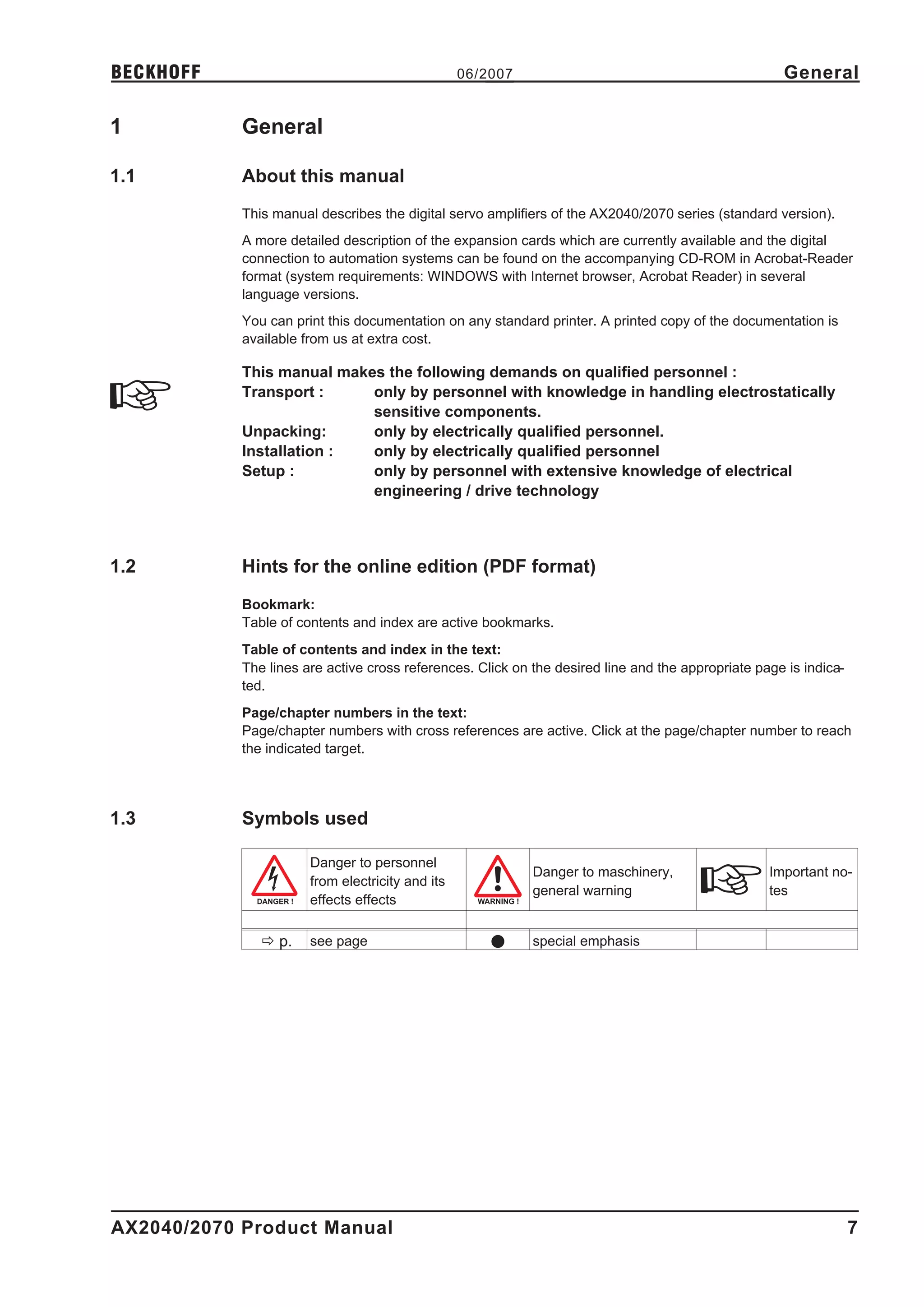
1           General

1.1         About this manual
            This manual describes the digital servo amplifiers of the AX2040/2070 series (standard version).
            A more detailed description of the expansion cards which are currently available and the digital
            connection to automation systems can be found on the accompanying CD-ROM in Acrobat-Reader
            format (system requirements: WINDOWS with Internet browser, Acrobat Reader) in several
            language versions.
            You can print this documentation on any standard printer. A printed copy of the documentation is
            available from us at extra cost.

            This manual makes the following demands on qualified personnel :
            Transport :     only by personnel with knowledge in handling electrostatically
                            sensitive components.
            Unpacking:      only by electrically qualified personnel.
            Installation :  only by electrically qualified personnel
            Setup :         only by personnel with extensive knowledge of electrical
                            engineering / drive technology


1.2         Hints for the online edition (PDF format)
            Bookmark:
            Table of contents and index are active bookmarks.
            Table of contents and index in the text:
            The lines are active cross references. Click on the desired line and the appropriate page is indica-
            ted.
            Page/chapter numbers in the text:
            Page/chapter numbers with cross references are active. Click at the page/chapter number to reach
            the indicated target.


1.3         Symbols used

                       Danger to personnel
                                                            Danger to maschinery,                  Important no-
                       from electricity and its
                                                            general warning                        tes
                       effects effects

               ð p.    see page                       l     special emphasis


AX2040/2070 Product Manual                                                                                         7
General                                     06/2007                                  BECKHOFF

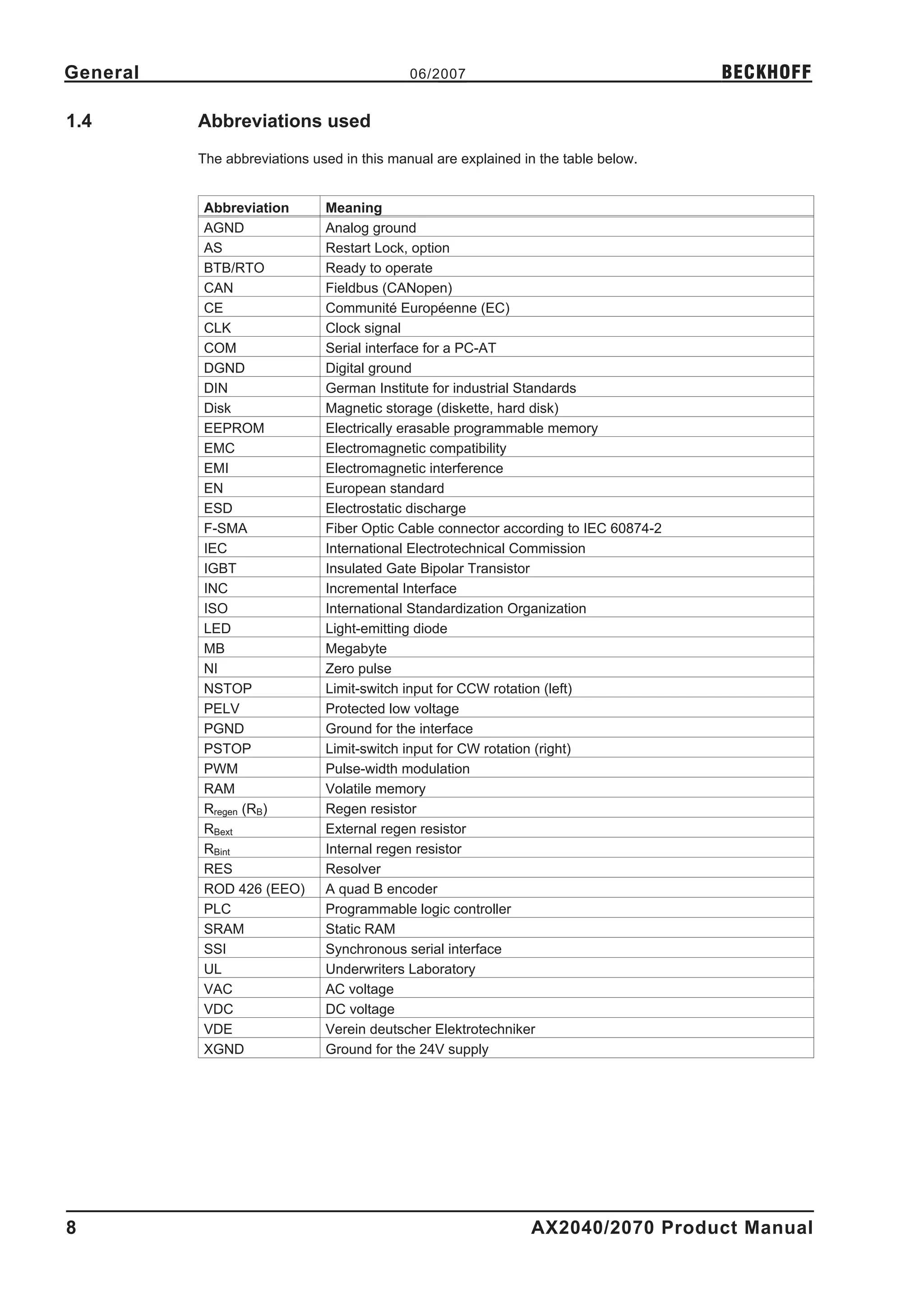
1.4       Abbreviations used
          The abbreviations used in this manual are explained in the table below.


          Abbreviation        Meaning
          AGND                Analog ground
          AS                  Restart Lock, option
          BTB/RTO             Ready to operate
          CAN                 Fieldbus (CANopen)
          CE                  Communité Européenne (EC)
          CLK                 Clock signal
          COM                 Serial interface for a PC-AT
          DGND                Digital ground
          DIN                 German Institute for industrial Standards
          Disk                Magnetic storage (diskette, hard disk)
          EEPROM              Electrically erasable programmable memory
          EMC                 Electromagnetic compatibility
          EMI                 Electromagnetic interference
          EN                  European standard
          ESD                 Electrostatic discharge
          F-SMA               Fiber Optic Cable connector according to IEC 60874-2
          IEC                 International Electrotechnical Commission
          IGBT                Insulated Gate Bipolar Transistor
          INC                 Incremental Interface
          ISO                 International Standardization Organization
          LED                 Light-emitting diode
          MB                  Megabyte
          NI                  Zero pulse
          NSTOP               Limit-switch input for CCW rotation (left)
          PELV                Protected low voltage
          PGND                Ground for the interface
          PSTOP               Limit-switch input for CW rotation (right)
          PWM                 Pulse-width modulation
          RAM                 Volatile memory
          Rregen (RB)         Regen resistor
          RBext               External regen resistor
          RBint               Internal regen resistor
          RES                 Resolver
          ROD 426 (EEO)       A quad B encoder
          PLC                 Programmable logic controller
          SRAM                Static RAM
          SSI                 Synchronous serial interface
          UL                  Underwriters Laboratory
          VAC                 AC voltage
          VDC                 DC voltage
          VDE                 Verein deutscher Elektrotechniker
          XGND                Ground for the 24V supply


8                                                              AX2040/2070 Product Manual
BECKHOFF                                   06/2007                                                 Safety

2           Safety

2.1         Safety Instructions
            l   Only properly qualified personnel are permitted to perform activities such as trans-
                port, installation, setup and maintenance. Properly qualified persons are those who
                are familiar with the transport, assembly, installation, setup and operation of the pro-
                duct, and who have the appropriate qualifications for their job. The qualified person-
                nel must know and observe:
                        IEC 60364 or DIN VDE 0100
                        IEC 60664 or DIN VDE 0110
                        national accident prevention regulations or BGV A3
            l   Read this documentation before carrying out installation and setup. Incorrect hand-
                ling of the servo amplifier can lead to personal injury or material damage. It is vital
                that you keep to the technical data and information on connection requirements (on
                the nameplate and in the documentation).
            l   The servo amplifiers contain electrostatically sensitive components which may be
                damaged by incorrect handling. Ground yourself before touching the servo amplifier
                by touching any unpainted metal surface. Avoid contact with highly insulating mater-
                ials (artificial fabrics, plastic film etc.). Place the servo amplifier on a conductive sur-
                face.


            l   The manufacturer of the machine must produce a hazard analysis for the machine
                and take appropriate measures to ensure that unforeseen movements do not result in
                personal injury or material damage.
            l   Do not open or touch the equipment during operation. Keep all covers and cabinet
                doors closed during operation. Touching the equipment is allowed during installation
                and commissioning for properly qualified persons only. Otherwise, there are deadly
                hazards, with the possibility of death, severe injury or material damage.
                —     During operation, servo amplifiers may have uncovered live
                      components, depending on their level of enclosure protection.
                —     Control and power connections may be live, even though the
                      motor is not rotating.
                —     Servo amplifiers may have hot surfaces during operation.
                      Surface can reach temperatures above 80°C.
            l   Never undo any electrical connections to the servo amplifier while it is live. There is a
                danger of electrical arcing with damage to contacts and personal injury.
                Wait at least five minutes after disconnecting the servo amplifier from the main
                supply power before touching potentially live sections of the equipment (e.g. con-
                tacts) or undoing any connections. Capacitors can still have dangerous voltages pre-
                sent up to five minutes after switching off the supply power. To be sure, measure the
                voltage in the DC Bus link and wait until it has fallen below 40V. Safety instructions


AX2040/2070 Product Manual                                                                                 9
Safety                                   06/2007                                            BECKHOFF

2.2      Use as directed
         l    The servo amplifiers are components which are built into electrical equipment or machines,
              and can only be used as integral components of such equipment.
         l    The manufacturer of the machine must generate a hazard analysis for the machine, and
              take appropriate measures to ensure that unforeseen movements cannot cause injury or
              damage to any person or property.
         l    The AX2040/2070 family of servo amplifiers can be connected directly to symmetrically eart-
              hed(grounded) three-phase industrial mains supply networks [TN-system, TT-system with
              earthed(grounded) neutral point, not more than 5000rms symmetrical amperes, 480VAC
              maximum] when protected by fuses type Fusetron FRS-R-50 for AX20 640 or FRS-R-80
              class RK5 for AX20 670, manufactured by Bussman, or equivalent, 480VAC min.

         The use of external mains chokes and mains filters is required.

         l    The servo amplifiers must not be operated directly on power supply networks >230V without
              an earth (ground) or with an asymmetrical earth (ground).
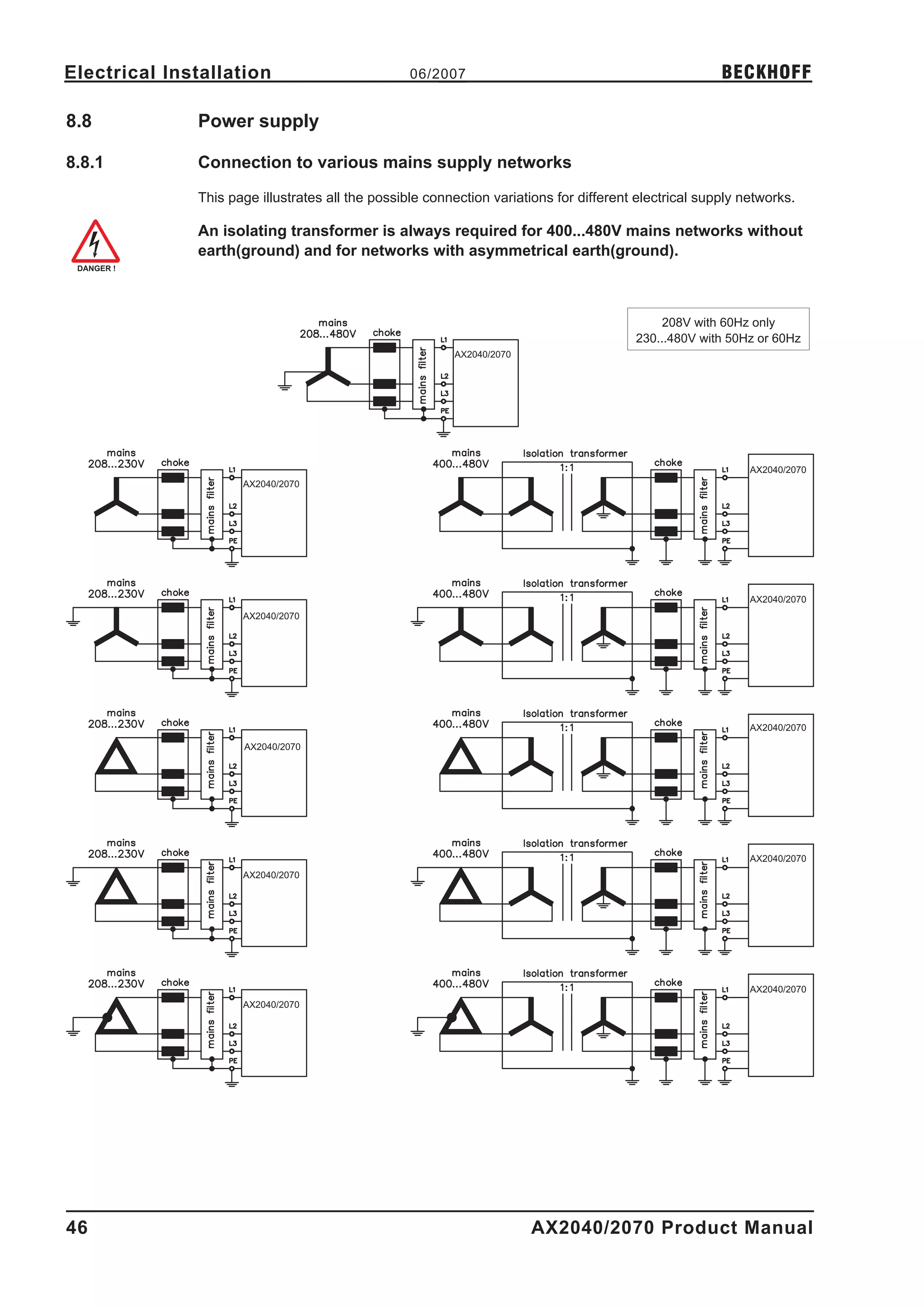
              Connection to other mains supply networks ð p. 46.
         l    Periodic overvoltages between outer conductor (L1, L2, L3) and housing of the servo ampli-
              fier may not exceed 1000V (peak value).
              Transient overvoltages (< 50µs) between the outer conductors may not exceed 1000V.
              Transient overvoltages (< 50µs) between outer conductors and housing may not exceed
              2000V.
         l    The regen resistors have to be protected by fuses type Limitron KLM, rated for 500VAC/DC
         l    The AX2040/2070 family of servo amplifiers is only intended to drive specific brushless syn-
              chronous servomotors with closed-loop control of torque, speed and/or position. The rated
              voltage of the motors must be at least as high as the DC bus link voltage of the servo ampli-
              fier. The motor must have integral thermal protection.
         l    The servo amplifiers may only be operated in a closed switchgear cabinet, taking into
              account the ambient conditions defined on page 19 and the dimensions shown on page 34.
              Ventilation or cooling may be necessary to prevent enclosure ambient from exceeding 45°C
              (113°F).
         l    Use copper wire only. Wire size may be determined from EN 60204 (or table 310-16 of the
              NEC 60°C or 75°C column for AWG size).
         l    We only guarantee the conformance of the servo amplifiers with the standards for industrial
              areas (page 11), if the components are delivered by BECKHOFF.
         l    Consider the specifications on page 70 when you use the personnel safe restart lock -AS-.


10                                                           AX2040/2070 Product Manual
BECKHOFF                                       06/2007                                            Standards

3           Standards

3.1         European directives and standards
            Servo amplifiers are components that are intended to be incorporated into electrical plant and
            machines for industrial use. When the servo amplifiers are built into machines or plant, the amplifier
            must not be used until it has been established that the machine or equipment fulfills the require-
            ments of the EC Machinery Directive (98/37/EC), the EC EMC Directive (89/336/EEC) and the EC
            Low Voltage Directive (73/23/EEC.)
            Standards to be applied for conformance with the EC Machinery Directive (98/37/EEC):
            EN 60204-1 (Safety and Electrical Equipment in Machines)
            EN 12100      (Safety of Machines)

            The manufacturer of the machine must generate a hazard analysis for the machine,
            and take appropriate measures to ensure that unforeseen movements cannot
            cause injury or damage to any person or property.

            Standards to be applied for conformance with the EC Low Voltage Directive (73/23/EEC):
            EN 60204-1 (Safety and Electrical Equipment in Machines)
            EN 50178      (Electronic Equipment in Power Installations)
            EN 60439-1 (Low Voltage Switchgear Combinations)
            Standards to be applied for conformance with the EC EMC Directive (89/336/EEC):
            EN 61000-6-1 / EN 61000-6-2 (Interference Immunity in Residential & Industrial Areas)
            EN 61000-6-3 / EN 61000-6-4 (Interference Generation in Residential & Industrial Areas)
            The manufacturer of the machine/plant is responsible for ensuring that it meets the limits required
            by the EMC regulations. Advice on the correct installation for EMC (such as shielding, grounding,
            treatment of connectors and cable layout) can be found in this documentation.

            The machine/plant manufacturer must check whether other standards or EC
            Directives must be applied to the machine/plant.


3.2         American Directives and Standards
            Chapter in process


3.3         Asian Directives and Standards
            Chapter in process


AX2040/2070 Product Manual                                                                                    11
Standards                                      06/2007                                            BECKHOFF

3.4         Approvals

3.4.1       CE - conformance

            Conformance with the EC EMC Directive (89/336/EEC) and the Low Voltage Directive (73/23/EEC)
            is mandatory for the supply of servo amplifiers within the European Community. Product standard
            EN 61800-3 is applied to ensure conformance with the EMC Directive. The Declaration of Confor-
            mity form can be found on our website (download area).
            Concerning noise immunity the servo amplifier meets the requirements to the 2nd environmental
            category (industrial environment). For noise emission the amplifier meets the requirement to a pro-
            duct of the category C2 (motor cable £ 25m).

            This product can cause high-frequency interferences in non industrial
            environments which can require measures for interference suppression.

            With a motor cable length from 25m onwards, the servo amplifier meets the requirement to the
            category C3.
            The servo amplifiers have been tested in a defined configuration, using the system components that
            are described in this documentation. Any divergence from the configuration and installation descri-
            bed in this documentation means that you will be responsible for carrying out new measurements to
            ensure conformance with regulatory requirements. The standard EN 50178 is applied to ensure
            conformance with the Low Voltage Directive.

3.4.2       UL and cUL- Conformance

            This servo amplifier is listed under UL file number E195162.
            UL (cUL)-certified servo amplifiers (Underwriters Laboratories Inc.) fulfill the relevant U.S. and
            Canadian standard (in this case UL 840 and UL 508C).
            This standard describes the fulfillment by design of minimum requirements for electrically operated
            power conversion equipment, such as frequency converters and servo amplifiers, which is intended
            to eliminate the risk of fire, electric shock, or injury to persons, being caused by such equipment.
            The technical conformance with the U.S. and Canadian standard is determined by an independent
            UL (cUL) inspector through the type testing and regular check-ups.
            Apart from the notes on installation and safety in the documentation, the customer does not have to
            observe any other points in direct connection with the UL (cUL)-certification of the equipment.
            UL 508C
            UL 508C describes the fulfillment by design of minimum requirements for electrically operated
            power conversion equipment, such as frequency converters and servo amplifiers, which is intended
            to eliminate the risk of fire being caused by such equipment.
            UL 840
            UL 840 describes the fulfillment by design of air and insulation creepage spacings for electrical
            equipment and printed circuit boards.


12                                                                 AX2040/2070 Product Manual
BECKHOFF                                       06/2007                                               Handling

4           Handling

4.1         Transport
            l     Only by qualified personnel in the manufacturer’s original recyclable packaging
            l     Avoid shocks
            l     Temperature            –25 to +70°C (-13...158°F), max. 20K/hr rate of change
            l     Humidity               max. 95% relative humidity, no condensation
            l     The servo amplifiers contain electrostatically sensitive components which can be
                  damaged by incorrect handling. Discharge yourself before touching the servo ampli-
                  fier. Avoid contact with highly insulating materials (artificial fabrics, plastic films etc.).
                  Place the servo amplifier on a conductive surface.
            l     If the packaging is damaged, check the unit for visible damage. In this case, inform the ship-
                  per and the manufacturer.


4.2         Packaging
            l     Cardboard box, can be recycled
            l     Dimensions:            (HxWxD) 410x470x490 mm
            l     Weight incl. accessories approx. ca. 25 Kg
            l     Labeling : nameplate outside at the box


4.3         Storage
            l     Storage only in the manufacturer’s original recyclable packaging
            l     Max. stacking height         3 cartons
            l     Storage temperature          -25 to +55°C, max. rate of change 20°C / hour
            l     Storage humidity             5 ... 95% relative humidity, no condensation
            l     Storage duration             Less than 1 year without restriction.
                  More than 1 year: capacitors must be re-formed before setting up and operating the servo
                  amplifier. To do this, remove all electrical connections and apply single-phase 230V AC for
                  about 30 minutes to the terminals L1 / L2.


4.4         Maintenance
            The instruments do not require any maintenance, opening the instruments invalidates the warranty.
            Cleaning :   — if the casing is dirty: clean with Isopropanol or similar
                                         do not immerse or spray
                         — if there is dirt inside the unit it must be cleaned by the manufacturer
                         — dirty protective grill on fan must be cleaned with a dry brush


4.5         Disposal
            In accordance to the WEEE-2002/96/EG-Guidelines we take old devices and accessories back for
            professional disposal, if the transport costs are taken over by the sender. Send the devices to:
                                 Beckhoff Automation GmbH
                                 Eiserstr. 5
                                 D-33415 Verl


AX2040/2070 Product Manual                                                                                   13
Package                                     06/2007                                                        BECKHOFF

5         Package

5.1       Package supplied
          When you order a AX2040/2070 series amplifier, you will receive:
          —      AX2040/2070
          —      mating connectors X3, X4

          The mating SubD connectors are not part of the package!

          —      Online documentation on CD-ROM
          —      Setup software DRIVE.EXE on CD-ROM
          Accessories: (must be ordered separately)
          —      Mains filter 3EF required
          —      Mains choke 3L required
          —      AC Servomotor (linear or rotary)
          —      motor cable as a cut-off length
          —      brake cable as a cut-off length
          —      feedback cable (pre-assembled) or
                 both feedback connectors separately, with feedback cable as length
          —      external regen resistor BAS, usually required
          —      communications cable to the PC (ð p.67) or Y-adapter (ð p.88) for parameter setting of up
                 to 6 servo amplifiers from one PC
          —      power cable, control cables, fieldbus cables (as lengths)


5.2       Nameplate
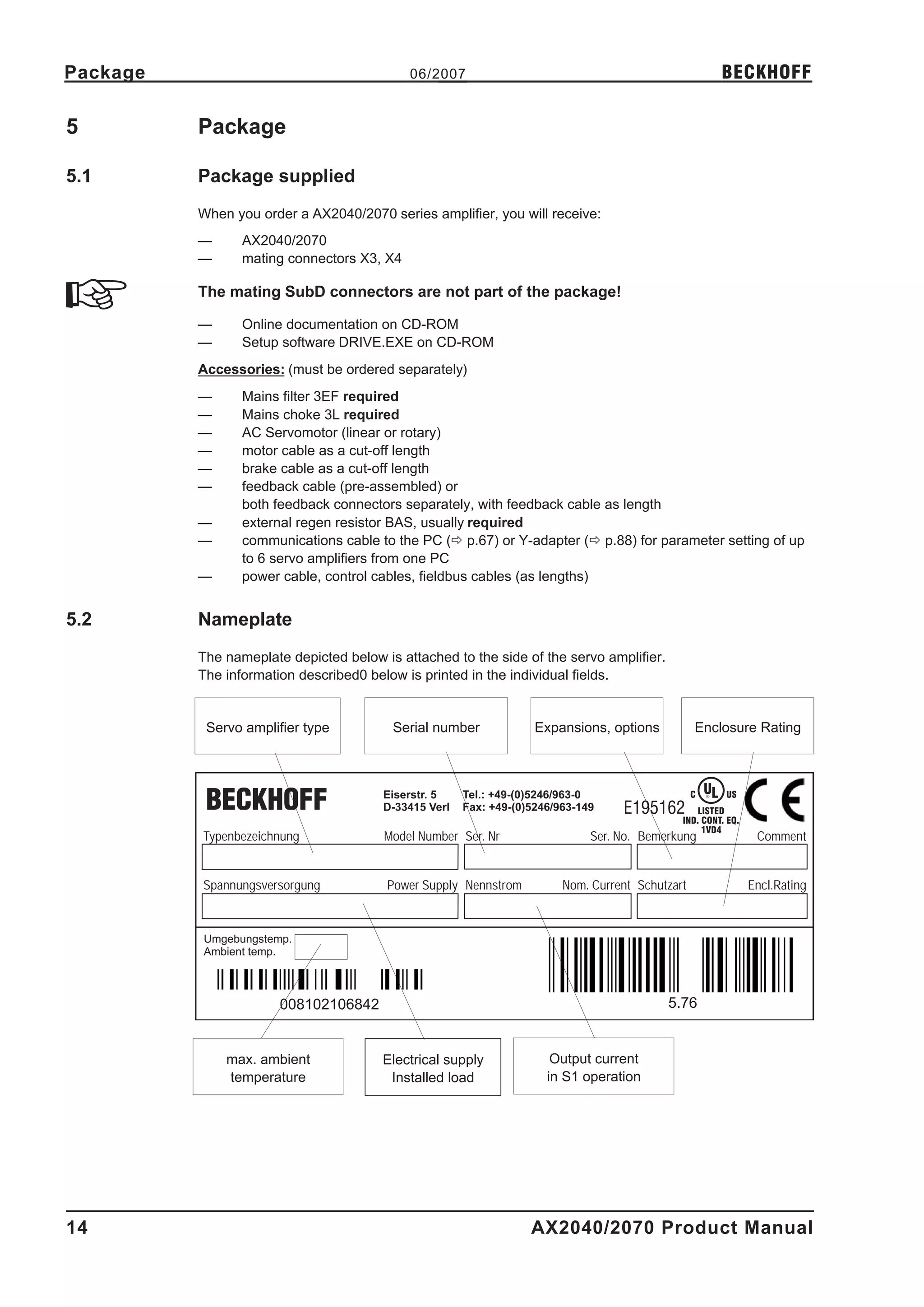
          The nameplate depicted below is attached to the side of the servo amplifier.
          The information described0 below is printed in the individual fields.


           Servo amplifier type          Serial number              Expansions, options           Enclosure Rating


                                        Eiserstr. 5    Tel.: +49-(0)5246/963-0                    C   UL
                                                                                                      ®    US
                                        D-33415 Verl   Fax: +49-(0)5246/963-149    E195162        LISTED
                                                                                              IND. CONT. EQ.
                                                                                                   1VD4
          Typenbezeichnung              Model Number Ser. Nr                  Ser. No. Bemerkung                 Comment


          Spannungsversorgung           Power Supply Nennstrom           Nom. Current Schutzart                 Encl.Rating


          Umgebungstemp.
          Ambient temp.


                       008102106842                                                        5.76


              max. ambient              Electrical supply              Output current
              temperature                Installed load               in S1 operation


14                                                                 AX2040/2070 Product Manual
BECKHOFF                           06/2007                            Package

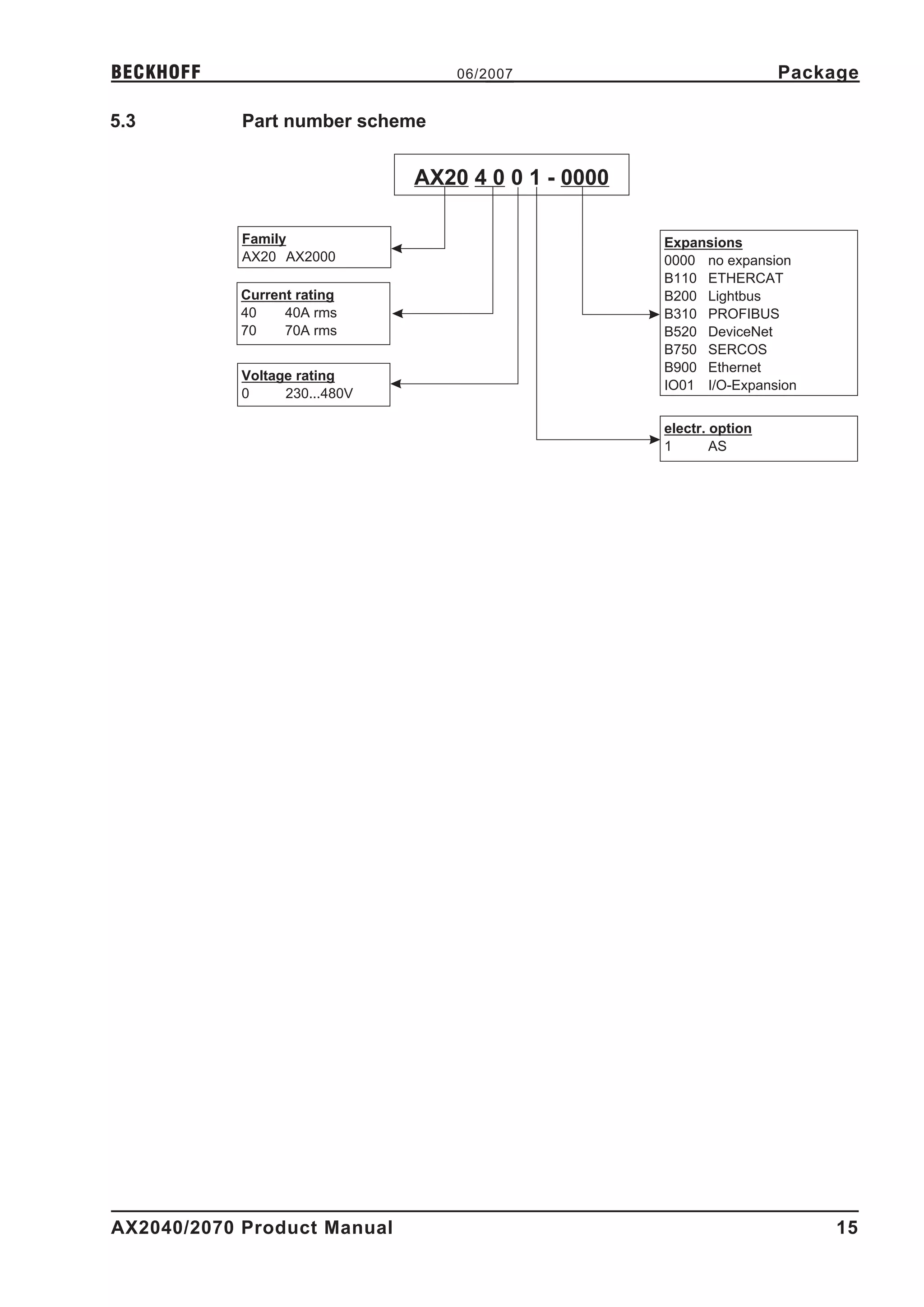
5.3         Part number scheme


                               AX20 4 0 0 1 - 0000

            Family                                   Expansions
            AX20 AX2000                              0000 no expansion
                                                     B110 ETHERCAT
           Current rating                            B200 Lightbus
           40    40A rms                             B310 PROFIBUS
           70    70A rms                             B520 DeviceNet
                                                     B750 SERCOS
                                                     B900 Ethernet
            Voltage rating
                                                     IO01 I/O-Expansion
            0     230...480V

                                                     electr. option
                                                     1       AS


AX2040/2070 Product Manual                                                 15
Technical description                           06/2007                                              BECKHOFF

6            Technical description

6.1          The digital servo amplifiers of the series AX2040/2070
             Standard version
             l     2 current ratings (40 A, 70 A)
             l     wide range of rated voltage (3x208V –10% to 3x480V +10%)
             l     shield connection directly at the servo amplifier
             l     integrated CANopen (default 500 kBaud), for integration into CANbus systems and for
                   setting parameters for several amplifiers via the PC-interface of one amplifier
             l     integrated RS232, electrically isolated, integrated pulse-direction interface
             l     -AS-   built-in safety relay (personnel-safety starting lock-out), (ð p.69)
             l     Slot for an expansion card
             l     Synchronous servomotors, linear motors and asynchronous motors can be used


             Power supply
             l     With external mains filter and mains choke directly off grounded 3~ system,
                          230V-10% ... 480V+10%, 50 Hz,
                          208V-10% ... 480V+10%, 60 Hz,

                   TN-system, TT-system with earthed (grounded) neutral point, not more than 5000 rms sym-
                   metrical amperes, 480VAC maximum; when protected by fuses type Fusetron FRS-R-80
                   (Class RK5), manufactured by Bussman, or equivalent 480VAC min
                   Connection to other mains supply networks only with insulating transformer ð p. 46
             l     BB6 rectifier bridge, off 3-phase earthed (grounded) supply, integral inrush circuit
             l     Fusing (e.g. fusible cutout) provided by the user
             l     All shielding connections directly on the amplifier
             l     Output stage: IGBT- module with isolated current measurement
             l     Regen circuit: with dynamic distribution of the regen power between several
                                  amplifiers on the same DC bus link circuit, external regen resistor
             l     DC bus link voltage 260 ... 900 VDC, can be switched in parallel
             l     Interference suppression filter for the 24V aux. supply (to category C2) is integrated

             External interference suppression filter for the supply input (to category C2)
             required. External mains choke required.

             Integrated safety
             l     Safe electrical separation to EN 50178 between the power input / motor connections and the
                   signal electronics, provided by appropriate insulation/creepage distances and complete elec-
                   trical isolation
             l     Soft-start, overvoltage recognition, short-circuit protection, phase-failure monitoring
             l     Temperature monitoring of servo amplifier and motor
                   (when using our motors with our pre-assembled cables)


             Auxiliary supply voltage 24VDC
             l     Electrically isolated, internal fusing, from an external 24VDC psu, e.g. with isolating transfor-
                   mer


16                                                                  AX2040/2070 Product Manual
BECKHOFF                                      06/2007                         Technical description

            Operation and parameter setting
            l     With our user-friendly software for setup through the serial interface of a PC
            l     Direct operation by means of two keys on the servo amplifier and a 3-character LED display
                  for status display in case of no PC available
            l     Fully programmable via RS232 interface


            Completely digital control
            l     Digital current controller (space vector pulse-width modulation, 62.5 µs)
            l     Freely programmable digital speed controller (62.5 µs or 250 µs)
            l     Integral position controller with adaptation possibilities for customer needs (250 µs)
            l     Pulse direction interface integrated for connection of a servomotor to a stepping motor
                  control
            l     Evaluation of the resolver signals and sine-cosine signals of a high-resolution encoder
            l     Encoder simulation (incremental or SSI)


            Comfort functions
            l     2 analog monitor outputs
            l     4 programmable digital inputs (normally, two are defined as limit-switch inputs)
            l     2 programmable digital outputs
            l     Freely programmable combinations of all digital signals


            Expansions
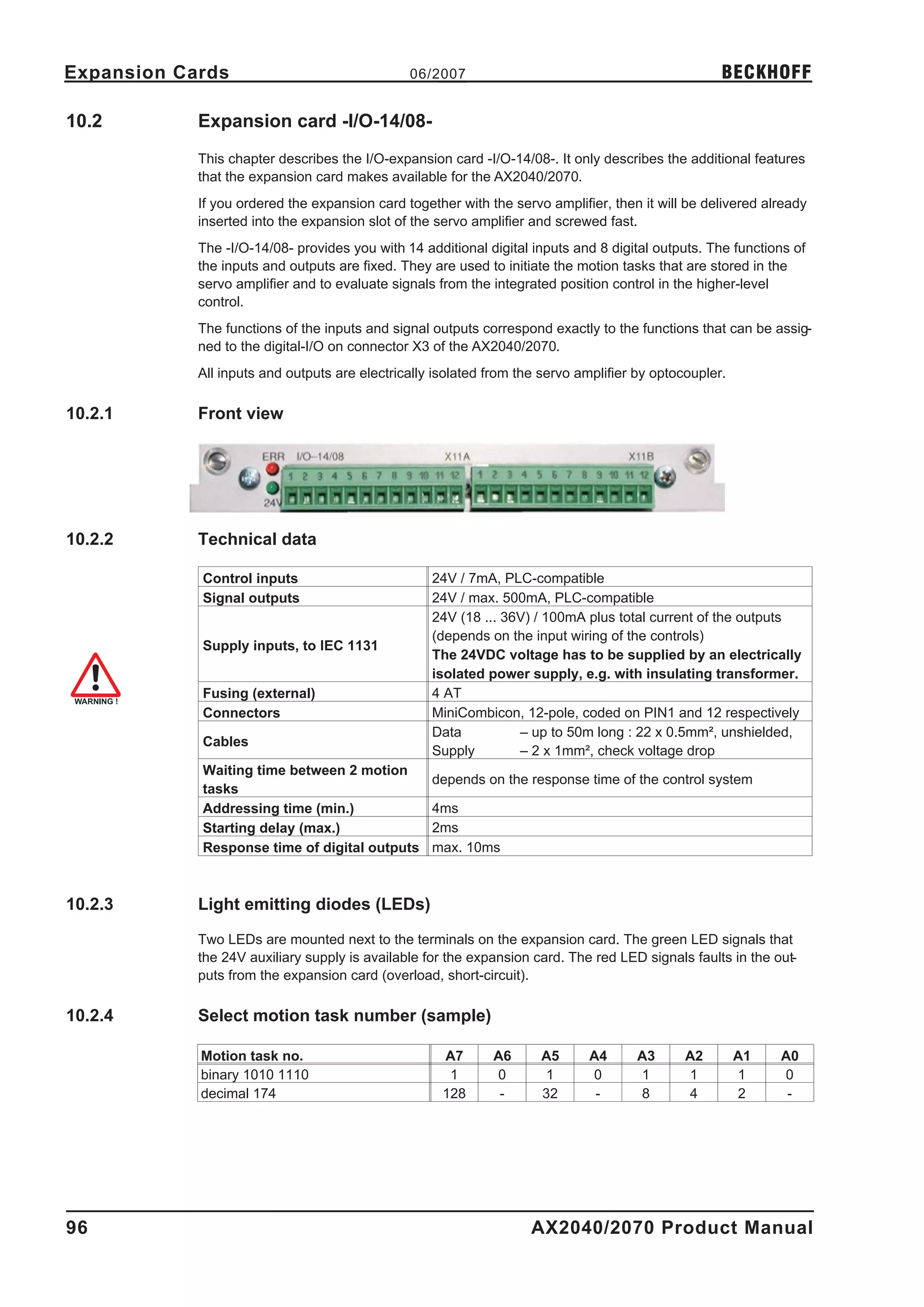
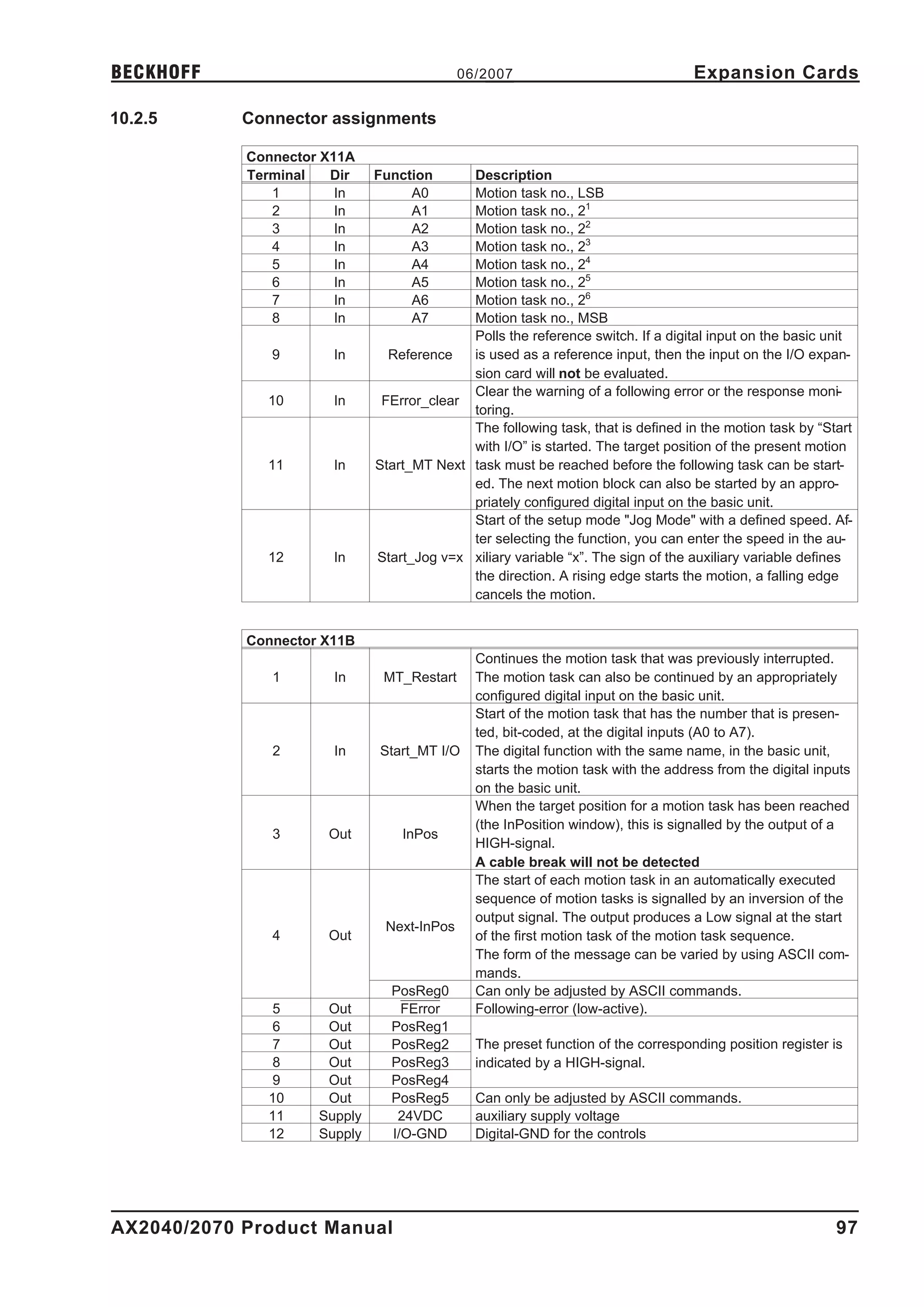
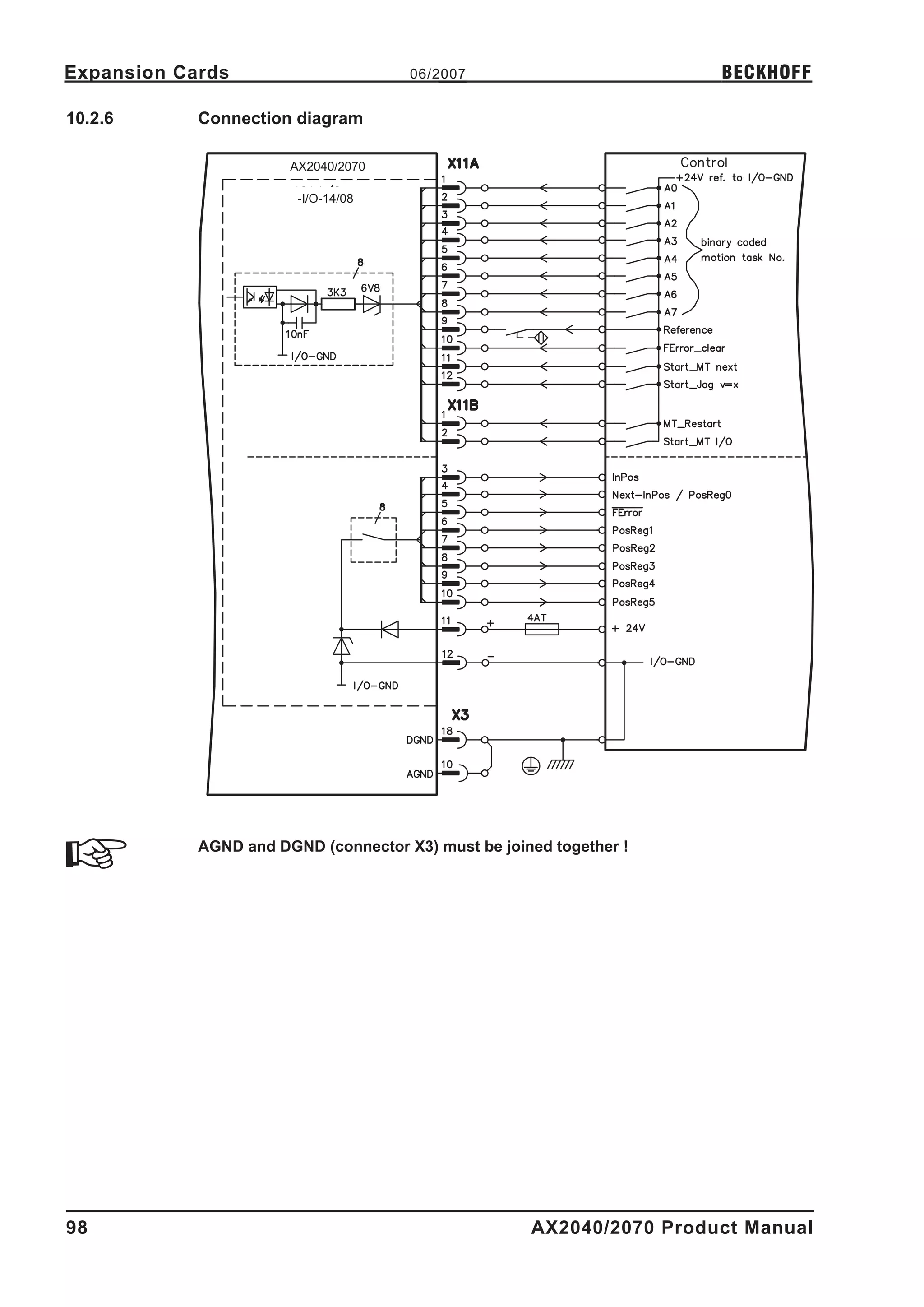
            l     -I/O-14/08- expansion card, ð p. 96
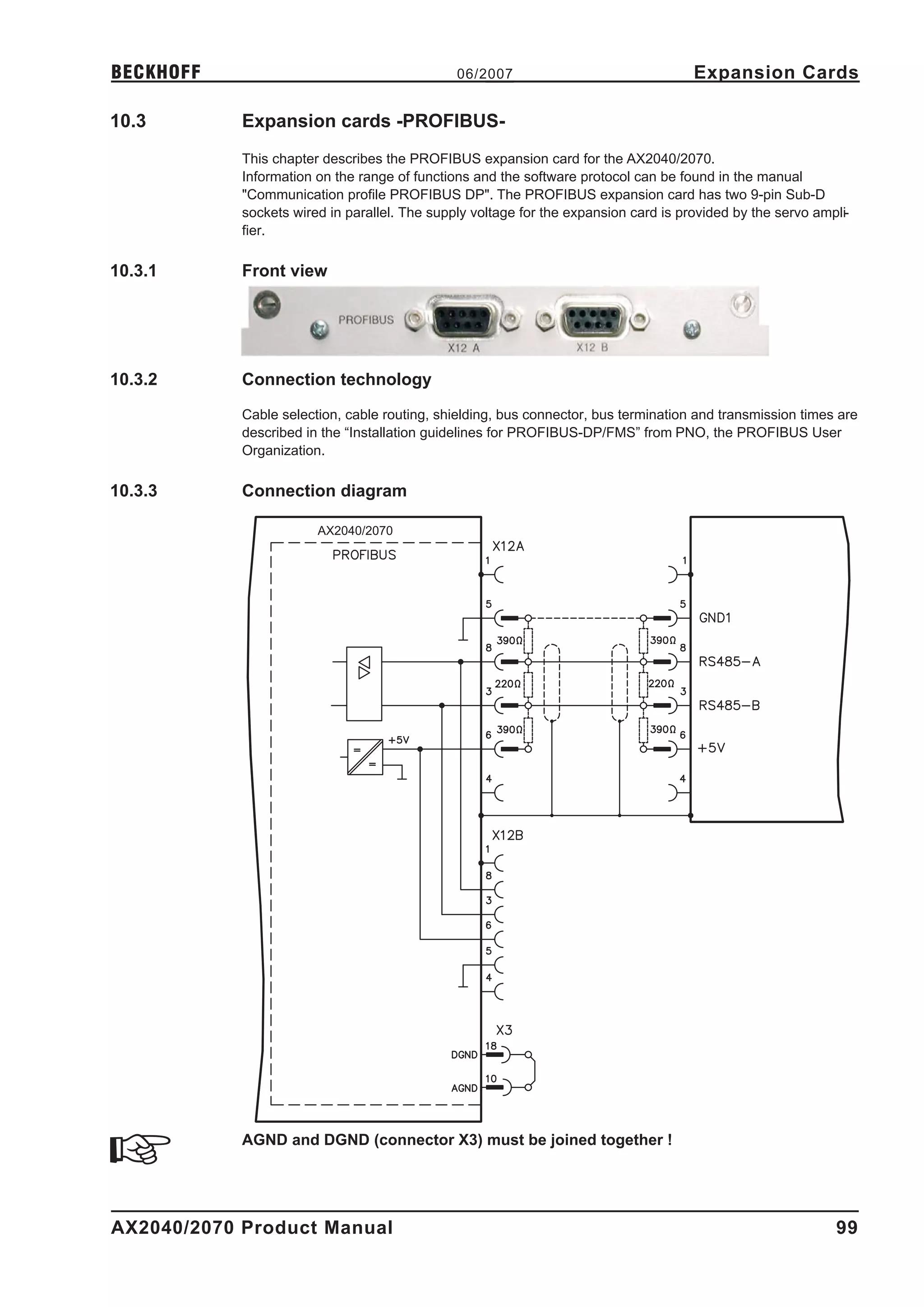
            l     PROFIBUS DP expansion card, ð p. 99
            l     SERCOS expansion card, ð p. 100
            l     DeviceNet expansion card, ð p. 102
            l     EtherCat expansion card, ð p. 105
            l     -2CAN- Expansion module, separated connectors for CAN bus and RS232, ð p. 106


AX2040/2070 Product Manual                                                                                  17
Technical description                          06/2007                                       BECKHOFF

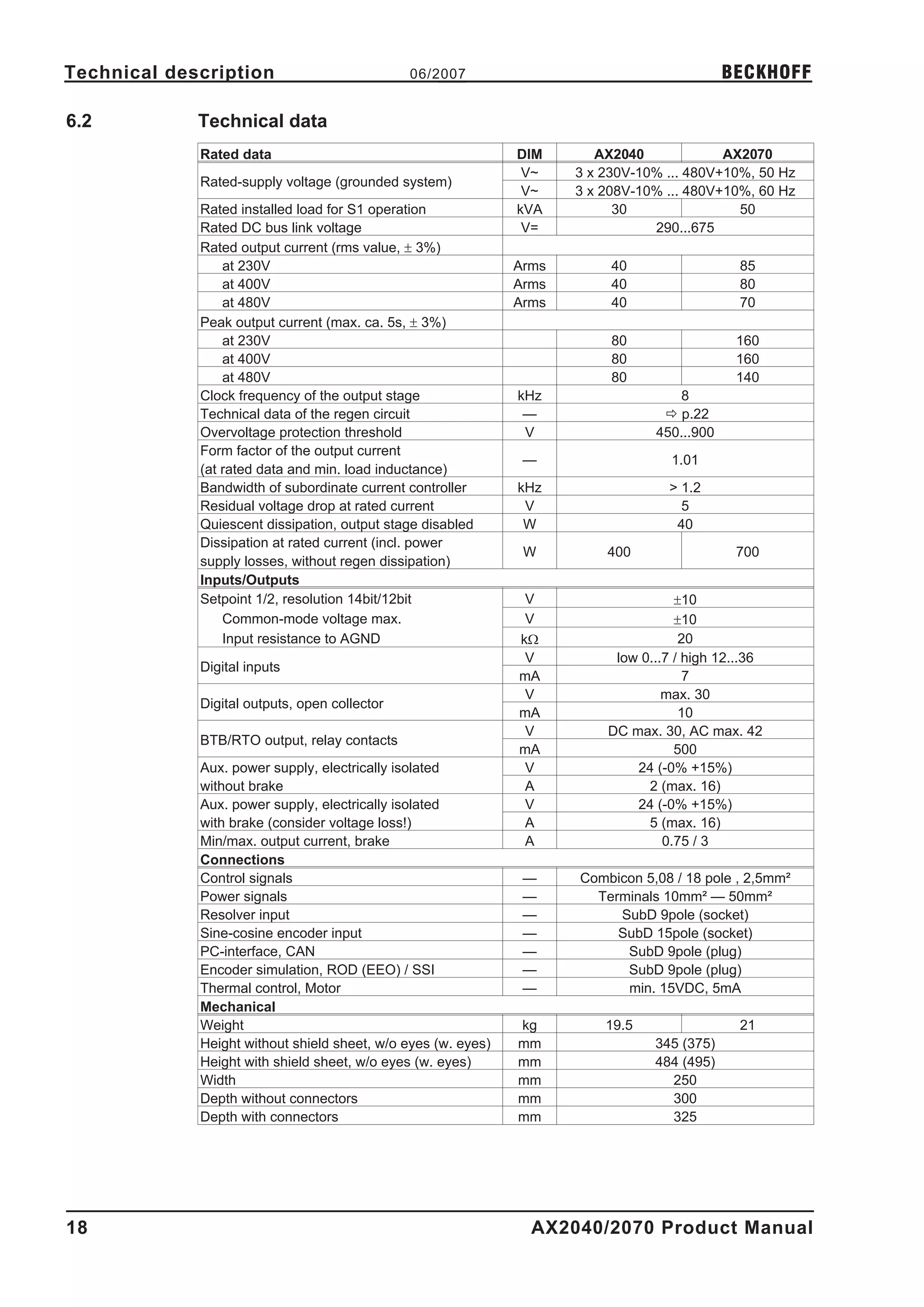
6.2          Technical data
             Rated data                                        DIM       AX2040             AX2070
                                                                V~    3 x 230V-10% ... 480V+10%, 50 Hz
             Rated-supply voltage (grounded system)
                                                                V~    3 x 208V-10% ... 480V+10%, 60 Hz
             Rated installed load for S1 operation             kVA          30                50
             Rated DC bus link voltage                          V=               290...675
             Rated output current (rms value, ± 3%)
                 at 230V                                       Arms        40                  85
                 at 400V                                       Arms        40                  80
                 at 480V                                       Arms        40                  70
             Peak output current (max. ca. 5s, ± 3%)
                 at 230V                                                   80                 160
                 at 400V                                                   80                 160
                 at 480V                                                   80                 140
             Clock frequency of the output stage               kHz                  8
             Technical data of the regen circuit                —                 ð p.22
             Overvoltage protection threshold                   V                450...900
             Form factor of the output current
                                                                —                   1.01
             (at rated data and min. load inductance)
             Bandwidth of subordinate current controller       kHz                 > 1.2
             Residual voltage drop at rated current             V                    5
             Quiescent dissipation, output stage disabled       W                   40
             Dissipation at rated current (incl. power
                                                                W         400                 700
             supply losses, without regen dissipation)
             Inputs/Outputs
             Setpoint 1/2, resolution 14bit/12bit               V                    ±10
                 Common-mode voltage max.                       V                    ±10
                 Input resistance to AGND                      kW                     20
                                                                V          low 0...7 / high 12...36
             Digital inputs
                                                               mA                      7
                                                                V                  max. 30
             Digital outputs, open collector
                                                               mA                     10
                                                                V         DC max. 30, AC max. 42
             BTB/RTO output, relay contacts
                                                               mA                    500
             Aux. power supply, electrically isolated           V             24 (-0% +15%)
             without brake                                      A               2 (max. 16)
             Aux. power supply, electrically isolated           V             24 (-0% +15%)
             with brake (consider voltage loss!)                A               5 (max. 16)
             Min/max. output current, brake                     A                  0.75 / 3
             Connections
             Control signals                                    —     Combicon 5,08 / 18 pole , 2,5mm²
             Power signals                                      —       Terminals 10mm² — 50mm²
             Resolver input                                     —          SubD 9pole (socket)
             Sine-cosine encoder input                          —          SubD 15pole (socket)
             PC-interface, CAN                                  —           SubD 9pole (plug)
             Encoder simulation, ROD (EEO) / SSI                —           SubD 9pole (plug)
             Thermal control, Motor                             —           min. 15VDC, 5mA
             Mechanical
             Weight                                            kg         19.5                 21
             Height without shield sheet, w/o eyes (w. eyes)   mm                345 (375)
             Height with shield sheet, w/o eyes (w. eyes)      mm                484 (495)
             Width                                             mm                  250
             Depth without connectors                          mm                  300
             Depth with connectors                             mm                  325


18                                                               AX2040/2070 Product Manual
BECKHOFF                                          06/2007                           Technical description

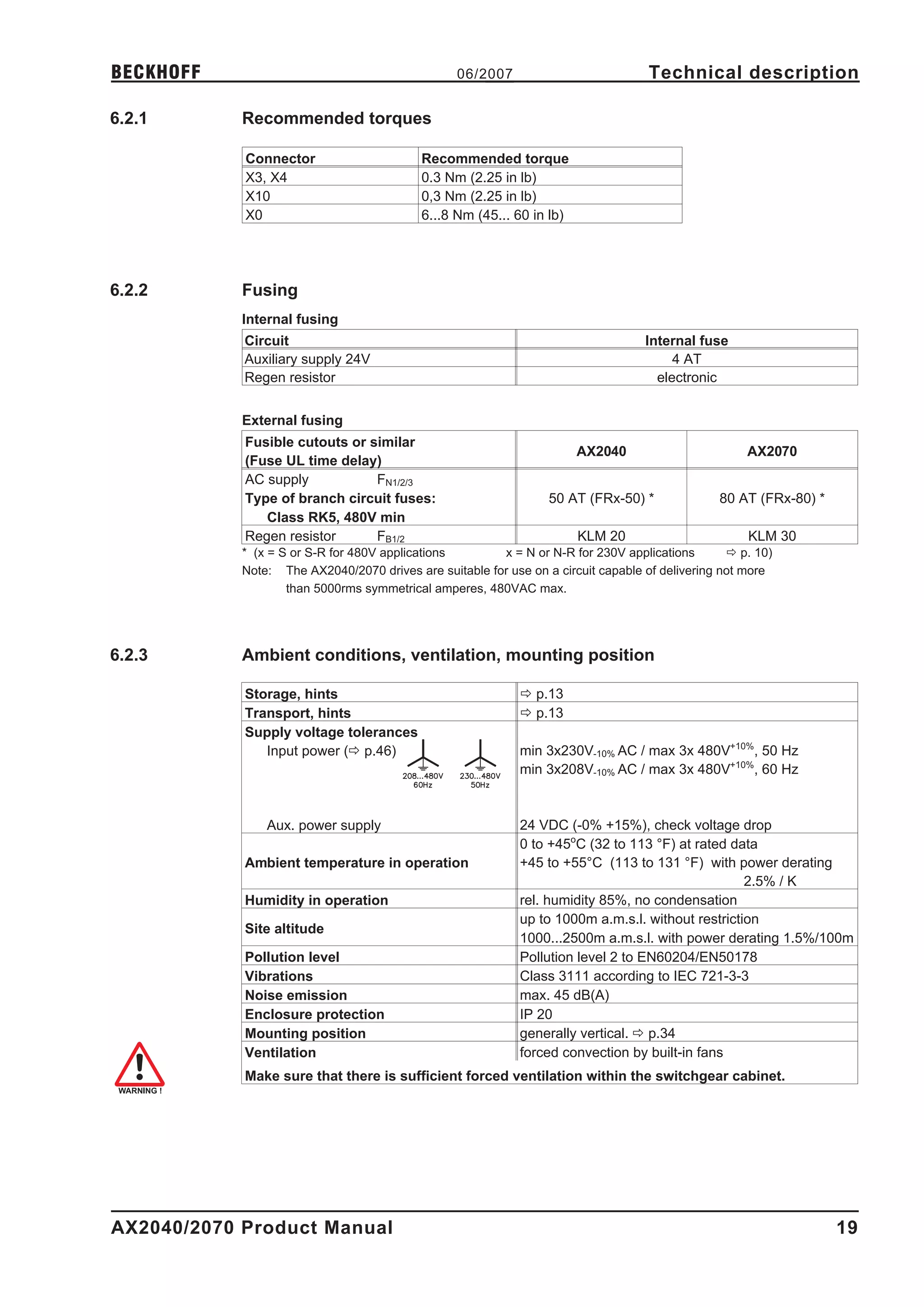
6.2.1       Recommended torques

            Connector                      Recommended torque
            X3, X4                         0.3 Nm (2.25 in lb)
            X10                            0,3 Nm (2.25 in lb)
            X0                             6...8 Nm (45... 60 in lb)


6.2.2       Fusing
            Internal fusing
            Circuit                                                                Internal fuse
            Auxiliary supply 24V                                                        4 AT
            Regen resistor                                                           electronic


            External fusing
            Fusible cutouts or similar
                                                                       AX2040                        AX2070
            (Fuse UL time delay)
            AC supply           FN1/2/3
            Type of branch circuit fuses:                         50 AT (FRx-50) *              80 AT (FRx-80) *
               Class RK5, 480V min
            Regen resistor      FB1/2                                  KLM 20                        KLM 30
            * (x = S or S-R for 480V applications       x = N or N-R for 230V applications        ð p. 10)
            Note: The AX2040/2070 drives are suitable for use on a circuit capable of delivering not more
                    than 5000rms symmetrical amperes, 480VAC max.


6.2.3       Ambient conditions, ventilation, mounting position

            Storage, hints                                   ð p.13
            Transport, hints                                 ð p.13
            Supply voltage tolerances
               Input power (ð p.46)                          min 3x230V-10% AC / max 3x 480V+10%, 50 Hz
                                                             min 3x208V-10% AC / max 3x 480V+10%, 60 Hz


                Aux. power supply                            24 VDC (-0% +15%), check voltage drop
                                                             0 to +45oC (32 to 113 °F) at rated data
            Ambient temperature in operation                 +45 to +55°C (113 to 131 °F) with power derating
                                                                                                   2.5% / K
            Humidity in operation                            rel. humidity 85%, no condensation
                                                             up to 1000m a.m.s.l. without restriction
            Site altitude
                                                             1000...2500m a.m.s.l. with power derating 1.5%/100m
            Pollution level                                  Pollution level 2 to EN60204/EN50178
            Vibrations                                       Class 3111 according to IEC 721-3-3
            Noise emission                                   max. 45 dB(A)
            Enclosure protection                             IP 20
            Mounting position                                generally vertical. ð p.34
            Ventilation                                      forced convection by built-in fans
            Make sure that there is sufficient forced ventilation within the switchgear cabinet.


AX2040/2070 Product Manual                                                                                         19
Technical description                           06/2007                                            BECKHOFF

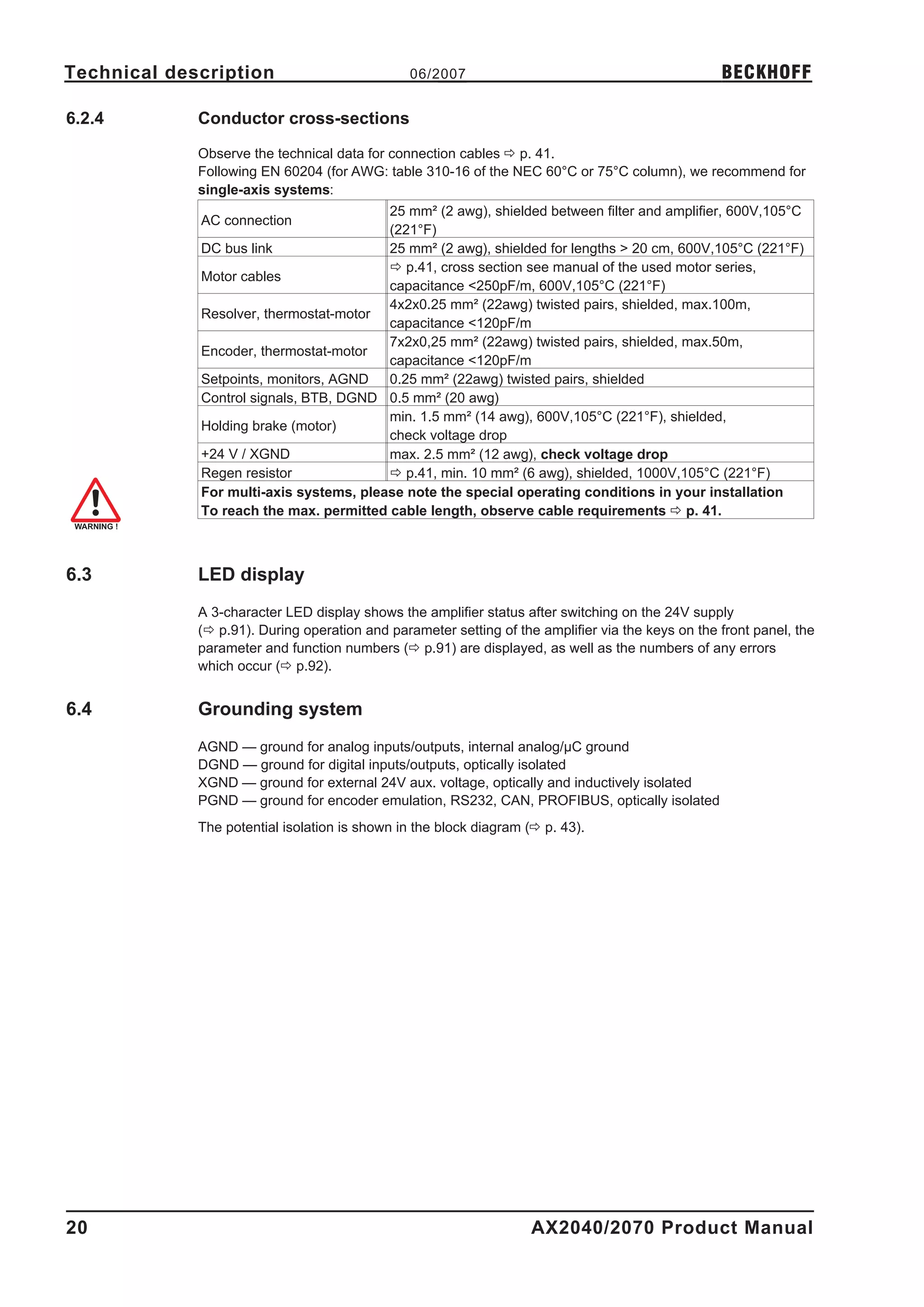
6.2.4        Conductor cross-sections

             Observe the technical data for connection cables ð p. 41.
             Following EN 60204 (for AWG: table 310-16 of the NEC 60°C or 75°C column), we recommend for
             single-axis systems:
                                         25 mm² (2 awg), shielded between filter and amplifier, 600V,105°C
             AC connection
                                         (221°F)
             DC bus link                 25 mm² (2 awg), shielded for lengths > 20 cm, 600V,105°C (221°F)
                                         ð p.41, cross section see manual of the used motor series,
             Motor cables
                                         capacitance <250pF/m, 600V,105°C (221°F)
                                         4x2x0.25 mm² (22awg) twisted pairs, shielded, max.100m,
             Resolver, thermostat-motor
                                         capacitance <120pF/m
                                         7x2x0,25 mm² (22awg) twisted pairs, shielded, max.50m,
             Encoder, thermostat-motor
                                         capacitance <120pF/m
             Setpoints, monitors, AGND   0.25 mm² (22awg) twisted pairs, shielded
             Control signals, BTB, DGND 0.5 mm² (20 awg)
                                         min. 1.5 mm² (14 awg), 600V,105°C (221°F), shielded,
             Holding brake (motor)
                                         check voltage drop
             +24 V / XGND                max. 2.5 mm² (12 awg), check voltage drop
             Regen resistor              ð p.41, min. 10 mm² (6 awg), shielded, 1000V,105°C (221°F)
             For multi-axis systems, please note the special operating conditions in your installation
             To reach the max. permitted cable length, observe cable requirements ð p. 41.


6.3          LED display
             A 3-character LED display shows the amplifier status after switching on the 24V supply
             (ð p.91). During operation and parameter setting of the amplifier via the keys on the front panel, the
             parameter and function numbers (ð p.91) are displayed, as well as the numbers of any errors
             which occur (ð p.92).


6.4          Grounding system
             AGND — ground for analog inputs/outputs, internal analog/µC ground
             DGND — ground for digital inputs/outputs, optically isolated
             XGND — ground for external 24V aux. voltage, optically and inductively isolated
             PGND — ground for encoder emulation, RS232, CAN, PROFIBUS, optically isolated
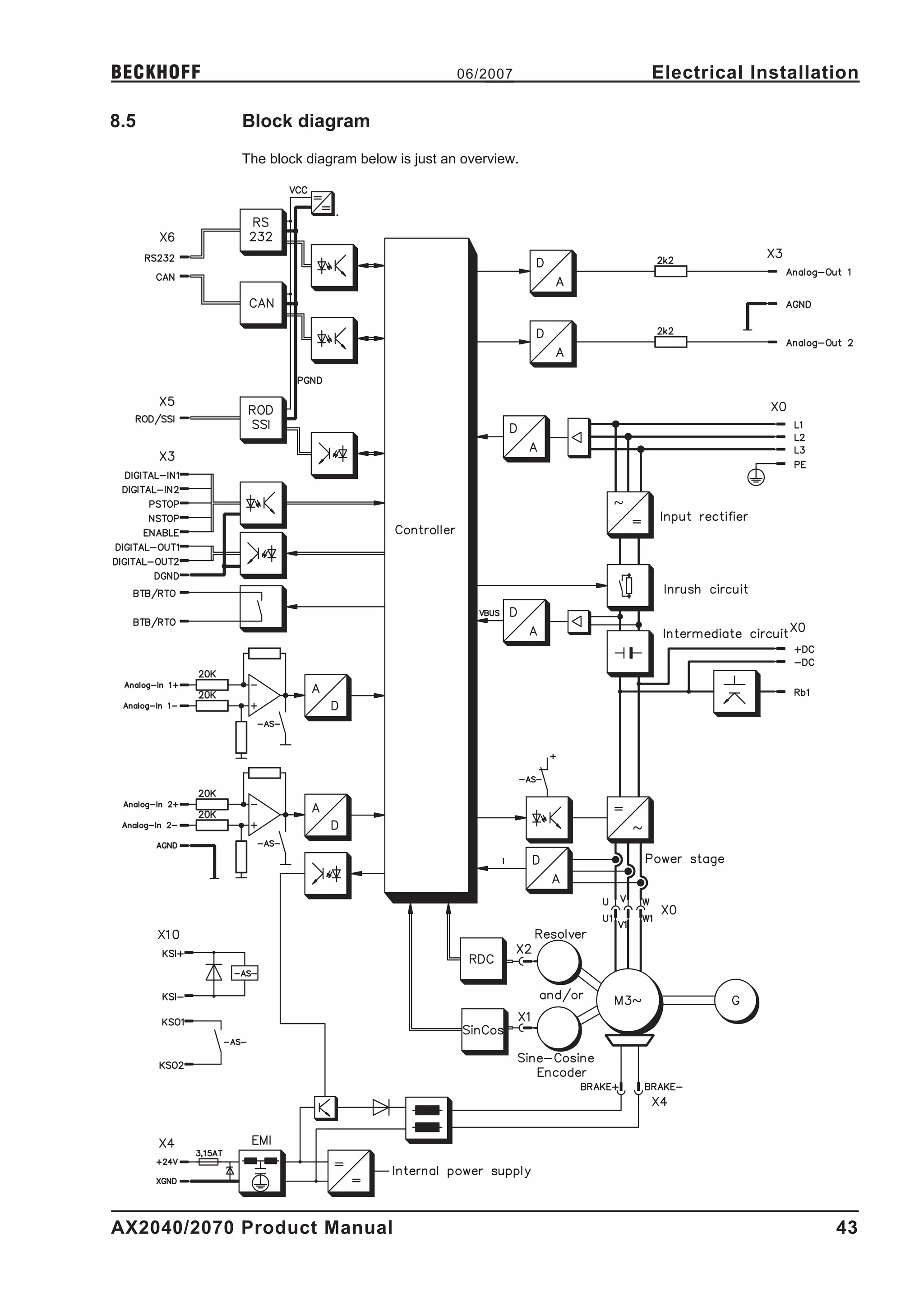
             The potential isolation is shown in the block diagram (ð p. 43).


20                                                                  AX2040/2070 Product Manual
BECKHOFF                                         06/2007                          Technical description

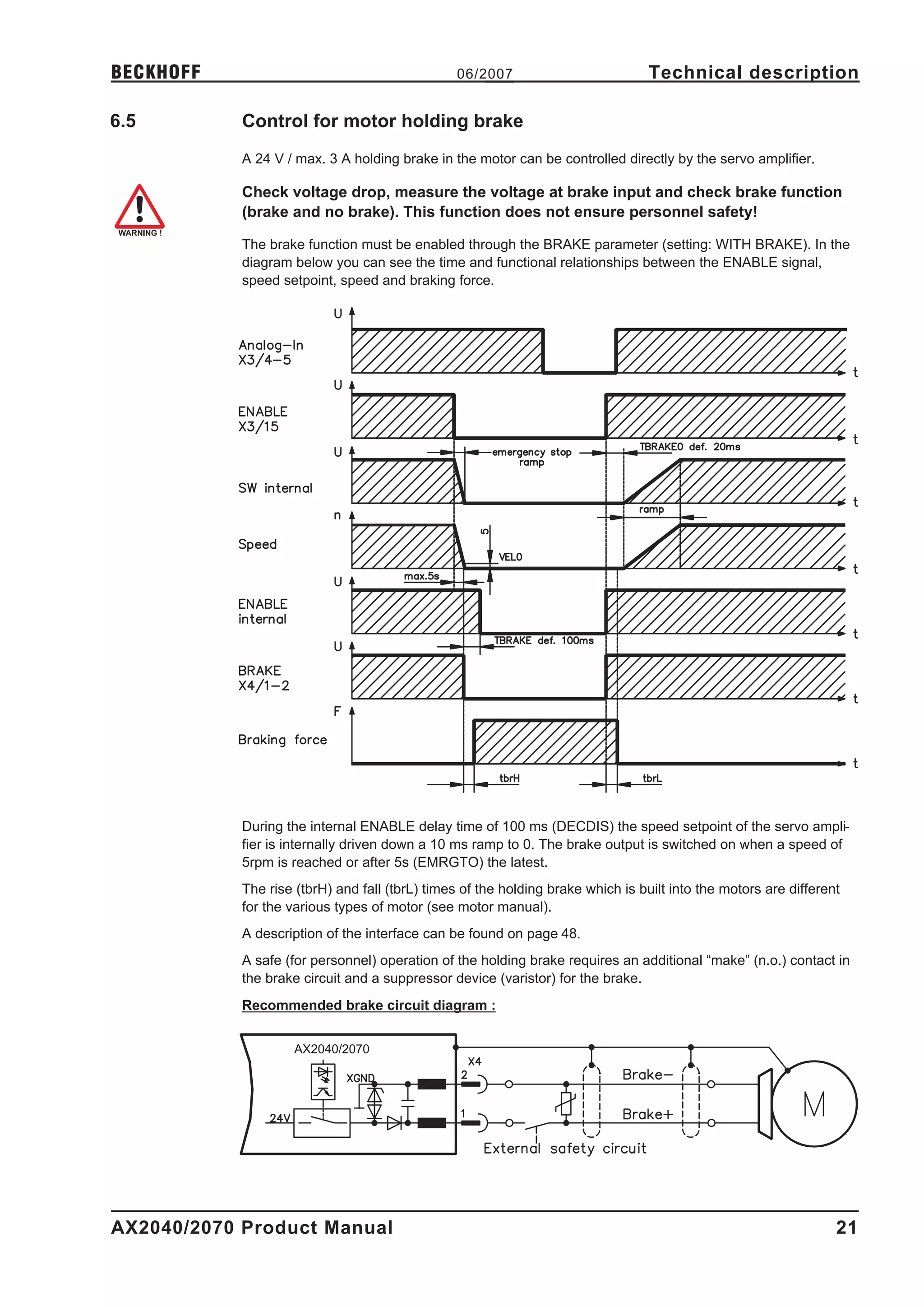
6.5         Control for motor holding brake
            A 24 V / max. 3 A holding brake in the motor can be controlled directly by the servo amplifier.

            Check voltage drop, measure the voltage at brake input and check brake function
            (brake and no brake). This function does not ensure personnel safety!

            The brake function must be enabled through the BRAKE parameter (setting: WITH BRAKE). In the
            diagram below you can see the time and functional relationships between the ENABLE signal,
            speed setpoint, speed and braking force.


            During the internal ENABLE delay time of 100 ms (DECDIS) the speed setpoint of the servo ampli-
            fier is internally driven down a 10 ms ramp to 0. The brake output is switched on when a speed of
            5rpm is reached or after 5s (EMRGTO) the latest.
            The rise (tbrH) and fall (tbrL) times of the holding brake which is built into the motors are different
            for the various types of motor (see motor manual).
            A description of the interface can be found on page 48.
            A safe (for personnel) operation of the holding brake requires an additional “make” (n.o.) contact in
            the brake circuit and a suppressor device (varistor) for the brake.
            Recommended brake circuit diagram :


                     AX2040/2070


AX2040/2070 Product Manual                                                                                        21
Technical description                           06/2007                                              BECKHOFF

6.6          Regen circuit
             During braking with the aid of the motor, energy is fed back to the servo amplifier. This energy is
             converted into heat in the regen resistor (ð p. ). The regen resistor is switched into circuit by the
             regen circuit. The regen circuit (thresholds) are adjusted to the supply voltage with the help of the
             setup software.
             Our customer service can help you with the calculation of the regen power which is required. A des-
             cription of the interface can be found on page 48.
             Functional description:
             1.- Individual amplifiers, not coupled through the DC bus link (DC+, DC-)
             The circuit starts to respond at a DC bus link voltage of 400V, 720V or 840V (depending on the
             supply voltage). If the energy which is fed back from the motor, as an average over time or as a
             peak value, is higher than the preset regen power, then the servo amplifier will output the status
             “regen power exceeded” and the regen circuit will be switched off. At the next internal check of the
             DC bus link voltage (after a few ms) an overvoltage will be detected and the servo amplifier will be
             switched off with the error message “Overvoltage F02” (ð p. 92).
             The BTB/RTO contact (terminal X3/2,3) will be opened at the same time (ð p. 66).
             2.- Several servo amplifiers coupled through the DC bus link circuit (DC+, DC-)
             Thanks to the built-in regen circuit with its patented power distribution, several amplifiers (even with
             different current ratings) can be operated off a common DC bus link. This is achieved by an auto-
             matic adjustment of the regen thresholds (which vary, because of tolerances).
             The regen energy is distributed equally among all the amplifiers. The combined power of all the
             amplifiers is always available, as continuous or peak power. The switch-off takes place as described
             under 1. (above) for the servo amplifier with the lowest switch-off threshold (resulting from toleran-
             ces).
             The RTO (BTB) contact of this amplifier (terminals X3/2,3) will be opened at the same time
             (ð p. 66).

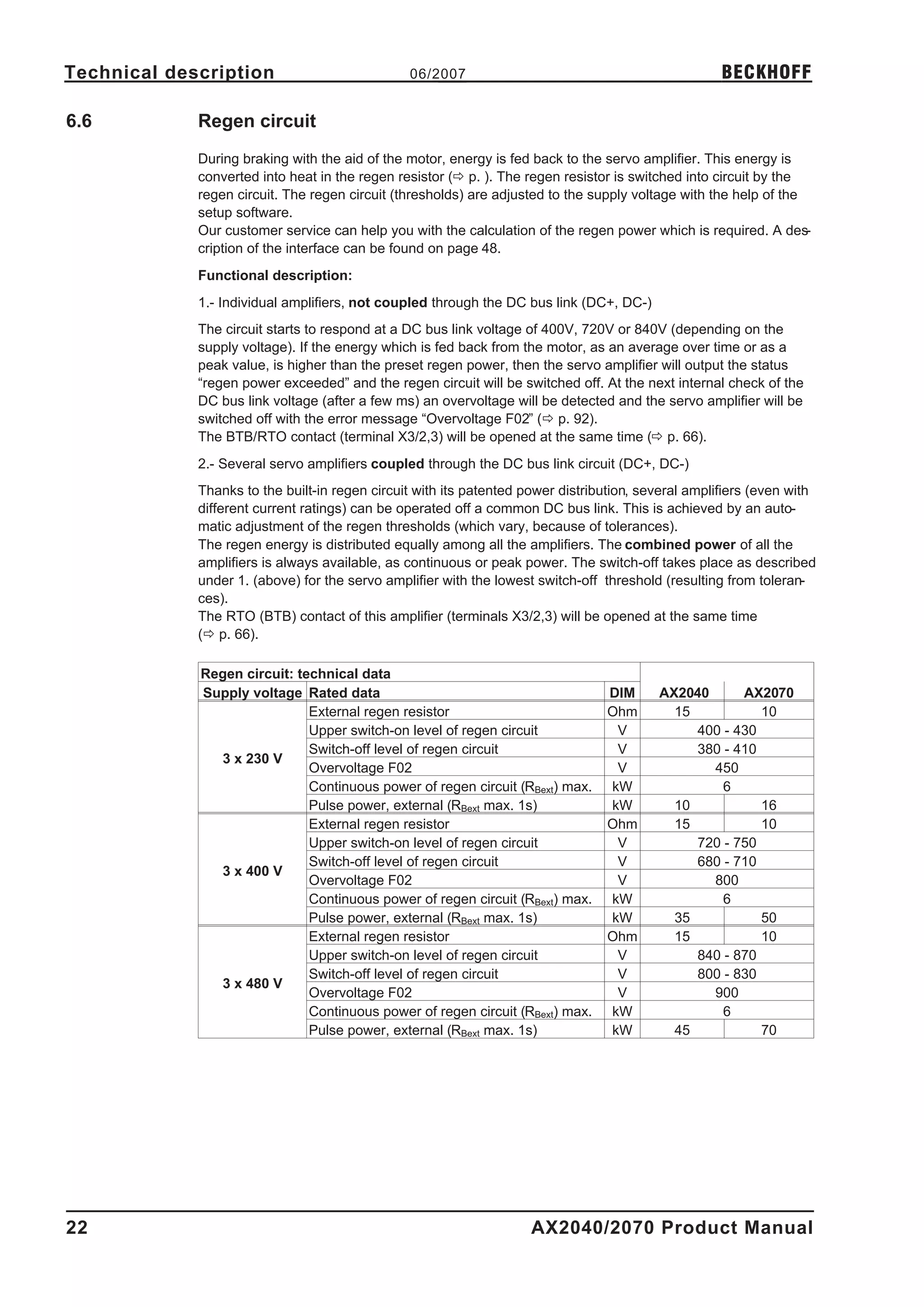
             Regen circuit: technical data
             Supply voltage Rated data                                           DIM      AX2040      AX2070
                              External regen resistor                            Ohm        15           10
                              Upper switch-on level of regen circuit              V            400 - 430
                              Switch-off level of regen circuit                   V            380 - 410
               3 x 230 V
                              Overvoltage F02                                     V              450
                              Continuous power of regen circuit (RBext) max.     kW                6
                              Pulse power, external (RBext max. 1s)              kW         10           16
                              External regen resistor                            Ohm        15           10
                              Upper switch-on level of regen circuit              V            720 - 750
                              Switch-off level of regen circuit                   V            680 - 710
               3 x 400 V
                              Overvoltage F02                                     V              800
                              Continuous power of regen circuit (RBext) max.     kW                6
                              Pulse power, external (RBext max. 1s)              kW         35           50
                              External regen resistor                            Ohm        15           10
                              Upper switch-on level of regen circuit              V            840 - 870
                              Switch-off level of regen circuit                   V            800 - 830
               3 x 480 V
                              Overvoltage F02                                     V              900
                              Continuous power of regen circuit (RBext) max.     kW                6
                              Pulse power, external (RBext max. 1s)              kW         45           70


22                                                                   AX2040/2070 Product Manual
BECKHOFF                                        06/2007                          Technical description

6.7         Switch-on and switch-off behavior
            This chapter describes the switch-on and switch-off behavior of the AX2040/2070 and the steps
            required to achieve operational stopping or emergency stop behavior that complies with standards.

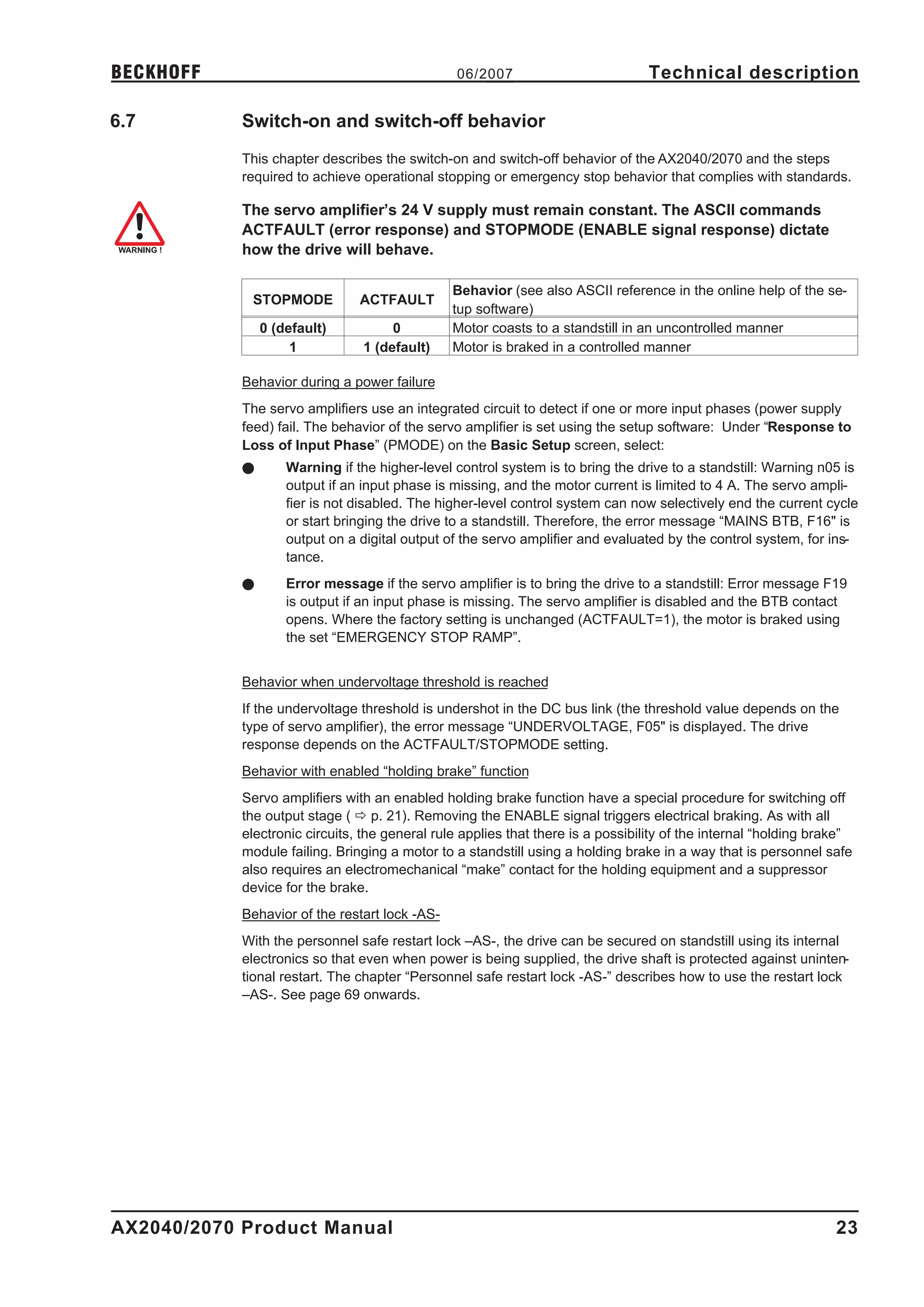
            The servo amplifier’s 24 V supply must remain constant. The ASCII commands
            ACTFAULT (error response) and STOPMODE (ENABLE signal response) dictate
            how the drive will behave.

                                                Behavior (see also ASCII reference in the online help of the se-
             STOPMODE           ACTFAULT
                                                tup software)
                0 (default)          0          Motor coasts to a standstill in an uncontrolled manner
                     1          1 (default)     Motor is braked in a controlled manner

            Behavior during a power failure
            The servo amplifiers use an integrated circuit to detect if one or more input phases (power supply
            feed) fail. The behavior of the servo amplifier is set using the setup software: Under “Response to
            Loss of Input Phase” (PMODE) on the Basic Setup screen, select:
            l       Warning if the higher-level control system is to bring the drive to a standstill: Warning n05 is
                    output if an input phase is missing, and the motor current is limited to 4 A. The servo ampli-
                    fier is not disabled. The higher-level control system can now selectively end the current cycle
                    or start bringing the drive to a standstill. Therefore, the error message “MAINS BTB, F16" is
                    output on a digital output of the servo amplifier and evaluated by the control system, for ins-
                    tance.
            l       Error message if the servo amplifier is to bring the drive to a standstill: Error message F19
                    is output if an input phase is missing. The servo amplifier is disabled and the BTB contact
                    opens. Where the factory setting is unchanged (ACTFAULT=1), the motor is braked using
                    the set “EMERGENCY STOP RAMP”.


            Behavior when undervoltage threshold is reached
            If the undervoltage threshold is undershot in the DC bus link (the threshold value depends on the
            type of servo amplifier), the error message “UNDERVOLTAGE, F05" is displayed. The drive
            response depends on the ACTFAULT/STOPMODE setting.
            Behavior with enabled “holding brake” function
            Servo amplifiers with an enabled holding brake function have a special procedure for switching off
            the output stage ( ð p. 21). Removing the ENABLE signal triggers electrical braking. As with all
            electronic circuits, the general rule applies that there is a possibility of the internal “holding brake”
            module failing. Bringing a motor to a standstill using a holding brake in a way that is personnel safe
            also requires an electromechanical “make” contact for the holding equipment and a suppressor
            device for the brake.
            Behavior of the restart lock -AS-
            With the personnel safe restart lock –AS-, the drive can be secured on standstill using its internal
            electronics so that even when power is being supplied, the drive shaft is protected against uninten-
            tional restart. The chapter “Personnel safe restart lock -AS-” describes how to use the restart lock
            –AS-. See page 69 onwards.


AX2040/2070 Product Manual                                                                                        23
Technical description                           06/2007                                              BECKHOFF

6.7.1        Behavior in standard operation

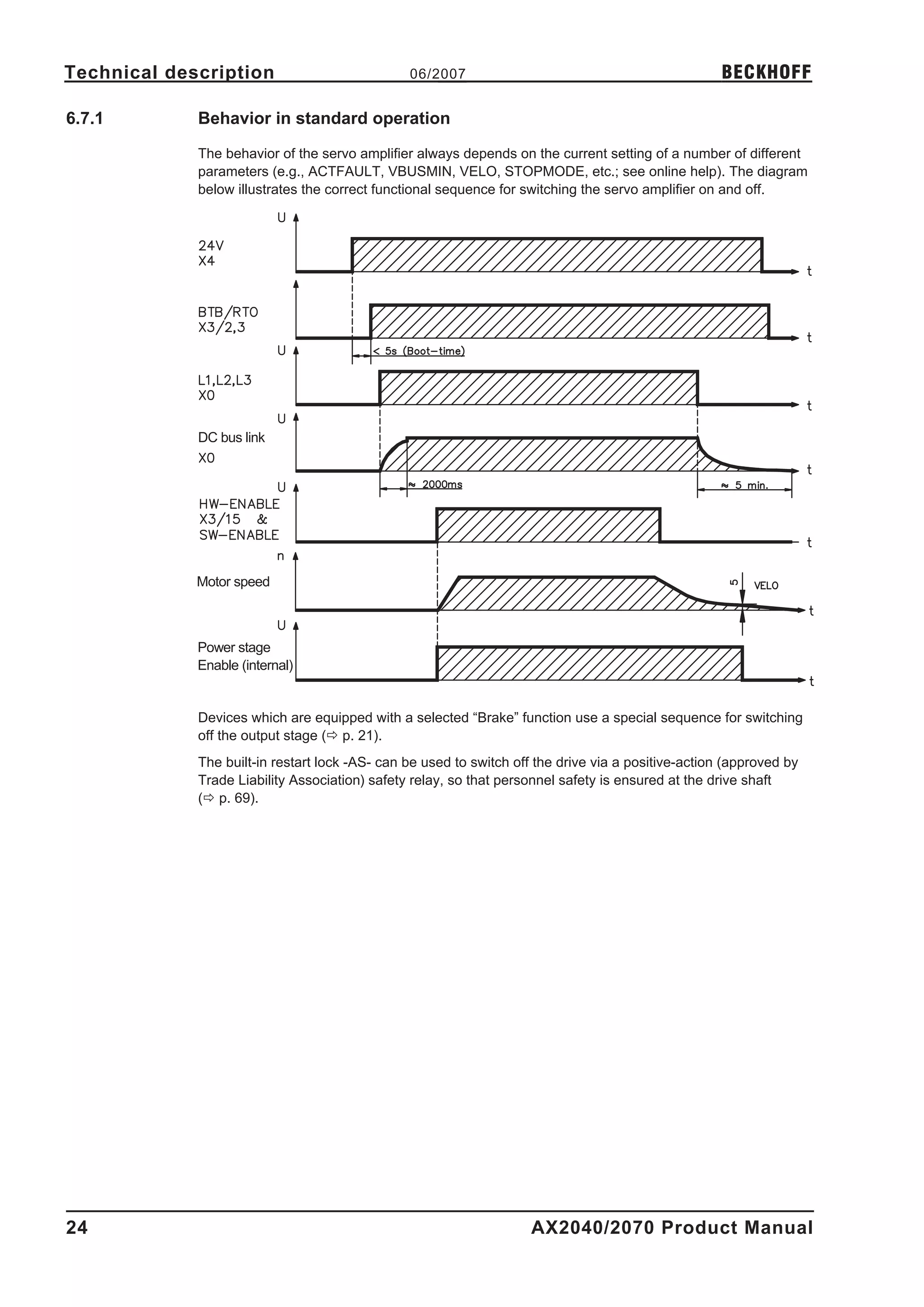
             The behavior of the servo amplifier always depends on the current setting of a number of different
             parameters (e.g., ACTFAULT, VBUSMIN, VELO, STOPMODE, etc.; see online help). The diagram
             below illustrates the correct functional sequence for switching the servo amplifier on and off.


             DC bus link


             Motor speed


             Power stage
             Enable (internal)


             Devices which are equipped with a selected “Brake” function use a special sequence for switching
             off the output stage (ð p. 21).
             The built-in restart lock -AS- can be used to switch off the drive via a positive-action (approved by
             Trade Liability Association) safety relay, so that personnel safety is ensured at the drive shaft
             (ð p. 69).


24                                                                   AX2040/2070 Product Manual
BECKHOFF                                        06/2007                         Technical description

6.7.2       Behavior in the event of an error (with standard setting)

            The behavior of the servo amplifier always depends on the current setting of a number of different
            parameters (e.g., ACTFAULT, VBUSMIN, VELO, STOPMODE, etc.; see online help). The diagram
            shows the startup procedure and the procedure that the internal control system follows in the event
            of one or more electrical supply phases failing, assuming that the standard parameter settings
            apply.


            (F16/F19 = error messages Mains BTB /input phase, F05 = error message Undervoltage)

            Even if there is no intervention from an external control system (in the example, the ENABLE signal
            remains active), the motor is immediately braked using the emergency stop ramp if an input phase
            error is detected and assuming that no changes have been made to the factory setting (ACT-
            FAULT=1).


AX2040/2070 Product Manual                                                                                  25
Technical description                            06/2007                                              BECKHOFF

6.8          Stop/Emergency Stop Function to EN 60204

             With the personnel safe restart lock –AS- (see page 69 onwards) the drive can be
             secured on standstill (torque-free) using its internal electronics so that even when
             power is being supplied, the drive shaft is protected against unintentional restart.

6.8.1        Stop: Standards

             The Stop function is used to shut down the machine in normal operation. The Stop functions are
             defined by EN 60204 (VDE 0113), paragraphs 9.2.2 and 9.2.5.3.
             Category 0:           Shut-down by immediate switching-off of the energy supply to the
                                   drive machinery (i.e. an uncontrolled shut-down);
             Category 1:           A controlled shut-down , whereby the energy supply to the drive
                                   machinery is maintained to perform the shut-down, and the energy
                                   supply is only interrupted when the shut-down has been completed;
             Category 2:           A controlled shut-down, whereby the energy supply to the drive
                                   machinery is maintained.

             The parameters “STOPMODE” and “ACTFAULT” must be set to 1 in order to
             implement the stop categories. If necessary, change the parameters via the
             terminal screen of the setup software and store the data in the EEPROM.

             The Stop Category must be determined by a risk evaluation of the machine. In addition, suitable
             means must be provided to guarantee a reliable shut-down.
             Category 0 and Category 1 Stops must be operable independently of the operating mode, whereby
             a Category 0 Stop must have priority. Stop functions must be implemented by disconnection of the
             appropriate circuitry, and have priority over assigned start functions.
             If necessary, provision must be made for the connection of protective devices and lock-outs. If
             applicable, the Stop function must signal its status to the control logic. A reset of the Stop function
             must not create a hazardous situation.


26                                                                   AX2040/2070 Product Manual
BECKHOFF                                         06/2007                        Technical description

6.8.2       Emergency Stop: Standards

            The emergency Stop function is used for the fastest possible shut-down of the machine in a dan-
            gerous situation. The Emergency Stop function can be triggered by the actions of a single person. It
            must be fully functional and available at all times. The user must not have to work out how to ope-
            rate this mechanism.
            The Emergency Stop function is defined by EN 60204 (VDE 0113), paragraph 9.2.5.4.
            In addition to the requirements for Stop, the emergency Stop must fulfil the following requirements:
            l      emergency stop must have priority over all other functions and controls in all operating situa-
                   tions;
            l      the energy supply to any drive machinery that could cause dangerous situations must be
                   switched off as fast as possible, without causing any further hazards (e.g. by using mechani-
                   cal latching devices that do not require an external supply of energy, by counter-current bra-
                   king in Stop Category 1);
            l      the reset must not initiate a restart.

            If necessary, provision must be made for the additional connection of emergency stop devices (see
            EN 60204, "Requirements for emergency stop devices").
            The Emergency Stop must be effective as a stop of either Category 0 or Category 1.
            The Emergency Stop Category must be determined by a risk evaluation of the machine.
            Category 0
            Only hard-wired, electromechanical components may be used for the Category 0 Emergency Stop
            function. It must not be triggered using switching logic (hardware or software), by transferring com-
            mands via a communication network, or via a data link.
            The drive must be shut down using an electromechanical circuit. If the connected servo motor has
            an integrated brake, this must always be controlled by an electromechanical circuit as well.
            Category 1
            With the Category 1 Emergency Stop function, there must be absolute certainty in terms of the
            power supply for the machine drives being switched off (i.e., secured) using electromechanical com-
            ponents. Additional Emergency Stop equipment may be connected. Bringing the motor to a stand-
            still by interrupting the mains supply and using controlled electronic braking. The 24 V supply for the
            servo amplifier must remain constant. The issue of which circuit should be used is highly dependent
            on the requirements of the application at hand.
            Usually a brake in a servo motor only has the function of a holding brake. To ensure an emergency
            stop function, the braking torque that is required must be checked. If the holding brake fulfills the
            dynamic requirements, it must be taken into acount that this application will cause increased wear.

            The parameters “STOPMODE” and “ACTFAULT” must be set to 1 in order to
            implement the stop categories. If necessary, change the parameters via the
            terminal screen of the setup software and store the data in the EEPROM.


AX2040/2070 Product Manual                                                                                     27
Technical description                           06/2007                                             BECKHOFF

6.8.3        Implementation of the Stop Category 0

             Bringing the motor to a standstill by immediately switching off the amplifier power supply (STOP-
             MODE & ACTFAULT parameters set to 1). The switching sequence is precisely determined by
             this circuit in order to avoid undesirable fault messages and servo amplifier failures.
             It is not possible to achieve a Category 0 shut-down with the servo amplifier alone, since hard-wired
             electromechanical components are compulsory for this type of disconnection.
             A brake that is built into the motor must have an additional electromechanical control circuit, as well
             as the control through the AX2040/2070, in order to meet Category 0.
             Usually a brake in a servo motor only has the function of a holding brake. To ensure an emergency
             stop function, the braking torque that is required must be checked. If the holding brake fulfills the
             dynamic requirements, it must be taken into acount that this application will cause increased wear.
             Circuit suggestion
             (with EMERGENCY STOP Category 0, control function with contactor relays)


                             AX2040/2070


28                                                                  AX2040/2070 Product Manual
BECKHOFF                                       06/2007                        Technical description

6.8.4       Implementation of the Stop Category 1

            Bringing the motor to a standstill by interrupting the mains supply and using controlled electronic
            braking (STOPMODE & ACTFAULT parameters set to 1). The 24 V supply for the AX2040/2070
            must remain constant.
            The drive is braked in a controlled manner during the stopping (disabling) procedure. If the speed
            VEL0 (see sequence diagram in chapter 6.5) is undershot, the holding brake is applied and the
            output stage is disabled.
            As soon as two separate time periods (set at the time relay) have elapsed, the mains supply and
            the holding brake are electrically isolated.

            Should an internal AX2040/2070 fault occur, the motor is forced to a standstill once
            K20 drops out.

            Circuit suggestion
            (with EMERGENCY STOP Category 1, control function with contactor relays)


                            AX2040/2070


AX2040/2070 Product Manual                                                                                   29
Technical description                           06/2007                                              BECKHOFF

6.8.5        Implementation of the Stop Category 2

             The machine receives an operational stop (disable) command and brakes the drive using the set
             braking ramp (STOPMODE & ACTFAULT parameters set to 1).
             The drive is braked in a controlled manner during the stopping (disabling) procedure. If the speed
             VEL0 (see sequence diagram in chapter 6.5) is undershot, the holding brake is applied and the
             output stage is disabled. In this case, there is no interruption of the electrical supply.
             If the electrical supply is switched off, not only will the controlled braking procedure be performed,
             but the mains supply and the holding brake will also be electrically isolated following a time period
             set at the time relay.
             Circuit suggestion
             (with EMERGENCY STOP Category 1, control function with contactor relays)


                             AX2040/2070


30                                                                   AX2040/2070 Product Manual
BECKHOFF                                         06/2007                            Technical description

6.9         Shock-hazard protection

6.9.1       Leakage current

            Leakage current via the PE conductor results from the combination of equipment and cable leakage
            currents. The leakage current frequency pattern comprises a number of frequencies, whereby the
            residual-current circuit breakers definitively evaluate the 50Hz current. For this reason, the leakage
            current cannot be measured using a conventional multimeter.
            As a rule of thumb, the following assumption can be made for leakage current on our low-capacity
            cables at a mains voltage of 400 V, depending on the clock frequency of the output stage:
                   Ileak = n x 20mA + L x 1mA/m at 8kHz clock frequency at the output stage
                   Ileak = n x 20mA + L x 2mA/m at a 16kHz clock frequency at the output stage
                   (where Ileak=leakage current, n=number of amplifiers, L=length of motor cable)
            At other mains voltage ratings, the leakage current varies in proportion to the voltage.
            Example:      2 x servo amplifiers + a 25m motor cable at a clock frequency of 8kHz:
                          2 x 20mA + 25m x 1mA/m = 65mA leakage current.

            Since the leakage current to PE is more than 3.5 mA, in compliance with EN50178
            the PE connection must either be doubled or a connecting cable with a
            cross-section >10mm² must be used.

            The following measures can be used to minimise leakage currents.
            — Reduce the length of the engine cable
            — Use low-capacity cables (see p.41)


6.9.2       Residual-current circuit breakers (FI)

            In conformity with DIN IEC 60364-4-41 – Regulations for installation and EN 60204 – Electrical
            equipment of machinery, residual-current circuit-breakers (called FI below) can be used provided
            the requisite regulations are complied with.
            The AX2040/2070 is a 3-phase system with a B6 bridge. Therefore, FIs which are sensitive to all
            currents must be used in order to detect any d.c. fault current. Refer to chapter 6.9.1 for the rule of
            thumb for determining the leakage current.
            Rated residual currents in the FI
                            Protection against "indirect contact" (personal fire protection) for stationary and mo-
            10 -30 mA
                            bile equipment, as well as for "direct contact".
                            Protection against "indirect contact" (personal fire protection) for stationary equip-
            50 -300 mA
                            ment

            Recommendation: In order to protect against direct contact (with motor cables
            <5m) we recommend that each servo amplifier be protected individually using a
            30mA residual-current circuit-breaker which is sensitive to all currents.

            If you use a selective FI circuit-breaker, the more intelligent evaluation process will prevent spurious
            tripping of the circuit-breakers.


AX2040/2070 Product Manual                                                                                      31
Technical description                            06/2007                                              BECKHOFF

6.9.3        Isolating transformers

             If protection against indirect contact is absolutely essential despite a higher leakage current, or if an
             alternative form of shock-hazard protection is sought, the AX2040/2070 can also be operated via an
             isolating transformer.
             A ground-leakage monitor can be used to monitor for short circuits.

             We would advise you to keep the length of wiring between the transformer and the
             servo amplifier as short as possible.


32                                                                   AX2040/2070 Product Manual
BECKHOFF                                       06/2007                       Mechanical Installation

7           Mechanical Installation

7.1         Important notes
            l      Protect the servo amplifier from impermissible stresses. In particular, do not let any compo-
                   nents become bent or any insulation distances altered during transport and handling. Avoid
                   contact with electronic components and contacts.
            l      Ensure that there is an adequate flow of cool, filtered air into the bottom of the switchgear
                   cabinet or use heat exchangers. Observe page 19.
            l      Take care that the servo amplifier and motor are earthed (grounded) properly. Do not use
                   painted (non-conductive) mounting plates.
            l      Don't mount devices, which produce magnetic fields, directly beside the servo amplifier.
                   Strong magnetic fields could directly affect internal components. Install devices which pro-
                   duce magnetic field with distance to the servo amplifiers and/or shield the magnetic fields.


7.2         Guide to mechanical installation
            The following notes should assist you to carry out the mechanical installation in a sensible
            sequence, without overlooking anything important.

                              In a closed switchgear cabinet. Observe page 19 .
                   Site       The site must be free from conductive or corrosive materials.
                              For the mounting position in the cabinet ð p. 34

                              Check that the ventilation of the servo amplifier is unimpeded
                              and keep within the permitted ambient temperature ð p. 19 .
                Ventilation
                              Keep the required space clear above and below the servo amplifier ð p 34.


                              Assemble the servo amplifier and power supply, filter and choke close
                Assembly
                              together on the conductive, grounded mounting plate in the cabinet.

                              EMC-compliant (EMI) shielding and grounding (ð p. 45)
                Grounding
                              Earth (ground) the mounting plate, motor housing and CNC-GND of the controls.
                Shielding
                              Notes on connection techniques are on page 40


AX2040/2070 Product Manual                                                                                     33
Mechanical Installation                       06/2007                             BECKHOFF

7.3          Assembly
             Ask our customer service for information for pass through mounting
             Material :          4 hexagon socket screws to DIN 912, M6
             Tool required :     5 mm Allen key - A.4.038.4/12


                                                             AX2040/2070


34                                                               AX2040/2070 Product Manual
BECKHOFF                     06/2007   Mechanical Installation

7.4         Dimensions


AX2040/2070 Product Manual                                 35
Mechanical Installation                   06/2007                              BECKHOFF


                      This page has been deliberately left blank.


36                                                            AX2040/2070 Product Manual
BECKHOFF                                       06/2007                          Electrical Installation

8           Electrical Installation

8.1         Important Notes
            l     Check the combination of servo amplifier and motor. Compare the rated voltage and current
                  of the units. Carry out the wiring according to the connection diagram on page 39.
            l     Make sure that the maximum permissible rated voltage at the terminals L1, L2, L3 or +DC,
                  –DC is not exceeded by more than 10% even in the most unfavourable case
                  (see EN 60204-1 Section 4.3.1). An excessive voltage on these terminals can lead to
                  destruction of the regen circuit and the servo amplifier.
            l     The use of external mains chokes and mains filters is required.
            l     The fusing of the AC supply input and the 24V supply is installed by the user (ð p. 19).
            l     Route power and control cables separately. We recommend a separation of at least 200mm.
                  This improves the interference immunity required by EMC regulations.
            l     Install all shielding with large areas (low impedance), with metallised connector housings or
                  shield connection clamps where possible. Earth (ground) the shielding at both ends (ðp.45).
                  Notes on connection techniques can be found on page 40.
            l     Feedback lines may not be extended, since thereby the shielding would be interrupted and
                  the signal processing could be disturbed.
            l     The cable between servo amplifier and regen resistor must be shielded.
            l     Install all heavy-current cables with an adequate cross-section, as per EN 60204 (ð p. 20)
                  and use the requested cable material (ð p. 41) to reach max. cable length.
            l     Wire the BTB/RTO contact in series into the safety circuit of the installation. The safety cir-
                  cuit must control the mains relay. Only in this way is the monitoring of the servo amplifier
                  assured.
            l     It is permissible to alter the servo amplifier settings by using the setup software.
                  Any other alterations will invalidate the warranty.


            Never disconnect the electrical connections to the servo amplifier while it is live. In
            unfavourable circumstances this could result in destruction of the electronics.
            Residual charges in the capacitors can have dangerous levels up to 300 seconds
            after switching off the mains supply voltage. Measure the voltage in the DC bus
            link (+DC/-DC), and wait until the voltage has fallen below 40V.
            Control and power connections can still be live, even when the motor is not
            rotating.


AX2040/2070 Product Manual                                                                                     37
Electrical Installation                          06/2007                                             BECKHOFF

8.2           Guide to electrical installation
              The following notes should assist you to carry out the electrical installation in a sensible sequence,
              without overlooking anything important.

                Cable selec-
                                 Select cables according to EN 60204 (ð p. 20)
                   tion

                                 EMC-compliant (EMI) shielding and grounding (ð p. 45)
                 Grounding
                                 Earth (ground) the mounting plate, motor housing and CNC-GND of the controls.
                 Shielding
                                 Notes on connection techniques are on page 40

                                 Route power leads and control cables separately
                   Wiring
                                 Wire the BTB/RTO contact in series into the safety loop
                                 — Connect the digital control inputs to the servo amplifier
                                 — Connect up AGND (also if fieldbuses are used)
                                 — Connect the analog setpoint, if required
                                 — Connect up the feedback unit (resolver and/or encoder)
                                 — Connect the encoder emulation, if required
                                 — Connect the expansion card (see corresponding manual on the CD-ROM)
                                 — Connect the motor cables, connect shielding to EMI connectors at both ends
                                 — Connect motor-holding brake, connect shielding to EMI connectors at
                                    both ends
                                 — Connect the external regen resistor (with fusing)
                                 — Connect aux. supply (for max. permissible voltage values ð p. 19)
                                 — Connect mains choke and mains filter (shielded lines between filter and
                                    servo amplifier)
                                 — Connect main power supply (for max. permissible voltage values ð p. 19)
                                 — Connect PC (ð p. 67).

                                 — Final check of the implementation of the wiring,
                Final check
                                 — according to the wiring diagrams which have been used.


38                                                                   AX2040/2070 Product Manual
BECKHOFF                                      06/2007                       Electrical Installation

8.3         Wiring

8.3.1       Important notes

            Only professional staff who are qualified in electrical engineering are allowed to install the
            servo amplifier.The installation procedure is described as an example. A different procedure may
            be sensible or necessary, depending on the application of the equipment.
            We provide further know-how through training courses (on request).

            Caution !
            Only install and wire up the equipment when it is not live, i.e. when neither the
            mains power supply nor the 24 V auxiliary voltage nor the operating voltages of
            any other connected equipment is switched on.
            Take care that the cabinet is safely disconnected (with a lock-out, warning signs
            etc.). The individual voltages will be switched on for the first time during setup.


            The ground symbol      X , which you will find in all the wiring diagrams, indicates
            that you must take care to provide an electrically conductive connection with the
            largest possible surface area between the unit indicated and the mounting plate in
            the switchgear cabinet.
            This connection is for the effective grounding of HF interference, and must not be
            confused with the PE- symbol W (a protective measure to EN 60204).


            Use the following connection diagrams:
            Overview                                               : page 45
            Mains power                                            : page 47
            Motor                                                  : page 48
            Feedback                                               : page 49ff
            Electronic Gearing / Master Slave
                  Master-Slave                                     : page 56
                  Pulse-Direction                                  : page 59
            Encoder Emulation
                  ROD (A quad B)                                   : page 61
                  SSI                                              : page 62
            Analog/Digital Inputs/Outputs                          : page 63ff
            RS232 / PC                                             : page 67
            CAN Interface                                          : page 68
            Restart lock -AS-                                      : page 72
            Multi-axis systems, example                            : page 89
            Expansion cards
                  I/O-14/08                                        : page 98
                  PROFIBUS                                         : page 99
                  SERCOS                                           : page 101
                  DeviceNet                                        : page 102
                  EtherCat                                         : page 105
                  -2CAN-                                           : page 107


AX2040/2070 Product Manual                                                                                39
Electrical Installation                    06/2007                                    BECKHOFF

8.3.2         Shielding connection to the front panel


                                                                 Remove the outer covering of the
                                                                 cable and the shielding braid from
                                                                 the cores for the required length.
                                                                 Secure the cores with a cable tie.

                                                                 Remove the outer covering of the
                                                                 cable over a length of about 30mm,
                                                                 without damaging the shielding
                                                                 braid.

                                                                 Pull a cable tie through the slot in
                                                                 the shielding rail (front panel) of the
                                                                 servo amplifier.


                                                     70          Use the cable tie to clamp the
                                              0   /20            shielding braid of the cable firmly
                                         2 04                    to the shielding rail.
                                     AX


                                                    0
                                             /207
                                          40
                                      20
                                    AX


40                                                        AX2040/2070 Product Manual
BECKHOFF                                       06/2007                        Electrical Installation

8.3.3       Technical data for cables

            Further information on the chemical, mechanical and electrical characteristics of the cables can be
            obtained from out customer service .

            Observe the restrictions in the chapter "Conductor cross-sections" on page 20.
            To operate the amplifier with the max. permitted cable length, you must use cable
            material which meets the requirements on the capacity given below.

            Insulation material
            Sheathing                   PUR (polyurethane, code 11Y)
            Core insulation             PETP (polyesteraphtalate, code 12Y)
            Capacitance
            Motor cable                 £ 4mm² : less than 150 pF /m
                                        >4mm² : less than 250 pF/m
            Feedback cable              less than 120 pF/m


AX2040/2070 Product Manual                                                                                   41
Electrical Installation                                   06/2007                                         BECKHOFF

8.4                  Components of a servo system


                                                 AX2040/2070

                       PC


           Control / PLC


                                    restart lock -AS-


                                   24V-power
                                   supply


                                                        Mains filter


                                                                                      Fuses


                  Mains choke


                                                                                      Regen resistor


                 Drive contactor


                         Fuses
                                                                                       Motor


     Terminals


                                                   Cables drawn bold are shielded. Electrical ground is drawn with
                                                   dash-dotted lines.


42                                                                        AX2040/2070 Product Manual
BECKHOFF                                      06/2007      Electrical Installation

8.5         Block diagram
            The block diagram below is just an overview.


AX2040/2070 Product Manual                                                     43
Electrical Installation         06/2007                    BECKHOFF

8.6           Pin assignments


44                                        AX2040/2070 Product Manual
BECKHOFF                                                 06/2007            Electrical Installation

8.7                   Connection diagram (overview)

Reference Safety Instructions (ð p.9) and
Use As Directed (ð p.10) !                             AX2040/2070


                                            ð p.51ff         ð p.63


                                                             ð p.64


                                                ð p.50


                                                ð p.48
                                                             ð p.65


                                                ð p.47       ð p.66


                                                ð p.48


                                                ð p.47
                                                             ð p.69


                                                             ð p.61
                                                             ð p.62
                                                             ð p.56
                                                             ð p.59

                                                                   ð p.68


                                                                   ð p.67

                                                         ð p.96
                                                         ð p.99
                                                         ð p.100
                                                         ð p.102
                                                         ð p.105
                                                         ð p.106


AX2040/2070 Product Manual                                                                      45
Electrical Installation                           06/2007                                              BECKHOFF

8.8           Power supply

8.8.1         Connection to various mains supply networks

              This page illustrates all the possible connection variations for different electrical supply networks.

              An isolating transformer is always required for 400...480V mains networks without
              earth(ground) and for networks with asymmetrical earth(ground).


                                                                                             208V with 60Hz only
                                                                                        230...480V with 50Hz or 60Hz
                                                         AX2040/2070


                                                                                                            AX2040/2070
                     AX2040/2070


                                                                                                            AX2040/2070
                     AX2040/2070


                                                                                                            AX2040/2070

                     AX2040/2070


                                                                                                            AX2040/2070
                     AX2040/2070


                                                                                                            AX2040/2070
                     AX2040/2070


46                                                                     AX2040/2070 Product Manual
BECKHOFF                                       06/2007                           Electrical Installation

8.8.2       Mains supply connection (X0)

            —      EMI filter and mains choke (required) provided by the user
            —      Fusing (e.g. fusible cut-outs) provided by the user ð p. 19

                AX2040/2070


8.8.3       24V auxiliary supply (X4)

            —      Electrically isolated, external 24VDC supply, e.g. with insulating transformer
            —      Required current rating ð p. 18
            —      Integrated EMI filter for the 24V auxiliary supply

                    AX2040/2070


8.8.4       DC bus link (X0)

            Can be connected in parallel, thanks to patented circuit to distribute the regen power among all the
            amplifiers connected to the same DC bus link circuit. (Connection example ð p. 89).

            Only servo amplifiers with mains supply from the same mains (identical mains
            supply voltage) may be connected by the DC bus link.

            The sum of the rated currents for all of the servo amplifiers connected in parallel
            to an AX2040/2070 must not exceed 300A.

            Use unshielded single cores (>=10mm²) with a max. length of 500 mm. Use
            shielded cables for longer lengths.


AX2040/2070 Product Manual                                                                                   47
Electrical Installation                        06/2007                          BECKHOFF

8.9           Motor connection with brake (X0, X4)
              Cable cross section see motor documentation.

                       AX2040/2070


8.10          External regen resistor (X0)
              Fusing and regen resistor provided by the user


                               AX2040/2070


48                                                             AX2040/2070 Product Manual
BECKHOFF                                       06/2007                          Electrical Installation

8.11        Feedback
            Every closed servo system will normally require at least one feedback device for sending actual
            values from the motor to the servo drive. Depending on the type of feedback device used, informa-
            tion will be fed back to the servo amplifier using digital or analog means.
            AX2040/2070 supports the most common types of feedback device whose functions must be assig-
            ned with the parameters
                    FBTYPE               (screen page FEEDBACK), primary Feedback
                    EXTPOS               (screen page POSITION), secondary Feedback
                    GEARMODE             (screen page GEARING), secondary Feedback
            in the setup software. Scaling and other settings must always be made here.

                                                                    Commu-       Speed      Position-    electr.
            Configuration        Location     ASCII Parameter
                                                                     tation      control     control    gearing
            One Feedback         motor        FBTYPE                   X           X           X
                                 motor        FBTYPE                   X           X
            Two Feedbacks                     EXTPOS                                             X
                                 externally
                                              GEARMODE                                                      X
            For a detailed description of the ASCII parameters, please refer to the online help of the setup soft-
            ware.
            The table below provides an overview of the supported feedback types, their corresponding para-
            meters and a reference to the relevant connection diagram in each case. On each of these, the pin
            assignment shown on the encoder side relates to the BECKHOFF motors.

                                                                     Wiring
            Primary feedback type                  Connector                        FBTYPE
                                                                    diagram
            Resolver                                   X2            ð p.50            0, 3
            SinCos Encoder BISS                        X1            ð p.51            20*
            SinCos Encoder ENDAT                       X1            ð p.52            3, 4
            SinCos Encoder HIPERFACE                   X1            ð p.52            2, 3
            SinCos Encoder w/o data channel            X1            ð p.53         6, 7 (16*)
            SinCos Encoder + Hall                      X1            ð p.54            11*
            RS422 5V + Hall                            X1            ð p.54            12*
            RS422 5V                                   X5            ð p.55           8*, 9*
            Sensorless (w/o feedback)                   -               -              10*
            * Can only be set on the terminal screen of the setup software
            ** RS422 means “incremental encoder AquadB”.

            Hints for combining primary with secondary feedback systems for position
            control/electr. gearing can be found from page 56.


AX2040/2070 Product Manual                                                                                      49
Electrical Installation                         06/2007                                           BECKHOFF

8.11.1        Resolver (X2)

              Connection of a Resolver (2 to 36-poles) as a feedback system. The thermostat contact in the
              motor is connected via the resolver cable to the AX20 and evaluated there.
              If cable lengths of more than 100 m are planned, please contact our customer service .
              FBTYPE 0, 3

                             AX2040/2070


50                                                                 AX2040/2070 Product Manual
BECKHOFF                                          06/2007                     Electrical Installation

8.11.2      Sine encoder with BISS (X1)

            Wiring of a single-turn or multi-turn sine-cosine encoder with BISS interface as a feedback system
            (firmware revision from 6.68). During start-up of the servo amplifier the parameters stored in the
            encoder eeprom are uploaded, after that phase only the sine/cosine signals are used.
            The thermostat contact in the motor is connected via the encoder cable to X1 and evaluated there.
            All signals are connected using our pre-assembled encoder connection cable.
            If cable lengths of more than 50m are planned, please consult our customer service.
            Frequency limit (sin, cos): 250 kHz
            FBTYPE 20

                           AX2040/2070


AX2040/2070 Product Manual                                                                                  51
Electrical Installation                         06/2007                                              BECKHOFF

8.11.3        Sine Encoder with EnDat 2.1 or HIPERFACE (X1)

              Connection of a single-turn or multiturn sine-cosine encoder. Preferred types are ECN1313 and
              EQN1325.
              The thermostat contact in the motor is connected via the resolver cable to the AX20 and evaluated
              there. All signals are connected using our pre-assembled encoder connection cable.
              If cable lengths of more than 50 m are planned, please consult our customer service.
              Frequency limit (sin, cos): 250 kHz
              Encoder with EnDat: FBTYPE 3, 4
              Encoder with HIPERFACE: FBTYPE 2, 3

                            AX2040/2070              SubD15             17pol.round


52                                                                 AX2040/2070 Product Manual
BECKHOFF                                          06/2007                        Electrical Installation

8.11.4      Sine Encoder without data channel (X1)

            Connection of a sine-cosine encoder without data channel as feedback unit. Every time the 24V
            auxiliary voltage is switched on, the amplifier needs start-up information for the position controller
            (parameter value MPHASE). Depending on the feedback type either wake&shake is executed or
            the value for MPHASE is read out of the amplifier's EEPROM.
            The thermostat contact in the motor is connected via the encoder cable to X1 and evaluated there.
            If lead lengths of more than 50 m are planned, please consult our customer service.
            Frequency limit (sin, cos): 250 kHz

            Encoder type            FBTYPE     Remarks
            SinCos 5V                  6       MPHASE from EEPROM
            SinCos 5V                  7       MPHASE with wake & shake
            Resolver+SinCos5V         16       Commutation with Resolver, speed&position with Encoder


            Don't use this feedback type with vertical load (hanging load).

                           AX2040/2070


AX2040/2070 Product Manual                                                                                       53
Electrical Installation                         06/2007                                              BECKHOFF

8.11.5        Incremental or sine encoder with hall sensors (X1)

              Feedback devices (incremental or sine-cosine), which don't deliver an absolute information for com-
              mutation, can be used as complete feedback system combined with an additional Hall encoder. All
              signals are connected to X1.
              If cable lengths of more than 25 m are planned, please consult our customer service.
              Frequency limit (A, B): 250 kHz
              RS422 with Hall: FBTYPE 12
              Encoder with Hall: FBTYPE 11

                       AX2040/2070              SubD15


54                                                                 AX2040/2070 Product Manual
BECKHOFF                                       06/2007                         Electrical Installation

8.11.6      Incremental Encoder (X5)

            An incremental encoder can be used as standard motor feedback.
            Every time the 24V auxiliary voltage is switched on, the amplifier needs start-up information for the
            position controller (parameter value MPHASE). Depending on the feedback type either wake&shake
            is executed or the value for MPHASE is read out of the amplifier's EEPROM.
            The thermostat contact in the motor is connected to X1 (see p.52) or X2 (see p.50).
            If lead lengths of more than 50 m are planned and for questions concerning the power supply of the
            encoder, please consult our customer service.

            AGND and DGND (connector X3) must be joined together !

            Frequency limit: 1.5 MHz

            Encoder type           FBTYPE        Remarks
            RS422 5V                  9          MPHASE from EEPROM
            RS422 5V                  8          MPHASE with wake & shake


            Don't use this feedback type with vertical load (hanging load).


                     AX2040/2070


AX2040/2070 Product Manual                                                                                   55
Electrical Installation                              06/2007                                       BECKHOFF

8.12          Electronic Gearing, Master-slave operation
              In the case of the “electronic gearing” functionality (see setup software and description of GEAR-
              MODE parameter), the servo amplifier is controlled by a secondary feedback device as a slave.
              It is possible to set up master/slave systems, use an external encoder as a setpoint encoder or con-
              nect the amplifier to a stepper motor control.
              The amplifier is parameterized using the setup software (electronic gearing).
              Primary Feedback: adjust on screen page "Feedback" (FBTYPE)
              Secondary Feedback: adjust on screen pages "Position" and "Gearing" (EXTPOS, GEARMODE)
              Master-/Slave adjustment
              Master: adjust encoder emulation on screen page "ROD/SSI/Encoder" (ENCMODE)
              Slave: adjust on screen pages "Position" and "Gearing" (EXTPOS, GEARMODE)
              The following types of external encoder can be used:

                                                                          Wiring
               Secondary Feedback type                 Connector                               GEARMODE
                                                                         diagram
               Incremental Encoder 5V                       X5            ð p.57              3, 5*, 13*, 15*
               Incremental Encoder 24V                      X3            ð p.57              0, 2*, 10*, 12*
               Sine/Cosine Encoder                          X1            ð p.58               6, 8*, 9*, 16*
               SSI Encoder                                  X5            ð p.59                  7*, 17*
               Pulse and Direction 5V                       X5            ð p.60                  4, 14*
               Pulse and Direction 24V                      X3            ð p.60                  1, 11*
              * adjustable via terminal screen of the setup software

              The follwing table shows the allowed feedback combinations:

                                   Secondary Feedback for Position control/Following
                                   Sine Encoder   Increment. Enco- Pulse&Direct.               SSI Encoder
               Primary Feedback
                                   (X1)           der5V/24V (X5/X3) 5V/24V (X5/X3)             (X5)
                                   EXTPOS = 1,2,3 EXTPOS = 1,2,3      EXTPOS = 1,2,3           EXTPOS = 1,2,3
               Resolver (X2)       GEARMODE = GEARMODE =              GEARMODE =               GEARMODE =
               FBTYPE = 0          6,8,9,16       0,2,3,5,10,12,13,15 1,4,11,14                7,17
                                   FPGA = 0       FPGA = 0            FPGA = 0                 FPGA = 1
                                   ENCMODE = 0 ENCMODE = 0            ENCMODE = 0              ENCMODE = 2
                                                  EXTPOS = 1,2,3      EXTPOS = 1,2,3           EXTPOS = 1,2,3
                                                  GEARMODE =          GEARMODE =               GEARMODE =
               Sine Encoder (X1)
                                           -      0,2,3,5,10,12,13,15 1,4,11,14                7,17
               FBTYPE = 2,4,6,7,20
                                                  FPGA = 1            FPGA = 1                 FPGA = 1
                                                  ENCMODE = 0         ENCMODE = 0              ENCMODE = 2
                                                  EXTPOS = 1,2,3      EXTPOS = 1,2,3
               Encoder & Hall (X1)
                                                  GEARMODE =          GEARMODE =
                                           -      0,2,3,5,10,12,13,15 1,4,11,14                         -
               FBTYPE = 11,12
                                                  FPGA = 1            FPGA = 1
                                                  ENCMODE = 0         ENCMODE = 0
               RS422 Encoder (X5)
                                           -                -         -                                 -
               FBTYPE = 8,9
                                                  EXTPOS = 1,2,3      EXTPOS = 1,2,3           EXTPOS = 1,2,3
               Sensorless                         GEARMODE =          GEARMODE =               GEARMODE =
               FBTYPE = 10                 -      0,2,3,5,10,12,13,15 1,4,11,14                7,17
                                                  FPGA = 0            FPGA = 0                 FPGA = 1
                                                  ENCMODE = 0         ENCMODE = 0              ENCMODE = 2


56                                                                     AX2040/2070 Product Manual
BECKHOFF                                       06/2007                        Electrical Installation

8.12.1      Connection to a AX20 master, 5 V signal level (X5)

            You can link several AX20 amplifiers together in master-slave operation. Up to 16 slave amplifiers
            can be controlled by the master via the encoder output. The connector X5 must be used.

            Frequency limit: 1.5 MHz, slew rate tv £ 0,1 µs


                   AX2040/2070

                                                                               AX20


            AGND and DGND (connector X3) must be joined together !


8.12.2      Connection to incremental encoder master with 24 V signal level (X3)

            This interface can be used to operate the AX2040/2070 as a slave, mastered by an encoder with 24
            V signal level (master-slave operation). The digital inputs DIGITAL-IN 1 and 2 at connector X3 must
            be used.

            Frequency limit: 250 kHz, slew rate tv £ 0.1 µs

                            AX2040/2070


            AGND and DGND (connector X3) must be joined together !


AX2040/2070 Product Manual                                                                                  57
Electrical Installation                         06/2007                                              BECKHOFF

8.12.3        Connection to a sine-cosine encoder master (X1)

              You can operate the AX2040/2070 as a slave, mastered by a sine-cosine encoder (master-slave
              operation). The connector X1 must be used.
              If cable lengths of more than 25 m are planned, please consult our customer service.
              Frequency limit: 250 kHz


                          AX2040/2070


              AGND and DGND (connector X3) must be joined together!


58                                                                 AX2040/2070 Product Manual
BECKHOFF                                       06/2007                          Electrical Installation

8.12.4      Connection to a SSI encoder (X5)

            You can set up the AX2040/2070 as a slave following a synchronous serial absolute-encoder
            (master-slave operation). This application uses the SubD connector X5.
            If lead lengths of more than 50 m are planned and for questions concerning the power supply of the
            encoder, please consult our customer service.
            Frequency limit: 1.5MHz

                    AX2040/2070


            AGND and DGND (connector X3) must be joined together!


8.12.5      Connection to stepper-motor controllers (step and direction)

            This interface can be used to connect the servo amplifier to a third-party stepper-motor controller.
            The parameters for the servo amplifier are set up with the aid of the setup software (electrical gea-
            ring). The number of steps can be adjusted, so that the servo amplifier can be adjusted to the
            pulse-direction signals of any stepper-motor controller. Various monitoring signals can be output.

            Observe the frequency limit!
            Using an A quad B encoder provides better EMC noise immunity.


            Speed profile and signal diagram


AX2040/2070 Product Manual                                                                                     59
Electrical Installation                         06/2007                                             BECKHOFF

8.12.5.1      Step/Direction with 5 V signal level (X5)

              This interface can be used to connect the servo amplifier to a stepper-motor controller with 5 V
              signal level. The connector X5 must be used.
              Frequency limit: 1.5 MHz

              AGND and DGND (connector X3) must be joined together !

                     AX2040/2070


8.12.5.2      Step/Direction with 24 V signal level (X3)

              This interface can be used to connect the servo amplifier to a stepper-motor controller with 24 V
              signal level. The digital inputs DIGITAL-IN 1 and 2 at connector X3 must be used.
              Frequency limit: 250 kHz

              AGND and DGND (connector X3) must be joined together!


                              AX2040/2070


60                                                                  AX2040/2070 Product Manual
BECKHOFF                                       06/2007                         Electrical Installation

8.13        Encoder emulations

8.13.1      Incremental encoder output - A quad B (X5)

            The incremental-encoder interface is part of the package supplied. Select the encoder function
            ROD (screen page “Encoder”). In the servo amplifier, the position of the motor shaft is calculated
            from the cyclic-absolute signals of the resolver or encoder. Incremental-encoder compatible pulses
            are generated from this information. Pulses are output on the SubD-connector X5 as two signals, A
            and B, with 90° phase difference and a zero pulse.
            The resolution (lines before quadrature) can be changed with the RESOLUTION parameter:

            Encoder function
                                   Feedback system              Resolution               Zero position
            (ENCMODE)
                                                                                        one per revolution
                                   Resolver                     256...4096
                                                                                        (only if A=B=1)
            ROD (1)
                                                                256...524288            one per revolution
                                   Encoder
                                                                (28 ... 219)            (only if A=B=1)
                                                                22...27                 analog pass through
            ROD interpolation (3) Encoder
                                                                TTL lines per sine line from X1 to X5
            You can also adjust and store the position of the zero pulse within one mechanical turn
            (parameter NI-OFFSET).

            The drivers are supplied from an internal supply voltage. PGND must always be
            connected to the controls. The max. admissible cable length is 10 m.

            Connections and signal description for incremental-encoder interface :
            The count direction is upwards when the motor shaft is rotating clockwise (looking at the shaft end).


                  AX2040/2070


AX2040/2070 Product Manual                                                                                   61
Electrical Installation                            06/2007                                                 BECKHOFF

8.13.2        SSI output (X5)

              The SSI interface (synchronous serial absolute-encoder simulation) is part of the delivered
              package. Select the encoder function SSI (screen page “Encoder”). In the servo amplifier, the posi-
              tion of the motor shaft is calculated from the cyclically absolute signals from the resolver or encoder.
              This information is used to create a position output in a format that is compatible with the standard
              SSI-absolute-encoder format. 24 bits are transmitted.
              SINGLE TURN selected: The upper 12 bits are fixed to ZERO, the lower 12 bits contain the posi-
              tion information. For 2-pole resolvers, the position value refers to the position within one turn of the
              motor, for 4-pole resolvers it is within half a turn, and for 6-pole resolvers it is within a third of a turn.
              Exception: If an encoder with a commutation track is used as the feedback unit, then the upper 12
              bits are set to 1 (data invalid!) until a homing run is performed.
              MULTI TURN selected: The upper 12 bits contain the number of motor turns, the lower 12 bits con-
              tain the position information.
              The signal sequence can be output in Gray code (standard) or in binary code (parameter
              SSI-CODE). The servo amplifier can be adjusted to the clock frequency of your SSI-evaluation with
              the SSI-CLOCK parameter (cycle time 200 kHz or 1.5 MHz and inverted).

              The drivers are supplied from internal supply voltage. PGND must always be
              connected.

              Connection and signal description for SSI interface :
              The count direction is upwards when the motor shaft is rotating clockwise (looking at the shaft end).


                      AX2040/2070


62                                                                       AX2040/2070 Product Manual
BECKHOFF                                        06/2007                           Electrical Installation

8.14        Digital and analog inputs and outputs

8.14.1      Analog inputs (X3)

            The servo amplifier is equipped with two differential inputs for analog setpoints which are
            programmable. AGND (X3/1) must always be joined to the CNC-GND of the controls as a ground
            reference.
            Technical characteristics

            —      Differential-input voltage max. ± 10 V
            —      Resolution 1.25 mV
            —      Ground reference : AGND, terminal X3/1
            —      Input resistance 20 kW
            —      Common-mode voltage range for both inputs ± 10 V
            —      Update rate 62.5 µs


                                     AX2040/2070


            Input Analog-In1 (terminals X3/4-5)
            Differential input voltage max. ± 10 V, resolution 14-bit, scalable
            Standard setting : speed setpoint
            Input Analog-In2 (terminals X3/6-7)
            Differential input voltage max. ± 10 V, resolution 12-bit, scalable
            Standard setting : torque setpoint
            Application examples for setpoint input Analog-In2:
            —      adjustable external current limit
            —      reduced-sensitivity input for setting-up/jog operation
            —      pre-control / override
            Fixing the direction of rotation
            Standard setting : clockwise rotation of the motor shaft (looking at the shaft end)
            —      Positive voltage between terminal X3/4 (+ ) and terminal X3/5 ( - ) or
            —      Positive voltage between terminal X3/6 (+ ) and terminal X3/7 ( - )
            To reverse the direction of rotation, swap the connections to terminals X3/4-5 and. X3/6-7 or
            change the ROT. DIRECTION parameter in the “Speed controller” screen.


AX2040/2070 Product Manual                                                                                  63
Electrical Installation                          06/2007                                          BECKHOFF

8.14.2        Analog outputs (X3)

              Technical characteristics
              —      Reference ground is analog-GND (AGND, terminal X3/1 and X3/10)
              —      Output resistance : 2.2 kW
              —      Output voltage ±10 V
              —      Resolution : 10 bit.
              —      Update rate 62.5 µs


                                       AX2040/2070


              Programmable analog outputs Analog-Out 1 / Analog-Out 2
              The terminals X3/8 (Analog-Out 1) or X3/9 (Analog-Out 2) can have the following analog signals
              assigned to them:
              Standard setting :
              Analog-Out 1 : Tachometer voltage nact (speed)
              The output delivers ±10 V at the preset limit speed.
              Analog-Out 2 : Current actual value Iact (torque)
              The output delivers ± 10 V at the preset peak current (effective r.m.s. value).
              You can use the terminals X3/8 (Analog-Out 1) or X3/9 (Analog-Out 2) to output converted analog
              values for digital measurements which are contained in the servo amplifier.
              You can find a list of pre-programmed functions on the "analog I/O" screen of our setup software.


64                                                                   AX2040/2070 Product Manual
BECKHOFF                                        06/2007                          Electrical Installation

8.14.3      Digital inputs (X3)

            All digital inputs are electrically isolated through optocouplers.
            Technical characteristics
            —      Reference ground is Digital-GND (DGND, terminal X3/18)
            —      Inputs at X3 meet PLC standards (IEC 61131-2 Typ 1)
            —      High: 11...30 V / 2...11 mA, Low -3...+5 V / <1 mA
            —      Update rate: 250 µs

                               AX2040/2070


            ENABLE input
            The output stage of the servo amplifier is activated by the enable signal
            (terminal X3/15, input 24 V, active-high).
            In the inhibited state (low signal) the motor which is attached does not have any torque.
            Programmable digital inputs :
            You can use the digital inputs PSTOP / NSTOP / DIGITAL-IN1 and DIGITAL-IN2 to initiate
            preprogrammed functions that are stored in the servo amplifier.
            You can find a list of pre-programmed functions on the "digital I/O" screen of our setup software.
            If an input is freshly assigned to a pre-programmed function, then the data set must be stored in the
            EEPROM of the servo amplifier, and the 24 V auxiliary supply of the servo amplifier must be swit-
            ched off and on again (to reset the amplifier software).
            Limit-switches PSTOP / NSTOP
            Terminals X3/13 and X3/14 are normally programmed for the connection of limit switches. If these
            inputs are not needed for the connection of limit switches, then they are programmable for other
            input functions.
            Limit-switch positive/negative (PSTOP / NSTOP, terminals X3/13 and X3/14), high level in normal
            operation (fail-safe for a cable break).
            A low signal (open) inhibits the corresponding direction of rotation, the ramp function remains
            effective.
            DIGITAL-IN 1 / DIGITAL-IN 2
            The digital inputs on terminals X3/11 (DIGITAL-IN 1) or terminal X3/12 (DIGITAL-IN 2) can be logi-
            cally combined in a pre-programmable function.


AX2040/2070 Product Manual                                                                                    65
Electrical Installation                          06/2007                                            BECKHOFF

8.14.4        Digital outputs (X3)

              Technical characteristics
              —      Reference ground is digital-GND (DGND, terminal X3/18)
              —      All digital outputs are floating
              —      DIGITAL-OUT1 and 2:             Open-collector, max. 30 VDC, 10 mA
                     BTB/RTO:                        Relay output, max. 30 VDC or 42 VAC, 0.5 A
              —      Update rate:                    250 µs

                                AX2040/2070


              Ready-to-operate contact BTB/RTO
              Operational readiness (terminals X3/2 and X3/3 ) is signalled by a floating relay contact.
              The contact is closed when the servo amplifier is ready for operation, the signal is not influenced
              by the enable signal, the I²t- limit, or the regen threshold.

              All faults cause the BTB/RTO contact to open and the switch-off of the output
              stage (if the BTB contact is open, the output stage is disabled -> no power). A list
              of the error messages can be found on page 92.


              Programmable digital outputs DIGITAL-OUT 1 / 2:
              You can use the digital outputs DIGITAL-OUT1 (terminal X3/16) and DIGITAL-OUT2 (terminal
              X3/17) to outputs messages from pre-programmed functions that are stored in the servo amplifier.
              You can find a list of pre-programmed functions on the "digital I/O" screen of our setup software.
              If an input is freshly assigned to a pre-programmed function, then the data set must be stored in the
              EEPROM of the servo amplifier, and the 24 V auxiliary supply of the servo amplifier must be swit-
              ched off and on again (to reset the amplifier software).
              Evaluate the outputs via inverting interface relays (see connection diagram), for example
              Phönix DEK-REL-24/I/1 (turn-on delay 6 ms, turn-off delay 16ms).


              The described logic in the online help of the setup software refers to the output of
              the inverting interface relays. Consider the delay of the applied relay !


66                                                                   AX2040/2070 Product Manual
BECKHOFF                                        06/2007                         Electrical Installation

8.15        RS232 interface, PC connection (X6)
            The setting of the operating, position control, and motion-block parameters, can be carried out on
            an ordinary commercial PC.
            Connect the PC interface (X6) of the servo amplifier while the supply to the equipment is swit-
            ched off via a normal commercial 3-core null-modem cable to a serial interface on the PC.

            Do not use a null-modem link cable!

            The interface is electrically isolated through an optocoupler, and is at the same potential as the
            CANopen interface.
            The interface is selected and set up in the setup software.
            Further notes can be found on page 76.
            With the optional expansion card -2CAN- the two interfaces for RS232 and CAN, which otherwise
            use the same connector X6, are separated onto two connectors (ð p. 106).


                       AX2040/2070


            Interface cable between the PC and servo amplifiers of the AX2040/2070 series:
            (View : looking at the face of the built-in SubD connectors, this corresponds to the solder side of the
            SubD sockets on the cable)


AX2040/2070 Product Manual                                                                                       67
Electrical Installation                          06/2007                                              BECKHOFF

8.16          CANopen interface (X6)
              The interface for connection to the CAN bus (default 500 kBaud). The integrated profile is based on
              the communication profile CANopen DS301 and the drive profile DSP402. The following functions
              are available in connection with the integrated position controller:
              Jogging with variable speed, reference traverse (zeroing), start motion task, start direct task, digital
              setpoint provision, data transmission functions and many others.
              Detailed information can be found in the CANopen manual. The interface is electrically isolated by
              optocouplers, and is at the same potential as the RS232 interface. The analog setpoint inputs can
              still be used.
              With the optional expansion card -2CAN- the two interfaces for RS232 and CAN, which otherwise
              use the same connector X6, are separated onto two connectors (ð p. 106).

              AGND and DGND (connector X3) must be joined together !

                   AX2040/2070


              CAN bus cable

              To meet ISO 11898 you should use a bus cable with a characteristic impedance of 120 W. The
              maximum usable cable length for reliable communication decreases with increasing transmission
              speed. As a guide, you can use the following values which we have measured, but they are not to
              be taken as assured limits:
              Cable data:          Characteristic impedance           100-120 W
                                   Cable capacity                     max. 60 nF/km
                                   Lead resistance (loop)             159.8 W/km
              Cable length, depending on the transmission rate
                 Transmission rate / kbaud           max. cable length / m
                          1000                                20
                           500                                70
                           250                               115
              Lower cable capacity (max. 30 nF/km) and lower lead resistance
              (loop, 115 W/km) make it possible to achieve greater distances.
              (Characteristic impedance 150 ± 5 W Þ terminating resistor 150 ± 5 W).
              For EMC reasons, the SubD connector housing must fulfil the following conditions:
                      —      metal or metallized housing
                      —      provision for cable shielding connection in housing, large-area connection


68                                                                    AX2040/2070 Product Manual
BECKHOFF                                         06/2007                          Electrical Installation

8.17        Restart lock -AS-
            A frequently required application task is the protection of personnel against the restarting of drives.
            This can not be achieved by an electronic inhibit, but must be implemented with mechanical ele-
            ments (positively driven relay contacts).
            To get round this problem, up to now either the main contactor in the mains supply line was swit-
            ched off, or another contactor was used to disconnect the motor from the servo amplifier.
            The disadvantages of this method are :
                   —     the DC bus link has to be charged up again at restart
                   —     wear on the contacts of the contactors, caused by switching under load
                   —     extensive wiring required, with additional switching components
            The restart lock -AS- avoids these disadvantages. A safety relay in the servo amplifier is activated
            either by the PLC or manually. Positively driven contacts provide a safe disconnection of the ampli-
            fier, the setpoint input of the servo amplifier is inhibited, and a signal is sent to the safety circuit.
            The suggested circuits (ð p. 73) fulfills safety category 1 (EN 954-1) or category 3 with additional
            safety relay (e.g. PNOZ of PILZ company).
            Advantages of the restart lock -AS- :
                 —      the DC bus link remains charged up, since the mains supply line remains active
                 —      only low voltages are switched, so there is no contact wear
                 —      very little wiring is required
                 —      the functionality and the personnel safety when using the circuit recommendations in
                        this documentation have been approved by the Trade Liability Association.
            Moving single axis-groups in setting-up operation
            In setting-up operation, people will frequently be within the danger zone of the machinery. Axes will
            normally be moved under the control of permission switches. An additional switch-off of the unused
            axes, by means of the restart lock, increases the safety margin and avoids the repeated switching
            of main contactors or motor contactors.
            Switching off grouped axes with separate working areas
            Even when several AX2040/2070 are operating off a common mains supply and DC bus link, it is
            possible to set up groups for separate working areas. These groups can then be switched off sepa-
            rately for personnel safety.

8.17.1      Safety instructions

            l      Observe the chapter "use as directed" for the restart lock -AS- (ð p. 70)
            l      The monitoring contacts (KSO1/2) for each amplifier must be looped into the control
                   circuit. This is vital, so that a malfunction of the internal safety relay or a cable break
                   can be recognized.
            l      If the restart lock -AS- is automatically activated by a control system (KSI1/2), then
                   make sure that the output of the control is monitored for possible malfunction. This
                   can be used to prevent a faulty output from activating the restart lock -AS- while the
                   motor is running.
            l      Keep to the following functional sequence when the restart lock -AS- is used :
                   1.    Brake the drive in a controlled manner (speed setpoint = 0V)
                   2.    When speed = 0 rpm, disable the servo amplifier (enable = 0V)
                   3.    If there is a suspended load, block the drive mechanically
                   4.    Activate the restart lock -AS-


AX2040/2070 Product Manual                                                                                        69
Electrical Installation                          06/2007                                             BECKHOFF

8.17.2        Use as directed

              The restart lock -AS- is exclusively intended to provide safety for personnel, by preventing the res-
              tart of a system. To achieve this personnel safety, the wiring of the safety circuits must meet the
              safety requirements of EN60204, EN12100 and EN 954-1..
              The -AS- restart lock must only be activated,
              —     when the motor is no longer rotating (setpoint = 0V, speed = 0rpm, enable = 0V).
                    Drives with a suspended load must have an additional safe mechanical blocking
                    (e.g. by a motor-holding brake).
              —     when the monitoring contacts (KSO1/2) for all servo amplifiers are wired into
                    the control signal loop.
              The -AS- restart lock may only be controlled by a CNC if the control of the internal safety relay is
              arranged for redundant monitoring.
              The -AS- restart lock must not be used if the drive is to be made inactive for the following reasons :
              1.     - cleaning, maintenance and repair operations
                     - long inoperative periods
                     In such cases, the entire system should be disconnected from the supply by the personnel,
                     and secured (main switch).
              2.     - emergency-stop situations
                     In an emergency-stop situation, the main contactor is switched off (by the emergency-stop
                     button).

8.17.3        Block diagram


70                                                                   AX2040/2070 Product Manual
BECKHOFF                                         06/2007                           Electrical Installation

8.17.4      Functional description

            The connector (X10) is mounted on the front panel of the AX2040/2070.The coil connections and a
            make (n.o.) contact of a safety relay are made available through 4 terminals on this connector.
            The 24VDC safety relay in the servo amplifier (approved) is controlled externally. All the relay con-
            tacts have positive action.
            Two contacts switch off the driver supply of the output stage in the servo amplifier, and short the
            internal setpoint signal to AGND (0 V).
            The make (n.o.) contact used for monitoring is looped into the control circuit.
            If the safety relay is not energized, then the monitoring contact is open and the servo amplifier is
            ready for operation.
            If the drive is electronically braked, the servo amplifier is disabled and the motor-holding brake is
            on, then the safety relay is energized (manually or by the controls).
            The supply voltage for the driver circuit of the output stage is switched off in a safe manner, the
            internal setpoint is shorted to 0V, and the monitoring contact bridges the safety logic in the control
            circuit of the system (monitoring of protective doors etc.)
            Even if the output stage or driver is destroyed, it is impossible to start the motor.
            If the safety relay itself is faulty, then the monitoring contact cannot bridge the safety logic of the
            system. Opening the protective devices will then switch off the system.

8.17.5      Signal diagram (sequence)


AX2040/2070 Product Manual                                                                                            71
Electrical Installation                       06/2007                                           BECKHOFF

8.17.6        Functional test

              The functioning of the restart lock must be tested during setup, after every
              alteration in the wiring of the system, or after exchanging one or more components
              of the system.

              1.   Stop all drives, with setpoint 0V, disable drives, mechanically block any suspended loads
              2.   Activate the restart lock -AS-.
              3.   Open protective screens (but do not enter hazardous area)
              4.   Pull off the X10 connector from an amplifier: the mains contactor must drop out
              5.   Reconnect X10. Switch on mains contactor again.
              6.   Repeat steps 4 and 5 for each individual servo amplifier.

8.17.7        Connection diagram (principle)

                              AX2040/2070


              Application examples for category 1 see chapters 8.17.8.


72                                                               AX2040/2070 Product Manual
BECKHOFF                             06/2007                Electrical Installation

8.17.8      Application example category 1 according to EN 954-1

8.17.8.1    Control circuit


8.17.8.2    Mains supply circuit


AX2040/2070 Product Manual                                                      73
Electrical Installation                        06/2007                    BECKHOFF

8.17.9        Application example category 3 according to EN 954-1

              Please contact our customer service.


74                                                       AX2040/2070 Product Manual
BECKHOFF                                      06/2007                                               Setup

9           Setup

9.1         Important notes

            Only professional personnel with extensive knowledge in the fields of electrical/
            drive technology are allowed to setup the servo amplifier.

            The setup procedure is described as an example. Depending on the application,
            a different procedure may be sensible or necessary. In multi-axis systems, setup each
            servo amplifier individually.


            The manufacturer of the machine must generate a hazard analysis for the machine,
            and take appropriate measures to ensure that unforeseen movements cannot
            cause injury or damage to any person or property.

            Check that all live connecting elements are protected from accidental contact.
            Deadly voltages can be present, up to 900V.
            Never disconnect any of the electrical connections to the servo amplifier while it is
            live. Capacitors can still have residual charges with dangerous levels up to 300
            seconds after switching off the supply power.
            Heat sinks of the amplifier can reach a temperature of up to 80°C (176°F) in
            operation. Check (measure) the heat sink temperature. Wait until the heat sink has
            cooled down below 40°C (104°F) before touching it.


            If the servo amplifier has been stored for longer than 1 year, then the DC bus link
            capacitors will have to be re-formed.
            To do this, disconnect all the electrical connections.
            Supply the servo amplifier for about 30 min. from single-phase 230VAC to the
            terminals L1 / L2. This will re-form the capacitors.


            Further setup information:
            The adaptation of parameters and the effects on the control loop behavior are
            described in the online help.
            The setup of the expansion card (if present) is described in the corresponding
            manual on the CD-ROM.
            We can provide further know-how through training courses (on request).


AX2040/2070 Product Manual                                                                            75
Setup                                        06/2007                                              BECKHOFF

9.2       Setup software

9.2.1     General

          This chapter describes the installation of the setup software for the AX2040/2070 digital servo
          amplifiers.
          We offer training and familiarisation courses on request.

9.2.1.1   Use as directed

          The setup software is intended to be used for setting up and storing the operating parameters for
          the AX2040/2070 series of servo amplifiers. The attached servo amplifier can be setup with the
          assistance of the software - during this process the drive can be controlled directly by the service
          functions.

          Only professional personnel who have the relevant expertise described on page 7
          are permitted to carry out online parameter setting for a drive which is running.
          Sets of data which are stored on data media are not safe against unintended
          alteration by other persons. After loading a set of data you must therefore check all
          parameters thoroughly before enabling the servo amplifier.

9.2.1.2   Software description

          The servo amplifiers must be adapted to the requirements of your installation. Usually you will not
          have to carry out this parameter setting yourself on the amplifier, but on a PC, with the assistance of
          the setup software. The PC is connected to the servo amplifier by a null-modem cable (ð p. 67).
          The setup software provides the communication between AX2040/2070 and the PC.
          You will find the setup software on the accompanying CD-ROM and at our web site in the download
          area.
          With very little effort you can alter parameters and instantly observe the effect on the drive, since
          there is a continuous (online) connection to the amplifier.
          Simultaneously, important actual values are read out from the amplifier and displayed on the PC
          monitor (oscilloscope function).
          Any interface modules (expansion cards) which may be built into the amplifier are automatically
          recognized, and the additional parameters which are required for position control or motion-block
          definition are made available.
          Sets of data can be stored on data media (archived) and loaded again. Sets of data which are
          stored on data media can be printed.
          We supply you with motor-specific default sets of data for the most common combinations of servo
          amplifier and motor. In most applications you will be able to use these default values to get your
          drive running without any problems.
          An extensive online help with integrated description of all variables and functions supports you in
          each situation.


76                                                                AX2040/2070 Product Manual
BECKHOFF                                        06/2007                                                   Setup

9.2.1.3     Hardware requirements

            The PC interface (X6, RS232) of the servo amplifier is connected to the serial interface of the PC by
            a null-modem cable (not a null-modem link cable !) (ð p. 67).

            Connect / disconnect the interface cable only when the supply is switched off for
            both the PC and the servo amplifier.

            The interface in the servo amplifier is electrically isolated by an optocoupler, and is at the same
            potential as the CANopen interface.
            Minimum requirements for the PC:
                   Processor             :       Pentium I or higher
                   Operating system      :       WINDOWS 95(c) / 98 / 2000 / ME / NT4.0 / XP
                   Graphics adapter      :       Windows compatible, color
                   Drives                :       hard disk with at least 10 MB free space
                                                 CD-ROM drive
                   Main memory           :       at least 8MB
                   Interface             :       one free serial interface (COM1...COM10)

9.2.1.4     Operating systems

            WINDOWS 95(c) / 98 / 2000 / ME / NT / XP
            DRIVE.EXE is executable under WINDOWS 95(c) / 98 / 2000 / ME / NT 4.0 / XP.
            The HTML help system is not available under WINDOWS 95a and 95b.
            WINDOWS FOR WORKGROUPS 3.xx, DOS, OS2
            DRIVE.EXE is not executable under WINDOWS 3.xx, DOS and OS2.
            In emergency, operation is possible through an ASCII terminal emulation (without user-interface).
            Interface settings : 9600 bps, no parity, no handshake
            Unix, Linux
            The software function has not been tested running within Unix or Linux.

9.2.2       Installation under WINDOWS 95 / 98 / 2000 / ME / NT / XP

            The CD-ROM includes an installation program for the setup software.
            Installation
            Autostart function activated:
            Insert the CD-ROM into a free drive. A window with the start screen opens. There you find a link to
            the setup software DRIVE.EXE. Click it and follow the instructions.
            Autostart function deactivated:
            Insert the CD-ROM into a free drive. Click on START (task bar), then on Run. Enter the program
            call: x:index.htm (x = correct CD drive letter).
            Click OK and proceed as described above.


            Connection to the serial interface of the PC
            Connect the interface cable to a serial interface on your PC and the PC interface (X6) of the
            AX2040/2070 (ð p. 67).


AX2040/2070 Product Manual                                                                                        77
Setup                                        06/2007                                            BECKHOFF

9.3       Quickstart Guide

9.3.1     Preparation

9.3.1.1   Unpacking, Mounting and Wiring the Servo Amplifier

          1. Unpack servo amplifier and accessories
          2. Observe safety instructions in the manuals
          3. Mount the servo amplifier as described in chapter 7.3
          4. Wire the servo amplifier as described in chapter 8.3 or apply the minimum wiring for drive testing
          as described in chapter 9.3.1.3
          5. Install the software as described in chapter 9.2


9.3.1.2   Documents

          You need access to these documents (located on the product CD-ROM, you can download the
          latest editions from our website):

          l      Product Manual (this manual)
          l      CANopen Communication Profile Manual


          Depending on the installed expansion card you need one of these documents:
          l      PROFIBUS DP Communication Profile Manual
          l      DeviceNet Communication Profile Manual
          l      SERCOS Communication Profile Manual
          l      EtherCat Communication Profile Manual (in process)

          You need Acrobat Reader to read the PDFs, an installation link is on every screen of the product
          CD-ROM.


78                                                               AX2040/2070 Product Manual
BECKHOFF                                            06/2007                                                  Setup

9.3.1.3     Minimum Wiring for Drive Test

            This wiring does not fulfill any requirements to safety or functionality of your
            application, it just shows the required wiring for drive testing without load.


                                                                      Motor-Feedback


                                                      RES


                                                                ENC
                                                     CAN
                                                     PC
                                          X3   2
                                                            3

             Power ON
                                 Enable


                                               15

                                               18
                        24V ON


                                          X4 3              4
              24V DC    +
                                             5
                        -

                                  Power


                                                                                       Motor-Power


                        Choke                  Filter

                                                                                                     Motor


                                                                          Brake Res.


AX2040/2070 Product Manual                                                                                     79
Setup                                     06/2007                                                BECKHOFF

9.3.2   Connect

        l     Connect the interface cable to a serial interface on your PC and to the serial interface X6 of
              the servo amplifier. USB to serial converter can be used optionally.
        l     Switch on the 24 V power supply for the servo amplifier.
        l     Wait about 30 seconds, until the front display of the servo amplifier displays the current
              classe (e.g.         for 40 amps). If the power supply voltage is switched on, too, a leading
              P is displayed (e.g.         for Power, 40 amps).

        If a fault code (      ) or a warning (       ) or a status message (./_ / E/S) appears
        in the display, you will find the description on page 92ff. If there is fault, fix the
        problem.


                     Double-Click the DRIVE.EXE icon on your Windows desktop to start the software.


                                            You can work offline or online with .
                                            Work ONLINE now. Select the interface where the servo am-
                                            plifier is connected to.


                                                                The software tries to communicate with the
                                                                drive and to upload the parameters. If it's
                                                                not successful, you receive this error mes-
                                                                sage.


                                  - wrong interface chosen
                                  - wrong connector chosen at the servo amplifier
        Frequent causes:          - interface is used by another software
                                  - 24 V auxiliary voltage for the servo amplifier not working
                                  - interface cable broken or wrong wiring
        Click OK to remove the error message. Detect and remove the error source. Restart the software.


80                                                            AX2040/2070 Product Manual
BECKHOFF                                       06/2007                                                  Setup

            If communication works, parameters are transmitted from the servoamplifier to the computer.
            Then you see the start screen.


                                                                             Make sure, that the amplifier is
                                                                             disabled (Input HW-Enable con-
                                                                             nector X3 pin 15 must be
                                                                             0 V or open)!


9.3.3       Important Screen Elements

            Help Function
            The Online-Help gives detailed information to all parameters the servo amplifier can work with.

            Key F1                          Starts Online Help for the actual screen page.
            Menu Bar ? or
                                            Starts Online Help with table of contents.
            Online HTML Help


            Tool Bar


                       Save to EEPROM,
                       required if you changed parameters.

                       Reset (coldstart),
                       required if you changed important configuration parameters.


                                            Operation Mode, use Digital Velocity mode for drive testing.


                                            Disable and Enable of the amplifier's output stage via software.


            Status Bar


AX2040/2070 Product Manual                                                                                     81
Setup                                      06/2007                                        BECKHOFF

9.3.4   Basic Setup

        On the start screen click "Basic Setup" button.


        Regen Resistor: Select "external" regen resistor
        max.Regen Power: Fill in the power of the connected regen resistor.
        max. Mains Voltage: Select the nominal mains AC voltage
        Mains Phase Missing: You can select either warning "n05" or error "F19" in case of phase loss.
        The setting "F19" disables the output stage, "n05" is just a message.
        Units: Acceleration, Velocity, Position
        Select usable units for your application referring to the moved load.


        Leave all other fields unchanged.


        Click OK. On the start screen click "Motor" button.


82                                                             AX2040/2070 Product Manual
BECKHOFF                                       06/2007                                                   Setup

9.3.5       Motor (synchronous)


            Press function key F12 (SW disable) before changing motor parameters.
            Motor Type: Select Synchronous Motor. If you use a linear motor or an induction motor, please
            contact our support department.
            Number-Name: Click the list to start uploading the motor parameter table, which is stored in the
            servo amplifier. Search and select the connected motor. If your motor is not listed, please contact
            our support department.

            Leave all other fields unchanged.


            Click OK.


                                                                 If your motor has a built-in brake, click Yes,
                                                                 otherwise "No".


                                                                 If Software Enable is active, a warning appe-
                                                                 ars. You can proceed, but after the amplifier is
                                                                 restarted, you must check whether the holding
                                                                 brake configuration is correct.
                                                                 Click OK.


                                                                 Parameters are uploaded to the amplifier's
                                                                 RAM now (takes some seconds). When this is
                                                                 done, you have to accept the changed confi-
                                                                 guration with "Yes" or to discard the changes
                                                                 in the appearing screen.
                                                                 If you click "Yes", the parameters are saved in
                                                                 the EEPROM and the amplifier makes a cold-
                                                                 start (reset). This takes some seconds.


            On the start screen, click "Feedback" button.


AX2040/2070 Product Manual                                                                                        83
Setup              06/2007                                     BECKHOFF

9.3.6   Feedback


                             Press function key F12 (disable) before chan-
                             ging feedback parameters.

                             Feedback Type:
                             Select the feedback type used.
                             Leave all other fields unchanged.


                             If Software Enable is active, a warning appears.
                             The configuration change cannot be performed.


                             Click OK on the warnings, press F12 (SW disab-
                             le) and start the Feedback procedure again.


                             If everything was ok, the same procedure (para-
                             meter upload) that has been described for the
                             motor selection starts.
                             If you click "Yes", the parameters are saved in
                             the EEPROM and the amplifier makes a cold-
                             start (reset). This takes some seconds.


84                              AX2040/2070 Product Manual
BECKHOFF                                        06/2007                                                   Setup

9.3.7       Save Parameters and Restart

            You are going to finish setup and you have changed several basic parameters. Depending on the
            parameters you changed, two possible reactions can occur:
            Configuration parameters changed


            A warning appears, that you have to restart the amplifier. This is called "coldstart". Click "YES". The
            parameters are saved to the amplifier's EEPROM automatically and a reset command restarts the
            amplifier (takes a few seconds). For example, this happens after motor or feedback selection.
            Other parameters changed
            No warning appears. Parameters are saved in the volatile RAM only. Save the parameters to the

            EEPROM of the servo amplifier manually by clicking the symbol             in the tool bar. A coldstart
            of the amplifier is not necessary.


            Reset the amplifier

            You can reset the amplifier manually (e.g. in case of an error). Click the icon       .


AX2040/2070 Product Manual                                                                                      85
Setup                                    06/2007                                         BECKHOFF

9.3.8   Jogging the Motor (Speed Control)

        Be aware that the actual position of the load permits the subsequent moving
        operations. The axis could move to the hardware limit-switch or the mechanical
        stop. Make sure that a jerk or a fast acceleration of the load cannot cause any
        damage.

        l    Switch on the power supply for the drive.
        l    Hardware-Enable: +24 VDC to Enable [connector X3 pin 15].

        l    Software-Enable: Click the "Enable" button                  on the start screen or use key
             combination Shift+F12. Now, the front display shows an E and the current rating (e.g.
                         for Enable, 40 amps)

        l    Click the icon "Oscilloscope"


        l    Select Service-Mode "Speed F6", then click "Parameter" button


        l    Enter a safe speed. The sign defines the direction of movement.

        Observe the "safe reduced speed" requirements for your application!

        l    Click OK.
        l    Start the service function ("Start" button or press F6).


             Click OK on the warning notice.
             Opmode is switched to "0" and the output stage is enabled automatically. The symbol's color
             changes to green as long as the function is active.
        l    The function is active until you click the "Stop" button or press F9.
        l    The output stage can be disabled by pressing function key F12.


86                                                            AX2040/2070 Product Manual
BECKHOFF                                       06/2007                                                   Setup

9.3.9       Status

            Actual warnings and errors are listed on the Status screen, which can be accessed on the start
            screen by clicking the "Status" button. This button monitors the current status of the amplifier and
            can appear with different text.


            The Reset button can be used to clear some actual error messages. A description of errors/war-
            nings can be found on page 92.
            Now you have setup and tested the basic functions of the drive successfully.

9.3.10      Monitor


                                                                                   Click the icon "Monitor"

                                                                                   The Monitor screen shows all
                                                                                   important electrical and me-
                                                                                   chanical actual values


9.3.11      Additional Setup Parameters

            Detailed information on all setup functions can be found in the Online Help systemand and the inte-
            grated command reference.


AX2040/2070 Product Manual                                                                                     87
Setup                                          06/2007                                        BECKHOFF

9.4     Multi-axis system
        Using a special multilink cable, you can connect up to six servo amplifiers together and to your PC :
        Cable type -SR6Y- (for 4 amplifiers) or -SR6Y6- (for 6 amplifiers).


                                          Add.:01
                         X6
                         PC/CAN
                                                          Add.:02


                    PC                                                     Add.:03


                                                                                            Add.:04

                                     Cable -SR6Y-
                         COMx
                         RS232


        Baud rates are the same for all amplifiers,
        see table below


        With the PC connected to just one servo amplifier you can now use the setup software to select all
        amplifiers through the preset station addresses and set up the parameters.


9.4.1   Node address for CAN-bus

        During setup it makes sense to preset the station addresses for the individual amplifiers and the
        baud rate for communication by means of the keypad on the front panel (ð p. 91).


9.4.2   Baud rate for CAN-bus

        After changing the station address and baud rate you must turn the 24V auxiliary
        supply of the servo amplifier off and on again.

        Coding of the baud rate in the LED display :
                  Coding                Baud rate in kbit/s           Coding          Baud rate in kbit/s
                    0                          10                       5                    250
                    1                          20                       6                    333
                    2                          50                       7                    500
                    3                          100                      8                    666
                    4                          125                      9                    800
                                                                        10                  1000


88                                                                  AX2040/2070 Product Manual
BECKHOFF                             06/2007                                              Setup

9.4.3       Example of connections for a multi-axis system


                                                        Reference Safety Instructions (ð p.9) and
                                                        Use As Directed (ð p.10) !


                                                AX2040/2070


                                               AX2040/2070


AX2040/2070 Product Manual                                                                     89
Setup                                     06/2007                                           BECKHOFF

9.5     Key operation / LED display
        In this chapter the two possible operation menus and the use of the keys in the front panel are
        shown. Normally, the AX2040/2070 only places the standard menu at your disposal. If you want to
        attend the amplifier via the detailed menu, you must keep the right key pressed while switching on
        the 24V-supply.

9.5.1   Key operation

        The two keys can be used to perform the following functions:

        Key symbol Functions
                   press once : go up one menu item, increase number by one
                   press twice in rapid succession : increase number by ten
                   press once : go down one menu item, decrease number by one
                   press twice in rapid succession : decrease number by ten
                   press and hold right key, then press left key as well :
                   enters a number, return function


9.5.2   Status display


90                                                           AX2040/2070 Product Manual
BECKHOFF                                      06/2007                                      Setup

9.5.3       Standard menu structure


                                                 see p.88
                                                 the entry will be stored automatically,
                                                 when you exit the input field.


9.5.4       Extended menu structure

            Keep the right key pressed while switching on the 24V-supply.


                                                                               see p.88


                                                                         see p.88


AX2040/2070 Product Manual                                                                   91
Setup                                       06/2007                                               BECKHOFF

9.6     Error messages
        Errors which occur are shown in coded form by an error number in the LED display on the front
        panel. All error messages result in the BTB/RTO contact being opened, and the output stage of the
        amplifier being switched off (motor loses all torque). If a motor-holding brake is installed, it will be
        activated.
        Number        Designation             Explanation
        E/S/A/P       Status Messages         Status messages, no error, see p. 90
        ...           Status Message          Updating the startup configuration
        -             Status Message          Programming mode
                                              Heat sink temperature too high
        F01*          Heat sink temperature
                                              limit is set by manufacturer to 80°
                                              Overvoltage in DC bus link
        F02*          Overvoltage
                                              limit depends on the electrical supply voltage
        F03*          Following error         Message from the position controller
        F04           Feedback                Cable break, short-circuit, short to ground
                                              Undervoltage in DC bus link
        F05*          Undervoltage
                                              limit is set by manufacturer to 100V
                                              Motor temperature too high or temp. sensor defect
        F06           Motor temperature
                                              limit is set by manufacturer to 145°C
        F07           Internal voltage supply Internal amplifier supply voltages are out of tolerance
        F08*          Overspeed               Motor runs away, speed is too high
        F09           EEPROM                  Checksum error
        F10           Flash-EPROM             Checksum error
        F11           Brake                   Cable break, short-circuit, short to ground
        F12           Motor phase             Motor phase missing (cable break or similar)
        F13*          Internal temperature    Internal temperature too high
        F14           Output stage            Fault in the power output stage
        F15           I²t max.                I²t maximum value exceeded
        F16*          Supply BTB/RTO          2 or 3 phases missing in the mains supply feed
                                              Error in the analog-digital conversion, normally caused by ex-
        F17           A/D converter
                                              treme electromagnetic interferences.
        F18           Regen                   Regen circuit faulty or incorrect setting
                                              A phase is missing in the mains supply power feed
        F19*          Supply phase
                                              (can be switched off for 2-phase operation)
        F20           Slot fault              Slot error (hardware fault on expansion card)
        F21           Handling error          Software error on the expansion card
        F22           Earth short circuit     Short-circuit between motor phase and ground
        F23           CAN-bus off             Severe CAN bus communication error
        F24           Warning                 Warning is displayed as fault
        F25           Commutation error       Commutation error
        F26           Limit switch            Homing error (machine has driven onto hardware limit switch)
                                              Operational error with -AS- , input for AS-Enable and ENAB-
        F27           AS
                                              LE have been set at the same time
                                              External position profile generator created a step, that excee-
        F28           External Trajectory
                                              ded the maximum value
        F29           Slot Fault              depends on expansion card, see online help
        F30           Emergency timeout       Timeout emergency stop
        F31           Macro                   Macro program error
        F32           System Error            system software not responding correctly
        * = These error messages can be cancelled by the ASCII command CLRFAULT, without executing a reset. If
        only these errors are present, and the RESET button or the I/O-function RESET is used, the CLRFAULT com-
        mand is also all that is carried out.

        More information to the messages can be found in the ASCII Object Reference
        (Online Help), see parameter ERRCODE. Hints for removal can be found in section
        "Trouble-Shooting" of the online help.


92                                                               AX2040/2070 Product Manual
BECKHOFF                                         06/2007                                                       Setup

9.7         Warning messages
            Faults which occur, but which do not cause a switch-off of the amplifier output stage (BTB/RTO con-
            tact remains closed), are indicated in the LED display on the front panel by a coded warning
            number.
            Number         Designation                   Explanation
            E/S/A/P        Status Messages               Status messages, no error, see p. 90
            ...            Status Message                Updating the startup configuration
            -              Status Message                Programming mode
            n01            I²t                           I²t threshold exceeded
            n02            Regen power                   Reached preset regen power limit
            n03*           S_fault                       Exceeded preset following error limit
            n04*           Response monitoring           Response monitoring (fieldbus) has been activated
            n05            Supply phase                  Mains supply phase missing
            n06*           SW limit switch 1             Underrun software limit switch 1
            n07*           SW limit switch 2             Overrun software limit switch 2
            n08            Motion task error             A faulty motion task was started
            n09            No reference point            No reference point (Home) set at start of motion task
            n10*           PSTOP                         PSTOP limit-switch activated
            n11*           NSTOP                         NSTOP limit-switch activated
                                                         Only for ENDAT or HIPERFACE® :
                           Motor default values
            n12                                          discrepancy between motor number saved in the en-
                           loaded
                                                         coder and the amplifier, motor default values loaded
            n13*           Slot warning                  24V supply of the I/O expansion board is missing
                                                         SinCos commutation (wake & shake) not completed,
            n14            SinCos feedback               will be canceled when amplifier is enabled and
                                                         wake&shake carried out
            n15            Table error                   Fault according to speed/current table INXMODE 35
            n16            Summarized warning            Summarized warning for n17 to n31
                                                         The mode synchronization SYNCSRC is selected but
            n17            Fielbus Synchronization
                                                         the drive isn’t in synchronies cycle
                                                         Using Multiturn encoder feedback, an overrun over
            n18            Multiturn overrun
                                                         the maximum number of resolutions was detected
            n19            Motion task ramps are limited Range overflow on motion task data
            n20            Wrong GMT data                Wrong "Graphical Motion Task" data
            n21            PLC program error             For details see plc code
                           max. motor temperatur rea-    The user can shut down the process before the tem-
            n22
                           ched                          perature eror will interrupt the process immediately
            n23...n31      reserved                      reserved
            n32            firmware beta version         Firmware is an unreleased beta version
            * = These warning messages lead to a controlled shut-down of the drive (braking with the emergency ramp)

            More information to the messages can be found in the ASCII Object Reference
            (Online Help), see parameter STATCODE. Hints for removal can be found in section
            "Trouble-Shooting" of the online help.


AX2040/2070 Product Manual                                                                                             93
Setup                                     06/2007                                             BECKHOFF

9.8     Removing faults / warnings
        Depending on the conditions in your installation, there may be a wide variety of reasons for the
        fault. In multi-axis systems there may be further hidden causes of a fault.

        Detailled hints for removal of faults can be found in the Online help chapter
        "Trouble-Shooting".

        Our customer service can give you further assistance with problems.

                                                                      Measures to remove the cause of
        Fault            possible causes
                                                                      the fault
                        — wrong cable used                            — use null-modem cable
        HMI message:
                        — cable plugged into wrong position           — plug cable into the correct sockets
        communicati-
                          in servo amplifier or PC                       on the servo amplifier and PC
        on fault
                        — wrong PC interface selected                 — select correct interface
                        — servo amplifier not enabled                 — apply enable signal
                        — break in setpoint cable                     — check setpoint cable
                        — motor phases swapped                        — correct motor phase sequence
        motor does
                        — brake not released                          — check brake control
        not rotate
                        — drive is mechanically blocked               — check mechanism
                        — no. of motor poles set incorrectly          — set no. of motor poles
                        — feedback set up incorrectly                 — set up feedback correctly
                        — gain too high (speed controller)            — reduce Kp (speed controller)
        motor
                        — shielding in feedback cable broken          — replace feedback cable
        oscillates
                        — AGND not wired up                           — join AGND to CNC-GND
                        — Irms or Ipeak is set to low                 — increase Irms or Ipeak
        drive reports
                                                                         (keep within motor data !)
        following error
                        — setpoint ramp is too long                   — shorten setpoint ramp +/-
        motor over-
                        — Irms/Ipeak set too high                     — reduce Irms/Ipeak
        heating
                        — Kp (speed controller) too low               — increase Kp (speed controller)
                        — Tn (speed controller) too high              — use motor default value for
        drive too soft                                                  Tn (speed controller)
                        — PID-T2 too high                             — reduce PID-T2
                        — T-Tacho too high                            — reduce T-Tacho
                        — Kp (speed controller) too high              — reduce Kp (speed controller)
                        — Tn (speed controller) too low               — use motor default value for
        drive runs
                                                                        Tn (speed controller)
        roughly
                        — PID-T2 too low                              — increase PID-T2
                        — T-Tacho too low                             — increase T-Tacho
                        — offset not correctly adjusted for analog    — adjust setpoint-offset (analog I/O)
        axis drifts at    setpoint provision
        setpoint = 0V — AGND not joined to the CNC-GND of             — join AGND and CNC-GND
                          the controls


94                                                            AX2040/2070 Product Manual
BECKHOFF                                   06/2007                          Expansion Cards

10          Expansion Cards


10.1        Guide to installation of expansion cards
                                                          l   Use a suitable screwdriver to unscrew
                                                              the cover of the option slot.
                                                          l   Take care that no small items (such
                                                              as screws) fall into the open option
                                                              slot.


                                                          l   Push the expansion card carefully
                                                              into the provided guide rails of the
                                                              main slot, without twisting it.


            l   Press the expansion card firmly into
                the slot, until the front cover touches
                the fixing lugs. This ensures that the
                connectors make good contact.
            l   Screw the screws on the front cover
                into the threads in the fixing lugs.


AX2040/2070 Product Manual                                                                           95
Expansion Cards                                06/2007                                              BECKHOFF

10.2        Expansion card -I/O-14/08-
            This chapter describes the I/O-expansion card -I/O-14/08-. It only describes the additional features
            that the expansion card makes available for the AX2040/2070.
            If you ordered the expansion card together with the servo amplifier, then it will be delivered already
            inserted into the expansion slot of the servo amplifier and screwed fast.
            The -I/O-14/08- provides you with 14 additional digital inputs and 8 digital outputs. The functions of
            the inputs and outputs are fixed. They are used to initiate the motion tasks that are stored in the
            servo amplifier and to evaluate signals from the integrated position control in the higher-level
            control.
            The functions of the inputs and signal outputs correspond exactly to the functions that can be assig-
            ned to the digital-I/O on connector X3 of the AX2040/2070.
            All inputs and outputs are electrically isolated from the servo amplifier by optocoupler.

10.2.1      Front view


10.2.2      Technical data

            Control inputs                         24V / 7mA, PLC-compatible
            Signal outputs                         24V / max. 500mA, PLC-compatible
                                                   24V (18 ... 36V) / 100mA plus total current of the outputs
                                                   (depends on the input wiring of the controls)
            Supply inputs, to IEC 1131
                                                   The 24VDC voltage has to be supplied by an electrically
                                                   isolated power supply, e.g. with insulating transformer.
            Fusing (external)                      4 AT
            Connectors                             MiniCombicon, 12-pole, coded on PIN1 and 12 respectively
                                                   Data          – up to 50m long : 22 x 0.5mm², unshielded,
            Cables
                                                   Supply        – 2 x 1mm², check voltage drop
            Waiting time between 2 motion
                                                   depends on the response time of the control system
            tasks
            Addressing time (min.)                 4ms
            Starting delay (max.)                  2ms
            Response time of digital outputs       max. 10ms


10.2.3      Light emitting diodes (LEDs)

            Two LEDs are mounted next to the terminals on the expansion card. The green LED signals that
            the 24V auxiliary supply is available for the expansion card. The red LED signals faults in the out-
            puts from the expansion card (overload, short-circuit).

10.2.4      Select motion task number (sample)

            Motion task no.                          A7      A6      A5      A4       A3      A2        A1   A0
            binary 1010 1110                          1      0       1       0        1       1         1    0
            decimal 174                              128      -      32       -       8       4         2     -


96                                                                  AX2040/2070 Product Manual
BECKHOFF                                    06/2007                               Expansion Cards

10.2.5      Connector assignments

            Connector X11A
            Terminal   Dir    Function      Description
               1        In         A0       Motion task no., LSB
               2        In         A1       Motion task no., 21
               3        In         A2       Motion task no., 22
               4        In         A3       Motion task no., 23
               5        In         A4       Motion task no., 24
               6        In         A5       Motion task no., 25
               7        In         A6       Motion task no., 26
               8        In         A7       Motion task no., MSB
                                            Polls the reference switch. If a digital input on the basic unit
               9       In       Reference   is used as a reference input, then the input on the I/O expan-
                                            sion card will not be evaluated.
                                            Clear the warning of a following error or the response moni-
              10       In      FError_clear
                                            toring.
                                            The following task, that is defined in the motion task by “Start
                                            with I/O” is started. The target position of the present motion
              11       In     Start_MT Next task must be reached before the following task can be start-
                                            ed. The next motion block can also be started by an appro-
                                            priately configured digital input on the basic unit.
                                            Start of the setup mode "Jog Mode" with a defined speed. Af-
                                            ter selecting the function, you can enter the speed in the au-
              12       In     Start_Jog v=x xiliary variable “x”. The sign of the auxiliary variable defines
                                            the direction. A rising edge starts the motion, a falling edge
                                            cancels the motion.


            Connector X11B
                                              Continues the motion task that was previously interrupted.
               1       In      MT_Restart     The motion task can also be continued by an appropriately
                                              configured digital input on the basic unit.
                                              Start of the motion task that has the number that is presen-
                                              ted, bit-coded, at the digital inputs (A0 to A7).
               2       In     Start_MT I/O    The digital function with the same name, in the basic unit,
                                              starts the motion task with the address from the digital inputs
                                              on the basic unit.
                                              When the target position for a motion task has been reached
                                              (the InPosition window), this is signalled by the output of a
               3      Out         InPos
                                              HIGH-signal.
                                              A cable break will not be detected
                                              The start of each motion task in an automatically executed
                                              sequence of motion tasks is signalled by an inversion of the
                                              output signal. The output produces a Low signal at the start
                               Next-InPos
               4      Out                     of the first motion task of the motion task sequence.
                                              The form of the message can be varied by using ASCII com-
                                              mands.
                                PosReg0       Can only be adjusted by ASCII commands.
              5       Out         FError      Following-error (low-active).
              6       Out       PosReg1
              7       Out       PosReg2       The preset function of the corresponding position register is
              8       Out       PosReg3       indicated by a HIGH-signal.
              9       Out       PosReg4
              10      Out       PosReg5       Can only be adjusted by ASCII commands.
              11     Supply      24VDC        auxiliary supply voltage
              12     Supply     I/O-GND       Digital-GND for the controls


AX2040/2070 Product Manual                                                                                97
Expansion Cards                       06/2007                         BECKHOFF

10.2.6      Connection diagram

                       AX2040/2070

                        -I/O-14/08


            AGND and DGND (connector X3) must be joined together !


98                                                   AX2040/2070 Product Manual
BECKHOFF                                       06/2007                                Expansion Cards

10.3        Expansion cards -PROFIBUS-
            This chapter describes the PROFIBUS expansion card for the AX2040/2070.
            Information on the range of functions and the software protocol can be found in the manual
            "Communication profile PROFIBUS DP". The PROFIBUS expansion card has two 9-pin Sub-D
            sockets wired in parallel. The supply voltage for the expansion card is provided by the servo ampli-
            fier.

10.3.1      Front view


10.3.2      Connection technology

            Cable selection, cable routing, shielding, bus connector, bus termination and transmission times are
            described in the “Installation guidelines for PROFIBUS-DP/FMS” from PNO, the PROFIBUS User
            Organization.

10.3.3      Connection diagram

                        AX2040/2070


            AGND and DGND (connector X3) must be joined together !


AX2040/2070 Product Manual                                                                                   99
Expansion Cards                                06/2007                                              BECKHOFF

10.4        Expansion card -SERCOS-
            This chapter describes the SERCOS expansion card for AX2040/2070.
            Information on the range of functions and the software protocol can be found in the manual
            "IDN Reference Guide SERCOS".

10.4.1      Front view


10.4.2      Light emitting diodes (LEDs)

                     indicates whether SERCOS telegrams are being correctly received. In the final Communi-
              RT
                     cation Phase 4 this LED should flicker, since cyclical telegrams are being received.
                     indicates that SERCOS telegrams are being transmitted. In the final Communication
                     Phase 4 this LED should flicker, since cyclical telegrams are being transmitted.
              TT     Check the stations addresses for the controls and the servo amplifier if:
                     - the LED never lights up in SERCOS Phase 1 or
                     - the axis cannot be operated, although the RT LED is lighting up cyclically.
                     indicates that SERCOS communication is faulty or suffering from interference.
                     If this LED is very bright, then communication is suffering strong interference,
                     or is non-existent.
                     Check the SERCOS transmission speed for the controls and the servo amplifier
                     (BAUDRATE) and the fibre-optic connection.
             ERR     If this LED flickers, this indicates a low level of interference for SERCOS communication,
                     or the optical transmitting power is not correctly adjusted to suit the length of cable.
                     Check the transmitting power of the (physically) previous SERCOS station.
                     The transmitting power of the servo amplifier can be adjusted in the setup software
                     DRIVE.EXE on the SERCOS screen page, by altering the parameter for
                     the cable length.


10.4.3      Connection technology

            For the fiber optic cable connection, only use SERCOS components to the SERCOS Standard
            IEC 61491.
            Receive data
            The fiber optic cable carrying receive data for the drive in the ring structure is connected to X13 with
            an F-SMA connector.
            Transmit data
            Connect the fiber optic cable for the data output to X14 with an F-SMA connector.


100                                                                 AX2040/2070 Product Manual
BECKHOFF                                       06/2007                               Expansion Cards

10.4.4      Connection diagram

            Layout of the SERCOS bus system in ring topology, with optical fibre cables (schematic).


            AGND and DGND (connector X3) must be joined together !


10.4.5      Modifying the station address

            The drive address can be set to a value between 0 and 63. With address 0, the drive is assigned
            as an amplifier in the SERCOS ring. There are various ways to set the station address:
            Keys on the front of the servo amplifier
            The SERCOS address can also be modified using the keys on the front (p. 91).
            Setup software
            The address can also be modified in the setup software. For additional information, please refer to
            the setup software online help. Alternatively, enter the command ADDR # in the “Terminal” screen,
            where # is the new address of the drive.

10.4.6      Modifying the baud rate and optical power

            If the baud rate is not set correctly, communication is not possible. The SBAUD # parameter can be
            used to set the baud rate, where # is the baud rate.
            If the optical power is not set correctly, errors occur in telegram transmission and the red LED on
            the drive lights up. During normal communication, the green send and receive LEDs flash, giving
            the impression that the relevant LED is on. The SLEN # parameter can be used to specify the
            optical range for a standard 1 mm² glass fibre cable, where # is the length of the cable in metres.

                    SBAUD                                             SLEN
               2       2 Mbaud            0        Very short connection
               4       4 Mbaud        1…< 15       Length of the connection with a 1 mm² plastic cable
               8       8 Mbaud        15…< 30      Length of the connection with a 1 mm² plastic cable
               16     16 Mbaud          ³ 30       Length of the connection with a 1 mm² plastic cable
            Setup software
            The parameters can be modified in the setup software, “SERCOS” screen. For additional informa-
            tion, please refer to the setup software online help. Alternatively, the commands SBAUD # and
            SLEN # can be entered in the “Terminal” screen.


AX2040/2070 Product Manual                                                                                 101
Expansion Cards                               06/2007                                            BECKHOFF

10.5        Expansion card -DEVICENET-
            This section describes the DeviceNet expansion card for AX2040/2070.
            Information on the range of functions and the software protocol can be found in our manual “Device-
            Net Communication Profile”.

10.5.1      Front view


10.5.2      Connection technology

            Cable selection, cable routing, shielding, bus connector, bus termination and transmission times are
            all described in the “DeviceNet Specification, Volume I, II”, published by ODVA.

10.5.3      Connection diagram

                    AX2040/2070


            AGND and DGND (connector X3) must be joined together !


102                                                               AX2040/2070 Product Manual
BECKHOFF                                       06/2007                                 Expansion Cards

10.5.4      Combined module/network status-LED

            LED      Meaning
                     The device is not online.
            off      - The device has not yet finished the Dup_MAC_ID test.
                     - The device is possibly not yet switched on.
                     The device is operating as normal, is online, and the connections have been establis-
            green
                     hed. The device has been assigned to a master.
                     The device is operating as normal, is online, but the connections have not been estab-
                     lished.
            blinking - The device has passed the Dup_MAC_ID test and is online, but the
            green        connection to other nodes have not been established.
                     - This device has not been assigned to a master.
                     - Missing, incomplete or wrong configuration.
            blinking
                     An error that can be cleared and/or at least one I/O connection are in a waiting state.
            red
                     - An error has occurred that cannot can be cleared; it may be necessary to
                         replace the device.
            red      - Communication device failure. The device has detected a fault that
                         prevents communication with the network (for instance, a MAC ID appears
                         twice or BUSOFF).

10.5.5      Setting the station address (device address)

            The station address for the servo amplifier can be set in three different ways:
            l      Set the rotary switches at the front of the expansion card to a value between 0 and 63. Each
                   switch represents a decimal figure. For example, to set the address for the drive to 10, set
                   MSD to 1 and LSD to 0.
            l      Set the rotary switches at the front of the expansion card to a value higher than 63. Now you
                   can set up the station address by using the ASCII commands DNMACID x, SAVE, COLD-
                   START, whereby “x” stands for the station address.
            l      Set the rotary switches at the front of the expansion card to a value higher than 63. Now you
                   can set up the station address by using the DeviceNet Object (Class 0x03, Attribute 1). This
                   is normally carried out with the help of a DeviceNet software setup tool. You must save the
                   parameters in non-volatile memory (Class 0x25, Attribute 0x65) and then restart the drive
                   after setting/altering the address.

10.5.6      Setting the transmission speed

            The DeviceNet transmission speed can be set in three different ways:
            l      Set the rotary switch for Baud rate (at the front of the option card) to a value between
                   0 and 2. 0 = 125 kbit/s, 1 = 250 kbit/s, 2 = 500 kbit/s.
            l      Set the rotary switch for Baud rate (at the front of the option card) to a value higher than 2.
                   Now you can set the Baud rate by using the terminal commands DNBAUD x, SAVE, COLD-
                   START, whereby “x” stands for 125, 250 or 500 .
            l      Set the rotary switch for Baud rate (at the front of the option card) to a value higher than 2.
                   Now you can set the Baud rate by using the DeviceNet Object (Class 0x03, Attribute 2) to a
                   value between 0 and 2. This is normally carried out with the help of a DeviceNet software
                   setup tool. You must save the parameters in non-volatile memory (Class 0x25, Attribute
                   0x65) and then restart the drive after altering the baud rate.


AX2040/2070 Product Manual                                                                                    103
Expansion Cards                                06/2007                                            BECKHOFF

10.5.7      Bus cable

            To meet ISO 898, a bus cable with a characteristic impedance of 120 W should be used. The maxi-
            mum usable cable length for reliable communication decreases with increasing transmission speed.
            As a guide, you can use the following values which we have measured, but they are not to be taken
            as assured limits.

            General characteristic           Specification
            Bit rates                        125 kbit, 250 kbit, 500 kbit
                                             500 meters at 125 kBaud
            Distance with larger
                                             250 meters at 250 kBaud
            bus connections
                                             100 meters at 500 kBaud
            Number of nodes                  64
            Signal environment               CAN
            Modulation                       Basic bandwidth
            Coupling medium                  DC-coupled differential transmit/receive operation
            Isolation                        500 V (option: optocoupler on the transceiver's node side)
            Typical differential input impe- Shunt C = 5pF
            dance (recessive state)          Shunt R = 25KW (power on)
            Min. differential input impe-    Shunt C = 24pF + 36 pF/m of the permanently attached stub cable
            dance (recessive state)          Shunt R = 20KW
                                             -25 V to +18 V (CAN_H, CAN_L)
                                             The voltages for CAN_H and CAN_L refer to the ground pin of the
            Absolute max.
                                             transceiver. The voltage is higher than that on the V-terminal by
            voltage range
                                             the amount of the forward voltage drop of the Schottky diode. This
                                             voltage drop must be < 0.6V.


            Grounding:
            The DeviceNet network must only be grounded at one point, to avoid ground loops. The circuitry for
            the physical layer in all devices are referenced to the V-bus signal. The ground connection is made
            via the power supply for the bus system. The current flowing between V- and ground must not flow
            through any device other than the power supply.
            Bus topology:
            The DeviceNet medium utilizes a linear bus topology. Termination resistors are required at each
            end of the connecting cable. Stub cables are permitted up to a length of 6 meters, so that at least
            one node can be connected.
            Termination resistors:
            DeviceNet requires a termination at each end of the connecting cable.
            These resistors must meet the following requirements: 120W, 1% metal-film, 1/4 W


104                                                                AX2040/2070 Product Manual
BECKHOFF                                      06/2007                              Expansion Cards

10.6        Expansion card -ETHERCAT-
            This section describes the EtherCat expansion card for AX2040/2070. Information on the range of
            functions and the software protocol can be found in the EtherCat documentation. This expansion
            cards enables the servo amplifier to be connected to the EtherCat network via RJ-45 connectors (IN
            and OUT ports).

10.6.1      Front view


10.6.2      LEDs

            LED         Function
                        flickering = Booting Error
                        blinking = Invalid Configuration
            ERROR       single flash = Unsolicited State Change
                        double flash = Watchdog Timeout
                        off = No Error
                        on = Device is in state OPERATIONAL
                        blinking = Device is in state PRE-OPERATIONAL
            RUN
                        single flash = Device is in state SAFE-OPERATIONAL
                        off = Device is in state INIT
                        on = linked, but not active at X20A (in)
            ACT IN      flickering = linked and active at X20A (in)
                        off = not linked at X20A (in)
                        on = linked, but not active at X20B (out)
            ACT OUT     flickering = linked and active at X20B (out)
                        off = not linked at X20B (out)

10.6.3      Connection diagram


            AGND and DGND (connector X3) must be joined together !


AX2040/2070 Product Manual                                                                              105
Expansion Cards                                06/2007                                             BECKHOFF

10.7        Expansion module -2CAN-
            Connector X6 of the AX20 is assigned to the signals for the RS232 interface and the CAN interface.
            It is therefore not the standard pin assignment for these interfaces, and a special cable is required
            to be able to use both interfaces simultaneously.
            The -2CAN- expansion module provides the interfaces on separate Sub-D connectors. The two
            CAN connectors are wired in parallel. A termination resistor (120 W) for the CAN bus can be swit-
            ched into circuit if the AX20 is at the end of the bus.


10.7.1      Installation

            The modul must be placed onto the option slot after levering off the cover of the option slot:
            l      Screw the distance pieces into the fixing lugs of the option slot.
            l      Place the expansion module onto the option slot.
            l      Screw the screws into the threads of the distance pieces.
            l      Plug the Sub-D9 socket into connector X6 on the AX20

10.7.2      Front View


10.7.3      Connection technology

            Standard shielded cables can be used for the RS232 and CAN interfaces.

            If the servo amplifier is the last device on the CAN bus, then the switch for the bus
            termination must be set to ON.
            Otherwise, the switch must be set to OFF (condition as delivered).


106                                                                AX2040/2070 Product Manual
BECKHOFF                            06/2007                           Expansion Cards

10.7.4      Connector assignments

            RS232                             CAN1=CAN2
            X6A Pin   Signal                   X6B=X6C Pin   Signal
               1      Vcc                           1
               2      RxD                           2        CAN-Low
               3      TxD                           3        CAN-GND
               4                                    4
               5      GND                           5
               6                                    6
               7                                    7        CAN-High
               8                                    8
               9                                    9


10.7.5      Connection diagram


AX2040/2070 Product Manual                                                       107
Expansion Cards                       06/2007                              BECKHOFF


                  This page has been deliberately left blank.


108                                                       AX2040/2070 Product Manual
BECKHOFF                                        06/2007                                            Appendix

11          Appendix

11.1        Glossary

C           Clock                                     Clock signal
            Common-mode voltage                       The maximum amplitude of a disturbance (on both
                                                      inputs) which a differential input can eliminate
            CONNECT- modules                          Modules built into the servo amplifier, with integrated
                                                      position control, which provide special versions of the
                                                      interface for the connection to the higher-level control
            Continuous power of regen circuit         Mean power which can be dissipated in the regen circuit
            Counts                                    Internal count pulses, 1 pulse = 1/220 turn-1
            Current controller                        Regulates the difference between the current setpoint
                                                      and the actual value to 0
                                                      Output : power output voltage
D           DC bus link                               Rectified and smoothed power voltage
            Disable                                   Removal of the enable signal (0V or open)
E           Enable                                    Enable signal for the servo amplifier (+24V)
F           Final speed                               Maximum value for speed normalization at ±10V
            Fieldbus interface                        CANopen, PROFIBUS, SERCOS, EtherCat
G           GRAY-code                                 Special method of representing binary numbers
H           Holding brake                             Brake in the motor, which can only be used when the
                                                      motor is at stillstand
I           I²t threshold                             Monitoring of the actually required r.m.s. current
            Input drift                               Temperature and age-dependent alteration of an analog
                                                      input
            Incremental encoder interface             Position signalling by 2 signals with 90° phase
                                                      difference, not an absolute position output
            Ipeak, peak current                       The effective value of the peak current
            Irms, effective current                   The r.m.s. value of the continuous current
K           Kp, P-gain                                Proportional gain of a control loop
L           Limit-switch                              Switch limiting the traverse path of the machine;
                                                      implemented as n.c. (break) contact
M           Machine                                   The complete assembly of all connected parts or
                                                      devices, of which at least one is movable
            Monitor output                            Output of an analog measurement
            Motion-block                              Data packet with all the position control parameters
                                                      which are required for a motion task
            Multi-axis system                         Machine with several independently driven axes
N           Natural convection                        Free movement of air for cooling
O           Optocoupler                               Optical connection between two electrically
                                                      independent systems


AX2040/2070 Product Manual                                                                                   109
Appendix                                      06/2007                                            BECKHOFF

P          P-controller                             Control loop with purely proportional behavior
           Phase shift                              Compensation for the lag between the electromagnetic
                                                    and magnetic fields in the motor
           PID-controller                           Control loop with proportional, integral and
                                                    differential behavior
           PID-T2                                   Filter time constant for the speed controller output
           Position controller                      Regulates the difference between the position setpoint
                                                    and the actual position to 0
                                                    Output : speed setpoint
           Potential isolation                      Electrically decoupled
           Power contactor                          System protection device with phase monitoring
           Pulse power of the regen circuit         Maximum power which can be dissipated in the
                                                    regen circuit
R          Regen circuit                            Converts superfluous energy, which is fed back
                                                    during braking, into heat in the regen resistor
           Reset                                    New start of the microprocessor
           Resolver-digital converter               Conversion of the analog resolver signals into
                                                    digital information
           Reversing mode                           Operation with a periodic change of direction
           Ring core                                Ferrite rings for interference suppression
           ROD-Interface                            Incremental position output
S          Servo amplifier                          Control device for regulating the position of a
                                                    servomotor
           Setpoint ramps                           Limits for the rate of change of the speed setpoint
           Short to ground                          Electrically conductive connection between a
                                                    phase and PE (protective earth)
           Short-circuit                            here: electrically conductive connection between
                                                    two phases
           Speed controller                         Regulates the difference between the speed setpoint
                                                    and the actual value to 0
                                                    Output : current setpoint
           SSI-interface                            Cyclic-absolute, serial position output
           Supply filter                            Device to divert interference on the power supply
                                                    cables to PE
T          T-tacho, tachometer time constant        Filter time constant in the speed feedback
                                                    of the control loop
           Tachometer voltage                       Voltage proportional to the actual speed
           Thermostat                               Temperature-sensitive switch built into the
                                                    motor winding
           Tn, I-integration time                   Integral section of a control loop
Z          Zero pulse                               Output once per turn from incremental encoders,
                                                    used to zero the machine


110                                                            AX2040/2070 Product Manual
BECKHOFF                                                   06/2007                                                Appendix

11.2                  Index

!      24Vaux. supply, interface . . . . . . . . . . . 47      M     Mains supply connection, interface.      .   .   .   .   .   .   47
                                                                     Mains supply networks . . . . . . .      .   .   .   .   .   .   46
A      A quad B interface . . . . . . . . . . . . . . . 61           Maintenance . . . . . . . . . . . .      .   .   .   .   .   .   13
       Abbreviations . . . . . . . . . . . . . . . . . . 8           Master-Slave . . . . . . . . . . . .     .   .   .   .   .   .   56
       Address . . . . . . . . . . . . . . . . . . . . 88            Motor holding brake . . . . . . . .      .   .   .   .   .   .   21
       Ambient conditions . . . . . . . . . . . . . . . 19           Motor, interface . . . . . . . . . .     .   .   .   .   .   .   48
       Ambient temperature. . . . . . . . . . . . . . 19             Mounting position . . . . . . . . .      .   .   .   .   .   .   19
       Analog outputs . . . . . . . . . . . . . . . . . 64           Multi-axis systems
       Assembly. . . . . . . . . . . . . . . . . . . . 34                Address / Baud Rate . . . . . .      .   .   .   .   .   .   88
B      Baudrate . . . . . . . . . . . . . . . . . . . . 88               Connection example . . . . . .       .   .   .   .   .   .   89
       BISS interface . . . . . . . . . . . . . . . . . 51     N     Nameplate . . . . . . . . . . . . .      .   .   .   .   .   .   14
       Block diagram . . . . . . . . . . . . . . . . . 43            Noise emission . . . . . . . . . . .     .   .   .   .   .   .   19
       Brake. . . . . . . . . . . . . . . . . . . . . . 21           NSTOP . . . . . . . . . . . . . . .      .   .   .   .   .   .   65
       BTB/RTO. . . . . . . . . . . . . . . . . . . . 66       O     Operating systems . . . . . . . . .      .   .   .   .   .   .   77
C      CANopen-Interface. . . . . . . . . . . . . . . 68             Options . . . . . . . . . . . . . . .    .   .   .   .   .   .   17
       CE-conformance . . . . . . . . . . . . . . . . 12             Outputs
       Conductor cross-sections . . . . . . . . . . . 20                 Analog out 1/2 . . . . . . . . .     .   .   .   .   .   .   64
       Connection diagram . . . . . . . . . . . . . . 45                 BTB/RTO . . . . . . . . . . . .      .   .   .   .   .   .   66
D      DC-link interface . . . . . . . . . . . . . . . . 47              DIGI-OUT 1/2 . . . . . . . . .       .   .   .   .   .   .   66
       DeviceNet bus cable . . . . . . . . . . . . . 104       P     Package supplied . . . . . . . . .       .   .   .   .   .   .   14
       Disposal . . . . . . . . . . . . . . . . . . . . 13           Packaging . . . . . . . . . . . . .      .   .   .   .   .   .   13
E      EMC . . . . . . . . . . . . . . . . . . . . . . 37            Part number scheme . . . . . . . .       .   .   .   .   .   .   15
       enclosure protection . . . . . . . . . . . . . . 19           PC cable . . . . . . . . . . . . . .     .   .   .   .   .   .   67
       Encoder                                                       PC connection . . . . . . . . . . .      .   .   .   .   .   .   67
          Emulations . . . . . . . . . . . . . . . . . 61            Pin assignments . . . . . . . . . .      .   .   .   .   .   .   44
          Interface . . . . . . . . . . . . . . . . . . 52           Pollution level . . . . . . . . . . .    .   .   .   .   .   .   19
          Master-Slave interface . . . . . . . . . . . 56            PSTOP . . . . . . . . . . . . . . .      .   .   .   .   .   .   65
       Error messages . . . . . . . . . . . . . . . . 92             Pulse-direction, interface . . . . . .   .   .   .   .   .   .   59
       Expansion card                                          Q     Quickstart . . . . . . . . . . . . .     .   .   .   .   .   .   78
          -2CAN- . . . . . . . . . . . . . . . . . . 106       R     Regen circuit . . . . . . . . . . . . . . . . . . 22
          -DeviceNet- . . . . . . . . . . . . . . . . 102
          -EtherCat- . . . . . . . . . . . . . . . . . 105           Regen resistor, interface . . . . . . . . . . . . 48
          Guide to installation . . . . . . . . . . . . 95           Residual-current circuit breaker (FI) . . . . . . 31
          -I/O-14/08- . . . . . . . . . . . . . . . . . 96           Resolver, interface . . . . . . . . . . . . . . . 50
          -PROFIBUS- . . . . . . . . . . . . . . . . 99              Restart lock -AS- . . . . . . . . . . . . . . . . 69
          -SERCOS- . . . . . . . . . . . . . . . . 100               RS232/PC, interface . . . . . . . . . . . . . . 67
       External fusing . . . . . . . . . . . . . . . . . 19    S     Safety instructions . . . . . . . . . . . . . . . . 9
F      Forming . . . . . . . . . . . . . . . . . . . . 75            Setpoint inputs . . . . . . . . . . . . . . . . . 63
                                                                     Setup. . . . . . . . . . . . . . . . . . . . . . 75
G      Glossary . . . . . . . . . . . . . . . . . . . 109            Shielding
       Ground symbol . . . . . . . . . . . . . . . . . 39                Connection diagram . . . . . . . . . . . . 45
       Grounding                                                         Connection techniques . . . . . . . . . . . 40
           Connection diagram . . . . . . . . . . . . 45                 Installation . . . . . . . . . . . . . . . . . 38
           Installation . . . . . . . . . . . . . . . . . 38         Shock-hazard protection . . . . . . . . . . . . 31
H      Hall, interface . . . . . . . . . . . . . . . . . 54          Sine-cosine encoder, interface . . . . . . . . . 53
       Hardware requirements . . . . . . . . . . . . 77              Site . . . . . . . . . . . . . . . . . . . . . . . 33
       Holding brake . . . . . . . . . . . . . . . . . 21            Site altitude. . . . . . . . . . . . . . . . . . . 19
                                                                     SSI, interface. . . . . . . . . . . . . . . . . . 62
I      Incremental encoder, interface . . . . . . . . . 55           Standards . . . . . . . . . . . . . . . . . . . 11
       Inputs                                                        Storage. . . . . . . . . . . . . . . . . . . . . 13
           Analog setpoints . . . . . . . . . . . . . . 63           Supply voltage . . . . . . . . . . . . . . . . . 19
           DIGI-IN 1/2 . . . . . . . . . . . . . . . . . 65          Switch-on and switch-off behaviour . . . . . . 23
           Enable . . . . . . . . . . . . . . . . . . . 65           System components, overview. . . . . . . . . 42
           NSTOP . . . . . . . . . . . . . . . . . . . 65      T     Technical data . . . . . . . . . . . . . . . . . 18
           PSTOP . . . . . . . . . . . . . . . . . . . 65
       Installation                                                  Torque, connectors . . . . . . . . . . . . . . 19
           Electrical . . . . . . . . . . . . . . . . . . 37         Transport . . . . . . . . . . . . . . . . . . . . 13
           Expansion cards . . . . . . . . . . . . . . 95            Trouble shooting . . . . . . . . . . . . . . . . 94
           Mechanical . . . . . . . . . . . . . . . . . 33     U     Use as directed
           Software . . . . . . . . . . . . . . . . . . 77               Hardware . . . . . . . . . . . . . . . . . . 10
K      Key operation . . . . . . . . . . . . . . . . . 90                Setup software . . . . . . . . . . . . . . . 76
L      LC-Display . . . . . . . . . . . . . . . . . . . 90     V     Ventilation
       Leakage current . . . . . . . . . . . . . . . . 31                Installation . . . . . . . . . . . . . . . . . 33
       Limit Switch Inputs . . . . . . . . . . . . . . . 65              Tech.Data . . . . . . . . . . . . . . . . . 19
                                                                     Vibrations . . . . . . . . . . . . . . . . . . . 19
                                                               W     Warning messages. . . . . . . . . . . . . . . 93
                                                                     Wiring . . . . . . . . . . . . . . . . . . . . . 39


AX2040/2070 Product Manual                                                                                                            111

Ax2040 en

  • 1.
    Digital Servo Amplifier AX2040/2070 Assembly, Installation, Setup Keep all product manuals as a product component during the life span of the servo amplifier. Pass all product manuals to future users / owners of the servo amplifier. Edition 06/2007
  • 2.
    Previous versions : Edition Remarks 09/05 First edition Chapter 1 updated, motor choke added, DeviceNet, SynqNet and EtherCat expansion cards added, chap- 02/06 ter 6 restructured, feedback section updated, cross section (awg) Part number scheme new, shock-hazard protection new, servo system graphics / different mains supply networks expanded&removed, feedback expanded, enc. emulation, switch-on and switch-off behavior ex- 06/07 panded, AS expanded, accessories removed, DC Bus link expanded, timing diagramm motor brake, dispo- sal acc. to WEEE-2002/96/EG, new structure, SynqNet removed, Quickstart integrated, warnings updated WINDOWS is a registered trademark of Microsoft Corp. HIPERFACE is a registered trademark of Max Stegmann GmbH EnDat is a registered trademark of Dr. Johannes Heidenhain GmbH Technical changes which improve the performance of the equipment may be made without prior notice ! Printed in the Federal Republic of Germany All rights reserved. No part of this work may be reproduced in any form (by printing, photocopying, microfilm or any other method) or stored, processed, copied or distributed by electronic means without the written permission of BECKHOFF.
  • 3.
    BECKHOFF 06/2007 Contents Page 1 General 1.1 About this manual . . . . . . . . . . . . . . . . . . . . . . . . . . . . . . . . . . . . . . . . . . . . . . . . . . . . . . . . . . . . . . . . . . . . . . . 7 1.2 Hints for the online edition (PDF format) . . . . . . . . . . . . . . . . . . . . . . . . . . . . . . . . . . . . . . . . . . . . . . . . . . . . . . 7 1.3 Symbols used. . . . . . . . . . . . . . . . . . . . . . . . . . . . . . . . . . . . . . . . . . . . . . . . . . . . . . . . . . . . . . . . . . . . . . . . . . . 7 1.4 Abbreviations used. . . . . . . . . . . . . . . . . . . . . . . . . . . . . . . . . . . . . . . . . . . . . . . . . . . . . . . . . . . . . . . . . . . . . . . 8 2 Safety 2.1 Safety Instructions . . . . . . . . . . . . . . . . . . . . . . . . . . . . . . . . . . . . . . . . . . . . . . . . . . . . . . . . . . . . . . . . . . . . . . . 9 2.2 Use as directed . . . . . . . . . . . . . . . . . . . . . . . . . . . . . . . . . . . . . . . . . . . . . . . . . . . . . . . . . . . . . . . . . . . . . . . . 10 3 Standards 3.1 European directives and standards . . . . . . . . . . . . . . . . . . . . . . . . . . . . . . . . . . . . . . . . . . . . . . . . . . . . . . . . . 11 3.2 American Directives and Standards . . . . . . . . . . . . . . . . . . . . . . . . . . . . . . . . . . . . . . . . . . . . . . . . . . . . . . . . . 11 3.3 Asian Directives and Standards . . . . . . . . . . . . . . . . . . . . . . . . . . . . . . . . . . . . . . . . . . . . . . . . . . . . . . . . . . . . 11 3.4 Approvals . . . . . . . . . . . . . . . . . . . . . . . . . . . . . . . . . . . . . . . . . . . . . . . . . . . . . . . . . . . . . . . . . . . . . . . . . . . . . 12 3.4.1 CE - conformance . . . . . . . . . . . . . . . . . . . . . . . . . . . . . . . . . . . . . . . . . . . . . . . . . . . . . . . . . . . . . . . . . 12 3.4.2 UL and cUL- Conformance . . . . . . . . . . . . . . . . . . . . . . . . . . . . . . . . . . . . . . . . . . . . . . . . . . . . . . . . . . 12 4 Handling 4.1 Transport . . . . . . . . . . . . . . . . . . . . . . . . . . . . . . . . . . . . . . . . . . . . . . . . . . . . . . . . . . . . . . . . . . . . . . . . . . . . . 13 4.2 Packaging . . . . . . . . . . . . . . . . . . . . . . . . . . . . . . . . . . . . . . . . . . . . . . . . . . . . . . . . . . . . . . . . . . . . . . . . . . . . 13 4.3 Storage . . . . . . . . . . . . . . . . . . . . . . . . . . . . . . . . . . . . . . . . . . . . . . . . . . . . . . . . . . . . . . . . . . . . . . . . . . . . . . 13 4.4 Maintenance. . . . . . . . . . . . . . . . . . . . . . . . . . . . . . . . . . . . . . . . . . . . . . . . . . . . . . . . . . . . . . . . . . . . . . . . . . . 13 4.5 Disposal . . . . . . . . . . . . . . . . . . . . . . . . . . . . . . . . . . . . . . . . . . . . . . . . . . . . . . . . . . . . . . . . . . . . . . . . . . . . . . 13 5 Package 5.1 Package supplied. . . . . . . . . . . . . . . . . . . . . . . . . . . . . . . . . . . . . . . . . . . . . . . . . . . . . . . . . . . . . . . . . . . . . . . 14 5.2 Nameplate . . . . . . . . . . . . . . . . . . . . . . . . . . . . . . . . . . . . . . . . . . . . . . . . . . . . . . . . . . . . . . . . . . . . . . . . . . . . 14 5.3 Part number scheme . . . . . . . . . . . . . . . . . . . . . . . . . . . . . . . . . . . . . . . . . . . . . . . . . . . . . . . . . . . . . . . . . . . . 15 6 Technical description 6.1 The digital servo amplifiers of the series AX2040/2070 . . . . . . . . . . . . . . . . . . . . . . . . . . . . . . . . . . . . . . . . . . 16 6.2 Technical data . . . . . . . . . . . . . . . . . . . . . . . . . . . . . . . . . . . . . . . . . . . . . . . . . . . . . . . . . . . . . . . . . . . . . . . . . 18 6.2.1 Recommended torques . . . . . . . . . . . . . . . . . . . . . . . . . . . . . . . . . . . . . . . . . . . . . . . . . . . . . . . . . . . . . 19 6.2.2 Fusing . . . . . . . . . . . . . . . . . . . . . . . . . . . . . . . . . . . . . . . . . . . . . . . . . . . . . . . . . . . . . . . . . . . . . . . . . . 19 6.2.3 Ambient conditions, ventilation, mounting position. . . . . . . . . . . . . . . . . . . . . . . . . . . . . . . . . . . . . . . . . 19 6.2.4 Conductor cross-sections. . . . . . . . . . . . . . . . . . . . . . . . . . . . . . . . . . . . . . . . . . . . . . . . . . . . . . . . . . . . 20 6.3 LED display . . . . . . . . . . . . . . . . . . . . . . . . . . . . . . . . . . . . . . . . . . . . . . . . . . . . . . . . . . . . . . . . . . . . . . . . . . . 20 6.4 Grounding system . . . . . . . . . . . . . . . . . . . . . . . . . . . . . . . . . . . . . . . . . . . . . . . . . . . . . . . . . . . . . . . . . . . . . . 20 6.5 Control for motor holding brake . . . . . . . . . . . . . . . . . . . . . . . . . . . . . . . . . . . . . . . . . . . . . . . . . . . . . . . . . . . . 21 6.6 Regen circuit . . . . . . . . . . . . . . . . . . . . . . . . . . . . . . . . . . . . . . . . . . . . . . . . . . . . . . . . . . . . . . . . . . . . . . . . . . 22 6.7 Switch-on and switch-off behavior . . . . . . . . . . . . . . . . . . . . . . . . . . . . . . . . . . . . . . . . . . . . . . . . . . . . . . . . . . 23 6.7.1 Behavior in standard operation . . . . . . . . . . . . . . . . . . . . . . . . . . . . . . . . . . . . . . . . . . . . . . . . . . . . . . . 24 6.7.2 Behavior in the event of an error (with standard setting) . . . . . . . . . . . . . . . . . . . . . . . . . . . . . . . . . . . . 25 6.8 Stop/Emergency Stop Function to EN 60204. . . . . . . . . . . . . . . . . . . . . . . . . . . . . . . . . . . . . . . . . . . . . . . . . . 26 6.8.1 Stop: Standards . . . . . . . . . . . . . . . . . . . . . . . . . . . . . . . . . . . . . . . . . . . . . . . . . . . . . . . . . . . . . . . . . . . 26 6.8.2 Emergency Stop: Standards . . . . . . . . . . . . . . . . . . . . . . . . . . . . . . . . . . . . . . . . . . . . . . . . . . . . . . . . . 27 6.8.3 Implementation of the Stop Category 0 . . . . . . . . . . . . . . . . . . . . . . . . . . . . . . . . . . . . . . . . . . . . . . . . . 28 6.8.4 Implementation of the Stop Category 1 . . . . . . . . . . . . . . . . . . . . . . . . . . . . . . . . . . . . . . . . . . . . . . . . . 29 6.8.5 Implementation of the Stop Category 2 . . . . . . . . . . . . . . . . . . . . . . . . . . . . . . . . . . . . . . . . . . . . . . . . . 30 6.9 Shock-hazard protection . . . . . . . . . . . . . . . . . . . . . . . . . . . . . . . . . . . . . . . . . . . . . . . . . . . . . . . . . . . . . . . . . 31 6.9.1 Leakage current . . . . . . . . . . . . . . . . . . . . . . . . . . . . . . . . . . . . . . . . . . . . . . . . . . . . . . . . . . . . . . . . . . . 31 6.9.2 Residual-current circuit breakers (FI). . . . . . . . . . . . . . . . . . . . . . . . . . . . . . . . . . . . . . . . . . . . . . . . . . . 31 6.9.3 Isolating transformers . . . . . . . . . . . . . . . . . . . . . . . . . . . . . . . . . . . . . . . . . . . . . . . . . . . . . . . . . . . . . . 32 AX2040/2070 Product Manual 3
  • 4.
    Contents 06/2007 BECKHOFF Page 7 Mechanical Installation 7.1 Important notes . . . . . . . . . . . . . . . . . . . . . . . . . . . . . . . . . . . . . . . . . . . . . . . . . . . . . . . . . . . . . . . . . . . . . . . . 33 7.2 Guide to mechanical installation. . . . . . . . . . . . . . . . . . . . . . . . . . . . . . . . . . . . . . . . . . . . . . . . . . . . . . . . . . . . 33 7.3 Assembly . . . . . . . . . . . . . . . . . . . . . . . . . . . . . . . . . . . . . . . . . . . . . . . . . . . . . . . . . . . . . . . . . . . . . . . . . . . . . 34 7.4 Dimensions . . . . . . . . . . . . . . . . . . . . . . . . . . . . . . . . . . . . . . . . . . . . . . . . . . . . . . . . . . . . . . . . . . . . . . . . . . . 35 8 Electrical Installation 8.1 Important Notes . . . . . . . . . . . . . . . . . . . . . . . . . . . . . . . . . . . . . . . . . . . . . . . . . . . . . . . . . . . . . . . . . . . . . . . . 37 8.2 Guide to electrical installation. . . . . . . . . . . . . . . . . . . . . . . . . . . . . . . . . . . . . . . . . . . . . . . . . . . . . . . . . . . . . . 38 8.3 Wiring. . . . . . . . . . . . . . . . . . . . . . . . . . . . . . . . . . . . . . . . . . . . . . . . . . . . . . . . . . . . . . . . . . . . . . . . . . . . . . . . 39 8.3.1 Important notes . . . . . . . . . . . . . . . . . . . . . . . . . . . . . . . . . . . . . . . . . . . . . . . . . . . . . . . . . . . . . . . . . . . 39 8.3.2 Shielding connection to the front panel . . . . . . . . . . . . . . . . . . . . . . . . . . . . . . . . . . . . . . . . . . . . . . . . . 40 8.3.3 Technical data for cables . . . . . . . . . . . . . . . . . . . . . . . . . . . . . . . . . . . . . . . . . . . . . . . . . . . . . . . . . . . . 41 8.4 Components of a servo system . . . . . . . . . . . . . . . . . . . . . . . . . . . . . . . . . . . . . . . . . . . . . . . . . . . . . . . . . . . . 42 8.5 Block diagram . . . . . . . . . . . . . . . . . . . . . . . . . . . . . . . . . . . . . . . . . . . . . . . . . . . . . . . . . . . . . . . . . . . . . . . . . 43 8.6 Pin assignments. . . . . . . . . . . . . . . . . . . . . . . . . . . . . . . . . . . . . . . . . . . . . . . . . . . . . . . . . . . . . . . . . . . . . . . . 44 8.7 Connection diagram (overview) . . . . . . . . . . . . . . . . . . . . . . . . . . . . . . . . . . . . . . . . . . . . . . . . . . . . . . . . . . . . 45 8.8 Power supply . . . . . . . . . . . . . . . . . . . . . . . . . . . . . . . . . . . . . . . . . . . . . . . . . . . . . . . . . . . . . . . . . . . . . . . . . . 46 8.8.1 Connection to various mains supply networks . . . . . . . . . . . . . . . . . . . . . . . . . . . . . . . . . . . . . . . . . . . . 46 8.8.2 Mains supply connection (X0) . . . . . . . . . . . . . . . . . . . . . . . . . . . . . . . . . . . . . . . . . . . . . . . . . . . . . . . . 47 8.8.3 24V auxiliary supply (X4) . . . . . . . . . . . . . . . . . . . . . . . . . . . . . . . . . . . . . . . . . . . . . . . . . . . . . . . . . . . . 47 8.8.4 DC bus link (X0). . . . . . . . . . . . . . . . . . . . . . . . . . . . . . . . . . . . . . . . . . . . . . . . . . . . . . . . . . . . . . . . . . . 47 8.9 Motor connection with brake (X0, X4) . . . . . . . . . . . . . . . . . . . . . . . . . . . . . . . . . . . . . . . . . . . . . . . . . . . . . . . 48 8.10 External regen resistor (X0) . . . . . . . . . . . . . . . . . . . . . . . . . . . . . . . . . . . . . . . . . . . . . . . . . . . . . . . . . . . . . . . 48 8.11 Feedback . . . . . . . . . . . . . . . . . . . . . . . . . . . . . . . . . . . . . . . . . . . . . . . . . . . . . . . . . . . . . . . . . . . . . . . . . . . . . 49 8.11.1 Resolver (X2) . . . . . . . . . . . . . . . . . . . . . . . . . . . . . . . . . . . . . . . . . . . . . . . . . . . . . . . . . . . . . . . . . . . . . 50 8.11.2 Sine encoder with BISS (X1) . . . . . . . . . . . . . . . . . . . . . . . . . . . . . . . . . . . . . . . . . . . . . . . . . . . . . . . . . 51 8.11.3 Sine Encoder with EnDat 2.1 or HIPERFACE (X1) . . . . . . . . . . . . . . . . . . . . . . . . . . . . . . . . . . . . . . . . 52 8.11.4 Sine Encoder without data channel (X1) . . . . . . . . . . . . . . . . . . . . . . . . . . . . . . . . . . . . . . . . . . . . . . . . 53 8.11.5 Incremental or sine encoder with hall sensors (X1) . . . . . . . . . . . . . . . . . . . . . . . . . . . . . . . . . . . . . . . . 54 8.11.6 Incremental Encoder (X5) . . . . . . . . . . . . . . . . . . . . . . . . . . . . . . . . . . . . . . . . . . . . . . . . . . . . . . . . . . . 55 8.12 Electronic Gearing, Master-slave operation . . . . . . . . . . . . . . . . . . . . . . . . . . . . . . . . . . . . . . . . . . . . . . . . . . . 56 8.12.1 Connection to a AX20 master, 5 V signal level (X5). . . . . . . . . . . . . . . . . . . . . . . . . . . . . . . . . . . . . . . . 57 8.12.2 Connection to incremental encoder master with 24 V signal level (X3) . . . . . . . . . . . . . . . . . . . . . . . . . 57 8.12.3 Connection to a sine-cosine encoder master (X1) . . . . . . . . . . . . . . . . . . . . . . . . . . . . . . . . . . . . . . . . . 58 8.12.4 Connection to a SSI encoder (X5) . . . . . . . . . . . . . . . . . . . . . . . . . . . . . . . . . . . . . . . . . . . . . . . . . . . . . 59 8.12.5 Connection to stepper-motor controllers (step and direction). . . . . . . . . . . . . . . . . . . . . . . . . . . . . . . . . 59 8.12.5.1 Step/Direction with 5 V signal level (X5) . . . . . . . . . . . . . . . . . . . . . . . . . . . . . . . . . . . . . . . . . . . . . 60 8.12.5.2 Step/Direction with 24 V signal level (X3) . . . . . . . . . . . . . . . . . . . . . . . . . . . . . . . . . . . . . . . . . . . . 60 8.13 Encoder emulations . . . . . . . . . . . . . . . . . . . . . . . . . . . . . . . . . . . . . . . . . . . . . . . . . . . . . . . . . . . . . . . . . . . . . 61 8.13.1 Incremental encoder output - A quad B (X5) . . . . . . . . . . . . . . . . . . . . . . . . . . . . . . . . . . . . . . . . . . . . . 61 8.13.2 SSI output (X5) . . . . . . . . . . . . . . . . . . . . . . . . . . . . . . . . . . . . . . . . . . . . . . . . . . . . . . . . . . . . . . . . . . . 62 8.14 Digital and analog inputs and outputs . . . . . . . . . . . . . . . . . . . . . . . . . . . . . . . . . . . . . . . . . . . . . . . . . . . . . . . 63 8.14.1 Analog inputs (X3) . . . . . . . . . . . . . . . . . . . . . . . . . . . . . . . . . . . . . . . . . . . . . . . . . . . . . . . . . . . . . . . . . 63 8.14.2 Analog outputs (X3) . . . . . . . . . . . . . . . . . . . . . . . . . . . . . . . . . . . . . . . . . . . . . . . . . . . . . . . . . . . . . . . . 64 8.14.3 Digital inputs (X3). . . . . . . . . . . . . . . . . . . . . . . . . . . . . . . . . . . . . . . . . . . . . . . . . . . . . . . . . . . . . . . . . . 65 8.14.4 Digital outputs (X3) . . . . . . . . . . . . . . . . . . . . . . . . . . . . . . . . . . . . . . . . . . . . . . . . . . . . . . . . . . . . . . . . 66 8.15 RS232 interface, PC connection (X6) . . . . . . . . . . . . . . . . . . . . . . . . . . . . . . . . . . . . . . . . . . . . . . . . . . . . . . . 67 8.16 CANopen interface (X6) . . . . . . . . . . . . . . . . . . . . . . . . . . . . . . . . . . . . . . . . . . . . . . . . . . . . . . . . . . . . . . . . . . 68 8.17 Restart lock -AS- . . . . . . . . . . . . . . . . . . . . . . . . . . . . . . . . . . . . . . . . . . . . . . . . . . . . . . . . . . . . . . . . . . . . . . . 69 8.17.1 Safety instructions . . . . . . . . . . . . . . . . . . . . . . . . . . . . . . . . . . . . . . . . . . . . . . . . . . . . . . . . . . . . . . . . . 69 8.17.2 Use as directed . . . . . . . . . . . . . . . . . . . . . . . . . . . . . . . . . . . . . . . . . . . . . . . . . . . . . . . . . . . . . . . . . . . 70 8.17.3 Block diagram . . . . . . . . . . . . . . . . . . . . . . . . . . . . . . . . . . . . . . . . . . . . . . . . . . . . . . . . . . . . . . . . . . . . 70 8.17.4 Functional description . . . . . . . . . . . . . . . . . . . . . . . . . . . . . . . . . . . . . . . . . . . . . . . . . . . . . . . . . . . . . . 71 8.17.5 Signal diagram (sequence) . . . . . . . . . . . . . . . . . . . . . . . . . . . . . . . . . . . . . . . . . . . . . . . . . . . . . . . . . . 71 8.17.6 Functional test . . . . . . . . . . . . . . . . . . . . . . . . . . . . . . . . . . . . . . . . . . . . . . . . . . . . . . . . . . . . . . . . . . . . 72 8.17.7 Connection diagram (principle) . . . . . . . . . . . . . . . . . . . . . . . . . . . . . . . . . . . . . . . . . . . . . . . . . . . . . . . 72 8.17.8 Application example category 1 according to EN 954-1. . . . . . . . . . . . . . . . . . . . . . . . . . . . . . . . . . . . . 73 8.17.8.1 Control circuit . . . . . . . . . . . . . . . . . . . . . . . . . . . . . . . . . . . . . . . . . . . . . . . . . . . . . . . . . . . . . . . . . 73 8.17.8.2 Mains supply circuit . . . . . . . . . . . . . . . . . . . . . . . . . . . . . . . . . . . . . . . . . . . . . . . . . . . . . . . . . . . . . 73 8.17.9 Application example category 3 according to EN 954-1. . . . . . . . . . . . . . . . . . . . . . . . . . . . . . . . . . . . . 74 4 AX2040/2070 Product Manual
  • 5.
    BECKHOFF 06/2007 Contents Page 9 Setup 9.1 Important notes . . . . . . . . . . . . . . . . . . . . . . . . . . . . . . . . . . . . . . . . . . . . . . . . . . . . . . . . . . . . . . . . . . . . . . . . 75 9.2 Setup software . . . . . . . . . . . . . . . . . . . . . . . . . . . . . . . . . . . . . . . . . . . . . . . . . . . . . . . . . . . . . . . . . . . . . . . . . 76 9.2.1 General . . . . . . . . . . . . . . . . . . . . . . . . . . . . . . . . . . . . . . . . . . . . . . . . . . . . . . . . . . . . . . . . . . . . . . . . . 76 9.2.1.1 Use as directed . . . . . . . . . . . . . . . . . . . . . . . . . . . . . . . . . . . . . . . . . . . . . . . . . . . . . . . . . . . . . . . . 76 9.2.1.2 Software description . . . . . . . . . . . . . . . . . . . . . . . . . . . . . . . . . . . . . . . . . . . . . . . . . . . . . . . . . . . . 76 9.2.1.3 Hardware requirements. . . . . . . . . . . . . . . . . . . . . . . . . . . . . . . . . . . . . . . . . . . . . . . . . . . . . . . . . . 77 9.2.1.4 Operating systems . . . . . . . . . . . . . . . . . . . . . . . . . . . . . . . . . . . . . . . . . . . . . . . . . . . . . . . . . . . . . 77 9.2.2 Installation under WINDOWS 95 / 98 / 2000 / ME / NT / XP . . . . . . . . . . . . . . . . . . . . . . . . . . . . . . . . . 77 9.3 Quickstart Guide . . . . . . . . . . . . . . . . . . . . . . . . . . . . . . . . . . . . . . . . . . . . . . . . . . . . . . . . . . . . . . . . . . . . . . . 78 9.3.1 Preparation . . . . . . . . . . . . . . . . . . . . . . . . . . . . . . . . . . . . . . . . . . . . . . . . . . . . . . . . . . . . . . . . . . . . . . 78 9.3.1.1 Unpacking, Mounting and Wiring the Servo Amplifier . . . . . . . . . . . . . . . . . . . . . . . . . . . . . . . . . . . 78 9.3.1.2 Documents . . . . . . . . . . . . . . . . . . . . . . . . . . . . . . . . . . . . . . . . . . . . . . . . . . . . . . . . . . . . . . . . . . . 78 9.3.1.3 Minimum Wiring for Drive Test . . . . . . . . . . . . . . . . . . . . . . . . . . . . . . . . . . . . . . . . . . . . . . . . . . . . 79 9.3.2 Connect . . . . . . . . . . . . . . . . . . . . . . . . . . . . . . . . . . . . . . . . . . . . . . . . . . . . . . . . . . . . . . . . . . . . . . . . . 80 9.3.3 Important Screen Elements . . . . . . . . . . . . . . . . . . . . . . . . . . . . . . . . . . . . . . . . . . . . . . . . . . . . . . . . . . 81 9.3.4 Basic Setup . . . . . . . . . . . . . . . . . . . . . . . . . . . . . . . . . . . . . . . . . . . . . . . . . . . . . . . . . . . . . . . . . . . . . . 82 9.3.5 Motor (synchronous) . . . . . . . . . . . . . . . . . . . . . . . . . . . . . . . . . . . . . . . . . . . . . . . . . . . . . . . . . . . . . . . 83 9.3.6 Feedback . . . . . . . . . . . . . . . . . . . . . . . . . . . . . . . . . . . . . . . . . . . . . . . . . . . . . . . . . . . . . . . . . . . . . . . . 84 9.3.7 Save Parameters and Restart . . . . . . . . . . . . . . . . . . . . . . . . . . . . . . . . . . . . . . . . . . . . . . . . . . . . . . . . 85 9.3.8 Jogging the Motor (Speed Control) . . . . . . . . . . . . . . . . . . . . . . . . . . . . . . . . . . . . . . . . . . . . . . . . . . . . 86 9.3.9 Status. . . . . . . . . . . . . . . . . . . . . . . . . . . . . . . . . . . . . . . . . . . . . . . . . . . . . . . . . . . . . . . . . . . . . . . . . . . 87 9.3.10 Monitor . . . . . . . . . . . . . . . . . . . . . . . . . . . . . . . . . . . . . . . . . . . . . . . . . . . . . . . . . . . . . . . . . . . . . . . . . . 87 9.3.11 Additional Setup Parameters . . . . . . . . . . . . . . . . . . . . . . . . . . . . . . . . . . . . . . . . . . . . . . . . . . . . . . . . . 87 9.4 Multi-axis system . . . . . . . . . . . . . . . . . . . . . . . . . . . . . . . . . . . . . . . . . . . . . . . . . . . . . . . . . . . . . . . . . . . . . . . 88 9.4.1 Node address for CAN-bus . . . . . . . . . . . . . . . . . . . . . . . . . . . . . . . . . . . . . . . . . . . . . . . . . . . . . . . . . . 88 9.4.2 Baud rate for CAN-bus. . . . . . . . . . . . . . . . . . . . . . . . . . . . . . . . . . . . . . . . . . . . . . . . . . . . . . . . . . . . . . 88 9.4.3 Example of connections for a multi-axis system. . . . . . . . . . . . . . . . . . . . . . . . . . . . . . . . . . . . . . . . . . . 89 9.5 Key operation / LED display. . . . . . . . . . . . . . . . . . . . . . . . . . . . . . . . . . . . . . . . . . . . . . . . . . . . . . . . . . . . . . . 90 9.5.1 Key operation. . . . . . . . . . . . . . . . . . . . . . . . . . . . . . . . . . . . . . . . . . . . . . . . . . . . . . . . . . . . . . . . . . . . . 90 9.5.2 Status display. . . . . . . . . . . . . . . . . . . . . . . . . . . . . . . . . . . . . . . . . . . . . . . . . . . . . . . . . . . . . . . . . . . . . 90 9.5.3 Standard menu structure . . . . . . . . . . . . . . . . . . . . . . . . . . . . . . . . . . . . . . . . . . . . . . . . . . . . . . . . . . . . 91 9.5.4 Extended menu structure . . . . . . . . . . . . . . . . . . . . . . . . . . . . . . . . . . . . . . . . . . . . . . . . . . . . . . . . . . . . 91 9.6 Error messages . . . . . . . . . . . . . . . . . . . . . . . . . . . . . . . . . . . . . . . . . . . . . . . . . . . . . . . . . . . . . . . . . . . . . . . . 92 9.7 Warning messages . . . . . . . . . . . . . . . . . . . . . . . . . . . . . . . . . . . . . . . . . . . . . . . . . . . . . . . . . . . . . . . . . . . . . 93 9.8 Removing faults / warnings . . . . . . . . . . . . . . . . . . . . . . . . . . . . . . . . . . . . . . . . . . . . . . . . . . . . . . . . . . . . . . . 94 AX2040/2070 Product Manual 5
  • 6.
    Contents 06/2007 BECKHOFF Page 10 Expansion Cards 10.1 Guide to installation of expansion cards. . . . . . . . . . . . . . . . . . . . . . . . . . . . . . . . . . . . . . . . . . . . . . . . . . . . . . 95 10.2 Expansion card -I/O-14/08- . . . . . . . . . . . . . . . . . . . . . . . . . . . . . . . . . . . . . . . . . . . . . . . . . . . . . . . . . . . . . . . 96 10.2.1 Front view . . . . . . . . . . . . . . . . . . . . . . . . . . . . . . . . . . . . . . . . . . . . . . . . . . . . . . . . . . . . . . . . . . . . . . . 96 10.2.2 Technical data . . . . . . . . . . . . . . . . . . . . . . . . . . . . . . . . . . . . . . . . . . . . . . . . . . . . . . . . . . . . . . . . . . . . 96 10.2.3 Light emitting diodes (LEDs) . . . . . . . . . . . . . . . . . . . . . . . . . . . . . . . . . . . . . . . . . . . . . . . . . . . . . . . . . 96 10.2.4 Select motion task number (sample) . . . . . . . . . . . . . . . . . . . . . . . . . . . . . . . . . . . . . . . . . . . . . . . . . . . 96 10.2.5 Connector assignments . . . . . . . . . . . . . . . . . . . . . . . . . . . . . . . . . . . . . . . . . . . . . . . . . . . . . . . . . . . . . 97 10.2.6 Connection diagram. . . . . . . . . . . . . . . . . . . . . . . . . . . . . . . . . . . . . . . . . . . . . . . . . . . . . . . . . . . . . . . . 98 10.3 Expansion cards -PROFIBUS-. . . . . . . . . . . . . . . . . . . . . . . . . . . . . . . . . . . . . . . . . . . . . . . . . . . . . . . . . . . . . 99 10.3.1 Front view . . . . . . . . . . . . . . . . . . . . . . . . . . . . . . . . . . . . . . . . . . . . . . . . . . . . . . . . . . . . . . . . . . . . . . . 99 10.3.2 Connection technology. . . . . . . . . . . . . . . . . . . . . . . . . . . . . . . . . . . . . . . . . . . . . . . . . . . . . . . . . . . . . . 99 10.3.3 Connection diagram. . . . . . . . . . . . . . . . . . . . . . . . . . . . . . . . . . . . . . . . . . . . . . . . . . . . . . . . . . . . . . . . 99 10.4 Expansion card -SERCOS- . . . . . . . . . . . . . . . . . . . . . . . . . . . . . . . . . . . . . . . . . . . . . . . . . . . . . . . . . . . . . . 100 10.4.1 Front view . . . . . . . . . . . . . . . . . . . . . . . . . . . . . . . . . . . . . . . . . . . . . . . . . . . . . . . . . . . . . . . . . . . . . . 100 10.4.2 Light emitting diodes (LEDs) . . . . . . . . . . . . . . . . . . . . . . . . . . . . . . . . . . . . . . . . . . . . . . . . . . . . . . . . 100 10.4.3 Connection technology. . . . . . . . . . . . . . . . . . . . . . . . . . . . . . . . . . . . . . . . . . . . . . . . . . . . . . . . . . . . . 100 10.4.4 Connection diagram. . . . . . . . . . . . . . . . . . . . . . . . . . . . . . . . . . . . . . . . . . . . . . . . . . . . . . . . . . . . . . . 101 10.4.5 Modifying the station address . . . . . . . . . . . . . . . . . . . . . . . . . . . . . . . . . . . . . . . . . . . . . . . . . . . . . . . 101 10.4.6 Modifying the baud rate and optical power. . . . . . . . . . . . . . . . . . . . . . . . . . . . . . . . . . . . . . . . . . . . . . 101 10.5 Expansion card -DEVICENET-. . . . . . . . . . . . . . . . . . . . . . . . . . . . . . . . . . . . . . . . . . . . . . . . . . . . . . . . . . . . 102 10.5.1 Front view . . . . . . . . . . . . . . . . . . . . . . . . . . . . . . . . . . . . . . . . . . . . . . . . . . . . . . . . . . . . . . . . . . . . . . 102 10.5.2 Connection technology. . . . . . . . . . . . . . . . . . . . . . . . . . . . . . . . . . . . . . . . . . . . . . . . . . . . . . . . . . . . . 102 10.5.3 Connection diagram. . . . . . . . . . . . . . . . . . . . . . . . . . . . . . . . . . . . . . . . . . . . . . . . . . . . . . . . . . . . . . . 102 10.5.4 Combined module/network status-LED . . . . . . . . . . . . . . . . . . . . . . . . . . . . . . . . . . . . . . . . . . . . . . . . 103 10.5.5 Setting the station address (device address) . . . . . . . . . . . . . . . . . . . . . . . . . . . . . . . . . . . . . . . . . . . . 103 10.5.6 Setting the transmission speed . . . . . . . . . . . . . . . . . . . . . . . . . . . . . . . . . . . . . . . . . . . . . . . . . . . . . . 103 10.5.7 Bus cable . . . . . . . . . . . . . . . . . . . . . . . . . . . . . . . . . . . . . . . . . . . . . . . . . . . . . . . . . . . . . . . . . . . . . . . 104 10.6 Expansion card -ETHERCAT- . . . . . . . . . . . . . . . . . . . . . . . . . . . . . . . . . . . . . . . . . . . . . . . . . . . . . . . . . . . . 105 10.6.1 Front view . . . . . . . . . . . . . . . . . . . . . . . . . . . . . . . . . . . . . . . . . . . . . . . . . . . . . . . . . . . . . . . . . . . . . . 105 10.6.2 LEDs . . . . . . . . . . . . . . . . . . . . . . . . . . . . . . . . . . . . . . . . . . . . . . . . . . . . . . . . . . . . . . . . . . . . . . . . . . 105 10.6.3 Connection diagram. . . . . . . . . . . . . . . . . . . . . . . . . . . . . . . . . . . . . . . . . . . . . . . . . . . . . . . . . . . . . . . 105 10.7 Expansion module -2CAN-. . . . . . . . . . . . . . . . . . . . . . . . . . . . . . . . . . . . . . . . . . . . . . . . . . . . . . . . . . . . . . . 106 10.7.1 Installation . . . . . . . . . . . . . . . . . . . . . . . . . . . . . . . . . . . . . . . . . . . . . . . . . . . . . . . . . . . . . . . . . . . . . . 106 10.7.2 Front View . . . . . . . . . . . . . . . . . . . . . . . . . . . . . . . . . . . . . . . . . . . . . . . . . . . . . . . . . . . . . . . . . . . . . . 106 10.7.3 Connection technology. . . . . . . . . . . . . . . . . . . . . . . . . . . . . . . . . . . . . . . . . . . . . . . . . . . . . . . . . . . . . 106 10.7.4 Connector assignments . . . . . . . . . . . . . . . . . . . . . . . . . . . . . . . . . . . . . . . . . . . . . . . . . . . . . . . . . . . . 107 10.7.5 Connection diagram. . . . . . . . . . . . . . . . . . . . . . . . . . . . . . . . . . . . . . . . . . . . . . . . . . . . . . . . . . . . . . . 107 11 Appendix 11.1 Glossary. . . . . . . . . . . . . . . . . . . . . . . . . . . . . . . . . . . . . . . . . . . . . . . . . . . . . . . . . . . . . . . . . . . . . . . . . . . . . 109 11.2 Index . . . . . . . . . . . . . . . . . . . . . . . . . . . . . . . . . . . . . . . . . . . . . . . . . . . . . . . . . . . . . . . . . . . . . . . . . . . . . . . 111 6 AX2040/2070 Product Manual
  • 7.
    BECKHOFF 06/2007 General 1 General 1.1 About this manual This manual describes the digital servo amplifiers of the AX2040/2070 series (standard version). A more detailed description of the expansion cards which are currently available and the digital connection to automation systems can be found on the accompanying CD-ROM in Acrobat-Reader format (system requirements: WINDOWS with Internet browser, Acrobat Reader) in several language versions. You can print this documentation on any standard printer. A printed copy of the documentation is available from us at extra cost. This manual makes the following demands on qualified personnel : Transport : only by personnel with knowledge in handling electrostatically sensitive components. Unpacking: only by electrically qualified personnel. Installation : only by electrically qualified personnel Setup : only by personnel with extensive knowledge of electrical engineering / drive technology 1.2 Hints for the online edition (PDF format) Bookmark: Table of contents and index are active bookmarks. Table of contents and index in the text: The lines are active cross references. Click on the desired line and the appropriate page is indica- ted. Page/chapter numbers in the text: Page/chapter numbers with cross references are active. Click at the page/chapter number to reach the indicated target. 1.3 Symbols used Danger to personnel Danger to maschinery, Important no- from electricity and its general warning tes effects effects ð p. see page l special emphasis AX2040/2070 Product Manual 7
  • 8.
    General 06/2007 BECKHOFF 1.4 Abbreviations used The abbreviations used in this manual are explained in the table below. Abbreviation Meaning AGND Analog ground AS Restart Lock, option BTB/RTO Ready to operate CAN Fieldbus (CANopen) CE Communité Européenne (EC) CLK Clock signal COM Serial interface for a PC-AT DGND Digital ground DIN German Institute for industrial Standards Disk Magnetic storage (diskette, hard disk) EEPROM Electrically erasable programmable memory EMC Electromagnetic compatibility EMI Electromagnetic interference EN European standard ESD Electrostatic discharge F-SMA Fiber Optic Cable connector according to IEC 60874-2 IEC International Electrotechnical Commission IGBT Insulated Gate Bipolar Transistor INC Incremental Interface ISO International Standardization Organization LED Light-emitting diode MB Megabyte NI Zero pulse NSTOP Limit-switch input for CCW rotation (left) PELV Protected low voltage PGND Ground for the interface PSTOP Limit-switch input for CW rotation (right) PWM Pulse-width modulation RAM Volatile memory Rregen (RB) Regen resistor RBext External regen resistor RBint Internal regen resistor RES Resolver ROD 426 (EEO) A quad B encoder PLC Programmable logic controller SRAM Static RAM SSI Synchronous serial interface UL Underwriters Laboratory VAC AC voltage VDC DC voltage VDE Verein deutscher Elektrotechniker XGND Ground for the 24V supply 8 AX2040/2070 Product Manual
  • 9.
    BECKHOFF 06/2007 Safety 2 Safety 2.1 Safety Instructions l Only properly qualified personnel are permitted to perform activities such as trans- port, installation, setup and maintenance. Properly qualified persons are those who are familiar with the transport, assembly, installation, setup and operation of the pro- duct, and who have the appropriate qualifications for their job. The qualified person- nel must know and observe: IEC 60364 or DIN VDE 0100 IEC 60664 or DIN VDE 0110 national accident prevention regulations or BGV A3 l Read this documentation before carrying out installation and setup. Incorrect hand- ling of the servo amplifier can lead to personal injury or material damage. It is vital that you keep to the technical data and information on connection requirements (on the nameplate and in the documentation). l The servo amplifiers contain electrostatically sensitive components which may be damaged by incorrect handling. Ground yourself before touching the servo amplifier by touching any unpainted metal surface. Avoid contact with highly insulating mater- ials (artificial fabrics, plastic film etc.). Place the servo amplifier on a conductive sur- face. l The manufacturer of the machine must produce a hazard analysis for the machine and take appropriate measures to ensure that unforeseen movements do not result in personal injury or material damage. l Do not open or touch the equipment during operation. Keep all covers and cabinet doors closed during operation. Touching the equipment is allowed during installation and commissioning for properly qualified persons only. Otherwise, there are deadly hazards, with the possibility of death, severe injury or material damage. — During operation, servo amplifiers may have uncovered live components, depending on their level of enclosure protection. — Control and power connections may be live, even though the motor is not rotating. — Servo amplifiers may have hot surfaces during operation. Surface can reach temperatures above 80°C. l Never undo any electrical connections to the servo amplifier while it is live. There is a danger of electrical arcing with damage to contacts and personal injury. Wait at least five minutes after disconnecting the servo amplifier from the main supply power before touching potentially live sections of the equipment (e.g. con- tacts) or undoing any connections. Capacitors can still have dangerous voltages pre- sent up to five minutes after switching off the supply power. To be sure, measure the voltage in the DC Bus link and wait until it has fallen below 40V. Safety instructions AX2040/2070 Product Manual 9
  • 10.
    Safety 06/2007 BECKHOFF 2.2 Use as directed l The servo amplifiers are components which are built into electrical equipment or machines, and can only be used as integral components of such equipment. l The manufacturer of the machine must generate a hazard analysis for the machine, and take appropriate measures to ensure that unforeseen movements cannot cause injury or damage to any person or property. l The AX2040/2070 family of servo amplifiers can be connected directly to symmetrically eart- hed(grounded) three-phase industrial mains supply networks [TN-system, TT-system with earthed(grounded) neutral point, not more than 5000rms symmetrical amperes, 480VAC maximum] when protected by fuses type Fusetron FRS-R-50 for AX20 640 or FRS-R-80 class RK5 for AX20 670, manufactured by Bussman, or equivalent, 480VAC min. The use of external mains chokes and mains filters is required. l The servo amplifiers must not be operated directly on power supply networks >230V without an earth (ground) or with an asymmetrical earth (ground). Connection to other mains supply networks ð p. 46. l Periodic overvoltages between outer conductor (L1, L2, L3) and housing of the servo ampli- fier may not exceed 1000V (peak value). Transient overvoltages (< 50µs) between the outer conductors may not exceed 1000V. Transient overvoltages (< 50µs) between outer conductors and housing may not exceed 2000V. l The regen resistors have to be protected by fuses type Limitron KLM, rated for 500VAC/DC l The AX2040/2070 family of servo amplifiers is only intended to drive specific brushless syn- chronous servomotors with closed-loop control of torque, speed and/or position. The rated voltage of the motors must be at least as high as the DC bus link voltage of the servo ampli- fier. The motor must have integral thermal protection. l The servo amplifiers may only be operated in a closed switchgear cabinet, taking into account the ambient conditions defined on page 19 and the dimensions shown on page 34. Ventilation or cooling may be necessary to prevent enclosure ambient from exceeding 45°C (113°F). l Use copper wire only. Wire size may be determined from EN 60204 (or table 310-16 of the NEC 60°C or 75°C column for AWG size). l We only guarantee the conformance of the servo amplifiers with the standards for industrial areas (page 11), if the components are delivered by BECKHOFF. l Consider the specifications on page 70 when you use the personnel safe restart lock -AS-. 10 AX2040/2070 Product Manual
  • 11.
    BECKHOFF 06/2007 Standards 3 Standards 3.1 European directives and standards Servo amplifiers are components that are intended to be incorporated into electrical plant and machines for industrial use. When the servo amplifiers are built into machines or plant, the amplifier must not be used until it has been established that the machine or equipment fulfills the require- ments of the EC Machinery Directive (98/37/EC), the EC EMC Directive (89/336/EEC) and the EC Low Voltage Directive (73/23/EEC.) Standards to be applied for conformance with the EC Machinery Directive (98/37/EEC): EN 60204-1 (Safety and Electrical Equipment in Machines) EN 12100 (Safety of Machines) The manufacturer of the machine must generate a hazard analysis for the machine, and take appropriate measures to ensure that unforeseen movements cannot cause injury or damage to any person or property. Standards to be applied for conformance with the EC Low Voltage Directive (73/23/EEC): EN 60204-1 (Safety and Electrical Equipment in Machines) EN 50178 (Electronic Equipment in Power Installations) EN 60439-1 (Low Voltage Switchgear Combinations) Standards to be applied for conformance with the EC EMC Directive (89/336/EEC): EN 61000-6-1 / EN 61000-6-2 (Interference Immunity in Residential & Industrial Areas) EN 61000-6-3 / EN 61000-6-4 (Interference Generation in Residential & Industrial Areas) The manufacturer of the machine/plant is responsible for ensuring that it meets the limits required by the EMC regulations. Advice on the correct installation for EMC (such as shielding, grounding, treatment of connectors and cable layout) can be found in this documentation. The machine/plant manufacturer must check whether other standards or EC Directives must be applied to the machine/plant. 3.2 American Directives and Standards Chapter in process 3.3 Asian Directives and Standards Chapter in process AX2040/2070 Product Manual 11
  • 12.
    Standards 06/2007 BECKHOFF 3.4 Approvals 3.4.1 CE - conformance Conformance with the EC EMC Directive (89/336/EEC) and the Low Voltage Directive (73/23/EEC) is mandatory for the supply of servo amplifiers within the European Community. Product standard EN 61800-3 is applied to ensure conformance with the EMC Directive. The Declaration of Confor- mity form can be found on our website (download area). Concerning noise immunity the servo amplifier meets the requirements to the 2nd environmental category (industrial environment). For noise emission the amplifier meets the requirement to a pro- duct of the category C2 (motor cable £ 25m). This product can cause high-frequency interferences in non industrial environments which can require measures for interference suppression. With a motor cable length from 25m onwards, the servo amplifier meets the requirement to the category C3. The servo amplifiers have been tested in a defined configuration, using the system components that are described in this documentation. Any divergence from the configuration and installation descri- bed in this documentation means that you will be responsible for carrying out new measurements to ensure conformance with regulatory requirements. The standard EN 50178 is applied to ensure conformance with the Low Voltage Directive. 3.4.2 UL and cUL- Conformance This servo amplifier is listed under UL file number E195162. UL (cUL)-certified servo amplifiers (Underwriters Laboratories Inc.) fulfill the relevant U.S. and Canadian standard (in this case UL 840 and UL 508C). This standard describes the fulfillment by design of minimum requirements for electrically operated power conversion equipment, such as frequency converters and servo amplifiers, which is intended to eliminate the risk of fire, electric shock, or injury to persons, being caused by such equipment. The technical conformance with the U.S. and Canadian standard is determined by an independent UL (cUL) inspector through the type testing and regular check-ups. Apart from the notes on installation and safety in the documentation, the customer does not have to observe any other points in direct connection with the UL (cUL)-certification of the equipment. UL 508C UL 508C describes the fulfillment by design of minimum requirements for electrically operated power conversion equipment, such as frequency converters and servo amplifiers, which is intended to eliminate the risk of fire being caused by such equipment. UL 840 UL 840 describes the fulfillment by design of air and insulation creepage spacings for electrical equipment and printed circuit boards. 12 AX2040/2070 Product Manual
  • 13.
    BECKHOFF 06/2007 Handling 4 Handling 4.1 Transport l Only by qualified personnel in the manufacturer’s original recyclable packaging l Avoid shocks l Temperature –25 to +70°C (-13...158°F), max. 20K/hr rate of change l Humidity max. 95% relative humidity, no condensation l The servo amplifiers contain electrostatically sensitive components which can be damaged by incorrect handling. Discharge yourself before touching the servo ampli- fier. Avoid contact with highly insulating materials (artificial fabrics, plastic films etc.). Place the servo amplifier on a conductive surface. l If the packaging is damaged, check the unit for visible damage. In this case, inform the ship- per and the manufacturer. 4.2 Packaging l Cardboard box, can be recycled l Dimensions: (HxWxD) 410x470x490 mm l Weight incl. accessories approx. ca. 25 Kg l Labeling : nameplate outside at the box 4.3 Storage l Storage only in the manufacturer’s original recyclable packaging l Max. stacking height 3 cartons l Storage temperature -25 to +55°C, max. rate of change 20°C / hour l Storage humidity 5 ... 95% relative humidity, no condensation l Storage duration Less than 1 year without restriction. More than 1 year: capacitors must be re-formed before setting up and operating the servo amplifier. To do this, remove all electrical connections and apply single-phase 230V AC for about 30 minutes to the terminals L1 / L2. 4.4 Maintenance The instruments do not require any maintenance, opening the instruments invalidates the warranty. Cleaning : — if the casing is dirty: clean with Isopropanol or similar do not immerse or spray — if there is dirt inside the unit it must be cleaned by the manufacturer — dirty protective grill on fan must be cleaned with a dry brush 4.5 Disposal In accordance to the WEEE-2002/96/EG-Guidelines we take old devices and accessories back for professional disposal, if the transport costs are taken over by the sender. Send the devices to: Beckhoff Automation GmbH Eiserstr. 5 D-33415 Verl AX2040/2070 Product Manual 13
  • 14.
    Package 06/2007 BECKHOFF 5 Package 5.1 Package supplied When you order a AX2040/2070 series amplifier, you will receive: — AX2040/2070 — mating connectors X3, X4 The mating SubD connectors are not part of the package! — Online documentation on CD-ROM — Setup software DRIVE.EXE on CD-ROM Accessories: (must be ordered separately) — Mains filter 3EF required — Mains choke 3L required — AC Servomotor (linear or rotary) — motor cable as a cut-off length — brake cable as a cut-off length — feedback cable (pre-assembled) or both feedback connectors separately, with feedback cable as length — external regen resistor BAS, usually required — communications cable to the PC (ð p.67) or Y-adapter (ð p.88) for parameter setting of up to 6 servo amplifiers from one PC — power cable, control cables, fieldbus cables (as lengths) 5.2 Nameplate The nameplate depicted below is attached to the side of the servo amplifier. The information described0 below is printed in the individual fields. Servo amplifier type Serial number Expansions, options Enclosure Rating Eiserstr. 5 Tel.: +49-(0)5246/963-0 C UL ® US D-33415 Verl Fax: +49-(0)5246/963-149 E195162 LISTED IND. CONT. EQ. 1VD4 Typenbezeichnung Model Number Ser. Nr Ser. No. Bemerkung Comment Spannungsversorgung Power Supply Nennstrom Nom. Current Schutzart Encl.Rating Umgebungstemp. Ambient temp. 008102106842 5.76 max. ambient Electrical supply Output current temperature Installed load in S1 operation 14 AX2040/2070 Product Manual
  • 15.
    BECKHOFF 06/2007 Package 5.3 Part number scheme AX20 4 0 0 1 - 0000 Family Expansions AX20 AX2000 0000 no expansion B110 ETHERCAT Current rating B200 Lightbus 40 40A rms B310 PROFIBUS 70 70A rms B520 DeviceNet B750 SERCOS B900 Ethernet Voltage rating IO01 I/O-Expansion 0 230...480V electr. option 1 AS AX2040/2070 Product Manual 15
  • 16.
    Technical description 06/2007 BECKHOFF 6 Technical description 6.1 The digital servo amplifiers of the series AX2040/2070 Standard version l 2 current ratings (40 A, 70 A) l wide range of rated voltage (3x208V –10% to 3x480V +10%) l shield connection directly at the servo amplifier l integrated CANopen (default 500 kBaud), for integration into CANbus systems and for setting parameters for several amplifiers via the PC-interface of one amplifier l integrated RS232, electrically isolated, integrated pulse-direction interface l -AS- built-in safety relay (personnel-safety starting lock-out), (ð p.69) l Slot for an expansion card l Synchronous servomotors, linear motors and asynchronous motors can be used Power supply l With external mains filter and mains choke directly off grounded 3~ system, 230V-10% ... 480V+10%, 50 Hz, 208V-10% ... 480V+10%, 60 Hz, TN-system, TT-system with earthed (grounded) neutral point, not more than 5000 rms sym- metrical amperes, 480VAC maximum; when protected by fuses type Fusetron FRS-R-80 (Class RK5), manufactured by Bussman, or equivalent 480VAC min Connection to other mains supply networks only with insulating transformer ð p. 46 l BB6 rectifier bridge, off 3-phase earthed (grounded) supply, integral inrush circuit l Fusing (e.g. fusible cutout) provided by the user l All shielding connections directly on the amplifier l Output stage: IGBT- module with isolated current measurement l Regen circuit: with dynamic distribution of the regen power between several amplifiers on the same DC bus link circuit, external regen resistor l DC bus link voltage 260 ... 900 VDC, can be switched in parallel l Interference suppression filter for the 24V aux. supply (to category C2) is integrated External interference suppression filter for the supply input (to category C2) required. External mains choke required. Integrated safety l Safe electrical separation to EN 50178 between the power input / motor connections and the signal electronics, provided by appropriate insulation/creepage distances and complete elec- trical isolation l Soft-start, overvoltage recognition, short-circuit protection, phase-failure monitoring l Temperature monitoring of servo amplifier and motor (when using our motors with our pre-assembled cables) Auxiliary supply voltage 24VDC l Electrically isolated, internal fusing, from an external 24VDC psu, e.g. with isolating transfor- mer 16 AX2040/2070 Product Manual
  • 17.
    BECKHOFF 06/2007 Technical description Operation and parameter setting l With our user-friendly software for setup through the serial interface of a PC l Direct operation by means of two keys on the servo amplifier and a 3-character LED display for status display in case of no PC available l Fully programmable via RS232 interface Completely digital control l Digital current controller (space vector pulse-width modulation, 62.5 µs) l Freely programmable digital speed controller (62.5 µs or 250 µs) l Integral position controller with adaptation possibilities for customer needs (250 µs) l Pulse direction interface integrated for connection of a servomotor to a stepping motor control l Evaluation of the resolver signals and sine-cosine signals of a high-resolution encoder l Encoder simulation (incremental or SSI) Comfort functions l 2 analog monitor outputs l 4 programmable digital inputs (normally, two are defined as limit-switch inputs) l 2 programmable digital outputs l Freely programmable combinations of all digital signals Expansions l -I/O-14/08- expansion card, ð p. 96 l PROFIBUS DP expansion card, ð p. 99 l SERCOS expansion card, ð p. 100 l DeviceNet expansion card, ð p. 102 l EtherCat expansion card, ð p. 105 l -2CAN- Expansion module, separated connectors for CAN bus and RS232, ð p. 106 AX2040/2070 Product Manual 17
  • 18.
    Technical description 06/2007 BECKHOFF 6.2 Technical data Rated data DIM AX2040 AX2070 V~ 3 x 230V-10% ... 480V+10%, 50 Hz Rated-supply voltage (grounded system) V~ 3 x 208V-10% ... 480V+10%, 60 Hz Rated installed load for S1 operation kVA 30 50 Rated DC bus link voltage V= 290...675 Rated output current (rms value, ± 3%) at 230V Arms 40 85 at 400V Arms 40 80 at 480V Arms 40 70 Peak output current (max. ca. 5s, ± 3%) at 230V 80 160 at 400V 80 160 at 480V 80 140 Clock frequency of the output stage kHz 8 Technical data of the regen circuit — ð p.22 Overvoltage protection threshold V 450...900 Form factor of the output current — 1.01 (at rated data and min. load inductance) Bandwidth of subordinate current controller kHz > 1.2 Residual voltage drop at rated current V 5 Quiescent dissipation, output stage disabled W 40 Dissipation at rated current (incl. power W 400 700 supply losses, without regen dissipation) Inputs/Outputs Setpoint 1/2, resolution 14bit/12bit V ±10 Common-mode voltage max. V ±10 Input resistance to AGND kW 20 V low 0...7 / high 12...36 Digital inputs mA 7 V max. 30 Digital outputs, open collector mA 10 V DC max. 30, AC max. 42 BTB/RTO output, relay contacts mA 500 Aux. power supply, electrically isolated V 24 (-0% +15%) without brake A 2 (max. 16) Aux. power supply, electrically isolated V 24 (-0% +15%) with brake (consider voltage loss!) A 5 (max. 16) Min/max. output current, brake A 0.75 / 3 Connections Control signals — Combicon 5,08 / 18 pole , 2,5mm² Power signals — Terminals 10mm² — 50mm² Resolver input — SubD 9pole (socket) Sine-cosine encoder input — SubD 15pole (socket) PC-interface, CAN — SubD 9pole (plug) Encoder simulation, ROD (EEO) / SSI — SubD 9pole (plug) Thermal control, Motor — min. 15VDC, 5mA Mechanical Weight kg 19.5 21 Height without shield sheet, w/o eyes (w. eyes) mm 345 (375) Height with shield sheet, w/o eyes (w. eyes) mm 484 (495) Width mm 250 Depth without connectors mm 300 Depth with connectors mm 325 18 AX2040/2070 Product Manual
  • 19.
    BECKHOFF 06/2007 Technical description 6.2.1 Recommended torques Connector Recommended torque X3, X4 0.3 Nm (2.25 in lb) X10 0,3 Nm (2.25 in lb) X0 6...8 Nm (45... 60 in lb) 6.2.2 Fusing Internal fusing Circuit Internal fuse Auxiliary supply 24V 4 AT Regen resistor electronic External fusing Fusible cutouts or similar AX2040 AX2070 (Fuse UL time delay) AC supply FN1/2/3 Type of branch circuit fuses: 50 AT (FRx-50) * 80 AT (FRx-80) * Class RK5, 480V min Regen resistor FB1/2 KLM 20 KLM 30 * (x = S or S-R for 480V applications x = N or N-R for 230V applications ð p. 10) Note: The AX2040/2070 drives are suitable for use on a circuit capable of delivering not more than 5000rms symmetrical amperes, 480VAC max. 6.2.3 Ambient conditions, ventilation, mounting position Storage, hints ð p.13 Transport, hints ð p.13 Supply voltage tolerances Input power (ð p.46) min 3x230V-10% AC / max 3x 480V+10%, 50 Hz min 3x208V-10% AC / max 3x 480V+10%, 60 Hz Aux. power supply 24 VDC (-0% +15%), check voltage drop 0 to +45oC (32 to 113 °F) at rated data Ambient temperature in operation +45 to +55°C (113 to 131 °F) with power derating 2.5% / K Humidity in operation rel. humidity 85%, no condensation up to 1000m a.m.s.l. without restriction Site altitude 1000...2500m a.m.s.l. with power derating 1.5%/100m Pollution level Pollution level 2 to EN60204/EN50178 Vibrations Class 3111 according to IEC 721-3-3 Noise emission max. 45 dB(A) Enclosure protection IP 20 Mounting position generally vertical. ð p.34 Ventilation forced convection by built-in fans Make sure that there is sufficient forced ventilation within the switchgear cabinet. AX2040/2070 Product Manual 19
  • 20.
    Technical description 06/2007 BECKHOFF 6.2.4 Conductor cross-sections Observe the technical data for connection cables ð p. 41. Following EN 60204 (for AWG: table 310-16 of the NEC 60°C or 75°C column), we recommend for single-axis systems: 25 mm² (2 awg), shielded between filter and amplifier, 600V,105°C AC connection (221°F) DC bus link 25 mm² (2 awg), shielded for lengths > 20 cm, 600V,105°C (221°F) ð p.41, cross section see manual of the used motor series, Motor cables capacitance <250pF/m, 600V,105°C (221°F) 4x2x0.25 mm² (22awg) twisted pairs, shielded, max.100m, Resolver, thermostat-motor capacitance <120pF/m 7x2x0,25 mm² (22awg) twisted pairs, shielded, max.50m, Encoder, thermostat-motor capacitance <120pF/m Setpoints, monitors, AGND 0.25 mm² (22awg) twisted pairs, shielded Control signals, BTB, DGND 0.5 mm² (20 awg) min. 1.5 mm² (14 awg), 600V,105°C (221°F), shielded, Holding brake (motor) check voltage drop +24 V / XGND max. 2.5 mm² (12 awg), check voltage drop Regen resistor ð p.41, min. 10 mm² (6 awg), shielded, 1000V,105°C (221°F) For multi-axis systems, please note the special operating conditions in your installation To reach the max. permitted cable length, observe cable requirements ð p. 41. 6.3 LED display A 3-character LED display shows the amplifier status after switching on the 24V supply (ð p.91). During operation and parameter setting of the amplifier via the keys on the front panel, the parameter and function numbers (ð p.91) are displayed, as well as the numbers of any errors which occur (ð p.92). 6.4 Grounding system AGND — ground for analog inputs/outputs, internal analog/µC ground DGND — ground for digital inputs/outputs, optically isolated XGND — ground for external 24V aux. voltage, optically and inductively isolated PGND — ground for encoder emulation, RS232, CAN, PROFIBUS, optically isolated The potential isolation is shown in the block diagram (ð p. 43). 20 AX2040/2070 Product Manual
  • 21.
    BECKHOFF 06/2007 Technical description 6.5 Control for motor holding brake A 24 V / max. 3 A holding brake in the motor can be controlled directly by the servo amplifier. Check voltage drop, measure the voltage at brake input and check brake function (brake and no brake). This function does not ensure personnel safety! The brake function must be enabled through the BRAKE parameter (setting: WITH BRAKE). In the diagram below you can see the time and functional relationships between the ENABLE signal, speed setpoint, speed and braking force. During the internal ENABLE delay time of 100 ms (DECDIS) the speed setpoint of the servo ampli- fier is internally driven down a 10 ms ramp to 0. The brake output is switched on when a speed of 5rpm is reached or after 5s (EMRGTO) the latest. The rise (tbrH) and fall (tbrL) times of the holding brake which is built into the motors are different for the various types of motor (see motor manual). A description of the interface can be found on page 48. A safe (for personnel) operation of the holding brake requires an additional “make” (n.o.) contact in the brake circuit and a suppressor device (varistor) for the brake. Recommended brake circuit diagram : AX2040/2070 AX2040/2070 Product Manual 21
  • 22.
    Technical description 06/2007 BECKHOFF 6.6 Regen circuit During braking with the aid of the motor, energy is fed back to the servo amplifier. This energy is converted into heat in the regen resistor (ð p. ). The regen resistor is switched into circuit by the regen circuit. The regen circuit (thresholds) are adjusted to the supply voltage with the help of the setup software. Our customer service can help you with the calculation of the regen power which is required. A des- cription of the interface can be found on page 48. Functional description: 1.- Individual amplifiers, not coupled through the DC bus link (DC+, DC-) The circuit starts to respond at a DC bus link voltage of 400V, 720V or 840V (depending on the supply voltage). If the energy which is fed back from the motor, as an average over time or as a peak value, is higher than the preset regen power, then the servo amplifier will output the status “regen power exceeded” and the regen circuit will be switched off. At the next internal check of the DC bus link voltage (after a few ms) an overvoltage will be detected and the servo amplifier will be switched off with the error message “Overvoltage F02” (ð p. 92). The BTB/RTO contact (terminal X3/2,3) will be opened at the same time (ð p. 66). 2.- Several servo amplifiers coupled through the DC bus link circuit (DC+, DC-) Thanks to the built-in regen circuit with its patented power distribution, several amplifiers (even with different current ratings) can be operated off a common DC bus link. This is achieved by an auto- matic adjustment of the regen thresholds (which vary, because of tolerances). The regen energy is distributed equally among all the amplifiers. The combined power of all the amplifiers is always available, as continuous or peak power. The switch-off takes place as described under 1. (above) for the servo amplifier with the lowest switch-off threshold (resulting from toleran- ces). The RTO (BTB) contact of this amplifier (terminals X3/2,3) will be opened at the same time (ð p. 66). Regen circuit: technical data Supply voltage Rated data DIM AX2040 AX2070 External regen resistor Ohm 15 10 Upper switch-on level of regen circuit V 400 - 430 Switch-off level of regen circuit V 380 - 410 3 x 230 V Overvoltage F02 V 450 Continuous power of regen circuit (RBext) max. kW 6 Pulse power, external (RBext max. 1s) kW 10 16 External regen resistor Ohm 15 10 Upper switch-on level of regen circuit V 720 - 750 Switch-off level of regen circuit V 680 - 710 3 x 400 V Overvoltage F02 V 800 Continuous power of regen circuit (RBext) max. kW 6 Pulse power, external (RBext max. 1s) kW 35 50 External regen resistor Ohm 15 10 Upper switch-on level of regen circuit V 840 - 870 Switch-off level of regen circuit V 800 - 830 3 x 480 V Overvoltage F02 V 900 Continuous power of regen circuit (RBext) max. kW 6 Pulse power, external (RBext max. 1s) kW 45 70 22 AX2040/2070 Product Manual
  • 23.
    BECKHOFF 06/2007 Technical description 6.7 Switch-on and switch-off behavior This chapter describes the switch-on and switch-off behavior of the AX2040/2070 and the steps required to achieve operational stopping or emergency stop behavior that complies with standards. The servo amplifier’s 24 V supply must remain constant. The ASCII commands ACTFAULT (error response) and STOPMODE (ENABLE signal response) dictate how the drive will behave. Behavior (see also ASCII reference in the online help of the se- STOPMODE ACTFAULT tup software) 0 (default) 0 Motor coasts to a standstill in an uncontrolled manner 1 1 (default) Motor is braked in a controlled manner Behavior during a power failure The servo amplifiers use an integrated circuit to detect if one or more input phases (power supply feed) fail. The behavior of the servo amplifier is set using the setup software: Under “Response to Loss of Input Phase” (PMODE) on the Basic Setup screen, select: l Warning if the higher-level control system is to bring the drive to a standstill: Warning n05 is output if an input phase is missing, and the motor current is limited to 4 A. The servo ampli- fier is not disabled. The higher-level control system can now selectively end the current cycle or start bringing the drive to a standstill. Therefore, the error message “MAINS BTB, F16" is output on a digital output of the servo amplifier and evaluated by the control system, for ins- tance. l Error message if the servo amplifier is to bring the drive to a standstill: Error message F19 is output if an input phase is missing. The servo amplifier is disabled and the BTB contact opens. Where the factory setting is unchanged (ACTFAULT=1), the motor is braked using the set “EMERGENCY STOP RAMP”. Behavior when undervoltage threshold is reached If the undervoltage threshold is undershot in the DC bus link (the threshold value depends on the type of servo amplifier), the error message “UNDERVOLTAGE, F05" is displayed. The drive response depends on the ACTFAULT/STOPMODE setting. Behavior with enabled “holding brake” function Servo amplifiers with an enabled holding brake function have a special procedure for switching off the output stage ( ð p. 21). Removing the ENABLE signal triggers electrical braking. As with all electronic circuits, the general rule applies that there is a possibility of the internal “holding brake” module failing. Bringing a motor to a standstill using a holding brake in a way that is personnel safe also requires an electromechanical “make” contact for the holding equipment and a suppressor device for the brake. Behavior of the restart lock -AS- With the personnel safe restart lock –AS-, the drive can be secured on standstill using its internal electronics so that even when power is being supplied, the drive shaft is protected against uninten- tional restart. The chapter “Personnel safe restart lock -AS-” describes how to use the restart lock –AS-. See page 69 onwards. AX2040/2070 Product Manual 23
  • 24.
    Technical description 06/2007 BECKHOFF 6.7.1 Behavior in standard operation The behavior of the servo amplifier always depends on the current setting of a number of different parameters (e.g., ACTFAULT, VBUSMIN, VELO, STOPMODE, etc.; see online help). The diagram below illustrates the correct functional sequence for switching the servo amplifier on and off. DC bus link Motor speed Power stage Enable (internal) Devices which are equipped with a selected “Brake” function use a special sequence for switching off the output stage (ð p. 21). The built-in restart lock -AS- can be used to switch off the drive via a positive-action (approved by Trade Liability Association) safety relay, so that personnel safety is ensured at the drive shaft (ð p. 69). 24 AX2040/2070 Product Manual
  • 25.
    BECKHOFF 06/2007 Technical description 6.7.2 Behavior in the event of an error (with standard setting) The behavior of the servo amplifier always depends on the current setting of a number of different parameters (e.g., ACTFAULT, VBUSMIN, VELO, STOPMODE, etc.; see online help). The diagram shows the startup procedure and the procedure that the internal control system follows in the event of one or more electrical supply phases failing, assuming that the standard parameter settings apply. (F16/F19 = error messages Mains BTB /input phase, F05 = error message Undervoltage) Even if there is no intervention from an external control system (in the example, the ENABLE signal remains active), the motor is immediately braked using the emergency stop ramp if an input phase error is detected and assuming that no changes have been made to the factory setting (ACT- FAULT=1). AX2040/2070 Product Manual 25
  • 26.
    Technical description 06/2007 BECKHOFF 6.8 Stop/Emergency Stop Function to EN 60204 With the personnel safe restart lock –AS- (see page 69 onwards) the drive can be secured on standstill (torque-free) using its internal electronics so that even when power is being supplied, the drive shaft is protected against unintentional restart. 6.8.1 Stop: Standards The Stop function is used to shut down the machine in normal operation. The Stop functions are defined by EN 60204 (VDE 0113), paragraphs 9.2.2 and 9.2.5.3. Category 0: Shut-down by immediate switching-off of the energy supply to the drive machinery (i.e. an uncontrolled shut-down); Category 1: A controlled shut-down , whereby the energy supply to the drive machinery is maintained to perform the shut-down, and the energy supply is only interrupted when the shut-down has been completed; Category 2: A controlled shut-down, whereby the energy supply to the drive machinery is maintained. The parameters “STOPMODE” and “ACTFAULT” must be set to 1 in order to implement the stop categories. If necessary, change the parameters via the terminal screen of the setup software and store the data in the EEPROM. The Stop Category must be determined by a risk evaluation of the machine. In addition, suitable means must be provided to guarantee a reliable shut-down. Category 0 and Category 1 Stops must be operable independently of the operating mode, whereby a Category 0 Stop must have priority. Stop functions must be implemented by disconnection of the appropriate circuitry, and have priority over assigned start functions. If necessary, provision must be made for the connection of protective devices and lock-outs. If applicable, the Stop function must signal its status to the control logic. A reset of the Stop function must not create a hazardous situation. 26 AX2040/2070 Product Manual
  • 27.
    BECKHOFF 06/2007 Technical description 6.8.2 Emergency Stop: Standards The emergency Stop function is used for the fastest possible shut-down of the machine in a dan- gerous situation. The Emergency Stop function can be triggered by the actions of a single person. It must be fully functional and available at all times. The user must not have to work out how to ope- rate this mechanism. The Emergency Stop function is defined by EN 60204 (VDE 0113), paragraph 9.2.5.4. In addition to the requirements for Stop, the emergency Stop must fulfil the following requirements: l emergency stop must have priority over all other functions and controls in all operating situa- tions; l the energy supply to any drive machinery that could cause dangerous situations must be switched off as fast as possible, without causing any further hazards (e.g. by using mechani- cal latching devices that do not require an external supply of energy, by counter-current bra- king in Stop Category 1); l the reset must not initiate a restart. If necessary, provision must be made for the additional connection of emergency stop devices (see EN 60204, "Requirements for emergency stop devices"). The Emergency Stop must be effective as a stop of either Category 0 or Category 1. The Emergency Stop Category must be determined by a risk evaluation of the machine. Category 0 Only hard-wired, electromechanical components may be used for the Category 0 Emergency Stop function. It must not be triggered using switching logic (hardware or software), by transferring com- mands via a communication network, or via a data link. The drive must be shut down using an electromechanical circuit. If the connected servo motor has an integrated brake, this must always be controlled by an electromechanical circuit as well. Category 1 With the Category 1 Emergency Stop function, there must be absolute certainty in terms of the power supply for the machine drives being switched off (i.e., secured) using electromechanical com- ponents. Additional Emergency Stop equipment may be connected. Bringing the motor to a stand- still by interrupting the mains supply and using controlled electronic braking. The 24 V supply for the servo amplifier must remain constant. The issue of which circuit should be used is highly dependent on the requirements of the application at hand. Usually a brake in a servo motor only has the function of a holding brake. To ensure an emergency stop function, the braking torque that is required must be checked. If the holding brake fulfills the dynamic requirements, it must be taken into acount that this application will cause increased wear. The parameters “STOPMODE” and “ACTFAULT” must be set to 1 in order to implement the stop categories. If necessary, change the parameters via the terminal screen of the setup software and store the data in the EEPROM. AX2040/2070 Product Manual 27
  • 28.
    Technical description 06/2007 BECKHOFF 6.8.3 Implementation of the Stop Category 0 Bringing the motor to a standstill by immediately switching off the amplifier power supply (STOP- MODE & ACTFAULT parameters set to 1). The switching sequence is precisely determined by this circuit in order to avoid undesirable fault messages and servo amplifier failures. It is not possible to achieve a Category 0 shut-down with the servo amplifier alone, since hard-wired electromechanical components are compulsory for this type of disconnection. A brake that is built into the motor must have an additional electromechanical control circuit, as well as the control through the AX2040/2070, in order to meet Category 0. Usually a brake in a servo motor only has the function of a holding brake. To ensure an emergency stop function, the braking torque that is required must be checked. If the holding brake fulfills the dynamic requirements, it must be taken into acount that this application will cause increased wear. Circuit suggestion (with EMERGENCY STOP Category 0, control function with contactor relays) AX2040/2070 28 AX2040/2070 Product Manual
  • 29.
    BECKHOFF 06/2007 Technical description 6.8.4 Implementation of the Stop Category 1 Bringing the motor to a standstill by interrupting the mains supply and using controlled electronic braking (STOPMODE & ACTFAULT parameters set to 1). The 24 V supply for the AX2040/2070 must remain constant. The drive is braked in a controlled manner during the stopping (disabling) procedure. If the speed VEL0 (see sequence diagram in chapter 6.5) is undershot, the holding brake is applied and the output stage is disabled. As soon as two separate time periods (set at the time relay) have elapsed, the mains supply and the holding brake are electrically isolated. Should an internal AX2040/2070 fault occur, the motor is forced to a standstill once K20 drops out. Circuit suggestion (with EMERGENCY STOP Category 1, control function with contactor relays) AX2040/2070 AX2040/2070 Product Manual 29
  • 30.
    Technical description 06/2007 BECKHOFF 6.8.5 Implementation of the Stop Category 2 The machine receives an operational stop (disable) command and brakes the drive using the set braking ramp (STOPMODE & ACTFAULT parameters set to 1). The drive is braked in a controlled manner during the stopping (disabling) procedure. If the speed VEL0 (see sequence diagram in chapter 6.5) is undershot, the holding brake is applied and the output stage is disabled. In this case, there is no interruption of the electrical supply. If the electrical supply is switched off, not only will the controlled braking procedure be performed, but the mains supply and the holding brake will also be electrically isolated following a time period set at the time relay. Circuit suggestion (with EMERGENCY STOP Category 1, control function with contactor relays) AX2040/2070 30 AX2040/2070 Product Manual
  • 31.
    BECKHOFF 06/2007 Technical description 6.9 Shock-hazard protection 6.9.1 Leakage current Leakage current via the PE conductor results from the combination of equipment and cable leakage currents. The leakage current frequency pattern comprises a number of frequencies, whereby the residual-current circuit breakers definitively evaluate the 50Hz current. For this reason, the leakage current cannot be measured using a conventional multimeter. As a rule of thumb, the following assumption can be made for leakage current on our low-capacity cables at a mains voltage of 400 V, depending on the clock frequency of the output stage: Ileak = n x 20mA + L x 1mA/m at 8kHz clock frequency at the output stage Ileak = n x 20mA + L x 2mA/m at a 16kHz clock frequency at the output stage (where Ileak=leakage current, n=number of amplifiers, L=length of motor cable) At other mains voltage ratings, the leakage current varies in proportion to the voltage. Example: 2 x servo amplifiers + a 25m motor cable at a clock frequency of 8kHz: 2 x 20mA + 25m x 1mA/m = 65mA leakage current. Since the leakage current to PE is more than 3.5 mA, in compliance with EN50178 the PE connection must either be doubled or a connecting cable with a cross-section >10mm² must be used. The following measures can be used to minimise leakage currents. — Reduce the length of the engine cable — Use low-capacity cables (see p.41) 6.9.2 Residual-current circuit breakers (FI) In conformity with DIN IEC 60364-4-41 – Regulations for installation and EN 60204 – Electrical equipment of machinery, residual-current circuit-breakers (called FI below) can be used provided the requisite regulations are complied with. The AX2040/2070 is a 3-phase system with a B6 bridge. Therefore, FIs which are sensitive to all currents must be used in order to detect any d.c. fault current. Refer to chapter 6.9.1 for the rule of thumb for determining the leakage current. Rated residual currents in the FI Protection against "indirect contact" (personal fire protection) for stationary and mo- 10 -30 mA bile equipment, as well as for "direct contact". Protection against "indirect contact" (personal fire protection) for stationary equip- 50 -300 mA ment Recommendation: In order to protect against direct contact (with motor cables <5m) we recommend that each servo amplifier be protected individually using a 30mA residual-current circuit-breaker which is sensitive to all currents. If you use a selective FI circuit-breaker, the more intelligent evaluation process will prevent spurious tripping of the circuit-breakers. AX2040/2070 Product Manual 31
  • 32.
    Technical description 06/2007 BECKHOFF 6.9.3 Isolating transformers If protection against indirect contact is absolutely essential despite a higher leakage current, or if an alternative form of shock-hazard protection is sought, the AX2040/2070 can also be operated via an isolating transformer. A ground-leakage monitor can be used to monitor for short circuits. We would advise you to keep the length of wiring between the transformer and the servo amplifier as short as possible. 32 AX2040/2070 Product Manual
  • 33.
    BECKHOFF 06/2007 Mechanical Installation 7 Mechanical Installation 7.1 Important notes l Protect the servo amplifier from impermissible stresses. In particular, do not let any compo- nents become bent or any insulation distances altered during transport and handling. Avoid contact with electronic components and contacts. l Ensure that there is an adequate flow of cool, filtered air into the bottom of the switchgear cabinet or use heat exchangers. Observe page 19. l Take care that the servo amplifier and motor are earthed (grounded) properly. Do not use painted (non-conductive) mounting plates. l Don't mount devices, which produce magnetic fields, directly beside the servo amplifier. Strong magnetic fields could directly affect internal components. Install devices which pro- duce magnetic field with distance to the servo amplifiers and/or shield the magnetic fields. 7.2 Guide to mechanical installation The following notes should assist you to carry out the mechanical installation in a sensible sequence, without overlooking anything important. In a closed switchgear cabinet. Observe page 19 . Site The site must be free from conductive or corrosive materials. For the mounting position in the cabinet ð p. 34 Check that the ventilation of the servo amplifier is unimpeded and keep within the permitted ambient temperature ð p. 19 . Ventilation Keep the required space clear above and below the servo amplifier ð p 34. Assemble the servo amplifier and power supply, filter and choke close Assembly together on the conductive, grounded mounting plate in the cabinet. EMC-compliant (EMI) shielding and grounding (ð p. 45) Grounding Earth (ground) the mounting plate, motor housing and CNC-GND of the controls. Shielding Notes on connection techniques are on page 40 AX2040/2070 Product Manual 33
  • 34.
    Mechanical Installation 06/2007 BECKHOFF 7.3 Assembly Ask our customer service for information for pass through mounting Material : 4 hexagon socket screws to DIN 912, M6 Tool required : 5 mm Allen key - A.4.038.4/12 AX2040/2070 34 AX2040/2070 Product Manual
  • 35.
    BECKHOFF 06/2007 Mechanical Installation 7.4 Dimensions AX2040/2070 Product Manual 35
  • 36.
    Mechanical Installation 06/2007 BECKHOFF This page has been deliberately left blank. 36 AX2040/2070 Product Manual
  • 37.
    BECKHOFF 06/2007 Electrical Installation 8 Electrical Installation 8.1 Important Notes l Check the combination of servo amplifier and motor. Compare the rated voltage and current of the units. Carry out the wiring according to the connection diagram on page 39. l Make sure that the maximum permissible rated voltage at the terminals L1, L2, L3 or +DC, –DC is not exceeded by more than 10% even in the most unfavourable case (see EN 60204-1 Section 4.3.1). An excessive voltage on these terminals can lead to destruction of the regen circuit and the servo amplifier. l The use of external mains chokes and mains filters is required. l The fusing of the AC supply input and the 24V supply is installed by the user (ð p. 19). l Route power and control cables separately. We recommend a separation of at least 200mm. This improves the interference immunity required by EMC regulations. l Install all shielding with large areas (low impedance), with metallised connector housings or shield connection clamps where possible. Earth (ground) the shielding at both ends (ðp.45). Notes on connection techniques can be found on page 40. l Feedback lines may not be extended, since thereby the shielding would be interrupted and the signal processing could be disturbed. l The cable between servo amplifier and regen resistor must be shielded. l Install all heavy-current cables with an adequate cross-section, as per EN 60204 (ð p. 20) and use the requested cable material (ð p. 41) to reach max. cable length. l Wire the BTB/RTO contact in series into the safety circuit of the installation. The safety cir- cuit must control the mains relay. Only in this way is the monitoring of the servo amplifier assured. l It is permissible to alter the servo amplifier settings by using the setup software. Any other alterations will invalidate the warranty. Never disconnect the electrical connections to the servo amplifier while it is live. In unfavourable circumstances this could result in destruction of the electronics. Residual charges in the capacitors can have dangerous levels up to 300 seconds after switching off the mains supply voltage. Measure the voltage in the DC bus link (+DC/-DC), and wait until the voltage has fallen below 40V. Control and power connections can still be live, even when the motor is not rotating. AX2040/2070 Product Manual 37
  • 38.
    Electrical Installation 06/2007 BECKHOFF 8.2 Guide to electrical installation The following notes should assist you to carry out the electrical installation in a sensible sequence, without overlooking anything important. Cable selec- Select cables according to EN 60204 (ð p. 20) tion EMC-compliant (EMI) shielding and grounding (ð p. 45) Grounding Earth (ground) the mounting plate, motor housing and CNC-GND of the controls. Shielding Notes on connection techniques are on page 40 Route power leads and control cables separately Wiring Wire the BTB/RTO contact in series into the safety loop — Connect the digital control inputs to the servo amplifier — Connect up AGND (also if fieldbuses are used) — Connect the analog setpoint, if required — Connect up the feedback unit (resolver and/or encoder) — Connect the encoder emulation, if required — Connect the expansion card (see corresponding manual on the CD-ROM) — Connect the motor cables, connect shielding to EMI connectors at both ends — Connect motor-holding brake, connect shielding to EMI connectors at both ends — Connect the external regen resistor (with fusing) — Connect aux. supply (for max. permissible voltage values ð p. 19) — Connect mains choke and mains filter (shielded lines between filter and servo amplifier) — Connect main power supply (for max. permissible voltage values ð p. 19) — Connect PC (ð p. 67). — Final check of the implementation of the wiring, Final check — according to the wiring diagrams which have been used. 38 AX2040/2070 Product Manual
  • 39.
    BECKHOFF 06/2007 Electrical Installation 8.3 Wiring 8.3.1 Important notes Only professional staff who are qualified in electrical engineering are allowed to install the servo amplifier.The installation procedure is described as an example. A different procedure may be sensible or necessary, depending on the application of the equipment. We provide further know-how through training courses (on request). Caution ! Only install and wire up the equipment when it is not live, i.e. when neither the mains power supply nor the 24 V auxiliary voltage nor the operating voltages of any other connected equipment is switched on. Take care that the cabinet is safely disconnected (with a lock-out, warning signs etc.). The individual voltages will be switched on for the first time during setup. The ground symbol X , which you will find in all the wiring diagrams, indicates that you must take care to provide an electrically conductive connection with the largest possible surface area between the unit indicated and the mounting plate in the switchgear cabinet. This connection is for the effective grounding of HF interference, and must not be confused with the PE- symbol W (a protective measure to EN 60204). Use the following connection diagrams: Overview : page 45 Mains power : page 47 Motor : page 48 Feedback : page 49ff Electronic Gearing / Master Slave Master-Slave : page 56 Pulse-Direction : page 59 Encoder Emulation ROD (A quad B) : page 61 SSI : page 62 Analog/Digital Inputs/Outputs : page 63ff RS232 / PC : page 67 CAN Interface : page 68 Restart lock -AS- : page 72 Multi-axis systems, example : page 89 Expansion cards I/O-14/08 : page 98 PROFIBUS : page 99 SERCOS : page 101 DeviceNet : page 102 EtherCat : page 105 -2CAN- : page 107 AX2040/2070 Product Manual 39
  • 40.
    Electrical Installation 06/2007 BECKHOFF 8.3.2 Shielding connection to the front panel Remove the outer covering of the cable and the shielding braid from the cores for the required length. Secure the cores with a cable tie. Remove the outer covering of the cable over a length of about 30mm, without damaging the shielding braid. Pull a cable tie through the slot in the shielding rail (front panel) of the servo amplifier. 70 Use the cable tie to clamp the 0 /20 shielding braid of the cable firmly 2 04 to the shielding rail. AX 0 /207 40 20 AX 40 AX2040/2070 Product Manual
  • 41.
    BECKHOFF 06/2007 Electrical Installation 8.3.3 Technical data for cables Further information on the chemical, mechanical and electrical characteristics of the cables can be obtained from out customer service . Observe the restrictions in the chapter "Conductor cross-sections" on page 20. To operate the amplifier with the max. permitted cable length, you must use cable material which meets the requirements on the capacity given below. Insulation material Sheathing PUR (polyurethane, code 11Y) Core insulation PETP (polyesteraphtalate, code 12Y) Capacitance Motor cable £ 4mm² : less than 150 pF /m >4mm² : less than 250 pF/m Feedback cable less than 120 pF/m AX2040/2070 Product Manual 41
  • 42.
    Electrical Installation 06/2007 BECKHOFF 8.4 Components of a servo system AX2040/2070 PC Control / PLC restart lock -AS- 24V-power supply Mains filter Fuses Mains choke Regen resistor Drive contactor Fuses Motor Terminals Cables drawn bold are shielded. Electrical ground is drawn with dash-dotted lines. 42 AX2040/2070 Product Manual
  • 43.
    BECKHOFF 06/2007 Electrical Installation 8.5 Block diagram The block diagram below is just an overview. AX2040/2070 Product Manual 43
  • 44.
    Electrical Installation 06/2007 BECKHOFF 8.6 Pin assignments 44 AX2040/2070 Product Manual
  • 45.
    BECKHOFF 06/2007 Electrical Installation 8.7 Connection diagram (overview) Reference Safety Instructions (ð p.9) and Use As Directed (ð p.10) ! AX2040/2070 ð p.51ff ð p.63 ð p.64 ð p.50 ð p.48 ð p.65 ð p.47 ð p.66 ð p.48 ð p.47 ð p.69 ð p.61 ð p.62 ð p.56 ð p.59 ð p.68 ð p.67 ð p.96 ð p.99 ð p.100 ð p.102 ð p.105 ð p.106 AX2040/2070 Product Manual 45
  • 46.
    Electrical Installation 06/2007 BECKHOFF 8.8 Power supply 8.8.1 Connection to various mains supply networks This page illustrates all the possible connection variations for different electrical supply networks. An isolating transformer is always required for 400...480V mains networks without earth(ground) and for networks with asymmetrical earth(ground). 208V with 60Hz only 230...480V with 50Hz or 60Hz AX2040/2070 AX2040/2070 AX2040/2070 AX2040/2070 AX2040/2070 AX2040/2070 AX2040/2070 AX2040/2070 AX2040/2070 AX2040/2070 AX2040/2070 46 AX2040/2070 Product Manual
  • 47.
    BECKHOFF 06/2007 Electrical Installation 8.8.2 Mains supply connection (X0) — EMI filter and mains choke (required) provided by the user — Fusing (e.g. fusible cut-outs) provided by the user ð p. 19 AX2040/2070 8.8.3 24V auxiliary supply (X4) — Electrically isolated, external 24VDC supply, e.g. with insulating transformer — Required current rating ð p. 18 — Integrated EMI filter for the 24V auxiliary supply AX2040/2070 8.8.4 DC bus link (X0) Can be connected in parallel, thanks to patented circuit to distribute the regen power among all the amplifiers connected to the same DC bus link circuit. (Connection example ð p. 89). Only servo amplifiers with mains supply from the same mains (identical mains supply voltage) may be connected by the DC bus link. The sum of the rated currents for all of the servo amplifiers connected in parallel to an AX2040/2070 must not exceed 300A. Use unshielded single cores (>=10mm²) with a max. length of 500 mm. Use shielded cables for longer lengths. AX2040/2070 Product Manual 47
  • 48.
    Electrical Installation 06/2007 BECKHOFF 8.9 Motor connection with brake (X0, X4) Cable cross section see motor documentation. AX2040/2070 8.10 External regen resistor (X0) Fusing and regen resistor provided by the user AX2040/2070 48 AX2040/2070 Product Manual
  • 49.
    BECKHOFF 06/2007 Electrical Installation 8.11 Feedback Every closed servo system will normally require at least one feedback device for sending actual values from the motor to the servo drive. Depending on the type of feedback device used, informa- tion will be fed back to the servo amplifier using digital or analog means. AX2040/2070 supports the most common types of feedback device whose functions must be assig- ned with the parameters FBTYPE (screen page FEEDBACK), primary Feedback EXTPOS (screen page POSITION), secondary Feedback GEARMODE (screen page GEARING), secondary Feedback in the setup software. Scaling and other settings must always be made here. Commu- Speed Position- electr. Configuration Location ASCII Parameter tation control control gearing One Feedback motor FBTYPE X X X motor FBTYPE X X Two Feedbacks EXTPOS X externally GEARMODE X For a detailed description of the ASCII parameters, please refer to the online help of the setup soft- ware. The table below provides an overview of the supported feedback types, their corresponding para- meters and a reference to the relevant connection diagram in each case. On each of these, the pin assignment shown on the encoder side relates to the BECKHOFF motors. Wiring Primary feedback type Connector FBTYPE diagram Resolver X2 ð p.50 0, 3 SinCos Encoder BISS X1 ð p.51 20* SinCos Encoder ENDAT X1 ð p.52 3, 4 SinCos Encoder HIPERFACE X1 ð p.52 2, 3 SinCos Encoder w/o data channel X1 ð p.53 6, 7 (16*) SinCos Encoder + Hall X1 ð p.54 11* RS422 5V + Hall X1 ð p.54 12* RS422 5V X5 ð p.55 8*, 9* Sensorless (w/o feedback) - - 10* * Can only be set on the terminal screen of the setup software ** RS422 means “incremental encoder AquadB”. Hints for combining primary with secondary feedback systems for position control/electr. gearing can be found from page 56. AX2040/2070 Product Manual 49
  • 50.
    Electrical Installation 06/2007 BECKHOFF 8.11.1 Resolver (X2) Connection of a Resolver (2 to 36-poles) as a feedback system. The thermostat contact in the motor is connected via the resolver cable to the AX20 and evaluated there. If cable lengths of more than 100 m are planned, please contact our customer service . FBTYPE 0, 3 AX2040/2070 50 AX2040/2070 Product Manual
  • 51.
    BECKHOFF 06/2007 Electrical Installation 8.11.2 Sine encoder with BISS (X1) Wiring of a single-turn or multi-turn sine-cosine encoder with BISS interface as a feedback system (firmware revision from 6.68). During start-up of the servo amplifier the parameters stored in the encoder eeprom are uploaded, after that phase only the sine/cosine signals are used. The thermostat contact in the motor is connected via the encoder cable to X1 and evaluated there. All signals are connected using our pre-assembled encoder connection cable. If cable lengths of more than 50m are planned, please consult our customer service. Frequency limit (sin, cos): 250 kHz FBTYPE 20 AX2040/2070 AX2040/2070 Product Manual 51
  • 52.
    Electrical Installation 06/2007 BECKHOFF 8.11.3 Sine Encoder with EnDat 2.1 or HIPERFACE (X1) Connection of a single-turn or multiturn sine-cosine encoder. Preferred types are ECN1313 and EQN1325. The thermostat contact in the motor is connected via the resolver cable to the AX20 and evaluated there. All signals are connected using our pre-assembled encoder connection cable. If cable lengths of more than 50 m are planned, please consult our customer service. Frequency limit (sin, cos): 250 kHz Encoder with EnDat: FBTYPE 3, 4 Encoder with HIPERFACE: FBTYPE 2, 3 AX2040/2070 SubD15 17pol.round 52 AX2040/2070 Product Manual
  • 53.
    BECKHOFF 06/2007 Electrical Installation 8.11.4 Sine Encoder without data channel (X1) Connection of a sine-cosine encoder without data channel as feedback unit. Every time the 24V auxiliary voltage is switched on, the amplifier needs start-up information for the position controller (parameter value MPHASE). Depending on the feedback type either wake&shake is executed or the value for MPHASE is read out of the amplifier's EEPROM. The thermostat contact in the motor is connected via the encoder cable to X1 and evaluated there. If lead lengths of more than 50 m are planned, please consult our customer service. Frequency limit (sin, cos): 250 kHz Encoder type FBTYPE Remarks SinCos 5V 6 MPHASE from EEPROM SinCos 5V 7 MPHASE with wake & shake Resolver+SinCos5V 16 Commutation with Resolver, speed&position with Encoder Don't use this feedback type with vertical load (hanging load). AX2040/2070 AX2040/2070 Product Manual 53
  • 54.
    Electrical Installation 06/2007 BECKHOFF 8.11.5 Incremental or sine encoder with hall sensors (X1) Feedback devices (incremental or sine-cosine), which don't deliver an absolute information for com- mutation, can be used as complete feedback system combined with an additional Hall encoder. All signals are connected to X1. If cable lengths of more than 25 m are planned, please consult our customer service. Frequency limit (A, B): 250 kHz RS422 with Hall: FBTYPE 12 Encoder with Hall: FBTYPE 11 AX2040/2070 SubD15 54 AX2040/2070 Product Manual
  • 55.
    BECKHOFF 06/2007 Electrical Installation 8.11.6 Incremental Encoder (X5) An incremental encoder can be used as standard motor feedback. Every time the 24V auxiliary voltage is switched on, the amplifier needs start-up information for the position controller (parameter value MPHASE). Depending on the feedback type either wake&shake is executed or the value for MPHASE is read out of the amplifier's EEPROM. The thermostat contact in the motor is connected to X1 (see p.52) or X2 (see p.50). If lead lengths of more than 50 m are planned and for questions concerning the power supply of the encoder, please consult our customer service. AGND and DGND (connector X3) must be joined together ! Frequency limit: 1.5 MHz Encoder type FBTYPE Remarks RS422 5V 9 MPHASE from EEPROM RS422 5V 8 MPHASE with wake & shake Don't use this feedback type with vertical load (hanging load). AX2040/2070 AX2040/2070 Product Manual 55
  • 56.
    Electrical Installation 06/2007 BECKHOFF 8.12 Electronic Gearing, Master-slave operation In the case of the “electronic gearing” functionality (see setup software and description of GEAR- MODE parameter), the servo amplifier is controlled by a secondary feedback device as a slave. It is possible to set up master/slave systems, use an external encoder as a setpoint encoder or con- nect the amplifier to a stepper motor control. The amplifier is parameterized using the setup software (electronic gearing). Primary Feedback: adjust on screen page "Feedback" (FBTYPE) Secondary Feedback: adjust on screen pages "Position" and "Gearing" (EXTPOS, GEARMODE) Master-/Slave adjustment Master: adjust encoder emulation on screen page "ROD/SSI/Encoder" (ENCMODE) Slave: adjust on screen pages "Position" and "Gearing" (EXTPOS, GEARMODE) The following types of external encoder can be used: Wiring Secondary Feedback type Connector GEARMODE diagram Incremental Encoder 5V X5 ð p.57 3, 5*, 13*, 15* Incremental Encoder 24V X3 ð p.57 0, 2*, 10*, 12* Sine/Cosine Encoder X1 ð p.58 6, 8*, 9*, 16* SSI Encoder X5 ð p.59 7*, 17* Pulse and Direction 5V X5 ð p.60 4, 14* Pulse and Direction 24V X3 ð p.60 1, 11* * adjustable via terminal screen of the setup software The follwing table shows the allowed feedback combinations: Secondary Feedback for Position control/Following Sine Encoder Increment. Enco- Pulse&Direct. SSI Encoder Primary Feedback (X1) der5V/24V (X5/X3) 5V/24V (X5/X3) (X5) EXTPOS = 1,2,3 EXTPOS = 1,2,3 EXTPOS = 1,2,3 EXTPOS = 1,2,3 Resolver (X2) GEARMODE = GEARMODE = GEARMODE = GEARMODE = FBTYPE = 0 6,8,9,16 0,2,3,5,10,12,13,15 1,4,11,14 7,17 FPGA = 0 FPGA = 0 FPGA = 0 FPGA = 1 ENCMODE = 0 ENCMODE = 0 ENCMODE = 0 ENCMODE = 2 EXTPOS = 1,2,3 EXTPOS = 1,2,3 EXTPOS = 1,2,3 GEARMODE = GEARMODE = GEARMODE = Sine Encoder (X1) - 0,2,3,5,10,12,13,15 1,4,11,14 7,17 FBTYPE = 2,4,6,7,20 FPGA = 1 FPGA = 1 FPGA = 1 ENCMODE = 0 ENCMODE = 0 ENCMODE = 2 EXTPOS = 1,2,3 EXTPOS = 1,2,3 Encoder & Hall (X1) GEARMODE = GEARMODE = - 0,2,3,5,10,12,13,15 1,4,11,14 - FBTYPE = 11,12 FPGA = 1 FPGA = 1 ENCMODE = 0 ENCMODE = 0 RS422 Encoder (X5) - - - - FBTYPE = 8,9 EXTPOS = 1,2,3 EXTPOS = 1,2,3 EXTPOS = 1,2,3 Sensorless GEARMODE = GEARMODE = GEARMODE = FBTYPE = 10 - 0,2,3,5,10,12,13,15 1,4,11,14 7,17 FPGA = 0 FPGA = 0 FPGA = 1 ENCMODE = 0 ENCMODE = 0 ENCMODE = 2 56 AX2040/2070 Product Manual
  • 57.
    BECKHOFF 06/2007 Electrical Installation 8.12.1 Connection to a AX20 master, 5 V signal level (X5) You can link several AX20 amplifiers together in master-slave operation. Up to 16 slave amplifiers can be controlled by the master via the encoder output. The connector X5 must be used. Frequency limit: 1.5 MHz, slew rate tv £ 0,1 µs AX2040/2070 AX20 AGND and DGND (connector X3) must be joined together ! 8.12.2 Connection to incremental encoder master with 24 V signal level (X3) This interface can be used to operate the AX2040/2070 as a slave, mastered by an encoder with 24 V signal level (master-slave operation). The digital inputs DIGITAL-IN 1 and 2 at connector X3 must be used. Frequency limit: 250 kHz, slew rate tv £ 0.1 µs AX2040/2070 AGND and DGND (connector X3) must be joined together ! AX2040/2070 Product Manual 57
  • 58.
    Electrical Installation 06/2007 BECKHOFF 8.12.3 Connection to a sine-cosine encoder master (X1) You can operate the AX2040/2070 as a slave, mastered by a sine-cosine encoder (master-slave operation). The connector X1 must be used. If cable lengths of more than 25 m are planned, please consult our customer service. Frequency limit: 250 kHz AX2040/2070 AGND and DGND (connector X3) must be joined together! 58 AX2040/2070 Product Manual
  • 59.
    BECKHOFF 06/2007 Electrical Installation 8.12.4 Connection to a SSI encoder (X5) You can set up the AX2040/2070 as a slave following a synchronous serial absolute-encoder (master-slave operation). This application uses the SubD connector X5. If lead lengths of more than 50 m are planned and for questions concerning the power supply of the encoder, please consult our customer service. Frequency limit: 1.5MHz AX2040/2070 AGND and DGND (connector X3) must be joined together! 8.12.5 Connection to stepper-motor controllers (step and direction) This interface can be used to connect the servo amplifier to a third-party stepper-motor controller. The parameters for the servo amplifier are set up with the aid of the setup software (electrical gea- ring). The number of steps can be adjusted, so that the servo amplifier can be adjusted to the pulse-direction signals of any stepper-motor controller. Various monitoring signals can be output. Observe the frequency limit! Using an A quad B encoder provides better EMC noise immunity. Speed profile and signal diagram AX2040/2070 Product Manual 59
  • 60.
    Electrical Installation 06/2007 BECKHOFF 8.12.5.1 Step/Direction with 5 V signal level (X5) This interface can be used to connect the servo amplifier to a stepper-motor controller with 5 V signal level. The connector X5 must be used. Frequency limit: 1.5 MHz AGND and DGND (connector X3) must be joined together ! AX2040/2070 8.12.5.2 Step/Direction with 24 V signal level (X3) This interface can be used to connect the servo amplifier to a stepper-motor controller with 24 V signal level. The digital inputs DIGITAL-IN 1 and 2 at connector X3 must be used. Frequency limit: 250 kHz AGND and DGND (connector X3) must be joined together! AX2040/2070 60 AX2040/2070 Product Manual
  • 61.
    BECKHOFF 06/2007 Electrical Installation 8.13 Encoder emulations 8.13.1 Incremental encoder output - A quad B (X5) The incremental-encoder interface is part of the package supplied. Select the encoder function ROD (screen page “Encoder”). In the servo amplifier, the position of the motor shaft is calculated from the cyclic-absolute signals of the resolver or encoder. Incremental-encoder compatible pulses are generated from this information. Pulses are output on the SubD-connector X5 as two signals, A and B, with 90° phase difference and a zero pulse. The resolution (lines before quadrature) can be changed with the RESOLUTION parameter: Encoder function Feedback system Resolution Zero position (ENCMODE) one per revolution Resolver 256...4096 (only if A=B=1) ROD (1) 256...524288 one per revolution Encoder (28 ... 219) (only if A=B=1) 22...27 analog pass through ROD interpolation (3) Encoder TTL lines per sine line from X1 to X5 You can also adjust and store the position of the zero pulse within one mechanical turn (parameter NI-OFFSET). The drivers are supplied from an internal supply voltage. PGND must always be connected to the controls. The max. admissible cable length is 10 m. Connections and signal description for incremental-encoder interface : The count direction is upwards when the motor shaft is rotating clockwise (looking at the shaft end). AX2040/2070 AX2040/2070 Product Manual 61
  • 62.
    Electrical Installation 06/2007 BECKHOFF 8.13.2 SSI output (X5) The SSI interface (synchronous serial absolute-encoder simulation) is part of the delivered package. Select the encoder function SSI (screen page “Encoder”). In the servo amplifier, the posi- tion of the motor shaft is calculated from the cyclically absolute signals from the resolver or encoder. This information is used to create a position output in a format that is compatible with the standard SSI-absolute-encoder format. 24 bits are transmitted. SINGLE TURN selected: The upper 12 bits are fixed to ZERO, the lower 12 bits contain the posi- tion information. For 2-pole resolvers, the position value refers to the position within one turn of the motor, for 4-pole resolvers it is within half a turn, and for 6-pole resolvers it is within a third of a turn. Exception: If an encoder with a commutation track is used as the feedback unit, then the upper 12 bits are set to 1 (data invalid!) until a homing run is performed. MULTI TURN selected: The upper 12 bits contain the number of motor turns, the lower 12 bits con- tain the position information. The signal sequence can be output in Gray code (standard) or in binary code (parameter SSI-CODE). The servo amplifier can be adjusted to the clock frequency of your SSI-evaluation with the SSI-CLOCK parameter (cycle time 200 kHz or 1.5 MHz and inverted). The drivers are supplied from internal supply voltage. PGND must always be connected. Connection and signal description for SSI interface : The count direction is upwards when the motor shaft is rotating clockwise (looking at the shaft end). AX2040/2070 62 AX2040/2070 Product Manual
  • 63.
    BECKHOFF 06/2007 Electrical Installation 8.14 Digital and analog inputs and outputs 8.14.1 Analog inputs (X3) The servo amplifier is equipped with two differential inputs for analog setpoints which are programmable. AGND (X3/1) must always be joined to the CNC-GND of the controls as a ground reference. Technical characteristics — Differential-input voltage max. ± 10 V — Resolution 1.25 mV — Ground reference : AGND, terminal X3/1 — Input resistance 20 kW — Common-mode voltage range for both inputs ± 10 V — Update rate 62.5 µs AX2040/2070 Input Analog-In1 (terminals X3/4-5) Differential input voltage max. ± 10 V, resolution 14-bit, scalable Standard setting : speed setpoint Input Analog-In2 (terminals X3/6-7) Differential input voltage max. ± 10 V, resolution 12-bit, scalable Standard setting : torque setpoint Application examples for setpoint input Analog-In2: — adjustable external current limit — reduced-sensitivity input for setting-up/jog operation — pre-control / override Fixing the direction of rotation Standard setting : clockwise rotation of the motor shaft (looking at the shaft end) — Positive voltage between terminal X3/4 (+ ) and terminal X3/5 ( - ) or — Positive voltage between terminal X3/6 (+ ) and terminal X3/7 ( - ) To reverse the direction of rotation, swap the connections to terminals X3/4-5 and. X3/6-7 or change the ROT. DIRECTION parameter in the “Speed controller” screen. AX2040/2070 Product Manual 63
  • 64.
    Electrical Installation 06/2007 BECKHOFF 8.14.2 Analog outputs (X3) Technical characteristics — Reference ground is analog-GND (AGND, terminal X3/1 and X3/10) — Output resistance : 2.2 kW — Output voltage ±10 V — Resolution : 10 bit. — Update rate 62.5 µs AX2040/2070 Programmable analog outputs Analog-Out 1 / Analog-Out 2 The terminals X3/8 (Analog-Out 1) or X3/9 (Analog-Out 2) can have the following analog signals assigned to them: Standard setting : Analog-Out 1 : Tachometer voltage nact (speed) The output delivers ±10 V at the preset limit speed. Analog-Out 2 : Current actual value Iact (torque) The output delivers ± 10 V at the preset peak current (effective r.m.s. value). You can use the terminals X3/8 (Analog-Out 1) or X3/9 (Analog-Out 2) to output converted analog values for digital measurements which are contained in the servo amplifier. You can find a list of pre-programmed functions on the "analog I/O" screen of our setup software. 64 AX2040/2070 Product Manual
  • 65.
    BECKHOFF 06/2007 Electrical Installation 8.14.3 Digital inputs (X3) All digital inputs are electrically isolated through optocouplers. Technical characteristics — Reference ground is Digital-GND (DGND, terminal X3/18) — Inputs at X3 meet PLC standards (IEC 61131-2 Typ 1) — High: 11...30 V / 2...11 mA, Low -3...+5 V / <1 mA — Update rate: 250 µs AX2040/2070 ENABLE input The output stage of the servo amplifier is activated by the enable signal (terminal X3/15, input 24 V, active-high). In the inhibited state (low signal) the motor which is attached does not have any torque. Programmable digital inputs : You can use the digital inputs PSTOP / NSTOP / DIGITAL-IN1 and DIGITAL-IN2 to initiate preprogrammed functions that are stored in the servo amplifier. You can find a list of pre-programmed functions on the "digital I/O" screen of our setup software. If an input is freshly assigned to a pre-programmed function, then the data set must be stored in the EEPROM of the servo amplifier, and the 24 V auxiliary supply of the servo amplifier must be swit- ched off and on again (to reset the amplifier software). Limit-switches PSTOP / NSTOP Terminals X3/13 and X3/14 are normally programmed for the connection of limit switches. If these inputs are not needed for the connection of limit switches, then they are programmable for other input functions. Limit-switch positive/negative (PSTOP / NSTOP, terminals X3/13 and X3/14), high level in normal operation (fail-safe for a cable break). A low signal (open) inhibits the corresponding direction of rotation, the ramp function remains effective. DIGITAL-IN 1 / DIGITAL-IN 2 The digital inputs on terminals X3/11 (DIGITAL-IN 1) or terminal X3/12 (DIGITAL-IN 2) can be logi- cally combined in a pre-programmable function. AX2040/2070 Product Manual 65
  • 66.
    Electrical Installation 06/2007 BECKHOFF 8.14.4 Digital outputs (X3) Technical characteristics — Reference ground is digital-GND (DGND, terminal X3/18) — All digital outputs are floating — DIGITAL-OUT1 and 2: Open-collector, max. 30 VDC, 10 mA BTB/RTO: Relay output, max. 30 VDC or 42 VAC, 0.5 A — Update rate: 250 µs AX2040/2070 Ready-to-operate contact BTB/RTO Operational readiness (terminals X3/2 and X3/3 ) is signalled by a floating relay contact. The contact is closed when the servo amplifier is ready for operation, the signal is not influenced by the enable signal, the I²t- limit, or the regen threshold. All faults cause the BTB/RTO contact to open and the switch-off of the output stage (if the BTB contact is open, the output stage is disabled -> no power). A list of the error messages can be found on page 92. Programmable digital outputs DIGITAL-OUT 1 / 2: You can use the digital outputs DIGITAL-OUT1 (terminal X3/16) and DIGITAL-OUT2 (terminal X3/17) to outputs messages from pre-programmed functions that are stored in the servo amplifier. You can find a list of pre-programmed functions on the "digital I/O" screen of our setup software. If an input is freshly assigned to a pre-programmed function, then the data set must be stored in the EEPROM of the servo amplifier, and the 24 V auxiliary supply of the servo amplifier must be swit- ched off and on again (to reset the amplifier software). Evaluate the outputs via inverting interface relays (see connection diagram), for example Phönix DEK-REL-24/I/1 (turn-on delay 6 ms, turn-off delay 16ms). The described logic in the online help of the setup software refers to the output of the inverting interface relays. Consider the delay of the applied relay ! 66 AX2040/2070 Product Manual
  • 67.
    BECKHOFF 06/2007 Electrical Installation 8.15 RS232 interface, PC connection (X6) The setting of the operating, position control, and motion-block parameters, can be carried out on an ordinary commercial PC. Connect the PC interface (X6) of the servo amplifier while the supply to the equipment is swit- ched off via a normal commercial 3-core null-modem cable to a serial interface on the PC. Do not use a null-modem link cable! The interface is electrically isolated through an optocoupler, and is at the same potential as the CANopen interface. The interface is selected and set up in the setup software. Further notes can be found on page 76. With the optional expansion card -2CAN- the two interfaces for RS232 and CAN, which otherwise use the same connector X6, are separated onto two connectors (ð p. 106). AX2040/2070 Interface cable between the PC and servo amplifiers of the AX2040/2070 series: (View : looking at the face of the built-in SubD connectors, this corresponds to the solder side of the SubD sockets on the cable) AX2040/2070 Product Manual 67
  • 68.
    Electrical Installation 06/2007 BECKHOFF 8.16 CANopen interface (X6) The interface for connection to the CAN bus (default 500 kBaud). The integrated profile is based on the communication profile CANopen DS301 and the drive profile DSP402. The following functions are available in connection with the integrated position controller: Jogging with variable speed, reference traverse (zeroing), start motion task, start direct task, digital setpoint provision, data transmission functions and many others. Detailed information can be found in the CANopen manual. The interface is electrically isolated by optocouplers, and is at the same potential as the RS232 interface. The analog setpoint inputs can still be used. With the optional expansion card -2CAN- the two interfaces for RS232 and CAN, which otherwise use the same connector X6, are separated onto two connectors (ð p. 106). AGND and DGND (connector X3) must be joined together ! AX2040/2070 CAN bus cable To meet ISO 11898 you should use a bus cable with a characteristic impedance of 120 W. The maximum usable cable length for reliable communication decreases with increasing transmission speed. As a guide, you can use the following values which we have measured, but they are not to be taken as assured limits: Cable data: Characteristic impedance 100-120 W Cable capacity max. 60 nF/km Lead resistance (loop) 159.8 W/km Cable length, depending on the transmission rate Transmission rate / kbaud max. cable length / m 1000 20 500 70 250 115 Lower cable capacity (max. 30 nF/km) and lower lead resistance (loop, 115 W/km) make it possible to achieve greater distances. (Characteristic impedance 150 ± 5 W Þ terminating resistor 150 ± 5 W). For EMC reasons, the SubD connector housing must fulfil the following conditions: — metal or metallized housing — provision for cable shielding connection in housing, large-area connection 68 AX2040/2070 Product Manual
  • 69.
    BECKHOFF 06/2007 Electrical Installation 8.17 Restart lock -AS- A frequently required application task is the protection of personnel against the restarting of drives. This can not be achieved by an electronic inhibit, but must be implemented with mechanical ele- ments (positively driven relay contacts). To get round this problem, up to now either the main contactor in the mains supply line was swit- ched off, or another contactor was used to disconnect the motor from the servo amplifier. The disadvantages of this method are : — the DC bus link has to be charged up again at restart — wear on the contacts of the contactors, caused by switching under load — extensive wiring required, with additional switching components The restart lock -AS- avoids these disadvantages. A safety relay in the servo amplifier is activated either by the PLC or manually. Positively driven contacts provide a safe disconnection of the ampli- fier, the setpoint input of the servo amplifier is inhibited, and a signal is sent to the safety circuit. The suggested circuits (ð p. 73) fulfills safety category 1 (EN 954-1) or category 3 with additional safety relay (e.g. PNOZ of PILZ company). Advantages of the restart lock -AS- : — the DC bus link remains charged up, since the mains supply line remains active — only low voltages are switched, so there is no contact wear — very little wiring is required — the functionality and the personnel safety when using the circuit recommendations in this documentation have been approved by the Trade Liability Association. Moving single axis-groups in setting-up operation In setting-up operation, people will frequently be within the danger zone of the machinery. Axes will normally be moved under the control of permission switches. An additional switch-off of the unused axes, by means of the restart lock, increases the safety margin and avoids the repeated switching of main contactors or motor contactors. Switching off grouped axes with separate working areas Even when several AX2040/2070 are operating off a common mains supply and DC bus link, it is possible to set up groups for separate working areas. These groups can then be switched off sepa- rately for personnel safety. 8.17.1 Safety instructions l Observe the chapter "use as directed" for the restart lock -AS- (ð p. 70) l The monitoring contacts (KSO1/2) for each amplifier must be looped into the control circuit. This is vital, so that a malfunction of the internal safety relay or a cable break can be recognized. l If the restart lock -AS- is automatically activated by a control system (KSI1/2), then make sure that the output of the control is monitored for possible malfunction. This can be used to prevent a faulty output from activating the restart lock -AS- while the motor is running. l Keep to the following functional sequence when the restart lock -AS- is used : 1. Brake the drive in a controlled manner (speed setpoint = 0V) 2. When speed = 0 rpm, disable the servo amplifier (enable = 0V) 3. If there is a suspended load, block the drive mechanically 4. Activate the restart lock -AS- AX2040/2070 Product Manual 69
  • 70.
    Electrical Installation 06/2007 BECKHOFF 8.17.2 Use as directed The restart lock -AS- is exclusively intended to provide safety for personnel, by preventing the res- tart of a system. To achieve this personnel safety, the wiring of the safety circuits must meet the safety requirements of EN60204, EN12100 and EN 954-1.. The -AS- restart lock must only be activated, — when the motor is no longer rotating (setpoint = 0V, speed = 0rpm, enable = 0V). Drives with a suspended load must have an additional safe mechanical blocking (e.g. by a motor-holding brake). — when the monitoring contacts (KSO1/2) for all servo amplifiers are wired into the control signal loop. The -AS- restart lock may only be controlled by a CNC if the control of the internal safety relay is arranged for redundant monitoring. The -AS- restart lock must not be used if the drive is to be made inactive for the following reasons : 1. - cleaning, maintenance and repair operations - long inoperative periods In such cases, the entire system should be disconnected from the supply by the personnel, and secured (main switch). 2. - emergency-stop situations In an emergency-stop situation, the main contactor is switched off (by the emergency-stop button). 8.17.3 Block diagram 70 AX2040/2070 Product Manual
  • 71.
    BECKHOFF 06/2007 Electrical Installation 8.17.4 Functional description The connector (X10) is mounted on the front panel of the AX2040/2070.The coil connections and a make (n.o.) contact of a safety relay are made available through 4 terminals on this connector. The 24VDC safety relay in the servo amplifier (approved) is controlled externally. All the relay con- tacts have positive action. Two contacts switch off the driver supply of the output stage in the servo amplifier, and short the internal setpoint signal to AGND (0 V). The make (n.o.) contact used for monitoring is looped into the control circuit. If the safety relay is not energized, then the monitoring contact is open and the servo amplifier is ready for operation. If the drive is electronically braked, the servo amplifier is disabled and the motor-holding brake is on, then the safety relay is energized (manually or by the controls). The supply voltage for the driver circuit of the output stage is switched off in a safe manner, the internal setpoint is shorted to 0V, and the monitoring contact bridges the safety logic in the control circuit of the system (monitoring of protective doors etc.) Even if the output stage or driver is destroyed, it is impossible to start the motor. If the safety relay itself is faulty, then the monitoring contact cannot bridge the safety logic of the system. Opening the protective devices will then switch off the system. 8.17.5 Signal diagram (sequence) AX2040/2070 Product Manual 71
  • 72.
    Electrical Installation 06/2007 BECKHOFF 8.17.6 Functional test The functioning of the restart lock must be tested during setup, after every alteration in the wiring of the system, or after exchanging one or more components of the system. 1. Stop all drives, with setpoint 0V, disable drives, mechanically block any suspended loads 2. Activate the restart lock -AS-. 3. Open protective screens (but do not enter hazardous area) 4. Pull off the X10 connector from an amplifier: the mains contactor must drop out 5. Reconnect X10. Switch on mains contactor again. 6. Repeat steps 4 and 5 for each individual servo amplifier. 8.17.7 Connection diagram (principle) AX2040/2070 Application examples for category 1 see chapters 8.17.8. 72 AX2040/2070 Product Manual
  • 73.
    BECKHOFF 06/2007 Electrical Installation 8.17.8 Application example category 1 according to EN 954-1 8.17.8.1 Control circuit 8.17.8.2 Mains supply circuit AX2040/2070 Product Manual 73
  • 74.
    Electrical Installation 06/2007 BECKHOFF 8.17.9 Application example category 3 according to EN 954-1 Please contact our customer service. 74 AX2040/2070 Product Manual
  • 75.
    BECKHOFF 06/2007 Setup 9 Setup 9.1 Important notes Only professional personnel with extensive knowledge in the fields of electrical/ drive technology are allowed to setup the servo amplifier. The setup procedure is described as an example. Depending on the application, a different procedure may be sensible or necessary. In multi-axis systems, setup each servo amplifier individually. The manufacturer of the machine must generate a hazard analysis for the machine, and take appropriate measures to ensure that unforeseen movements cannot cause injury or damage to any person or property. Check that all live connecting elements are protected from accidental contact. Deadly voltages can be present, up to 900V. Never disconnect any of the electrical connections to the servo amplifier while it is live. Capacitors can still have residual charges with dangerous levels up to 300 seconds after switching off the supply power. Heat sinks of the amplifier can reach a temperature of up to 80°C (176°F) in operation. Check (measure) the heat sink temperature. Wait until the heat sink has cooled down below 40°C (104°F) before touching it. If the servo amplifier has been stored for longer than 1 year, then the DC bus link capacitors will have to be re-formed. To do this, disconnect all the electrical connections. Supply the servo amplifier for about 30 min. from single-phase 230VAC to the terminals L1 / L2. This will re-form the capacitors. Further setup information: The adaptation of parameters and the effects on the control loop behavior are described in the online help. The setup of the expansion card (if present) is described in the corresponding manual on the CD-ROM. We can provide further know-how through training courses (on request). AX2040/2070 Product Manual 75
  • 76.
    Setup 06/2007 BECKHOFF 9.2 Setup software 9.2.1 General This chapter describes the installation of the setup software for the AX2040/2070 digital servo amplifiers. We offer training and familiarisation courses on request. 9.2.1.1 Use as directed The setup software is intended to be used for setting up and storing the operating parameters for the AX2040/2070 series of servo amplifiers. The attached servo amplifier can be setup with the assistance of the software - during this process the drive can be controlled directly by the service functions. Only professional personnel who have the relevant expertise described on page 7 are permitted to carry out online parameter setting for a drive which is running. Sets of data which are stored on data media are not safe against unintended alteration by other persons. After loading a set of data you must therefore check all parameters thoroughly before enabling the servo amplifier. 9.2.1.2 Software description The servo amplifiers must be adapted to the requirements of your installation. Usually you will not have to carry out this parameter setting yourself on the amplifier, but on a PC, with the assistance of the setup software. The PC is connected to the servo amplifier by a null-modem cable (ð p. 67). The setup software provides the communication between AX2040/2070 and the PC. You will find the setup software on the accompanying CD-ROM and at our web site in the download area. With very little effort you can alter parameters and instantly observe the effect on the drive, since there is a continuous (online) connection to the amplifier. Simultaneously, important actual values are read out from the amplifier and displayed on the PC monitor (oscilloscope function). Any interface modules (expansion cards) which may be built into the amplifier are automatically recognized, and the additional parameters which are required for position control or motion-block definition are made available. Sets of data can be stored on data media (archived) and loaded again. Sets of data which are stored on data media can be printed. We supply you with motor-specific default sets of data for the most common combinations of servo amplifier and motor. In most applications you will be able to use these default values to get your drive running without any problems. An extensive online help with integrated description of all variables and functions supports you in each situation. 76 AX2040/2070 Product Manual
  • 77.
    BECKHOFF 06/2007 Setup 9.2.1.3 Hardware requirements The PC interface (X6, RS232) of the servo amplifier is connected to the serial interface of the PC by a null-modem cable (not a null-modem link cable !) (ð p. 67). Connect / disconnect the interface cable only when the supply is switched off for both the PC and the servo amplifier. The interface in the servo amplifier is electrically isolated by an optocoupler, and is at the same potential as the CANopen interface. Minimum requirements for the PC: Processor : Pentium I or higher Operating system : WINDOWS 95(c) / 98 / 2000 / ME / NT4.0 / XP Graphics adapter : Windows compatible, color Drives : hard disk with at least 10 MB free space CD-ROM drive Main memory : at least 8MB Interface : one free serial interface (COM1...COM10) 9.2.1.4 Operating systems WINDOWS 95(c) / 98 / 2000 / ME / NT / XP DRIVE.EXE is executable under WINDOWS 95(c) / 98 / 2000 / ME / NT 4.0 / XP. The HTML help system is not available under WINDOWS 95a and 95b. WINDOWS FOR WORKGROUPS 3.xx, DOS, OS2 DRIVE.EXE is not executable under WINDOWS 3.xx, DOS and OS2. In emergency, operation is possible through an ASCII terminal emulation (without user-interface). Interface settings : 9600 bps, no parity, no handshake Unix, Linux The software function has not been tested running within Unix or Linux. 9.2.2 Installation under WINDOWS 95 / 98 / 2000 / ME / NT / XP The CD-ROM includes an installation program for the setup software. Installation Autostart function activated: Insert the CD-ROM into a free drive. A window with the start screen opens. There you find a link to the setup software DRIVE.EXE. Click it and follow the instructions. Autostart function deactivated: Insert the CD-ROM into a free drive. Click on START (task bar), then on Run. Enter the program call: x:index.htm (x = correct CD drive letter). Click OK and proceed as described above. Connection to the serial interface of the PC Connect the interface cable to a serial interface on your PC and the PC interface (X6) of the AX2040/2070 (ð p. 67). AX2040/2070 Product Manual 77
  • 78.
    Setup 06/2007 BECKHOFF 9.3 Quickstart Guide 9.3.1 Preparation 9.3.1.1 Unpacking, Mounting and Wiring the Servo Amplifier 1. Unpack servo amplifier and accessories 2. Observe safety instructions in the manuals 3. Mount the servo amplifier as described in chapter 7.3 4. Wire the servo amplifier as described in chapter 8.3 or apply the minimum wiring for drive testing as described in chapter 9.3.1.3 5. Install the software as described in chapter 9.2 9.3.1.2 Documents You need access to these documents (located on the product CD-ROM, you can download the latest editions from our website): l Product Manual (this manual) l CANopen Communication Profile Manual Depending on the installed expansion card you need one of these documents: l PROFIBUS DP Communication Profile Manual l DeviceNet Communication Profile Manual l SERCOS Communication Profile Manual l EtherCat Communication Profile Manual (in process) You need Acrobat Reader to read the PDFs, an installation link is on every screen of the product CD-ROM. 78 AX2040/2070 Product Manual
  • 79.
    BECKHOFF 06/2007 Setup 9.3.1.3 Minimum Wiring for Drive Test This wiring does not fulfill any requirements to safety or functionality of your application, it just shows the required wiring for drive testing without load. Motor-Feedback RES ENC CAN PC X3 2 3 Power ON Enable 15 18 24V ON X4 3 4 24V DC + 5 - Power Motor-Power Choke Filter Motor Brake Res. AX2040/2070 Product Manual 79
  • 80.
    Setup 06/2007 BECKHOFF 9.3.2 Connect l Connect the interface cable to a serial interface on your PC and to the serial interface X6 of the servo amplifier. USB to serial converter can be used optionally. l Switch on the 24 V power supply for the servo amplifier. l Wait about 30 seconds, until the front display of the servo amplifier displays the current classe (e.g. for 40 amps). If the power supply voltage is switched on, too, a leading P is displayed (e.g. for Power, 40 amps). If a fault code ( ) or a warning ( ) or a status message (./_ / E/S) appears in the display, you will find the description on page 92ff. If there is fault, fix the problem. Double-Click the DRIVE.EXE icon on your Windows desktop to start the software. You can work offline or online with . Work ONLINE now. Select the interface where the servo am- plifier is connected to. The software tries to communicate with the drive and to upload the parameters. If it's not successful, you receive this error mes- sage. - wrong interface chosen - wrong connector chosen at the servo amplifier Frequent causes: - interface is used by another software - 24 V auxiliary voltage for the servo amplifier not working - interface cable broken or wrong wiring Click OK to remove the error message. Detect and remove the error source. Restart the software. 80 AX2040/2070 Product Manual
  • 81.
    BECKHOFF 06/2007 Setup If communication works, parameters are transmitted from the servoamplifier to the computer. Then you see the start screen. Make sure, that the amplifier is disabled (Input HW-Enable con- nector X3 pin 15 must be 0 V or open)! 9.3.3 Important Screen Elements Help Function The Online-Help gives detailed information to all parameters the servo amplifier can work with. Key F1 Starts Online Help for the actual screen page. Menu Bar ? or Starts Online Help with table of contents. Online HTML Help Tool Bar Save to EEPROM, required if you changed parameters. Reset (coldstart), required if you changed important configuration parameters. Operation Mode, use Digital Velocity mode for drive testing. Disable and Enable of the amplifier's output stage via software. Status Bar AX2040/2070 Product Manual 81
  • 82.
    Setup 06/2007 BECKHOFF 9.3.4 Basic Setup On the start screen click "Basic Setup" button. Regen Resistor: Select "external" regen resistor max.Regen Power: Fill in the power of the connected regen resistor. max. Mains Voltage: Select the nominal mains AC voltage Mains Phase Missing: You can select either warning "n05" or error "F19" in case of phase loss. The setting "F19" disables the output stage, "n05" is just a message. Units: Acceleration, Velocity, Position Select usable units for your application referring to the moved load. Leave all other fields unchanged. Click OK. On the start screen click "Motor" button. 82 AX2040/2070 Product Manual
  • 83.
    BECKHOFF 06/2007 Setup 9.3.5 Motor (synchronous) Press function key F12 (SW disable) before changing motor parameters. Motor Type: Select Synchronous Motor. If you use a linear motor or an induction motor, please contact our support department. Number-Name: Click the list to start uploading the motor parameter table, which is stored in the servo amplifier. Search and select the connected motor. If your motor is not listed, please contact our support department. Leave all other fields unchanged. Click OK. If your motor has a built-in brake, click Yes, otherwise "No". If Software Enable is active, a warning appe- ars. You can proceed, but after the amplifier is restarted, you must check whether the holding brake configuration is correct. Click OK. Parameters are uploaded to the amplifier's RAM now (takes some seconds). When this is done, you have to accept the changed confi- guration with "Yes" or to discard the changes in the appearing screen. If you click "Yes", the parameters are saved in the EEPROM and the amplifier makes a cold- start (reset). This takes some seconds. On the start screen, click "Feedback" button. AX2040/2070 Product Manual 83
  • 84.
    Setup 06/2007 BECKHOFF 9.3.6 Feedback Press function key F12 (disable) before chan- ging feedback parameters. Feedback Type: Select the feedback type used. Leave all other fields unchanged. If Software Enable is active, a warning appears. The configuration change cannot be performed. Click OK on the warnings, press F12 (SW disab- le) and start the Feedback procedure again. If everything was ok, the same procedure (para- meter upload) that has been described for the motor selection starts. If you click "Yes", the parameters are saved in the EEPROM and the amplifier makes a cold- start (reset). This takes some seconds. 84 AX2040/2070 Product Manual
  • 85.
    BECKHOFF 06/2007 Setup 9.3.7 Save Parameters and Restart You are going to finish setup and you have changed several basic parameters. Depending on the parameters you changed, two possible reactions can occur: Configuration parameters changed A warning appears, that you have to restart the amplifier. This is called "coldstart". Click "YES". The parameters are saved to the amplifier's EEPROM automatically and a reset command restarts the amplifier (takes a few seconds). For example, this happens after motor or feedback selection. Other parameters changed No warning appears. Parameters are saved in the volatile RAM only. Save the parameters to the EEPROM of the servo amplifier manually by clicking the symbol in the tool bar. A coldstart of the amplifier is not necessary. Reset the amplifier You can reset the amplifier manually (e.g. in case of an error). Click the icon . AX2040/2070 Product Manual 85
  • 86.
    Setup 06/2007 BECKHOFF 9.3.8 Jogging the Motor (Speed Control) Be aware that the actual position of the load permits the subsequent moving operations. The axis could move to the hardware limit-switch or the mechanical stop. Make sure that a jerk or a fast acceleration of the load cannot cause any damage. l Switch on the power supply for the drive. l Hardware-Enable: +24 VDC to Enable [connector X3 pin 15]. l Software-Enable: Click the "Enable" button on the start screen or use key combination Shift+F12. Now, the front display shows an E and the current rating (e.g. for Enable, 40 amps) l Click the icon "Oscilloscope" l Select Service-Mode "Speed F6", then click "Parameter" button l Enter a safe speed. The sign defines the direction of movement. Observe the "safe reduced speed" requirements for your application! l Click OK. l Start the service function ("Start" button or press F6). Click OK on the warning notice. Opmode is switched to "0" and the output stage is enabled automatically. The symbol's color changes to green as long as the function is active. l The function is active until you click the "Stop" button or press F9. l The output stage can be disabled by pressing function key F12. 86 AX2040/2070 Product Manual
  • 87.
    BECKHOFF 06/2007 Setup 9.3.9 Status Actual warnings and errors are listed on the Status screen, which can be accessed on the start screen by clicking the "Status" button. This button monitors the current status of the amplifier and can appear with different text. The Reset button can be used to clear some actual error messages. A description of errors/war- nings can be found on page 92. Now you have setup and tested the basic functions of the drive successfully. 9.3.10 Monitor Click the icon "Monitor" The Monitor screen shows all important electrical and me- chanical actual values 9.3.11 Additional Setup Parameters Detailed information on all setup functions can be found in the Online Help systemand and the inte- grated command reference. AX2040/2070 Product Manual 87
  • 88.
    Setup 06/2007 BECKHOFF 9.4 Multi-axis system Using a special multilink cable, you can connect up to six servo amplifiers together and to your PC : Cable type -SR6Y- (for 4 amplifiers) or -SR6Y6- (for 6 amplifiers). Add.:01 X6 PC/CAN Add.:02 PC Add.:03 Add.:04 Cable -SR6Y- COMx RS232 Baud rates are the same for all amplifiers, see table below With the PC connected to just one servo amplifier you can now use the setup software to select all amplifiers through the preset station addresses and set up the parameters. 9.4.1 Node address for CAN-bus During setup it makes sense to preset the station addresses for the individual amplifiers and the baud rate for communication by means of the keypad on the front panel (ð p. 91). 9.4.2 Baud rate for CAN-bus After changing the station address and baud rate you must turn the 24V auxiliary supply of the servo amplifier off and on again. Coding of the baud rate in the LED display : Coding Baud rate in kbit/s Coding Baud rate in kbit/s 0 10 5 250 1 20 6 333 2 50 7 500 3 100 8 666 4 125 9 800 10 1000 88 AX2040/2070 Product Manual
  • 89.
    BECKHOFF 06/2007 Setup 9.4.3 Example of connections for a multi-axis system Reference Safety Instructions (ð p.9) and Use As Directed (ð p.10) ! AX2040/2070 AX2040/2070 AX2040/2070 Product Manual 89
  • 90.
    Setup 06/2007 BECKHOFF 9.5 Key operation / LED display In this chapter the two possible operation menus and the use of the keys in the front panel are shown. Normally, the AX2040/2070 only places the standard menu at your disposal. If you want to attend the amplifier via the detailed menu, you must keep the right key pressed while switching on the 24V-supply. 9.5.1 Key operation The two keys can be used to perform the following functions: Key symbol Functions press once : go up one menu item, increase number by one press twice in rapid succession : increase number by ten press once : go down one menu item, decrease number by one press twice in rapid succession : decrease number by ten press and hold right key, then press left key as well : enters a number, return function 9.5.2 Status display 90 AX2040/2070 Product Manual
  • 91.
    BECKHOFF 06/2007 Setup 9.5.3 Standard menu structure see p.88 the entry will be stored automatically, when you exit the input field. 9.5.4 Extended menu structure Keep the right key pressed while switching on the 24V-supply. see p.88 see p.88 AX2040/2070 Product Manual 91
  • 92.
    Setup 06/2007 BECKHOFF 9.6 Error messages Errors which occur are shown in coded form by an error number in the LED display on the front panel. All error messages result in the BTB/RTO contact being opened, and the output stage of the amplifier being switched off (motor loses all torque). If a motor-holding brake is installed, it will be activated. Number Designation Explanation E/S/A/P Status Messages Status messages, no error, see p. 90 ... Status Message Updating the startup configuration - Status Message Programming mode Heat sink temperature too high F01* Heat sink temperature limit is set by manufacturer to 80° Overvoltage in DC bus link F02* Overvoltage limit depends on the electrical supply voltage F03* Following error Message from the position controller F04 Feedback Cable break, short-circuit, short to ground Undervoltage in DC bus link F05* Undervoltage limit is set by manufacturer to 100V Motor temperature too high or temp. sensor defect F06 Motor temperature limit is set by manufacturer to 145°C F07 Internal voltage supply Internal amplifier supply voltages are out of tolerance F08* Overspeed Motor runs away, speed is too high F09 EEPROM Checksum error F10 Flash-EPROM Checksum error F11 Brake Cable break, short-circuit, short to ground F12 Motor phase Motor phase missing (cable break or similar) F13* Internal temperature Internal temperature too high F14 Output stage Fault in the power output stage F15 I²t max. I²t maximum value exceeded F16* Supply BTB/RTO 2 or 3 phases missing in the mains supply feed Error in the analog-digital conversion, normally caused by ex- F17 A/D converter treme electromagnetic interferences. F18 Regen Regen circuit faulty or incorrect setting A phase is missing in the mains supply power feed F19* Supply phase (can be switched off for 2-phase operation) F20 Slot fault Slot error (hardware fault on expansion card) F21 Handling error Software error on the expansion card F22 Earth short circuit Short-circuit between motor phase and ground F23 CAN-bus off Severe CAN bus communication error F24 Warning Warning is displayed as fault F25 Commutation error Commutation error F26 Limit switch Homing error (machine has driven onto hardware limit switch) Operational error with -AS- , input for AS-Enable and ENAB- F27 AS LE have been set at the same time External position profile generator created a step, that excee- F28 External Trajectory ded the maximum value F29 Slot Fault depends on expansion card, see online help F30 Emergency timeout Timeout emergency stop F31 Macro Macro program error F32 System Error system software not responding correctly * = These error messages can be cancelled by the ASCII command CLRFAULT, without executing a reset. If only these errors are present, and the RESET button or the I/O-function RESET is used, the CLRFAULT com- mand is also all that is carried out. More information to the messages can be found in the ASCII Object Reference (Online Help), see parameter ERRCODE. Hints for removal can be found in section "Trouble-Shooting" of the online help. 92 AX2040/2070 Product Manual
  • 93.
    BECKHOFF 06/2007 Setup 9.7 Warning messages Faults which occur, but which do not cause a switch-off of the amplifier output stage (BTB/RTO con- tact remains closed), are indicated in the LED display on the front panel by a coded warning number. Number Designation Explanation E/S/A/P Status Messages Status messages, no error, see p. 90 ... Status Message Updating the startup configuration - Status Message Programming mode n01 I²t I²t threshold exceeded n02 Regen power Reached preset regen power limit n03* S_fault Exceeded preset following error limit n04* Response monitoring Response monitoring (fieldbus) has been activated n05 Supply phase Mains supply phase missing n06* SW limit switch 1 Underrun software limit switch 1 n07* SW limit switch 2 Overrun software limit switch 2 n08 Motion task error A faulty motion task was started n09 No reference point No reference point (Home) set at start of motion task n10* PSTOP PSTOP limit-switch activated n11* NSTOP NSTOP limit-switch activated Only for ENDAT or HIPERFACE® : Motor default values n12 discrepancy between motor number saved in the en- loaded coder and the amplifier, motor default values loaded n13* Slot warning 24V supply of the I/O expansion board is missing SinCos commutation (wake & shake) not completed, n14 SinCos feedback will be canceled when amplifier is enabled and wake&shake carried out n15 Table error Fault according to speed/current table INXMODE 35 n16 Summarized warning Summarized warning for n17 to n31 The mode synchronization SYNCSRC is selected but n17 Fielbus Synchronization the drive isn’t in synchronies cycle Using Multiturn encoder feedback, an overrun over n18 Multiturn overrun the maximum number of resolutions was detected n19 Motion task ramps are limited Range overflow on motion task data n20 Wrong GMT data Wrong "Graphical Motion Task" data n21 PLC program error For details see plc code max. motor temperatur rea- The user can shut down the process before the tem- n22 ched perature eror will interrupt the process immediately n23...n31 reserved reserved n32 firmware beta version Firmware is an unreleased beta version * = These warning messages lead to a controlled shut-down of the drive (braking with the emergency ramp) More information to the messages can be found in the ASCII Object Reference (Online Help), see parameter STATCODE. Hints for removal can be found in section "Trouble-Shooting" of the online help. AX2040/2070 Product Manual 93
  • 94.
    Setup 06/2007 BECKHOFF 9.8 Removing faults / warnings Depending on the conditions in your installation, there may be a wide variety of reasons for the fault. In multi-axis systems there may be further hidden causes of a fault. Detailled hints for removal of faults can be found in the Online help chapter "Trouble-Shooting". Our customer service can give you further assistance with problems. Measures to remove the cause of Fault possible causes the fault — wrong cable used — use null-modem cable HMI message: — cable plugged into wrong position — plug cable into the correct sockets communicati- in servo amplifier or PC on the servo amplifier and PC on fault — wrong PC interface selected — select correct interface — servo amplifier not enabled — apply enable signal — break in setpoint cable — check setpoint cable — motor phases swapped — correct motor phase sequence motor does — brake not released — check brake control not rotate — drive is mechanically blocked — check mechanism — no. of motor poles set incorrectly — set no. of motor poles — feedback set up incorrectly — set up feedback correctly — gain too high (speed controller) — reduce Kp (speed controller) motor — shielding in feedback cable broken — replace feedback cable oscillates — AGND not wired up — join AGND to CNC-GND — Irms or Ipeak is set to low — increase Irms or Ipeak drive reports (keep within motor data !) following error — setpoint ramp is too long — shorten setpoint ramp +/- motor over- — Irms/Ipeak set too high — reduce Irms/Ipeak heating — Kp (speed controller) too low — increase Kp (speed controller) — Tn (speed controller) too high — use motor default value for drive too soft Tn (speed controller) — PID-T2 too high — reduce PID-T2 — T-Tacho too high — reduce T-Tacho — Kp (speed controller) too high — reduce Kp (speed controller) — Tn (speed controller) too low — use motor default value for drive runs Tn (speed controller) roughly — PID-T2 too low — increase PID-T2 — T-Tacho too low — increase T-Tacho — offset not correctly adjusted for analog — adjust setpoint-offset (analog I/O) axis drifts at setpoint provision setpoint = 0V — AGND not joined to the CNC-GND of — join AGND and CNC-GND the controls 94 AX2040/2070 Product Manual
  • 95.
    BECKHOFF 06/2007 Expansion Cards 10 Expansion Cards 10.1 Guide to installation of expansion cards l Use a suitable screwdriver to unscrew the cover of the option slot. l Take care that no small items (such as screws) fall into the open option slot. l Push the expansion card carefully into the provided guide rails of the main slot, without twisting it. l Press the expansion card firmly into the slot, until the front cover touches the fixing lugs. This ensures that the connectors make good contact. l Screw the screws on the front cover into the threads in the fixing lugs. AX2040/2070 Product Manual 95
  • 96.
    Expansion Cards 06/2007 BECKHOFF 10.2 Expansion card -I/O-14/08- This chapter describes the I/O-expansion card -I/O-14/08-. It only describes the additional features that the expansion card makes available for the AX2040/2070. If you ordered the expansion card together with the servo amplifier, then it will be delivered already inserted into the expansion slot of the servo amplifier and screwed fast. The -I/O-14/08- provides you with 14 additional digital inputs and 8 digital outputs. The functions of the inputs and outputs are fixed. They are used to initiate the motion tasks that are stored in the servo amplifier and to evaluate signals from the integrated position control in the higher-level control. The functions of the inputs and signal outputs correspond exactly to the functions that can be assig- ned to the digital-I/O on connector X3 of the AX2040/2070. All inputs and outputs are electrically isolated from the servo amplifier by optocoupler. 10.2.1 Front view 10.2.2 Technical data Control inputs 24V / 7mA, PLC-compatible Signal outputs 24V / max. 500mA, PLC-compatible 24V (18 ... 36V) / 100mA plus total current of the outputs (depends on the input wiring of the controls) Supply inputs, to IEC 1131 The 24VDC voltage has to be supplied by an electrically isolated power supply, e.g. with insulating transformer. Fusing (external) 4 AT Connectors MiniCombicon, 12-pole, coded on PIN1 and 12 respectively Data – up to 50m long : 22 x 0.5mm², unshielded, Cables Supply – 2 x 1mm², check voltage drop Waiting time between 2 motion depends on the response time of the control system tasks Addressing time (min.) 4ms Starting delay (max.) 2ms Response time of digital outputs max. 10ms 10.2.3 Light emitting diodes (LEDs) Two LEDs are mounted next to the terminals on the expansion card. The green LED signals that the 24V auxiliary supply is available for the expansion card. The red LED signals faults in the out- puts from the expansion card (overload, short-circuit). 10.2.4 Select motion task number (sample) Motion task no. A7 A6 A5 A4 A3 A2 A1 A0 binary 1010 1110 1 0 1 0 1 1 1 0 decimal 174 128 - 32 - 8 4 2 - 96 AX2040/2070 Product Manual
  • 97.
    BECKHOFF 06/2007 Expansion Cards 10.2.5 Connector assignments Connector X11A Terminal Dir Function Description 1 In A0 Motion task no., LSB 2 In A1 Motion task no., 21 3 In A2 Motion task no., 22 4 In A3 Motion task no., 23 5 In A4 Motion task no., 24 6 In A5 Motion task no., 25 7 In A6 Motion task no., 26 8 In A7 Motion task no., MSB Polls the reference switch. If a digital input on the basic unit 9 In Reference is used as a reference input, then the input on the I/O expan- sion card will not be evaluated. Clear the warning of a following error or the response moni- 10 In FError_clear toring. The following task, that is defined in the motion task by “Start with I/O” is started. The target position of the present motion 11 In Start_MT Next task must be reached before the following task can be start- ed. The next motion block can also be started by an appro- priately configured digital input on the basic unit. Start of the setup mode "Jog Mode" with a defined speed. Af- ter selecting the function, you can enter the speed in the au- 12 In Start_Jog v=x xiliary variable “x”. The sign of the auxiliary variable defines the direction. A rising edge starts the motion, a falling edge cancels the motion. Connector X11B Continues the motion task that was previously interrupted. 1 In MT_Restart The motion task can also be continued by an appropriately configured digital input on the basic unit. Start of the motion task that has the number that is presen- ted, bit-coded, at the digital inputs (A0 to A7). 2 In Start_MT I/O The digital function with the same name, in the basic unit, starts the motion task with the address from the digital inputs on the basic unit. When the target position for a motion task has been reached (the InPosition window), this is signalled by the output of a 3 Out InPos HIGH-signal. A cable break will not be detected The start of each motion task in an automatically executed sequence of motion tasks is signalled by an inversion of the output signal. The output produces a Low signal at the start Next-InPos 4 Out of the first motion task of the motion task sequence. The form of the message can be varied by using ASCII com- mands. PosReg0 Can only be adjusted by ASCII commands. 5 Out FError Following-error (low-active). 6 Out PosReg1 7 Out PosReg2 The preset function of the corresponding position register is 8 Out PosReg3 indicated by a HIGH-signal. 9 Out PosReg4 10 Out PosReg5 Can only be adjusted by ASCII commands. 11 Supply 24VDC auxiliary supply voltage 12 Supply I/O-GND Digital-GND for the controls AX2040/2070 Product Manual 97
  • 98.
    Expansion Cards 06/2007 BECKHOFF 10.2.6 Connection diagram AX2040/2070 -I/O-14/08 AGND and DGND (connector X3) must be joined together ! 98 AX2040/2070 Product Manual
  • 99.
    BECKHOFF 06/2007 Expansion Cards 10.3 Expansion cards -PROFIBUS- This chapter describes the PROFIBUS expansion card for the AX2040/2070. Information on the range of functions and the software protocol can be found in the manual "Communication profile PROFIBUS DP". The PROFIBUS expansion card has two 9-pin Sub-D sockets wired in parallel. The supply voltage for the expansion card is provided by the servo ampli- fier. 10.3.1 Front view 10.3.2 Connection technology Cable selection, cable routing, shielding, bus connector, bus termination and transmission times are described in the “Installation guidelines for PROFIBUS-DP/FMS” from PNO, the PROFIBUS User Organization. 10.3.3 Connection diagram AX2040/2070 AGND and DGND (connector X3) must be joined together ! AX2040/2070 Product Manual 99
  • 100.
    Expansion Cards 06/2007 BECKHOFF 10.4 Expansion card -SERCOS- This chapter describes the SERCOS expansion card for AX2040/2070. Information on the range of functions and the software protocol can be found in the manual "IDN Reference Guide SERCOS". 10.4.1 Front view 10.4.2 Light emitting diodes (LEDs) indicates whether SERCOS telegrams are being correctly received. In the final Communi- RT cation Phase 4 this LED should flicker, since cyclical telegrams are being received. indicates that SERCOS telegrams are being transmitted. In the final Communication Phase 4 this LED should flicker, since cyclical telegrams are being transmitted. TT Check the stations addresses for the controls and the servo amplifier if: - the LED never lights up in SERCOS Phase 1 or - the axis cannot be operated, although the RT LED is lighting up cyclically. indicates that SERCOS communication is faulty or suffering from interference. If this LED is very bright, then communication is suffering strong interference, or is non-existent. Check the SERCOS transmission speed for the controls and the servo amplifier (BAUDRATE) and the fibre-optic connection. ERR If this LED flickers, this indicates a low level of interference for SERCOS communication, or the optical transmitting power is not correctly adjusted to suit the length of cable. Check the transmitting power of the (physically) previous SERCOS station. The transmitting power of the servo amplifier can be adjusted in the setup software DRIVE.EXE on the SERCOS screen page, by altering the parameter for the cable length. 10.4.3 Connection technology For the fiber optic cable connection, only use SERCOS components to the SERCOS Standard IEC 61491. Receive data The fiber optic cable carrying receive data for the drive in the ring structure is connected to X13 with an F-SMA connector. Transmit data Connect the fiber optic cable for the data output to X14 with an F-SMA connector. 100 AX2040/2070 Product Manual
  • 101.
    BECKHOFF 06/2007 Expansion Cards 10.4.4 Connection diagram Layout of the SERCOS bus system in ring topology, with optical fibre cables (schematic). AGND and DGND (connector X3) must be joined together ! 10.4.5 Modifying the station address The drive address can be set to a value between 0 and 63. With address 0, the drive is assigned as an amplifier in the SERCOS ring. There are various ways to set the station address: Keys on the front of the servo amplifier The SERCOS address can also be modified using the keys on the front (p. 91). Setup software The address can also be modified in the setup software. For additional information, please refer to the setup software online help. Alternatively, enter the command ADDR # in the “Terminal” screen, where # is the new address of the drive. 10.4.6 Modifying the baud rate and optical power If the baud rate is not set correctly, communication is not possible. The SBAUD # parameter can be used to set the baud rate, where # is the baud rate. If the optical power is not set correctly, errors occur in telegram transmission and the red LED on the drive lights up. During normal communication, the green send and receive LEDs flash, giving the impression that the relevant LED is on. The SLEN # parameter can be used to specify the optical range for a standard 1 mm² glass fibre cable, where # is the length of the cable in metres. SBAUD SLEN 2 2 Mbaud 0 Very short connection 4 4 Mbaud 1…< 15 Length of the connection with a 1 mm² plastic cable 8 8 Mbaud 15…< 30 Length of the connection with a 1 mm² plastic cable 16 16 Mbaud ³ 30 Length of the connection with a 1 mm² plastic cable Setup software The parameters can be modified in the setup software, “SERCOS” screen. For additional informa- tion, please refer to the setup software online help. Alternatively, the commands SBAUD # and SLEN # can be entered in the “Terminal” screen. AX2040/2070 Product Manual 101
  • 102.
    Expansion Cards 06/2007 BECKHOFF 10.5 Expansion card -DEVICENET- This section describes the DeviceNet expansion card for AX2040/2070. Information on the range of functions and the software protocol can be found in our manual “Device- Net Communication Profile”. 10.5.1 Front view 10.5.2 Connection technology Cable selection, cable routing, shielding, bus connector, bus termination and transmission times are all described in the “DeviceNet Specification, Volume I, II”, published by ODVA. 10.5.3 Connection diagram AX2040/2070 AGND and DGND (connector X3) must be joined together ! 102 AX2040/2070 Product Manual
  • 103.
    BECKHOFF 06/2007 Expansion Cards 10.5.4 Combined module/network status-LED LED Meaning The device is not online. off - The device has not yet finished the Dup_MAC_ID test. - The device is possibly not yet switched on. The device is operating as normal, is online, and the connections have been establis- green hed. The device has been assigned to a master. The device is operating as normal, is online, but the connections have not been estab- lished. blinking - The device has passed the Dup_MAC_ID test and is online, but the green connection to other nodes have not been established. - This device has not been assigned to a master. - Missing, incomplete or wrong configuration. blinking An error that can be cleared and/or at least one I/O connection are in a waiting state. red - An error has occurred that cannot can be cleared; it may be necessary to replace the device. red - Communication device failure. The device has detected a fault that prevents communication with the network (for instance, a MAC ID appears twice or BUSOFF). 10.5.5 Setting the station address (device address) The station address for the servo amplifier can be set in three different ways: l Set the rotary switches at the front of the expansion card to a value between 0 and 63. Each switch represents a decimal figure. For example, to set the address for the drive to 10, set MSD to 1 and LSD to 0. l Set the rotary switches at the front of the expansion card to a value higher than 63. Now you can set up the station address by using the ASCII commands DNMACID x, SAVE, COLD- START, whereby “x” stands for the station address. l Set the rotary switches at the front of the expansion card to a value higher than 63. Now you can set up the station address by using the DeviceNet Object (Class 0x03, Attribute 1). This is normally carried out with the help of a DeviceNet software setup tool. You must save the parameters in non-volatile memory (Class 0x25, Attribute 0x65) and then restart the drive after setting/altering the address. 10.5.6 Setting the transmission speed The DeviceNet transmission speed can be set in three different ways: l Set the rotary switch for Baud rate (at the front of the option card) to a value between 0 and 2. 0 = 125 kbit/s, 1 = 250 kbit/s, 2 = 500 kbit/s. l Set the rotary switch for Baud rate (at the front of the option card) to a value higher than 2. Now you can set the Baud rate by using the terminal commands DNBAUD x, SAVE, COLD- START, whereby “x” stands for 125, 250 or 500 . l Set the rotary switch for Baud rate (at the front of the option card) to a value higher than 2. Now you can set the Baud rate by using the DeviceNet Object (Class 0x03, Attribute 2) to a value between 0 and 2. This is normally carried out with the help of a DeviceNet software setup tool. You must save the parameters in non-volatile memory (Class 0x25, Attribute 0x65) and then restart the drive after altering the baud rate. AX2040/2070 Product Manual 103
  • 104.
    Expansion Cards 06/2007 BECKHOFF 10.5.7 Bus cable To meet ISO 898, a bus cable with a characteristic impedance of 120 W should be used. The maxi- mum usable cable length for reliable communication decreases with increasing transmission speed. As a guide, you can use the following values which we have measured, but they are not to be taken as assured limits. General characteristic Specification Bit rates 125 kbit, 250 kbit, 500 kbit 500 meters at 125 kBaud Distance with larger 250 meters at 250 kBaud bus connections 100 meters at 500 kBaud Number of nodes 64 Signal environment CAN Modulation Basic bandwidth Coupling medium DC-coupled differential transmit/receive operation Isolation 500 V (option: optocoupler on the transceiver's node side) Typical differential input impe- Shunt C = 5pF dance (recessive state) Shunt R = 25KW (power on) Min. differential input impe- Shunt C = 24pF + 36 pF/m of the permanently attached stub cable dance (recessive state) Shunt R = 20KW -25 V to +18 V (CAN_H, CAN_L) The voltages for CAN_H and CAN_L refer to the ground pin of the Absolute max. transceiver. The voltage is higher than that on the V-terminal by voltage range the amount of the forward voltage drop of the Schottky diode. This voltage drop must be < 0.6V. Grounding: The DeviceNet network must only be grounded at one point, to avoid ground loops. The circuitry for the physical layer in all devices are referenced to the V-bus signal. The ground connection is made via the power supply for the bus system. The current flowing between V- and ground must not flow through any device other than the power supply. Bus topology: The DeviceNet medium utilizes a linear bus topology. Termination resistors are required at each end of the connecting cable. Stub cables are permitted up to a length of 6 meters, so that at least one node can be connected. Termination resistors: DeviceNet requires a termination at each end of the connecting cable. These resistors must meet the following requirements: 120W, 1% metal-film, 1/4 W 104 AX2040/2070 Product Manual
  • 105.
    BECKHOFF 06/2007 Expansion Cards 10.6 Expansion card -ETHERCAT- This section describes the EtherCat expansion card for AX2040/2070. Information on the range of functions and the software protocol can be found in the EtherCat documentation. This expansion cards enables the servo amplifier to be connected to the EtherCat network via RJ-45 connectors (IN and OUT ports). 10.6.1 Front view 10.6.2 LEDs LED Function flickering = Booting Error blinking = Invalid Configuration ERROR single flash = Unsolicited State Change double flash = Watchdog Timeout off = No Error on = Device is in state OPERATIONAL blinking = Device is in state PRE-OPERATIONAL RUN single flash = Device is in state SAFE-OPERATIONAL off = Device is in state INIT on = linked, but not active at X20A (in) ACT IN flickering = linked and active at X20A (in) off = not linked at X20A (in) on = linked, but not active at X20B (out) ACT OUT flickering = linked and active at X20B (out) off = not linked at X20B (out) 10.6.3 Connection diagram AGND and DGND (connector X3) must be joined together ! AX2040/2070 Product Manual 105
  • 106.
    Expansion Cards 06/2007 BECKHOFF 10.7 Expansion module -2CAN- Connector X6 of the AX20 is assigned to the signals for the RS232 interface and the CAN interface. It is therefore not the standard pin assignment for these interfaces, and a special cable is required to be able to use both interfaces simultaneously. The -2CAN- expansion module provides the interfaces on separate Sub-D connectors. The two CAN connectors are wired in parallel. A termination resistor (120 W) for the CAN bus can be swit- ched into circuit if the AX20 is at the end of the bus. 10.7.1 Installation The modul must be placed onto the option slot after levering off the cover of the option slot: l Screw the distance pieces into the fixing lugs of the option slot. l Place the expansion module onto the option slot. l Screw the screws into the threads of the distance pieces. l Plug the Sub-D9 socket into connector X6 on the AX20 10.7.2 Front View 10.7.3 Connection technology Standard shielded cables can be used for the RS232 and CAN interfaces. If the servo amplifier is the last device on the CAN bus, then the switch for the bus termination must be set to ON. Otherwise, the switch must be set to OFF (condition as delivered). 106 AX2040/2070 Product Manual
  • 107.
    BECKHOFF 06/2007 Expansion Cards 10.7.4 Connector assignments RS232 CAN1=CAN2 X6A Pin Signal X6B=X6C Pin Signal 1 Vcc 1 2 RxD 2 CAN-Low 3 TxD 3 CAN-GND 4 4 5 GND 5 6 6 7 7 CAN-High 8 8 9 9 10.7.5 Connection diagram AX2040/2070 Product Manual 107
  • 108.
    Expansion Cards 06/2007 BECKHOFF This page has been deliberately left blank. 108 AX2040/2070 Product Manual
  • 109.
    BECKHOFF 06/2007 Appendix 11 Appendix 11.1 Glossary C Clock Clock signal Common-mode voltage The maximum amplitude of a disturbance (on both inputs) which a differential input can eliminate CONNECT- modules Modules built into the servo amplifier, with integrated position control, which provide special versions of the interface for the connection to the higher-level control Continuous power of regen circuit Mean power which can be dissipated in the regen circuit Counts Internal count pulses, 1 pulse = 1/220 turn-1 Current controller Regulates the difference between the current setpoint and the actual value to 0 Output : power output voltage D DC bus link Rectified and smoothed power voltage Disable Removal of the enable signal (0V or open) E Enable Enable signal for the servo amplifier (+24V) F Final speed Maximum value for speed normalization at ±10V Fieldbus interface CANopen, PROFIBUS, SERCOS, EtherCat G GRAY-code Special method of representing binary numbers H Holding brake Brake in the motor, which can only be used when the motor is at stillstand I I²t threshold Monitoring of the actually required r.m.s. current Input drift Temperature and age-dependent alteration of an analog input Incremental encoder interface Position signalling by 2 signals with 90° phase difference, not an absolute position output Ipeak, peak current The effective value of the peak current Irms, effective current The r.m.s. value of the continuous current K Kp, P-gain Proportional gain of a control loop L Limit-switch Switch limiting the traverse path of the machine; implemented as n.c. (break) contact M Machine The complete assembly of all connected parts or devices, of which at least one is movable Monitor output Output of an analog measurement Motion-block Data packet with all the position control parameters which are required for a motion task Multi-axis system Machine with several independently driven axes N Natural convection Free movement of air for cooling O Optocoupler Optical connection between two electrically independent systems AX2040/2070 Product Manual 109
  • 110.
    Appendix 06/2007 BECKHOFF P P-controller Control loop with purely proportional behavior Phase shift Compensation for the lag between the electromagnetic and magnetic fields in the motor PID-controller Control loop with proportional, integral and differential behavior PID-T2 Filter time constant for the speed controller output Position controller Regulates the difference between the position setpoint and the actual position to 0 Output : speed setpoint Potential isolation Electrically decoupled Power contactor System protection device with phase monitoring Pulse power of the regen circuit Maximum power which can be dissipated in the regen circuit R Regen circuit Converts superfluous energy, which is fed back during braking, into heat in the regen resistor Reset New start of the microprocessor Resolver-digital converter Conversion of the analog resolver signals into digital information Reversing mode Operation with a periodic change of direction Ring core Ferrite rings for interference suppression ROD-Interface Incremental position output S Servo amplifier Control device for regulating the position of a servomotor Setpoint ramps Limits for the rate of change of the speed setpoint Short to ground Electrically conductive connection between a phase and PE (protective earth) Short-circuit here: electrically conductive connection between two phases Speed controller Regulates the difference between the speed setpoint and the actual value to 0 Output : current setpoint SSI-interface Cyclic-absolute, serial position output Supply filter Device to divert interference on the power supply cables to PE T T-tacho, tachometer time constant Filter time constant in the speed feedback of the control loop Tachometer voltage Voltage proportional to the actual speed Thermostat Temperature-sensitive switch built into the motor winding Tn, I-integration time Integral section of a control loop Z Zero pulse Output once per turn from incremental encoders, used to zero the machine 110 AX2040/2070 Product Manual
  • 111.
    BECKHOFF 06/2007 Appendix 11.2 Index ! 24Vaux. supply, interface . . . . . . . . . . . 47 M Mains supply connection, interface. . . . . . . 47 Mains supply networks . . . . . . . . . . . . . 46 A A quad B interface . . . . . . . . . . . . . . . 61 Maintenance . . . . . . . . . . . . . . . . . . 13 Abbreviations . . . . . . . . . . . . . . . . . . 8 Master-Slave . . . . . . . . . . . . . . . . . . 56 Address . . . . . . . . . . . . . . . . . . . . 88 Motor holding brake . . . . . . . . . . . . . . 21 Ambient conditions . . . . . . . . . . . . . . . 19 Motor, interface . . . . . . . . . . . . . . . . 48 Ambient temperature. . . . . . . . . . . . . . 19 Mounting position . . . . . . . . . . . . . . . 19 Analog outputs . . . . . . . . . . . . . . . . . 64 Multi-axis systems Assembly. . . . . . . . . . . . . . . . . . . . 34 Address / Baud Rate . . . . . . . . . . . . 88 B Baudrate . . . . . . . . . . . . . . . . . . . . 88 Connection example . . . . . . . . . . . . 89 BISS interface . . . . . . . . . . . . . . . . . 51 N Nameplate . . . . . . . . . . . . . . . . . . . 14 Block diagram . . . . . . . . . . . . . . . . . 43 Noise emission . . . . . . . . . . . . . . . . . 19 Brake. . . . . . . . . . . . . . . . . . . . . . 21 NSTOP . . . . . . . . . . . . . . . . . . . . . 65 BTB/RTO. . . . . . . . . . . . . . . . . . . . 66 O Operating systems . . . . . . . . . . . . . . . 77 C CANopen-Interface. . . . . . . . . . . . . . . 68 Options . . . . . . . . . . . . . . . . . . . . . 17 CE-conformance . . . . . . . . . . . . . . . . 12 Outputs Conductor cross-sections . . . . . . . . . . . 20 Analog out 1/2 . . . . . . . . . . . . . . . 64 Connection diagram . . . . . . . . . . . . . . 45 BTB/RTO . . . . . . . . . . . . . . . . . . 66 D DC-link interface . . . . . . . . . . . . . . . . 47 DIGI-OUT 1/2 . . . . . . . . . . . . . . . 66 DeviceNet bus cable . . . . . . . . . . . . . 104 P Package supplied . . . . . . . . . . . . . . . 14 Disposal . . . . . . . . . . . . . . . . . . . . 13 Packaging . . . . . . . . . . . . . . . . . . . 13 E EMC . . . . . . . . . . . . . . . . . . . . . . 37 Part number scheme . . . . . . . . . . . . . . 15 enclosure protection . . . . . . . . . . . . . . 19 PC cable . . . . . . . . . . . . . . . . . . . . 67 Encoder PC connection . . . . . . . . . . . . . . . . . 67 Emulations . . . . . . . . . . . . . . . . . 61 Pin assignments . . . . . . . . . . . . . . . . 44 Interface . . . . . . . . . . . . . . . . . . 52 Pollution level . . . . . . . . . . . . . . . . . 19 Master-Slave interface . . . . . . . . . . . 56 PSTOP . . . . . . . . . . . . . . . . . . . . . 65 Error messages . . . . . . . . . . . . . . . . 92 Pulse-direction, interface . . . . . . . . . . . . 59 Expansion card Q Quickstart . . . . . . . . . . . . . . . . . . . 78 -2CAN- . . . . . . . . . . . . . . . . . . 106 R Regen circuit . . . . . . . . . . . . . . . . . . 22 -DeviceNet- . . . . . . . . . . . . . . . . 102 -EtherCat- . . . . . . . . . . . . . . . . . 105 Regen resistor, interface . . . . . . . . . . . . 48 Guide to installation . . . . . . . . . . . . 95 Residual-current circuit breaker (FI) . . . . . . 31 -I/O-14/08- . . . . . . . . . . . . . . . . . 96 Resolver, interface . . . . . . . . . . . . . . . 50 -PROFIBUS- . . . . . . . . . . . . . . . . 99 Restart lock -AS- . . . . . . . . . . . . . . . . 69 -SERCOS- . . . . . . . . . . . . . . . . 100 RS232/PC, interface . . . . . . . . . . . . . . 67 External fusing . . . . . . . . . . . . . . . . . 19 S Safety instructions . . . . . . . . . . . . . . . . 9 F Forming . . . . . . . . . . . . . . . . . . . . 75 Setpoint inputs . . . . . . . . . . . . . . . . . 63 Setup. . . . . . . . . . . . . . . . . . . . . . 75 G Glossary . . . . . . . . . . . . . . . . . . . 109 Shielding Ground symbol . . . . . . . . . . . . . . . . . 39 Connection diagram . . . . . . . . . . . . 45 Grounding Connection techniques . . . . . . . . . . . 40 Connection diagram . . . . . . . . . . . . 45 Installation . . . . . . . . . . . . . . . . . 38 Installation . . . . . . . . . . . . . . . . . 38 Shock-hazard protection . . . . . . . . . . . . 31 H Hall, interface . . . . . . . . . . . . . . . . . 54 Sine-cosine encoder, interface . . . . . . . . . 53 Hardware requirements . . . . . . . . . . . . 77 Site . . . . . . . . . . . . . . . . . . . . . . . 33 Holding brake . . . . . . . . . . . . . . . . . 21 Site altitude. . . . . . . . . . . . . . . . . . . 19 SSI, interface. . . . . . . . . . . . . . . . . . 62 I Incremental encoder, interface . . . . . . . . . 55 Standards . . . . . . . . . . . . . . . . . . . 11 Inputs Storage. . . . . . . . . . . . . . . . . . . . . 13 Analog setpoints . . . . . . . . . . . . . . 63 Supply voltage . . . . . . . . . . . . . . . . . 19 DIGI-IN 1/2 . . . . . . . . . . . . . . . . . 65 Switch-on and switch-off behaviour . . . . . . 23 Enable . . . . . . . . . . . . . . . . . . . 65 System components, overview. . . . . . . . . 42 NSTOP . . . . . . . . . . . . . . . . . . . 65 T Technical data . . . . . . . . . . . . . . . . . 18 PSTOP . . . . . . . . . . . . . . . . . . . 65 Installation Torque, connectors . . . . . . . . . . . . . . 19 Electrical . . . . . . . . . . . . . . . . . . 37 Transport . . . . . . . . . . . . . . . . . . . . 13 Expansion cards . . . . . . . . . . . . . . 95 Trouble shooting . . . . . . . . . . . . . . . . 94 Mechanical . . . . . . . . . . . . . . . . . 33 U Use as directed Software . . . . . . . . . . . . . . . . . . 77 Hardware . . . . . . . . . . . . . . . . . . 10 K Key operation . . . . . . . . . . . . . . . . . 90 Setup software . . . . . . . . . . . . . . . 76 L LC-Display . . . . . . . . . . . . . . . . . . . 90 V Ventilation Leakage current . . . . . . . . . . . . . . . . 31 Installation . . . . . . . . . . . . . . . . . 33 Limit Switch Inputs . . . . . . . . . . . . . . . 65 Tech.Data . . . . . . . . . . . . . . . . . 19 Vibrations . . . . . . . . . . . . . . . . . . . 19 W Warning messages. . . . . . . . . . . . . . . 93 Wiring . . . . . . . . . . . . . . . . . . . . . 39 AX2040/2070 Product Manual 111