


SNORT R
Users Manual
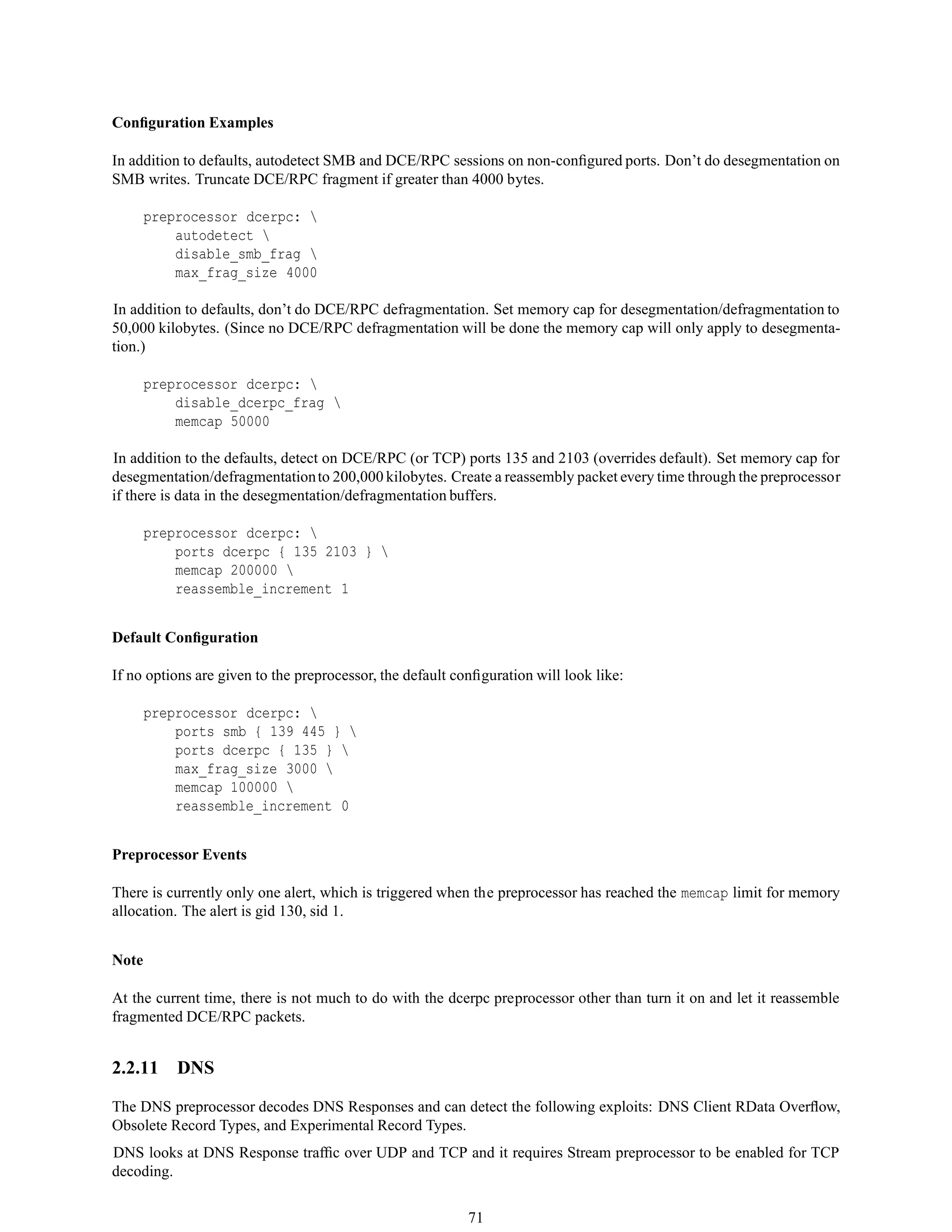
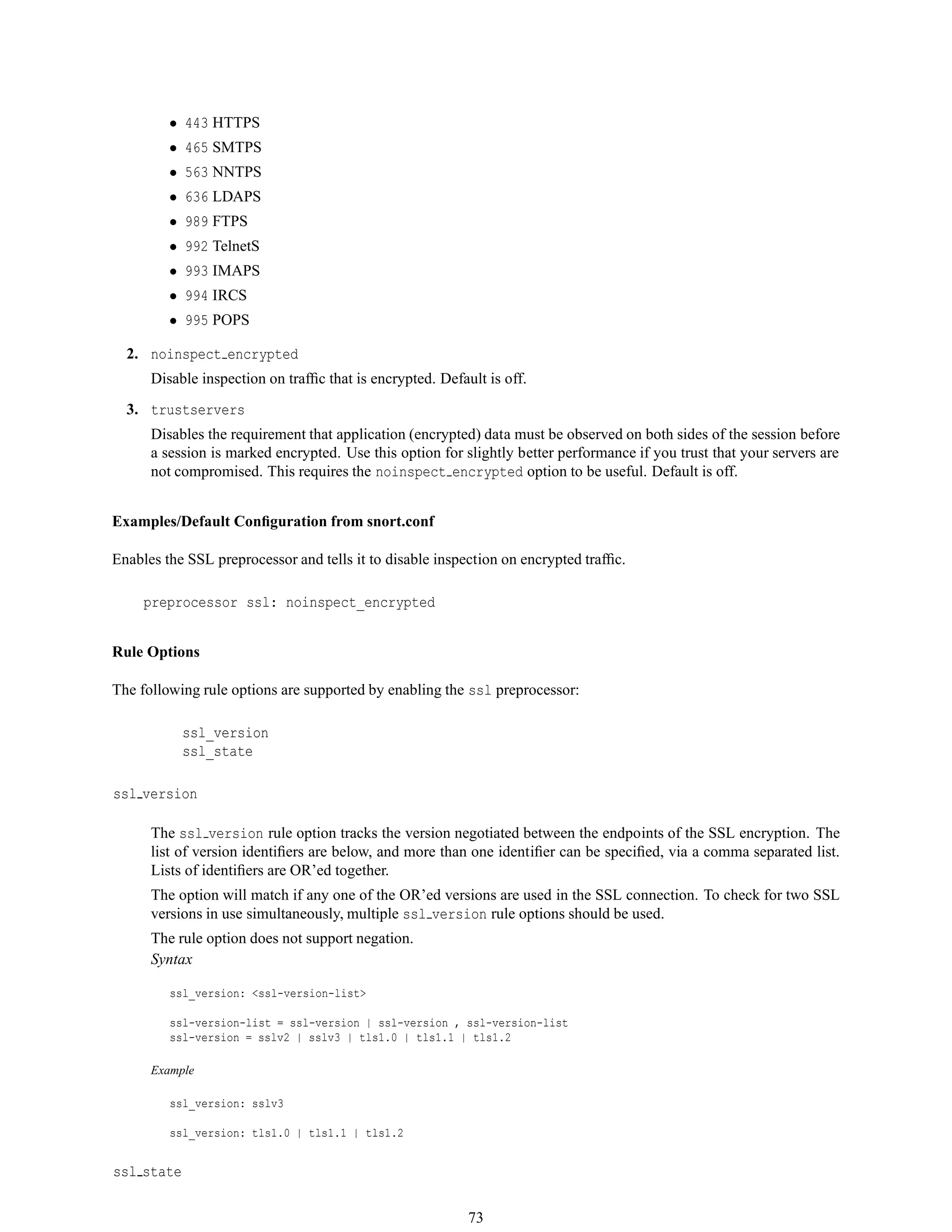
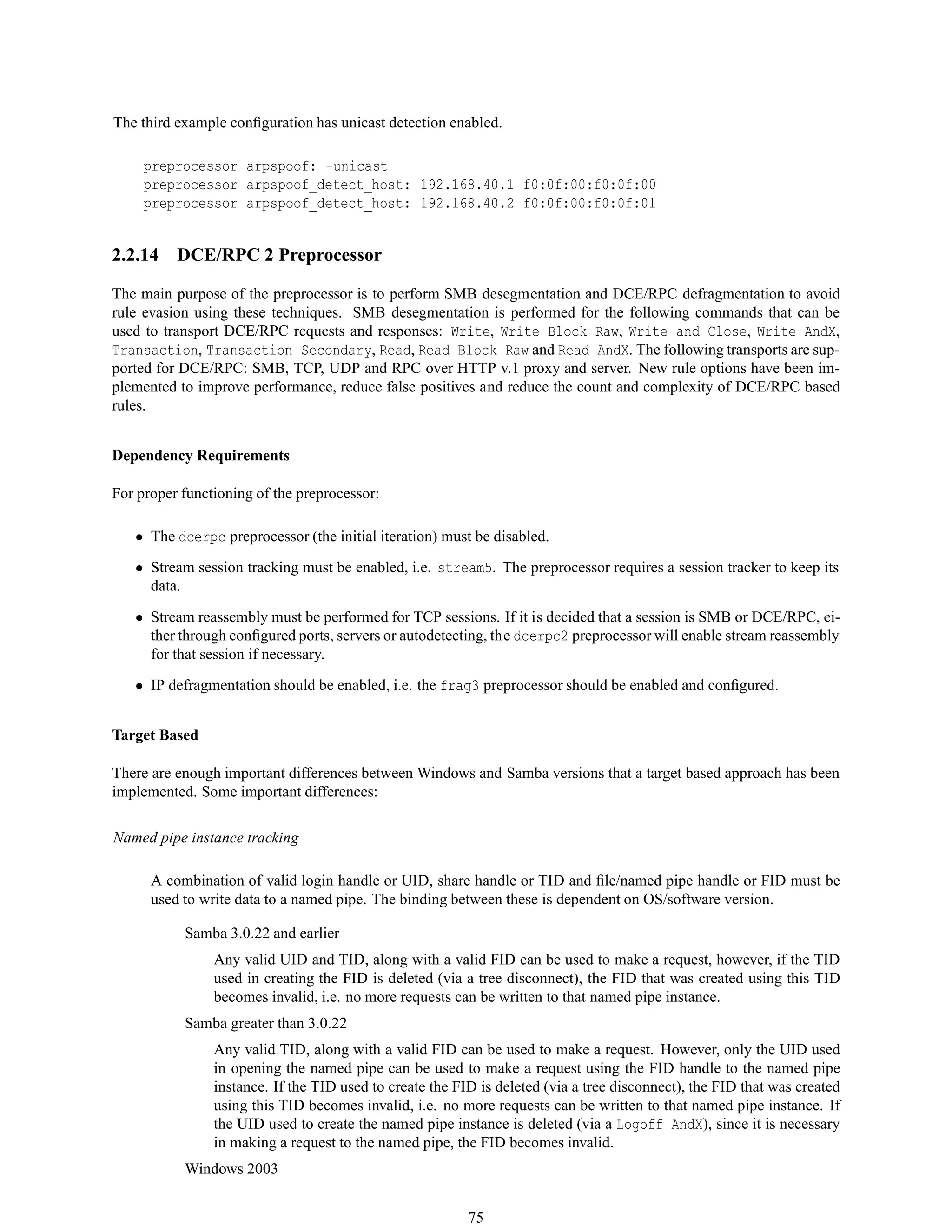
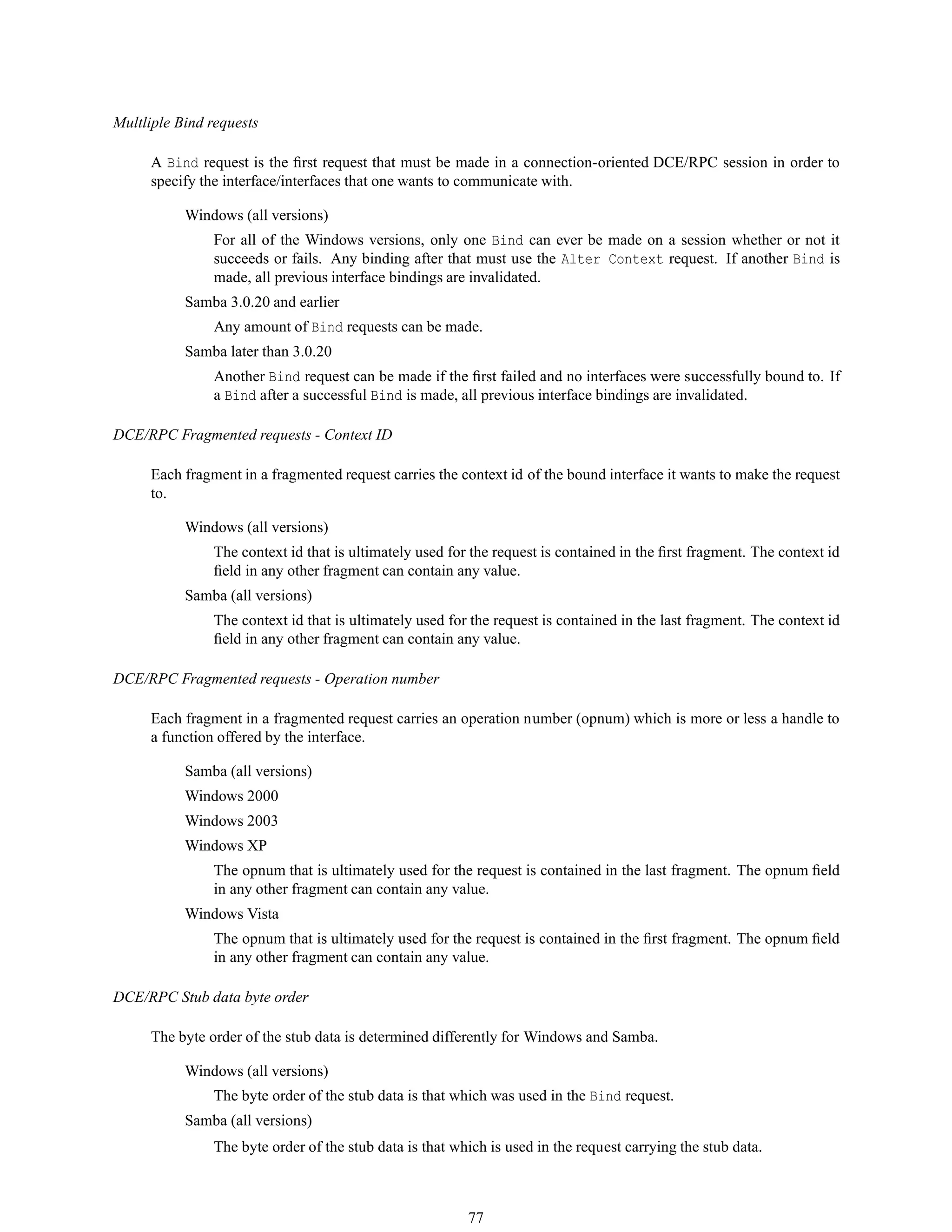
2.8.6
The Snort Project
March 19, 2010
Copyright c 1998-2003 Martin Roesch
Copyright c 2001-2003 Chris Green
Copyright c 2003-2010 Sourcefire, Inc.
1
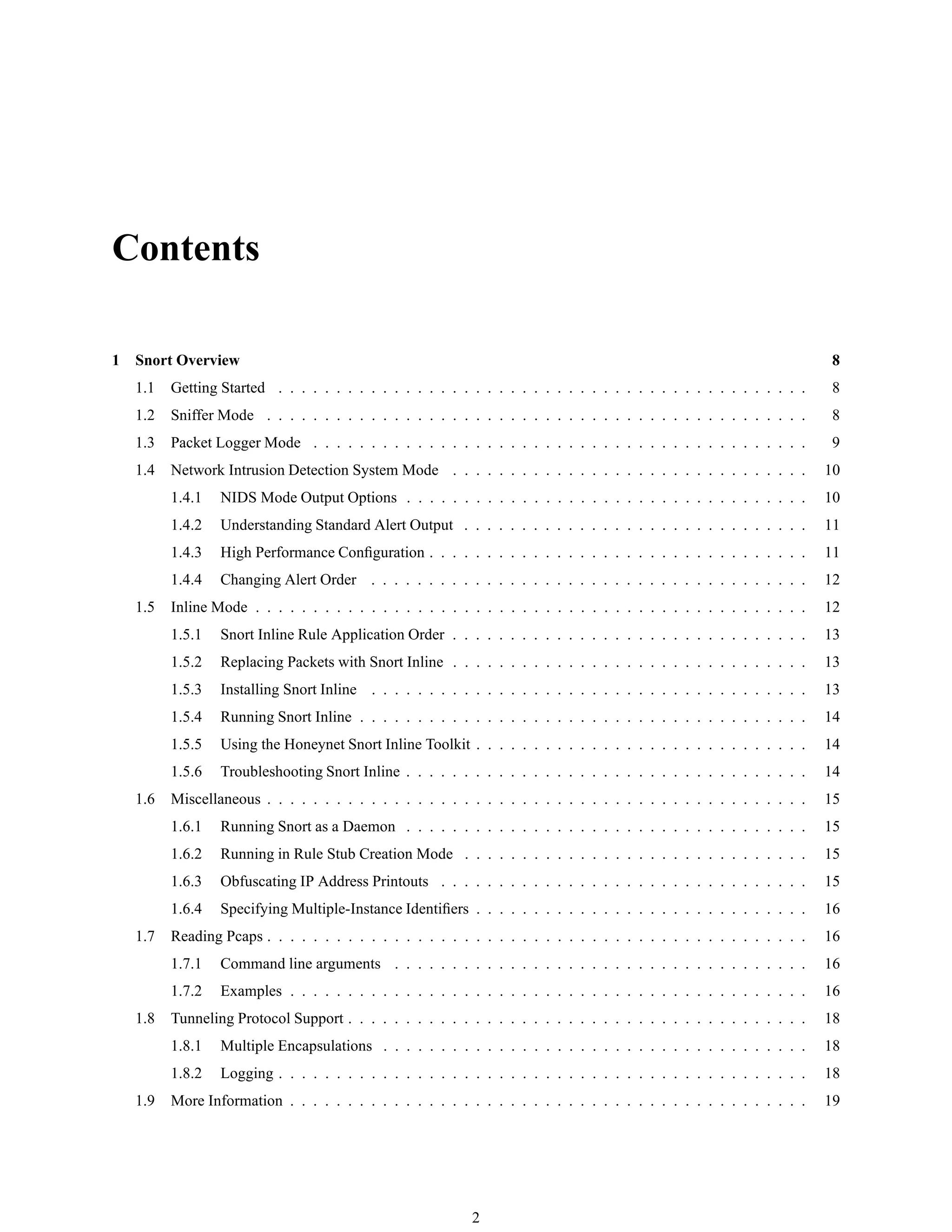
Contents
1 Snort Overview 8
1.1 Getting Started . . . . . . . . . . . . . . . . . . . . . . . . . . . . . . . . . . . . . . . . . . . . . . 8
1.2 Sniffer Mode . . . . . . . . . . . . . . . . . . . . . . . . . . . . . . . . . . . . . . . . . . . . . . . 8
1.3 Packet Logger Mode . . . . . . . . . . . . . . . . . . . . . . . . . . . . . . . . . . . . . . . . . . . 9
1.4 Network Intrusion Detection System Mode . . . . . . . . . . . . . . . . . . . . . . . . . . . . . . . 10
1.4.1 NIDS Mode Output Options . . . . . . . . . . . . . . . . . . . . . . . . . . . . . . . . . . . 10
1.4.2 Understanding Standard Alert Output . . . . . . . . . . . . . . . . . . . . . . . . . . . . . . 11
1.4.3 High Performance Configuration . . . . . . . . . . . . . . . . . . . . . . . . . . . . . . . . . 11
1.4.4 Changing Alert Order . . . . . . . . . . . . . . . . . . . . . . . . . . . . . . . . . . . . . . 12
1.5 Inline Mode . . . . . . . . . . . . . . . . . . . . . . . . . . . . . . . . . . . . . . . . . . . . . . . . 12
1.5.1 Snort Inline Rule Application Order . . . . . . . . . . . . . . . . . . . . . . . . . . . . . . . 13
1.5.2 Replacing Packets with Snort Inline . . . . . . . . . . . . . . . . . . . . . . . . . . . . . . . 13
1.5.3 Installing Snort Inline . . . . . . . . . . . . . . . . . . . . . . . . . . . . . . . . . . . . . . 13
1.5.4 Running Snort Inline . . . . . . . . . . . . . . . . . . . . . . . . . . . . . . . . . . . . . . . 14
1.5.5 Using the Honeynet Snort Inline Toolkit . . . . . . . . . . . . . . . . . . . . . . . . . . . . . 14
1.5.6 Troubleshooting Snort Inline . . . . . . . . . . . . . . . . . . . . . . . . . . . . . . . . . . . 14
1.6 Miscellaneous . . . . . . . . . . . . . . . . . . . . . . . . . . . . . . . . . . . . . . . . . . . . . . . 15
1.6.1 Running Snort as a Daemon . . . . . . . . . . . . . . . . . . . . . . . . . . . . . . . . . . . 15
1.6.2 Running in Rule Stub Creation Mode . . . . . . . . . . . . . . . . . . . . . . . . . . . . . . 15
1.6.3 Obfuscating IP Address Printouts . . . . . . . . . . . . . . . . . . . . . . . . . . . . . . . . 15
1.6.4 Specifying Multiple-Instance Identifiers . . . . . . . . . . . . . . . . . . . . . . . . . . . . . 16
1.7 Reading Pcaps . . . . . . . . . . . . . . . . . . . . . . . . . . . . . . . . . . . . . . . . . . . . . . . 16
1.7.1 Command line arguments . . . . . . . . . . . . . . . . . . . . . . . . . . . . . . . . . . . . 16
1.7.2 Examples . . . . . . . . . . . . . . . . . . . . . . . . . . . . . . . . . . . . . . . . . . . . . 16
1.8 Tunneling Protocol Support . . . . . . . . . . . . . . . . . . . . . . . . . . . . . . . . . . . . . . . . 18
1.8.1 Multiple Encapsulations . . . . . . . . . . . . . . . . . . . . . . . . . . . . . . . . . . . . . 18
1.8.2 Logging . . . . . . . . . . . . . . . . . . . . . . . . . . . . . . . . . . . . . . . . . . . . . . 18
1.9 More Information . . . . . . . . . . . . . . . . . . . . . . . . . . . . . . . . . . . . . . . . . . . . . 19
2
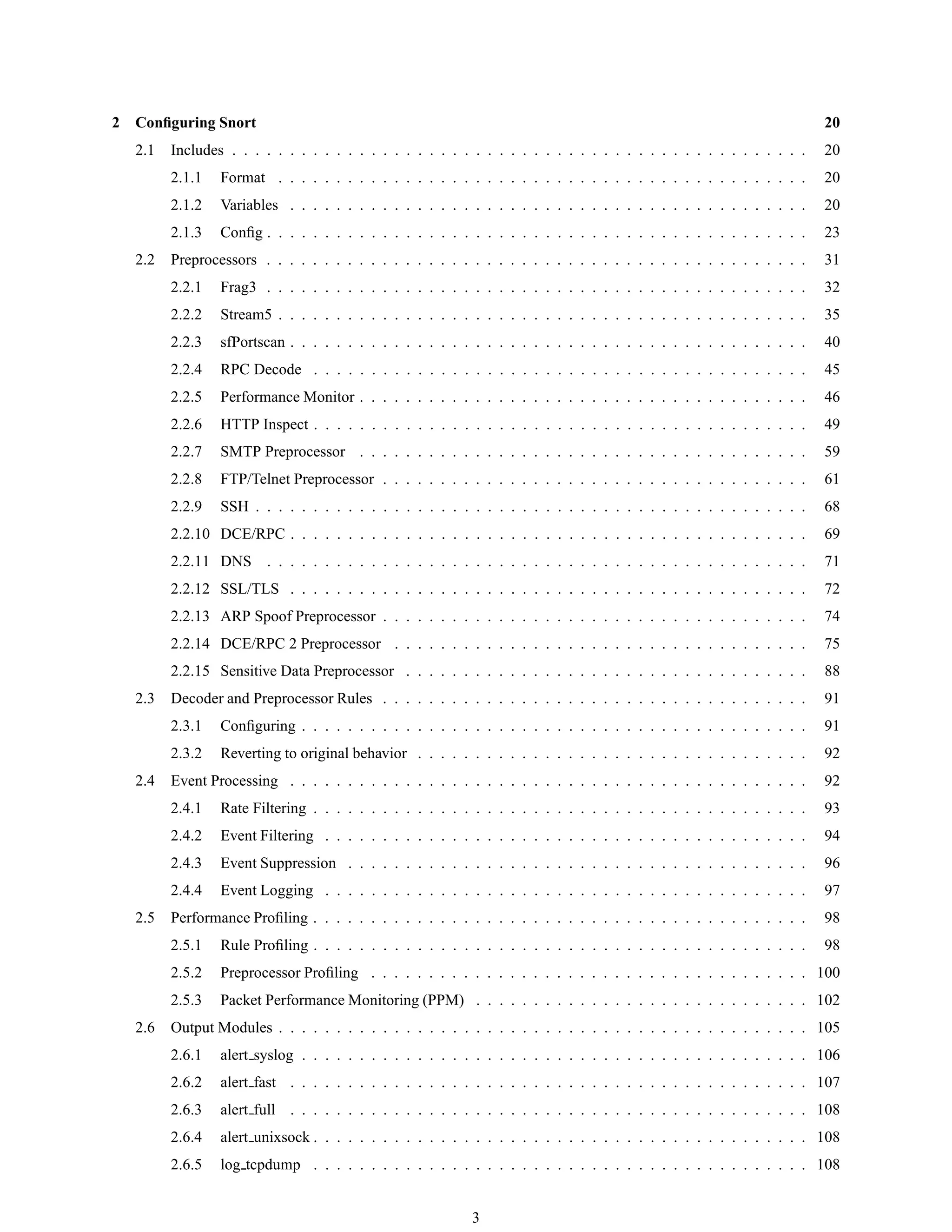
2 Configuring Snort 20
2.1 Includes . . . . . . . . . . . . . . . . . . . . . . . . . . . . . . . . . . . . . . . . . . . . . . . . . . 20
2.1.1 Format . . . . . . . . . . . . . . . . . . . . . . . . . . . . . . . . . . . . . . . . . . . . . . 20
2.1.2 Variables . . . . . . . . . . . . . . . . . . . . . . . . . . . . . . . . . . . . . . . . . . . . . 20
2.1.3 Config . . . . . . . . . . . . . . . . . . . . . . . . . . . . . . . . . . . . . . . . . . . . . . . 23
2.2 Preprocessors . . . . . . . . . . . . . . . . . . . . . . . . . . . . . . . . . . . . . . . . . . . . . . . 31
2.2.1 Frag3 . . . . . . . . . . . . . . . . . . . . . . . . . . . . . . . . . . . . . . . . . . . . . . . 32
2.2.2 Stream5 . . . . . . . . . . . . . . . . . . . . . . . . . . . . . . . . . . . . . . . . . . . . . . 35
2.2.3 sfPortscan . . . . . . . . . . . . . . . . . . . . . . . . . . . . . . . . . . . . . . . . . . . . . 40
2.2.4 RPC Decode . . . . . . . . . . . . . . . . . . . . . . . . . . . . . . . . . . . . . . . . . . . 45
2.2.5 Performance Monitor . . . . . . . . . . . . . . . . . . . . . . . . . . . . . . . . . . . . . . . 46
2.2.6 HTTP Inspect . . . . . . . . . . . . . . . . . . . . . . . . . . . . . . . . . . . . . . . . . . . 49
2.2.7 SMTP Preprocessor . . . . . . . . . . . . . . . . . . . . . . . . . . . . . . . . . . . . . . . 59
2.2.8 FTP/Telnet Preprocessor . . . . . . . . . . . . . . . . . . . . . . . . . . . . . . . . . . . . . 61
2.2.9 SSH . . . . . . . . . . . . . . . . . . . . . . . . . . . . . . . . . . . . . . . . . . . . . . . . 68
2.2.10 DCE/RPC . . . . . . . . . . . . . . . . . . . . . . . . . . . . . . . . . . . . . . . . . . . . . 69
2.2.11 DNS . . . . . . . . . . . . . . . . . . . . . . . . . . . . . . . . . . . . . . . . . . . . . . . 71
2.2.12 SSL/TLS . . . . . . . . . . . . . . . . . . . . . . . . . . . . . . . . . . . . . . . . . . . . . 72
2.2.13 ARP Spoof Preprocessor . . . . . . . . . . . . . . . . . . . . . . . . . . . . . . . . . . . . . 74
2.2.14 DCE/RPC 2 Preprocessor . . . . . . . . . . . . . . . . . . . . . . . . . . . . . . . . . . . . 75
2.2.15 Sensitive Data Preprocessor . . . . . . . . . . . . . . . . . . . . . . . . . . . . . . . . . . . 88
2.3 Decoder and Preprocessor Rules . . . . . . . . . . . . . . . . . . . . . . . . . . . . . . . . . . . . . 91
2.3.1 Configuring . . . . . . . . . . . . . . . . . . . . . . . . . . . . . . . . . . . . . . . . . . . . 91
2.3.2 Reverting to original behavior . . . . . . . . . . . . . . . . . . . . . . . . . . . . . . . . . . 92
2.4 Event Processing . . . . . . . . . . . . . . . . . . . . . . . . . . . . . . . . . . . . . . . . . . . . . 92
2.4.1 Rate Filtering . . . . . . . . . . . . . . . . . . . . . . . . . . . . . . . . . . . . . . . . . . . 93
2.4.2 Event Filtering . . . . . . . . . . . . . . . . . . . . . . . . . . . . . . . . . . . . . . . . . . 94
2.4.3 Event Suppression . . . . . . . . . . . . . . . . . . . . . . . . . . . . . . . . . . . . . . . . 96
2.4.4 Event Logging . . . . . . . . . . . . . . . . . . . . . . . . . . . . . . . . . . . . . . . . . . 97
2.5 Performance Profiling . . . . . . . . . . . . . . . . . . . . . . . . . . . . . . . . . . . . . . . . . . . 98
2.5.1 Rule Profiling . . . . . . . . . . . . . . . . . . . . . . . . . . . . . . . . . . . . . . . . . . . 98
2.5.2 Preprocessor Profiling . . . . . . . . . . . . . . . . . . . . . . . . . . . . . . . . . . . . . . 100
2.5.3 Packet Performance Monitoring (PPM) . . . . . . . . . . . . . . . . . . . . . . . . . . . . . 102
2.6 Output Modules . . . . . . . . . . . . . . . . . . . . . . . . . . . . . . . . . . . . . . . . . . . . . . 105
2.6.1 alert syslog . . . . . . . . . . . . . . . . . . . . . . . . . . . . . . . . . . . . . . . . . . . . 106
2.6.2 alert fast . . . . . . . . . . . . . . . . . . . . . . . . . . . . . . . . . . . . . . . . . . . . . 107
2.6.3 alert full . . . . . . . . . . . . . . . . . . . . . . . . . . . . . . . . . . . . . . . . . . . . . 108
2.6.4 alert unixsock . . . . . . . . . . . . . . . . . . . . . . . . . . . . . . . . . . . . . . . . . . . 108
2.6.5 log tcpdump . . . . . . . . . . . . . . . . . . . . . . . . . . . . . . . . . . . . . . . . . . . 108
3
2.6.6 database . . . . . . . . . . . . . . . . . . . . . . . . . . . . . . . . . . . . . . . . . . . . . . 109
2.6.7 csv . . . . . . . . . . . . . . . . . . . . . . . . . . . . . . . . . . . . . . . . . . . . . . . . 110
2.6.8 unified . . . . . . . . . . . . . . . . . . . . . . . . . . . . . . . . . . . . . . . . . . . . . . 111
2.6.9 unified 2 . . . . . . . . . . . . . . . . . . . . . . . . . . . . . . . . . . . . . . . . . . . . . 112
2.6.10 alert prelude . . . . . . . . . . . . . . . . . . . . . . . . . . . . . . . . . . . . . . . . . . . 112
2.6.11 log null . . . . . . . . . . . . . . . . . . . . . . . . . . . . . . . . . . . . . . . . . . . . . . 113
2.6.12 alert aruba action . . . . . . . . . . . . . . . . . . . . . . . . . . . . . . . . . . . . . . . . . 113
2.6.13 Log Limits . . . . . . . . . . . . . . . . . . . . . . . . . . . . . . . . . . . . . . . . . . . . 114
2.7 Host Attribute Table . . . . . . . . . . . . . . . . . . . . . . . . . . . . . . . . . . . . . . . . . . . . 114
2.7.1 Configuration Format . . . . . . . . . . . . . . . . . . . . . . . . . . . . . . . . . . . . . . . 114
2.7.2 Attribute Table File Format . . . . . . . . . . . . . . . . . . . . . . . . . . . . . . . . . . . . 115
2.8 Dynamic Modules . . . . . . . . . . . . . . . . . . . . . . . . . . . . . . . . . . . . . . . . . . . . . 117
2.8.1 Format . . . . . . . . . . . . . . . . . . . . . . . . . . . . . . . . . . . . . . . . . . . . . . 117
2.8.2 Directives . . . . . . . . . . . . . . . . . . . . . . . . . . . . . . . . . . . . . . . . . . . . . 117
2.9 Reloading a Snort Configuration . . . . . . . . . . . . . . . . . . . . . . . . . . . . . . . . . . . . . 117
2.9.1 Enabling support . . . . . . . . . . . . . . . . . . . . . . . . . . . . . . . . . . . . . . . . . 118
2.9.2 Reloading a configuration . . . . . . . . . . . . . . . . . . . . . . . . . . . . . . . . . . . . 118
2.9.3 Non-reloadable configuration options . . . . . . . . . . . . . . . . . . . . . . . . . . . . . . 118
2.10 Multiple Configurations . . . . . . . . . . . . . . . . . . . . . . . . . . . . . . . . . . . . . . . . . . 120
2.10.1 Creating Multiple Configurations . . . . . . . . . . . . . . . . . . . . . . . . . . . . . . . . 120
2.10.2 Configuration Specific Elements . . . . . . . . . . . . . . . . . . . . . . . . . . . . . . . . . 120
2.10.3 How Configuration is applied? . . . . . . . . . . . . . . . . . . . . . . . . . . . . . . . . . . 122
3 Writing Snort Rules 123
3.1 The Basics . . . . . . . . . . . . . . . . . . . . . . . . . . . . . . . . . . . . . . . . . . . . . . . . . 123
3.2 Rules Headers . . . . . . . . . . . . . . . . . . . . . . . . . . . . . . . . . . . . . . . . . . . . . . . 123
3.2.1 Rule Actions . . . . . . . . . . . . . . . . . . . . . . . . . . . . . . . . . . . . . . . . . . . 123
3.2.2 Protocols . . . . . . . . . . . . . . . . . . . . . . . . . . . . . . . . . . . . . . . . . . . . . 124
3.2.3 IP Addresses . . . . . . . . . . . . . . . . . . . . . . . . . . . . . . . . . . . . . . . . . . . 124
3.2.4 Port Numbers . . . . . . . . . . . . . . . . . . . . . . . . . . . . . . . . . . . . . . . . . . . 125
3.2.5 The Direction Operator . . . . . . . . . . . . . . . . . . . . . . . . . . . . . . . . . . . . . . 125
3.2.6 Activate/Dynamic Rules . . . . . . . . . . . . . . . . . . . . . . . . . . . . . . . . . . . . . 126
3.3 Rule Options . . . . . . . . . . . . . . . . . . . . . . . . . . . . . . . . . . . . . . . . . . . . . . . 126
3.4 General Rule Options . . . . . . . . . . . . . . . . . . . . . . . . . . . . . . . . . . . . . . . . . . . 127
3.4.1 msg . . . . . . . . . . . . . . . . . . . . . . . . . . . . . . . . . . . . . . . . . . . . . . . . 127
3.4.2 reference . . . . . . . . . . . . . . . . . . . . . . . . . . . . . . . . . . . . . . . . . . . . . 127
3.4.3 gid . . . . . . . . . . . . . . . . . . . . . . . . . . . . . . . . . . . . . . . . . . . . . . . . 128
3.4.4 sid . . . . . . . . . . . . . . . . . . . . . . . . . . . . . . . . . . . . . . . . . . . . . . . . . 128
3.4.5 rev . . . . . . . . . . . . . . . . . . . . . . . . . . . . . . . . . . . . . . . . . . . . . . . . 129
4
3.4.6 classtype . . . . . . . . . . . . . . . . . . . . . . . . . . . . . . . . . . . . . . . . . . . . . 129
3.4.7 priority . . . . . . . . . . . . . . . . . . . . . . . . . . . . . . . . . . . . . . . . . . . . . . 130
3.4.8 metadata . . . . . . . . . . . . . . . . . . . . . . . . . . . . . . . . . . . . . . . . . . . . . 131
3.4.9 General Rule Quick Reference . . . . . . . . . . . . . . . . . . . . . . . . . . . . . . . . . . 131
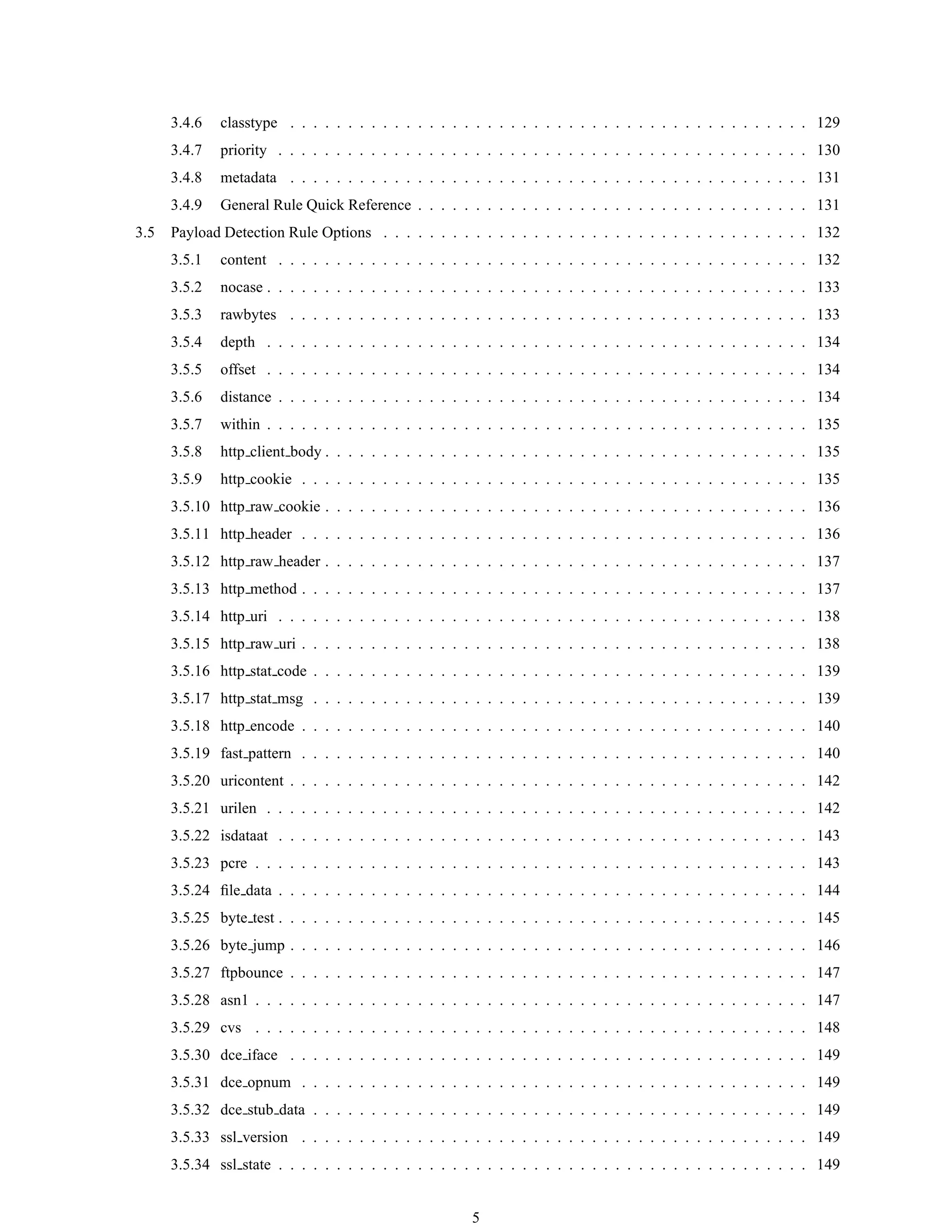
3.5 Payload Detection Rule Options . . . . . . . . . . . . . . . . . . . . . . . . . . . . . . . . . . . . . 132
3.5.1 content . . . . . . . . . . . . . . . . . . . . . . . . . . . . . . . . . . . . . . . . . . . . . . 132
3.5.2 nocase . . . . . . . . . . . . . . . . . . . . . . . . . . . . . . . . . . . . . . . . . . . . . . . 133
3.5.3 rawbytes . . . . . . . . . . . . . . . . . . . . . . . . . . . . . . . . . . . . . . . . . . . . . 133
3.5.4 depth . . . . . . . . . . . . . . . . . . . . . . . . . . . . . . . . . . . . . . . . . . . . . . . 134
3.5.5 offset . . . . . . . . . . . . . . . . . . . . . . . . . . . . . . . . . . . . . . . . . . . . . . . 134
3.5.6 distance . . . . . . . . . . . . . . . . . . . . . . . . . . . . . . . . . . . . . . . . . . . . . . 134
3.5.7 within . . . . . . . . . . . . . . . . . . . . . . . . . . . . . . . . . . . . . . . . . . . . . . . 135
3.5.8 http client body . . . . . . . . . . . . . . . . . . . . . . . . . . . . . . . . . . . . . . . . . . 135
3.5.9 http cookie . . . . . . . . . . . . . . . . . . . . . . . . . . . . . . . . . . . . . . . . . . . . 135
3.5.10 http raw cookie . . . . . . . . . . . . . . . . . . . . . . . . . . . . . . . . . . . . . . . . . . 136
3.5.11 http header . . . . . . . . . . . . . . . . . . . . . . . . . . . . . . . . . . . . . . . . . . . . 136
3.5.12 http raw header . . . . . . . . . . . . . . . . . . . . . . . . . . . . . . . . . . . . . . . . . . 137
3.5.13 http method . . . . . . . . . . . . . . . . . . . . . . . . . . . . . . . . . . . . . . . . . . . . 137
3.5.14 http uri . . . . . . . . . . . . . . . . . . . . . . . . . . . . . . . . . . . . . . . . . . . . . . 138
3.5.15 http raw uri . . . . . . . . . . . . . . . . . . . . . . . . . . . . . . . . . . . . . . . . . . . . 138
3.5.16 http stat code . . . . . . . . . . . . . . . . . . . . . . . . . . . . . . . . . . . . . . . . . . . 139
3.5.17 http stat msg . . . . . . . . . . . . . . . . . . . . . . . . . . . . . . . . . . . . . . . . . . . 139
3.5.18 http encode . . . . . . . . . . . . . . . . . . . . . . . . . . . . . . . . . . . . . . . . . . . . 140
3.5.19 fast pattern . . . . . . . . . . . . . . . . . . . . . . . . . . . . . . . . . . . . . . . . . . . . 140
3.5.20 uricontent . . . . . . . . . . . . . . . . . . . . . . . . . . . . . . . . . . . . . . . . . . . . . 142
3.5.21 urilen . . . . . . . . . . . . . . . . . . . . . . . . . . . . . . . . . . . . . . . . . . . . . . . 142
3.5.22 isdataat . . . . . . . . . . . . . . . . . . . . . . . . . . . . . . . . . . . . . . . . . . . . . . 143
3.5.23 pcre . . . . . . . . . . . . . . . . . . . . . . . . . . . . . . . . . . . . . . . . . . . . . . . . 143
3.5.24 file data . . . . . . . . . . . . . . . . . . . . . . . . . . . . . . . . . . . . . . . . . . . . . . 144
3.5.25 byte test . . . . . . . . . . . . . . . . . . . . . . . . . . . . . . . . . . . . . . . . . . . . . . 145
3.5.26 byte jump . . . . . . . . . . . . . . . . . . . . . . . . . . . . . . . . . . . . . . . . . . . . . 146
3.5.27 ftpbounce . . . . . . . . . . . . . . . . . . . . . . . . . . . . . . . . . . . . . . . . . . . . . 147
3.5.28 asn1 . . . . . . . . . . . . . . . . . . . . . . . . . . . . . . . . . . . . . . . . . . . . . . . . 147
3.5.29 cvs . . . . . . . . . . . . . . . . . . . . . . . . . . . . . . . . . . . . . . . . . . . . . . . . 148
3.5.30 dce iface . . . . . . . . . . . . . . . . . . . . . . . . . . . . . . . . . . . . . . . . . . . . . 149
3.5.31 dce opnum . . . . . . . . . . . . . . . . . . . . . . . . . . . . . . . . . . . . . . . . . . . . 149
3.5.32 dce stub data . . . . . . . . . . . . . . . . . . . . . . . . . . . . . . . . . . . . . . . . . . . 149
3.5.33 ssl version . . . . . . . . . . . . . . . . . . . . . . . . . . . . . . . . . . . . . . . . . . . . 149
3.5.34 ssl state . . . . . . . . . . . . . . . . . . . . . . . . . . . . . . . . . . . . . . . . . . . . . . 149
5
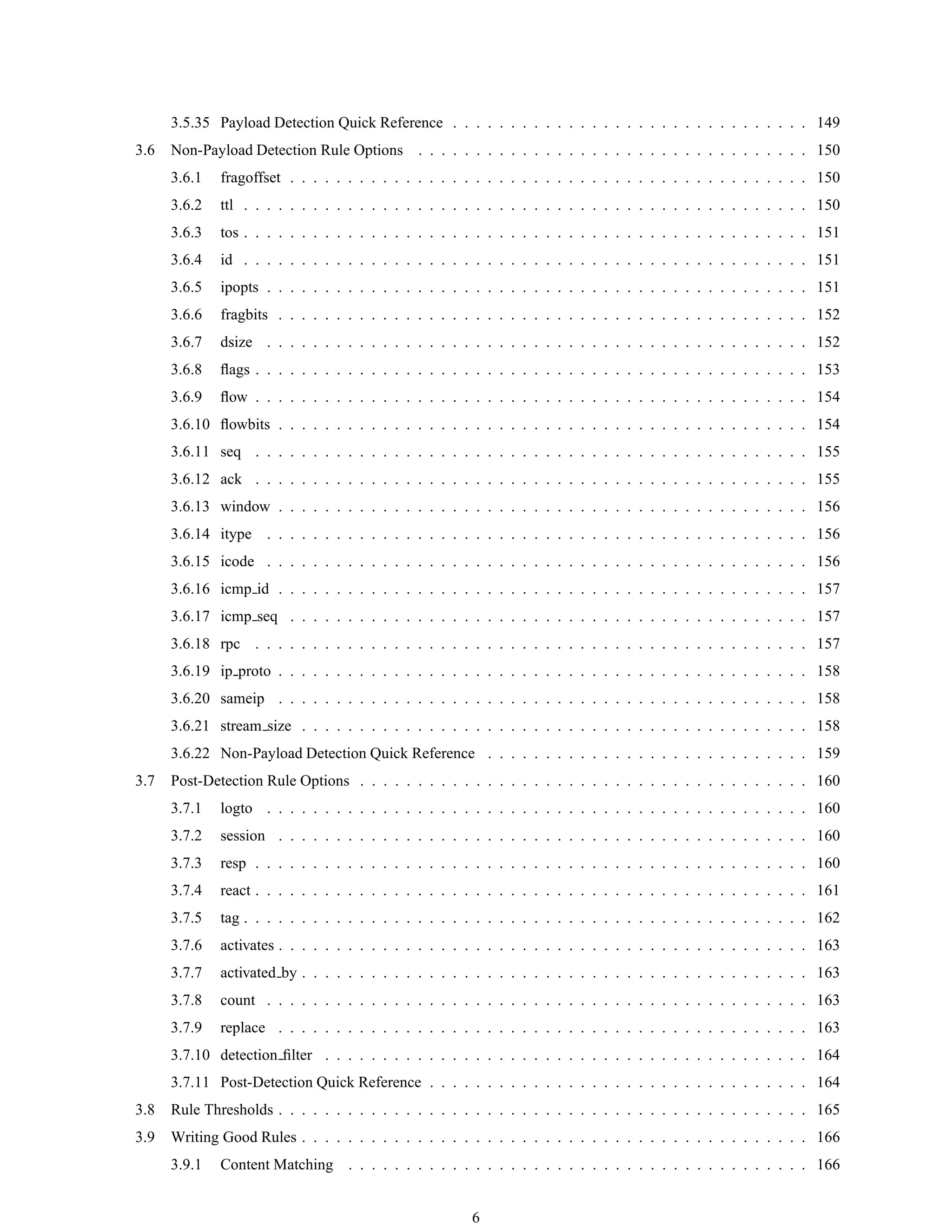
3.5.35 Payload Detection Quick Reference . . . . . . . . . . . . . . . . . . . . . . . . . . . . . . . 149
3.6 Non-Payload Detection Rule Options . . . . . . . . . . . . . . . . . . . . . . . . . . . . . . . . . . 150
3.6.1 fragoffset . . . . . . . . . . . . . . . . . . . . . . . . . . . . . . . . . . . . . . . . . . . . . 150
3.6.2 ttl . . . . . . . . . . . . . . . . . . . . . . . . . . . . . . . . . . . . . . . . . . . . . . . . . 150
3.6.3 tos . . . . . . . . . . . . . . . . . . . . . . . . . . . . . . . . . . . . . . . . . . . . . . . . . 151
3.6.4 id . . . . . . . . . . . . . . . . . . . . . . . . . . . . . . . . . . . . . . . . . . . . . . . . . 151
3.6.5 ipopts . . . . . . . . . . . . . . . . . . . . . . . . . . . . . . . . . . . . . . . . . . . . . . . 151
3.6.6 fragbits . . . . . . . . . . . . . . . . . . . . . . . . . . . . . . . . . . . . . . . . . . . . . . 152
3.6.7 dsize . . . . . . . . . . . . . . . . . . . . . . . . . . . . . . . . . . . . . . . . . . . . . . . 152
3.6.8 flags . . . . . . . . . . . . . . . . . . . . . . . . . . . . . . . . . . . . . . . . . . . . . . . . 153
3.6.9 flow . . . . . . . . . . . . . . . . . . . . . . . . . . . . . . . . . . . . . . . . . . . . . . . . 154
3.6.10 flowbits . . . . . . . . . . . . . . . . . . . . . . . . . . . . . . . . . . . . . . . . . . . . . . 154
3.6.11 seq . . . . . . . . . . . . . . . . . . . . . . . . . . . . . . . . . . . . . . . . . . . . . . . . 155
3.6.12 ack . . . . . . . . . . . . . . . . . . . . . . . . . . . . . . . . . . . . . . . . . . . . . . . . 155
3.6.13 window . . . . . . . . . . . . . . . . . . . . . . . . . . . . . . . . . . . . . . . . . . . . . . 156
3.6.14 itype . . . . . . . . . . . . . . . . . . . . . . . . . . . . . . . . . . . . . . . . . . . . . . . 156
3.6.15 icode . . . . . . . . . . . . . . . . . . . . . . . . . . . . . . . . . . . . . . . . . . . . . . . 156
3.6.16 icmp id . . . . . . . . . . . . . . . . . . . . . . . . . . . . . . . . . . . . . . . . . . . . . . 157
3.6.17 icmp seq . . . . . . . . . . . . . . . . . . . . . . . . . . . . . . . . . . . . . . . . . . . . . 157
3.6.18 rpc . . . . . . . . . . . . . . . . . . . . . . . . . . . . . . . . . . . . . . . . . . . . . . . . 157
3.6.19 ip proto . . . . . . . . . . . . . . . . . . . . . . . . . . . . . . . . . . . . . . . . . . . . . . 158
3.6.20 sameip . . . . . . . . . . . . . . . . . . . . . . . . . . . . . . . . . . . . . . . . . . . . . . 158
3.6.21 stream size . . . . . . . . . . . . . . . . . . . . . . . . . . . . . . . . . . . . . . . . . . . . 158
3.6.22 Non-Payload Detection Quick Reference . . . . . . . . . . . . . . . . . . . . . . . . . . . . 159
3.7 Post-Detection Rule Options . . . . . . . . . . . . . . . . . . . . . . . . . . . . . . . . . . . . . . . 160
3.7.1 logto . . . . . . . . . . . . . . . . . . . . . . . . . . . . . . . . . . . . . . . . . . . . . . . 160
3.7.2 session . . . . . . . . . . . . . . . . . . . . . . . . . . . . . . . . . . . . . . . . . . . . . . 160
3.7.3 resp . . . . . . . . . . . . . . . . . . . . . . . . . . . . . . . . . . . . . . . . . . . . . . . . 160
3.7.4 react . . . . . . . . . . . . . . . . . . . . . . . . . . . . . . . . . . . . . . . . . . . . . . . . 161
3.7.5 tag . . . . . . . . . . . . . . . . . . . . . . . . . . . . . . . . . . . . . . . . . . . . . . . . . 162
3.7.6 activates . . . . . . . . . . . . . . . . . . . . . . . . . . . . . . . . . . . . . . . . . . . . . . 163
3.7.7 activated by . . . . . . . . . . . . . . . . . . . . . . . . . . . . . . . . . . . . . . . . . . . . 163
3.7.8 count . . . . . . . . . . . . . . . . . . . . . . . . . . . . . . . . . . . . . . . . . . . . . . . 163
3.7.9 replace . . . . . . . . . . . . . . . . . . . . . . . . . . . . . . . . . . . . . . . . . . . . . . 163
3.7.10 detection filter . . . . . . . . . . . . . . . . . . . . . . . . . . . . . . . . . . . . . . . . . . 164
3.7.11 Post-Detection Quick Reference . . . . . . . . . . . . . . . . . . . . . . . . . . . . . . . . . 164
3.8 Rule Thresholds . . . . . . . . . . . . . . . . . . . . . . . . . . . . . . . . . . . . . . . . . . . . . . 165
3.9 Writing Good Rules . . . . . . . . . . . . . . . . . . . . . . . . . . . . . . . . . . . . . . . . . . . . 166
3.9.1 Content Matching . . . . . . . . . . . . . . . . . . . . . . . . . . . . . . . . . . . . . . . . 166
6
3.9.2 Catch the Vulnerability, Not the Exploit . . . . . . . . . . . . . . . . . . . . . . . . . . . . . 166
3.9.3 Catch the Oddities of the Protocol in the Rule . . . . . . . . . . . . . . . . . . . . . . . . . . 166
3.9.4 Optimizing Rules . . . . . . . . . . . . . . . . . . . . . . . . . . . . . . . . . . . . . . . . . 167
3.9.5 Testing Numerical Values . . . . . . . . . . . . . . . . . . . . . . . . . . . . . . . . . . . . 168
4 Making Snort Faster 172
4.1 MMAPed pcap . . . . . . . . . . . . . . . . . . . . . . . . . . . . . . . . . . . . . . . . . . . . . . 172
5 Dynamic Modules 173
5.1 Data Structures . . . . . . . . . . . . . . . . . . . . . . . . . . . . . . . . . . . . . . . . . . . . . . 173
5.1.1 DynamicPluginMeta . . . . . . . . . . . . . . . . . . . . . . . . . . . . . . . . . . . . . . . 173
5.1.2 DynamicPreprocessorData . . . . . . . . . . . . . . . . . . . . . . . . . . . . . . . . . . . . 173
5.1.3 DynamicEngineData . . . . . . . . . . . . . . . . . . . . . . . . . . . . . . . . . . . . . . . 174
5.1.4 SFSnortPacket . . . . . . . . . . . . . . . . . . . . . . . . . . . . . . . . . . . . . . . . . . 174
5.1.5 Dynamic Rules . . . . . . . . . . . . . . . . . . . . . . . . . . . . . . . . . . . . . . . . . . 175
5.2 Required Functions . . . . . . . . . . . . . . . . . . . . . . . . . . . . . . . . . . . . . . . . . . . . 181
5.2.1 Preprocessors . . . . . . . . . . . . . . . . . . . . . . . . . . . . . . . . . . . . . . . . . . . 182
5.2.2 Detection Engine . . . . . . . . . . . . . . . . . . . . . . . . . . . . . . . . . . . . . . . . . 182
5.2.3 Rules . . . . . . . . . . . . . . . . . . . . . . . . . . . . . . . . . . . . . . . . . . . . . . . 183
5.3 Examples . . . . . . . . . . . . . . . . . . . . . . . . . . . . . . . . . . . . . . . . . . . . . . . . . 184
5.3.1 Preprocessor Example . . . . . . . . . . . . . . . . . . . . . . . . . . . . . . . . . . . . . . 184
5.3.2 Rules . . . . . . . . . . . . . . . . . . . . . . . . . . . . . . . . . . . . . . . . . . . . . . . 186
6 Snort Development 189
6.1 Submitting Patches . . . . . . . . . . . . . . . . . . . . . . . . . . . . . . . . . . . . . . . . . . . . 189
6.2 Snort Data Flow . . . . . . . . . . . . . . . . . . . . . . . . . . . . . . . . . . . . . . . . . . . . . . 189
6.2.1 Preprocessors . . . . . . . . . . . . . . . . . . . . . . . . . . . . . . . . . . . . . . . . . . . 189
6.2.2 Detection Plugins . . . . . . . . . . . . . . . . . . . . . . . . . . . . . . . . . . . . . . . . . 190
6.2.3 Output Plugins . . . . . . . . . . . . . . . . . . . . . . . . . . . . . . . . . . . . . . . . . . 190
6.3 The Snort Team . . . . . . . . . . . . . . . . . . . . . . . . . . . . . . . . . . . . . . . . . . . . . . 191
7
Chapter 1
Snort Overview
This manual is based on Writing Snort Rules by Martin Roesch and further work from Chris Green <cmg@snort.org>.
It was then maintained by Brian Caswell <bmc@snort.org> and now is maintained by the Snort Team. If you have a
better way to say something or find that something in the documentation is outdated, drop us a line and we will update
it. If you would like to submit patches for this document, you can find the latest version of the documentation in LATEX
format in the Snort CVS repository at /doc/snort_manual.tex. Small documentation updates are the easiest way to
help out the Snort Project.
1.1 Getting Started
Snort really isn’t very hard to use, but there are a lot of command line options to play with, and it’s not always obvious
which ones go together well. This file aims to make using Snort easier for new users.
Before we proceed, there are a few basic concepts you should understand about Snort. Snort can be configured to run
in three modes:
• Sniffer mode, which simply reads the packets off of the network and displays them for you in a continuous
stream on the console (screen).
• Packet Logger mode, which logs the packets to disk.
• Network Intrusion Detection System (NIDS) mode, the most complex and configurable configuration, which
allows Snort to analyze network traffic for matches against a user-defined rule set and performs several actions
based upon what it sees.
• Inline mode, which obtains packets from iptables instead of from libpcap and then causes iptables to drop or
pass packets based on Snort rules that use inline-specific rule types.
1.2 Sniffer Mode
First, let’s start with the basics. If you just want to print out the TCP/IP packet headers to the screen (i.e. sniffer mode),
try this:
./snort -v
This command will run Snort and just show the IP and TCP/UDP/ICMP headers, nothing else. If you want to see the
application data in transit, try the following:
./snort -vd
8
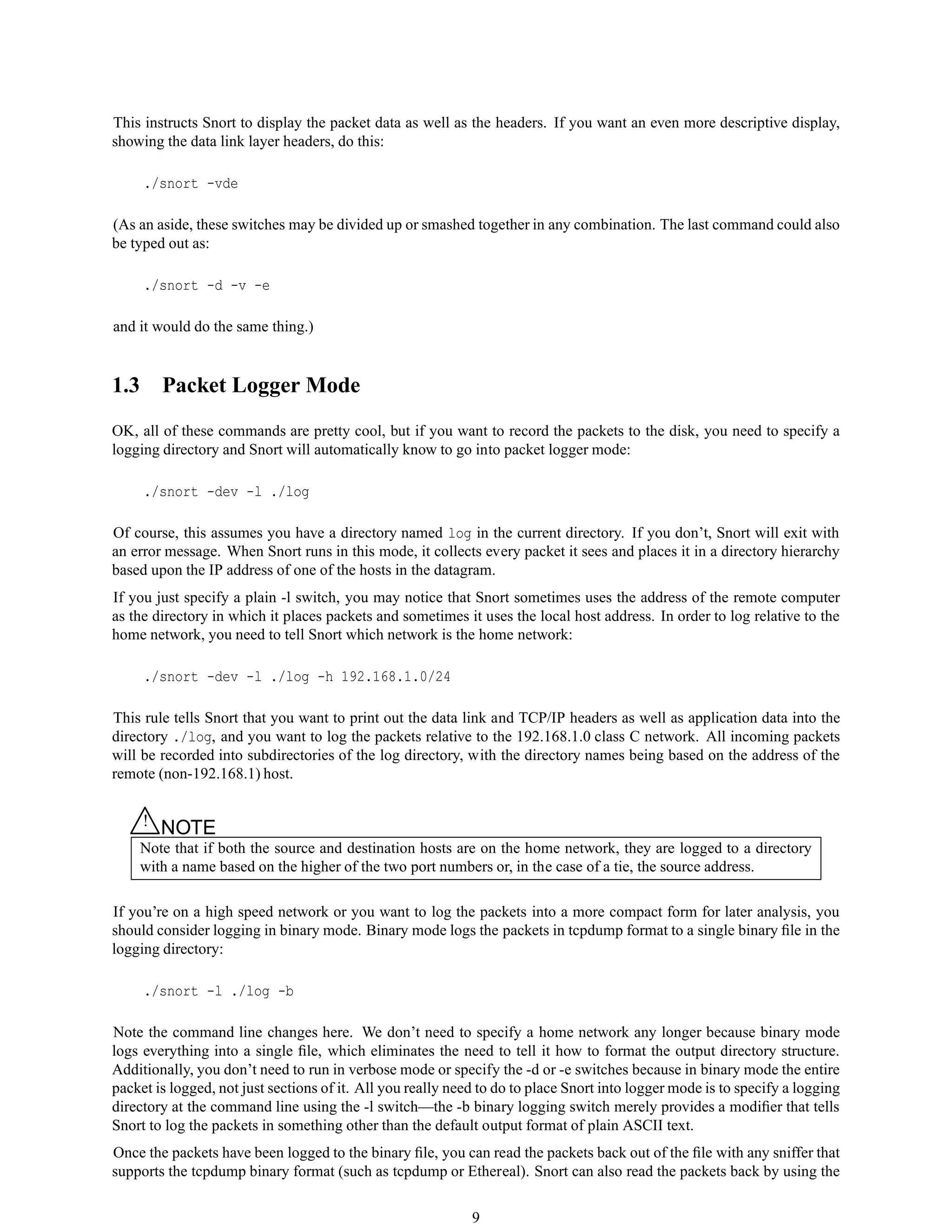
This instructs Snort to display the packet data as well as the headers. If you want an even more descriptive display,
showing the data link layer headers, do this:
./snort -vde
(As an aside, these switches may be divided up or smashed together in any combination. The last command could also
be typed out as:
./snort -d -v -e
and it would do the same thing.)
1.3 Packet Logger Mode
OK, all of these commands are pretty cool, but if you want to record the packets to the disk, you need to specify a
logging directory and Snort will automatically know to go into packet logger mode:
./snort -dev -l ./log
Of course, this assumes you have a directory named log in the current directory. If you don’t, Snort will exit with
an error message. When Snort runs in this mode, it collects every packet it sees and places it in a directory hierarchy
based upon the IP address of one of the hosts in the datagram.
If you just specify a plain -l switch, you may notice that Snort sometimes uses the address of the remote computer
as the directory in which it places packets and sometimes it uses the local host address. In order to log relative to the
home network, you need to tell Snort which network is the home network:
./snort -dev -l ./log -h 192.168.1.0/24
This rule tells Snort that you want to print out the data link and TCP/IP headers as well as application data into the
directory ./log, and you want to log the packets relative to the 192.168.1.0 class C network. All incoming packets
will be recorded into subdirectories of the log directory, with the directory names being based on the address of the
remote (non-192.168.1) host.
△! NOTE
Note that if both the source and destination hosts are on the home network, they are logged to a directory
with a name based on the higher of the two port numbers or, in the case of a tie, the source address.
If you’re on a high speed network or you want to log the packets into a more compact form for later analysis, you
should consider logging in binary mode. Binary mode logs the packets in tcpdump format to a single binary file in the
logging directory:
./snort -l ./log -b
Note the command line changes here. We don’t need to specify a home network any longer because binary mode
logs everything into a single file, which eliminates the need to tell it how to format the output directory structure.
Additionally, you don’t need to run in verbose mode or specify the -d or -e switches because in binary mode the entire
packet is logged, not just sections of it. All you really need to do to place Snort into logger mode is to specify a logging
directory at the command line using the -l switch—the -b binary logging switch merely provides a modifier that tells
Snort to log the packets in something other than the default output format of plain ASCII text.
Once the packets have been logged to the binary file, you can read the packets back out of the file with any sniffer that
supports the tcpdump binary format (such as tcpdump or Ethereal). Snort can also read the packets back by using the
9
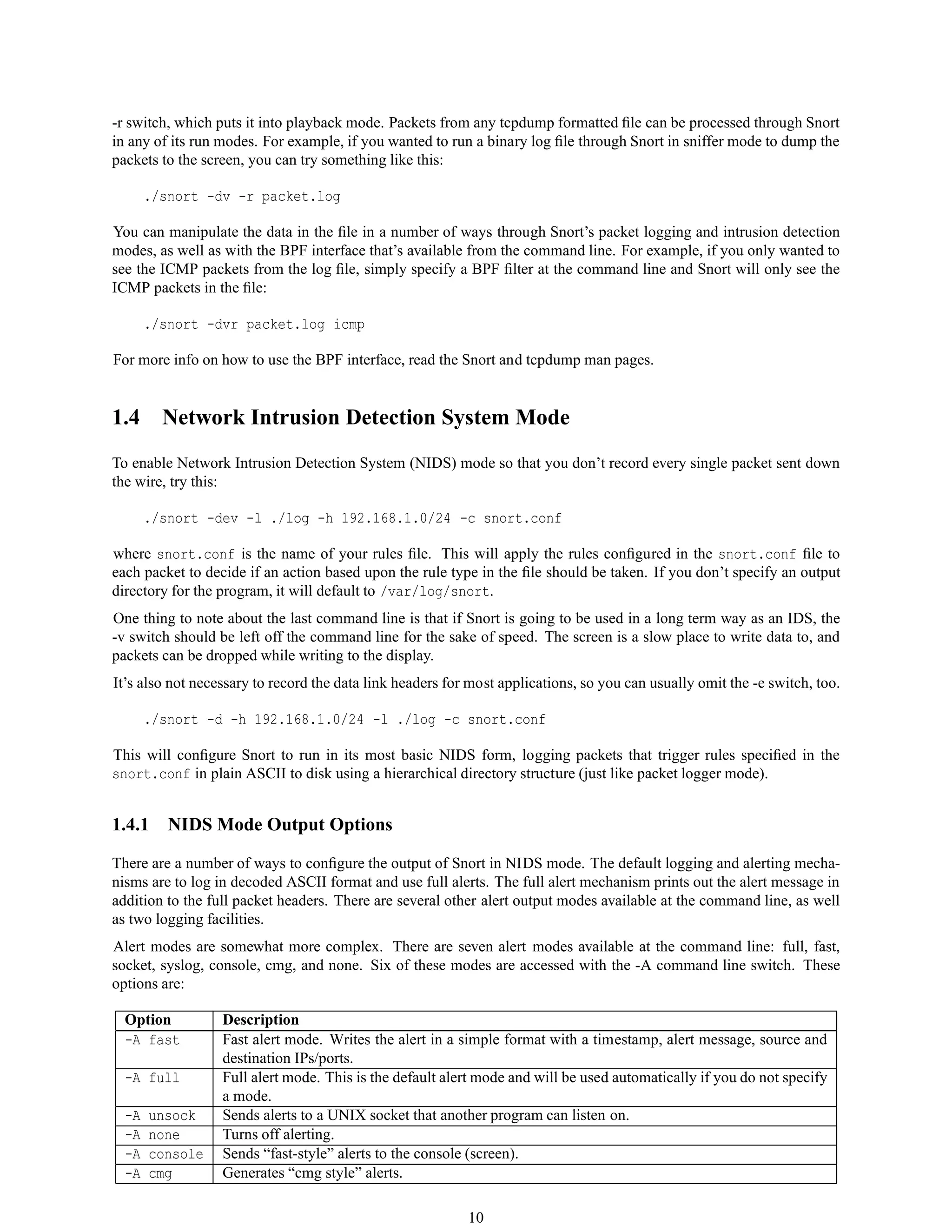
-r switch, which puts it into playback mode. Packets from any tcpdump formatted file can be processed through Snort
in any of its run modes. For example, if you wanted to run a binary log file through Snort in sniffer mode to dump the
packets to the screen, you can try something like this:
./snort -dv -r packet.log
You can manipulate the data in the file in a number of ways through Snort’s packet logging and intrusion detection
modes, as well as with the BPF interface that’s available from the command line. For example, if you only wanted to
see the ICMP packets from the log file, simply specify a BPF filter at the command line and Snort will only see the
ICMP packets in the file:
./snort -dvr packet.log icmp
For more info on how to use the BPF interface, read the Snort and tcpdump man pages.
1.4 Network Intrusion Detection System Mode
To enable Network Intrusion Detection System (NIDS) mode so that you don’t record every single packet sent down
the wire, try this:
./snort -dev -l ./log -h 192.168.1.0/24 -c snort.conf
where snort.conf is the name of your rules file. This will apply the rules configured in the snort.conf file to
each packet to decide if an action based upon the rule type in the file should be taken. If you don’t specify an output
directory for the program, it will default to /var/log/snort.
One thing to note about the last command line is that if Snort is going to be used in a long term way as an IDS, the
-v switch should be left off the command line for the sake of speed. The screen is a slow place to write data to, and
packets can be dropped while writing to the display.
It’s also not necessary to record the data link headers for most applications, so you can usually omit the -e switch, too.
./snort -d -h 192.168.1.0/24 -l ./log -c snort.conf
This will configure Snort to run in its most basic NIDS form, logging packets that trigger rules specified in the
snort.conf in plain ASCII to disk using a hierarchical directory structure (just like packet logger mode).
1.4.1 NIDS Mode Output Options
There are a number of ways to configure the output of Snort in NIDS mode. The default logging and alerting mecha-
nisms are to log in decoded ASCII format and use full alerts. The full alert mechanism prints out the alert message in
addition to the full packet headers. There are several other alert output modes available at the command line, as well
as two logging facilities.
Alert modes are somewhat more complex. There are seven alert modes available at the command line: full, fast,
socket, syslog, console, cmg, and none. Six of these modes are accessed with the -A command line switch. These
options are:
Option Description
-A fast Fast alert mode. Writes the alert in a simple format with a timestamp, alert message, source and
destination IPs/ports.
-A full Full alert mode. This is the default alert mode and will be used automatically if you do not specify
a mode.
-A unsock Sends alerts to a UNIX socket that another program can listen on.
-A none Turns off alerting.
-A console Sends “fast-style” alerts to the console (screen).
-A cmg Generates “cmg style” alerts.
10
Packets can be logged to their default decoded ASCII format or to a binary log file via the -b command line switch.
To disable packet logging altogether, use the -N command line switch.
For output modes available through the configuration file, see Section 2.6.
△! NOTE
Command line logging options override any output options specified in the configuration file. This allows
debugging of configuration issues quickly via the command line.
To send alerts to syslog, use the -s switch. The default facilities for the syslog alerting mechanism are LOG AUTHPRIV
and LOG ALERT. If you want to configure other facilities for syslog output, use the output plugin directives in the
rules files. See Section 2.6.1 for more details on configuring syslog output.
For example, use the following command line to log to default (decoded ASCII) facility and send alerts to syslog:
./snort -c snort.conf -l ./log -h 192.168.1.0/24 -s
As another example, use the following command line to log to the default facility in /var/log/snort and send alerts to a
fast alert file:
./snort -c snort.conf -A fast -h 192.168.1.0/24
1.4.2 Understanding Standard Alert Output
When Snort generates an alert message, it will usually look like the following:
[**] [116:56:1] (snort_decoder): T/TCP Detected [**]
The first number is the Generator ID, this tells the user what component of Snort generated this alert. For a list of
GIDs, please read etc/generators in the Snort source. In this case, we know that this event came from the “decode”
(116) component of Snort.
The second number is the Snort ID (sometimes referred to as Signature ID). For a list of preprocessor SIDs, please see
etc/gen-msg.map. Rule-based SIDs are written directly into the rules with the sid option. In this case, 56 represents a
T/TCP event.
The third number is the revision ID. This number is primarily used when writing signatures, as each rendition of the
rule should increment this number with the rev option.
1.4.3 High Performance Configuration
If you want Snort to go fast (like keep up with a 1000 Mbps connection), you need to use unified logging and a unified
log reader such as barnyard. This allows Snort to log alerts in a binary form as fast as possible while another program
performs the slow actions, such as writing to a database.
If you want a text file that’s easily parsable, but still somewhat fast, try using binary logging with the “fast” output
mechanism.
This will log packets in tcpdump format and produce minimal alerts. For example:
./snort -b -A fast -c snort.conf
11
1.4.4 Changing Alert Order
The default way in which Snort applies its rules to packets may not be appropriate for all installations. The Pass rules
are applied first, then the Drop rules, then the Alert rules and finally, Log rules are applied.
△! NOTE
Sometimes an errant pass rule could cause alerts to not show up, in which case you can change the default
ordering to allow Alert rules to be applied before Pass rules. For more information, please refer to the
--alert-before-pass option.
Several command line options are available to change the order in which rule actions are taken.
• --alert-before-pass option forces alert rules to take affect in favor of a pass rule.
• --treat-drop-as-alert causes drop, sdrop, and reject rules and any associated alerts to be logged as alerts,
rather then the normal action. This allows use of an inline policy with passive/IDS mode.
• --process-all-events option causes Snort to process every event associated with a packet, while taking the
actions based on the rules ordering. Without this option (default case), only the events for the first action based
on rules ordering are processed.
△! NOTE
Pass rules are special cases here, in that the event processing is terminated when a pass rule is encountered,
regardless of the use of --process-all-events.
1.5 Inline Mode
Snort 2.3.0 RC1 integrated the intrusion prevention system (IPS) capability of Snort Inline into the official Snort
project. Snort Inline obtains packets from iptables instead of libpcap and then uses new rule types to help iptables
pass or drop packets based on Snort rules.
In order for Snort Inline to work properly, you must download and compile the iptables code to include “make
install-devel” (http://www.iptables.org). This will install the libipq library that allows Snort Inline to inter-
face with iptables. Also, you must build and install LibNet, which is available from http://www.packetfactory.net.
There are three rule types you can use when running Snort with Snort Inline:
• drop - The drop rule type will tell iptables to drop the packet and log it via usual Snort means.
• reject - The reject rule type will tell iptables to drop the packet, log it via usual Snort means, and send a TCP
reset if the protocol is TCP or an icmp port unreachable if the protocol is UDP.
• sdrop - The sdrop rule type will tell iptables to drop the packet. Nothing is logged.
△! NOTE
You can also replace sections of the packet payload when using Snort Inline. See Section 1.5.2 for more
information.
When using a reject rule, there are two options you can use to send TCP resets:
• You can use a RAW socket (the default behavior for Snort Inline), in which case you must have an interface
that has an IP address assigned to it. If there is not an interface with an IP address assigned with access to the
source of the packet, the packet will be logged and the reset packet will never make it onto the network.
12
• You can also now perform resets via a physical device when using iptables. We take the indev name from
ip queue and use this as the interface on which to send resets. We no longer need an IP loaded on the bridge,
and can remain pretty stealthy as the config layer2 resets in snort.conf takes a source MAC address which
we substitute for the MAC of the bridge. For example:
config layer2resets
tells Snort Inline to use layer2 resets and uses the MAC address of the bridge as the source MAC in the
packet, and:
config layer2resets: 00:06:76:DD:5F:E3
will tell Snort Inline to use layer2 resets and uses the source MAC of 00:06:76:DD:5F:E3 in the reset packet.
• The command-line option --disable-inline-initialization can be used to not initialize IPTables when in
inline mode. It should be used with command-line option -T to test for a valid configuration without requiring
opening inline devices and adversely affecting traffic flow.
1.5.1 Snort Inline Rule Application Order
The current rule application order is:
->activation->dynamic->pass->drop->sdrop->reject->alert->log
This will ensure that a drop rule has precedence over an alert or log rule.
1.5.2 Replacing Packets with Snort Inline
Additionally, Jed Haile’s content replace code allows you to modify packets before they leave the network. For
example:
alert tcp any any <> any 80 ( 
msg: "tcp replace"; content:"GET"; replace:"BET";)
alert udp any any <> any 53 ( 
msg: "udp replace"; content: "yahoo"; replace: "xxxxx";)
These rules will comb TCP port 80 traffic looking for GET, and UDP port 53 traffic looking for yahoo. Once they
are found, they are replaced with BET and xxxxx, respectively. The replace pattern and content can be of different
lengths. When the replace pattern is longer than the content, the replace pattern gets truncated and when the replace
pattern is shorter than the content, first few bytes of the content (equivalent to the length of the replace pattern) are
replaced.
1.5.3 Installing Snort Inline
To install Snort inline, use the following command:
./configure --enable-inline
make
make install
13
1.5.4 Running Snort Inline
First, you need to ensure that the ip queue module is loaded. Then, you need to send traffic to Snort Inline using the
QUEUE target. For example:
iptables -A OUTPUT -p tcp --dport 80 -j QUEUE
sends all TCP traffic leaving the firewall going to port 80 to the QUEUE target. This is what sends the packet from
kernel space to user space (Snort Inline). A quick way to get all outbound traffic going to the QUEUE is to use the
rc.firewall script created and maintained by the Honeynet Project (http://www.honeynet.org/papers/honeynet/tools/)
This script is well-documented and allows you to direct packets to Snort Inline by simply changing the QUEUE
variable to yes.
Finally, start Snort Inline:
snort -QDc ../etc/drop.conf -l /var/log/snort
You can use the following command line options:
• -Q - Gets packets from iptables.
• -D - Runs Snort Inline in daemon mode. The process ID is stored at /var/run/snort.pid
• -c - Reads the following configuration file.
• -l - Logs to the following directory.
Ideally, Snort Inline will be run using only its own drop.rules. If you want to use Snort for just alerting, a separate
process should be running with its own rule set.
1.5.5 Using the Honeynet Snort Inline Toolkit
The Honeynet Snort Inline Toolkit is a statically compiled Snort Inline binary put together by the Honeynet Project
for the Linux operating system. It comes with a set of drop.rules, the Snort Inline binary, a snort-inline rotation
shell script, and a good README. It can be found at:
http://www.honeynet.org/papers/honeynet/tools/
1.5.6 Troubleshooting Snort Inline
If you run Snort Inline and see something like this:
Initializing Output Plugins!
Reading from iptables
Log directory = /var/log/snort
Initializing Inline mode
InlineInit: : Failed to send netlink message: Connection refused
More than likely, the ip queue module is not loaded or ip queue support is not compiled into your kernel. Either
recompile your kernel to support ip queue, or load the module.
The ip queue module is loaded by executing:
insmod ip_queue
Also, if you want to ensure Snort Inline is getting packets, you can start it in the following manner:
snort -Qvc <configuration file>
This will display the header of every packet that Snort Inline sees.
14
1.6 Miscellaneous
1.6.1 Running Snort as a Daemon
If you want to run Snort as a daemon, you can the add -D switch to any combination described in the previous sections.
Please notice that if you want to be able to restart Snort by sending a SIGHUP signal to the daemon, you must specify
the full path to the Snort binary when you start it, for example:
/usr/local/bin/snort -d -h 192.168.1.0/24 
-l /var/log/snortlogs -c /usr/local/etc/snort.conf -s -D
Relative paths are not supported due to security concerns.
Snort PID File
When Snort is run as a daemon , the daemon creates a PID file in the log directory. In Snort 2.6, the --pid-path
command line switch causes Snort to write the PID file in the directory specified.
Additionally, the --create-pidfile switch can be used to force creation of a PID file even when not running in
daemon mode.
The PID file will be locked so that other snort processes cannot start. Use the --nolock-pidfile switch to not lock
the PID file.
1.6.2 Running in Rule Stub Creation Mode
If you need to dump the shared object rules stub to a directory, you might need to use the –dump-dynamic-rulesoption.
These rule stub files are used in conjunction with the shared object rules. The path can be relative or absolute.
/usr/local/bin/snort -c /usr/local/etc/snort.conf 
--dump-dynamic-rules=/tmp
This path can also be configured in the snort.conf using the config option dump-dynamic-rules-path as follows:
config dump-dynamic-rules-path: /tmp/sorules
The path configured by command line has precedence over the one configured using dump-dynamic-rules-path.
/usr/local/bin/snort -c /usr/local/etc/snort.conf 
--dump-dynamic-rules
snort.conf:
config dump-dynamic-rules-path: /tmp/sorules
In the above mentioned scenario the dump path is set to /tmp/sorules.
1.6.3 Obfuscating IP Address Printouts
If you need to post packet logs to public mailing lists, you might want to use the -O switch. This switch obfuscates
your IP addresses in packet printouts. This is handy if you don’t want people on the mailing list to know the IP
addresses involved. You can also combine the -O switch with the -h switch to only obfuscate the IP addresses of hosts
on the home network. This is useful if you don’t care who sees the address of the attacking host. For example, you
could use the following command to read the packets from a log file and dump them to the screen, obfuscating only
the addresses from the 192.168.1.0/24 class C network:
./snort -d -v -r snort.log -O -h 192.168.1.0/24
15
1.6.4 Specifying Multiple-Instance Identifiers
In Snort v2.4, the -G command line option was added that specifies an instance identifier for the event logs. This option
can be used when running multiple instances of snort, either on different CPUs, or on the same CPU but a different
interface. Each Snort instance will use the value specified to generate unique event IDs. Users can specify either a
decimal value (-G 1) or hex value preceded by 0x (-G 0x11). This is also supported via a long option --logid.
1.7 Reading Pcaps
Instead of having Snort listen on an interface, you can give it a packet capture to read. Snort will read and analyze the
packets as if they came off the wire. This can be useful for testing and debugging Snort.
1.7.1 Command line arguments
Any of the below can be specified multiple times on the command line (-r included) and in addition to other Snort
command line options. Note, however, that specifying --pcap-reset and --pcap-show multiple times has the same
effect as specifying them once.
Option Description
-r <file> Read a single pcap.
--pcap-single=<file> Same as -r. Added for completeness.
--pcap-file=<file> File that contains a list of pcaps to read. Can specify path to pcap or directory to
recurse to get pcaps.
--pcap-list="<list>" A space separated list of pcaps to read.
--pcap-dir=<dir> A directory to recurse to look for pcaps. Sorted in ascii order.
--pcap-filter=<filter> Shell style filter to apply when getting pcaps from file or directory. This fil-
ter will apply to any --pcap-file or --pcap-dir arguments following. Use
--pcap-no-filter to delete filter for following --pcap-file or --pcap-dir
arguments or specify --pcap-filter again to forget previous filter and to apply
to following --pcap-file or --pcap-dir arguments.
--pcap-no-filter Reset to use no filter when getting pcaps from file or directory.
--pcap-reset If reading multiple pcaps, reset snort to post-configuration state before reading
next pcap. The default, i.e. without this option, is not to reset state.
--pcap-show Print a line saying what pcap is currently being read.
1.7.2 Examples
Read a single pcap
$ snort -r foo.pcap
$ snort --pcap-single=foo.pcap
Read pcaps from a file
$ cat foo.txt
foo1.pcap
foo2.pcap
/home/foo/pcaps
$ snort --pcap-file=foo.txt
This will read foo1.pcap, foo2.pcap and all files under /home/foo/pcaps. Note that Snort will not try to determine
whether the files under that directory are really pcap files or not.
16
Read pcaps from a command line list
$ snort --pcap-list="foo1.pcap foo2.pcap foo3.pcap"
This will read foo1.pcap, foo2.pcap and foo3.pcap.
Read pcaps under a directory
$ snort --pcap-dir="/home/foo/pcaps"
This will include all of the files under /home/foo/pcaps.
Using filters
$ cat foo.txt
foo1.pcap
foo2.pcap
/home/foo/pcaps
$ snort --pcap-filter="*.pcap" --pcap-file=foo.txt
$ snort --pcap-filter="*.pcap" --pcap-dir=/home/foo/pcaps
The above will only include files that match the shell pattern ”*.pcap”, in other words, any file ending in ”.pcap”.
$ snort --pcap-filter="*.pcap --pcap-file=foo.txt 
> --pcap-filter="*.cap" --pcap-dir=/home/foo/pcaps
In the above, the first filter ”*.pcap” will only be applied to the pcaps in the file ”foo.txt” (and any directories that are
recursed in that file). The addition of the second filter ”*.cap” will cause the first filter to be forgotten and then applied
to the directory /home/foo/pcaps, so only files ending in ”.cap” will be included from that directory.
$ snort --pcap-filter="*.pcap --pcap-file=foo.txt 
> --pcap-no-filter --pcap-dir=/home/foo/pcaps
In this example, the first filter will be applied to foo.txt, then no filter will be applied to the files found under
/home/foo/pcaps, so all files found under /home/foo/pcaps will be included.
$ snort --pcap-filter="*.pcap --pcap-file=foo.txt 
> --pcap-no-filter --pcap-dir=/home/foo/pcaps 
> --pcap-filter="*.cap" --pcap-dir=/home/foo/pcaps2
In this example, the first filter will be applied to foo.txt, then no filter will be applied to the files found under
/home/foo/pcaps, so all files found under /home/foo/pcaps will be included, then the filter ”*.cap” will be applied
to files found under /home/foo/pcaps2.
Resetting state
$ snort --pcap-dir=/home/foo/pcaps --pcap-reset
The above example will read all of the files under /home/foo/pcaps, but after each pcap is read, Snort will be reset to
a post-configuration state, meaning all buffers will be flushed, statistics reset, etc. For each pcap, it will be like Snort
is seeing traffic for the first time.
17
Printing the pcap
$ snort --pcap-dir=/home/foo/pcaps --pcap-show
The above example will read all of the files under /home/foo/pcaps and will print a line indicating which pcap is
currently being read.
1.8 Tunneling Protocol Support
Snort supports decoding of GRE, IP in IP and PPTP. To enable support, an extra configuration option is necessary:
$ ./configure --enable-gre
To enable IPv6 support, one still needs to use the configuration option:
$ ./configure --enable-ipv6
1.8.1 Multiple Encapsulations
Snort will not decode more than one encapsulation. Scenarios such as
Eth IPv4 GRE IPv4 GRE IPv4 TCP Payload
or
Eth IPv4 IPv6 IPv4 TCP Payload
will not be handled and will generate a decoder alert.
1.8.2 Logging
Currently, only the encapsulated part of the packet is logged, e.g.
Eth IP1 GRE IP2 TCP Payload
gets logged as
Eth IP2 TCP Payload
and
Eth IP1 IP2 TCP Payload
gets logged as
Eth IP2 TCP Payload
△! NOTE
Decoding of PPTP, which utilizes GRE and PPP, is not currently supported on architectures that require word
alignment such as SPARC.
18
1.9 More Information
Chapter 2 contains much information about many configuration options available in the configuration file. The Snort
manual page and the output of snort -? or snort --help contain information that can help you get Snort running
in several different modes.
△! NOTE
In many shells, a backslash () is needed to escape the ?, so you may have to type snort -? instead of
snort -? for a list of Snort command line options.
The Snort web page (http://www.snort.org) and the Snort Users mailing list:
http://marc.theaimsgroup.com/?l=snort-users
at snort-users@lists.sourceforge.net provide informative announcements as well as a venue for community
discussion and support. There’s a lot to Snort, so sit back with a beverage of your choosing and read the documentation
and mailing list archives.
19
Chapter 2
Configuring Snort
2.1 Includes
The include keyword allows other rules files to be included within the rules file indicated on the Snort command line.
It works much like an #include from the C programming language, reading the contents of the named file and adding
the contents in the place where the include statement appears in the file.
2.1.1 Format
include <include file path/name>
△! NOTE
Note that there is no semicolon at the end of this line.
Included files will substitute any predefined variable values into their own variable references. See Section 2.1.2 for
more information on defining and using variables in Snort rules files.
2.1.2 Variables
Three types of variables may be defined in Snort:
• var
• portvar
• ipvar
△! NOTE
Note: ’ipvar’s are only enabled with IPv6 support. Without IPv6 support, use a regular ’var’.
These are simple substitution variables set with the var, ipvar, or portvar keywords as follows:
var RULES_PATH rules/
portvar MY_PORTS [22,80,1024:1050]
ipvar MY_NET [192.168.1.0/24,10.1.1.0/24]
alert tcp any any -> $MY_NET $MY_PORTS (flags:S; msg:"SYN packet";)
include $RULE_PATH/example.rule
20
IP Variables and IP Lists
IPs may be specified individually, in a list, as a CIDR block, or any combination of the three. If IPv6 support is
enabled, IP variables should be specified using ’ipvar’ instead of ’var’. Using ’var’ for an IP variable is still allowed
for backward compatibility, but it will be deprecated in a future release.
IPs, IP lists, and CIDR blocks may be negated with ’!’. Negation is handled differently compared with Snort versions
2.7.x and earlier. Previously, each element in a list was logically OR’ed together. IP lists now OR non-negated
elements and AND the result with the OR’ed negated elements.
The following example list will match the IP 1.1.1.1 and IP from 2.2.2.0 to 2.2.2.255, with the exception of IPs 2.2.2.2
and 2.2.2.3.
[1.1.1.1,2.2.2.0/24,![2.2.2.2,2.2.2.3]]
The order of the elements in the list does not matter. The element ’any’ can be used to match all IPs, although ’!any’
is not allowed. Also, negated IP ranges that are more general than non-negated IP ranges are not allowed.
See below for some valid examples if IP variables and IP lists.
ipvar EXAMPLE [1.1.1.1,2.2.2.0/24,![2.2.2.2,2.2.2.3]]
alert tcp $EXAMPLE any -> any any (msg:"Example"; sid:1;)
alert tcp [1.0.0.0/8,!1.1.1.0/24] any -> any any (msg:"Example";sid:2;)
The following examples demonstrate some invalid uses of IP variables and IP lists.
Use of !any:
ipvar EXAMPLE any
alert tcp !$EXAMPLE any -> any any (msg:"Example";sid:3;)
Different use of !any:
ipvar EXAMPLE !any
alert tcp $EXAMPLE any -> any any (msg:"Example";sid:3;)
Logical contradictions:
ipvar EXAMPLE [1.1.1.1,!1.1.1.1]
Nonsensical negations:
ipvar EXAMPLE [1.1.1.0/24,!1.1.0.0/16]
Port Variables and Port Lists
Portlists supports the declaration and lookup of ports and the representation of lists and ranges of ports. Variables,
ranges, or lists may all be negated with ’!’. Also, ’any’ will specify any ports, but ’!any’ is not allowed. Valid port
ranges are from 0 to 65535.
Lists of ports must be enclosed in brackets and port ranges may be specified with a ’:’, such as in:
[10:50,888:900]
21
Port variables should be specified using ’portvar’. The use of ’var’ to declare a port variable will be deprecated in a
future release. For backwards compatibility, a ’var’ can still be used to declare a port variable, provided the variable
name either ends with ’ PORT’ or begins with ’PORT ’.
The following examples demonstrate several valid usages of both port variables and port lists.
portvar EXAMPLE1 80
var EXAMPLE2_PORT [80:90]
var PORT_EXAMPLE2 [1]
portvar EXAMPLE3 any
portvar EXAMPLE4 [!70:90]
portvar EXAMPLE5 [80,91:95,100:200]
alert tcp any $EXAMPLE1 -> any $EXAMPLE2_PORT (msg:"Example"; sid:1;)
alert tcp any $PORT_EXAMPLE2 -> any any (msg:"Example"; sid:2;)
alert tcp any 90 -> any [100:1000,9999:20000] (msg:"Example"; sid:3;)
Several invalid examples of port variables and port lists are demonstrated below:
Use of !any:
portvar EXAMPLE5 !any
var EXAMPLE5 !any
Logical contradictions:
portvar EXAMPLE6 [80,!80]
Ports out of range:
portvar EXAMPLE7 [65536]
Incorrect declaration and use of a port variable:
var EXAMPLE8 80
alert tcp any $EXAMPLE8 -> any any (msg:"Example"; sid:4;)
Port variable used as an IP:
alert tcp $EXAMPLE1 any -> any any (msg:"Example"; sid:5;)
Variable Modifiers
Rule variable names can be modified in several ways. You can define meta-variables using the $ operator. These can
be used with the variable modifier operators ? and -, as described in the following table:
22
Variable Syntax Description
var Defines a meta-variable.
$(var) or $var Replaces with the contents of variable var.
$(var:-default) Replaces the contents of the variable var with “default” if var is undefined.
$(var:?message) Replaces with the contents of variable var or prints out the error message and
exits.
Here is an example of advanced variable usage in action:
ipvar MY_NET 192.168.1.0/24
log tcp any any -> $(MY_NET:?MY_NET is undefined!) 23
Limitations
When embedding variables, types can not be mixed. For instance, port variables can be defined in terms of other port
variables, but old-style variables (with the ’var’ keyword) can not be embedded inside a ’portvar’.
Valid embedded variable:
portvar pvar1 80
portvar pvar2 [$pvar1,90]
Invalid embedded variable:
var pvar1 80
portvar pvar2 [$pvar1,90]
Likewise, variables can not be redefined if they were previously defined as a different type. They should be renamed
instead:
Invalid redefinition:
var pvar 80
portvar pvar 90
2.1.3 Config
Many configuration and command line options of Snort can be specified in the configuration file.
Format
config <directive> [: <value>]
23
Config Directive Description
config alert with interface name Appends interface name to alert (snort -I).
config alertfile: <filename> Sets the alerts output file.
config asn1: <max-nodes> Specifies the maximum number of nodes to track when doing
ASN1 decoding. See Section 3.5.28 for more information and
examples.
config autogenerate preprocessor
decoder rules
If Snort was configured to enable decoder and preprocessor
rules, this option will cause Snort to revert back to it’s origi-
nal behavior of alerting if the decoder or preprocessor generates
an event.
config bpf file: <filename> Specifies BPF filters (snort -F).
config checksum drop: <types> Types of packets to drop if invalid checksums. Values: none,
noip, notcp, noicmp, noudp, ip, tcp, udp, icmp or all
(only applicable in inline mode and for packets checked per
checksum mode config option).
config checksum mode: <types> Types of packets to calculate checksums. Values: none, noip,
notcp, noicmp, noudp, ip, tcp, udp, icmp or all.
config chroot: <dir> Chroots to specified dir (snort -t).
config classification: <class> See Table 3.2 for a list of classifications.
config daemon Forks as a daemon (snort -D).
config decode data link Decodes Layer2 headers (snort -e).
config default rule state: <state> Global configuration directive to enable or disable the loading
of rules into the detection engine. Default (with or without di-
rective) is enabled. Specify disabled to disable loading rules.
24
config detection: [search-method
<method>]
Select type of fast pattern matcher algorithm to use.
• search-method <method>
– Queued match search methods - Matches are
queued until the fast pattern matcher is finished with
the payload, then evaluated. This was found to gen-
erally increase performance through fewer cache
misses (evaluating each rule would generally blow
away the fast pattern matcher state in the cache).
∗ ac and ac-q - Aho-Corasick Full (high mem-
ory, best performance).
∗ ac-bnfa and ac-bnfa-q - Aho-Corasick Bi-
nary NFA (low memory, high performance)
∗ lowmem and lowmem-q - Low Memory Key-
word Trie (low memory, moderate perfor-
mance)
∗ ac-split - Aho-Corasick Full with ANY-
ANY port group evaluated separately (low
memory, high performance). Note this
is shorthand for search-method ac,
split-any-any
– No queue search methods - The ”nq” option spec-
ifies that matches should not be queued and evalu-
ated as they are found.
∗ ac-nq - Aho-Corasick Full (high memory, best
performance).
∗ ac-bnfa-nq - Aho-Corasick Binary NFA (low
memory, high performance). This is the default
search method if none is specified.
∗ lowmem-nq - Low Memory Keyword Trie (low
memory, moderate performance)
– Other search methods (the above are considered su-
perior to these)
∗ ac-std - Aho-Corasick Standard (high mem-
ory, high performance)
∗ acs - Aho-Corasick Sparse (high memory,
moderate performance)
∗ ac-banded - Aho-Corasick Banded (high
memory, moderate performance)
∗ ac-sparsebands - Aho-Corasick Sparse-
Banded (high memory, moderate performance)
25
config detection: [split-any-any]
[search-optimize] [max-pattern-len
<int>]
Other options that affect fast pattern matching.
• split-any-any
– A memory/performance tradeoff. By default, ANY-
ANY port rules are added to every non ANY-ANY
port group so that only one port group rule eval-
uation needs to be done per packet. Not putting
the ANY-ANY port rule group into every other port
group can significantly reduce the memory footprint
of the fast pattern matchers if there are many ANY-
ANY port rules. But doing so may require two port
group evaluations per packet - one for the specific
port group and one for the ANY-ANY port group,
thus potentially reducing performance. This option
is generic and can be used with any search-method
but was specifically intended for use with the ac
search-method where the memory footprint is sig-
nificantly reduced though overall fast pattern per-
formance is better than ac-bnfa. Of note is that
the lower memory footprint can also increase per-
formance through fewer cache misses. Default is
not to split the ANY-ANY port group.
• search-optimize
– Optimizes fast pattern memory when used with
search-method ac or ac-split by dynamically
determining the size of a state based on the total
number of states. When used with ac-bnfa, some
fail-state resolution will be attempted, potentially
increasing performance. Default is not to optimize.
• max-pattern-len <integer>
– This is a memory optimization that specifies the
maximum length of a pattern that will be put in the
fast pattern matcher. Patterns longer than this length
will be truncated to this length before inserting into
the pattern matcher. Useful when there are very
long contents being used and truncating the pattern
won’t diminish the uniqueness of the patterns. Note
that this may cause more false positive rule evalu-
ations, i.e. rules that will be evaluated because a
fast pattern was matched, but eventually fail, how-
ever CPU cache can play a part in performance so a
smaller memory footprint of the fast pattern matcher
can potentially increase performance. Default is to
not set a maximum pattern length.
26
config detection:
[no stream inserts]
[max queue events <int>]
[enable-single-rule-group]
[bleedover-port-limit]
Other detection engine options.
• no stream inserts
– Specifies that stream inserted packets should not be
evaluated against the detection engine. This is a po-
tential performance improvement with the idea that
the stream rebuilt packet will contain the payload
in the inserted one so the stream inserted packet
doesn’t need to be evaluated. Default is to inspect
stream inserts.
• max queue events <integer>
– Specifies the maximum number of events to queue
per packet. Default is 5 events.
• enable-single-rule-group
– Put all rules into one port group. Not recommended.
Default is not to do this.
• bleedover-port-limit
– The maximum number of source or destination
ports designated in a rule before the rule is consid-
ered an ANY-ANY port group rule. Default is 1024.
27
config detection: [debug]
[debug-print-nocontent-rule-tests]
[debug-print-rule-group-build-details]
[debug-print-rule-groups-uncompiled]
[debug-print-rule-groups-compiled]
[debug-print-fast-pattern]
[bleedover-warnings-enabled]
Options for detection engine debugging.
• debug
– Prints fast pattern information for a particular port
group.
• debug-print-nocontent-rule-tests
– Prints port group information during packet evalua-
tion.
• debug-print-rule-group-build-details
– Prints port group information during port group
compilation.
• debug-print-rule-groups-uncompiled
– Prints uncompiled port group information.
• debug-print-rule-groups-compiled
– Prints compiled port group information.
• debug-print-fast-pattern
– For each rule with fast pattern content, prints infor-
mation about the content being used for the fast pat-
tern matcher.
• bleedover-warnings-enabled
– Prints a warning if the number of source or
destination ports used in a rule exceed the
bleedover-port-limit forcing the rule to be
moved into the ANY-ANY port group.
config disable decode alerts Turns off the alerts generated by the decode phase of Snort.
config disable inline init failopen Disables failopen thread that allows inline traffic to pass
while Snort is starting up. Only useful if Snort was
configured with –enable-inline-init-failopen. (snort
--disable-inline-init-failopen)
config disable ipopt alerts Disables IP option length validation alerts.
config disable tcpopt alerts Disables option length validation alerts.
config
disable tcpopt experimental alerts
Turns off alerts generated by experimental TCP options.
config disable tcpopt obsolete alerts Turns off alerts generated by obsolete TCP options.
config disable tcpopt ttcp alerts Turns off alerts generated by T/TCP options.
config disable ttcp alerts Turns off alerts generated by T/TCP options.
config dump chars only Turns on character dumps (snort -C).
config dump payload Dumps application layer (snort -d).
config dump payload verbose Dumps raw packet starting at link layer (snort -X).
config enable decode drops Enables the dropping of bad packets identified by decoder (only
applicable in inline mode).
config enable decode oversized alerts Enable alerting on packets that have headers containing length
fields for which the value is greater than the length of the packet.
28
config enable decode oversized drops Enable dropping packets that have headers containing length
fields for which the value is greater than the length of the packet.
enable decode oversized alerts must also be enabled for
this to be effective (only applicable in inline mode).
config enable ipopt drops Enables the dropping of bad packets with bad/truncated IP op-
tions (only applicable in inline mode).
config enable mpls multicast Enables support for MPLS multicast. This option is needed
when the network allows MPLS multicast traffic. When this
option is off and MPLS multicast traffic is detected, Snort will
generate an alert. By default, it is off.
config enable mpls overlapping ip Enables support for overlapping IP addresses in an MPLS net-
work. In a normal situation, where there are no overlapping
IP addresses, this configuration option should not be turned on.
However, there could be situations where two private networks
share the same IP space and different MPLS labels are used to
differentiate traffic from the two VPNs. In such a situation, this
configuration option should be turned on. By default, it is off.
config enable tcpopt drops Enables the dropping of bad packets with bad/truncated TCP
option (only applicable in inline mode).
config
enable tcpopt experimental drops
Enables the dropping of bad packets with experimental TCP op-
tion. (only applicable in inline mode).
config enable tcpopt obsolete drops Enables the dropping of bad packets with obsolete TCP option.
(only applicable in inline mode).
enable tcpopt ttcp drops Enables the dropping of bad packets with T/TCP option. (only
applicable in inline mode).
enable ttcp drops Enables the dropping of bad packets with T/TCP option. (only
applicable in inline mode).
config event filter: memcap
<bytes>
Set global memcap in bytes for thresholding. Default is
1048576 bytes (1 megabyte).
config event queue: [max queue
<num>] [log <num>] [order events
<order>]
Specifies conditions about Snort’s event queue. You can use the
following options:
• max queue <integer> (max events supported)
• log <integer> (number of events to log)
• order events [priority|content length] (how to
order events within the queue)
See Section 2.4.4 for more information and examples.
config flexresp2 attempts:
<num-resets>
Specify the number of TCP reset packets to send to the source
of the attack. Valid values are 0 to 20, however values less than
4 will default to 4. The default value without this option is 4.
(Snort must be compiled with –enable-flexresp2)
config flexresp2 interface:
<iface>
Specify the response interface to use. In Windows this can also
be the interface number. (Snort must be compiled with –enable-
flexresp2)
config flexresp2 memcap: <bytes> Specify the memcap for the hash table used to track the time
of responses. The times (hashed on a socket pair plus protocol)
are used to limit sending a response to the same half of a socket
pair every couple of seconds. Default is 1048576 bytes. (Snort
must be compiled with –enable-flexresp2)
config flexresp2 rows: <num-rows> Specify the number of rows for the hash table used to track the
time of responses. Default is 1024 rows. (Snort must be com-
piled with –enable-flexresp2)
29
config flowbits size: <num-bits> Specifies the maximum number of flowbit tags that can be used
within a rule set.
config ignore ports: <proto>
<port-list>
Specifies ports to ignore (useful for ignoring noisy NFS traffic).
Specify the protocol (TCP, UDP, IP, or ICMP), followed by a
list of ports. Port ranges are supported.
config interface: <iface> Sets the network interface (snort -i).
config ipv6 frag:
[bsd icmp frag alert on|off]
[, bad ipv6 frag alert on|off]
[, frag timeout <secs>] [,
max frag sessions <max-track>]
The following options can be used:
• bsd icmp frag alert on|off (Specify whether or not
to alert. Default is on)
• bad ipv6 frag alert on|off (Specify whether or not
to alert. Default is on)
• frag timeout <integer> (Specify amount of time in
seconds to timeout first frag in hash table)
• max frag sessions <integer> (Specify the number
of fragments to track in the hash table)
config layer2resets: <mac-addr> This option is only available when running in inline mode. See
Section 1.5.
config logdir: <dir> Sets the logdir (snort -l).
config max attribute hosts: <hosts> Sets a limit on the maximum number of hosts to read from
the attribute table. Minimum value is 32 and the maximum is
524288 (512k). The default is 10000. If the number of hosts
in the attribute table exceeds this value, an error is logged and
the remainder of the hosts are ignored. This option is only sup-
ported with a Host Attribute Table (see section 2.7).
config max mpls labelchain len:
<num-hdrs>
Sets a Snort-wide limit on the number of MPLS headers a
packet can have. Its default value is -1, which means that there
is no limit on label chain length.
config min ttl: <ttl> Sets a Snort-wide minimum ttl to ignore all traffic.
config mpls payload type:
ipv4|ipv6|ethernet
Sets a Snort-wide MPLS payload type. In addition to ipv4, ipv6
and ethernet are also valid options. The default MPLS payload
type is ipv4
config no promisc Disables promiscuous mode (snort -p).
config nolog Disables logging. Note: Alerts will still occur. (snort -N).
config nopcre Disables pcre pattern matching.
config obfuscate Obfuscates IP Addresses (snort -O).
config order: <order> Changes the order that rules are evaluated, eg: pass alert log
activation.
config pcre match limit:
<integer>
Restricts the amount of backtracking a given PCRE option. For
example, it will limit the number of nested repeats within a pat-
tern. A value of -1 allows for unlimited PCRE, up to the PCRE
library compiled limit (around 10 million). A value of 0 results
in no PCRE evaluation. The snort default value is 1500.
config pcre match limit recursion:
<integer>
Restricts the amount of stack used by a given PCRE option. A
value of -1 allows for unlimited PCRE, up to the PCRE library
compiled limit (around 10 million). A value of 0 results in no
PCRE evaluation. The snort default value is 1500. This option
is only useful if the value is less than the pcre match limit
config pkt count: <N> Exits after N packets (snort -n).
30
config policy version:
<base-version-string>
[<binding-version-string>]
Supply versioning information to configuration files. Base ver-
sion should be a string in all configuration files including in-
cluded ones. In addition, binding version must be in any file
configured with config binding. This option is used to avoid
race conditions when modifying and loading a configuration
within a short time span - before Snort has had a chance to load
a previous configuration.
config profile preprocs Print statistics on preprocessor performance. See Section 2.5.2
for more details.
config profile rules Print statistics on rule performance. See Section 2.5.1 for more
details.
config quiet Disables banner and status reports (snort -q).
config read bin file: <pcap> Specifies a pcap file to use (instead of reading from network),
same effect as -r <tf> option.
config reference: <ref> Adds a new reference system to Snort, eg: myref
http://myurl.com/?id=
config reference net <cidr> For IP obfuscation, the obfuscated net will be used if the packet
contains an IP address in the reference net. Also used to de-
termine how to set up the logging directory structure for the
session post detection rule option and ascii output plugin - an
attempt is made to name the log directories after the IP address
that is not in the reference net.
config set gid: <gid> Changes GID to specified GID (snort -g).
set uid: <uid> Sets UID to <id> (snort -u).
config show year Shows year in timestamps (snort -y).
config snaplen: <bytes> Set the snaplength of packet, same effect as -P <snaplen> or
--snaplen <snaplen> options.
config stateful Sets assurance mode for stream (stream is established).
config tagged packet limit:
<max-tag>
When a metric other than packets is used in a tag option in
a rule, this option sets the maximum number of packets to be
tagged regardless of the amount defined by the other metric.
See Section 3.7.5 on using the tag option when writing rules
for more details. The default value when this option is not con-
figured is 256 packets. Setting this option to a value of 0 will
disable the packet limit.
config threshold: memcap <bytes> Set global memcap in bytes for thresholding. Default is
1048576 bytes (1 megabyte). (This is deprecated. Use config
event filter instead.)
config timestats interval: <secs> Set the amount of time in seconds between logging time stats.
Default is 3600 (1 hour). Note this option is only available if
Snort was built to use time stats with --enable-timestats.
config umask: <umask> Sets umask when running (snort -m).
config utc Uses UTC instead of local time for timestamps (snort -U).
config verbose Uses verbose logging to STDOUT (snort -v).
2.2 Preprocessors
Preprocessors were introduced in version 1.5 of Snort. They allow the functionality of Snort to be extended by allowing
users and programmers to drop modular plugins into Snort fairly easily. Preprocessor code is run before the detection
engine is called, but after the packet has been decoded. The packet can be modified or analyzed in an out-of-band
manner using this mechanism.
Preprocessors are loaded and configured using the preprocessor keyword. The format of the preprocessor directive
in the Snort rules file is:
31
preprocessor <name>: <options>
2.2.1 Frag3
The frag3 preprocessor is a target-based IP defragmentation module for Snort. Frag3 is intended as a replacement for
the frag2 defragmentation module and was designed with the following goals:
1. Faster execution than frag2 with less complex data management.
2. Target-based host modeling anti-evasion techniques.
The frag2 preprocessor used splay trees extensively for managing the data structures associated with defragmenting
packets. Splay trees are excellent data structures to use when you have some assurance of locality of reference for the
data that you are handling but in high speed, heavily fragmented environments the nature of the splay trees worked
against the system and actually hindered performance. Frag3 uses the sfxhash data structure and linked lists for data
handling internally which allows it to have much more predictable and deterministic performance in any environment
which should aid us in managing heavily fragmented environments.
Target-based analysis is a relatively new concept in network-based intrusion detection. The idea of a target-based
system is to model the actual targets on the network instead of merely modeling the protocols and looking for attacks
within them. When IP stacks are written for different operating systems, they are usually implemented by people
who read the RFCs and then write their interpretation of what the RFC outlines into code. Unfortunately, there are
ambiguities in the way that the RFCs define some of the edge conditions that may occur and when this happens
different people implement certain aspects of their IP stacks differently. For an IDS this is a big problem.
In an environment where the attacker can determine what style of IP defragmentation is being used on a partic-
ular target, the attacker can try to fragment packets such that the target will put them back together in a specific
manner while any passive systems trying to model the host traffic have to guess which way the target OS is going
to handle the overlaps and retransmits. As I like to say, if the attacker has more information about the targets on
a network than the IDS does, it is possible to evade the IDS. This is where the idea for “target-based IDS” came
from. For more detail on this issue and how it affects IDS, check out the famous Ptacek & Newsham paper at
http://www.snort.org/docs/idspaper/.
The basic idea behind target-based IDS is that we tell the IDS information about hosts on the network so that it can
avoid Ptacek & Newsham style evasion attacks based on information about how an individual target IP stack operates.
Vern Paxson and Umesh Shankar did a great paper on this very topic in 2003 that detailed mapping the hosts on a net-
work and determining how their various IP stack implementations handled the types of problems seen in IP defragmen-
tation and TCP stream reassembly. Check it out at http://www.icir.org/vern/papers/activemap-oak03.pdf.
We can also present the IDS with topology information to avoid TTL-based evasions and a variety of other issues, but
that’s a topic for another day. Once we have this information we can start to really change the game for these complex
modeling problems.
Frag3 was implemented to showcase and prototype a target-based module within Snort to test this idea.
Frag 3 Configuration
Frag3 configuration is somewhat more complex than frag2. There are at least two preprocessor directives required
to activate frag3, a global configuration directive and an engine instantiation. There can be an arbitrary number of
engines defined at startup with their own configuration, but only one global configuration.
Global Configuration
• Preprocessor name: frag3 global
• Available options: NOTE: Global configuration options are comma separated.
– max frags <number> - Maximum simultaneous fragments to track. Default is 8192.
– memcap <bytes> - Memory cap for self preservation. Default is 4MB.
32
– prealloc frags <number> - Alternate memory management mode. Use preallocated fragment nodes
(faster in some situations).
– disabled - Option to turn off the preprocessor. By default this option is turned off. When the preprocessor
is disabled only the options memcap, prealloc memcap, and prealloc frags are applied when specified with
the configuration.
Engine Configuration
• Preprocessor name: frag3 engine
• Available options: NOTE: Engine configuration options are space separated.
– timeout <seconds> - Timeout for fragments. Fragments in the engine for longer than this period will
be automatically dropped. Default is 60 seconds.
– min ttl <value> - Minimum acceptable TTL value for a fragment packet. Default is 1.
– detect anomalies - Detect fragment anomalies.
– bind to <ip list> - IP List to bind this engine to. This engine will only run for packets with destination
addresses contained within the IP List. Default value is all.
– overlap limit <number> - Limits the number of overlapping fragments per packet. The default is
”0” (unlimited), the minimum is ”0”, and the maximum is ”255”. This is an optional parameter. de-
tect anomalies option must be configured for this option to take effect.
– min fragment length <number> - Defines smallest fragment size (payload size) that should be consid-
ered valid. Fragments smaller than or equal to this limit are considered malicious and an event is raised, if
detect anomalies is also configured. The default is ”0” (unlimited), the minimum is ”0”, and the maximum
is ”255”. This is an optional parameter. detect anomalies option must be configured for this option to take
effect.
– policy <type> - Select a target-based defragmentation mode. Available types are first, last, bsd, bsd-
right, linux. Default type is bsd.
The Paxson Active Mapping paper introduced the terminology frag3 is using to describe policy types. The
known mappings are as follows. Anyone who develops more mappings and would like to add to this list
please feel free to send us an email!
33
Platform Type
AIX 2 BSD
AIX 4.3 8.9.3 BSD
Cisco IOS Last
FreeBSD BSD
HP JetDirect (printer) BSD-right
HP-UX B.10.20 BSD
HP-UX 11.00 First
IRIX 4.0.5F BSD
IRIX 6.2 BSD
IRIX 6.3 BSD
IRIX64 6.4 BSD
Linux 2.2.10 linux
Linux 2.2.14-5.0 linux
Linux 2.2.16-3 linux
Linux 2.2.19-6.2.10smp linux
Linux 2.4.7-10 linux
Linux 2.4.9-31SGI 1.0.2smp linux
Linux 2.4 (RedHat 7.1-7.3) linux
MacOS (version unknown) First
NCD Thin Clients BSD
OpenBSD (version unknown) linux
OpenVMS 7.1 BSD
OS/2 (version unknown) BSD
OSF1 V3.0 BSD
OSF1 V3.2 BSD
OSF1 V4.0,5.0,5.1 BSD
SunOS 4.1.4 BSD
SunOS 5.5.1,5.6,5.7,5.8 First
Tru64 Unix V5.0A,V5.1 BSD
Vax/VMS BSD
Windows (95/98/NT4/W2K/XP) First
Format
Note in the advanced configuration below that there are three engines specified running with Linux, first and last
policies assigned. The first two engines are bound to specific IP address ranges and the last one applies to all other
traffic. Packets that don’t fall within the address requirements of the first two engines automatically fall through to the
third one.
Basic Configuration
preprocessor frag3_global
preprocessor frag3_engine
Advanced Configuration
preprocessor frag3_global: prealloc_nodes 8192
preprocessor frag3_engine: policy linux, bind_to 192.168.1.0/24
preprocessor frag3_engine: policy first, bind_to [10.1.47.0/24,172.16.8.0/24]
preprocessor frag3_engine: policy last, detect_anomalies
34
Frag 3 Alert Output
Frag3 is capable of detecting eight different types of anomalies. Its event output is packet-based so it will work with
all output modes of Snort. Read the documentation in the doc/signatures directory with filenames that begin with
“123-” for information on the different event types.
2.2.2 Stream5
The Stream5 preprocessor is a target-based TCP reassembly module for Snort. It is capable of tracking sessions for
both TCP and UDP. With Stream5, the rule ’flow’ and ’flowbits’ keywords are usable with TCP as well as UDP traffic.
Transport Protocols
TCP sessions are identified via the classic TCP ”connection”. UDP sessions are established as the result of a series of
UDP packets from two end points via the same set of ports. ICMP messages are tracked for the purposes of checking
for unreachable and service unavailable messages, which effectively terminate a TCP or UDP session.
Target-Based
Stream5, like Frag3, introduces target-based actions for handling of overlapping data and other TCP anomalies. The
methods for handling overlapping data, TCP Timestamps, Data on SYN, FIN and Reset sequence numbers, etc. and
the policies supported by Stream5 are the results of extensive research with many target operating systems.
Stream API
Stream5 fully supports the Stream API, other protocol normalizers/preprocessors to dynamically configure reassembly
behavior as required by the application layer protocol, identify sessions that may be ignored (large data transfers, etc),
and update the identifying information about the session (application protocol, direction, etc) that can later be used by
rules.
Anomaly Detection
TCP protocol anomalies, such as data on SYN packets, data received outside the TCP window, etc are configured via
the detect anomalies option to the TCP configuration. Some of these anomalies are detected on a per-target basis.
For example, a few operating systems allow data in TCP SYN packets, while others do not.
Stream5 Global Configuration
Global settings for the Stream5 preprocessor.
preprocessor stream5_global: 
[track_tcp <yes|no>], [max_tcp <number>], 
[memcap <number bytes>], 
[track_udp <yes|no>], [max_udp <number>], 
[track_icmp <yes|no>], [max_icmp <number>], 
[flush_on_alert], [show_rebuilt_packets], 
[prune_log_max <bytes>], [disabled]
35
Option Description
track tcp <yes|no> Track sessions for TCP. The default is ”yes”.
max tcp <num sessions> Maximum simultaneous TCP sessions tracked. The default is ”256000”, maxi-
mum is ”1052672”, minimum is ”1”.
memcap <num bytes> Memcap for TCP packet storage. The default is ”8388608” (8MB), maximum is
”1073741824” (1GB), minimum is ”32768” (32KB).
track udp <yes|no> Track sessions for UDP. The default is ”yes”.
max udp <num sessions> Maximum simultaneous UDP sessions tracked. The default is ”128000”, maxi-
mum is ”1052672”, minimum is ”1”.
track icmp <yes|no> Track sessions for ICMP. The default is ”yes”.
max icmp <num sessions> Maximum simultaneous ICMP sessions tracked. The default is ”64000”, maxi-
mum is ”1052672”, minimum is ”1”.
disabled Option to disble the stream5 tracking. By default this option is turned off. When
the preprocessor is disabled only the options memcap, max tcp, max udp and
max icmp are applied when specified with the configuration.
flush on alert Backwards compatibility. Flush a TCP stream when an alert is generated on that
stream. The default is set to off.
show rebuilt packets Print/display packet after rebuilt (for debugging). The default is set to off.
prune log max <num bytes> Print a message when a session terminates that was consuming more than the
specified number of bytes. The default is ”1048576” (1MB), minimum is ”0”
(unlimited), maximum is not bounded, other than by the memcap.
Stream5 TCP Configuration
Provides a means on a per IP address target to configure TCP policy. This can have multiple occurrences, per policy
that is bound to an IP address or network. One default policy must be specified, and that policy is not bound to an IP
address or network.
preprocessor stream5_tcp: 
[bind_to <ip_addr>], 
[timeout <number secs>], [policy <policy_id>], 
[overlap_limit <number>], [max_window <number>], 
[require_3whs [<number secs>]], [detect_anomalies], 
[check_session_hijacking], [use_static_footprint_sizes], 
[dont_store_large_packets], [dont_reassemble_async], 
[max_queued_bytes <bytes>], [max_queued_segs <number segs>], 
[ports <client|server|both> <all|number [number]*>], 
[ignore_any_rules]
Option Description
bind to <ip addr> IP address or network for this policy. The default is set to any.
timeout <num seconds> Session timeout. The default is ”30”, the minimum is ”1”, and the maxi-
mum is ”86400” (approximately 1 day).
36
policy <policy id> The Operating System policy for the target OS. The policy id can be one
of the following:
Policy Name Operating Systems.
first Favor first overlapped segment.
last Favor first overlapped segment.
bsd FresBSD 4.x and newer, NetBSD 2.x and
newer, OpenBSD 3.x and newer
linux Linux 2.4 and newer
old-linux Linux 2.2 and earlier
windows Windows 2000, Windows XP, Windows
95/98/ME
win2003 Windows 2003 Server
vista Windows Vista
solaris Solaris 9.x and newer
hpux HPUX 11 and newer
hpux10 HPUX 10
irix IRIX 6 and newer
macos MacOS 10.3 and newer
overlap limit <number> Limits the number of overlapping packets per session. The default is ”0”
(unlimited), the minimum is ”0”, and the maximum is ”255”.
max window <number> Maximum TCP window allowed. The default is ”0” (unlimited), the
minimum is ”0”, and the maximum is ”1073725440” (65535 left shift
14). That is the highest possible TCP window per RFCs. This option is
intended to prevent a DoS against Stream5 by an attacker using an abnor-
mally large window, so using a value near the maximum is discouraged.
require 3whs [<number
seconds>]
Establish sessions only on completion of a SYN/SYN-ACK/ACK hand-
shake. The default is set to off. The optional number of seconds speci-
fies a startup timeout. This allows a grace period for existing sessions to
be considered established during that interval immediately after Snort is
started. The default is ”0” (don’t consider existing sessions established),
the minimum is ”0”, and the maximum is ”86400” (approximately 1
day).
detect anomalies Detect and alert on TCP protocol anomalies. The default is set to off.
check session hijacking Check for TCP session hijacking. This check validates the hardware
(MAC) address from both sides of the connect – as established on the
3-way handshake against subsequent packets received on the session. If
an ethernet layer is not part of the protocol stack received by Snort, there
are no checks performed. Alerts are generated (per ’detect anomalies’
option) for either the client or server when the MAC address for one side
or the other does not match. The default is set to off.
use static footprint sizes Use static values for determining when to build a reassembled packet to
allow for repeatable tests. This option should not be used production
environments. The default is set to off.
dont store large packets Performance improvement to not queue large packets in reassembly
buffer. The default is set to off. Using this option may result in missed
attacks.
dont reassemble async Don’t queue packets for reassembly if traffic has not been seen in both
directions. The default is set to queue packets.
max queued bytes <bytes> Limit the number of bytes queued for reassembly on a given TCP session
to bytes. Default is ”1048576” (1MB). A value of ”0” means unlimited,
with a non-zero minimum of ”1024”, and a maximum of ”1073741824”
(1GB). A message is written to console/syslog when this limit is en-
forced.
37
max queued segs <num> Limit the number of segments queued for reassembly on a given TCP
session. The default is ”2621”, derived based on an average size of 400
bytes. A value of ”0” means unlimited, with a non-zero minimum of
”2”, and a maximum of ”1073741824” (1GB). A message is written to
console/syslog when this limit is enforced.
ports <client|server|both>
<all|number(s)>
Specify the client, server, or both and list of ports in which to perform
reassembly. This can appear more than once in a given config. The de-
fault settings are ports client 21 23 25 42 53 80 110 111 135
136 137 139 143 445 513 514 1433 1521 2401 3306. The mini-
mum port allowed is ”1” and the maximum allowed is ”65535”.
ignore any rules Don’t process any -> any (ports) rules for TCP that attempt to match
payload if there are no port specific rules for the src or destination port.
Rules that have flow or flowbits will never be ignored. This is a perfor-
mance improvement and may result in missed attacks. Using this does
not affect rules that look at protocol headers, only those with content,
PCRE, or byte test options. The default is ”off”. This option can be used
only in default policy.
△! NOTE
If no options are specified for a given TCP policy, that is the default TCP policy. If only a bind to option is
used with no other options that TCP policy uses all of the default values.
Stream5 UDP Configuration
Configuration for UDP session tracking. Since there is no target based binding, there should be only one occurrence
of the UDP configuration.
preprocessor stream5_udp: [timeout <number secs>], [ignore_any_rules]
Option Description
timeout <num seconds> Session timeout. The default is ”30”, the minimum is ”1”, and the maximum is
”86400” (approximately 1 day).
ignore any rules Don’t process any -> any (ports) rules for UDP that attempt to match payload
if there are no port specific rules for the src or destination port. Rules that have
flow or flowbits will never be ignored. This is a performance improvement and
may result in missed attacks. Using this does not affect rules that look at protocol
headers, only those with content, PCRE, or byte test options. The default is ”off”.
△! NOTE
With the ignore any rules option, a UDP rule will be ignored except when there is another port specific rule
that may be applied to the traffic. For example, if a UDP rule specifies destination port 53, the ’ignored’ any
-> any rule will be applied to traffic to/from port 53, but NOT to any other source or destination port. A list
of rule SIDs affected by this option are printed at Snort’s startup.
△! NOTE
With the ignore any rules option, if a UDP rule that uses any -> any ports includes either flow or flowbits,
the ignore any rules option is effectively pointless. Because of the potential impact of disabling a flowbits
rule, the ignore any rules option will be disabled in this case.
38
Stream5 ICMP Configuration
Configuration for ICMP session tracking. Since there is no target based binding, there should be only one occurrence
of the ICMP configuration.
△! NOTE
ICMP is currently untested, in minimal code form and is NOT ready for use in production networks. It is not
turned on by default.
preprocessor stream5_icmp: [timeout <number secs>]
Option Description
timeout <num seconds> Session timeout. The default is ”30”, the minimum is ”1”, and the maximum is
”86400” (approximately 1 day).
Example Configurations
1. This example configuration is the default configuration in snort.conf and can be used for repeatable tests of
stream reassembly in readback mode.
preprocessor stream5_global: 
max_tcp 8192, track_tcp yes, track_udp yes, track_icmp no
preprocessor stream5_tcp: 
policy first, use_static_footprint_sizes
preprocessor stream5_udp: 
ignore_any_rules
2. This configuration maps two network segments to different OS policies, one for Windows and one for Linux,
with all other traffic going to the default policy of Solaris.
preprocessor stream5_global: track_tcp yes
preprocessor stream5_tcp: bind_to 192.168.1.0/24, policy windows
preprocessor stream5_tcp: bind_to 10.1.1.0/24, policy linux
preprocessor stream5_tcp: policy solaris
Alerts
Stream5 uses generator ID 129. It is capable of alerting on 8 (eight) anomalies, all of which relate to TCP anomalies.
There are no anomalies detected relating to UDP or ICMP.
The list of SIDs is as follows:
1. SYN on established session
2. Data on SYN packet
3. Data sent on stream not accepting data
4. TCP Timestamp is outside of PAWS window
5. Bad segment, overlap adjusted size less than/equal 0
6. Window size (after scaling) larger than policy allows
7. Limit on number of overlapping TCP packets reached
8. Data after Reset packet
39
2.2.3 sfPortscan
The sfPortscan module, developed by Sourcefire, is designed to detect the first phase in a network attack: Recon-
naissance. In the Reconnaissance phase, an attacker determines what types of network protocols or services a host
supports. This is the traditional place where a portscan takes place. This phase assumes the attacking host has no prior
knowledge of what protocols or services are supported by the target; otherwise, this phase would not be necessary.
As the attacker has no beforehand knowledge of its intended target, most queries sent by the attacker will be negative
(meaning that the service ports are closed). In the nature of legitimate network communications, negative responses
from hosts are rare, and rarer still are multiple negative responses within a given amount of time. Our primary objective
in detecting portscans is to detect and track these negative responses.
One of the most common portscanning tools in use today is Nmap. Nmap encompasses many, if not all, of the current
portscanning techniques. sfPortscan was designed to be able to detect the different types of scans Nmap can produce.
sfPortscan will currently alert for the following types of Nmap scans:
• TCP Portscan
• UDP Portscan
• IP Portscan
These alerts are for one→one portscans, which are the traditional types of scans; one host scans multiple ports on
another host. Most of the port queries will be negative, since most hosts have relatively few services available.
sfPortscan also alerts for the following types of decoy portscans:
• TCP Decoy Portscan
• UDP Decoy Portscan
• IP Decoy Portscan
Decoy portscans are much like the Nmap portscans described above, only the attacker has a spoofed source address
inter-mixed with the real scanning address. This tactic helps hide the true identity of the attacker.
sfPortscan alerts for the following types of distributed portscans:
• TCP Distributed Portscan
• UDP Distributed Portscan
• IP Distributed Portscan
These are many→one portscans. Distributed portscans occur when multiple hosts query one host for open services.
This is used to evade an IDS and obfuscate command and control hosts.
△! NOTE
Negative queries will be distributed among scanning hosts, so we track this type of scan through the scanned
host.
sfPortscan alerts for the following types of portsweeps:
• TCP Portsweep
• UDP Portsweep
• IP Portsweep
40
• ICMP Portsweep
These alerts are for one→many portsweeps. One host scans a single port on multiple hosts. This usually occurs when
a new exploit comes out and the attacker is looking for a specific service.
△! NOTE
The characteristics of a portsweep scan may not result in many negative responses. For example, if an attacker
portsweeps a web farm for port 80, we will most likely not see many negative responses.
sfPortscan alerts on the following filtered portscans and portsweeps:
• TCP Filtered Portscan
• UDP Filtered Portscan
• IP Filtered Portscan
• TCP Filtered Decoy Portscan
• UDP Filtered Decoy Portscan
• IP Filtered Decoy Portscan
• TCP Filtered Portsweep
• UDP Filtered Portsweep
• IP Filtered Portsweep
• ICMP Filtered Portsweep
• TCP Filtered Distributed Portscan
• UDP Filtered Distributed Portscan
• IP Filtered Distributed Portscan
“Filtered” alerts indicate that there were no network errors (ICMP unreachables or TCP RSTs) or responses on closed
ports have been suppressed. It’s also a good indicator of whether the alert is just a very active legitimate host. Active
hosts, such as NATs, can trigger these alerts because they can send out many connection attempts within a very small
amount of time. A filtered alert may go off before responses from the remote hosts are received.
sfPortscan only generates one alert for each host pair in question during the time window (more on windows below).
On TCP scan alerts, sfPortscan will also display any open ports that were scanned. On TCP sweep alerts however,
sfPortscan will only track open ports after the alert has been triggered. Open port events are not individual alerts, but
tags based on the original scan alert.
sfPortscan Configuration
Use of the Stream5 preprocessor is required for sfPortscan. Stream gives portscan direction in the case of connection-
less protocols like ICMP and UDP. You should enable the Stream preprocessor in your snort.conf, as described in
Section 2.2.2.
The parameters you can use to configure the portscan module are:
1. proto <protocol>
Available options:
• TCP
41
• UDP
• IGMP
• ip proto
• all
2. scan type <scan type>
Available options:
• portscan
• portsweep
• decoy portscan
• distributed portscan
• all
3. sense level <level>
Available options:
• low - “Low” alerts are only generated on error packets sent from the target host, and because of the nature
of error responses, this setting should see very few false positives. However, this setting will never trigger
a Filtered Scan alert because of a lack of error responses. This setting is based on a static time window of
60 seconds, afterwhich this window is reset.
• medium - “Medium” alerts track connection counts, and so will generate filtered scan alerts. This setting
may false positive on active hosts (NATs, proxies, DNS caches, etc), so the user may need to deploy the
use of Ignore directives to properly tune this directive.
• high - “High” alerts continuously track hosts on a network using a time window to evaluate portscan
statistics for that host. A ”High” setting will catch some slow scans because of the continuous monitoring,
but is very sensitive to active hosts. This most definitely will require the user to tune sfPortscan.
4. watch ip <ip1|ip2/cidr[ [port|port2-port3]]>
Defines which IPs, networks, and specific ports on those hosts to watch. The list is a comma separated list of
IP addresses, IP address using CIDR notation. Optionally, ports are specified after the IP address/CIDR using a
space and can be either a single port or a range denoted by a dash. IPs or networks not falling into this range are
ignored if this option is used.
5. ignore scanners <ip1|ip2/cidr[ [port|port2-port3]]>
Ignores the source of scan alerts. The parameter is the same format as that of watch ip.
6. ignore scanned <ip1|ip2/cidr[ [port|port2-port3]]>
Ignores the destination of scan alerts. The parameter is the same format as that of watch ip.
7. logfile <file>
This option will output portscan events to the file specified. If file does not contain a leading slash, this file
will be placed in the Snort config dir.
8. include midstream
This option will include sessions picked up in midstream by Stream5. This can lead to false alerts, especially
under heavy load with dropped packets; which is why the option is off by default.
9. detect ack scans
This option will include sessions picked up in midstream by the stream module, which is necessary to detect
ACK scans. However, this can lead to false alerts, especially under heavy load with dropped packets; which is
why the option is off by default.
10. disabled
This optional keyword is allowed with any policy to avoid packet processing. This option disables the preproces-
sor. When the preprocessor is disabled only the memcap option is applied when specified with the configuration.
The other options are parsed but not used. Any valid configuration may have ”disabled” added to it.
42
Format
preprocessor sfportscan: proto <protocols> 
scan_type <portscan|portsweep|decoy_portscan|distributed_portscan|all> 
sense_level <low|medium|high> 
watch_ip <IP or IP/CIDR> 
ignore_scanners <IP list> 
ignore_scanned <IP list> 
logfile <path and filename> 
disabled
Example
preprocessor flow: stats_interval 0 hash 2
preprocessor sfportscan:
proto { all } 
scan_type { all } 
sense_level { low }
sfPortscan Alert Output
Unified Output In order to get all the portscan information logged with the alert, snort generates a pseudo-packet
and uses the payload portion to store the additional portscan information of priority count, connection count, IP count,
port count, IP range, and port range. The characteristics of the packet are:
Src/Dst MAC Addr == MACDAD
IP Protocol == 255
IP TTL == 0
Other than that, the packet looks like the IP portion of the packet that caused the portscan alert to be generated. This
includes any IP options, etc. The payload and payload size of the packet are equal to the length of the additional
portscan information that is logged. The size tends to be around 100 - 200 bytes.
Open port alerts differ from the other portscan alerts, because open port alerts utilize the tagged packet output system.
This means that if an output system that doesn’t print tagged packets is used, then the user won’t see open port alerts.
The open port information is stored in the IP payload and contains the port that is open.
The sfPortscan alert output was designed to work with unified packet logging, so it is possible to extend favorite Snort
GUIs to display portscan alerts and the additional information in the IP payload using the above packet characteristics.
Log File Output Log file output is displayed in the following format, and explained further below:
Time: 09/08-15:07:31.603880
event_id: 2
192.168.169.3 -> 192.168.169.5 (portscan) TCP Filtered Portscan
Priority Count: 0
Connection Count: 200
IP Count: 2
Scanner IP Range: 192.168.169.3:192.168.169.4
Port/Proto Count: 200
Port/Proto Range: 20:47557
If there are open ports on the target, one or more additional tagged packet(s) will be appended:
43
Time: 09/08-15:07:31.603881
event_ref: 2
192.168.169.3 -> 192.168.169.5 (portscan) Open Port
Open Port: 38458
1. Event id/Event ref
These fields are used to link an alert with the corresponding Open Port tagged packet
2. Priority Count
Priority Count keeps track of bad responses (resets, unreachables). The higher the priority count, the more
bad responses have been received.
3. Connection Count
Connection Count lists how many connections are active on the hosts (src or dst). This is accurate for
connection-based protocols, and is more of an estimate for others. Whether or not a portscan was filtered is
determined here. High connection count and low priority count would indicate filtered (no response received
from target).
4. IP Count
IP Count keeps track of the last IP to contact a host, and increments the count if the next IP is different. For
one-to-one scans, this is a low number. For active hosts this number will be high regardless, and one-to-one
scans may appear as a distributed scan.
5. Scanned/Scanner IP Range
This field changes depending on the type of alert. Portsweep (one-to-many) scans display the scanned IP range;
Portscans (one-to-one) display the scanner IP.
6. Port Count
Port Count keeps track of the last port contacted and increments this number when that changes. We use this
count (along with IP Count) to determine the difference between one-to-one portscans and one-to-one decoys.
Tuning sfPortscan
The most important aspect in detecting portscans is tuning the detection engine for your network(s). Here are some
tuning tips:
1. Use the watch ip, ignore scanners, and ignore scanned options.
It’s important to correctly set these options. The watch ip option is easy to understand. The analyst should set
this option to the list of Cidr blocks and IPs that they want to watch. If no watch ip is defined, sfPortscan will
watch all network traffic.
The ignore scanners and ignore scanned options come into play in weeding out legitimate hosts that are
very active on your network. Some of the most common examples are NAT IPs, DNS cache servers, syslog
servers, and nfs servers. sfPortscan may not generate false positives for these types of hosts, but be aware when
first tuning sfPortscan for these IPs. Depending on the type of alert that the host generates, the analyst will know
which to ignore it as. If the host is generating portsweep events, then add it to the ignore scanners option.
If the host is generating portscan alerts (and is the host that is being scanned), add it to the ignore scanned
option.
2. Filtered scan alerts are much more prone to false positives.
When determining false positives, the alert type is very important. Most of the false positives that sfPortscan
may generate are of the filtered scan alert type. So be much more suspicious of filtered portscans. Many times
this just indicates that a host was very active during the time period in question. If the host continually generates
these types of alerts, add it to the ignore scanners list or use a lower sensitivity level.
44
3. Make use of the Priority Count, Connection Count, IP Count, Port Count, IP Range, and Port Range to
determine false positives.
The portscan alert details are vital in determining the scope of a portscan and also the confidence of the portscan.
In the future, we hope to automate much of this analysis in assigning a scope level and confidence level, but
for now the user must manually do this. The easiest way to determine false positives is through simple ratio
estimations. The following is a list of ratios to estimate and the associated values that indicate a legitimate scan
and not a false positive.
Connection Count / IP Count: This ratio indicates an estimated average of connections per IP. For portscans,
this ratio should be high, the higher the better. For portsweeps, this ratio should be low.
Port Count / IP Count: This ratio indicates an estimated average of ports connected to per IP. For portscans, this
ratio should be high and indicates that the scanned host’s ports were connected to by fewer IPs. For portsweeps,
this ratio should be low, indicating that the scanning host connected to few ports but on many hosts.
Connection Count / Port Count: This ratio indicates an estimated average of connections per port. For
portscans, this ratio should be low. This indicates that each connection was to a different port. For portsweeps,
this ratio should be high. This indicates that there were many connections to the same port.
The reason that Priority Count is not included, is because the priority count is included in the connection
count and the above comparisons take that into consideration. The Priority Count play an important role in
tuning because the higher the priority count the more likely it is a real portscan or portsweep (unless the host is
firewalled).
4. If all else fails, lower the sensitivity level.
If none of these other tuning techniques work or the analyst doesn’t have the time for tuning, lower the sensitivity
level. You get the best protection the higher the sensitivity level, but it’s also important that the portscan detection
engine generate alerts that the analyst will find informative. The low sensitivity level only generates alerts based
on error responses. These responses indicate a portscan and the alerts generated by the low sensitivity level are
highly accurate and require the least tuning. The low sensitivity level does not catch filtered scans; since these
are more prone to false positives.
2.2.4 RPC Decode
The rpc decode preprocessor normalizes RPC multiple fragmented records into a single un-fragmented record. It does
this by normalizing the packet into the packet buffer. If stream5 is enabled, it will only process client-side traffic. By
default, it runs against traffic on ports 111 and 32771.
Format
preprocessor rpc_decode: 
<ports> [ alert_fragments ] 
[no_alert_multiple_requests] 
[no_alert_large_fragments] 
[no_alert_incomplete]
Option Description
alert fragments Alert on any fragmented RPC record.
no alert multiple requests Don’t alert when there are multiple records in one packet.
no alert large fragments Don’t alert when the sum of fragmented records exceeds one packet.
no alert incomplete Don’t alert when a single fragment record exceeds the size of one packet.
45
2.2.5 Performance Monitor
This preprocessor measures Snort’s real-time and theoretical maximum performance. Whenever this preprocessor is
turned on, it should have an output mode enabled, either “console” which prints statistics to the console window or
“file” with a file name, where statistics get printed to the specified file name. By default, Snort’s real-time statistics
are processed. This includes:
• Time Stamp
• Drop Rate
• Mbits/Sec (wire) [duplicated below for easy comparison with other rates]
• Alerts/Sec
• K-Pkts/Sec (wire) [duplicated below for easy comparison with other rates]
• Avg Bytes/Pkt (wire) [duplicated below for easy comparison with other rates]
• Pat-Matched [percent of data received that Snort processes in pattern matching]
• Syns/Sec
• SynAcks/Sec
• New Sessions Cached/Sec
• Sessions Del fr Cache/Sec
• Current Cached Sessions
• Max Cached Sessions
• Stream Flushes/Sec
• Stream Session Cache Faults
• Stream Session Cache Timeouts
• New Frag Trackers/Sec
• Frag-Completes/Sec
• Frag-Inserts/Sec
• Frag-Deletes/Sec
• Frag-Auto Deletes/Sec [memory DoS protection]
• Frag-Flushes/Sec
• Frag-Current [number of current Frag Trackers]
• Frag-Max [max number of Frag Trackers at any time]
• Frag-Timeouts
• Frag-Faults
• Number of CPUs [*** Only if compiled with LINUX SMP ***, the next three appear for each CPU]
• CPU usage (user)
• CPU usage (sys)
• CPU usage (Idle)
46
• Mbits/Sec (wire) [average mbits of total traffic]
• Mbits/Sec (ipfrag) [average mbits of IP fragmented traffic]
• Mbits/Sec (ipreass) [average mbits Snort injects after IP reassembly]
• Mbits/Sec (tcprebuilt) [average mbits Snort injects after TCP reassembly]
• Mbits/Sec (applayer) [average mbits seen by rules and protocol decoders]
• Avg Bytes/Pkt (wire)
• Avg Bytes/Pkt (ipfrag)
• Avg Bytes/Pkt (ipreass)
• Avg Bytes/Pkt (tcprebuilt)
• Avg Bytes/Pkt (applayer)
• K-Pkts/Sec (wire)
• K-Pkts/Sec (ipfrag)
• K-Pkts/Sec (ipreass)
• K-Pkts/Sec (tcprebuilt)
• K-Pkts/Sec (applayer)
• Total Packets Received
• Total Packets Dropped (not processed)
• Total Packets Blocked (inline)
• Percentage of Packets Dropped
• Total Filtered TCP Packets
• Total Filtered UDP Packets
• Midstream TCP Sessions/Sec
• Closed TCP Sessions/Sec
• Pruned TCP Sessions/Sec
• TimedOut TCP Sessions/Sec
• Dropped Async TCP Sessions/Sec
• TCP Sessions Initializing
• TCP Sessions Established
• TCP Sessions Closing
• Max TCP Sessions (interval)
• New Cached UDP Sessions/Sec
• Cached UDP Ssns Del/Sec
• Current Cached UDP Sessions
• Max Cached UDP Sessions
• Current Attribute Table Hosts (Target Based)
47
• Attribute Table Reloads (Target Based)
• Mbits/Sec (Snort)
• Mbits/Sec (sniffing)
• Mbits/Sec (combined)
• uSeconds/Pkt (Snort)
• uSeconds/Pkt (sniffing)
• uSeconds/Pkt (combined)
• KPkts/Sec (Snort)
• KPkts/Sec (sniffing)
• KPkts/Sec (combined)
The following options can be used with the performance monitor:
• flow - Prints out statistics about the type of traffic and protocol distributions that Snort is seeing. This option
can produce large amounts of output.
• events - Turns on event reporting. This prints out statistics as to the number of rules that were evaluated and
didn’t match (non-qualified events) vs. the number of rules that were evaluated and matched (qualified events).
A high non-qualified event to qualified event ratio can indicate there are many rules with either minimal content
or no content that are being evaluated without success. The fast pattern matcher is used to select a set of rules for
evaluation based on the longest content or a content modified with the fast pattern rule option in a rule.
Rules with short, generic contents are more likely to be selected for evaluation than those with longer, more
unique contents. Rules without content are not filtered via the fast pattern matcher and are always evaluated,
so if possible, adding a content rule option to those rules can decrease the number of times they need to be
evaluated and improve performance.
• max - Turns on the theoretical maximum performance that Snort calculates given the processor speed and current
performance. This is only valid for uniprocessor machines, since many operating systems don’t keep accurate
kernel statistics for multiple CPUs.
• console - Prints statistics at the console.
• file - Prints statistics in a comma-delimited format to the file that is specified. Not all statistics are output to
this file. You may also use snortfile which will output into your defined Snort log directory. Both of these
directives can be overridden on the command line with the -Z or --perfmon-file options. At startup, Snort
will log a distinctive line to this file with a timestamp to all readers to easily identify gaps in the stats caused by
Snort not running.
• pktcnt - Adjusts the number of packets to process before checking for the time sample. This boosts perfor-
mance, since checking the time sample reduces Snort’s performance. By default, this is 10000.
• time - Represents the number of seconds between intervals.
• accumulate or reset - Defines which type of drop statistics are kept by the operating system. By default,
reset is used.
• atexitonly - Dump stats for entire life of Snort.
• max file size - Defines the maximum size of the comma-delimited file. Before the file exceeds this size, it
will be rolled into a new date stamped file of the format YYYY-MM-DD, followed by YYYY-MM-DD.x, where
x will be incremented each time the comma delimited file is rolled over. The minimum is 4096 bytes and the
maximum is 2147483648 bytes (2GB). The default is the same as the maximum.
• flow-ip - Collects IP traffic distribution statistics based on host pairs. For each pair of hosts for which IP traffic
has been seen, the following statistics are collected for both directions (A to B and B to A):
48
– TCP Packets
– TCP Traffic in Bytes
– TCP Sessions Established
– TCP Sessions Closed
– UDP Packets
– UDP Traffic in Bytes
– UDP Sessions Created
– Other IP Packets
– Other IP Traffic in Bytes
These statistics are printed and reset at the end of each interval.
• flow-ip-file - Prints the flow IP statistics in a comma-delimited format to the file that is specified. All of the
statistics mentioned above, as well as the IP addresses of the host pairs in human-readable format, are included.
• flow-ip-memcap - Sets the memory cap on the hash table used to store IP traffic statistics for host pairs. Once
the cap has been reached, the table will start to prune the statistics for the least recently seen host pairs to free
memory. This value is in bytes and the default value is 52428800 (50MB).
Examples
preprocessor perfmonitor: 
time 30 events flow file stats.profile max console pktcnt 10000
preprocessor perfmonitor: 
time 300 file /var/tmp/snortstat pktcnt 10000
preprocessor perfmonitor: 
time 30 flow-ip flow-ip-file flow-ip-stats.csv pktcnt 1000
2.2.6 HTTP Inspect
HTTP Inspect is a generic HTTP decoder for user applications. Given a data buffer, HTTP Inspect will decode the
buffer, find HTTP fields, and normalize the fields. HTTP Inspect works on both client requests and server responses.
The current version of HTTP Inspect only handles stateless processing. This means that HTTP Inspect looks for HTTP
fields on a packet-by-packet basis, and will be fooled if packets are not reassembled. This works fine when there is
another module handling the reassembly, but there are limitations in analyzing the protocol. Future versions will have
a stateful processing mode which will hook into various reassembly modules.
HTTP Inspect has a very “rich” user configuration. Users can configure individual HTTP servers with a variety of
options, which should allow the user to emulate any type of web server. Within HTTP Inspect, there are two areas of
configuration: global and server.
Global Configuration
The global configuration deals with configuration options that determine the global functioning of HTTP Inspect. The
following example gives the generic global configuration format:
Format
preprocessor http_inspect: 
global 
iis_unicode_map <map_filename> 
49
codemap <integer> 
[detect_anomalous_servers] 
[proxy_alert] 
[max_gzip_mem <num>] 
[compress_depth <num>] [decompress_depth <num>] 
disabled
You can only have a single global configuration, you’ll get an error if you try otherwise.
Configuration
1. iis unicode map <map filename> [codemap <integer>]
This is the global iis unicode map file. The iis unicode map is a required configuration parameter. The map
file can reside in the same directory as snort.conf or be specified via a fully-qualified path to the map file.
The iis unicode map file is a Unicode codepoint map which tells HTTP Inspect which codepage to use when
decoding Unicode characters. For US servers, the codemap is usually 1252.
A Microsoft US Unicode codepoint map is provided in the Snort source etc directory by default. It is called
unicode.map and should be used if no other codepoint map is available. A tool is supplied with Snort to generate
custom Unicode maps--ms unicode generator.c, which is available at http://www.snort.org/dl/contrib/.
△! NOTE
Remember that this configuration is for the global IIS Unicode map, individual servers can reference their
own IIS Unicode map.
2. detect anomalous servers
This global configuration option enables generic HTTP server traffic inspection on non-HTTP configured ports,
and alerts if HTTP traffic is seen. Don’t turn this on if you don’t have a default server configuration that
encompasses all of the HTTP server ports that your users might access. In the future, we want to limit this to
specific networks so it’s more useful, but for right now, this inspects all network traffic.
3. proxy alert
This enables global alerting on HTTP server proxy usage. By configuring HTTP Inspect servers and enabling
allow proxy use, you will only receive proxy use alerts for web users that aren’t using the configured proxies
or are using a rogue proxy server.
Please note that if users aren’t required to configure web proxy use, then you may get a lot of proxy alerts. So,
please only use this feature with traditional proxy environments. Blind firewall proxies don’t count.
4. compress depth <integer> This option specifies the maximum amount of packet payload to decompress.
This value can be set from 1 to 20480. The default for this option is 1460.
5. decompress depth <integer> This option specifies the maximum amount of decompressed data to obtain
from the compressed packet payload. This value can be set from 1 to 20480. The default for this option is 2920.
6. max gzip mem
This option determines (in bytes) the maximum amount of memory the HTTP Inspect preprocessor will use for
decompression. This value can be set from 3276 bytes to 100MB. This option along with compress depth and
decompress depth determines the gzip sessions that will be decompressed at any given instant. The default
value for this option is 838860.
△! NOTE
It is suggested to set this value such that the max gzip session calculated as follows is atleast 1.
max gzip session = max gzip mem /(decompress depth + compress depth)
50
7. disabled
This optional keyword is allowed with any policy to avoid packet processing. This option disables the preproces-
sor. When the preprocessor is disabled only the ”max gzip mem”, ”compress depth” and ”decompress depth”
options are applied when specified with the configuration. Other options are parsed but not used. Any valid
configuration may have ”disabled” added to it.
Example Global Configuration
preprocessor http_inspect: 
global iis_unicode_map unicode.map 1252
Server Configuration
There are two types of server configurations: default and by IP address.
Default This configuration supplies the default server configuration for any server that is not individually configured.
Most of your web servers will most likely end up using the default configuration.
Example Default Configuration
preprocessor http_inspect_server: 
server default profile all ports { 80 }
Configuration by IP Address This format is very similar to “default”, the only difference being that specific IPs
can be configured.
Example IP Configuration
preprocessor http_inspect_server: 
server 10.1.1.1 profile all ports { 80 }
Configuration by Multiple IP Addresses This format is very similar to “Configuration by IP Address”, the only
difference being that multiple IPs can be specified via a space separated list. There is a limit of 40 IP addresses or
CIDR notations per http inspect server line.
Example Multiple IP Configuration
preprocessor http_inspect_server: 
server { 10.1.1.1 10.2.2.0/24 } profile all ports { 80 }
Server Configuration Options
Important: Some configuration options have an argument of ‘yes’ or ‘no’. This argument specifies whether the user
wants the configuration option to generate an HTTP Inspect alert or not. The ‘yes/no’ argument does not specify
whether the configuration option itself is on or off, only the alerting functionality. In other words, whether set to ‘yes’
or ’no’, HTTP normalization will still occur, and rules based on HTTP traffic will still trigger.
1. profile <all|apache|iis|iis5 0|iis4 0>
Users can configure HTTP Inspect by using pre-defined HTTP server profiles. Profiles allow the user to easily
configure the preprocessor for a certain type of server, but are not required for proper operation.
51
There are five profiles available: all, apache, iis, iis5 0, and iis4 0.
1-A. all
The all profile is meant to normalize the URI using most of the common tricks available. We alert on the
more serious forms of evasions. This is a great profile for detecting all types of attacks, regardless of the
HTTP server. profile all sets the configuration options described in Table 2.3.
Table 2.3: Options for the “all” Profile
Option Setting
server flow depth 300
client flow depth 300
post depth 0
chunk encoding alert on chunks larger than 500000 bytes
iis unicode map codepoint map in the global configuration
ascii decoding on, alert off
multiple slash on, alert off
directory normalization on, alert off
apache whitespace on, alert off
double decoding on, alert on
%u decoding on, alert on
bare byte decoding on, alert on
iis unicode codepoints on, alert on
iis backslash on, alert off
iis delimiter on, alert off
webroot on, alert on
non strict URL parsing on
tab uri delimiter is set
max header length 0, header length not checked
max headers 0, number of headers not checked
1-B. apache
The apache profile is used for Apache web servers. This differs from the iis profile by only accepting
UTF-8 standard Unicode encoding and not accepting backslashes as legitimate slashes, like IIS does.
Apache also accepts tabs as whitespace. profile apache sets the configuration options described in
Table 2.4.
Table 2.4: Options for the apache Profile
Option Setting
server flow depth 300
client flow depth 300
post depth 0
chunk encoding alert on chunks larger than 500000 bytes
ascii decoding on, alert off
multiple slash on, alert off
directory normalization on, alert off
webroot on, alert on
apache whitespace on, alert on
utf 8 encoding on, alert off
non strict url parsing on
tab uri delimiter is set
max header length 0, header length not checked
max headers 0, number of headers not checked
52
1-C. iis
The iis profile mimics IIS servers. So that means we use IIS Unicode codemaps for each server, %u
encoding, bare-byte encoding, double decoding, backslashes, etc. profile iis sets the configuration
options described in Table 2.5.
Table 2.5: Options for the iis Profile
Option Setting
server flow depth 300
client flow depth 300
post depth 0
chunk encoding alert on chunks larger than 500000 bytes
iis unicode map codepoint map in the global configuration
ascii decoding on, alert off
multiple slash on, alert off
directory normalization on, alert off
webroot on, alert on
double decoding on, alert on
%u decoding on, alert on
bare byte decoding on, alert on
iis unicode codepoints on, alert on
iis backslash on, alert off
iis delimiter on, alert on
apache whitespace on, alert on
non strict URL parsing on
max header length 0, header length not checked
max headers 0, number of headers not checked
1-D. iis4 0, iis5 0
In IIS 4.0 and IIS 5.0, there was a double decoding vulnerability. These two profiles are identical to iis,
except they will alert by default if a URL has a double encoding. Double decode is not supported in IIS
5.1 and beyond, so it’s disabled by default.
1-E. default, no profile
The default options used by HTTP Inspect do not use a profile and are described in Table 2.6.
Profiles must be specified as the first server option and cannot be combined with any other options except:
• ports
• iis unicode map
• allow proxy use
• server flow depth
• client flow depth
• post depth
• no alerts
• inspect uri only
• oversize dir length
• normalize headers
• normalize cookies
• max header length
• max headers
• extended response inspection
• enable cookie
• inspect gzip
These options must be specified after the profile option.
53
Table 2.6: Default HTTP Inspect Options
Option Setting
port 80
server flow depth 300
client flow depth 300
post depth 0
chunk encoding alert on chunks larger than 500000 bytes
ascii decoding on, alert off
utf 8 encoding on, alert off
multiple slash on, alert off
directory normalization on, alert off
webroot on, alert on
iis backslash on, alert off
apache whitespace on, alert off
iis delimiter on, alert off
non strict URL parsing on
max header length 0, header length not checked
max headers 0, number of headers not checked
Example
preprocessor http_inspect_server: 
server 1.1.1.1 profile all ports { 80 3128 }
2. ports {<port> [<port>< ... >]}
This is how the user configures which ports to decode on the HTTP server. However, HTTPS traffic is encrypted
and cannot be decoded with HTTP Inspect. To ignore HTTPS traffic, use the SSL preprocessor.
3. iis unicode map <map filename> codemap <integer>
The IIS Unicode map is generated by the program ms unicode generator.c. This program is located on the
Snort.org web site at http://www.snort.org/dl/contrib/ directory. Executing this program generates a
Unicode map for the system that it was run on. So, to get the specific Unicode mappings for an IIS web server,
you run this program on that server and use that Unicode map in this configuration.
When using this option, the user needs to specify the file that contains the IIS Unicode map and also specify
the Unicode map to use. For US servers, this is usually 1252. But the ms unicode generator program tells you
which codemap to use for you server; it’s the ANSI code page. You can select the correct code page by looking
at the available code pages that the ms unicode generator outputs.
4. extended response inspection This enables the extended HTTP response inspection. The default http re-
sponse inspection does not inspect the various fields of a HTTP response. By turning this option the HTTP
response will be thoroughly inspected. The different fields of a HTTP response such as status code, status
message, headers, cookie (when enable cookie is configured) and body are extracted and saved into buffers.
Different rule options are provided to inspect these buffers.
5. enable cookie This options turns on the cookie extraction from HTTP requests and HTTP response. By default
the cookie inspection and extraction will be turned off.
6. inspect gzip This option specifies the HTTP inspect module to uncompress the compressed data(gzip/deflate)
in HTTP response. You should select the config option ”extended response inspection” before configuring this
option. Decompression is done across packets. So the decompression will end when either the ’compress depth’
or ’decompress depth’ is reached or when the decompress data ends. When the compressed data is spanned
across multiple packets, the state of the last decompressed packet is used to decompressed the data of the next
packet. But the decompressed data are individually inspected. (i.e. the decompressed data from different packets
are not combined while inspecting). Also the amount of decompressed data that will be inspected depends on
the ’server flow depth’ configured.
54
△! NOTE
To enable compression of HTTP server response, Snort should be configured with the –enable-zlib flag.
7. server flow depth <integer>
This specifies the amount of server response payload to inspect. This option significantly increases IDS perfor-
mance because we are ignoring a large part of the network traffic (HTTP server response payloads). A small
percentage of Snort rules are targeted at this traffic and a small flow depth value may cause false negatives in
some of these rules. Most of these rules target either the HTTP header, or the content that is likely to be in the
first hundred or so bytes of non-header data. Headers are usually under 300 bytes long, but your mileage may
vary.
This value can be set from -1 to 2920. A value of -1 causes Snort to ignore all server side traffic for ports
defined in ports. Inversely, a value of 0 causes Snort to inspect all HTTP server payloads defined in ports
(note that this will likely slow down IDS performance). Values above 0 tell Snort the number of bytes to inspect
in the first packet of the server response.It is suggested to set the ’server flow depth’ to its maximum value or
the ’decompress depth’ (if ’decompress depth’ is less than 2920) when ’inspect gzip’ is enabled.
△! NOTE
server flow depth is the same as the old flow depth option, which will be deprecated in a future release.
8. client flow depth <integer>
This specifies the amount of raw client request payload to inspect. It is similar to server flow depth (above),
and has a default value of 300. It primarily eliminates Snort from inspecting larger HTTP Cookies that appear
at the end of many client request Headers.
9. post depth <integer>
This specifies the amount of data to inspect in a client post message. The value can be set from 0 to 65495. The
default value is 0. This increases the performance by inspecting only specified bytes in the post message.
10. ascii <yes|no>
The ascii decode option tells us whether to decode encoded ASCII chars, a.k.a %2f = /, %2e = ., etc. It is
normal to see ASCII encoding usage in URLs, so it is recommended that you disable HTTP Inspect alerting for
this option.
11. extended ascii uri
This option enables the support for extended ascii codes in the HTTP request URI. This option is turned off by
default and is not supported with any of the profiles.
12. utf 8 <yes|no>
The utf-8 decode option tells HTTP Inspect to decode standard UTF-8 Unicode sequences that are in the URI.
This abides by the Unicode standard and only uses % encoding. Apache uses this standard, so for any Apache
servers, make sure you have this option turned on. As for alerting, you may be interested in knowing when you
have a UTF-8 encoded URI, but this will be prone to false positives as legitimate web clients use this type of
encoding. When utf 8 is enabled, ASCII decoding is also enabled to enforce correct functioning.
13. u encode <yes|no>
This option emulates the IIS %u encoding scheme. How the %u encoding scheme works is as follows: the
encoding scheme is started by a %u followed by 4 characters, like %uxxxx. The xxxx is a hex-encoded value
that correlates to an IIS Unicode codepoint. This value can most definitely be ASCII. An ASCII character is
encoded like %u002f = /, %u002e = ., etc. If no iis unicode map is specified before or after this option, the
default codemap is used.
You should alert on %u encodings, because we are not aware of any legitimate clients that use this encoding. So
it is most likely someone trying to be covert.
55
14. bare byte <yes|no>
Bare byte encoding is an IIS trick that uses non-ASCII characters as valid values when decoding UTF-8 values.
This is not in the HTTP standard, as all non-ASCII values have to be encoded with a %. Bare byte encoding
allows the user to emulate an IIS server and interpret non-standard encodings correctly.
The alert on this decoding should be enabled, because there are no legitimate clients that encode UTF-8 this
way since it is non-standard.
15. base36 <yes|no>
This is an option to decode base36 encoded chars. This option is based on info from:
http://www.yk.rim.or.jp/˜shikap/patch/spp_http_decode.patch.
If %u encoding is enabled, this option will not work. You have to use the base36 option with the utf 8 option.
Don’t use the %u option, because base36 won’t work. When base36 is enabled, ASCII encoding is also enabled
to enforce correct behavior.
16. iis unicode <yes|no>
The iis unicode option turns on the Unicode codepoint mapping. If there is no iis unicode map option spec-
ified with the server config, iis unicode uses the default codemap. The iis unicode option handles the
mapping of non-ASCII codepoints that the IIS server accepts and decodes normal UTF-8 requests.
You should alert on the iis unicode option, because it is seen mainly in attacks and evasion attempts. When
iis unicode is enabled, ASCII and UTF-8 decoding are also enabled to enforce correct decoding. To alert on
UTF-8 decoding, you must enable also enable utf 8 yes.
17. double decode <yes|no>
The double decode option is once again IIS-specific and emulates IIS functionality. How this works is that IIS
does two passes through the request URI, doing decodes in each one. In the first pass, it seems that all types of
iis encoding is done: utf-8 unicode, ascii, bare byte, and %u. In the second pass, the following encodings are
done: ascii, bare byte, and %u. We leave out utf-8 because I think how this works is that the % encoded utf-8
is decoded to the Unicode byte in the first pass, and then UTF-8 is decoded in the second stage. Anyway, this
is really complex and adds tons of different encodings for one character. When double decode is enabled, so
ASCII is also enabled to enforce correct decoding.
18. non rfc char {<byte> [<byte ...>]}
This option lets users receive an alert if certain non-RFC chars are used in a request URI. For instance, a user
may not want to see null bytes in the request URI and we can alert on that. Please use this option with care,
because you could configure it to say, alert on all ‘/’ or something like that. It’s flexible, so be careful.
19. multi slash <yes|no>
This option normalizes multiple slashes in a row, so something like: “foo/////////bar” get normalized to “foo/bar.”
If you want an alert when multiple slashes are seen, then configure with a yes; otherwise, use no.
20. iis backslash <yes|no>
Normalizes backslashes to slashes. This is again an IIS emulation. So a request URI of “/foobar” gets normal-
ized to “/foo/bar.”
21. directory <yes|no>
This option normalizes directory traversals and self-referential directories.
The directory:
/foo/fake_dir/../bar
gets normalized to:
/foo/bar
The directory:
56
/foo/./bar
gets normalized to:
/foo/bar
If you want to configure an alert, specify yes, otherwise, specify no. This alert may give false positives, since
some web sites refer to files using directory traversals.
22. apache whitespace <yes|no>
This option deals with the non-RFC standard of using tab for a space delimiter. Apache uses this, so if the
emulated web server is Apache, enable this option. Alerts on this option may be interesting, but may also be
false positive prone.
23. iis delimiter <yes|no>
This started out being IIS-specific, but Apache takes this non-standard delimiter was well. Since this is common,
we always take this as standard since the most popular web servers accept it. But you can still get an alert on
this option.
24. chunk length <non-zero positive integer>
This option is an anomaly detector for abnormally large chunk sizes. This picks up the Apache chunk encoding
exploits, and may also alert on HTTP tunneling that uses chunk encoding.
25. no pipeline req
This option turns HTTP pipeline decoding off, and is a performance enhancement if needed. By default, pipeline
requests are inspected for attacks, but when this option is enabled, pipeline requests are not decoded and ana-
lyzed per HTTP protocol field. It is only inspected with the generic pattern matching.
26. non strict
This option turns on non-strict URI parsing for the broken way in which Apache servers will decode a URI.
Only use this option on servers that will accept URIs like this: ”get /index.html alsjdfk alsj lj aj la jsj sn”. The
non strict option assumes the URI is between the first and second space even if there is no valid HTTP identifier
after the second space.
27. allow proxy use
By specifying this keyword, the user is allowing proxy use on this server. This means that no alert will be
generated if the proxy alert global keyword has been used. If the proxy alert keyword is not enabled, then
this option does nothing. The allow proxy use keyword is just a way to suppress unauthorized proxy use for
an authorized server.
28. no alerts
This option turns off all alerts that are generated by the HTTP Inspect preprocessor module. This has no effect
on HTTP rules in the rule set. No argument is specified.
29. oversize dir length <non-zero positive integer>
This option takes a non-zero positive integer as an argument. The argument specifies the max char directory
length for URL directory. If a url directory is larger than this argument size, an alert is generated. A good
argument value is 300 characters. This should limit the alerts to IDS evasion type attacks, like whisker -i 4.
30. inspect uri only
This is a performance optimization. When enabled, only the URI portion of HTTP requests will be inspected
for attacks. As this field usually contains 90-95% of the web attacks, you’ll catch most of the attacks. So if
you need extra performance, enable this optimization. It’s important to note that if this option is used without
any uricontent rules, then no inspection will take place. This is obvious since the URI is only inspected with
uricontent rules, and if there are none available, then there is nothing to inspect.
For example, if we have the following rule set:
57
alert tcp any any -> any 80 ( msg:"content"; content: "foo"; )
and the we inspect the following URI:
get /foo.htm http/1.0rnrn
No alert will be generated when inspect uri only is enabled. The inspect uri only configuration turns off
all forms of detection except uricontent inspection.
31. max header length <positive integer up to 65535>
This option takes an integer as an argument. The integer is the maximum length allowed for an HTTP client
request header field. Requests that exceed this length will cause a ”Long Header” alert. This alert is off by
default. To enable, specify an integer argument to max header length of 1 to 65535. Specifying a value of 0 is
treated as disabling the alert.
32. webroot <yes|no>
This option generates an alert when a directory traversal traverses past the web server root directory. This
generates much fewer false positives than the directory option, because it doesn’t alert on directory traversals
that stay within the web server directory structure. It only alerts when the directory traversals go past the web
server root directory, which is associated with certain web attacks.
33. tab uri delimiter
This option turns on the use of the tab character (0x09) as a delimiter for a URI. Apache accepts tab as a
delimiter; IIS does not. For IIS, a tab in the URI should be treated as any other character. Whether this option is
on or not, a tab is treated as whitespace if a space character (0x20) precedes it. No argument is specified.
34. normalize headers
This option turns on normalization for HTTP Header Fields, not including Cookies (using the same configuration
parameters as the URI normalization (ie, multi-slash, directory, etc.). It is useful for normalizing Referrer URIs
that may appear in the HTTP Header.
35. normalize cookies
This option turns on normalization for HTTP Cookie Fields (using the same configuration parameters as the
URI normalization (ie, multi-slash, directory, etc.). It is useful for normalizing data in HTTP Cookies that may
be encoded.
36. max headers <positive integer up to 1024>
This option takes an integer as an argument. The integer is the maximum number of HTTP client request header
fields. Requests that contain more HTTP Headers than this value will cause a ”Max Header” alert. The alert is
off by default. To enable, specify an integer argument to max headers of 1 to 1024. Specifying a value of 0 is
treated as disabling the alert.
Examples
preprocessor http_inspect_server: 
server 10.1.1.1 
ports { 80 3128 8080 } 
server_flow_depth 0 
ascii no 
double_decode yes 
non_rfc_char { 0x00 } 
chunk_length 500000 
non_strict 
no_alerts
preprocessor http_inspect_server: 
58
server default 
ports { 80 3128 } 
non_strict 
non_rfc_char { 0x00 } 
server_flow_depth 300 
apache_whitespace yes 
directory no 
iis_backslash no 
u_encode yes 
ascii no 
chunk_length 500000 
bare_byte yes 
double_decode yes 
iis_unicode yes 
iis_delimiter yes 
multi_slash no
preprocessor http_inspect_server: 
server default 
profile all 
ports { 80 8080 }
2.2.7 SMTP Preprocessor
The SMTP preprocessor is an SMTP decoder for user applications. Given a data buffer, SMTP will decode the buffer
and find SMTP commands and responses. It will also mark the command, data header data body sections, and TLS
data.
SMTP handles stateless and stateful processing. It saves state between individual packets. However maintaining
correct state is dependent on the reassembly of the client side of the stream (ie, a loss of coherent stream data results
in a loss of state).
Configuration
SMTP has the usual configuration items, such as port and inspection type. Also, SMTP command lines can be
normalized to remove extraneous spaces. TLS-encrypted traffic can be ignored, which improves performance. In
addition, regular mail data can be ignored for an additional performance boost. Since so few (none in the current snort
rule set) exploits are against mail data, this is relatively safe to do and can improve the performance of data inspection.
The configuration options are described below:
1. ports { <port> [<port>] ... }
This specifies on what ports to check for SMTP data. Typically, this will include 25 and possibly 465, for
encrypted SMTP.
2. inspection type <stateful | stateless>
Indicate whether to operate in stateful or stateless mode.
3. normalize <all | none | cmds>
This turns on normalization. Normalization checks for more than one space character after a command. Space
characters are defined as space (ASCII 0x20) or tab (ASCII 0x09).
all checks all commands
none turns off normalization for all commands.
cmds just checks commands listed with the normalize cmds parameter.
59
4. ignore data
Ignore data section of mail (except for mail headers) when processing rules.
5. ignore tls data
Ignore TLS-encrypted data when processing rules.
6. max command line len <int>
Alert if an SMTP command line is longer than this value. Absence of this option or a ”0” means never alert on
command line length. RFC 2821 recommends 512 as a maximum command line length.
7. max header line len <int>
Alert if an SMTP DATA header line is longer than this value. Absence of this option or a ”0” means never alert
on data header line length. RFC 2821 recommends 1024 as a maximum data header line length.
8. max response line len <int>
Alert if an SMTP response line is longer than this value. Absence of this option or a ”0” means never alert on
response line length. RFC 2821 recommends 512 as a maximum response line length.
9. alt max command line len <int> { <cmd> [<cmd>] }
Overrides max command line len for specific commands.
10. no alerts
Turn off all alerts for this preprocessor.
11. invalid cmds { <Space-delimited list of commands> }
Alert if this command is sent from client side. Default is an empty list.
12. valid cmds { <Space-delimited list of commands> }
List of valid commands. We do not alert on commands in this list. Default is an empty list, but preprocessor has
this list hard-coded:
{ ATRN AUTH BDAT DATA DEBUG EHLO EMAL ESAM ESND ESOM ETRN EVFY EXPN } { HELO
HELP IDENT MAIL NOOP QUIT RCPT RSET SAML SOML SEND ONEX QUEU } { STARTTLS TICK
TIME TURN TURNME VERB VRFY X-EXPS X-LINK2STATE} { XADR XAUTH XCIR XEXCH50 XGEN
XLICENSE XQUE XSTA XTRN XUSR }
13. alert unknown cmds
Alert if we don’t recognize command. Default is off.
14. normalize cmds { <Space-delimited list of commands> }
Normalize this list of commands Default is { RCPT VRFY EXPN }.
15. xlink2state { enable | disable [drop] }
Enable/disable xlink2state alert. Drop if alerted. Default is enable.
16. print cmds
List all commands understood by the preprocessor. This not normally printed out with the configuration because
it can print so much data.
Example
preprocessor SMTP: 
ports { 25 } 
inspection_type stateful 
normalize cmds 
normalize_cmds { EXPN VRFY RCPT } 
ignore_data 
60
ignore_tls_data 
max_command_line_len 512 
max_header_line_len 1024 
max_response_line_len 512 
no_alerts 
alt_max_command_line_len 300 { RCPT } 
invalid_cmds { } 
valid_cmds { } 
xlink2state { disable } 
print_cmds
Default
preprocessor SMTP: 
ports { 25 } 
inspection_type stateful 
normalize cmds 
normalize_cmds { EXPN VRFY RCPT } 
alt_max_command_line_len 260 { MAIL } 
alt_max_command_line_len 300 { RCPT } 
alt_max_command_line_len 500 { HELP HELO ETRN } 
alt_max_command_line_len 255 { EXPN VRFY }
Note
RCPT TO: and MAIL FROM: are SMTP commands. For the preprocessor configuration, they are referred to as RCPT
and MAIL, respectively. Within the code, the preprocessor actually maps RCPT and MAIL to the correct command
name.
2.2.8 FTP/Telnet Preprocessor
FTP/Telnet is an improvement to the Telnet decoder and provides stateful inspection capability for both FTP and
Telnet data streams. FTP/Telnet will decode the stream, identifying FTP commands and responses and Telnet escape
sequences and normalize the fields. FTP/Telnet works on both client requests and server responses.
FTP/Telnet has the capability to handle stateless processing, meaning it only looks for information on a packet-by-
packet basis.
The default is to run FTP/Telnet in stateful inspection mode, meaning it looks for information and handles reassembled
data correctly.
FTP/Telnet has a very “rich” user configuration, similar to that of HTTP Inspect (See 2.2.6). Users can configure
individual FTP servers and clients with a variety of options, which should allow the user to emulate any type of FTP
server or FTP Client. Within FTP/Telnet, there are four areas of configuration: Global, Telnet, FTP Client, and FTP
Server.
△! NOTE
Some configuration options have an argument of yes or no. This argument specifies whether the user wants
the configuration option to generate a ftptelnet alert or not. The presence of the option indicates the option
itself is on, while the yes/no argument applies to the alerting functionality associated with that option.
Global Configuration
The global configuration deals with configuration options that determine the global functioning of FTP/Telnet. The
following example gives the generic global configuration format:
61
Format
preprocessor ftp_telnet: 
global 
inspection_type stateful 
encrypted_traffic yes 
check_encrypted
You can only have a single global configuration, you’ll get an error if you try otherwise. The FTP/Telnet global
configuration must appear before the other three areas of configuration.
Configuration
1. inspection type
This indicates whether to operate in stateful or stateless mode.
2. encrypted traffic <yes|no>
This option enables detection and alerting on encrypted Telnet and FTP command channels.
△! NOTE
When inspection type is in stateless mode, checks for encrypted traffic will occur on every packet, whereas
in stateful mode, a particular session will be noted as encrypted and not inspected any further.
3. check encrypted
Instructs the preprocessor to continue to check an encrypted session for a subsequent command to cease encryp-
tion.
Example Global Configuration
preprocessor ftp_telnet: 
global inspection_type stateful encrypted_traffic no
Telnet Configuration
The telnet configuration deals with configuration options that determine the functioning of the Telnet portion of the
preprocessor. The following example gives the generic telnet configuration format:
Format
preprocessor ftp_telnet_protocol: 
telnet 
ports { 23 } 
normalize 
ayt_attack_thresh 6 
detect_anomalies
There should only be a single telnet configuration, and subsequent instances will override previously set values.
62
Configuration
1. ports {<port> [<port>< ... >]}
This is how the user configures which ports to decode as telnet traffic. SSH tunnels cannot be decoded, so adding
port 22 will only yield false positives. Typically port 23 will be included.
2. normalize
This option tells the preprocessor to normalize the telnet traffic by eliminating the telnet escape sequences. It
functions similarly to its predecessor, the telnet decode preprocessor. Rules written with ’raw’ content options
will ignore the normalized buffer that is created when this option is in use.
3. ayt attack thresh < number >
This option causes the preprocessor to alert when the number of consecutive telnet Are You There (AYT)
commands reaches the number specified. It is only applicable when the mode is stateful.
4. detect anomalies
In order to support certain options, Telnet supports subnegotiation. Per the Telnet RFC, subnegotiation begins
with SB (subnegotiation begin) and must end with an SE (subnegotiation end). However, certain implementa-
tions of Telnet servers will ignore the SB without a corresponding SE. This is anomalous behavior which could
be an evasion case. Being that FTP uses the Telnet protocol on the control connection, it is also susceptible to
this behavior. The detect anomalies option enables alerting on Telnet SB without the corresponding SE.
Example Telnet Configuration
preprocessor ftp_telnet_protocol: 
telnet ports { 23 } normalize ayt_attack_thresh 6
FTP Server Configuration
There are two types of FTP server configurations: default and by IP address.
Default This configuration supplies the default server configuration for any FTP server that is not individually con-
figured. Most of your FTP servers will most likely end up using the default configuration.
Example Default FTP Server Configuration
preprocessor ftp_telnet_protocol: 
ftp server default ports { 21 }
Refer to 65 for the list of options set in default ftp server configuration.
Configuration by IP Address This format is very similar to “default”, the only difference being that specific IPs
can be configured.
Example IP specific FTP Server Configuration
preprocessor _telnet_protocol: 
ftp server 10.1.1.1 ports { 21 } ftp_cmds { XPWD XCWD }
63
FTP Server Configuration Options
1. ports {<port> [<port>< ... >]}
This is how the user configures which ports to decode as FTP command channel traffic. Typically port 21 will
be included.
2. print cmds
During initialization, this option causes the preprocessorto print the configuration for each of the FTP commands
for this server.
3. ftp cmds {cmd[cmd]}
The preprocessor is configured to alert when it sees an FTP command that is not allowed by the server.
This option specifies a list of additional commands allowed by this server, outside of the default FTP command
set as specified in RFC 959. This may be used to allow the use of the ’X’ commands identified in RFC 775, as
well as any additional commands as needed.
For example:
ftp_cmds { XPWD XCWD XCUP XMKD XRMD }
4. def max param len <number>
This specifies the default maximum allowed parameter length for an FTP command. It can be used as a basic
buffer overflow detection.
5. alt max param len <number> {cmd[cmd]}
This specifies the maximum allowed parameter length for the specified FTP command(s). It can be used as a
more specific buffer overflow detection. For example the USER command – usernames may be no longer than
16 bytes, so the appropriate configuration would be:
alt_max_param_len 16 { USER }
6. chk str fmt {cmd[cmd]}
This option causes a check for string format attacks in the specified commands.
7. cmd validity cmd < fmt >
This option specifies the valid format for parameters of a given command.
fmt must be enclosed in <>’s and may contain the following:
Value Description
int Parameter must be an integer
number Parameter must be an integer between 1 and 255
char <chars> Parameter must be a single character, one of <chars>
date <datefmt> Parameter follows format specified, where:
n Number
C Character
[] optional format enclosed
| OR
{} choice of options
. + - literal
string Parameter is a string (effectively unrestricted)
host port Parameter must be a host/port specified, per RFC 959
long host port Parameter must be a long host port specified, per RFC
1639
extended host port Parameter must be an extended host port specified, per
RFC 2428
{}, | One of choices enclosed within, separated by |
{}, [] One of the choices enclosed within {}, optional value
enclosed within []
64
Examples of the cmd validity option are shown below. These examples are the default checks, per RFC 959 and
others performed by the preprocessor.
cmd_validity MODE <char SBC>
cmd_validity STRU <char FRP>
cmd_validity ALLO < int [ char R int ] >
cmd_validity TYPE < { char AE [ char NTC ] | char I | char L [ number ] } >
cmd_validity PORT < host_port >
A cmd validity line can be used to override these defaults and/or add a check for other commands.
# This allows additional modes, including mode Z which allows for
# zip-style compression.
cmd_validity MODE < char ASBCZ >
# Allow for a date in the MDTM command.
cmd_validity MDTM < [ date nnnnnnnnnnnnnn[.n[n[n]]] ] string >
MDTM is an off case that is worth discussing. While not part of an established standard, certain FTP servers ac-
cept MDTM commands that set the modification time on a file. The most common among servers that do, accept
a format using YYYYMMDDHHmmss[.uuu]. Some others accept a format using YYYYMMDDHHmmss[+—-
]TZ format. The example above is for the first case (time format as specified in http://www.ietf.org/internet-
drafts/draft-ietf-ftpext-mlst-16.txt)
To check validity for a server that uses the TZ format, use the following:
cmd_validity MDTM < [ date nnnnnnnnnnnnnn[{+|-}n[n]] ] string >
8. telnet cmds <yes|no>
This option turns on detection and alerting when telnet escape sequences are seen on the FTP command channel.
Injection of telnet escape sequences could be used as an evasion attempt on an FTP command channel.
9. ignore telnet erase cmds <yes|no>
This option allows Snort to ignore telnet escape sequences for erase character (TNC EAC) and erase line (TNC
EAL) when normalizing FTP command channel. Some FTP servers do not process those telnet escape se-
quences.
10. data chan
This option causes the rest of snort (rules, other preprocessors) to ignore FTP data channel connections. Using
this option means that NO INSPECTION other than TCP state will be performed on FTP data transfers. It
can be used to improve performance, especially with large file transfers from a trusted source. If your rule set
includes virus-type rules, it is recommended that this option not be used.
Use of the ”data chan” option is deprecated in favor of the ”ignore data chan” option. ”data chan” will be
removed in a future release.
11. ignore data chan <yes|no>
This option causes the rest of Snort (rules, other preprocessors) to ignore FTP data channel connections. Setting
this option to ”yes” means that NO INSPECTION other than TCP state will be performed on FTP data transfers.
It can be used to improve performance, especially with large file transfers from a trusted source. If your rule set
includes virus-type rules, it is recommended that this option not be used.
FTP Server Base Configuration Options
The base FTP server configuration is as follows. Options specified in the configuration file will modify this set of
options. FTP commands are added to the set of allowed commands. The other options will override those in the base
configuration.
65
def_max_param_len 100
ftp_cmds { USER PASS ACCT CWD CDUP SMNT
QUIT REIN TYPE STRU MODE RETR
STOR STOU APPE ALLO REST RNFR
RNTO ABOR DELE RMD MKD PWD LIST
NLST SITE SYST STAT HELP NOOP }
ftp_cmds { AUTH ADAT PROT PBSZ CONF ENC }
ftp_cmds { PORT PASV LPRT LPSV EPRT EPSV }
ftp_cmds { FEAT OPTS }
ftp_cmds { MDTM REST SIZE MLST MLSD }
alt_max_param_len 0 { CDUP QUIT REIN PASV STOU ABOR PWD SYST NOOP }
cmd_validity MODE < char SBC >
cmd_validity STRU < char FRPO [ string ] >
cmd_validity ALLO < int [ char R int ] >
cmd_validity TYPE < { char AE [ char NTC ] | char I | char L [ number ] } >
cmd_validity PORT < host_port >
cmd_validity LPRT < long_host_port >
cmd_validity EPRT < extd_host_port >
cmd_validity EPSV < [ { ’1’ | ’2’ | ’ALL’ } ] >
FTP Client Configuration
Similar to the FTP Server configuration, the FTP client configurations has two types: default, and by IP address.
Default This configuration supplies the default client configuration for any FTP client that is not individually con-
figured. Most of your FTP clients will most likely end up using the default configuration.
Example Default FTP Client Configuration
preprocessor ftp_telnet_protocol: 
ftp client default bounce no max_resp_len 200
Configuration by IP Address This format is very similar to “default”, the only difference being that specific IPs
can be configured.
Example IP specific FTP Client Configuration
preprocessor ftp_telnet_protocol: 
ftp client 10.1.1.1 bounce yes max_resp_len 500
FTP Client Configuration Options
1. max resp len <number>
This specifies the maximum allowed response length to an FTP command accepted by the client. It can be used
as a basic buffer overflow detection.
2. bounce <yes|no>
This option turns on detection and alerting of FTP bounce attacks. An FTP bounce attack occurs when the FTP
PORT command is issued and the specified host does not match the host of the client.
3. bounce to < CIDR,[port|portlow,porthi] >
66
When the bounce option is turned on, this allows the PORT command to use the IP address (in CIDR format) and
port (or inclusive port range) without generating an alert. It can be used to deal with proxied FTP connections
where the FTP data channel is different from the client.
A few examples:
• Allow bounces to 192.162.1.1 port 20020 – ie, the use of PORT 192,168,1,1,78,52.
bounce_to { 192.168.1.1,20020 }
• Allow bounces to 192.162.1.1 ports 20020 through 20040 – ie, the use of PORT 192,168,1,1,78,xx,
where xx is 52 through 72 inclusive.
bounce_to { 192.168.1.1,20020,20040 }
• Allow bounces to 192.162.1.1 port 20020 and 192.168.1.2 port 20030.
bounce_to { 192.168.1.1,20020 192.168.1.2,20030 }
4. telnet cmds <yes|no>
This option turns on detection and alerting when telnet escape sequences are seen on the FTP command channel.
Injection of telnet escape sequences could be used as an evasion attempt on an FTP command channel.
5. ignore telnet erase cmds <yes|no>
This option allows Snort to ignore telnet escape sequences for erase character (TNC EAC) and erase line (TNC
EAL) when normalizing FTP command channel. Some FTP clients do not process those telnet escape sequences.
Examples/Default Configuration from snort.conf
preprocessor ftp_telnet: 
global 
encrypted_traffic yes 
inspection_type stateful
preprocessor ftp_telnet_protocol:
telnet 
normalize 
ayt_attack_thresh 200
# This is consistent with the FTP rules as of 18 Sept 2004.
# Set CWD to allow parameter length of 200
# MODE has an additional mode of Z (compressed)
# Check for string formats in USER & PASS commands
# Check MDTM commands that set modification time on the file.
preprocessor ftp_telnet_protocol: 
ftp server default 
def_max_param_len 100 
alt_max_param_len 200 { CWD } 
cmd_validity MODE < char ASBCZ > 
cmd_validity MDTM < [ date nnnnnnnnnnnnnn[.n[n[n]]] ] string > 
chk_str_fmt { USER PASS RNFR RNTO SITE MKD } 
telnet_cmds yes 
ignore_data_chan yes
preprocessor ftp_telnet_protocol: 
ftp client default 
max_resp_len 256 
bounce yes 
telnet_cmds yes
67
2.2.9 SSH
The SSH preprocessor detects the following exploits: Challenge-Response Buffer Overflow, CRC 32, Secure CRT,
and the Protocol Mismatch exploit.
Both Challenge-Response Overflow and CRC 32 attacks occur after the key exchange, and are therefore encrypted.
Both attacks involve sending a large payload (20kb+) to the server immediately after the authentication challenge. To
detect the attacks, the SSH preprocessor counts the number of bytes transmitted to the server. If those bytes exceed a
predefined limit within a predefined number of packets, an alert is generated. Since the Challenge-Response Overflow
only effects SSHv2 and CRC 32 only effects SSHv1, the SSH version string exchange is used to distinguish the attacks.
The Secure CRT and protocol mismatch exploits are observable before the key exchange.
Configuration
By default, all alerts are disabled and the preprocessor checks traffic on port 22.
The available configuration options are described below.
1. server ports {<port> [<port>< ... >]}
This option specifies which ports the SSH preprocessor should inspect traffic to.
2. max encrypted packets < number >
The number of encrypted packets that Snort will inspect before ignoring a given SSH session. The SSH vulner-
abilities that Snort can detect all happen at the very beginning of an SSH session. Once max encrypted packets
packets have been seen, Snort ignores the session to increase performance.
3. max client bytes < number >
The number of unanswered bytes allowed to be transferred before alerting on Challenge-Response Overflow or
CRC 32. This number must be hit before max encrypted packets packets are sent, or else Snort will ignore the
traffic.
4. max server version len < number >
The maximum number of bytes allowed in the SSH server version string before alerting on the Secure CRT
server version string overflow.
5. autodetect
Attempt to automatically detect SSH.
6. enable respoverflow
Enables checking for the Challenge-Response Overflow exploit.
7. enable ssh1crc32
Enables checking for the CRC 32 exploit.
8. enable srvoverflow
Enables checking for the Secure CRT exploit.
9. enable protomismatch
Enables checking for the Protocol Mismatch exploit.
10. enable badmsgdir
Enable alerts for traffic flowing the wrong direction. For instance, if the presumed server generates client traffic,
or if a client generates server traffic.
11. enable paysize
Enables alerts for invalid payload sizes.
68
12. enable recognition
Enable alerts for non-SSH traffic on SSH ports.
The SSH preprocessor should work by default. After max encrypted packets is reached, the preprocessor will stop
processing traffic for a given session. If Challenge-Response Overflow or CRC 32 false positive, try increasing the
number of required client bytes with max client bytes.
Example Configuration from snort.conf
Looks for attacks on SSH server port 22. Alerts at 19600 unacknowledged bytes within 20 encrypted packets for the
Challenge-Response Overflow/CRC32 exploits.
preprocessor ssh: 
server_ports { 22 } 
max_client_bytes 19600 
max_encrypted_packets 20 
enable_respoverflow 
enable_ssh1crc32
2.2.10 DCE/RPC
△! NOTE
The dcerpc preprocessor is now considered deprecated and will be removed in a future release. Please
use the dcerpc2 preprocessor in its place. See section 2.2.14 of this manual and README.dcerpc2 for
documentation.
The dcerpc preprocessor detects and decodes SMB and DCE/RPC traffic. It is primarily interested in DCE/RPC
requests, and only decodes SMB to get to the potential DCE/RPC requests carried by SMB.
Currently, the preprocessor only handles desegmentation (at SMB and TCP layers) and defragmentation of DCE/RPC.
Snort rules can be evaded by using both types of fragmentation. With the preprocessor enabled, the rules are given
reassembled DCE/RPC data to examine.
At the SMB layer, only segmentation using WriteAndX is currently reassembled. Other methods will be handled in
future versions of the preprocessor.
Autodetection of SMB is done by looking for ”xFFSMB” at the start of the SMB data, as well as checking the NetBIOS
header (which is always present for SMB) for the type ”Session Message”.
Autodetection of DCE/RPC is not as reliable. Currently, two bytes are checked in the packet. Assuming that the data
is a DCE/RPC header, one byte is checked for DCE/RPC version 5 and another for a DCE/RPC PDU type of Request.
If both match, the preprocessor proceeds with the assumption that it is looking at DCE/RPC data. If subsequent checks
are nonsensical, it ends processing.
Configuration
The preprocessor has several optional configuration options. They are described below:
• autodetect
In addition to configured ports, try to autodetect DCE/RPC sessions. Note that DCE/RPC can run on practically
any port in addition to the more common ports. This option is not configured by default.
69
• ports smb { <port> [<port> <...>] }
Ports that the preprocessor monitors for SMB traffic. Default are ports 139 and 445.
• ports dcerpc { <port> [<port> <...>] }
Ports that the preprocessor monitors for DCE/RPC over TCP traffic. Default is port 135.
• disable smb frag
Do not do SMB desegmentation. Unless you are experiencing severe performance issues, this option should not
be configured as SMB segmentation provides for an easy evasion opportunity. This option is not configured by
default.
• disable dcerpc frag
Do not do DCE/RPC defragmentation. Unless you are experiencing severe performance issues, this option
should not be configured as DCE/RPC fragmentation provides for an easy evasion opportunity. This option is
not configured by default.
• max frag size <number>
Maximum DCE/RPC fragment size to put in defragmentation buffer, in bytes. Default is 3000 bytes.
• memcap <number>
Maximum amount of memory available to the DCE/RPC preprocessor for desegmentation and defragmentation,
in kilobytes. Default is 100000 kilobytes.
• disabled
This optional keyword is allowed with any policy to avoid packet processing. This option disables the preproces-
sor. When the preprocessor is disabled only the memcap option is applied when specified with the configuration.
The other options are parsed but not used. Any valid configuration may have ”disabled” added to it.
• alert memcap
Alert if memcap is exceeded. This option is not configured by default.
• reassemble increment <number>
This option specifies how often the preprocessor should create a reassembled packet to send to the detection
engine with the data that’s been accrued in the segmentation and fragmentation reassembly buffers, before the
final desegmentation or defragmentation of the DCE/RPC request takes place. This will potentially catch an
attack earlier and is useful if in inline mode. Since the preprocessor looks at TCP reassembled packets (to avoid
TCP overlaps and segmentation evasions), the last packet of an attack using DCE/RPC segmented/fragmented
evasion techniques may have already gone through before the preprocessor looks at it, so looking at the data
early will likely catch the attack before all of the exploit data has gone through. Note, however, that in using
this option, Snort will potentially take a performance hit. Not recommended if Snort is running in passive
mode as it’s not really needed. The argument to the option specifies how often the preprocessor should create
a reassembled packet if there is data in the segmentation/fragmentation buffers. If not specified, this option is
disabled. A value of 0 will in effect disable this option as well.
70
Configuration Examples
In addition to defaults, autodetect SMB and DCE/RPC sessions on non-configured ports. Don’t do desegmentation on
SMB writes. Truncate DCE/RPC fragment if greater than 4000 bytes.
preprocessor dcerpc: 
autodetect 
disable_smb_frag 
max_frag_size 4000
In addition to defaults, don’t do DCE/RPC defragmentation. Set memory cap for desegmentation/defragmentation to
50,000 kilobytes. (Since no DCE/RPC defragmentation will be done the memory cap will only apply to desegmenta-
tion.)
preprocessor dcerpc: 
disable_dcerpc_frag 
memcap 50000
In addition to the defaults, detect on DCE/RPC (or TCP) ports 135 and 2103 (overrides default). Set memory cap for
desegmentation/defragmentationto 200,000 kilobytes. Create a reassembly packet every time through the preprocessor
if there is data in the desegmentation/defragmentation buffers.
preprocessor dcerpc: 
ports dcerpc { 135 2103 } 
memcap 200000 
reassemble_increment 1
Default Configuration
If no options are given to the preprocessor, the default configuration will look like:
preprocessor dcerpc: 
ports smb { 139 445 } 
ports dcerpc { 135 } 
max_frag_size 3000 
memcap 100000 
reassemble_increment 0
Preprocessor Events
There is currently only one alert, which is triggered when the preprocessor has reached the memcap limit for memory
allocation. The alert is gid 130, sid 1.
Note
At the current time, there is not much to do with the dcerpc preprocessor other than turn it on and let it reassemble
fragmented DCE/RPC packets.
2.2.11 DNS
The DNS preprocessor decodes DNS Responses and can detect the following exploits: DNS Client RData Overflow,
Obsolete Record Types, and Experimental Record Types.
DNS looks at DNS Response traffic over UDP and TCP and it requires Stream preprocessor to be enabled for TCP
decoding.
71
Configuration
By default, all alerts are disabled and the preprocessor checks traffic on port 53.
The available configuration options are described below.
1. ports {<port> [<port>< ... >]}
This option specifies the source ports that the DNS preprocessor should inspect traffic.
2. enable obsolete types
Alert on Obsolete (per RFC 1035) Record Types
3. enable experimental types
Alert on Experimental (per RFC 1035) Record Types
4. enable rdata overflow
Check for DNS Client RData TXT Overflow
The DNS preprocessor does nothing if none of the 3 vulnerabilities it checks for are enabled. It will not operate on
TCP sessions picked up midstream, and it will cease operation on a session if it loses state because of missing data
(dropped packets).
Examples/Default Configuration from snort.conf
Looks for traffic on DNS server port 53. Check for the DNS Client RData overflow vulnerability. Do not alert on
obsolete or experimental RData record types.
preprocessor dns: 
ports { 53 } 
enable_rdata_overflow
2.2.12 SSL/TLS
Encrypted traffic should be ignored by Snort for both performance reasons and to reduce false positives. The SSL
Dynamic Preprocessor (SSLPP) decodes SSL and TLS traffic and optionally determines if and when Snort should
stop inspection of it.
Typically, SSL is used over port 443 as HTTPS. By enabling the SSLPP to inspect port 443 and enabling the noin-
spect encrypted option, only the SSL handshake of each connection will be inspected. Once the traffic is determined
to be encrypted, no further inspection of the data on the connection is made.
By default, SSLPP looks for a handshake followed by encrypted traffic traveling to both sides. If one side responds
with an indication that something has failed, such as the handshake, the session is not marked as encrypted. Verifying
that faultless encrypted traffic is sent from both endpoints ensures two things: the last client-side handshake packet
was not crafted to evade Snort, and that the traffic is legitimately encrypted.
In some cases, especially when packets may be missed, the only observed response from one endpoint will be TCP
ACKs. Therefore, if a user knows that server-side encrypted data can be trusted to mark the session as encrypted, the
user should use the ’trustservers’ option, documented below.
Configuration
1. ports {<port> [<port>< ... >]}
This option specifies which ports SSLPP will inspect traffic on.
By default, SSLPP watches the following ports:
72
• 443 HTTPS
• 465 SMTPS
• 563 NNTPS
• 636 LDAPS
• 989 FTPS
• 992 TelnetS
• 993 IMAPS
• 994 IRCS
• 995 POPS
2. noinspect encrypted
Disable inspection on traffic that is encrypted. Default is off.
3. trustservers
Disables the requirement that application (encrypted) data must be observed on both sides of the session before
a session is marked encrypted. Use this option for slightly better performance if you trust that your servers are
not compromised. This requires the noinspect encrypted option to be useful. Default is off.
Examples/Default Configuration from snort.conf
Enables the SSL preprocessor and tells it to disable inspection on encrypted traffic.
preprocessor ssl: noinspect_encrypted
Rule Options
The following rule options are supported by enabling the ssl preprocessor:
ssl_version
ssl_state
ssl version
The ssl version rule option tracks the version negotiated between the endpoints of the SSL encryption. The
list of version identifiers are below, and more than one identifier can be specified, via a comma separated list.
Lists of identifiers are OR’ed together.
The option will match if any one of the OR’ed versions are used in the SSL connection. To check for two SSL
versions in use simultaneously, multiple ssl version rule options should be used.
The rule option does not support negation.
Syntax
ssl_version: <ssl-version-list>
ssl-version-list = ssl-version | ssl-version , ssl-version-list
ssl-version = sslv2 | sslv3 | tls1.0 | tls1.1 | tls1.2
Example
ssl_version: sslv3
ssl_version: tls1.0 | tls1.1 | tls1.2
ssl state
73
The ssl state rule option tracks the state of the SSL encryption during the process of hello and key exchange.
The list of states are below. More than one state can be specified, via a comma separated list, and are OR’e
together.
The option will match if the connection has passed through any one of the OR’ed states. To ensure the connection
is reached each of a set of states, multiple ssl state rule options should be used.
The rule option does not support negation.
Syntax
ssl_state: <ssl-state-list>
ssl-state-list = ssl-state | ssl-state , ssl-state-list
ssl-state = client_hello | server_hello | client_keyx | server_keyx | unknown
Example
ssl_state: client_hello
ssl_state: client_keyx | server_keyx
2.2.13 ARP Spoof Preprocessor
The ARP spoof preprocessor decodes ARP packets and detects ARP attacks, unicast ARP requests, and inconsistent
Ethernet to IP mapping.
When no arguments are specified to arpspoof, the preprocessor inspects Ethernet addresses and the addresses in the
ARP packets. When inconsistency occurs, an alert with GID 112 and SID 2 or 3 is generated.
When ”-unicast” is specified as the argument of arpspoof, the preprocessor checks for unicast ARP requests. An
alert with GID 112 and SID 1 will be generated if a unicast ARP request is detected.
Specify a pair of IP and hardware address as the argument to arpspoof detect host. The host with the IP address
should be on the same layer 2 segment as Snort is. Specify one host IP MAC combo per line. The preprocessor will
use this list when detecting ARP cache overwrite attacks. Alert SID 4 is used in this case.
Format
preprocessor arpspoof[: -unicast]
preprocessor arpspoof_detect_host: ip mac
Option Description
ip IP address.
mac The Ethernet address corresponding to the preceding IP.
Example Configuration
The first example configuration does neither unicast detection nor ARP mapping monitoring. The preprocessor merely
looks for Ethernet address inconsistencies.
preprocessor arpspoof
The next example configuration does not do unicast detection but monitors ARP mapping for hosts 192.168.40.1 and
192.168.40.2.
preprocessor arpspoof
preprocessor arpspoof_detect_host: 192.168.40.1 f0:0f:00:f0:0f:00
preprocessor arpspoof_detect_host: 192.168.40.2 f0:0f:00:f0:0f:01
74
The third example configuration has unicast detection enabled.
preprocessor arpspoof: -unicast
preprocessor arpspoof_detect_host: 192.168.40.1 f0:0f:00:f0:0f:00
preprocessor arpspoof_detect_host: 192.168.40.2 f0:0f:00:f0:0f:01
2.2.14 DCE/RPC 2 Preprocessor
The main purpose of the preprocessor is to perform SMB desegmentation and DCE/RPC defragmentation to avoid
rule evasion using these techniques. SMB desegmentation is performed for the following commands that can be
used to transport DCE/RPC requests and responses: Write, Write Block Raw, Write and Close, Write AndX,
Transaction, Transaction Secondary, Read, Read Block Raw and Read AndX. The following transports are sup-
ported for DCE/RPC: SMB, TCP, UDP and RPC over HTTP v.1 proxy and server. New rule options have been im-
plemented to improve performance, reduce false positives and reduce the count and complexity of DCE/RPC based
rules.
Dependency Requirements
For proper functioning of the preprocessor:
• The dcerpc preprocessor (the initial iteration) must be disabled.
• Stream session tracking must be enabled, i.e. stream5. The preprocessor requires a session tracker to keep its
data.
• Stream reassembly must be performed for TCP sessions. If it is decided that a session is SMB or DCE/RPC, ei-
ther through configured ports, servers or autodetecting, the dcerpc2 preprocessor will enable stream reassembly
for that session if necessary.
• IP defragmentation should be enabled, i.e. the frag3 preprocessor should be enabled and configured.
Target Based
There are enough important differences between Windows and Samba versions that a target based approach has been
implemented. Some important differences:
Named pipe instance tracking
A combination of valid login handle or UID, share handle or TID and file/named pipe handle or FID must be
used to write data to a named pipe. The binding between these is dependent on OS/software version.
Samba 3.0.22 and earlier
Any valid UID and TID, along with a valid FID can be used to make a request, however, if the TID
used in creating the FID is deleted (via a tree disconnect), the FID that was created using this TID
becomes invalid, i.e. no more requests can be written to that named pipe instance.
Samba greater than 3.0.22
Any valid TID, along with a valid FID can be used to make a request. However, only the UID used
in opening the named pipe can be used to make a request using the FID handle to the named pipe
instance. If the TID used to create the FID is deleted (via a tree disconnect), the FID that was created
using this TID becomes invalid, i.e. no more requests can be written to that named pipe instance. If
the UID used to create the named pipe instance is deleted (via a Logoff AndX), since it is necessary
in making a request to the named pipe, the FID becomes invalid.
Windows 2003
75
Windows XP
Windows Vista
These Windows versions require strict binding between the UID, TID and FID used to make a request
to a named pipe instance. Both the UID and TID used to open the named pipe instance must be
used when writing data to the same named pipe instance. Therefore, deleting either the UID or TID
invalidates the FID.
Windows 2000
Windows 2000 is interesting in that the first request to a named pipe must use the same binding as that
of the other Windows versions. However, requests after that follow the same binding as Samba 3.0.22
and earlier, i.e. no binding. It also follows Samba greater than 3.0.22 in that deleting the UID or TID
used to create the named pipe instance also invalidates it.
Accepted SMB commands
Samba in particular does not recognize certain commands under an IPC$ tree.
Samba (all versions)
Under an IPC$ tree, does not accept:
Open
Write And Close
Read
Read Block Raw
Write Block Raw
Windows (all versions)
Accepts all of the above commands under an IPC$ tree.
AndX command chaining
Windows is very strict in what command combinations it allows to be chained. Samba, on the other hand, is
very lax and allows some nonsensical combinations, e.g. multiple logins and tree connects (only one place to
return handles for these), login/logoff and tree connect/tree disconnect. Ultimately, we don’t want to keep track
of data that the server won’t accept. An evasion possibility would be accepting a fragment in a request that the
server won’t accept that gets sandwiched between an exploit.
Transaction tracking
The differences between a Transaction request and using one of the Write* commands to write data to a
named pipe are that (1) a Transaction performs the operations of a write and a read from the named pipe,
whereas in using the Write* commands, the client has to explicitly send one of the Read* requests to tell the
server to send the response and (2) a Transaction request is not written to the named pipe until all of the data is
received (via potential Transaction Secondary requests) whereas with the Write* commands, data is written
to the named pipe as it is received by the server. Multiple Transaction requests can be made simultaneously to
the same named pipe. These requests can also be segmented with Transaction Secondary commands. What
distinguishes them (when the same named pipe is being written to, i.e. having the same FID) are fields in the
SMB header representing a process id (PID) and multiplex id (MID). The PID represents the process this request
is a part of. An MID represents different sub-processes within a process (or under a PID). Segments for each
”thread” are stored separately and written to the named pipe when all segments are received. It is necessary to
track this so as not to munge these requests together (which would be a potential evasion opportunity).
Windows (all versions)
Uses a combination of PID and MID to define a ”thread”.
Samba (all versions)
Uses just the MID to define a ”thread”.
76
Multliple Bind requests
A Bind request is the first request that must be made in a connection-oriented DCE/RPC session in order to
specify the interface/interfaces that one wants to communicate with.
Windows (all versions)
For all of the Windows versions, only one Bind can ever be made on a session whether or not it
succeeds or fails. Any binding after that must use the Alter Context request. If another Bind is
made, all previous interface bindings are invalidated.
Samba 3.0.20 and earlier
Any amount of Bind requests can be made.
Samba later than 3.0.20
Another Bind request can be made if the first failed and no interfaces were successfully bound to. If
a Bind after a successful Bind is made, all previous interface bindings are invalidated.
DCE/RPC Fragmented requests - Context ID
Each fragment in a fragmented request carries the context id of the bound interface it wants to make the request
to.
Windows (all versions)
The context id that is ultimately used for the request is contained in the first fragment. The context id
field in any other fragment can contain any value.
Samba (all versions)
The context id that is ultimately used for the request is contained in the last fragment. The context id
field in any other fragment can contain any value.
DCE/RPC Fragmented requests - Operation number
Each fragment in a fragmented request carries an operation number (opnum) which is more or less a handle to
a function offered by the interface.
Samba (all versions)
Windows 2000
Windows 2003
Windows XP
The opnum that is ultimately used for the request is contained in the last fragment. The opnum field
in any other fragment can contain any value.
Windows Vista
The opnum that is ultimately used for the request is contained in the first fragment. The opnum field
in any other fragment can contain any value.
DCE/RPC Stub data byte order
The byte order of the stub data is determined differently for Windows and Samba.
Windows (all versions)
The byte order of the stub data is that which was used in the Bind request.
Samba (all versions)
The byte order of the stub data is that which is used in the request carrying the stub data.
77
Configuration
The dcerpc2 preprocessor has a global configuration and one or more server configurations. The global preprocessor
configuration name is dcerpc2 and the server preprocessor configuration name is dcerpc2 server.
Global Configuration
preprocessor dcerpc2
The global dcerpc2 configuration is required. Only one global dcerpc2 configuration can be specified.
Option syntax
Option Argument Required Default
memcap <memcap> NO memcap 102400
disable defrag NONE NO OFF
max frag len <max-frag-len> NO OFF
events <events> NO OFF
reassemble threshold <re-thresh> NO OFF
disabled NONE NO OFF
memcap = 1024-4194303 (kilobytes)
max-frag-len = 1514-65535
events = pseudo-event | event | ’[’ event-list ’]’
pseudo-event = "none" | "all"
event-list = event | event ’,’ event-list
event = "memcap" | "smb" | "co" | "cl"
re-thresh = 0-65535
Option explanations
memcap
Specifies the maximum amount of run-time memory that can be allocated. Run-time memory includes any
memory allocated after configuration. Default is 100 MB.
disabled
Disables the preprocessor. By default this value is turned off. When the preprocessor is disabled only the
memcap option is applied when specified with the configuration.
disable defrag
Tells the preprocessor not to do DCE/RPC defragmentation. Default is to do defragmentation.
max frag len
Specifies the maximum fragment size that will be added to the defragmention module. If a fragment is
greater than this size, it is truncated before being added to the defragmentation module. Default is not set.
events
Specifies the classes of events to enable. (See Events section for an enumeration and explanation of events.)
memcap
Only one event. If the memcap is reached or exceeded, alert.
smb
Alert on events related to SMB processing.
78
co
Stands for connection-orientedDCE/RPC. Alert on events related to connection-orientedDCE/RPC
processing.
cl
Stands for connectionless DCE/RPC. Alert on events related to connectionless DCE/RPC pro-
cessing.
reassemble threshold
Specifies a minimum number of bytes in the DCE/RPC desegmentation and defragmentation buffers before
creating a reassembly packet to send to the detection engine. This option is useful in inline mode so as to
potentially catch an exploit early before full defragmentation is done. A value of 0 supplied as an argument
to this option will, in effect, disable this option. Default is disabled.
Option examples
memcap 30000
max_frag_len 16840
events none
events all
events smb
events co
events [co]
events [smb, co]
events [memcap, smb, co, cl]
reassemble_threshold 500
Configuration examples
preprocessor dcerpc2
preprocessor dcerpc2: memcap 500000
preprocessor dcerpc2: max_frag_len 16840, memcap 300000, events smb
preprocessor dcerpc2: memcap 50000, events [memcap, smb, co, cl], max_frag_len 14440
preprocessor dcerpc2: disable_defrag, events [memcap, smb]
preprocessor dcerpc2: reassemble_threshold 500
Default global configuration
preprocessor dcerpc2: memcap 102400
Server Configuration
preprocessor dcerpc2_server
The dcerpc2 server configuration is optional. A dcerpc2 server configuration must start with default or net
options. The default and net options are mutually exclusive. At most one default configuration can be specified. If
no default configuration is specified, default values will be used for the default configuration. Zero or more net
configurations can be specified. For any dcerpc2 server configuration, if non-required options are not specified, the
defaults will be used. When processing DCE/RPC traffic, the default configuration is used if no net configurations
match. If a net configuration matches, it will override the default configuration. A net configuration matches if the
packet’s server IP address matches an IP address or net specified in the net configuration. The net option supports
IPv6 addresses. Note that port and ip variables defined in snort.conf CANNOT be used.
Option syntax
79
Option Argument Required Default
default NONE YES NONE
net <net> YES NONE
policy <policy> NO policy WinXP
detect <detect> NO detect [smb [139,445], tcp 135,
udp 135, rpc-over-http-server
593]
autodetect <detect> NO autodetect [tcp 1025:, udp 1025:,
rpc-over-http-server 1025:]
no autodetect http proxy ports NONE NO DISABLED (The preprocessor autodetects
on all proxy ports by default)
smb invalid shares <shares> NO NONE
smb max chain <max-chain> NO smb max chain 3
net = ip | ’[’ ip-list ’]’
ip-list = ip | ip ’,’ ip-list
ip = ip-addr | ip-addr ’/’ prefix | ip4-addr ’/’ netmask
ip-addr = ip4-addr | ip6-addr
ip4-addr = a valid IPv4 address
ip6-addr = a valid IPv6 address (can be compressed)
prefix = a valid CIDR
netmask = a valid netmask
policy = "Win2000" | "Win2003" | "WinXP" | "WinVista" |
"Samba" | "Samba-3.0.22" | "Samba-3.0.20"
detect = "none" | detect-opt | ’[’ detect-list ’]’
detect-list = detect-opt | detect-opt ’,’ detect-list
detect-opt = transport | transport port-item |
transport ’[’ port-list ’]’
transport = "smb" | "tcp" | "udp" | "rpc-over-http-proxy" |
"rpc-over-http-server"
port-list = port-item | port-item ’,’ port-list
port-item = port | port-range
port-range = ’:’ port | port ’:’ | port ’:’ port
port = 0-65535
shares = share | ’[’ share-list ’]’
share-list = share | share ’,’ share-list
share = word | ’"’ word ’"’ | ’"’ var-word ’"’
word = graphical ascii characters except ’,’ ’"’ ’]’ ’[’ ’$’
var-word = graphical ascii characters except ’,’ ’"’ ’]’ ’[’
max-chain = 0-255
Because the Snort main parser treats ’$’ as the start of a variable and tries to expand it, shares with ’$’ must be
enclosed quotes.
Option explanations
default
Specifies that this configuration is for the default server configuration.
net
Specifies that this configuration is an IP or net specific configuration. The configuration will only apply to
the IP addresses and nets supplied as an argument.
policy
Specifies the target-based policy to use when processing. Default is ”WinXP”.
detect
Specifies the DCE/RPC transport and server ports that should be detected on for the transport. Defaults
are ports 139 and 445 for SMB, 135 for TCP and UDP, 593 for RPC over HTTP server and 80 for RPC
over HTTP proxy.
80
autodetect
Specifies the DCE/RPC transport and server ports that the preprocessor should attempt to autodetect on
for the transport. The autodetect ports are only queried if no detect transport/ports match the packet. The
order in which the preprocessor will attempt to autodetect will be - TCP/UDP, RPC over HTTP server,
RPC over HTTP proxy and lastly SMB. Note that most dynamic DCE/RPC ports are above 1024 and ride
directly over TCP or UDP. It would be very uncommon to see SMB on anything other than ports 139 and
445. Defaults are 1025-65535 for TCP, UDP and RPC over HTTP server.
no autodetect http proxy ports
By default, the preprocessor will always attempt to autodetect for ports specified in the detect configuration
for rpc-over-http-proxy. This is because the proxy is likely a web server and the preprocessor should not
look at all web traffic. This option is useful if the RPC over HTTP proxy configured with the detect option
is only used to proxy DCE/RPC traffic. Default is to autodetect on RPC over HTTP proxy detect ports.
smb invalid shares
Specifies SMB shares that the preprocessor should alert on if an attempt is made to connect to them via a
Tree Connect or Tree Connect AndX. Default is empty.
smb max chain
Specifies the maximum amount of AndX command chaining that is allowed before an alert is generated.
Default maximum is 3 chained commands. A value of 0 disables this option.
Option examples
net 192.168.0.10
net 192.168.0.0/24
net [192.168.0.0/24]
net 192.168.0.0/255.255.255.0
net feab:45b3:ab92:8ac4:d322:007f:e5aa:7845
net feab:45b3:ab92:8ac4:d322:007f:e5aa:7845/128
net feab:45b3::/32
net [192.168.0.10, feab:45b3::/32]
net [192.168.0.0/24, feab:45b3:ab92:8ac4:d322:007f:e5aa:7845]
policy Win2000
policy Samba-3.0.22
detect none
detect smb
detect [smb]
detect smb 445
detect [smb 445]
detect smb [139,445]
detect [smb [139,445]]
detect [smb, tcp]
detect [smb 139, tcp [135,2103]]
detect [smb [139,445], tcp 135, udp 135, rpc-over-http-server [593,6002:6004]]
autodetect none
autodetect tcp
autodetect [tcp]
autodetect tcp 2025:
autodetect [tcp 2025:]
autodetect tcp [2025:3001,3003:]
autodetect [tcp [2025:3001,3003:]]
autodetect [tcp, udp]
autodetect [tcp 2025:, udp 2025:]
autodetect [tcp 2025:, udp, rpc-over-http-server [1025:6001,6005:]]
smb_invalid_shares private
smb_invalid_shares "private"
smb_invalid_shares "C$"
smb_invalid_shares [private, "C$"]
smb_invalid_shares ["private", "C$"]
smb_max_chain 1
81
Configuration examples
preprocessor dcerpc2_server: 
default
preprocessor dcerpc2_server: 
default, policy Win2000
preprocessor dcerpc2_server: 
default, policy Win2000, detect [smb, tcp], autodetect tcp 1025:, 
smb_invalid_shares ["C$", "D$", "ADMIN$"]
preprocessor dcerpc2_server: net 10.4.10.0/24, policy Win2000
preprocessor dcerpc2_server: 
net [10.4.10.0/24,feab:45b3::/126], policy WinVista, smb_max_chain 1
preprocessor dcerpc2_server: 
net [10.4.10.0/24,feab:45b3::/126], policy WinVista, 
detect [smb, tcp, rpc-over-http-proxy 8081],
autodetect [tcp, rpc-over-http-proxy [1025:6001,6005:]], 
smb_invalid_shares ["C$", "ADMIN$"], no_autodetect_http_proxy_ports
preprocessor dcerpc2_server: 
net [10.4.11.56,10.4.11.57], policy Samba, detect smb, autodetect none
Default server configuration
preprocessor dcerpc2_server: default, policy WinXP, 
detect [smb [139,445], tcp 135, udp 135, rpc-over-http-server 593], 
autodetect [tcp 1025:, udp 1025:, rpc-over-http-server 1025:], smb_max_chain 3
Complete dcerpc2 default configuration
preprocessor dcerpc2: memcap 102400
preprocessor dcerpc2_server: 
default, policy WinXP, 
detect [smb [139,445], tcp 135, udp 135, rpc-over-http-server 593], 
autodetect [tcp 1025:, udp 1025:, rpc-over-http-server 1025:], smb_max_chain 3
Events
The preprocessor uses GID 133 to register events.
Memcap events
SID Description
1 If the memory cap is reached and the preprocessor is configured to alert.
SMB events
SID Description
2 An invalid NetBIOS Session Service type was specified in the header. Valid types are: Message,
Request (only from client), Positive Response (only from server), Negative Response
(only from server), Retarget Response (only from server) and Keep Alive.
3 An SMB message type was specified in the header. Either a request was made by the server or a
response was given by the client.
82
4 The SMB id does not equal xffSMB. Note that since the preprocessor does not yet support
SMB2, id of xfeSMB is turned away before an eventable point is reached.
5 The word count of the command header is invalid. SMB commands have pretty specific word
counts and if the preprocessor sees a command with a word count that doesn’t jive with that
command, the preprocessor will alert.
6 Some commands require a minimum number of bytes after the command header. If a command
requires this and the byte count is less than the minimum required byte count for that command,
the preprocessor will alert.
7 Some commands, especially the commands from the SMB Core implementation require a data
format field that specifies the kind of data that will be coming next. Some commands require a
specific format for the data. The preprocessor will alert if the format is not that which is expected
for that command.
8 Many SMB commands have a field containing an offset from the beginning of the SMB header to
where the data the command is carrying starts. If this offset puts us before data that has already
been processed or after the end of payload, the preprocessor will alert.
9 Some SMB commands, such as Transaction, have a field containing the total amount of data
to be transmitted. If this field is zero, the preprocessor will alert.
10 The preprocessor will alert if the NetBIOS Session Service length field contains a value less than
the size of an SMB header.
11 The preprocessor will alert if the remaining NetBIOS packet length is less than the size of the
SMB command header to be decoded.
12 The preprocessor will alert if the remaining NetBIOS packet length is less than the size of the
SMB command byte count specified in the command header.
13 The preprocessor will alert if the remaining NetBIOS packet length is less than the size of the
SMB command data size specified in the command header.
14 The preprocessor will alert if the total data count specified in the SMB command header is less
than the data size specified in the SMB command header. (Total data count must always be
greater than or equal to current data size.)
15 The preprocessor will alert if the total amount of data sent in a transaction is greater than the total
data count specified in the SMB command header.
16 The preprocessor will alert if the byte count specified in the SMB command header is less than
the data size specified in the SMB command. (The byte count must always be greater than or
equal to the data size.)
17 Some of the Core Protocol commands (from the initial SMB implementation) require that the
byte count be some value greater than the data size exactly. The preprocessor will alert if the
byte count minus a predetermined amount based on the SMB command is not equal to the data
size.
18 For the Tree Connect command (and not the Tree Connect AndX command), the preprocessor
has to queue the requests up and wait for a server response to determine whether or not an IPC
share was successfully connected to (which is what the preprocessor is interested in). Unlike
the Tree Connect AndX response, there is no indication in the Tree Connect response as to
whether the share is IPC or not. There should be under normal circumstances no more than a few
pending tree connects at a time and the preprocessor will alert if this number is excessive.
19 After a client is done writing data using the Write* commands, it issues a Read* command to
the server to tell it to send a response to the data it has written. In this case the preprocessor
is concerned with the server response. The Read* request contains the file id associated with a
named pipe instance that the preprocessor will ultimately send the data to. The server response,
however, does not contain this file id, so it need to be queued with the request and dequeued with
the response. If multiple Read* requests are sent to the server, they are responded to in the order
they were sent. There should be under normal circumstances no more than a few pending Read*
requests at a time and the preprocessor will alert if this number is excessive.
20 The preprocessor will alert if the number of chained commands in a single request is greater than
or equal to the configured amount (default is 3).
83
21 With AndX command chaining it is possible to chain multiple Session Setup AndX commands
within the same request. There is, however, only one place in the SMB header to return a login
handle (or Uid). Windows does not allow this behavior, however Samba does. This is anomalous
behavior and the preprocessor will alert if it happens.
22 With AndX command chaining it is possible to chain multiple Tree Connect AndX commands
within the same request. There is, however, only one place in the SMB header to return a tree
handle (or Tid). Windows does not allow this behavior, however Samba does. This is anomalous
behavior and the preprocessor will alert if it happens.
23 When a Session Setup AndX request is sent to the server, the server responds (if the client
successfully authenticates) which a user id or login handle. This is used by the client in subse-
quent requests to indicate that it has authenticated. A Logoff AndX request is sent by the client
to indicate it wants to end the session and invalidate the login handle. With commands that are
chained after a Session Setup AndX request, the login handle returned by the server is used for
the subsequent chained commands. The combination of a Session Setup AndX command with
a chained Logoff AndX command, essentially logins in and logs off in the same request and is
anomalous behavior. The preprocessor will alert if it sees this.
24 A Tree Connect AndX command is used to connect to a share. The Tree Disconnect com-
mand is used to disconnect from that share. The combination of a Tree Connect AndX com-
mand with a chained Tree Disconnect command, essentially connects to a share and discon-
nects from the same share in the same request and is anomalous behavior. The preprocessor will
alert if it sees this.
25 An Open AndX or Nt Create AndX command is used to open/create a file or named pipe. (The
preprocessor is only interested in named pipes as this is where DCE/RPC requests are written to.)
The Close command is used to close that file or named pipe. The combination of a Open AndX
or Nt Create AndX command with a chained Close command, essentially opens and closes the
named pipe in the same request and is anomalous behavior. The preprocessor will alert if it sees
this.
26 The preprocessor will alert if it sees any of the invalid SMB shares configured. It looks for a
Tree Connect or Tree Connect AndX to the share.
Connection-oriented DCE/RPC events
SID Description
27 The preprocessor will alert if the connection-oriented DCE/RPC major version contained in the
header is not equal to 5.
28 The preprocessor will alert if the connection-oriented DCE/RPC minor version contained in the
header is not equal to 0.
29 The preprocessor will alert if the connection-oriented DCE/RPC PDU type contained in the
header is not a valid PDU type.
30 The preprocessor will alert if the fragment length defined in the header is less than the size of the
header.
31 The preprocessor will alert if the remaining fragment length is less than the remaining packet
size.
32 The preprocessor will alert if in a Bind or Alter Context request, there are no context items
specified.
33 The preprocessor will alert if in a Bind or Alter Context request, there are no transfer syntaxes
to go with the requested interface.
34 The preprocessor will alert if a non-last fragment is less than the size of the negotiated maximum
fragment length. Most evasion techniques try to fragment the data as much as possible and
usually each fragment comes well below the negotiated transmit size.
35 The preprocessor will alert if a fragment is larger than the maximum negotiated fragment length.
36 The byte order of the request data is determined by the Bind in connection-oriented DCE/RPC
for Windows. It is anomalous behavior to attempt to change the byte order mid-session.
84
37 The call id for a set of fragments in a fragmented request should stay the same (it is incremented
for each complete request). The preprocessor will alert if it changes in a fragment mid-request.
38 The operation number specifies which function the request is calling on the bound interface. If a
request is fragmented, this number should stay the same for all fragments. The preprocessor will
alert if the opnum changes in a fragment mid-request.
39 The context id is a handle to a interface that was bound to. If a request if fragmented, this number
should stay the same for all fragments. The preprocessor will alert if the context id changes in a
fragment mid-request.
Connectionless DCE/RPC events
SID Description
40 The preprocessor will alert if the connectionless DCE/RPC major version is not equal to 4.
41 The preprocessor will alert if the connectionless DCE/RPC pdu type is not a valid pdu type.
42 The preprocessor will alert if the packet data length is less than the size of the connectionless
header.
43 The preprocessor will alert if the sequence number uses in a request is the same or less than a
previously used sequence number on the session. In testing, wrapping the sequence number space
produces strange behavior from the server, so this should be considered anomalous behavior.
Rule Options
New rule options are supported by enabling the dcerpc2 preprocessor:
dce_iface
dce_opnum
dce_stub_data
New modifiers to existing byte test and byte jump rule options:
byte_test: dce
byte_jump: dce
dce iface
For DCE/RPC based rules it has been necessary to set flow-bits based on a client bind to a service to avoid
false positives. It is necessary for a client to bind to a service before being able to make a call to it. When a
client sends a bind request to the server, it can, however, specify one or more service interfaces to bind to. Each
interface is represented by a UUID. Each interface UUID is paired with a unique index (or context id) that future
requests can use to reference the service that the client is making a call to. The server will respond with the
interface UUIDs it accepts as valid and will allow the client to make requests to those services. When a client
makes a request, it will specify the context id so the server knows what service the client is making a request
to. Instead of using flow-bits, a rule can simply ask the preprocessor, using this rule option, whether or not the
client has bound to a specific interface UUID and whether or not this client request is making a request to it.
This can eliminate false positives where more than one service is bound to successfully since the preprocessor
can correlate the bind UUID to the context id used in the request. A DCE/RPC request can specify whether
numbers are represented as big endian or little endian. The representation of the interface UUID is different
depending on the endianness specified in the DCE/RPC previously requiring two rules - one for big endian and
85
one for little endian. The preprocessor eliminates the need for two rules by normalizing the UUID. An interface
contains a version. Some versions of an interface may not be vulnerable to a certain exploit. Also, a DCE/RPC
request can be broken up into 1 or more fragments. Flags (and a field in the connectionless header) are set in the
DCE/RPC header to indicate whether the fragment is the first, a middle or the last fragment. Many checks for
data in the DCE/RPC request are only relevant if the DCE/RPC request is a first fragment (or full request), since
subsequent fragments will contain data deeper into the DCE/RPC request. A rule which is looking for data,
say 5 bytes into the request (maybe it’s a length field), will be looking at the wrong data on a fragment other
than the first, since the beginning of subsequent fragments are already offset some length from the beginning of
the request. This can be a source of false positives in fragmented DCE/RPC traffic. By default it is reasonable
to only evaluate if the request is a first fragment (or full request). However, if the any frag option is used to
specify evaluating on all fragments.
Syntax
<uuid> [ ’,’ <operator> <version> ] [ ’,’ "any_frag" ]
uuid = hexlong ’-’ hexshort ’-’ hexshort ’-’ 2hexbyte ’-’ 6hexbyte
hexlong = 4hexbyte
hexshort = 2hexbyte
hexbyte = 2HEXDIGIT
operator = ’<’ | ’>’ | ’=’ | ’!’
version = 0-65535
Examples
dce_iface: 4b324fc8-1670-01d3-1278-5a47bf6ee188;
dce_iface: 4b324fc8-1670-01d3-1278-5a47bf6ee188,<2;
dce_iface: 4b324fc8-1670-01d3-1278-5a47bf6ee188,any_frag;
dce_iface: 4b324fc8-1670-01d3-1278-5a47bf6ee188,=1,any_frag;
This option is used to specify an interface UUID. Optional arguments are an interface version and operator to
specify that the version be less than (’<’), greater than (’>’), equal to (’=’) or not equal to (’!’) the version
specified. Also, by default the rule will only be evaluated for a first fragment (or full request, i.e. not a fragment)
since most rules are written to start at the beginning of a request. The any frag argument says to evaluate for
middle and last fragments as well. This option requires tracking client Bind and Alter Context requests as
well as server Bind Ack and Alter Context responses for connection-oriented DCE/RPC in the preprocessor.
For each Bind and Alter Context request, the client specifies a list of interface UUIDs along with a handle
(or context id) for each interface UUID that will be used during the DCE/RPC session to reference the interface.
The server response indicates which interfaces it will allow the client to make requests to - it either accepts
or rejects the client’s wish to bind to a certain interface. This tracking is required so that when a request is
processed, the context id used in the request can be correlated with the interface UUID it is a handle for.
hexlong and hexshort will be specified and interpreted to be in big endian order (this is usually the default
way an interface UUID will be seen and represented). As an example, the following Messenger interface UUID
as taken off the wire from a little endian Bind request:
|f8 91 7b 5a 00 ff d0 11 a9 b2 00 c0 4f b6 e6 fc|
must be written as:
5a7b91f8-ff00-11d0-a9b2-00c04fb6e6fc
The same UUID taken off the wire from a big endian Bind request:
|5a 7b 91 f8 ff 00 11 d0 a9 b2 00 c0 4f b6 e6 fc|
must be written the same way:
5a7b91f8-ff00-11d0-a9b2-00c04fb6e6fc
86
This option matches if the specified interface UUID matches the interface UUID (as referred to by the context
id) of the DCE/RPC request and if supplied, the version operation is true. This option will not match if the
fragment is not a first fragment (or full request) unless the any frag option is supplied in which case only the
interface UUID and version need match. Note that a defragmented DCE/RPC request will be considered a full
request.
△! NOTE
Using this rule option will automatically insert fast pattern contents into the fast pattern matcher. For UDP
rules, the interface UUID, in both big and little endian format will be inserted into the fast pattern matcher.
For TCP rules, (1) if the rule option flow:to server|from client is used, |05 00 00| will be inserted into
the fast pattern matcher, (2) if the rule option flow:from server|to client is used, |05 00 02| will be
inserted into the fast pattern matcher and (3) if the flow isn’t known, |05 00| will be inserted into the fast
pattern matcher. Note that if the rule already has content rule options in it, the best (meaning longest) pattern
will be used. If a content in the rule uses the fast pattern rule option, it will unequivocally be used over
the above mentioned patterns.
dce opnum
The opnum represents a specific function call to an interface. After is has been determined that a client has
bound to a specific interface and is making a request to it (see above - dce iface) usually we want to know
what function call it is making to that service. It is likely that an exploit lies in the particular DCE/RPC function
call.
Syntax
<opnum-list>
opnum-list = opnum-item | opnum-item ’,’ opnum-list
opnum-item = opnum | opnum-range
opnum-range = opnum ’-’ opnum
opnum = 0-65535
Examples
dce_opnum: 15;
dce_opnum: 15-18;
dce_opnum: 15,18-20;
dce_opnum: 15,17,20-22;
This option is used to specify an opnum (or operation number), opnum range or list containing either or both
opnum and/or opnum-range. The opnum of a DCE/RPC request will be matched against the opnums specified
with this option. This option matches if any one of the opnums specified match the opnum of the DCE/RPC
request.
dce stub data
Since most netbios rules were doing protocol decoding only to get to the DCE/RPC stub data, i.e. the remote
procedure call or function call data, this option will alleviate this need and place the cursor at the beginning of
the DCE/RPC stub data. This reduces the number of rule option checks and the complexity of the rule.
This option takes no arguments.
Example
dce_stub_data;
This option is used to place the cursor (used to walk the packet payload in rules processing) at the beginning
of the DCE/RPC stub data, regardless of preceding rule options. There are no arguments to this option. This
option matches if there is DCE/RPC stub data.
87
byte test and byte jump
A DCE/RPC request can specify whether numbers are represented in big or little endian. These rule options will
take as a new argument dce and will work basically the same as the normal byte test/byte jump, but since
the DCE/RPC preprocessor will know the endianness of the request, it will be able to do the correct conversion.
byte test
Syntax
<convert> ’,’ [ ’!’ ] <operator> ’,’ <value> [ ’,’ <offset> [ ’,’ "relative" ]] 
’,’ "dce"
convert = 1 | 2 | 4
operator = ’<’ | ’=’ | ’>’ | ’&’ | ’ˆ’
value = 0-4294967295
offset = -65535 to 65535
Examples
byte_test: 4,>,35000,0,relative,dce;
byte_test: 2,!=,2280,-10,relative,dce;
When using the dce argument to a byte test, the following normal byte test arguments will not be
allowed: big, little, string, hex, dec and oct.
byte jump
Syntax
<convert> ’,’ <offset> [ ’,’ "relative" ] [ ’,’ "multiplier" <mult-value> ] 
[ ’,’ "align" ] [ ’,’ "post_offet" <adjustment-value> ] ’,’ "dce"
convert = 1 | 2 | 4
offset = -65535 to 65535
mult-value = 0-65535
adjustment-value = -65535 to 65535
Example
byte_jump:4,-4,relative,align,multiplier 2,post_offset -4,dce;
When using the dce argument to a byte jump, the following normal byte jump arguments will not be
allowed: big, little, string, hex, dec, oct and from beginning.
Example of rule complexity reduction
The following two rules using the new rule options replace 64 (set and isset flowbit) rules that are necessary if
the new rule options are not used:
alert tcp $EXTERNAL_NET any -> $HOME_NET [135,139,445,593,1024:] 
(msg:"dns R_Dnssrv funcs2 overflow attempt"; flow:established,to_server; 
dce_iface:50abc2a4-574d-40b3-9d66-ee4fd5fba076; dce_opnum:0-11; dce_stub_data; 
pcre:"/ˆ.{12}(x00x00x00x00|.{12})/sR"; byte_jump:4,-4,relative,align,dce; 
byte_test:4,>,256,4,relative,dce; reference:bugtraq,23470; reference:cve,2007-1748; 
classtype:attempted-admin; sid:1000068;)
alert udp $EXTERNAL_NET any -> $HOME_NET [135,1024:] 
(msg:"dns R_Dnssrv funcs2 overflow attempt"; flow:established,to_server; 
dce_iface:50abc2a4-574d-40b3-9d66-ee4fd5fba076; dce_opnum:0-11; dce_stub_data; 
pcre:"/ˆ.{12}(x00x00x00x00|.{12})/sR"; byte_jump:4,-4,relative,align,dce; 
byte_test:4,>,256,4,relative,dce; reference:bugtraq,23470; reference:cve,2007-1748; 
classtype:attempted-admin; sid:1000069;)
2.2.15 Sensitive Data Preprocessor
The Sensitive Data preprocessor is a Snort module that performs detection and filtering of Personally Identifiable
Information (PII). This information includes credit card numbers, U.S. Social Security numbers, and email addresses.
A limited regular expression syntax is also included for defining your own PII.
88
Dependencies
The Stream5 preprocessor must be enabled for the Sensitive Data preprocessor to work.
Preprocessor Configuration
Sensitive Data configuration is split into two parts: the preprocessor config, and the rule options. The preprocessor
config starts with:
preprocessor sensitive_data:
Option syntax
Option Argument Required Default
alert threshold <number> NO alert threshold 25
mask output NONE NO OFF
ssn file <filename> NO OFF
alert_threshold = 1 - 4294067295
Option explanations
alert threshold
The preprocessor will alert when any combination of PII are detected in a session. This option specifies
how many need to be detected before alerting. This should be set higher than the highest individual count
in your ”sd pattern” rules.
mask output
This option replaces all but the last 4 digits of a detected PII with ”X”s. This is only done on credit card &
Social Security numbers, where an organization’s regulations may prevent them from seeing unencrypted
numbers.
ssn file
A Social Security number is broken up into 3 sections: Area (3 digits), Group (2 digits), and Serial (4
digits). On a monthly basis, the Social Security Administration publishes a list of which Group numbers
are in use for each Area. These numbers can be updated in Snort by supplying a CSV file with the new
maximum Group numbers to use. By default, Snort recognizes Social Security numbers issued up through
November 2009.
Example preprocessor config
preprocessor sensitive_data: alert_threshold 25 
mask_output 
ssn_file ssn_groups_Jan10.csv
Rule Options
Snort rules are used to specify which PII the preprocessor should look for. A new rule option is provided by the
preprocessor:
sd_pattern
89
This rule option specifies what type of PII a rule should detect.
Syntax
sd_pattern: <count>,<pattern>
count = 1-255
pattern = any string
Option Explanations
count
This dictates how many times a PII pattern must be matched for an alert to be generated. The count is
tracked across all packets in a session.
pattern
This is where the pattern of the PII gets specified. There are a few built-in patterns to choose from:
credit card
The ”credit card” pattern matches 15- and 16-digit credit card numbers. These numbers may
have spaces, dashes, or nothing in between groups. This covers Visa, Mastercard, Discover, and
American Express. Credit card numbers matched this way have their check digits verified using
the Luhn algorithm.
us social
This pattern matches against 9-digit U.S. Social Security numbers. The SSNs are expected to
have dashes between the Area, Group, and Serial sections.
SSNs have no check digits, but the preprocessor will check matches against the list of currently
allocated group numbers.
us social nodashes
This pattern matches U.S. Social Security numbers without dashes separating the Area, Group,
and Serial sections.
email
This pattern matches against email addresses.
If the pattern specified is not one of the above built-in patterns, then it is the definition of a custom PII
pattern. Custom PII types are defined using a limited regex-style syntax. The following special characters
and escape sequences are supported:
d matches any digit
D matches any non-digit
l matches any letter
L matches any non-letter
w matches any alphanumeric character
W matches any non-alphanumeric character
{num} used to repeat a character or escape sequence ”num” times. example:
”{.3}” matches 3 digits.
? makes the previous character or escape sequence optional. example: ”
?” matches an optional space. This behaves in a greedy manner.
 matches a backslash
{, } matches { and }
? matches a question mark.
Other characters in the pattern will be matched literally.
△! NOTE
Unlike PCRE, w in this rule option does NOT match underscores.
90
Examples
sd_pattern: 2,us_social;
Alerts when 2 social security numbers (with dashes) appear in a session.
sd_pattern: 5,(d{3})d{3}-d{4};
Alerts on 5 U.S. phone numbers, following the format (123)456-7890
Whole rule example:
alert tcp $HOME_NET $HIGH_PORTS -> $EXTERNAL_NET $SMTP_PORTS 
(msg:"Credit Card numbers sent over email"; gid:138; sid:1000; rev:1; 
sd_pattern:4,credit_card; metadata:service smtp;)
Caveats
sd pattern is not compatible with other rule options. Trying to use other rule options with sd pattern
will result in an error message.
Rules using sd pattern must use GID 138.
2.3 Decoder and Preprocessor Rules
Decoder and preprocessor rules allow one to enable and disable decoder and preprocessor events on a rule by rule
basis. They also allow one to specify the rule type or action of a decoder or preprocessor event on a rule by rule basis.
Decoder config options will still determine whether or not to generate decoder events. For example, if config
disable decode alerts is in snort.conf, decoder events will not be generated regardless of whether or not there
are corresponding rules for the event. Also note that if the decoder is configured to enable drops, e.g. config
enable decode drops, these options will take precedence over the event type of the rule. A packet will be dropped
if either a decoder config drop option is in snort.conf or the decoder or preprocessor rule type is drop. Of course,
the drop cases only apply if Snort is running inline. See doc/README.decode for config options that control decoder
events.
2.3.1 Configuring
The following options to configure will enable decoder and preprocessor rules:
$ ./configure --enable-decoder-preprocessor-rules
The decoder and preprocessor rules are located in the preproc rules/ directory in the top level source tree, and
have the names decoder.rules and preprocessor.rules respectively. These files are updated as new decoder and
preprocessor events are added to Snort.
To enable these rules in snort.conf, define the path to where the rules are located and uncomment the include lines
in snort.conf that reference the rules files.
var PREPROC_RULE_PATH /path/to/preproc_rules
...
include $PREPROC_RULE_PATH/preprocessor.rules
include $PREPROC_RULE_PATH/decoder.rules
To disable any rule, just comment it with a # or remove the rule completely from the file (commenting is recom-
mended).
To change the rule type or action of a decoder/preprocessor rule, just replace alert with the desired rule type. Any
one of the following rule types can be used:
91
alert
log
pass
drop
sdrop
reject
For example one can change:
alert ( msg: "DECODE_NOT_IPV4_DGRAM"; sid: 1; gid: 116; rev: 1; 
metadata: rule-type decode ; classtype:protocol-command-decode;)
to
drop ( msg: "DECODE_NOT_IPV4_DGRAM"; sid: 1; gid: 116; rev: 1; 
metadata: rule-type decode ; classtype:protocol-command-decode;)
to drop (as well as alert on) packets where the Ethernet protocol is IPv4 but version field in IPv4 header has a value
other than 4.
See README.decode, README.gre and the various preprocessorREADMEs for descriptions of the rules in decoder.rules
and preprocessor.rules.
2.3.2 Reverting to original behavior
If you have configured snort to use decoder and preprocessor rules, the following config option in snort.conf will
make Snort revert to the old behavior:
config autogenerate_preprocessor_decoder_rules
Note that if you want to revert to the old behavior, you also have to remove the decoder and preprocessor rules and
any reference to them from snort.conf, otherwise they will be loaded. This option applies to rules not specified and
the default behavior is to alert.
2.4 Event Processing
Snort provides a variety of mechanisms to tune event processing to suit your needs:
• Detection Filters
You can use detection filters to specify a threshold that must be exceeded before a rule generates an event. This
is covered in section 3.7.10.
• Rate Filters
You can use rate filters to change a rule action when the number or rate of events indicates a possible attack.
• Event Filters
You can use event filters to reduce the number of logged events for noisy rules. This can be tuned to significantly
reduce false alarms.
• Event Suppression
You can completely suppress the logging of unintersting events.
92
2.4.1 Rate Filtering
rate filter provides rate based attack prevention by allowing users to configure a new action to take for a specified
time when a given rate is exceeded. Multiple rate filters can be defined on the same rule, in which case they are
evaluated in the order they appear in the configuration file, and the first applicable action is taken.
Format
Rate filters are used as standalone configurations (outside of a rule) and have the following format:
rate_filter 
gen_id <gid>, sig_id <sid>, 
track <by_src|by_dst|by_rule>, 
count <c>, seconds <s>, 
new_action alert|drop|pass|log|sdrop|reject, 
timeout <seconds> 
[, apply_to <ip-list>]
The options are described in the table below - all are required except apply to, which is optional.
Option Description
track by src | by dst |
by rule
rate is tracked either by source IP address, destination IP address, or by
rule. This means the match statistics are maintained for each unique
source IP address, for each unique destination IP address, or they are
aggregated at rule level. For rules related to Stream5 sessions, source
and destination means client and server respectively. track by rule
and apply to may not be used together.
count c the maximum number of rule matches in s seconds before the rate filter
limit to is exceeded. c must be nonzero value.
seconds s the time period over which count is accrued. 0 seconds means count is
a total count instead of a specific rate. For example, rate filter may
be used to detect if the number of connections to a specific server exceed
a specific count. 0 seconds only applies to internal rules (gen id 135) and
other use will produce a fatal error by Snort.
new action alert | drop |
pass | log | sdrop | reject
new action replaces rule action for t seconds. drop, reject, and
sdrop can be used only when snort is used in inline mode. sdrop and
reject are conditionally compiled with GIDS.
timeout t revert to the original rule action after t seconds. If t is 0, then rule
action is never reverted back. An event filter may be used to manage
number of alerts after the rule action is enabled by rate filter.
apply to <ip-list> restrict the configuration to only to source or destination IP address (in-
dicated by track parameter) determined by <ip-list>. track by rule
and apply to may not be used together. Note that events are gener-
ated during the timeout period, even if the rate falls below the configured
limit.
Examples
Example 1 - allow a maximum of 100 connection attempts per second from any one IP address, and block further
connection attempts from that IP address for 10 seconds:
rate_filter 
gen_id 135, sig_id 1, 
93
track by_src, 
count 100, seconds 1, 
new_action drop, timeout 10
Example 2 - allow a maximum of 100 successful simultaneous connections from any one IP address, and block further
connections from that IP address for 10 seconds:
rate_filter 
gen_id 135, sig_id 2, 
track by_src, 
count 100, seconds 0, 
new_action drop, timeout 10
2.4.2 Event Filtering
Event filtering can be used to reduce the number of logged alerts for noisy rules by limiting the number of times a
particular event is logged during a specified time interval. This can be tuned to significantly reduce false alarms.
There are 3 types of event filters:
• limit
Alerts on the 1st m events during the time interval, then ignores events for the rest of the time interval.
• threshold
Alerts every m times we see this event during the time interval.
• both
Alerts once per time interval after seeing m occurrences of the event, then ignores any additional events during
the time interval.
Format
event_filter 
gen_id <gid>, sig_id <sid>, 
type <limit|threshold|both>, 
track <by_src|by_dst>, 
count <c>, seconds <s>
threshold 
gen_id <gid>, sig_id <sid>, 
type <limit|threshold|both>, 
track <by_src|by_dst>, 
count <c>, seconds <s>
threshold is an alias for event filter. Both formats are equivalent and support the options described below - all
are required. threshold is deprecated and will not be supported in future releases.
△! NOTE
Only one event filter may be defined for a given gen id, sig id. If more than one event filter is
applied to a specific gen id, sig id pair, Snort will terminate with an error while reading the configuration
information.
event filters with sig id 0 are considered ”global” because they apply to all rules with the given gen id. If
gen id is also 0, then the filter applies to all rules. (gen id 0, sig id != 0 is not allowed). Standard filtering tests
94
Option Description
gen id <gid> Specify the generator ID of an associated rule. gen id 0, sig id 0 can be used
to specify a ”global” threshold that applies to all rules.
sig id <sid> Specify the signature ID of an associated rule. sig id 0 specifies a ”global” filter
because it applies to all sig ids for the given gen id.
type limit|threshold|both type limit alerts on the 1st m events during the time interval, then ignores events
for the rest of the time interval. Type threshold alerts every m times we see
this event during the time interval. Type both alerts once per time interval after
seeing m occurrences of the event, then ignores any additional events during the
time interval.
track by src|by dst rate is tracked either by source IP address, or destination IP address. This means
count is maintained for each unique source IP addresses, or for each unique desti-
nation IP addresses. Ports or anything else are not tracked.
count c number of rule matching in s seconds that will cause event filter limit to be
exceeded. c must be nonzero value.
seconds s time period over which count is accrued. s must be nonzero value.
are applied first, if they do not block an event from being logged, the global filtering test is applied. Thresholds in a
rule (deprecated) will override a global event filter. Global event filters do not override what’s in a signature
or a more specific stand-alone event filter.
△! NOTE
event filters can be used to suppress excessive rate filter alerts, however, the first new action event
of the timeout period is never suppressed. Such events indicate a change of state that are significant to the
user monitoring the network.
Examples
Limit logging to 1 event per 60 seconds:
event_filter 
gen_id 1, sig_id 1851, 
type limit, track by_src, 
count 1, seconds 60
Limit logging to every 3rd event:
event_filter 
gen_id 1, sig_id 1852, 
type threshold, track by_src, 
count 3, seconds 60
Limit logging to just 1 event per 60 seconds, but only if we exceed 30 events in 60 seconds:
event_filter 
gen_id 1, sig_id 1853, 
type both, track by_src, 
count 30, seconds 60
Limit to logging 1 event per 60 seconds per IP triggering each rule (rule gen id is 1):
95
event_filter 
gen_id 1, sig_id 0, 
type limit, track by_src, 
count 1, seconds 60
Limit to logging 1 event per 60 seconds per IP, triggering each rule for each event generator:
event_filter 
gen_id 0, sig_id 0, 
type limit, track by_src, 
count 1, seconds 60
Events in Snort are generated in the usual way, event filters are handled as part of the output system. Read gen-
msg.map for details on gen ids.
Users can also configure a memcap for threshold with a “config:” option:
config event_filter: memcap <bytes>
# this is deprecated:
config threshold: memcap <bytes>
2.4.3 Event Suppression
Event suppression stops specified events from firing without removing the rule from the rule base. Suppression uses
an IP list to select specific networks and users for suppression. Suppression tests are performed prior to either standard
or global thresholding tests.
Suppression are standalone configurations that reference generators, SIDs, and IP addresses via an IP list . This allows
a rule to be completely suppressed, or suppressed when the causative traffic is going to or coming from a specific IP
or group of IP addresses.
You may apply multiple suppressions to a non-zero SID. You may also combine one event filter and several
suppressions to the same non-zero SID.
Format
The suppress configuration has two forms:
suppress 
gen_id <gid>, sig_id <sid>, 
suppress 
gen_id <gid>, sig_id <sid>, 
track <by_src|by_dst>, ip <ip-list>
Examples
Suppress this event completely:
suppress gen_id 1, sig_id 1852:
Suppress this event from this IP:
96
Option Description
gen id <gid> Specify the generator ID of an associated rule. gen id 0, sig id 0 can be used
to specify a ”global” threshold that applies to all rules.
sig id <sid> Specify the signature ID of an associated rule. sig id 0 specifies a ”global” filter
because it applies to all sig ids for the given gen id.
track by src|by dst Suppress by source IP address or destination IP address. This is optional, but if
present, ip must be provided as well.
ip <list> Restrict the suppression to only source or destination IP addresses (indicated by
track parameter) determined by ¡list¿. If track is provided, ip must be provided
as well.
suppress gen_id 1, sig_id 1852, track by_src, ip 10.1.1.54
Suppress this event to this CIDR block:
suppress gen_id 1, sig_id 1852, track by_dst, ip 10.1.1.0/24
2.4.4 Event Logging
Snort supports logging multiple events per packet/stream that are prioritized with different insertion methods, such as
max content length or event ordering using the event queue.
The general configuration of the event queue is as follows:
config event_queue: [max_queue [size]] [log [size]] [order_events [TYPE]]
Event Queue Configuration Options There are three configuration options to the configuration parameter’event queue’.
1. max queue
This determines the maximum size of the event queue. For example, if the event queue has a max size of 8, only
8 events will be stored for a single packet or stream.
The default value is 8.
2. log
This determines the number of events to log for a given packet or stream. You can’t log more than the max event
number that was specified.
The default value is 3.
3. order events
This argument determines the way that the incoming events are ordered. We currently have two different meth-
ods:
• priority - The highest priority (1 being the highest) events are ordered first.
• content length - Rules are ordered before decode or preprocessor alerts, and rules that have a longer
content are ordered before rules with shorter contents.
The method in which events are ordered does not affect rule types such as pass, alert, log, etc.
The default value is content length.
97
Event Queue Configuration Examples The default configuration:
config event_queue: max_queue 8 log 3 order_events content_length
Example of a reconfigured event queue:
config event_queue: max_queue 10 log 3 order_events content_length
Use the default event queue values, but change event order:
config event_queue: order_events priority
Use the default event queue values but change the number of logged events:
config event_queue: log 2
2.5 Performance Profiling
Snort can provide statistics on rule and preprocessor performance. Each require only a simple config option to
snort.conf and Snort will print statistics on the worst (or all) performers on exit. When a file name is provided in
profile rules or profile preprocs, the statistics will be saved in these files. If append is not specified, a new
file will be created each time Snort is run. The filenames will have timestamps appended to them. These files will be
found in the logging directory.
To use this feature, you must build snort with the --enable-perfprofiling option to the configure script.
2.5.1 Rule Profiling
Format
config profile_rules: 
print [all | <num>], 
sort <sort_option> 
[,filename <filename> [append]]
• <num> is the number of rules to print
• <sort option> is one of:
checks
matches
nomatches
avg ticks
avg ticks per match
avg ticks per nomatch
total ticks
• <filename> is the output filename
• [append] dictates that the output will go to the same file each time (optional)
98
Rule Profile Statistics (worst 4 rules)
==========================================================
Num SID GID Rev Checks Matches Alerts Ticks Avg/Check Avg/Match Avg/Nonmatch
=== === === === ====== ======= ====== ===== ========= ========= ============
1 2389 1 12 1 1 1 385698 385698.0 385698.0 0.0
2 2178 1 17 2 0 0 107822 53911.0 0.0 53911.0
3 2179 1 8 2 0 0 92458 46229.0 0.0 46229.0
4 1734 1 37 2 0 0 90054 45027.0 0.0 45027.0
Figure 2.1: Rule Profiling Example Output
Examples
• Print all rules, sort by avg ticks (default configuration if option is turned on)
config profile rules
• Print all rules, sort by avg ticks, and append to file rules stats.txt
config profile rules: filename rules stats.txt append
• Print the top 10 rules, based on highest average time
config profile rules: print 10, sort avg ticks
• Print all rules, sorted by number of checks
config profile rules: print all, sort checks
• Print top 100 rules, based on total time
config profile rules: print 100, sort total ticks
• Print with default options, save results to performance.txt each time
config profile rules: filename performance.txt append
• Print top 20 rules, save results to perf.txt with timestamp in filename
config profile rules: print 20, filename perf.txt
Output
Snort will print a table much like the following at exit.
Configuration line used to print the above table:
config profile rules: print 4, sort total ticks
The columns represent:
• Number (rank)
• Sig ID
• Generator ID
• Checks (number of times rule was evaluated after fast pattern match within portgroup or any->any rules)
• Matches (number of times ALL rule options matched, will be high for rules that have no options)
• Alerts (number of alerts generated from this rule)
• CPU Ticks
• Avg Ticks per Check
• Avg Ticks per Match
99
• Avg Ticks per Nonmatch
Interpreting this info is the key. The Microsecs (or Ticks) column is important because that is the total time spent
evaluating a given rule. But, if that rule is causing alerts, it makes sense to leave it alone.
A high Avg/Check is a poor performing rule, that most likely contains PCRE. High Checks and low Avg/Check is
usually an any->any rule with few rule options and no content. Quick to check, the few options may or may not match.
We are looking at moving some of these into code, especially those with low SIDs.
By default, this information will be printed to the console when Snort exits. You can use the ”filename” option in
snort.conf to specify a file where this will be written. If ”append” is not specified, a new file will be created each time
Snort is run. The filenames will have timestamps appended to them. These files will be found in the logging directory.
2.5.2 Preprocessor Profiling
Format
config profile_preprocs: 
print [all | <num>], 
sort <sort_option> 
[, filename <filename> [append]]
• <num> is the number of preprocessors to print
• <sort option> is one of:
checks
avg ticks
total ticks
• <filename> is the output filename
• [append] dictates that the output will go to the same file each time (optional)
Examples
• Print all preprocessors, sort by avg ticks (default configuration if option is turned on)
config profile preprocs
• Print all preprocessors, sort by avg ticks, and append to file preprocs stats.txt
config profile preprocs: filename preprocs stats.txt append
• Print the top 10 preprocessors, based on highest average time
config profile preprocs: print 10, sort avg ticks
• Print all preprocessors, sorted by number of checks
config profile preprocs: print all, sort checks
Output
Snort will print a table much like the following at exit.
Configuration line used to print the above table:
config profile_rules: 
print 3, sort total_ticks
100
Preprocessor Profile Statistics (all)
==========================================================
Num Preprocessor Layer Checks Exits Microsecs Avg/Check Pct of Caller Pct of Total
=== ============ ===== ====== ===== ========= ========= ============= ============
1 ftptelnet_ftp 0 2697 2697 135720 50.32 0.20 0.20
2 detect 0 930237 930237 31645670 34.02 47.20 47.20
1 rule eval 1 1347969 1347969 26758596 19.85 84.56 39.91
1 rule tree eval 2 1669390 1669390 26605086 15.94 99.43 39.68
1 pcre 3 488652 488652 18994719 38.87 71.40 28.33
2 asn1 3 1 1 8 8.56 0.00 0.00
3 uricontent 3 647122 647122 2638614 4.08 9.92 3.94
4 content 3 1043099 1043099 3154396 3.02 11.86 4.70
5 ftpbounce 3 23 23 19 0.87 0.00 0.00
6 byte_jump 3 9007 9007 3321 0.37 0.01 0.00
7 byte_test 3 239015 239015 64401 0.27 0.24 0.10
8 icmp_seq 3 2 2 0 0.16 0.00 0.00
9 fragbits 3 65259 65259 10168 0.16 0.04 0.02
10 isdataat 3 5085 5085 757 0.15 0.00 0.00
11 flags 3 4147 4147 517 0.12 0.00 0.00
12 flowbits 3 2002630 2002630 212231 0.11 0.80 0.32
13 ack 3 4042 4042 261 0.06 0.00 0.00
14 flow 3 1347822 1347822 79002 0.06 0.30 0.12
15 icode 3 75538 75538 4280 0.06 0.02 0.01
16 itype 3 27009 27009 1524 0.06 0.01 0.00
17 icmp_id 3 41150 41150 1618 0.04 0.01 0.00
18 ip_proto 3 142625 142625 5004 0.04 0.02 0.01
19 ipopts 3 13690 13690 457 0.03 0.00 0.00
2 rtn eval 2 55836 55836 22763 0.41 0.09 0.03
2 mpse 1 492836 492836 4135697 8.39 13.07 6.17
3 frag3 0 76925 76925 1683797 21.89 2.51 2.51
1 frag3insert 1 70885 70885 434980 6.14 25.83 0.65
2 frag3rebuild 1 5419 5419 6280 1.16 0.37 0.01
4 dcerpc 0 127332 127332 2426830 19.06 3.62 3.62
5 s5 0 809682 809682 14195602 17.53 21.17 21.17
1 s5tcp 1 765281 765281 14128577 18.46 99.53 21.07
1 s5TcpState 2 742464 742464 13223585 17.81 93.59 19.72
1 s5TcpFlush 3 51987 51987 92918 1.79 0.70 0.14
1 s5TcpProcessRebuilt 4 47355 47355 14548497 307.22 15657.23 21.70
2 s5TcpBuildPacket 4 47360 47360 41711 0.88 44.89 0.06
2 s5TcpData 3 250035 250035 141490 0.57 1.07 0.21
1 s5TcpPktInsert 4 88173 88173 110136 1.25 77.84 0.16
2 s5TcpNewSess 2 60880 60880 81779 1.34 0.58 0.12
6 eventq 0 2089428 2089428 26690209 12.77 39.81 39.81
7 httpinspect 0 296030 296030 1862359 6.29 2.78 2.78
8 smtp 0 137653 137653 227982 1.66 0.34 0.34
9 decode 0 1057635 1057635 1162456 1.10 1.73 1.73
10 ftptelnet_telnet 0 175 175 175 1.00 0.00 0.00
11 sfportscan 0 881153 881153 518655 0.59 0.77 0.77
12 backorifice 0 35369 35369 4875 0.14 0.01 0.01
13 dns 0 16639 16639 1346 0.08 0.00 0.00
total total 0 1018323 1018323 67046412 65.84 0.00 0.00
Figure 2.2: Preprocessor Profiling Example Output
101
The columns represent:
• Number (rank) - The number is indented for each layer. Layer 1 preprocessors are listed under their respective
caller (and sorted similarly).
• Preprocessor Name
• Layer - When printing a specific number of preprocessors all subtasks info for a particular preprocessor is
printed for each layer 0 preprocessor stat.
• Checks (number of times preprocessor decided to look at a packet, ports matched, app layer header was correct,
etc)
• Exits (number of corresponding exits – just to verify code is instrumented correctly, should ALWAYS match
Checks, unless an exception was trapped)
• CPU Ticks
• Avg Ticks per Check
• Percent of caller - For non layer 0 preprocessors, i.e. subroutines within preprocessors, this identifies the percent
of the caller’s ticks that is spent for this subtask.
Because of task swapping, non-instrumented code, and other factors, the Pct of Caller field will not add up to 100%
of the caller’s time. It does give a reasonable indication of how much relative time is spent within each subtask.
By default, this information will be printed to the console when Snort exits. You can use the ”filename” option in
snort.conf to specify a file where this will be written. If ”append” is not specified, a new file will be created each time
Snort is run. The filenames will have timestamps appended to them. These files will be found in the logging directory.
2.5.3 Packet Performance Monitoring (PPM)
PPM provides thresholding mechanisms that can be used to provide a basic level of latency control for snort. It does
not provide a hard and fast latency guarantee but should in effect provide a good average latency control. Both rules
and packets can be checked for latency. The action taken upon detection of excessive latency is configurable. The
following sections describe configuration, sample output, and some implementation details worth noting.
To use PPM, you must build with the –enable-ppm or the –enable-sourcefire option to configure.
PPM is configured as follows:
# Packet configuration:
config ppm: max-pkt-time <micro-secs>, 
fastpath-expensive-packets, 
pkt-log, 
debug-pkts
# Rule configuration:
config ppm: max-rule-time <micro-secs>, 
threshold count, 
suspend-expensive-rules, 
suspend-timeout <seconds>, 
rule-log [log] [alert]
Packets and rules can be configured separately, as above, or together in just one config ppm statement. Packet and rule
monitoring is independent, so one or both or neither may be enabled.
102
Configuration
Packet Configuration Options
max-pkt-time <micro-secs>
• enables packet latency thresholding using ’micros-secs’ as the limit.
• default is 0 (packet latency thresholding disabled)
• reasonable starting defaults: 100/250/1000 for 1G/100M/5M nets
fastpath-expensive-packets
• enables stopping further inspection of a packet if the max time is exceeded
• default is off
pkt-log
• enables logging packet event if packet exceeds max-pkt-time
• logging is to syslog or console depending upon snort configuration
• default is no logging
debug-pkts
• enables per packet timing stats to be printed after each packet
• default is off
Rule Configuration Options
max-rule-time <micro-secs>
• enables rule latency thresholding using ’micros-secs’ as the limit.
• default is 0 (rule latency thresholding disabled)
• reasonable starting defaults: 100/250/1000 for 1G/100M/5M nets
threshold <count>
• sets the number of consecutive rule time excesses before disabling a rule
• default is 5
suspend-expensive-rules
• enables suspending rule inspection if the max rule time is exceeded
• default is off
suspend-timeout <seconds>
• rule suspension time in seconds
• default is 60 seconds
• set to zero to permanently disable expensive rules
103
rule-log [log] [alert]
• enables event logging output for rules
• default is no logging
• one or both of the options ’log’ and ’alert’ must be used with ’rule-log’
• the log option enables output to syslog or console depending upon snort configuration
Examples
Example 1: The following enables packet tracking:
config ppm: max-pkt-time 100
The following enables rule tracking:
config ppm: max-rule-time 50, threshold 5
If fastpath-expensive-packets or suspend-expensive-rules is not used, then no action is taken other than to increment
the count of the number of packets that should be fastpath’d or the rules that should be suspended. A summary of this
information is printed out when snort exits.
Example 2:
The following suspends rules and aborts packet inspection. These rules were used to generate the sample output that
follows.
config ppm: 
max-pkt-time 50, fastpath-expensive-packets, 
pkt-log, debug-pkt
config ppm: 
max-rule-time 50, threshold 5, suspend-expensive-rules, 
suspend-timeout 300, rule-log log alert
Sample Snort Output
Sample Snort Startup Output
Packet Performance Monitor Config:
ticks per usec : 1600 ticks
max packet time : 50 usecs
packet action : fastpath-expensive-packets
packet logging : log
debug-pkts : disabled
Rule Performance Monitor Config:
ticks per usec : 1600 ticks
max rule time : 50 usecs
rule action : suspend-expensive-rules
rule threshold : 5
suspend timeout : 300 secs
rule logging : alert log
104
Sample Snort Run-time Output
...
PPM: Process-BeginPkt[61] caplen=60
PPM: Pkt[61] Used= 8.15385 usecs
PPM: Process-EndPkt[61]
PPM: Process-BeginPkt[62] caplen=342
PPM: Pkt[62] Used= 65.3659 usecs
PPM: Process-EndPkt[62]
PPM: Pkt-Event Pkt[63] used=56.0438 usecs, 0 rules, 1 nc-rules tested, packet fastpathed.
PPM: Process-BeginPkt[63] caplen=60
PPM: Pkt[63] Used= 8.394 usecs
PPM: Process-EndPkt[63]
PPM: Process-BeginPkt[64] caplen=60
PPM: Pkt[64] Used= 8.21764 usecs
PPM: Process-EndPkt[64]
...
Sample Snort Exit Output
Packet Performance Summary:
max packet time : 50 usecs
packet events : 1
avg pkt time : 0.633125 usecs
Rule Performance Summary:
max rule time : 50 usecs
rule events : 0
avg nc-rule time : 0.2675 usecs
Implementation Details
• Enforcement of packet and rule processing times is done after processing each rule. Latency control is not
enforced after each preprocessor.
• This implementation is software based and does not use an interrupt driven timing mechanism and is therefore
subject to the granularity of the software based timing tests. Due to the granularity of the timing measurements
any individual packet may exceed the user specified packet or rule processing time limit. Therefore this imple-
mentation cannot implement a precise latency guarantee with strict timing guarantees. Hence the reason this is
considered a best effort approach.
• Since this implementation depends on hardware based high performance frequency counters, latency threshold-
ing is presently only available on Intel and PPC platforms.
• Time checks are made based on the total system time, not processor usage by Snort. This was a conscious design
decision because when a system is loaded, the latency for a packet is based on the total system time, not just the
processor time the Snort application receives. Therefore, it is recommended that you tune your thresholding to
operate optimally when your system is under load.
2.6 Output Modules
Output modules are new as of version 1.6. They allow Snort to be much more flexible in the formatting and presentation
of output to its users. The output modules are run when the alert or logging subsystems of Snort are called, after
105
the preprocessors and detection engine. The format of the directives in the rules file is very similar to that of the
preprocessors.
Multiple output plugins may be specified in the Snort configuration file. When multiple plugins of the same type (log,
alert) are specified, they are stacked and called in sequence when an event occurs. As with the standard logging and
alerting systems, output plugins send their data to /var/log/snort by default or to a user directed directory (using the -l
command line switch).
Output modules are loaded at runtime by specifying the output keyword in the rules file:
output <name>: <options>
output alert_syslog: log_auth log_alert
2.6.1 alert syslog
This module sends alerts to the syslog facility (much like the -s command line switch). This module also allows the
user to specify the logging facility and priority within the Snort rules file, giving users greater flexibility in logging
alerts.
Available Keywords
Facilities
• log auth
• log authpriv
• log daemon
• log local0
• log local1
• log local2
• log local3
• log local4
• log local5
• log local6
• log local7
• log user
Priorities
• log emerg
• log alert
• log crit
• log err
• log warning
• log notice
• log info
• log debug
106
Options
• log cons
• log ndelay
• log perror
• log pid
Format
alert_syslog: 
<facility> <priority> <options>
△! NOTE
As WIN32 does not run syslog servers locally by default, a hostname and port can be passed as options. The
default host is 127.0.0.1. The default port is 514.
output alert_syslog: 
[host=<hostname[:<port>],] 
<facility> <priority> <options>
Example
output alert_syslog: 10.1.1.1:514, <facility> <priority> <options>
2.6.2 alert fast
This will print Snort alerts in a quick one-line format to a specified output file. It is a faster alerting method than full
alerts because it doesn’t need to print all of the packet headers to the output file and because it logs to only 1 file.
Format
output alert_fast: [<filename> ["packet"] [<limit>]]
<limit> ::= <number>[(’G’|’M’|K’)]
• filename: the name of the log file. The default name is ¡logdir¿/alert. You may specify ”stdout” for terminal
output. The name may include an absolute or relative path.
• packet: this option will cause multiline entries with full packet headers to be logged. By default, only brief
single-line entries are logged.
• limit: an optional limit on file size which defaults to 128 MB. The minimum is 1 KB. See 2.6.13 for more
information.
Example
output alert_fast: alert.fast
107
2.6.3 alert full
This will print Snort alert messages with full packet headers. The alerts will be written in the default logging directory
(/var/log/snort) or in the logging directory specified at the command line.
Inside the logging directory, a directory will be created per IP. These files will be decoded packet dumps of the packets
that triggered the alerts. The creation of these files slows Snort down considerably. This output method is discouraged
for all but the lightest traffic situations.
Format
output alert_full: [<filename> [<limit>]]
<limit> ::= <number>[(’G’|’M’|K’)]
• filename: the name of the log file. The default name is ¡logdir¿/alert. You may specify ”stdout” for terminal
output. The name may include an absolute or relative path.
• limit: an optional limit on file size which defaults to 128 MB. The minimum is 1 KB. See 2.6.13 for more
information.
Example
output alert_full: alert.full
2.6.4 alert unixsock
Sets up a UNIX domain socket and sends alert reports to it. External programs/processes can listen in on this socket
and receive Snort alert and packet data in real time. This is currently an experimental interface.
Format
alert_unixsock
Example
output alert_unixsock
2.6.5 log tcpdump
The log tcpdump module logs packets to a tcpdump-formatted file. This is useful for performing post-process analysis
on collected traffic with the vast number of tools that are available for examining tcpdump-formatted files.
Format
output log_tcpdump: [<filename> [<limit>]]
<limit> ::= <number>[(’G’|’M’|K’)]
• filename: the name of the log file. The default name is ¡logdir¿/snort.log. The name may include an absolute
or relative path. A UNIX timestamp is appended to the filename.
• limit: an optional limit on file size which defaults to 128 MB. When a sequence of packets is to be logged, the
aggregate size is used to test the rollover condition. See 2.6.13 for more information.
108
Example
output log_tcpdump: snort.log
2.6.6 database
This module from Jed Pickel sends Snort data to a variety of SQL databases. More information on installing and
configuring this module can be found on the [91]incident.org web page. The arguments to this plugin are the name of
the database to be logged to and a parameter list. Parameters are specified with the format parameter = argument. see
Figure 2.3 for example usage.
Format
database: <log | alert>, <database type>, <parameter list>
The following parameters are available:
host - Host to connect to. If a non-zero-length string is specified, TCP/IP communication is used. Without a host
name, it will connect using a local UNIX domain socket.
port - Port number to connect to at the server host, or socket filename extension for UNIX-domain connections.
dbname - Database name
user - Database username for authentication
password - Password used if the database demands password authentication
sensor name - Specify your own name for this Snort sensor. If you do not specify a name, one will be generated
automatically
encoding - Because the packet payload and option data is binary, there is no one simple and portable way to store it
in a database. Blobs are not used because they are not portable across databases. So i leave the encoding option
to you. You can choose from the following options. Each has its own advantages and disadvantages:
hex (default) - Represent binary data as a hex string.
Storage requirements - 2x the size of the binary
Searchability - very good
Human readability - not readable unless you are a true geek, requires post processing
base64 - Represent binary data as a base64 string.
Storage requirements - ∼1.3x the size of the binary
Searchability - impossible without post processing
Human readability - not readable requires post processing
ascii - Represent binary data as an ASCII string. This is the only option where you will actually lose data.
Non-ASCII Data is represented as a ‘.’. If you choose this option, then data for IP and TCP options will
still be represented as hex because it does not make any sense for that data to be ASCII.
Storage requirements - slightly larger than the binary because some characters are escaped (&,<,>)
Searchability - very good for searching for a text string impossible if you want to search for binary
human readability - very good
detail - How much detailed data do you want to store? The options are:
full (default) - Log all details of a packet that caused an alert (including IP/TCP options and the payload)
109
output database: 
log, mysql, dbname=snort user=snort host=localhost password=xyz
Figure 2.3: Database Output Plugin Configuration
fast - Log only a minimum amount of data. You severely limit the potential of some analysis applications
if you choose this option, but this is still the best choice for some applications. The following fields are
logged: timestamp, signature, source ip, destination ip, source port, destination port, tcp
flags, and protocol)
Furthermore, there is a logging method and database type that must be defined. There are two logging types available,
log and alert. Setting the type to log attaches the database logging functionality to the log facility within the program.
If you set the type to log, the plugin will be called on the log output chain. Setting the type to alert attaches the plugin
to the alert output chain within the program.
There are five database types available in the current version of the plugin. These are mssql, mysql, postgresql,
oracle, and odbc. Set the type to match the database you are using.
△! NOTE
The database output plugin does not have the ability to handle alerts that are generated by using the tag
keyword. See section 3.7.5 for more details.
2.6.7 csv
The csv output plugin allows alert data to be written in a format easily importable to a database. The output fields and
their order may be customized.
Format
output alert_csv: [<filename> [<format> [<limit>]]]
<format> ::= "default"|<list>
<list> ::= <field>(,<field>)*
<field> ::= "dst"|"src"|"ttl" ...
<limit> ::= <number>[(’G’|’M’|K’)]
• filename: the name of the log file. The default name is ¡logdir¿/alert.csv. You may specify ”stdout” for terminal
output. The name may include an absolute or relative path.
• format: The list of formatting options is below. If the formatting option is ”default”, the output is in the order
of the formatting options listed.
– timestamp
– sig generator
– sig id
– sig rev
– msg
– proto
– src
– srcport
– dst
110
– dstport
– ethsrc
– ethdst
– ethlen
– tcpflags
– tcpseq
– tcpack
– tcplen
– tcpwindow
– ttl
– tos
– id
– dgmlen
– iplen
– icmptype
– icmpcode
– icmpid
– icmpseq
• limit: an optional limit on file size which defaults to 128 MB. The minimum is 1 KB. See 2.6.13 for more
information.
Example
output alert_csv: /var/log/alert.csv default
output alert_csv: /var/log/alert.csv timestamp, msg
2.6.8 unified
The unified output plugin is designed to be the fastest possible method of logging Snort events. The unified output
plugin logs events in binary format, allowing another programs to handle complex logging mechanisms that would
otherwise diminish the performance of Snort.
The name unified is a misnomer, as the unified output plugin creates two different files, an alert file, and a log file.
The alert file contains the high-level details of an event (eg: IPs, protocol, port, message id). The log file contains
the detailed packet information (a packet dump with the associated event ID). Both file types are written in a bimary
format described in spo unified.h.
△! NOTE
Files have the file creation time (in Unix Epoch format) appended to each file when it is created.
Format
output alert_unified: <base file name> [, <limit <file size limit in MB>]
output log_unified: <base file name> [, <limit <file size limit in MB>]
111
Example
output alert_unified: snort.alert, limit 128
output log_unified: snort.log, limit 128
2.6.9 unified 2
The unified2 output plugin is a replacement for the unified output plugin. It has the same performance characteristics,
but a slightly different logging format. See section 2.6.8 on unified logging for more information.
Unified2 can work in one of three modes, packet logging, alert logging, or true unified logging. Packet logging
includes a capture of the entire packet and is specified with log unified2. Likewise, alert logging will only log
events and is specified with alert unified2. To include both logging styles in a single, unified file, simply specify
unified2.
When MPLS support is turned on, MPLS labels can be included in unified2 events. Use option mpls event types to
enable this. If option mpls event types is not used, then MPLS labels will be not be included in unified2 events.
△! NOTE
By default, unified 2 files have the file creation time (in Unix Epoch format) appended to each file when it is
created.
Format
output alert_unified2: 
filename <base filename> [, <limit <size in MB>] [, nostamp] [, mpls_event_types]
output log_unified2: 
filename <base filename> [, <limit <size in MB>] [, nostamp]
output unified2: 
filename <base file name> [, <limit <size in MB>] [, nostamp] [, mpls_event_types]
Example
output alert_unified2: filename snort.alert, limit 128, nostamp
output log_unified2: filename snort.log, limit 128, nostamp
output unified2: filename merged.log, limit 128, nostamp
output unified2: filename merged.log, limit 128, nostamp, mpls_event_types
2.6.10 alert prelude
△! NOTE
support to use alert prelude is not built in by default. To use alert prelude, snort must be built with the
–enable-prelude argument passed to ./configure.
The alert prelude output plugin is used to log to a Prelude database. For more information on Prelude, see http://www.prelude-ids.or
Format
output alert_prelude: 
112
profile=<name of prelude profile> 
[ info=<priority number for info priority alerts>] 
[ low=<priority number for low priority alerts>] 
[ medium=<priority number for medium priority alerts>]
Example
output alert_prelude: profile=snort info=4 low=3 medium=2
2.6.11 log null
Sometimes it is useful to be able to create rules that will alert to certain types of traffic but will not cause packet log
entries. In Snort 1.8.2, the log null plugin was introduced. This is equivalent to using the -n command line option but
it is able to work within a ruletype.
Format
output log_null
Example
output log_null # like using snort -n
ruletype info {
type alert
output alert_fast: info.alert
output log_null
}
2.6.12 alert aruba action
△! NOTE
Support to use alert aruba action is not built in by default. To use alert aruba action, snort must be built with
the –enable-aruba argument passed to ./configure.
Communicates with an Aruba Networks wireless mobility controller to change the status of authenticated users. This
allows Snort to take action against users on the Aruba controller to control their network privilege levels.
For more information on Aruba Networks access control, see http://www.arubanetworks.com/.
Format
output alert_aruba_action: 
<controller address> <secrettype> <secret> <action>
The following parameters are required:
controller address- Aruba mobility controller address.
secrettype - Secret type, one of ”sha1”, ”md5” or ”cleartext”.
113
secret - Authentication secret configured on the Aruba mobility controller with the ”aaa xml-api client” configura-
tion command, represented as a sha1 or md5 hash, or a cleartext password.
action - Action to apply to the source IP address of the traffic generating an alert.
blacklist - Blacklist the station by disabling all radio communication.
setrole:rolename- Change the user´s role to the specified rolename.
Example
output alert_aruba_action: 
10.3.9.6 cleartext foobar setrole:quarantine_role
2.6.13 Log Limits
This section pertains to logs produced by alert fast, alert full, alert csv, and log tcpdump. unified and
unified2 also may be given limits. Those limits are described in the respective sections.
When a configured limit is reached, the current log is closed and a new log is opened with a UNIX timestamp appended
to the configured log name.
Limits are configured as follows:
<limit> ::= <number>[(<gb>|<mb>|<kb>)]
<gb> ::= ’G’|’g’
<mb> ::= ’M’|’m’
<kb> ::= ’K’|’k’
Rollover will occur at most once per second so if limit is too small for logging rate, limit will be exceeded. Rollover
works correctly if snort is stopped/restarted.
2.7 Host Attribute Table
Starting with version 2.8.1, Snort has the capability to use information from an outside source to determine both the
protocol for use with Snort rules, and IP-Frag policy (see section 2.2.1) and TCP Stream reassembly policies (see
section 2.2.2). This information is stored in an attribute table, which is loaded at startup. The table is re-read during
run time upon receipt of signal number 30.
Snort associates a given packet with its attribute data from the table, if applicable.
For rule evaluation, service information is used instead of the ports when the protocol metadata in the rule matches the
service corresponding to the traffic. If the rule doesn’t have protocol metadata, or the traffic doesn’t have any matching
service information, the rule relies on the port information.
△! NOTE
To use a host attribute table, Snort must be configured with the –enable-targetbased flag.
2.7.1 Configuration Format
attribute_table filename <path to file>
114
2.7.2 Attribute Table File Format
The attribute table uses an XML format and consists of two sections, a mapping section, used to reduce the size of the
file for common data elements, and the host attribute section. The mapping section is optional.
An example of the file format is shown below.
<SNORT_ATTRIBUTES>
<ATTRIBUTE_MAP>
<ENTRY>
<ID>1</ID>
<VALUE>Linux</VALUE>
</ENTRY>
<ENTRY>
<ID>2</ID>
<VALUE>ssh</VALUE>
</ENTRY>
</ATTRIBUTE_MAP>
<ATTRIBUTE_TABLE>
<HOST>
<IP>192.168.1.234</IP>
<OPERATING_SYSTEM>
<NAME>
<ATTRIBUTE_ID>1</ATTRIBUTE_ID>
<CONFIDENCE>100</CONFIDENCE>
</NAME>
<VENDOR>
<ATTRIBUTE_VALUE>Red Hat</ATTRIBUTE_VALUE>
<CONFIDENCE>99</CONFIDENCE>
</VENDOR>
<VERSION>
<ATTRIBUTE_VALUE>2.6</ATTRIBUTE_VALUE>
<CONFIDENCE>98</CONFIDENCE>
</VERSION>
<FRAG_POLICY>linux</FRAG_POLICY>
<STREAM_POLICY>linux</STREAM_POLICY>
</OPERATING_SYSTEM>
<SERVICES>
<SERVICE>
<PORT>
<ATTRIBUTE_VALUE>22</ATTRIBUTE_VALUE>
<CONFIDENCE>100</CONFIDENCE>
</PORT>
<IPPROTO>
<ATTRIBUTE_VALUE>tcp</ATTRIBUTE_VALUE>
<CONFIDENCE>100</CONFIDENCE>
</IPPROTO>
<PROTOCOL>
<ATTRIBUTE_ID>2</ATTRIBUTE_ID>
<CONFIDENCE>100</CONFIDENCE>
</PROTOCOL>
<APPLICATION>
<ATTRIBUTE_VALUE>OpenSSH</ATTRIBUTE_VALUE>
<CONFIDENCE>100</CONFIDENCE>
<VERSION>
<ATTRIBUTE_VALUE>3.9p1</ATTRIBUTE_VALUE>
<CONFIDENCE>93</CONFIDENCE>
115
</VERSION>
</APPLICATION>
</SERVICE>
<SERVICE>
<PORT>
<ATTRIBUTE_VALUE>23</ATTRIBUTE_VALUE>
<CONFIDENCE>100</CONFIDENCE>
</PORT>
<IPPROTO>
<ATTRIBUTE_VALUE>tcp</ATTRIBUTE_VALUE>
<CONFIDENCE>100</CONFIDENCE>
</IPPROTO>
<PROTOCOL>
<ATTRIBUTE_VALUE>telnet</ATTRIBUTE_VALUE>
<CONFIDENCE>100</CONFIDENCE>
</PROTOCOL>
<APPLICATION>
<ATTRIBUTE_VALUE>telnet</ATTRIBUTE_VALUE>
<CONFIDENCE>50</CONFIDENCE>
</APPLICATION>
</SERVICE>
</SERVICES>
<CLIENTS>
<CLIENT>
<IPPROTO>
<ATTRIBUTE_VALUE>tcp</ATTRIBUTE_VALUE>
<CONFIDENCE>100</CONFIDENCE>
</IPPROTO>
<PROTOCOL>
<ATTRIBUTE_ID>http</ATTRIBUTE_ID>
<CONFIDENCE>91</CONFIDENCE>
</PROTOCOL>
<APPLICATION>
<ATTRIBUTE_ID>IE Http Browser</ATTRIBUTE_ID>
<CONFIDENCE>90</CONFIDENCE>
<VERSION>
<ATTRIBUTE_VALUE>6.0</ATTRIBUTE_VALUE>
<CONFIDENCE>89</CONFIDENCE>
</VERSION>
</APPLICATION>
</CLIENT>
</CLIENTS>
</HOST>
</ATTRIBUTE_TABLE>
</SNORT_ATTRIBUTES>
△! NOTE
With Snort 2.8.1, for a given host entry, the stream and IP frag information are both used. Of the service
attributes, only the IP protocol (tcp, udp, etc), port, and protocol (http, ssh, etc) are used. The application
and version for a given service attribute, and any client attributes are ignored. They will be used in a future
release.
A DTD for verification of the Host Attribute Table XML file is provided with the snort packages.
116
2.8 Dynamic Modules
Dynamically loadable modules were introduced with Snort 2.6. They can be loaded via directives in snort.conf or
via command-line options.
△! NOTE
To disable use of dynamic modules, Snort must be configured with the --disable-dynamicplugin flag.
2.8.1 Format
<directive> <parameters>
2.8.2 Directives
Syntax Description
dynamicpreprocessor [ file
<shared library path> |
directory <directory of
shared libraries> ]
Tells snort to load the dynamic preprocessor shared library (if
file is used) or all dynamic preprocessor shared libraries (if di-
rectory is used). Specify file, followed by the full or rel-
ative path to the shared library. Or, specify directory, fol-
lowed by the full or relative path to a directory of preprocessor
shared libraries. (Same effect as --dynamic-preprocessor-lib or
--dynamic-preprocessor-lib-dir options). See chapter 5 for more
information on dynamic preprocessor libraries.
dynamicengine [ file <shared
library path> | directory
<directory of shared
libraries> ]
Tells snort to load the dynamic engine shared library (if file is used) or
all dynamic engine shared libraries (if directory is used). Specify file,
followed by the full or relative path to the shared library. Or, specify
directory, followed by the full or relative path to a directory of pre-
processor shared libraries. (Same effect as --dynamic-engine-lib or
--dynamic-preprocessor-lib-dir options). See chapter 5 for more
information on dynamic engine libraries.
dynamicdetection [ file
<shared library path> |
directory <directory of
shared libraries> ]
Tells snort to load the dynamic detection rules shared library (if file
is used) or all dynamic detection rules shared libraries (if directory
is used). Specify file, followed by the full or relative path to the
shared library. Or, specify directory, followed by the full or relative
path to a directory of detection rules shared libraries. (Same effect as
--dynamic-detection-lib or --dynamic-detection-lib-dir op-
tions). See chapter 5 for more information on dynamic detection rules
libraries.
2.9 Reloading a Snort Configuration
Snort now supports reloading a configuration in lieu of restarting Snort in so as to provide seamless traffic inspection
during a configuration change. A separate thread will parse and create a swappable configuration object while the
main Snort packet processing thread continues inspecting traffic under the current configuration. When a swappable
configuration object is ready for use, the main Snort packet processing thread will swap in the new configuration to
use and will continue processing under the new configuration. Note that for some preprocessors, existing session data
will continue to use the configuration under which they were created in order to continue with proper state for that
session. All newly created sessions will, however, use the new configuration.
117
2.9.1 Enabling support
To enable support for reloading a configuration, add --enable-reload to configure when compiling.
There is also an ancillary option that determines how Snort should behave if any non-reloadable options are changed
(see section 2.9.3 below). This option is enabled by default and the behavior is for Snort to restart if any non-
reloadable options are added/modified/removed. To disable this behavior and have Snort exit instead of restart, add
--disable-reload-error-restart in addition to --enable-reload to configure when compiling.
△! NOTE
This functionality is not currently supported in Windows.
2.9.2 Reloading a configuration
First modify your snort.conf (the file passed to the -c option on the command line).
Then, to initiate a reload, send Snort a SIGHUP signal, e.g.
$ kill -SIGHUP <snort pid>
△! NOTE
If reload support is not enabled, Snort will restart (as it always has) upon receipt of a SIGHUP.
△! NOTE
An invalid configuration will still result in Snort fatal erroring, so you should test your new configuration
before issuing a reload, e.g. $ snort -c snort.conf -T
2.9.3 Non-reloadable configuration options
There are a number of option changes that are currently non-reloadable because they require changes to output, startup
memory allocations, etc. Modifying any of these options will cause Snort to restart (as a SIGHUP previously did) or
exit (if --disable-reload-error-restart was used to configure Snort).
Reloadable configuration options of note:
• Adding/modifying/removing text rules and variables are reloadable.
• Adding/modifying/removing preprocessor configurations are reloadable (except as noted below).
Non-reloadable configuration options of note:
• Adding/modifying/removingshared objects via dynamicdetection, dynamicengine and dynamicpreprocessorare
not reloadable, i.e. any new/modified/removed shared objects will require a restart.
• Any changes to output will require a restart.
Changes to the following options are not reloadable:
attribute_table
config alertfile
config asn1
config chroot
118
config daemon
config detection_filter
config flexresp2_attempts
config flexresp2_interface
config flexresp2_memcap
config flexresp2_rows
config flowbits_size
config interface
config logdir
config max_attribute_hosts
config nolog
config no_promisc
config pkt_count
config rate_filter
config read_bin_file
config set_gid
config set_uid
config snaplen
config threshold
dynamicdetection
dynamicengine
dynamicpreprocessor
output
In certain cases, only some of the parameters to a config option or preprocessor configuration are not reloadable.
Those parameters are listed below the relevant config option or preprocessor.
config ppm: max-rule-time <int>
rule-log
config profile_rules
filename
print
sort
config profile_preprocs
filename
print
sort
preprocessor dcerpc2
memcap
preprocessor frag3_global
max_frags
memcap
prealloc_frags
prealloc_memcap
disabled
preprocessor perfmonitor
file
snortfile
preprocessor sfportscan
memcap
logfile
disabled
preprocessor stream5_global
memcap
max_tcp
max_udp
max_icmp
119
track_tcp
track_udp
track_icmp
2.10 Multiple Configurations
Snort now supports multiple configurations based on VLAN Id or IP subnet within a single instance of Snort. This will
allow administrators to specify multiple snort configuration files and bind each configuration to one or more VLANs
or subnets rather than running one Snort for each configuration required. Each unique snort configuration file will
create a new configuration instance within snort. VLANs/Subnets not bound to any specific configuration will use the
default configuration. Each configuration can have different preprocessor settings and detection rules.
2.10.1 Creating Multiple Configurations
Default configuration for snort is specified using the existing -c option. A default configuration binds multiple vlans
or networks to non-default configurations, using the following configuration line:
config binding: <path_to_snort.conf> vlan <vlanIdList>
config binding: <path_to_snort.conf> net <ipList>
path to snort.conf - Refers to the absolute or relative path to the snort.conf for specific configuration.
vlanIdList - Refers to the comma seperated list of vlandIds and vlanId ranges. The format for ranges is two vlanId
separated by a ”-”. Spaces are allowed within ranges. Valid vlanId is any number in 0-4095 range. Negative
vland Ids and alphanumeric are not supported.
ipList - Refers to ip subnets. Subnets can be CIDR blocks for IPV6 or IPv4. A maximum of 512 individual IPv4
or IPv6 addresses or CIDRs can be specified.
△! NOTE
Vlan and Subnets can not be used in the same line. Configurations can be applied based on either Vlans or
Subnets not both.
△! NOTE
Even though Vlan Ids 0 and 4095 are reserved, they are included as valid in terms of configuring Snort.
2.10.2 Configuration Specific Elements
Config Options
Generally config options defined within the default configuration are global by default i.e. their value applies to all
other configurations. The following config options are specific to each configuration.
policy_id
policy_mode
policy_version
The following config options are specific to each configuration. If not defined in a configuration, the default values of
the option (not the default configuration values) take effect.
120
config checksum_drop
config disable_decode_alerts
config disable_decode_drops
config disable_ipopt_alerts
config disable_ipopt_drops
config disable_tcpopt_alerts
config disable_tcpopt_drops
config disable_tcpopt_experimental_alerts
config disable_tcpopt_experimental_drops
config disable_tcpopt_obsolete_alerts
config disable_tcpopt_obsolete_drops
config disable_ttcp_alerts
config disable_tcpopt_ttcp_alerts
config disable_ttcp_drops
Rules
Rules are specific to configurations but only some parts of a rule can be customized for performance reasons. If a
rule is not specified in a configuration then the rule will never raise an event for the configuration. A rule shares all
parts of the rule options, including the general options, payload detection options, non-payload detection options, and
post-detection options. Parts of the rule header can be specified differently across configurations, limited to:
Source IP address and port
Destination IP address and port
Action
A higher revision of a rule in one configuration will override other revisions of the same rule in other configurations.
Variables
Variables defined using ”var”, ”portvar” and ”ipvar” are specific to configurations. If the rules in a configuration use
variables, those variables must be defined in that configuration.
Preprocessors
Preprocessors configurations can be defined within each vlan or subnet specific configuration. Options controlling
specific preprocessor memory usage, through specific limit on memory usage or number of instances, are processed
only in default policy. The options control total memory usage for a preprocessor across all policies. These options are
ignored in non-default policies without raising an error. A preprocessor must be configured in default configuration be-
fore it can be configured in non-default configuration. This is required as some mandatory preprocessor configuration
options are processed only in default configuration.
Events and Output
An unique policy id can be assigned by user, to each configuration using the following config line:
config policy_id: <id>
id - Refers to a 16-bit unsigned value. This policy id will be used to identify alerts from a specific configuration in
the unified2 records.
121
△! NOTE
If no policy id is specified, snort assigns 0 (zero) value to the configuration.
To enable vlanId logging in unified2 records the following option can be used.
output alert_unified2: vlan_event_types (alert logging only)
output unified2: filename <filename>, vlan_event_types (true unified logging)
filename - Refers to the absolute or relative filename.
vlan event types - When this option is set, snort will use unified2 event type 104 and 105 for IPv4 and IPv6
respectively.
△! NOTE
Each event logged will have the vlanId from the packet if vlan headers are present otherwise 0 will be used.
2.10.3 How Configuration is applied?
Snort assigns every incoming packet to a unique configuration based on the following criteria. If VLANID is present,
then the innermost VLANID is used to find bound configuration. If the bound configuration is the default configura-
tion, then destination IP address is searched to the most specific subnet that is bound to a non-default configuration.
The packet is assigned non-default configuration if found otherwise the check is repeated using source IP address. In
the end, default configuration is used if no other matching configuration is found.
For addressed based configuration binding, this can lead to conflicts between configurations if source address is bound
to one configuration and destination address is bound to another. In this case, snort will use the first configuration in
the order of definition, that can be applied to the packet.
122
Chapter 3
Writing Snort Rules
3.1 The Basics
Snort uses a simple, lightweight rules description language that is flexible and quite powerful. There are a number of
simple guidelines to remember when developing Snort rules that will help safeguard your sanity.
Most Snort rules are written in a single line. This was required in versions prior to 1.8. In current versions of Snort,
rules may span multiple lines by adding a backslash  to the end of the line.
Snort rules are divided into two logical sections, the rule header and the rule options. The rule header contains
the rule’s action, protocol, source and destination IP addresses and netmasks, and the source and destination ports
information. The rule option section contains alert messages and information on which parts of the packet should be
inspected to determine if the rule action should be taken.
Figure 3.1 illustrates a sample Snort rule.
The text up to the first parenthesis is the rule header and the section enclosed in parenthesis contains the rule options.
The words before the colons in the rule options section are called option keywords.
△! NOTE
Note that the rule options section is not specifically required by any rule, they are just used for the sake of
making tighter definitions of packets to collect or alert on (or drop, for that matter).
All of the elements in that make up a rule must be true for the indicated rule action to be taken. When taken together,
the elements can be considered to form a logical AND statement. At the same time, the various rules in a Snort rules
library file can be considered to form a large logical OR statement.
3.2 Rules Headers
3.2.1 Rule Actions
The rule header contains the information that defines the who, where, and what of a packet, as well as what to do in
the event that a packet with all the attributes indicated in the rule should show up. The first item in a rule is the rule
alert tcp any any -> 192.168.1.0/24 111 
(content:"|00 01 86 a5|"; msg:"mountd access";)
Figure 3.1: Sample Snort Rule
123
action. The rule action tells Snort what to do when it finds a packet that matches the rule criteria. There are 5 available
default actions in Snort, alert, log, pass, activate, and dynamic. In addition, if you are running Snort in inline mode,
you have additional options which include drop, reject, and sdrop.
1. alert - generate an alert using the selected alert method, and then log the packet
2. log - log the packet
3. pass - ignore the packet
4. activate - alert and then turn on another dynamic rule
5. dynamic - remain idle until activated by an activate rule , then act as a log rule
6. drop - make iptables drop the packet and log the packet
7. reject - make iptables drop the packet, log it, and then send a TCP reset if the protocol is TCP or an ICMP port
unreachable message if the protocol is UDP.
8. sdrop - make iptables drop the packet but do not log it.
You can also define your own rule types and associate one or more output plugins with them. You can then use the
rule types as actions in Snort rules.
This example will create a type that will log to just tcpdump:
ruletype suspicious
{
type log
output log_tcpdump: suspicious.log
}
This example will create a rule type that will log to syslog and a MySQL database:
ruletype redalert
{
type alert
output alert_syslog: LOG_AUTH LOG_ALERT
output database: log, mysql, user=snort dbname=snort host=localhost
}
3.2.2 Protocols
The next field in a rule is the protocol. There are four protocols that Snort currently analyzes for suspicious behavior
– TCP, UDP, ICMP, and IP. In the future there may be more, such as ARP, IGRP, GRE, OSPF, RIP, IPX, etc.
3.2.3 IP Addresses
The next portion of the rule header deals with the IP address and port information for a given rule. The keyword any
may be used to define any address. Snort does not have a mechanism to provide host name lookup for the IP address
fields in the rules file. The addresses are formed by a straight numeric IP address and a CIDR[3] block. The CIDR
block indicates the netmask that should be applied to the rule’s address and any incoming packets that are tested against
the rule. A CIDR block mask of /24 indicates a Class C network, /16 a Class B network, and /32 indicates a specific
machine address. For example, the address/CIDR combination 192.168.1.0/24 would signify the block of addresses
from 192.168.1.1 to 192.168.1.255. Any rule that used this designation for, say, the destination address would match
on any address in that range. The CIDR designations give us a nice short-hand way to designate large address spaces
with just a few characters.
124
alert tcp !192.168.1.0/24 any -> 192.168.1.0/24 111 
(content: "|00 01 86 a5|"; msg: "external mountd access";)
Figure 3.2: Example IP Address Negation Rule
alert tcp ![192.168.1.0/24,10.1.1.0/24] any -> 
[192.168.1.0/24,10.1.1.0/24] 111 (content: "|00 01 86 a5|"; 
msg: "external mountd access";)
Figure 3.3: IP Address Lists
In Figure 3.1, the source IP address was set to match for any computer talking, and the destination address was set to
match on the 192.168.1.0 Class C network.
There is an operator that can be applied to IP addresses, the negation operator. This operator tells Snort to match any
IP address except the one indicated by the listed IP address. The negation operator is indicated with a !. For example,
an easy modification to the initial example is to make it alert on any traffic that originates outside of the local net with
the negation operator as shown in Figure 3.2.
This rule’s IP addresses indicate any tcp packet with a source IP address not originating from the internal network and
a destination address on the internal network.
You may also specify lists of IP addresses. An IP list is specified by enclosing a comma separated list of IP addresses
and CIDR blocks within square brackets. For the time being, the IP list may not include spaces between the addresses.
See Figure 3.3 for an example of an IP list in action.
3.2.4 Port Numbers
Port numbers may be specified in a number of ways, including any ports, static port definitions, ranges, and by
negation. Any ports are a wildcard value, meaning literally any port. Static ports are indicated by a single port
number, such as 111 for portmapper, 23 for telnet, or 80 for http, etc. Port ranges are indicated with the range operator
:. The range operator may be applied in a number of ways to take on different meanings, such as in Figure 3.4.
Port negation is indicated by using the negation operator !. The negation operator may be applied against any of the
other rule types (except any, which would translate to none, how Zen...). For example, if for some twisted reason you
wanted to log everything except the X Windows ports, you could do something like the rule in Figure 3.5.
3.2.5 The Direction Operator
The direction operator -> indicates the orientation, or direction, of the traffic that the rule applies to. The IP address
and port numbers on the left side of the direction operator is considered to be the traffic coming from the source
log udp any any -> 192.168.1.0/24 1:1024 log udp
traffic coming from any port and destination ports ranging from 1 to 1024
log tcp any any -> 192.168.1.0/24 :6000
log tcp traffic from any port going to ports less than or equal to 6000
log tcp any :1024 -> 192.168.1.0/24 500:
log tcp traffic from privileged ports less than or equal to 1024 going to ports greater than or equal to 500
Figure 3.4: Port Range Examples
125
log tcp any any -> 192.168.1.0/24 !6000:6010
Figure 3.5: Example of Port Negation
log tcp !192.168.1.0/24 any <> 192.168.1.0/24 23
Figure 3.6: Snort rules using the Bidirectional Operator
host, and the address and port information on the right side of the operator is the destination host. There is also a
bidirectional operator, which is indicated with a <> symbol. This tells Snort to consider the address/port pairs in
either the source or destination orientation. This is handy for recording/analyzing both sides of a conversation, such as
telnet or POP3 sessions. An example of the bidirectional operator being used to record both sides of a telnet session is
shown in Figure 3.6.
Also, note that there is no <- operator. In Snort versions before 1.8.7, the direction operator did not have proper
error checking and many people used an invalid token. The reason the <- does not exist is so that rules always read
consistently.
3.2.6 Activate/Dynamic Rules
△! NOTE
Activate and Dynamic rules are being phased out in favor of a combination of tagging (3.7.5) and flowbits
(3.6.10).
Activate/dynamic rule pairs give Snort a powerful capability. You can now have one rule activate another when it’s
action is performed for a set number of packets. This is very useful if you want to set Snort up to perform follow on
recording when a specific rule goes off. Activate rules act just like alert rules, except they have a *required* option
field: activates. Dynamic rules act just like log rules, but they have a different option field: activated by. Dynamic
rules have a second required field as well, count.
Activate rules are just like alerts but also tell Snort to add a rule when a specific network event occurs. Dynamic rules
are just like log rules except are dynamically enabled when the activate rule id goes off.
Put ’em together and they look like Figure 3.7.
These rules tell Snort to alert when it detects an IMAP buffer overflow and collect the next 50 packets headed for port
143 coming from outside $HOME NET headed to $HOME NET. If the buffer overflow happened and was successful,
there’s a very good possibility that useful data will be contained within the next 50 (or whatever) packets going to that
same service port on the network, so there’s value in collecting those packets for later analysis.
3.3 Rule Options
Rule options form the heart of Snort’s intrusion detection engine, combining ease of use with power and flexibility. All
Snort rule options are separated from each other using the semicolon (;) character. Rule option keywords are separated
from their arguments with a colon (:) character.
activate tcp !$HOME_NET any -> $HOME_NET 143 (flags: PA; 
content: "|E8C0FFFFFF|/bin"; activates: 1; 
msg: "IMAP buffer overflow!";)
dynamic tcp !$HOME_NET any -> $HOME_NET 143 (activated_by: 1; count: 50;)
Figure 3.7: Activate/Dynamic Rule Example
126
There are four major categories of rule options.
general These options provide information about the rule but do not have any affect during detection
payload These options all look for data inside the packet payload and can be inter-related
non-payload These options look for non-payload data
post-detection These options are rule specific triggers that happen after a rule has “fired.”
3.4 General Rule Options
3.4.1 msg
The msg rule option tells the logging and alerting engine the message to print along with a packet dump or to an alert.
It is a simple text string that utilizes the  as an escape character to indicate a discrete character that might otherwise
confuse Snort’s rules parser (such as the semi-colon ; character).
Format
msg: "<message text>";
3.4.2 reference
The reference keyword allows rules to include references to external attack identification systems. The plugin currently
supports several specific systems as well as unique URLs. This plugin is to be used by output plugins to provide a link
to additional information about the alert produced.
Make sure to also take a look at http://www.snort.org/pub-bin/sigs-search.cgi/ for a system that is indexing
descriptions of alerts based on of the sid (See Section 3.4.4).
Table 3.1: Supported Systems
System URL Prefix
bugtraq http://www.securityfocus.com/bid/
cve http://cve.mitre.org/cgi-bin/cvename.cgi?name=
nessus http://cgi.nessus.org/plugins/dump.php3?id=
arachnids (currently down) http://www.whitehats.com/info/IDS
mcafee http://vil.nai.com/vil/dispVirus.asp?virus k=
url http://
Format
reference: <id system>,<id>; [reference: <id system>,<id>;]
Examples
alert tcp any any -> any 7070 (msg:"IDS411/dos-realaudio"; 
flags:AP; content:"|fff4 fffd 06|"; reference:arachnids,IDS411;)
alert tcp any any -> any 21 (msg:"IDS287/ftp-wuftp260-venglin-linux"; 
flags:AP; content:"|31c031db 31c9b046 cd80 31c031db|"; 
127
reference:arachnids,IDS287; reference:bugtraq,1387; 
reference:cve,CAN-2000-1574;)
3.4.3 gid
The gid keyword (generator id) is used to identify what part of Snort generates the event when a particular rule
fires. For example gid 1 is associated with the rules subsystem and various gids over 100 are designated for specific
preprocessors and the decoder. See etc/generators in the source tree for the current generator ids in use. Note that the
gid keyword is optional and if it is not specified in a rule, it will default to 1 and the rule will be part of the general rule
subsystem. To avoid potential conflict with gids defined in Snort (that for some reason aren’t noted it etc/generators),
it is recommended that a value greater than 1,000,000 be used. For general rule writing, it is not recommended that
the gid keyword be used. This option should be used with the sid keyword. (See section 3.4.4)
The file etc/gen-msg.map contains contains more information on preprocessor and decoder gids.
Format
gid: <generator id>;
Example
This example is a rule with a generator id of 1000001.
alert tcp any any -> any 80 (content:"BOB"; gid:1000001; sid:1; rev:1;)
3.4.4 sid
The sid keyword is used to uniquely identify Snort rules. This information allows output plugins to identify rules
easily. This option should be used with the rev keyword. (See section 3.4.5)
• <100 Reserved for future use
• 100-1,000,000 Rules included with the Snort distribution
• >1,000,000 Used for local rules
The file sid-msg.map contains a mapping of alert messages to Snort rule IDs. This information is useful when post-
processing alert to map an ID to an alert message.
Format
sid: <snort rules id>;
Example
This example is a rule with the Snort Rule ID of 1000983.
alert tcp any any -> any 80 (content:"BOB"; sid:1000983; rev:1;)
128
3.4.5 rev
The rev keyword is used to uniquely identify revisions of Snort rules. Revisions, along with Snort rule id’s, allow
signatures and descriptions to be refined and replaced with updated information. This option should be used with the
sid keyword. (See section 3.4.4)
Format
rev: <revision integer>;
Example
This example is a rule with the Snort Rule Revision of 1.
alert tcp any any -> any 80 (content:"BOB"; sid:1000983; rev:1;)
3.4.6 classtype
The classtype keyword is used to categorize a rule as detecting an attack that is part of a more general type of attack
class. Snort provides a default set of attack classes that are used by the default set of rules it provides. Defining
classifications for rules provides a way to better organize the event data Snort produces.
Format
classtype: <class name>;
Example
alert tcp any any -> any 25 (msg:"SMTP expn root"; flags:A+; 
content:"expn root"; nocase; classtype:attempted-recon;)
Attack classifications defined by Snort reside in the classification.config file. The file uses the following syntax:
config classification: <class name>,<class description>,<default priority>
These attack classifications are listed in Table 3.2. They are currently ordered with 4 default priorities. A priority of 1
(high) is the most severe and 4 (very low) is the least severe.
Table 3.2: Snort Default Classifications
Classtype Description Priority
attempted-admin Attempted Administrator Privilege Gain high
attempted-user Attempted User Privilege Gain high
inappropriate-content Inappropriate Content was Detected high
policy-violation Potential Corporate Privacy Violation high
shellcode-detect Executable code was detected high
successful-admin Successful Administrator Privilege Gain high
successful-user Successful User Privilege Gain high
trojan-activity A Network Trojan was detected high
unsuccessful-user Unsuccessful User Privilege Gain high
web-application-attack Web Application Attack high
129
attempted-dos Attempted Denial of Service medium
attempted-recon Attempted Information Leak medium
bad-unknown Potentially Bad Traffic medium
default-login-attempt Attempt to login by a default username and
password
medium
denial-of-service Detection of a Denial of Service Attack medium
misc-attack Misc Attack medium
non-standard-protocol Detection of a non-standard protocol or event medium
rpc-portmap-decode Decode of an RPC Query medium
successful-dos Denial of Service medium
successful-recon-largescale Large Scale Information Leak medium
successful-recon-limited Information Leak medium
suspicious-filename-detect A suspicious filename was detected medium
suspicious-login An attempted login using a suspicious user-
name was detected
medium
system-call-detect A system call was detected medium
unusual-client-port-connection A client was using an unusual port medium
web-application-activity Access to a potentially vulnerable web appli-
cation
medium
icmp-event Generic ICMP event low
misc-activity Misc activity low
network-scan Detection of a Network Scan low
not-suspicious Not Suspicious Traffic low
protocol-command-decode Generic Protocol Command Decode low
string-detect A suspicious string was detected low
unknown Unknown Traffic low
tcp-connection A TCP connection was detected very low
Warnings
The classtype option can only use classifications that have been defined in snort.conf by using the config
classification option. Snort provides a default set of classifications in classification.config that are used
by the rules it provides.
3.4.7 priority
The priority tag assigns a severity level to rules. A classtype rule assigns a default priority (defined by the config
classification option) that may be overridden with a priority rule. Examples of each case are given below.
Format
priority: <priority integer>;
Examples
alert TCP any any -> any 80 (msg: "WEB-MISC phf attempt"; flags:A+; 
content: "/cgi-bin/phf"; priority:10;)
alert tcp any any -> any 80 (msg:"EXPLOIT ntpdx overflow"; 
dsize: >128; classtype:attempted-admin; priority:10 );
130
3.4.8 metadata
The metadata tag allows a rule writer to embed additional information about the rule, typically in a key-value format.
Certain metadata keys and values have meaning to Snort and are listed in Table 3.3. Keys other than those listed in the
table are effectively ignored by Snort and can be free-form, with a key and a value. Multiple keys are separated by a
comma, while keys and values are separated by a space.
Table 3.3: Snort Metadata Keys
Key Description Value Format
engine Indicate a Shared Library Rule ”shared”
soid Shared Library Rule Generator and SID gid|sid
service Target-Based Service Identifier ”http”
△! NOTE
The service Metadata Key is only meaningful when a Host Atttribute Table is provided. When the value
exactly matches the service ID as specified in the table, the rule is applied to that packet, otherwise, the rule
is not applied (even if the ports specified in the rule match). See Section 2.7 for details on the Host Attribute
Table.
.
Format
The examples below show an stub rule from a shared library rule. The first uses multiple metadata keywords, the
second a single metadata keyword, with keys separated by commas.
metadata: key1 value1;
metadata: key1 value1, key2 value2;
Examples
alert tcp any any -> any 80 (msg: "Shared Library Rule Example"; 
metadata:engine shared; metadata:soid 3|12345;)
alert tcp any any -> any 80 (msg: "Shared Library Rule Example"; 
metadata:engine shared, soid 3|12345;)
alert tcp any any -> any 80 (msg: "HTTP Service Rule Example"; 
metadata:service http;)
3.4.9 General Rule Quick Reference
Table 3.4: General rule option keywords
Keyword Description
msg The msg keyword tells the logging and alerting engine the message to print with
the packet dump or alert.
reference The reference keyword allows rules to include references to external attack iden-
tification systems.
gid The gid keyword (generator id) is used to identify what part of Snort generates the
event when a particular rule fires.
131
sid The sid keyword is used to uniquely identify Snort rules.
rev The rev keyword is used to uniquely identify revisions of Snort rules.
classtype The classtype keyword is used to categorize a rule as detecting an attack that is
part of a more general type of attack class.
priority The priority keyword assigns a severity level to rules.
metadata The metadata keyword allows a rule writer to embed additional information about
the rule, typically in a key-value format.
3.5 Payload Detection Rule Options
3.5.1 content
The content keyword is one of the more important features of Snort. It allows the user to set rules that search for
specific content in the packet payload and trigger response based on that data. Whenever a content option pattern
match is performed, the Boyer-Moore pattern match function is called and the (rather computationally expensive) test
is performed against the packet contents. If data exactly matching the argument data string is contained anywhere
within the packet’s payload, the test is successful and the remainder of the rule option tests are performed. Be aware
that this test is case sensitive.
The option data for the content keyword is somewhat complex; it can contain mixed text and binary data. The binary
data is generally enclosed within the pipe (|) character and represented as bytecode. Bytecode represents binary data
as hexadecimal numbers and is a good shorthand method for describing complex binary data. The example below
shows use of mixed text and binary data in a Snort rule.
Note that multiple content rules can be specified in one rule. This allows rules to be tailored for less false positives.
If the rule is preceded by a !, the alert will be triggered on packets that do not contain this content. This is useful when
writing rules that want to alert on packets that do not match a certain pattern
△! NOTE
Also note that the following characters must be escaped inside a content rule:
;  "
Format
content: [!] "<content string>";
Examples
alert tcp any any -> any 139 (content:"|5c 00|P|00|I|00|P|00|E|00 5c|";)
alert tcp any any -> any 80 (content:!"GET";)
△! NOTE
A ! modifier negates the results of the entire content search, modifiers included. For example, if using
content:!"A"; within:50; and there are only 5 bytes of payload and there is no ”A” in those 5 bytes, the
result will return a match. If there must be 50 bytes for a valid match, use isdataat as a pre-cursor to the
content.
132
Changing content behavior
The content keyword has a number of modifier keywords. The modifier keywords change how the previously speci-
fied content works. These modifier keywords are:
Table 3.5: Content Modifiers
Modifier Section
nocase 3.5.2
rawbytes 3.5.3
depth 3.5.4
offset 3.5.5
distance 3.5.6
within 3.5.7
http client body 3.5.8
http cookie 3.5.9
http raw cookie 3.5.10
http header 3.5.11
http raw header 3.5.12
http method 3.5.13
http uri 3.5.14
http raw uri 3.5.15
http stat code 3.5.16
http stat msg 3.5.17
fast pattern 3.5.19
3.5.2 nocase
The nocase keyword allows the rule writer to specify that the Snort should look for the specific pattern, ignoring case.
nocase modifies the previous ’content’ keyword in the rule.
Format
nocase;
Example
alert tcp any any -> any 21 (msg:"FTP ROOT"; content:"USER root"; nocase;)
3.5.3 rawbytes
The rawbytes keyword allows rules to look at the raw packet data, ignoring any decoding that was done by preproces-
sors. This acts as a modifier to the previous content 3.5.1 option.
format
rawbytes;
133
Example
This example tells the content pattern matcher to look at the raw traffic, instead of the decoded traffic provided by the
Telnet decoder.
alert tcp any any -> any 21 (msg: "Telnet NOP"; content: "|FF F1|"; rawbytes;)
3.5.4 depth
The depth keyword allows the rule writer to specify how far into a packet Snort should search for the specified pattern.
depth modifies the previous ‘content’ keyword in the rule.
A depth of 5 would tell Snort to only look for the specified pattern within the first 5 bytes of the payload.
As the depth keyword is a modifier to the previous ‘content’ keyword, there must be a content in the rule before ‘depth’
is specified.
Format
depth: <number>;
3.5.5 offset
The offset keyword allows the rule writer to specify where to start searching for a pattern within a packet. offset
modifies the previous ’content’ keyword in the rule.
An offset of 5 would tell Snort to start looking for the specified pattern after the first 5 bytes of the payload.
As this keyword is a modifier to the previous ’content’ keyword, there must be a content in the rule before ’offset’ is
specified.
Format
offset: <number>;
Example
The following example shows use of a combined content, offset, and depth search rule.
alert tcp any any -> any 80 (content: "cgi-bin/phf"; offset:4; depth:20;)
3.5.6 distance
The distance keyword allows the rule writer to specify how far into a packet Snort should ignore before starting to
search for the specified pattern relative to the end of the previous pattern match.
This can be thought of as exactly the same thing as offset (See Section 3.5.5), except it is relative to the end of the last
pattern match instead of the beginning of the packet.
Format
distance: <byte count>;
134
Example
The rule below maps to a regular expression of /ABC.{1}DEF/.
alert tcp any any -> any any (content:"ABC"; content: "DEF"; distance:1;)
3.5.7 within
The within keyword is a content modifier that makes sure that at most N bytes are between pattern matches using the
content keyword ( See Section 3.5.1 ). It’s designed to be used in conjunction with the distance (Section 3.5.6) rule
option.
Format
within: <byte count>;
Examples
This rule constrains the search of EFG to not go past 10 bytes past the ABC match.
alert tcp any any -> any any (content:"ABC"; content: "EFG"; within:10;)
3.5.8 http client body
The http client body keyword is a content modifier that restricts the search to the body of an HTTP client request.
As this keyword is a modifier to the previous ’content’ keyword, there must be a content in the rule before ’http client body’
is specified.
Format
http_client_body;
Examples
This rule constrains the search for the pattern ”EFG” to the raw body of an HTTP client request.
alert tcp any any -> any 80 (content:"ABC"; content: "EFG"; http_client_body;)
△! NOTE
The http client body modifier is not allowed to be used with the rawbytes modifier for the same content.
3.5.9 http cookie
The http cookie keyword is a content modifier that restricts the search to the extracted Cookie Header field of a HTTP
client request or a HTTP server response (per the configuration of HttpInspect 2.2.6).
As this keyword is a modifier to the previous ’content’ keyword, there must be a content in the rule before ’http cookie’
is specified. This keyword is dependent on the ’enable cookie’ config option. The Cookie Header field will be
extracted only when this option is configured.
The extracted Cookie Header field may be NORMALIZED, per the configuration of HttpInspect (see 2.2.6).
135
Format
http_cookie;
Examples
This rule constrains the search for the pattern ”EFG” to the extracted Cookie Header field of a HTTP client request.
alert tcp any any -> any 80 (content:"ABC"; content: "EFG"; http_cookie;)
△! NOTE
The http cookie modifier is not allowed to be used with the rawbytes or fast pattern modifiers for the
same content.
3.5.10 http raw cookie
The http raw cookie keyword is a content modifier that restricts the search to the extracted UNNORMALIZED Cookie
Header field of a HTTP client request or a HTTP server response (per the configuration of HttpInspect 2.2.6).
As this keyword is a modifier to the previous ’content’ keyword, there must be a content in the rule before ’http raw cookie’
is specified. This keyword is dependent on the ’enable cookie’ config option. The Cookie Header field will be ex-
tracted only when this option is configured.
Format
http_raw_cookie;
Examples
This rule constrains the search for the pattern ”EFG” to the extracted Unnormalized Cookie Header field of a HTTP
client request.
alert tcp any any -> any 80 (content:"ABC"; content: "EFG"; http_raw_cookie;)
△! NOTE
The http raw cookie modifier is not allowed to be used with the rawbytes, http cookie or fast pattern
modifiers for the same content.
3.5.11 http header
The http header keyword is a content modifier that restricts the search to the extracted Header fields of a HTTP client
request or a HTTP server response (per the configuration of HttpInspect 2.2.6).
As this keyword is a modifier to the previous ’content’ keyword, there must be a content in the rule before ’http header’
is specified.
The extracted Header fields may be NORMALIZED, per the configuration of HttpInspect (see 2.2.6).
Format
http_header;
136
Examples
This rule constrains the search for the pattern ”EFG” to the extracted Header fields of a HTTP client request or a HTTP
server response.
alert tcp any any -> any 80 (content:"ABC"; content: "EFG"; http_header;)
△! NOTE
The http header modifier is not allowed to be used with the rawbytes modifier for the same content.
3.5.12 http raw header
The http raw header keyword is a content modifier that restricts the search to the extracted UNNORMALIZED Header
fields of a HTTP client request or a HTTP server response (per the configuration of HttpInspect 2.2.6).
As this keyword is a modifier to the previous ’content’ keyword, there must be a content in the rule before ’http raw header’
is specified.
Format
http_raw_header;
Examples
This rule constrains the search for the pattern ”EFG” to the extracted Header fields of a HTTP client request or a HTTP
server response.
alert tcp any any -> any 80 (content:"ABC"; content: "EFG"; http_raw_header;)
△! NOTE
The http raw header modifier is not allowed to be used with the rawbytes, http header or fast pattern
modifiers for the same content.
3.5.13 http method
The http method keyword is a content modifier that restricts the search to the extracted Method from a HTTP client
request.
As this keyword is a modifier to the previous ’content’ keyword, there must be a content in the rule before ’http method’
is specified.
Format
http_method;
137
Examples
This rule constrains the search for the pattern ”GET” to the extracted Method from a HTTP client request.
alert tcp any any -> any 80 (content:"ABC"; content: "GET"; http_method;)
△! NOTE
The http method modifier is not allowed to be used with the rawbytes modifier for the same content.
3.5.14 http uri
The http uri keyword is a content modifier that restricts the search to the NORMALIZED request URI field . Using a
content rule option followed by a http uri modifier is the same as using a uricontent by itself (see: 3.5.20).
As this keyword is a modifier to the previous ’content’ keyword, there must be a content in the rule before ’http uri’
is specified.
Format
http_uri;
Examples
This rule constrains the search for the pattern ”EFG” to the NORMALIZED URI.
alert tcp any any -> any 80 (content:"ABC"; content: "EFG"; http_uri;)
△! NOTE
The http uri modifier is not allowed to be used with the rawbytes modifier for the same content.
3.5.15 http raw uri
The http raw uri keyword is a content modifier that restricts the search to the UNNORMALIZED request URI field .
As this keyword is a modifier to the previous ’content’ keyword, there must be a content in the rule before ’http raw uri’
is specified.
Format
http_raw_uri;
Examples
This rule constrains the search for the pattern ”EFG” to the UNNORMALIZED URI.
alert tcp any any -> any 80 (content:"ABC"; content: "EFG"; http_raw_uri;)
△! NOTE
The http raw uri modifier is not allowed to be used with the rawbytes, http uri or fast pattern mod-
ifiers for the same content.
138
3.5.16 http stat code
The http stat code keyword is a content modifier that restricts the search to the extracted Status code field from a
HTTP server response.
As this keyword is a modifier to the previous ’content’ keyword, there must be a content in the rule before ’http stat code’
is specified.
The Status Code field will be extracted only if the extended reponse inspection is configured for the HttpInspect (see
2.2.6).
Format
http_stat_code;
Examples
This rule constrains the search for the pattern ”200” to the extracted Status Code field of a HTTP server response.
alert tcp any any -> any 80 (content:"ABC"; content: "200"; http_stat_code;)
△! NOTE
The http stat code modifier is not allowed to be used with the rawbytes or fast pattern modifiers for
the same content.
3.5.17 http stat msg
The http stat msg keyword is a content modifier that restricts the search to the extracted Status Message field from a
HTTP server response.
As this keyword is a modifier to the previous ’content’ keyword, there must be a content in the rule before ’http stat msg’
is specified.
The Status Message field will be extracted only if the extended reponse inspection is configured for the HttpInspect
(see 2.2.6).
Format
http_stat_msg;
Examples
This rule constrains the search for the pattern ”Not Found” to the extracted Status Message field of a HTTP server
response.
alert tcp any any -> any 80 (content:"ABC"; content: "Not Found"; http_stat_msg;)
△! NOTE
The http stat msg modifier is not allowed to be used with the rawbytes or fast pattern modifiers for
the same content.
139
3.5.18 http encode
The http encode keyword will enable alerting based on encoding type present in a HTTP client request or a HTTP
server response (per the configuration of HttpInspect 2.2.6).
There are nine keyword associated with http encode. The keywords ’uri’, ’header’ and ’cookie’ determine the HTTP
fields used to search for a particular encoding type. The keywords ’utf8’, ’double encode’, ’non ascii’, ’base36’, ’uen-
code’ and ’bare byte’ determine the encoding type which would trigger the alert. These keywords can be combined
using a OR operation. Negation is allowed on these keywords.
The config option ’normalize headers’ needs to be turned on for rules to work with keyword ’header’. The keyword
’cookie’ is depedent on config options ’enable cookie’ and ’normalize cookies’ (see 2.2.6). This rule option will not
be able to detect encodings if the specified HTTP fields are not NORMALIZED.
Option Description
uri Check for the specified encoding type in HTTP client request URI field.
header Ckeck for the specified encoding type in HTTP request or HTTP response header
fields (depending on the packet flow)
cookie Check for the specified encoding type in HTTP request or HTTP response cookie
header fields (depending on the packet flow)
utf8 Check for utf8 encoding in the specified buffer
double encode Check for double encoding in the specified buffer
non ascii Check for non-ascii encoding in the specified buffer
base36 Check for base36 encoding in the specified buffer
uencode Check for u-encoding in the specified buffer
bare byte Check for bare byte encoding in the specified buffer
Format
http_encode: <http buffer type>, [!] <encoding type>
http_encode: [uri|header|cookie], [!][<utf8|double_encode|non_ascii|base36|uencode|bare_byte>];
Examples
alert tcp any any -> any any (msg:"UTF8/UEncode Encoding present"; http_encode:uri,utf8|uencode;)
alert tcp any any -> any any (msg:"No UTF8"; http_encode:uri,!utf8;)
△! NOTE
Negation(!) and OR(|) operations cannot be used in conjunction with each other for the http encode key-
word. The OR and negation operations work only on the encoding type field and not on http buffer type
field.
3.5.19 fast pattern
The fast pattern keyword is a content modifier that sets the content within a rule to be used with the fast pattern
matcher. Since the default behavior of fast pattern determination is to use the longest content in the rule, it is useful if
a shorter content is more ”unique” than the longer content, meaning the shorter content is less likely to be found in a
packet than the longer content.
The fast pattern matcher is used to select only those rules that have a chance of matching by using a content in the rule
for selection and only evaluating that rule if the content is found in the payload. Though this may seem to be overhead,
it can significantly reduce the number of rules that need to be evaluated and thus increases performance. The better
the content used for the fast pattern matcher, the less likely the rule will needlessly be evaluated.
140
As this keyword is a modifier to the previous content keyword, there must be a content rule option in the rule before
fast pattern is specified. The fast pattern option may be specified only once per rule.
△! NOTE
The fast pattern modifier cannot be used with the following http content modifiers: http cookie,
http raw uri, http raw header, http raw cookie, http stat code, http stat msg. Note, however,
that it is okay to use the fast pattern modifier if another http content modifier not mentioned above is used
in combination with one of the above to modify the same content.
△! NOTE
The fast pattern modifier can be used with negated contents only if those contents are not modified with
offset, depth, distance or within.
Format
The fast pattern option can be used alone or optionally take arguments. When used alone, the meaning is simply
to use the specified content as the fast pattern content for the rule.
fast_pattern;
The optional argument only can be used to specify that the content should only be used for the fast pattern matcher
and should not be evaluated as a rule option. This is useful, for example, if a known content must be located in the
payload independent of location in the payload, as it saves the time necessary to evaluate the rule option. Note that (1)
the modified content must be case insensitive since patterns are inserted into the pattern matcher in a case insensitive
manner, (2) negated contents cannot be used and (3) contents cannot have any positional modifiers such as offset,
depth, distance or within.
fast_pattern:only;
The optional argument <offset>,<length> can be used to specify that only a portion of the content should be used
for the fast pattern matcher. This is useful if the pattern is very long and only a portion of the pattern is necessary to
satisfy ”uniqueness” thus reducing the memory required to store the entire pattern in the fast pattern matcher.
fast_pattern:<offset>,<length>;
△! NOTE
The optional arguments only and <offset>,<length> are mutually exclusive.
Examples
This rule causes the pattern ”IJKLMNO” to be used with the fast pattern matcher, even though it is shorter than the
earlier pattern ”ABCDEFGH”.
alert tcp any any -> any 80 (content:"ABCDEFGH"; content:"IJKLMNO"; fast_pattern;)
This rule says to use the content ”IJKLMNO” for the fast pattern matcher and that the content should only be used for
the fast pattern matcher and not evaluated as a content rule option.
alert tcp any any -> any 80 (content:"ABCDEFGH"; content:"IJKLMNO"; nocase; fast_pattern:only;)
This rule says to use ”JKLMN” as the fast pattern content, but still evaluate the content rule option as ”IJKLMNO”.
alert tcp any any -> any 80 (content:"ABCDEFGH"; content:"IJKLMNO"; fast_pattern:1,5;)
141
3.5.20 uricontent
The uricontent keyword in the Snort rule language searches the NORMALIZED request URI field. This means that
if you are writing rules that include things that are normalized, such as %2f or directory traversals, these rules will not
alert. The reason is that the things you are looking for are normalized out of the URI buffer.
For example, the URI:
/scripts/..%c0%af../winnt/system32/cmd.exe?/c+ver
will get normalized into:
/winnt/system32/cmd.exe?/c+ver
Another example, the URI:
/cgi-bin/aaaaaaaaaaaaaaaaaaaaaaaaaa/..%252fp%68f?
will get normalized into:
/cgi-bin/phf?
When writing a uricontent rule, write the content that you want to find in the context that the URI will be normalized.
For example, if Snort normalizes directory traversals, do not include directory traversals.
You can write rules that look for the non-normalized content by using the content option. (See Section 3.5.1)
For a description of the parameters to this function, see the content rule options in Section 3.5.1.
This option works in conjunction with the HTTP Inspect preprocessor specified in Section 2.2.6.
Format
uricontent:[!]<content string>;
△! NOTE
uricontent cannot be modified by a rawbytes modifier.
3.5.21 urilen
The urilen keyword in the Snort rule language specifies the exact length, the minimum length, the maximum length,
or range of URI lengths to match.
Format
urilen: int<>int;
urilen: [<,>] <int>;
The following example will match URIs that are 5 bytes long:
urilen: 5
The following example will match URIs that are shorter than 5 bytes:
142
urilen: < 5
The following example will match URIs that are greater than 5 bytes and less than 10 bytes:
urilen: 5<>10
This option works in conjunction with the HTTP Inspect preprocessor specified in Section 2.2.6.
3.5.22 isdataat
Verify that the payload has data at a specified location, optionally looking for data relative to the end of the previous
content match.
Format
isdataat:[!] <int>[,relative];
Example
alert tcp any any -> any 111 (content:"PASS"; isdataat:50,relative; 
content:!"|0a|"; within:50;)
This rule looks for the string PASS exists in the packet, then verifies there is at least 50 bytes after the end of the string
PASS, then verifies that there is not a newline character within 50 bytes of the end of the PASS string.
A ! modifier negates the results of the isdataat test. It will alert if a certain amount of data is not present within
the payload. For example, the rule with modifiers content:"foo"; isdataat:!10,relative; would alert if there
were not 10 bytes after ”foo” before the payload ended.
3.5.23 pcre
The pcre keyword allows rules to be written using perl compatible regular expressions. For more detail on what can
be done via a pcre regular expression, check out the PCRE web site http://www.pcre.org
Format
pcre:[!]"(/<regex>/|m<delim><regex><delim>)[ismxAEGRUBPHMCOIDKYS]";
The post-re modifiers set compile time flags for the regular expression. See tables 3.6, 3.7, and 3.8 for descriptions of
each modifier.
Table 3.6: Perl compatible modifiers for pcre
i case insensitive
s include newlines in the dot metacharacter
m By default, the string is treated as one big line of characters. ˆ and $ match at
the beginning and ending of the string. When m is set, ˆ and $ match immediately
following or immediately before any newline in the buffer, as well as the very start
and very end of the buffer.
x whitespace data characters in the pattern are ignored except when escaped or in-
side a character class
143
Table 3.7: PCRE compatible modifiers for pcre
A the pattern must match only at the start of the buffer (same as ˆ )
E Set $ to match only at the end of the subject string. Without E, $ also matches
immediately before the final character if it is a newline (but not before any other
newlines).
G Inverts the ”greediness” of the quantifiers so that they are not greedy by default,
but become greedy if followed by ”?”.
Table 3.8: Snort specific modifiers for pcre
R Match relative to the end of the last pattern match. (Similar to distance:0;)
U Match the decoded URI buffers (Similar to uricontent and http uri)
I Match the unormalized HTTP request uri buffer (Similar to http raw uri)
P Match unnormalized HTTP request body (Similar to http client body)
H Match normalized HTTP request or HTTP response header (Similar to
http header)
D Match unnormalized HTTP request or HTTP response header (Similar to
http raw header)
M Match normalized HTTP request method (Similar to http method)
C Match normalized HTTP request or HTTP response cookie (Similar to
http cookie)
K Match unnormalized HTTP request or HTTP response cookie (Similar to
http raw cookie)
S Match HTTP response status code (Similar to http stat code)
Y Match HTTP response status message (Similar to http stat msg)
B Do not use the decoded buffers (Similar to rawbytes)
O Override the configured pcre match limit for this expression (See section 2.1.3)
△! NOTE
The modifiers R and B should not be used together.
Example
This example performs a case-insensitive search for the string BLAH in the payload.
alert ip any any -> any any (pcre:"/BLAH/i";)
△! NOTE
Snort’s handling of multiple URIs with PCRE does not work as expected. PCRE when used without a
uricontent only evaluates the first URI. In order to use pcre to inspect all URIs, you must use either a
content or a uricontent.
3.5.24 file data
This option is used to place the cursor (used to walk the packet payload in rules processing) at the beginning of either
the entity body of a HTTP response or the SMTP body data. This option takes no arguments.
Format
file_data;
144
This option matches if there is HTTP response body or SMTP body. This option option will operate similarly to the
dce stub data option added with DCE/RPC2, in that it simply sets a reference for other relative rule options ( byte
test, byte jump, pcre) to use. This file data can point to either a file or a block of data.
Example
alert tcp any any -> any any(msg:"foo at the start of the payload"; file_data; pcre:"/foo/i";)
3.5.25 byte test
Test a byte field against a specific value (with operator). Capable of testing binary values or converting representative
byte strings to their binary equivalent and testing them.
For a more detailed explanation, please read Section 3.9.5.
Format
byte_test: <bytes to convert>, [!]<operator>, <value>, <offset> 
[,relative] [,<endian>] [,<number type>, string];
Option Description
bytes to convert Number of bytes to pick up from the packet
operator Operation to perform to test the value:
• < - less than
• > - greater than
• = - equal
• ! - not
• & - bitwise AND
• ˆ - bitwise OR
value Value to test the converted value against
offset Number of bytes into the payload to start processing
relative Use an offset relative to last pattern match
endian Endian type of the number being read:
• big - Process data as big endian (default)
• little - Process data as little endian
string Data is stored in string format in packet
number type Type of number being read:
• hex - Converted string data is represented in hexadecimal
• dec - Converted string data is represented in decimal
• oct - Converted string data is represented in octal
dce Let the DCE/RPC 2 preprocessor determine the byte order of the value to be con-
verted. See section 2.2.14 for a description and examples (2.2.14 for quick refer-
ence).
145
Any of the operators can also include ! to check if the operator is not true. If ! is specified without an operator, then
the operator is set to =.
△! NOTE
Snort uses the C operators for each of these operators. If the & operator is used, then it would be the same as
using if (data & value) { do something();}
Examples
alert udp $EXTERNAL_NET any -> $HOME_NET any 
(msg:"AMD procedure 7 plog overflow "; 
content: "|00 04 93 F3|"; 
content: "|00 00 00 07|"; distance: 4; within: 4; 
byte_test: 4,>, 1000, 20, relative;)
alert tcp $EXTERNAL_NET any -> $HOME_NET any 
(msg:"AMD procedure 7 plog overflow "; 
content: "|00 04 93 F3|"; 
content: "|00 00 00 07|"; distance: 4; within: 4; 
byte_test: 4, >,1000, 20, relative;)
alert udp any any -> any 1234 
(byte_test: 4, =, 1234, 0, string, dec; 
msg: "got 1234!";)
alert udp any any -> any 1235 
(byte_test: 3, =, 123, 0, string, dec; 
msg: "got 123!";)
alert udp any any -> any 1236 
(byte_test: 2, =, 12, 0, string, dec; 
msg: "got 12!";)
alert udp any any -> any 1237 
(byte_test: 10, =, 1234567890, 0, string, dec; 
msg: "got 1234567890!";)
alert udp any any -> any 1238 
(byte_test: 8, =, 0xdeadbeef, 0, string, hex; 
msg: "got DEADBEEF!";)
3.5.26 byte jump
The byte jump keyword allows rules to be written for length encoded protocols trivially. By having an option that
reads the length of a portion of data, then skips that far forward in the packet, rules can be written that skip over
specific portions of length-encoded protocols and perform detection in very specific locations.
The byte jump option does this by reading some number of bytes, convert them to their numeric representation, move
that many bytes forward and set a pointer for later detection. This pointer is known as the detect offset end pointer, or
doe ptr.
For a more detailed explanation, please read Section 3.9.5.
146
Format
byte_jump: <bytes_to_convert>, <offset> 
[,relative] [,multiplier <multiplier value>] [,big] [,little][,string]
[,hex] [,dec] [,oct] [,align] [,from_beginning] [,post_offset <adjustment value>];
Option Description
bytes to convert Number of bytes to pick up from the packet
offset Number of bytes into the payload to start processing
relative Use an offset relative to last pattern match
multiplier <value> Multiply the number of calculated bytes by <value> and skip forward that num-
ber of bytes.
big Process data as big endian (default)
little Process data as little endian
string Data is stored in string format in packet
hex Converted string data is represented in hexadecimal
dec Converted string data is represented in decimal
oct Converted string data is represented in octal
align Round the number of converted bytes up to the next 32-bit boundary
from beginning Skip forward from the beginning of the packet payload instead of from the current
position in the packet.
post offset <value> Skip forward or backwards (positive of negative value) by <value> number of
bytes after the other jump options have been applied.
dce Let the DCE/RPC 2 preprocessor determine the byte order of the value to be con-
verted. See section 2.2.14 for a description and examples (2.2.14 for quick refer-
ence).
Example
alert udp any any -> any 32770:34000 (content: "|00 01 86 B8|"; 
content: "|00 00 00 01|"; distance: 4; within: 4; 
byte_jump: 4, 12, relative, align; 
byte_test: 4, >, 900, 20, relative; 
msg: "statd format string buffer overflow";)
3.5.27 ftpbounce
The ftpbounce keyword detects FTP bounce attacks.
Format
ftpbounce;
Example
alert tcp $EXTERNAL_NET any -> $HOME_NET 21 (msg:"FTP PORT bounce attempt"; 
flow:to_server,established; content:"PORT"; nocase; ftpbounce; pcre:"/ˆPORT/smi";
classtype:misc-attack; sid:3441; rev:1;)
3.5.28 asn1
The ASN.1 detection plugin decodes a packet or a portion of a packet, and looks for various malicious encodings.
147
Multiple options can be used in an ’asn1’ option and the implied logic is boolean OR. So if any of the arguments
evaluate as true, the whole option evaluates as true.
The ASN.1 options provide programmatic detection capabilities as well as some more dynamic type detection. If an
option has an argument, the option and the argument are separated by a space or a comma. The preferred usage is to
use a space between option and argument.
Format
asn1: option[ argument][, option[ argument]] . . .
Option Description
bitstring overflow Detects invalid bitstring encodings that are known to be remotely exploitable.
double overflow Detects a double ASCII encoding that is larger than a standard buffer. This is
known to be an exploitable function in Microsoft, but it is unknown at this time
which services may be exploitable.
oversize length <value> Compares ASN.1 type lengths with the supplied argument. The syntax looks like,
“oversize length 500”. This means that if an ASN.1 type is greater than 500, then
this keyword is evaluated as true. This keyword must have one argument which
specifies the length to compare against.
absolute offset <value> This is the absolute offset from the beginning of the packet. For example,
if you wanted to decode snmp packets, you would say “absolute offset 0”.
absolute offset has one argument, the offset value. Offset may be positive
or negative.
relative offset <value> This is the relative offset from the last content match or byte test/jump.
relative offset has one argument, the offset number. So if you wanted to
start decoding and ASN.1 sequence right after the content “foo”, you would spec-
ify ’content:"foo"; asn1: bitstring_overflow, relative_offset 0’.
Offset values may be positive or negative.
Examples
alert udp any any -> any 161 (msg:"Oversize SNMP Length"; 
asn1: oversize_length 10000, absolute_offset 0;)
alert tcp any any -> any 80 (msg:"ASN1 Relative Foo"; content:"foo"; 
asn1: bitstring_overflow, relative_offset 0;)
3.5.29 cvs
The CVS detection plugin aids in the detection of: Bugtraq-10384, CVE-2004-0396: ”Malformed Entry Modified and
Unchanged flag insertion”. Default CVS server ports are 2401 and 514 and are included in the default ports for stream
reassembly.
△! NOTE
This plugin cannot do detection over encrypted sessions, e.g. SSH (usually port 22).
Format
cvs:<option>;
148
Option Description
invalid-entry Looks for an invalid Entry string, which is a way of causing a heap overflow
(see CVE-2004-0396) and bad pointer derefenece in versions of CVS 1.11.15 and
before.
Examples
alert tcp any any -> any 2401 (msg:"CVS Invalid-entry"; 
flow:to_server,established; cvs:invalid-entry;)
3.5.30 dce iface
See the DCE/RPC 2 Preprocessor section 2.2.14 for a description and examples of using this rule option.
3.5.31 dce opnum
See the DCE/RPC 2 Preprocessor section 2.2.14 for a description and examples of using this rule option.
3.5.32 dce stub data
See the DCE/RPC 2 Preprocessor section 2.2.14 for a description and examples of using this rule option.
3.5.33 ssl version
See the SSL/TLS Preprocessor section 2.2.12 for a description and examples of using this rule option.
3.5.34 ssl state
See the SSL/TLS Preprocessor section 2.2.12 for a description and examples of using this rule option.
3.5.35 Payload Detection Quick Reference
Table 3.9: Payload detection rule option keywords
Keyword Description
content The content keyword allows the user to set rules that search for specific content in
the packet payload and trigger response based on that data.
rawbytes The rawbytes keyword allows rules to look at the raw packet data, ignoring any
decoding that was done by preprocessors.
depth The depth keyword allows the rule writer to specify how far into a packet Snort
should search for the specified pattern.
offset The offset keyword allows the rule writer to specify where to start searching for a
pattern within a packet.
distance The distance keyword allows the rule writer to specify how far into a packet Snort
should ignore before starting to search for the specified pattern relative to the end
of the previous pattern match.
within The within keyword is a content modifier that makes sure that at most N bytes are
between pattern matches using the content keyword.
uricontent The uricontent keyword in the Snort rule language searches the normalized request
URI field.
149
isdataat The isdataat keyword verifies that the payload has data at a specified location.
pcre The pcre keyword allows rules to be written using perl compatible regular expres-
sions.
byte test The byte test keyword tests a byte field against a specific value (with operator).
byte jump The byte jump keyword allows rules to read the length of a portion of data, then
skip that far forward in the packet.
ftpbounce The ftpbounce keyword detects FTP bounce attacks.
asn1 The asn1 detection plugin decodes a packet or a portion of a packet, and looks for
various malicious encodings.
cvs The cvs keyword detects invalid entry strings.
dce iface See the DCE/RPC 2 Preprocessor section 2.2.14.
dce opnum See the DCE/RPC 2 Preprocessor section 2.2.14.
dce stub data See the DCE/RPC 2 Preprocessor section 2.2.14.
3.6 Non-Payload Detection Rule Options
3.6.1 fragoffset
The fragoffset keyword allows one to compare the IP fragment offset field against a decimal value. To catch all the first
fragments of an IP session, you could use the fragbits keyword and look for the More fragments option in conjunction
with a fragoffset of 0.
Format
fragoffset:[<|>]<number>;
Example
alert ip any any -> any any 
(msg: "First Fragment"; fragbits: M; fragoffset: 0;)
3.6.2 ttl
The ttl keyword is used to check the IP time-to-live value. This option keyword was intended for use in the detection
of traceroute attempts.
Format
ttl:[[<number>-]><=]<number>;
Example
This example checks for a time-to-live value that is less than 3.
ttl:<3;
This example checks for a time-to-live value that between 3 and 5.
ttl:3-5;
150
3.6.3 tos
The tos keyword is used to check the IP TOS field for a specific value.
Format
tos:[!]<number>;
Example
This example looks for a tos value that is not 4
tos:!4;
3.6.4 id
The id keyword is used to check the IP ID field for a specific value. Some tools (exploits, scanners and other odd
programs) set this field specifically for various purposes, for example, the value 31337 is very popular with some
hackers.
Format
id:<number>;
Example
This example looks for the IP ID of 31337.
id:31337;
3.6.5 ipopts
The ipopts keyword is used to check if a specific IP option is present.
The following options may be checked:
rr - Record Route
eol - End of list
nop - No Op
ts - Time Stamp
sec - IP Security
esec - IP Extended Security
lsrr - Loose Source Routing
ssrr - Strict Source Routing
satid - Stream identifier
any - any IP options are set
The most frequently watched for IP options are strict and loose source routing which aren’t used in any widespread
internet applications.
151
Format
ipopts:<rr|eol|nop|ts|sec|esec|lsrr|ssrr|satid|any>;
Example
This example looks for the IP Option of Loose Source Routing.
ipopts:lsrr;
Warning
Only a single ipopts keyword may be specified per rule.
3.6.6 fragbits
The fragbits keyword is used to check if fragmentation and reserved bits are set in the IP header.
The following bits may be checked:
M - More Fragments
D - Don’t Fragment
R - Reserved Bit
The following modifiers can be set to change the match criteria:
+ match on the specified bits, plus any others
* match if any of the specified bits are set
! match if the specified bits are not set
Format
fragbits:[+*!]<[MDR]>;
Example
This example checks if the More Fragments bit and the Do not Fragment bit are set.
fragbits:MD+;
3.6.7 dsize
The dsize keyword is used to test the packet payload size. This may be used to check for abnormally sized packets. In
many cases, it is useful for detecting buffer overflows.
Format
dsize: [<>]<number>[<><number>];
152
Example
This example looks for a dsize that is between 300 and 400 bytes.
dsize:300<>400;
Warning
dsize will fail on stream rebuilt packets, regardless of the size of the payload.
3.6.8 flags
The flags keyword is used to check if specific TCP flag bits are present.
The following bits may be checked:
F - FIN (LSB in TCP Flags byte)
S - SYN
R - RST
P - PSH
A - ACK
U - URG
1 - Reserved bit 1 (MSB in TCP Flags byte)
2 - Reserved bit 2
0 - No TCP Flags Set
The following modifiers can be set to change the match criteria:
+ - match on the specified bits, plus any others
* - match if any of the specified bits are set
! - match if the specified bits are not set
To handle writing rules for session initiation packets such as ECN where a SYN packet is sent with the previously
reserved bits 1 and 2 set, an option mask may be specified. A rule could check for a flags value of S,12 if one wishes
to find packets with just the syn bit, regardless of the values of the reserved bits.
Format
flags:[!|*|+]<FSRPAU120>[,<FSRPAU120>];
Example
This example checks if just the SYN and the FIN bits are set, ignoring reserved bit 1 and reserved bit 2.
alert tcp any any -> any any (flags:SF,12;)
153
3.6.9 flow
The flow keyword is used in conjunction with TCP stream reassembly (see Section 2.2.2). It allows rules to only apply
to certain directions of the traffic flow.
This allows rules to only apply to clients or servers. This allows packets related to $HOME NET clients viewing web
pages to be distinguished from servers running in the $HOME NET.
The established keyword will replace the flags: A+ used in many places to show established TCP connections.
Options
Option Description
to client Trigger on server responses from A to B
to server Trigger on client requests from A to B
from client Trigger on client requests from A to B
from server Trigger on server responses from A to B
established Trigger only on established TCP connections
stateless Trigger regardless of the state of the stream processor (useful for packets that are
designed to cause machines to crash)
no stream Do not trigger on rebuilt stream packets (useful for dsize and stream5)
only stream Only trigger on rebuilt stream packets
Format
flow: [(established|stateless)]
[,(to_client|to_server|from_client|from_server)]
[,(no_stream|only_stream)];
Examples
alert tcp !$HOME_NET any -> $HOME_NET 21 (msg:"cd incoming detected"; 
flow:from_client; content:"CWD incoming"; nocase;)
alert tcp !$HOME_NET 0 -> $HOME_NET 0 (msg: "Port 0 TCP traffic"; 
flow:stateless;)
3.6.10 flowbits
The flowbits keyword is used in conjunction with conversation tracking from the Stream preprocessor(see Section2.2.2).
It allows rules to track states during a transport protocol session. The flowbits option is most useful for TCP sessions,
as it allows rules to generically track the state of an application protocol.
There are eight keywords associated with flowbits. Most of the options need a user-defined name for the specific
state that is being checked. This string should be limited to any alphanumeric string including periods, dashes, and
underscores. The keywords set and toggle take an optional argument which specifies the group to which the keywords
will belong. When no group name is specified the flowbits will belong to a default group. All the flowbits in a
particular group (with an exception of default group) are mutually exclusive. A particular flow cannot belong to more
than one group.
154
Option Description
set Sets the specified state for the current flow and unsets all the other flowbits in a
group when a GROUP NAME is specified.
unset Unsets the specified state for the current flow.
toggle Sets the specified state if the state is unset and unsets all the other flowbits in a
group when a GROUP NAME is specified, otherwise unsets the state if the state
is set.
isset Checks if the specified state is set.
isnotset Checks if the specified state is not set.
noalert Cause the rule to not generate an alert, regardless of the rest of the detection
options.
Format
flowbits: [set|unset|toggle|isset|reset|noalert][,<STATE_NAME>][,<GROUP_NAME>];
Examples
alert tcp any 143 -> any any (msg:"IMAP login";
content:"OK LOGIN"; flowbits:set,logged_in;
flowbits:noalert;)
alert tcp any any -> any 143 (msg:"IMAP LIST"; content:"LIST";
flowbits:isset,logged_in;)
3.6.11 seq
The seq keyword is used to check for a specific TCP sequence number.
Format
seq:<number>;
Example
This example looks for a TCP sequence number of 0.
seq:0;
3.6.12 ack
The ack keyword is used to check for a specific TCP acknowledge number.
Format
ack: <number>;
155
Example
This example looks for a TCP acknowledge number of 0.
ack:0;
3.6.13 window
The window keyword is used to check for a specific TCP window size.
Format
window:[!]<number>;
Example
This example looks for a TCP window size of 55808.
window:55808;
3.6.14 itype
The itype keyword is used to check for a specific ICMP type value.
Format
itype:[<|>]<number>[<><number>];
Example
This example looks for an ICMP type greater than 30.
itype:>30;
3.6.15 icode
The icode keyword is used to check for a specific ICMP code value.
Format
icode: [<|>]<number>[<><number>];
Example
This example looks for an ICMP code greater than 30.
code:>30;
156
3.6.16 icmp id
The icmp id keyword is used to check for a specific ICMP ID value.
This is useful because some covert channel programs use static ICMP fields when they communicate. This particular
plugin was developed to detect the stacheldraht DDoS agent.
Format
icmp_id:<number>;
Example
This example looks for an ICMP ID of 0.
icmp_id:0;
3.6.17 icmp seq
The icmp seq keyword is used to check for a specific ICMP sequence value.
This is useful because some covert channel programs use static ICMP fields when they communicate. This particular
plugin was developed to detect the stacheldraht DDoS agent.
Format
icmp_seq:<number>;
Example
This example looks for an ICMP Sequence of 0.
icmp_seq:0;
3.6.18 rpc
The rpc keyword is used to check for a RPC application, version, and procedure numbers in SUNRPC CALL requests.
Wildcards are valid for both version and procedure numbers by using ’*’;
Format
rpc: <application number>, [<version number>|*], [<procedure number>|*]>;
Example
The following example looks for an RPC portmap GETPORT request.
alert tcp any any -> any 111 (rpc: 100000,*,3;);
157
Warning
Because of the fast pattern matching engine, the RPC keyword is slower than looking for the RPC values by using
normal content matching.
3.6.19 ip proto
The ip proto keyword allows checks against the IP protocol header. For a list of protocols that may be specified by
name, see /etc/protocols.
Format
ip_proto:[!|>|<] <name or number>;
Example
This example looks for IGMP traffic.
alert ip any any -> any any (ip_proto:igmp;)
3.6.20 sameip
The sameip keyword allows rules to check if the source ip is the same as the destination IP.
Format
sameip;
Example
This example looks for any traffic where the Source IP and the Destination IP is the same.
alert ip any any -> any any (sameip;)
3.6.21 stream size
The stream size keyword allows a rule to match traffic according to the number of bytes observed, as determined by
the TCP sequence numbers.
△! NOTE
The stream size option is only available when the Stream5 preprocessor is enabled.
Format
stream_size:<server|client|both|either>,<operator>,<number>
Where the operator is one of the following:
• < - less than
158
• > - greater than
• = - equal
• != - not
• <= - less than or equal
• >= - greater than or equal
Example
For example, to look for a session that is less that 6 bytes from the client side, use:
alert tcp any any -> any any (stream_size:client,<,6;)
3.6.22 Non-Payload Detection Quick Reference
Table 3.10: Non-payload detection rule option keywords
Keyword Description
fragoffset The fragoffset keyword allows one to compare the IP fragment offset field against
a decimal value.
ttl The ttl keyword is used to check the IP time-to-live value.
tos The tos keyword is used to check the IP TOS field for a specific value.
id The id keyword is used to check the IP ID field for a specific value.
ipopts The ipopts keyword is used to check if a specific IP option is present.
fragbits The fragbits keyword is used to check if fragmentation and reserved bits are set in
the IP header.
dsize The dsize keyword is used to test the packet payload size.
flags The flags keyword is used to check if specific TCP flag bits are present.
flow The flow keyword allows rules to only apply to certain directions of the traffic
flow.
flowbits The flowbits keyword allows rules to track states during a transport protocol ses-
sion.
seq The seq keyword is used to check for a specific TCP sequence number.
ack The ack keyword is used to check for a specific TCP acknowledge number.
window The window keyword is used to check for a specific TCP window size.
itype The itype keyword is used to check for a specific ICMP type value.
icode The icode keyword is used to check for a specific ICMP code value.
icmp id The icmp id keyword is used to check for a specific ICMP ID value.
icmp seq The icmp seq keyword is used to check for a specific ICMP sequence value.
rpc The rpc keyword is used to check for a RPC application, version, and procedure
numbers in SUNRPC CALL requests.
ip proto The ip proto keyword allows checks against the IP protocol header.
sameip The sameip keyword allows rules to check if the source ip is the same as the
destination IP.
159
3.7 Post-Detection Rule Options
3.7.1 logto
The logto keyword tells Snort to log all packets that trigger this rule to a special output log file. This is especially
handy for combining data from things like NMAP activity, HTTP CGI scans, etc. It should be noted that this option
does not work when Snort is in binary logging mode.
Format
logto:"filename";
3.7.2 session
The session keyword is built to extract user data from TCP Sessions. There are many cases where seeing what users
are typing in telnet, rlogin, ftp, or even web sessions is very useful.
There are two available argument keywords for the session rule option, printable or all. The printable keyword only
prints out data that the user would normally see or be able to type.
The all keyword substitutes non-printable characters with their hexadecimal equivalents.
Format
session: [printable|all];
Example
The following example logs all printable strings in a telnet packet.
log tcp any any <> any 23 (session:printable;)
Warnings
Using the session keyword can slow Snort down considerably, so it should not be used in heavy load situations. The
session keyword is best suited for post-processing binary (pcap) log files.
3.7.3 resp
The resp keyword is used to attempt to close sessions when an alert is triggered. In Snort, this is called flexible
response.
Flexible Response supports the following mechanisms for attempting to close sessions:
Option Description
rst snd Send TCP-RST packets to the sending socket
rst rcv Send TCP-RST packets to the receiving socket
rst all Send TCP RST packets in both directions
icmp net Send a ICMP NET UNREACH to the sender
icmp host Send a ICMP HOST UNREACH to the sender
icmp port Send a ICMP PORT UNREACH to the sender
icmp all Send all above ICMP packets to the sender
These options can be combined to send multiple responses to the target host.
160
Format
resp: <resp_mechanism>[,<resp_mechanism>[,<resp_mechanism>]];
Warnings
This functionality is not built in by default. Use the – –enable-flexresp flag to configure when building Snort to enable
this functionality.
Be very careful when using Flexible Response. It is quite easy to get Snort into an infinite loop by defining a rule such
as:
alert tcp any any -> any any (resp:rst_all;)
It is easy to be fooled into interfering with normal network traffic as well.
Example
The following example attempts to reset any TCP connection to port 1524.
alert tcp any any -> any 1524 (flags:S; resp:rst_all;)
3.7.4 react
This keyword implements an ability for users to react to traffic that matches a Snort rule. The basic reaction is
blocking interesting sites users want to access: New York Times, slashdot, or something really important - napster and
any inappropriate sites. The React code allows Snort to actively close offending connections and send a visible notice
to the browser. The notice may include your own comment. The following arguments (basic modifiers) are valid for
this option:
• block - close connection and send the visible notice
The basic argument may be combined with the following arguments (additional modifiers):
• msg - include the msg option text into the blocking visible notice
• proxy <port nr> - use the proxy port to send the visible notice
Multiple additional arguments are separated by a comma. The react keyword should be placed as the last one in the
option list.
Format
react: block[, <react_additional_modifier>];
Example
alert tcp any any <> 192.168.1.0/24 80 (content: "bad.htm"; 
msg: "Not for children!"; react: block, msg, proxy 8000;)
161
Warnings
React functionality is not built in by default; you must configure with –enable-react to build it. (Note that react may
now be enabled independently of flexresp and flexresp2.)
Be very careful when using react. Causing a network traffic generation loop is very easy to do with this functionality.
3.7.5 tag
The tag keyword allow rules to log more than just the single packet that triggered the rule. Once a rule is triggered,
additional traffic involving the source and/or destination host is tagged. Tagged traffic is logged to allow analysis of
response codes and post-attack traffic. tagged alerts will be sent to the same output plugins as the original alert, but it
is the responsibility of the output plugin to properly handle these special alerts. Currently, the database output plugin,
described in Section 2.6.6, does not properly handle tagged alerts.
Format
tag: <type>, <count>, <metric>, [direction];
type
• session - Log packets in the session that set off the rule
• host - Log packets from the host that caused the tag to activate (uses [direction] modifier)
count
• <integer> - Count is specified as a number of units. Units are specified in the <metric> field.
metric
• packets - Tag the host/session for <count> packets
• seconds - Tag the host/session for <count> seconds
• bytes - Tag the host/session for <count> bytes
direction - only relevant if host type is used.
• src - Tag packets containing the source IP address of the packet that generated the initial event.
• dst - Tag packets containing the destination IP address of the packet that generated the initial event.
Note, any packets that generate an alert will not be tagged. For example, it may seem that the following rule will tag
the first 600 seconds of any packet involving 10.1.1.1.
alert tcp any any <> 10.1.1.1 any (tag:host,600,seconds,src;)
However, since the rule will fire on every packet involving 10.1.1.1, no packets will get tagged. The flowbits option
would be useful here.
alert tcp any any <> 10.1.1.1 any (flowbits:isnotset,tagged;
flowbits:set,tagged; tag:host,600,seconds,src;)
Also note that if you have a tag option in a rule that uses a metric other than packets, a tagged packet limit will
be used to limit the number of tagged packets regardless of whether the seconds or bytes count has been reached.
The default tagged packet limit value is 256 and can be modified by using a config option in your snort.conf file
(see Section 2.1.3 on how to use the tagged packet limit config option). You can disable this packet limit for
a particular rule by adding a packets metric to your tag option and setting its count to 0 (This can be done on a
162
global scale by setting the tagged packet limit option in snort.conf to 0). Doing this will ensure that packets are
tagged for the full amount of seconds or bytes and will not be cut off by the tagged packet limit. (Note that the
tagged packet limit was introduced to avoid DoS situations on high bandwidth sensors for tag rules with a high
seconds or bytes counts.)
alert tcp 10.1.1.4 any -> 10.1.1.1 any 
(content:"TAGMYPACKETS"; tag:host,0,packets,600,seconds,src;)
Example
This example logs the first 10 seconds or the tagged packet limit (whichever comes first) of any telnet session.
alert tcp any any -> any 23 (flags:s,12; tag:session,10,seconds;)
3.7.6 activates
The activates keyword allows the rule writer to specify a rule to add when a specific network event occurs. See
Section 3.2.6 for more information.
Format
activates: 1;
3.7.7 activated by
The activated by keyword allows the rule writer to dynamically enable a rule when a specific activate rule is trig-
gered. See Section 3.2.6 for more information.
Format
activated_by: 1;
3.7.8 count
The count keyword must be used in combination with the activated by keyword. It allows the rule writer to specify
how many packets to leave the rule enabled for after it is activated. See Section 3.2.6 for more information.
Format
activated_by: 1; count: 50;
3.7.9 replace
The replace keyword is a feature available in inline mode which will cause Snort to replace the prior matching
content with the given string. Both the new string and the content it is to replace must have the same length. You can
have multiple replacements within a rule, one per content.
See section 1.5 for more on operating in inline mode.
replace: <string>;
163
3.7.10 detection filter
detection filter defines a rate which must be exceeded by a source or destination host before a rule can generate an
event. detection filter has the following format:
detection_filter: 
track <by_src|by_dst>, 
count <c>, seconds <s>;
Option Description
track
by src|by dst
Rate is tracked either by source IP address or destination IP address. This means
count is maintained for each unique source IP address or each unique destination
IP address.
count c The maximum number of rule matches in s seconds allowed before the detection
filter limit to be exceeded. C must be nonzero.
seconds s Time period over which count is accrued. The value must be nonzero.
Snort evaluates a detection filter as the last step of the detection phase, after evaluating all other rule options
(regardless of the position of the filter within the rule source). At most one detection filter is permitted per rule.
Example - this rule will fire on every failed login attempt from 10.1.2.100 during one sampling period of 60 seconds,
after the first 30 failed login attempts:
drop tcp 10.1.2.100 any > 10.1.1.100 22 ( 
msg:"SSH Brute Force Attempt";
flow:established,to_server; 
content:"SSH"; nocase; offset:0; depth:4; 
detection_filter: track by_src, count 30, seconds 60; 
sid:1000001; rev:1;)
Since potentially many events will be generated, a detection filter would normally be used in conjunction with
an event filter to reduce the number of logged events.
3.7.11 Post-Detection Quick Reference
Table 3.11: Post-detection rule option keywords
Keyword Description
logto The logto keyword tells Snort to log all packets that trigger this rule to a special
output log file.
session The session keyword is built to extract user data from TCP Sessions.
resp The resp keyword is used attempt to close sessions when an alert is triggered.
react This keyword implements an ability for users to react to traffic that matches a
Snort rule by closing connection and sending a notice.
tag The tag keyword allow rules to log more than just the single packet that triggered
the rule.
activates This keyword allows the rule writer to specify a rule to add when a specific net-
work event occurs.
activated by This keyword allows the rule writer to dynamically enable a rule when a specific
activate rule is triggered.
count This keyword must be used in combination with the activated by keyword. It
allows the rule writer to specify how many packets to leave the rule enabled for
after it is activated.
164
replace Replace the prior matching content with the given string of the same length. Avail-
able in inline mode only.
detection filter Track by source or destination IP address and if the rule otherwise matches more
than the configured rate it will fire.
3.8 Rule Thresholds
△! NOTE
Rule thresholds are deprecated and will not be supported in a future release. Use detection filters
(3.7.10) within rules, or event filters (2.4.2) as standalone configurations instead.
threshold can be included as part of a rule, or you can use standalone thresholds that reference the generator and
SID they are applied to. There is no functional difference between adding a threshold to a rule, or using a standalone
threshold applied to the same rule. There is a logical difference. Some rules may only make sense with a threshold.
These should incorporate the threshold into the rule. For instance, a rule for detecting a too many login password
attempts may require more than 5 attempts. This can be done using the ‘limit’ type of threshold. It makes sense that
the threshold feature is an integral part of this rule.
Format
threshold: 
type <limit|threshold|both>, 
track <by_src|by_dst>, 
count <c>, seconds <s>;
Option Description
type limit|threshold|both type limit alerts on the 1st m events during the time interval, then ignores events
for the rest of the time interval. Type threshold alerts every m times we see
this event during the time interval. Type both alerts once per time interval after
seeing m occurrences of the event, then ignores any additional events during the
time interval.
track by src|by dst rate is tracked either by source IP address, or destination IP address. This means
count is maintained for each unique source IP addresses, or for each unique desti-
nation IP addresses. Ports or anything else are not tracked.
count c number of rule matching in s seconds that will cause event filter limit to be
exceeded. c must be nonzero value.
seconds s time period over which count is accrued. s must be nonzero value.
Examples
This rule logs the first event of this SID every 60 seconds.
alert tcp $external_net any -> $http_servers $http_ports 
(msg:"web-misc robots.txt access"; flow:to_server, established; 
uricontent:"/robots.txt"; nocase; reference:nessus,10302; 
classtype:web-application-activity; threshold: type limit, track 
by_src, count 1 , seconds 60 ; sid:1000852; rev:1;)
165
This rule logs every 10th event on this SID during a 60 second interval. So if less than 10 events occur in 60 seconds,
nothing gets logged. Once an event is logged, a new time period starts for type=threshold.
alert tcp $external_net any -> $http_servers $http_ports 
(msg:"web-misc robots.txt access"; flow:to_server, established; 
uricontent:"/robots.txt"; nocase; reference:nessus,10302; 
classtype:web-application-activity; threshold: type threshold, 
track by_dst, count 10 , seconds 60 ; sid:1000852; rev:1;)
This rule logs at most one event every 60 seconds if at least 10 events on this SID are fired.
alert tcp $external_net any -> $http_servers $http_ports 
(msg:"web-misc robots.txt access"; flow:to_server, established; 
uricontent:"/robots.txt"; nocase; reference:nessus,10302; 
classtype:web-application-activity; threshold: type both , track 
by_dst, count 10 , seconds 60 ; sid:1000852; rev:1;)
3.9 Writing Good Rules
There are some general concepts to keep in mind when developing Snort rules to maximize efficiency and speed.
3.9.1 Content Matching
Snort groups rules by protocol (ip, tcp, udp, icmp), then by ports (ip and icmp use slightly differnet logic), then by
those with content and those without. For rules with content, a multi-pattern matcher is used to select rules that
have a chance at matching based on a single content. Selecting rules for evaluation via this ”fast” pattern matcher was
found to increase performance, especially when applied to large rule groups like HTTP. The longer and more unique
a content is, the less likely that rule and all of it’s rule options will be evaluated unnecessarily - it’s safe to say there
is generally more ”good” traffic than ”bad”. Rules without content are always evaluated (relative to the protocol
and port group in which they reside), potentially putting a drag on performance. While some detection options, such
as pcre and byte test, perform detection in the payload section of the packet, they are not used by the fast pattern
matching engine. If at all possible, try and have at least one content (or uricontent) rule option in your rule.
3.9.2 Catch the Vulnerability, Not the Exploit
Try to write rules that target the vulnerability, instead of a specific exploit.
For example, look for a the vulnerable command with an argument that is too large, instead of shellcode that binds a
shell.
By writing rules for the vulnerability, the rule is less vulnerable to evasion when an attacker changes the exploit
slightly.
3.9.3 Catch the Oddities of the Protocol in the Rule
Many services typically send the commands in upper case letters. FTP is a good example. In FTP, to send the
username, the client sends:
user username_here
A simple rule to look for FTP root login attempts could be:
alert tcp any any -> any any 21 (content:"user root";)
166
While it may seem trivial to write a rule that looks for the username root, a good rule will handle all of the odd things
that the protocol might handle when accepting the user command.
For example, each of the following are accepted by most FTP servers:
user root
user root
user root
user root
user<tab>root
To handle all of the cases that the FTP server might handle, the rule needs more smarts than a simple string match.
A good rule that looks for root login on ftp would be:
alert tcp any any -> any 21 (flow:to_server,established; 
content:"root"; pcre:"/users+root/i";)
There are a few important things to note in this rule:
• The rule has a flow option, verifying this is traffic going to the server on an established session.
• The rule has a content option, looking for root, which is the longest, most unique string in the attack. This option
is added to allow the fast pattern matcher to select this rule for evaluation only if the content root is found in the
payload.
• The rule has a pcre option, looking for user, followed at least one space character (which includes tab), followed
by root, ignoring case.
3.9.4 Optimizing Rules
The content matching portion of the detection engine has recursion to handle a few evasion cases. Rules that are not
properly written can cause Snort to waste time duplicating checks.
The way the recursion works now is if a pattern matches, and if any of the detection options after that pattern fail, then
look for the pattern again after where it was found the previous time. Repeat until the pattern is not found again or the
opt functions all succeed.
On first read, that may not sound like a smart idea, but it is needed. For example, take the following rule:
alert ip any any -> any any (content:"a"; content:"b"; within:1;)
This rule would look for “a”, immediately followed by “b”. Without recursion, the payload “aab” would fail, even
though it is obvious that the payload “aab” has “a” immediately followed by “b”, because the first ”a” is not immedi-
ately followed by “b”.
While recursion is important for detection, the recursion implementation is not very smart.
For example, the following rule options are not optimized:
content:"|13|"; dsize:1;
By looking at this rule snippit, it is obvious the rule looks for a packet with a single byte of 0x13. However, because
of recursion, a packet with 1024 bytes of 0x13 could cause 1023 too many pattern match attempts and 1023 too many
dsize checks. Why? The content 0x13 would be found in the first byte, then the dsize option would fail, and because
of recursion, the content 0x13 would be found again starting after where the previous 0x13 was found, once it is found,
then check the dsize again, repeating until 0x13 is not found in the payload again.
167
Reordering the rule options so that discrete checks (such as dsize) are moved to the begining of the rule speed up
Snort.
The optimized rule snipping would be:
dsize:1; content:"|13|";
A packet of 1024 bytes of 0x13 would fail immediately, as the dsize check is the first option checked and dsize is a
discrete check without recursion.
The following rule options are discrete and should generally be placed at the begining of any rule:
• dsize
• flags
• flow
• fragbits
• icmp id
• icmp seq
• icode
• id
• ipopts
• ip proto
• itype
• seq
• session
• tos
• ttl
• ack
• window
• resp
• sameip
3.9.5 Testing Numerical Values
The rule options byte test and byte jump were written to support writing rules for protocols that have length encoded
data. RPC was the protocol that spawned the requirement for these two rule options, as RPC uses simple length based
encoding for passing data.
In order to understand why byte test and byte jump are useful, let’s go through an exploit attempt against the sadmind
service.
This is the payload of the exploit:
168
89 09 9c e2 00 00 00 00 00 00 00 02 00 01 87 88 ................
00 00 00 0a 00 00 00 01 00 00 00 01 00 00 00 20 ...............
40 28 3a 10 00 00 00 0a 4d 45 54 41 53 50 4c 4f @(:.....metasplo
49 54 00 00 00 00 00 00 00 00 00 00 00 00 00 00 it..............
00 00 00 00 00 00 00 00 40 28 3a 14 00 07 45 df ........@(:...e.
00 00 00 00 00 00 00 00 00 00 00 00 00 00 00 00 ................
00 00 00 00 00 00 00 06 00 00 00 00 00 00 00 00 ................
00 00 00 00 00 00 00 04 00 00 00 00 00 00 00 04 ................
7f 00 00 01 00 01 87 88 00 00 00 0a 00 00 00 04 ................
7f 00 00 01 00 01 87 88 00 00 00 0a 00 00 00 11 ................
00 00 00 1e 00 00 00 00 00 00 00 00 00 00 00 00 ................
00 00 00 00 00 00 00 3b 4d 45 54 41 53 50 4c 4f .......;metasplo
49 54 00 00 00 00 00 00 00 00 00 00 00 00 00 00 it..............
00 00 00 00 00 00 00 00 00 00 00 00 00 00 00 00 ................
00 00 00 00 00 00 00 00 00 00 00 00 00 00 00 00 ................
00 00 00 00 00 00 00 06 73 79 73 74 65 6d 00 00 ........system..
00 00 00 15 2e 2e 2f 2e 2e 2f 2e 2e 2f 2e 2e 2f ....../../../../
2e 2e 2f 62 69 6e 2f 73 68 00 00 00 00 00 04 1e ../bin/sh.......
<snip>
Let’s break this up, describe each of the fields, and figure out how to write a rule to catch this exploit.
There are a few things to note with RPC:
• Numbers are written as uint32s, taking four bytes. The number 26 would show up as 0x0000001a.
• Strings are written as a uint32 specifying the length of the string, the string, and then null bytes to pad the length
of the string to end on a 4 byte boundary. The string “bob” would show up as 0x00000003626f6200.
89 09 9c e2 - the request id, a random uint32, unique to each request
00 00 00 00 - rpc type (call = 0, response = 1)
00 00 00 02 - rpc version (2)
00 01 87 88 - rpc program (0x00018788 = 100232 = sadmind)
00 00 00 0a - rpc program version (0x0000000a = 10)
00 00 00 01 - rpc procedure (0x00000001 = 1)
00 00 00 01 - credential flavor (1 = auth_unix)
00 00 00 20 - length of auth_unix data (0x20 = 32
## the next 32 bytes are the auth_unix data
40 28 3a 10 - unix timestamp (0x40283a10 = 1076378128 = feb 10 01:55:28 2004 gmt)
00 00 00 0a - length of the client machine name (0x0a = 10)
4d 45 54 41 53 50 4c 4f 49 54 00 00 - metasploit
00 00 00 00 - uid of requesting user (0)
00 00 00 00 - gid of requesting user (0)
00 00 00 00 - extra group ids (0)
00 00 00 00 - verifier flavor (0 = auth_null, aka none)
00 00 00 00 - length of verifier (0, aka none)
The rest of the packet is the request that gets passed to procedure 1 of sadmind.
However, we know the vulnerability is that sadmind trusts the uid coming from the client. sadmind runs any request
where the client’s uid is 0 as root. As such, we have decoded enough of the request to write our rule.
First, we need to make sure that our packet is an RPC call.
content:"|00 00 00 00|"; offset:4; depth:4;
169
Then, we need to make sure that our packet is a call to sadmind.
content:"|00 01 87 88|"; offset:12; depth:4;
Then, we need to make sure that our packet is a call to the procedure 1, the vulnerable procedure.
content:"|00 00 00 01|"; offset:16; depth:4;
Then, we need to make sure that our packet has auth unix credentials.
content:"|00 00 00 01|"; offset:20; depth:4;
We don’t care about the hostname, but we want to skip over it and check a number value after the hostname. This is
where byte test is useful. Starting at the length of the hostname, the data we have is:
00 00 00 0a 4d 45 54 41 53 50 4c 4f 49 54 00 00
00 00 00 00 00 00 00 00 00 00 00 00 00 00 00 00
00 00 00 00
We want to read 4 bytes, turn it into a number, and jump that many bytes forward, making sure to account for the
padding that RPC requires on strings. If we do that, we are now at:
00 00 00 00 00 00 00 00 00 00 00 00 00 00 00 00
00 00 00 00
which happens to be the exact location of the uid, the value we want to check.
In english, we want to read 4 bytes, 36 bytes from the beginning of the packet, and turn those 4 bytes into an integer
and jump that many bytes forward, aligning on the 4 byte boundary. To do that in a Snort rule, we use:
byte_jump:4,36,align;
then we want to look for the uid of 0.
content:"|00 00 00 00|"; within:4;
Now that we have all the detection capabilities for our rule, let’s put them all together.
content:"|00 00 00 00|"; offset:4; depth:4;
content:"|00 01 87 88|"; offset:12; depth:4;
content:"|00 00 00 01|"; offset:16; depth:4;
content:"|00 00 00 01|"; offset:20; depth:4;
byte_jump:4,36,align;
content:"|00 00 00 00|"; within:4;
The 3rd and fourth string match are right next to each other, so we should combine those patterns. We end up with:
content:"|00 00 00 00|"; offset:4; depth:4;
content:"|00 01 87 88|"; offset:12; depth:4;
content:"|00 00 00 01 00 00 00 01|"; offset:16; depth:8;
byte_jump:4,36,align;
content:"|00 00 00 00|"; within:4;
170
If the sadmind service was vulnerable to a buffer overflow when reading the client’s hostname, instead of reading the
length of the hostname and jumping that many bytes forward, we would check the length of the hostname to make
sure it is not too large.
To do that, we would read 4 bytes, starting 36 bytes into the packet, turn it into a number, and then make sure it is not
too large (let’s say bigger than 200 bytes). In Snort, we do:
byte_test:4,>,200,36;
Our full rule would be:
content:"|00 00 00 00|"; offset:4; depth:4;
content:"|00 01 87 88|"; offset:12; depth:4;
content:"|00 00 00 01 00 00 00 01|"; offset:16; depth:8;
byte_test:4,>,200,36;
171
Chapter 4
Making Snort Faster
4.1 MMAPed pcap
On Linux, a modified version of libpcap is available that implements a shared memory ring buffer. Phil Woods
(cpw@lanl.gov) is the current maintainer of the libpcap implementation of the shared memory ring buffer. The shared
memory ring buffer libpcap can be downloaded from his website at http://public.lanl.gov/cpw/.
Instead of the normal mechanism of copying the packets from kernel memory into userland memory, by using a shared
memory ring buffer, libpcap is able to queue packets into a shared buffer that Snort is able to read directly. This change
speeds up Snort by limiting the number of times the packet is copied before Snort gets to perform its detection upon
it.
Once Snort linked against the shared memory libpcap, enabling the ring buffer is done via setting the enviornment
variable PCAP FRAMES. PCAP FRAMES is the size of the ring buffer. According to Phil, the maximum size is
32768, as this appears to be the maximum number of iovecs the kernel can handle. By using PCAP FRAMES=max,
libpcap will automatically use the most frames possible. On Ethernet, this ends up being 1530 bytes per frame, for a
total of around 52 Mbytes of memory for the ring buffer alone.
172
Chapter 5
Dynamic Modules
Preprocessors, detection capabilities, and rules can now be developed as dynamically loadable module to snort. When
enabled via the –enable-dynamicplugin configure option, the dynamic API presents a means for loading dynamic
libraries and allowing the module to utilize certain functions within the main snort code.
The remainder of this chapter will highlight the data structures and API functions used in developing preprocessors,
detection engines, and rules as a dynamic plugin to snort.
Beware: the definitions herein may be out of date; check the appropriate header files for the current definitions.
5.1 Data Structures
A number of data structures are central to the API. The definition of each is defined in the following sections.
5.1.1 DynamicPluginMeta
The DynamicPluginMeta structure defines the type of dynamic module (preprocessor, rules, or detection engine), the
version information, and path to the shared library. A shared library can implement all three types, but typically is
limited to a single functionality such as a preprocessor. It is defined in sf dynamic meta.h as:
#define MAX_NAME_LEN 1024
#define TYPE_ENGINE 0x01
#define TYPE_DETECTION 0x02
#define TYPE_PREPROCESSOR 0x04
typedef struct _DynamicPluginMeta
{
int type;
int major;
int minor;
int build;
char uniqueName[MAX_NAME_LEN];
char *libraryPath;
} DynamicPluginMeta;
5.1.2 DynamicPreprocessorData
The DynamicPreprocessorData structure defines the interface the preprocessor uses to interact with snort itself. This
inclues functions to register the preprocessor’s configuration parsing, restart, exit, and processing functions. It includes
173
function to log messages, errors, fatal errors, and debugging info. It also includes information for setting alerts,
handling Inline drops, access to the StreamAPI, and it provides access to the normalized http and alternate data
buffers. This data structure should be initialized when the preprocessor shared library is loaded. It is defined in
sf dynamic preprocessor.h. Check the header file for the current definition.
5.1.3 DynamicEngineData
The DynamicEngineData structure defines the interface a detection engine uses to interact with snort itself. This
includes functions for logging messages, errors, fatal errors, and debugging info as well as a means to register and
check flowbits. It also includes a location to store rule-stubs for dynamic rules that are loaded, and it provides access
to the normalized http and alternate data buffers. It is defined in sf dynamic engine.h as:
typedef struct _DynamicEngineData
{
int version;
u_int8_t *altBuffer;
UriInfo *uriBuffers[MAX_URIINFOS];
RegisterRule ruleRegister;
RegisterBit flowbitRegister;
CheckFlowbit flowbitCheck;
DetectAsn1 asn1Detect;
LogMsgFunc logMsg;
LogMsgFunc errMsg;
LogMsgFunc fatalMsg;
char *dataDumpDirectory;
GetPreprocRuleOptFuncs getPreprocOptFuncs;
SetRuleData setRuleData;
GetRuleData getRuleData;
DebugMsgFunc debugMsg;
#ifdef HAVE_WCHAR_H
DebugWideMsgFunc debugWideMsg;
#endif
char **debugMsgFile;
int *debugMsgLine;
PCRECompileFunc pcreCompile;
PCREStudyFunc pcreStudy;
PCREExecFunc pcreExec;
} DynamicEngineData;
5.1.4 SFSnortPacket
The SFSnortPacket structure mirrors the snort Packet structure and provides access to all of the data contained in a
given packet.
It and the data structures it incorporates are defined in sf snort packet.h. Additional data structures may be defined
to reference other protocol fields. Check the header file for the current definitions.
174
5.1.5 Dynamic Rules
A dynamic rule should use any of the following data structures. The following structures are defined in sf snort plugin api.h.
Rule
The Rule structure defines the basic outline of a rule and contains the same set of information that is seen in a text
rule. That includes protocol, address and port information and rule information (classification, generator and signature
IDs, revision, priority, classification, and a list of references). It also includes a list of rule options and an optional
evaluation function.
#define RULE_MATCH 1
#define RULE_NOMATCH 0
typedef struct _Rule
{
IPInfo ip;
RuleInformation info;
RuleOption **options; /* NULL terminated array of RuleOption union */
ruleEvalFunc evalFunc;
char initialized; /* Rule Initialized, used internally */
u_int32_t numOptions; /* Rule option count, used internally */
char noAlert; /* Flag with no alert, used internally */
void *ruleData; /* Hash table for dynamic data pointers */
} Rule;
The rule evaluation function is defined as
typedef int (*ruleEvalFunc)(void *);
where the parameter is a pointer to the SFSnortPacket structure.
RuleInformation
The RuleInformation structure defines the meta data for a rule and includes generator ID, signature ID, revision,
classification, priority, message text, and a list of references.
typedef struct _RuleInformation
{
u_int32_t genID;
u_int32_t sigID;
u_int32_t revision;
char *classification; /* String format of classification name */
u_int32_t priority;
char *message;
RuleReference **references; /* NULL terminated array of references */
RuleMetaData **meta; /* NULL terminated array of references */
} RuleInformation;
175
RuleReference
The RuleReference structure defines a single rule reference, including the system name and rereference identifier.
typedef struct _RuleReference
{
char *systemName;
char *refIdentifier;
} RuleReference;
IPInfo
The IPInfo structure defines the initial matching criteria for a rule and includes the protocol, src address and port, des-
tination address and port, and direction. Some of the standard strings and variables are predefined - any, HOME NET,
HTTP SERVERS, HTTP PORTS, etc.
typedef struct _IPInfo
{
u_int8_t protocol;
char * src_addr;
char * src_port; /* 0 for non TCP/UDP */
char direction; /* non-zero is bi-directional */
char * dst_addr;
char * dst_port; /* 0 for non TCP/UDP */
} IPInfo;
#define ANY_NET "any"
#define HOME_NET "$HOME_NET"
#define EXTERNAL_NET "$EXTERNAL_NET"
#define ANY_PORT "any"
#define HTTP_SERVERS "$HTTP_SERVERS"
#define HTTP_PORTS "$HTTP_PORTS"
#define SMTP_SERVERS "$SMTP_SERVERS"
RuleOption
The RuleOption structure defines a single rule option as an option type and a reference to the data specific to that
option. Each option has a flags field that contains specific flags for that option as well as a ”Not” flag. The ”Not” flag
is used to negate the results of evaluating that option.
typedef enum DynamicOptionType {
OPTION_TYPE_PREPROCESSOR,
OPTION_TYPE_CONTENT,
OPTION_TYPE_PCRE,
OPTION_TYPE_FLOWBIT,
OPTION_TYPE_FLOWFLAGS,
OPTION_TYPE_ASN1,
OPTION_TYPE_CURSOR,
OPTION_TYPE_HDR_CHECK,
OPTION_TYPE_BYTE_TEST,
OPTION_TYPE_BYTE_JUMP,
OPTION_TYPE_BYTE_EXTRACT,
OPTION_TYPE_SET_CURSOR,
OPTION_TYPE_LOOP,
OPTION_TYPE_MAX
176
};
typedef struct _RuleOption
{
int optionType;
union
{
void *ptr;
ContentInfo *content;
CursorInfo *cursor;
PCREInfo *pcre;
FlowBitsInfo *flowBit;
ByteData *byte;
ByteExtract *byteExtract;
FlowFlags *flowFlags;
Asn1Context *asn1;
HdrOptCheck *hdrData;
LoopInfo *loop;
PreprocessorOption *preprocOpt;
} option_u;
} RuleOption;
#define NOT_FLAG 0x10000000
Some options also contain information that is initialized at run time, such as the compiled PCRE information, Boyer-
Moore content information, the integer ID for a flowbit, etc.
The option types and related structures are listed below.
• OptionType: Content & Structure: ContentInfo
The ContentInfo structure defines an option for a content search. It includes the pattern, depth and offset, and
flags (one of which must specify the buffer – raw, URI or normalized – to search). Additional flags include
nocase, relative, unicode, and a designation that this content is to be used for snorts fast pattern evaluation. The
most unique content, that which distinguishes this rule as a possible match to a packet, should be marked for
fast pattern evaluation. In the dynamic detection engine provided with Snort, if no ContentInfo structure in a
given rules uses that flag, the one with the longest content length will be used.
typedef struct _ContentInfo
{
u_int8_t *pattern;
u_int32_t depth;
int32_t offset;
u_int32_t flags; /* must include a CONTENT_BUF_X */
void *boyer_ptr;
u_int8_t *patternByteForm;
u_int32_t patternByteFormLength;
u_int32_t incrementLength;
} ContentInfo;
#define CONTENT_NOCASE 0x01
#define CONTENT_RELATIVE 0x02
#define CONTENT_UNICODE2BYTE 0x04
#define CONTENT_UNICODE4BYTE 0x08
#define CONTENT_FAST_PATTERN 0x10
#define CONTENT_END_BUFFER 0x20
#define CONTENT_BUF_NORMALIZED 0x100
177
#define CONTENT_BUF_RAW 0x200
#define CONTENT_BUF_URI 0x400
• OptionType: PCRE & Structure: PCREInfo
The PCREInfo structure defines an option for a PCRE search. It includes the PCRE expression, pcre flags such
as caseless, as defined in PCRE.h, and flags to specify the buffer.
/*
pcre.h provides flags:
PCRE_CASELESS
PCRE_MULTILINE
PCRE_DOTALL
PCRE_EXTENDED
PCRE_ANCHORED
PCRE_DOLLAR_ENDONLY
PCRE_UNGREEDY
*/
typedef struct _PCREInfo
{
char *expr;
void *compiled_expr;
void *compiled_extra;
u_int32_t compile_flags;
u_int32_t flags; /* must include a CONTENT_BUF_X */
} PCREInfo;
• OptionType: Flowbit & Structure: FlowBitsInfo
The FlowBitsInfo structure defines a flowbits option. It includes the name of the flowbit and the operation (set,
unset, toggle, isset, isnotset).
#define FLOWBIT_SET 0x01
#define FLOWBIT_UNSET 0x02
#define FLOWBIT_TOGGLE 0x04
#define FLOWBIT_ISSET 0x08
#define FLOWBIT_ISNOTSET 0x10
#define FLOWBIT_RESET 0x20
#define FLOWBIT_NOALERT 0x40
typedef struct _FlowBitsInfo
{
char *flowBitsName;
u_int8_t operation;
u_int32_t id;
u_int32_t flags;
} FlowBitsInfo;
• OptionType: Flow Flags & Structure: FlowFlags
The FlowFlags structure defines a flow option. It includes the flags, which specify the direction (from server,
to server), established session, etc.
#define FLOW_ESTABLISHED 0x10
#define FLOW_IGNORE_REASSEMBLED 0x1000
#define FLOW_ONLY_REASSMBLED 0x2000
178
#define FLOW_FR_SERVER 0x40
#define FLOW_TO_CLIENT 0x40 /* Just for redundancy */
#define FLOW_TO_SERVER 0x80
#define FLOW_FR_CLIENT 0x80 /* Just for redundancy */
typedef struct _FlowFlags
{
u_int32_t flags;
} FlowFlags;
• OptionType: ASN.1 & Structure: Asn1Context
The Asn1Context structure defines the information for an ASN1 option. It mirrors the ASN1 rule option and
also includes a flags field.
#define ASN1_ABS_OFFSET 1
#define ASN1_REL_OFFSET 2
typedef struct _Asn1Context
{
int bs_overflow;
int double_overflow;
int print;
int length;
unsigned int max_length;
int offset;
int offset_type;
u_int32_t flags;
} Asn1Context;
• OptionType: Cursor Check & Structure: CursorInfo
The CursorInfo structure defines an option for a cursor evaluation. The cursor is the current position within the
evaluation buffer, as related to content and PCRE searches, as well as byte tests and byte jumps. It includes an
offset and flags that specify the buffer. This can be used to verify there is sufficient data to continue evaluation,
similar to the isdataat rule option.
typedef struct _CursorInfo
{
int32_t offset;
u_int32_t flags; /* specify one of CONTENT_BUF_X */
} CursorInfo;
• OptionType: Protocol Header & Structure: HdrOptCheck
The HdrOptCheck structure defines an option to check a protocol header for a specific value. It incldues the
header field, the operation (¡,¿,=,etc), a value, a mask to ignore that part of the header field, and flags.
#define IP_HDR_ID 0x0001 /* IP Header ID */
#define IP_HDR_PROTO 0x0002 /* IP Protocol */
#define IP_HDR_FRAGBITS 0x0003 /* Frag Flags set in IP Header */
#define IP_HDR_FRAGOFFSET 0x0004 /* Frag Offset set in IP Header */
#define IP_HDR_OPTIONS 0x0005 /* IP Options -- is option xx included */
#define IP_HDR_TTL 0x0006 /* IP Time to live */
#define IP_HDR_TOS 0x0007 /* IP Type of Service */
#define IP_HDR_OPTCHECK_MASK 0x000f
#define TCP_HDR_ACK 0x0010 /* TCP Ack Value */
179
#define TCP_HDR_SEQ 0x0020 /* TCP Seq Value */
#define TCP_HDR_FLAGS 0x0030 /* Flags set in TCP Header */
#define TCP_HDR_OPTIONS 0x0040 /* TCP Options -- is option xx included */
#define TCP_HDR_WIN 0x0050 /* TCP Window */
#define TCP_HDR_OPTCHECK_MASK 0x00f0
#define ICMP_HDR_CODE 0x1000 /* ICMP Header Code */
#define ICMP_HDR_TYPE 0x2000 /* ICMP Header Type */
#define ICMP_HDR_ID 0x3000 /* ICMP ID for ICMP_ECHO/ICMP_ECHO_REPLY */
#define ICMP_HDR_SEQ 0x4000 /* ICMP ID for ICMP_ECHO/ICMP_ECHO_REPLY */
#define ICMP_HDR_OPTCHECK_MASK 0xf000
typedef struct _HdrOptCheck
{
u_int16_t hdrField; /* Field to check */
u_int32_t op; /* Type of comparison */
u_int32_t value; /* Value to compare value against */
u_int32_t mask_value; /* bits of value to ignore */
u_int32_t flags;
} HdrOptCheck;
• OptionType: Byte Test & Structure: ByteData
The ByteData structure defines the information for both ByteTest and ByteJump operations. It includes the
number of bytes, an operation (for ByteTest, ¡,¿,=,etc), a value, an offset, multiplier, and flags. The flags must
specify the buffer.
#define CHECK_EQ 0
#define CHECK_NEQ 1
#define CHECK_LT 2
#define CHECK_GT 3
#define CHECK_LTE 4
#define CHECK_GTE 5
#define CHECK_AND 6
#define CHECK_XOR 7
#define CHECK_ALL 8
#define CHECK_ATLEASTONE 9
#define CHECK_NONE 10
typedef struct _ByteData
{
u_int32_t bytes; /* Number of bytes to extract */
u_int32_t op; /* Type of byte comparison, for checkValue */
u_int32_t value; /* Value to compare value against, for checkValue, or extracted value */
int32_t offset; /* Offset from cursor */
u_int32_t multiplier; /* Used for byte jump -- 32bits is MORE than enough */
u_int32_t flags; /* must include a CONTENT_BUF_X */
} ByteData;
• OptionType: Byte Jump & Structure: ByteData
See Byte Test above.
• OptionType: Set Cursor & Structure: CursorInfo
See Cursor Check above.
• OptionType: Loop & Structures: LoopInfo,ByteExtract,DynamicElement
The LoopInfo structure defines the information for a set of options that are to be evaluated repeatedly. The loop
option acts like a FOR loop and includes start, end, and increment values as well as the comparison operation for
180
termination. It includes a cursor adjust that happens through each iteration of the loop, a reference to a RuleInfo
structure that defines the RuleOptions are to be evaluated through each iteration. One of those options may be a
ByteExtract.
typedef struct _LoopInfo
{
DynamicElement *start; /* Starting value of FOR loop (i=start) */
DynamicElement *end; /* Ending value of FOR loop (i OP end) */
DynamicElement *increment; /* Increment value of FOR loop (i+= increment) */
u_int32_t op; /* Type of comparison for loop termination */
CursorInfo *cursorAdjust; /* How to move cursor each iteration of loop */
struct _Rule *subRule; /* Pointer to SubRule & options to evaluate within
* the loop */
u_int8_t initialized; /* Loop initialized properly (safeguard) */
u_int32_t flags; /* can be used to negate loop results, specifies
} LoopInfo;
The ByteExtract structure defines the information to use when extracting bytes for a DynamicElement used a in
Loop evaltion. It includes the number of bytes, an offset, multiplier, flags specifying the buffer, and a reference
to the DynamicElement.
typedef struct _ByteExtract
{
u_int32_t bytes; /* Number of bytes to extract */
int32_t offset; /* Offset from cursor */
u_int32_t multiplier; /* Multiply value by this (similar to byte jump) */
u_int32_t flags; /* must include a CONTENT_BUF_X */
char *refId; /* To match up with a DynamicElement refId */
void *memoryLocation; /* Location to store the data extracted */
} ByteExtract;
The DynamicElement structure is used to define the values for a looping evaluation. It includes whether the
element is static (an integer) or dynamic (extracted from a buffer in the packet) and the value. For a dynamic
element, the value is filled by a related ByteExtract option that is part of the loop.
#define DYNAMIC_TYPE_INT_STATIC 1
#define DYNAMIC_TYPE_INT_REF 2
typedef struct _DynamicElement
{
char dynamicType; /* type of this field - static or reference */
char *refId; /* reference ID (NULL if static) */
union
{
void *voidPtr; /* Holder */
int32_t staticInt; /* Value of static */
int32_t *dynamicInt; /* Pointer to value of dynamic */
} data;
} DynamicElement;
5.2 Required Functions
Each dynamic module must define a set of functions and data objects to work within this framework.
181
5.2.1 Preprocessors
Each dynamic preprocessorlibrary must define the following functions. These are defined in the file sf dynamic preproc lib.c.
The metadata and setup function for the preprocessor should be defined sf preproc info.h.
• int LibVersion(DynamicPluginMeta *)
This function returns the metadata for the shared library.
• int InitializePreprocessor(DynamicPreprocessorData *)
This function initializes the data structure for use by the preprocessor into a library global variable, dpd and
invokes the setup function.
5.2.2 Detection Engine
Each dynamic detection engine library must define the following functions.
• int LibVersion(DynamicPluginMeta *)
This function returns the metadata for the shared library.
• int InitializeEngineLib(DynamicEngineData *)
This function initializes the data structure for use by the engine.
The sample code provided with Snort predefines those functions and defines the following APIs to be used by a
dynamic rules library.
• int RegisterRules(Rule **)
This is the function to iterate through each rule in the list, initialize it to setup content searches, PCRE evalution
data, and register flowbits.
• int DumpRules(char *,Rule **)
This is the function to iterate through each rule in the list and write a rule-stop to be used by snort to control the
action of the rule (alert, log, drop, etc).
• int ruleMatch(void *p, Rule *rule)
This is the function to evaluate a rule if the rule does not have its own Rule Evaluation Function. This uses the
individual functions outlined below for each of the rule options and handles repetitive content issues.
Each of the functions below returns RULE MATCH if the option matches based on the current criteria (cursor
position, etc).
– int contentMatch(void *p, ContentInfo* content, u int8 t **cursor)
This function evaluates a single content for a given packet, checking for the existence of that content as
delimited by ContentInfo and cursor. Cursor position is updated and returned in *cursor.
With a text rule, the with option corresponds to depth, and the distance option corresponds to offset.
– int checkFlow(void *p, FlowFlags *flowflags)
This function evaluates the flow for a given packet.
– int extractValue(void *p, ByteExtract *byteExtract, u int8 t *cursor)
This function extracts the bytes from a given packet, as specified by ByteExtract and delimited by cursor.
Value extracted is stored in ByteExtract memoryLocation paraneter.
– int processFlowbits(void *p, FlowBitsInfo *flowbits)
This function evaluates the flowbits for a given packet, as specified by FlowBitsInfo. It will interact with
flowbits used by text-based rules.
182
– int setCursor(void *p, CursorInfo *cursorInfo, u int8 t **cursor)
This function adjusts the cursor as delimited by CursorInfo. New cursor position is returned in *cursor.
It handles bounds checking for the specified buffer and returns RULE NOMATCH if the cursor is moved
out of bounds.
It is also used by contentMatch, byteJump, and pcreMatch to adjust the cursor position after a successful
match.
– int checkCursor(void *p, CursorInfo *cursorInfo, u int8 t *cursor)
This function validates that the cursor is within bounds of the specified buffer.
– int checkValue(void *p, ByteData *byteData, u int32 t value, u int8 t *cursor)
This function compares the value to the value stored in ByteData.
– int byteTest(void *p, ByteData *byteData, u int8 t *cursor)
This is a wrapper for extractValue() followed by checkValue().
– int byteJump(void *p, ByteData *byteData, u int8 t **cursor)
This is a wrapper for extractValue() followed by setCursor().
– int pcreMatch(void *p, PCREInfo *pcre, u int8 t **cursor)
This function evaluates a single pcre for a given packet, checking for the existence of the expression as
delimited by PCREInfo and cursor. Cursor position is updated and returned in *cursor.
– int detectAsn1(void *p, Asn1Context *asn1, u int8 t *cursor)
This function evaluates an ASN.1 check for a given packet, as delimited by Asn1Context and cursor.
– int checkHdrOpt(void *p, HdrOptCheck *optData)
This function evaluates the given packet’s protocol headers, as specified by HdrOptCheck.
– int loopEval(void *p, LoopInfo *loop, u int8 t **cursor)
This function iterates through the SubRule of LoopInfo, as delimited by LoopInfo and cursor. Cursor
position is updated and returned in *cursor.
– int preprocOptionEval(void *p, PreprocessorOption *preprocOpt, u int8 t **cursor)
This function evaluates the preprocessor defined option, as spepcifed by PreprocessorOption. Cursor po-
sition is updated and returned in *cursor.
– void setTempCursor(u int8 t **temp cursor, u int8 t **cursor)
This function is used to handled repetitive contents to save off a cursor position temporarily to be reset at
later point.
– void revertTempCursor(u int8 t **temp cursor, u int8 t **cursor)
This function is used to revert to a previously saved temporary cursor position.
△! NOTE
If you decide to write you own rule evaluation function, patterns that occur more than once may result in false
negatives. Take extra care to handle this situation and search for the matched pattern again if subsequent rule
options fail to match. This should be done for both content and PCRE options.
5.2.3 Rules
Each dynamic rules library must define the following functions. Examples are defined in the file sfnort dynamic detection lib.c.
The metadata and setup function for the preprocessor should be defined in sfsnort dynamic detection lib.h.
• int LibVersion(DynamicPluginMeta *)
This function returns the metadata for the shared library.
• int EngineVersion(DynamicPluginMeta *)
This function defines the version requirements for the corresponding detection engine library.
183
• int DumpSkeletonRules()
This functions writes out the rule-stubs for rules that are loaded.
• int InitializeDetection()
This function registers each rule in the rules library. It should set up fast pattern-matcher content, register
flowbits, etc.
The sample code provided with Snort predefines those functions and uses the following data within the dynamic rules
library.
• Rule *rules[]
A NULL terminated list of Rule structures that this library defines.
5.3 Examples
This section provides a simple example of a dynamic preprocessor and a dynamic rule.
5.3.1 Preprocessor Example
The following is an example of a simple preprocessor. This preprocessor always alerts on a Packet if the TCP port
matches the one configured.
This assumes the the files sf dynamic preproc lib.c and sf dynamic preproc lib.h are used.
This is the metadata for this preprocessor, defined in sf preproc info.h.
#define MAJOR_VERSION 1
#define MINOR_VERSION 0
#define BUILD_VERSION 0
#define PREPROC_NAME "SF_Dynamic_Example_Preprocessor"
#define DYNAMIC_PREPROC_SETUP ExampleSetup
extern void ExampleSetup();
The remainder of the code is defined in spp example.c and is compiled together with sf dynamic preproc lib.c into
lib sfdynamic preprocessor example.so.
Define the Setup function to register the initialization function.
#define GENERATOR_EXAMPLE 256
extern DynamicPreprocessorData _dpd;
void ExampleInit(unsigned char *);
void ExampleProcess(void *, void *);
void ExampleSetup()
{
_dpd.registerPreproc("dynamic_example", ExampleInit);
DEBUG_WRAP(_dpd.debugMsg(DEBUG_PLUGIN, "Preprocessor: Example is setupn"););
}
The initialization function to parse the keywords from snort.conf.
184
u_int16_t portToCheck;
void ExampleInit(unsigned char *args)
{
char *arg;
char *argEnd;
unsigned long port;
_dpd.logMsg("Example dynamic preprocessor configurationn");
arg = strtok(args, " tnr");
if(!strcasecmp("port", arg))
{
arg = strtok(NULL, "tnr");
if (!arg)
{
_dpd.fatalMsg("ExamplePreproc: Missing portn");
}
port = strtoul(arg, &argEnd, 10);
if (port < 0 || port > 65535)
{
_dpd.fatalMsg("ExamplePreproc: Invalid port %dn", port);
}
portToCheck = port;
_dpd.logMsg(" Port: %dn", portToCheck);
}
else
{
_dpd.fatalMsg("ExamplePreproc: Invalid option %sn", arg);
}
/* Register the preprocessor function, Transport layer, ID 10000 */
_dpd.addPreproc(ExampleProcess, PRIORITY_TRANSPORT, 10000);
DEBUG_WRAP(_dpd.debugMsg(DEBUG_PLUGIN, "Preprocessor: Example is initializedn"););
}
The function to process the packet and log an alert if the either port matches.
#define SRC_PORT_MATCH 1
#define SRC_PORT_MATCH_STR "example_preprocessor: src port match"
#define DST_PORT_MATCH 2
#define DST_PORT_MATCH_STR "example_preprocessor: dest port match"
void ExampleProcess(void *pkt, void *context)
{
SFSnortPacket *p = (SFSnortPacket *)pkt;
if (!p->ip4_header || p->ip4_header->proto != IPPROTO_TCP || !p->tcp_header)
{
/* Not for me, return */
return;
}
if (p->src_port == portToCheck)
{
185
/* Source port matched, log alert */
_dpd.alertAdd(GENERATOR_EXAMPLE, SRC_PORT_MATCH,
1, 0, 3, SRC_PORT_MATCH_STR, 0);
return;
}
if (p->dst_port == portToCheck)
{
/* Destination port matched, log alert */
_dpd.alertAdd(GENERATOR_EXAMPLE, DST_PORT_MATCH,
1, 0, 3, DST_PORT_MATCH_STR, 0);
return;
}
}
5.3.2 Rules
The following is an example of a simple rule, take from the current rule set, SID 109. It is implemented to work with
the detection engine provided with snort.
The snort rule in normal format:
alert tcp $HOME_NET 12345:12346 -> $EXTERNAL_NET any 
(msg:"BACKDOOR netbus active"; flow:from_server,established; 
content:"NetBus"; reference:arachnids,401; classtype:misc-activity; 
sid:109; rev:5;)
This is the metadata for this rule library, defined in detection lib meta.h.
/* Version for this rule library */
#define DETECTION_LIB_MAJOR_VERSION 1
#define DETECTION_LIB_MINOR_VERSION 0
#define DETECTION_LIB_BUILD_VERSION 1
#define DETECTION_LIB_NAME "Snort_Dynamic_Rule_Example"
/* Required version and name of the engine */
#define REQ_ENGINE_LIB_MAJOR_VERSION 1
#define REQ_ENGINE_LIB_MINOR_VERSION 0
#define REQ_ENGINE_LIB_NAME "SF_SNORT_DETECTION_ENGINE"
The definition of each data structure for this rule is in sid109.c.
Declaration of the data structures.
• Flow option
Define the FlowFlags structure and its corresponding RuleOption. Per the text version, flow is from server,established.
static FlowFlags sid109flow =
{
FLOW_ESTABLISHED|FLOW_TO_CLIENT
};
static RuleOption sid109option1 =
{
186
OPTION_TYPE_FLOWFLAGS,
{
&sid109flow
}
};
• Content Option
Define the ContentInfo structure and its corresponding RuleOption. Per the text version, content is ”NetBus”,
no depth or offset, case sensitive, and non-relative. Search on the normalized buffer by default. NOTE: This
content will be used for the fast pattern matcher since it is the longest content option for this rule and no contents
have a flag of CONTENT FAST PATTERN.
static ContentInfo sid109content =
{
"NetBus", /* pattern to search for */
0, /* depth */
0, /* offset */
CONTENT_BUF_NORMALIZED, /* flags */
NULL, /* holder for boyer/moore info */
NULL, /* holder for byte representation of "NetBus" */
0, /* holder for length of byte representation */
0 /* holder for increment length */
};
static RuleOption sid109option2 =
{
OPTION_TYPE_CONTENT,
{
&sid109content
}
};
• Rule and Meta Data
Define the references.
static RuleReference sid109ref_arachnids =
{
"arachnids", /* Type */
"401" /* value */
};
static RuleReference *sid109refs[] =
{
&sid109ref_arachnids,
NULL
};
The list of rule options. Rule options are evaluated in the order specified.
RuleOption *sid109options[] =
{
&sid109option1,
&sid109option2,
NULL
};
187
The rule itself, with the protocl header, meta data (sid, classification, message, etc).
Rule sid109 =
{
/* protocol header, akin to => tcp any any -> any any */
{
IPPROTO_TCP, /* proto */
HOME_NET, /* source IP */
"12345:12346", /* source port(s) */
0, /* Direction */
EXTERNAL_NET, /* destination IP */
ANY_PORT, /* destination port */
},
/* metadata */
{
3, /* genid -- use 3 to distinguish a C rule */
109, /* sigid */
5, /* revision */
"misc-activity", /* classification */
0, /* priority */
"BACKDOOR netbus active", /* message */
sid109refs /* ptr to references */
},
sid109options, /* ptr to rule options */
NULL, /* Use internal eval func */
0, /* Holder, not yet initialized, used internally */
0, /* Holder, option count, used internally */
0, /* Holder, no alert, used internally for flowbits */
NULL /* Holder, rule data, used internally */
• The List of rules defined by this rules library
The NULL terminated list of rules. The InitializeDetection iterates through each Rule in the list and initializes
the content, flowbits, pcre, etc.
extern Rule sid109;
extern Rule sid637;
Rule *rules[] =
{
&sid109,
&sid637,
NULL
};
188
Chapter 6
Snort Development
Currently, this chapter is here as a place holder. It will someday contain references on how to create new detection
plugins and preprocessors. End users don’t really need to be reading this section. This is intended to help developers
get a basic understanding of whats going on quickly.
If you are going to be helping out with Snort development, please use the HEAD branch of cvs. We’ve had problems
in the past of people submitting patches only to the stable branch (since they are likely writing this stuff for their own
IDS purposes). Bugfixes are what goes into STABLE. Features go into HEAD.
6.1 Submitting Patches
Patches to Snort should be sent to the snort-devel@lists.sourceforge.net mailing list. Patches should done
with the command diff -nu snort-orig snort-new.
6.2 Snort Data Flow
First, traffic is acquired from the network link via libpcap. Packets are passed through a series of decoder routines that
first fill out the packet structure for link level protocols then are further decoded for things like TCP and UDP ports.
Packets are then sent through the registered set of preprocessors. Each preprocessor checks to see if this packet is
something it should look at.
Packets are then sent through the detection engine. The detection engine checks each packet against the various
options listed in the Snort rules files. Each of the keyword options is a plugin. This allows this to be easily extensible.
6.2.1 Preprocessors
For example, a TCP analysis preprocessor could simply return if the packet does not have a TCP header. It can do this
by checking:
if (p->tcph==null)
return;
Similarly, there are a lot of packet flags available that can be used to mark a packet as “reassembled” or logged. Check
out src/decode.h for the list of pkt * constants.
189
6.2.2 Detection Plugins
Basically, look at an existing output plugin and copy it to a new item and change a few things. Later, we’ll document
what these few things are.
6.2.3 Output Plugins
Generally, new output plugins should go into the barnyard project rather than the Snort project. We are currently
cleaning house on the available output options.
190
6.3 The Snort Team
Creator and Lead Architect Marty Roesch
Lead Snort Developers Steve Sturges
Todd Wease
Russ Combs
Ryan Jordan
Dilbagh Chahal
Bhagyashree Bantwal
Snort Rules Maintainer Brian Caswell
Snort Rules Team Nigel Houghton
Alex Kirk
Matt Watchinski
Win32 Maintainer Snort Team
RPM Maintainers JP Vossen
Daniel Wittenberg
Inline Developers Victor Julien
Rob McMillen
William Metcalf
Major Contributors Erek Adams
Andrew Baker
Scott Campbell
Roman D.
Michael Davis
Chris Green
Jed Haile
Jeremy Hewlett
Glenn Mansfield Keeni
Adam Keeton
Chad Kreimendahl
Kevin Liu
Andrew Mullican
Jeff Nathan
Marc Norton
Judy Novak
Andreas Ostling
Chris Reid
Daniel Roelker
Dragos Ruiu
Fyodor Yarochkin
Phil Wood
191
Bibliography
[1] http://packetstorm.securify.com/mag/phrack/phrack49/p49-06
[2] http://www.nmap.org
[3] http://public.pacbell.net/dedicated/cidr.html
[4] http://www.whitehats.com
[5] http://www.incident.org/snortdb
[6] http://www.pcre.org
192

Snort manual

  • 1.
    SNORT R Users Manual 2.8.6 TheSnort Project March 19, 2010
  • 2.
    Copyright c 1998-2003Martin Roesch Copyright c 2001-2003 Chris Green Copyright c 2003-2010 Sourcefire, Inc. 1
  • 3.
    Contents 1 Snort Overview8 1.1 Getting Started . . . . . . . . . . . . . . . . . . . . . . . . . . . . . . . . . . . . . . . . . . . . . . 8 1.2 Sniffer Mode . . . . . . . . . . . . . . . . . . . . . . . . . . . . . . . . . . . . . . . . . . . . . . . 8 1.3 Packet Logger Mode . . . . . . . . . . . . . . . . . . . . . . . . . . . . . . . . . . . . . . . . . . . 9 1.4 Network Intrusion Detection System Mode . . . . . . . . . . . . . . . . . . . . . . . . . . . . . . . 10 1.4.1 NIDS Mode Output Options . . . . . . . . . . . . . . . . . . . . . . . . . . . . . . . . . . . 10 1.4.2 Understanding Standard Alert Output . . . . . . . . . . . . . . . . . . . . . . . . . . . . . . 11 1.4.3 High Performance Configuration . . . . . . . . . . . . . . . . . . . . . . . . . . . . . . . . . 11 1.4.4 Changing Alert Order . . . . . . . . . . . . . . . . . . . . . . . . . . . . . . . . . . . . . . 12 1.5 Inline Mode . . . . . . . . . . . . . . . . . . . . . . . . . . . . . . . . . . . . . . . . . . . . . . . . 12 1.5.1 Snort Inline Rule Application Order . . . . . . . . . . . . . . . . . . . . . . . . . . . . . . . 13 1.5.2 Replacing Packets with Snort Inline . . . . . . . . . . . . . . . . . . . . . . . . . . . . . . . 13 1.5.3 Installing Snort Inline . . . . . . . . . . . . . . . . . . . . . . . . . . . . . . . . . . . . . . 13 1.5.4 Running Snort Inline . . . . . . . . . . . . . . . . . . . . . . . . . . . . . . . . . . . . . . . 14 1.5.5 Using the Honeynet Snort Inline Toolkit . . . . . . . . . . . . . . . . . . . . . . . . . . . . . 14 1.5.6 Troubleshooting Snort Inline . . . . . . . . . . . . . . . . . . . . . . . . . . . . . . . . . . . 14 1.6 Miscellaneous . . . . . . . . . . . . . . . . . . . . . . . . . . . . . . . . . . . . . . . . . . . . . . . 15 1.6.1 Running Snort as a Daemon . . . . . . . . . . . . . . . . . . . . . . . . . . . . . . . . . . . 15 1.6.2 Running in Rule Stub Creation Mode . . . . . . . . . . . . . . . . . . . . . . . . . . . . . . 15 1.6.3 Obfuscating IP Address Printouts . . . . . . . . . . . . . . . . . . . . . . . . . . . . . . . . 15 1.6.4 Specifying Multiple-Instance Identifiers . . . . . . . . . . . . . . . . . . . . . . . . . . . . . 16 1.7 Reading Pcaps . . . . . . . . . . . . . . . . . . . . . . . . . . . . . . . . . . . . . . . . . . . . . . . 16 1.7.1 Command line arguments . . . . . . . . . . . . . . . . . . . . . . . . . . . . . . . . . . . . 16 1.7.2 Examples . . . . . . . . . . . . . . . . . . . . . . . . . . . . . . . . . . . . . . . . . . . . . 16 1.8 Tunneling Protocol Support . . . . . . . . . . . . . . . . . . . . . . . . . . . . . . . . . . . . . . . . 18 1.8.1 Multiple Encapsulations . . . . . . . . . . . . . . . . . . . . . . . . . . . . . . . . . . . . . 18 1.8.2 Logging . . . . . . . . . . . . . . . . . . . . . . . . . . . . . . . . . . . . . . . . . . . . . . 18 1.9 More Information . . . . . . . . . . . . . . . . . . . . . . . . . . . . . . . . . . . . . . . . . . . . . 19 2
  • 4.
    2 Configuring Snort20 2.1 Includes . . . . . . . . . . . . . . . . . . . . . . . . . . . . . . . . . . . . . . . . . . . . . . . . . . 20 2.1.1 Format . . . . . . . . . . . . . . . . . . . . . . . . . . . . . . . . . . . . . . . . . . . . . . 20 2.1.2 Variables . . . . . . . . . . . . . . . . . . . . . . . . . . . . . . . . . . . . . . . . . . . . . 20 2.1.3 Config . . . . . . . . . . . . . . . . . . . . . . . . . . . . . . . . . . . . . . . . . . . . . . . 23 2.2 Preprocessors . . . . . . . . . . . . . . . . . . . . . . . . . . . . . . . . . . . . . . . . . . . . . . . 31 2.2.1 Frag3 . . . . . . . . . . . . . . . . . . . . . . . . . . . . . . . . . . . . . . . . . . . . . . . 32 2.2.2 Stream5 . . . . . . . . . . . . . . . . . . . . . . . . . . . . . . . . . . . . . . . . . . . . . . 35 2.2.3 sfPortscan . . . . . . . . . . . . . . . . . . . . . . . . . . . . . . . . . . . . . . . . . . . . . 40 2.2.4 RPC Decode . . . . . . . . . . . . . . . . . . . . . . . . . . . . . . . . . . . . . . . . . . . 45 2.2.5 Performance Monitor . . . . . . . . . . . . . . . . . . . . . . . . . . . . . . . . . . . . . . . 46 2.2.6 HTTP Inspect . . . . . . . . . . . . . . . . . . . . . . . . . . . . . . . . . . . . . . . . . . . 49 2.2.7 SMTP Preprocessor . . . . . . . . . . . . . . . . . . . . . . . . . . . . . . . . . . . . . . . 59 2.2.8 FTP/Telnet Preprocessor . . . . . . . . . . . . . . . . . . . . . . . . . . . . . . . . . . . . . 61 2.2.9 SSH . . . . . . . . . . . . . . . . . . . . . . . . . . . . . . . . . . . . . . . . . . . . . . . . 68 2.2.10 DCE/RPC . . . . . . . . . . . . . . . . . . . . . . . . . . . . . . . . . . . . . . . . . . . . . 69 2.2.11 DNS . . . . . . . . . . . . . . . . . . . . . . . . . . . . . . . . . . . . . . . . . . . . . . . 71 2.2.12 SSL/TLS . . . . . . . . . . . . . . . . . . . . . . . . . . . . . . . . . . . . . . . . . . . . . 72 2.2.13 ARP Spoof Preprocessor . . . . . . . . . . . . . . . . . . . . . . . . . . . . . . . . . . . . . 74 2.2.14 DCE/RPC 2 Preprocessor . . . . . . . . . . . . . . . . . . . . . . . . . . . . . . . . . . . . 75 2.2.15 Sensitive Data Preprocessor . . . . . . . . . . . . . . . . . . . . . . . . . . . . . . . . . . . 88 2.3 Decoder and Preprocessor Rules . . . . . . . . . . . . . . . . . . . . . . . . . . . . . . . . . . . . . 91 2.3.1 Configuring . . . . . . . . . . . . . . . . . . . . . . . . . . . . . . . . . . . . . . . . . . . . 91 2.3.2 Reverting to original behavior . . . . . . . . . . . . . . . . . . . . . . . . . . . . . . . . . . 92 2.4 Event Processing . . . . . . . . . . . . . . . . . . . . . . . . . . . . . . . . . . . . . . . . . . . . . 92 2.4.1 Rate Filtering . . . . . . . . . . . . . . . . . . . . . . . . . . . . . . . . . . . . . . . . . . . 93 2.4.2 Event Filtering . . . . . . . . . . . . . . . . . . . . . . . . . . . . . . . . . . . . . . . . . . 94 2.4.3 Event Suppression . . . . . . . . . . . . . . . . . . . . . . . . . . . . . . . . . . . . . . . . 96 2.4.4 Event Logging . . . . . . . . . . . . . . . . . . . . . . . . . . . . . . . . . . . . . . . . . . 97 2.5 Performance Profiling . . . . . . . . . . . . . . . . . . . . . . . . . . . . . . . . . . . . . . . . . . . 98 2.5.1 Rule Profiling . . . . . . . . . . . . . . . . . . . . . . . . . . . . . . . . . . . . . . . . . . . 98 2.5.2 Preprocessor Profiling . . . . . . . . . . . . . . . . . . . . . . . . . . . . . . . . . . . . . . 100 2.5.3 Packet Performance Monitoring (PPM) . . . . . . . . . . . . . . . . . . . . . . . . . . . . . 102 2.6 Output Modules . . . . . . . . . . . . . . . . . . . . . . . . . . . . . . . . . . . . . . . . . . . . . . 105 2.6.1 alert syslog . . . . . . . . . . . . . . . . . . . . . . . . . . . . . . . . . . . . . . . . . . . . 106 2.6.2 alert fast . . . . . . . . . . . . . . . . . . . . . . . . . . . . . . . . . . . . . . . . . . . . . 107 2.6.3 alert full . . . . . . . . . . . . . . . . . . . . . . . . . . . . . . . . . . . . . . . . . . . . . 108 2.6.4 alert unixsock . . . . . . . . . . . . . . . . . . . . . . . . . . . . . . . . . . . . . . . . . . . 108 2.6.5 log tcpdump . . . . . . . . . . . . . . . . . . . . . . . . . . . . . . . . . . . . . . . . . . . 108 3
  • 5.
    2.6.6 database .. . . . . . . . . . . . . . . . . . . . . . . . . . . . . . . . . . . . . . . . . . . . . 109 2.6.7 csv . . . . . . . . . . . . . . . . . . . . . . . . . . . . . . . . . . . . . . . . . . . . . . . . 110 2.6.8 unified . . . . . . . . . . . . . . . . . . . . . . . . . . . . . . . . . . . . . . . . . . . . . . 111 2.6.9 unified 2 . . . . . . . . . . . . . . . . . . . . . . . . . . . . . . . . . . . . . . . . . . . . . 112 2.6.10 alert prelude . . . . . . . . . . . . . . . . . . . . . . . . . . . . . . . . . . . . . . . . . . . 112 2.6.11 log null . . . . . . . . . . . . . . . . . . . . . . . . . . . . . . . . . . . . . . . . . . . . . . 113 2.6.12 alert aruba action . . . . . . . . . . . . . . . . . . . . . . . . . . . . . . . . . . . . . . . . . 113 2.6.13 Log Limits . . . . . . . . . . . . . . . . . . . . . . . . . . . . . . . . . . . . . . . . . . . . 114 2.7 Host Attribute Table . . . . . . . . . . . . . . . . . . . . . . . . . . . . . . . . . . . . . . . . . . . . 114 2.7.1 Configuration Format . . . . . . . . . . . . . . . . . . . . . . . . . . . . . . . . . . . . . . . 114 2.7.2 Attribute Table File Format . . . . . . . . . . . . . . . . . . . . . . . . . . . . . . . . . . . . 115 2.8 Dynamic Modules . . . . . . . . . . . . . . . . . . . . . . . . . . . . . . . . . . . . . . . . . . . . . 117 2.8.1 Format . . . . . . . . . . . . . . . . . . . . . . . . . . . . . . . . . . . . . . . . . . . . . . 117 2.8.2 Directives . . . . . . . . . . . . . . . . . . . . . . . . . . . . . . . . . . . . . . . . . . . . . 117 2.9 Reloading a Snort Configuration . . . . . . . . . . . . . . . . . . . . . . . . . . . . . . . . . . . . . 117 2.9.1 Enabling support . . . . . . . . . . . . . . . . . . . . . . . . . . . . . . . . . . . . . . . . . 118 2.9.2 Reloading a configuration . . . . . . . . . . . . . . . . . . . . . . . . . . . . . . . . . . . . 118 2.9.3 Non-reloadable configuration options . . . . . . . . . . . . . . . . . . . . . . . . . . . . . . 118 2.10 Multiple Configurations . . . . . . . . . . . . . . . . . . . . . . . . . . . . . . . . . . . . . . . . . . 120 2.10.1 Creating Multiple Configurations . . . . . . . . . . . . . . . . . . . . . . . . . . . . . . . . 120 2.10.2 Configuration Specific Elements . . . . . . . . . . . . . . . . . . . . . . . . . . . . . . . . . 120 2.10.3 How Configuration is applied? . . . . . . . . . . . . . . . . . . . . . . . . . . . . . . . . . . 122 3 Writing Snort Rules 123 3.1 The Basics . . . . . . . . . . . . . . . . . . . . . . . . . . . . . . . . . . . . . . . . . . . . . . . . . 123 3.2 Rules Headers . . . . . . . . . . . . . . . . . . . . . . . . . . . . . . . . . . . . . . . . . . . . . . . 123 3.2.1 Rule Actions . . . . . . . . . . . . . . . . . . . . . . . . . . . . . . . . . . . . . . . . . . . 123 3.2.2 Protocols . . . . . . . . . . . . . . . . . . . . . . . . . . . . . . . . . . . . . . . . . . . . . 124 3.2.3 IP Addresses . . . . . . . . . . . . . . . . . . . . . . . . . . . . . . . . . . . . . . . . . . . 124 3.2.4 Port Numbers . . . . . . . . . . . . . . . . . . . . . . . . . . . . . . . . . . . . . . . . . . . 125 3.2.5 The Direction Operator . . . . . . . . . . . . . . . . . . . . . . . . . . . . . . . . . . . . . . 125 3.2.6 Activate/Dynamic Rules . . . . . . . . . . . . . . . . . . . . . . . . . . . . . . . . . . . . . 126 3.3 Rule Options . . . . . . . . . . . . . . . . . . . . . . . . . . . . . . . . . . . . . . . . . . . . . . . 126 3.4 General Rule Options . . . . . . . . . . . . . . . . . . . . . . . . . . . . . . . . . . . . . . . . . . . 127 3.4.1 msg . . . . . . . . . . . . . . . . . . . . . . . . . . . . . . . . . . . . . . . . . . . . . . . . 127 3.4.2 reference . . . . . . . . . . . . . . . . . . . . . . . . . . . . . . . . . . . . . . . . . . . . . 127 3.4.3 gid . . . . . . . . . . . . . . . . . . . . . . . . . . . . . . . . . . . . . . . . . . . . . . . . 128 3.4.4 sid . . . . . . . . . . . . . . . . . . . . . . . . . . . . . . . . . . . . . . . . . . . . . . . . . 128 3.4.5 rev . . . . . . . . . . . . . . . . . . . . . . . . . . . . . . . . . . . . . . . . . . . . . . . . 129 4
  • 6.
    3.4.6 classtype .. . . . . . . . . . . . . . . . . . . . . . . . . . . . . . . . . . . . . . . . . . . . 129 3.4.7 priority . . . . . . . . . . . . . . . . . . . . . . . . . . . . . . . . . . . . . . . . . . . . . . 130 3.4.8 metadata . . . . . . . . . . . . . . . . . . . . . . . . . . . . . . . . . . . . . . . . . . . . . 131 3.4.9 General Rule Quick Reference . . . . . . . . . . . . . . . . . . . . . . . . . . . . . . . . . . 131 3.5 Payload Detection Rule Options . . . . . . . . . . . . . . . . . . . . . . . . . . . . . . . . . . . . . 132 3.5.1 content . . . . . . . . . . . . . . . . . . . . . . . . . . . . . . . . . . . . . . . . . . . . . . 132 3.5.2 nocase . . . . . . . . . . . . . . . . . . . . . . . . . . . . . . . . . . . . . . . . . . . . . . . 133 3.5.3 rawbytes . . . . . . . . . . . . . . . . . . . . . . . . . . . . . . . . . . . . . . . . . . . . . 133 3.5.4 depth . . . . . . . . . . . . . . . . . . . . . . . . . . . . . . . . . . . . . . . . . . . . . . . 134 3.5.5 offset . . . . . . . . . . . . . . . . . . . . . . . . . . . . . . . . . . . . . . . . . . . . . . . 134 3.5.6 distance . . . . . . . . . . . . . . . . . . . . . . . . . . . . . . . . . . . . . . . . . . . . . . 134 3.5.7 within . . . . . . . . . . . . . . . . . . . . . . . . . . . . . . . . . . . . . . . . . . . . . . . 135 3.5.8 http client body . . . . . . . . . . . . . . . . . . . . . . . . . . . . . . . . . . . . . . . . . . 135 3.5.9 http cookie . . . . . . . . . . . . . . . . . . . . . . . . . . . . . . . . . . . . . . . . . . . . 135 3.5.10 http raw cookie . . . . . . . . . . . . . . . . . . . . . . . . . . . . . . . . . . . . . . . . . . 136 3.5.11 http header . . . . . . . . . . . . . . . . . . . . . . . . . . . . . . . . . . . . . . . . . . . . 136 3.5.12 http raw header . . . . . . . . . . . . . . . . . . . . . . . . . . . . . . . . . . . . . . . . . . 137 3.5.13 http method . . . . . . . . . . . . . . . . . . . . . . . . . . . . . . . . . . . . . . . . . . . . 137 3.5.14 http uri . . . . . . . . . . . . . . . . . . . . . . . . . . . . . . . . . . . . . . . . . . . . . . 138 3.5.15 http raw uri . . . . . . . . . . . . . . . . . . . . . . . . . . . . . . . . . . . . . . . . . . . . 138 3.5.16 http stat code . . . . . . . . . . . . . . . . . . . . . . . . . . . . . . . . . . . . . . . . . . . 139 3.5.17 http stat msg . . . . . . . . . . . . . . . . . . . . . . . . . . . . . . . . . . . . . . . . . . . 139 3.5.18 http encode . . . . . . . . . . . . . . . . . . . . . . . . . . . . . . . . . . . . . . . . . . . . 140 3.5.19 fast pattern . . . . . . . . . . . . . . . . . . . . . . . . . . . . . . . . . . . . . . . . . . . . 140 3.5.20 uricontent . . . . . . . . . . . . . . . . . . . . . . . . . . . . . . . . . . . . . . . . . . . . . 142 3.5.21 urilen . . . . . . . . . . . . . . . . . . . . . . . . . . . . . . . . . . . . . . . . . . . . . . . 142 3.5.22 isdataat . . . . . . . . . . . . . . . . . . . . . . . . . . . . . . . . . . . . . . . . . . . . . . 143 3.5.23 pcre . . . . . . . . . . . . . . . . . . . . . . . . . . . . . . . . . . . . . . . . . . . . . . . . 143 3.5.24 file data . . . . . . . . . . . . . . . . . . . . . . . . . . . . . . . . . . . . . . . . . . . . . . 144 3.5.25 byte test . . . . . . . . . . . . . . . . . . . . . . . . . . . . . . . . . . . . . . . . . . . . . . 145 3.5.26 byte jump . . . . . . . . . . . . . . . . . . . . . . . . . . . . . . . . . . . . . . . . . . . . . 146 3.5.27 ftpbounce . . . . . . . . . . . . . . . . . . . . . . . . . . . . . . . . . . . . . . . . . . . . . 147 3.5.28 asn1 . . . . . . . . . . . . . . . . . . . . . . . . . . . . . . . . . . . . . . . . . . . . . . . . 147 3.5.29 cvs . . . . . . . . . . . . . . . . . . . . . . . . . . . . . . . . . . . . . . . . . . . . . . . . 148 3.5.30 dce iface . . . . . . . . . . . . . . . . . . . . . . . . . . . . . . . . . . . . . . . . . . . . . 149 3.5.31 dce opnum . . . . . . . . . . . . . . . . . . . . . . . . . . . . . . . . . . . . . . . . . . . . 149 3.5.32 dce stub data . . . . . . . . . . . . . . . . . . . . . . . . . . . . . . . . . . . . . . . . . . . 149 3.5.33 ssl version . . . . . . . . . . . . . . . . . . . . . . . . . . . . . . . . . . . . . . . . . . . . 149 3.5.34 ssl state . . . . . . . . . . . . . . . . . . . . . . . . . . . . . . . . . . . . . . . . . . . . . . 149 5
  • 7.
    3.5.35 Payload DetectionQuick Reference . . . . . . . . . . . . . . . . . . . . . . . . . . . . . . . 149 3.6 Non-Payload Detection Rule Options . . . . . . . . . . . . . . . . . . . . . . . . . . . . . . . . . . 150 3.6.1 fragoffset . . . . . . . . . . . . . . . . . . . . . . . . . . . . . . . . . . . . . . . . . . . . . 150 3.6.2 ttl . . . . . . . . . . . . . . . . . . . . . . . . . . . . . . . . . . . . . . . . . . . . . . . . . 150 3.6.3 tos . . . . . . . . . . . . . . . . . . . . . . . . . . . . . . . . . . . . . . . . . . . . . . . . . 151 3.6.4 id . . . . . . . . . . . . . . . . . . . . . . . . . . . . . . . . . . . . . . . . . . . . . . . . . 151 3.6.5 ipopts . . . . . . . . . . . . . . . . . . . . . . . . . . . . . . . . . . . . . . . . . . . . . . . 151 3.6.6 fragbits . . . . . . . . . . . . . . . . . . . . . . . . . . . . . . . . . . . . . . . . . . . . . . 152 3.6.7 dsize . . . . . . . . . . . . . . . . . . . . . . . . . . . . . . . . . . . . . . . . . . . . . . . 152 3.6.8 flags . . . . . . . . . . . . . . . . . . . . . . . . . . . . . . . . . . . . . . . . . . . . . . . . 153 3.6.9 flow . . . . . . . . . . . . . . . . . . . . . . . . . . . . . . . . . . . . . . . . . . . . . . . . 154 3.6.10 flowbits . . . . . . . . . . . . . . . . . . . . . . . . . . . . . . . . . . . . . . . . . . . . . . 154 3.6.11 seq . . . . . . . . . . . . . . . . . . . . . . . . . . . . . . . . . . . . . . . . . . . . . . . . 155 3.6.12 ack . . . . . . . . . . . . . . . . . . . . . . . . . . . . . . . . . . . . . . . . . . . . . . . . 155 3.6.13 window . . . . . . . . . . . . . . . . . . . . . . . . . . . . . . . . . . . . . . . . . . . . . . 156 3.6.14 itype . . . . . . . . . . . . . . . . . . . . . . . . . . . . . . . . . . . . . . . . . . . . . . . 156 3.6.15 icode . . . . . . . . . . . . . . . . . . . . . . . . . . . . . . . . . . . . . . . . . . . . . . . 156 3.6.16 icmp id . . . . . . . . . . . . . . . . . . . . . . . . . . . . . . . . . . . . . . . . . . . . . . 157 3.6.17 icmp seq . . . . . . . . . . . . . . . . . . . . . . . . . . . . . . . . . . . . . . . . . . . . . 157 3.6.18 rpc . . . . . . . . . . . . . . . . . . . . . . . . . . . . . . . . . . . . . . . . . . . . . . . . 157 3.6.19 ip proto . . . . . . . . . . . . . . . . . . . . . . . . . . . . . . . . . . . . . . . . . . . . . . 158 3.6.20 sameip . . . . . . . . . . . . . . . . . . . . . . . . . . . . . . . . . . . . . . . . . . . . . . 158 3.6.21 stream size . . . . . . . . . . . . . . . . . . . . . . . . . . . . . . . . . . . . . . . . . . . . 158 3.6.22 Non-Payload Detection Quick Reference . . . . . . . . . . . . . . . . . . . . . . . . . . . . 159 3.7 Post-Detection Rule Options . . . . . . . . . . . . . . . . . . . . . . . . . . . . . . . . . . . . . . . 160 3.7.1 logto . . . . . . . . . . . . . . . . . . . . . . . . . . . . . . . . . . . . . . . . . . . . . . . 160 3.7.2 session . . . . . . . . . . . . . . . . . . . . . . . . . . . . . . . . . . . . . . . . . . . . . . 160 3.7.3 resp . . . . . . . . . . . . . . . . . . . . . . . . . . . . . . . . . . . . . . . . . . . . . . . . 160 3.7.4 react . . . . . . . . . . . . . . . . . . . . . . . . . . . . . . . . . . . . . . . . . . . . . . . . 161 3.7.5 tag . . . . . . . . . . . . . . . . . . . . . . . . . . . . . . . . . . . . . . . . . . . . . . . . . 162 3.7.6 activates . . . . . . . . . . . . . . . . . . . . . . . . . . . . . . . . . . . . . . . . . . . . . . 163 3.7.7 activated by . . . . . . . . . . . . . . . . . . . . . . . . . . . . . . . . . . . . . . . . . . . . 163 3.7.8 count . . . . . . . . . . . . . . . . . . . . . . . . . . . . . . . . . . . . . . . . . . . . . . . 163 3.7.9 replace . . . . . . . . . . . . . . . . . . . . . . . . . . . . . . . . . . . . . . . . . . . . . . 163 3.7.10 detection filter . . . . . . . . . . . . . . . . . . . . . . . . . . . . . . . . . . . . . . . . . . 164 3.7.11 Post-Detection Quick Reference . . . . . . . . . . . . . . . . . . . . . . . . . . . . . . . . . 164 3.8 Rule Thresholds . . . . . . . . . . . . . . . . . . . . . . . . . . . . . . . . . . . . . . . . . . . . . . 165 3.9 Writing Good Rules . . . . . . . . . . . . . . . . . . . . . . . . . . . . . . . . . . . . . . . . . . . . 166 3.9.1 Content Matching . . . . . . . . . . . . . . . . . . . . . . . . . . . . . . . . . . . . . . . . 166 6
  • 8.
    3.9.2 Catch theVulnerability, Not the Exploit . . . . . . . . . . . . . . . . . . . . . . . . . . . . . 166 3.9.3 Catch the Oddities of the Protocol in the Rule . . . . . . . . . . . . . . . . . . . . . . . . . . 166 3.9.4 Optimizing Rules . . . . . . . . . . . . . . . . . . . . . . . . . . . . . . . . . . . . . . . . . 167 3.9.5 Testing Numerical Values . . . . . . . . . . . . . . . . . . . . . . . . . . . . . . . . . . . . 168 4 Making Snort Faster 172 4.1 MMAPed pcap . . . . . . . . . . . . . . . . . . . . . . . . . . . . . . . . . . . . . . . . . . . . . . 172 5 Dynamic Modules 173 5.1 Data Structures . . . . . . . . . . . . . . . . . . . . . . . . . . . . . . . . . . . . . . . . . . . . . . 173 5.1.1 DynamicPluginMeta . . . . . . . . . . . . . . . . . . . . . . . . . . . . . . . . . . . . . . . 173 5.1.2 DynamicPreprocessorData . . . . . . . . . . . . . . . . . . . . . . . . . . . . . . . . . . . . 173 5.1.3 DynamicEngineData . . . . . . . . . . . . . . . . . . . . . . . . . . . . . . . . . . . . . . . 174 5.1.4 SFSnortPacket . . . . . . . . . . . . . . . . . . . . . . . . . . . . . . . . . . . . . . . . . . 174 5.1.5 Dynamic Rules . . . . . . . . . . . . . . . . . . . . . . . . . . . . . . . . . . . . . . . . . . 175 5.2 Required Functions . . . . . . . . . . . . . . . . . . . . . . . . . . . . . . . . . . . . . . . . . . . . 181 5.2.1 Preprocessors . . . . . . . . . . . . . . . . . . . . . . . . . . . . . . . . . . . . . . . . . . . 182 5.2.2 Detection Engine . . . . . . . . . . . . . . . . . . . . . . . . . . . . . . . . . . . . . . . . . 182 5.2.3 Rules . . . . . . . . . . . . . . . . . . . . . . . . . . . . . . . . . . . . . . . . . . . . . . . 183 5.3 Examples . . . . . . . . . . . . . . . . . . . . . . . . . . . . . . . . . . . . . . . . . . . . . . . . . 184 5.3.1 Preprocessor Example . . . . . . . . . . . . . . . . . . . . . . . . . . . . . . . . . . . . . . 184 5.3.2 Rules . . . . . . . . . . . . . . . . . . . . . . . . . . . . . . . . . . . . . . . . . . . . . . . 186 6 Snort Development 189 6.1 Submitting Patches . . . . . . . . . . . . . . . . . . . . . . . . . . . . . . . . . . . . . . . . . . . . 189 6.2 Snort Data Flow . . . . . . . . . . . . . . . . . . . . . . . . . . . . . . . . . . . . . . . . . . . . . . 189 6.2.1 Preprocessors . . . . . . . . . . . . . . . . . . . . . . . . . . . . . . . . . . . . . . . . . . . 189 6.2.2 Detection Plugins . . . . . . . . . . . . . . . . . . . . . . . . . . . . . . . . . . . . . . . . . 190 6.2.3 Output Plugins . . . . . . . . . . . . . . . . . . . . . . . . . . . . . . . . . . . . . . . . . . 190 6.3 The Snort Team . . . . . . . . . . . . . . . . . . . . . . . . . . . . . . . . . . . . . . . . . . . . . . 191 7
  • 9.
    Chapter 1 Snort Overview Thismanual is based on Writing Snort Rules by Martin Roesch and further work from Chris Green <cmg@snort.org>. It was then maintained by Brian Caswell <bmc@snort.org> and now is maintained by the Snort Team. If you have a better way to say something or find that something in the documentation is outdated, drop us a line and we will update it. If you would like to submit patches for this document, you can find the latest version of the documentation in LATEX format in the Snort CVS repository at /doc/snort_manual.tex. Small documentation updates are the easiest way to help out the Snort Project. 1.1 Getting Started Snort really isn’t very hard to use, but there are a lot of command line options to play with, and it’s not always obvious which ones go together well. This file aims to make using Snort easier for new users. Before we proceed, there are a few basic concepts you should understand about Snort. Snort can be configured to run in three modes: • Sniffer mode, which simply reads the packets off of the network and displays them for you in a continuous stream on the console (screen). • Packet Logger mode, which logs the packets to disk. • Network Intrusion Detection System (NIDS) mode, the most complex and configurable configuration, which allows Snort to analyze network traffic for matches against a user-defined rule set and performs several actions based upon what it sees. • Inline mode, which obtains packets from iptables instead of from libpcap and then causes iptables to drop or pass packets based on Snort rules that use inline-specific rule types. 1.2 Sniffer Mode First, let’s start with the basics. If you just want to print out the TCP/IP packet headers to the screen (i.e. sniffer mode), try this: ./snort -v This command will run Snort and just show the IP and TCP/UDP/ICMP headers, nothing else. If you want to see the application data in transit, try the following: ./snort -vd 8
  • 10.
    This instructs Snortto display the packet data as well as the headers. If you want an even more descriptive display, showing the data link layer headers, do this: ./snort -vde (As an aside, these switches may be divided up or smashed together in any combination. The last command could also be typed out as: ./snort -d -v -e and it would do the same thing.) 1.3 Packet Logger Mode OK, all of these commands are pretty cool, but if you want to record the packets to the disk, you need to specify a logging directory and Snort will automatically know to go into packet logger mode: ./snort -dev -l ./log Of course, this assumes you have a directory named log in the current directory. If you don’t, Snort will exit with an error message. When Snort runs in this mode, it collects every packet it sees and places it in a directory hierarchy based upon the IP address of one of the hosts in the datagram. If you just specify a plain -l switch, you may notice that Snort sometimes uses the address of the remote computer as the directory in which it places packets and sometimes it uses the local host address. In order to log relative to the home network, you need to tell Snort which network is the home network: ./snort -dev -l ./log -h 192.168.1.0/24 This rule tells Snort that you want to print out the data link and TCP/IP headers as well as application data into the directory ./log, and you want to log the packets relative to the 192.168.1.0 class C network. All incoming packets will be recorded into subdirectories of the log directory, with the directory names being based on the address of the remote (non-192.168.1) host. △! NOTE Note that if both the source and destination hosts are on the home network, they are logged to a directory with a name based on the higher of the two port numbers or, in the case of a tie, the source address. If you’re on a high speed network or you want to log the packets into a more compact form for later analysis, you should consider logging in binary mode. Binary mode logs the packets in tcpdump format to a single binary file in the logging directory: ./snort -l ./log -b Note the command line changes here. We don’t need to specify a home network any longer because binary mode logs everything into a single file, which eliminates the need to tell it how to format the output directory structure. Additionally, you don’t need to run in verbose mode or specify the -d or -e switches because in binary mode the entire packet is logged, not just sections of it. All you really need to do to place Snort into logger mode is to specify a logging directory at the command line using the -l switch—the -b binary logging switch merely provides a modifier that tells Snort to log the packets in something other than the default output format of plain ASCII text. Once the packets have been logged to the binary file, you can read the packets back out of the file with any sniffer that supports the tcpdump binary format (such as tcpdump or Ethereal). Snort can also read the packets back by using the 9
  • 11.
    -r switch, whichputs it into playback mode. Packets from any tcpdump formatted file can be processed through Snort in any of its run modes. For example, if you wanted to run a binary log file through Snort in sniffer mode to dump the packets to the screen, you can try something like this: ./snort -dv -r packet.log You can manipulate the data in the file in a number of ways through Snort’s packet logging and intrusion detection modes, as well as with the BPF interface that’s available from the command line. For example, if you only wanted to see the ICMP packets from the log file, simply specify a BPF filter at the command line and Snort will only see the ICMP packets in the file: ./snort -dvr packet.log icmp For more info on how to use the BPF interface, read the Snort and tcpdump man pages. 1.4 Network Intrusion Detection System Mode To enable Network Intrusion Detection System (NIDS) mode so that you don’t record every single packet sent down the wire, try this: ./snort -dev -l ./log -h 192.168.1.0/24 -c snort.conf where snort.conf is the name of your rules file. This will apply the rules configured in the snort.conf file to each packet to decide if an action based upon the rule type in the file should be taken. If you don’t specify an output directory for the program, it will default to /var/log/snort. One thing to note about the last command line is that if Snort is going to be used in a long term way as an IDS, the -v switch should be left off the command line for the sake of speed. The screen is a slow place to write data to, and packets can be dropped while writing to the display. It’s also not necessary to record the data link headers for most applications, so you can usually omit the -e switch, too. ./snort -d -h 192.168.1.0/24 -l ./log -c snort.conf This will configure Snort to run in its most basic NIDS form, logging packets that trigger rules specified in the snort.conf in plain ASCII to disk using a hierarchical directory structure (just like packet logger mode). 1.4.1 NIDS Mode Output Options There are a number of ways to configure the output of Snort in NIDS mode. The default logging and alerting mecha- nisms are to log in decoded ASCII format and use full alerts. The full alert mechanism prints out the alert message in addition to the full packet headers. There are several other alert output modes available at the command line, as well as two logging facilities. Alert modes are somewhat more complex. There are seven alert modes available at the command line: full, fast, socket, syslog, console, cmg, and none. Six of these modes are accessed with the -A command line switch. These options are: Option Description -A fast Fast alert mode. Writes the alert in a simple format with a timestamp, alert message, source and destination IPs/ports. -A full Full alert mode. This is the default alert mode and will be used automatically if you do not specify a mode. -A unsock Sends alerts to a UNIX socket that another program can listen on. -A none Turns off alerting. -A console Sends “fast-style” alerts to the console (screen). -A cmg Generates “cmg style” alerts. 10
  • 12.
    Packets can belogged to their default decoded ASCII format or to a binary log file via the -b command line switch. To disable packet logging altogether, use the -N command line switch. For output modes available through the configuration file, see Section 2.6. △! NOTE Command line logging options override any output options specified in the configuration file. This allows debugging of configuration issues quickly via the command line. To send alerts to syslog, use the -s switch. The default facilities for the syslog alerting mechanism are LOG AUTHPRIV and LOG ALERT. If you want to configure other facilities for syslog output, use the output plugin directives in the rules files. See Section 2.6.1 for more details on configuring syslog output. For example, use the following command line to log to default (decoded ASCII) facility and send alerts to syslog: ./snort -c snort.conf -l ./log -h 192.168.1.0/24 -s As another example, use the following command line to log to the default facility in /var/log/snort and send alerts to a fast alert file: ./snort -c snort.conf -A fast -h 192.168.1.0/24 1.4.2 Understanding Standard Alert Output When Snort generates an alert message, it will usually look like the following: [**] [116:56:1] (snort_decoder): T/TCP Detected [**] The first number is the Generator ID, this tells the user what component of Snort generated this alert. For a list of GIDs, please read etc/generators in the Snort source. In this case, we know that this event came from the “decode” (116) component of Snort. The second number is the Snort ID (sometimes referred to as Signature ID). For a list of preprocessor SIDs, please see etc/gen-msg.map. Rule-based SIDs are written directly into the rules with the sid option. In this case, 56 represents a T/TCP event. The third number is the revision ID. This number is primarily used when writing signatures, as each rendition of the rule should increment this number with the rev option. 1.4.3 High Performance Configuration If you want Snort to go fast (like keep up with a 1000 Mbps connection), you need to use unified logging and a unified log reader such as barnyard. This allows Snort to log alerts in a binary form as fast as possible while another program performs the slow actions, such as writing to a database. If you want a text file that’s easily parsable, but still somewhat fast, try using binary logging with the “fast” output mechanism. This will log packets in tcpdump format and produce minimal alerts. For example: ./snort -b -A fast -c snort.conf 11
  • 13.
    1.4.4 Changing AlertOrder The default way in which Snort applies its rules to packets may not be appropriate for all installations. The Pass rules are applied first, then the Drop rules, then the Alert rules and finally, Log rules are applied. △! NOTE Sometimes an errant pass rule could cause alerts to not show up, in which case you can change the default ordering to allow Alert rules to be applied before Pass rules. For more information, please refer to the --alert-before-pass option. Several command line options are available to change the order in which rule actions are taken. • --alert-before-pass option forces alert rules to take affect in favor of a pass rule. • --treat-drop-as-alert causes drop, sdrop, and reject rules and any associated alerts to be logged as alerts, rather then the normal action. This allows use of an inline policy with passive/IDS mode. • --process-all-events option causes Snort to process every event associated with a packet, while taking the actions based on the rules ordering. Without this option (default case), only the events for the first action based on rules ordering are processed. △! NOTE Pass rules are special cases here, in that the event processing is terminated when a pass rule is encountered, regardless of the use of --process-all-events. 1.5 Inline Mode Snort 2.3.0 RC1 integrated the intrusion prevention system (IPS) capability of Snort Inline into the official Snort project. Snort Inline obtains packets from iptables instead of libpcap and then uses new rule types to help iptables pass or drop packets based on Snort rules. In order for Snort Inline to work properly, you must download and compile the iptables code to include “make install-devel” (http://www.iptables.org). This will install the libipq library that allows Snort Inline to inter- face with iptables. Also, you must build and install LibNet, which is available from http://www.packetfactory.net. There are three rule types you can use when running Snort with Snort Inline: • drop - The drop rule type will tell iptables to drop the packet and log it via usual Snort means. • reject - The reject rule type will tell iptables to drop the packet, log it via usual Snort means, and send a TCP reset if the protocol is TCP or an icmp port unreachable if the protocol is UDP. • sdrop - The sdrop rule type will tell iptables to drop the packet. Nothing is logged. △! NOTE You can also replace sections of the packet payload when using Snort Inline. See Section 1.5.2 for more information. When using a reject rule, there are two options you can use to send TCP resets: • You can use a RAW socket (the default behavior for Snort Inline), in which case you must have an interface that has an IP address assigned to it. If there is not an interface with an IP address assigned with access to the source of the packet, the packet will be logged and the reset packet will never make it onto the network. 12
  • 14.
    • You canalso now perform resets via a physical device when using iptables. We take the indev name from ip queue and use this as the interface on which to send resets. We no longer need an IP loaded on the bridge, and can remain pretty stealthy as the config layer2 resets in snort.conf takes a source MAC address which we substitute for the MAC of the bridge. For example: config layer2resets tells Snort Inline to use layer2 resets and uses the MAC address of the bridge as the source MAC in the packet, and: config layer2resets: 00:06:76:DD:5F:E3 will tell Snort Inline to use layer2 resets and uses the source MAC of 00:06:76:DD:5F:E3 in the reset packet. • The command-line option --disable-inline-initialization can be used to not initialize IPTables when in inline mode. It should be used with command-line option -T to test for a valid configuration without requiring opening inline devices and adversely affecting traffic flow. 1.5.1 Snort Inline Rule Application Order The current rule application order is: ->activation->dynamic->pass->drop->sdrop->reject->alert->log This will ensure that a drop rule has precedence over an alert or log rule. 1.5.2 Replacing Packets with Snort Inline Additionally, Jed Haile’s content replace code allows you to modify packets before they leave the network. For example: alert tcp any any <> any 80 ( msg: "tcp replace"; content:"GET"; replace:"BET";) alert udp any any <> any 53 ( msg: "udp replace"; content: "yahoo"; replace: "xxxxx";) These rules will comb TCP port 80 traffic looking for GET, and UDP port 53 traffic looking for yahoo. Once they are found, they are replaced with BET and xxxxx, respectively. The replace pattern and content can be of different lengths. When the replace pattern is longer than the content, the replace pattern gets truncated and when the replace pattern is shorter than the content, first few bytes of the content (equivalent to the length of the replace pattern) are replaced. 1.5.3 Installing Snort Inline To install Snort inline, use the following command: ./configure --enable-inline make make install 13
  • 15.
    1.5.4 Running SnortInline First, you need to ensure that the ip queue module is loaded. Then, you need to send traffic to Snort Inline using the QUEUE target. For example: iptables -A OUTPUT -p tcp --dport 80 -j QUEUE sends all TCP traffic leaving the firewall going to port 80 to the QUEUE target. This is what sends the packet from kernel space to user space (Snort Inline). A quick way to get all outbound traffic going to the QUEUE is to use the rc.firewall script created and maintained by the Honeynet Project (http://www.honeynet.org/papers/honeynet/tools/) This script is well-documented and allows you to direct packets to Snort Inline by simply changing the QUEUE variable to yes. Finally, start Snort Inline: snort -QDc ../etc/drop.conf -l /var/log/snort You can use the following command line options: • -Q - Gets packets from iptables. • -D - Runs Snort Inline in daemon mode. The process ID is stored at /var/run/snort.pid • -c - Reads the following configuration file. • -l - Logs to the following directory. Ideally, Snort Inline will be run using only its own drop.rules. If you want to use Snort for just alerting, a separate process should be running with its own rule set. 1.5.5 Using the Honeynet Snort Inline Toolkit The Honeynet Snort Inline Toolkit is a statically compiled Snort Inline binary put together by the Honeynet Project for the Linux operating system. It comes with a set of drop.rules, the Snort Inline binary, a snort-inline rotation shell script, and a good README. It can be found at: http://www.honeynet.org/papers/honeynet/tools/ 1.5.6 Troubleshooting Snort Inline If you run Snort Inline and see something like this: Initializing Output Plugins! Reading from iptables Log directory = /var/log/snort Initializing Inline mode InlineInit: : Failed to send netlink message: Connection refused More than likely, the ip queue module is not loaded or ip queue support is not compiled into your kernel. Either recompile your kernel to support ip queue, or load the module. The ip queue module is loaded by executing: insmod ip_queue Also, if you want to ensure Snort Inline is getting packets, you can start it in the following manner: snort -Qvc <configuration file> This will display the header of every packet that Snort Inline sees. 14
  • 16.
    1.6 Miscellaneous 1.6.1 RunningSnort as a Daemon If you want to run Snort as a daemon, you can the add -D switch to any combination described in the previous sections. Please notice that if you want to be able to restart Snort by sending a SIGHUP signal to the daemon, you must specify the full path to the Snort binary when you start it, for example: /usr/local/bin/snort -d -h 192.168.1.0/24 -l /var/log/snortlogs -c /usr/local/etc/snort.conf -s -D Relative paths are not supported due to security concerns. Snort PID File When Snort is run as a daemon , the daemon creates a PID file in the log directory. In Snort 2.6, the --pid-path command line switch causes Snort to write the PID file in the directory specified. Additionally, the --create-pidfile switch can be used to force creation of a PID file even when not running in daemon mode. The PID file will be locked so that other snort processes cannot start. Use the --nolock-pidfile switch to not lock the PID file. 1.6.2 Running in Rule Stub Creation Mode If you need to dump the shared object rules stub to a directory, you might need to use the –dump-dynamic-rulesoption. These rule stub files are used in conjunction with the shared object rules. The path can be relative or absolute. /usr/local/bin/snort -c /usr/local/etc/snort.conf --dump-dynamic-rules=/tmp This path can also be configured in the snort.conf using the config option dump-dynamic-rules-path as follows: config dump-dynamic-rules-path: /tmp/sorules The path configured by command line has precedence over the one configured using dump-dynamic-rules-path. /usr/local/bin/snort -c /usr/local/etc/snort.conf --dump-dynamic-rules snort.conf: config dump-dynamic-rules-path: /tmp/sorules In the above mentioned scenario the dump path is set to /tmp/sorules. 1.6.3 Obfuscating IP Address Printouts If you need to post packet logs to public mailing lists, you might want to use the -O switch. This switch obfuscates your IP addresses in packet printouts. This is handy if you don’t want people on the mailing list to know the IP addresses involved. You can also combine the -O switch with the -h switch to only obfuscate the IP addresses of hosts on the home network. This is useful if you don’t care who sees the address of the attacking host. For example, you could use the following command to read the packets from a log file and dump them to the screen, obfuscating only the addresses from the 192.168.1.0/24 class C network: ./snort -d -v -r snort.log -O -h 192.168.1.0/24 15
  • 17.
    1.6.4 Specifying Multiple-InstanceIdentifiers In Snort v2.4, the -G command line option was added that specifies an instance identifier for the event logs. This option can be used when running multiple instances of snort, either on different CPUs, or on the same CPU but a different interface. Each Snort instance will use the value specified to generate unique event IDs. Users can specify either a decimal value (-G 1) or hex value preceded by 0x (-G 0x11). This is also supported via a long option --logid. 1.7 Reading Pcaps Instead of having Snort listen on an interface, you can give it a packet capture to read. Snort will read and analyze the packets as if they came off the wire. This can be useful for testing and debugging Snort. 1.7.1 Command line arguments Any of the below can be specified multiple times on the command line (-r included) and in addition to other Snort command line options. Note, however, that specifying --pcap-reset and --pcap-show multiple times has the same effect as specifying them once. Option Description -r <file> Read a single pcap. --pcap-single=<file> Same as -r. Added for completeness. --pcap-file=<file> File that contains a list of pcaps to read. Can specify path to pcap or directory to recurse to get pcaps. --pcap-list="<list>" A space separated list of pcaps to read. --pcap-dir=<dir> A directory to recurse to look for pcaps. Sorted in ascii order. --pcap-filter=<filter> Shell style filter to apply when getting pcaps from file or directory. This fil- ter will apply to any --pcap-file or --pcap-dir arguments following. Use --pcap-no-filter to delete filter for following --pcap-file or --pcap-dir arguments or specify --pcap-filter again to forget previous filter and to apply to following --pcap-file or --pcap-dir arguments. --pcap-no-filter Reset to use no filter when getting pcaps from file or directory. --pcap-reset If reading multiple pcaps, reset snort to post-configuration state before reading next pcap. The default, i.e. without this option, is not to reset state. --pcap-show Print a line saying what pcap is currently being read. 1.7.2 Examples Read a single pcap $ snort -r foo.pcap $ snort --pcap-single=foo.pcap Read pcaps from a file $ cat foo.txt foo1.pcap foo2.pcap /home/foo/pcaps $ snort --pcap-file=foo.txt This will read foo1.pcap, foo2.pcap and all files under /home/foo/pcaps. Note that Snort will not try to determine whether the files under that directory are really pcap files or not. 16
  • 18.
    Read pcaps froma command line list $ snort --pcap-list="foo1.pcap foo2.pcap foo3.pcap" This will read foo1.pcap, foo2.pcap and foo3.pcap. Read pcaps under a directory $ snort --pcap-dir="/home/foo/pcaps" This will include all of the files under /home/foo/pcaps. Using filters $ cat foo.txt foo1.pcap foo2.pcap /home/foo/pcaps $ snort --pcap-filter="*.pcap" --pcap-file=foo.txt $ snort --pcap-filter="*.pcap" --pcap-dir=/home/foo/pcaps The above will only include files that match the shell pattern ”*.pcap”, in other words, any file ending in ”.pcap”. $ snort --pcap-filter="*.pcap --pcap-file=foo.txt > --pcap-filter="*.cap" --pcap-dir=/home/foo/pcaps In the above, the first filter ”*.pcap” will only be applied to the pcaps in the file ”foo.txt” (and any directories that are recursed in that file). The addition of the second filter ”*.cap” will cause the first filter to be forgotten and then applied to the directory /home/foo/pcaps, so only files ending in ”.cap” will be included from that directory. $ snort --pcap-filter="*.pcap --pcap-file=foo.txt > --pcap-no-filter --pcap-dir=/home/foo/pcaps In this example, the first filter will be applied to foo.txt, then no filter will be applied to the files found under /home/foo/pcaps, so all files found under /home/foo/pcaps will be included. $ snort --pcap-filter="*.pcap --pcap-file=foo.txt > --pcap-no-filter --pcap-dir=/home/foo/pcaps > --pcap-filter="*.cap" --pcap-dir=/home/foo/pcaps2 In this example, the first filter will be applied to foo.txt, then no filter will be applied to the files found under /home/foo/pcaps, so all files found under /home/foo/pcaps will be included, then the filter ”*.cap” will be applied to files found under /home/foo/pcaps2. Resetting state $ snort --pcap-dir=/home/foo/pcaps --pcap-reset The above example will read all of the files under /home/foo/pcaps, but after each pcap is read, Snort will be reset to a post-configuration state, meaning all buffers will be flushed, statistics reset, etc. For each pcap, it will be like Snort is seeing traffic for the first time. 17
  • 19.
    Printing the pcap $snort --pcap-dir=/home/foo/pcaps --pcap-show The above example will read all of the files under /home/foo/pcaps and will print a line indicating which pcap is currently being read. 1.8 Tunneling Protocol Support Snort supports decoding of GRE, IP in IP and PPTP. To enable support, an extra configuration option is necessary: $ ./configure --enable-gre To enable IPv6 support, one still needs to use the configuration option: $ ./configure --enable-ipv6 1.8.1 Multiple Encapsulations Snort will not decode more than one encapsulation. Scenarios such as Eth IPv4 GRE IPv4 GRE IPv4 TCP Payload or Eth IPv4 IPv6 IPv4 TCP Payload will not be handled and will generate a decoder alert. 1.8.2 Logging Currently, only the encapsulated part of the packet is logged, e.g. Eth IP1 GRE IP2 TCP Payload gets logged as Eth IP2 TCP Payload and Eth IP1 IP2 TCP Payload gets logged as Eth IP2 TCP Payload △! NOTE Decoding of PPTP, which utilizes GRE and PPP, is not currently supported on architectures that require word alignment such as SPARC. 18
  • 20.
    1.9 More Information Chapter2 contains much information about many configuration options available in the configuration file. The Snort manual page and the output of snort -? or snort --help contain information that can help you get Snort running in several different modes. △! NOTE In many shells, a backslash () is needed to escape the ?, so you may have to type snort -? instead of snort -? for a list of Snort command line options. The Snort web page (http://www.snort.org) and the Snort Users mailing list: http://marc.theaimsgroup.com/?l=snort-users at snort-users@lists.sourceforge.net provide informative announcements as well as a venue for community discussion and support. There’s a lot to Snort, so sit back with a beverage of your choosing and read the documentation and mailing list archives. 19
  • 21.
    Chapter 2 Configuring Snort 2.1Includes The include keyword allows other rules files to be included within the rules file indicated on the Snort command line. It works much like an #include from the C programming language, reading the contents of the named file and adding the contents in the place where the include statement appears in the file. 2.1.1 Format include <include file path/name> △! NOTE Note that there is no semicolon at the end of this line. Included files will substitute any predefined variable values into their own variable references. See Section 2.1.2 for more information on defining and using variables in Snort rules files. 2.1.2 Variables Three types of variables may be defined in Snort: • var • portvar • ipvar △! NOTE Note: ’ipvar’s are only enabled with IPv6 support. Without IPv6 support, use a regular ’var’. These are simple substitution variables set with the var, ipvar, or portvar keywords as follows: var RULES_PATH rules/ portvar MY_PORTS [22,80,1024:1050] ipvar MY_NET [192.168.1.0/24,10.1.1.0/24] alert tcp any any -> $MY_NET $MY_PORTS (flags:S; msg:"SYN packet";) include $RULE_PATH/example.rule 20
  • 22.
    IP Variables andIP Lists IPs may be specified individually, in a list, as a CIDR block, or any combination of the three. If IPv6 support is enabled, IP variables should be specified using ’ipvar’ instead of ’var’. Using ’var’ for an IP variable is still allowed for backward compatibility, but it will be deprecated in a future release. IPs, IP lists, and CIDR blocks may be negated with ’!’. Negation is handled differently compared with Snort versions 2.7.x and earlier. Previously, each element in a list was logically OR’ed together. IP lists now OR non-negated elements and AND the result with the OR’ed negated elements. The following example list will match the IP 1.1.1.1 and IP from 2.2.2.0 to 2.2.2.255, with the exception of IPs 2.2.2.2 and 2.2.2.3. [1.1.1.1,2.2.2.0/24,![2.2.2.2,2.2.2.3]] The order of the elements in the list does not matter. The element ’any’ can be used to match all IPs, although ’!any’ is not allowed. Also, negated IP ranges that are more general than non-negated IP ranges are not allowed. See below for some valid examples if IP variables and IP lists. ipvar EXAMPLE [1.1.1.1,2.2.2.0/24,![2.2.2.2,2.2.2.3]] alert tcp $EXAMPLE any -> any any (msg:"Example"; sid:1;) alert tcp [1.0.0.0/8,!1.1.1.0/24] any -> any any (msg:"Example";sid:2;) The following examples demonstrate some invalid uses of IP variables and IP lists. Use of !any: ipvar EXAMPLE any alert tcp !$EXAMPLE any -> any any (msg:"Example";sid:3;) Different use of !any: ipvar EXAMPLE !any alert tcp $EXAMPLE any -> any any (msg:"Example";sid:3;) Logical contradictions: ipvar EXAMPLE [1.1.1.1,!1.1.1.1] Nonsensical negations: ipvar EXAMPLE [1.1.1.0/24,!1.1.0.0/16] Port Variables and Port Lists Portlists supports the declaration and lookup of ports and the representation of lists and ranges of ports. Variables, ranges, or lists may all be negated with ’!’. Also, ’any’ will specify any ports, but ’!any’ is not allowed. Valid port ranges are from 0 to 65535. Lists of ports must be enclosed in brackets and port ranges may be specified with a ’:’, such as in: [10:50,888:900] 21
  • 23.
    Port variables shouldbe specified using ’portvar’. The use of ’var’ to declare a port variable will be deprecated in a future release. For backwards compatibility, a ’var’ can still be used to declare a port variable, provided the variable name either ends with ’ PORT’ or begins with ’PORT ’. The following examples demonstrate several valid usages of both port variables and port lists. portvar EXAMPLE1 80 var EXAMPLE2_PORT [80:90] var PORT_EXAMPLE2 [1] portvar EXAMPLE3 any portvar EXAMPLE4 [!70:90] portvar EXAMPLE5 [80,91:95,100:200] alert tcp any $EXAMPLE1 -> any $EXAMPLE2_PORT (msg:"Example"; sid:1;) alert tcp any $PORT_EXAMPLE2 -> any any (msg:"Example"; sid:2;) alert tcp any 90 -> any [100:1000,9999:20000] (msg:"Example"; sid:3;) Several invalid examples of port variables and port lists are demonstrated below: Use of !any: portvar EXAMPLE5 !any var EXAMPLE5 !any Logical contradictions: portvar EXAMPLE6 [80,!80] Ports out of range: portvar EXAMPLE7 [65536] Incorrect declaration and use of a port variable: var EXAMPLE8 80 alert tcp any $EXAMPLE8 -> any any (msg:"Example"; sid:4;) Port variable used as an IP: alert tcp $EXAMPLE1 any -> any any (msg:"Example"; sid:5;) Variable Modifiers Rule variable names can be modified in several ways. You can define meta-variables using the $ operator. These can be used with the variable modifier operators ? and -, as described in the following table: 22
  • 24.
    Variable Syntax Description varDefines a meta-variable. $(var) or $var Replaces with the contents of variable var. $(var:-default) Replaces the contents of the variable var with “default” if var is undefined. $(var:?message) Replaces with the contents of variable var or prints out the error message and exits. Here is an example of advanced variable usage in action: ipvar MY_NET 192.168.1.0/24 log tcp any any -> $(MY_NET:?MY_NET is undefined!) 23 Limitations When embedding variables, types can not be mixed. For instance, port variables can be defined in terms of other port variables, but old-style variables (with the ’var’ keyword) can not be embedded inside a ’portvar’. Valid embedded variable: portvar pvar1 80 portvar pvar2 [$pvar1,90] Invalid embedded variable: var pvar1 80 portvar pvar2 [$pvar1,90] Likewise, variables can not be redefined if they were previously defined as a different type. They should be renamed instead: Invalid redefinition: var pvar 80 portvar pvar 90 2.1.3 Config Many configuration and command line options of Snort can be specified in the configuration file. Format config <directive> [: <value>] 23
  • 25.
    Config Directive Description configalert with interface name Appends interface name to alert (snort -I). config alertfile: <filename> Sets the alerts output file. config asn1: <max-nodes> Specifies the maximum number of nodes to track when doing ASN1 decoding. See Section 3.5.28 for more information and examples. config autogenerate preprocessor decoder rules If Snort was configured to enable decoder and preprocessor rules, this option will cause Snort to revert back to it’s origi- nal behavior of alerting if the decoder or preprocessor generates an event. config bpf file: <filename> Specifies BPF filters (snort -F). config checksum drop: <types> Types of packets to drop if invalid checksums. Values: none, noip, notcp, noicmp, noudp, ip, tcp, udp, icmp or all (only applicable in inline mode and for packets checked per checksum mode config option). config checksum mode: <types> Types of packets to calculate checksums. Values: none, noip, notcp, noicmp, noudp, ip, tcp, udp, icmp or all. config chroot: <dir> Chroots to specified dir (snort -t). config classification: <class> See Table 3.2 for a list of classifications. config daemon Forks as a daemon (snort -D). config decode data link Decodes Layer2 headers (snort -e). config default rule state: <state> Global configuration directive to enable or disable the loading of rules into the detection engine. Default (with or without di- rective) is enabled. Specify disabled to disable loading rules. 24
  • 26.
    config detection: [search-method <method>] Selecttype of fast pattern matcher algorithm to use. • search-method <method> – Queued match search methods - Matches are queued until the fast pattern matcher is finished with the payload, then evaluated. This was found to gen- erally increase performance through fewer cache misses (evaluating each rule would generally blow away the fast pattern matcher state in the cache). ∗ ac and ac-q - Aho-Corasick Full (high mem- ory, best performance). ∗ ac-bnfa and ac-bnfa-q - Aho-Corasick Bi- nary NFA (low memory, high performance) ∗ lowmem and lowmem-q - Low Memory Key- word Trie (low memory, moderate perfor- mance) ∗ ac-split - Aho-Corasick Full with ANY- ANY port group evaluated separately (low memory, high performance). Note this is shorthand for search-method ac, split-any-any – No queue search methods - The ”nq” option spec- ifies that matches should not be queued and evalu- ated as they are found. ∗ ac-nq - Aho-Corasick Full (high memory, best performance). ∗ ac-bnfa-nq - Aho-Corasick Binary NFA (low memory, high performance). This is the default search method if none is specified. ∗ lowmem-nq - Low Memory Keyword Trie (low memory, moderate performance) – Other search methods (the above are considered su- perior to these) ∗ ac-std - Aho-Corasick Standard (high mem- ory, high performance) ∗ acs - Aho-Corasick Sparse (high memory, moderate performance) ∗ ac-banded - Aho-Corasick Banded (high memory, moderate performance) ∗ ac-sparsebands - Aho-Corasick Sparse- Banded (high memory, moderate performance) 25
  • 27.
    config detection: [split-any-any] [search-optimize][max-pattern-len <int>] Other options that affect fast pattern matching. • split-any-any – A memory/performance tradeoff. By default, ANY- ANY port rules are added to every non ANY-ANY port group so that only one port group rule eval- uation needs to be done per packet. Not putting the ANY-ANY port rule group into every other port group can significantly reduce the memory footprint of the fast pattern matchers if there are many ANY- ANY port rules. But doing so may require two port group evaluations per packet - one for the specific port group and one for the ANY-ANY port group, thus potentially reducing performance. This option is generic and can be used with any search-method but was specifically intended for use with the ac search-method where the memory footprint is sig- nificantly reduced though overall fast pattern per- formance is better than ac-bnfa. Of note is that the lower memory footprint can also increase per- formance through fewer cache misses. Default is not to split the ANY-ANY port group. • search-optimize – Optimizes fast pattern memory when used with search-method ac or ac-split by dynamically determining the size of a state based on the total number of states. When used with ac-bnfa, some fail-state resolution will be attempted, potentially increasing performance. Default is not to optimize. • max-pattern-len <integer> – This is a memory optimization that specifies the maximum length of a pattern that will be put in the fast pattern matcher. Patterns longer than this length will be truncated to this length before inserting into the pattern matcher. Useful when there are very long contents being used and truncating the pattern won’t diminish the uniqueness of the patterns. Note that this may cause more false positive rule evalu- ations, i.e. rules that will be evaluated because a fast pattern was matched, but eventually fail, how- ever CPU cache can play a part in performance so a smaller memory footprint of the fast pattern matcher can potentially increase performance. Default is to not set a maximum pattern length. 26
  • 28.
    config detection: [no streaminserts] [max queue events <int>] [enable-single-rule-group] [bleedover-port-limit] Other detection engine options. • no stream inserts – Specifies that stream inserted packets should not be evaluated against the detection engine. This is a po- tential performance improvement with the idea that the stream rebuilt packet will contain the payload in the inserted one so the stream inserted packet doesn’t need to be evaluated. Default is to inspect stream inserts. • max queue events <integer> – Specifies the maximum number of events to queue per packet. Default is 5 events. • enable-single-rule-group – Put all rules into one port group. Not recommended. Default is not to do this. • bleedover-port-limit – The maximum number of source or destination ports designated in a rule before the rule is consid- ered an ANY-ANY port group rule. Default is 1024. 27
  • 29.
    config detection: [debug] [debug-print-nocontent-rule-tests] [debug-print-rule-group-build-details] [debug-print-rule-groups-uncompiled] [debug-print-rule-groups-compiled] [debug-print-fast-pattern] [bleedover-warnings-enabled] Optionsfor detection engine debugging. • debug – Prints fast pattern information for a particular port group. • debug-print-nocontent-rule-tests – Prints port group information during packet evalua- tion. • debug-print-rule-group-build-details – Prints port group information during port group compilation. • debug-print-rule-groups-uncompiled – Prints uncompiled port group information. • debug-print-rule-groups-compiled – Prints compiled port group information. • debug-print-fast-pattern – For each rule with fast pattern content, prints infor- mation about the content being used for the fast pat- tern matcher. • bleedover-warnings-enabled – Prints a warning if the number of source or destination ports used in a rule exceed the bleedover-port-limit forcing the rule to be moved into the ANY-ANY port group. config disable decode alerts Turns off the alerts generated by the decode phase of Snort. config disable inline init failopen Disables failopen thread that allows inline traffic to pass while Snort is starting up. Only useful if Snort was configured with –enable-inline-init-failopen. (snort --disable-inline-init-failopen) config disable ipopt alerts Disables IP option length validation alerts. config disable tcpopt alerts Disables option length validation alerts. config disable tcpopt experimental alerts Turns off alerts generated by experimental TCP options. config disable tcpopt obsolete alerts Turns off alerts generated by obsolete TCP options. config disable tcpopt ttcp alerts Turns off alerts generated by T/TCP options. config disable ttcp alerts Turns off alerts generated by T/TCP options. config dump chars only Turns on character dumps (snort -C). config dump payload Dumps application layer (snort -d). config dump payload verbose Dumps raw packet starting at link layer (snort -X). config enable decode drops Enables the dropping of bad packets identified by decoder (only applicable in inline mode). config enable decode oversized alerts Enable alerting on packets that have headers containing length fields for which the value is greater than the length of the packet. 28
  • 30.
    config enable decodeoversized drops Enable dropping packets that have headers containing length fields for which the value is greater than the length of the packet. enable decode oversized alerts must also be enabled for this to be effective (only applicable in inline mode). config enable ipopt drops Enables the dropping of bad packets with bad/truncated IP op- tions (only applicable in inline mode). config enable mpls multicast Enables support for MPLS multicast. This option is needed when the network allows MPLS multicast traffic. When this option is off and MPLS multicast traffic is detected, Snort will generate an alert. By default, it is off. config enable mpls overlapping ip Enables support for overlapping IP addresses in an MPLS net- work. In a normal situation, where there are no overlapping IP addresses, this configuration option should not be turned on. However, there could be situations where two private networks share the same IP space and different MPLS labels are used to differentiate traffic from the two VPNs. In such a situation, this configuration option should be turned on. By default, it is off. config enable tcpopt drops Enables the dropping of bad packets with bad/truncated TCP option (only applicable in inline mode). config enable tcpopt experimental drops Enables the dropping of bad packets with experimental TCP op- tion. (only applicable in inline mode). config enable tcpopt obsolete drops Enables the dropping of bad packets with obsolete TCP option. (only applicable in inline mode). enable tcpopt ttcp drops Enables the dropping of bad packets with T/TCP option. (only applicable in inline mode). enable ttcp drops Enables the dropping of bad packets with T/TCP option. (only applicable in inline mode). config event filter: memcap <bytes> Set global memcap in bytes for thresholding. Default is 1048576 bytes (1 megabyte). config event queue: [max queue <num>] [log <num>] [order events <order>] Specifies conditions about Snort’s event queue. You can use the following options: • max queue <integer> (max events supported) • log <integer> (number of events to log) • order events [priority|content length] (how to order events within the queue) See Section 2.4.4 for more information and examples. config flexresp2 attempts: <num-resets> Specify the number of TCP reset packets to send to the source of the attack. Valid values are 0 to 20, however values less than 4 will default to 4. The default value without this option is 4. (Snort must be compiled with –enable-flexresp2) config flexresp2 interface: <iface> Specify the response interface to use. In Windows this can also be the interface number. (Snort must be compiled with –enable- flexresp2) config flexresp2 memcap: <bytes> Specify the memcap for the hash table used to track the time of responses. The times (hashed on a socket pair plus protocol) are used to limit sending a response to the same half of a socket pair every couple of seconds. Default is 1048576 bytes. (Snort must be compiled with –enable-flexresp2) config flexresp2 rows: <num-rows> Specify the number of rows for the hash table used to track the time of responses. Default is 1024 rows. (Snort must be com- piled with –enable-flexresp2) 29
  • 31.
    config flowbits size:<num-bits> Specifies the maximum number of flowbit tags that can be used within a rule set. config ignore ports: <proto> <port-list> Specifies ports to ignore (useful for ignoring noisy NFS traffic). Specify the protocol (TCP, UDP, IP, or ICMP), followed by a list of ports. Port ranges are supported. config interface: <iface> Sets the network interface (snort -i). config ipv6 frag: [bsd icmp frag alert on|off] [, bad ipv6 frag alert on|off] [, frag timeout <secs>] [, max frag sessions <max-track>] The following options can be used: • bsd icmp frag alert on|off (Specify whether or not to alert. Default is on) • bad ipv6 frag alert on|off (Specify whether or not to alert. Default is on) • frag timeout <integer> (Specify amount of time in seconds to timeout first frag in hash table) • max frag sessions <integer> (Specify the number of fragments to track in the hash table) config layer2resets: <mac-addr> This option is only available when running in inline mode. See Section 1.5. config logdir: <dir> Sets the logdir (snort -l). config max attribute hosts: <hosts> Sets a limit on the maximum number of hosts to read from the attribute table. Minimum value is 32 and the maximum is 524288 (512k). The default is 10000. If the number of hosts in the attribute table exceeds this value, an error is logged and the remainder of the hosts are ignored. This option is only sup- ported with a Host Attribute Table (see section 2.7). config max mpls labelchain len: <num-hdrs> Sets a Snort-wide limit on the number of MPLS headers a packet can have. Its default value is -1, which means that there is no limit on label chain length. config min ttl: <ttl> Sets a Snort-wide minimum ttl to ignore all traffic. config mpls payload type: ipv4|ipv6|ethernet Sets a Snort-wide MPLS payload type. In addition to ipv4, ipv6 and ethernet are also valid options. The default MPLS payload type is ipv4 config no promisc Disables promiscuous mode (snort -p). config nolog Disables logging. Note: Alerts will still occur. (snort -N). config nopcre Disables pcre pattern matching. config obfuscate Obfuscates IP Addresses (snort -O). config order: <order> Changes the order that rules are evaluated, eg: pass alert log activation. config pcre match limit: <integer> Restricts the amount of backtracking a given PCRE option. For example, it will limit the number of nested repeats within a pat- tern. A value of -1 allows for unlimited PCRE, up to the PCRE library compiled limit (around 10 million). A value of 0 results in no PCRE evaluation. The snort default value is 1500. config pcre match limit recursion: <integer> Restricts the amount of stack used by a given PCRE option. A value of -1 allows for unlimited PCRE, up to the PCRE library compiled limit (around 10 million). A value of 0 results in no PCRE evaluation. The snort default value is 1500. This option is only useful if the value is less than the pcre match limit config pkt count: <N> Exits after N packets (snort -n). 30
  • 32.
    config policy version: <base-version-string> [<binding-version-string>] Supplyversioning information to configuration files. Base ver- sion should be a string in all configuration files including in- cluded ones. In addition, binding version must be in any file configured with config binding. This option is used to avoid race conditions when modifying and loading a configuration within a short time span - before Snort has had a chance to load a previous configuration. config profile preprocs Print statistics on preprocessor performance. See Section 2.5.2 for more details. config profile rules Print statistics on rule performance. See Section 2.5.1 for more details. config quiet Disables banner and status reports (snort -q). config read bin file: <pcap> Specifies a pcap file to use (instead of reading from network), same effect as -r <tf> option. config reference: <ref> Adds a new reference system to Snort, eg: myref http://myurl.com/?id= config reference net <cidr> For IP obfuscation, the obfuscated net will be used if the packet contains an IP address in the reference net. Also used to de- termine how to set up the logging directory structure for the session post detection rule option and ascii output plugin - an attempt is made to name the log directories after the IP address that is not in the reference net. config set gid: <gid> Changes GID to specified GID (snort -g). set uid: <uid> Sets UID to <id> (snort -u). config show year Shows year in timestamps (snort -y). config snaplen: <bytes> Set the snaplength of packet, same effect as -P <snaplen> or --snaplen <snaplen> options. config stateful Sets assurance mode for stream (stream is established). config tagged packet limit: <max-tag> When a metric other than packets is used in a tag option in a rule, this option sets the maximum number of packets to be tagged regardless of the amount defined by the other metric. See Section 3.7.5 on using the tag option when writing rules for more details. The default value when this option is not con- figured is 256 packets. Setting this option to a value of 0 will disable the packet limit. config threshold: memcap <bytes> Set global memcap in bytes for thresholding. Default is 1048576 bytes (1 megabyte). (This is deprecated. Use config event filter instead.) config timestats interval: <secs> Set the amount of time in seconds between logging time stats. Default is 3600 (1 hour). Note this option is only available if Snort was built to use time stats with --enable-timestats. config umask: <umask> Sets umask when running (snort -m). config utc Uses UTC instead of local time for timestamps (snort -U). config verbose Uses verbose logging to STDOUT (snort -v). 2.2 Preprocessors Preprocessors were introduced in version 1.5 of Snort. They allow the functionality of Snort to be extended by allowing users and programmers to drop modular plugins into Snort fairly easily. Preprocessor code is run before the detection engine is called, but after the packet has been decoded. The packet can be modified or analyzed in an out-of-band manner using this mechanism. Preprocessors are loaded and configured using the preprocessor keyword. The format of the preprocessor directive in the Snort rules file is: 31
  • 33.
    preprocessor <name>: <options> 2.2.1Frag3 The frag3 preprocessor is a target-based IP defragmentation module for Snort. Frag3 is intended as a replacement for the frag2 defragmentation module and was designed with the following goals: 1. Faster execution than frag2 with less complex data management. 2. Target-based host modeling anti-evasion techniques. The frag2 preprocessor used splay trees extensively for managing the data structures associated with defragmenting packets. Splay trees are excellent data structures to use when you have some assurance of locality of reference for the data that you are handling but in high speed, heavily fragmented environments the nature of the splay trees worked against the system and actually hindered performance. Frag3 uses the sfxhash data structure and linked lists for data handling internally which allows it to have much more predictable and deterministic performance in any environment which should aid us in managing heavily fragmented environments. Target-based analysis is a relatively new concept in network-based intrusion detection. The idea of a target-based system is to model the actual targets on the network instead of merely modeling the protocols and looking for attacks within them. When IP stacks are written for different operating systems, they are usually implemented by people who read the RFCs and then write their interpretation of what the RFC outlines into code. Unfortunately, there are ambiguities in the way that the RFCs define some of the edge conditions that may occur and when this happens different people implement certain aspects of their IP stacks differently. For an IDS this is a big problem. In an environment where the attacker can determine what style of IP defragmentation is being used on a partic- ular target, the attacker can try to fragment packets such that the target will put them back together in a specific manner while any passive systems trying to model the host traffic have to guess which way the target OS is going to handle the overlaps and retransmits. As I like to say, if the attacker has more information about the targets on a network than the IDS does, it is possible to evade the IDS. This is where the idea for “target-based IDS” came from. For more detail on this issue and how it affects IDS, check out the famous Ptacek & Newsham paper at http://www.snort.org/docs/idspaper/. The basic idea behind target-based IDS is that we tell the IDS information about hosts on the network so that it can avoid Ptacek & Newsham style evasion attacks based on information about how an individual target IP stack operates. Vern Paxson and Umesh Shankar did a great paper on this very topic in 2003 that detailed mapping the hosts on a net- work and determining how their various IP stack implementations handled the types of problems seen in IP defragmen- tation and TCP stream reassembly. Check it out at http://www.icir.org/vern/papers/activemap-oak03.pdf. We can also present the IDS with topology information to avoid TTL-based evasions and a variety of other issues, but that’s a topic for another day. Once we have this information we can start to really change the game for these complex modeling problems. Frag3 was implemented to showcase and prototype a target-based module within Snort to test this idea. Frag 3 Configuration Frag3 configuration is somewhat more complex than frag2. There are at least two preprocessor directives required to activate frag3, a global configuration directive and an engine instantiation. There can be an arbitrary number of engines defined at startup with their own configuration, but only one global configuration. Global Configuration • Preprocessor name: frag3 global • Available options: NOTE: Global configuration options are comma separated. – max frags <number> - Maximum simultaneous fragments to track. Default is 8192. – memcap <bytes> - Memory cap for self preservation. Default is 4MB. 32
  • 34.
    – prealloc frags<number> - Alternate memory management mode. Use preallocated fragment nodes (faster in some situations). – disabled - Option to turn off the preprocessor. By default this option is turned off. When the preprocessor is disabled only the options memcap, prealloc memcap, and prealloc frags are applied when specified with the configuration. Engine Configuration • Preprocessor name: frag3 engine • Available options: NOTE: Engine configuration options are space separated. – timeout <seconds> - Timeout for fragments. Fragments in the engine for longer than this period will be automatically dropped. Default is 60 seconds. – min ttl <value> - Minimum acceptable TTL value for a fragment packet. Default is 1. – detect anomalies - Detect fragment anomalies. – bind to <ip list> - IP List to bind this engine to. This engine will only run for packets with destination addresses contained within the IP List. Default value is all. – overlap limit <number> - Limits the number of overlapping fragments per packet. The default is ”0” (unlimited), the minimum is ”0”, and the maximum is ”255”. This is an optional parameter. de- tect anomalies option must be configured for this option to take effect. – min fragment length <number> - Defines smallest fragment size (payload size) that should be consid- ered valid. Fragments smaller than or equal to this limit are considered malicious and an event is raised, if detect anomalies is also configured. The default is ”0” (unlimited), the minimum is ”0”, and the maximum is ”255”. This is an optional parameter. detect anomalies option must be configured for this option to take effect. – policy <type> - Select a target-based defragmentation mode. Available types are first, last, bsd, bsd- right, linux. Default type is bsd. The Paxson Active Mapping paper introduced the terminology frag3 is using to describe policy types. The known mappings are as follows. Anyone who develops more mappings and would like to add to this list please feel free to send us an email! 33
  • 35.
    Platform Type AIX 2BSD AIX 4.3 8.9.3 BSD Cisco IOS Last FreeBSD BSD HP JetDirect (printer) BSD-right HP-UX B.10.20 BSD HP-UX 11.00 First IRIX 4.0.5F BSD IRIX 6.2 BSD IRIX 6.3 BSD IRIX64 6.4 BSD Linux 2.2.10 linux Linux 2.2.14-5.0 linux Linux 2.2.16-3 linux Linux 2.2.19-6.2.10smp linux Linux 2.4.7-10 linux Linux 2.4.9-31SGI 1.0.2smp linux Linux 2.4 (RedHat 7.1-7.3) linux MacOS (version unknown) First NCD Thin Clients BSD OpenBSD (version unknown) linux OpenBSD (version unknown) linux OpenVMS 7.1 BSD OS/2 (version unknown) BSD OSF1 V3.0 BSD OSF1 V3.2 BSD OSF1 V4.0,5.0,5.1 BSD SunOS 4.1.4 BSD SunOS 5.5.1,5.6,5.7,5.8 First Tru64 Unix V5.0A,V5.1 BSD Vax/VMS BSD Windows (95/98/NT4/W2K/XP) First Format Note in the advanced configuration below that there are three engines specified running with Linux, first and last policies assigned. The first two engines are bound to specific IP address ranges and the last one applies to all other traffic. Packets that don’t fall within the address requirements of the first two engines automatically fall through to the third one. Basic Configuration preprocessor frag3_global preprocessor frag3_engine Advanced Configuration preprocessor frag3_global: prealloc_nodes 8192 preprocessor frag3_engine: policy linux, bind_to 192.168.1.0/24 preprocessor frag3_engine: policy first, bind_to [10.1.47.0/24,172.16.8.0/24] preprocessor frag3_engine: policy last, detect_anomalies 34
  • 36.
    Frag 3 AlertOutput Frag3 is capable of detecting eight different types of anomalies. Its event output is packet-based so it will work with all output modes of Snort. Read the documentation in the doc/signatures directory with filenames that begin with “123-” for information on the different event types. 2.2.2 Stream5 The Stream5 preprocessor is a target-based TCP reassembly module for Snort. It is capable of tracking sessions for both TCP and UDP. With Stream5, the rule ’flow’ and ’flowbits’ keywords are usable with TCP as well as UDP traffic. Transport Protocols TCP sessions are identified via the classic TCP ”connection”. UDP sessions are established as the result of a series of UDP packets from two end points via the same set of ports. ICMP messages are tracked for the purposes of checking for unreachable and service unavailable messages, which effectively terminate a TCP or UDP session. Target-Based Stream5, like Frag3, introduces target-based actions for handling of overlapping data and other TCP anomalies. The methods for handling overlapping data, TCP Timestamps, Data on SYN, FIN and Reset sequence numbers, etc. and the policies supported by Stream5 are the results of extensive research with many target operating systems. Stream API Stream5 fully supports the Stream API, other protocol normalizers/preprocessors to dynamically configure reassembly behavior as required by the application layer protocol, identify sessions that may be ignored (large data transfers, etc), and update the identifying information about the session (application protocol, direction, etc) that can later be used by rules. Anomaly Detection TCP protocol anomalies, such as data on SYN packets, data received outside the TCP window, etc are configured via the detect anomalies option to the TCP configuration. Some of these anomalies are detected on a per-target basis. For example, a few operating systems allow data in TCP SYN packets, while others do not. Stream5 Global Configuration Global settings for the Stream5 preprocessor. preprocessor stream5_global: [track_tcp <yes|no>], [max_tcp <number>], [memcap <number bytes>], [track_udp <yes|no>], [max_udp <number>], [track_icmp <yes|no>], [max_icmp <number>], [flush_on_alert], [show_rebuilt_packets], [prune_log_max <bytes>], [disabled] 35
  • 37.
    Option Description track tcp<yes|no> Track sessions for TCP. The default is ”yes”. max tcp <num sessions> Maximum simultaneous TCP sessions tracked. The default is ”256000”, maxi- mum is ”1052672”, minimum is ”1”. memcap <num bytes> Memcap for TCP packet storage. The default is ”8388608” (8MB), maximum is ”1073741824” (1GB), minimum is ”32768” (32KB). track udp <yes|no> Track sessions for UDP. The default is ”yes”. max udp <num sessions> Maximum simultaneous UDP sessions tracked. The default is ”128000”, maxi- mum is ”1052672”, minimum is ”1”. track icmp <yes|no> Track sessions for ICMP. The default is ”yes”. max icmp <num sessions> Maximum simultaneous ICMP sessions tracked. The default is ”64000”, maxi- mum is ”1052672”, minimum is ”1”. disabled Option to disble the stream5 tracking. By default this option is turned off. When the preprocessor is disabled only the options memcap, max tcp, max udp and max icmp are applied when specified with the configuration. flush on alert Backwards compatibility. Flush a TCP stream when an alert is generated on that stream. The default is set to off. show rebuilt packets Print/display packet after rebuilt (for debugging). The default is set to off. prune log max <num bytes> Print a message when a session terminates that was consuming more than the specified number of bytes. The default is ”1048576” (1MB), minimum is ”0” (unlimited), maximum is not bounded, other than by the memcap. Stream5 TCP Configuration Provides a means on a per IP address target to configure TCP policy. This can have multiple occurrences, per policy that is bound to an IP address or network. One default policy must be specified, and that policy is not bound to an IP address or network. preprocessor stream5_tcp: [bind_to <ip_addr>], [timeout <number secs>], [policy <policy_id>], [overlap_limit <number>], [max_window <number>], [require_3whs [<number secs>]], [detect_anomalies], [check_session_hijacking], [use_static_footprint_sizes], [dont_store_large_packets], [dont_reassemble_async], [max_queued_bytes <bytes>], [max_queued_segs <number segs>], [ports <client|server|both> <all|number [number]*>], [ignore_any_rules] Option Description bind to <ip addr> IP address or network for this policy. The default is set to any. timeout <num seconds> Session timeout. The default is ”30”, the minimum is ”1”, and the maxi- mum is ”86400” (approximately 1 day). 36
  • 38.
    policy <policy id>The Operating System policy for the target OS. The policy id can be one of the following: Policy Name Operating Systems. first Favor first overlapped segment. last Favor first overlapped segment. bsd FresBSD 4.x and newer, NetBSD 2.x and newer, OpenBSD 3.x and newer linux Linux 2.4 and newer old-linux Linux 2.2 and earlier windows Windows 2000, Windows XP, Windows 95/98/ME win2003 Windows 2003 Server vista Windows Vista solaris Solaris 9.x and newer hpux HPUX 11 and newer hpux10 HPUX 10 irix IRIX 6 and newer macos MacOS 10.3 and newer overlap limit <number> Limits the number of overlapping packets per session. The default is ”0” (unlimited), the minimum is ”0”, and the maximum is ”255”. max window <number> Maximum TCP window allowed. The default is ”0” (unlimited), the minimum is ”0”, and the maximum is ”1073725440” (65535 left shift 14). That is the highest possible TCP window per RFCs. This option is intended to prevent a DoS against Stream5 by an attacker using an abnor- mally large window, so using a value near the maximum is discouraged. require 3whs [<number seconds>] Establish sessions only on completion of a SYN/SYN-ACK/ACK hand- shake. The default is set to off. The optional number of seconds speci- fies a startup timeout. This allows a grace period for existing sessions to be considered established during that interval immediately after Snort is started. The default is ”0” (don’t consider existing sessions established), the minimum is ”0”, and the maximum is ”86400” (approximately 1 day). detect anomalies Detect and alert on TCP protocol anomalies. The default is set to off. check session hijacking Check for TCP session hijacking. This check validates the hardware (MAC) address from both sides of the connect – as established on the 3-way handshake against subsequent packets received on the session. If an ethernet layer is not part of the protocol stack received by Snort, there are no checks performed. Alerts are generated (per ’detect anomalies’ option) for either the client or server when the MAC address for one side or the other does not match. The default is set to off. use static footprint sizes Use static values for determining when to build a reassembled packet to allow for repeatable tests. This option should not be used production environments. The default is set to off. dont store large packets Performance improvement to not queue large packets in reassembly buffer. The default is set to off. Using this option may result in missed attacks. dont reassemble async Don’t queue packets for reassembly if traffic has not been seen in both directions. The default is set to queue packets. max queued bytes <bytes> Limit the number of bytes queued for reassembly on a given TCP session to bytes. Default is ”1048576” (1MB). A value of ”0” means unlimited, with a non-zero minimum of ”1024”, and a maximum of ”1073741824” (1GB). A message is written to console/syslog when this limit is en- forced. 37
  • 39.
    max queued segs<num> Limit the number of segments queued for reassembly on a given TCP session. The default is ”2621”, derived based on an average size of 400 bytes. A value of ”0” means unlimited, with a non-zero minimum of ”2”, and a maximum of ”1073741824” (1GB). A message is written to console/syslog when this limit is enforced. ports <client|server|both> <all|number(s)> Specify the client, server, or both and list of ports in which to perform reassembly. This can appear more than once in a given config. The de- fault settings are ports client 21 23 25 42 53 80 110 111 135 136 137 139 143 445 513 514 1433 1521 2401 3306. The mini- mum port allowed is ”1” and the maximum allowed is ”65535”. ignore any rules Don’t process any -> any (ports) rules for TCP that attempt to match payload if there are no port specific rules for the src or destination port. Rules that have flow or flowbits will never be ignored. This is a perfor- mance improvement and may result in missed attacks. Using this does not affect rules that look at protocol headers, only those with content, PCRE, or byte test options. The default is ”off”. This option can be used only in default policy. △! NOTE If no options are specified for a given TCP policy, that is the default TCP policy. If only a bind to option is used with no other options that TCP policy uses all of the default values. Stream5 UDP Configuration Configuration for UDP session tracking. Since there is no target based binding, there should be only one occurrence of the UDP configuration. preprocessor stream5_udp: [timeout <number secs>], [ignore_any_rules] Option Description timeout <num seconds> Session timeout. The default is ”30”, the minimum is ”1”, and the maximum is ”86400” (approximately 1 day). ignore any rules Don’t process any -> any (ports) rules for UDP that attempt to match payload if there are no port specific rules for the src or destination port. Rules that have flow or flowbits will never be ignored. This is a performance improvement and may result in missed attacks. Using this does not affect rules that look at protocol headers, only those with content, PCRE, or byte test options. The default is ”off”. △! NOTE With the ignore any rules option, a UDP rule will be ignored except when there is another port specific rule that may be applied to the traffic. For example, if a UDP rule specifies destination port 53, the ’ignored’ any -> any rule will be applied to traffic to/from port 53, but NOT to any other source or destination port. A list of rule SIDs affected by this option are printed at Snort’s startup. △! NOTE With the ignore any rules option, if a UDP rule that uses any -> any ports includes either flow or flowbits, the ignore any rules option is effectively pointless. Because of the potential impact of disabling a flowbits rule, the ignore any rules option will be disabled in this case. 38
  • 40.
    Stream5 ICMP Configuration Configurationfor ICMP session tracking. Since there is no target based binding, there should be only one occurrence of the ICMP configuration. △! NOTE ICMP is currently untested, in minimal code form and is NOT ready for use in production networks. It is not turned on by default. preprocessor stream5_icmp: [timeout <number secs>] Option Description timeout <num seconds> Session timeout. The default is ”30”, the minimum is ”1”, and the maximum is ”86400” (approximately 1 day). Example Configurations 1. This example configuration is the default configuration in snort.conf and can be used for repeatable tests of stream reassembly in readback mode. preprocessor stream5_global: max_tcp 8192, track_tcp yes, track_udp yes, track_icmp no preprocessor stream5_tcp: policy first, use_static_footprint_sizes preprocessor stream5_udp: ignore_any_rules 2. This configuration maps two network segments to different OS policies, one for Windows and one for Linux, with all other traffic going to the default policy of Solaris. preprocessor stream5_global: track_tcp yes preprocessor stream5_tcp: bind_to 192.168.1.0/24, policy windows preprocessor stream5_tcp: bind_to 10.1.1.0/24, policy linux preprocessor stream5_tcp: policy solaris Alerts Stream5 uses generator ID 129. It is capable of alerting on 8 (eight) anomalies, all of which relate to TCP anomalies. There are no anomalies detected relating to UDP or ICMP. The list of SIDs is as follows: 1. SYN on established session 2. Data on SYN packet 3. Data sent on stream not accepting data 4. TCP Timestamp is outside of PAWS window 5. Bad segment, overlap adjusted size less than/equal 0 6. Window size (after scaling) larger than policy allows 7. Limit on number of overlapping TCP packets reached 8. Data after Reset packet 39
  • 41.
    2.2.3 sfPortscan The sfPortscanmodule, developed by Sourcefire, is designed to detect the first phase in a network attack: Recon- naissance. In the Reconnaissance phase, an attacker determines what types of network protocols or services a host supports. This is the traditional place where a portscan takes place. This phase assumes the attacking host has no prior knowledge of what protocols or services are supported by the target; otherwise, this phase would not be necessary. As the attacker has no beforehand knowledge of its intended target, most queries sent by the attacker will be negative (meaning that the service ports are closed). In the nature of legitimate network communications, negative responses from hosts are rare, and rarer still are multiple negative responses within a given amount of time. Our primary objective in detecting portscans is to detect and track these negative responses. One of the most common portscanning tools in use today is Nmap. Nmap encompasses many, if not all, of the current portscanning techniques. sfPortscan was designed to be able to detect the different types of scans Nmap can produce. sfPortscan will currently alert for the following types of Nmap scans: • TCP Portscan • UDP Portscan • IP Portscan These alerts are for one→one portscans, which are the traditional types of scans; one host scans multiple ports on another host. Most of the port queries will be negative, since most hosts have relatively few services available. sfPortscan also alerts for the following types of decoy portscans: • TCP Decoy Portscan • UDP Decoy Portscan • IP Decoy Portscan Decoy portscans are much like the Nmap portscans described above, only the attacker has a spoofed source address inter-mixed with the real scanning address. This tactic helps hide the true identity of the attacker. sfPortscan alerts for the following types of distributed portscans: • TCP Distributed Portscan • UDP Distributed Portscan • IP Distributed Portscan These are many→one portscans. Distributed portscans occur when multiple hosts query one host for open services. This is used to evade an IDS and obfuscate command and control hosts. △! NOTE Negative queries will be distributed among scanning hosts, so we track this type of scan through the scanned host. sfPortscan alerts for the following types of portsweeps: • TCP Portsweep • UDP Portsweep • IP Portsweep 40
  • 42.
    • ICMP Portsweep Thesealerts are for one→many portsweeps. One host scans a single port on multiple hosts. This usually occurs when a new exploit comes out and the attacker is looking for a specific service. △! NOTE The characteristics of a portsweep scan may not result in many negative responses. For example, if an attacker portsweeps a web farm for port 80, we will most likely not see many negative responses. sfPortscan alerts on the following filtered portscans and portsweeps: • TCP Filtered Portscan • UDP Filtered Portscan • IP Filtered Portscan • TCP Filtered Decoy Portscan • UDP Filtered Decoy Portscan • IP Filtered Decoy Portscan • TCP Filtered Portsweep • UDP Filtered Portsweep • IP Filtered Portsweep • ICMP Filtered Portsweep • TCP Filtered Distributed Portscan • UDP Filtered Distributed Portscan • IP Filtered Distributed Portscan “Filtered” alerts indicate that there were no network errors (ICMP unreachables or TCP RSTs) or responses on closed ports have been suppressed. It’s also a good indicator of whether the alert is just a very active legitimate host. Active hosts, such as NATs, can trigger these alerts because they can send out many connection attempts within a very small amount of time. A filtered alert may go off before responses from the remote hosts are received. sfPortscan only generates one alert for each host pair in question during the time window (more on windows below). On TCP scan alerts, sfPortscan will also display any open ports that were scanned. On TCP sweep alerts however, sfPortscan will only track open ports after the alert has been triggered. Open port events are not individual alerts, but tags based on the original scan alert. sfPortscan Configuration Use of the Stream5 preprocessor is required for sfPortscan. Stream gives portscan direction in the case of connection- less protocols like ICMP and UDP. You should enable the Stream preprocessor in your snort.conf, as described in Section 2.2.2. The parameters you can use to configure the portscan module are: 1. proto <protocol> Available options: • TCP 41
  • 43.
    • UDP • IGMP •ip proto • all 2. scan type <scan type> Available options: • portscan • portsweep • decoy portscan • distributed portscan • all 3. sense level <level> Available options: • low - “Low” alerts are only generated on error packets sent from the target host, and because of the nature of error responses, this setting should see very few false positives. However, this setting will never trigger a Filtered Scan alert because of a lack of error responses. This setting is based on a static time window of 60 seconds, afterwhich this window is reset. • medium - “Medium” alerts track connection counts, and so will generate filtered scan alerts. This setting may false positive on active hosts (NATs, proxies, DNS caches, etc), so the user may need to deploy the use of Ignore directives to properly tune this directive. • high - “High” alerts continuously track hosts on a network using a time window to evaluate portscan statistics for that host. A ”High” setting will catch some slow scans because of the continuous monitoring, but is very sensitive to active hosts. This most definitely will require the user to tune sfPortscan. 4. watch ip <ip1|ip2/cidr[ [port|port2-port3]]> Defines which IPs, networks, and specific ports on those hosts to watch. The list is a comma separated list of IP addresses, IP address using CIDR notation. Optionally, ports are specified after the IP address/CIDR using a space and can be either a single port or a range denoted by a dash. IPs or networks not falling into this range are ignored if this option is used. 5. ignore scanners <ip1|ip2/cidr[ [port|port2-port3]]> Ignores the source of scan alerts. The parameter is the same format as that of watch ip. 6. ignore scanned <ip1|ip2/cidr[ [port|port2-port3]]> Ignores the destination of scan alerts. The parameter is the same format as that of watch ip. 7. logfile <file> This option will output portscan events to the file specified. If file does not contain a leading slash, this file will be placed in the Snort config dir. 8. include midstream This option will include sessions picked up in midstream by Stream5. This can lead to false alerts, especially under heavy load with dropped packets; which is why the option is off by default. 9. detect ack scans This option will include sessions picked up in midstream by the stream module, which is necessary to detect ACK scans. However, this can lead to false alerts, especially under heavy load with dropped packets; which is why the option is off by default. 10. disabled This optional keyword is allowed with any policy to avoid packet processing. This option disables the preproces- sor. When the preprocessor is disabled only the memcap option is applied when specified with the configuration. The other options are parsed but not used. Any valid configuration may have ”disabled” added to it. 42
  • 44.
    Format preprocessor sfportscan: proto<protocols> scan_type <portscan|portsweep|decoy_portscan|distributed_portscan|all> sense_level <low|medium|high> watch_ip <IP or IP/CIDR> ignore_scanners <IP list> ignore_scanned <IP list> logfile <path and filename> disabled Example preprocessor flow: stats_interval 0 hash 2 preprocessor sfportscan: proto { all } scan_type { all } sense_level { low } sfPortscan Alert Output Unified Output In order to get all the portscan information logged with the alert, snort generates a pseudo-packet and uses the payload portion to store the additional portscan information of priority count, connection count, IP count, port count, IP range, and port range. The characteristics of the packet are: Src/Dst MAC Addr == MACDAD IP Protocol == 255 IP TTL == 0 Other than that, the packet looks like the IP portion of the packet that caused the portscan alert to be generated. This includes any IP options, etc. The payload and payload size of the packet are equal to the length of the additional portscan information that is logged. The size tends to be around 100 - 200 bytes. Open port alerts differ from the other portscan alerts, because open port alerts utilize the tagged packet output system. This means that if an output system that doesn’t print tagged packets is used, then the user won’t see open port alerts. The open port information is stored in the IP payload and contains the port that is open. The sfPortscan alert output was designed to work with unified packet logging, so it is possible to extend favorite Snort GUIs to display portscan alerts and the additional information in the IP payload using the above packet characteristics. Log File Output Log file output is displayed in the following format, and explained further below: Time: 09/08-15:07:31.603880 event_id: 2 192.168.169.3 -> 192.168.169.5 (portscan) TCP Filtered Portscan Priority Count: 0 Connection Count: 200 IP Count: 2 Scanner IP Range: 192.168.169.3:192.168.169.4 Port/Proto Count: 200 Port/Proto Range: 20:47557 If there are open ports on the target, one or more additional tagged packet(s) will be appended: 43
  • 45.
    Time: 09/08-15:07:31.603881 event_ref: 2 192.168.169.3-> 192.168.169.5 (portscan) Open Port Open Port: 38458 1. Event id/Event ref These fields are used to link an alert with the corresponding Open Port tagged packet 2. Priority Count Priority Count keeps track of bad responses (resets, unreachables). The higher the priority count, the more bad responses have been received. 3. Connection Count Connection Count lists how many connections are active on the hosts (src or dst). This is accurate for connection-based protocols, and is more of an estimate for others. Whether or not a portscan was filtered is determined here. High connection count and low priority count would indicate filtered (no response received from target). 4. IP Count IP Count keeps track of the last IP to contact a host, and increments the count if the next IP is different. For one-to-one scans, this is a low number. For active hosts this number will be high regardless, and one-to-one scans may appear as a distributed scan. 5. Scanned/Scanner IP Range This field changes depending on the type of alert. Portsweep (one-to-many) scans display the scanned IP range; Portscans (one-to-one) display the scanner IP. 6. Port Count Port Count keeps track of the last port contacted and increments this number when that changes. We use this count (along with IP Count) to determine the difference between one-to-one portscans and one-to-one decoys. Tuning sfPortscan The most important aspect in detecting portscans is tuning the detection engine for your network(s). Here are some tuning tips: 1. Use the watch ip, ignore scanners, and ignore scanned options. It’s important to correctly set these options. The watch ip option is easy to understand. The analyst should set this option to the list of Cidr blocks and IPs that they want to watch. If no watch ip is defined, sfPortscan will watch all network traffic. The ignore scanners and ignore scanned options come into play in weeding out legitimate hosts that are very active on your network. Some of the most common examples are NAT IPs, DNS cache servers, syslog servers, and nfs servers. sfPortscan may not generate false positives for these types of hosts, but be aware when first tuning sfPortscan for these IPs. Depending on the type of alert that the host generates, the analyst will know which to ignore it as. If the host is generating portsweep events, then add it to the ignore scanners option. If the host is generating portscan alerts (and is the host that is being scanned), add it to the ignore scanned option. 2. Filtered scan alerts are much more prone to false positives. When determining false positives, the alert type is very important. Most of the false positives that sfPortscan may generate are of the filtered scan alert type. So be much more suspicious of filtered portscans. Many times this just indicates that a host was very active during the time period in question. If the host continually generates these types of alerts, add it to the ignore scanners list or use a lower sensitivity level. 44
  • 46.
    3. Make useof the Priority Count, Connection Count, IP Count, Port Count, IP Range, and Port Range to determine false positives. The portscan alert details are vital in determining the scope of a portscan and also the confidence of the portscan. In the future, we hope to automate much of this analysis in assigning a scope level and confidence level, but for now the user must manually do this. The easiest way to determine false positives is through simple ratio estimations. The following is a list of ratios to estimate and the associated values that indicate a legitimate scan and not a false positive. Connection Count / IP Count: This ratio indicates an estimated average of connections per IP. For portscans, this ratio should be high, the higher the better. For portsweeps, this ratio should be low. Port Count / IP Count: This ratio indicates an estimated average of ports connected to per IP. For portscans, this ratio should be high and indicates that the scanned host’s ports were connected to by fewer IPs. For portsweeps, this ratio should be low, indicating that the scanning host connected to few ports but on many hosts. Connection Count / Port Count: This ratio indicates an estimated average of connections per port. For portscans, this ratio should be low. This indicates that each connection was to a different port. For portsweeps, this ratio should be high. This indicates that there were many connections to the same port. The reason that Priority Count is not included, is because the priority count is included in the connection count and the above comparisons take that into consideration. The Priority Count play an important role in tuning because the higher the priority count the more likely it is a real portscan or portsweep (unless the host is firewalled). 4. If all else fails, lower the sensitivity level. If none of these other tuning techniques work or the analyst doesn’t have the time for tuning, lower the sensitivity level. You get the best protection the higher the sensitivity level, but it’s also important that the portscan detection engine generate alerts that the analyst will find informative. The low sensitivity level only generates alerts based on error responses. These responses indicate a portscan and the alerts generated by the low sensitivity level are highly accurate and require the least tuning. The low sensitivity level does not catch filtered scans; since these are more prone to false positives. 2.2.4 RPC Decode The rpc decode preprocessor normalizes RPC multiple fragmented records into a single un-fragmented record. It does this by normalizing the packet into the packet buffer. If stream5 is enabled, it will only process client-side traffic. By default, it runs against traffic on ports 111 and 32771. Format preprocessor rpc_decode: <ports> [ alert_fragments ] [no_alert_multiple_requests] [no_alert_large_fragments] [no_alert_incomplete] Option Description alert fragments Alert on any fragmented RPC record. no alert multiple requests Don’t alert when there are multiple records in one packet. no alert large fragments Don’t alert when the sum of fragmented records exceeds one packet. no alert incomplete Don’t alert when a single fragment record exceeds the size of one packet. 45
  • 47.
    2.2.5 Performance Monitor Thispreprocessor measures Snort’s real-time and theoretical maximum performance. Whenever this preprocessor is turned on, it should have an output mode enabled, either “console” which prints statistics to the console window or “file” with a file name, where statistics get printed to the specified file name. By default, Snort’s real-time statistics are processed. This includes: • Time Stamp • Drop Rate • Mbits/Sec (wire) [duplicated below for easy comparison with other rates] • Alerts/Sec • K-Pkts/Sec (wire) [duplicated below for easy comparison with other rates] • Avg Bytes/Pkt (wire) [duplicated below for easy comparison with other rates] • Pat-Matched [percent of data received that Snort processes in pattern matching] • Syns/Sec • SynAcks/Sec • New Sessions Cached/Sec • Sessions Del fr Cache/Sec • Current Cached Sessions • Max Cached Sessions • Stream Flushes/Sec • Stream Session Cache Faults • Stream Session Cache Timeouts • New Frag Trackers/Sec • Frag-Completes/Sec • Frag-Inserts/Sec • Frag-Deletes/Sec • Frag-Auto Deletes/Sec [memory DoS protection] • Frag-Flushes/Sec • Frag-Current [number of current Frag Trackers] • Frag-Max [max number of Frag Trackers at any time] • Frag-Timeouts • Frag-Faults • Number of CPUs [*** Only if compiled with LINUX SMP ***, the next three appear for each CPU] • CPU usage (user) • CPU usage (sys) • CPU usage (Idle) 46
  • 48.
    • Mbits/Sec (wire)[average mbits of total traffic] • Mbits/Sec (ipfrag) [average mbits of IP fragmented traffic] • Mbits/Sec (ipreass) [average mbits Snort injects after IP reassembly] • Mbits/Sec (tcprebuilt) [average mbits Snort injects after TCP reassembly] • Mbits/Sec (applayer) [average mbits seen by rules and protocol decoders] • Avg Bytes/Pkt (wire) • Avg Bytes/Pkt (ipfrag) • Avg Bytes/Pkt (ipreass) • Avg Bytes/Pkt (tcprebuilt) • Avg Bytes/Pkt (applayer) • K-Pkts/Sec (wire) • K-Pkts/Sec (ipfrag) • K-Pkts/Sec (ipreass) • K-Pkts/Sec (tcprebuilt) • K-Pkts/Sec (applayer) • Total Packets Received • Total Packets Dropped (not processed) • Total Packets Blocked (inline) • Percentage of Packets Dropped • Total Filtered TCP Packets • Total Filtered UDP Packets • Midstream TCP Sessions/Sec • Closed TCP Sessions/Sec • Pruned TCP Sessions/Sec • TimedOut TCP Sessions/Sec • Dropped Async TCP Sessions/Sec • TCP Sessions Initializing • TCP Sessions Established • TCP Sessions Closing • Max TCP Sessions (interval) • New Cached UDP Sessions/Sec • Cached UDP Ssns Del/Sec • Current Cached UDP Sessions • Max Cached UDP Sessions • Current Attribute Table Hosts (Target Based) 47
  • 49.
    • Attribute TableReloads (Target Based) • Mbits/Sec (Snort) • Mbits/Sec (sniffing) • Mbits/Sec (combined) • uSeconds/Pkt (Snort) • uSeconds/Pkt (sniffing) • uSeconds/Pkt (combined) • KPkts/Sec (Snort) • KPkts/Sec (sniffing) • KPkts/Sec (combined) The following options can be used with the performance monitor: • flow - Prints out statistics about the type of traffic and protocol distributions that Snort is seeing. This option can produce large amounts of output. • events - Turns on event reporting. This prints out statistics as to the number of rules that were evaluated and didn’t match (non-qualified events) vs. the number of rules that were evaluated and matched (qualified events). A high non-qualified event to qualified event ratio can indicate there are many rules with either minimal content or no content that are being evaluated without success. The fast pattern matcher is used to select a set of rules for evaluation based on the longest content or a content modified with the fast pattern rule option in a rule. Rules with short, generic contents are more likely to be selected for evaluation than those with longer, more unique contents. Rules without content are not filtered via the fast pattern matcher and are always evaluated, so if possible, adding a content rule option to those rules can decrease the number of times they need to be evaluated and improve performance. • max - Turns on the theoretical maximum performance that Snort calculates given the processor speed and current performance. This is only valid for uniprocessor machines, since many operating systems don’t keep accurate kernel statistics for multiple CPUs. • console - Prints statistics at the console. • file - Prints statistics in a comma-delimited format to the file that is specified. Not all statistics are output to this file. You may also use snortfile which will output into your defined Snort log directory. Both of these directives can be overridden on the command line with the -Z or --perfmon-file options. At startup, Snort will log a distinctive line to this file with a timestamp to all readers to easily identify gaps in the stats caused by Snort not running. • pktcnt - Adjusts the number of packets to process before checking for the time sample. This boosts perfor- mance, since checking the time sample reduces Snort’s performance. By default, this is 10000. • time - Represents the number of seconds between intervals. • accumulate or reset - Defines which type of drop statistics are kept by the operating system. By default, reset is used. • atexitonly - Dump stats for entire life of Snort. • max file size - Defines the maximum size of the comma-delimited file. Before the file exceeds this size, it will be rolled into a new date stamped file of the format YYYY-MM-DD, followed by YYYY-MM-DD.x, where x will be incremented each time the comma delimited file is rolled over. The minimum is 4096 bytes and the maximum is 2147483648 bytes (2GB). The default is the same as the maximum. • flow-ip - Collects IP traffic distribution statistics based on host pairs. For each pair of hosts for which IP traffic has been seen, the following statistics are collected for both directions (A to B and B to A): 48
  • 50.
    – TCP Packets –TCP Traffic in Bytes – TCP Sessions Established – TCP Sessions Closed – UDP Packets – UDP Traffic in Bytes – UDP Sessions Created – Other IP Packets – Other IP Traffic in Bytes These statistics are printed and reset at the end of each interval. • flow-ip-file - Prints the flow IP statistics in a comma-delimited format to the file that is specified. All of the statistics mentioned above, as well as the IP addresses of the host pairs in human-readable format, are included. • flow-ip-memcap - Sets the memory cap on the hash table used to store IP traffic statistics for host pairs. Once the cap has been reached, the table will start to prune the statistics for the least recently seen host pairs to free memory. This value is in bytes and the default value is 52428800 (50MB). Examples preprocessor perfmonitor: time 30 events flow file stats.profile max console pktcnt 10000 preprocessor perfmonitor: time 300 file /var/tmp/snortstat pktcnt 10000 preprocessor perfmonitor: time 30 flow-ip flow-ip-file flow-ip-stats.csv pktcnt 1000 2.2.6 HTTP Inspect HTTP Inspect is a generic HTTP decoder for user applications. Given a data buffer, HTTP Inspect will decode the buffer, find HTTP fields, and normalize the fields. HTTP Inspect works on both client requests and server responses. The current version of HTTP Inspect only handles stateless processing. This means that HTTP Inspect looks for HTTP fields on a packet-by-packet basis, and will be fooled if packets are not reassembled. This works fine when there is another module handling the reassembly, but there are limitations in analyzing the protocol. Future versions will have a stateful processing mode which will hook into various reassembly modules. HTTP Inspect has a very “rich” user configuration. Users can configure individual HTTP servers with a variety of options, which should allow the user to emulate any type of web server. Within HTTP Inspect, there are two areas of configuration: global and server. Global Configuration The global configuration deals with configuration options that determine the global functioning of HTTP Inspect. The following example gives the generic global configuration format: Format preprocessor http_inspect: global iis_unicode_map <map_filename> 49
  • 51.
    codemap <integer> [detect_anomalous_servers] [proxy_alert] [max_gzip_mem <num>] [compress_depth <num>] [decompress_depth <num>] disabled You can only have a single global configuration, you’ll get an error if you try otherwise. Configuration 1. iis unicode map <map filename> [codemap <integer>] This is the global iis unicode map file. The iis unicode map is a required configuration parameter. The map file can reside in the same directory as snort.conf or be specified via a fully-qualified path to the map file. The iis unicode map file is a Unicode codepoint map which tells HTTP Inspect which codepage to use when decoding Unicode characters. For US servers, the codemap is usually 1252. A Microsoft US Unicode codepoint map is provided in the Snort source etc directory by default. It is called unicode.map and should be used if no other codepoint map is available. A tool is supplied with Snort to generate custom Unicode maps--ms unicode generator.c, which is available at http://www.snort.org/dl/contrib/. △! NOTE Remember that this configuration is for the global IIS Unicode map, individual servers can reference their own IIS Unicode map. 2. detect anomalous servers This global configuration option enables generic HTTP server traffic inspection on non-HTTP configured ports, and alerts if HTTP traffic is seen. Don’t turn this on if you don’t have a default server configuration that encompasses all of the HTTP server ports that your users might access. In the future, we want to limit this to specific networks so it’s more useful, but for right now, this inspects all network traffic. 3. proxy alert This enables global alerting on HTTP server proxy usage. By configuring HTTP Inspect servers and enabling allow proxy use, you will only receive proxy use alerts for web users that aren’t using the configured proxies or are using a rogue proxy server. Please note that if users aren’t required to configure web proxy use, then you may get a lot of proxy alerts. So, please only use this feature with traditional proxy environments. Blind firewall proxies don’t count. 4. compress depth <integer> This option specifies the maximum amount of packet payload to decompress. This value can be set from 1 to 20480. The default for this option is 1460. 5. decompress depth <integer> This option specifies the maximum amount of decompressed data to obtain from the compressed packet payload. This value can be set from 1 to 20480. The default for this option is 2920. 6. max gzip mem This option determines (in bytes) the maximum amount of memory the HTTP Inspect preprocessor will use for decompression. This value can be set from 3276 bytes to 100MB. This option along with compress depth and decompress depth determines the gzip sessions that will be decompressed at any given instant. The default value for this option is 838860. △! NOTE It is suggested to set this value such that the max gzip session calculated as follows is atleast 1. max gzip session = max gzip mem /(decompress depth + compress depth) 50
  • 52.
    7. disabled This optionalkeyword is allowed with any policy to avoid packet processing. This option disables the preproces- sor. When the preprocessor is disabled only the ”max gzip mem”, ”compress depth” and ”decompress depth” options are applied when specified with the configuration. Other options are parsed but not used. Any valid configuration may have ”disabled” added to it. Example Global Configuration preprocessor http_inspect: global iis_unicode_map unicode.map 1252 Server Configuration There are two types of server configurations: default and by IP address. Default This configuration supplies the default server configuration for any server that is not individually configured. Most of your web servers will most likely end up using the default configuration. Example Default Configuration preprocessor http_inspect_server: server default profile all ports { 80 } Configuration by IP Address This format is very similar to “default”, the only difference being that specific IPs can be configured. Example IP Configuration preprocessor http_inspect_server: server 10.1.1.1 profile all ports { 80 } Configuration by Multiple IP Addresses This format is very similar to “Configuration by IP Address”, the only difference being that multiple IPs can be specified via a space separated list. There is a limit of 40 IP addresses or CIDR notations per http inspect server line. Example Multiple IP Configuration preprocessor http_inspect_server: server { 10.1.1.1 10.2.2.0/24 } profile all ports { 80 } Server Configuration Options Important: Some configuration options have an argument of ‘yes’ or ‘no’. This argument specifies whether the user wants the configuration option to generate an HTTP Inspect alert or not. The ‘yes/no’ argument does not specify whether the configuration option itself is on or off, only the alerting functionality. In other words, whether set to ‘yes’ or ’no’, HTTP normalization will still occur, and rules based on HTTP traffic will still trigger. 1. profile <all|apache|iis|iis5 0|iis4 0> Users can configure HTTP Inspect by using pre-defined HTTP server profiles. Profiles allow the user to easily configure the preprocessor for a certain type of server, but are not required for proper operation. 51
  • 53.
    There are fiveprofiles available: all, apache, iis, iis5 0, and iis4 0. 1-A. all The all profile is meant to normalize the URI using most of the common tricks available. We alert on the more serious forms of evasions. This is a great profile for detecting all types of attacks, regardless of the HTTP server. profile all sets the configuration options described in Table 2.3. Table 2.3: Options for the “all” Profile Option Setting server flow depth 300 client flow depth 300 post depth 0 chunk encoding alert on chunks larger than 500000 bytes iis unicode map codepoint map in the global configuration ascii decoding on, alert off multiple slash on, alert off directory normalization on, alert off apache whitespace on, alert off double decoding on, alert on %u decoding on, alert on bare byte decoding on, alert on iis unicode codepoints on, alert on iis backslash on, alert off iis delimiter on, alert off webroot on, alert on non strict URL parsing on tab uri delimiter is set max header length 0, header length not checked max headers 0, number of headers not checked 1-B. apache The apache profile is used for Apache web servers. This differs from the iis profile by only accepting UTF-8 standard Unicode encoding and not accepting backslashes as legitimate slashes, like IIS does. Apache also accepts tabs as whitespace. profile apache sets the configuration options described in Table 2.4. Table 2.4: Options for the apache Profile Option Setting server flow depth 300 client flow depth 300 post depth 0 chunk encoding alert on chunks larger than 500000 bytes ascii decoding on, alert off multiple slash on, alert off directory normalization on, alert off webroot on, alert on apache whitespace on, alert on utf 8 encoding on, alert off non strict url parsing on tab uri delimiter is set max header length 0, header length not checked max headers 0, number of headers not checked 52
  • 54.
    1-C. iis The iisprofile mimics IIS servers. So that means we use IIS Unicode codemaps for each server, %u encoding, bare-byte encoding, double decoding, backslashes, etc. profile iis sets the configuration options described in Table 2.5. Table 2.5: Options for the iis Profile Option Setting server flow depth 300 client flow depth 300 post depth 0 chunk encoding alert on chunks larger than 500000 bytes iis unicode map codepoint map in the global configuration ascii decoding on, alert off multiple slash on, alert off directory normalization on, alert off webroot on, alert on double decoding on, alert on %u decoding on, alert on bare byte decoding on, alert on iis unicode codepoints on, alert on iis backslash on, alert off iis delimiter on, alert on apache whitespace on, alert on non strict URL parsing on max header length 0, header length not checked max headers 0, number of headers not checked 1-D. iis4 0, iis5 0 In IIS 4.0 and IIS 5.0, there was a double decoding vulnerability. These two profiles are identical to iis, except they will alert by default if a URL has a double encoding. Double decode is not supported in IIS 5.1 and beyond, so it’s disabled by default. 1-E. default, no profile The default options used by HTTP Inspect do not use a profile and are described in Table 2.6. Profiles must be specified as the first server option and cannot be combined with any other options except: • ports • iis unicode map • allow proxy use • server flow depth • client flow depth • post depth • no alerts • inspect uri only • oversize dir length • normalize headers • normalize cookies • max header length • max headers • extended response inspection • enable cookie • inspect gzip These options must be specified after the profile option. 53
  • 55.
    Table 2.6: DefaultHTTP Inspect Options Option Setting port 80 server flow depth 300 client flow depth 300 post depth 0 chunk encoding alert on chunks larger than 500000 bytes ascii decoding on, alert off utf 8 encoding on, alert off multiple slash on, alert off directory normalization on, alert off webroot on, alert on iis backslash on, alert off apache whitespace on, alert off iis delimiter on, alert off non strict URL parsing on max header length 0, header length not checked max headers 0, number of headers not checked Example preprocessor http_inspect_server: server 1.1.1.1 profile all ports { 80 3128 } 2. ports {<port> [<port>< ... >]} This is how the user configures which ports to decode on the HTTP server. However, HTTPS traffic is encrypted and cannot be decoded with HTTP Inspect. To ignore HTTPS traffic, use the SSL preprocessor. 3. iis unicode map <map filename> codemap <integer> The IIS Unicode map is generated by the program ms unicode generator.c. This program is located on the Snort.org web site at http://www.snort.org/dl/contrib/ directory. Executing this program generates a Unicode map for the system that it was run on. So, to get the specific Unicode mappings for an IIS web server, you run this program on that server and use that Unicode map in this configuration. When using this option, the user needs to specify the file that contains the IIS Unicode map and also specify the Unicode map to use. For US servers, this is usually 1252. But the ms unicode generator program tells you which codemap to use for you server; it’s the ANSI code page. You can select the correct code page by looking at the available code pages that the ms unicode generator outputs. 4. extended response inspection This enables the extended HTTP response inspection. The default http re- sponse inspection does not inspect the various fields of a HTTP response. By turning this option the HTTP response will be thoroughly inspected. The different fields of a HTTP response such as status code, status message, headers, cookie (when enable cookie is configured) and body are extracted and saved into buffers. Different rule options are provided to inspect these buffers. 5. enable cookie This options turns on the cookie extraction from HTTP requests and HTTP response. By default the cookie inspection and extraction will be turned off. 6. inspect gzip This option specifies the HTTP inspect module to uncompress the compressed data(gzip/deflate) in HTTP response. You should select the config option ”extended response inspection” before configuring this option. Decompression is done across packets. So the decompression will end when either the ’compress depth’ or ’decompress depth’ is reached or when the decompress data ends. When the compressed data is spanned across multiple packets, the state of the last decompressed packet is used to decompressed the data of the next packet. But the decompressed data are individually inspected. (i.e. the decompressed data from different packets are not combined while inspecting). Also the amount of decompressed data that will be inspected depends on the ’server flow depth’ configured. 54
  • 56.
    △! NOTE To enablecompression of HTTP server response, Snort should be configured with the –enable-zlib flag. 7. server flow depth <integer> This specifies the amount of server response payload to inspect. This option significantly increases IDS perfor- mance because we are ignoring a large part of the network traffic (HTTP server response payloads). A small percentage of Snort rules are targeted at this traffic and a small flow depth value may cause false negatives in some of these rules. Most of these rules target either the HTTP header, or the content that is likely to be in the first hundred or so bytes of non-header data. Headers are usually under 300 bytes long, but your mileage may vary. This value can be set from -1 to 2920. A value of -1 causes Snort to ignore all server side traffic for ports defined in ports. Inversely, a value of 0 causes Snort to inspect all HTTP server payloads defined in ports (note that this will likely slow down IDS performance). Values above 0 tell Snort the number of bytes to inspect in the first packet of the server response.It is suggested to set the ’server flow depth’ to its maximum value or the ’decompress depth’ (if ’decompress depth’ is less than 2920) when ’inspect gzip’ is enabled. △! NOTE server flow depth is the same as the old flow depth option, which will be deprecated in a future release. 8. client flow depth <integer> This specifies the amount of raw client request payload to inspect. It is similar to server flow depth (above), and has a default value of 300. It primarily eliminates Snort from inspecting larger HTTP Cookies that appear at the end of many client request Headers. 9. post depth <integer> This specifies the amount of data to inspect in a client post message. The value can be set from 0 to 65495. The default value is 0. This increases the performance by inspecting only specified bytes in the post message. 10. ascii <yes|no> The ascii decode option tells us whether to decode encoded ASCII chars, a.k.a %2f = /, %2e = ., etc. It is normal to see ASCII encoding usage in URLs, so it is recommended that you disable HTTP Inspect alerting for this option. 11. extended ascii uri This option enables the support for extended ascii codes in the HTTP request URI. This option is turned off by default and is not supported with any of the profiles. 12. utf 8 <yes|no> The utf-8 decode option tells HTTP Inspect to decode standard UTF-8 Unicode sequences that are in the URI. This abides by the Unicode standard and only uses % encoding. Apache uses this standard, so for any Apache servers, make sure you have this option turned on. As for alerting, you may be interested in knowing when you have a UTF-8 encoded URI, but this will be prone to false positives as legitimate web clients use this type of encoding. When utf 8 is enabled, ASCII decoding is also enabled to enforce correct functioning. 13. u encode <yes|no> This option emulates the IIS %u encoding scheme. How the %u encoding scheme works is as follows: the encoding scheme is started by a %u followed by 4 characters, like %uxxxx. The xxxx is a hex-encoded value that correlates to an IIS Unicode codepoint. This value can most definitely be ASCII. An ASCII character is encoded like %u002f = /, %u002e = ., etc. If no iis unicode map is specified before or after this option, the default codemap is used. You should alert on %u encodings, because we are not aware of any legitimate clients that use this encoding. So it is most likely someone trying to be covert. 55
  • 57.
    14. bare byte<yes|no> Bare byte encoding is an IIS trick that uses non-ASCII characters as valid values when decoding UTF-8 values. This is not in the HTTP standard, as all non-ASCII values have to be encoded with a %. Bare byte encoding allows the user to emulate an IIS server and interpret non-standard encodings correctly. The alert on this decoding should be enabled, because there are no legitimate clients that encode UTF-8 this way since it is non-standard. 15. base36 <yes|no> This is an option to decode base36 encoded chars. This option is based on info from: http://www.yk.rim.or.jp/˜shikap/patch/spp_http_decode.patch. If %u encoding is enabled, this option will not work. You have to use the base36 option with the utf 8 option. Don’t use the %u option, because base36 won’t work. When base36 is enabled, ASCII encoding is also enabled to enforce correct behavior. 16. iis unicode <yes|no> The iis unicode option turns on the Unicode codepoint mapping. If there is no iis unicode map option spec- ified with the server config, iis unicode uses the default codemap. The iis unicode option handles the mapping of non-ASCII codepoints that the IIS server accepts and decodes normal UTF-8 requests. You should alert on the iis unicode option, because it is seen mainly in attacks and evasion attempts. When iis unicode is enabled, ASCII and UTF-8 decoding are also enabled to enforce correct decoding. To alert on UTF-8 decoding, you must enable also enable utf 8 yes. 17. double decode <yes|no> The double decode option is once again IIS-specific and emulates IIS functionality. How this works is that IIS does two passes through the request URI, doing decodes in each one. In the first pass, it seems that all types of iis encoding is done: utf-8 unicode, ascii, bare byte, and %u. In the second pass, the following encodings are done: ascii, bare byte, and %u. We leave out utf-8 because I think how this works is that the % encoded utf-8 is decoded to the Unicode byte in the first pass, and then UTF-8 is decoded in the second stage. Anyway, this is really complex and adds tons of different encodings for one character. When double decode is enabled, so ASCII is also enabled to enforce correct decoding. 18. non rfc char {<byte> [<byte ...>]} This option lets users receive an alert if certain non-RFC chars are used in a request URI. For instance, a user may not want to see null bytes in the request URI and we can alert on that. Please use this option with care, because you could configure it to say, alert on all ‘/’ or something like that. It’s flexible, so be careful. 19. multi slash <yes|no> This option normalizes multiple slashes in a row, so something like: “foo/////////bar” get normalized to “foo/bar.” If you want an alert when multiple slashes are seen, then configure with a yes; otherwise, use no. 20. iis backslash <yes|no> Normalizes backslashes to slashes. This is again an IIS emulation. So a request URI of “/foobar” gets normal- ized to “/foo/bar.” 21. directory <yes|no> This option normalizes directory traversals and self-referential directories. The directory: /foo/fake_dir/../bar gets normalized to: /foo/bar The directory: 56
  • 58.
    /foo/./bar gets normalized to: /foo/bar Ifyou want to configure an alert, specify yes, otherwise, specify no. This alert may give false positives, since some web sites refer to files using directory traversals. 22. apache whitespace <yes|no> This option deals with the non-RFC standard of using tab for a space delimiter. Apache uses this, so if the emulated web server is Apache, enable this option. Alerts on this option may be interesting, but may also be false positive prone. 23. iis delimiter <yes|no> This started out being IIS-specific, but Apache takes this non-standard delimiter was well. Since this is common, we always take this as standard since the most popular web servers accept it. But you can still get an alert on this option. 24. chunk length <non-zero positive integer> This option is an anomaly detector for abnormally large chunk sizes. This picks up the Apache chunk encoding exploits, and may also alert on HTTP tunneling that uses chunk encoding. 25. no pipeline req This option turns HTTP pipeline decoding off, and is a performance enhancement if needed. By default, pipeline requests are inspected for attacks, but when this option is enabled, pipeline requests are not decoded and ana- lyzed per HTTP protocol field. It is only inspected with the generic pattern matching. 26. non strict This option turns on non-strict URI parsing for the broken way in which Apache servers will decode a URI. Only use this option on servers that will accept URIs like this: ”get /index.html alsjdfk alsj lj aj la jsj sn”. The non strict option assumes the URI is between the first and second space even if there is no valid HTTP identifier after the second space. 27. allow proxy use By specifying this keyword, the user is allowing proxy use on this server. This means that no alert will be generated if the proxy alert global keyword has been used. If the proxy alert keyword is not enabled, then this option does nothing. The allow proxy use keyword is just a way to suppress unauthorized proxy use for an authorized server. 28. no alerts This option turns off all alerts that are generated by the HTTP Inspect preprocessor module. This has no effect on HTTP rules in the rule set. No argument is specified. 29. oversize dir length <non-zero positive integer> This option takes a non-zero positive integer as an argument. The argument specifies the max char directory length for URL directory. If a url directory is larger than this argument size, an alert is generated. A good argument value is 300 characters. This should limit the alerts to IDS evasion type attacks, like whisker -i 4. 30. inspect uri only This is a performance optimization. When enabled, only the URI portion of HTTP requests will be inspected for attacks. As this field usually contains 90-95% of the web attacks, you’ll catch most of the attacks. So if you need extra performance, enable this optimization. It’s important to note that if this option is used without any uricontent rules, then no inspection will take place. This is obvious since the URI is only inspected with uricontent rules, and if there are none available, then there is nothing to inspect. For example, if we have the following rule set: 57
  • 59.
    alert tcp anyany -> any 80 ( msg:"content"; content: "foo"; ) and the we inspect the following URI: get /foo.htm http/1.0rnrn No alert will be generated when inspect uri only is enabled. The inspect uri only configuration turns off all forms of detection except uricontent inspection. 31. max header length <positive integer up to 65535> This option takes an integer as an argument. The integer is the maximum length allowed for an HTTP client request header field. Requests that exceed this length will cause a ”Long Header” alert. This alert is off by default. To enable, specify an integer argument to max header length of 1 to 65535. Specifying a value of 0 is treated as disabling the alert. 32. webroot <yes|no> This option generates an alert when a directory traversal traverses past the web server root directory. This generates much fewer false positives than the directory option, because it doesn’t alert on directory traversals that stay within the web server directory structure. It only alerts when the directory traversals go past the web server root directory, which is associated with certain web attacks. 33. tab uri delimiter This option turns on the use of the tab character (0x09) as a delimiter for a URI. Apache accepts tab as a delimiter; IIS does not. For IIS, a tab in the URI should be treated as any other character. Whether this option is on or not, a tab is treated as whitespace if a space character (0x20) precedes it. No argument is specified. 34. normalize headers This option turns on normalization for HTTP Header Fields, not including Cookies (using the same configuration parameters as the URI normalization (ie, multi-slash, directory, etc.). It is useful for normalizing Referrer URIs that may appear in the HTTP Header. 35. normalize cookies This option turns on normalization for HTTP Cookie Fields (using the same configuration parameters as the URI normalization (ie, multi-slash, directory, etc.). It is useful for normalizing data in HTTP Cookies that may be encoded. 36. max headers <positive integer up to 1024> This option takes an integer as an argument. The integer is the maximum number of HTTP client request header fields. Requests that contain more HTTP Headers than this value will cause a ”Max Header” alert. The alert is off by default. To enable, specify an integer argument to max headers of 1 to 1024. Specifying a value of 0 is treated as disabling the alert. Examples preprocessor http_inspect_server: server 10.1.1.1 ports { 80 3128 8080 } server_flow_depth 0 ascii no double_decode yes non_rfc_char { 0x00 } chunk_length 500000 non_strict no_alerts preprocessor http_inspect_server: 58
  • 60.
    server default ports{ 80 3128 } non_strict non_rfc_char { 0x00 } server_flow_depth 300 apache_whitespace yes directory no iis_backslash no u_encode yes ascii no chunk_length 500000 bare_byte yes double_decode yes iis_unicode yes iis_delimiter yes multi_slash no preprocessor http_inspect_server: server default profile all ports { 80 8080 } 2.2.7 SMTP Preprocessor The SMTP preprocessor is an SMTP decoder for user applications. Given a data buffer, SMTP will decode the buffer and find SMTP commands and responses. It will also mark the command, data header data body sections, and TLS data. SMTP handles stateless and stateful processing. It saves state between individual packets. However maintaining correct state is dependent on the reassembly of the client side of the stream (ie, a loss of coherent stream data results in a loss of state). Configuration SMTP has the usual configuration items, such as port and inspection type. Also, SMTP command lines can be normalized to remove extraneous spaces. TLS-encrypted traffic can be ignored, which improves performance. In addition, regular mail data can be ignored for an additional performance boost. Since so few (none in the current snort rule set) exploits are against mail data, this is relatively safe to do and can improve the performance of data inspection. The configuration options are described below: 1. ports { <port> [<port>] ... } This specifies on what ports to check for SMTP data. Typically, this will include 25 and possibly 465, for encrypted SMTP. 2. inspection type <stateful | stateless> Indicate whether to operate in stateful or stateless mode. 3. normalize <all | none | cmds> This turns on normalization. Normalization checks for more than one space character after a command. Space characters are defined as space (ASCII 0x20) or tab (ASCII 0x09). all checks all commands none turns off normalization for all commands. cmds just checks commands listed with the normalize cmds parameter. 59
  • 61.
    4. ignore data Ignoredata section of mail (except for mail headers) when processing rules. 5. ignore tls data Ignore TLS-encrypted data when processing rules. 6. max command line len <int> Alert if an SMTP command line is longer than this value. Absence of this option or a ”0” means never alert on command line length. RFC 2821 recommends 512 as a maximum command line length. 7. max header line len <int> Alert if an SMTP DATA header line is longer than this value. Absence of this option or a ”0” means never alert on data header line length. RFC 2821 recommends 1024 as a maximum data header line length. 8. max response line len <int> Alert if an SMTP response line is longer than this value. Absence of this option or a ”0” means never alert on response line length. RFC 2821 recommends 512 as a maximum response line length. 9. alt max command line len <int> { <cmd> [<cmd>] } Overrides max command line len for specific commands. 10. no alerts Turn off all alerts for this preprocessor. 11. invalid cmds { <Space-delimited list of commands> } Alert if this command is sent from client side. Default is an empty list. 12. valid cmds { <Space-delimited list of commands> } List of valid commands. We do not alert on commands in this list. Default is an empty list, but preprocessor has this list hard-coded: { ATRN AUTH BDAT DATA DEBUG EHLO EMAL ESAM ESND ESOM ETRN EVFY EXPN } { HELO HELP IDENT MAIL NOOP QUIT RCPT RSET SAML SOML SEND ONEX QUEU } { STARTTLS TICK TIME TURN TURNME VERB VRFY X-EXPS X-LINK2STATE} { XADR XAUTH XCIR XEXCH50 XGEN XLICENSE XQUE XSTA XTRN XUSR } 13. alert unknown cmds Alert if we don’t recognize command. Default is off. 14. normalize cmds { <Space-delimited list of commands> } Normalize this list of commands Default is { RCPT VRFY EXPN }. 15. xlink2state { enable | disable [drop] } Enable/disable xlink2state alert. Drop if alerted. Default is enable. 16. print cmds List all commands understood by the preprocessor. This not normally printed out with the configuration because it can print so much data. Example preprocessor SMTP: ports { 25 } inspection_type stateful normalize cmds normalize_cmds { EXPN VRFY RCPT } ignore_data 60
  • 62.
    ignore_tls_data max_command_line_len 512 max_header_line_len 1024 max_response_line_len 512 no_alerts alt_max_command_line_len 300 { RCPT } invalid_cmds { } valid_cmds { } xlink2state { disable } print_cmds Default preprocessor SMTP: ports { 25 } inspection_type stateful normalize cmds normalize_cmds { EXPN VRFY RCPT } alt_max_command_line_len 260 { MAIL } alt_max_command_line_len 300 { RCPT } alt_max_command_line_len 500 { HELP HELO ETRN } alt_max_command_line_len 255 { EXPN VRFY } Note RCPT TO: and MAIL FROM: are SMTP commands. For the preprocessor configuration, they are referred to as RCPT and MAIL, respectively. Within the code, the preprocessor actually maps RCPT and MAIL to the correct command name. 2.2.8 FTP/Telnet Preprocessor FTP/Telnet is an improvement to the Telnet decoder and provides stateful inspection capability for both FTP and Telnet data streams. FTP/Telnet will decode the stream, identifying FTP commands and responses and Telnet escape sequences and normalize the fields. FTP/Telnet works on both client requests and server responses. FTP/Telnet has the capability to handle stateless processing, meaning it only looks for information on a packet-by- packet basis. The default is to run FTP/Telnet in stateful inspection mode, meaning it looks for information and handles reassembled data correctly. FTP/Telnet has a very “rich” user configuration, similar to that of HTTP Inspect (See 2.2.6). Users can configure individual FTP servers and clients with a variety of options, which should allow the user to emulate any type of FTP server or FTP Client. Within FTP/Telnet, there are four areas of configuration: Global, Telnet, FTP Client, and FTP Server. △! NOTE Some configuration options have an argument of yes or no. This argument specifies whether the user wants the configuration option to generate a ftptelnet alert or not. The presence of the option indicates the option itself is on, while the yes/no argument applies to the alerting functionality associated with that option. Global Configuration The global configuration deals with configuration options that determine the global functioning of FTP/Telnet. The following example gives the generic global configuration format: 61
  • 63.
    Format preprocessor ftp_telnet: global inspection_type stateful encrypted_traffic yes check_encrypted You can only have a single global configuration, you’ll get an error if you try otherwise. The FTP/Telnet global configuration must appear before the other three areas of configuration. Configuration 1. inspection type This indicates whether to operate in stateful or stateless mode. 2. encrypted traffic <yes|no> This option enables detection and alerting on encrypted Telnet and FTP command channels. △! NOTE When inspection type is in stateless mode, checks for encrypted traffic will occur on every packet, whereas in stateful mode, a particular session will be noted as encrypted and not inspected any further. 3. check encrypted Instructs the preprocessor to continue to check an encrypted session for a subsequent command to cease encryp- tion. Example Global Configuration preprocessor ftp_telnet: global inspection_type stateful encrypted_traffic no Telnet Configuration The telnet configuration deals with configuration options that determine the functioning of the Telnet portion of the preprocessor. The following example gives the generic telnet configuration format: Format preprocessor ftp_telnet_protocol: telnet ports { 23 } normalize ayt_attack_thresh 6 detect_anomalies There should only be a single telnet configuration, and subsequent instances will override previously set values. 62
  • 64.
    Configuration 1. ports {<port>[<port>< ... >]} This is how the user configures which ports to decode as telnet traffic. SSH tunnels cannot be decoded, so adding port 22 will only yield false positives. Typically port 23 will be included. 2. normalize This option tells the preprocessor to normalize the telnet traffic by eliminating the telnet escape sequences. It functions similarly to its predecessor, the telnet decode preprocessor. Rules written with ’raw’ content options will ignore the normalized buffer that is created when this option is in use. 3. ayt attack thresh < number > This option causes the preprocessor to alert when the number of consecutive telnet Are You There (AYT) commands reaches the number specified. It is only applicable when the mode is stateful. 4. detect anomalies In order to support certain options, Telnet supports subnegotiation. Per the Telnet RFC, subnegotiation begins with SB (subnegotiation begin) and must end with an SE (subnegotiation end). However, certain implementa- tions of Telnet servers will ignore the SB without a corresponding SE. This is anomalous behavior which could be an evasion case. Being that FTP uses the Telnet protocol on the control connection, it is also susceptible to this behavior. The detect anomalies option enables alerting on Telnet SB without the corresponding SE. Example Telnet Configuration preprocessor ftp_telnet_protocol: telnet ports { 23 } normalize ayt_attack_thresh 6 FTP Server Configuration There are two types of FTP server configurations: default and by IP address. Default This configuration supplies the default server configuration for any FTP server that is not individually con- figured. Most of your FTP servers will most likely end up using the default configuration. Example Default FTP Server Configuration preprocessor ftp_telnet_protocol: ftp server default ports { 21 } Refer to 65 for the list of options set in default ftp server configuration. Configuration by IP Address This format is very similar to “default”, the only difference being that specific IPs can be configured. Example IP specific FTP Server Configuration preprocessor _telnet_protocol: ftp server 10.1.1.1 ports { 21 } ftp_cmds { XPWD XCWD } 63
  • 65.
    FTP Server ConfigurationOptions 1. ports {<port> [<port>< ... >]} This is how the user configures which ports to decode as FTP command channel traffic. Typically port 21 will be included. 2. print cmds During initialization, this option causes the preprocessorto print the configuration for each of the FTP commands for this server. 3. ftp cmds {cmd[cmd]} The preprocessor is configured to alert when it sees an FTP command that is not allowed by the server. This option specifies a list of additional commands allowed by this server, outside of the default FTP command set as specified in RFC 959. This may be used to allow the use of the ’X’ commands identified in RFC 775, as well as any additional commands as needed. For example: ftp_cmds { XPWD XCWD XCUP XMKD XRMD } 4. def max param len <number> This specifies the default maximum allowed parameter length for an FTP command. It can be used as a basic buffer overflow detection. 5. alt max param len <number> {cmd[cmd]} This specifies the maximum allowed parameter length for the specified FTP command(s). It can be used as a more specific buffer overflow detection. For example the USER command – usernames may be no longer than 16 bytes, so the appropriate configuration would be: alt_max_param_len 16 { USER } 6. chk str fmt {cmd[cmd]} This option causes a check for string format attacks in the specified commands. 7. cmd validity cmd < fmt > This option specifies the valid format for parameters of a given command. fmt must be enclosed in <>’s and may contain the following: Value Description int Parameter must be an integer number Parameter must be an integer between 1 and 255 char <chars> Parameter must be a single character, one of <chars> date <datefmt> Parameter follows format specified, where: n Number C Character [] optional format enclosed | OR {} choice of options . + - literal string Parameter is a string (effectively unrestricted) host port Parameter must be a host/port specified, per RFC 959 long host port Parameter must be a long host port specified, per RFC 1639 extended host port Parameter must be an extended host port specified, per RFC 2428 {}, | One of choices enclosed within, separated by | {}, [] One of the choices enclosed within {}, optional value enclosed within [] 64
  • 66.
    Examples of thecmd validity option are shown below. These examples are the default checks, per RFC 959 and others performed by the preprocessor. cmd_validity MODE <char SBC> cmd_validity STRU <char FRP> cmd_validity ALLO < int [ char R int ] > cmd_validity TYPE < { char AE [ char NTC ] | char I | char L [ number ] } > cmd_validity PORT < host_port > A cmd validity line can be used to override these defaults and/or add a check for other commands. # This allows additional modes, including mode Z which allows for # zip-style compression. cmd_validity MODE < char ASBCZ > # Allow for a date in the MDTM command. cmd_validity MDTM < [ date nnnnnnnnnnnnnn[.n[n[n]]] ] string > MDTM is an off case that is worth discussing. While not part of an established standard, certain FTP servers ac- cept MDTM commands that set the modification time on a file. The most common among servers that do, accept a format using YYYYMMDDHHmmss[.uuu]. Some others accept a format using YYYYMMDDHHmmss[+—- ]TZ format. The example above is for the first case (time format as specified in http://www.ietf.org/internet- drafts/draft-ietf-ftpext-mlst-16.txt) To check validity for a server that uses the TZ format, use the following: cmd_validity MDTM < [ date nnnnnnnnnnnnnn[{+|-}n[n]] ] string > 8. telnet cmds <yes|no> This option turns on detection and alerting when telnet escape sequences are seen on the FTP command channel. Injection of telnet escape sequences could be used as an evasion attempt on an FTP command channel. 9. ignore telnet erase cmds <yes|no> This option allows Snort to ignore telnet escape sequences for erase character (TNC EAC) and erase line (TNC EAL) when normalizing FTP command channel. Some FTP servers do not process those telnet escape se- quences. 10. data chan This option causes the rest of snort (rules, other preprocessors) to ignore FTP data channel connections. Using this option means that NO INSPECTION other than TCP state will be performed on FTP data transfers. It can be used to improve performance, especially with large file transfers from a trusted source. If your rule set includes virus-type rules, it is recommended that this option not be used. Use of the ”data chan” option is deprecated in favor of the ”ignore data chan” option. ”data chan” will be removed in a future release. 11. ignore data chan <yes|no> This option causes the rest of Snort (rules, other preprocessors) to ignore FTP data channel connections. Setting this option to ”yes” means that NO INSPECTION other than TCP state will be performed on FTP data transfers. It can be used to improve performance, especially with large file transfers from a trusted source. If your rule set includes virus-type rules, it is recommended that this option not be used. FTP Server Base Configuration Options The base FTP server configuration is as follows. Options specified in the configuration file will modify this set of options. FTP commands are added to the set of allowed commands. The other options will override those in the base configuration. 65
  • 67.
    def_max_param_len 100 ftp_cmds {USER PASS ACCT CWD CDUP SMNT QUIT REIN TYPE STRU MODE RETR STOR STOU APPE ALLO REST RNFR RNTO ABOR DELE RMD MKD PWD LIST NLST SITE SYST STAT HELP NOOP } ftp_cmds { AUTH ADAT PROT PBSZ CONF ENC } ftp_cmds { PORT PASV LPRT LPSV EPRT EPSV } ftp_cmds { FEAT OPTS } ftp_cmds { MDTM REST SIZE MLST MLSD } alt_max_param_len 0 { CDUP QUIT REIN PASV STOU ABOR PWD SYST NOOP } cmd_validity MODE < char SBC > cmd_validity STRU < char FRPO [ string ] > cmd_validity ALLO < int [ char R int ] > cmd_validity TYPE < { char AE [ char NTC ] | char I | char L [ number ] } > cmd_validity PORT < host_port > cmd_validity LPRT < long_host_port > cmd_validity EPRT < extd_host_port > cmd_validity EPSV < [ { ’1’ | ’2’ | ’ALL’ } ] > FTP Client Configuration Similar to the FTP Server configuration, the FTP client configurations has two types: default, and by IP address. Default This configuration supplies the default client configuration for any FTP client that is not individually con- figured. Most of your FTP clients will most likely end up using the default configuration. Example Default FTP Client Configuration preprocessor ftp_telnet_protocol: ftp client default bounce no max_resp_len 200 Configuration by IP Address This format is very similar to “default”, the only difference being that specific IPs can be configured. Example IP specific FTP Client Configuration preprocessor ftp_telnet_protocol: ftp client 10.1.1.1 bounce yes max_resp_len 500 FTP Client Configuration Options 1. max resp len <number> This specifies the maximum allowed response length to an FTP command accepted by the client. It can be used as a basic buffer overflow detection. 2. bounce <yes|no> This option turns on detection and alerting of FTP bounce attacks. An FTP bounce attack occurs when the FTP PORT command is issued and the specified host does not match the host of the client. 3. bounce to < CIDR,[port|portlow,porthi] > 66
  • 68.
    When the bounceoption is turned on, this allows the PORT command to use the IP address (in CIDR format) and port (or inclusive port range) without generating an alert. It can be used to deal with proxied FTP connections where the FTP data channel is different from the client. A few examples: • Allow bounces to 192.162.1.1 port 20020 – ie, the use of PORT 192,168,1,1,78,52. bounce_to { 192.168.1.1,20020 } • Allow bounces to 192.162.1.1 ports 20020 through 20040 – ie, the use of PORT 192,168,1,1,78,xx, where xx is 52 through 72 inclusive. bounce_to { 192.168.1.1,20020,20040 } • Allow bounces to 192.162.1.1 port 20020 and 192.168.1.2 port 20030. bounce_to { 192.168.1.1,20020 192.168.1.2,20030 } 4. telnet cmds <yes|no> This option turns on detection and alerting when telnet escape sequences are seen on the FTP command channel. Injection of telnet escape sequences could be used as an evasion attempt on an FTP command channel. 5. ignore telnet erase cmds <yes|no> This option allows Snort to ignore telnet escape sequences for erase character (TNC EAC) and erase line (TNC EAL) when normalizing FTP command channel. Some FTP clients do not process those telnet escape sequences. Examples/Default Configuration from snort.conf preprocessor ftp_telnet: global encrypted_traffic yes inspection_type stateful preprocessor ftp_telnet_protocol: telnet normalize ayt_attack_thresh 200 # This is consistent with the FTP rules as of 18 Sept 2004. # Set CWD to allow parameter length of 200 # MODE has an additional mode of Z (compressed) # Check for string formats in USER & PASS commands # Check MDTM commands that set modification time on the file. preprocessor ftp_telnet_protocol: ftp server default def_max_param_len 100 alt_max_param_len 200 { CWD } cmd_validity MODE < char ASBCZ > cmd_validity MDTM < [ date nnnnnnnnnnnnnn[.n[n[n]]] ] string > chk_str_fmt { USER PASS RNFR RNTO SITE MKD } telnet_cmds yes ignore_data_chan yes preprocessor ftp_telnet_protocol: ftp client default max_resp_len 256 bounce yes telnet_cmds yes 67
  • 69.
    2.2.9 SSH The SSHpreprocessor detects the following exploits: Challenge-Response Buffer Overflow, CRC 32, Secure CRT, and the Protocol Mismatch exploit. Both Challenge-Response Overflow and CRC 32 attacks occur after the key exchange, and are therefore encrypted. Both attacks involve sending a large payload (20kb+) to the server immediately after the authentication challenge. To detect the attacks, the SSH preprocessor counts the number of bytes transmitted to the server. If those bytes exceed a predefined limit within a predefined number of packets, an alert is generated. Since the Challenge-Response Overflow only effects SSHv2 and CRC 32 only effects SSHv1, the SSH version string exchange is used to distinguish the attacks. The Secure CRT and protocol mismatch exploits are observable before the key exchange. Configuration By default, all alerts are disabled and the preprocessor checks traffic on port 22. The available configuration options are described below. 1. server ports {<port> [<port>< ... >]} This option specifies which ports the SSH preprocessor should inspect traffic to. 2. max encrypted packets < number > The number of encrypted packets that Snort will inspect before ignoring a given SSH session. The SSH vulner- abilities that Snort can detect all happen at the very beginning of an SSH session. Once max encrypted packets packets have been seen, Snort ignores the session to increase performance. 3. max client bytes < number > The number of unanswered bytes allowed to be transferred before alerting on Challenge-Response Overflow or CRC 32. This number must be hit before max encrypted packets packets are sent, or else Snort will ignore the traffic. 4. max server version len < number > The maximum number of bytes allowed in the SSH server version string before alerting on the Secure CRT server version string overflow. 5. autodetect Attempt to automatically detect SSH. 6. enable respoverflow Enables checking for the Challenge-Response Overflow exploit. 7. enable ssh1crc32 Enables checking for the CRC 32 exploit. 8. enable srvoverflow Enables checking for the Secure CRT exploit. 9. enable protomismatch Enables checking for the Protocol Mismatch exploit. 10. enable badmsgdir Enable alerts for traffic flowing the wrong direction. For instance, if the presumed server generates client traffic, or if a client generates server traffic. 11. enable paysize Enables alerts for invalid payload sizes. 68
  • 70.
    12. enable recognition Enablealerts for non-SSH traffic on SSH ports. The SSH preprocessor should work by default. After max encrypted packets is reached, the preprocessor will stop processing traffic for a given session. If Challenge-Response Overflow or CRC 32 false positive, try increasing the number of required client bytes with max client bytes. Example Configuration from snort.conf Looks for attacks on SSH server port 22. Alerts at 19600 unacknowledged bytes within 20 encrypted packets for the Challenge-Response Overflow/CRC32 exploits. preprocessor ssh: server_ports { 22 } max_client_bytes 19600 max_encrypted_packets 20 enable_respoverflow enable_ssh1crc32 2.2.10 DCE/RPC △! NOTE The dcerpc preprocessor is now considered deprecated and will be removed in a future release. Please use the dcerpc2 preprocessor in its place. See section 2.2.14 of this manual and README.dcerpc2 for documentation. The dcerpc preprocessor detects and decodes SMB and DCE/RPC traffic. It is primarily interested in DCE/RPC requests, and only decodes SMB to get to the potential DCE/RPC requests carried by SMB. Currently, the preprocessor only handles desegmentation (at SMB and TCP layers) and defragmentation of DCE/RPC. Snort rules can be evaded by using both types of fragmentation. With the preprocessor enabled, the rules are given reassembled DCE/RPC data to examine. At the SMB layer, only segmentation using WriteAndX is currently reassembled. Other methods will be handled in future versions of the preprocessor. Autodetection of SMB is done by looking for ”xFFSMB” at the start of the SMB data, as well as checking the NetBIOS header (which is always present for SMB) for the type ”Session Message”. Autodetection of DCE/RPC is not as reliable. Currently, two bytes are checked in the packet. Assuming that the data is a DCE/RPC header, one byte is checked for DCE/RPC version 5 and another for a DCE/RPC PDU type of Request. If both match, the preprocessor proceeds with the assumption that it is looking at DCE/RPC data. If subsequent checks are nonsensical, it ends processing. Configuration The preprocessor has several optional configuration options. They are described below: • autodetect In addition to configured ports, try to autodetect DCE/RPC sessions. Note that DCE/RPC can run on practically any port in addition to the more common ports. This option is not configured by default. 69
  • 71.
    • ports smb{ <port> [<port> <...>] } Ports that the preprocessor monitors for SMB traffic. Default are ports 139 and 445. • ports dcerpc { <port> [<port> <...>] } Ports that the preprocessor monitors for DCE/RPC over TCP traffic. Default is port 135. • disable smb frag Do not do SMB desegmentation. Unless you are experiencing severe performance issues, this option should not be configured as SMB segmentation provides for an easy evasion opportunity. This option is not configured by default. • disable dcerpc frag Do not do DCE/RPC defragmentation. Unless you are experiencing severe performance issues, this option should not be configured as DCE/RPC fragmentation provides for an easy evasion opportunity. This option is not configured by default. • max frag size <number> Maximum DCE/RPC fragment size to put in defragmentation buffer, in bytes. Default is 3000 bytes. • memcap <number> Maximum amount of memory available to the DCE/RPC preprocessor for desegmentation and defragmentation, in kilobytes. Default is 100000 kilobytes. • disabled This optional keyword is allowed with any policy to avoid packet processing. This option disables the preproces- sor. When the preprocessor is disabled only the memcap option is applied when specified with the configuration. The other options are parsed but not used. Any valid configuration may have ”disabled” added to it. • alert memcap Alert if memcap is exceeded. This option is not configured by default. • reassemble increment <number> This option specifies how often the preprocessor should create a reassembled packet to send to the detection engine with the data that’s been accrued in the segmentation and fragmentation reassembly buffers, before the final desegmentation or defragmentation of the DCE/RPC request takes place. This will potentially catch an attack earlier and is useful if in inline mode. Since the preprocessor looks at TCP reassembled packets (to avoid TCP overlaps and segmentation evasions), the last packet of an attack using DCE/RPC segmented/fragmented evasion techniques may have already gone through before the preprocessor looks at it, so looking at the data early will likely catch the attack before all of the exploit data has gone through. Note, however, that in using this option, Snort will potentially take a performance hit. Not recommended if Snort is running in passive mode as it’s not really needed. The argument to the option specifies how often the preprocessor should create a reassembled packet if there is data in the segmentation/fragmentation buffers. If not specified, this option is disabled. A value of 0 will in effect disable this option as well. 70
  • 72.
    Configuration Examples In additionto defaults, autodetect SMB and DCE/RPC sessions on non-configured ports. Don’t do desegmentation on SMB writes. Truncate DCE/RPC fragment if greater than 4000 bytes. preprocessor dcerpc: autodetect disable_smb_frag max_frag_size 4000 In addition to defaults, don’t do DCE/RPC defragmentation. Set memory cap for desegmentation/defragmentation to 50,000 kilobytes. (Since no DCE/RPC defragmentation will be done the memory cap will only apply to desegmenta- tion.) preprocessor dcerpc: disable_dcerpc_frag memcap 50000 In addition to the defaults, detect on DCE/RPC (or TCP) ports 135 and 2103 (overrides default). Set memory cap for desegmentation/defragmentationto 200,000 kilobytes. Create a reassembly packet every time through the preprocessor if there is data in the desegmentation/defragmentation buffers. preprocessor dcerpc: ports dcerpc { 135 2103 } memcap 200000 reassemble_increment 1 Default Configuration If no options are given to the preprocessor, the default configuration will look like: preprocessor dcerpc: ports smb { 139 445 } ports dcerpc { 135 } max_frag_size 3000 memcap 100000 reassemble_increment 0 Preprocessor Events There is currently only one alert, which is triggered when the preprocessor has reached the memcap limit for memory allocation. The alert is gid 130, sid 1. Note At the current time, there is not much to do with the dcerpc preprocessor other than turn it on and let it reassemble fragmented DCE/RPC packets. 2.2.11 DNS The DNS preprocessor decodes DNS Responses and can detect the following exploits: DNS Client RData Overflow, Obsolete Record Types, and Experimental Record Types. DNS looks at DNS Response traffic over UDP and TCP and it requires Stream preprocessor to be enabled for TCP decoding. 71
  • 73.
    Configuration By default, allalerts are disabled and the preprocessor checks traffic on port 53. The available configuration options are described below. 1. ports {<port> [<port>< ... >]} This option specifies the source ports that the DNS preprocessor should inspect traffic. 2. enable obsolete types Alert on Obsolete (per RFC 1035) Record Types 3. enable experimental types Alert on Experimental (per RFC 1035) Record Types 4. enable rdata overflow Check for DNS Client RData TXT Overflow The DNS preprocessor does nothing if none of the 3 vulnerabilities it checks for are enabled. It will not operate on TCP sessions picked up midstream, and it will cease operation on a session if it loses state because of missing data (dropped packets). Examples/Default Configuration from snort.conf Looks for traffic on DNS server port 53. Check for the DNS Client RData overflow vulnerability. Do not alert on obsolete or experimental RData record types. preprocessor dns: ports { 53 } enable_rdata_overflow 2.2.12 SSL/TLS Encrypted traffic should be ignored by Snort for both performance reasons and to reduce false positives. The SSL Dynamic Preprocessor (SSLPP) decodes SSL and TLS traffic and optionally determines if and when Snort should stop inspection of it. Typically, SSL is used over port 443 as HTTPS. By enabling the SSLPP to inspect port 443 and enabling the noin- spect encrypted option, only the SSL handshake of each connection will be inspected. Once the traffic is determined to be encrypted, no further inspection of the data on the connection is made. By default, SSLPP looks for a handshake followed by encrypted traffic traveling to both sides. If one side responds with an indication that something has failed, such as the handshake, the session is not marked as encrypted. Verifying that faultless encrypted traffic is sent from both endpoints ensures two things: the last client-side handshake packet was not crafted to evade Snort, and that the traffic is legitimately encrypted. In some cases, especially when packets may be missed, the only observed response from one endpoint will be TCP ACKs. Therefore, if a user knows that server-side encrypted data can be trusted to mark the session as encrypted, the user should use the ’trustservers’ option, documented below. Configuration 1. ports {<port> [<port>< ... >]} This option specifies which ports SSLPP will inspect traffic on. By default, SSLPP watches the following ports: 72
  • 74.
    • 443 HTTPS •465 SMTPS • 563 NNTPS • 636 LDAPS • 989 FTPS • 992 TelnetS • 993 IMAPS • 994 IRCS • 995 POPS 2. noinspect encrypted Disable inspection on traffic that is encrypted. Default is off. 3. trustservers Disables the requirement that application (encrypted) data must be observed on both sides of the session before a session is marked encrypted. Use this option for slightly better performance if you trust that your servers are not compromised. This requires the noinspect encrypted option to be useful. Default is off. Examples/Default Configuration from snort.conf Enables the SSL preprocessor and tells it to disable inspection on encrypted traffic. preprocessor ssl: noinspect_encrypted Rule Options The following rule options are supported by enabling the ssl preprocessor: ssl_version ssl_state ssl version The ssl version rule option tracks the version negotiated between the endpoints of the SSL encryption. The list of version identifiers are below, and more than one identifier can be specified, via a comma separated list. Lists of identifiers are OR’ed together. The option will match if any one of the OR’ed versions are used in the SSL connection. To check for two SSL versions in use simultaneously, multiple ssl version rule options should be used. The rule option does not support negation. Syntax ssl_version: <ssl-version-list> ssl-version-list = ssl-version | ssl-version , ssl-version-list ssl-version = sslv2 | sslv3 | tls1.0 | tls1.1 | tls1.2 Example ssl_version: sslv3 ssl_version: tls1.0 | tls1.1 | tls1.2 ssl state 73
  • 75.
    The ssl staterule option tracks the state of the SSL encryption during the process of hello and key exchange. The list of states are below. More than one state can be specified, via a comma separated list, and are OR’e together. The option will match if the connection has passed through any one of the OR’ed states. To ensure the connection is reached each of a set of states, multiple ssl state rule options should be used. The rule option does not support negation. Syntax ssl_state: <ssl-state-list> ssl-state-list = ssl-state | ssl-state , ssl-state-list ssl-state = client_hello | server_hello | client_keyx | server_keyx | unknown Example ssl_state: client_hello ssl_state: client_keyx | server_keyx 2.2.13 ARP Spoof Preprocessor The ARP spoof preprocessor decodes ARP packets and detects ARP attacks, unicast ARP requests, and inconsistent Ethernet to IP mapping. When no arguments are specified to arpspoof, the preprocessor inspects Ethernet addresses and the addresses in the ARP packets. When inconsistency occurs, an alert with GID 112 and SID 2 or 3 is generated. When ”-unicast” is specified as the argument of arpspoof, the preprocessor checks for unicast ARP requests. An alert with GID 112 and SID 1 will be generated if a unicast ARP request is detected. Specify a pair of IP and hardware address as the argument to arpspoof detect host. The host with the IP address should be on the same layer 2 segment as Snort is. Specify one host IP MAC combo per line. The preprocessor will use this list when detecting ARP cache overwrite attacks. Alert SID 4 is used in this case. Format preprocessor arpspoof[: -unicast] preprocessor arpspoof_detect_host: ip mac Option Description ip IP address. mac The Ethernet address corresponding to the preceding IP. Example Configuration The first example configuration does neither unicast detection nor ARP mapping monitoring. The preprocessor merely looks for Ethernet address inconsistencies. preprocessor arpspoof The next example configuration does not do unicast detection but monitors ARP mapping for hosts 192.168.40.1 and 192.168.40.2. preprocessor arpspoof preprocessor arpspoof_detect_host: 192.168.40.1 f0:0f:00:f0:0f:00 preprocessor arpspoof_detect_host: 192.168.40.2 f0:0f:00:f0:0f:01 74
  • 76.
    The third exampleconfiguration has unicast detection enabled. preprocessor arpspoof: -unicast preprocessor arpspoof_detect_host: 192.168.40.1 f0:0f:00:f0:0f:00 preprocessor arpspoof_detect_host: 192.168.40.2 f0:0f:00:f0:0f:01 2.2.14 DCE/RPC 2 Preprocessor The main purpose of the preprocessor is to perform SMB desegmentation and DCE/RPC defragmentation to avoid rule evasion using these techniques. SMB desegmentation is performed for the following commands that can be used to transport DCE/RPC requests and responses: Write, Write Block Raw, Write and Close, Write AndX, Transaction, Transaction Secondary, Read, Read Block Raw and Read AndX. The following transports are sup- ported for DCE/RPC: SMB, TCP, UDP and RPC over HTTP v.1 proxy and server. New rule options have been im- plemented to improve performance, reduce false positives and reduce the count and complexity of DCE/RPC based rules. Dependency Requirements For proper functioning of the preprocessor: • The dcerpc preprocessor (the initial iteration) must be disabled. • Stream session tracking must be enabled, i.e. stream5. The preprocessor requires a session tracker to keep its data. • Stream reassembly must be performed for TCP sessions. If it is decided that a session is SMB or DCE/RPC, ei- ther through configured ports, servers or autodetecting, the dcerpc2 preprocessor will enable stream reassembly for that session if necessary. • IP defragmentation should be enabled, i.e. the frag3 preprocessor should be enabled and configured. Target Based There are enough important differences between Windows and Samba versions that a target based approach has been implemented. Some important differences: Named pipe instance tracking A combination of valid login handle or UID, share handle or TID and file/named pipe handle or FID must be used to write data to a named pipe. The binding between these is dependent on OS/software version. Samba 3.0.22 and earlier Any valid UID and TID, along with a valid FID can be used to make a request, however, if the TID used in creating the FID is deleted (via a tree disconnect), the FID that was created using this TID becomes invalid, i.e. no more requests can be written to that named pipe instance. Samba greater than 3.0.22 Any valid TID, along with a valid FID can be used to make a request. However, only the UID used in opening the named pipe can be used to make a request using the FID handle to the named pipe instance. If the TID used to create the FID is deleted (via a tree disconnect), the FID that was created using this TID becomes invalid, i.e. no more requests can be written to that named pipe instance. If the UID used to create the named pipe instance is deleted (via a Logoff AndX), since it is necessary in making a request to the named pipe, the FID becomes invalid. Windows 2003 75
  • 77.
    Windows XP Windows Vista TheseWindows versions require strict binding between the UID, TID and FID used to make a request to a named pipe instance. Both the UID and TID used to open the named pipe instance must be used when writing data to the same named pipe instance. Therefore, deleting either the UID or TID invalidates the FID. Windows 2000 Windows 2000 is interesting in that the first request to a named pipe must use the same binding as that of the other Windows versions. However, requests after that follow the same binding as Samba 3.0.22 and earlier, i.e. no binding. It also follows Samba greater than 3.0.22 in that deleting the UID or TID used to create the named pipe instance also invalidates it. Accepted SMB commands Samba in particular does not recognize certain commands under an IPC$ tree. Samba (all versions) Under an IPC$ tree, does not accept: Open Write And Close Read Read Block Raw Write Block Raw Windows (all versions) Accepts all of the above commands under an IPC$ tree. AndX command chaining Windows is very strict in what command combinations it allows to be chained. Samba, on the other hand, is very lax and allows some nonsensical combinations, e.g. multiple logins and tree connects (only one place to return handles for these), login/logoff and tree connect/tree disconnect. Ultimately, we don’t want to keep track of data that the server won’t accept. An evasion possibility would be accepting a fragment in a request that the server won’t accept that gets sandwiched between an exploit. Transaction tracking The differences between a Transaction request and using one of the Write* commands to write data to a named pipe are that (1) a Transaction performs the operations of a write and a read from the named pipe, whereas in using the Write* commands, the client has to explicitly send one of the Read* requests to tell the server to send the response and (2) a Transaction request is not written to the named pipe until all of the data is received (via potential Transaction Secondary requests) whereas with the Write* commands, data is written to the named pipe as it is received by the server. Multiple Transaction requests can be made simultaneously to the same named pipe. These requests can also be segmented with Transaction Secondary commands. What distinguishes them (when the same named pipe is being written to, i.e. having the same FID) are fields in the SMB header representing a process id (PID) and multiplex id (MID). The PID represents the process this request is a part of. An MID represents different sub-processes within a process (or under a PID). Segments for each ”thread” are stored separately and written to the named pipe when all segments are received. It is necessary to track this so as not to munge these requests together (which would be a potential evasion opportunity). Windows (all versions) Uses a combination of PID and MID to define a ”thread”. Samba (all versions) Uses just the MID to define a ”thread”. 76
  • 78.
    Multliple Bind requests ABind request is the first request that must be made in a connection-oriented DCE/RPC session in order to specify the interface/interfaces that one wants to communicate with. Windows (all versions) For all of the Windows versions, only one Bind can ever be made on a session whether or not it succeeds or fails. Any binding after that must use the Alter Context request. If another Bind is made, all previous interface bindings are invalidated. Samba 3.0.20 and earlier Any amount of Bind requests can be made. Samba later than 3.0.20 Another Bind request can be made if the first failed and no interfaces were successfully bound to. If a Bind after a successful Bind is made, all previous interface bindings are invalidated. DCE/RPC Fragmented requests - Context ID Each fragment in a fragmented request carries the context id of the bound interface it wants to make the request to. Windows (all versions) The context id that is ultimately used for the request is contained in the first fragment. The context id field in any other fragment can contain any value. Samba (all versions) The context id that is ultimately used for the request is contained in the last fragment. The context id field in any other fragment can contain any value. DCE/RPC Fragmented requests - Operation number Each fragment in a fragmented request carries an operation number (opnum) which is more or less a handle to a function offered by the interface. Samba (all versions) Windows 2000 Windows 2003 Windows XP The opnum that is ultimately used for the request is contained in the last fragment. The opnum field in any other fragment can contain any value. Windows Vista The opnum that is ultimately used for the request is contained in the first fragment. The opnum field in any other fragment can contain any value. DCE/RPC Stub data byte order The byte order of the stub data is determined differently for Windows and Samba. Windows (all versions) The byte order of the stub data is that which was used in the Bind request. Samba (all versions) The byte order of the stub data is that which is used in the request carrying the stub data. 77
  • 79.
    Configuration The dcerpc2 preprocessorhas a global configuration and one or more server configurations. The global preprocessor configuration name is dcerpc2 and the server preprocessor configuration name is dcerpc2 server. Global Configuration preprocessor dcerpc2 The global dcerpc2 configuration is required. Only one global dcerpc2 configuration can be specified. Option syntax Option Argument Required Default memcap <memcap> NO memcap 102400 disable defrag NONE NO OFF max frag len <max-frag-len> NO OFF events <events> NO OFF reassemble threshold <re-thresh> NO OFF disabled NONE NO OFF memcap = 1024-4194303 (kilobytes) max-frag-len = 1514-65535 events = pseudo-event | event | ’[’ event-list ’]’ pseudo-event = "none" | "all" event-list = event | event ’,’ event-list event = "memcap" | "smb" | "co" | "cl" re-thresh = 0-65535 Option explanations memcap Specifies the maximum amount of run-time memory that can be allocated. Run-time memory includes any memory allocated after configuration. Default is 100 MB. disabled Disables the preprocessor. By default this value is turned off. When the preprocessor is disabled only the memcap option is applied when specified with the configuration. disable defrag Tells the preprocessor not to do DCE/RPC defragmentation. Default is to do defragmentation. max frag len Specifies the maximum fragment size that will be added to the defragmention module. If a fragment is greater than this size, it is truncated before being added to the defragmentation module. Default is not set. events Specifies the classes of events to enable. (See Events section for an enumeration and explanation of events.) memcap Only one event. If the memcap is reached or exceeded, alert. smb Alert on events related to SMB processing. 78
  • 80.
    co Stands for connection-orientedDCE/RPC.Alert on events related to connection-orientedDCE/RPC processing. cl Stands for connectionless DCE/RPC. Alert on events related to connectionless DCE/RPC pro- cessing. reassemble threshold Specifies a minimum number of bytes in the DCE/RPC desegmentation and defragmentation buffers before creating a reassembly packet to send to the detection engine. This option is useful in inline mode so as to potentially catch an exploit early before full defragmentation is done. A value of 0 supplied as an argument to this option will, in effect, disable this option. Default is disabled. Option examples memcap 30000 max_frag_len 16840 events none events all events smb events co events [co] events [smb, co] events [memcap, smb, co, cl] reassemble_threshold 500 Configuration examples preprocessor dcerpc2 preprocessor dcerpc2: memcap 500000 preprocessor dcerpc2: max_frag_len 16840, memcap 300000, events smb preprocessor dcerpc2: memcap 50000, events [memcap, smb, co, cl], max_frag_len 14440 preprocessor dcerpc2: disable_defrag, events [memcap, smb] preprocessor dcerpc2: reassemble_threshold 500 Default global configuration preprocessor dcerpc2: memcap 102400 Server Configuration preprocessor dcerpc2_server The dcerpc2 server configuration is optional. A dcerpc2 server configuration must start with default or net options. The default and net options are mutually exclusive. At most one default configuration can be specified. If no default configuration is specified, default values will be used for the default configuration. Zero or more net configurations can be specified. For any dcerpc2 server configuration, if non-required options are not specified, the defaults will be used. When processing DCE/RPC traffic, the default configuration is used if no net configurations match. If a net configuration matches, it will override the default configuration. A net configuration matches if the packet’s server IP address matches an IP address or net specified in the net configuration. The net option supports IPv6 addresses. Note that port and ip variables defined in snort.conf CANNOT be used. Option syntax 79
  • 81.
    Option Argument RequiredDefault default NONE YES NONE net <net> YES NONE policy <policy> NO policy WinXP detect <detect> NO detect [smb [139,445], tcp 135, udp 135, rpc-over-http-server 593] autodetect <detect> NO autodetect [tcp 1025:, udp 1025:, rpc-over-http-server 1025:] no autodetect http proxy ports NONE NO DISABLED (The preprocessor autodetects on all proxy ports by default) smb invalid shares <shares> NO NONE smb max chain <max-chain> NO smb max chain 3 net = ip | ’[’ ip-list ’]’ ip-list = ip | ip ’,’ ip-list ip = ip-addr | ip-addr ’/’ prefix | ip4-addr ’/’ netmask ip-addr = ip4-addr | ip6-addr ip4-addr = a valid IPv4 address ip6-addr = a valid IPv6 address (can be compressed) prefix = a valid CIDR netmask = a valid netmask policy = "Win2000" | "Win2003" | "WinXP" | "WinVista" | "Samba" | "Samba-3.0.22" | "Samba-3.0.20" detect = "none" | detect-opt | ’[’ detect-list ’]’ detect-list = detect-opt | detect-opt ’,’ detect-list detect-opt = transport | transport port-item | transport ’[’ port-list ’]’ transport = "smb" | "tcp" | "udp" | "rpc-over-http-proxy" | "rpc-over-http-server" port-list = port-item | port-item ’,’ port-list port-item = port | port-range port-range = ’:’ port | port ’:’ | port ’:’ port port = 0-65535 shares = share | ’[’ share-list ’]’ share-list = share | share ’,’ share-list share = word | ’"’ word ’"’ | ’"’ var-word ’"’ word = graphical ascii characters except ’,’ ’"’ ’]’ ’[’ ’$’ var-word = graphical ascii characters except ’,’ ’"’ ’]’ ’[’ max-chain = 0-255 Because the Snort main parser treats ’$’ as the start of a variable and tries to expand it, shares with ’$’ must be enclosed quotes. Option explanations default Specifies that this configuration is for the default server configuration. net Specifies that this configuration is an IP or net specific configuration. The configuration will only apply to the IP addresses and nets supplied as an argument. policy Specifies the target-based policy to use when processing. Default is ”WinXP”. detect Specifies the DCE/RPC transport and server ports that should be detected on for the transport. Defaults are ports 139 and 445 for SMB, 135 for TCP and UDP, 593 for RPC over HTTP server and 80 for RPC over HTTP proxy. 80
  • 82.
    autodetect Specifies the DCE/RPCtransport and server ports that the preprocessor should attempt to autodetect on for the transport. The autodetect ports are only queried if no detect transport/ports match the packet. The order in which the preprocessor will attempt to autodetect will be - TCP/UDP, RPC over HTTP server, RPC over HTTP proxy and lastly SMB. Note that most dynamic DCE/RPC ports are above 1024 and ride directly over TCP or UDP. It would be very uncommon to see SMB on anything other than ports 139 and 445. Defaults are 1025-65535 for TCP, UDP and RPC over HTTP server. no autodetect http proxy ports By default, the preprocessor will always attempt to autodetect for ports specified in the detect configuration for rpc-over-http-proxy. This is because the proxy is likely a web server and the preprocessor should not look at all web traffic. This option is useful if the RPC over HTTP proxy configured with the detect option is only used to proxy DCE/RPC traffic. Default is to autodetect on RPC over HTTP proxy detect ports. smb invalid shares Specifies SMB shares that the preprocessor should alert on if an attempt is made to connect to them via a Tree Connect or Tree Connect AndX. Default is empty. smb max chain Specifies the maximum amount of AndX command chaining that is allowed before an alert is generated. Default maximum is 3 chained commands. A value of 0 disables this option. Option examples net 192.168.0.10 net 192.168.0.0/24 net [192.168.0.0/24] net 192.168.0.0/255.255.255.0 net feab:45b3:ab92:8ac4:d322:007f:e5aa:7845 net feab:45b3:ab92:8ac4:d322:007f:e5aa:7845/128 net feab:45b3::/32 net [192.168.0.10, feab:45b3::/32] net [192.168.0.0/24, feab:45b3:ab92:8ac4:d322:007f:e5aa:7845] policy Win2000 policy Samba-3.0.22 detect none detect smb detect [smb] detect smb 445 detect [smb 445] detect smb [139,445] detect [smb [139,445]] detect [smb, tcp] detect [smb 139, tcp [135,2103]] detect [smb [139,445], tcp 135, udp 135, rpc-over-http-server [593,6002:6004]] autodetect none autodetect tcp autodetect [tcp] autodetect tcp 2025: autodetect [tcp 2025:] autodetect tcp [2025:3001,3003:] autodetect [tcp [2025:3001,3003:]] autodetect [tcp, udp] autodetect [tcp 2025:, udp 2025:] autodetect [tcp 2025:, udp, rpc-over-http-server [1025:6001,6005:]] smb_invalid_shares private smb_invalid_shares "private" smb_invalid_shares "C$" smb_invalid_shares [private, "C$"] smb_invalid_shares ["private", "C$"] smb_max_chain 1 81
  • 83.
    Configuration examples preprocessor dcerpc2_server: default preprocessor dcerpc2_server: default, policy Win2000 preprocessor dcerpc2_server: default, policy Win2000, detect [smb, tcp], autodetect tcp 1025:, smb_invalid_shares ["C$", "D$", "ADMIN$"] preprocessor dcerpc2_server: net 10.4.10.0/24, policy Win2000 preprocessor dcerpc2_server: net [10.4.10.0/24,feab:45b3::/126], policy WinVista, smb_max_chain 1 preprocessor dcerpc2_server: net [10.4.10.0/24,feab:45b3::/126], policy WinVista, detect [smb, tcp, rpc-over-http-proxy 8081], autodetect [tcp, rpc-over-http-proxy [1025:6001,6005:]], smb_invalid_shares ["C$", "ADMIN$"], no_autodetect_http_proxy_ports preprocessor dcerpc2_server: net [10.4.11.56,10.4.11.57], policy Samba, detect smb, autodetect none Default server configuration preprocessor dcerpc2_server: default, policy WinXP, detect [smb [139,445], tcp 135, udp 135, rpc-over-http-server 593], autodetect [tcp 1025:, udp 1025:, rpc-over-http-server 1025:], smb_max_chain 3 Complete dcerpc2 default configuration preprocessor dcerpc2: memcap 102400 preprocessor dcerpc2_server: default, policy WinXP, detect [smb [139,445], tcp 135, udp 135, rpc-over-http-server 593], autodetect [tcp 1025:, udp 1025:, rpc-over-http-server 1025:], smb_max_chain 3 Events The preprocessor uses GID 133 to register events. Memcap events SID Description 1 If the memory cap is reached and the preprocessor is configured to alert. SMB events SID Description 2 An invalid NetBIOS Session Service type was specified in the header. Valid types are: Message, Request (only from client), Positive Response (only from server), Negative Response (only from server), Retarget Response (only from server) and Keep Alive. 3 An SMB message type was specified in the header. Either a request was made by the server or a response was given by the client. 82
  • 84.
    4 The SMBid does not equal xffSMB. Note that since the preprocessor does not yet support SMB2, id of xfeSMB is turned away before an eventable point is reached. 5 The word count of the command header is invalid. SMB commands have pretty specific word counts and if the preprocessor sees a command with a word count that doesn’t jive with that command, the preprocessor will alert. 6 Some commands require a minimum number of bytes after the command header. If a command requires this and the byte count is less than the minimum required byte count for that command, the preprocessor will alert. 7 Some commands, especially the commands from the SMB Core implementation require a data format field that specifies the kind of data that will be coming next. Some commands require a specific format for the data. The preprocessor will alert if the format is not that which is expected for that command. 8 Many SMB commands have a field containing an offset from the beginning of the SMB header to where the data the command is carrying starts. If this offset puts us before data that has already been processed or after the end of payload, the preprocessor will alert. 9 Some SMB commands, such as Transaction, have a field containing the total amount of data to be transmitted. If this field is zero, the preprocessor will alert. 10 The preprocessor will alert if the NetBIOS Session Service length field contains a value less than the size of an SMB header. 11 The preprocessor will alert if the remaining NetBIOS packet length is less than the size of the SMB command header to be decoded. 12 The preprocessor will alert if the remaining NetBIOS packet length is less than the size of the SMB command byte count specified in the command header. 13 The preprocessor will alert if the remaining NetBIOS packet length is less than the size of the SMB command data size specified in the command header. 14 The preprocessor will alert if the total data count specified in the SMB command header is less than the data size specified in the SMB command header. (Total data count must always be greater than or equal to current data size.) 15 The preprocessor will alert if the total amount of data sent in a transaction is greater than the total data count specified in the SMB command header. 16 The preprocessor will alert if the byte count specified in the SMB command header is less than the data size specified in the SMB command. (The byte count must always be greater than or equal to the data size.) 17 Some of the Core Protocol commands (from the initial SMB implementation) require that the byte count be some value greater than the data size exactly. The preprocessor will alert if the byte count minus a predetermined amount based on the SMB command is not equal to the data size. 18 For the Tree Connect command (and not the Tree Connect AndX command), the preprocessor has to queue the requests up and wait for a server response to determine whether or not an IPC share was successfully connected to (which is what the preprocessor is interested in). Unlike the Tree Connect AndX response, there is no indication in the Tree Connect response as to whether the share is IPC or not. There should be under normal circumstances no more than a few pending tree connects at a time and the preprocessor will alert if this number is excessive. 19 After a client is done writing data using the Write* commands, it issues a Read* command to the server to tell it to send a response to the data it has written. In this case the preprocessor is concerned with the server response. The Read* request contains the file id associated with a named pipe instance that the preprocessor will ultimately send the data to. The server response, however, does not contain this file id, so it need to be queued with the request and dequeued with the response. If multiple Read* requests are sent to the server, they are responded to in the order they were sent. There should be under normal circumstances no more than a few pending Read* requests at a time and the preprocessor will alert if this number is excessive. 20 The preprocessor will alert if the number of chained commands in a single request is greater than or equal to the configured amount (default is 3). 83
  • 85.
    21 With AndXcommand chaining it is possible to chain multiple Session Setup AndX commands within the same request. There is, however, only one place in the SMB header to return a login handle (or Uid). Windows does not allow this behavior, however Samba does. This is anomalous behavior and the preprocessor will alert if it happens. 22 With AndX command chaining it is possible to chain multiple Tree Connect AndX commands within the same request. There is, however, only one place in the SMB header to return a tree handle (or Tid). Windows does not allow this behavior, however Samba does. This is anomalous behavior and the preprocessor will alert if it happens. 23 When a Session Setup AndX request is sent to the server, the server responds (if the client successfully authenticates) which a user id or login handle. This is used by the client in subse- quent requests to indicate that it has authenticated. A Logoff AndX request is sent by the client to indicate it wants to end the session and invalidate the login handle. With commands that are chained after a Session Setup AndX request, the login handle returned by the server is used for the subsequent chained commands. The combination of a Session Setup AndX command with a chained Logoff AndX command, essentially logins in and logs off in the same request and is anomalous behavior. The preprocessor will alert if it sees this. 24 A Tree Connect AndX command is used to connect to a share. The Tree Disconnect com- mand is used to disconnect from that share. The combination of a Tree Connect AndX com- mand with a chained Tree Disconnect command, essentially connects to a share and discon- nects from the same share in the same request and is anomalous behavior. The preprocessor will alert if it sees this. 25 An Open AndX or Nt Create AndX command is used to open/create a file or named pipe. (The preprocessor is only interested in named pipes as this is where DCE/RPC requests are written to.) The Close command is used to close that file or named pipe. The combination of a Open AndX or Nt Create AndX command with a chained Close command, essentially opens and closes the named pipe in the same request and is anomalous behavior. The preprocessor will alert if it sees this. 26 The preprocessor will alert if it sees any of the invalid SMB shares configured. It looks for a Tree Connect or Tree Connect AndX to the share. Connection-oriented DCE/RPC events SID Description 27 The preprocessor will alert if the connection-oriented DCE/RPC major version contained in the header is not equal to 5. 28 The preprocessor will alert if the connection-oriented DCE/RPC minor version contained in the header is not equal to 0. 29 The preprocessor will alert if the connection-oriented DCE/RPC PDU type contained in the header is not a valid PDU type. 30 The preprocessor will alert if the fragment length defined in the header is less than the size of the header. 31 The preprocessor will alert if the remaining fragment length is less than the remaining packet size. 32 The preprocessor will alert if in a Bind or Alter Context request, there are no context items specified. 33 The preprocessor will alert if in a Bind or Alter Context request, there are no transfer syntaxes to go with the requested interface. 34 The preprocessor will alert if a non-last fragment is less than the size of the negotiated maximum fragment length. Most evasion techniques try to fragment the data as much as possible and usually each fragment comes well below the negotiated transmit size. 35 The preprocessor will alert if a fragment is larger than the maximum negotiated fragment length. 36 The byte order of the request data is determined by the Bind in connection-oriented DCE/RPC for Windows. It is anomalous behavior to attempt to change the byte order mid-session. 84
  • 86.
    37 The callid for a set of fragments in a fragmented request should stay the same (it is incremented for each complete request). The preprocessor will alert if it changes in a fragment mid-request. 38 The operation number specifies which function the request is calling on the bound interface. If a request is fragmented, this number should stay the same for all fragments. The preprocessor will alert if the opnum changes in a fragment mid-request. 39 The context id is a handle to a interface that was bound to. If a request if fragmented, this number should stay the same for all fragments. The preprocessor will alert if the context id changes in a fragment mid-request. Connectionless DCE/RPC events SID Description 40 The preprocessor will alert if the connectionless DCE/RPC major version is not equal to 4. 41 The preprocessor will alert if the connectionless DCE/RPC pdu type is not a valid pdu type. 42 The preprocessor will alert if the packet data length is less than the size of the connectionless header. 43 The preprocessor will alert if the sequence number uses in a request is the same or less than a previously used sequence number on the session. In testing, wrapping the sequence number space produces strange behavior from the server, so this should be considered anomalous behavior. Rule Options New rule options are supported by enabling the dcerpc2 preprocessor: dce_iface dce_opnum dce_stub_data New modifiers to existing byte test and byte jump rule options: byte_test: dce byte_jump: dce dce iface For DCE/RPC based rules it has been necessary to set flow-bits based on a client bind to a service to avoid false positives. It is necessary for a client to bind to a service before being able to make a call to it. When a client sends a bind request to the server, it can, however, specify one or more service interfaces to bind to. Each interface is represented by a UUID. Each interface UUID is paired with a unique index (or context id) that future requests can use to reference the service that the client is making a call to. The server will respond with the interface UUIDs it accepts as valid and will allow the client to make requests to those services. When a client makes a request, it will specify the context id so the server knows what service the client is making a request to. Instead of using flow-bits, a rule can simply ask the preprocessor, using this rule option, whether or not the client has bound to a specific interface UUID and whether or not this client request is making a request to it. This can eliminate false positives where more than one service is bound to successfully since the preprocessor can correlate the bind UUID to the context id used in the request. A DCE/RPC request can specify whether numbers are represented as big endian or little endian. The representation of the interface UUID is different depending on the endianness specified in the DCE/RPC previously requiring two rules - one for big endian and 85
  • 87.
    one for littleendian. The preprocessor eliminates the need for two rules by normalizing the UUID. An interface contains a version. Some versions of an interface may not be vulnerable to a certain exploit. Also, a DCE/RPC request can be broken up into 1 or more fragments. Flags (and a field in the connectionless header) are set in the DCE/RPC header to indicate whether the fragment is the first, a middle or the last fragment. Many checks for data in the DCE/RPC request are only relevant if the DCE/RPC request is a first fragment (or full request), since subsequent fragments will contain data deeper into the DCE/RPC request. A rule which is looking for data, say 5 bytes into the request (maybe it’s a length field), will be looking at the wrong data on a fragment other than the first, since the beginning of subsequent fragments are already offset some length from the beginning of the request. This can be a source of false positives in fragmented DCE/RPC traffic. By default it is reasonable to only evaluate if the request is a first fragment (or full request). However, if the any frag option is used to specify evaluating on all fragments. Syntax <uuid> [ ’,’ <operator> <version> ] [ ’,’ "any_frag" ] uuid = hexlong ’-’ hexshort ’-’ hexshort ’-’ 2hexbyte ’-’ 6hexbyte hexlong = 4hexbyte hexshort = 2hexbyte hexbyte = 2HEXDIGIT operator = ’<’ | ’>’ | ’=’ | ’!’ version = 0-65535 Examples dce_iface: 4b324fc8-1670-01d3-1278-5a47bf6ee188; dce_iface: 4b324fc8-1670-01d3-1278-5a47bf6ee188,<2; dce_iface: 4b324fc8-1670-01d3-1278-5a47bf6ee188,any_frag; dce_iface: 4b324fc8-1670-01d3-1278-5a47bf6ee188,=1,any_frag; This option is used to specify an interface UUID. Optional arguments are an interface version and operator to specify that the version be less than (’<’), greater than (’>’), equal to (’=’) or not equal to (’!’) the version specified. Also, by default the rule will only be evaluated for a first fragment (or full request, i.e. not a fragment) since most rules are written to start at the beginning of a request. The any frag argument says to evaluate for middle and last fragments as well. This option requires tracking client Bind and Alter Context requests as well as server Bind Ack and Alter Context responses for connection-oriented DCE/RPC in the preprocessor. For each Bind and Alter Context request, the client specifies a list of interface UUIDs along with a handle (or context id) for each interface UUID that will be used during the DCE/RPC session to reference the interface. The server response indicates which interfaces it will allow the client to make requests to - it either accepts or rejects the client’s wish to bind to a certain interface. This tracking is required so that when a request is processed, the context id used in the request can be correlated with the interface UUID it is a handle for. hexlong and hexshort will be specified and interpreted to be in big endian order (this is usually the default way an interface UUID will be seen and represented). As an example, the following Messenger interface UUID as taken off the wire from a little endian Bind request: |f8 91 7b 5a 00 ff d0 11 a9 b2 00 c0 4f b6 e6 fc| must be written as: 5a7b91f8-ff00-11d0-a9b2-00c04fb6e6fc The same UUID taken off the wire from a big endian Bind request: |5a 7b 91 f8 ff 00 11 d0 a9 b2 00 c0 4f b6 e6 fc| must be written the same way: 5a7b91f8-ff00-11d0-a9b2-00c04fb6e6fc 86
  • 88.
    This option matchesif the specified interface UUID matches the interface UUID (as referred to by the context id) of the DCE/RPC request and if supplied, the version operation is true. This option will not match if the fragment is not a first fragment (or full request) unless the any frag option is supplied in which case only the interface UUID and version need match. Note that a defragmented DCE/RPC request will be considered a full request. △! NOTE Using this rule option will automatically insert fast pattern contents into the fast pattern matcher. For UDP rules, the interface UUID, in both big and little endian format will be inserted into the fast pattern matcher. For TCP rules, (1) if the rule option flow:to server|from client is used, |05 00 00| will be inserted into the fast pattern matcher, (2) if the rule option flow:from server|to client is used, |05 00 02| will be inserted into the fast pattern matcher and (3) if the flow isn’t known, |05 00| will be inserted into the fast pattern matcher. Note that if the rule already has content rule options in it, the best (meaning longest) pattern will be used. If a content in the rule uses the fast pattern rule option, it will unequivocally be used over the above mentioned patterns. dce opnum The opnum represents a specific function call to an interface. After is has been determined that a client has bound to a specific interface and is making a request to it (see above - dce iface) usually we want to know what function call it is making to that service. It is likely that an exploit lies in the particular DCE/RPC function call. Syntax <opnum-list> opnum-list = opnum-item | opnum-item ’,’ opnum-list opnum-item = opnum | opnum-range opnum-range = opnum ’-’ opnum opnum = 0-65535 Examples dce_opnum: 15; dce_opnum: 15-18; dce_opnum: 15,18-20; dce_opnum: 15,17,20-22; This option is used to specify an opnum (or operation number), opnum range or list containing either or both opnum and/or opnum-range. The opnum of a DCE/RPC request will be matched against the opnums specified with this option. This option matches if any one of the opnums specified match the opnum of the DCE/RPC request. dce stub data Since most netbios rules were doing protocol decoding only to get to the DCE/RPC stub data, i.e. the remote procedure call or function call data, this option will alleviate this need and place the cursor at the beginning of the DCE/RPC stub data. This reduces the number of rule option checks and the complexity of the rule. This option takes no arguments. Example dce_stub_data; This option is used to place the cursor (used to walk the packet payload in rules processing) at the beginning of the DCE/RPC stub data, regardless of preceding rule options. There are no arguments to this option. This option matches if there is DCE/RPC stub data. 87
  • 89.
    byte test andbyte jump A DCE/RPC request can specify whether numbers are represented in big or little endian. These rule options will take as a new argument dce and will work basically the same as the normal byte test/byte jump, but since the DCE/RPC preprocessor will know the endianness of the request, it will be able to do the correct conversion. byte test Syntax <convert> ’,’ [ ’!’ ] <operator> ’,’ <value> [ ’,’ <offset> [ ’,’ "relative" ]] ’,’ "dce" convert = 1 | 2 | 4 operator = ’<’ | ’=’ | ’>’ | ’&’ | ’ˆ’ value = 0-4294967295 offset = -65535 to 65535 Examples byte_test: 4,>,35000,0,relative,dce; byte_test: 2,!=,2280,-10,relative,dce; When using the dce argument to a byte test, the following normal byte test arguments will not be allowed: big, little, string, hex, dec and oct. byte jump Syntax <convert> ’,’ <offset> [ ’,’ "relative" ] [ ’,’ "multiplier" <mult-value> ] [ ’,’ "align" ] [ ’,’ "post_offet" <adjustment-value> ] ’,’ "dce" convert = 1 | 2 | 4 offset = -65535 to 65535 mult-value = 0-65535 adjustment-value = -65535 to 65535 Example byte_jump:4,-4,relative,align,multiplier 2,post_offset -4,dce; When using the dce argument to a byte jump, the following normal byte jump arguments will not be allowed: big, little, string, hex, dec, oct and from beginning. Example of rule complexity reduction The following two rules using the new rule options replace 64 (set and isset flowbit) rules that are necessary if the new rule options are not used: alert tcp $EXTERNAL_NET any -> $HOME_NET [135,139,445,593,1024:] (msg:"dns R_Dnssrv funcs2 overflow attempt"; flow:established,to_server; dce_iface:50abc2a4-574d-40b3-9d66-ee4fd5fba076; dce_opnum:0-11; dce_stub_data; pcre:"/ˆ.{12}(x00x00x00x00|.{12})/sR"; byte_jump:4,-4,relative,align,dce; byte_test:4,>,256,4,relative,dce; reference:bugtraq,23470; reference:cve,2007-1748; classtype:attempted-admin; sid:1000068;) alert udp $EXTERNAL_NET any -> $HOME_NET [135,1024:] (msg:"dns R_Dnssrv funcs2 overflow attempt"; flow:established,to_server; dce_iface:50abc2a4-574d-40b3-9d66-ee4fd5fba076; dce_opnum:0-11; dce_stub_data; pcre:"/ˆ.{12}(x00x00x00x00|.{12})/sR"; byte_jump:4,-4,relative,align,dce; byte_test:4,>,256,4,relative,dce; reference:bugtraq,23470; reference:cve,2007-1748; classtype:attempted-admin; sid:1000069;) 2.2.15 Sensitive Data Preprocessor The Sensitive Data preprocessor is a Snort module that performs detection and filtering of Personally Identifiable Information (PII). This information includes credit card numbers, U.S. Social Security numbers, and email addresses. A limited regular expression syntax is also included for defining your own PII. 88
  • 90.
    Dependencies The Stream5 preprocessormust be enabled for the Sensitive Data preprocessor to work. Preprocessor Configuration Sensitive Data configuration is split into two parts: the preprocessor config, and the rule options. The preprocessor config starts with: preprocessor sensitive_data: Option syntax Option Argument Required Default alert threshold <number> NO alert threshold 25 mask output NONE NO OFF ssn file <filename> NO OFF alert_threshold = 1 - 4294067295 Option explanations alert threshold The preprocessor will alert when any combination of PII are detected in a session. This option specifies how many need to be detected before alerting. This should be set higher than the highest individual count in your ”sd pattern” rules. mask output This option replaces all but the last 4 digits of a detected PII with ”X”s. This is only done on credit card & Social Security numbers, where an organization’s regulations may prevent them from seeing unencrypted numbers. ssn file A Social Security number is broken up into 3 sections: Area (3 digits), Group (2 digits), and Serial (4 digits). On a monthly basis, the Social Security Administration publishes a list of which Group numbers are in use for each Area. These numbers can be updated in Snort by supplying a CSV file with the new maximum Group numbers to use. By default, Snort recognizes Social Security numbers issued up through November 2009. Example preprocessor config preprocessor sensitive_data: alert_threshold 25 mask_output ssn_file ssn_groups_Jan10.csv Rule Options Snort rules are used to specify which PII the preprocessor should look for. A new rule option is provided by the preprocessor: sd_pattern 89
  • 91.
    This rule optionspecifies what type of PII a rule should detect. Syntax sd_pattern: <count>,<pattern> count = 1-255 pattern = any string Option Explanations count This dictates how many times a PII pattern must be matched for an alert to be generated. The count is tracked across all packets in a session. pattern This is where the pattern of the PII gets specified. There are a few built-in patterns to choose from: credit card The ”credit card” pattern matches 15- and 16-digit credit card numbers. These numbers may have spaces, dashes, or nothing in between groups. This covers Visa, Mastercard, Discover, and American Express. Credit card numbers matched this way have their check digits verified using the Luhn algorithm. us social This pattern matches against 9-digit U.S. Social Security numbers. The SSNs are expected to have dashes between the Area, Group, and Serial sections. SSNs have no check digits, but the preprocessor will check matches against the list of currently allocated group numbers. us social nodashes This pattern matches U.S. Social Security numbers without dashes separating the Area, Group, and Serial sections. email This pattern matches against email addresses. If the pattern specified is not one of the above built-in patterns, then it is the definition of a custom PII pattern. Custom PII types are defined using a limited regex-style syntax. The following special characters and escape sequences are supported: d matches any digit D matches any non-digit l matches any letter L matches any non-letter w matches any alphanumeric character W matches any non-alphanumeric character {num} used to repeat a character or escape sequence ”num” times. example: ”{.3}” matches 3 digits. ? makes the previous character or escape sequence optional. example: ” ?” matches an optional space. This behaves in a greedy manner. matches a backslash {, } matches { and } ? matches a question mark. Other characters in the pattern will be matched literally. △! NOTE Unlike PCRE, w in this rule option does NOT match underscores. 90
  • 92.
    Examples sd_pattern: 2,us_social; Alerts when2 social security numbers (with dashes) appear in a session. sd_pattern: 5,(d{3})d{3}-d{4}; Alerts on 5 U.S. phone numbers, following the format (123)456-7890 Whole rule example: alert tcp $HOME_NET $HIGH_PORTS -> $EXTERNAL_NET $SMTP_PORTS (msg:"Credit Card numbers sent over email"; gid:138; sid:1000; rev:1; sd_pattern:4,credit_card; metadata:service smtp;) Caveats sd pattern is not compatible with other rule options. Trying to use other rule options with sd pattern will result in an error message. Rules using sd pattern must use GID 138. 2.3 Decoder and Preprocessor Rules Decoder and preprocessor rules allow one to enable and disable decoder and preprocessor events on a rule by rule basis. They also allow one to specify the rule type or action of a decoder or preprocessor event on a rule by rule basis. Decoder config options will still determine whether or not to generate decoder events. For example, if config disable decode alerts is in snort.conf, decoder events will not be generated regardless of whether or not there are corresponding rules for the event. Also note that if the decoder is configured to enable drops, e.g. config enable decode drops, these options will take precedence over the event type of the rule. A packet will be dropped if either a decoder config drop option is in snort.conf or the decoder or preprocessor rule type is drop. Of course, the drop cases only apply if Snort is running inline. See doc/README.decode for config options that control decoder events. 2.3.1 Configuring The following options to configure will enable decoder and preprocessor rules: $ ./configure --enable-decoder-preprocessor-rules The decoder and preprocessor rules are located in the preproc rules/ directory in the top level source tree, and have the names decoder.rules and preprocessor.rules respectively. These files are updated as new decoder and preprocessor events are added to Snort. To enable these rules in snort.conf, define the path to where the rules are located and uncomment the include lines in snort.conf that reference the rules files. var PREPROC_RULE_PATH /path/to/preproc_rules ... include $PREPROC_RULE_PATH/preprocessor.rules include $PREPROC_RULE_PATH/decoder.rules To disable any rule, just comment it with a # or remove the rule completely from the file (commenting is recom- mended). To change the rule type or action of a decoder/preprocessor rule, just replace alert with the desired rule type. Any one of the following rule types can be used: 91
  • 93.
    alert log pass drop sdrop reject For example onecan change: alert ( msg: "DECODE_NOT_IPV4_DGRAM"; sid: 1; gid: 116; rev: 1; metadata: rule-type decode ; classtype:protocol-command-decode;) to drop ( msg: "DECODE_NOT_IPV4_DGRAM"; sid: 1; gid: 116; rev: 1; metadata: rule-type decode ; classtype:protocol-command-decode;) to drop (as well as alert on) packets where the Ethernet protocol is IPv4 but version field in IPv4 header has a value other than 4. See README.decode, README.gre and the various preprocessorREADMEs for descriptions of the rules in decoder.rules and preprocessor.rules. 2.3.2 Reverting to original behavior If you have configured snort to use decoder and preprocessor rules, the following config option in snort.conf will make Snort revert to the old behavior: config autogenerate_preprocessor_decoder_rules Note that if you want to revert to the old behavior, you also have to remove the decoder and preprocessor rules and any reference to them from snort.conf, otherwise they will be loaded. This option applies to rules not specified and the default behavior is to alert. 2.4 Event Processing Snort provides a variety of mechanisms to tune event processing to suit your needs: • Detection Filters You can use detection filters to specify a threshold that must be exceeded before a rule generates an event. This is covered in section 3.7.10. • Rate Filters You can use rate filters to change a rule action when the number or rate of events indicates a possible attack. • Event Filters You can use event filters to reduce the number of logged events for noisy rules. This can be tuned to significantly reduce false alarms. • Event Suppression You can completely suppress the logging of unintersting events. 92
  • 94.
    2.4.1 Rate Filtering ratefilter provides rate based attack prevention by allowing users to configure a new action to take for a specified time when a given rate is exceeded. Multiple rate filters can be defined on the same rule, in which case they are evaluated in the order they appear in the configuration file, and the first applicable action is taken. Format Rate filters are used as standalone configurations (outside of a rule) and have the following format: rate_filter gen_id <gid>, sig_id <sid>, track <by_src|by_dst|by_rule>, count <c>, seconds <s>, new_action alert|drop|pass|log|sdrop|reject, timeout <seconds> [, apply_to <ip-list>] The options are described in the table below - all are required except apply to, which is optional. Option Description track by src | by dst | by rule rate is tracked either by source IP address, destination IP address, or by rule. This means the match statistics are maintained for each unique source IP address, for each unique destination IP address, or they are aggregated at rule level. For rules related to Stream5 sessions, source and destination means client and server respectively. track by rule and apply to may not be used together. count c the maximum number of rule matches in s seconds before the rate filter limit to is exceeded. c must be nonzero value. seconds s the time period over which count is accrued. 0 seconds means count is a total count instead of a specific rate. For example, rate filter may be used to detect if the number of connections to a specific server exceed a specific count. 0 seconds only applies to internal rules (gen id 135) and other use will produce a fatal error by Snort. new action alert | drop | pass | log | sdrop | reject new action replaces rule action for t seconds. drop, reject, and sdrop can be used only when snort is used in inline mode. sdrop and reject are conditionally compiled with GIDS. timeout t revert to the original rule action after t seconds. If t is 0, then rule action is never reverted back. An event filter may be used to manage number of alerts after the rule action is enabled by rate filter. apply to <ip-list> restrict the configuration to only to source or destination IP address (in- dicated by track parameter) determined by <ip-list>. track by rule and apply to may not be used together. Note that events are gener- ated during the timeout period, even if the rate falls below the configured limit. Examples Example 1 - allow a maximum of 100 connection attempts per second from any one IP address, and block further connection attempts from that IP address for 10 seconds: rate_filter gen_id 135, sig_id 1, 93
  • 95.
    track by_src, count100, seconds 1, new_action drop, timeout 10 Example 2 - allow a maximum of 100 successful simultaneous connections from any one IP address, and block further connections from that IP address for 10 seconds: rate_filter gen_id 135, sig_id 2, track by_src, count 100, seconds 0, new_action drop, timeout 10 2.4.2 Event Filtering Event filtering can be used to reduce the number of logged alerts for noisy rules by limiting the number of times a particular event is logged during a specified time interval. This can be tuned to significantly reduce false alarms. There are 3 types of event filters: • limit Alerts on the 1st m events during the time interval, then ignores events for the rest of the time interval. • threshold Alerts every m times we see this event during the time interval. • both Alerts once per time interval after seeing m occurrences of the event, then ignores any additional events during the time interval. Format event_filter gen_id <gid>, sig_id <sid>, type <limit|threshold|both>, track <by_src|by_dst>, count <c>, seconds <s> threshold gen_id <gid>, sig_id <sid>, type <limit|threshold|both>, track <by_src|by_dst>, count <c>, seconds <s> threshold is an alias for event filter. Both formats are equivalent and support the options described below - all are required. threshold is deprecated and will not be supported in future releases. △! NOTE Only one event filter may be defined for a given gen id, sig id. If more than one event filter is applied to a specific gen id, sig id pair, Snort will terminate with an error while reading the configuration information. event filters with sig id 0 are considered ”global” because they apply to all rules with the given gen id. If gen id is also 0, then the filter applies to all rules. (gen id 0, sig id != 0 is not allowed). Standard filtering tests 94
  • 96.
    Option Description gen id<gid> Specify the generator ID of an associated rule. gen id 0, sig id 0 can be used to specify a ”global” threshold that applies to all rules. sig id <sid> Specify the signature ID of an associated rule. sig id 0 specifies a ”global” filter because it applies to all sig ids for the given gen id. type limit|threshold|both type limit alerts on the 1st m events during the time interval, then ignores events for the rest of the time interval. Type threshold alerts every m times we see this event during the time interval. Type both alerts once per time interval after seeing m occurrences of the event, then ignores any additional events during the time interval. track by src|by dst rate is tracked either by source IP address, or destination IP address. This means count is maintained for each unique source IP addresses, or for each unique desti- nation IP addresses. Ports or anything else are not tracked. count c number of rule matching in s seconds that will cause event filter limit to be exceeded. c must be nonzero value. seconds s time period over which count is accrued. s must be nonzero value. are applied first, if they do not block an event from being logged, the global filtering test is applied. Thresholds in a rule (deprecated) will override a global event filter. Global event filters do not override what’s in a signature or a more specific stand-alone event filter. △! NOTE event filters can be used to suppress excessive rate filter alerts, however, the first new action event of the timeout period is never suppressed. Such events indicate a change of state that are significant to the user monitoring the network. Examples Limit logging to 1 event per 60 seconds: event_filter gen_id 1, sig_id 1851, type limit, track by_src, count 1, seconds 60 Limit logging to every 3rd event: event_filter gen_id 1, sig_id 1852, type threshold, track by_src, count 3, seconds 60 Limit logging to just 1 event per 60 seconds, but only if we exceed 30 events in 60 seconds: event_filter gen_id 1, sig_id 1853, type both, track by_src, count 30, seconds 60 Limit to logging 1 event per 60 seconds per IP triggering each rule (rule gen id is 1): 95
  • 97.
    event_filter gen_id 1,sig_id 0, type limit, track by_src, count 1, seconds 60 Limit to logging 1 event per 60 seconds per IP, triggering each rule for each event generator: event_filter gen_id 0, sig_id 0, type limit, track by_src, count 1, seconds 60 Events in Snort are generated in the usual way, event filters are handled as part of the output system. Read gen- msg.map for details on gen ids. Users can also configure a memcap for threshold with a “config:” option: config event_filter: memcap <bytes> # this is deprecated: config threshold: memcap <bytes> 2.4.3 Event Suppression Event suppression stops specified events from firing without removing the rule from the rule base. Suppression uses an IP list to select specific networks and users for suppression. Suppression tests are performed prior to either standard or global thresholding tests. Suppression are standalone configurations that reference generators, SIDs, and IP addresses via an IP list . This allows a rule to be completely suppressed, or suppressed when the causative traffic is going to or coming from a specific IP or group of IP addresses. You may apply multiple suppressions to a non-zero SID. You may also combine one event filter and several suppressions to the same non-zero SID. Format The suppress configuration has two forms: suppress gen_id <gid>, sig_id <sid>, suppress gen_id <gid>, sig_id <sid>, track <by_src|by_dst>, ip <ip-list> Examples Suppress this event completely: suppress gen_id 1, sig_id 1852: Suppress this event from this IP: 96
  • 98.
    Option Description gen id<gid> Specify the generator ID of an associated rule. gen id 0, sig id 0 can be used to specify a ”global” threshold that applies to all rules. sig id <sid> Specify the signature ID of an associated rule. sig id 0 specifies a ”global” filter because it applies to all sig ids for the given gen id. track by src|by dst Suppress by source IP address or destination IP address. This is optional, but if present, ip must be provided as well. ip <list> Restrict the suppression to only source or destination IP addresses (indicated by track parameter) determined by ¡list¿. If track is provided, ip must be provided as well. suppress gen_id 1, sig_id 1852, track by_src, ip 10.1.1.54 Suppress this event to this CIDR block: suppress gen_id 1, sig_id 1852, track by_dst, ip 10.1.1.0/24 2.4.4 Event Logging Snort supports logging multiple events per packet/stream that are prioritized with different insertion methods, such as max content length or event ordering using the event queue. The general configuration of the event queue is as follows: config event_queue: [max_queue [size]] [log [size]] [order_events [TYPE]] Event Queue Configuration Options There are three configuration options to the configuration parameter’event queue’. 1. max queue This determines the maximum size of the event queue. For example, if the event queue has a max size of 8, only 8 events will be stored for a single packet or stream. The default value is 8. 2. log This determines the number of events to log for a given packet or stream. You can’t log more than the max event number that was specified. The default value is 3. 3. order events This argument determines the way that the incoming events are ordered. We currently have two different meth- ods: • priority - The highest priority (1 being the highest) events are ordered first. • content length - Rules are ordered before decode or preprocessor alerts, and rules that have a longer content are ordered before rules with shorter contents. The method in which events are ordered does not affect rule types such as pass, alert, log, etc. The default value is content length. 97
  • 99.
    Event Queue ConfigurationExamples The default configuration: config event_queue: max_queue 8 log 3 order_events content_length Example of a reconfigured event queue: config event_queue: max_queue 10 log 3 order_events content_length Use the default event queue values, but change event order: config event_queue: order_events priority Use the default event queue values but change the number of logged events: config event_queue: log 2 2.5 Performance Profiling Snort can provide statistics on rule and preprocessor performance. Each require only a simple config option to snort.conf and Snort will print statistics on the worst (or all) performers on exit. When a file name is provided in profile rules or profile preprocs, the statistics will be saved in these files. If append is not specified, a new file will be created each time Snort is run. The filenames will have timestamps appended to them. These files will be found in the logging directory. To use this feature, you must build snort with the --enable-perfprofiling option to the configure script. 2.5.1 Rule Profiling Format config profile_rules: print [all | <num>], sort <sort_option> [,filename <filename> [append]] • <num> is the number of rules to print • <sort option> is one of: checks matches nomatches avg ticks avg ticks per match avg ticks per nomatch total ticks • <filename> is the output filename • [append] dictates that the output will go to the same file each time (optional) 98
  • 100.
    Rule Profile Statistics(worst 4 rules) ========================================================== Num SID GID Rev Checks Matches Alerts Ticks Avg/Check Avg/Match Avg/Nonmatch === === === === ====== ======= ====== ===== ========= ========= ============ 1 2389 1 12 1 1 1 385698 385698.0 385698.0 0.0 2 2178 1 17 2 0 0 107822 53911.0 0.0 53911.0 3 2179 1 8 2 0 0 92458 46229.0 0.0 46229.0 4 1734 1 37 2 0 0 90054 45027.0 0.0 45027.0 Figure 2.1: Rule Profiling Example Output Examples • Print all rules, sort by avg ticks (default configuration if option is turned on) config profile rules • Print all rules, sort by avg ticks, and append to file rules stats.txt config profile rules: filename rules stats.txt append • Print the top 10 rules, based on highest average time config profile rules: print 10, sort avg ticks • Print all rules, sorted by number of checks config profile rules: print all, sort checks • Print top 100 rules, based on total time config profile rules: print 100, sort total ticks • Print with default options, save results to performance.txt each time config profile rules: filename performance.txt append • Print top 20 rules, save results to perf.txt with timestamp in filename config profile rules: print 20, filename perf.txt Output Snort will print a table much like the following at exit. Configuration line used to print the above table: config profile rules: print 4, sort total ticks The columns represent: • Number (rank) • Sig ID • Generator ID • Checks (number of times rule was evaluated after fast pattern match within portgroup or any->any rules) • Matches (number of times ALL rule options matched, will be high for rules that have no options) • Alerts (number of alerts generated from this rule) • CPU Ticks • Avg Ticks per Check • Avg Ticks per Match 99
  • 101.
    • Avg Ticksper Nonmatch Interpreting this info is the key. The Microsecs (or Ticks) column is important because that is the total time spent evaluating a given rule. But, if that rule is causing alerts, it makes sense to leave it alone. A high Avg/Check is a poor performing rule, that most likely contains PCRE. High Checks and low Avg/Check is usually an any->any rule with few rule options and no content. Quick to check, the few options may or may not match. We are looking at moving some of these into code, especially those with low SIDs. By default, this information will be printed to the console when Snort exits. You can use the ”filename” option in snort.conf to specify a file where this will be written. If ”append” is not specified, a new file will be created each time Snort is run. The filenames will have timestamps appended to them. These files will be found in the logging directory. 2.5.2 Preprocessor Profiling Format config profile_preprocs: print [all | <num>], sort <sort_option> [, filename <filename> [append]] • <num> is the number of preprocessors to print • <sort option> is one of: checks avg ticks total ticks • <filename> is the output filename • [append] dictates that the output will go to the same file each time (optional) Examples • Print all preprocessors, sort by avg ticks (default configuration if option is turned on) config profile preprocs • Print all preprocessors, sort by avg ticks, and append to file preprocs stats.txt config profile preprocs: filename preprocs stats.txt append • Print the top 10 preprocessors, based on highest average time config profile preprocs: print 10, sort avg ticks • Print all preprocessors, sorted by number of checks config profile preprocs: print all, sort checks Output Snort will print a table much like the following at exit. Configuration line used to print the above table: config profile_rules: print 3, sort total_ticks 100
  • 102.
    Preprocessor Profile Statistics(all) ========================================================== Num Preprocessor Layer Checks Exits Microsecs Avg/Check Pct of Caller Pct of Total === ============ ===== ====== ===== ========= ========= ============= ============ 1 ftptelnet_ftp 0 2697 2697 135720 50.32 0.20 0.20 2 detect 0 930237 930237 31645670 34.02 47.20 47.20 1 rule eval 1 1347969 1347969 26758596 19.85 84.56 39.91 1 rule tree eval 2 1669390 1669390 26605086 15.94 99.43 39.68 1 pcre 3 488652 488652 18994719 38.87 71.40 28.33 2 asn1 3 1 1 8 8.56 0.00 0.00 3 uricontent 3 647122 647122 2638614 4.08 9.92 3.94 4 content 3 1043099 1043099 3154396 3.02 11.86 4.70 5 ftpbounce 3 23 23 19 0.87 0.00 0.00 6 byte_jump 3 9007 9007 3321 0.37 0.01 0.00 7 byte_test 3 239015 239015 64401 0.27 0.24 0.10 8 icmp_seq 3 2 2 0 0.16 0.00 0.00 9 fragbits 3 65259 65259 10168 0.16 0.04 0.02 10 isdataat 3 5085 5085 757 0.15 0.00 0.00 11 flags 3 4147 4147 517 0.12 0.00 0.00 12 flowbits 3 2002630 2002630 212231 0.11 0.80 0.32 13 ack 3 4042 4042 261 0.06 0.00 0.00 14 flow 3 1347822 1347822 79002 0.06 0.30 0.12 15 icode 3 75538 75538 4280 0.06 0.02 0.01 16 itype 3 27009 27009 1524 0.06 0.01 0.00 17 icmp_id 3 41150 41150 1618 0.04 0.01 0.00 18 ip_proto 3 142625 142625 5004 0.04 0.02 0.01 19 ipopts 3 13690 13690 457 0.03 0.00 0.00 2 rtn eval 2 55836 55836 22763 0.41 0.09 0.03 2 mpse 1 492836 492836 4135697 8.39 13.07 6.17 3 frag3 0 76925 76925 1683797 21.89 2.51 2.51 1 frag3insert 1 70885 70885 434980 6.14 25.83 0.65 2 frag3rebuild 1 5419 5419 6280 1.16 0.37 0.01 4 dcerpc 0 127332 127332 2426830 19.06 3.62 3.62 5 s5 0 809682 809682 14195602 17.53 21.17 21.17 1 s5tcp 1 765281 765281 14128577 18.46 99.53 21.07 1 s5TcpState 2 742464 742464 13223585 17.81 93.59 19.72 1 s5TcpFlush 3 51987 51987 92918 1.79 0.70 0.14 1 s5TcpProcessRebuilt 4 47355 47355 14548497 307.22 15657.23 21.70 2 s5TcpBuildPacket 4 47360 47360 41711 0.88 44.89 0.06 2 s5TcpData 3 250035 250035 141490 0.57 1.07 0.21 1 s5TcpPktInsert 4 88173 88173 110136 1.25 77.84 0.16 2 s5TcpNewSess 2 60880 60880 81779 1.34 0.58 0.12 6 eventq 0 2089428 2089428 26690209 12.77 39.81 39.81 7 httpinspect 0 296030 296030 1862359 6.29 2.78 2.78 8 smtp 0 137653 137653 227982 1.66 0.34 0.34 9 decode 0 1057635 1057635 1162456 1.10 1.73 1.73 10 ftptelnet_telnet 0 175 175 175 1.00 0.00 0.00 11 sfportscan 0 881153 881153 518655 0.59 0.77 0.77 12 backorifice 0 35369 35369 4875 0.14 0.01 0.01 13 dns 0 16639 16639 1346 0.08 0.00 0.00 total total 0 1018323 1018323 67046412 65.84 0.00 0.00 Figure 2.2: Preprocessor Profiling Example Output 101
  • 103.
    The columns represent: •Number (rank) - The number is indented for each layer. Layer 1 preprocessors are listed under their respective caller (and sorted similarly). • Preprocessor Name • Layer - When printing a specific number of preprocessors all subtasks info for a particular preprocessor is printed for each layer 0 preprocessor stat. • Checks (number of times preprocessor decided to look at a packet, ports matched, app layer header was correct, etc) • Exits (number of corresponding exits – just to verify code is instrumented correctly, should ALWAYS match Checks, unless an exception was trapped) • CPU Ticks • Avg Ticks per Check • Percent of caller - For non layer 0 preprocessors, i.e. subroutines within preprocessors, this identifies the percent of the caller’s ticks that is spent for this subtask. Because of task swapping, non-instrumented code, and other factors, the Pct of Caller field will not add up to 100% of the caller’s time. It does give a reasonable indication of how much relative time is spent within each subtask. By default, this information will be printed to the console when Snort exits. You can use the ”filename” option in snort.conf to specify a file where this will be written. If ”append” is not specified, a new file will be created each time Snort is run. The filenames will have timestamps appended to them. These files will be found in the logging directory. 2.5.3 Packet Performance Monitoring (PPM) PPM provides thresholding mechanisms that can be used to provide a basic level of latency control for snort. It does not provide a hard and fast latency guarantee but should in effect provide a good average latency control. Both rules and packets can be checked for latency. The action taken upon detection of excessive latency is configurable. The following sections describe configuration, sample output, and some implementation details worth noting. To use PPM, you must build with the –enable-ppm or the –enable-sourcefire option to configure. PPM is configured as follows: # Packet configuration: config ppm: max-pkt-time <micro-secs>, fastpath-expensive-packets, pkt-log, debug-pkts # Rule configuration: config ppm: max-rule-time <micro-secs>, threshold count, suspend-expensive-rules, suspend-timeout <seconds>, rule-log [log] [alert] Packets and rules can be configured separately, as above, or together in just one config ppm statement. Packet and rule monitoring is independent, so one or both or neither may be enabled. 102
  • 104.
    Configuration Packet Configuration Options max-pkt-time<micro-secs> • enables packet latency thresholding using ’micros-secs’ as the limit. • default is 0 (packet latency thresholding disabled) • reasonable starting defaults: 100/250/1000 for 1G/100M/5M nets fastpath-expensive-packets • enables stopping further inspection of a packet if the max time is exceeded • default is off pkt-log • enables logging packet event if packet exceeds max-pkt-time • logging is to syslog or console depending upon snort configuration • default is no logging debug-pkts • enables per packet timing stats to be printed after each packet • default is off Rule Configuration Options max-rule-time <micro-secs> • enables rule latency thresholding using ’micros-secs’ as the limit. • default is 0 (rule latency thresholding disabled) • reasonable starting defaults: 100/250/1000 for 1G/100M/5M nets threshold <count> • sets the number of consecutive rule time excesses before disabling a rule • default is 5 suspend-expensive-rules • enables suspending rule inspection if the max rule time is exceeded • default is off suspend-timeout <seconds> • rule suspension time in seconds • default is 60 seconds • set to zero to permanently disable expensive rules 103
  • 105.
    rule-log [log] [alert] •enables event logging output for rules • default is no logging • one or both of the options ’log’ and ’alert’ must be used with ’rule-log’ • the log option enables output to syslog or console depending upon snort configuration Examples Example 1: The following enables packet tracking: config ppm: max-pkt-time 100 The following enables rule tracking: config ppm: max-rule-time 50, threshold 5 If fastpath-expensive-packets or suspend-expensive-rules is not used, then no action is taken other than to increment the count of the number of packets that should be fastpath’d or the rules that should be suspended. A summary of this information is printed out when snort exits. Example 2: The following suspends rules and aborts packet inspection. These rules were used to generate the sample output that follows. config ppm: max-pkt-time 50, fastpath-expensive-packets, pkt-log, debug-pkt config ppm: max-rule-time 50, threshold 5, suspend-expensive-rules, suspend-timeout 300, rule-log log alert Sample Snort Output Sample Snort Startup Output Packet Performance Monitor Config: ticks per usec : 1600 ticks max packet time : 50 usecs packet action : fastpath-expensive-packets packet logging : log debug-pkts : disabled Rule Performance Monitor Config: ticks per usec : 1600 ticks max rule time : 50 usecs rule action : suspend-expensive-rules rule threshold : 5 suspend timeout : 300 secs rule logging : alert log 104
  • 106.
    Sample Snort Run-timeOutput ... PPM: Process-BeginPkt[61] caplen=60 PPM: Pkt[61] Used= 8.15385 usecs PPM: Process-EndPkt[61] PPM: Process-BeginPkt[62] caplen=342 PPM: Pkt[62] Used= 65.3659 usecs PPM: Process-EndPkt[62] PPM: Pkt-Event Pkt[63] used=56.0438 usecs, 0 rules, 1 nc-rules tested, packet fastpathed. PPM: Process-BeginPkt[63] caplen=60 PPM: Pkt[63] Used= 8.394 usecs PPM: Process-EndPkt[63] PPM: Process-BeginPkt[64] caplen=60 PPM: Pkt[64] Used= 8.21764 usecs PPM: Process-EndPkt[64] ... Sample Snort Exit Output Packet Performance Summary: max packet time : 50 usecs packet events : 1 avg pkt time : 0.633125 usecs Rule Performance Summary: max rule time : 50 usecs rule events : 0 avg nc-rule time : 0.2675 usecs Implementation Details • Enforcement of packet and rule processing times is done after processing each rule. Latency control is not enforced after each preprocessor. • This implementation is software based and does not use an interrupt driven timing mechanism and is therefore subject to the granularity of the software based timing tests. Due to the granularity of the timing measurements any individual packet may exceed the user specified packet or rule processing time limit. Therefore this imple- mentation cannot implement a precise latency guarantee with strict timing guarantees. Hence the reason this is considered a best effort approach. • Since this implementation depends on hardware based high performance frequency counters, latency threshold- ing is presently only available on Intel and PPC platforms. • Time checks are made based on the total system time, not processor usage by Snort. This was a conscious design decision because when a system is loaded, the latency for a packet is based on the total system time, not just the processor time the Snort application receives. Therefore, it is recommended that you tune your thresholding to operate optimally when your system is under load. 2.6 Output Modules Output modules are new as of version 1.6. They allow Snort to be much more flexible in the formatting and presentation of output to its users. The output modules are run when the alert or logging subsystems of Snort are called, after 105
  • 107.
    the preprocessors anddetection engine. The format of the directives in the rules file is very similar to that of the preprocessors. Multiple output plugins may be specified in the Snort configuration file. When multiple plugins of the same type (log, alert) are specified, they are stacked and called in sequence when an event occurs. As with the standard logging and alerting systems, output plugins send their data to /var/log/snort by default or to a user directed directory (using the -l command line switch). Output modules are loaded at runtime by specifying the output keyword in the rules file: output <name>: <options> output alert_syslog: log_auth log_alert 2.6.1 alert syslog This module sends alerts to the syslog facility (much like the -s command line switch). This module also allows the user to specify the logging facility and priority within the Snort rules file, giving users greater flexibility in logging alerts. Available Keywords Facilities • log auth • log authpriv • log daemon • log local0 • log local1 • log local2 • log local3 • log local4 • log local5 • log local6 • log local7 • log user Priorities • log emerg • log alert • log crit • log err • log warning • log notice • log info • log debug 106
  • 108.
    Options • log cons •log ndelay • log perror • log pid Format alert_syslog: <facility> <priority> <options> △! NOTE As WIN32 does not run syslog servers locally by default, a hostname and port can be passed as options. The default host is 127.0.0.1. The default port is 514. output alert_syslog: [host=<hostname[:<port>],] <facility> <priority> <options> Example output alert_syslog: 10.1.1.1:514, <facility> <priority> <options> 2.6.2 alert fast This will print Snort alerts in a quick one-line format to a specified output file. It is a faster alerting method than full alerts because it doesn’t need to print all of the packet headers to the output file and because it logs to only 1 file. Format output alert_fast: [<filename> ["packet"] [<limit>]] <limit> ::= <number>[(’G’|’M’|K’)] • filename: the name of the log file. The default name is ¡logdir¿/alert. You may specify ”stdout” for terminal output. The name may include an absolute or relative path. • packet: this option will cause multiline entries with full packet headers to be logged. By default, only brief single-line entries are logged. • limit: an optional limit on file size which defaults to 128 MB. The minimum is 1 KB. See 2.6.13 for more information. Example output alert_fast: alert.fast 107
  • 109.
    2.6.3 alert full Thiswill print Snort alert messages with full packet headers. The alerts will be written in the default logging directory (/var/log/snort) or in the logging directory specified at the command line. Inside the logging directory, a directory will be created per IP. These files will be decoded packet dumps of the packets that triggered the alerts. The creation of these files slows Snort down considerably. This output method is discouraged for all but the lightest traffic situations. Format output alert_full: [<filename> [<limit>]] <limit> ::= <number>[(’G’|’M’|K’)] • filename: the name of the log file. The default name is ¡logdir¿/alert. You may specify ”stdout” for terminal output. The name may include an absolute or relative path. • limit: an optional limit on file size which defaults to 128 MB. The minimum is 1 KB. See 2.6.13 for more information. Example output alert_full: alert.full 2.6.4 alert unixsock Sets up a UNIX domain socket and sends alert reports to it. External programs/processes can listen in on this socket and receive Snort alert and packet data in real time. This is currently an experimental interface. Format alert_unixsock Example output alert_unixsock 2.6.5 log tcpdump The log tcpdump module logs packets to a tcpdump-formatted file. This is useful for performing post-process analysis on collected traffic with the vast number of tools that are available for examining tcpdump-formatted files. Format output log_tcpdump: [<filename> [<limit>]] <limit> ::= <number>[(’G’|’M’|K’)] • filename: the name of the log file. The default name is ¡logdir¿/snort.log. The name may include an absolute or relative path. A UNIX timestamp is appended to the filename. • limit: an optional limit on file size which defaults to 128 MB. When a sequence of packets is to be logged, the aggregate size is used to test the rollover condition. See 2.6.13 for more information. 108
  • 110.
    Example output log_tcpdump: snort.log 2.6.6database This module from Jed Pickel sends Snort data to a variety of SQL databases. More information on installing and configuring this module can be found on the [91]incident.org web page. The arguments to this plugin are the name of the database to be logged to and a parameter list. Parameters are specified with the format parameter = argument. see Figure 2.3 for example usage. Format database: <log | alert>, <database type>, <parameter list> The following parameters are available: host - Host to connect to. If a non-zero-length string is specified, TCP/IP communication is used. Without a host name, it will connect using a local UNIX domain socket. port - Port number to connect to at the server host, or socket filename extension for UNIX-domain connections. dbname - Database name user - Database username for authentication password - Password used if the database demands password authentication sensor name - Specify your own name for this Snort sensor. If you do not specify a name, one will be generated automatically encoding - Because the packet payload and option data is binary, there is no one simple and portable way to store it in a database. Blobs are not used because they are not portable across databases. So i leave the encoding option to you. You can choose from the following options. Each has its own advantages and disadvantages: hex (default) - Represent binary data as a hex string. Storage requirements - 2x the size of the binary Searchability - very good Human readability - not readable unless you are a true geek, requires post processing base64 - Represent binary data as a base64 string. Storage requirements - ∼1.3x the size of the binary Searchability - impossible without post processing Human readability - not readable requires post processing ascii - Represent binary data as an ASCII string. This is the only option where you will actually lose data. Non-ASCII Data is represented as a ‘.’. If you choose this option, then data for IP and TCP options will still be represented as hex because it does not make any sense for that data to be ASCII. Storage requirements - slightly larger than the binary because some characters are escaped (&,<,>) Searchability - very good for searching for a text string impossible if you want to search for binary human readability - very good detail - How much detailed data do you want to store? The options are: full (default) - Log all details of a packet that caused an alert (including IP/TCP options and the payload) 109
  • 111.
    output database: log,mysql, dbname=snort user=snort host=localhost password=xyz Figure 2.3: Database Output Plugin Configuration fast - Log only a minimum amount of data. You severely limit the potential of some analysis applications if you choose this option, but this is still the best choice for some applications. The following fields are logged: timestamp, signature, source ip, destination ip, source port, destination port, tcp flags, and protocol) Furthermore, there is a logging method and database type that must be defined. There are two logging types available, log and alert. Setting the type to log attaches the database logging functionality to the log facility within the program. If you set the type to log, the plugin will be called on the log output chain. Setting the type to alert attaches the plugin to the alert output chain within the program. There are five database types available in the current version of the plugin. These are mssql, mysql, postgresql, oracle, and odbc. Set the type to match the database you are using. △! NOTE The database output plugin does not have the ability to handle alerts that are generated by using the tag keyword. See section 3.7.5 for more details. 2.6.7 csv The csv output plugin allows alert data to be written in a format easily importable to a database. The output fields and their order may be customized. Format output alert_csv: [<filename> [<format> [<limit>]]] <format> ::= "default"|<list> <list> ::= <field>(,<field>)* <field> ::= "dst"|"src"|"ttl" ... <limit> ::= <number>[(’G’|’M’|K’)] • filename: the name of the log file. The default name is ¡logdir¿/alert.csv. You may specify ”stdout” for terminal output. The name may include an absolute or relative path. • format: The list of formatting options is below. If the formatting option is ”default”, the output is in the order of the formatting options listed. – timestamp – sig generator – sig id – sig rev – msg – proto – src – srcport – dst 110
  • 112.
    – dstport – ethsrc –ethdst – ethlen – tcpflags – tcpseq – tcpack – tcplen – tcpwindow – ttl – tos – id – dgmlen – iplen – icmptype – icmpcode – icmpid – icmpseq • limit: an optional limit on file size which defaults to 128 MB. The minimum is 1 KB. See 2.6.13 for more information. Example output alert_csv: /var/log/alert.csv default output alert_csv: /var/log/alert.csv timestamp, msg 2.6.8 unified The unified output plugin is designed to be the fastest possible method of logging Snort events. The unified output plugin logs events in binary format, allowing another programs to handle complex logging mechanisms that would otherwise diminish the performance of Snort. The name unified is a misnomer, as the unified output plugin creates two different files, an alert file, and a log file. The alert file contains the high-level details of an event (eg: IPs, protocol, port, message id). The log file contains the detailed packet information (a packet dump with the associated event ID). Both file types are written in a bimary format described in spo unified.h. △! NOTE Files have the file creation time (in Unix Epoch format) appended to each file when it is created. Format output alert_unified: <base file name> [, <limit <file size limit in MB>] output log_unified: <base file name> [, <limit <file size limit in MB>] 111
  • 113.
    Example output alert_unified: snort.alert,limit 128 output log_unified: snort.log, limit 128 2.6.9 unified 2 The unified2 output plugin is a replacement for the unified output plugin. It has the same performance characteristics, but a slightly different logging format. See section 2.6.8 on unified logging for more information. Unified2 can work in one of three modes, packet logging, alert logging, or true unified logging. Packet logging includes a capture of the entire packet and is specified with log unified2. Likewise, alert logging will only log events and is specified with alert unified2. To include both logging styles in a single, unified file, simply specify unified2. When MPLS support is turned on, MPLS labels can be included in unified2 events. Use option mpls event types to enable this. If option mpls event types is not used, then MPLS labels will be not be included in unified2 events. △! NOTE By default, unified 2 files have the file creation time (in Unix Epoch format) appended to each file when it is created. Format output alert_unified2: filename <base filename> [, <limit <size in MB>] [, nostamp] [, mpls_event_types] output log_unified2: filename <base filename> [, <limit <size in MB>] [, nostamp] output unified2: filename <base file name> [, <limit <size in MB>] [, nostamp] [, mpls_event_types] Example output alert_unified2: filename snort.alert, limit 128, nostamp output log_unified2: filename snort.log, limit 128, nostamp output unified2: filename merged.log, limit 128, nostamp output unified2: filename merged.log, limit 128, nostamp, mpls_event_types 2.6.10 alert prelude △! NOTE support to use alert prelude is not built in by default. To use alert prelude, snort must be built with the –enable-prelude argument passed to ./configure. The alert prelude output plugin is used to log to a Prelude database. For more information on Prelude, see http://www.prelude-ids.or Format output alert_prelude: 112
  • 114.
    profile=<name of preludeprofile> [ info=<priority number for info priority alerts>] [ low=<priority number for low priority alerts>] [ medium=<priority number for medium priority alerts>] Example output alert_prelude: profile=snort info=4 low=3 medium=2 2.6.11 log null Sometimes it is useful to be able to create rules that will alert to certain types of traffic but will not cause packet log entries. In Snort 1.8.2, the log null plugin was introduced. This is equivalent to using the -n command line option but it is able to work within a ruletype. Format output log_null Example output log_null # like using snort -n ruletype info { type alert output alert_fast: info.alert output log_null } 2.6.12 alert aruba action △! NOTE Support to use alert aruba action is not built in by default. To use alert aruba action, snort must be built with the –enable-aruba argument passed to ./configure. Communicates with an Aruba Networks wireless mobility controller to change the status of authenticated users. This allows Snort to take action against users on the Aruba controller to control their network privilege levels. For more information on Aruba Networks access control, see http://www.arubanetworks.com/. Format output alert_aruba_action: <controller address> <secrettype> <secret> <action> The following parameters are required: controller address- Aruba mobility controller address. secrettype - Secret type, one of ”sha1”, ”md5” or ”cleartext”. 113
  • 115.
    secret - Authenticationsecret configured on the Aruba mobility controller with the ”aaa xml-api client” configura- tion command, represented as a sha1 or md5 hash, or a cleartext password. action - Action to apply to the source IP address of the traffic generating an alert. blacklist - Blacklist the station by disabling all radio communication. setrole:rolename- Change the user´s role to the specified rolename. Example output alert_aruba_action: 10.3.9.6 cleartext foobar setrole:quarantine_role 2.6.13 Log Limits This section pertains to logs produced by alert fast, alert full, alert csv, and log tcpdump. unified and unified2 also may be given limits. Those limits are described in the respective sections. When a configured limit is reached, the current log is closed and a new log is opened with a UNIX timestamp appended to the configured log name. Limits are configured as follows: <limit> ::= <number>[(<gb>|<mb>|<kb>)] <gb> ::= ’G’|’g’ <mb> ::= ’M’|’m’ <kb> ::= ’K’|’k’ Rollover will occur at most once per second so if limit is too small for logging rate, limit will be exceeded. Rollover works correctly if snort is stopped/restarted. 2.7 Host Attribute Table Starting with version 2.8.1, Snort has the capability to use information from an outside source to determine both the protocol for use with Snort rules, and IP-Frag policy (see section 2.2.1) and TCP Stream reassembly policies (see section 2.2.2). This information is stored in an attribute table, which is loaded at startup. The table is re-read during run time upon receipt of signal number 30. Snort associates a given packet with its attribute data from the table, if applicable. For rule evaluation, service information is used instead of the ports when the protocol metadata in the rule matches the service corresponding to the traffic. If the rule doesn’t have protocol metadata, or the traffic doesn’t have any matching service information, the rule relies on the port information. △! NOTE To use a host attribute table, Snort must be configured with the –enable-targetbased flag. 2.7.1 Configuration Format attribute_table filename <path to file> 114
  • 116.
    2.7.2 Attribute TableFile Format The attribute table uses an XML format and consists of two sections, a mapping section, used to reduce the size of the file for common data elements, and the host attribute section. The mapping section is optional. An example of the file format is shown below. <SNORT_ATTRIBUTES> <ATTRIBUTE_MAP> <ENTRY> <ID>1</ID> <VALUE>Linux</VALUE> </ENTRY> <ENTRY> <ID>2</ID> <VALUE>ssh</VALUE> </ENTRY> </ATTRIBUTE_MAP> <ATTRIBUTE_TABLE> <HOST> <IP>192.168.1.234</IP> <OPERATING_SYSTEM> <NAME> <ATTRIBUTE_ID>1</ATTRIBUTE_ID> <CONFIDENCE>100</CONFIDENCE> </NAME> <VENDOR> <ATTRIBUTE_VALUE>Red Hat</ATTRIBUTE_VALUE> <CONFIDENCE>99</CONFIDENCE> </VENDOR> <VERSION> <ATTRIBUTE_VALUE>2.6</ATTRIBUTE_VALUE> <CONFIDENCE>98</CONFIDENCE> </VERSION> <FRAG_POLICY>linux</FRAG_POLICY> <STREAM_POLICY>linux</STREAM_POLICY> </OPERATING_SYSTEM> <SERVICES> <SERVICE> <PORT> <ATTRIBUTE_VALUE>22</ATTRIBUTE_VALUE> <CONFIDENCE>100</CONFIDENCE> </PORT> <IPPROTO> <ATTRIBUTE_VALUE>tcp</ATTRIBUTE_VALUE> <CONFIDENCE>100</CONFIDENCE> </IPPROTO> <PROTOCOL> <ATTRIBUTE_ID>2</ATTRIBUTE_ID> <CONFIDENCE>100</CONFIDENCE> </PROTOCOL> <APPLICATION> <ATTRIBUTE_VALUE>OpenSSH</ATTRIBUTE_VALUE> <CONFIDENCE>100</CONFIDENCE> <VERSION> <ATTRIBUTE_VALUE>3.9p1</ATTRIBUTE_VALUE> <CONFIDENCE>93</CONFIDENCE> 115
  • 117.
    </VERSION> </APPLICATION> </SERVICE> <SERVICE> <PORT> <ATTRIBUTE_VALUE>23</ATTRIBUTE_VALUE> <CONFIDENCE>100</CONFIDENCE> </PORT> <IPPROTO> <ATTRIBUTE_VALUE>tcp</ATTRIBUTE_VALUE> <CONFIDENCE>100</CONFIDENCE> </IPPROTO> <PROTOCOL> <ATTRIBUTE_VALUE>telnet</ATTRIBUTE_VALUE> <CONFIDENCE>100</CONFIDENCE> </PROTOCOL> <APPLICATION> <ATTRIBUTE_VALUE>telnet</ATTRIBUTE_VALUE> <CONFIDENCE>50</CONFIDENCE> </APPLICATION> </SERVICE> </SERVICES> <CLIENTS> <CLIENT> <IPPROTO> <ATTRIBUTE_VALUE>tcp</ATTRIBUTE_VALUE> <CONFIDENCE>100</CONFIDENCE> </IPPROTO> <PROTOCOL> <ATTRIBUTE_ID>http</ATTRIBUTE_ID> <CONFIDENCE>91</CONFIDENCE> </PROTOCOL> <APPLICATION> <ATTRIBUTE_ID>IE Http Browser</ATTRIBUTE_ID> <CONFIDENCE>90</CONFIDENCE> <VERSION> <ATTRIBUTE_VALUE>6.0</ATTRIBUTE_VALUE> <CONFIDENCE>89</CONFIDENCE> </VERSION> </APPLICATION> </CLIENT> </CLIENTS> </HOST> </ATTRIBUTE_TABLE> </SNORT_ATTRIBUTES> △!NOTE With Snort 2.8.1, for a given host entry, the stream and IP frag information are both used. Of the service attributes, only the IP protocol (tcp, udp, etc), port, and protocol (http, ssh, etc) are used. The application and version for a given service attribute, and any client attributes are ignored. They will be used in a future release. A DTD for verification of the Host Attribute Table XML file is provided with the snort packages. 116
  • 118.
    2.8 Dynamic Modules Dynamicallyloadable modules were introduced with Snort 2.6. They can be loaded via directives in snort.conf or via command-line options. △! NOTE To disable use of dynamic modules, Snort must be configured with the --disable-dynamicplugin flag. 2.8.1 Format <directive> <parameters> 2.8.2 Directives Syntax Description dynamicpreprocessor [ file <shared library path> | directory <directory of shared libraries> ] Tells snort to load the dynamic preprocessor shared library (if file is used) or all dynamic preprocessor shared libraries (if di- rectory is used). Specify file, followed by the full or rel- ative path to the shared library. Or, specify directory, fol- lowed by the full or relative path to a directory of preprocessor shared libraries. (Same effect as --dynamic-preprocessor-lib or --dynamic-preprocessor-lib-dir options). See chapter 5 for more information on dynamic preprocessor libraries. dynamicengine [ file <shared library path> | directory <directory of shared libraries> ] Tells snort to load the dynamic engine shared library (if file is used) or all dynamic engine shared libraries (if directory is used). Specify file, followed by the full or relative path to the shared library. Or, specify directory, followed by the full or relative path to a directory of pre- processor shared libraries. (Same effect as --dynamic-engine-lib or --dynamic-preprocessor-lib-dir options). See chapter 5 for more information on dynamic engine libraries. dynamicdetection [ file <shared library path> | directory <directory of shared libraries> ] Tells snort to load the dynamic detection rules shared library (if file is used) or all dynamic detection rules shared libraries (if directory is used). Specify file, followed by the full or relative path to the shared library. Or, specify directory, followed by the full or relative path to a directory of detection rules shared libraries. (Same effect as --dynamic-detection-lib or --dynamic-detection-lib-dir op- tions). See chapter 5 for more information on dynamic detection rules libraries. 2.9 Reloading a Snort Configuration Snort now supports reloading a configuration in lieu of restarting Snort in so as to provide seamless traffic inspection during a configuration change. A separate thread will parse and create a swappable configuration object while the main Snort packet processing thread continues inspecting traffic under the current configuration. When a swappable configuration object is ready for use, the main Snort packet processing thread will swap in the new configuration to use and will continue processing under the new configuration. Note that for some preprocessors, existing session data will continue to use the configuration under which they were created in order to continue with proper state for that session. All newly created sessions will, however, use the new configuration. 117
  • 119.
    2.9.1 Enabling support Toenable support for reloading a configuration, add --enable-reload to configure when compiling. There is also an ancillary option that determines how Snort should behave if any non-reloadable options are changed (see section 2.9.3 below). This option is enabled by default and the behavior is for Snort to restart if any non- reloadable options are added/modified/removed. To disable this behavior and have Snort exit instead of restart, add --disable-reload-error-restart in addition to --enable-reload to configure when compiling. △! NOTE This functionality is not currently supported in Windows. 2.9.2 Reloading a configuration First modify your snort.conf (the file passed to the -c option on the command line). Then, to initiate a reload, send Snort a SIGHUP signal, e.g. $ kill -SIGHUP <snort pid> △! NOTE If reload support is not enabled, Snort will restart (as it always has) upon receipt of a SIGHUP. △! NOTE An invalid configuration will still result in Snort fatal erroring, so you should test your new configuration before issuing a reload, e.g. $ snort -c snort.conf -T 2.9.3 Non-reloadable configuration options There are a number of option changes that are currently non-reloadable because they require changes to output, startup memory allocations, etc. Modifying any of these options will cause Snort to restart (as a SIGHUP previously did) or exit (if --disable-reload-error-restart was used to configure Snort). Reloadable configuration options of note: • Adding/modifying/removing text rules and variables are reloadable. • Adding/modifying/removing preprocessor configurations are reloadable (except as noted below). Non-reloadable configuration options of note: • Adding/modifying/removingshared objects via dynamicdetection, dynamicengine and dynamicpreprocessorare not reloadable, i.e. any new/modified/removed shared objects will require a restart. • Any changes to output will require a restart. Changes to the following options are not reloadable: attribute_table config alertfile config asn1 config chroot 118
  • 120.
    config daemon config detection_filter configflexresp2_attempts config flexresp2_interface config flexresp2_memcap config flexresp2_rows config flowbits_size config interface config logdir config max_attribute_hosts config nolog config no_promisc config pkt_count config rate_filter config read_bin_file config set_gid config set_uid config snaplen config threshold dynamicdetection dynamicengine dynamicpreprocessor output In certain cases, only some of the parameters to a config option or preprocessor configuration are not reloadable. Those parameters are listed below the relevant config option or preprocessor. config ppm: max-rule-time <int> rule-log config profile_rules filename print sort config profile_preprocs filename print sort preprocessor dcerpc2 memcap preprocessor frag3_global max_frags memcap prealloc_frags prealloc_memcap disabled preprocessor perfmonitor file snortfile preprocessor sfportscan memcap logfile disabled preprocessor stream5_global memcap max_tcp max_udp max_icmp 119
  • 121.
    track_tcp track_udp track_icmp 2.10 Multiple Configurations Snortnow supports multiple configurations based on VLAN Id or IP subnet within a single instance of Snort. This will allow administrators to specify multiple snort configuration files and bind each configuration to one or more VLANs or subnets rather than running one Snort for each configuration required. Each unique snort configuration file will create a new configuration instance within snort. VLANs/Subnets not bound to any specific configuration will use the default configuration. Each configuration can have different preprocessor settings and detection rules. 2.10.1 Creating Multiple Configurations Default configuration for snort is specified using the existing -c option. A default configuration binds multiple vlans or networks to non-default configurations, using the following configuration line: config binding: <path_to_snort.conf> vlan <vlanIdList> config binding: <path_to_snort.conf> net <ipList> path to snort.conf - Refers to the absolute or relative path to the snort.conf for specific configuration. vlanIdList - Refers to the comma seperated list of vlandIds and vlanId ranges. The format for ranges is two vlanId separated by a ”-”. Spaces are allowed within ranges. Valid vlanId is any number in 0-4095 range. Negative vland Ids and alphanumeric are not supported. ipList - Refers to ip subnets. Subnets can be CIDR blocks for IPV6 or IPv4. A maximum of 512 individual IPv4 or IPv6 addresses or CIDRs can be specified. △! NOTE Vlan and Subnets can not be used in the same line. Configurations can be applied based on either Vlans or Subnets not both. △! NOTE Even though Vlan Ids 0 and 4095 are reserved, they are included as valid in terms of configuring Snort. 2.10.2 Configuration Specific Elements Config Options Generally config options defined within the default configuration are global by default i.e. their value applies to all other configurations. The following config options are specific to each configuration. policy_id policy_mode policy_version The following config options are specific to each configuration. If not defined in a configuration, the default values of the option (not the default configuration values) take effect. 120
  • 122.
    config checksum_drop config disable_decode_alerts configdisable_decode_drops config disable_ipopt_alerts config disable_ipopt_drops config disable_tcpopt_alerts config disable_tcpopt_drops config disable_tcpopt_experimental_alerts config disable_tcpopt_experimental_drops config disable_tcpopt_obsolete_alerts config disable_tcpopt_obsolete_drops config disable_ttcp_alerts config disable_tcpopt_ttcp_alerts config disable_ttcp_drops Rules Rules are specific to configurations but only some parts of a rule can be customized for performance reasons. If a rule is not specified in a configuration then the rule will never raise an event for the configuration. A rule shares all parts of the rule options, including the general options, payload detection options, non-payload detection options, and post-detection options. Parts of the rule header can be specified differently across configurations, limited to: Source IP address and port Destination IP address and port Action A higher revision of a rule in one configuration will override other revisions of the same rule in other configurations. Variables Variables defined using ”var”, ”portvar” and ”ipvar” are specific to configurations. If the rules in a configuration use variables, those variables must be defined in that configuration. Preprocessors Preprocessors configurations can be defined within each vlan or subnet specific configuration. Options controlling specific preprocessor memory usage, through specific limit on memory usage or number of instances, are processed only in default policy. The options control total memory usage for a preprocessor across all policies. These options are ignored in non-default policies without raising an error. A preprocessor must be configured in default configuration be- fore it can be configured in non-default configuration. This is required as some mandatory preprocessor configuration options are processed only in default configuration. Events and Output An unique policy id can be assigned by user, to each configuration using the following config line: config policy_id: <id> id - Refers to a 16-bit unsigned value. This policy id will be used to identify alerts from a specific configuration in the unified2 records. 121
  • 123.
    △! NOTE If nopolicy id is specified, snort assigns 0 (zero) value to the configuration. To enable vlanId logging in unified2 records the following option can be used. output alert_unified2: vlan_event_types (alert logging only) output unified2: filename <filename>, vlan_event_types (true unified logging) filename - Refers to the absolute or relative filename. vlan event types - When this option is set, snort will use unified2 event type 104 and 105 for IPv4 and IPv6 respectively. △! NOTE Each event logged will have the vlanId from the packet if vlan headers are present otherwise 0 will be used. 2.10.3 How Configuration is applied? Snort assigns every incoming packet to a unique configuration based on the following criteria. If VLANID is present, then the innermost VLANID is used to find bound configuration. If the bound configuration is the default configura- tion, then destination IP address is searched to the most specific subnet that is bound to a non-default configuration. The packet is assigned non-default configuration if found otherwise the check is repeated using source IP address. In the end, default configuration is used if no other matching configuration is found. For addressed based configuration binding, this can lead to conflicts between configurations if source address is bound to one configuration and destination address is bound to another. In this case, snort will use the first configuration in the order of definition, that can be applied to the packet. 122
  • 124.
    Chapter 3 Writing SnortRules 3.1 The Basics Snort uses a simple, lightweight rules description language that is flexible and quite powerful. There are a number of simple guidelines to remember when developing Snort rules that will help safeguard your sanity. Most Snort rules are written in a single line. This was required in versions prior to 1.8. In current versions of Snort, rules may span multiple lines by adding a backslash to the end of the line. Snort rules are divided into two logical sections, the rule header and the rule options. The rule header contains the rule’s action, protocol, source and destination IP addresses and netmasks, and the source and destination ports information. The rule option section contains alert messages and information on which parts of the packet should be inspected to determine if the rule action should be taken. Figure 3.1 illustrates a sample Snort rule. The text up to the first parenthesis is the rule header and the section enclosed in parenthesis contains the rule options. The words before the colons in the rule options section are called option keywords. △! NOTE Note that the rule options section is not specifically required by any rule, they are just used for the sake of making tighter definitions of packets to collect or alert on (or drop, for that matter). All of the elements in that make up a rule must be true for the indicated rule action to be taken. When taken together, the elements can be considered to form a logical AND statement. At the same time, the various rules in a Snort rules library file can be considered to form a large logical OR statement. 3.2 Rules Headers 3.2.1 Rule Actions The rule header contains the information that defines the who, where, and what of a packet, as well as what to do in the event that a packet with all the attributes indicated in the rule should show up. The first item in a rule is the rule alert tcp any any -> 192.168.1.0/24 111 (content:"|00 01 86 a5|"; msg:"mountd access";) Figure 3.1: Sample Snort Rule 123
  • 125.
    action. The ruleaction tells Snort what to do when it finds a packet that matches the rule criteria. There are 5 available default actions in Snort, alert, log, pass, activate, and dynamic. In addition, if you are running Snort in inline mode, you have additional options which include drop, reject, and sdrop. 1. alert - generate an alert using the selected alert method, and then log the packet 2. log - log the packet 3. pass - ignore the packet 4. activate - alert and then turn on another dynamic rule 5. dynamic - remain idle until activated by an activate rule , then act as a log rule 6. drop - make iptables drop the packet and log the packet 7. reject - make iptables drop the packet, log it, and then send a TCP reset if the protocol is TCP or an ICMP port unreachable message if the protocol is UDP. 8. sdrop - make iptables drop the packet but do not log it. You can also define your own rule types and associate one or more output plugins with them. You can then use the rule types as actions in Snort rules. This example will create a type that will log to just tcpdump: ruletype suspicious { type log output log_tcpdump: suspicious.log } This example will create a rule type that will log to syslog and a MySQL database: ruletype redalert { type alert output alert_syslog: LOG_AUTH LOG_ALERT output database: log, mysql, user=snort dbname=snort host=localhost } 3.2.2 Protocols The next field in a rule is the protocol. There are four protocols that Snort currently analyzes for suspicious behavior – TCP, UDP, ICMP, and IP. In the future there may be more, such as ARP, IGRP, GRE, OSPF, RIP, IPX, etc. 3.2.3 IP Addresses The next portion of the rule header deals with the IP address and port information for a given rule. The keyword any may be used to define any address. Snort does not have a mechanism to provide host name lookup for the IP address fields in the rules file. The addresses are formed by a straight numeric IP address and a CIDR[3] block. The CIDR block indicates the netmask that should be applied to the rule’s address and any incoming packets that are tested against the rule. A CIDR block mask of /24 indicates a Class C network, /16 a Class B network, and /32 indicates a specific machine address. For example, the address/CIDR combination 192.168.1.0/24 would signify the block of addresses from 192.168.1.1 to 192.168.1.255. Any rule that used this designation for, say, the destination address would match on any address in that range. The CIDR designations give us a nice short-hand way to designate large address spaces with just a few characters. 124
  • 126.
    alert tcp !192.168.1.0/24any -> 192.168.1.0/24 111 (content: "|00 01 86 a5|"; msg: "external mountd access";) Figure 3.2: Example IP Address Negation Rule alert tcp ![192.168.1.0/24,10.1.1.0/24] any -> [192.168.1.0/24,10.1.1.0/24] 111 (content: "|00 01 86 a5|"; msg: "external mountd access";) Figure 3.3: IP Address Lists In Figure 3.1, the source IP address was set to match for any computer talking, and the destination address was set to match on the 192.168.1.0 Class C network. There is an operator that can be applied to IP addresses, the negation operator. This operator tells Snort to match any IP address except the one indicated by the listed IP address. The negation operator is indicated with a !. For example, an easy modification to the initial example is to make it alert on any traffic that originates outside of the local net with the negation operator as shown in Figure 3.2. This rule’s IP addresses indicate any tcp packet with a source IP address not originating from the internal network and a destination address on the internal network. You may also specify lists of IP addresses. An IP list is specified by enclosing a comma separated list of IP addresses and CIDR blocks within square brackets. For the time being, the IP list may not include spaces between the addresses. See Figure 3.3 for an example of an IP list in action. 3.2.4 Port Numbers Port numbers may be specified in a number of ways, including any ports, static port definitions, ranges, and by negation. Any ports are a wildcard value, meaning literally any port. Static ports are indicated by a single port number, such as 111 for portmapper, 23 for telnet, or 80 for http, etc. Port ranges are indicated with the range operator :. The range operator may be applied in a number of ways to take on different meanings, such as in Figure 3.4. Port negation is indicated by using the negation operator !. The negation operator may be applied against any of the other rule types (except any, which would translate to none, how Zen...). For example, if for some twisted reason you wanted to log everything except the X Windows ports, you could do something like the rule in Figure 3.5. 3.2.5 The Direction Operator The direction operator -> indicates the orientation, or direction, of the traffic that the rule applies to. The IP address and port numbers on the left side of the direction operator is considered to be the traffic coming from the source log udp any any -> 192.168.1.0/24 1:1024 log udp traffic coming from any port and destination ports ranging from 1 to 1024 log tcp any any -> 192.168.1.0/24 :6000 log tcp traffic from any port going to ports less than or equal to 6000 log tcp any :1024 -> 192.168.1.0/24 500: log tcp traffic from privileged ports less than or equal to 1024 going to ports greater than or equal to 500 Figure 3.4: Port Range Examples 125
  • 127.
    log tcp anyany -> 192.168.1.0/24 !6000:6010 Figure 3.5: Example of Port Negation log tcp !192.168.1.0/24 any <> 192.168.1.0/24 23 Figure 3.6: Snort rules using the Bidirectional Operator host, and the address and port information on the right side of the operator is the destination host. There is also a bidirectional operator, which is indicated with a <> symbol. This tells Snort to consider the address/port pairs in either the source or destination orientation. This is handy for recording/analyzing both sides of a conversation, such as telnet or POP3 sessions. An example of the bidirectional operator being used to record both sides of a telnet session is shown in Figure 3.6. Also, note that there is no <- operator. In Snort versions before 1.8.7, the direction operator did not have proper error checking and many people used an invalid token. The reason the <- does not exist is so that rules always read consistently. 3.2.6 Activate/Dynamic Rules △! NOTE Activate and Dynamic rules are being phased out in favor of a combination of tagging (3.7.5) and flowbits (3.6.10). Activate/dynamic rule pairs give Snort a powerful capability. You can now have one rule activate another when it’s action is performed for a set number of packets. This is very useful if you want to set Snort up to perform follow on recording when a specific rule goes off. Activate rules act just like alert rules, except they have a *required* option field: activates. Dynamic rules act just like log rules, but they have a different option field: activated by. Dynamic rules have a second required field as well, count. Activate rules are just like alerts but also tell Snort to add a rule when a specific network event occurs. Dynamic rules are just like log rules except are dynamically enabled when the activate rule id goes off. Put ’em together and they look like Figure 3.7. These rules tell Snort to alert when it detects an IMAP buffer overflow and collect the next 50 packets headed for port 143 coming from outside $HOME NET headed to $HOME NET. If the buffer overflow happened and was successful, there’s a very good possibility that useful data will be contained within the next 50 (or whatever) packets going to that same service port on the network, so there’s value in collecting those packets for later analysis. 3.3 Rule Options Rule options form the heart of Snort’s intrusion detection engine, combining ease of use with power and flexibility. All Snort rule options are separated from each other using the semicolon (;) character. Rule option keywords are separated from their arguments with a colon (:) character. activate tcp !$HOME_NET any -> $HOME_NET 143 (flags: PA; content: "|E8C0FFFFFF|/bin"; activates: 1; msg: "IMAP buffer overflow!";) dynamic tcp !$HOME_NET any -> $HOME_NET 143 (activated_by: 1; count: 50;) Figure 3.7: Activate/Dynamic Rule Example 126
  • 128.
    There are fourmajor categories of rule options. general These options provide information about the rule but do not have any affect during detection payload These options all look for data inside the packet payload and can be inter-related non-payload These options look for non-payload data post-detection These options are rule specific triggers that happen after a rule has “fired.” 3.4 General Rule Options 3.4.1 msg The msg rule option tells the logging and alerting engine the message to print along with a packet dump or to an alert. It is a simple text string that utilizes the as an escape character to indicate a discrete character that might otherwise confuse Snort’s rules parser (such as the semi-colon ; character). Format msg: "<message text>"; 3.4.2 reference The reference keyword allows rules to include references to external attack identification systems. The plugin currently supports several specific systems as well as unique URLs. This plugin is to be used by output plugins to provide a link to additional information about the alert produced. Make sure to also take a look at http://www.snort.org/pub-bin/sigs-search.cgi/ for a system that is indexing descriptions of alerts based on of the sid (See Section 3.4.4). Table 3.1: Supported Systems System URL Prefix bugtraq http://www.securityfocus.com/bid/ cve http://cve.mitre.org/cgi-bin/cvename.cgi?name= nessus http://cgi.nessus.org/plugins/dump.php3?id= arachnids (currently down) http://www.whitehats.com/info/IDS mcafee http://vil.nai.com/vil/dispVirus.asp?virus k= url http:// Format reference: <id system>,<id>; [reference: <id system>,<id>;] Examples alert tcp any any -> any 7070 (msg:"IDS411/dos-realaudio"; flags:AP; content:"|fff4 fffd 06|"; reference:arachnids,IDS411;) alert tcp any any -> any 21 (msg:"IDS287/ftp-wuftp260-venglin-linux"; flags:AP; content:"|31c031db 31c9b046 cd80 31c031db|"; 127
  • 129.
    reference:arachnids,IDS287; reference:bugtraq,1387; reference:cve,CAN-2000-1574;) 3.4.3gid The gid keyword (generator id) is used to identify what part of Snort generates the event when a particular rule fires. For example gid 1 is associated with the rules subsystem and various gids over 100 are designated for specific preprocessors and the decoder. See etc/generators in the source tree for the current generator ids in use. Note that the gid keyword is optional and if it is not specified in a rule, it will default to 1 and the rule will be part of the general rule subsystem. To avoid potential conflict with gids defined in Snort (that for some reason aren’t noted it etc/generators), it is recommended that a value greater than 1,000,000 be used. For general rule writing, it is not recommended that the gid keyword be used. This option should be used with the sid keyword. (See section 3.4.4) The file etc/gen-msg.map contains contains more information on preprocessor and decoder gids. Format gid: <generator id>; Example This example is a rule with a generator id of 1000001. alert tcp any any -> any 80 (content:"BOB"; gid:1000001; sid:1; rev:1;) 3.4.4 sid The sid keyword is used to uniquely identify Snort rules. This information allows output plugins to identify rules easily. This option should be used with the rev keyword. (See section 3.4.5) • <100 Reserved for future use • 100-1,000,000 Rules included with the Snort distribution • >1,000,000 Used for local rules The file sid-msg.map contains a mapping of alert messages to Snort rule IDs. This information is useful when post- processing alert to map an ID to an alert message. Format sid: <snort rules id>; Example This example is a rule with the Snort Rule ID of 1000983. alert tcp any any -> any 80 (content:"BOB"; sid:1000983; rev:1;) 128
  • 130.
    3.4.5 rev The revkeyword is used to uniquely identify revisions of Snort rules. Revisions, along with Snort rule id’s, allow signatures and descriptions to be refined and replaced with updated information. This option should be used with the sid keyword. (See section 3.4.4) Format rev: <revision integer>; Example This example is a rule with the Snort Rule Revision of 1. alert tcp any any -> any 80 (content:"BOB"; sid:1000983; rev:1;) 3.4.6 classtype The classtype keyword is used to categorize a rule as detecting an attack that is part of a more general type of attack class. Snort provides a default set of attack classes that are used by the default set of rules it provides. Defining classifications for rules provides a way to better organize the event data Snort produces. Format classtype: <class name>; Example alert tcp any any -> any 25 (msg:"SMTP expn root"; flags:A+; content:"expn root"; nocase; classtype:attempted-recon;) Attack classifications defined by Snort reside in the classification.config file. The file uses the following syntax: config classification: <class name>,<class description>,<default priority> These attack classifications are listed in Table 3.2. They are currently ordered with 4 default priorities. A priority of 1 (high) is the most severe and 4 (very low) is the least severe. Table 3.2: Snort Default Classifications Classtype Description Priority attempted-admin Attempted Administrator Privilege Gain high attempted-user Attempted User Privilege Gain high inappropriate-content Inappropriate Content was Detected high policy-violation Potential Corporate Privacy Violation high shellcode-detect Executable code was detected high successful-admin Successful Administrator Privilege Gain high successful-user Successful User Privilege Gain high trojan-activity A Network Trojan was detected high unsuccessful-user Unsuccessful User Privilege Gain high web-application-attack Web Application Attack high 129
  • 131.
    attempted-dos Attempted Denialof Service medium attempted-recon Attempted Information Leak medium bad-unknown Potentially Bad Traffic medium default-login-attempt Attempt to login by a default username and password medium denial-of-service Detection of a Denial of Service Attack medium misc-attack Misc Attack medium non-standard-protocol Detection of a non-standard protocol or event medium rpc-portmap-decode Decode of an RPC Query medium successful-dos Denial of Service medium successful-recon-largescale Large Scale Information Leak medium successful-recon-limited Information Leak medium suspicious-filename-detect A suspicious filename was detected medium suspicious-login An attempted login using a suspicious user- name was detected medium system-call-detect A system call was detected medium unusual-client-port-connection A client was using an unusual port medium web-application-activity Access to a potentially vulnerable web appli- cation medium icmp-event Generic ICMP event low misc-activity Misc activity low network-scan Detection of a Network Scan low not-suspicious Not Suspicious Traffic low protocol-command-decode Generic Protocol Command Decode low string-detect A suspicious string was detected low unknown Unknown Traffic low tcp-connection A TCP connection was detected very low Warnings The classtype option can only use classifications that have been defined in snort.conf by using the config classification option. Snort provides a default set of classifications in classification.config that are used by the rules it provides. 3.4.7 priority The priority tag assigns a severity level to rules. A classtype rule assigns a default priority (defined by the config classification option) that may be overridden with a priority rule. Examples of each case are given below. Format priority: <priority integer>; Examples alert TCP any any -> any 80 (msg: "WEB-MISC phf attempt"; flags:A+; content: "/cgi-bin/phf"; priority:10;) alert tcp any any -> any 80 (msg:"EXPLOIT ntpdx overflow"; dsize: >128; classtype:attempted-admin; priority:10 ); 130
  • 132.
    3.4.8 metadata The metadatatag allows a rule writer to embed additional information about the rule, typically in a key-value format. Certain metadata keys and values have meaning to Snort and are listed in Table 3.3. Keys other than those listed in the table are effectively ignored by Snort and can be free-form, with a key and a value. Multiple keys are separated by a comma, while keys and values are separated by a space. Table 3.3: Snort Metadata Keys Key Description Value Format engine Indicate a Shared Library Rule ”shared” soid Shared Library Rule Generator and SID gid|sid service Target-Based Service Identifier ”http” △! NOTE The service Metadata Key is only meaningful when a Host Atttribute Table is provided. When the value exactly matches the service ID as specified in the table, the rule is applied to that packet, otherwise, the rule is not applied (even if the ports specified in the rule match). See Section 2.7 for details on the Host Attribute Table. . Format The examples below show an stub rule from a shared library rule. The first uses multiple metadata keywords, the second a single metadata keyword, with keys separated by commas. metadata: key1 value1; metadata: key1 value1, key2 value2; Examples alert tcp any any -> any 80 (msg: "Shared Library Rule Example"; metadata:engine shared; metadata:soid 3|12345;) alert tcp any any -> any 80 (msg: "Shared Library Rule Example"; metadata:engine shared, soid 3|12345;) alert tcp any any -> any 80 (msg: "HTTP Service Rule Example"; metadata:service http;) 3.4.9 General Rule Quick Reference Table 3.4: General rule option keywords Keyword Description msg The msg keyword tells the logging and alerting engine the message to print with the packet dump or alert. reference The reference keyword allows rules to include references to external attack iden- tification systems. gid The gid keyword (generator id) is used to identify what part of Snort generates the event when a particular rule fires. 131
  • 133.
    sid The sidkeyword is used to uniquely identify Snort rules. rev The rev keyword is used to uniquely identify revisions of Snort rules. classtype The classtype keyword is used to categorize a rule as detecting an attack that is part of a more general type of attack class. priority The priority keyword assigns a severity level to rules. metadata The metadata keyword allows a rule writer to embed additional information about the rule, typically in a key-value format. 3.5 Payload Detection Rule Options 3.5.1 content The content keyword is one of the more important features of Snort. It allows the user to set rules that search for specific content in the packet payload and trigger response based on that data. Whenever a content option pattern match is performed, the Boyer-Moore pattern match function is called and the (rather computationally expensive) test is performed against the packet contents. If data exactly matching the argument data string is contained anywhere within the packet’s payload, the test is successful and the remainder of the rule option tests are performed. Be aware that this test is case sensitive. The option data for the content keyword is somewhat complex; it can contain mixed text and binary data. The binary data is generally enclosed within the pipe (|) character and represented as bytecode. Bytecode represents binary data as hexadecimal numbers and is a good shorthand method for describing complex binary data. The example below shows use of mixed text and binary data in a Snort rule. Note that multiple content rules can be specified in one rule. This allows rules to be tailored for less false positives. If the rule is preceded by a !, the alert will be triggered on packets that do not contain this content. This is useful when writing rules that want to alert on packets that do not match a certain pattern △! NOTE Also note that the following characters must be escaped inside a content rule: ; " Format content: [!] "<content string>"; Examples alert tcp any any -> any 139 (content:"|5c 00|P|00|I|00|P|00|E|00 5c|";) alert tcp any any -> any 80 (content:!"GET";) △! NOTE A ! modifier negates the results of the entire content search, modifiers included. For example, if using content:!"A"; within:50; and there are only 5 bytes of payload and there is no ”A” in those 5 bytes, the result will return a match. If there must be 50 bytes for a valid match, use isdataat as a pre-cursor to the content. 132
  • 134.
    Changing content behavior Thecontent keyword has a number of modifier keywords. The modifier keywords change how the previously speci- fied content works. These modifier keywords are: Table 3.5: Content Modifiers Modifier Section nocase 3.5.2 rawbytes 3.5.3 depth 3.5.4 offset 3.5.5 distance 3.5.6 within 3.5.7 http client body 3.5.8 http cookie 3.5.9 http raw cookie 3.5.10 http header 3.5.11 http raw header 3.5.12 http method 3.5.13 http uri 3.5.14 http raw uri 3.5.15 http stat code 3.5.16 http stat msg 3.5.17 fast pattern 3.5.19 3.5.2 nocase The nocase keyword allows the rule writer to specify that the Snort should look for the specific pattern, ignoring case. nocase modifies the previous ’content’ keyword in the rule. Format nocase; Example alert tcp any any -> any 21 (msg:"FTP ROOT"; content:"USER root"; nocase;) 3.5.3 rawbytes The rawbytes keyword allows rules to look at the raw packet data, ignoring any decoding that was done by preproces- sors. This acts as a modifier to the previous content 3.5.1 option. format rawbytes; 133
  • 135.
    Example This example tellsthe content pattern matcher to look at the raw traffic, instead of the decoded traffic provided by the Telnet decoder. alert tcp any any -> any 21 (msg: "Telnet NOP"; content: "|FF F1|"; rawbytes;) 3.5.4 depth The depth keyword allows the rule writer to specify how far into a packet Snort should search for the specified pattern. depth modifies the previous ‘content’ keyword in the rule. A depth of 5 would tell Snort to only look for the specified pattern within the first 5 bytes of the payload. As the depth keyword is a modifier to the previous ‘content’ keyword, there must be a content in the rule before ‘depth’ is specified. Format depth: <number>; 3.5.5 offset The offset keyword allows the rule writer to specify where to start searching for a pattern within a packet. offset modifies the previous ’content’ keyword in the rule. An offset of 5 would tell Snort to start looking for the specified pattern after the first 5 bytes of the payload. As this keyword is a modifier to the previous ’content’ keyword, there must be a content in the rule before ’offset’ is specified. Format offset: <number>; Example The following example shows use of a combined content, offset, and depth search rule. alert tcp any any -> any 80 (content: "cgi-bin/phf"; offset:4; depth:20;) 3.5.6 distance The distance keyword allows the rule writer to specify how far into a packet Snort should ignore before starting to search for the specified pattern relative to the end of the previous pattern match. This can be thought of as exactly the same thing as offset (See Section 3.5.5), except it is relative to the end of the last pattern match instead of the beginning of the packet. Format distance: <byte count>; 134
  • 136.
    Example The rule belowmaps to a regular expression of /ABC.{1}DEF/. alert tcp any any -> any any (content:"ABC"; content: "DEF"; distance:1;) 3.5.7 within The within keyword is a content modifier that makes sure that at most N bytes are between pattern matches using the content keyword ( See Section 3.5.1 ). It’s designed to be used in conjunction with the distance (Section 3.5.6) rule option. Format within: <byte count>; Examples This rule constrains the search of EFG to not go past 10 bytes past the ABC match. alert tcp any any -> any any (content:"ABC"; content: "EFG"; within:10;) 3.5.8 http client body The http client body keyword is a content modifier that restricts the search to the body of an HTTP client request. As this keyword is a modifier to the previous ’content’ keyword, there must be a content in the rule before ’http client body’ is specified. Format http_client_body; Examples This rule constrains the search for the pattern ”EFG” to the raw body of an HTTP client request. alert tcp any any -> any 80 (content:"ABC"; content: "EFG"; http_client_body;) △! NOTE The http client body modifier is not allowed to be used with the rawbytes modifier for the same content. 3.5.9 http cookie The http cookie keyword is a content modifier that restricts the search to the extracted Cookie Header field of a HTTP client request or a HTTP server response (per the configuration of HttpInspect 2.2.6). As this keyword is a modifier to the previous ’content’ keyword, there must be a content in the rule before ’http cookie’ is specified. This keyword is dependent on the ’enable cookie’ config option. The Cookie Header field will be extracted only when this option is configured. The extracted Cookie Header field may be NORMALIZED, per the configuration of HttpInspect (see 2.2.6). 135
  • 137.
    Format http_cookie; Examples This rule constrainsthe search for the pattern ”EFG” to the extracted Cookie Header field of a HTTP client request. alert tcp any any -> any 80 (content:"ABC"; content: "EFG"; http_cookie;) △! NOTE The http cookie modifier is not allowed to be used with the rawbytes or fast pattern modifiers for the same content. 3.5.10 http raw cookie The http raw cookie keyword is a content modifier that restricts the search to the extracted UNNORMALIZED Cookie Header field of a HTTP client request or a HTTP server response (per the configuration of HttpInspect 2.2.6). As this keyword is a modifier to the previous ’content’ keyword, there must be a content in the rule before ’http raw cookie’ is specified. This keyword is dependent on the ’enable cookie’ config option. The Cookie Header field will be ex- tracted only when this option is configured. Format http_raw_cookie; Examples This rule constrains the search for the pattern ”EFG” to the extracted Unnormalized Cookie Header field of a HTTP client request. alert tcp any any -> any 80 (content:"ABC"; content: "EFG"; http_raw_cookie;) △! NOTE The http raw cookie modifier is not allowed to be used with the rawbytes, http cookie or fast pattern modifiers for the same content. 3.5.11 http header The http header keyword is a content modifier that restricts the search to the extracted Header fields of a HTTP client request or a HTTP server response (per the configuration of HttpInspect 2.2.6). As this keyword is a modifier to the previous ’content’ keyword, there must be a content in the rule before ’http header’ is specified. The extracted Header fields may be NORMALIZED, per the configuration of HttpInspect (see 2.2.6). Format http_header; 136
  • 138.
    Examples This rule constrainsthe search for the pattern ”EFG” to the extracted Header fields of a HTTP client request or a HTTP server response. alert tcp any any -> any 80 (content:"ABC"; content: "EFG"; http_header;) △! NOTE The http header modifier is not allowed to be used with the rawbytes modifier for the same content. 3.5.12 http raw header The http raw header keyword is a content modifier that restricts the search to the extracted UNNORMALIZED Header fields of a HTTP client request or a HTTP server response (per the configuration of HttpInspect 2.2.6). As this keyword is a modifier to the previous ’content’ keyword, there must be a content in the rule before ’http raw header’ is specified. Format http_raw_header; Examples This rule constrains the search for the pattern ”EFG” to the extracted Header fields of a HTTP client request or a HTTP server response. alert tcp any any -> any 80 (content:"ABC"; content: "EFG"; http_raw_header;) △! NOTE The http raw header modifier is not allowed to be used with the rawbytes, http header or fast pattern modifiers for the same content. 3.5.13 http method The http method keyword is a content modifier that restricts the search to the extracted Method from a HTTP client request. As this keyword is a modifier to the previous ’content’ keyword, there must be a content in the rule before ’http method’ is specified. Format http_method; 137
  • 139.
    Examples This rule constrainsthe search for the pattern ”GET” to the extracted Method from a HTTP client request. alert tcp any any -> any 80 (content:"ABC"; content: "GET"; http_method;) △! NOTE The http method modifier is not allowed to be used with the rawbytes modifier for the same content. 3.5.14 http uri The http uri keyword is a content modifier that restricts the search to the NORMALIZED request URI field . Using a content rule option followed by a http uri modifier is the same as using a uricontent by itself (see: 3.5.20). As this keyword is a modifier to the previous ’content’ keyword, there must be a content in the rule before ’http uri’ is specified. Format http_uri; Examples This rule constrains the search for the pattern ”EFG” to the NORMALIZED URI. alert tcp any any -> any 80 (content:"ABC"; content: "EFG"; http_uri;) △! NOTE The http uri modifier is not allowed to be used with the rawbytes modifier for the same content. 3.5.15 http raw uri The http raw uri keyword is a content modifier that restricts the search to the UNNORMALIZED request URI field . As this keyword is a modifier to the previous ’content’ keyword, there must be a content in the rule before ’http raw uri’ is specified. Format http_raw_uri; Examples This rule constrains the search for the pattern ”EFG” to the UNNORMALIZED URI. alert tcp any any -> any 80 (content:"ABC"; content: "EFG"; http_raw_uri;) △! NOTE The http raw uri modifier is not allowed to be used with the rawbytes, http uri or fast pattern mod- ifiers for the same content. 138
  • 140.
    3.5.16 http statcode The http stat code keyword is a content modifier that restricts the search to the extracted Status code field from a HTTP server response. As this keyword is a modifier to the previous ’content’ keyword, there must be a content in the rule before ’http stat code’ is specified. The Status Code field will be extracted only if the extended reponse inspection is configured for the HttpInspect (see 2.2.6). Format http_stat_code; Examples This rule constrains the search for the pattern ”200” to the extracted Status Code field of a HTTP server response. alert tcp any any -> any 80 (content:"ABC"; content: "200"; http_stat_code;) △! NOTE The http stat code modifier is not allowed to be used with the rawbytes or fast pattern modifiers for the same content. 3.5.17 http stat msg The http stat msg keyword is a content modifier that restricts the search to the extracted Status Message field from a HTTP server response. As this keyword is a modifier to the previous ’content’ keyword, there must be a content in the rule before ’http stat msg’ is specified. The Status Message field will be extracted only if the extended reponse inspection is configured for the HttpInspect (see 2.2.6). Format http_stat_msg; Examples This rule constrains the search for the pattern ”Not Found” to the extracted Status Message field of a HTTP server response. alert tcp any any -> any 80 (content:"ABC"; content: "Not Found"; http_stat_msg;) △! NOTE The http stat msg modifier is not allowed to be used with the rawbytes or fast pattern modifiers for the same content. 139
  • 141.
    3.5.18 http encode Thehttp encode keyword will enable alerting based on encoding type present in a HTTP client request or a HTTP server response (per the configuration of HttpInspect 2.2.6). There are nine keyword associated with http encode. The keywords ’uri’, ’header’ and ’cookie’ determine the HTTP fields used to search for a particular encoding type. The keywords ’utf8’, ’double encode’, ’non ascii’, ’base36’, ’uen- code’ and ’bare byte’ determine the encoding type which would trigger the alert. These keywords can be combined using a OR operation. Negation is allowed on these keywords. The config option ’normalize headers’ needs to be turned on for rules to work with keyword ’header’. The keyword ’cookie’ is depedent on config options ’enable cookie’ and ’normalize cookies’ (see 2.2.6). This rule option will not be able to detect encodings if the specified HTTP fields are not NORMALIZED. Option Description uri Check for the specified encoding type in HTTP client request URI field. header Ckeck for the specified encoding type in HTTP request or HTTP response header fields (depending on the packet flow) cookie Check for the specified encoding type in HTTP request or HTTP response cookie header fields (depending on the packet flow) utf8 Check for utf8 encoding in the specified buffer double encode Check for double encoding in the specified buffer non ascii Check for non-ascii encoding in the specified buffer base36 Check for base36 encoding in the specified buffer uencode Check for u-encoding in the specified buffer bare byte Check for bare byte encoding in the specified buffer Format http_encode: <http buffer type>, [!] <encoding type> http_encode: [uri|header|cookie], [!][<utf8|double_encode|non_ascii|base36|uencode|bare_byte>]; Examples alert tcp any any -> any any (msg:"UTF8/UEncode Encoding present"; http_encode:uri,utf8|uencode;) alert tcp any any -> any any (msg:"No UTF8"; http_encode:uri,!utf8;) △! NOTE Negation(!) and OR(|) operations cannot be used in conjunction with each other for the http encode key- word. The OR and negation operations work only on the encoding type field and not on http buffer type field. 3.5.19 fast pattern The fast pattern keyword is a content modifier that sets the content within a rule to be used with the fast pattern matcher. Since the default behavior of fast pattern determination is to use the longest content in the rule, it is useful if a shorter content is more ”unique” than the longer content, meaning the shorter content is less likely to be found in a packet than the longer content. The fast pattern matcher is used to select only those rules that have a chance of matching by using a content in the rule for selection and only evaluating that rule if the content is found in the payload. Though this may seem to be overhead, it can significantly reduce the number of rules that need to be evaluated and thus increases performance. The better the content used for the fast pattern matcher, the less likely the rule will needlessly be evaluated. 140
  • 142.
    As this keywordis a modifier to the previous content keyword, there must be a content rule option in the rule before fast pattern is specified. The fast pattern option may be specified only once per rule. △! NOTE The fast pattern modifier cannot be used with the following http content modifiers: http cookie, http raw uri, http raw header, http raw cookie, http stat code, http stat msg. Note, however, that it is okay to use the fast pattern modifier if another http content modifier not mentioned above is used in combination with one of the above to modify the same content. △! NOTE The fast pattern modifier can be used with negated contents only if those contents are not modified with offset, depth, distance or within. Format The fast pattern option can be used alone or optionally take arguments. When used alone, the meaning is simply to use the specified content as the fast pattern content for the rule. fast_pattern; The optional argument only can be used to specify that the content should only be used for the fast pattern matcher and should not be evaluated as a rule option. This is useful, for example, if a known content must be located in the payload independent of location in the payload, as it saves the time necessary to evaluate the rule option. Note that (1) the modified content must be case insensitive since patterns are inserted into the pattern matcher in a case insensitive manner, (2) negated contents cannot be used and (3) contents cannot have any positional modifiers such as offset, depth, distance or within. fast_pattern:only; The optional argument <offset>,<length> can be used to specify that only a portion of the content should be used for the fast pattern matcher. This is useful if the pattern is very long and only a portion of the pattern is necessary to satisfy ”uniqueness” thus reducing the memory required to store the entire pattern in the fast pattern matcher. fast_pattern:<offset>,<length>; △! NOTE The optional arguments only and <offset>,<length> are mutually exclusive. Examples This rule causes the pattern ”IJKLMNO” to be used with the fast pattern matcher, even though it is shorter than the earlier pattern ”ABCDEFGH”. alert tcp any any -> any 80 (content:"ABCDEFGH"; content:"IJKLMNO"; fast_pattern;) This rule says to use the content ”IJKLMNO” for the fast pattern matcher and that the content should only be used for the fast pattern matcher and not evaluated as a content rule option. alert tcp any any -> any 80 (content:"ABCDEFGH"; content:"IJKLMNO"; nocase; fast_pattern:only;) This rule says to use ”JKLMN” as the fast pattern content, but still evaluate the content rule option as ”IJKLMNO”. alert tcp any any -> any 80 (content:"ABCDEFGH"; content:"IJKLMNO"; fast_pattern:1,5;) 141
  • 143.
    3.5.20 uricontent The uricontentkeyword in the Snort rule language searches the NORMALIZED request URI field. This means that if you are writing rules that include things that are normalized, such as %2f or directory traversals, these rules will not alert. The reason is that the things you are looking for are normalized out of the URI buffer. For example, the URI: /scripts/..%c0%af../winnt/system32/cmd.exe?/c+ver will get normalized into: /winnt/system32/cmd.exe?/c+ver Another example, the URI: /cgi-bin/aaaaaaaaaaaaaaaaaaaaaaaaaa/..%252fp%68f? will get normalized into: /cgi-bin/phf? When writing a uricontent rule, write the content that you want to find in the context that the URI will be normalized. For example, if Snort normalizes directory traversals, do not include directory traversals. You can write rules that look for the non-normalized content by using the content option. (See Section 3.5.1) For a description of the parameters to this function, see the content rule options in Section 3.5.1. This option works in conjunction with the HTTP Inspect preprocessor specified in Section 2.2.6. Format uricontent:[!]<content string>; △! NOTE uricontent cannot be modified by a rawbytes modifier. 3.5.21 urilen The urilen keyword in the Snort rule language specifies the exact length, the minimum length, the maximum length, or range of URI lengths to match. Format urilen: int<>int; urilen: [<,>] <int>; The following example will match URIs that are 5 bytes long: urilen: 5 The following example will match URIs that are shorter than 5 bytes: 142
  • 144.
    urilen: < 5 Thefollowing example will match URIs that are greater than 5 bytes and less than 10 bytes: urilen: 5<>10 This option works in conjunction with the HTTP Inspect preprocessor specified in Section 2.2.6. 3.5.22 isdataat Verify that the payload has data at a specified location, optionally looking for data relative to the end of the previous content match. Format isdataat:[!] <int>[,relative]; Example alert tcp any any -> any 111 (content:"PASS"; isdataat:50,relative; content:!"|0a|"; within:50;) This rule looks for the string PASS exists in the packet, then verifies there is at least 50 bytes after the end of the string PASS, then verifies that there is not a newline character within 50 bytes of the end of the PASS string. A ! modifier negates the results of the isdataat test. It will alert if a certain amount of data is not present within the payload. For example, the rule with modifiers content:"foo"; isdataat:!10,relative; would alert if there were not 10 bytes after ”foo” before the payload ended. 3.5.23 pcre The pcre keyword allows rules to be written using perl compatible regular expressions. For more detail on what can be done via a pcre regular expression, check out the PCRE web site http://www.pcre.org Format pcre:[!]"(/<regex>/|m<delim><regex><delim>)[ismxAEGRUBPHMCOIDKYS]"; The post-re modifiers set compile time flags for the regular expression. See tables 3.6, 3.7, and 3.8 for descriptions of each modifier. Table 3.6: Perl compatible modifiers for pcre i case insensitive s include newlines in the dot metacharacter m By default, the string is treated as one big line of characters. ˆ and $ match at the beginning and ending of the string. When m is set, ˆ and $ match immediately following or immediately before any newline in the buffer, as well as the very start and very end of the buffer. x whitespace data characters in the pattern are ignored except when escaped or in- side a character class 143
  • 145.
    Table 3.7: PCREcompatible modifiers for pcre A the pattern must match only at the start of the buffer (same as ˆ ) E Set $ to match only at the end of the subject string. Without E, $ also matches immediately before the final character if it is a newline (but not before any other newlines). G Inverts the ”greediness” of the quantifiers so that they are not greedy by default, but become greedy if followed by ”?”. Table 3.8: Snort specific modifiers for pcre R Match relative to the end of the last pattern match. (Similar to distance:0;) U Match the decoded URI buffers (Similar to uricontent and http uri) I Match the unormalized HTTP request uri buffer (Similar to http raw uri) P Match unnormalized HTTP request body (Similar to http client body) H Match normalized HTTP request or HTTP response header (Similar to http header) D Match unnormalized HTTP request or HTTP response header (Similar to http raw header) M Match normalized HTTP request method (Similar to http method) C Match normalized HTTP request or HTTP response cookie (Similar to http cookie) K Match unnormalized HTTP request or HTTP response cookie (Similar to http raw cookie) S Match HTTP response status code (Similar to http stat code) Y Match HTTP response status message (Similar to http stat msg) B Do not use the decoded buffers (Similar to rawbytes) O Override the configured pcre match limit for this expression (See section 2.1.3) △! NOTE The modifiers R and B should not be used together. Example This example performs a case-insensitive search for the string BLAH in the payload. alert ip any any -> any any (pcre:"/BLAH/i";) △! NOTE Snort’s handling of multiple URIs with PCRE does not work as expected. PCRE when used without a uricontent only evaluates the first URI. In order to use pcre to inspect all URIs, you must use either a content or a uricontent. 3.5.24 file data This option is used to place the cursor (used to walk the packet payload in rules processing) at the beginning of either the entity body of a HTTP response or the SMTP body data. This option takes no arguments. Format file_data; 144
  • 146.
    This option matchesif there is HTTP response body or SMTP body. This option option will operate similarly to the dce stub data option added with DCE/RPC2, in that it simply sets a reference for other relative rule options ( byte test, byte jump, pcre) to use. This file data can point to either a file or a block of data. Example alert tcp any any -> any any(msg:"foo at the start of the payload"; file_data; pcre:"/foo/i";) 3.5.25 byte test Test a byte field against a specific value (with operator). Capable of testing binary values or converting representative byte strings to their binary equivalent and testing them. For a more detailed explanation, please read Section 3.9.5. Format byte_test: <bytes to convert>, [!]<operator>, <value>, <offset> [,relative] [,<endian>] [,<number type>, string]; Option Description bytes to convert Number of bytes to pick up from the packet operator Operation to perform to test the value: • < - less than • > - greater than • = - equal • ! - not • & - bitwise AND • ˆ - bitwise OR value Value to test the converted value against offset Number of bytes into the payload to start processing relative Use an offset relative to last pattern match endian Endian type of the number being read: • big - Process data as big endian (default) • little - Process data as little endian string Data is stored in string format in packet number type Type of number being read: • hex - Converted string data is represented in hexadecimal • dec - Converted string data is represented in decimal • oct - Converted string data is represented in octal dce Let the DCE/RPC 2 preprocessor determine the byte order of the value to be con- verted. See section 2.2.14 for a description and examples (2.2.14 for quick refer- ence). 145
  • 147.
    Any of theoperators can also include ! to check if the operator is not true. If ! is specified without an operator, then the operator is set to =. △! NOTE Snort uses the C operators for each of these operators. If the & operator is used, then it would be the same as using if (data & value) { do something();} Examples alert udp $EXTERNAL_NET any -> $HOME_NET any (msg:"AMD procedure 7 plog overflow "; content: "|00 04 93 F3|"; content: "|00 00 00 07|"; distance: 4; within: 4; byte_test: 4,>, 1000, 20, relative;) alert tcp $EXTERNAL_NET any -> $HOME_NET any (msg:"AMD procedure 7 plog overflow "; content: "|00 04 93 F3|"; content: "|00 00 00 07|"; distance: 4; within: 4; byte_test: 4, >,1000, 20, relative;) alert udp any any -> any 1234 (byte_test: 4, =, 1234, 0, string, dec; msg: "got 1234!";) alert udp any any -> any 1235 (byte_test: 3, =, 123, 0, string, dec; msg: "got 123!";) alert udp any any -> any 1236 (byte_test: 2, =, 12, 0, string, dec; msg: "got 12!";) alert udp any any -> any 1237 (byte_test: 10, =, 1234567890, 0, string, dec; msg: "got 1234567890!";) alert udp any any -> any 1238 (byte_test: 8, =, 0xdeadbeef, 0, string, hex; msg: "got DEADBEEF!";) 3.5.26 byte jump The byte jump keyword allows rules to be written for length encoded protocols trivially. By having an option that reads the length of a portion of data, then skips that far forward in the packet, rules can be written that skip over specific portions of length-encoded protocols and perform detection in very specific locations. The byte jump option does this by reading some number of bytes, convert them to their numeric representation, move that many bytes forward and set a pointer for later detection. This pointer is known as the detect offset end pointer, or doe ptr. For a more detailed explanation, please read Section 3.9.5. 146
  • 148.
    Format byte_jump: <bytes_to_convert>, <offset> [,relative] [,multiplier <multiplier value>] [,big] [,little][,string] [,hex] [,dec] [,oct] [,align] [,from_beginning] [,post_offset <adjustment value>]; Option Description bytes to convert Number of bytes to pick up from the packet offset Number of bytes into the payload to start processing relative Use an offset relative to last pattern match multiplier <value> Multiply the number of calculated bytes by <value> and skip forward that num- ber of bytes. big Process data as big endian (default) little Process data as little endian string Data is stored in string format in packet hex Converted string data is represented in hexadecimal dec Converted string data is represented in decimal oct Converted string data is represented in octal align Round the number of converted bytes up to the next 32-bit boundary from beginning Skip forward from the beginning of the packet payload instead of from the current position in the packet. post offset <value> Skip forward or backwards (positive of negative value) by <value> number of bytes after the other jump options have been applied. dce Let the DCE/RPC 2 preprocessor determine the byte order of the value to be con- verted. See section 2.2.14 for a description and examples (2.2.14 for quick refer- ence). Example alert udp any any -> any 32770:34000 (content: "|00 01 86 B8|"; content: "|00 00 00 01|"; distance: 4; within: 4; byte_jump: 4, 12, relative, align; byte_test: 4, >, 900, 20, relative; msg: "statd format string buffer overflow";) 3.5.27 ftpbounce The ftpbounce keyword detects FTP bounce attacks. Format ftpbounce; Example alert tcp $EXTERNAL_NET any -> $HOME_NET 21 (msg:"FTP PORT bounce attempt"; flow:to_server,established; content:"PORT"; nocase; ftpbounce; pcre:"/ˆPORT/smi"; classtype:misc-attack; sid:3441; rev:1;) 3.5.28 asn1 The ASN.1 detection plugin decodes a packet or a portion of a packet, and looks for various malicious encodings. 147
  • 149.
    Multiple options canbe used in an ’asn1’ option and the implied logic is boolean OR. So if any of the arguments evaluate as true, the whole option evaluates as true. The ASN.1 options provide programmatic detection capabilities as well as some more dynamic type detection. If an option has an argument, the option and the argument are separated by a space or a comma. The preferred usage is to use a space between option and argument. Format asn1: option[ argument][, option[ argument]] . . . Option Description bitstring overflow Detects invalid bitstring encodings that are known to be remotely exploitable. double overflow Detects a double ASCII encoding that is larger than a standard buffer. This is known to be an exploitable function in Microsoft, but it is unknown at this time which services may be exploitable. oversize length <value> Compares ASN.1 type lengths with the supplied argument. The syntax looks like, “oversize length 500”. This means that if an ASN.1 type is greater than 500, then this keyword is evaluated as true. This keyword must have one argument which specifies the length to compare against. absolute offset <value> This is the absolute offset from the beginning of the packet. For example, if you wanted to decode snmp packets, you would say “absolute offset 0”. absolute offset has one argument, the offset value. Offset may be positive or negative. relative offset <value> This is the relative offset from the last content match or byte test/jump. relative offset has one argument, the offset number. So if you wanted to start decoding and ASN.1 sequence right after the content “foo”, you would spec- ify ’content:"foo"; asn1: bitstring_overflow, relative_offset 0’. Offset values may be positive or negative. Examples alert udp any any -> any 161 (msg:"Oversize SNMP Length"; asn1: oversize_length 10000, absolute_offset 0;) alert tcp any any -> any 80 (msg:"ASN1 Relative Foo"; content:"foo"; asn1: bitstring_overflow, relative_offset 0;) 3.5.29 cvs The CVS detection plugin aids in the detection of: Bugtraq-10384, CVE-2004-0396: ”Malformed Entry Modified and Unchanged flag insertion”. Default CVS server ports are 2401 and 514 and are included in the default ports for stream reassembly. △! NOTE This plugin cannot do detection over encrypted sessions, e.g. SSH (usually port 22). Format cvs:<option>; 148
  • 150.
    Option Description invalid-entry Looksfor an invalid Entry string, which is a way of causing a heap overflow (see CVE-2004-0396) and bad pointer derefenece in versions of CVS 1.11.15 and before. Examples alert tcp any any -> any 2401 (msg:"CVS Invalid-entry"; flow:to_server,established; cvs:invalid-entry;) 3.5.30 dce iface See the DCE/RPC 2 Preprocessor section 2.2.14 for a description and examples of using this rule option. 3.5.31 dce opnum See the DCE/RPC 2 Preprocessor section 2.2.14 for a description and examples of using this rule option. 3.5.32 dce stub data See the DCE/RPC 2 Preprocessor section 2.2.14 for a description and examples of using this rule option. 3.5.33 ssl version See the SSL/TLS Preprocessor section 2.2.12 for a description and examples of using this rule option. 3.5.34 ssl state See the SSL/TLS Preprocessor section 2.2.12 for a description and examples of using this rule option. 3.5.35 Payload Detection Quick Reference Table 3.9: Payload detection rule option keywords Keyword Description content The content keyword allows the user to set rules that search for specific content in the packet payload and trigger response based on that data. rawbytes The rawbytes keyword allows rules to look at the raw packet data, ignoring any decoding that was done by preprocessors. depth The depth keyword allows the rule writer to specify how far into a packet Snort should search for the specified pattern. offset The offset keyword allows the rule writer to specify where to start searching for a pattern within a packet. distance The distance keyword allows the rule writer to specify how far into a packet Snort should ignore before starting to search for the specified pattern relative to the end of the previous pattern match. within The within keyword is a content modifier that makes sure that at most N bytes are between pattern matches using the content keyword. uricontent The uricontent keyword in the Snort rule language searches the normalized request URI field. 149
  • 151.
    isdataat The isdataatkeyword verifies that the payload has data at a specified location. pcre The pcre keyword allows rules to be written using perl compatible regular expres- sions. byte test The byte test keyword tests a byte field against a specific value (with operator). byte jump The byte jump keyword allows rules to read the length of a portion of data, then skip that far forward in the packet. ftpbounce The ftpbounce keyword detects FTP bounce attacks. asn1 The asn1 detection plugin decodes a packet or a portion of a packet, and looks for various malicious encodings. cvs The cvs keyword detects invalid entry strings. dce iface See the DCE/RPC 2 Preprocessor section 2.2.14. dce opnum See the DCE/RPC 2 Preprocessor section 2.2.14. dce stub data See the DCE/RPC 2 Preprocessor section 2.2.14. 3.6 Non-Payload Detection Rule Options 3.6.1 fragoffset The fragoffset keyword allows one to compare the IP fragment offset field against a decimal value. To catch all the first fragments of an IP session, you could use the fragbits keyword and look for the More fragments option in conjunction with a fragoffset of 0. Format fragoffset:[<|>]<number>; Example alert ip any any -> any any (msg: "First Fragment"; fragbits: M; fragoffset: 0;) 3.6.2 ttl The ttl keyword is used to check the IP time-to-live value. This option keyword was intended for use in the detection of traceroute attempts. Format ttl:[[<number>-]><=]<number>; Example This example checks for a time-to-live value that is less than 3. ttl:<3; This example checks for a time-to-live value that between 3 and 5. ttl:3-5; 150
  • 152.
    3.6.3 tos The toskeyword is used to check the IP TOS field for a specific value. Format tos:[!]<number>; Example This example looks for a tos value that is not 4 tos:!4; 3.6.4 id The id keyword is used to check the IP ID field for a specific value. Some tools (exploits, scanners and other odd programs) set this field specifically for various purposes, for example, the value 31337 is very popular with some hackers. Format id:<number>; Example This example looks for the IP ID of 31337. id:31337; 3.6.5 ipopts The ipopts keyword is used to check if a specific IP option is present. The following options may be checked: rr - Record Route eol - End of list nop - No Op ts - Time Stamp sec - IP Security esec - IP Extended Security lsrr - Loose Source Routing ssrr - Strict Source Routing satid - Stream identifier any - any IP options are set The most frequently watched for IP options are strict and loose source routing which aren’t used in any widespread internet applications. 151
  • 153.
    Format ipopts:<rr|eol|nop|ts|sec|esec|lsrr|ssrr|satid|any>; Example This example looksfor the IP Option of Loose Source Routing. ipopts:lsrr; Warning Only a single ipopts keyword may be specified per rule. 3.6.6 fragbits The fragbits keyword is used to check if fragmentation and reserved bits are set in the IP header. The following bits may be checked: M - More Fragments D - Don’t Fragment R - Reserved Bit The following modifiers can be set to change the match criteria: + match on the specified bits, plus any others * match if any of the specified bits are set ! match if the specified bits are not set Format fragbits:[+*!]<[MDR]>; Example This example checks if the More Fragments bit and the Do not Fragment bit are set. fragbits:MD+; 3.6.7 dsize The dsize keyword is used to test the packet payload size. This may be used to check for abnormally sized packets. In many cases, it is useful for detecting buffer overflows. Format dsize: [<>]<number>[<><number>]; 152
  • 154.
    Example This example looksfor a dsize that is between 300 and 400 bytes. dsize:300<>400; Warning dsize will fail on stream rebuilt packets, regardless of the size of the payload. 3.6.8 flags The flags keyword is used to check if specific TCP flag bits are present. The following bits may be checked: F - FIN (LSB in TCP Flags byte) S - SYN R - RST P - PSH A - ACK U - URG 1 - Reserved bit 1 (MSB in TCP Flags byte) 2 - Reserved bit 2 0 - No TCP Flags Set The following modifiers can be set to change the match criteria: + - match on the specified bits, plus any others * - match if any of the specified bits are set ! - match if the specified bits are not set To handle writing rules for session initiation packets such as ECN where a SYN packet is sent with the previously reserved bits 1 and 2 set, an option mask may be specified. A rule could check for a flags value of S,12 if one wishes to find packets with just the syn bit, regardless of the values of the reserved bits. Format flags:[!|*|+]<FSRPAU120>[,<FSRPAU120>]; Example This example checks if just the SYN and the FIN bits are set, ignoring reserved bit 1 and reserved bit 2. alert tcp any any -> any any (flags:SF,12;) 153
  • 155.
    3.6.9 flow The flowkeyword is used in conjunction with TCP stream reassembly (see Section 2.2.2). It allows rules to only apply to certain directions of the traffic flow. This allows rules to only apply to clients or servers. This allows packets related to $HOME NET clients viewing web pages to be distinguished from servers running in the $HOME NET. The established keyword will replace the flags: A+ used in many places to show established TCP connections. Options Option Description to client Trigger on server responses from A to B to server Trigger on client requests from A to B from client Trigger on client requests from A to B from server Trigger on server responses from A to B established Trigger only on established TCP connections stateless Trigger regardless of the state of the stream processor (useful for packets that are designed to cause machines to crash) no stream Do not trigger on rebuilt stream packets (useful for dsize and stream5) only stream Only trigger on rebuilt stream packets Format flow: [(established|stateless)] [,(to_client|to_server|from_client|from_server)] [,(no_stream|only_stream)]; Examples alert tcp !$HOME_NET any -> $HOME_NET 21 (msg:"cd incoming detected"; flow:from_client; content:"CWD incoming"; nocase;) alert tcp !$HOME_NET 0 -> $HOME_NET 0 (msg: "Port 0 TCP traffic"; flow:stateless;) 3.6.10 flowbits The flowbits keyword is used in conjunction with conversation tracking from the Stream preprocessor(see Section2.2.2). It allows rules to track states during a transport protocol session. The flowbits option is most useful for TCP sessions, as it allows rules to generically track the state of an application protocol. There are eight keywords associated with flowbits. Most of the options need a user-defined name for the specific state that is being checked. This string should be limited to any alphanumeric string including periods, dashes, and underscores. The keywords set and toggle take an optional argument which specifies the group to which the keywords will belong. When no group name is specified the flowbits will belong to a default group. All the flowbits in a particular group (with an exception of default group) are mutually exclusive. A particular flow cannot belong to more than one group. 154
  • 156.
    Option Description set Setsthe specified state for the current flow and unsets all the other flowbits in a group when a GROUP NAME is specified. unset Unsets the specified state for the current flow. toggle Sets the specified state if the state is unset and unsets all the other flowbits in a group when a GROUP NAME is specified, otherwise unsets the state if the state is set. isset Checks if the specified state is set. isnotset Checks if the specified state is not set. noalert Cause the rule to not generate an alert, regardless of the rest of the detection options. Format flowbits: [set|unset|toggle|isset|reset|noalert][,<STATE_NAME>][,<GROUP_NAME>]; Examples alert tcp any 143 -> any any (msg:"IMAP login"; content:"OK LOGIN"; flowbits:set,logged_in; flowbits:noalert;) alert tcp any any -> any 143 (msg:"IMAP LIST"; content:"LIST"; flowbits:isset,logged_in;) 3.6.11 seq The seq keyword is used to check for a specific TCP sequence number. Format seq:<number>; Example This example looks for a TCP sequence number of 0. seq:0; 3.6.12 ack The ack keyword is used to check for a specific TCP acknowledge number. Format ack: <number>; 155
  • 157.
    Example This example looksfor a TCP acknowledge number of 0. ack:0; 3.6.13 window The window keyword is used to check for a specific TCP window size. Format window:[!]<number>; Example This example looks for a TCP window size of 55808. window:55808; 3.6.14 itype The itype keyword is used to check for a specific ICMP type value. Format itype:[<|>]<number>[<><number>]; Example This example looks for an ICMP type greater than 30. itype:>30; 3.6.15 icode The icode keyword is used to check for a specific ICMP code value. Format icode: [<|>]<number>[<><number>]; Example This example looks for an ICMP code greater than 30. code:>30; 156
  • 158.
    3.6.16 icmp id Theicmp id keyword is used to check for a specific ICMP ID value. This is useful because some covert channel programs use static ICMP fields when they communicate. This particular plugin was developed to detect the stacheldraht DDoS agent. Format icmp_id:<number>; Example This example looks for an ICMP ID of 0. icmp_id:0; 3.6.17 icmp seq The icmp seq keyword is used to check for a specific ICMP sequence value. This is useful because some covert channel programs use static ICMP fields when they communicate. This particular plugin was developed to detect the stacheldraht DDoS agent. Format icmp_seq:<number>; Example This example looks for an ICMP Sequence of 0. icmp_seq:0; 3.6.18 rpc The rpc keyword is used to check for a RPC application, version, and procedure numbers in SUNRPC CALL requests. Wildcards are valid for both version and procedure numbers by using ’*’; Format rpc: <application number>, [<version number>|*], [<procedure number>|*]>; Example The following example looks for an RPC portmap GETPORT request. alert tcp any any -> any 111 (rpc: 100000,*,3;); 157
  • 159.
    Warning Because of thefast pattern matching engine, the RPC keyword is slower than looking for the RPC values by using normal content matching. 3.6.19 ip proto The ip proto keyword allows checks against the IP protocol header. For a list of protocols that may be specified by name, see /etc/protocols. Format ip_proto:[!|>|<] <name or number>; Example This example looks for IGMP traffic. alert ip any any -> any any (ip_proto:igmp;) 3.6.20 sameip The sameip keyword allows rules to check if the source ip is the same as the destination IP. Format sameip; Example This example looks for any traffic where the Source IP and the Destination IP is the same. alert ip any any -> any any (sameip;) 3.6.21 stream size The stream size keyword allows a rule to match traffic according to the number of bytes observed, as determined by the TCP sequence numbers. △! NOTE The stream size option is only available when the Stream5 preprocessor is enabled. Format stream_size:<server|client|both|either>,<operator>,<number> Where the operator is one of the following: • < - less than 158
  • 160.
    • > -greater than • = - equal • != - not • <= - less than or equal • >= - greater than or equal Example For example, to look for a session that is less that 6 bytes from the client side, use: alert tcp any any -> any any (stream_size:client,<,6;) 3.6.22 Non-Payload Detection Quick Reference Table 3.10: Non-payload detection rule option keywords Keyword Description fragoffset The fragoffset keyword allows one to compare the IP fragment offset field against a decimal value. ttl The ttl keyword is used to check the IP time-to-live value. tos The tos keyword is used to check the IP TOS field for a specific value. id The id keyword is used to check the IP ID field for a specific value. ipopts The ipopts keyword is used to check if a specific IP option is present. fragbits The fragbits keyword is used to check if fragmentation and reserved bits are set in the IP header. dsize The dsize keyword is used to test the packet payload size. flags The flags keyword is used to check if specific TCP flag bits are present. flow The flow keyword allows rules to only apply to certain directions of the traffic flow. flowbits The flowbits keyword allows rules to track states during a transport protocol ses- sion. seq The seq keyword is used to check for a specific TCP sequence number. ack The ack keyword is used to check for a specific TCP acknowledge number. window The window keyword is used to check for a specific TCP window size. itype The itype keyword is used to check for a specific ICMP type value. icode The icode keyword is used to check for a specific ICMP code value. icmp id The icmp id keyword is used to check for a specific ICMP ID value. icmp seq The icmp seq keyword is used to check for a specific ICMP sequence value. rpc The rpc keyword is used to check for a RPC application, version, and procedure numbers in SUNRPC CALL requests. ip proto The ip proto keyword allows checks against the IP protocol header. sameip The sameip keyword allows rules to check if the source ip is the same as the destination IP. 159
  • 161.
    3.7 Post-Detection RuleOptions 3.7.1 logto The logto keyword tells Snort to log all packets that trigger this rule to a special output log file. This is especially handy for combining data from things like NMAP activity, HTTP CGI scans, etc. It should be noted that this option does not work when Snort is in binary logging mode. Format logto:"filename"; 3.7.2 session The session keyword is built to extract user data from TCP Sessions. There are many cases where seeing what users are typing in telnet, rlogin, ftp, or even web sessions is very useful. There are two available argument keywords for the session rule option, printable or all. The printable keyword only prints out data that the user would normally see or be able to type. The all keyword substitutes non-printable characters with their hexadecimal equivalents. Format session: [printable|all]; Example The following example logs all printable strings in a telnet packet. log tcp any any <> any 23 (session:printable;) Warnings Using the session keyword can slow Snort down considerably, so it should not be used in heavy load situations. The session keyword is best suited for post-processing binary (pcap) log files. 3.7.3 resp The resp keyword is used to attempt to close sessions when an alert is triggered. In Snort, this is called flexible response. Flexible Response supports the following mechanisms for attempting to close sessions: Option Description rst snd Send TCP-RST packets to the sending socket rst rcv Send TCP-RST packets to the receiving socket rst all Send TCP RST packets in both directions icmp net Send a ICMP NET UNREACH to the sender icmp host Send a ICMP HOST UNREACH to the sender icmp port Send a ICMP PORT UNREACH to the sender icmp all Send all above ICMP packets to the sender These options can be combined to send multiple responses to the target host. 160
  • 162.
    Format resp: <resp_mechanism>[,<resp_mechanism>[,<resp_mechanism>]]; Warnings This functionalityis not built in by default. Use the – –enable-flexresp flag to configure when building Snort to enable this functionality. Be very careful when using Flexible Response. It is quite easy to get Snort into an infinite loop by defining a rule such as: alert tcp any any -> any any (resp:rst_all;) It is easy to be fooled into interfering with normal network traffic as well. Example The following example attempts to reset any TCP connection to port 1524. alert tcp any any -> any 1524 (flags:S; resp:rst_all;) 3.7.4 react This keyword implements an ability for users to react to traffic that matches a Snort rule. The basic reaction is blocking interesting sites users want to access: New York Times, slashdot, or something really important - napster and any inappropriate sites. The React code allows Snort to actively close offending connections and send a visible notice to the browser. The notice may include your own comment. The following arguments (basic modifiers) are valid for this option: • block - close connection and send the visible notice The basic argument may be combined with the following arguments (additional modifiers): • msg - include the msg option text into the blocking visible notice • proxy <port nr> - use the proxy port to send the visible notice Multiple additional arguments are separated by a comma. The react keyword should be placed as the last one in the option list. Format react: block[, <react_additional_modifier>]; Example alert tcp any any <> 192.168.1.0/24 80 (content: "bad.htm"; msg: "Not for children!"; react: block, msg, proxy 8000;) 161
  • 163.
    Warnings React functionality isnot built in by default; you must configure with –enable-react to build it. (Note that react may now be enabled independently of flexresp and flexresp2.) Be very careful when using react. Causing a network traffic generation loop is very easy to do with this functionality. 3.7.5 tag The tag keyword allow rules to log more than just the single packet that triggered the rule. Once a rule is triggered, additional traffic involving the source and/or destination host is tagged. Tagged traffic is logged to allow analysis of response codes and post-attack traffic. tagged alerts will be sent to the same output plugins as the original alert, but it is the responsibility of the output plugin to properly handle these special alerts. Currently, the database output plugin, described in Section 2.6.6, does not properly handle tagged alerts. Format tag: <type>, <count>, <metric>, [direction]; type • session - Log packets in the session that set off the rule • host - Log packets from the host that caused the tag to activate (uses [direction] modifier) count • <integer> - Count is specified as a number of units. Units are specified in the <metric> field. metric • packets - Tag the host/session for <count> packets • seconds - Tag the host/session for <count> seconds • bytes - Tag the host/session for <count> bytes direction - only relevant if host type is used. • src - Tag packets containing the source IP address of the packet that generated the initial event. • dst - Tag packets containing the destination IP address of the packet that generated the initial event. Note, any packets that generate an alert will not be tagged. For example, it may seem that the following rule will tag the first 600 seconds of any packet involving 10.1.1.1. alert tcp any any <> 10.1.1.1 any (tag:host,600,seconds,src;) However, since the rule will fire on every packet involving 10.1.1.1, no packets will get tagged. The flowbits option would be useful here. alert tcp any any <> 10.1.1.1 any (flowbits:isnotset,tagged; flowbits:set,tagged; tag:host,600,seconds,src;) Also note that if you have a tag option in a rule that uses a metric other than packets, a tagged packet limit will be used to limit the number of tagged packets regardless of whether the seconds or bytes count has been reached. The default tagged packet limit value is 256 and can be modified by using a config option in your snort.conf file (see Section 2.1.3 on how to use the tagged packet limit config option). You can disable this packet limit for a particular rule by adding a packets metric to your tag option and setting its count to 0 (This can be done on a 162
  • 164.
    global scale bysetting the tagged packet limit option in snort.conf to 0). Doing this will ensure that packets are tagged for the full amount of seconds or bytes and will not be cut off by the tagged packet limit. (Note that the tagged packet limit was introduced to avoid DoS situations on high bandwidth sensors for tag rules with a high seconds or bytes counts.) alert tcp 10.1.1.4 any -> 10.1.1.1 any (content:"TAGMYPACKETS"; tag:host,0,packets,600,seconds,src;) Example This example logs the first 10 seconds or the tagged packet limit (whichever comes first) of any telnet session. alert tcp any any -> any 23 (flags:s,12; tag:session,10,seconds;) 3.7.6 activates The activates keyword allows the rule writer to specify a rule to add when a specific network event occurs. See Section 3.2.6 for more information. Format activates: 1; 3.7.7 activated by The activated by keyword allows the rule writer to dynamically enable a rule when a specific activate rule is trig- gered. See Section 3.2.6 for more information. Format activated_by: 1; 3.7.8 count The count keyword must be used in combination with the activated by keyword. It allows the rule writer to specify how many packets to leave the rule enabled for after it is activated. See Section 3.2.6 for more information. Format activated_by: 1; count: 50; 3.7.9 replace The replace keyword is a feature available in inline mode which will cause Snort to replace the prior matching content with the given string. Both the new string and the content it is to replace must have the same length. You can have multiple replacements within a rule, one per content. See section 1.5 for more on operating in inline mode. replace: <string>; 163
  • 165.
    3.7.10 detection filter detectionfilter defines a rate which must be exceeded by a source or destination host before a rule can generate an event. detection filter has the following format: detection_filter: track <by_src|by_dst>, count <c>, seconds <s>; Option Description track by src|by dst Rate is tracked either by source IP address or destination IP address. This means count is maintained for each unique source IP address or each unique destination IP address. count c The maximum number of rule matches in s seconds allowed before the detection filter limit to be exceeded. C must be nonzero. seconds s Time period over which count is accrued. The value must be nonzero. Snort evaluates a detection filter as the last step of the detection phase, after evaluating all other rule options (regardless of the position of the filter within the rule source). At most one detection filter is permitted per rule. Example - this rule will fire on every failed login attempt from 10.1.2.100 during one sampling period of 60 seconds, after the first 30 failed login attempts: drop tcp 10.1.2.100 any > 10.1.1.100 22 ( msg:"SSH Brute Force Attempt"; flow:established,to_server; content:"SSH"; nocase; offset:0; depth:4; detection_filter: track by_src, count 30, seconds 60; sid:1000001; rev:1;) Since potentially many events will be generated, a detection filter would normally be used in conjunction with an event filter to reduce the number of logged events. 3.7.11 Post-Detection Quick Reference Table 3.11: Post-detection rule option keywords Keyword Description logto The logto keyword tells Snort to log all packets that trigger this rule to a special output log file. session The session keyword is built to extract user data from TCP Sessions. resp The resp keyword is used attempt to close sessions when an alert is triggered. react This keyword implements an ability for users to react to traffic that matches a Snort rule by closing connection and sending a notice. tag The tag keyword allow rules to log more than just the single packet that triggered the rule. activates This keyword allows the rule writer to specify a rule to add when a specific net- work event occurs. activated by This keyword allows the rule writer to dynamically enable a rule when a specific activate rule is triggered. count This keyword must be used in combination with the activated by keyword. It allows the rule writer to specify how many packets to leave the rule enabled for after it is activated. 164
  • 166.
    replace Replace theprior matching content with the given string of the same length. Avail- able in inline mode only. detection filter Track by source or destination IP address and if the rule otherwise matches more than the configured rate it will fire. 3.8 Rule Thresholds △! NOTE Rule thresholds are deprecated and will not be supported in a future release. Use detection filters (3.7.10) within rules, or event filters (2.4.2) as standalone configurations instead. threshold can be included as part of a rule, or you can use standalone thresholds that reference the generator and SID they are applied to. There is no functional difference between adding a threshold to a rule, or using a standalone threshold applied to the same rule. There is a logical difference. Some rules may only make sense with a threshold. These should incorporate the threshold into the rule. For instance, a rule for detecting a too many login password attempts may require more than 5 attempts. This can be done using the ‘limit’ type of threshold. It makes sense that the threshold feature is an integral part of this rule. Format threshold: type <limit|threshold|both>, track <by_src|by_dst>, count <c>, seconds <s>; Option Description type limit|threshold|both type limit alerts on the 1st m events during the time interval, then ignores events for the rest of the time interval. Type threshold alerts every m times we see this event during the time interval. Type both alerts once per time interval after seeing m occurrences of the event, then ignores any additional events during the time interval. track by src|by dst rate is tracked either by source IP address, or destination IP address. This means count is maintained for each unique source IP addresses, or for each unique desti- nation IP addresses. Ports or anything else are not tracked. count c number of rule matching in s seconds that will cause event filter limit to be exceeded. c must be nonzero value. seconds s time period over which count is accrued. s must be nonzero value. Examples This rule logs the first event of this SID every 60 seconds. alert tcp $external_net any -> $http_servers $http_ports (msg:"web-misc robots.txt access"; flow:to_server, established; uricontent:"/robots.txt"; nocase; reference:nessus,10302; classtype:web-application-activity; threshold: type limit, track by_src, count 1 , seconds 60 ; sid:1000852; rev:1;) 165
  • 167.
    This rule logsevery 10th event on this SID during a 60 second interval. So if less than 10 events occur in 60 seconds, nothing gets logged. Once an event is logged, a new time period starts for type=threshold. alert tcp $external_net any -> $http_servers $http_ports (msg:"web-misc robots.txt access"; flow:to_server, established; uricontent:"/robots.txt"; nocase; reference:nessus,10302; classtype:web-application-activity; threshold: type threshold, track by_dst, count 10 , seconds 60 ; sid:1000852; rev:1;) This rule logs at most one event every 60 seconds if at least 10 events on this SID are fired. alert tcp $external_net any -> $http_servers $http_ports (msg:"web-misc robots.txt access"; flow:to_server, established; uricontent:"/robots.txt"; nocase; reference:nessus,10302; classtype:web-application-activity; threshold: type both , track by_dst, count 10 , seconds 60 ; sid:1000852; rev:1;) 3.9 Writing Good Rules There are some general concepts to keep in mind when developing Snort rules to maximize efficiency and speed. 3.9.1 Content Matching Snort groups rules by protocol (ip, tcp, udp, icmp), then by ports (ip and icmp use slightly differnet logic), then by those with content and those without. For rules with content, a multi-pattern matcher is used to select rules that have a chance at matching based on a single content. Selecting rules for evaluation via this ”fast” pattern matcher was found to increase performance, especially when applied to large rule groups like HTTP. The longer and more unique a content is, the less likely that rule and all of it’s rule options will be evaluated unnecessarily - it’s safe to say there is generally more ”good” traffic than ”bad”. Rules without content are always evaluated (relative to the protocol and port group in which they reside), potentially putting a drag on performance. While some detection options, such as pcre and byte test, perform detection in the payload section of the packet, they are not used by the fast pattern matching engine. If at all possible, try and have at least one content (or uricontent) rule option in your rule. 3.9.2 Catch the Vulnerability, Not the Exploit Try to write rules that target the vulnerability, instead of a specific exploit. For example, look for a the vulnerable command with an argument that is too large, instead of shellcode that binds a shell. By writing rules for the vulnerability, the rule is less vulnerable to evasion when an attacker changes the exploit slightly. 3.9.3 Catch the Oddities of the Protocol in the Rule Many services typically send the commands in upper case letters. FTP is a good example. In FTP, to send the username, the client sends: user username_here A simple rule to look for FTP root login attempts could be: alert tcp any any -> any any 21 (content:"user root";) 166
  • 168.
    While it mayseem trivial to write a rule that looks for the username root, a good rule will handle all of the odd things that the protocol might handle when accepting the user command. For example, each of the following are accepted by most FTP servers: user root user root user root user root user<tab>root To handle all of the cases that the FTP server might handle, the rule needs more smarts than a simple string match. A good rule that looks for root login on ftp would be: alert tcp any any -> any 21 (flow:to_server,established; content:"root"; pcre:"/users+root/i";) There are a few important things to note in this rule: • The rule has a flow option, verifying this is traffic going to the server on an established session. • The rule has a content option, looking for root, which is the longest, most unique string in the attack. This option is added to allow the fast pattern matcher to select this rule for evaluation only if the content root is found in the payload. • The rule has a pcre option, looking for user, followed at least one space character (which includes tab), followed by root, ignoring case. 3.9.4 Optimizing Rules The content matching portion of the detection engine has recursion to handle a few evasion cases. Rules that are not properly written can cause Snort to waste time duplicating checks. The way the recursion works now is if a pattern matches, and if any of the detection options after that pattern fail, then look for the pattern again after where it was found the previous time. Repeat until the pattern is not found again or the opt functions all succeed. On first read, that may not sound like a smart idea, but it is needed. For example, take the following rule: alert ip any any -> any any (content:"a"; content:"b"; within:1;) This rule would look for “a”, immediately followed by “b”. Without recursion, the payload “aab” would fail, even though it is obvious that the payload “aab” has “a” immediately followed by “b”, because the first ”a” is not immedi- ately followed by “b”. While recursion is important for detection, the recursion implementation is not very smart. For example, the following rule options are not optimized: content:"|13|"; dsize:1; By looking at this rule snippit, it is obvious the rule looks for a packet with a single byte of 0x13. However, because of recursion, a packet with 1024 bytes of 0x13 could cause 1023 too many pattern match attempts and 1023 too many dsize checks. Why? The content 0x13 would be found in the first byte, then the dsize option would fail, and because of recursion, the content 0x13 would be found again starting after where the previous 0x13 was found, once it is found, then check the dsize again, repeating until 0x13 is not found in the payload again. 167
  • 169.
    Reordering the ruleoptions so that discrete checks (such as dsize) are moved to the begining of the rule speed up Snort. The optimized rule snipping would be: dsize:1; content:"|13|"; A packet of 1024 bytes of 0x13 would fail immediately, as the dsize check is the first option checked and dsize is a discrete check without recursion. The following rule options are discrete and should generally be placed at the begining of any rule: • dsize • flags • flow • fragbits • icmp id • icmp seq • icode • id • ipopts • ip proto • itype • seq • session • tos • ttl • ack • window • resp • sameip 3.9.5 Testing Numerical Values The rule options byte test and byte jump were written to support writing rules for protocols that have length encoded data. RPC was the protocol that spawned the requirement for these two rule options, as RPC uses simple length based encoding for passing data. In order to understand why byte test and byte jump are useful, let’s go through an exploit attempt against the sadmind service. This is the payload of the exploit: 168
  • 170.
    89 09 9ce2 00 00 00 00 00 00 00 02 00 01 87 88 ................ 00 00 00 0a 00 00 00 01 00 00 00 01 00 00 00 20 ............... 40 28 3a 10 00 00 00 0a 4d 45 54 41 53 50 4c 4f @(:.....metasplo 49 54 00 00 00 00 00 00 00 00 00 00 00 00 00 00 it.............. 00 00 00 00 00 00 00 00 40 28 3a 14 00 07 45 df ........@(:...e. 00 00 00 00 00 00 00 00 00 00 00 00 00 00 00 00 ................ 00 00 00 00 00 00 00 06 00 00 00 00 00 00 00 00 ................ 00 00 00 00 00 00 00 04 00 00 00 00 00 00 00 04 ................ 7f 00 00 01 00 01 87 88 00 00 00 0a 00 00 00 04 ................ 7f 00 00 01 00 01 87 88 00 00 00 0a 00 00 00 11 ................ 00 00 00 1e 00 00 00 00 00 00 00 00 00 00 00 00 ................ 00 00 00 00 00 00 00 3b 4d 45 54 41 53 50 4c 4f .......;metasplo 49 54 00 00 00 00 00 00 00 00 00 00 00 00 00 00 it.............. 00 00 00 00 00 00 00 00 00 00 00 00 00 00 00 00 ................ 00 00 00 00 00 00 00 00 00 00 00 00 00 00 00 00 ................ 00 00 00 00 00 00 00 06 73 79 73 74 65 6d 00 00 ........system.. 00 00 00 15 2e 2e 2f 2e 2e 2f 2e 2e 2f 2e 2e 2f ....../../../../ 2e 2e 2f 62 69 6e 2f 73 68 00 00 00 00 00 04 1e ../bin/sh....... <snip> Let’s break this up, describe each of the fields, and figure out how to write a rule to catch this exploit. There are a few things to note with RPC: • Numbers are written as uint32s, taking four bytes. The number 26 would show up as 0x0000001a. • Strings are written as a uint32 specifying the length of the string, the string, and then null bytes to pad the length of the string to end on a 4 byte boundary. The string “bob” would show up as 0x00000003626f6200. 89 09 9c e2 - the request id, a random uint32, unique to each request 00 00 00 00 - rpc type (call = 0, response = 1) 00 00 00 02 - rpc version (2) 00 01 87 88 - rpc program (0x00018788 = 100232 = sadmind) 00 00 00 0a - rpc program version (0x0000000a = 10) 00 00 00 01 - rpc procedure (0x00000001 = 1) 00 00 00 01 - credential flavor (1 = auth_unix) 00 00 00 20 - length of auth_unix data (0x20 = 32 ## the next 32 bytes are the auth_unix data 40 28 3a 10 - unix timestamp (0x40283a10 = 1076378128 = feb 10 01:55:28 2004 gmt) 00 00 00 0a - length of the client machine name (0x0a = 10) 4d 45 54 41 53 50 4c 4f 49 54 00 00 - metasploit 00 00 00 00 - uid of requesting user (0) 00 00 00 00 - gid of requesting user (0) 00 00 00 00 - extra group ids (0) 00 00 00 00 - verifier flavor (0 = auth_null, aka none) 00 00 00 00 - length of verifier (0, aka none) The rest of the packet is the request that gets passed to procedure 1 of sadmind. However, we know the vulnerability is that sadmind trusts the uid coming from the client. sadmind runs any request where the client’s uid is 0 as root. As such, we have decoded enough of the request to write our rule. First, we need to make sure that our packet is an RPC call. content:"|00 00 00 00|"; offset:4; depth:4; 169
  • 171.
    Then, we needto make sure that our packet is a call to sadmind. content:"|00 01 87 88|"; offset:12; depth:4; Then, we need to make sure that our packet is a call to the procedure 1, the vulnerable procedure. content:"|00 00 00 01|"; offset:16; depth:4; Then, we need to make sure that our packet has auth unix credentials. content:"|00 00 00 01|"; offset:20; depth:4; We don’t care about the hostname, but we want to skip over it and check a number value after the hostname. This is where byte test is useful. Starting at the length of the hostname, the data we have is: 00 00 00 0a 4d 45 54 41 53 50 4c 4f 49 54 00 00 00 00 00 00 00 00 00 00 00 00 00 00 00 00 00 00 00 00 00 00 We want to read 4 bytes, turn it into a number, and jump that many bytes forward, making sure to account for the padding that RPC requires on strings. If we do that, we are now at: 00 00 00 00 00 00 00 00 00 00 00 00 00 00 00 00 00 00 00 00 which happens to be the exact location of the uid, the value we want to check. In english, we want to read 4 bytes, 36 bytes from the beginning of the packet, and turn those 4 bytes into an integer and jump that many bytes forward, aligning on the 4 byte boundary. To do that in a Snort rule, we use: byte_jump:4,36,align; then we want to look for the uid of 0. content:"|00 00 00 00|"; within:4; Now that we have all the detection capabilities for our rule, let’s put them all together. content:"|00 00 00 00|"; offset:4; depth:4; content:"|00 01 87 88|"; offset:12; depth:4; content:"|00 00 00 01|"; offset:16; depth:4; content:"|00 00 00 01|"; offset:20; depth:4; byte_jump:4,36,align; content:"|00 00 00 00|"; within:4; The 3rd and fourth string match are right next to each other, so we should combine those patterns. We end up with: content:"|00 00 00 00|"; offset:4; depth:4; content:"|00 01 87 88|"; offset:12; depth:4; content:"|00 00 00 01 00 00 00 01|"; offset:16; depth:8; byte_jump:4,36,align; content:"|00 00 00 00|"; within:4; 170
  • 172.
    If the sadmindservice was vulnerable to a buffer overflow when reading the client’s hostname, instead of reading the length of the hostname and jumping that many bytes forward, we would check the length of the hostname to make sure it is not too large. To do that, we would read 4 bytes, starting 36 bytes into the packet, turn it into a number, and then make sure it is not too large (let’s say bigger than 200 bytes). In Snort, we do: byte_test:4,>,200,36; Our full rule would be: content:"|00 00 00 00|"; offset:4; depth:4; content:"|00 01 87 88|"; offset:12; depth:4; content:"|00 00 00 01 00 00 00 01|"; offset:16; depth:8; byte_test:4,>,200,36; 171
  • 173.
    Chapter 4 Making SnortFaster 4.1 MMAPed pcap On Linux, a modified version of libpcap is available that implements a shared memory ring buffer. Phil Woods (cpw@lanl.gov) is the current maintainer of the libpcap implementation of the shared memory ring buffer. The shared memory ring buffer libpcap can be downloaded from his website at http://public.lanl.gov/cpw/. Instead of the normal mechanism of copying the packets from kernel memory into userland memory, by using a shared memory ring buffer, libpcap is able to queue packets into a shared buffer that Snort is able to read directly. This change speeds up Snort by limiting the number of times the packet is copied before Snort gets to perform its detection upon it. Once Snort linked against the shared memory libpcap, enabling the ring buffer is done via setting the enviornment variable PCAP FRAMES. PCAP FRAMES is the size of the ring buffer. According to Phil, the maximum size is 32768, as this appears to be the maximum number of iovecs the kernel can handle. By using PCAP FRAMES=max, libpcap will automatically use the most frames possible. On Ethernet, this ends up being 1530 bytes per frame, for a total of around 52 Mbytes of memory for the ring buffer alone. 172
  • 174.
    Chapter 5 Dynamic Modules Preprocessors,detection capabilities, and rules can now be developed as dynamically loadable module to snort. When enabled via the –enable-dynamicplugin configure option, the dynamic API presents a means for loading dynamic libraries and allowing the module to utilize certain functions within the main snort code. The remainder of this chapter will highlight the data structures and API functions used in developing preprocessors, detection engines, and rules as a dynamic plugin to snort. Beware: the definitions herein may be out of date; check the appropriate header files for the current definitions. 5.1 Data Structures A number of data structures are central to the API. The definition of each is defined in the following sections. 5.1.1 DynamicPluginMeta The DynamicPluginMeta structure defines the type of dynamic module (preprocessor, rules, or detection engine), the version information, and path to the shared library. A shared library can implement all three types, but typically is limited to a single functionality such as a preprocessor. It is defined in sf dynamic meta.h as: #define MAX_NAME_LEN 1024 #define TYPE_ENGINE 0x01 #define TYPE_DETECTION 0x02 #define TYPE_PREPROCESSOR 0x04 typedef struct _DynamicPluginMeta { int type; int major; int minor; int build; char uniqueName[MAX_NAME_LEN]; char *libraryPath; } DynamicPluginMeta; 5.1.2 DynamicPreprocessorData The DynamicPreprocessorData structure defines the interface the preprocessor uses to interact with snort itself. This inclues functions to register the preprocessor’s configuration parsing, restart, exit, and processing functions. It includes 173
  • 175.
    function to logmessages, errors, fatal errors, and debugging info. It also includes information for setting alerts, handling Inline drops, access to the StreamAPI, and it provides access to the normalized http and alternate data buffers. This data structure should be initialized when the preprocessor shared library is loaded. It is defined in sf dynamic preprocessor.h. Check the header file for the current definition. 5.1.3 DynamicEngineData The DynamicEngineData structure defines the interface a detection engine uses to interact with snort itself. This includes functions for logging messages, errors, fatal errors, and debugging info as well as a means to register and check flowbits. It also includes a location to store rule-stubs for dynamic rules that are loaded, and it provides access to the normalized http and alternate data buffers. It is defined in sf dynamic engine.h as: typedef struct _DynamicEngineData { int version; u_int8_t *altBuffer; UriInfo *uriBuffers[MAX_URIINFOS]; RegisterRule ruleRegister; RegisterBit flowbitRegister; CheckFlowbit flowbitCheck; DetectAsn1 asn1Detect; LogMsgFunc logMsg; LogMsgFunc errMsg; LogMsgFunc fatalMsg; char *dataDumpDirectory; GetPreprocRuleOptFuncs getPreprocOptFuncs; SetRuleData setRuleData; GetRuleData getRuleData; DebugMsgFunc debugMsg; #ifdef HAVE_WCHAR_H DebugWideMsgFunc debugWideMsg; #endif char **debugMsgFile; int *debugMsgLine; PCRECompileFunc pcreCompile; PCREStudyFunc pcreStudy; PCREExecFunc pcreExec; } DynamicEngineData; 5.1.4 SFSnortPacket The SFSnortPacket structure mirrors the snort Packet structure and provides access to all of the data contained in a given packet. It and the data structures it incorporates are defined in sf snort packet.h. Additional data structures may be defined to reference other protocol fields. Check the header file for the current definitions. 174
  • 176.
    5.1.5 Dynamic Rules Adynamic rule should use any of the following data structures. The following structures are defined in sf snort plugin api.h. Rule The Rule structure defines the basic outline of a rule and contains the same set of information that is seen in a text rule. That includes protocol, address and port information and rule information (classification, generator and signature IDs, revision, priority, classification, and a list of references). It also includes a list of rule options and an optional evaluation function. #define RULE_MATCH 1 #define RULE_NOMATCH 0 typedef struct _Rule { IPInfo ip; RuleInformation info; RuleOption **options; /* NULL terminated array of RuleOption union */ ruleEvalFunc evalFunc; char initialized; /* Rule Initialized, used internally */ u_int32_t numOptions; /* Rule option count, used internally */ char noAlert; /* Flag with no alert, used internally */ void *ruleData; /* Hash table for dynamic data pointers */ } Rule; The rule evaluation function is defined as typedef int (*ruleEvalFunc)(void *); where the parameter is a pointer to the SFSnortPacket structure. RuleInformation The RuleInformation structure defines the meta data for a rule and includes generator ID, signature ID, revision, classification, priority, message text, and a list of references. typedef struct _RuleInformation { u_int32_t genID; u_int32_t sigID; u_int32_t revision; char *classification; /* String format of classification name */ u_int32_t priority; char *message; RuleReference **references; /* NULL terminated array of references */ RuleMetaData **meta; /* NULL terminated array of references */ } RuleInformation; 175
  • 177.
    RuleReference The RuleReference structuredefines a single rule reference, including the system name and rereference identifier. typedef struct _RuleReference { char *systemName; char *refIdentifier; } RuleReference; IPInfo The IPInfo structure defines the initial matching criteria for a rule and includes the protocol, src address and port, des- tination address and port, and direction. Some of the standard strings and variables are predefined - any, HOME NET, HTTP SERVERS, HTTP PORTS, etc. typedef struct _IPInfo { u_int8_t protocol; char * src_addr; char * src_port; /* 0 for non TCP/UDP */ char direction; /* non-zero is bi-directional */ char * dst_addr; char * dst_port; /* 0 for non TCP/UDP */ } IPInfo; #define ANY_NET "any" #define HOME_NET "$HOME_NET" #define EXTERNAL_NET "$EXTERNAL_NET" #define ANY_PORT "any" #define HTTP_SERVERS "$HTTP_SERVERS" #define HTTP_PORTS "$HTTP_PORTS" #define SMTP_SERVERS "$SMTP_SERVERS" RuleOption The RuleOption structure defines a single rule option as an option type and a reference to the data specific to that option. Each option has a flags field that contains specific flags for that option as well as a ”Not” flag. The ”Not” flag is used to negate the results of evaluating that option. typedef enum DynamicOptionType { OPTION_TYPE_PREPROCESSOR, OPTION_TYPE_CONTENT, OPTION_TYPE_PCRE, OPTION_TYPE_FLOWBIT, OPTION_TYPE_FLOWFLAGS, OPTION_TYPE_ASN1, OPTION_TYPE_CURSOR, OPTION_TYPE_HDR_CHECK, OPTION_TYPE_BYTE_TEST, OPTION_TYPE_BYTE_JUMP, OPTION_TYPE_BYTE_EXTRACT, OPTION_TYPE_SET_CURSOR, OPTION_TYPE_LOOP, OPTION_TYPE_MAX 176
  • 178.
    }; typedef struct _RuleOption { intoptionType; union { void *ptr; ContentInfo *content; CursorInfo *cursor; PCREInfo *pcre; FlowBitsInfo *flowBit; ByteData *byte; ByteExtract *byteExtract; FlowFlags *flowFlags; Asn1Context *asn1; HdrOptCheck *hdrData; LoopInfo *loop; PreprocessorOption *preprocOpt; } option_u; } RuleOption; #define NOT_FLAG 0x10000000 Some options also contain information that is initialized at run time, such as the compiled PCRE information, Boyer- Moore content information, the integer ID for a flowbit, etc. The option types and related structures are listed below. • OptionType: Content & Structure: ContentInfo The ContentInfo structure defines an option for a content search. It includes the pattern, depth and offset, and flags (one of which must specify the buffer – raw, URI or normalized – to search). Additional flags include nocase, relative, unicode, and a designation that this content is to be used for snorts fast pattern evaluation. The most unique content, that which distinguishes this rule as a possible match to a packet, should be marked for fast pattern evaluation. In the dynamic detection engine provided with Snort, if no ContentInfo structure in a given rules uses that flag, the one with the longest content length will be used. typedef struct _ContentInfo { u_int8_t *pattern; u_int32_t depth; int32_t offset; u_int32_t flags; /* must include a CONTENT_BUF_X */ void *boyer_ptr; u_int8_t *patternByteForm; u_int32_t patternByteFormLength; u_int32_t incrementLength; } ContentInfo; #define CONTENT_NOCASE 0x01 #define CONTENT_RELATIVE 0x02 #define CONTENT_UNICODE2BYTE 0x04 #define CONTENT_UNICODE4BYTE 0x08 #define CONTENT_FAST_PATTERN 0x10 #define CONTENT_END_BUFFER 0x20 #define CONTENT_BUF_NORMALIZED 0x100 177
  • 179.
    #define CONTENT_BUF_RAW 0x200 #defineCONTENT_BUF_URI 0x400 • OptionType: PCRE & Structure: PCREInfo The PCREInfo structure defines an option for a PCRE search. It includes the PCRE expression, pcre flags such as caseless, as defined in PCRE.h, and flags to specify the buffer. /* pcre.h provides flags: PCRE_CASELESS PCRE_MULTILINE PCRE_DOTALL PCRE_EXTENDED PCRE_ANCHORED PCRE_DOLLAR_ENDONLY PCRE_UNGREEDY */ typedef struct _PCREInfo { char *expr; void *compiled_expr; void *compiled_extra; u_int32_t compile_flags; u_int32_t flags; /* must include a CONTENT_BUF_X */ } PCREInfo; • OptionType: Flowbit & Structure: FlowBitsInfo The FlowBitsInfo structure defines a flowbits option. It includes the name of the flowbit and the operation (set, unset, toggle, isset, isnotset). #define FLOWBIT_SET 0x01 #define FLOWBIT_UNSET 0x02 #define FLOWBIT_TOGGLE 0x04 #define FLOWBIT_ISSET 0x08 #define FLOWBIT_ISNOTSET 0x10 #define FLOWBIT_RESET 0x20 #define FLOWBIT_NOALERT 0x40 typedef struct _FlowBitsInfo { char *flowBitsName; u_int8_t operation; u_int32_t id; u_int32_t flags; } FlowBitsInfo; • OptionType: Flow Flags & Structure: FlowFlags The FlowFlags structure defines a flow option. It includes the flags, which specify the direction (from server, to server), established session, etc. #define FLOW_ESTABLISHED 0x10 #define FLOW_IGNORE_REASSEMBLED 0x1000 #define FLOW_ONLY_REASSMBLED 0x2000 178
  • 180.
    #define FLOW_FR_SERVER 0x40 #defineFLOW_TO_CLIENT 0x40 /* Just for redundancy */ #define FLOW_TO_SERVER 0x80 #define FLOW_FR_CLIENT 0x80 /* Just for redundancy */ typedef struct _FlowFlags { u_int32_t flags; } FlowFlags; • OptionType: ASN.1 & Structure: Asn1Context The Asn1Context structure defines the information for an ASN1 option. It mirrors the ASN1 rule option and also includes a flags field. #define ASN1_ABS_OFFSET 1 #define ASN1_REL_OFFSET 2 typedef struct _Asn1Context { int bs_overflow; int double_overflow; int print; int length; unsigned int max_length; int offset; int offset_type; u_int32_t flags; } Asn1Context; • OptionType: Cursor Check & Structure: CursorInfo The CursorInfo structure defines an option for a cursor evaluation. The cursor is the current position within the evaluation buffer, as related to content and PCRE searches, as well as byte tests and byte jumps. It includes an offset and flags that specify the buffer. This can be used to verify there is sufficient data to continue evaluation, similar to the isdataat rule option. typedef struct _CursorInfo { int32_t offset; u_int32_t flags; /* specify one of CONTENT_BUF_X */ } CursorInfo; • OptionType: Protocol Header & Structure: HdrOptCheck The HdrOptCheck structure defines an option to check a protocol header for a specific value. It incldues the header field, the operation (¡,¿,=,etc), a value, a mask to ignore that part of the header field, and flags. #define IP_HDR_ID 0x0001 /* IP Header ID */ #define IP_HDR_PROTO 0x0002 /* IP Protocol */ #define IP_HDR_FRAGBITS 0x0003 /* Frag Flags set in IP Header */ #define IP_HDR_FRAGOFFSET 0x0004 /* Frag Offset set in IP Header */ #define IP_HDR_OPTIONS 0x0005 /* IP Options -- is option xx included */ #define IP_HDR_TTL 0x0006 /* IP Time to live */ #define IP_HDR_TOS 0x0007 /* IP Type of Service */ #define IP_HDR_OPTCHECK_MASK 0x000f #define TCP_HDR_ACK 0x0010 /* TCP Ack Value */ 179
  • 181.
    #define TCP_HDR_SEQ 0x0020/* TCP Seq Value */ #define TCP_HDR_FLAGS 0x0030 /* Flags set in TCP Header */ #define TCP_HDR_OPTIONS 0x0040 /* TCP Options -- is option xx included */ #define TCP_HDR_WIN 0x0050 /* TCP Window */ #define TCP_HDR_OPTCHECK_MASK 0x00f0 #define ICMP_HDR_CODE 0x1000 /* ICMP Header Code */ #define ICMP_HDR_TYPE 0x2000 /* ICMP Header Type */ #define ICMP_HDR_ID 0x3000 /* ICMP ID for ICMP_ECHO/ICMP_ECHO_REPLY */ #define ICMP_HDR_SEQ 0x4000 /* ICMP ID for ICMP_ECHO/ICMP_ECHO_REPLY */ #define ICMP_HDR_OPTCHECK_MASK 0xf000 typedef struct _HdrOptCheck { u_int16_t hdrField; /* Field to check */ u_int32_t op; /* Type of comparison */ u_int32_t value; /* Value to compare value against */ u_int32_t mask_value; /* bits of value to ignore */ u_int32_t flags; } HdrOptCheck; • OptionType: Byte Test & Structure: ByteData The ByteData structure defines the information for both ByteTest and ByteJump operations. It includes the number of bytes, an operation (for ByteTest, ¡,¿,=,etc), a value, an offset, multiplier, and flags. The flags must specify the buffer. #define CHECK_EQ 0 #define CHECK_NEQ 1 #define CHECK_LT 2 #define CHECK_GT 3 #define CHECK_LTE 4 #define CHECK_GTE 5 #define CHECK_AND 6 #define CHECK_XOR 7 #define CHECK_ALL 8 #define CHECK_ATLEASTONE 9 #define CHECK_NONE 10 typedef struct _ByteData { u_int32_t bytes; /* Number of bytes to extract */ u_int32_t op; /* Type of byte comparison, for checkValue */ u_int32_t value; /* Value to compare value against, for checkValue, or extracted value */ int32_t offset; /* Offset from cursor */ u_int32_t multiplier; /* Used for byte jump -- 32bits is MORE than enough */ u_int32_t flags; /* must include a CONTENT_BUF_X */ } ByteData; • OptionType: Byte Jump & Structure: ByteData See Byte Test above. • OptionType: Set Cursor & Structure: CursorInfo See Cursor Check above. • OptionType: Loop & Structures: LoopInfo,ByteExtract,DynamicElement The LoopInfo structure defines the information for a set of options that are to be evaluated repeatedly. The loop option acts like a FOR loop and includes start, end, and increment values as well as the comparison operation for 180
  • 182.
    termination. It includesa cursor adjust that happens through each iteration of the loop, a reference to a RuleInfo structure that defines the RuleOptions are to be evaluated through each iteration. One of those options may be a ByteExtract. typedef struct _LoopInfo { DynamicElement *start; /* Starting value of FOR loop (i=start) */ DynamicElement *end; /* Ending value of FOR loop (i OP end) */ DynamicElement *increment; /* Increment value of FOR loop (i+= increment) */ u_int32_t op; /* Type of comparison for loop termination */ CursorInfo *cursorAdjust; /* How to move cursor each iteration of loop */ struct _Rule *subRule; /* Pointer to SubRule & options to evaluate within * the loop */ u_int8_t initialized; /* Loop initialized properly (safeguard) */ u_int32_t flags; /* can be used to negate loop results, specifies } LoopInfo; The ByteExtract structure defines the information to use when extracting bytes for a DynamicElement used a in Loop evaltion. It includes the number of bytes, an offset, multiplier, flags specifying the buffer, and a reference to the DynamicElement. typedef struct _ByteExtract { u_int32_t bytes; /* Number of bytes to extract */ int32_t offset; /* Offset from cursor */ u_int32_t multiplier; /* Multiply value by this (similar to byte jump) */ u_int32_t flags; /* must include a CONTENT_BUF_X */ char *refId; /* To match up with a DynamicElement refId */ void *memoryLocation; /* Location to store the data extracted */ } ByteExtract; The DynamicElement structure is used to define the values for a looping evaluation. It includes whether the element is static (an integer) or dynamic (extracted from a buffer in the packet) and the value. For a dynamic element, the value is filled by a related ByteExtract option that is part of the loop. #define DYNAMIC_TYPE_INT_STATIC 1 #define DYNAMIC_TYPE_INT_REF 2 typedef struct _DynamicElement { char dynamicType; /* type of this field - static or reference */ char *refId; /* reference ID (NULL if static) */ union { void *voidPtr; /* Holder */ int32_t staticInt; /* Value of static */ int32_t *dynamicInt; /* Pointer to value of dynamic */ } data; } DynamicElement; 5.2 Required Functions Each dynamic module must define a set of functions and data objects to work within this framework. 181
  • 183.
    5.2.1 Preprocessors Each dynamicpreprocessorlibrary must define the following functions. These are defined in the file sf dynamic preproc lib.c. The metadata and setup function for the preprocessor should be defined sf preproc info.h. • int LibVersion(DynamicPluginMeta *) This function returns the metadata for the shared library. • int InitializePreprocessor(DynamicPreprocessorData *) This function initializes the data structure for use by the preprocessor into a library global variable, dpd and invokes the setup function. 5.2.2 Detection Engine Each dynamic detection engine library must define the following functions. • int LibVersion(DynamicPluginMeta *) This function returns the metadata for the shared library. • int InitializeEngineLib(DynamicEngineData *) This function initializes the data structure for use by the engine. The sample code provided with Snort predefines those functions and defines the following APIs to be used by a dynamic rules library. • int RegisterRules(Rule **) This is the function to iterate through each rule in the list, initialize it to setup content searches, PCRE evalution data, and register flowbits. • int DumpRules(char *,Rule **) This is the function to iterate through each rule in the list and write a rule-stop to be used by snort to control the action of the rule (alert, log, drop, etc). • int ruleMatch(void *p, Rule *rule) This is the function to evaluate a rule if the rule does not have its own Rule Evaluation Function. This uses the individual functions outlined below for each of the rule options and handles repetitive content issues. Each of the functions below returns RULE MATCH if the option matches based on the current criteria (cursor position, etc). – int contentMatch(void *p, ContentInfo* content, u int8 t **cursor) This function evaluates a single content for a given packet, checking for the existence of that content as delimited by ContentInfo and cursor. Cursor position is updated and returned in *cursor. With a text rule, the with option corresponds to depth, and the distance option corresponds to offset. – int checkFlow(void *p, FlowFlags *flowflags) This function evaluates the flow for a given packet. – int extractValue(void *p, ByteExtract *byteExtract, u int8 t *cursor) This function extracts the bytes from a given packet, as specified by ByteExtract and delimited by cursor. Value extracted is stored in ByteExtract memoryLocation paraneter. – int processFlowbits(void *p, FlowBitsInfo *flowbits) This function evaluates the flowbits for a given packet, as specified by FlowBitsInfo. It will interact with flowbits used by text-based rules. 182
  • 184.
    – int setCursor(void*p, CursorInfo *cursorInfo, u int8 t **cursor) This function adjusts the cursor as delimited by CursorInfo. New cursor position is returned in *cursor. It handles bounds checking for the specified buffer and returns RULE NOMATCH if the cursor is moved out of bounds. It is also used by contentMatch, byteJump, and pcreMatch to adjust the cursor position after a successful match. – int checkCursor(void *p, CursorInfo *cursorInfo, u int8 t *cursor) This function validates that the cursor is within bounds of the specified buffer. – int checkValue(void *p, ByteData *byteData, u int32 t value, u int8 t *cursor) This function compares the value to the value stored in ByteData. – int byteTest(void *p, ByteData *byteData, u int8 t *cursor) This is a wrapper for extractValue() followed by checkValue(). – int byteJump(void *p, ByteData *byteData, u int8 t **cursor) This is a wrapper for extractValue() followed by setCursor(). – int pcreMatch(void *p, PCREInfo *pcre, u int8 t **cursor) This function evaluates a single pcre for a given packet, checking for the existence of the expression as delimited by PCREInfo and cursor. Cursor position is updated and returned in *cursor. – int detectAsn1(void *p, Asn1Context *asn1, u int8 t *cursor) This function evaluates an ASN.1 check for a given packet, as delimited by Asn1Context and cursor. – int checkHdrOpt(void *p, HdrOptCheck *optData) This function evaluates the given packet’s protocol headers, as specified by HdrOptCheck. – int loopEval(void *p, LoopInfo *loop, u int8 t **cursor) This function iterates through the SubRule of LoopInfo, as delimited by LoopInfo and cursor. Cursor position is updated and returned in *cursor. – int preprocOptionEval(void *p, PreprocessorOption *preprocOpt, u int8 t **cursor) This function evaluates the preprocessor defined option, as spepcifed by PreprocessorOption. Cursor po- sition is updated and returned in *cursor. – void setTempCursor(u int8 t **temp cursor, u int8 t **cursor) This function is used to handled repetitive contents to save off a cursor position temporarily to be reset at later point. – void revertTempCursor(u int8 t **temp cursor, u int8 t **cursor) This function is used to revert to a previously saved temporary cursor position. △! NOTE If you decide to write you own rule evaluation function, patterns that occur more than once may result in false negatives. Take extra care to handle this situation and search for the matched pattern again if subsequent rule options fail to match. This should be done for both content and PCRE options. 5.2.3 Rules Each dynamic rules library must define the following functions. Examples are defined in the file sfnort dynamic detection lib.c. The metadata and setup function for the preprocessor should be defined in sfsnort dynamic detection lib.h. • int LibVersion(DynamicPluginMeta *) This function returns the metadata for the shared library. • int EngineVersion(DynamicPluginMeta *) This function defines the version requirements for the corresponding detection engine library. 183
  • 185.
    • int DumpSkeletonRules() Thisfunctions writes out the rule-stubs for rules that are loaded. • int InitializeDetection() This function registers each rule in the rules library. It should set up fast pattern-matcher content, register flowbits, etc. The sample code provided with Snort predefines those functions and uses the following data within the dynamic rules library. • Rule *rules[] A NULL terminated list of Rule structures that this library defines. 5.3 Examples This section provides a simple example of a dynamic preprocessor and a dynamic rule. 5.3.1 Preprocessor Example The following is an example of a simple preprocessor. This preprocessor always alerts on a Packet if the TCP port matches the one configured. This assumes the the files sf dynamic preproc lib.c and sf dynamic preproc lib.h are used. This is the metadata for this preprocessor, defined in sf preproc info.h. #define MAJOR_VERSION 1 #define MINOR_VERSION 0 #define BUILD_VERSION 0 #define PREPROC_NAME "SF_Dynamic_Example_Preprocessor" #define DYNAMIC_PREPROC_SETUP ExampleSetup extern void ExampleSetup(); The remainder of the code is defined in spp example.c and is compiled together with sf dynamic preproc lib.c into lib sfdynamic preprocessor example.so. Define the Setup function to register the initialization function. #define GENERATOR_EXAMPLE 256 extern DynamicPreprocessorData _dpd; void ExampleInit(unsigned char *); void ExampleProcess(void *, void *); void ExampleSetup() { _dpd.registerPreproc("dynamic_example", ExampleInit); DEBUG_WRAP(_dpd.debugMsg(DEBUG_PLUGIN, "Preprocessor: Example is setupn");); } The initialization function to parse the keywords from snort.conf. 184
  • 186.
    u_int16_t portToCheck; void ExampleInit(unsignedchar *args) { char *arg; char *argEnd; unsigned long port; _dpd.logMsg("Example dynamic preprocessor configurationn"); arg = strtok(args, " tnr"); if(!strcasecmp("port", arg)) { arg = strtok(NULL, "tnr"); if (!arg) { _dpd.fatalMsg("ExamplePreproc: Missing portn"); } port = strtoul(arg, &argEnd, 10); if (port < 0 || port > 65535) { _dpd.fatalMsg("ExamplePreproc: Invalid port %dn", port); } portToCheck = port; _dpd.logMsg(" Port: %dn", portToCheck); } else { _dpd.fatalMsg("ExamplePreproc: Invalid option %sn", arg); } /* Register the preprocessor function, Transport layer, ID 10000 */ _dpd.addPreproc(ExampleProcess, PRIORITY_TRANSPORT, 10000); DEBUG_WRAP(_dpd.debugMsg(DEBUG_PLUGIN, "Preprocessor: Example is initializedn");); } The function to process the packet and log an alert if the either port matches. #define SRC_PORT_MATCH 1 #define SRC_PORT_MATCH_STR "example_preprocessor: src port match" #define DST_PORT_MATCH 2 #define DST_PORT_MATCH_STR "example_preprocessor: dest port match" void ExampleProcess(void *pkt, void *context) { SFSnortPacket *p = (SFSnortPacket *)pkt; if (!p->ip4_header || p->ip4_header->proto != IPPROTO_TCP || !p->tcp_header) { /* Not for me, return */ return; } if (p->src_port == portToCheck) { 185
  • 187.
    /* Source portmatched, log alert */ _dpd.alertAdd(GENERATOR_EXAMPLE, SRC_PORT_MATCH, 1, 0, 3, SRC_PORT_MATCH_STR, 0); return; } if (p->dst_port == portToCheck) { /* Destination port matched, log alert */ _dpd.alertAdd(GENERATOR_EXAMPLE, DST_PORT_MATCH, 1, 0, 3, DST_PORT_MATCH_STR, 0); return; } } 5.3.2 Rules The following is an example of a simple rule, take from the current rule set, SID 109. It is implemented to work with the detection engine provided with snort. The snort rule in normal format: alert tcp $HOME_NET 12345:12346 -> $EXTERNAL_NET any (msg:"BACKDOOR netbus active"; flow:from_server,established; content:"NetBus"; reference:arachnids,401; classtype:misc-activity; sid:109; rev:5;) This is the metadata for this rule library, defined in detection lib meta.h. /* Version for this rule library */ #define DETECTION_LIB_MAJOR_VERSION 1 #define DETECTION_LIB_MINOR_VERSION 0 #define DETECTION_LIB_BUILD_VERSION 1 #define DETECTION_LIB_NAME "Snort_Dynamic_Rule_Example" /* Required version and name of the engine */ #define REQ_ENGINE_LIB_MAJOR_VERSION 1 #define REQ_ENGINE_LIB_MINOR_VERSION 0 #define REQ_ENGINE_LIB_NAME "SF_SNORT_DETECTION_ENGINE" The definition of each data structure for this rule is in sid109.c. Declaration of the data structures. • Flow option Define the FlowFlags structure and its corresponding RuleOption. Per the text version, flow is from server,established. static FlowFlags sid109flow = { FLOW_ESTABLISHED|FLOW_TO_CLIENT }; static RuleOption sid109option1 = { 186
  • 188.
    OPTION_TYPE_FLOWFLAGS, { &sid109flow } }; • Content Option Definethe ContentInfo structure and its corresponding RuleOption. Per the text version, content is ”NetBus”, no depth or offset, case sensitive, and non-relative. Search on the normalized buffer by default. NOTE: This content will be used for the fast pattern matcher since it is the longest content option for this rule and no contents have a flag of CONTENT FAST PATTERN. static ContentInfo sid109content = { "NetBus", /* pattern to search for */ 0, /* depth */ 0, /* offset */ CONTENT_BUF_NORMALIZED, /* flags */ NULL, /* holder for boyer/moore info */ NULL, /* holder for byte representation of "NetBus" */ 0, /* holder for length of byte representation */ 0 /* holder for increment length */ }; static RuleOption sid109option2 = { OPTION_TYPE_CONTENT, { &sid109content } }; • Rule and Meta Data Define the references. static RuleReference sid109ref_arachnids = { "arachnids", /* Type */ "401" /* value */ }; static RuleReference *sid109refs[] = { &sid109ref_arachnids, NULL }; The list of rule options. Rule options are evaluated in the order specified. RuleOption *sid109options[] = { &sid109option1, &sid109option2, NULL }; 187
  • 189.
    The rule itself,with the protocl header, meta data (sid, classification, message, etc). Rule sid109 = { /* protocol header, akin to => tcp any any -> any any */ { IPPROTO_TCP, /* proto */ HOME_NET, /* source IP */ "12345:12346", /* source port(s) */ 0, /* Direction */ EXTERNAL_NET, /* destination IP */ ANY_PORT, /* destination port */ }, /* metadata */ { 3, /* genid -- use 3 to distinguish a C rule */ 109, /* sigid */ 5, /* revision */ "misc-activity", /* classification */ 0, /* priority */ "BACKDOOR netbus active", /* message */ sid109refs /* ptr to references */ }, sid109options, /* ptr to rule options */ NULL, /* Use internal eval func */ 0, /* Holder, not yet initialized, used internally */ 0, /* Holder, option count, used internally */ 0, /* Holder, no alert, used internally for flowbits */ NULL /* Holder, rule data, used internally */ • The List of rules defined by this rules library The NULL terminated list of rules. The InitializeDetection iterates through each Rule in the list and initializes the content, flowbits, pcre, etc. extern Rule sid109; extern Rule sid637; Rule *rules[] = { &sid109, &sid637, NULL }; 188
  • 190.
    Chapter 6 Snort Development Currently,this chapter is here as a place holder. It will someday contain references on how to create new detection plugins and preprocessors. End users don’t really need to be reading this section. This is intended to help developers get a basic understanding of whats going on quickly. If you are going to be helping out with Snort development, please use the HEAD branch of cvs. We’ve had problems in the past of people submitting patches only to the stable branch (since they are likely writing this stuff for their own IDS purposes). Bugfixes are what goes into STABLE. Features go into HEAD. 6.1 Submitting Patches Patches to Snort should be sent to the snort-devel@lists.sourceforge.net mailing list. Patches should done with the command diff -nu snort-orig snort-new. 6.2 Snort Data Flow First, traffic is acquired from the network link via libpcap. Packets are passed through a series of decoder routines that first fill out the packet structure for link level protocols then are further decoded for things like TCP and UDP ports. Packets are then sent through the registered set of preprocessors. Each preprocessor checks to see if this packet is something it should look at. Packets are then sent through the detection engine. The detection engine checks each packet against the various options listed in the Snort rules files. Each of the keyword options is a plugin. This allows this to be easily extensible. 6.2.1 Preprocessors For example, a TCP analysis preprocessor could simply return if the packet does not have a TCP header. It can do this by checking: if (p->tcph==null) return; Similarly, there are a lot of packet flags available that can be used to mark a packet as “reassembled” or logged. Check out src/decode.h for the list of pkt * constants. 189
  • 191.
    6.2.2 Detection Plugins Basically,look at an existing output plugin and copy it to a new item and change a few things. Later, we’ll document what these few things are. 6.2.3 Output Plugins Generally, new output plugins should go into the barnyard project rather than the Snort project. We are currently cleaning house on the available output options. 190
  • 192.
    6.3 The SnortTeam Creator and Lead Architect Marty Roesch Lead Snort Developers Steve Sturges Todd Wease Russ Combs Ryan Jordan Dilbagh Chahal Bhagyashree Bantwal Snort Rules Maintainer Brian Caswell Snort Rules Team Nigel Houghton Alex Kirk Matt Watchinski Win32 Maintainer Snort Team RPM Maintainers JP Vossen Daniel Wittenberg Inline Developers Victor Julien Rob McMillen William Metcalf Major Contributors Erek Adams Andrew Baker Scott Campbell Roman D. Michael Davis Chris Green Jed Haile Jeremy Hewlett Glenn Mansfield Keeni Adam Keeton Chad Kreimendahl Kevin Liu Andrew Mullican Jeff Nathan Marc Norton Judy Novak Andreas Ostling Chris Reid Daniel Roelker Dragos Ruiu Fyodor Yarochkin Phil Wood 191
  • 193.
    Bibliography [1] http://packetstorm.securify.com/mag/phrack/phrack49/p49-06 [2] http://www.nmap.org [3]http://public.pacbell.net/dedicated/cidr.html [4] http://www.whitehats.com [5] http://www.incident.org/snortdb [6] http://www.pcre.org 192