Martin Corlett-Moss Email marketing How to do it right! How to do it wrong! Who am I?
A note None of the work showcased is ours. It is what we think of as best practice from the industry. All the examples are drawn from my inbox, which is probably not that different to yours.
Point 1 - It’s not Rocket Science? But it is the application of a few simple rules, and a bit of creativity. The purpose of this session is to give you a few key tips, which will  help you to improve your email marketing. It is not supposed to teach you to suck eggs. NOR is it a technical seminar. It is supposed to give you a few things which you could  do tomorrow.
Why use Email
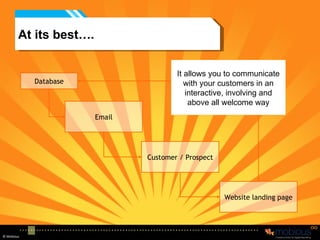
At its best…. Email Database Customer / Prospect Website landing page It allows you to communicate with your customers in an interactive, involving and above all welcome way
Imagine Your best, most cherished brochure, something you have worked on and crafted, a thing of beauty. You send it out to people and hope that they appreciate the splendour of your product. You want people to read it, understand your product and take in your brand.
What actually happens
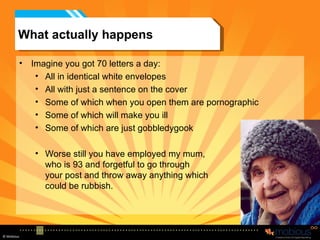
What actually happens Imagine you got 70 letters a day: All in identical white envelopes All with just a sentence on the cover Some of which when you open them are pornographic Some of which will make you ill Some of which are just gobbledygook Worse still you have employed my mum, who is 93 and forgetful to go through  your post and throw away anything which could be rubbish.
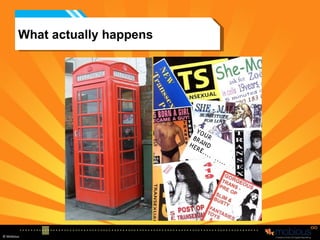
Imagine Your best press ad, something you have paid an agency to create, to develop. Something which is 100% brand supporting.  You want it to be placed in the right media, alongside similar (but not as good) products. A media you know is read by the right people
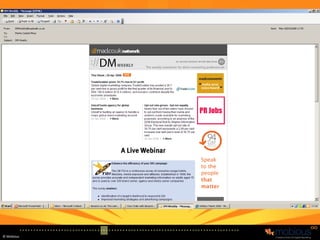
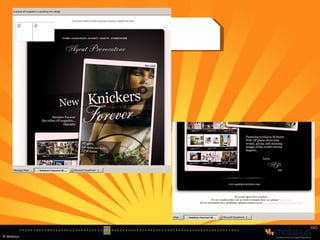
What actually happens
Imagine (if you do TV) the £2.3 million TV or radio ad, which you have spend so much time on. It shows just how great your product is. It is funny, quirky, sexy, informative and brilliant.
What actually happens X X
So why do we do it with email! We would never place our ads in such media Never allow our brochures to be  mixed in with the junk.
What if… I came to you and said: I have this great new media, when it arrives it will mess up your layout, most people will have to press a button to see anything other than an X. it will arrive just after an ad for “I can make your penis bigger” and just before “I can keep you up all night”. Most people will consider it rubbish, and will have no idea why you have sent it to them.  What would you say?
But that is what we are doing Everyone says that they want to do email better… Done right it can be brilliant But, you have to accept its limitations and its risks. Like everything else you can make the most of it if you understand it.
So why do it? Done right it can be: Interesting Useful Actually beneficial for the audience Brand supporting Drive traffic to your website Cost effective Interactive Welcomed
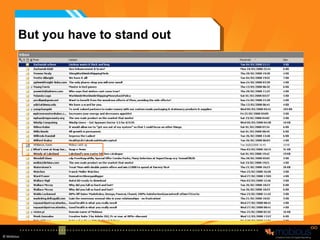
But you have to stand out
First tip.. For a while, read your junk mail and subscribe to some good brands – certainly all your competitors. See what other people are doing. How many of you are marketing people?  How many are on TPS and MPS? How many skip the ads on TV? How many don’t look at the ads in the Newspaper? How many read their junk mail? If you don’t then how will you know what other people are doing? How will you get better at it yourselves?
Background Somewhere around 60 billion emails are sent every day Around 95% of emails received are Spam Some spam filters are great, but they seem sporadic. Mine for example filters out internal company emails, no matter how many times I tell it not to, so I spend now more time monitoring my spam than my inbox. 58% of people receive at least one Phishing email every day (log on here and enter your security details)
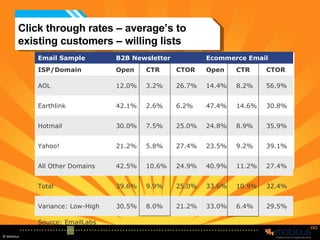
Click through rates – average’s to existing customers – willing lists Source: EmailLabs 29.5% 6.4% 33.0% 21.2% 8.0% 30.5% Variance: Low-High 32.4% 10.9% 33.6% 25.0% 9.9% 39.6% Total 27.4% 11.2% 40.9% 24.9% 10.6% 42.5% All Other Domains 39.1% 9.2% 23.5% 27.4% 5.8% 21.2% Yahoo! 35.9% 8.9% 24.8% 25.0% 7.5% 30.0% Hotmail 30.8% 14.6% 47.4% 6.2% 2.6% 42.1% Earthlink 56.9% 8.2% 14.4% 26.7% 3.2% 12.0% AOL CTOR CTR Open CTOR CTR Open ISP/Domain Ecommerce Email B2B Newsletter Email Sample
So – what makes up an email
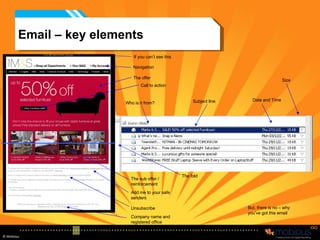
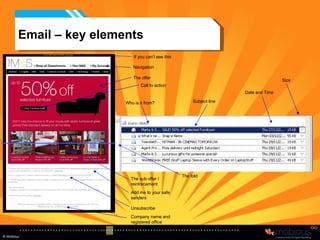
Email – key elements Who is it from? Subject line Size  Navigation The offer If you can’t see this The sub offer / reinforcement Company name and registered office Add me to your safe senders Unsubscribe The fold Date and Time But, there is no – why you’ve got this email Call to action
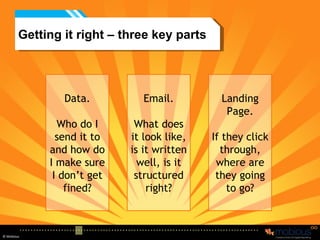
Getting it right – three key parts Data. Who do I send it to and how do I make sure I don’t get fined? Email. What does it look like, is it written well, is it structured right? Landing Page. If they click through, where are they going to go?
Data
Data Where from: Avoid bought in lists – they are invariably rubbish. Only do this if you are happy with a very very low response rate. Avoid going on the “group” newsletters unless you are happy with low response rates. Build the data from existing customers collect it right and then use it Generate Viral activity  Run a Member get member scheme Ensure that you have DPA/ opt in covered Do not be afraid of unsubscribes– if someone does not want to receive your email, then don’t send one
Opt in If you are offered data – ask yourself; These 100,000 opted in email addresses, have they opted in to me, or just to everything? Remember data goes dirty by about 20% a year, so how up to date is your email list? Around 31% of email addresses change each year.  People have a private email address and a work email address People have a “junk” email address People just have have lots of email addresses People protect their “real” email address far more than their postcode, so we have to treat it with respect Most people who are on commercially available lists, will change their email address. So what are you actually buying?
DPA - Opt in – you need to get it Single – I want your newsletter One click on a site saying you want to subscribe This is the minimum requirement You cannot do assumed opt it, people have to actually tick a box Double – is when you email them, and they have to confirm back to you This is absolutely best practice  It avoids people unsubscribing at a later date You then send the confirmation email – ask them to add to contacts.
The process – Data Checking You can do three basic things 1- dedupe - get rid of duplicates 2 – address validity – looking at the structure of the email address e.g. [email_address] So martincm@mobious.netto – would not be right Martincorlettmosshotmail.com – would not be right 3 – DNS SMTP checking – pings to the server which the address is at  to see if it exists or not. You can get a 20% drop out rate before you’ve even started. (better for cost and real result analysis)
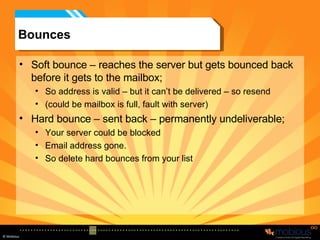
Bounces Soft bounce – reaches the server but gets bounced back before it gets to the mailbox; So address is valid – but it can’t be delivered – so resend (could be mailbox is full, fault with server) Hard bounce – sent back – permanently undeliverable; Your server could be blocked Email address gone. So delete hard bounces from your list
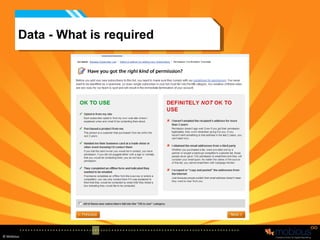
Data - What is required
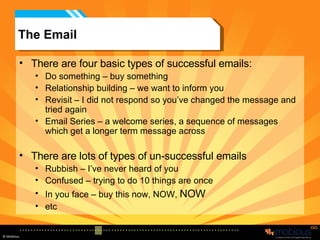
The Email There are four basic types of successful emails: Do something – buy something Relationship building – we want to inform you Revisit – I did not respond so you’ve changed the message and tried again Email Series – a welcome series, a sequence of messages which get a longer term message across There are lots of types of un-successful emails Rubbish – I’ve never heard of you Confused – trying to do 10 things are once In you face – buy this now, NOW,  NOW etc


Email – key elements Who is it from? Subject line Date and Time Navigation The offer If you can’t see this The sub offer / reinforcement Company name and registered office Add me to your safe senders Unsubscribe The fold Size  Call to action
The Basics
Basics – Date and Time There are lots of “urban myths” about when the best time to send an email is, “3.33 on a Friday afternoon”. Reality is the right time to send an email is when the prospect wants to receive it and has time to look at it. You need to ask the question, what will they be doing when they receive it, and when you send it may not be when they open it. But there are wrong times: If you are sending in the UK – don’t send between 9.00pm and 7.00am – most people’s first job in the morning is to delete the overnight spam. If it’s a home email – you may be better sending them after work If it’s a work email during work hours, but not, first thing in the morning, - gut feel says just before lunch is a good time, but this is not backed up by facts. Monday is usually best avoided. Also if your target audience is insomniacs who play games online overnight then 3.00am might be the best time.
Basics Who is it from It has to be from you, your company. Do not try to hide or be clever. You have to have a proper monitored reply address (you must check it). Company registration number  -Place of registration  - Registered office address  Where is it from – Server Be careful which server you send them from yours could become black listed. All the ISP’s get together to create white and black lists. E.g. If you send out too many emails a day you could become black listed (even legitimate emails can cause this), goto  www.whatismyipaddress.com/staticpages/index.php/is-my-ip-address-blacklisted Best way is to send emails out through a reputable company who will maintain the integrity of their server, for example if we get over 0.01% junk mail on a campaign – it is questioned and we could be removed prevented from using them. The Offer – the reason There has to be a reason to read and you have to make sure its clear and valid
Basics If you can’t see this Best practice would be to say why they are receiving it. So that they understand why it has arrived. You obviously need a link to the email on your website, if you can’t see this click here. Add me to your safe senders If you are sending to the right people, who have subscribed or opted in, then ask them to help get past the filters Unsubscribe Do not be afraid to offer unsubscribes, you want people to unsubscribe if they do not want to receive your emails, do not forget emails still cost money. But more importantly they damage your brand. You can say “do you really want to” page – change frequency, permissions etc The Fold Remember to test the email, where does it cut off, where is the fold? Size Keep it smaller than 50k
Basics Call to action don’t forget you need to actually ask them to do something, otherwise what is the point in sending it
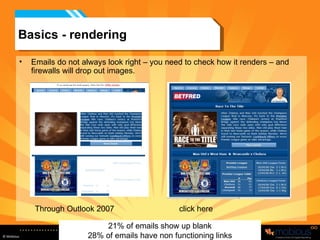
Basics - rendering Emails do not always look right – you need to check how it renders – and firewalls will drop out images. Through Outlook 2007 click here 21% of emails show up blank 28% of emails have non functioning links
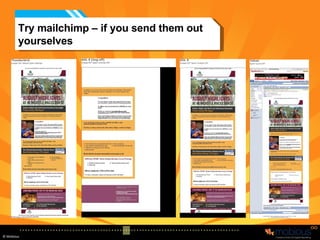
Try mailchimp – if you send them out yourselves
Specifics
Areas to Focus Three areas we will look at in more depth Subject Line This is what will make your email be opened Copy You need to make sure that the copy is well written and clear. Design –  remember there is no such thing as really bad design, only badly constructed emails: 40% of browsers are not internet explorer so how does yours look? Remember most emails come through as X The best design in the world will be ruined if it sizes wrong
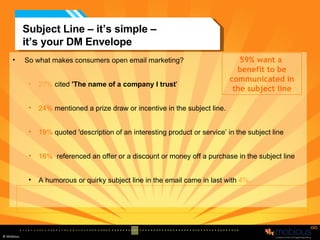
So what makes consumers open email marketing? 27%  cited  'The name of a company I trust '  24%  mentioned a prize draw or incentive in the subject line. 19%  quoted 'description of an interesting product or service’ in the subject line 16%   referenced an offer or a discount or money off a purchase in the subject line A humorous or quirky subject line in the email came in last with  4%. Subject Line – it’s simple –  it’s your DM Envelope Source: 2006 IMRS Internet Survey 59% want a  benefit to be communicated in the subject line
But Roughly 52% of emails use subject lines to describe the email content but give no indication of the value recipients would get as a result of opening the message. If that is what people want, we need to make sure we do it!
Copy – Size  Overall body copy size doesn’t really matter Every word needs to be earning its place in your copy. But do not be too worried by overall length.  Your copy should be as long or as short as it needs to be to sell the product. Provided the design is right you can get it read But remember that it has to have value, would you want to read it? If your copy is long, break it up into sections.
Copy - Clarity Do not use long Latin words like "information"  Use short Anglo-Saxon words like "facts“, use directional words, words which are action orientated.  Be clear, simple and to the point   Don’t be clever and cryptic.  Can your copy pass the “idiot test” what is the reading age of your copy (you can check this in “Word” easily enough) Does it pass the “goldfish test” - would you remember it 60 seconds later? Get someone to read it (who has had nothing to do with it, and then ask them a minute later – for the key points) MOST IMPORTANTLY Don’t try to be funny unless you really are funny!
Copy - Grammar Grammar, Grammar, Grammar Do not be limited by thinking that everything has to be "grammatically correct". Say it in the  simplest right way for your audience.  The accepted rules of emails are completely different to brochure and letter copy. Keep it short and sweet and simple Use short sentences with actions front loaded. Stick to 1 idea in every paragraph.  Be specific, avoid "up to 5%" or "over 1,000". Headers should be short – 5 -6 words And Subject lines less than 35 characters
Copy –  Customers are people too Don’t Speak Gibberish, nobody speaks it! Speak the reader's language and do what a salesperson would do – reflect their language back at them, BUT – get things checked by the target audience Effective copy often has dialogue, "you-and-me-talking" style to it.  Avoid internal business speak.  If you talk normally you are less likely to alienate anyone. Treat the reader with respect Consumers are far more sophisticated than we give  them credit for – after all we’re all consumers too aren't we!!!
The Design Fundamentally this is not a session on design – design is determined by: Who you are What you want to achieve What your target audience is There are some fundamentals – layout of copy, lining stuff up, making it all work together (co-ordination of colours) balance, designs can just look awful, but design is subjective. So rather than dwell on what you already know, what facts are there? Scientific studies of heatmaps reveals some key points
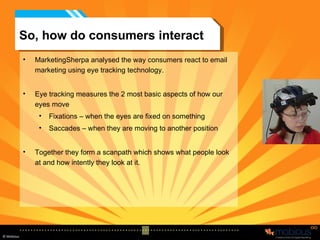
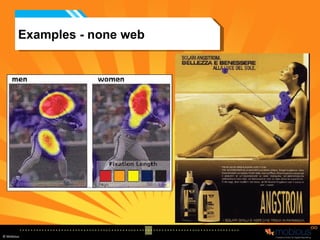
So, how do consumers interact MarketingSherpa analysed the way consumers react to email marketing using eye tracking technology. Eye tracking measures the 2 most basic aspects of how our eyes move Fixations – when the eyes are fixed on something Saccades – when they are moving to another position Together they form a scanpath which shows what people look at and how intently they look at it.
Examples - none web
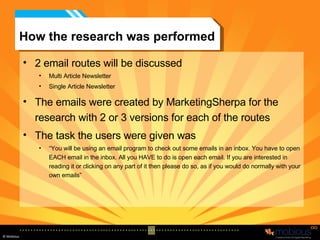
How the research was performed 2 email routes will be discussed Multi Article Newsletter Single Article Newsletter The emails were created by MarketingSherpa for the research with 2 or 3 versions for each of the routes The task the users were given was “ You will be using an email program to check out some emails in an inbox. You have to open EACH email in the inbox. All you HAVE to do is open each email. If you are interested in reading it or clicking on any part of it then please do so, as if you would do normally with your own emails”
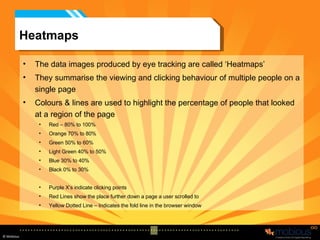
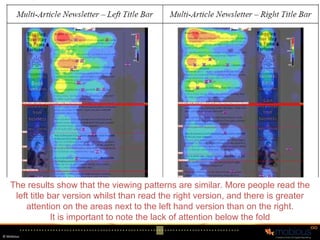
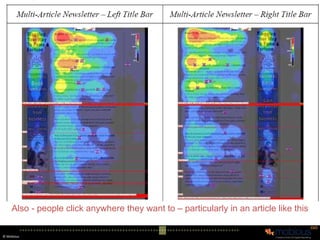
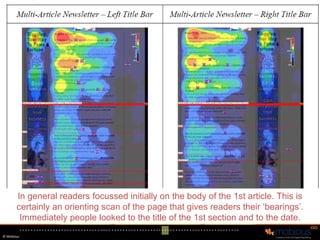
Heatmaps The data images produced by eye tracking are called ‘Heatmaps’ They summarise the viewing and clicking behaviour of multiple people on a single page Colours & lines are used to highlight the percentage of people that looked at a region of the page Red – 80% to 100%  Orange 70% to 80% Green 50% to 60% Light Green 40% to 50% Blue 30% to 40% Black 0% to 30% Purple X’s indicate clicking points Red Lines show the place further down a page a user scrolled to Yellow Dotted Line – Indicates the fold line in the browser window
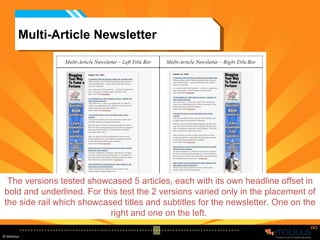
Multi-Article Newsletter The versions tested showcased 5 articles, each with its own headline offset in bold and underlined. For this test the 2 versions varied only in the placement of the side rail which showcased titles and subtitles for the newsletter. One on the right and one on the left.
Multi-Article Newsletter The results show that the viewing patterns are similar. More people read the left title bar version whilst than read the right version, and there is greater attention on the areas next to the left hand version than on the right. It is important to note the lack of attention below the fold
Multi-Article Newsletter Also - people click anywhere they want to – particularly in an article like this
Multi-Article Newsletter In general readers focussed initially on the body of the 1st article. This is certainly an orienting scan of the page that gives readers their ‘bearings’. Immediately people looked to the title of the 1st section and to the date.
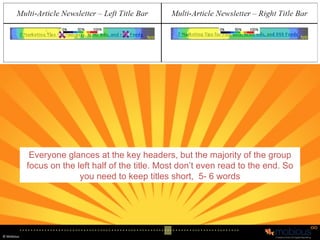
Multi-Article Newsletter Everyone glances at the key headers, but the majority of the group focus on the left half of the title. Most don’t even read to the end. So you need to keep titles short,  5- 6 words
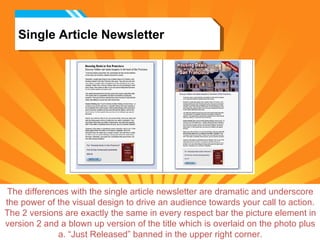
Single Article Newsletter The differences with the single article newsletter are dramatic and underscore the power of the visual design to drive an audience towards your call to action. The 2 versions are exactly the same in every respect bar the picture element in version 2 and a blown up version of the title which is overlaid on the photo plus a. “Just Released” banned in the upper right corner.
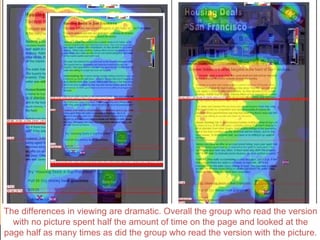
Single Article Newsletter The differences in viewing are dramatic. Overall the group who read the version with no picture spent half the amount of time on the page and looked at the page half as many times as did the group who read the version with the picture.
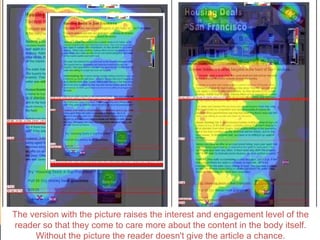
Single Article Newsletter The version with the picture raises the interest and engagement level of the reader so that they come to care more about the content in the body itself. Without the picture the reader doesn't give the article a chance.
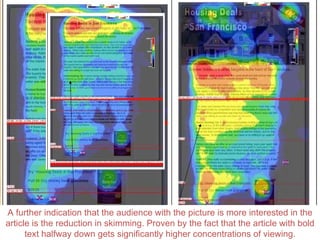
Single Article Newsletter A further indication that the audience with the picture is more interested in the article is the reduction in skimming. Proven by the fact that the article with bold text halfway down gets significantly higher concentrations of viewing.
Single Article Newsletter Importantly the call to action gets far more attention in the email with the image
Summary Images are vital – but you must make them relevant People click wherever and whenever they want to. Although clicks on ‘unclickable’ areas average 10% it rose to 40% on some tests!  So make your design selectable Roughly half of people who view an email make it through to the end. But this is impacted downwards with emails that go beyond the ‘fold’.  So ensure that the key information is above the fold. The ideal is to have a call to action above the fold as well as below People don't read whole sentences or headlines. Our brains are one step ahead and fill in information. People read enough to predict the rest and move on.  So front load action words and calls to action!
Landing Pages
What is a landing page What are landing pages? Landing pages are stand alone web pages built specifically for marketing campaigns such as pay-per-click search engine advertising and email marketing. The are the most important pages on your site, providing the fastest track from email receipt to paying customers. Building and optimizing landing pages for your email campaigns can result in dramatic increases in online sales (or leads), delivering a higher return on your investment for your marketing budget.
Key Benefits Key Benefits of Landing Pages Improves the results of your email campaigns by driving traffic straight to the right pages Enables you to rapidly test new campaigns and offers, narrowing your options to the offers that drive sales Enables you to use segmentation to offer variable pricing and offers Critically, their ‘disconnected’ state allows for accurate campaign measurement
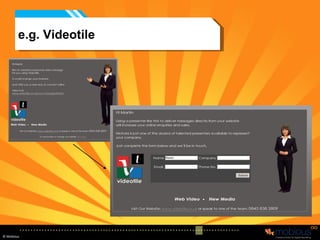
e.g. Videotile
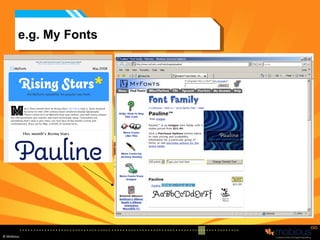
e.g. My Fonts
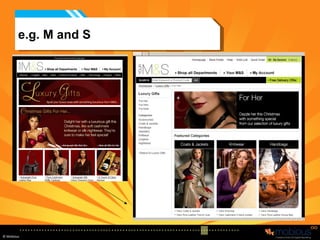
e.g. M and S
Variables What variables on a landing page and site will influence your particular type of visitor?  Copy Product images Merchandising Color Site navigation Shopping cart ease of use Pricing All can be changed, tested and optimised automatically
Landing Pages Define Your Conversion –   What do you want? Before you start to design your landing page, define that page’s conversion activity. For a newsletter landing page, the conversion activity is entering an email address into a form and clicking “Accept.” Stay Focused –   Do one thing well Avoid the urge to promote or link to other  areas of your site. The point of the landing page is to prevent your visitor from wandering. You want them converting, not clicking around to other parts of your site
Landing Pages Do a Little Research  –  What is your target?  Who are you talking to? Build a profile of your ideal visitor. Keep this person in mind when creating your landing page. Do not construct the page for anyone else—generic and broad pages are proven to fail Eliminate unneeded Elements  –  Strip it down Distractions kill conversions. Strip any unneeded elements from the page. They expect a very specific message. You have already sold them on the concept.
Landing Pages Match the Creative  –  Keep it Consistent   The landing page and creative should match. The easiest way to clue visitors in that they have arrived at the right place is to use the heading from your ad creative. Remove Navigation –   Don’t let them escape If you can, remove the navigation bar. Of course, don’t remove it if it is essential to the conversion process. Remember your message, and if a link has nothing to with it—chuck it!
Landing Pages Important Elements Above the “Fold”  –  Don’t hide below the fold Pay attention to the virtual fold. Place enough content above the fold to allow your visitor to make a decision about continuing on the site.  Provide Conversion Exits  –  Allow people to act Make it easy for your visitor to convert. Place conversion exits above the fold and at every scroll-and-a-half of screen space. E.g have you sign up/buy now above the fold
Landing Pages Lead the Eye  –  Take them where you want them to go Use typography and color to your advantage.  Lead the eye along the page towards the conversion exit.  Thoughtful use of white space, large copy and graphics can make a long page seem much shorter Avoid putting interesting material in sidebars.  This pulls the eye away from the main body. If it’s interesting and valuable, keep it close to the center and use it to direct the eye.
Landing pages  Test, Test, Test –   And then test again After you have finished the design of your landing page, test it with a small user group. Go over a checklist with your design team: Is the whole page focused?  Does the message match the advertisement?  Have you reduced all distractions?  Is critical information above the fold? Are there enough conversion exits?  Does the page enhance your brand?
Who gets it right?
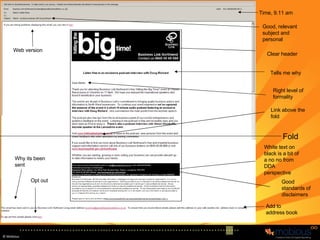
Fold Good, relevant subject and personal Time, 9.11 am Clear header Tells me why Right level of formality Good standards of disclaimers Add to address book Link above the fold White text on black is a bit of a no no from DDA perspective Why its been sent Opt out Web version
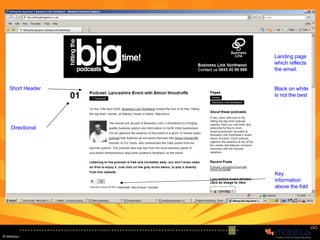
Landing page which reflects the email. Black on white is not the best Key information above the fold Short Header Directional
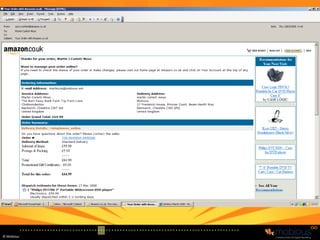
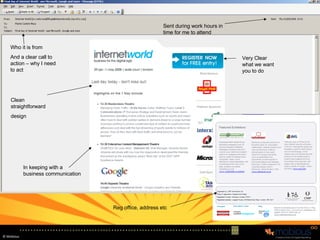
Very Clear what we want you to do Who it is from And a clear call to action – why I need to act Clean straightforward design In keeping with a business communication Sent during work hours in time for me to attend  Reg office, address etc
So in summary Email can be great – but you have to understand the rules Doing it right is not that hard (doing it brilliantly is a bit harder) but everyone can do simple things and get it right; 1) Get your data right first 2) Develop your email so it works, so it has all the key features and there is a reason to send it 3) Always create a landing page And test everything, again and again and again
Questions -  and one sales ploy Remember we will do one “free” critique on your emails, so if you are interested. Email me first to tell me you want to Then add me to your next mail list so I see the email exactly as a punter would [email_address] You will NOT have opted in to further communication, so we will not bombard you with emails or “can we meet” messages.

Merit Event - E-Mail Marketing - How to do it Right!!!

  • 1.
    Martin Corlett-Moss Emailmarketing How to do it right! How to do it wrong! Who am I?
  • 2.
    A note Noneof the work showcased is ours. It is what we think of as best practice from the industry. All the examples are drawn from my inbox, which is probably not that different to yours.
  • 3.
    Point 1 -It’s not Rocket Science? But it is the application of a few simple rules, and a bit of creativity. The purpose of this session is to give you a few key tips, which will help you to improve your email marketing. It is not supposed to teach you to suck eggs. NOR is it a technical seminar. It is supposed to give you a few things which you could do tomorrow.
  • 4.
  • 5.
    At its best….Email Database Customer / Prospect Website landing page It allows you to communicate with your customers in an interactive, involving and above all welcome way
  • 6.
    Imagine Your best,most cherished brochure, something you have worked on and crafted, a thing of beauty. You send it out to people and hope that they appreciate the splendour of your product. You want people to read it, understand your product and take in your brand.
  • 7.
  • 8.
    What actually happensImagine you got 70 letters a day: All in identical white envelopes All with just a sentence on the cover Some of which when you open them are pornographic Some of which will make you ill Some of which are just gobbledygook Worse still you have employed my mum, who is 93 and forgetful to go through your post and throw away anything which could be rubbish.
  • 9.
    Imagine Your bestpress ad, something you have paid an agency to create, to develop. Something which is 100% brand supporting. You want it to be placed in the right media, alongside similar (but not as good) products. A media you know is read by the right people
  • 10.
  • 11.
    Imagine (if youdo TV) the £2.3 million TV or radio ad, which you have spend so much time on. It shows just how great your product is. It is funny, quirky, sexy, informative and brilliant.
  • 12.
  • 13.
    So why dowe do it with email! We would never place our ads in such media Never allow our brochures to be mixed in with the junk.
  • 14.
    What if… Icame to you and said: I have this great new media, when it arrives it will mess up your layout, most people will have to press a button to see anything other than an X. it will arrive just after an ad for “I can make your penis bigger” and just before “I can keep you up all night”. Most people will consider it rubbish, and will have no idea why you have sent it to them. What would you say?
  • 15.
    But that iswhat we are doing Everyone says that they want to do email better… Done right it can be brilliant But, you have to accept its limitations and its risks. Like everything else you can make the most of it if you understand it.
  • 16.
    So why doit? Done right it can be: Interesting Useful Actually beneficial for the audience Brand supporting Drive traffic to your website Cost effective Interactive Welcomed
  • 17.
    But you haveto stand out
  • 18.
    First tip.. Fora while, read your junk mail and subscribe to some good brands – certainly all your competitors. See what other people are doing. How many of you are marketing people? How many are on TPS and MPS? How many skip the ads on TV? How many don’t look at the ads in the Newspaper? How many read their junk mail? If you don’t then how will you know what other people are doing? How will you get better at it yourselves?
  • 19.
    Background Somewhere around60 billion emails are sent every day Around 95% of emails received are Spam Some spam filters are great, but they seem sporadic. Mine for example filters out internal company emails, no matter how many times I tell it not to, so I spend now more time monitoring my spam than my inbox. 58% of people receive at least one Phishing email every day (log on here and enter your security details)
  • 20.
    Click through rates– average’s to existing customers – willing lists Source: EmailLabs 29.5% 6.4% 33.0% 21.2% 8.0% 30.5% Variance: Low-High 32.4% 10.9% 33.6% 25.0% 9.9% 39.6% Total 27.4% 11.2% 40.9% 24.9% 10.6% 42.5% All Other Domains 39.1% 9.2% 23.5% 27.4% 5.8% 21.2% Yahoo! 35.9% 8.9% 24.8% 25.0% 7.5% 30.0% Hotmail 30.8% 14.6% 47.4% 6.2% 2.6% 42.1% Earthlink 56.9% 8.2% 14.4% 26.7% 3.2% 12.0% AOL CTOR CTR Open CTOR CTR Open ISP/Domain Ecommerce Email B2B Newsletter Email Sample
  • 21.
    So – whatmakes up an email
  • 22.
    Email – keyelements Who is it from? Subject line Size Navigation The offer If you can’t see this The sub offer / reinforcement Company name and registered office Add me to your safe senders Unsubscribe The fold Date and Time But, there is no – why you’ve got this email Call to action
  • 23.
    Getting it right– three key parts Data. Who do I send it to and how do I make sure I don’t get fined? Email. What does it look like, is it written well, is it structured right? Landing Page. If they click through, where are they going to go?
  • 24.
  • 25.
    Data Where from:Avoid bought in lists – they are invariably rubbish. Only do this if you are happy with a very very low response rate. Avoid going on the “group” newsletters unless you are happy with low response rates. Build the data from existing customers collect it right and then use it Generate Viral activity Run a Member get member scheme Ensure that you have DPA/ opt in covered Do not be afraid of unsubscribes– if someone does not want to receive your email, then don’t send one
  • 26.
    Opt in Ifyou are offered data – ask yourself; These 100,000 opted in email addresses, have they opted in to me, or just to everything? Remember data goes dirty by about 20% a year, so how up to date is your email list? Around 31% of email addresses change each year. People have a private email address and a work email address People have a “junk” email address People just have have lots of email addresses People protect their “real” email address far more than their postcode, so we have to treat it with respect Most people who are on commercially available lists, will change their email address. So what are you actually buying?
  • 27.
    DPA - Optin – you need to get it Single – I want your newsletter One click on a site saying you want to subscribe This is the minimum requirement You cannot do assumed opt it, people have to actually tick a box Double – is when you email them, and they have to confirm back to you This is absolutely best practice It avoids people unsubscribing at a later date You then send the confirmation email – ask them to add to contacts.
  • 28.
    The process –Data Checking You can do three basic things 1- dedupe - get rid of duplicates 2 – address validity – looking at the structure of the email address e.g. [email_address] So martincm@mobious.netto – would not be right Martincorlettmosshotmail.com – would not be right 3 – DNS SMTP checking – pings to the server which the address is at to see if it exists or not. You can get a 20% drop out rate before you’ve even started. (better for cost and real result analysis)
  • 29.
    Bounces Soft bounce– reaches the server but gets bounced back before it gets to the mailbox; So address is valid – but it can’t be delivered – so resend (could be mailbox is full, fault with server) Hard bounce – sent back – permanently undeliverable; Your server could be blocked Email address gone. So delete hard bounces from your list
  • 30.
    Data - Whatis required
  • 31.
    The Email Thereare four basic types of successful emails: Do something – buy something Relationship building – we want to inform you Revisit – I did not respond so you’ve changed the message and tried again Email Series – a welcome series, a sequence of messages which get a longer term message across There are lots of types of un-successful emails Rubbish – I’ve never heard of you Confused – trying to do 10 things are once In you face – buy this now, NOW, NOW etc
  • 32.
  • 33.
  • 34.
  • 35.
    Email – keyelements Who is it from? Subject line Date and Time Navigation The offer If you can’t see this The sub offer / reinforcement Company name and registered office Add me to your safe senders Unsubscribe The fold Size Call to action
  • 36.
  • 37.
    Basics – Dateand Time There are lots of “urban myths” about when the best time to send an email is, “3.33 on a Friday afternoon”. Reality is the right time to send an email is when the prospect wants to receive it and has time to look at it. You need to ask the question, what will they be doing when they receive it, and when you send it may not be when they open it. But there are wrong times: If you are sending in the UK – don’t send between 9.00pm and 7.00am – most people’s first job in the morning is to delete the overnight spam. If it’s a home email – you may be better sending them after work If it’s a work email during work hours, but not, first thing in the morning, - gut feel says just before lunch is a good time, but this is not backed up by facts. Monday is usually best avoided. Also if your target audience is insomniacs who play games online overnight then 3.00am might be the best time.
  • 38.
    Basics Who isit from It has to be from you, your company. Do not try to hide or be clever. You have to have a proper monitored reply address (you must check it). Company registration number -Place of registration - Registered office address Where is it from – Server Be careful which server you send them from yours could become black listed. All the ISP’s get together to create white and black lists. E.g. If you send out too many emails a day you could become black listed (even legitimate emails can cause this), goto www.whatismyipaddress.com/staticpages/index.php/is-my-ip-address-blacklisted Best way is to send emails out through a reputable company who will maintain the integrity of their server, for example if we get over 0.01% junk mail on a campaign – it is questioned and we could be removed prevented from using them. The Offer – the reason There has to be a reason to read and you have to make sure its clear and valid
  • 39.
    Basics If youcan’t see this Best practice would be to say why they are receiving it. So that they understand why it has arrived. You obviously need a link to the email on your website, if you can’t see this click here. Add me to your safe senders If you are sending to the right people, who have subscribed or opted in, then ask them to help get past the filters Unsubscribe Do not be afraid to offer unsubscribes, you want people to unsubscribe if they do not want to receive your emails, do not forget emails still cost money. But more importantly they damage your brand. You can say “do you really want to” page – change frequency, permissions etc The Fold Remember to test the email, where does it cut off, where is the fold? Size Keep it smaller than 50k
  • 40.
    Basics Call toaction don’t forget you need to actually ask them to do something, otherwise what is the point in sending it
  • 41.
    Basics - renderingEmails do not always look right – you need to check how it renders – and firewalls will drop out images. Through Outlook 2007 click here 21% of emails show up blank 28% of emails have non functioning links
  • 42.
    Try mailchimp –if you send them out yourselves
  • 43.
  • 44.
    Areas to FocusThree areas we will look at in more depth Subject Line This is what will make your email be opened Copy You need to make sure that the copy is well written and clear. Design – remember there is no such thing as really bad design, only badly constructed emails: 40% of browsers are not internet explorer so how does yours look? Remember most emails come through as X The best design in the world will be ruined if it sizes wrong
  • 45.
    So what makesconsumers open email marketing? 27% cited 'The name of a company I trust ' 24% mentioned a prize draw or incentive in the subject line. 19% quoted 'description of an interesting product or service’ in the subject line 16% referenced an offer or a discount or money off a purchase in the subject line A humorous or quirky subject line in the email came in last with 4%. Subject Line – it’s simple – it’s your DM Envelope Source: 2006 IMRS Internet Survey 59% want a benefit to be communicated in the subject line
  • 46.
    But Roughly 52%of emails use subject lines to describe the email content but give no indication of the value recipients would get as a result of opening the message. If that is what people want, we need to make sure we do it!
  • 47.
    Copy – Size Overall body copy size doesn’t really matter Every word needs to be earning its place in your copy. But do not be too worried by overall length. Your copy should be as long or as short as it needs to be to sell the product. Provided the design is right you can get it read But remember that it has to have value, would you want to read it? If your copy is long, break it up into sections.
  • 48.
    Copy - ClarityDo not use long Latin words like "information" Use short Anglo-Saxon words like "facts“, use directional words, words which are action orientated. Be clear, simple and to the point Don’t be clever and cryptic. Can your copy pass the “idiot test” what is the reading age of your copy (you can check this in “Word” easily enough) Does it pass the “goldfish test” - would you remember it 60 seconds later? Get someone to read it (who has had nothing to do with it, and then ask them a minute later – for the key points) MOST IMPORTANTLY Don’t try to be funny unless you really are funny!
  • 49.
    Copy - GrammarGrammar, Grammar, Grammar Do not be limited by thinking that everything has to be "grammatically correct". Say it in the simplest right way for your audience. The accepted rules of emails are completely different to brochure and letter copy. Keep it short and sweet and simple Use short sentences with actions front loaded. Stick to 1 idea in every paragraph. Be specific, avoid "up to 5%" or "over 1,000". Headers should be short – 5 -6 words And Subject lines less than 35 characters
  • 50.
    Copy – Customers are people too Don’t Speak Gibberish, nobody speaks it! Speak the reader's language and do what a salesperson would do – reflect their language back at them, BUT – get things checked by the target audience Effective copy often has dialogue, "you-and-me-talking" style to it. Avoid internal business speak. If you talk normally you are less likely to alienate anyone. Treat the reader with respect Consumers are far more sophisticated than we give them credit for – after all we’re all consumers too aren't we!!!
  • 51.
    The Design Fundamentallythis is not a session on design – design is determined by: Who you are What you want to achieve What your target audience is There are some fundamentals – layout of copy, lining stuff up, making it all work together (co-ordination of colours) balance, designs can just look awful, but design is subjective. So rather than dwell on what you already know, what facts are there? Scientific studies of heatmaps reveals some key points
  • 52.
    So, how doconsumers interact MarketingSherpa analysed the way consumers react to email marketing using eye tracking technology. Eye tracking measures the 2 most basic aspects of how our eyes move Fixations – when the eyes are fixed on something Saccades – when they are moving to another position Together they form a scanpath which shows what people look at and how intently they look at it.
  • 53.
  • 54.
    How the researchwas performed 2 email routes will be discussed Multi Article Newsletter Single Article Newsletter The emails were created by MarketingSherpa for the research with 2 or 3 versions for each of the routes The task the users were given was “ You will be using an email program to check out some emails in an inbox. You have to open EACH email in the inbox. All you HAVE to do is open each email. If you are interested in reading it or clicking on any part of it then please do so, as if you would do normally with your own emails”
  • 55.
    Heatmaps The dataimages produced by eye tracking are called ‘Heatmaps’ They summarise the viewing and clicking behaviour of multiple people on a single page Colours & lines are used to highlight the percentage of people that looked at a region of the page Red – 80% to 100% Orange 70% to 80% Green 50% to 60% Light Green 40% to 50% Blue 30% to 40% Black 0% to 30% Purple X’s indicate clicking points Red Lines show the place further down a page a user scrolled to Yellow Dotted Line – Indicates the fold line in the browser window
  • 56.
    Multi-Article Newsletter Theversions tested showcased 5 articles, each with its own headline offset in bold and underlined. For this test the 2 versions varied only in the placement of the side rail which showcased titles and subtitles for the newsletter. One on the right and one on the left.
  • 57.
    Multi-Article Newsletter Theresults show that the viewing patterns are similar. More people read the left title bar version whilst than read the right version, and there is greater attention on the areas next to the left hand version than on the right. It is important to note the lack of attention below the fold
  • 58.
    Multi-Article Newsletter Also- people click anywhere they want to – particularly in an article like this
  • 59.
    Multi-Article Newsletter Ingeneral readers focussed initially on the body of the 1st article. This is certainly an orienting scan of the page that gives readers their ‘bearings’. Immediately people looked to the title of the 1st section and to the date.
  • 60.
    Multi-Article Newsletter Everyoneglances at the key headers, but the majority of the group focus on the left half of the title. Most don’t even read to the end. So you need to keep titles short, 5- 6 words
  • 61.
    Single Article NewsletterThe differences with the single article newsletter are dramatic and underscore the power of the visual design to drive an audience towards your call to action. The 2 versions are exactly the same in every respect bar the picture element in version 2 and a blown up version of the title which is overlaid on the photo plus a. “Just Released” banned in the upper right corner.
  • 62.
    Single Article NewsletterThe differences in viewing are dramatic. Overall the group who read the version with no picture spent half the amount of time on the page and looked at the page half as many times as did the group who read the version with the picture.
  • 63.
    Single Article NewsletterThe version with the picture raises the interest and engagement level of the reader so that they come to care more about the content in the body itself. Without the picture the reader doesn't give the article a chance.
  • 64.
    Single Article NewsletterA further indication that the audience with the picture is more interested in the article is the reduction in skimming. Proven by the fact that the article with bold text halfway down gets significantly higher concentrations of viewing.
  • 65.
    Single Article NewsletterImportantly the call to action gets far more attention in the email with the image
  • 66.
    Summary Images arevital – but you must make them relevant People click wherever and whenever they want to. Although clicks on ‘unclickable’ areas average 10% it rose to 40% on some tests! So make your design selectable Roughly half of people who view an email make it through to the end. But this is impacted downwards with emails that go beyond the ‘fold’. So ensure that the key information is above the fold. The ideal is to have a call to action above the fold as well as below People don't read whole sentences or headlines. Our brains are one step ahead and fill in information. People read enough to predict the rest and move on. So front load action words and calls to action!
  • 67.
  • 68.
    What is alanding page What are landing pages? Landing pages are stand alone web pages built specifically for marketing campaigns such as pay-per-click search engine advertising and email marketing. The are the most important pages on your site, providing the fastest track from email receipt to paying customers. Building and optimizing landing pages for your email campaigns can result in dramatic increases in online sales (or leads), delivering a higher return on your investment for your marketing budget.
  • 69.
    Key Benefits KeyBenefits of Landing Pages Improves the results of your email campaigns by driving traffic straight to the right pages Enables you to rapidly test new campaigns and offers, narrowing your options to the offers that drive sales Enables you to use segmentation to offer variable pricing and offers Critically, their ‘disconnected’ state allows for accurate campaign measurement
  • 70.
  • 71.
  • 72.
  • 73.
    Variables What variableson a landing page and site will influence your particular type of visitor? Copy Product images Merchandising Color Site navigation Shopping cart ease of use Pricing All can be changed, tested and optimised automatically
  • 74.
    Landing Pages DefineYour Conversion – What do you want? Before you start to design your landing page, define that page’s conversion activity. For a newsletter landing page, the conversion activity is entering an email address into a form and clicking “Accept.” Stay Focused – Do one thing well Avoid the urge to promote or link to other areas of your site. The point of the landing page is to prevent your visitor from wandering. You want them converting, not clicking around to other parts of your site
  • 75.
    Landing Pages Doa Little Research – What is your target? Who are you talking to? Build a profile of your ideal visitor. Keep this person in mind when creating your landing page. Do not construct the page for anyone else—generic and broad pages are proven to fail Eliminate unneeded Elements – Strip it down Distractions kill conversions. Strip any unneeded elements from the page. They expect a very specific message. You have already sold them on the concept.
  • 76.
    Landing Pages Matchthe Creative – Keep it Consistent The landing page and creative should match. The easiest way to clue visitors in that they have arrived at the right place is to use the heading from your ad creative. Remove Navigation – Don’t let them escape If you can, remove the navigation bar. Of course, don’t remove it if it is essential to the conversion process. Remember your message, and if a link has nothing to with it—chuck it!
  • 77.
    Landing Pages ImportantElements Above the “Fold” – Don’t hide below the fold Pay attention to the virtual fold. Place enough content above the fold to allow your visitor to make a decision about continuing on the site. Provide Conversion Exits – Allow people to act Make it easy for your visitor to convert. Place conversion exits above the fold and at every scroll-and-a-half of screen space. E.g have you sign up/buy now above the fold
  • 78.
    Landing Pages Leadthe Eye – Take them where you want them to go Use typography and color to your advantage. Lead the eye along the page towards the conversion exit. Thoughtful use of white space, large copy and graphics can make a long page seem much shorter Avoid putting interesting material in sidebars. This pulls the eye away from the main body. If it’s interesting and valuable, keep it close to the center and use it to direct the eye.
  • 79.
    Landing pages Test, Test, Test – And then test again After you have finished the design of your landing page, test it with a small user group. Go over a checklist with your design team: Is the whole page focused? Does the message match the advertisement? Have you reduced all distractions? Is critical information above the fold? Are there enough conversion exits? Does the page enhance your brand?
  • 80.
  • 81.
    Fold Good, relevantsubject and personal Time, 9.11 am Clear header Tells me why Right level of formality Good standards of disclaimers Add to address book Link above the fold White text on black is a bit of a no no from DDA perspective Why its been sent Opt out Web version
  • 82.
    Landing page whichreflects the email. Black on white is not the best Key information above the fold Short Header Directional
  • 83.
    Very Clear whatwe want you to do Who it is from And a clear call to action – why I need to act Clean straightforward design In keeping with a business communication Sent during work hours in time for me to attend Reg office, address etc
  • 84.
    So in summaryEmail can be great – but you have to understand the rules Doing it right is not that hard (doing it brilliantly is a bit harder) but everyone can do simple things and get it right; 1) Get your data right first 2) Develop your email so it works, so it has all the key features and there is a reason to send it 3) Always create a landing page And test everything, again and again and again
  • 85.
    Questions - and one sales ploy Remember we will do one “free” critique on your emails, so if you are interested. Email me first to tell me you want to Then add me to your next mail list so I see the email exactly as a punter would [email_address] You will NOT have opted in to further communication, so we will not bombard you with emails or “can we meet” messages.