Email marketing and communications tips and trends 2010
Why email? Cost and time savings   More effective tracking and targeting More interactive for todayโ€™s consumer More efficient Formatted for delivery method Less work for the reader Content available for keyword search Hits back to your web site โ€”show what else they are missing Consider hybrid
Back to basics 1. Identify sender โ€“  actual personโ€™s name, PLUS company name  Does everyone know the name of your CEO or President? 2. Subject line โ€“  why should I care? "And we're off!"  Well, who is "we," and where are we off to? Spell it out Remember length โ€“ Blackberry, smart phone, etc. 3. Make images optional Many email clients and smart phones suppress Never put call to action, most impt. info.,  in image only
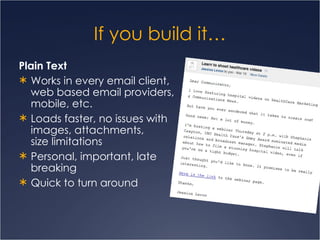
If you build itโ€ฆ Plain Text Works in every email client, web based email providers, mobile, etc. Loads faster, no issues with images, attachments,  size limitations Personal, important, late breaking Quick to turn around
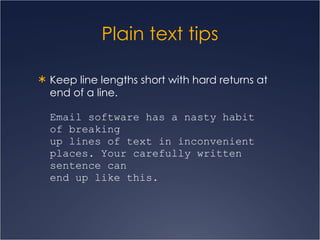
Plain text tips Keep line lengths short with hard returns at end of a line. Email software has a nasty habit  of breaking  up lines of text in inconvenient places. Your carefully written sentence can  end up like this.
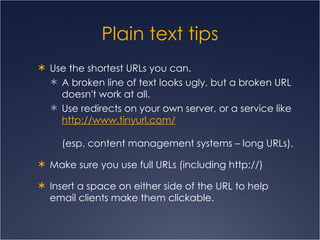
Plain text tips Use the shortest URLs you can. A broken line of text looks ugly, but a broken URL doesn't work at all.  Use redirects on your own server, or a service like  http:// www.tinyurl.com /   (esp. content management systems โ€“ long URLs). Make sure you use full URLs (including http://) Insert a space on either side of the URL to help email clients make them clickable.
Plain text tips Create headings and sections.  A big block of text is hard to read, especially plain text with no color or different font sizes to help people scan.  Can use  lines of repeated characters   underscores (_______) or asterisks (********)  to emphasize and break email into sections. Make sure the text is well structured and clear โ€“  focus is on the content!
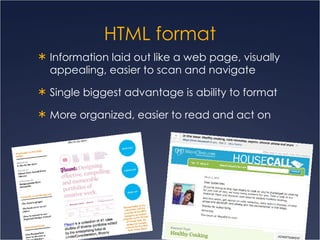
HTML format Information laid out like a web page, visually appealing, easier to scan and navigate Single biggest advantage is ability to format  More organized, easier to read and act on
Getting technical Most important content should appear at or near top Plain text version should be available for people who can't, or choose not to, view HTML And โ€œView as web pageโ€ link for full html Avoid CSS Use inline styles to control other elements such as background colors and fonts
Set the table Using HTML tables is the only way to achieve a layout that will render consistently across different mail clients Percents: Set table width to 98% or smaller โ€“ some mail clients need 1% padding on each side. Pixels: Standard pixels wide is between 400 โ€“ 600 px Can purchase tested HTML email templates and customize to your preferences, or build an html page from scratch
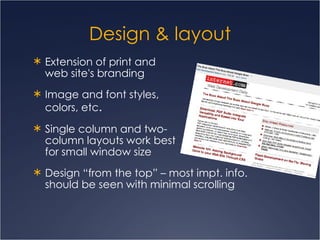
Design & layout Extension of print and  web site's branding Image and font styles,  colors, etc . Single column and two- column layouts work best  for small window size  Design โ€œfrom the topโ€ โ€“ most impt. info. should be seen with minimal scrolling
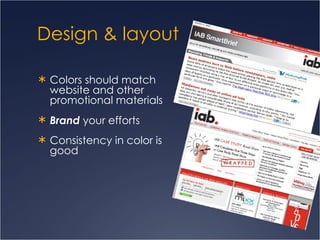
Design & layout Colors should match  website and other  promotional materials Brand  your efforts  Consistency in color is  good
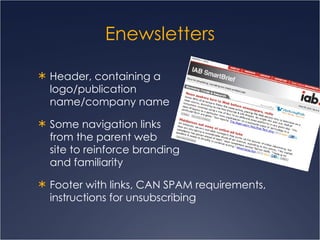
Enewsletters Header, containing a  logo/publication  name/company name  Some navigation links  from the parent web  site to reinforce branding  and familiarity Footer with links, CAN SPAM requirements, instructions for unsubscribing
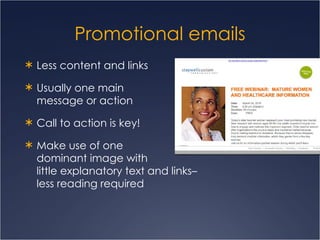
Promotional emails Less content and links Usually one main  message or action Call to action is key! Make use of one  dominant image with  little explanatory text and linksโ€“  less reading required
Writing with purpose Your choices will depend on your goals  If you want to drive traffic to the site, use skillfully-written teasers w/links  If your newsletter is about building reputation as a provider of information, having the full content in the email might make more sense Audience is key โ€“ are they motivated to follow a link? Don't try to tell too much โ€” make them targeted with exception of an enewsletter  and even then  limit topics.  Have a good idea of what you want the reader to do (Call to Action!)
Test, test, test Outlook (versions), Yahoo!, Google Mail, AOL, Hotmail, other web-based Mobile readers, blackberry, iPhone, smart phones Determine domain names in your mailing list
Improve your results Try, and track, small, controlled changes Boring subject lines work only when you have a very strong relationship with your subscribers Try action words, Google AdWords โ€œKeywordโ€ or โ€œSearch-based keyword toolโ€ (based on your website) for trigger words Think first 50 characters Days of week and time of day Avoid spam triggers such as โ€œfreeโ€
More best practices Absolute links, store email IMAGES on web server (for example,  /images/email/),  and don't delete.  Set links and pdfs to  open in a new  window  (target="_blank").  And be sure to  include โ€œ(pdf)โ€ or โ€œdownloadโ€ or the Acrobat pdf icon.
More best practices Make sure your email displays with images turned off.  a background image to provide a background pattern or color, with white text over it. โ€œ xโ€ alt tags
Easy to miss Is the subject line correct?  Dates, times, facts Is the contact information correct?  Call the number! Ask readers to add your โ€œFromโ€ address Unsubscribe CAN SPAM requirements
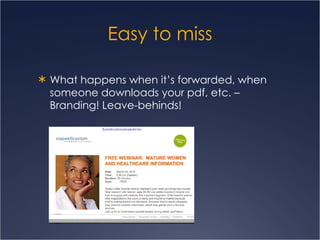
Easy to miss What happens when itโ€™s forwarded, when someone downloads your pdf, etc. โ€“ Branding! Leave-behinds!
ย 
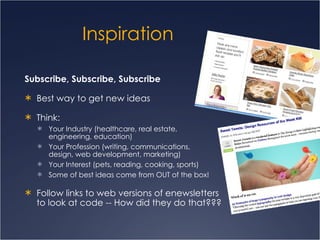
Inspiration Subscribe, Subscribe, Subscribe Best way to get new ideas Think:  Your Industry (healthcare, real estate,  engineering, education)  Your Profession (writing, communications,  design, web development, marketing) Your Interest (pets, reading, cooking, sports)  Some of best ideas come from OUT of the box! Follow links to web versions of enewsletters  to look at code -- How did they do that???
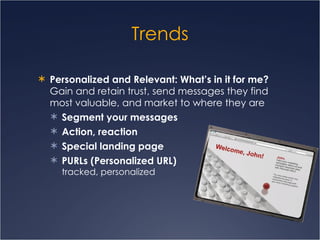
Trends Personalized and Relevant: Whatโ€™s in it for me? Gain and retain trust, send messages they find most valuable, and market to where they are Segment your messages Action, reaction Special landing page PURLs (Personalized URL)  tracked, personalized
Trends Create enews from your blog   Blog-RSS feed-signupโ€“ automated every time you post to blog, keeps no-maintenance line of communication open Create raving fans Allow (ask) readers to comment, give feedback, participate  You learn more about your customer, your members, your client, your audience
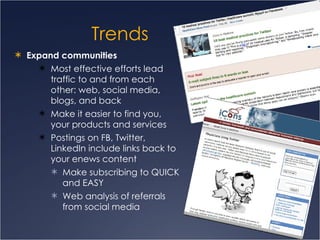
Trends Expand communities  Most effective efforts lead traffic to and from each other: web, social media, blogs, and back Make it easier to find you, your products and services Postings on FB, Twitter, LinkedIn include links back to your enews content  Make subscribing to QUICK and EASY Web analysis of referrals from social media
Trends Email Invitations, RSVPs, Surveys and Opinion Polls  โ€“ register, track and learn about your readers www.myemma.com/surveys /  and โ€œcustomer storiesโ€ Mobile email use is rampant .  People now check their email in the bathroom, the church pew and, well, other places peopleย can't drag a desktop.
Remember An email inbox is a  very noisy place Subscribers may only read the subject line โ€“  action words! Permission matters, and relevance trumps permission ! Meet your legal obligations  โ€” Federal CAN SPAM Make unsubscribing easy  โ€” No point emailing people who are not interested. Auto unsubscribe is best, easiest! โ€œRemoveโ€ will work if you have someone dedicated to maintaining the list. Image blocking is common โ€“  again, alt tags! Remember your audience Test, test, test
Resources Small list? Sending via Outlook is ok  Large list? Dedicated server, consider outside onilne service (see list), and/or get with your IT
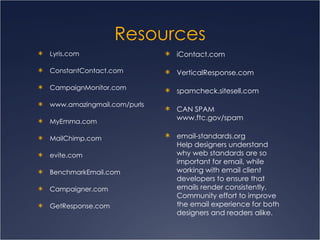
Resources Lyris.com ConstantContact.com CampaignMonitor.com www.amazingmail.com/purls MyEmma.com MailChimp.com evite.com BenchmarkEmail.com Campaigner.com GetResponse.com iContact.com VerticalResponse.com spamcheck.sitesell.com CAN SPAM  www.ftc.gov/spam email-standards.org Help designers understand why web standards are so important for email, while working with email client developers to ensure that emails render consistently. Community effort to improve the email experience for both designers and readers alike.
QUESTIONS? www.womcom.org [email_address] twitter.com/christybd linkedin.com/in/christybroccardodavis slideshare.com/christybd

Email Tips 2010

  • 1.
    Email marketing andcommunications tips and trends 2010
  • 2.
    Why email? Costand time savings More effective tracking and targeting More interactive for todayโ€™s consumer More efficient Formatted for delivery method Less work for the reader Content available for keyword search Hits back to your web site โ€”show what else they are missing Consider hybrid
  • 3.
    Back to basics1. Identify sender โ€“ actual personโ€™s name, PLUS company name Does everyone know the name of your CEO or President? 2. Subject line โ€“ why should I care? "And we're off!" Well, who is "we," and where are we off to? Spell it out Remember length โ€“ Blackberry, smart phone, etc. 3. Make images optional Many email clients and smart phones suppress Never put call to action, most impt. info., in image only
  • 4.
    If you builditโ€ฆ Plain Text Works in every email client, web based email providers, mobile, etc. Loads faster, no issues with images, attachments, size limitations Personal, important, late breaking Quick to turn around
  • 5.
    Plain text tipsKeep line lengths short with hard returns at end of a line. Email software has a nasty habit of breaking up lines of text in inconvenient places. Your carefully written sentence can end up like this.
  • 6.
    Plain text tipsUse the shortest URLs you can. A broken line of text looks ugly, but a broken URL doesn't work at all. Use redirects on your own server, or a service like http:// www.tinyurl.com / (esp. content management systems โ€“ long URLs). Make sure you use full URLs (including http://) Insert a space on either side of the URL to help email clients make them clickable.
  • 7.
    Plain text tipsCreate headings and sections. A big block of text is hard to read, especially plain text with no color or different font sizes to help people scan. Can use lines of repeated characters underscores (_______) or asterisks (********) to emphasize and break email into sections. Make sure the text is well structured and clear โ€“ focus is on the content!
  • 8.
    HTML format Informationlaid out like a web page, visually appealing, easier to scan and navigate Single biggest advantage is ability to format More organized, easier to read and act on
  • 9.
    Getting technical Mostimportant content should appear at or near top Plain text version should be available for people who can't, or choose not to, view HTML And โ€œView as web pageโ€ link for full html Avoid CSS Use inline styles to control other elements such as background colors and fonts
  • 10.
    Set the tableUsing HTML tables is the only way to achieve a layout that will render consistently across different mail clients Percents: Set table width to 98% or smaller โ€“ some mail clients need 1% padding on each side. Pixels: Standard pixels wide is between 400 โ€“ 600 px Can purchase tested HTML email templates and customize to your preferences, or build an html page from scratch
  • 11.
    Design & layoutExtension of print and web site's branding Image and font styles, colors, etc . Single column and two- column layouts work best for small window size Design โ€œfrom the topโ€ โ€“ most impt. info. should be seen with minimal scrolling
  • 12.
    Design & layoutColors should match website and other promotional materials Brand your efforts Consistency in color is good
  • 13.
    Enewsletters Header, containinga logo/publication name/company name Some navigation links from the parent web site to reinforce branding and familiarity Footer with links, CAN SPAM requirements, instructions for unsubscribing
  • 14.
    Promotional emails Lesscontent and links Usually one main message or action Call to action is key! Make use of one dominant image with little explanatory text and linksโ€“ less reading required
  • 15.
    Writing with purposeYour choices will depend on your goals If you want to drive traffic to the site, use skillfully-written teasers w/links If your newsletter is about building reputation as a provider of information, having the full content in the email might make more sense Audience is key โ€“ are they motivated to follow a link? Don't try to tell too much โ€” make them targeted with exception of an enewsletter and even then limit topics. Have a good idea of what you want the reader to do (Call to Action!)
  • 16.
    Test, test, testOutlook (versions), Yahoo!, Google Mail, AOL, Hotmail, other web-based Mobile readers, blackberry, iPhone, smart phones Determine domain names in your mailing list
  • 17.
    Improve your resultsTry, and track, small, controlled changes Boring subject lines work only when you have a very strong relationship with your subscribers Try action words, Google AdWords โ€œKeywordโ€ or โ€œSearch-based keyword toolโ€ (based on your website) for trigger words Think first 50 characters Days of week and time of day Avoid spam triggers such as โ€œfreeโ€
  • 18.
    More best practicesAbsolute links, store email IMAGES on web server (for example, /images/email/), and don't delete. Set links and pdfs to open in a new window (target="_blank"). And be sure to include โ€œ(pdf)โ€ or โ€œdownloadโ€ or the Acrobat pdf icon.
  • 19.
    More best practicesMake sure your email displays with images turned off. a background image to provide a background pattern or color, with white text over it. โ€œ xโ€ alt tags
  • 20.
    Easy to missIs the subject line correct? Dates, times, facts Is the contact information correct? Call the number! Ask readers to add your โ€œFromโ€ address Unsubscribe CAN SPAM requirements
  • 21.
    Easy to missWhat happens when itโ€™s forwarded, when someone downloads your pdf, etc. โ€“ Branding! Leave-behinds!
  • 22.
  • 23.
    Inspiration Subscribe, Subscribe,Subscribe Best way to get new ideas Think: Your Industry (healthcare, real estate, engineering, education) Your Profession (writing, communications, design, web development, marketing) Your Interest (pets, reading, cooking, sports) Some of best ideas come from OUT of the box! Follow links to web versions of enewsletters to look at code -- How did they do that???
  • 24.
    Trends Personalized andRelevant: Whatโ€™s in it for me? Gain and retain trust, send messages they find most valuable, and market to where they are Segment your messages Action, reaction Special landing page PURLs (Personalized URL) tracked, personalized
  • 25.
    Trends Create enewsfrom your blog Blog-RSS feed-signupโ€“ automated every time you post to blog, keeps no-maintenance line of communication open Create raving fans Allow (ask) readers to comment, give feedback, participate You learn more about your customer, your members, your client, your audience
  • 26.
    Trends Expand communities Most effective efforts lead traffic to and from each other: web, social media, blogs, and back Make it easier to find you, your products and services Postings on FB, Twitter, LinkedIn include links back to your enews content Make subscribing to QUICK and EASY Web analysis of referrals from social media
  • 27.
    Trends Email Invitations,RSVPs, Surveys and Opinion Polls โ€“ register, track and learn about your readers www.myemma.com/surveys / and โ€œcustomer storiesโ€ Mobile email use is rampant . People now check their email in the bathroom, the church pew and, well, other places peopleย can't drag a desktop.
  • 28.
    Remember An emailinbox is a very noisy place Subscribers may only read the subject line โ€“ action words! Permission matters, and relevance trumps permission ! Meet your legal obligations โ€” Federal CAN SPAM Make unsubscribing easy โ€” No point emailing people who are not interested. Auto unsubscribe is best, easiest! โ€œRemoveโ€ will work if you have someone dedicated to maintaining the list. Image blocking is common โ€“ again, alt tags! Remember your audience Test, test, test
  • 29.
    Resources Small list?Sending via Outlook is ok Large list? Dedicated server, consider outside onilne service (see list), and/or get with your IT
  • 30.
    Resources Lyris.com ConstantContact.comCampaignMonitor.com www.amazingmail.com/purls MyEmma.com MailChimp.com evite.com BenchmarkEmail.com Campaigner.com GetResponse.com iContact.com VerticalResponse.com spamcheck.sitesell.com CAN SPAM www.ftc.gov/spam email-standards.org Help designers understand why web standards are so important for email, while working with email client developers to ensure that emails render consistently. Community effort to improve the email experience for both designers and readers alike.
  • 31.
    QUESTIONS? www.womcom.org [email_address]twitter.com/christybd linkedin.com/in/christybroccardodavis slideshare.com/christybd