ORACLE ENTERPRISE MANAGER 12C
EM CLI CRASH COURSE
GÖKHAN ATIL
DBA TEAM LEADER
Gökhan Atıl
DBA Team Leader at bilyoner.com

Oracle ACE (since 2011)

Founding Member and Vice President of
TROUG (troug.org) 

Co-author of Expert Oracle Enterprise
Manager

Blogger (since 2008) gokhanatil.com

Active on twitter: @gokhanatil
2
Agenda
Introduction to EM CLI

EM CLI Verbs

Formatting the Output

Fetching Information From EM Repository 

Sample Bash Scripts

EM CLI Interactive Mode and Scripting Mode

Fundamentals of Python

Sample Python Scripts
3
What is EM CLI?
Repository
Agent
OMS
Web Console
4
What is EM CLI?
Repository
EM CLI
Agent
OMS
Web Console
4
Why EM CLI?
Emotional Reasons:

We love text-based tools

Practical Reasons:

Sometimes it’s faster (less clicks)

Good for scripting (automatisation

and bulk operations)
Web interface of
Enterprise Manager
is so cool!
5
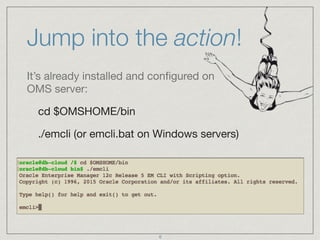
Jump into the action!
It’s already installed and configured on
OMS server:

cd $OMSHOME/bin

./emcli (or emcli.bat on Windows servers)
6
You can install EM CLI to your PC
Requires Java version 1.6.0_43 or greater

Supported Operating Systems: Windows, Linux,
Solaris, HPUX, Tru64, AIX 

Go to “command line interface” page under
“setup” page to download the installation JAR file.

Login is not required, so it’s possible to download
the JAR file with “wget”.
To run EM CLI on Java 1.8 or higher, you need apply patch 17555224 to
the weblogic server. Use"-no-check-certificate" parameter with wget.
7
Downloaded and ready to install!
After you download, set JAVA_HOME and install the JAR
file: 

java -jar emcliadvancedkit.jar -install_dir=<home>

java -jar emclikit.jar -install_dir=<home>

Configure EM CLI:

emcli help setup

emcli setup -url="https://host:port/em" 

-username=<emuser> -dir=<instancedir> -trustall
8
EM CLI Directory Structure
EM CLI configuration and log files (.emcli.log) are
located in the “instance home” directory
(remember the -dir parameter).

Basic JAR files and bash scripts are stored in
“installation directory”.

After you run “setup”, required JAR files used by
verbs will be fetched from OMS are stored under
the bindings directory.
9
Standard vs Scripting
There are two different installation kits for EM CLI:

EM CLI Standard Kit: This kit supports only the
Standard (command line) mode.

EM CLI with Scripting mode (option): This
“advanced” kit supports Interactive and Script
modes in addition to standard mode.
10
3 modes of EM CLI:
Standard mode: This mode provides a simple command-line
interface to Enterprise Manager, and supports the execution of one
verb at a time from the command line.

emcli get_targets

Interactive mode: This mode enables you to create a single
interactive session with OMS. It is a Jython shell.

emcli

Scripting mode: In Scripting mode, EM CLI runs Jython scripts using
EM CLI verbs as Jython functions.

emcli @scriptname.py
11
Understanding EM CLI Syntax
In standard mode, EM CLI expect you enter a verb as
the first parameter. A verb is a task or action in the form
of a user command which exposes Enterprise Manager
functionality. Verbs may take zero or more arguments as
input. 

emcli verb 1st_argument 

[ -2nd_ argument="value" ]

[ -3rd_ argument="value" ] 

[ -4th_ argument ]

…
12
A less known feature
emcli setup -

Syntax Error: Ambiguous argument - matches the
beginning of each of these argument names: 

-_newline_, -additionalpostparams, -autologin, 

-certans, -custom_attrib_file, -dir, -licans, 

-localdirans, -noautologin, -nocertvalidate, 

-noregister, -novalidate, -offline, -password, -trustall, 

-url, -username, -verb_jars_dir

emcli setup -ur="https://host:port/em" -us=<emuser> -t
13
Basic Operational Verbs
help: Get help for emcli verbs (Usage: emcli help [verb_name])

setup: Setup emcli to work with an EM Management Server

sync: Synchronize with the EM Management Server (updates)

login: Login to the EM Management Server (OMS)

logout: Logout from the EM Management Server

status: List emcli configuration details

version: List emcli verb versions or the emcli client version

argfile: Execute emcli verbs from a file

invoke_ws: Invoke EM web service.
14
400+ Verbs in 76 Categories
Add Host Verbs

Agent Administration Verbs

Agent Upgrade Verbs

BI Publisher Reports Verbs

Blackout Verbs

Credential Verbs

Incident Rules Verbs

Job Verbs

Metric Extension Verbs

Monitoring Templates Verbs

Oracle Cloud Verbs

Provisioning Verbs

Self Update Verbs

User Administration Verbs
15
“Grep” is your friend!
Some verbs provide own filtering mechanism, 

but some of them don’t. Using grep will 

help you to filter the output of emcli.

emcli help | grep -i blackout


emcli get_target_types | grep -i database
16
Find the exact name of a target
Some verbs require the name and type as input. Target
names, target types and even “verbs” are case
sensitive, so be sure that you use the exact name of a
target and target type: 

emcli get_targets

emcli get_targets -targets="targetname:targettype"

emcli get_targets -targets=“targetname:%"

emcli get_targets -targets="targettype"
17
Format and redirect the output
emcli get_targets -format="name:pretty" 

emcli get_targets -format="name:csv" 

emcli get_targets -format="name:script"

emcli get_targets -script

emcli get_targets -script > list_of_targets.txt

emcli get_targets -script l parsing_tool
18
Output can
be parsed
easily by
Unix tools
List the targets which has critical
alerts
emcli get_targets -alerts

emcli get_targets -alerts -script -noheader | awk '{ if
($5>0) print $4":"$3"t"$5 }'
19
Critical
Alerts
Gateway to the EM repository
Although there are more than 70 verbs to help you fetch a
specific information from OMS such as list of targets, list
of jobs etc, you may still need a more powerful verb
which can fetch information from the repository database.

The following command will list roles defined in EM:

emcli list -resource="Roles"

This command will show all resources that you can query:

emcli list -help
20
Gateway to the EM repository
This command shows the columns of the specified resource:

emcli list -resource="Administrators" -help

This command will list user names and user types defined as
EM administrator:

emcli list -resource="Administrators" 

-columns="USER_NAME,USER_TYPE"

This command will show details about SYSMAN administrator:

emcli list -resource=“Administrators" -search="USER_NAME =
'SYSMAN'"
21
Gateway to the EM repository
For now, “List” verb can query 27 resources. If you
can not find the data you need among these
resources, you can even run SQL on repository
database:

emcli list -sql="<query>"
22
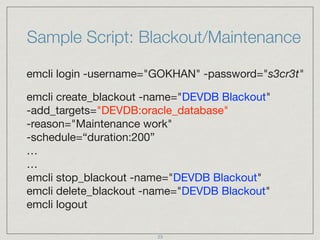
Sample Script: Blackout/Maintenance
emcli login -username="GOKHAN" -password="s3cr3t"

emcli create_blackout -name="DEVDB Blackout" 

-add_targets="DEVDB:oracle_database" 

-reason="Maintenance work" 

-schedule=“duration:200”

…

…

emcli stop_blackout -name="DEVDB Blackout"

emcli delete_blackout -name="DEVDB Blackout"

emcli logout
23
Sample Script: Clear Stateless Alerts
login=$(emcli login -username="GOKHAN" 

-password="s3cr3t" | grep -c “successful")


if [ $login -eq 1 ]; then

for DBNAME in $(emcli get_targets 

-targets="oracle_database" -noheader -script | cut -f4);

do

emcli clear_stateless_alerts -older_than=0

-target_type="oracle_database"

-target_name="$DBNAME"

done

emcli logout

fi
24
Sample Script: Delete All Named
Credentials
login=$(emcli login -username="GOKHAN" 

-password="s3cr3t" | grep -c "successful")


if [ $login -eq 1 ]; then

for CN in $(emcli list_named_credentials -script

-noheader | cut -f1);

do

emcli delete_named_credential -cred_name="$CN"

done

emcli logout

fi
25
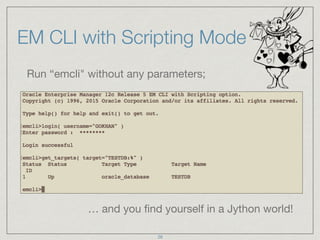
EM CLI with Scripting Mode
Run “emcli" without any parameters;

… and you find yourself in a Jython world!
26
Someone said Jython?
Jython is an implementation of the Python programming
language designed to run on the Java platform.
27
So what’s Python?
Widely used general-purpose, high-level
programming language

Supports multiple programming paradigms,
including OOP, imperative and functional
programming

Dynamic type system and automatic memory
management

Batteries Included (!)
28
EM CLI & Python
Verbs are defined as Python functions

Arguments are entered as function parameters

get_targets( target="oracle_database")

Results of verbs can be formatted as JSON

Some Python modules are included (math, os … )

Programming elements of Python makes scripting
easy!
29
Fundamentals of Python
Variables (dynamic type, no need for declaration but
need initialisation):

myvar = "TESTDB"

myvar = myvar + ":oracle_database"

myvar = 10

myvar = myvar + 10 

myvar = 10 + "10"
TypeError:
unsupported
operand type(s) for 

+: 'int' and 'str'
30
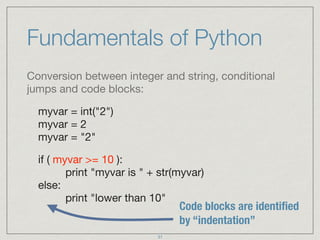
Fundamentals of Python
Conversion between integer and string, conditional
jumps and code blocks:

myvar = int("2")

myvar = 2

myvar = "2"

if ( myvar >= 10 ):

print "myvar is " + str(myvar)

else:

print "lower than 10"
Code blocks are identified
by “indentation”
31
Fundamentals of Python
Dictionary objects, list objects and iterations:

mydict = { 'Name':'Gokhan', 'Age':40 }
mydict['Name'] = "Gokhan"

mylist = ["Joe","William","Jack","Averell"] 

mylist[0] = "Joe" 

for i in mylist:

print i
JSON
it will print all elements in “mylist”
32
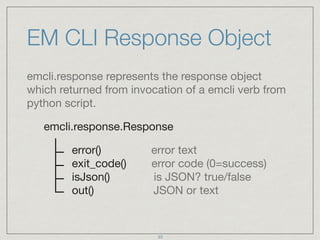
EM CLI Response Object
emcli.response represents the response object
which returned from invocation of a emcli verb from
python script.

emcli.response.Response

error() error text

exit_code() error code (0=success)

isJson() is JSON? true/false

out() JSON or text
33
EM CLI Response Object
In scripting mode, default output format type is
JSON. In interactive mode, to change the output
format to JSON, you need to run the following
command:

set_client_property('EMCLI_OUTPUT_TYPE', 'JSON') 

It’s better to use JSON because it directly matches
with Python “dictionary” object. There’s no need for
extra effort to parse the output.
34
EM CLI Response Object
Let’s get the response from a verb:

mytargets = get_targets( target="oracle_database" )

type(mytargets.out())

<type 'dict'>

mytargets.out()

{'data': [{'Status': 'Up', 'Warning': '6', 'Status ID': '0',
'Target Type': 'oracle_database', 'Critical': '64', 'Target
Name': ‘TESTDB’},{…}]}
35
EM CLI Response Object
A response always contain a “data” item which is a
list object:

type(mytargets.out()['data'])

<type ‘list'>

mytargets.out()['data']

[{'Status': 'Up', 'Warning': '6', 'Status ID': '0',
'Target Type': 'oracle_database', 'Critical': '64',
'Target Name': ‘TESTDB’},{…}]
36
EM CLI Response Object
After we reach the list, we can iterate over the items
of the list:

for DB in mytargets.out()['data']:

print DB['Target Name'], DB['Status']
37
Sample Script: Clear Stateless Alerts
Save the following code in a file (clearalerts.py) and
run it as “emcli @clearalerts.py”:

if login( username="GOKHAN" ).exit_code()==0:

mytargets=get_targets( targets="oracle_database" )

for DB in mytargets.out()['data']:

clear_stateless_alerts( 

target_name=DB['Target Name'], 

target_type=DB['Target Type'], older_than="0" )
38
Sample Script: Change DBSNMP
Passwords
if len(sys.argv) <> 2:

print "Usage: emcli @change_dbsnmp_passwords.py oldpwd newpwd"

exit()

if login( username="GOKHAN" ).exit_code()==0:

mytargets=get_targets( targets="%_database" )

for DB in mytargets.out()['data']:

try: 

update_db_password (target_name=DB['Target Name'],

target_type=DB['Target Type'] ,

change_at_target="yes",user_name="dbsnmp",

old_password=sys.argv[0],

new_password=sys.argv[1],

retype_new_password=sys.argv[1])

except emcli.exception.VerbExecutionError, e:

print e.error()
39
Sample Script: Promote Unmanaged
Databases
lg = login( username="SYSMAN" )

if lg.exit_code() <> 0:

print lg.error()

utargets=get_targets( "unmanaged", "properties",
targets="oracle_database" )

for target in utargets.out()['data']:

add_target( name=target['Target Name'], type=target['Target Type'],

host=target['Host Info'].split(';')[0].split(':')[1],

credentials="UserName:dbsnmp;password:xyz;Role:Normal",
properties=target[‘Properties'] )
positional parameters
40
Sample Script: Promote Unmanaged
Databases
lg = login( username="SYSMAN" )

if lg.exit_code() <> 0:

print lg.error()

utargets=get_targets( "unmanaged", "properties",
targets="oracle_database" )

for target in utargets.out()['data']:

add_target( name=target['Target Name'], type=target['Target Type'],

host=target['Host Info'].split(';')[0].split(':')[1],

credentials="UserName:dbsnmp;password:xyz;Role:Normal",
properties=target[‘Properties'] )
positional parameters
40
Further Reading:
OEM 12c Command-Line Interface

My blog:

http://www.gokhanatil.com

Kellyn Pot'Vin-Gorman

http://dbakevlar.com

Ray Smith

https://oramanageability.wordpress.com

Sete Miller

http://sethmiller.org

The Definitive Guide to Jython

http://www.jython.org/jythonbook/en/1.0/
41
THANK YOU FOR ATTENDING! 

ANY QUESTIONS?
42

EMCLI Crash Course - DOAG Germany

  • 1.
    ORACLE ENTERPRISE MANAGER12C EM CLI CRASH COURSE GÖKHAN ATIL DBA TEAM LEADER
  • 2.
    Gökhan Atıl DBA TeamLeader at bilyoner.com Oracle ACE (since 2011) Founding Member and Vice President of TROUG (troug.org) Co-author of Expert Oracle Enterprise Manager Blogger (since 2008) gokhanatil.com Active on twitter: @gokhanatil 2
  • 3.
    Agenda Introduction to EMCLI EM CLI Verbs Formatting the Output Fetching Information From EM Repository Sample Bash Scripts EM CLI Interactive Mode and Scripting Mode Fundamentals of Python Sample Python Scripts 3
  • 4.
    What is EMCLI? Repository Agent OMS Web Console 4
  • 5.
    What is EMCLI? Repository EM CLI Agent OMS Web Console 4
  • 6.
    Why EM CLI? EmotionalReasons: We love text-based tools Practical Reasons: Sometimes it’s faster (less clicks) Good for scripting (automatisation
 and bulk operations) Web interface of Enterprise Manager is so cool! 5
  • 7.
    Jump into theaction! It’s already installed and configured on OMS server: cd $OMSHOME/bin ./emcli (or emcli.bat on Windows servers) 6
  • 8.
    You can installEM CLI to your PC Requires Java version 1.6.0_43 or greater Supported Operating Systems: Windows, Linux, Solaris, HPUX, Tru64, AIX Go to “command line interface” page under “setup” page to download the installation JAR file. Login is not required, so it’s possible to download the JAR file with “wget”. To run EM CLI on Java 1.8 or higher, you need apply patch 17555224 to the weblogic server. Use"-no-check-certificate" parameter with wget. 7
  • 9.
    Downloaded and readyto install! After you download, set JAVA_HOME and install the JAR file: java -jar emcliadvancedkit.jar -install_dir=<home> java -jar emclikit.jar -install_dir=<home> Configure EM CLI: emcli help setup emcli setup -url="https://host:port/em" 
 -username=<emuser> -dir=<instancedir> -trustall 8
  • 10.
    EM CLI DirectoryStructure EM CLI configuration and log files (.emcli.log) are located in the “instance home” directory (remember the -dir parameter). Basic JAR files and bash scripts are stored in “installation directory”. After you run “setup”, required JAR files used by verbs will be fetched from OMS are stored under the bindings directory. 9
  • 11.
    Standard vs Scripting Thereare two different installation kits for EM CLI: EM CLI Standard Kit: This kit supports only the Standard (command line) mode. EM CLI with Scripting mode (option): This “advanced” kit supports Interactive and Script modes in addition to standard mode. 10
  • 12.
    3 modes ofEM CLI: Standard mode: This mode provides a simple command-line interface to Enterprise Manager, and supports the execution of one verb at a time from the command line. emcli get_targets Interactive mode: This mode enables you to create a single interactive session with OMS. It is a Jython shell. emcli Scripting mode: In Scripting mode, EM CLI runs Jython scripts using EM CLI verbs as Jython functions. emcli @scriptname.py 11
  • 13.
    Understanding EM CLISyntax In standard mode, EM CLI expect you enter a verb as the first parameter. A verb is a task or action in the form of a user command which exposes Enterprise Manager functionality. Verbs may take zero or more arguments as input. emcli verb 1st_argument 
 [ -2nd_ argument="value" ]
 [ -3rd_ argument="value" ] 
 [ -4th_ argument ]
 … 12
  • 14.
    A less knownfeature emcli setup - Syntax Error: Ambiguous argument - matches the beginning of each of these argument names: 
 -_newline_, -additionalpostparams, -autologin, 
 -certans, -custom_attrib_file, -dir, -licans, 
 -localdirans, -noautologin, -nocertvalidate, 
 -noregister, -novalidate, -offline, -password, -trustall, 
 -url, -username, -verb_jars_dir emcli setup -ur="https://host:port/em" -us=<emuser> -t 13
  • 15.
    Basic Operational Verbs help:Get help for emcli verbs (Usage: emcli help [verb_name]) setup: Setup emcli to work with an EM Management Server sync: Synchronize with the EM Management Server (updates) login: Login to the EM Management Server (OMS) logout: Logout from the EM Management Server status: List emcli configuration details version: List emcli verb versions or the emcli client version argfile: Execute emcli verbs from a file invoke_ws: Invoke EM web service. 14
  • 16.
    400+ Verbs in76 Categories Add Host Verbs Agent Administration Verbs Agent Upgrade Verbs BI Publisher Reports Verbs Blackout Verbs Credential Verbs Incident Rules Verbs Job Verbs Metric Extension Verbs Monitoring Templates Verbs Oracle Cloud Verbs Provisioning Verbs Self Update Verbs User Administration Verbs 15
  • 17.
    “Grep” is yourfriend! Some verbs provide own filtering mechanism, 
 but some of them don’t. Using grep will 
 help you to filter the output of emcli. emcli help | grep -i blackout 
 emcli get_target_types | grep -i database 16
  • 18.
    Find the exactname of a target Some verbs require the name and type as input. Target names, target types and even “verbs” are case sensitive, so be sure that you use the exact name of a target and target type: emcli get_targets emcli get_targets -targets="targetname:targettype" emcli get_targets -targets=“targetname:%" emcli get_targets -targets="targettype" 17
  • 19.
    Format and redirectthe output emcli get_targets -format="name:pretty" emcli get_targets -format="name:csv" emcli get_targets -format="name:script" emcli get_targets -script emcli get_targets -script > list_of_targets.txt emcli get_targets -script l parsing_tool 18 Output can be parsed easily by Unix tools
  • 20.
    List the targetswhich has critical alerts emcli get_targets -alerts emcli get_targets -alerts -script -noheader | awk '{ if ($5>0) print $4":"$3"t"$5 }' 19 Critical Alerts
  • 21.
    Gateway to theEM repository Although there are more than 70 verbs to help you fetch a specific information from OMS such as list of targets, list of jobs etc, you may still need a more powerful verb which can fetch information from the repository database. The following command will list roles defined in EM: emcli list -resource="Roles" This command will show all resources that you can query: emcli list -help 20
  • 22.
    Gateway to theEM repository This command shows the columns of the specified resource: emcli list -resource="Administrators" -help This command will list user names and user types defined as EM administrator: emcli list -resource="Administrators" 
 -columns="USER_NAME,USER_TYPE" This command will show details about SYSMAN administrator: emcli list -resource=“Administrators" -search="USER_NAME = 'SYSMAN'" 21
  • 23.
    Gateway to theEM repository For now, “List” verb can query 27 resources. If you can not find the data you need among these resources, you can even run SQL on repository database: emcli list -sql="<query>" 22
  • 24.
    Sample Script: Blackout/Maintenance emclilogin -username="GOKHAN" -password="s3cr3t" emcli create_blackout -name="DEVDB Blackout" 
 -add_targets="DEVDB:oracle_database" 
 -reason="Maintenance work" 
 -schedule=“duration:200”
 …
 …
 emcli stop_blackout -name="DEVDB Blackout"
 emcli delete_blackout -name="DEVDB Blackout"
 emcli logout 23
  • 25.
    Sample Script: ClearStateless Alerts login=$(emcli login -username="GOKHAN" 
 -password="s3cr3t" | grep -c “successful")
 
 if [ $login -eq 1 ]; then
 for DBNAME in $(emcli get_targets 
 -targets="oracle_database" -noheader -script | cut -f4);
 do
 emcli clear_stateless_alerts -older_than=0
 -target_type="oracle_database"
 -target_name="$DBNAME"
 done
 emcli logout
 fi 24
  • 26.
    Sample Script: DeleteAll Named Credentials login=$(emcli login -username="GOKHAN" 
 -password="s3cr3t" | grep -c "successful")
 
 if [ $login -eq 1 ]; then
 for CN in $(emcli list_named_credentials -script
 -noheader | cut -f1);
 do
 emcli delete_named_credential -cred_name="$CN"
 done
 emcli logout
 fi 25
  • 27.
    EM CLI withScripting Mode Run “emcli" without any parameters; … and you find yourself in a Jython world! 26
  • 28.
    Someone said Jython? Jythonis an implementation of the Python programming language designed to run on the Java platform. 27
  • 29.
    So what’s Python? Widelyused general-purpose, high-level programming language Supports multiple programming paradigms, including OOP, imperative and functional programming Dynamic type system and automatic memory management Batteries Included (!) 28
  • 30.
    EM CLI &Python Verbs are defined as Python functions Arguments are entered as function parameters get_targets( target="oracle_database") Results of verbs can be formatted as JSON Some Python modules are included (math, os … ) Programming elements of Python makes scripting easy! 29
  • 31.
    Fundamentals of Python Variables(dynamic type, no need for declaration but need initialisation): myvar = "TESTDB" myvar = myvar + ":oracle_database" myvar = 10 myvar = myvar + 10 myvar = 10 + "10" TypeError: unsupported operand type(s) for 
 +: 'int' and 'str' 30
  • 32.
    Fundamentals of Python Conversionbetween integer and string, conditional jumps and code blocks: myvar = int("2")
 myvar = 2
 myvar = "2" if ( myvar >= 10 ):
 print "myvar is " + str(myvar)
 else:
 print "lower than 10" Code blocks are identified by “indentation” 31
  • 33.
    Fundamentals of Python Dictionaryobjects, list objects and iterations: mydict = { 'Name':'Gokhan', 'Age':40 } mydict['Name'] = "Gokhan" mylist = ["Joe","William","Jack","Averell"] 
 mylist[0] = "Joe" for i in mylist:
 print i JSON it will print all elements in “mylist” 32
  • 34.
    EM CLI ResponseObject emcli.response represents the response object which returned from invocation of a emcli verb from python script. emcli.response.Response error() error text
 exit_code() error code (0=success)
 isJson() is JSON? true/false
 out() JSON or text 33
  • 35.
    EM CLI ResponseObject In scripting mode, default output format type is JSON. In interactive mode, to change the output format to JSON, you need to run the following command: set_client_property('EMCLI_OUTPUT_TYPE', 'JSON') It’s better to use JSON because it directly matches with Python “dictionary” object. There’s no need for extra effort to parse the output. 34
  • 36.
    EM CLI ResponseObject Let’s get the response from a verb: mytargets = get_targets( target="oracle_database" ) type(mytargets.out())
 <type 'dict'> mytargets.out() {'data': [{'Status': 'Up', 'Warning': '6', 'Status ID': '0', 'Target Type': 'oracle_database', 'Critical': '64', 'Target Name': ‘TESTDB’},{…}]} 35
  • 37.
    EM CLI ResponseObject A response always contain a “data” item which is a list object: type(mytargets.out()['data'])
 <type ‘list'> mytargets.out()['data'] [{'Status': 'Up', 'Warning': '6', 'Status ID': '0', 'Target Type': 'oracle_database', 'Critical': '64', 'Target Name': ‘TESTDB’},{…}] 36
  • 38.
    EM CLI ResponseObject After we reach the list, we can iterate over the items of the list: for DB in mytargets.out()['data']:
 print DB['Target Name'], DB['Status'] 37
  • 39.
    Sample Script: ClearStateless Alerts Save the following code in a file (clearalerts.py) and run it as “emcli @clearalerts.py”: if login( username="GOKHAN" ).exit_code()==0: mytargets=get_targets( targets="oracle_database" ) for DB in mytargets.out()['data']:
 clear_stateless_alerts( 
 target_name=DB['Target Name'], 
 target_type=DB['Target Type'], older_than="0" ) 38
  • 40.
    Sample Script: ChangeDBSNMP Passwords if len(sys.argv) <> 2:
 print "Usage: emcli @change_dbsnmp_passwords.py oldpwd newpwd"
 exit()
 if login( username="GOKHAN" ).exit_code()==0:
 mytargets=get_targets( targets="%_database" )
 for DB in mytargets.out()['data']:
 try: 
 update_db_password (target_name=DB['Target Name'],
 target_type=DB['Target Type'] ,
 change_at_target="yes",user_name="dbsnmp",
 old_password=sys.argv[0],
 new_password=sys.argv[1],
 retype_new_password=sys.argv[1])
 except emcli.exception.VerbExecutionError, e:
 print e.error() 39
  • 41.
    Sample Script: PromoteUnmanaged Databases lg = login( username="SYSMAN" ) if lg.exit_code() <> 0:
 print lg.error() utargets=get_targets( "unmanaged", "properties", targets="oracle_database" ) for target in utargets.out()['data']:
 add_target( name=target['Target Name'], type=target['Target Type'],
 host=target['Host Info'].split(';')[0].split(':')[1],
 credentials="UserName:dbsnmp;password:xyz;Role:Normal", properties=target[‘Properties'] ) positional parameters 40
  • 42.
    Sample Script: PromoteUnmanaged Databases lg = login( username="SYSMAN" ) if lg.exit_code() <> 0:
 print lg.error() utargets=get_targets( "unmanaged", "properties", targets="oracle_database" ) for target in utargets.out()['data']:
 add_target( name=target['Target Name'], type=target['Target Type'],
 host=target['Host Info'].split(';')[0].split(':')[1],
 credentials="UserName:dbsnmp;password:xyz;Role:Normal", properties=target[‘Properties'] ) positional parameters 40
  • 43.
    Further Reading: OEM 12cCommand-Line Interface My blog:
 http://www.gokhanatil.com Kellyn Pot'Vin-Gorman
 http://dbakevlar.com Ray Smith
 https://oramanageability.wordpress.com Sete Miller
 http://sethmiller.org The Definitive Guide to Jython
 http://www.jython.org/jythonbook/en/1.0/ 41
  • 44.
    THANK YOU FORATTENDING! 
 ANY QUESTIONS? 42