EFFCTIVE PHOTOGRAPHY
WITH COMPOSITION
Composition refers to the way the
various elements in a scene are
arranged within the frame.
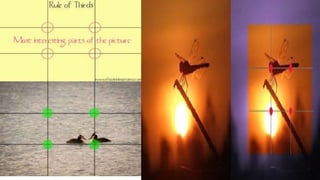
The rule of third says that you
should position the most
important elements in your
scene along these lines, or at
the points where they intersect
Rule of Third
Balancing elements
Secondary subject of lesser
importance or size on the
other side of the frame.
Leading lines
Leading lines help lead the
viewer through the image and
focus attention on important
elements.
Incorporating patterns into your photographs is always a good way to
create a pleasing composition.
Symmetry and Patterns
Viewpoint
Photographing from high above, down at
ground level, from the side, from the
back, from a long way away, from very
close up, and so on is view point
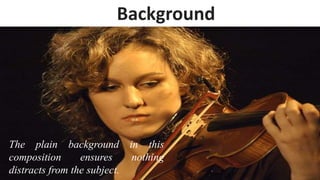
The plain background in this
composition ensures nothing
distracts from the subject.
Background
Depth can create in a photo by including objects in
the foreground, middle ground and background.
Including some foreground interest in a scene is a
great way of adding a sense of depth to the scene
Depth
Framing
Look for horizontal and
vertical lines in the frame
The rule of thirds
"Headroom", "looking
room", and "leading
room". Headroom is
the amount of space
between the top of
the subject's head and
the top of the frame.
Cropping
By cropping tight around the subject you
eliminate the background "noise“ ensuring the
subject gets the viewer's undivided attention.
FULL FRAME MODERATE LY TIGHT CROP
EXTREMELY TIGHT CROP
CROPPING
Simplicity and Minimalism
Minimalism means ‘less” and sometime ‘less is more’.
Simplicity often means taking photos with
uncomplicated backgrounds that don’t distract from
the main subject.
Isolate the Subject
Using a shallow depth of field +wide aperture make background blur: result is
subject isolated in a very effective way. This is a particularly useful technique for
shooting portraits
Color Combinations
Colors that are
opposite each other on
the color wheel are
said to be
‘complimentary
colors’. Incorporate
complimentary colors
in scenes is a better
way of creating
attractive and striking
compositions.
Camera
shots
and
angles
Establishing Shot
Usually the first shot of a scene, this is used
to establish the location and environment
Wide Shots (WS)
Show the entire person or area. This category includes the FULL SHOT showing
the entire human body, with the head near the top of the frame and the feet
near the bottom
Medium Shot (MS)
Shows part of the subject in more detail. For a person, a medium
shot typically frames the subject from the waste up
Medium Close-Up (MCU)
Falls between a Medium Shot and a Close-Up, generally
framing the subject from chest or shoulder up
Close-Up (CU)
Shows a particular part of your subject. A close up of a person
usually means a close up of their face.
Extreme Close Ups (ECU)
Extreme Close Up are much tighter close-up shots in which you get detail
greater than the human eye might be able to normally perceive
Extreme Long (wide) Shot
• Used to show the subject from a
distance, or the area in which the
scene is taking place
• very little detail visible in the shot, it's
meant to give a general impression
rather than specific information
• It normally shows an EXTERIOR
Two Shot
Over-the-Shoulder Shot (OSS)
A popular shot where a subject is shot from behind the shoulder of
another, framing the subject anywhere from a Medium to Close-Up.
A high-angle shot that’s taken from directly overhead and from a distance
Bird’s-eye view (Top Shot)
Shot taken with the
camera
approximately at
human eye level,
resulting in a neutral
effect on the
audience.
Eye Level
low-angle shot, is a shot from a camera angle positioned low on the
vertical axis, anywhere below the eye line, looking up
Low Angle
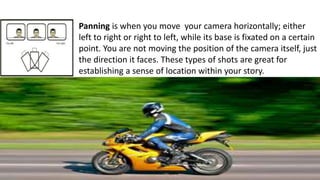
Panning is when you move your camera horizontally; either
left to right or right to left, while its base is fixated on a certain
point. You are not moving the position of the camera itself, just
the direction it faces. These types of shots are great for
establishing a sense of location within your story.
Tilting is when you move the camera vertically, up to down
or down to up, while its base is fixated to a certain point.
Again, like panning, this move typically involves the use of a
tripod where the camera is stationary but you move the
angle it points to. These shots are popular when introducing
a character, especially one of grandeur, in a movie.
White balance
White balance in digital photography means adjusting colors accurately so that the
image looks more natural. In other words, white balance (WB) is the process of
removing unrealistic color casts, so that objects which appear white in person are
rendered white in your photo .
Pre-set White Balance Settings
Auto (A) ---- Default WB setting. The camera automatically guesses
the WB depending on ambient light and use of flash.
Daylight is for a clear and sunny day.
Cloudy warms natural light in an overcast situation.
Shade setting accounts for a natural blue hue and warms up the image
accordingly.
Tungsten will be used for indoor settings and electric light to cool down
yellow tones.
Fluorescent setting is great for balancing out strip lighting’s green and
blue tones
The flash setting will add a blue tinge to your images so use with
caution!
Auto white balance Daylight white balanceTungsten white balance
Shade white balanceFluorescent white balanceCloudy white balance
Manual White Balance Adjustments
what you do is to tell your camera
what white looks like in a shot so
that it has something as a reference
point for deciding how other colors
should look.
Automatic White Balance/Custom White Balance
Custom white
balance uses an
18% gray card
as a neutral
reference.)
Effective photography with composition

Effective photography with composition

  • 1.
    EFFCTIVE PHOTOGRAPHY WITH COMPOSITION Compositionrefers to the way the various elements in a scene are arranged within the frame.
  • 2.
    The rule ofthird says that you should position the most important elements in your scene along these lines, or at the points where they intersect Rule of Third
  • 4.
    Balancing elements Secondary subjectof lesser importance or size on the other side of the frame.
  • 5.
    Leading lines Leading lineshelp lead the viewer through the image and focus attention on important elements.
  • 6.
    Incorporating patterns intoyour photographs is always a good way to create a pleasing composition. Symmetry and Patterns
  • 7.
    Viewpoint Photographing from highabove, down at ground level, from the side, from the back, from a long way away, from very close up, and so on is view point
  • 8.
    The plain backgroundin this composition ensures nothing distracts from the subject. Background
  • 9.
    Depth can createin a photo by including objects in the foreground, middle ground and background. Including some foreground interest in a scene is a great way of adding a sense of depth to the scene Depth
  • 10.
    Framing Look for horizontaland vertical lines in the frame The rule of thirds "Headroom", "looking room", and "leading room". Headroom is the amount of space between the top of the subject's head and the top of the frame.
  • 11.
    Cropping By cropping tightaround the subject you eliminate the background "noise“ ensuring the subject gets the viewer's undivided attention.
  • 12.
    FULL FRAME MODERATELY TIGHT CROP EXTREMELY TIGHT CROP CROPPING
  • 13.
    Simplicity and Minimalism Minimalismmeans ‘less” and sometime ‘less is more’. Simplicity often means taking photos with uncomplicated backgrounds that don’t distract from the main subject.
  • 14.
    Isolate the Subject Usinga shallow depth of field +wide aperture make background blur: result is subject isolated in a very effective way. This is a particularly useful technique for shooting portraits
  • 15.
    Color Combinations Colors thatare opposite each other on the color wheel are said to be ‘complimentary colors’. Incorporate complimentary colors in scenes is a better way of creating attractive and striking compositions.
  • 16.
  • 17.
    Establishing Shot Usually thefirst shot of a scene, this is used to establish the location and environment
  • 18.
    Wide Shots (WS) Showthe entire person or area. This category includes the FULL SHOT showing the entire human body, with the head near the top of the frame and the feet near the bottom
  • 19.
    Medium Shot (MS) Showspart of the subject in more detail. For a person, a medium shot typically frames the subject from the waste up
  • 20.
    Medium Close-Up (MCU) Fallsbetween a Medium Shot and a Close-Up, generally framing the subject from chest or shoulder up
  • 21.
    Close-Up (CU) Shows aparticular part of your subject. A close up of a person usually means a close up of their face.
  • 22.
    Extreme Close Ups(ECU) Extreme Close Up are much tighter close-up shots in which you get detail greater than the human eye might be able to normally perceive
  • 24.
    Extreme Long (wide)Shot • Used to show the subject from a distance, or the area in which the scene is taking place • very little detail visible in the shot, it's meant to give a general impression rather than specific information • It normally shows an EXTERIOR
  • 25.
  • 26.
    Over-the-Shoulder Shot (OSS) Apopular shot where a subject is shot from behind the shoulder of another, framing the subject anywhere from a Medium to Close-Up.
  • 27.
    A high-angle shotthat’s taken from directly overhead and from a distance Bird’s-eye view (Top Shot)
  • 28.
    Shot taken withthe camera approximately at human eye level, resulting in a neutral effect on the audience. Eye Level
  • 29.
    low-angle shot, isa shot from a camera angle positioned low on the vertical axis, anywhere below the eye line, looking up Low Angle
  • 30.
    Panning is whenyou move your camera horizontally; either left to right or right to left, while its base is fixated on a certain point. You are not moving the position of the camera itself, just the direction it faces. These types of shots are great for establishing a sense of location within your story.
  • 31.
    Tilting is whenyou move the camera vertically, up to down or down to up, while its base is fixated to a certain point. Again, like panning, this move typically involves the use of a tripod where the camera is stationary but you move the angle it points to. These shots are popular when introducing a character, especially one of grandeur, in a movie.
  • 32.
    White balance White balancein digital photography means adjusting colors accurately so that the image looks more natural. In other words, white balance (WB) is the process of removing unrealistic color casts, so that objects which appear white in person are rendered white in your photo .
  • 33.
    Pre-set White BalanceSettings Auto (A) ---- Default WB setting. The camera automatically guesses the WB depending on ambient light and use of flash. Daylight is for a clear and sunny day. Cloudy warms natural light in an overcast situation. Shade setting accounts for a natural blue hue and warms up the image accordingly. Tungsten will be used for indoor settings and electric light to cool down yellow tones. Fluorescent setting is great for balancing out strip lighting’s green and blue tones The flash setting will add a blue tinge to your images so use with caution!
  • 34.
    Auto white balanceDaylight white balanceTungsten white balance Shade white balanceFluorescent white balanceCloudy white balance
  • 35.
    Manual White BalanceAdjustments what you do is to tell your camera what white looks like in a shot so that it has something as a reference point for deciding how other colors should look.
  • 36.
    Automatic White Balance/CustomWhite Balance Custom white balance uses an 18% gray card as a neutral reference.)