
OUTCOMES
1. Reflect on the ways in which you think, plan, and go
   about technology integration
2. Generalize potential uses of technology through the
   exploration of specific cases
3. Help you develop a list of free technologies that you and
   your students can use
THE PK-CK-TK (TPACK) APPROACH
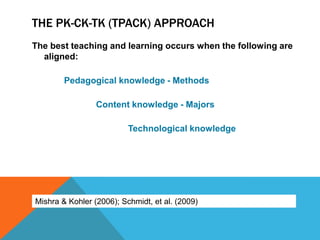
The best teaching and learning occurs when the following are
  aligned:

        Pedagogical knowledge - Methods

                 Content knowledge - Majors

                          Technological knowledge


Mishra & Kohler (2006); Schmidt, et al. (2009)
TAKE STOCK BEFORE CHOOSING A TECHNOLOGY

1. Reflect on pedagogical knowledge (PK, methods)–
    1.How do my students learn?
    2.What methods have I mastered?


2. Reflect on the content (CK, majors)–
    1.What needs to be taught/learned?
    2.What is my prior knowledge and understanding of this?
    3.What prior knowledge/skills do my students have?
PEDAGOGICAL-CONTENT KNOWLEDGE (PK-CK)


What methods (PK) will
help my learners best
acquire target skills and
content (CK)?
NOW CHOOSE TECHNOLOGY (TK)
1. Find tools that are available to you
2. Select tools that may fit with your PK-CK
3. Determine the best tool for your PK-CK
    1.Which one am I comfortable with?
    2.Which one will my students be able to use?
    3.Which one has the options I/my students will need to best
     teach/learn?
    4.Which one enhances the content of the lesson?
SAMPLE 1 – WRITING FOR A PURPOSE

Objective (CK) – TSWBAT
demonstrate the ability to process
write

Methods (PK) – graphic
organizer, peer review & collaborative
writing, teacher
conference, drafting, editing, revising
A skill we would like students to develop
SAMPLE COURSE & STUDENT BACKGROUND

• Course: World History, Language Arts, e.g.
• Students should be able to craft an original piece (CMT
  LA, CAPT IW)
• How can I support students during each step in the writing
  process?
• Students are of a variety of ability levels; some have
  IEPs, 504s, and/or SRBI (RTI) interventions
• How can meet all of my students’ individual needs?
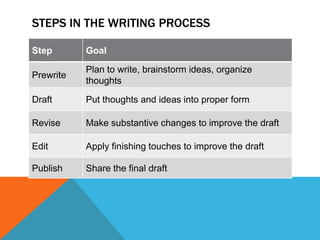
STEPS IN THE WRITING PROCESS

Step       Goal

           Plan to write, brainstorm ideas, organize
Prewrite
           thoughts

Draft      Put thoughts and ideas into proper form

Revise     Make substantive changes to improve the draft

Edit       Apply finishing touches to improve the draft

Publish    Share the final draft
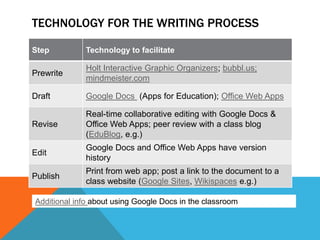
TECHNOLOGY FOR THE WRITING PROCESS

Step          Technology to facilitate

              Holt Interactive Graphic Organizers; bubbl.us;
Prewrite
              mindmeister.com

Draft         Google Docs (Apps for Education); Office Web Apps

              Real-time collaborative editing with Google Docs &
Revise        Office Web Apps; peer review with a class blog
              (EduBlog, e.g.)
              Google Docs and Office Web Apps have version
Edit
              history
              Print from web app; post a link to the document to a
Publish
              class website (Google Sites, Wikispaces e.g.)

Additional info about using Google Docs in the classroom
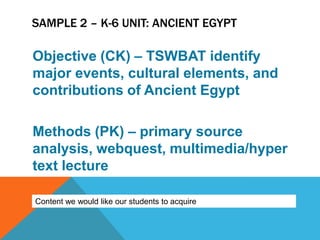
SAMPLE 2 – K-6 UNIT: ANCIENT EGYPT

Objective (CK) – TSWBAT identify
major events, cultural elements, and
contributions of Ancient Egypt

Methods (PK) – primary source
analysis, webquest, multimedia/hyper
text lecture

Content we would like our students to acquire
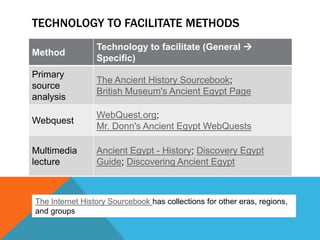
TECHNOLOGY TO FACILITATE METHODS
                 Technology to facilitate (General 
Method
                 Specific)
Primary
                 The Ancient History Sourcebook;
source
                 British Museum's Ancient Egypt Page
analysis
                 WebQuest.org;
Webquest
                 Mr. Donn's Ancient Egypt WebQuests

Multimedia       Ancient Egypt - History; Discovery Egypt
lecture          Guide; Discovering Ancient Egypt


The Internet History Sourcebook has collections for other eras, regions,
and groups
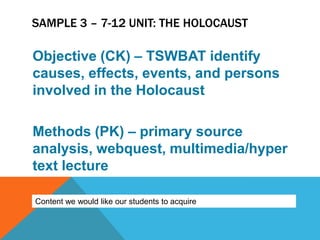
SAMPLE 3 – 7-12 UNIT: THE HOLOCAUST

Objective (CK) – TSWBAT identify
causes, effects, events, and persons
involved in the Holocaust

Methods (PK) – primary source
analysis, webquest, multimedia/hyper
text lecture

Content we would like our students to acquire
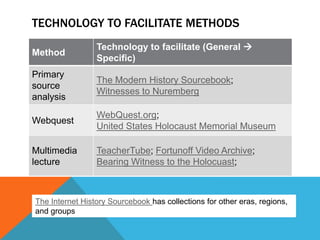
TECHNOLOGY TO FACILITATE METHODS
                 Technology to facilitate (General 
Method
                 Specific)
Primary
                 The Modern History Sourcebook;
source
                 Witnesses to Nuremberg
analysis
                 WebQuest.org;
Webquest
                 United States Holocaust Memorial Museum

Multimedia       TeacherTube; Fortunoff Video Archive;
lecture          Bearing Witness to the Holocuast;


The Internet History Sourcebook has collections for other eras, regions,
and groups
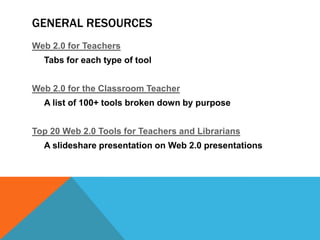
GENERAL RESOURCES
Web 2.0 for Teachers
  Tabs for each type of tool


Web 2.0 for the Classroom Teacher
  A list of 100+ tools broken down by purpose


Top 20 Web 2.0 Tools for Teachers and Librarians
  A slideshare presentation on Web 2.0 presentations
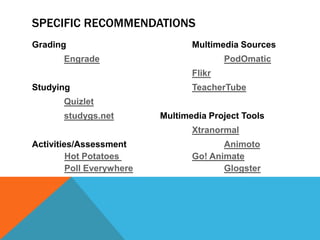
SPECIFIC RECOMMENDATIONS
Grading                           Multimedia Sources
       Engrade                            PodOmatic
                                  Flikr
Studying                          TeacherTube
       Quizlet
       studygs.net         Multimedia Project Tools
                                  Xtranormal
Activities/Assessment                    Animoto
         Hot Potatoes             Go! Animate
         Poll Everywhere                 Glogster
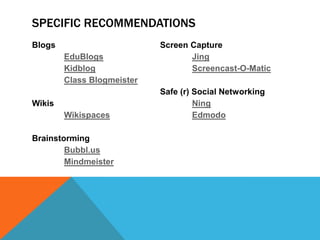
SPECIFIC RECOMMENDATIONS
Blogs                       Screen Capture
        EduBlogs                   Jing
        Kidblog                    Screencast-O-Matic
        Class Blogmeister
                            Safe (r) Social Networking
Wikis                                Ning
        Wikispaces                   Edmodo

Brainstorming
        Bubbl.us
        Mindmeister

Thoughtful Integration of Web 2.0 Tools in the Elementary Curriculum

  • 2.
    OUTCOMES 1. Reflect onthe ways in which you think, plan, and go about technology integration 2. Generalize potential uses of technology through the exploration of specific cases 3. Help you develop a list of free technologies that you and your students can use
  • 3.
    THE PK-CK-TK (TPACK)APPROACH The best teaching and learning occurs when the following are aligned: Pedagogical knowledge - Methods Content knowledge - Majors Technological knowledge Mishra & Kohler (2006); Schmidt, et al. (2009)
  • 4.
    TAKE STOCK BEFORECHOOSING A TECHNOLOGY 1. Reflect on pedagogical knowledge (PK, methods)– 1.How do my students learn? 2.What methods have I mastered? 2. Reflect on the content (CK, majors)– 1.What needs to be taught/learned? 2.What is my prior knowledge and understanding of this? 3.What prior knowledge/skills do my students have?
  • 5.
    PEDAGOGICAL-CONTENT KNOWLEDGE (PK-CK) Whatmethods (PK) will help my learners best acquire target skills and content (CK)?
  • 6.
    NOW CHOOSE TECHNOLOGY(TK) 1. Find tools that are available to you 2. Select tools that may fit with your PK-CK 3. Determine the best tool for your PK-CK 1.Which one am I comfortable with? 2.Which one will my students be able to use? 3.Which one has the options I/my students will need to best teach/learn? 4.Which one enhances the content of the lesson?
  • 7.
    SAMPLE 1 –WRITING FOR A PURPOSE Objective (CK) – TSWBAT demonstrate the ability to process write Methods (PK) – graphic organizer, peer review & collaborative writing, teacher conference, drafting, editing, revising A skill we would like students to develop
  • 8.
    SAMPLE COURSE &STUDENT BACKGROUND • Course: World History, Language Arts, e.g. • Students should be able to craft an original piece (CMT LA, CAPT IW) • How can I support students during each step in the writing process? • Students are of a variety of ability levels; some have IEPs, 504s, and/or SRBI (RTI) interventions • How can meet all of my students’ individual needs?
  • 9.
    STEPS IN THEWRITING PROCESS Step Goal Plan to write, brainstorm ideas, organize Prewrite thoughts Draft Put thoughts and ideas into proper form Revise Make substantive changes to improve the draft Edit Apply finishing touches to improve the draft Publish Share the final draft
  • 10.
    TECHNOLOGY FOR THEWRITING PROCESS Step Technology to facilitate Holt Interactive Graphic Organizers; bubbl.us; Prewrite mindmeister.com Draft Google Docs (Apps for Education); Office Web Apps Real-time collaborative editing with Google Docs & Revise Office Web Apps; peer review with a class blog (EduBlog, e.g.) Google Docs and Office Web Apps have version Edit history Print from web app; post a link to the document to a Publish class website (Google Sites, Wikispaces e.g.) Additional info about using Google Docs in the classroom
  • 11.
    SAMPLE 2 –K-6 UNIT: ANCIENT EGYPT Objective (CK) – TSWBAT identify major events, cultural elements, and contributions of Ancient Egypt Methods (PK) – primary source analysis, webquest, multimedia/hyper text lecture Content we would like our students to acquire
  • 12.
    TECHNOLOGY TO FACILITATEMETHODS Technology to facilitate (General  Method Specific) Primary The Ancient History Sourcebook; source British Museum's Ancient Egypt Page analysis WebQuest.org; Webquest Mr. Donn's Ancient Egypt WebQuests Multimedia Ancient Egypt - History; Discovery Egypt lecture Guide; Discovering Ancient Egypt The Internet History Sourcebook has collections for other eras, regions, and groups
  • 13.
    SAMPLE 3 –7-12 UNIT: THE HOLOCAUST Objective (CK) – TSWBAT identify causes, effects, events, and persons involved in the Holocaust Methods (PK) – primary source analysis, webquest, multimedia/hyper text lecture Content we would like our students to acquire
  • 14.
    TECHNOLOGY TO FACILITATEMETHODS Technology to facilitate (General  Method Specific) Primary The Modern History Sourcebook; source Witnesses to Nuremberg analysis WebQuest.org; Webquest United States Holocaust Memorial Museum Multimedia TeacherTube; Fortunoff Video Archive; lecture Bearing Witness to the Holocuast; The Internet History Sourcebook has collections for other eras, regions, and groups
  • 15.
    GENERAL RESOURCES Web 2.0for Teachers Tabs for each type of tool Web 2.0 for the Classroom Teacher A list of 100+ tools broken down by purpose Top 20 Web 2.0 Tools for Teachers and Librarians A slideshare presentation on Web 2.0 presentations
  • 16.
    SPECIFIC RECOMMENDATIONS Grading Multimedia Sources Engrade PodOmatic Flikr Studying TeacherTube Quizlet studygs.net Multimedia Project Tools Xtranormal Activities/Assessment Animoto Hot Potatoes Go! Animate Poll Everywhere Glogster
  • 17.
    SPECIFIC RECOMMENDATIONS Blogs Screen Capture EduBlogs Jing Kidblog Screencast-O-Matic Class Blogmeister Safe (r) Social Networking Wikis Ning Wikispaces Edmodo Brainstorming Bubbl.us Mindmeister