Managed IT Services Lower Your Costs Lower Your Risks  Increase Your Capabilities & Productivity
The Situation Businesses are demanding higher return on investment for IT dollars Businesses are analyzing how to convert fixed cost IT models to variable cost,  pay as you go models IT organizations are struggling to keep pace with accelerated business demands when budgets and talent are in short supply IT needs to simplify their service and refocus on integrated business solutions  Business relies on IT innovation to remain competitive and enable transformation with advanced, optimized IT investments
The Problem Not enough resources to stay current Not enough time to get it all done Can’t afford to bring in help Too much time spent fire fighting No time to learn best practices Spend 70%-80% of IT budget maintaining existing functionality
Current Options Do it yourself No time, can’t know everything Hire help to do the work Results will vary May not follow ‘Best Practices’ One-time event Relatively expensive No on-going maintenance Hosting or Outsourcing Expensive, integration challenges Off-site and out of customer environment
Managed Services Market $63B industry opportunity in the next 5 years Market is estimated to grow 36% year over year through 2008  Market gaining momentum
2005 Gartner Analysis Robust Growth Ahead for Remote Management Services Abstract:  The IT management market will provide solid growth through 2008. The  fastest growing  part of the market is the  remote operation and management of networks and IT infrastructure . Strategic Market Statement The remote monitoring and management (RMM) market is expected to grown at a compound  annual growth rate  (CAGR) of  36 percent  through  2008 . Publication Date:  January 3, 2005
Why Managed Services now? High speed Internet access is affordable for everyone Reliable Internet Technologies have advanced ADS, WSUS, SMS, SBS, XP, Terminal Services, MOM, DPS Bandwidth aware products New business models for everyone Pay as you grow, affordable a-la carte options Customer’s IT needs are increasing
Our Vision Definition 6 brings world-class IT infrastructure solutions to businesses of all sizes. In addition to remotely monitoring and managing servers on a subscription basis, Definition 6 offers IT infrastructure consulting. We specialize in automating patch management and software distribution, server migration and consolidation, as well as identity management and security solutions.  Definition 6 focuses on operational efficiency, helping clients do more with less by providing the best system performance for the lowest cost.
The Definition 6 solution Subscription based IT consulting & management services Customer pays D6 to manage and maintain per device (server) on a monthly basis We manage the device in the customer’s office or in a data center of their choice which can be D6’s cages at Internap (Virtual ASP) Our offerings enable customers to: Increase operational efficiency Reduce and control operating costs (Lowered by 10-30%) Cost effectively gain access to world-class consultants Reallocate internal resources to grow business Minimize downtime & legal exposure through IT Maximize use of resources Provide 30%-60% more functionality (latest software) Stay patched and current in a cost-effective way Maintain a secure, reliable environment Make IT spend more predictable Minimize legal exposure from IT
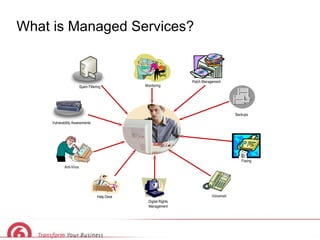
What is Managed Services? Backups Digital Rights Management Faxing Spam Filtering Monitoring Patch Management Vulnerability Assessments Anti-Virus Voicemail Help Desk
Managed Services available for Microsoft Windows Server 2003 IIS, AD & GP, DC, File/Print, SharePoint Services, LOB Applications, Terminal Services, Rights Management Services Microsoft Exchange Server Microsoft SQL Server Microsoft Small Business Server Microsoft Live Communication Server Microsoft SharePoint Portal Server Microsoft Identity Integration Server Microsoft Content Management Server Microsoft Commerce Server Microsoft Speech Server …  and more
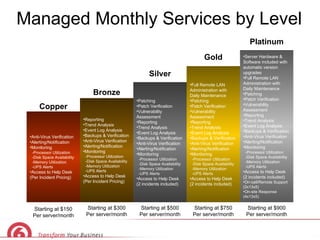
Managed Monthly Services by Level Anti-Virus Verification Alerting/Notification Monitoring -Processor Utilization -Disk Space Availability -Memory Utilization -UPS Alerts Access to Help Desk (Per Incident Pricing) Reporting Trend Analysis Event Log Analysis Backups & Verification Anti-Virus Verification Alerting/Notification Monitoring -Processor Utilization -Disk Space Availability -Memory Utilization -UPS Alerts Access to Help Desk (Per Incident Pricing) Patching Patch Verification Vulnerability Assessment Reporting Trend Analysis Event Log Analysis Backups & Verification Anti-Virus Verification Alerting/Notification Monitoring -Processor Utilization -Disk Space Availability -Memory Utilization -UPS Alerts Access to Help Desk (2 incidents included) Full Remote LAN Administration with Daily Maintenance Patching Patch Verification Vulnerability Assessment Reporting Trend Analysis Event Log Analysis Backups & Verification Anti-Virus Verification Alerting/Notification Monitoring -Processor Utilization -Disk Space Availability -Memory Utilization -UPS Alerts Access to Help Desk (2 incidents included) Server Hardware & Software included with automatic version upgrades Full Remote LAN Administration with Daily Maintenance Patching Patch Verification Vulnerability Assessment Reporting Trend Analysis Event Log Analysis Backups & Verification Anti-Virus Verification Alerting/Notification Monitoring -Processor Utilization -Disk Space Availability -Memory Utilization -UPS Alerts Access to Help Desk (2 incidents included) On-call/Remote Support (2x13x5) On-site Response (4x13x5) Copper Bronze Silver Gold Platinum Starting at $150 Per server/month Starting at $500 Per server/month Starting at $750 Per server/month Starting at $300 Per server/month Starting at $900 Per server/month
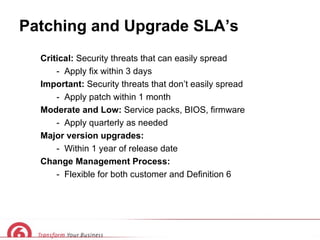
Patching and Upgrade SLA’s Critical:  Security threats that can easily spread  -  Apply fix within 3 days Important:  Security threats that don’t easily spread -  Apply patch within 1 month Moderate and Low:  Service packs, BIOS, firmware -  Apply quarterly as needed Major version upgrades:  -  Within 1 year of release date Change Management Process:  -  Flexible for both customer and Definition 6
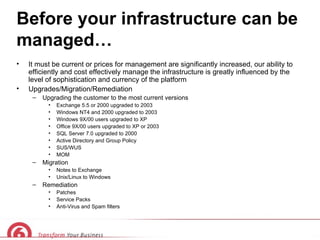
Before your infrastructure can be managed… It must be current or prices for management are significantly increased, our ability to efficiently and cost effectively manage the infrastructure is greatly influenced by the level of sophistication and currency of the platform Upgrades/Migration/Remediation Upgrading the customer to the most current versions Exchange 5.5 or 2000 upgraded to 2003 Windows NT4 and 2000 upgraded to 2003 Windows 9X/00 users upgraded to XP Office 9X/00 users upgraded to XP or 2003 SQL Server 7.0 upgraded to 2000 Active Directory and Group Policy SUS/WUS MOM Migration Notes to Exchange Unix/Linux to Windows Remediation Patches Service Packs Anti-Virus and Spam filters
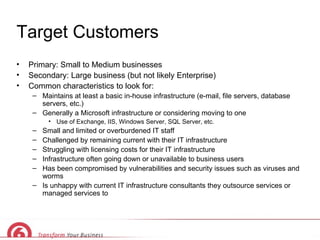
Target Customers Primary: Small to Medium businesses Secondary: Large business (but not likely Enterprise) Common characteristics to look for: Maintains at least a basic in-house infrastructure (e-mail, file servers, database servers, etc.) Generally a Microsoft infrastructure or considering moving to one Use of Exchange, IIS, Windows Server, SQL Server, etc. Small and limited or overburdened IT staff Challenged by remaining current with their IT infrastructure Struggling with licensing costs for their IT infrastructure Infrastructure often going down or unavailable to business users  Has been compromised by vulnerabilities and security issues such as viruses and worms Is unhappy with current IT infrastructure consultants they outsource services or managed services to
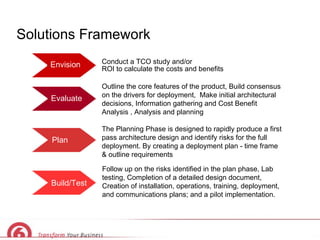
Solutions Framework Conduct a TCO study and/or  ROI to calculate the costs and benefits Evaluate Plan Build/Test Envision Outline the core features of the product, Build consensus on the drivers for deployment,  Make initial architectural decisions, Information gathering and Cost Benefit Analysis , Analysis and planning The Planning Phase is designed to rapidly produce a first pass architecture design and identify risks for the full deployment. By creating a deployment plan - time frame & outline requirements Follow up on the risks identified in the plan phase, Lab testing, Completion of a detailed design document, Creation of installation, operations, training, deployment, and communications plans; and a pilot implementation.
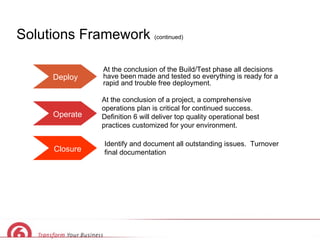
Solutions Framework  (continued) Deploy Operate Closure At the conclusion of the Build/Test phase all decisions have been   made and tested so everything is ready for a rapid and trouble free deployment.  At the conclusion of a project, a comprehensive operations plan is critical for continued success.  Definition 6 will deliver top quality operational best practices customized for your environment. Identify and document all outstanding issues.  Turnover final documentation
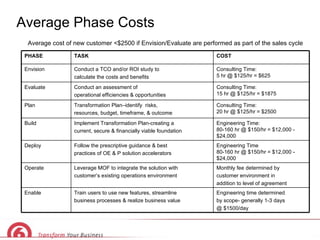
Average Phase Costs Average cost of new customer <$2500 if Envision/Evaluate are performed as part of the sales cycle Engineering time determined by scope- generally 1-3 days @ $1500/day Train users to use new features, streamline business processes & realize business value Enable Monthly fee determined by customer environment in  addition to level of agreement Leverage MOF to integrate the solution with customer’s existing operations environment Operate Engineering Time  80-160 hr @ $150/hr = $12,000 - $24,000 Follow the prescriptive guidance & best  practices of OE & P solution accelerators Deploy Engineering Time: 80-160 hr @ $150/hr = $12,000 - $24,000 Implement Transformation Plan-creating a  current, secure & financially viable foundation Build Consulting Time:  20 hr @ $125/hr = $2500 Transformation Plan–identify  risks, resources, budget, timeframe, & outcome Plan Consulting Time:  15 hr @ $125/hr = $1875 Conduct an assessment of operational efficiencies & opportunities Evaluate Consulting Time:  5 hr @ $125/hr = $625 Conduct a TCO and/or ROI study to  calculate the costs and benefits Envision COST TASK PHASE
D6 Logistics FAQs Who sells managed services? Who actually performs these services? How do we do it? Who manages the customer and these kinds of accounts? What about contracts and legal language? When can I approach my customers about this?
Other D6 Internal FAQ What is our relationship with Bedrock? What value does the Bedrock alliance give us? Where can I get more information or something to share with my customers? http://portal01.def6.com/C4/Network/default.aspx How does this help me with my customers? What if my customers are more interested in creative and marketing services? What is SPLA? How long are Managed Services agreements for?
Managed Services Success Stories

Ppt Template

  • 1.
    Managed IT ServicesLower Your Costs Lower Your Risks Increase Your Capabilities & Productivity
  • 2.
    The Situation Businessesare demanding higher return on investment for IT dollars Businesses are analyzing how to convert fixed cost IT models to variable cost, pay as you go models IT organizations are struggling to keep pace with accelerated business demands when budgets and talent are in short supply IT needs to simplify their service and refocus on integrated business solutions Business relies on IT innovation to remain competitive and enable transformation with advanced, optimized IT investments
  • 3.
    The Problem Notenough resources to stay current Not enough time to get it all done Can’t afford to bring in help Too much time spent fire fighting No time to learn best practices Spend 70%-80% of IT budget maintaining existing functionality
  • 4.
    Current Options Doit yourself No time, can’t know everything Hire help to do the work Results will vary May not follow ‘Best Practices’ One-time event Relatively expensive No on-going maintenance Hosting or Outsourcing Expensive, integration challenges Off-site and out of customer environment
  • 5.
    Managed Services Market$63B industry opportunity in the next 5 years Market is estimated to grow 36% year over year through 2008 Market gaining momentum
  • 6.
    2005 Gartner AnalysisRobust Growth Ahead for Remote Management Services Abstract: The IT management market will provide solid growth through 2008. The fastest growing part of the market is the remote operation and management of networks and IT infrastructure . Strategic Market Statement The remote monitoring and management (RMM) market is expected to grown at a compound annual growth rate (CAGR) of 36 percent through 2008 . Publication Date: January 3, 2005
  • 7.
    Why Managed Servicesnow? High speed Internet access is affordable for everyone Reliable Internet Technologies have advanced ADS, WSUS, SMS, SBS, XP, Terminal Services, MOM, DPS Bandwidth aware products New business models for everyone Pay as you grow, affordable a-la carte options Customer’s IT needs are increasing
  • 8.
    Our Vision Definition6 brings world-class IT infrastructure solutions to businesses of all sizes. In addition to remotely monitoring and managing servers on a subscription basis, Definition 6 offers IT infrastructure consulting. We specialize in automating patch management and software distribution, server migration and consolidation, as well as identity management and security solutions.  Definition 6 focuses on operational efficiency, helping clients do more with less by providing the best system performance for the lowest cost.
  • 9.
    The Definition 6solution Subscription based IT consulting & management services Customer pays D6 to manage and maintain per device (server) on a monthly basis We manage the device in the customer’s office or in a data center of their choice which can be D6’s cages at Internap (Virtual ASP) Our offerings enable customers to: Increase operational efficiency Reduce and control operating costs (Lowered by 10-30%) Cost effectively gain access to world-class consultants Reallocate internal resources to grow business Minimize downtime & legal exposure through IT Maximize use of resources Provide 30%-60% more functionality (latest software) Stay patched and current in a cost-effective way Maintain a secure, reliable environment Make IT spend more predictable Minimize legal exposure from IT
  • 10.
    What is ManagedServices? Backups Digital Rights Management Faxing Spam Filtering Monitoring Patch Management Vulnerability Assessments Anti-Virus Voicemail Help Desk
  • 11.
    Managed Services availablefor Microsoft Windows Server 2003 IIS, AD & GP, DC, File/Print, SharePoint Services, LOB Applications, Terminal Services, Rights Management Services Microsoft Exchange Server Microsoft SQL Server Microsoft Small Business Server Microsoft Live Communication Server Microsoft SharePoint Portal Server Microsoft Identity Integration Server Microsoft Content Management Server Microsoft Commerce Server Microsoft Speech Server … and more
  • 12.
    Managed Monthly Servicesby Level Anti-Virus Verification Alerting/Notification Monitoring -Processor Utilization -Disk Space Availability -Memory Utilization -UPS Alerts Access to Help Desk (Per Incident Pricing) Reporting Trend Analysis Event Log Analysis Backups & Verification Anti-Virus Verification Alerting/Notification Monitoring -Processor Utilization -Disk Space Availability -Memory Utilization -UPS Alerts Access to Help Desk (Per Incident Pricing) Patching Patch Verification Vulnerability Assessment Reporting Trend Analysis Event Log Analysis Backups & Verification Anti-Virus Verification Alerting/Notification Monitoring -Processor Utilization -Disk Space Availability -Memory Utilization -UPS Alerts Access to Help Desk (2 incidents included) Full Remote LAN Administration with Daily Maintenance Patching Patch Verification Vulnerability Assessment Reporting Trend Analysis Event Log Analysis Backups & Verification Anti-Virus Verification Alerting/Notification Monitoring -Processor Utilization -Disk Space Availability -Memory Utilization -UPS Alerts Access to Help Desk (2 incidents included) Server Hardware & Software included with automatic version upgrades Full Remote LAN Administration with Daily Maintenance Patching Patch Verification Vulnerability Assessment Reporting Trend Analysis Event Log Analysis Backups & Verification Anti-Virus Verification Alerting/Notification Monitoring -Processor Utilization -Disk Space Availability -Memory Utilization -UPS Alerts Access to Help Desk (2 incidents included) On-call/Remote Support (2x13x5) On-site Response (4x13x5) Copper Bronze Silver Gold Platinum Starting at $150 Per server/month Starting at $500 Per server/month Starting at $750 Per server/month Starting at $300 Per server/month Starting at $900 Per server/month
  • 13.
    Patching and UpgradeSLA’s Critical: Security threats that can easily spread - Apply fix within 3 days Important: Security threats that don’t easily spread - Apply patch within 1 month Moderate and Low: Service packs, BIOS, firmware - Apply quarterly as needed Major version upgrades: - Within 1 year of release date Change Management Process: - Flexible for both customer and Definition 6
  • 14.
    Before your infrastructurecan be managed… It must be current or prices for management are significantly increased, our ability to efficiently and cost effectively manage the infrastructure is greatly influenced by the level of sophistication and currency of the platform Upgrades/Migration/Remediation Upgrading the customer to the most current versions Exchange 5.5 or 2000 upgraded to 2003 Windows NT4 and 2000 upgraded to 2003 Windows 9X/00 users upgraded to XP Office 9X/00 users upgraded to XP or 2003 SQL Server 7.0 upgraded to 2000 Active Directory and Group Policy SUS/WUS MOM Migration Notes to Exchange Unix/Linux to Windows Remediation Patches Service Packs Anti-Virus and Spam filters
  • 15.
    Target Customers Primary:Small to Medium businesses Secondary: Large business (but not likely Enterprise) Common characteristics to look for: Maintains at least a basic in-house infrastructure (e-mail, file servers, database servers, etc.) Generally a Microsoft infrastructure or considering moving to one Use of Exchange, IIS, Windows Server, SQL Server, etc. Small and limited or overburdened IT staff Challenged by remaining current with their IT infrastructure Struggling with licensing costs for their IT infrastructure Infrastructure often going down or unavailable to business users Has been compromised by vulnerabilities and security issues such as viruses and worms Is unhappy with current IT infrastructure consultants they outsource services or managed services to
  • 16.
    Solutions Framework Conducta TCO study and/or ROI to calculate the costs and benefits Evaluate Plan Build/Test Envision Outline the core features of the product, Build consensus on the drivers for deployment, Make initial architectural decisions, Information gathering and Cost Benefit Analysis , Analysis and planning The Planning Phase is designed to rapidly produce a first pass architecture design and identify risks for the full deployment. By creating a deployment plan - time frame & outline requirements Follow up on the risks identified in the plan phase, Lab testing, Completion of a detailed design document, Creation of installation, operations, training, deployment, and communications plans; and a pilot implementation.
  • 17.
    Solutions Framework (continued) Deploy Operate Closure At the conclusion of the Build/Test phase all decisions have been made and tested so everything is ready for a rapid and trouble free deployment. At the conclusion of a project, a comprehensive operations plan is critical for continued success. Definition 6 will deliver top quality operational best practices customized for your environment. Identify and document all outstanding issues. Turnover final documentation
  • 18.
    Average Phase CostsAverage cost of new customer <$2500 if Envision/Evaluate are performed as part of the sales cycle Engineering time determined by scope- generally 1-3 days @ $1500/day Train users to use new features, streamline business processes & realize business value Enable Monthly fee determined by customer environment in addition to level of agreement Leverage MOF to integrate the solution with customer’s existing operations environment Operate Engineering Time 80-160 hr @ $150/hr = $12,000 - $24,000 Follow the prescriptive guidance & best practices of OE & P solution accelerators Deploy Engineering Time: 80-160 hr @ $150/hr = $12,000 - $24,000 Implement Transformation Plan-creating a current, secure & financially viable foundation Build Consulting Time: 20 hr @ $125/hr = $2500 Transformation Plan–identify risks, resources, budget, timeframe, & outcome Plan Consulting Time: 15 hr @ $125/hr = $1875 Conduct an assessment of operational efficiencies & opportunities Evaluate Consulting Time: 5 hr @ $125/hr = $625 Conduct a TCO and/or ROI study to calculate the costs and benefits Envision COST TASK PHASE
  • 19.
    D6 Logistics FAQsWho sells managed services? Who actually performs these services? How do we do it? Who manages the customer and these kinds of accounts? What about contracts and legal language? When can I approach my customers about this?
  • 20.
    Other D6 InternalFAQ What is our relationship with Bedrock? What value does the Bedrock alliance give us? Where can I get more information or something to share with my customers? http://portal01.def6.com/C4/Network/default.aspx How does this help me with my customers? What if my customers are more interested in creative and marketing services? What is SPLA? How long are Managed Services agreements for?
  • 21.