Making Content Easy to FindDC2010 – Pittsburgh, PABetsy FanningAIIM
Who is AIIM?The leading industry association representing professionals working in Enterprise Content Management (ECM).  We offer a Membership Value Program Focused On:Market Education
Peer Networking
Industry Advocacy
Professional DevelopmentAbout AIIM StandardsANSI AccreditedISO TC 171, Document Management Applications – SecretariatISO TC 171, Document Management Applications, SC2, Application Issues – SecretariatU. S. TAG (Technical Advisory Group) to ISO TC 171 Administrator Industry Standards Developer – AIIM Recommended Practices (ARP)Open Source Standards for Document ManagementLiaison Relationships
What is ECM?The tools and technologies used to:Capture — move content (in any form) into your repositories for reuse or retirementManage — move it around the enterprise to drive key applications and processesStore — put it in a logical place for easy accessPreserve — long-term archival and storageDeliver — get to the right audience on the right device …documents and content related to organization processes.
What is content?Content comes in a variety of formats:
Unstructured content such as
Office files (e.g., word processing, e-mail)
Imaged documents
Media files
Complex documents (e.g., CAD files)
Structured content (often referred to as “data”) stored in database tables
Or increasingly, XML
Semi-structured content such as HTMLWhat is Expected?Information should be easy to discover or locateInformation access is about helping users find documents that satisfy their information needsRemember, someone may be looking for something they’ve never seen or touched beforeInformation should be easy to tag or assign the metadata
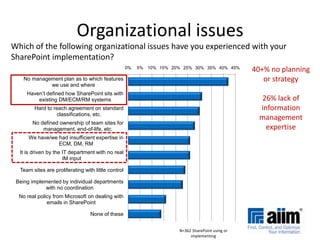
Organizational issuesWhich of the following organizational issues have you experienced with your SharePoint implementation?40+% no planning or strategy26% lack of information management expertise N=362 SharePoint using or implementing
Know What You HaveIn order to improve information access, you need to knowHow much content you haveWhat types of content you have, and its relative valueWhat content needs to be archived, retained, or deletedIn order to undertake a successful ECM/WCM/RM/Search implementation or improvement effort you need to know:What documents you possess Who “owns” the content in order to determine proper security, roles and permissionsWho or what creates content in order to properly tag/index and otherwise contextualise and enrich contentUltimately, you need to create an overall Content Model
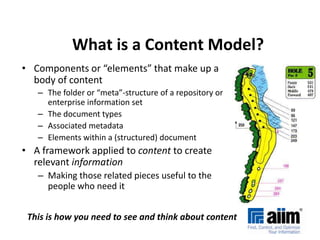
What is a Content Model?Components or “elements” that make up a body of contentThe folder or “meta”-structure of a repository or enterprise information setThe document types Associated metadataElements within a (structured) documentA framework applied to content to create relevant informationMaking those related pieces useful to the people who need itThis is how you need to see and think about content
What is a Metadata Strategy?Identification and understanding of different metadata types and their purposeSynchronisation and adoption across a department, project, and ultimately the entire enterprise; Agreement on terms, labels, and meaningsUnderstanding of people, processes, and systems applying and interacting with metadata and vocabulariesUnderstanding who owns various metadata and structuresPlanning for maintenance and changesSource: Ed Stevenson, Really Strategies, Inc.
Benefits of StrategyConsistent use of metadata structures across the enterprise makes the metadata more powerfulInformation and systems become more interoperableLesser chance of ambiguous terms when metadata and its purposes are defined, helping to ensure quality in the metadataUnderstanding of how metadata changes can affect downstream processesIdentification of gaps in what should have more metadataCommunication of metadata information to others who may find uses for the content outside its original areaRealistic appreciation for level of effort to “tag” or “index” contentEstablishment of someone or some group with centralised knowledge of the metadata processesSource: Ed Stevenson, Really Strategies, Inc.
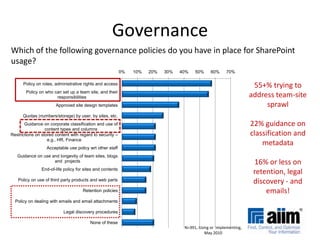
GovernanceWhich of the following governance policies do you have in place for SharePoint usage?55+% trying to address team-site sprawl22% guidance on classification and metadata16% or less on retention, legal discovery - and emails!N=391, Using or  implementing, May 2010
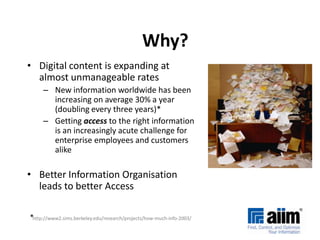
Why?Digital content is expanding at almost unmanageable ratesNew information worldwide has been increasing on average 30% a year (doubling every three years)*Getting access to the right information is an increasingly acute challenge for enterprise employees and customers alikeBetter Information Organisation leads to better Access*http://www2.sims.berkeley.edu/research/projects/how-much-info-2003/
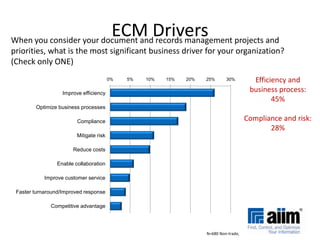
ECM DriversWhen you consider your document and records management projects and priorities, what is the most significant business driver for your organization? (Check only ONE)Efficiency and business process: 45%Compliance and risk: 28%N=680 Non-trade,
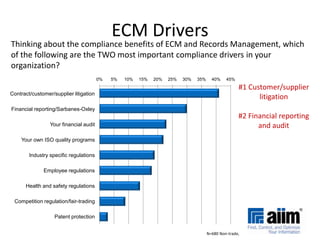
ECM DriversThinking about the compliance benefits of ECM and Records Management, which of the following are the TWO most important compliance drivers in your organization? #1 Customer/supplier litigation #2 Financial reporting and auditN=680 Non-trade,
Metadata and ECM Metadata often acts as a “great unifier” in the area of content technologies and enable them to work togetherMany content management systems depend on solid library and categorisation services order to add significant valueEssential for organising any large content corpusRequired for meaningful records managementCritical to effective findabilityHow you choose to design the repository, and how the system you choose can use certain repositories and content structures, greatly influence the business value you can realise
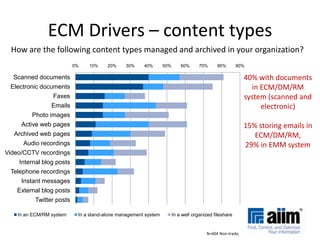
ECM Drivers – content typesHow are the following content types managed and archived in your organization?40% with documents in ECM/DM/RM system (scanned and electronic)15% storing emails in ECM/DM/RM, 29% in EMM systemN=604 Non-trade,
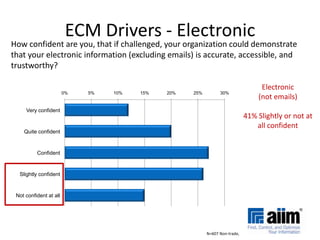
ECM Drivers - ElectronicHow confident are you, that if challenged, your organization could demonstrate that your electronic information (excluding emails) is accurate, accessible, and trustworthy?Electronic (not emails) 41% Slightly or not at all confident N=607 Non-trade,
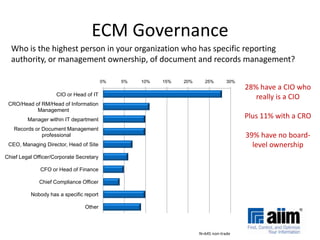
ECM GovernanceWho is the highest person in your organization who has specific reporting authority, or management ownership, of document and records management?28% have a CIO who really is a CIOPlus 11% with a CRO39% have no board-level ownershipN=645 non-trade
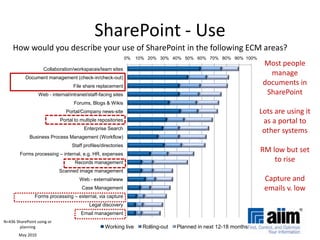
SharePoint - Use How would you describe your use of SharePoint in the following ECM areas? Most people manage documents in SharePointLots are using it as a portal to other systemsRM low but set to riseCapture and emails v. lowN=436 SharePoint using or planningMay 2010
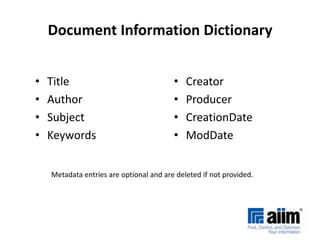
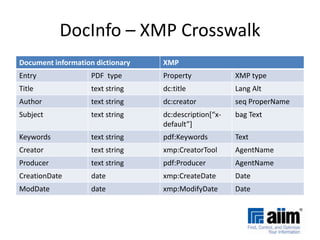
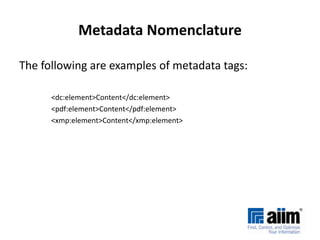
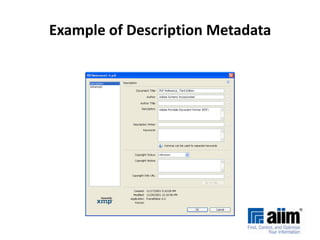
ECM DC UseMany content technologies are now offering Dublin Core standard repositories and content formats out of the boxSharePoint uses Content TypesTied to business process or document typeShared across site collectionsDC is used with file formats – PDF and PDF/A
So, what happens with no metadata?
Context to the ProblemFor humans, adding metadata means workTaggers may not see the ultimate benefit of metadata themselves
Benefits tend to accrue to the enterprise and content consumers
To be sure, clerical staff can be forced to index

Dc2010 fanning

  • 1.
    Making Content Easyto FindDC2010 – Pittsburgh, PABetsy FanningAIIM
  • 2.
    Who is AIIM?Theleading industry association representing professionals working in Enterprise Content Management (ECM). We offer a Membership Value Program Focused On:Market Education
  • 3.
  • 4.
  • 5.
    Professional DevelopmentAbout AIIMStandardsANSI AccreditedISO TC 171, Document Management Applications – SecretariatISO TC 171, Document Management Applications, SC2, Application Issues – SecretariatU. S. TAG (Technical Advisory Group) to ISO TC 171 Administrator Industry Standards Developer – AIIM Recommended Practices (ARP)Open Source Standards for Document ManagementLiaison Relationships
  • 6.
    What is ECM?Thetools and technologies used to:Capture — move content (in any form) into your repositories for reuse or retirementManage — move it around the enterprise to drive key applications and processesStore — put it in a logical place for easy accessPreserve — long-term archival and storageDeliver — get to the right audience on the right device …documents and content related to organization processes.
  • 7.
    What is content?Contentcomes in a variety of formats:
  • 8.
  • 9.
    Office files (e.g.,word processing, e-mail)
  • 10.
  • 11.
  • 12.
  • 13.
    Structured content (oftenreferred to as “data”) stored in database tables
  • 14.
  • 15.
    Semi-structured content suchas HTMLWhat is Expected?Information should be easy to discover or locateInformation access is about helping users find documents that satisfy their information needsRemember, someone may be looking for something they’ve never seen or touched beforeInformation should be easy to tag or assign the metadata
  • 16.
    Organizational issuesWhich ofthe following organizational issues have you experienced with your SharePoint implementation?40+% no planning or strategy26% lack of information management expertise N=362 SharePoint using or implementing
  • 17.
    Know What YouHaveIn order to improve information access, you need to knowHow much content you haveWhat types of content you have, and its relative valueWhat content needs to be archived, retained, or deletedIn order to undertake a successful ECM/WCM/RM/Search implementation or improvement effort you need to know:What documents you possess Who “owns” the content in order to determine proper security, roles and permissionsWho or what creates content in order to properly tag/index and otherwise contextualise and enrich contentUltimately, you need to create an overall Content Model
  • 18.
    What is aContent Model?Components or “elements” that make up a body of contentThe folder or “meta”-structure of a repository or enterprise information setThe document types Associated metadataElements within a (structured) documentA framework applied to content to create relevant informationMaking those related pieces useful to the people who need itThis is how you need to see and think about content
  • 19.
    What is aMetadata Strategy?Identification and understanding of different metadata types and their purposeSynchronisation and adoption across a department, project, and ultimately the entire enterprise; Agreement on terms, labels, and meaningsUnderstanding of people, processes, and systems applying and interacting with metadata and vocabulariesUnderstanding who owns various metadata and structuresPlanning for maintenance and changesSource: Ed Stevenson, Really Strategies, Inc.
  • 20.
    Benefits of StrategyConsistentuse of metadata structures across the enterprise makes the metadata more powerfulInformation and systems become more interoperableLesser chance of ambiguous terms when metadata and its purposes are defined, helping to ensure quality in the metadataUnderstanding of how metadata changes can affect downstream processesIdentification of gaps in what should have more metadataCommunication of metadata information to others who may find uses for the content outside its original areaRealistic appreciation for level of effort to “tag” or “index” contentEstablishment of someone or some group with centralised knowledge of the metadata processesSource: Ed Stevenson, Really Strategies, Inc.
  • 21.
    GovernanceWhich of thefollowing governance policies do you have in place for SharePoint usage?55+% trying to address team-site sprawl22% guidance on classification and metadata16% or less on retention, legal discovery - and emails!N=391, Using or implementing, May 2010
  • 22.
    Why?Digital content isexpanding at almost unmanageable ratesNew information worldwide has been increasing on average 30% a year (doubling every three years)*Getting access to the right information is an increasingly acute challenge for enterprise employees and customers alikeBetter Information Organisation leads to better Access*http://www2.sims.berkeley.edu/research/projects/how-much-info-2003/
  • 23.
    ECM DriversWhen youconsider your document and records management projects and priorities, what is the most significant business driver for your organization? (Check only ONE)Efficiency and business process: 45%Compliance and risk: 28%N=680 Non-trade,
  • 24.
    ECM DriversThinking aboutthe compliance benefits of ECM and Records Management, which of the following are the TWO most important compliance drivers in your organization? #1 Customer/supplier litigation #2 Financial reporting and auditN=680 Non-trade,
  • 25.
    Metadata and ECMMetadata often acts as a “great unifier” in the area of content technologies and enable them to work togetherMany content management systems depend on solid library and categorisation services order to add significant valueEssential for organising any large content corpusRequired for meaningful records managementCritical to effective findabilityHow you choose to design the repository, and how the system you choose can use certain repositories and content structures, greatly influence the business value you can realise
  • 26.
    ECM Drivers –content typesHow are the following content types managed and archived in your organization?40% with documents in ECM/DM/RM system (scanned and electronic)15% storing emails in ECM/DM/RM, 29% in EMM systemN=604 Non-trade,
  • 27.
    ECM Drivers -ElectronicHow confident are you, that if challenged, your organization could demonstrate that your electronic information (excluding emails) is accurate, accessible, and trustworthy?Electronic (not emails) 41% Slightly or not at all confident N=607 Non-trade,
  • 28.
    ECM GovernanceWho isthe highest person in your organization who has specific reporting authority, or management ownership, of document and records management?28% have a CIO who really is a CIOPlus 11% with a CRO39% have no board-level ownershipN=645 non-trade
  • 29.
    SharePoint - UseHow would you describe your use of SharePoint in the following ECM areas? Most people manage documents in SharePointLots are using it as a portal to other systemsRM low but set to riseCapture and emails v. lowN=436 SharePoint using or planningMay 2010
  • 30.
    ECM DC UseManycontent technologies are now offering Dublin Core standard repositories and content formats out of the boxSharePoint uses Content TypesTied to business process or document typeShared across site collectionsDC is used with file formats – PDF and PDF/A
  • 31.
    So, what happenswith no metadata?
  • 32.
    Context to theProblemFor humans, adding metadata means workTaggers may not see the ultimate benefit of metadata themselves
  • 33.
    Benefits tend toaccrue to the enterprise and content consumers
  • 34.
    To be sure,clerical staff can be forced to index

Editor's Notes

  • #6 Be sure to distinguish among the words content, information and data as described here.
  • #7 For more speaker notes, see the PRACT-1 deck
  • #10 A content model is a representation of components or pieces that make up a body of content. Before I go into all of the details of this definition, I would highlight the picture on the right. You might be wondering why we have a picture of a golf hole. There’s a reason for that. Any piece of information has some sort of content model, a way that it’s represented; the different components of that content put together make up a model. So in this particular case, there are different elements of this model. You have a set of numbers that represent different yardages. You also have pictures that give you a visual representation of how this particular golf hole is laid out. You have trees along the left. You have a lake along the right. Then there are various points on the hole that are represented to give you a sense of the distance from one part of the hole to the next part.  All of this is what helps the golfer, or the person using this particular content model, make decisions or decide what needs to be done with the information to take action. Going back to our definition, you can also look at a content model as the folder, repository metastructure, or broader enterprise information set. You could think of any piece of content in your enterprise just as this sort of golf hole is laid out. How are your documents laid out? How are your repositories laid out? What are the different components within those repositories and within those documents? That’s what really makes up your large enterprise content model. Where you run into problems is where that content model isn’t consistent. If I took this golf hole—and this one in particular is represented in yards—and showed it to a golfer who’s used to looking at distances in meters, you start to run into some challenges. The same sort of things exist within enterprises when you represent information in different ways.  Content models are how you need to see and think about information. So when you look at a document or a picture like this golf hole, you need to think about what the components are, how they break down, and how to potentially reorganise them to optimise them for your content technology.
  • #11 Many organisations will attempt to establish metadata strategy. And this is usually done in a larger context of a content strategy or a content management strategy. But considering metadata in and of itself is an extremely important part of that. And this is a process of identifying and understanding the different metadata types and their purpose. So as we talked about when I showed that recipe example, that metadata model, it wasn’t just about identifying what the metadata is, but also what’s the point of it? What’s the purpose? What exactly is this metadata going to be used for? The second point that I would make, that it might be the most challenging part of a metadata strategy, is the synchronisation and adoption across a department, a project, and ultimately the entire enterprise, so what something is called, how it’s labeled, and what that means. The consensus building ends up being perhaps the most challenging part of any metadata strategy and eventually actually implementation of the metadata. And that’s because it is very difficult to get different departments to agree on what something should be called.  And there are some ways to solve it if you can’t, in fact, come to a consensus. And that’s where the thesaurus comes in, which we’ll talk about a little later.  Finally the understanding of the people, processes, and systems, how they’re interacting with metadata and vocabularies, who owns that metadata, and planning for the maintenance and changes of the metadata — these are all very important parts of a metadata strategy and a content strategy overall.
  • #12 There’s a number of benefits to establishing this strategy early on. Consistent use of the metadata structures across the enterprise makes the metadata more powerful. If the metadata is not consistent, the effectiveness really gets diluted. You won’t be able to consistently find information. And, of course as I’ve mentioned numerous times, the information and systems will be more interoperable and be able to exchange content more easily if those structures are consistent. The disambiguation I mentioned earlier is also very important. Understanding how the metadata changes will affect downstream processes is also very important. If someone changes metadata, that might kick off a different process or it might change where the content ends up being displayed. It’s very important that your content managers understand the ramifications of tagging content in certain ways. Identifying gaps are also very important because, odds are, you have some implicit metadata already in your organisation of course. So knowing what the gaps are usually is accomplished by understanding the end use of the content, how people are searching for it, how that content might need to be used within a system or on a website. That’s often where you realise you need certain types of metadata in order to accomplish that. So now’s the time during the strategy to identify those gaps. And then of course communication. Part of the key of establishing a strategy is making sure that everyone’s on the same page and that you communicate it out to the organisation. And with metadata, people outside of that initial circle that’s establishing a strategy might actually find a lot of use for that metadata that they hadn’t thought about before there actually was a metadata strategy. Understanding the level of effort to tag or index content is also something that tends to come out while establishing a strategy. You need to be prepared with the adequate level of resources and motivation to really tag an index content. Because it is something that can be very laborious and require a good deal of time and effort. And we’ll get into some more detail on that in a moment.  Also establishing someone in the group with a centralised knowledge of the metadata process, this could be a single individual or it could be the whole group that was involved with establishing the strategy. Either way, it’s important to have that central source that people can go to if they have a question about how to apply metadata, how it’s being used across the enterprise. Actually implementing the strategy is something we’ll get into in more detail in the specialist track.
  • #14 For more speaker notes, see the PRACT-1 deck
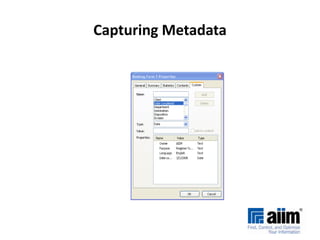
  • #24 In our last section before wrapping things up, let’s talk about automated collection of metadata or auto-tagging. Little bit of content around this problem, for human beings, of course adding metadata often means quite a bit of work. The people who are assigned to tag, sometimes they don’t really see the benefit of getting involved. It becomes to them a chore or laborious process. They might even say, “Well, it’s not my job, so why should I do it?” In this case, I would use an example from many implementations of content management systems whereby explaining the result or the ramifications, or most importantly, the benefit of tagging is a good thing to explain to the people who would be doing the tagging. Because if they see the benefit, and you, in fact, explain what’s in it for them, so to speak, it might actually help and incent them to get involved with the tagging. And in some cases, let’s not forget, it’s not just anybody who should be tagging. In some systems, it’s a very specialised skill, not only to necessarily use the system and to tag, but also perhaps around the subject. You might need a highly specialised subject matter expert to tag things accurately.  Commonly, human beings provide incomplete or inaccurate metadata, especially if you have a large number of people tagging. It’s very difficult to not leave it open to interpretation. People will tag things differently based on what department they’re in, et cetera. So given the challenges in, not only incenting people to tag, but also in keeping what they do complete and accurate, the question arises, well, is there a way to get machines to add metadata for us, consistently, accurately, and to alleviate some of the burden from people within enterprises? Let’s explore that question a little bit now.
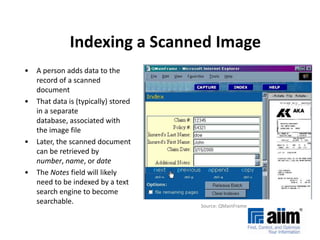
  • #25 Here’s an example of how someone might go about indexing a scanned image. So you have a picture here in this example on the right, where you see a little thumbnail on the far right of a document that’s been scanned by some sort of imaging technology. And an indexer might have to fill in information about this particular document. In this case, we have a claim number. We have a policy number. We have the last name of the person who’s being insured. So obviously this is some kind of insurance document. And then there’s also a claim date and a random notes field. So this data, when it gets entered into the system, is usually stored in a separate database, and it’s associated with the image file so that if someone wants to pull it up, they can type in any of these items, whether they’re looking for a particular claim number or a claim date or based on someone’s name. And then the system would pull up the document based on this particular metadata that’s within the index. The notes field is a little bit more complex, simply because the information isn’t as precise or discrete as the other fields are. So the notes field might actually have to be indexed by a text-based search engine to become more easily searchable. We’re going to talk a lot about search technology a little bit later, and how it might actually deal with a free form field such as this notes area.