





Creating Business Intelligence
with SharePoint 2010


                                Demo + Code
                                http://bit.ly/kOqLnv
ivan@dimension-si.com
http://twitter.com/@iasanders
Outline & Agenda









                   2   | SharePoint Saturday New York City 2011
3   | SharePoint Saturday New York City 2011
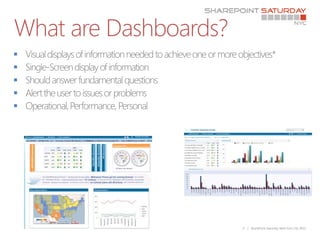
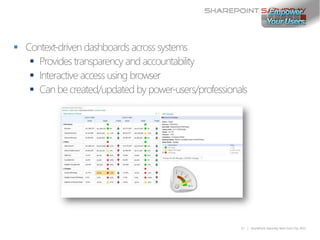
What are Dashboards?







                       5   | SharePoint Saturday New York City 2011
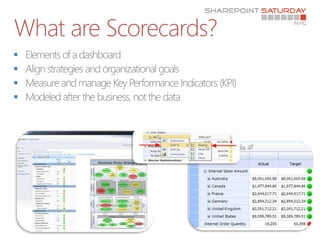
What are Scorecards?






                       6   | SharePoint Saturday New York City 2011
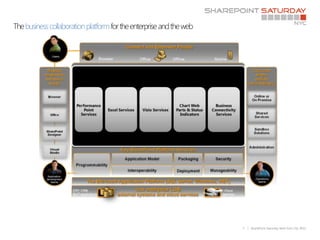
The business collaboration platform for the enterprise and the web


                                                                     7   | SharePoint Saturday New York City 2011
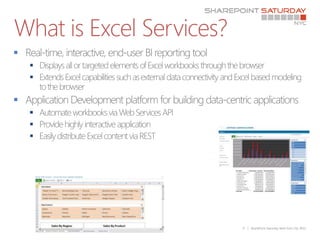
What is Excel Services?

    
    


    
    
    


                          9   | SharePoint Saturday New York City 2011
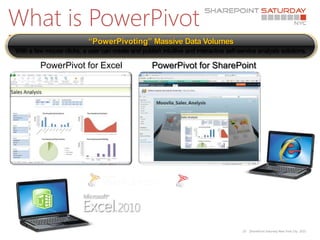
What is PowerPivot
Technology                  “PowerPivoting” Massive Data Volumes
With a few mouse clicks, a user can create and publish intuitive and interactive self-service analysis solutions.

         PowerPivot for Excel                       PowerPivot for SharePoint


                                                                                        10   |SharePoint Saturday New York City 2011
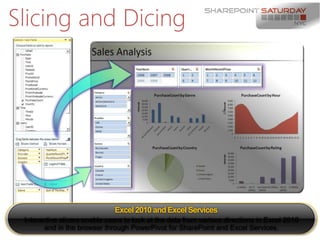
Slicing and Dicing


                                   Excel 2010 and Excel Services
 Interactive slicers enable users to look at the data from various directions in Excel 2010
        and in the browser through PowerPivot for SharePoint and Excel |SharePoint Saturday New York City 2011
                                                                          11
                                                                             Services.
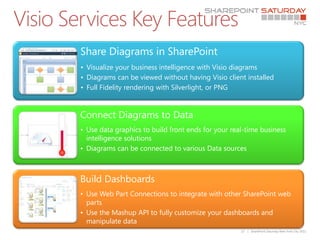
Visio Services Key Features
        Share Diagrams in SharePoint
        • Visualize your business intelligence with Visio diagrams
        • Diagrams can be viewed without having Visio client installed
        • Full Fidelity rendering with Silverlight, or PNG


        Connect Diagrams to Data
        • Use data graphics to build front ends for your real-time business
          intelligence solutions
        • Diagrams can be connected to various Data sources


        Build Dashboards
        • Use Web Part Connections to integrate with other SharePoint web
          parts
        • Use the Mashup API to fully customize your dashboards and
          manipulate data
                                                            13   | SharePoint Saturday New York City 2011

    
    
    

    


    
    


        14   | SharePoint Saturday New York City 2011
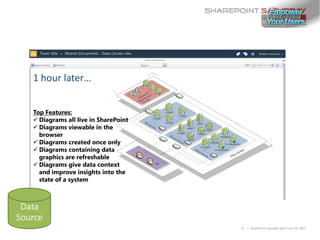
1 hour later…


Top Features:
 Diagrams all live in SharePoint
 Diagrams viewable in the
  browser
 Diagrams created once only
 Diagrams containing data
  graphics are refreshable
 Diagrams give data context
  and improve insights into the
  state of a system


                                    15   | SharePoint Saturday New York City 2011

    
    
    


        17   | SharePoint Saturday New York City 2011

    
    
        


            18   | SharePoint Saturday New York City 2011

    
    
        
    
    


            19   | SharePoint Saturday New York City 2011
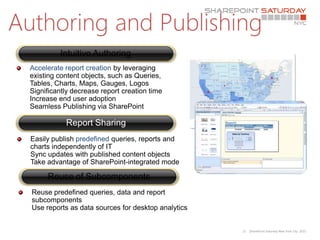
Authoring and Publishing
           Intuitive Authoring
  Accelerate report creation by leveraging
  existing content objects, such as Queries,
  Tables, Charts, Maps, Gauges, Logos
  Significantly decrease report creation time
  Increase end user adoption
  Seamless Publishing via SharePoint

             Report Sharing
  Easily publish predefined queries, reports and
  charts independently of IT
  Sync updates with published content objects
  Take advantage of SharePoint-integrated mode

       Reuse of Subcomponents
  Reuse predefined queries, data and report
  subcomponents
  Use reports as data sources for desktop analytics


                                                      21   |SharePoint Saturday New York City 2011
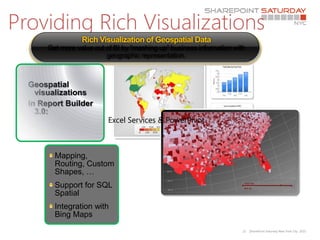
Providing Rich Visualizations
                  Rich Visualization of Geospatial Data
       Get more value out of BI by “mashing up” business information with
                          geographic representation.


  Geospatial
    visualizations
  in Report Builder
    3.0:
                           Excel Services & PowerPivot


         Mapping,
         Routing, Custom
         Shapes, …
         Support for SQL
         Spatial
         Integration with
         Bing Maps
                                                                        22   |SharePoint Saturday New York City 2011









    24   | SharePoint Saturday New York City 2011
Who Do you trust??
     http://www.bluedoglimited.com/default.aspx
     http://www.andrewconnell.com/blog
                 http://www.harbar   .net
     http://www.heathersolomon.com/blog
                 http://www.toddklindt.com/default.aspx
                 http://www.toddbaginski.com/blog
                 http://bit.ly/edlSm5
                  http://weblogs.asp.net/jan
     http://www.u2u.info/Blogs/Patrick/default.aspx
                 http://www.wictorwilen.se
                 http://blog.tedpattison.net/default.aspx
                 http://www.fastrup.net
     http://keutmann.blogspot.com
                 http://blog.krichie.com
                 http://blogs.technet.com/b/wbaer
                 http://blah.winsmarts.com
                 http://weblogs.asp.net/bsimser


                                                             26   | SharePoint Saturday New York City 2011
Codeplex – with Source Code
   http://cksdev.codeplex.com
   http://startermasterpages.codeplex.com
   http://spm.codeplex.com
   http://autospinstaller.codeplex.com
   http://spsf.codeplex.com
   http://slk.codeplex.com
   http://smarttools.codeplex.com
   http://spviewpermission.codeplex.com
   http://bidshelper.codeplex.com
   http://almspecialisttoolkit.codeplex.com
   http://spsf.codeplex.com


                                               27   | SharePoint Saturday New York City 2011
SharePoint 2010 Guidance
 Book        The Book

             Developing Applications for SharePoint 2010 (includes the Help file [CHM], samples, and
 Downloads
             library source code)

             •Introduction to Developing Applications with SharePoint 2010
             •SharePoint Server-side Data Access – Part 1 of 3: Introduction
 Media
             •SharePoint Server-side Data Access – Part 2 of 3: Related Lists
             •SharePoint Server-side Data Access – Part 3 of 3: Analyzing Generated CAML

 Support     Discussions for patterns & practices SharePoint Guidance

 Training    Hands-on labs

 Community   patterns & practices SharePoint Guidance Community Site

 License     Microsoft patterns & practices license September 2009


                                                                               28   | SharePoint Saturday New York City 2011
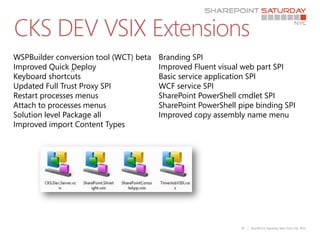
CKS DEV VSIX Extensions
WSPBuilder conversion tool (WCT) beta   Branding SPI
Improved Quick 20Deploy                 Improved Fluent visual web part SPI
Keyboard shortcuts                      Basic service application SPI
Updated Full Trust Proxy SPI            WCF service SPI
Restart processes menus                 SharePoint PowerShell cmdlet SPI
Attach to processes menus               SharePoint PowerShell pipe binding SPI
Solution level Package all              Improved copy assembly name menu
Improved import Content Types


                                                              29   | SharePoint Saturday New York City 2011
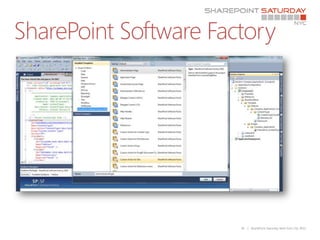
SharePoint Software Factory


                       30   | SharePoint Saturday New York City 2011
Housekeeping






               31   | SharePoint Saturday New York City 2011
Thanks to Our Sponsors!

SharePoint Saturday NYC - Business Intelligence

  • 1.
    Creating Business Intelligence withSharePoint 2010 Demo + Code http://bit.ly/kOqLnv ivan@dimension-si.com http://twitter.com/@iasanders
  • 2.
    Outline & Agenda        2 | SharePoint Saturday New York City 2011
  • 3.
    3 | SharePoint Saturday New York City 2011
  • 5.
    What are Dashboards?      5 | SharePoint Saturday New York City 2011
  • 6.
    What are Scorecards?     6 | SharePoint Saturday New York City 2011
  • 7.
    The business collaborationplatform for the enterprise and the web 7 | SharePoint Saturday New York City 2011
  • 9.
    What is ExcelServices?        9 | SharePoint Saturday New York City 2011
  • 10.
    What is PowerPivot Technology “PowerPivoting” Massive Data Volumes With a few mouse clicks, a user can create and publish intuitive and interactive self-service analysis solutions. PowerPivot for Excel PowerPivot for SharePoint 10 |SharePoint Saturday New York City 2011
  • 11.
    Slicing and Dicing Excel 2010 and Excel Services Interactive slicers enable users to look at the data from various directions in Excel 2010 and in the browser through PowerPivot for SharePoint and Excel |SharePoint Saturday New York City 2011 11 Services.
  • 13.
    Visio Services KeyFeatures Share Diagrams in SharePoint • Visualize your business intelligence with Visio diagrams • Diagrams can be viewed without having Visio client installed • Full Fidelity rendering with Silverlight, or PNG Connect Diagrams to Data • Use data graphics to build front ends for your real-time business intelligence solutions • Diagrams can be connected to various Data sources Build Dashboards • Use Web Part Connections to integrate with other SharePoint web parts • Use the Mashup API to fully customize your dashboards and manipulate data 13 | SharePoint Saturday New York City 2011
  • 14.
           14 | SharePoint Saturday New York City 2011
  • 15.
    1 hour later… TopFeatures:  Diagrams all live in SharePoint  Diagrams viewable in the browser  Diagrams created once only  Diagrams containing data graphics are refreshable  Diagrams give data context and improve insights into the state of a system 15 | SharePoint Saturday New York City 2011
  • 17.
       17 | SharePoint Saturday New York City 2011
  • 18.
       18 | SharePoint Saturday New York City 2011
  • 19.
         19 | SharePoint Saturday New York City 2011
  • 21.
    Authoring and Publishing Intuitive Authoring Accelerate report creation by leveraging existing content objects, such as Queries, Tables, Charts, Maps, Gauges, Logos Significantly decrease report creation time Increase end user adoption Seamless Publishing via SharePoint Report Sharing Easily publish predefined queries, reports and charts independently of IT Sync updates with published content objects Take advantage of SharePoint-integrated mode Reuse of Subcomponents Reuse predefined queries, data and report subcomponents Use reports as data sources for desktop analytics 21 |SharePoint Saturday New York City 2011
  • 22.
    Providing Rich Visualizations Rich Visualization of Geospatial Data Get more value out of BI by “mashing up” business information with geographic representation. Geospatial visualizations in Report Builder 3.0: Excel Services & PowerPivot Mapping, Routing, Custom Shapes, … Support for SQL Spatial Integration with Bing Maps 22 |SharePoint Saturday New York City 2011
  • 24.
             24 | SharePoint Saturday New York City 2011
  • 26.
    Who Do youtrust??  http://www.bluedoglimited.com/default.aspx  http://www.andrewconnell.com/blog  http://www.harbar .net  http://www.heathersolomon.com/blog  http://www.toddklindt.com/default.aspx  http://www.toddbaginski.com/blog  http://bit.ly/edlSm5 http://weblogs.asp.net/jan  http://www.u2u.info/Blogs/Patrick/default.aspx  http://www.wictorwilen.se  http://blog.tedpattison.net/default.aspx  http://www.fastrup.net  http://keutmann.blogspot.com  http://blog.krichie.com  http://blogs.technet.com/b/wbaer  http://blah.winsmarts.com  http://weblogs.asp.net/bsimser 26 | SharePoint Saturday New York City 2011
  • 27.
    Codeplex – withSource Code  http://cksdev.codeplex.com  http://startermasterpages.codeplex.com  http://spm.codeplex.com  http://autospinstaller.codeplex.com  http://spsf.codeplex.com  http://slk.codeplex.com  http://smarttools.codeplex.com  http://spviewpermission.codeplex.com  http://bidshelper.codeplex.com  http://almspecialisttoolkit.codeplex.com  http://spsf.codeplex.com 27 | SharePoint Saturday New York City 2011
  • 28.
    SharePoint 2010 Guidance Book The Book Developing Applications for SharePoint 2010 (includes the Help file [CHM], samples, and Downloads library source code) •Introduction to Developing Applications with SharePoint 2010 •SharePoint Server-side Data Access – Part 1 of 3: Introduction Media •SharePoint Server-side Data Access – Part 2 of 3: Related Lists •SharePoint Server-side Data Access – Part 3 of 3: Analyzing Generated CAML Support Discussions for patterns & practices SharePoint Guidance Training Hands-on labs Community patterns & practices SharePoint Guidance Community Site License Microsoft patterns & practices license September 2009 28 | SharePoint Saturday New York City 2011
  • 29.
    CKS DEV VSIXExtensions WSPBuilder conversion tool (WCT) beta Branding SPI Improved Quick 20Deploy Improved Fluent visual web part SPI Keyboard shortcuts Basic service application SPI Updated Full Trust Proxy SPI WCF service SPI Restart processes menus SharePoint PowerShell cmdlet SPI Attach to processes menus SharePoint PowerShell pipe binding SPI Solution level Package all Improved copy assembly name menu Improved import Content Types 29 | SharePoint Saturday New York City 2011
  • 30.
    SharePoint Software Factory 30 | SharePoint Saturday New York City 2011
  • 31.
    Housekeeping   31 | SharePoint Saturday New York City 2011
  • 32.
    Thanks to OurSponsors!

Editor's Notes

  • #4 Who i I am nothing but SharePoint Clients
  • #11 Purpose of the slideClarify that Microsoft SQL Server PowerPivot technology includes both an Excel add-in and server-based technology that integrates with SharePoint Server 2010. Key Points: SQL Server PowerPivot for Excel 2010 is a data analysis add-in that delivers unmatched computational power directly within Microsoft Excel SQL Server PowerPivot for Excel 2010 is available for download free of charge at www.powerpivot.com. SQL Server PowerPivot for SharePoint integrates with Excel Services on the SharePoint server to enable seamless and secure sharing and collaboration on user-generated BI solutions directly in the browserSQL Server PowerPivot for SharePoint is included in SQL Server 2008 R2Conclusion: SQL Server PowerPivot technology is the key to managed self-service BI, empowering users, enabling seamless and secure sharing and collaboration on user-generated BI solutions , and helping IT organizations increase efficiency through the PowerPivot Management Dashboard.
  • #12 Purpose of the slidePoint out that SQL Server PowerPivot uses the standard Excel capabilities for slicing and dicing. Key Points: Use familiar PivotTable views, charts, and slicers for interactive analysisSort, filter, and scroll through millions of rows with about the same performance as a few thousand Users can work seamlessly via Web browser and enjoy the same performance and features as the Excel client.Conclusion: Interactive slicers enable users to look at the data from various directions in Excel 2010 and in the browser through PowerPivot for SharePoint and Excel Services.
  • #22 Purpose of the slideElaborate on the capabilities provided through Reporting Services and Report Builder 3.0. Key Points: Report Builder 3.0 accelerates report creation by leveraging existing content objects, such as Queries, Tables, Charts, Maps, Gauges, Logos It’s easy to share reports in a SharePoint-based environmentReport Builder 3.0 supports publishing and reuse of subcomponents to accelerate development, lower costs, and helps to keep reports up to date by automatically synchronizing updates with published content objectsReports can as data sources for desktop analyticsConclusion: Reporting Services and Report Builder 3.0 are essential tools to deliver meaningful reports to business users. It is also an important self-service BI tool for business users to easily create and publish predefined queries, reports and charts independently of IT.
  • #23 Purpose of the slideHighlight the new support of geospatial visualization in Report Builder 3.0. Key Points: Support for geospatial visualization includes mapping, routing, and custom shapes Users can also enhance location-based data reports with Bing Maps Conclusion: Rich visualization enables organizations to get more value out of BI by “mashing up” business information with geographic representationElaborate on the capabilities provided through Reporting Services and Report Builder 3.0. Key Points: Report Builder 3.0 accelerates report creation by leveraging existing content objects, such as Queries, Tables, Charts, Maps, Gauges, Logos It’s easy to share reports in a SharePoint-based environmentReport Builder 3.0 supports publishing and reuse of subcomponents to accelerate development, lower costs, and helps to keep reports up to date by automatically synchronizing updates with published content objectsReports can as data sources for desktop analyticsConclusion: Reporting Services and Report Builder 3.0 are essential tools to deliver meaningful reports to business users. It is also an .
  • #29 Microsoft More cool stuff
  • #30 Wes Hackets and CKS Folks
  • #31 http://spsf.codeplex.com SharePoint Software Factory