Fabio Filardi
Dynamics AX Technical Architect
fabiofilardi@gmail.com
Services

           Overview


           Lesson 1: Service Groups


           Lesson 2: Ports and Adapters


           Lesson 3: Infra & Deployment


           Lesson 4: Custom Services


           Lesson 5: Consuming Web Services


           Lesson 6: Transformations


           Lesson 7: Office Add-in
Overview


  In Microsoft Dynamics AX 2012, the Application Integration
   Framework (AIF) underwent a number of dramatic
   changes, starting with its name. The AIF is now known as
   Services. In the application you will see it listed as
   Services and Application Integration Framework.

  In Microsoft Dynamics AX 2012, the module offers more
   options for WCF service hosts, a reduction in the number
   of forms and concepts, an increase in the performance of
   service calls and more flexibility in the classes on which
   services can be built.
Lesson 1: Service Groups
This lesson defines the term Service Group and describes what it contains


   What is and advantages

     Service Groups is a new node added to the AOT and they are hosted on
      the AOS.

     A single service group consists of a set of services deployed together.

     Besides having services consistently managed and deployed
      together, there are other advantages to service groups:

           All the services are contained within the same WSDL;

           You only need to add one service reference in Microsoft Visual Studio
            to access all of the objects from the services in the service group;

           You can use the types exposed in the services throughout your .NET
            code.
Lesson 2: Ports and Adapters
This lesson defines the terms Basic and Enhanced Ports and Adapter types


  Introduction

   A port represents a Windows Communication Foundation (WCF) service
    host, and all services that it hosts are WCF endpoints. By default, a port is
    hosted on the Application Object Server (AOS) or on Internet Information
    Services (IIS) if HTTP is chosen as the adapter.

   In Microsoft Dynamics AX 2009, the configuration of AIF involved several
    concepts including local endpoints, adapters, channels and endpoints. Each
    concept had multiple steps and its own form. In Microsoft Dynamics AX
    2012, the user interface for the Services module is dramatically restructured
    resulting in the introduction of ports and most of the concepts are generated for
    you and they are configured in a single form.
Lesson 2: Ports and Adapters
This lesson defines the terms Basic and Enhanced Ports and Adapter types


  Types

   There are both Inbound and Outbound ports that have similar functionality.
    Inbound ports handle incoming requests. Outbound ports handle requests that
    are outbound only, such as when the Send electronically is clicked on a form
    within the application.

   Inbound ports can be Basic or Enhanced. When a service group is
    deployed, basic ports are generated and configured automatically. Enhanced
    ports are port you create manually. They give you several options around
    hosting, adapter types, document processing, error handling and security.
Lesson 2: Ports and Adapters
This lesson defines the terms Basic and Enhanced Ports and Adapter types


  Basic Port

   After a service group is deployed, a basic port is generated to represent the
    service group. The port will have the same name as the service group it
    represents, is deployed as a WCF service hosted on your AOS instances and
    you call these services using the NetTcp adapter.
Lesson 2: Ports and Adapters
This lesson defines the terms Basic and Enhanced Ports and Adapter types


  Enhanced Ports

   Enhanced ports allow many more configuration options than are possible with a
    basic port. For example, basic ports are deployed as WCF services only to the
    AOS and use the NetTcp adapter. With an enhanced port, you can choose
    between an AOS or an IIS host and have several choices for adapter types.

   The options for adapters type are:

              File System, HTTP, MSMQ and NetTcp

   Services in Microsoft Dynamics AX 2012 are hosted on the AOS by default, but
    can also be hosted on IIS. To consume services over the Internet, you must
    use the HTTP Adapter and host services on IIS. IIS routes all service requests
    to the AOS. Regardless of the origin of the service request, Internet or
    Intranet, all the service requests are processed on the AOS.
Lesson 2: Ports and Adapters
This lesson defines the terms Basic and Enhanced Ports and Adapter types


  Enhanced Ports
Lesson 3: Infra & Deployment
This lesson describes the changes in infrastructure and deployment


   Performance and Scalability Improvements

    The limitations around file sizes (10 MB) no longer exist;

    X++ services classes compile into CIL;

    Intranet deployment does not require IIS, services are hosted on the
     AOS by default;

    .NET Business Connector is not used by services hosted on the AOS
     and in IIS;

    Session pooling is used to reduce the overhead on operation calls.
Lesson 3: Infra & Deployment
This lesson describes the changes in infrastructure and deployment


   Services Hosted and Deployed on the AOS

   There are a some steps for the service to be exposed on the AOS:

    A new .NET service assembly is built and copied to the Microsoft
     Dynamics AX application share.

    If re-deploying, the previous service host on the AOS is stopped and
     the old service assembly is unloaded.

    A new service host is created/instantiated on the AOS instance.

    When the AOS starts, the AOS startup code loads the new service
     assembly from the application share.

    A new service assembly generated is hosted only in the current
     AOS, other AOS instances pick up only at startup time.
Lesson 3: Infra & Deployment
This lesson describes the changes in infrastructure and deployment


   Services Hosted and Deployed in IIS

   Changes in hosting services on IIS for requests originating from the
   Internet:

    In MS DAX 2009, IIS hosted services used the .NET Business
     Connector (BC) to communicate with the AOS.

    In MS DAX 2012, IIS hosted services use the WCF routing service to
     send service requests to the AOS.

    The WCF routing service does use the Business connector proxy
     account only to pass the calling user's context to the AOS.

    All service requests, regardless of their origin, are processed on the
     AOS.
Lesson 4 - Custom Services
This lesson describes changes to create custom document services


  Custom Document Services

  The steps for creating and updating custom document services are the
  same as they were in DAX 2009.

  A difference in the process in DAX 2012, is where you implement your
  defaulting code.

  In all previous versions of DAX, defaulting logic for services was
  implemented in AxBC classes like AxSalesTable or AxSalesLine.

  The same logic for interactive scenarios was repeated in locations that
  could not be used by services like the methods on forms. In Microsoft
  Dynamics AX 2012, in order to avoid duplicating logic, defaulting code
  can be put on the table in the defaultField() method.
Lesson 4 - Custom Services
This lesson describes changes to create custom document services


  Custom Document Services

  Example of defaultField() usage:
Lesson 4 - Custom Services
This lesson describes changes to create custom document services


  Custom Document Services

  Changes in creating the query used by custom document services:

   It is not necessary to include tables for foreign key references in your
    query. The document services framework will provide foreign key
    substitution.

   If the tables in your service include dimension key values, it is not
    necessary to include the dimension framework tables in your query.
Lesson 4 - Custom Services
This lesson describes changes to create custom document services


  Custom Services

  As in previous versions of Microsoft Dynamics AX, non-document custom
  services can be created.

  In Dynamics AX 2012, the process for creating a non-document service
  class is easier because classes can be decorated as DataContract
  classes.

  The use of non-document classes is more common in 2012.
Lesson 4 - Custom Services
This lesson describes changes to create custom document services


  Data and Service Contract Classes

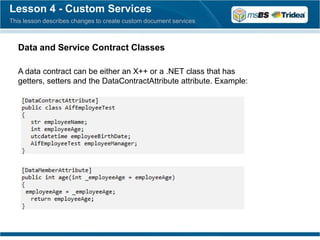
  A data contract can be either an X++ or a .NET class that has
  getters, setters and the DataContractAttribute attribute. Example:
Lesson 4 - Custom Services
This lesson describes changes to create custom document services


  Data and Service Contract Classes

  After you have created a data contract class, you create the service
  contract class. The service contract class is the class that is exposed as
  a service. It consumes the data contract class. Example:
Lesson 5: Consuming Web Services
This lesson describes the improvements in consuming web services


  2012 vs 2009

  In DAX 2009, you could consume an external web service from X++ code
  by adding a Service reference under the References node of the AOT.

  The issue with this functionality was that the service references ran in a
  separate application domain compared to the X++ code.

  In DAX 2012, this was replaced by a new model for consuming external
  Web service, where you can add your Visual Studio projects into AOT.

  In Visual Studio, with a reference to the same web service and an
  instance of the same proxy class, Intellisense displays many more
  properties and methods.
Lesson 6: Transformations
This lesson shows the improvements in transformation of incoming data


   Improvements

   In DAX 2009, you were able to transform incoming data through the use of
   pipeline components. The application shipped with two pipeline components:

    Value substitution: allow users to substitute an incoming value with a
     destination value.

    XSLT transformation: allowed users to create XSLT transformations that
     converted an inbound document format to the required schema of the DAX
     document.

   In order to implement any other transformations you were required to create a
   custom pipeline component class.

   We are still able to use value substitution and xslt transformations similar to that
   implemented in DAX 2009. In addition, DAX 2012 now allows you to implement
   custom transformation assemblies using the .Net and Visual Studio 2010.
Lesson 7: Office Add-in
This lesson shows how to use Office with Dynamics AX


  Word & Excel

  The Office Add-ins for Microsoft Dynamics AX 2012 enable queries and AIF
  Document services to be integrated into Excel or Word.

  Only services that have Create or Update methods can be used as data sources
  to modify data in excel. In order to use the services, you must first add them to
  an AIF Services port and activate the port.

  To use a service or query within Microsoft Excel or Word, you must expose
  these services and queries as a data source.
Services


           Have fun. ;)

Microsoft Dynamics AX 2012 - Services Overview

  • 1.
    Fabio Filardi Dynamics AXTechnical Architect fabiofilardi@gmail.com
  • 2.
    Services Overview Lesson 1: Service Groups Lesson 2: Ports and Adapters Lesson 3: Infra & Deployment Lesson 4: Custom Services Lesson 5: Consuming Web Services Lesson 6: Transformations Lesson 7: Office Add-in
  • 3.
    Overview  InMicrosoft Dynamics AX 2012, the Application Integration Framework (AIF) underwent a number of dramatic changes, starting with its name. The AIF is now known as Services. In the application you will see it listed as Services and Application Integration Framework.  In Microsoft Dynamics AX 2012, the module offers more options for WCF service hosts, a reduction in the number of forms and concepts, an increase in the performance of service calls and more flexibility in the classes on which services can be built.
  • 4.
    Lesson 1: ServiceGroups This lesson defines the term Service Group and describes what it contains What is and advantages  Service Groups is a new node added to the AOT and they are hosted on the AOS.  A single service group consists of a set of services deployed together.  Besides having services consistently managed and deployed together, there are other advantages to service groups:  All the services are contained within the same WSDL;  You only need to add one service reference in Microsoft Visual Studio to access all of the objects from the services in the service group;  You can use the types exposed in the services throughout your .NET code.
  • 5.
    Lesson 2: Portsand Adapters This lesson defines the terms Basic and Enhanced Ports and Adapter types Introduction  A port represents a Windows Communication Foundation (WCF) service host, and all services that it hosts are WCF endpoints. By default, a port is hosted on the Application Object Server (AOS) or on Internet Information Services (IIS) if HTTP is chosen as the adapter.  In Microsoft Dynamics AX 2009, the configuration of AIF involved several concepts including local endpoints, adapters, channels and endpoints. Each concept had multiple steps and its own form. In Microsoft Dynamics AX 2012, the user interface for the Services module is dramatically restructured resulting in the introduction of ports and most of the concepts are generated for you and they are configured in a single form.
  • 6.
    Lesson 2: Portsand Adapters This lesson defines the terms Basic and Enhanced Ports and Adapter types Types  There are both Inbound and Outbound ports that have similar functionality. Inbound ports handle incoming requests. Outbound ports handle requests that are outbound only, such as when the Send electronically is clicked on a form within the application.  Inbound ports can be Basic or Enhanced. When a service group is deployed, basic ports are generated and configured automatically. Enhanced ports are port you create manually. They give you several options around hosting, adapter types, document processing, error handling and security.
  • 7.
    Lesson 2: Portsand Adapters This lesson defines the terms Basic and Enhanced Ports and Adapter types Basic Port  After a service group is deployed, a basic port is generated to represent the service group. The port will have the same name as the service group it represents, is deployed as a WCF service hosted on your AOS instances and you call these services using the NetTcp adapter.
  • 8.
    Lesson 2: Portsand Adapters This lesson defines the terms Basic and Enhanced Ports and Adapter types Enhanced Ports  Enhanced ports allow many more configuration options than are possible with a basic port. For example, basic ports are deployed as WCF services only to the AOS and use the NetTcp adapter. With an enhanced port, you can choose between an AOS or an IIS host and have several choices for adapter types.  The options for adapters type are: File System, HTTP, MSMQ and NetTcp  Services in Microsoft Dynamics AX 2012 are hosted on the AOS by default, but can also be hosted on IIS. To consume services over the Internet, you must use the HTTP Adapter and host services on IIS. IIS routes all service requests to the AOS. Regardless of the origin of the service request, Internet or Intranet, all the service requests are processed on the AOS.
  • 9.
    Lesson 2: Portsand Adapters This lesson defines the terms Basic and Enhanced Ports and Adapter types Enhanced Ports
  • 10.
    Lesson 3: Infra& Deployment This lesson describes the changes in infrastructure and deployment Performance and Scalability Improvements  The limitations around file sizes (10 MB) no longer exist;  X++ services classes compile into CIL;  Intranet deployment does not require IIS, services are hosted on the AOS by default;  .NET Business Connector is not used by services hosted on the AOS and in IIS;  Session pooling is used to reduce the overhead on operation calls.
  • 11.
    Lesson 3: Infra& Deployment This lesson describes the changes in infrastructure and deployment Services Hosted and Deployed on the AOS There are a some steps for the service to be exposed on the AOS:  A new .NET service assembly is built and copied to the Microsoft Dynamics AX application share.  If re-deploying, the previous service host on the AOS is stopped and the old service assembly is unloaded.  A new service host is created/instantiated on the AOS instance.  When the AOS starts, the AOS startup code loads the new service assembly from the application share.  A new service assembly generated is hosted only in the current AOS, other AOS instances pick up only at startup time.
  • 12.
    Lesson 3: Infra& Deployment This lesson describes the changes in infrastructure and deployment Services Hosted and Deployed in IIS Changes in hosting services on IIS for requests originating from the Internet:  In MS DAX 2009, IIS hosted services used the .NET Business Connector (BC) to communicate with the AOS.  In MS DAX 2012, IIS hosted services use the WCF routing service to send service requests to the AOS.  The WCF routing service does use the Business connector proxy account only to pass the calling user's context to the AOS.  All service requests, regardless of their origin, are processed on the AOS.
  • 13.
    Lesson 4 -Custom Services This lesson describes changes to create custom document services Custom Document Services The steps for creating and updating custom document services are the same as they were in DAX 2009. A difference in the process in DAX 2012, is where you implement your defaulting code. In all previous versions of DAX, defaulting logic for services was implemented in AxBC classes like AxSalesTable or AxSalesLine. The same logic for interactive scenarios was repeated in locations that could not be used by services like the methods on forms. In Microsoft Dynamics AX 2012, in order to avoid duplicating logic, defaulting code can be put on the table in the defaultField() method.
  • 14.
    Lesson 4 -Custom Services This lesson describes changes to create custom document services Custom Document Services Example of defaultField() usage:
  • 15.
    Lesson 4 -Custom Services This lesson describes changes to create custom document services Custom Document Services Changes in creating the query used by custom document services:  It is not necessary to include tables for foreign key references in your query. The document services framework will provide foreign key substitution.  If the tables in your service include dimension key values, it is not necessary to include the dimension framework tables in your query.
  • 16.
    Lesson 4 -Custom Services This lesson describes changes to create custom document services Custom Services As in previous versions of Microsoft Dynamics AX, non-document custom services can be created. In Dynamics AX 2012, the process for creating a non-document service class is easier because classes can be decorated as DataContract classes. The use of non-document classes is more common in 2012.
  • 17.
    Lesson 4 -Custom Services This lesson describes changes to create custom document services Data and Service Contract Classes A data contract can be either an X++ or a .NET class that has getters, setters and the DataContractAttribute attribute. Example:
  • 18.
    Lesson 4 -Custom Services This lesson describes changes to create custom document services Data and Service Contract Classes After you have created a data contract class, you create the service contract class. The service contract class is the class that is exposed as a service. It consumes the data contract class. Example:
  • 19.
    Lesson 5: ConsumingWeb Services This lesson describes the improvements in consuming web services 2012 vs 2009 In DAX 2009, you could consume an external web service from X++ code by adding a Service reference under the References node of the AOT. The issue with this functionality was that the service references ran in a separate application domain compared to the X++ code. In DAX 2012, this was replaced by a new model for consuming external Web service, where you can add your Visual Studio projects into AOT. In Visual Studio, with a reference to the same web service and an instance of the same proxy class, Intellisense displays many more properties and methods.
  • 20.
    Lesson 6: Transformations Thislesson shows the improvements in transformation of incoming data Improvements In DAX 2009, you were able to transform incoming data through the use of pipeline components. The application shipped with two pipeline components:  Value substitution: allow users to substitute an incoming value with a destination value.  XSLT transformation: allowed users to create XSLT transformations that converted an inbound document format to the required schema of the DAX document. In order to implement any other transformations you were required to create a custom pipeline component class. We are still able to use value substitution and xslt transformations similar to that implemented in DAX 2009. In addition, DAX 2012 now allows you to implement custom transformation assemblies using the .Net and Visual Studio 2010.
  • 21.
    Lesson 7: OfficeAdd-in This lesson shows how to use Office with Dynamics AX Word & Excel The Office Add-ins for Microsoft Dynamics AX 2012 enable queries and AIF Document services to be integrated into Excel or Word. Only services that have Create or Update methods can be used as data sources to modify data in excel. In order to use the services, you must first add them to an AIF Services port and activate the port. To use a service or query within Microsoft Excel or Word, you must expose these services and queries as a data source.
  • 22.
    Services Have fun. ;)