GENESYS FRAMEWORK
(LOGICAL ARCHITECTURE)
OVERVIEW
Vishad Garg
Genesys Framework
• The Genesys Framework, a mandatory part of any Genesys-
based interaction management system, provides functions
required for the normal operation of any Genesys solution.
• For getting the bigger picture, how system is organized and
how it operates, this is probably the best way to approach it.
• Here we will look at the major divisions, or layers and the
functions of each layer.
• Later we will see as how these components/Layer interact
with each other or work together for the operation of
Genesys Solution.
Layers of Genesys Framework
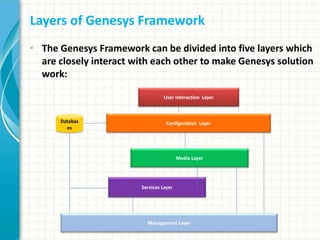
• The Genesys Framework can be divided into five layers which
are closely interact with each other to make Genesys solution
work:
Databas
es
Configuration Layer
Management Layer
User Interaction Layer
Services Layer
Media Layer
Roles of Each Layer
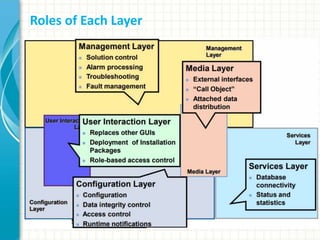
Configuration Layer
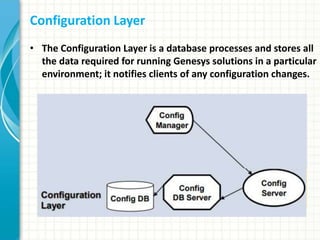
• The Configuration Layer is a database processes and stores all
the data required for running Genesys solutions in a particular
environment; it notifies clients of any configuration changes.
Configuration Layer
• User privileges and Roles are maintained within the Genesys
Configuration Layer.
• An advanced, configuration-data-distribution mechanism, so
applications can read their configuration upon startup and be
notified of updates at runtime without service interruptions.
• Comprehensive data-integrity control functions that prevent
entry of illogical configuration data that might cause solution
malfunction.
• Wizards to help users through the automated process of
solution deployment.
Configuration Layer
• Universal, open, Simple Object Access Protocol (SOAP)
interface to the configuration, so that a broad range of third-
party applications can read and write the information.
• Access control functions to regulate user access to solution
functions and data, based on the access privileges set for each
item.
• WDE pulls in relevant objects to compose WDE views as per
LoB/access specifications.
Configuration Layer
Configuration Layer
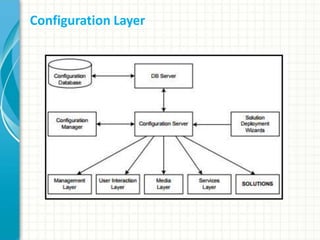
Genesys Configuration Layer stores, processes, and controls
access to the configuration data for a Genesys environment.
Configuration Layer Components Include:
• Configuration Server
• Configuration Database Server
• Configuration Database
• Configuration Manager Enterprise (CME)
• Solution Deployment Wizard
• Configuration Conversion Wizard
• Configuration Import Wizard
Configuration Layer Components
Configuration Server
• Provides centralized access to the Config DB, based on
permissions that administrators can grant to any user for any
config object.
• Handles data integrity, provides run-time notifications,
manages security, and controls access to the Configuration DB
through DB Server. Also notifies applications of changes made
to the data.
• Optionally, Configuration Server can run in Proxy mode to
support a geographically distributed environment.
Configuration Layer Components
Configuration Server
• Every time a change is made, Config Server through DB Server
updates the database then refreshes its own memory cache
of configuration data.
• All client applications are sent dynamic updates relevant to
the functions they perform.
Configuration Layer Components
Configuration Database Server
• DB Server—a Services Layer component—is the access point
to the Configuration Database.
Configuration Database
• The Configuration Database stores all configuration data.
Configuration Layer Components
Configuration Manager Enterprise (CME)
• Provides a user-friendly interface for manipulating the
contact center configuration data that solutions use and for
setting user permissions for solution functions and data.
• Config Manager is a client of Configuration Server.
• Any number of Configuration Managers can be installed in the
same environment and run simultaneously.
Configuration Layer Components
Solution Deployment Wizard
• Automates the process of solution deployment, upgrades,
and un-installation.
• Solution Wizard is a client of Configuration Server.
Configuration Conversion Wizard
• Provides a user-friendly interface to migrate Genesys
configuration data from older versions.
Configuration Layer Components
Configuration Import Wizard
• Makes it easier to integrate data from external data sources
into the Genesys Configuration DB.
• It provides a user-friendly interface to import agent data from
Lightweight Directory Access Protocal (LDAP) and Microsoft
Active Directory DB
• Switch configuration data from various switches.
• The Wizard also includes import/export of configuration data
to and from Extensible Markup Language (XML) files,
generation of custom reports from the Configuration DB, and
comparison of 2 configuration sets (including import of
configuration differences).
Management Layer
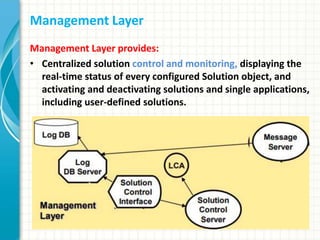
Management Layer provides:
• Centralized solution control and monitoring, displaying the
real-time status of every configured Solution object, and
activating and deactivating solutions and single applications,
including user-defined solutions.
Management Layer
Management Layer provides:
• Centralized logging that records applications maintenance
events.
• Centralized logging also allows you to track individual
interactions, audit activities in your contact center, and store
alarm history.
• Flexible alarm signaling that triggers alarms based on
application maintenance events, system performance
parameters, or Simple Network Management Protocol
(SNMP) thresholds. Alarms are communicated to Solution
Control Interface and can be written to system logs.
Management Layer
Management Layer provides:
• The Management Layer automatically associates alarms with
the solutions they affect and stores alarms as active
conditions in the system until they either removed by another
maintenance event or cleared by the user.
• Fault-management functions, consisting of detection,
isolation, and correction of application failures. For non-
redundant configurations, the Management Layer
automatically restarts applications that fail. For redundant
configurations, this layer supports a switchover to the
standby applications and also automatically restarts
applications that fail.
Management Layer
Management Layer provides:
• Individual host monitoring, including CPU and memory usage
records and information about running processes and
services.
• Support for geographically distributed environments.
Management Layer
Management Layer
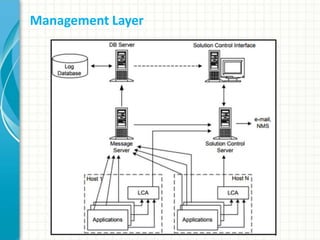
Management Layer Components Include:
• Local Control Agent (LCA)
• Message Server
• Solution Control Server
• Solution Control Interface (SCI)
• Log DB Server
• Log Database
Management Layer Components
Local Control Agent (LCA)
• Local Control Agent (LCA) is a daemon component that
monitors, starts, and stops Genesys server applications as
well as third-party server applications configured in the
Genesys configuration environment. In addition, LCA detects
failures of Genesys servers and communicates their roles in
redundancy context.
Management Layer Components
Message Server
• Message Server provides centralized processing and storage
of all maintenance events that Genesys server applications
generate.
• Events are stored as log records in the Centralized Log
Database where they are available for further centralized
processing.
• Message Server also checks for log events configured to
trigger alarms. If it detects a match, it sends the alarm to
Solution Control Server (SCS) for immediate processing.
Management Layer Components
Solution Control Server
• Solution Control Server (SCS) is the processing center of the
Management Layer. It uses Local Control Agents to start
solution components in the proper order, monitor their
status, and provide a restart or switchover in case of
application failure.
• SCS also processes user-specified alarms.
Management Layer Components
Solution Control Interface (SCI)
• Solution Control Interface provides a user-friendly interface
for managing Genesys solutions.
• SCI displays the status and configuration of all installed
Genesys solutions and information about detected alarms
and maintenance logs. You can start and stop solutions or
single-server applications, including third-party applications,
through this interface.
• SCI also allows advanced handling of maintenance logs and
advanced viewing of host processes.
“Starting in release 8.0, the management functions performed
through SCI can also be performed through the Genesys
Administrator web-based user interface”
Management Layer Components
Log DB Server
• Log DB Server interfaces the Management Layer components
with the DBMS (database management system) in which the
Log Database is installed.
Log Database
• The Log Database stores all log records, including interaction-
related records, alarm history records, and audit records.
User Interaction Layer
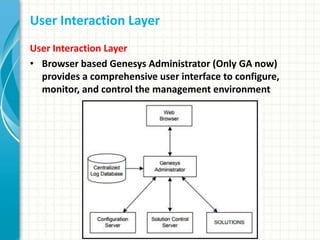
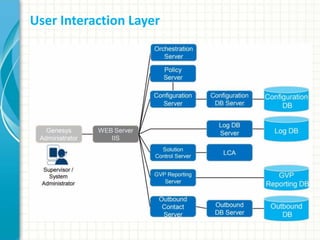
• Browser based Genesys Administrator (Only GA now)
provides a comprehensive user interface to configure,
monitor, and control the management environment
User Interaction Layer
• Genesys Administrator (GA) combines the functionality of
Configuration Manager Enterprise (CME), Solution Control
Interface (SCI) and Outbound Contact Manager (OCM).
Genesys Administrator:
• Communicates with the Configuration Server (a Configuration
Layer component) to exchange configuration information.
• Communicates with the Solution Control Server (a
Management Layer component) to exchange status,
operations, and control information.
• Reads logs from the Centralized Log Database (a Management
Layer component).
User Interaction Layer
Genesys Administrator
used for managing and provisioning of:
• Solutions and all applications and settings within them
• User accounts, skills, roles and permissions
• Environmental information such as switch configuration, user
logins, queues etc.
• Genesys Voice Platform configuration and operation
• Outbound Contact configuration and operation
• Monitor solution state and alarms across the entire
environment
User Interaction Layer
Genesys Administrator Benefits:
• All management operations are now consolidated under a
single user interface with contextual task wizards and short
cuts for common activities.
• Genesys Administrator simplifies finding the location of
configuration information and provides search and navigation
short cuts across the configuration environments.
Media Layer
Media Layer
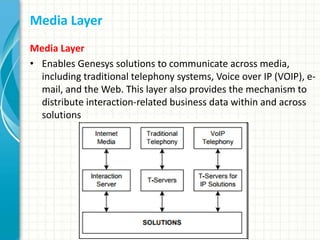
• Enables Genesys solutions to communicate across media,
including traditional telephony systems, Voice over IP (VOIP), e-
mail, and the Web. This layer also provides the mechanism to
distribute interaction-related business data within and across
solutions
Media Layer
• Interaction Server provides an interface with Internet media
like e-mail and web communications. T-Server provides an
interface with traditional telephony systems.
• T-Servers provide an interface with traditional telephony
systems.
• T-Servers for IP Solutions provide an interface with VoIP
telephony systems.
Media Layer
• All of these servers communicate interaction-processing
requests from the Genesys solutions to the media devices and
distribute interaction-processing events in the opposite
direction.
• They also maintain the current state of each interaction and
all the business data collected about each interaction during
processing stages.
• These servers distribute attached data to all the applications
that participate in processing the interaction. They can also
transfer that data across multiple interaction-processing sites.
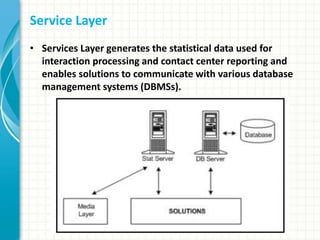
Service Layer
• Services Layer generates the statistical data used for
interaction processing and contact center reporting and
enables solutions to communicate with various database
management systems (DBMSs).
Service Layer
Services Layer provides:
• Stat Server tracks real-time states of interaction management
resources and collects statistics about contact center
performance.
• Genesys solutions use the statistical data to more
“intelligently” manage real-time interactions.
• Through Genesys Reporting, one can use the data to generate
real-time and historical contact center reports.
• DB Server provides the interface between Genesys
applications and the DBMS holding the operational databases
for solutions.
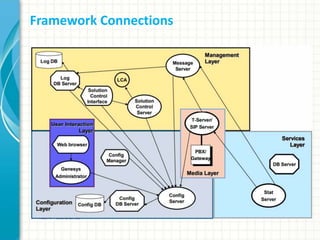
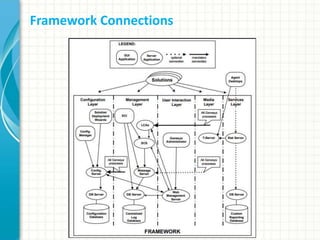
Framework Connections

Genesys framework

  • 1.
  • 2.
    Genesys Framework • TheGenesys Framework, a mandatory part of any Genesys- based interaction management system, provides functions required for the normal operation of any Genesys solution. • For getting the bigger picture, how system is organized and how it operates, this is probably the best way to approach it. • Here we will look at the major divisions, or layers and the functions of each layer. • Later we will see as how these components/Layer interact with each other or work together for the operation of Genesys Solution.
  • 3.
    Layers of GenesysFramework • The Genesys Framework can be divided into five layers which are closely interact with each other to make Genesys solution work: Databas es Configuration Layer Management Layer User Interaction Layer Services Layer Media Layer
  • 4.
  • 5.
    Configuration Layer • TheConfiguration Layer is a database processes and stores all the data required for running Genesys solutions in a particular environment; it notifies clients of any configuration changes.
  • 6.
    Configuration Layer • Userprivileges and Roles are maintained within the Genesys Configuration Layer. • An advanced, configuration-data-distribution mechanism, so applications can read their configuration upon startup and be notified of updates at runtime without service interruptions. • Comprehensive data-integrity control functions that prevent entry of illogical configuration data that might cause solution malfunction. • Wizards to help users through the automated process of solution deployment.
  • 7.
    Configuration Layer • Universal,open, Simple Object Access Protocol (SOAP) interface to the configuration, so that a broad range of third- party applications can read and write the information. • Access control functions to regulate user access to solution functions and data, based on the access privileges set for each item. • WDE pulls in relevant objects to compose WDE views as per LoB/access specifications.
  • 8.
  • 9.
    Configuration Layer Genesys ConfigurationLayer stores, processes, and controls access to the configuration data for a Genesys environment. Configuration Layer Components Include: • Configuration Server • Configuration Database Server • Configuration Database • Configuration Manager Enterprise (CME) • Solution Deployment Wizard • Configuration Conversion Wizard • Configuration Import Wizard
  • 10.
    Configuration Layer Components ConfigurationServer • Provides centralized access to the Config DB, based on permissions that administrators can grant to any user for any config object. • Handles data integrity, provides run-time notifications, manages security, and controls access to the Configuration DB through DB Server. Also notifies applications of changes made to the data. • Optionally, Configuration Server can run in Proxy mode to support a geographically distributed environment.
  • 11.
    Configuration Layer Components ConfigurationServer • Every time a change is made, Config Server through DB Server updates the database then refreshes its own memory cache of configuration data. • All client applications are sent dynamic updates relevant to the functions they perform.
  • 12.
    Configuration Layer Components ConfigurationDatabase Server • DB Server—a Services Layer component—is the access point to the Configuration Database. Configuration Database • The Configuration Database stores all configuration data.
  • 13.
    Configuration Layer Components ConfigurationManager Enterprise (CME) • Provides a user-friendly interface for manipulating the contact center configuration data that solutions use and for setting user permissions for solution functions and data. • Config Manager is a client of Configuration Server. • Any number of Configuration Managers can be installed in the same environment and run simultaneously.
  • 14.
    Configuration Layer Components SolutionDeployment Wizard • Automates the process of solution deployment, upgrades, and un-installation. • Solution Wizard is a client of Configuration Server. Configuration Conversion Wizard • Provides a user-friendly interface to migrate Genesys configuration data from older versions.
  • 15.
    Configuration Layer Components ConfigurationImport Wizard • Makes it easier to integrate data from external data sources into the Genesys Configuration DB. • It provides a user-friendly interface to import agent data from Lightweight Directory Access Protocal (LDAP) and Microsoft Active Directory DB • Switch configuration data from various switches. • The Wizard also includes import/export of configuration data to and from Extensible Markup Language (XML) files, generation of custom reports from the Configuration DB, and comparison of 2 configuration sets (including import of configuration differences).
  • 16.
    Management Layer Management Layerprovides: • Centralized solution control and monitoring, displaying the real-time status of every configured Solution object, and activating and deactivating solutions and single applications, including user-defined solutions.
  • 17.
    Management Layer Management Layerprovides: • Centralized logging that records applications maintenance events. • Centralized logging also allows you to track individual interactions, audit activities in your contact center, and store alarm history. • Flexible alarm signaling that triggers alarms based on application maintenance events, system performance parameters, or Simple Network Management Protocol (SNMP) thresholds. Alarms are communicated to Solution Control Interface and can be written to system logs.
  • 18.
    Management Layer Management Layerprovides: • The Management Layer automatically associates alarms with the solutions they affect and stores alarms as active conditions in the system until they either removed by another maintenance event or cleared by the user. • Fault-management functions, consisting of detection, isolation, and correction of application failures. For non- redundant configurations, the Management Layer automatically restarts applications that fail. For redundant configurations, this layer supports a switchover to the standby applications and also automatically restarts applications that fail.
  • 19.
    Management Layer Management Layerprovides: • Individual host monitoring, including CPU and memory usage records and information about running processes and services. • Support for geographically distributed environments.
  • 20.
  • 21.
    Management Layer Management LayerComponents Include: • Local Control Agent (LCA) • Message Server • Solution Control Server • Solution Control Interface (SCI) • Log DB Server • Log Database
  • 22.
    Management Layer Components LocalControl Agent (LCA) • Local Control Agent (LCA) is a daemon component that monitors, starts, and stops Genesys server applications as well as third-party server applications configured in the Genesys configuration environment. In addition, LCA detects failures of Genesys servers and communicates their roles in redundancy context.
  • 23.
    Management Layer Components MessageServer • Message Server provides centralized processing and storage of all maintenance events that Genesys server applications generate. • Events are stored as log records in the Centralized Log Database where they are available for further centralized processing. • Message Server also checks for log events configured to trigger alarms. If it detects a match, it sends the alarm to Solution Control Server (SCS) for immediate processing.
  • 24.
    Management Layer Components SolutionControl Server • Solution Control Server (SCS) is the processing center of the Management Layer. It uses Local Control Agents to start solution components in the proper order, monitor their status, and provide a restart or switchover in case of application failure. • SCS also processes user-specified alarms.
  • 25.
    Management Layer Components SolutionControl Interface (SCI) • Solution Control Interface provides a user-friendly interface for managing Genesys solutions. • SCI displays the status and configuration of all installed Genesys solutions and information about detected alarms and maintenance logs. You can start and stop solutions or single-server applications, including third-party applications, through this interface. • SCI also allows advanced handling of maintenance logs and advanced viewing of host processes. “Starting in release 8.0, the management functions performed through SCI can also be performed through the Genesys Administrator web-based user interface”
  • 26.
    Management Layer Components LogDB Server • Log DB Server interfaces the Management Layer components with the DBMS (database management system) in which the Log Database is installed. Log Database • The Log Database stores all log records, including interaction- related records, alarm history records, and audit records.
  • 27.
    User Interaction Layer UserInteraction Layer • Browser based Genesys Administrator (Only GA now) provides a comprehensive user interface to configure, monitor, and control the management environment
  • 28.
  • 29.
    User Interaction Layer UserInteraction Layer • Genesys Administrator (GA) combines the functionality of Configuration Manager Enterprise (CME), Solution Control Interface (SCI) and Outbound Contact Manager (OCM). Genesys Administrator: • Communicates with the Configuration Server (a Configuration Layer component) to exchange configuration information. • Communicates with the Solution Control Server (a Management Layer component) to exchange status, operations, and control information. • Reads logs from the Centralized Log Database (a Management Layer component).
  • 30.
    User Interaction Layer GenesysAdministrator used for managing and provisioning of: • Solutions and all applications and settings within them • User accounts, skills, roles and permissions • Environmental information such as switch configuration, user logins, queues etc. • Genesys Voice Platform configuration and operation • Outbound Contact configuration and operation • Monitor solution state and alarms across the entire environment
  • 31.
    User Interaction Layer GenesysAdministrator Benefits: • All management operations are now consolidated under a single user interface with contextual task wizards and short cuts for common activities. • Genesys Administrator simplifies finding the location of configuration information and provides search and navigation short cuts across the configuration environments.
  • 32.
    Media Layer Media Layer •Enables Genesys solutions to communicate across media, including traditional telephony systems, Voice over IP (VOIP), e- mail, and the Web. This layer also provides the mechanism to distribute interaction-related business data within and across solutions
  • 33.
    Media Layer • InteractionServer provides an interface with Internet media like e-mail and web communications. T-Server provides an interface with traditional telephony systems. • T-Servers provide an interface with traditional telephony systems. • T-Servers for IP Solutions provide an interface with VoIP telephony systems.
  • 34.
    Media Layer • Allof these servers communicate interaction-processing requests from the Genesys solutions to the media devices and distribute interaction-processing events in the opposite direction. • They also maintain the current state of each interaction and all the business data collected about each interaction during processing stages. • These servers distribute attached data to all the applications that participate in processing the interaction. They can also transfer that data across multiple interaction-processing sites.
  • 35.
    Service Layer • ServicesLayer generates the statistical data used for interaction processing and contact center reporting and enables solutions to communicate with various database management systems (DBMSs).
  • 36.
    Service Layer Services Layerprovides: • Stat Server tracks real-time states of interaction management resources and collects statistics about contact center performance. • Genesys solutions use the statistical data to more “intelligently” manage real-time interactions. • Through Genesys Reporting, one can use the data to generate real-time and historical contact center reports. • DB Server provides the interface between Genesys applications and the DBMS holding the operational databases for solutions.
  • 37.
  • 38.