AX 2012 X++ Code Best Practices 
Best practice is a method or technique that has consistently shown results superior to 
those achieved with other means, and that is used as a benchmark. In addition, a "best" 
practice can evolve to become better as improvements are discovered. Best practice is 
considered by some as a business buzzword, used to describe the process of 
developing and following a standard way of doing things that multiple organizations can 
use. 
Best practices are used to maintain quality as an alternative to mandatory legislated 
standards and can be based on self-assessment or benchmarking.
AX 2012 X++ Code Best Practices 
Index 
Select Statements 
Comments 
Extra Semicolon 
Constants 
User interface labels 
System Oriented Constants 
Dates 
Try catch Block 
Transactions 
Conditional Statements 
XML Documentation 
Avoiding Potential Security Issues 
Other Best Practices 
References
AX 2012 X++ Code Best Practices 
Select Statements 
➔ The index, order by, and where statements are indented once relative to the 
select or while select statements. 
➔ The where expression is structured in a column. 
➔ The Boolean operators (&&) are at the beginning of the line (and in columns). 
➔ The while select block has braces even though it contains only one statement. 
➔ The braces are at the same column position as the while block. 
➔ The uppercase- and lowercase-name standards are adhered to. 
Comments 
➔ To find comments in the source (both // .. and /* .. */), use the Find 
dialog to search for methods containing the text (regular expression): 
/[/*] 
➔ Comments should not include: 
◆ Dates 
◆ Names 
◆ Aliases 
◆ Version or layer references 
◆ Bug numbers – unless it is a workaround, or unless the code 
could appear inappropriate if you didn't know that it was for a 
bug fix. 
◆ Politically or culturally sensitive phrases 
➔ If you put a comment at the start of the method to describe its 
purpose and use, you can use block comments (/* */) 
Extra Semicolon 
➔ From Microsoft Dynamics AX 2012 onward, you are no longer required 
to put a semicolon on an empty line after the last variable declaration. 
Adding the semicolon is no longer an X++ best practices.
AX 2012 X++ Code Best Practices 
Constants 
Use Intrinsic functions whenever possible. Intrinsic functions are metadata 
assertion functions. They take arguments that represent entities in the 
Application Object Tree (AOT), and validate these arguments at compile time 
details 
➔ User interface labels 
this must be complete sentences. Do not build sentences using more 
than one label, or other constants or variables under program control 
(do not use concatenation). 
Description description = "@SYS12345" 
Use strFmt to format user interface text. 
➔ System Oriented Constants 
Do not use labels. You will get a warning if a label is used inside single 
quotes. 
Dates 
➔ Use only strongly typed (date) fields, variables, and controls (do 
not use str or int). 
➔ Use Auto settings in date formatting properties. 
➔ Use DateTimeUtil::getSystemDateTime instead of systemDateGet 
or today 
➔ Avoid using date2str for performing date conversions. 
➔ Most application logic should use the system function 
systemDateGet , which holds the logic business date of the 
system (this can be set from the status bar). 
➔ The system function today() should be used only where the 
actual machine date is needed 
➔ use strFmt or date2Str with -1 in all the formatting parameters. 
This ensures that the date is formatted in the way that the user 
has specified in Regional Settings
AX 2012 X++ Code Best Practices 
Try catch Block 
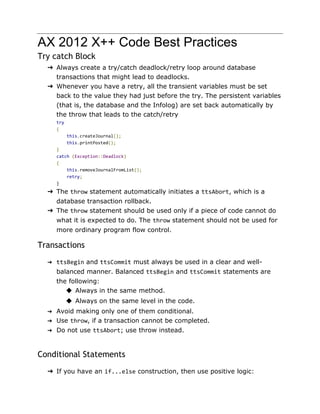
➔ Always create a try/catch deadlock/retry loop around database 
transactions that might lead to deadlocks. 
➔ Whenever you have a retry, all the transient variables must be set 
back to the value they had just before the try. The persistent variables 
(that is, the database and the Infolog) are set back automatically by 
the throw that leads to the catch/retry 
try 
{ 
this.createJournal(); 
this.printPosted(); 
} 
catch (Exception::Deadlock) 
{ 
this.removeJournalFromList(); 
retry; 
} 
➔ The throw statement automatically initiates a ttsAbort, which is a 
database transaction rollback. 
➔ The throw statement should be used only if a piece of code cannot do 
what it is expected to do. The throw statement should not be used for 
more ordinary program flow control. 
Transactions 
➔ ttsBegin and ttsCommit must always be used in a clear and well-balanced 
manner. Balanced ttsBegin and ttsCommit statements are 
the following: 
◆ Always in the same method. 
◆ Always on the same level in the code. 
➔ Avoid making only one of them conditional. 
➔ Use throw, if a transaction cannot be completed. 
➔ Do not use ttsAbort; use throw instead. 
Conditional Statements 
➔ If you have an if...else construction, then use positive logic:
AX 2012 X++ Code Best Practices 
Avoid: 
if (!false) 
{ 
... 
} 
XML Documentation 
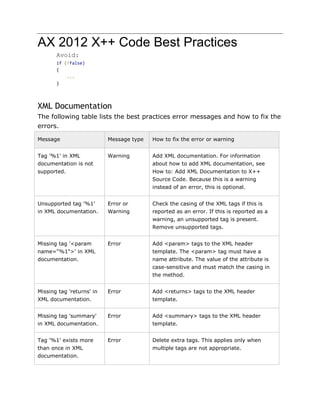
The following table lists the best practices error messages and how to fix the 
errors. 
Message Message type How to fix the error or warning 
Tag '%1' in XML 
documentation is not 
supported. 
Warning Add XML documentation. For information 
about how to add XML documentation, see 
How to: Add XML Documentation to X++ 
Source Code. Because this is a warning 
instead of an error, this is optional. 
Unsupported tag '%1' 
in XML documentation. 
Error or 
Warning 
Check the casing of the XML tags if this is 
reported as an error. If this is reported as a 
warning, an unsupported tag is present. 
Remove unsupported tags. 
Missing tag '<param 
name="%1">' in XML 
documentation. 
Error Add <param> tags to the XML header 
template. The <param> tag must have a 
name attribute. The value of the attribute is 
case-sensitive and must match the casing in 
the method. 
Missing tag 'returns' in 
XML documentation. 
Error Add <returns> tags to the XML header 
template. 
Missing tag 'summary' 
in XML documentation. 
Error Add <summary> tags to the XML header 
template. 
Tag '%1' exists more 
than once in XML 
documentation. 
Error Delete extra tags. This applies only when 
multiple tags are not appropriate.
AX 2012 X++ Code Best Practices 
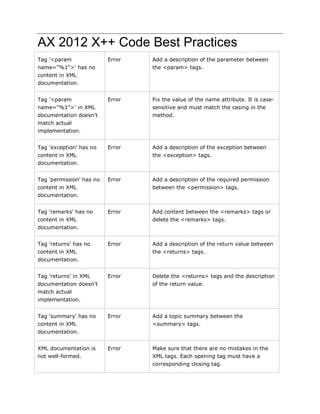
Tag '<param 
name="%1">' has no 
content in XML 
documentation. 
Error Add a description of the parameter between 
the <param> tags. 
Tag '<param 
name="%1">' in XML 
documentation doesn't 
match actual 
implementation. 
Error Fix the value of the name attribute. It is case-sensitive 
and must match the casing in the 
method. 
Tag 'exception' has no 
content in XML 
documentation. 
Error Add a description of the exception between 
the <exception> tags. 
Tag 'permission' has no 
content in XML 
documentation. 
Error Add a description of the required permission 
between the <permission> tags. 
Tag 'remarks' has no 
content in XML 
documentation. 
Error Add content between the <remarks> tags or 
delete the <remarks> tags. 
Tag 'returns' has no 
content in XML 
documentation. 
Error Add a description of the return value between 
the <returns> tags. 
Tag 'returns' in XML 
documentation doesn't 
match actual 
implementation. 
Error Delete the <returns> tags and the description 
of the return value. 
Tag 'summary' has no 
content in XML 
documentation. 
Error Add a topic summary between the 
<summary> tags. 
XML documentation is 
not well-formed. 
Error Make sure that there are no mistakes in the 
XML tags. Each opening tag must have a 
corresponding closing tag.
AX 2012 X++ Code Best Practices 
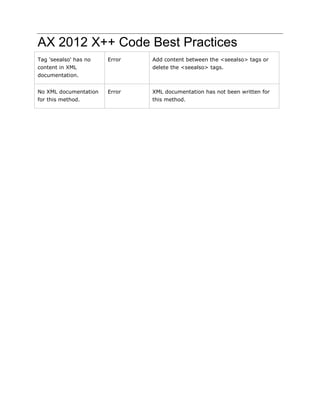
Tag 'seealso' has no 
content in XML 
documentation. 
Error Add content between the <seealso> tags or 
delete the <seealso> tags. 
No XML documentation 
for this method. 
Error XML documentation has not been written for 
this method.
AX 2012 X++ Code Best Practices 
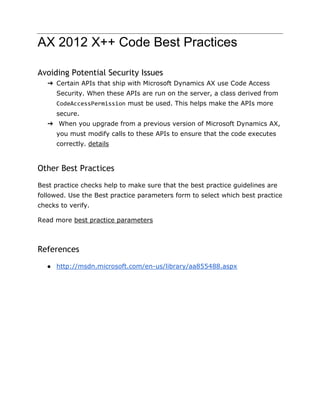
Avoiding Potential Security Issues 
➔ Certain APIs that ship with Microsoft Dynamics AX use Code Access 
Security. When these APIs are run on the server, a class derived from 
CodeAccessPermission must be used. This helps make the APIs more 
secure. 
➔ When you upgrade from a previous version of Microsoft Dynamics AX, 
you must modify calls to these APIs to ensure that the code executes 
correctly. details 
Other Best Practices 
Best practice checks help to make sure that the best practice guidelines are 
followed. Use the Best practice parameters form to select which best practice 
checks to verify. 
Read more best practice parameters 
References 
● http://msdn.microsoft.com/en-us/library/aa855488.aspx

Ax 2012 x++ code best practices

  • 1.
    AX 2012 X++Code Best Practices Best practice is a method or technique that has consistently shown results superior to those achieved with other means, and that is used as a benchmark. In addition, a "best" practice can evolve to become better as improvements are discovered. Best practice is considered by some as a business buzzword, used to describe the process of developing and following a standard way of doing things that multiple organizations can use. Best practices are used to maintain quality as an alternative to mandatory legislated standards and can be based on self-assessment or benchmarking.
  • 2.
    AX 2012 X++Code Best Practices Index Select Statements Comments Extra Semicolon Constants User interface labels System Oriented Constants Dates Try catch Block Transactions Conditional Statements XML Documentation Avoiding Potential Security Issues Other Best Practices References
  • 3.
    AX 2012 X++Code Best Practices Select Statements ➔ The index, order by, and where statements are indented once relative to the select or while select statements. ➔ The where expression is structured in a column. ➔ The Boolean operators (&&) are at the beginning of the line (and in columns). ➔ The while select block has braces even though it contains only one statement. ➔ The braces are at the same column position as the while block. ➔ The uppercase- and lowercase-name standards are adhered to. Comments ➔ To find comments in the source (both // .. and /* .. */), use the Find dialog to search for methods containing the text (regular expression): /[/*] ➔ Comments should not include: ◆ Dates ◆ Names ◆ Aliases ◆ Version or layer references ◆ Bug numbers – unless it is a workaround, or unless the code could appear inappropriate if you didn't know that it was for a bug fix. ◆ Politically or culturally sensitive phrases ➔ If you put a comment at the start of the method to describe its purpose and use, you can use block comments (/* */) Extra Semicolon ➔ From Microsoft Dynamics AX 2012 onward, you are no longer required to put a semicolon on an empty line after the last variable declaration. Adding the semicolon is no longer an X++ best practices.
  • 4.
    AX 2012 X++Code Best Practices Constants Use Intrinsic functions whenever possible. Intrinsic functions are metadata assertion functions. They take arguments that represent entities in the Application Object Tree (AOT), and validate these arguments at compile time details ➔ User interface labels this must be complete sentences. Do not build sentences using more than one label, or other constants or variables under program control (do not use concatenation). Description description = "@SYS12345" Use strFmt to format user interface text. ➔ System Oriented Constants Do not use labels. You will get a warning if a label is used inside single quotes. Dates ➔ Use only strongly typed (date) fields, variables, and controls (do not use str or int). ➔ Use Auto settings in date formatting properties. ➔ Use DateTimeUtil::getSystemDateTime instead of systemDateGet or today ➔ Avoid using date2str for performing date conversions. ➔ Most application logic should use the system function systemDateGet , which holds the logic business date of the system (this can be set from the status bar). ➔ The system function today() should be used only where the actual machine date is needed ➔ use strFmt or date2Str with -1 in all the formatting parameters. This ensures that the date is formatted in the way that the user has specified in Regional Settings
  • 5.
    AX 2012 X++Code Best Practices Try catch Block ➔ Always create a try/catch deadlock/retry loop around database transactions that might lead to deadlocks. ➔ Whenever you have a retry, all the transient variables must be set back to the value they had just before the try. The persistent variables (that is, the database and the Infolog) are set back automatically by the throw that leads to the catch/retry try { this.createJournal(); this.printPosted(); } catch (Exception::Deadlock) { this.removeJournalFromList(); retry; } ➔ The throw statement automatically initiates a ttsAbort, which is a database transaction rollback. ➔ The throw statement should be used only if a piece of code cannot do what it is expected to do. The throw statement should not be used for more ordinary program flow control. Transactions ➔ ttsBegin and ttsCommit must always be used in a clear and well-balanced manner. Balanced ttsBegin and ttsCommit statements are the following: ◆ Always in the same method. ◆ Always on the same level in the code. ➔ Avoid making only one of them conditional. ➔ Use throw, if a transaction cannot be completed. ➔ Do not use ttsAbort; use throw instead. Conditional Statements ➔ If you have an if...else construction, then use positive logic:
  • 6.
    AX 2012 X++Code Best Practices Avoid: if (!false) { ... } XML Documentation The following table lists the best practices error messages and how to fix the errors. Message Message type How to fix the error or warning Tag '%1' in XML documentation is not supported. Warning Add XML documentation. For information about how to add XML documentation, see How to: Add XML Documentation to X++ Source Code. Because this is a warning instead of an error, this is optional. Unsupported tag '%1' in XML documentation. Error or Warning Check the casing of the XML tags if this is reported as an error. If this is reported as a warning, an unsupported tag is present. Remove unsupported tags. Missing tag '<param name="%1">' in XML documentation. Error Add <param> tags to the XML header template. The <param> tag must have a name attribute. The value of the attribute is case-sensitive and must match the casing in the method. Missing tag 'returns' in XML documentation. Error Add <returns> tags to the XML header template. Missing tag 'summary' in XML documentation. Error Add <summary> tags to the XML header template. Tag '%1' exists more than once in XML documentation. Error Delete extra tags. This applies only when multiple tags are not appropriate.
  • 7.
    AX 2012 X++Code Best Practices Tag '<param name="%1">' has no content in XML documentation. Error Add a description of the parameter between the <param> tags. Tag '<param name="%1">' in XML documentation doesn't match actual implementation. Error Fix the value of the name attribute. It is case-sensitive and must match the casing in the method. Tag 'exception' has no content in XML documentation. Error Add a description of the exception between the <exception> tags. Tag 'permission' has no content in XML documentation. Error Add a description of the required permission between the <permission> tags. Tag 'remarks' has no content in XML documentation. Error Add content between the <remarks> tags or delete the <remarks> tags. Tag 'returns' has no content in XML documentation. Error Add a description of the return value between the <returns> tags. Tag 'returns' in XML documentation doesn't match actual implementation. Error Delete the <returns> tags and the description of the return value. Tag 'summary' has no content in XML documentation. Error Add a topic summary between the <summary> tags. XML documentation is not well-formed. Error Make sure that there are no mistakes in the XML tags. Each opening tag must have a corresponding closing tag.
  • 8.
    AX 2012 X++Code Best Practices Tag 'seealso' has no content in XML documentation. Error Add content between the <seealso> tags or delete the <seealso> tags. No XML documentation for this method. Error XML documentation has not been written for this method.
  • 9.
    AX 2012 X++Code Best Practices Avoiding Potential Security Issues ➔ Certain APIs that ship with Microsoft Dynamics AX use Code Access Security. When these APIs are run on the server, a class derived from CodeAccessPermission must be used. This helps make the APIs more secure. ➔ When you upgrade from a previous version of Microsoft Dynamics AX, you must modify calls to these APIs to ensure that the code executes correctly. details Other Best Practices Best practice checks help to make sure that the best practice guidelines are followed. Use the Best practice parameters form to select which best practice checks to verify. Read more best practice parameters References ● http://msdn.microsoft.com/en-us/library/aa855488.aspx