A Quick Guide to
Microsoft Forms
9 Nov 2019
About Microsoft Forms
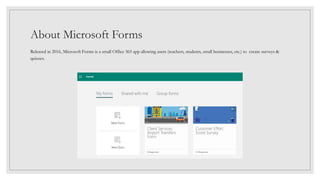
Released in 2016, Microsoft Forms is a small Office 365 app allowing users (teachers, students, small businesses, etc.) to create surveys &
quizzes.
Features & Benefits
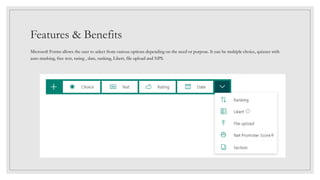
Microsoft Forms allows the user to select from various options depending on the need or purpose. It can be multiple choice, quizzes with
auto-marking, free text, rating , date, ranking, Likert, file upload and NPS.
Configuration & Capability
Access to forms, polls or quizzes created using Microsoft Forms is not restricted to
Office 365 users. The app can grant access to anyone with the link.
It also provides a set of options for responses from start dates to a an automated &
customized thank you message.
The user can opt to send email receipts to respondents and/or get an
email notification for each response.
Configuration & Capability
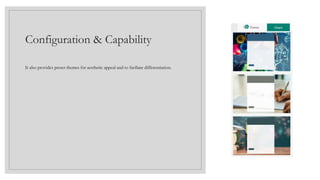
It also provides preset themes for aesthetic appeal and to faciliate differentiation.
Configuration &
Capability
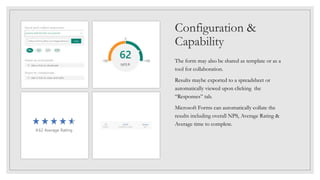
The form may also be shared as template or as a
tool for collaboration.
Results maybe exported to a spreadsheet or
automatically viewed upon clicking the
“Responses” tab.
Microsoft Forms can automatically collate the
results including overall NPS, Average Rating &
Average time to complete.
Reference:
Frequently asked questions about Microsoft Forms. (n.d.). Retrieved from https://support.office.com/en-us/article/frequently-asked-
questions-about-microsoft-forms-495c4242-6102-40a0-add8-df05ed6af61c.
Please attribute to Creative
Commons with a link to
creativecommons.org
A Quick Guide to Microsoft
Forms by Jeffrey Santos is
licensed under a Creative
Commons Attribution-
NonCommercial-ShareAlike
4.0 International License.

A Quick Guide to Microsoft Forms

  • 1.
    A Quick Guideto Microsoft Forms 9 Nov 2019
  • 2.
    About Microsoft Forms Releasedin 2016, Microsoft Forms is a small Office 365 app allowing users (teachers, students, small businesses, etc.) to create surveys & quizzes.
  • 3.
    Features & Benefits MicrosoftForms allows the user to select from various options depending on the need or purpose. It can be multiple choice, quizzes with auto-marking, free text, rating , date, ranking, Likert, file upload and NPS.
  • 4.
    Configuration & Capability Accessto forms, polls or quizzes created using Microsoft Forms is not restricted to Office 365 users. The app can grant access to anyone with the link. It also provides a set of options for responses from start dates to a an automated & customized thank you message. The user can opt to send email receipts to respondents and/or get an email notification for each response.
  • 5.
    Configuration & Capability Italso provides preset themes for aesthetic appeal and to faciliate differentiation.
  • 6.
    Configuration & Capability The formmay also be shared as template or as a tool for collaboration. Results maybe exported to a spreadsheet or automatically viewed upon clicking the “Responses” tab. Microsoft Forms can automatically collate the results including overall NPS, Average Rating & Average time to complete.
  • 7.
    Reference: Frequently asked questionsabout Microsoft Forms. (n.d.). Retrieved from https://support.office.com/en-us/article/frequently-asked- questions-about-microsoft-forms-495c4242-6102-40a0-add8-df05ed6af61c.
  • 8.
    Please attribute toCreative Commons with a link to creativecommons.org A Quick Guide to Microsoft Forms by Jeffrey Santos is licensed under a Creative Commons Attribution- NonCommercial-ShareAlike 4.0 International License.

Editor's Notes

  • #9 <a rel="license" href="http://creativecommons.org/licenses/by-nc-sa/4.0/"><img alt="Creative Commons License" style="border-width:0" src="https://i.creativecommons.org/l/by-nc-sa/4.0/88x31.png" /></a><br /><span xmlns:dct="http://purl.org/dc/terms/" href="http://purl.org/dc/dcmitype/Text" property="dct:title" rel="dct:type">A Quick Guide to Microsoft Forms</span> by <span xmlns:cc="http://creativecommons.org/ns#" property="cc:attributionName">Jeffrey Santos</span> is licensed under a <a rel="license" href="http://creativecommons.org/licenses/by-nc-sa/4.0/">Creative Commons Attribution-NonCommercial-ShareAlike 4.0 International License</a>.