Migrating On-Premises Workloads
with Azure Migrate
Dinusha Kumarasiri
About Me
 Microsoft MVP for Microsoft Azure
 Microsoft Certified Trainer (MCT)
 Senior Consultant at Dialog Information Technology
 Cloud Enthusiast
 Love to share what I learn
Agenda
 Why Moving to Cloud?
 Cloud Adoption Framework (CAF)
 Cloud Migration Strategies
 Cloud Migration Phases
 Overview of Azure Migrate
 Migrating to Azure Virtual Machines
 Migrating to Azure Databases
 Migrating to Azure App Services
 Migrating to Containers
Why Moving to Cloud?
Cost Savings
Optimization of
Internal Operations
Increase Business
Agility
Improve Customer
Experiences
New Technical
Capabilities
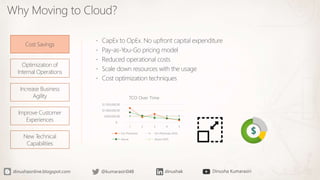
 CapEx to OpEx. No upfront capital expenditure
 Pay-as-You-Go pricing model
 Reduced operational costs
 Scale down resources with the usage
 Cost optimization techniques
$-
$500,000.00
$1,000,000.00
$1,500,000.00
1 2 3 4 5
TCO Over Time
On-Premises On-Premises AVG
Azure Azure AVG
Why Moving to Cloud?
Cost Savings
Optimization of
Internal Operations
Increase Business
Agility
Improve Customer
Experiences
New Technical
Capabilities
 Improved collaboration
 Streamlined processes with automations
 Enhanced security with proven solutions
 Better insights with monitoring and visualizations
Why Moving to Cloud?
Cost Savings
Optimization of
Internal Operations
Increase Business
Agility
Improve Customer
Experiences
New Technical
Capabilities
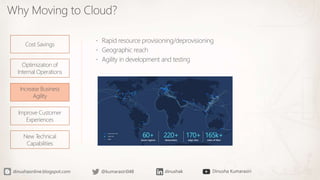
 Rapid resource provisioning/deprovisioning
 Geographic reach
 Agility in development and testing
Why Moving to Cloud?
Cost Savings
Optimization of
Internal Operations
Increase Business
Agility
Improve Customer
Experiences
New Technical
Capabilities
 Improved availability
 Enhanced security
 Low latency backed with SLA
Why Moving to Cloud?
Cost Savings
Optimization of
Internal Operations
Increase Business
Agility
Improve Customer
Experiences
New Technical
Capabilities
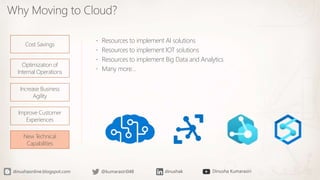
 Resources to implement AI solutions
 Resources to implement IOT solutions
 Resources to implement Big Data and Analytics
 Many more…
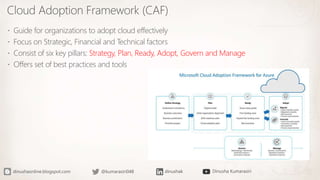
Cloud Adoption Framework (CAF)
 Guide for organizations to adopt cloud effectively
 Focus on Strategic, Financial and Technical factors
 Consist of six key pillars: Strategy, Plan, Ready, Adopt, Govern and Manage
 Offers set of best practices and tools
Cloud Migration Strategies
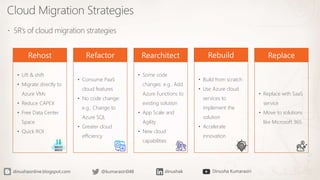
 5R’s of cloud migration strategies
• Lift & shift
• Migrate directly to
Azure VMs
• Reduce CAPEX
• Free Data Center
Space
• Quick ROI
• Consume PaaS
cloud features
• No code change:
e.g.. Change to
Azure SQL
• Greater cloud
efficiency
• Some code
changes: e.g.. Add
Azure Functions to
existing solution
• App Scale and
Agility
• New cloud
capabilities
• Build from scratch
• Use Azure cloud
services to
implement the
solution
• Accelerate
innovation
• Replace with SaaS
service
• Move to solutions
like Microsoft 365
Cloud Migration Phases
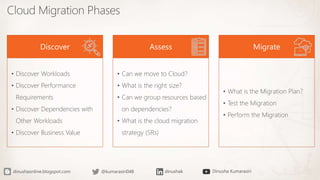
• Discover Workloads
• Discover Performance
Requirements
• Discover Dependencies with
Other Workloads
• Discover Business Value
• Can we move to Cloud?
• What is the right size?
• Can we group resources based
on dependencies?
• What is the cloud migration
strategy (5Rs)
• What is the Migration Plan?
• Test the Migration
• Perform the Migration
Overview of Azure Migrate Service
 Central Hub to Discover, Assess and Migrate resources to Microsoft Azure
 Built-in tools and third-party tools
 Plan, Test and Migrate workloads to Azure
• VMWare
• Hyper-V
• Physical Servers
• Databases • Web Apps • Azure Data Box
• Virtual Desktop
Infrastructure (VDI)
Migrating to Azure Virtual Machines
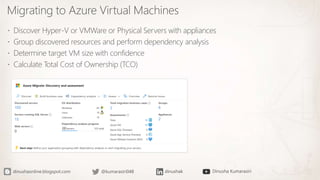
 Discover Hyper-V or VMWare or Physical Servers with appliances
 Group discovered resources and perform dependency analysis
 Determine target VM size with confidence
 Calculate Total Cost of Ownership (TCO)
Migrating to Azure Virtual Machines
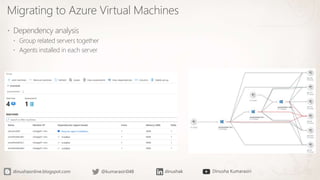
 Dependency analysis
 Group related servers together
 Agents installed in each server
Migrating to Azure Virtual Machines
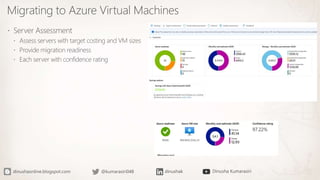
 Server Assessment
 Assess servers with target costing and VM sizes
 Provide migration readiness
 Each server with confidence rating
Demo
Migrating to Azure Databases
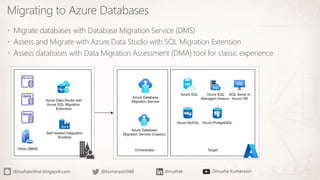
 Migrate databases with Database Migration Service (DMS)
 Assess and Migrate with Azure Data Studio with SQL Migration Extension
 Assess databases with Data Migration Assessment (DMA) tool for classic experience
Migrating to Azure Databases
 Database Assessment
Migrating to Azure Databases
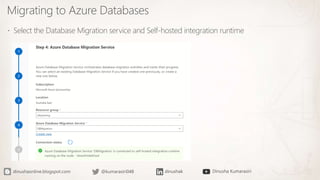
 Select the Database Migration service and Self-hosted integration runtime
Migrating to Azure Databases
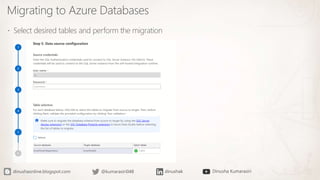
 Select desired tables and perform the migration
Migrating to Azure App Service
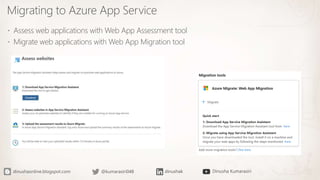
 Assess web applications with Web App Assessment tool
 Migrate web applications with Web App Migration tool
Migrating to Containers
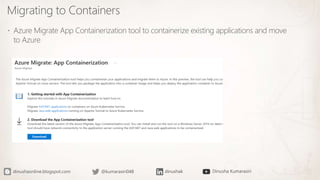
 Azure Migrate App Containerization tool to containerize existing applications and move
to Azure
dinushaonline.blogspot.com @kumarasiri048 dinushak Dinusha Kumarasiri

Migrating On-Premises Workloads with Azure Migrate

  • 1.
    Migrating On-Premises Workloads withAzure Migrate Dinusha Kumarasiri
  • 2.
    About Me  MicrosoftMVP for Microsoft Azure  Microsoft Certified Trainer (MCT)  Senior Consultant at Dialog Information Technology  Cloud Enthusiast  Love to share what I learn
  • 3.
    Agenda  Why Movingto Cloud?  Cloud Adoption Framework (CAF)  Cloud Migration Strategies  Cloud Migration Phases  Overview of Azure Migrate  Migrating to Azure Virtual Machines  Migrating to Azure Databases  Migrating to Azure App Services  Migrating to Containers
  • 4.
    Why Moving toCloud? Cost Savings Optimization of Internal Operations Increase Business Agility Improve Customer Experiences New Technical Capabilities  CapEx to OpEx. No upfront capital expenditure  Pay-as-You-Go pricing model  Reduced operational costs  Scale down resources with the usage  Cost optimization techniques $- $500,000.00 $1,000,000.00 $1,500,000.00 1 2 3 4 5 TCO Over Time On-Premises On-Premises AVG Azure Azure AVG
  • 5.
    Why Moving toCloud? Cost Savings Optimization of Internal Operations Increase Business Agility Improve Customer Experiences New Technical Capabilities  Improved collaboration  Streamlined processes with automations  Enhanced security with proven solutions  Better insights with monitoring and visualizations
  • 6.
    Why Moving toCloud? Cost Savings Optimization of Internal Operations Increase Business Agility Improve Customer Experiences New Technical Capabilities  Rapid resource provisioning/deprovisioning  Geographic reach  Agility in development and testing
  • 7.
    Why Moving toCloud? Cost Savings Optimization of Internal Operations Increase Business Agility Improve Customer Experiences New Technical Capabilities  Improved availability  Enhanced security  Low latency backed with SLA
  • 8.
    Why Moving toCloud? Cost Savings Optimization of Internal Operations Increase Business Agility Improve Customer Experiences New Technical Capabilities  Resources to implement AI solutions  Resources to implement IOT solutions  Resources to implement Big Data and Analytics  Many more…
  • 9.
    Cloud Adoption Framework(CAF)  Guide for organizations to adopt cloud effectively  Focus on Strategic, Financial and Technical factors  Consist of six key pillars: Strategy, Plan, Ready, Adopt, Govern and Manage  Offers set of best practices and tools
  • 10.
    Cloud Migration Strategies 5R’s of cloud migration strategies • Lift & shift • Migrate directly to Azure VMs • Reduce CAPEX • Free Data Center Space • Quick ROI • Consume PaaS cloud features • No code change: e.g.. Change to Azure SQL • Greater cloud efficiency • Some code changes: e.g.. Add Azure Functions to existing solution • App Scale and Agility • New cloud capabilities • Build from scratch • Use Azure cloud services to implement the solution • Accelerate innovation • Replace with SaaS service • Move to solutions like Microsoft 365
  • 11.
    Cloud Migration Phases •Discover Workloads • Discover Performance Requirements • Discover Dependencies with Other Workloads • Discover Business Value • Can we move to Cloud? • What is the right size? • Can we group resources based on dependencies? • What is the cloud migration strategy (5Rs) • What is the Migration Plan? • Test the Migration • Perform the Migration
  • 12.
    Overview of AzureMigrate Service  Central Hub to Discover, Assess and Migrate resources to Microsoft Azure  Built-in tools and third-party tools  Plan, Test and Migrate workloads to Azure • VMWare • Hyper-V • Physical Servers • Databases • Web Apps • Azure Data Box • Virtual Desktop Infrastructure (VDI)
  • 13.
    Migrating to AzureVirtual Machines  Discover Hyper-V or VMWare or Physical Servers with appliances  Group discovered resources and perform dependency analysis  Determine target VM size with confidence  Calculate Total Cost of Ownership (TCO)
  • 14.
    Migrating to AzureVirtual Machines  Dependency analysis  Group related servers together  Agents installed in each server
  • 15.
    Migrating to AzureVirtual Machines  Server Assessment  Assess servers with target costing and VM sizes  Provide migration readiness  Each server with confidence rating
  • 16.
  • 17.
    Migrating to AzureDatabases  Migrate databases with Database Migration Service (DMS)  Assess and Migrate with Azure Data Studio with SQL Migration Extension  Assess databases with Data Migration Assessment (DMA) tool for classic experience
  • 18.
    Migrating to AzureDatabases  Database Assessment
  • 19.
    Migrating to AzureDatabases  Select the Database Migration service and Self-hosted integration runtime
  • 20.
    Migrating to AzureDatabases  Select desired tables and perform the migration
  • 21.
    Migrating to AzureApp Service  Assess web applications with Web App Assessment tool  Migrate web applications with Web App Migration tool
  • 22.
    Migrating to Containers Azure Migrate App Containerization tool to containerize existing applications and move to Azure
  • 23.