CUSTOMIZATION
JAVASCRIPT ADVANCED
TECHNICAL TRAINING
Sanjaya Prakash Pradhan
MCP & Founder of Softchief.com
COURSE ID D365 - 002 Duration - 4Hr
Topics in Review
❖ Areas where we can use Javascript - Day1
❖ Using JQuery with Javascript - Day1
❖ Data Access using Javascript - Day2
❖ Javascript Programming Best Practices - Day2
❖ Debugging Javascript Code - Day2
❖ XRM Object Model and Reference Code - Day2
(https://msdn.microsoft.com/en-us/library/jj602964(v=crm.7).aspx)http
s://softchief.com/2015/11/29/client-scipts-in-dynamics-crm-xrm-javasri
pt-jquery/
❖ Frequently Used Code Snippets with XRM Objects - Day2
❖ Tools related to Javascript Customization OData etc - Day2
❖ CRM SDK JS Codes & Deployment - Day2
❖ Available JS Libraries - Day2
DAY 1
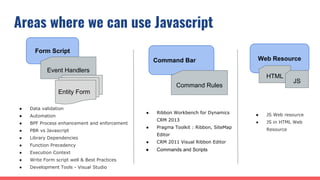
Areas where we can use Javascript
Form Script
Command Bar Web Resource
Event Handlers
Entity Form
Command Rules
● Data validation
● Automation
● BPF Process enhancement and enforcement
● PBR vs Javascript
● Library Dependencies
● Function Precedency
● Execution Context
● Write Form script well & Best Practices
● Development Tools - Visual Studio
● Ribbon Workbench for Dynamics
CRM 2013
● Pragma Toolkit : Ribbon, SiteMap
Editor
● CRM 2011 Visual Ribbon Editor
● Commands and Scripts
HTML
JS
● JS Web resource
● JS in HTML Web
Resource
Using JQuery in Javascript
❖ Use JQuery with HTML Web resource
❖ JQuery is Cross browser library
❖ No Restriction for DOM manipulation using JQuery & HTML Web resource
❖ Avoid using JQuery with Form scripts or Ribbon Command as unsupported
❖ Restrict your scripts to use the Xrm.Page and Xrm.Utility libraries available in
form scripts and ribbon commands.
❖ Do not load JQuery on Form load if not needed.
❖ Using $.ajax to perform requests against the OData and Modern Apps SOAP
endpoint is supported
❖ Download JQuery from Official site and JSON Library
Data Access using Javascript (REST & SOAP)
❖ OData REST Protocol
❖ Based on a URI and Stateless
❖ OData response retrieved using JSON format
❖ OData Tools - CRM Rest Builder
❖ Example : https://softchief.com/2016/11/05/rest-crud-examples/
❖ The SOAP endpoint lets you execute messages because the REST endpoint
does not yet allow this.
❖ CRM SDK reference for SOAP and REST
❖ Sample Code Reference in CRM SDK
❖ FetchXML in SOAP
DAY 2
Javascript Best Practices
❖ Avoid using unsupported methods (Custom Code Tool)
❖ Use a cross-browser JavaScript library for HTML web resource user
interfaces
❖ Do not use jQuery for form script or commands
❖ Use feature detection when writing functions for multiple browsers
❖ Do not Access DOM
❖ Define unique names for your JavaScript functions
❖ Use asynchronous data access methods
Javascript Debugging
❖ F12 for Debugging
❖ Console Message
❖ Breakpoint
❖ Add Watch
XRM Object
DEMO
References
❖ https://msdn.microsoft.com/en-us/library/jj602964(v=crm.7).aspx
❖ https://softchief.com/2015/11/29/client-scipts-in-dynamics-crm-xrm-javasript-jq
uery/
❖ https://msdn.microsoft.com/en-us/library/gg328474.aspx
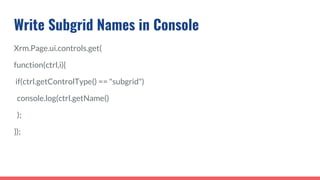
Write Subgrid Names in Console
Xrm.Page.ui.controls.get(
function(ctrl,i){
if(ctrl.getControlType() == "subgrid")
console.log(ctrl.getName()
);
});
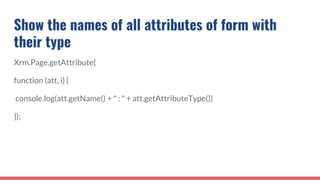
Show the names of all attributes of form with
their type
Xrm.Page.getAttribute(
function (att, i) {
console.log(att.getName() + " : " + att.getAttributeType())
});
Show the valid option values for optionset
attributes
Xrm.Page.getAttribute(
function (att, i) {
if (att.getAttributeType() == "optionset") {
console.log(att.getName())
var options = att.getOptions();
var optionsLength = options.length;
for (var i = 0; i < optionsLength; i++) {
var option = options[i];
console.log(" value: " + option.value + " Label: " + option.text)
}
}
});
function to Show/Hide a TAB
function HideShowTab(isVisible, tabName) {
for (var count = 0; count < tabName.length; count++) {
if (Xrm.Page.ui.tabs.get(tabName[count]) != null) {
Xrm.Page.ui.tabs.get(tabName[count]).setVisible(isVisible);
}
}
}
Show Hide Fields
function ShowHideFields(isVisible, fields) {
for (var count = 0; count < fields.length; count++) {
if (Xrm.Page.getControl(fields[count]) != null) {
Xrm.Page.getControl(fields[count]).setVisible(isVisible);
}
}
}
Set Required Level
function SetAttributeRequiredLevel(fields, level) {
for (var count = 0; count < fields.length; count++) {
if (Xrm.Page.getControl(fields[count]) != null) {
Xrm.Page.getAttribute(fields[count]).setRequiredLevel(level);
}
}
}
Set Lookup Field Value
function SetLookupValue(fieldName, id, name, entityType) {
if (fieldName != null) {
var lookupValue = new Array();
lookupValue[0] = new Object();
lookupValue[0].id = id;
lookupValue[0].name = name;
lookupValue[0].entityType = entityType;
Xrm.Page.getAttribute(fieldName).setValue(lookupValue);
}
}
/*eg.,
function XYZ()
{
getLookupvalue1 = Xrm.Page.data.entity.attributes.get("lookupvalue1").getValue();
getLookupvalue1Id = MyLib.documentOwner[0].id;
getLookupvalue1Name = MyLib.documentOwner[0].name;
//setLookupIDSchename - Lookup's Schemaname which you are going to Set
SetLookupValue("setLookupIDSchename",getLookupvalue1Id,getLookupvalue1Name,getLookupvalue1[0].entityType);
}*/
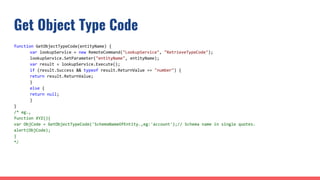
Get Object Type Code
function GetObjectTypeCode(entityName) {
var lookupService = new RemoteCommand("LookupService", "RetrieveTypeCode");
lookupService.SetParameter("entityName", entityName);
var result = lookupService.Execute();
if (result.Success && typeof result.ReturnValue == "number") {
return result.ReturnValue;
}
else {
return null;
}
}
/* eg.,
function XYZ(){
var ObjCode = GetObjectTypeCode('SchemaNameOfEntity.,eg:'account');// Schema name in single quotes.
alert(ObjCode);
}
*/
Enable Disable Field
// Function to make the field enable or disable
function SetEnabledDisabled(isEnable, fields) {
for (var count = 0; count < fields.length; count++) {
if (Xrm.Page.getControl(fields[count]) != null) {
Xrm.Page.getControl(fields[count]).setDisabled(isEnable);
}
}
}
/*Eg.,
///Values: true(Disable or Read only field), false (Enable)
function XYZ()
{ SetEnabledDisabled(true, ["FieldSchemaName1", "FieldSchemaName2", "FieldSchemaName3"]); }*/
Get related record info
// This function is used to select the related entity data using OData service.
function ODataSelect(selectQuery) {
var serverurl = Xrm.Page.context.getServerUrl();
var odataSelect = serverurl + "/XRMServices/2011/OrganizationData.svc" + "/" + selectQuery;
var result = null;
// force cross-site scripting (as of jQuery 1.5)
jQuery.support.cors = true;
$.ajax({
type: "GET",
async: false,
contentType: "application/json; charset=utf-8",
datatype: "json",
url: odataSelect,
beforeSend: function (XMLHttpRequest) { XMLHttpRequest.setRequestHeader("Accept", "application/json"); },
success: function (data, textStatus, XmlHttpRequest) {
result = data.d;
},
error: function (XmlHttpRequest, textStatus, errorThrown) {
}
});
return result;
}
/*Eg. to call this function for our logic
function XYZ()
{
var Ownerid = Xrm.Page.data.entity.attributes.get("ownerid").getValue()[0].id;
var selectQuery = "AccountSet?$top=1&$filter=AccountId eq guid'" + Ownerid + "'&$select=Name,CreatedOn";
var OdataResult = ODataSelect(selectQuery); //ODataSelect - function called here
var roleName = OdataResult.results[0].Name;
var roleCreatedOn = OdataResult.results[0].CreatedOn; alert(roleName);alert(roleCreatedOn);
}*/
Thanks You
Any Questions?

Dynamics 365 CRM Javascript Customization

  • 1.
    CUSTOMIZATION JAVASCRIPT ADVANCED TECHNICAL TRAINING SanjayaPrakash Pradhan MCP & Founder of Softchief.com COURSE ID D365 - 002 Duration - 4Hr
  • 2.
    Topics in Review ❖Areas where we can use Javascript - Day1 ❖ Using JQuery with Javascript - Day1 ❖ Data Access using Javascript - Day2 ❖ Javascript Programming Best Practices - Day2 ❖ Debugging Javascript Code - Day2 ❖ XRM Object Model and Reference Code - Day2 (https://msdn.microsoft.com/en-us/library/jj602964(v=crm.7).aspx)http s://softchief.com/2015/11/29/client-scipts-in-dynamics-crm-xrm-javasri pt-jquery/ ❖ Frequently Used Code Snippets with XRM Objects - Day2 ❖ Tools related to Javascript Customization OData etc - Day2 ❖ CRM SDK JS Codes & Deployment - Day2 ❖ Available JS Libraries - Day2
  • 3.
  • 4.
    Areas where wecan use Javascript Form Script Command Bar Web Resource Event Handlers Entity Form Command Rules ● Data validation ● Automation ● BPF Process enhancement and enforcement ● PBR vs Javascript ● Library Dependencies ● Function Precedency ● Execution Context ● Write Form script well & Best Practices ● Development Tools - Visual Studio ● Ribbon Workbench for Dynamics CRM 2013 ● Pragma Toolkit : Ribbon, SiteMap Editor ● CRM 2011 Visual Ribbon Editor ● Commands and Scripts HTML JS ● JS Web resource ● JS in HTML Web Resource
  • 5.
    Using JQuery inJavascript ❖ Use JQuery with HTML Web resource ❖ JQuery is Cross browser library ❖ No Restriction for DOM manipulation using JQuery & HTML Web resource ❖ Avoid using JQuery with Form scripts or Ribbon Command as unsupported ❖ Restrict your scripts to use the Xrm.Page and Xrm.Utility libraries available in form scripts and ribbon commands. ❖ Do not load JQuery on Form load if not needed. ❖ Using $.ajax to perform requests against the OData and Modern Apps SOAP endpoint is supported ❖ Download JQuery from Official site and JSON Library
  • 6.
    Data Access usingJavascript (REST & SOAP) ❖ OData REST Protocol ❖ Based on a URI and Stateless ❖ OData response retrieved using JSON format ❖ OData Tools - CRM Rest Builder ❖ Example : https://softchief.com/2016/11/05/rest-crud-examples/ ❖ The SOAP endpoint lets you execute messages because the REST endpoint does not yet allow this. ❖ CRM SDK reference for SOAP and REST ❖ Sample Code Reference in CRM SDK ❖ FetchXML in SOAP
  • 7.
  • 8.
    Javascript Best Practices ❖Avoid using unsupported methods (Custom Code Tool) ❖ Use a cross-browser JavaScript library for HTML web resource user interfaces ❖ Do not use jQuery for form script or commands ❖ Use feature detection when writing functions for multiple browsers ❖ Do not Access DOM ❖ Define unique names for your JavaScript functions ❖ Use asynchronous data access methods
  • 9.
    Javascript Debugging ❖ F12for Debugging ❖ Console Message ❖ Breakpoint ❖ Add Watch
  • 10.
  • 11.
  • 12.
  • 13.
    Write Subgrid Namesin Console Xrm.Page.ui.controls.get( function(ctrl,i){ if(ctrl.getControlType() == "subgrid") console.log(ctrl.getName() ); });
  • 14.
    Show the namesof all attributes of form with their type Xrm.Page.getAttribute( function (att, i) { console.log(att.getName() + " : " + att.getAttributeType()) });
  • 15.
    Show the validoption values for optionset attributes Xrm.Page.getAttribute( function (att, i) { if (att.getAttributeType() == "optionset") { console.log(att.getName()) var options = att.getOptions(); var optionsLength = options.length; for (var i = 0; i < optionsLength; i++) { var option = options[i]; console.log(" value: " + option.value + " Label: " + option.text) } } });
  • 16.
    function to Show/Hidea TAB function HideShowTab(isVisible, tabName) { for (var count = 0; count < tabName.length; count++) { if (Xrm.Page.ui.tabs.get(tabName[count]) != null) { Xrm.Page.ui.tabs.get(tabName[count]).setVisible(isVisible); } } }
  • 17.
    Show Hide Fields functionShowHideFields(isVisible, fields) { for (var count = 0; count < fields.length; count++) { if (Xrm.Page.getControl(fields[count]) != null) { Xrm.Page.getControl(fields[count]).setVisible(isVisible); } } }
  • 18.
    Set Required Level functionSetAttributeRequiredLevel(fields, level) { for (var count = 0; count < fields.length; count++) { if (Xrm.Page.getControl(fields[count]) != null) { Xrm.Page.getAttribute(fields[count]).setRequiredLevel(level); } } }
  • 19.
    Set Lookup FieldValue function SetLookupValue(fieldName, id, name, entityType) { if (fieldName != null) { var lookupValue = new Array(); lookupValue[0] = new Object(); lookupValue[0].id = id; lookupValue[0].name = name; lookupValue[0].entityType = entityType; Xrm.Page.getAttribute(fieldName).setValue(lookupValue); } } /*eg., function XYZ() { getLookupvalue1 = Xrm.Page.data.entity.attributes.get("lookupvalue1").getValue(); getLookupvalue1Id = MyLib.documentOwner[0].id; getLookupvalue1Name = MyLib.documentOwner[0].name; //setLookupIDSchename - Lookup's Schemaname which you are going to Set SetLookupValue("setLookupIDSchename",getLookupvalue1Id,getLookupvalue1Name,getLookupvalue1[0].entityType); }*/
  • 20.
    Get Object TypeCode function GetObjectTypeCode(entityName) { var lookupService = new RemoteCommand("LookupService", "RetrieveTypeCode"); lookupService.SetParameter("entityName", entityName); var result = lookupService.Execute(); if (result.Success && typeof result.ReturnValue == "number") { return result.ReturnValue; } else { return null; } } /* eg., function XYZ(){ var ObjCode = GetObjectTypeCode('SchemaNameOfEntity.,eg:'account');// Schema name in single quotes. alert(ObjCode); } */
  • 21.
    Enable Disable Field //Function to make the field enable or disable function SetEnabledDisabled(isEnable, fields) { for (var count = 0; count < fields.length; count++) { if (Xrm.Page.getControl(fields[count]) != null) { Xrm.Page.getControl(fields[count]).setDisabled(isEnable); } } } /*Eg., ///Values: true(Disable or Read only field), false (Enable) function XYZ() { SetEnabledDisabled(true, ["FieldSchemaName1", "FieldSchemaName2", "FieldSchemaName3"]); }*/
  • 22.
    Get related recordinfo // This function is used to select the related entity data using OData service. function ODataSelect(selectQuery) { var serverurl = Xrm.Page.context.getServerUrl(); var odataSelect = serverurl + "/XRMServices/2011/OrganizationData.svc" + "/" + selectQuery; var result = null; // force cross-site scripting (as of jQuery 1.5) jQuery.support.cors = true; $.ajax({ type: "GET", async: false, contentType: "application/json; charset=utf-8", datatype: "json", url: odataSelect, beforeSend: function (XMLHttpRequest) { XMLHttpRequest.setRequestHeader("Accept", "application/json"); }, success: function (data, textStatus, XmlHttpRequest) { result = data.d; }, error: function (XmlHttpRequest, textStatus, errorThrown) { } }); return result; } /*Eg. to call this function for our logic function XYZ() { var Ownerid = Xrm.Page.data.entity.attributes.get("ownerid").getValue()[0].id; var selectQuery = "AccountSet?$top=1&$filter=AccountId eq guid'" + Ownerid + "'&$select=Name,CreatedOn"; var OdataResult = ODataSelect(selectQuery); //ODataSelect - function called here var roleName = OdataResult.results[0].Name; var roleCreatedOn = OdataResult.results[0].CreatedOn; alert(roleName);alert(roleCreatedOn); }*/
  • 23.