



CUSTOMIZATION
ADVANCED PLUG-INSS
TECHNICAL TRAINING
Sanjaya Prakash Pradhan
MCP & Founder of Softchief.com
COURSE ID D365 - 003 Duration - 4Hrs
Fundamentals
❖ Custom Business logic
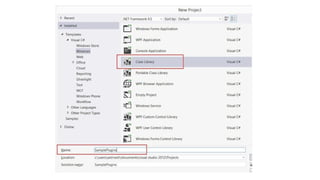
❖ .Net Assembly with C# programming using OOPS
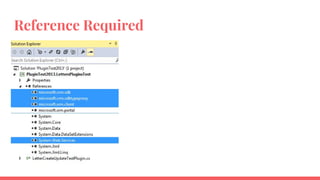
❖ Binaries Reference required
❖ CRM SDK for plugins
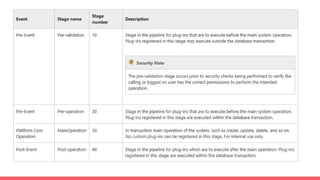
❖ Event Pipeline Execution
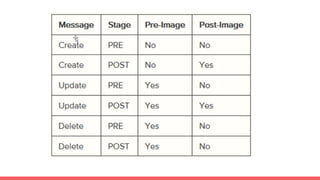
❖ Messages, Steps & Images
❖ Execute Method
❖ IServiceProvider Interface and IPlugin Interface
❖ Plugin Context
❖ Impersonation
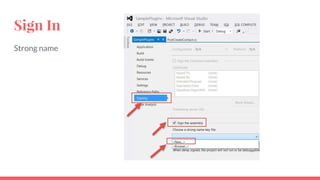
❖ Signing Plugin
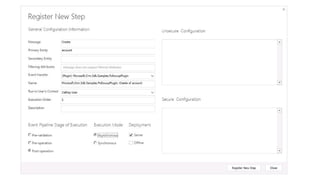
❖ Plugin Registration Tool
More Information
❖ Sync & Async Plugins
❖ Privilege Required for Plugin Registration
❖ Plugin Isolation
❖ Shared Variables
❖ 2 Minute TimeOUT
❖ Exception handling
❖ Registration Options (Database, Disk, GAC)
❖ Sample Scenario Video : https://youtu.be/zNGmKjSgJnE
❖ https://softchief.com/2016/11/12/all-about-dynamics-crm-plugins/
❖ Debug - Plugin Profiler
❖ Deploy
❖ Context Depth
❖ Debugging Attach Process
❖ Remote Debugging
❖ Best Practice
When to use Plugins
❖ Use a Plug-in when you need to integrate MS Dynamics CRM with a legacy system or
when you want to extend or customize the original functionality or behaviors of MS
Dynamics CRM.
❖ Plug-ins are the best choice to enforce the business rules of your business. You could use
Javascript events or business rules to add validation on the rules you want to enforce;
however, those types of validations work only when CRM is used through the native
interface (such as the web or outlook client)
❖ If we remember that other applications can be interacting with the CRM system through
the web service, service endpoints, and so on, the validations and rules enforcement, will
work always if we put them on plug-ins.
❖ Plug-ins run on the server side, whereas Javascript validations run on the client side. It is a
good practice to put the validation logic in one place on the server side
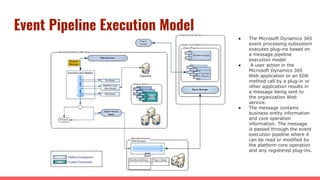
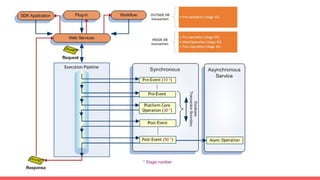
Event Pipeline Execution Model
● The Microsoft Dynamics 365
event processing subsystem
executes plug-ins based on
a message pipeline
execution model
● A user action in the
Microsoft Dynamics 365
Web application or an SDK
method call by a plug-in or
other application results in
a message being sent to
the organization Web
service.
● The message contains
business entity information
and core operation
information. The message
is passed through the event
execution pipeline where it
can be read or modified by
the platform core operation
and any registered plug-ins.
D
E
M
O
Sign In
Strong name
Reference Required
THANK YOU

Course003 plugins chapters

  • 1.
    CUSTOMIZATION ADVANCED PLUG-INSS TECHNICAL TRAINING SanjayaPrakash Pradhan MCP & Founder of Softchief.com COURSE ID D365 - 003 Duration - 4Hrs
  • 2.
    Fundamentals ❖ Custom Businesslogic ❖ .Net Assembly with C# programming using OOPS ❖ Binaries Reference required ❖ CRM SDK for plugins ❖ Event Pipeline Execution ❖ Messages, Steps & Images ❖ Execute Method ❖ IServiceProvider Interface and IPlugin Interface ❖ Plugin Context ❖ Impersonation ❖ Signing Plugin ❖ Plugin Registration Tool
  • 3.
    More Information ❖ Sync& Async Plugins ❖ Privilege Required for Plugin Registration ❖ Plugin Isolation ❖ Shared Variables ❖ 2 Minute TimeOUT ❖ Exception handling ❖ Registration Options (Database, Disk, GAC) ❖ Sample Scenario Video : https://youtu.be/zNGmKjSgJnE ❖ https://softchief.com/2016/11/12/all-about-dynamics-crm-plugins/ ❖ Debug - Plugin Profiler ❖ Deploy ❖ Context Depth ❖ Debugging Attach Process ❖ Remote Debugging ❖ Best Practice
  • 4.
    When to usePlugins ❖ Use a Plug-in when you need to integrate MS Dynamics CRM with a legacy system or when you want to extend or customize the original functionality or behaviors of MS Dynamics CRM. ❖ Plug-ins are the best choice to enforce the business rules of your business. You could use Javascript events or business rules to add validation on the rules you want to enforce; however, those types of validations work only when CRM is used through the native interface (such as the web or outlook client) ❖ If we remember that other applications can be interacting with the CRM system through the web service, service endpoints, and so on, the validations and rules enforcement, will work always if we put them on plug-ins. ❖ Plug-ins run on the server side, whereas Javascript validations run on the client side. It is a good practice to put the validation logic in one place on the server side
  • 5.
    Event Pipeline ExecutionModel ● The Microsoft Dynamics 365 event processing subsystem executes plug-ins based on a message pipeline execution model ● A user action in the Microsoft Dynamics 365 Web application or an SDK method call by a plug-in or other application results in a message being sent to the organization Web service. ● The message contains business entity information and core operation information. The message is passed through the event execution pipeline where it can be read or modified by the platform core operation and any registered plug-ins.
  • 9.
  • 11.
  • 12.
  • 14.