CUSTOMIZATION
CUSTOM
WORKFLOW
ACTIVITY (CWA)
TECHNICAL TRAINING
Sanjaya Prakash Pradhan
MCP & Founder of Softchief.com
COURSE ID D365 - 003 Duration - 4Hrs
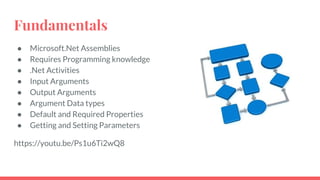
Fundamentals
● Microsoft.Net Assemblies
● Requires Programming knowledge
● .Net Activities
● Input Arguments
● Output Arguments
● Argument Data types
● Default and Required Properties
● Getting and Setting Parameters
https://youtu.be/Ps1u6Ti2wQ8
Required Tools
To develop a custom workflow you need to have:
1. Visual Studio IDE
2. Dynamics 365 SDK – Plugin Registration Tool
3. Simple Knowledge on C#.NET
Required Reference Dlls
● Microsoft.Xrm.Sdk.dll
● Microsoft.Xrm.Sdk.Workflow.dll
● System.Runtime.Serialization
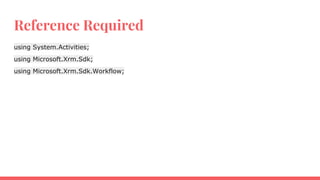
Reference Required
using System.Activities;
using Microsoft.Xrm.Sdk;
using Microsoft.Xrm.Sdk.Workflow;
Remember
1. Custom workflows can be incorporated by CRM workflows or Dialogs as a process step. Custom
workflows cannot be run independently as these are treated as a process step inside a CRM workflow or
Dialog.
2. Every workflow supports some Input Parameters and Output parameters.
3. Input Parameters are supplied to the custom workflow from the CRM workflow and Output parameters
are returned from the custom workflow to CRM workflow to use in check condition steps.
4. After developing the custom workflow assembly it is registered in CRM using plugin registration tool the
same way we do for plugins.
5. Custom workflow activities are .net assemblies which are registered in CRM.
6. Every custom workflow activity class inherits CodeActivity class.
7. Each custom workflow assembly must be signed in by a KEY.
Input Argument
DateTime
[Input("DateTime input")]
[Output("DateTime output")]
[Default("2013-07-09T02:54:00Z")]
public InOutArgument DateTime { get; set; }
using System;
using System.Collections.Generic;
using System.Linq;
using System.Text;
using System.Activities;
using Microsoft.Xrm.Sdk.Workflow;
namespace GetAge
{
public sealed class CalculateAge:CodeActivity
{
[Input("Date Of Birth")]
public InArgument<DateTime> DOB { get; set; }
protected override void Execute(CodeActivityContext context)
{
DateTime dtDOB = DOB.Get(context);
int CalculatedAge =
Convert.ToInt32((DateTime.Now.Subtract(dtDOB).TotalDays)/365);
Age.Set(context, CalculatedAge);
}

Custom Workflow Quick Notes

  • 1.
    CUSTOMIZATION CUSTOM WORKFLOW ACTIVITY (CWA) TECHNICAL TRAINING SanjayaPrakash Pradhan MCP & Founder of Softchief.com COURSE ID D365 - 003 Duration - 4Hrs
  • 2.
    Fundamentals ● Microsoft.Net Assemblies ●Requires Programming knowledge ● .Net Activities ● Input Arguments ● Output Arguments ● Argument Data types ● Default and Required Properties ● Getting and Setting Parameters https://youtu.be/Ps1u6Ti2wQ8
  • 3.
    Required Tools To developa custom workflow you need to have: 1. Visual Studio IDE 2. Dynamics 365 SDK – Plugin Registration Tool 3. Simple Knowledge on C#.NET Required Reference Dlls ● Microsoft.Xrm.Sdk.dll ● Microsoft.Xrm.Sdk.Workflow.dll ● System.Runtime.Serialization
  • 4.
    Reference Required using System.Activities; usingMicrosoft.Xrm.Sdk; using Microsoft.Xrm.Sdk.Workflow;
  • 5.
    Remember 1. Custom workflowscan be incorporated by CRM workflows or Dialogs as a process step. Custom workflows cannot be run independently as these are treated as a process step inside a CRM workflow or Dialog. 2. Every workflow supports some Input Parameters and Output parameters. 3. Input Parameters are supplied to the custom workflow from the CRM workflow and Output parameters are returned from the custom workflow to CRM workflow to use in check condition steps. 4. After developing the custom workflow assembly it is registered in CRM using plugin registration tool the same way we do for plugins. 5. Custom workflow activities are .net assemblies which are registered in CRM. 6. Every custom workflow activity class inherits CodeActivity class. 7. Each custom workflow assembly must be signed in by a KEY.
  • 6.
    Input Argument DateTime [Input("DateTime input")] [Output("DateTimeoutput")] [Default("2013-07-09T02:54:00Z")] public InOutArgument DateTime { get; set; }
  • 7.
    using System; using System.Collections.Generic; usingSystem.Linq; using System.Text; using System.Activities; using Microsoft.Xrm.Sdk.Workflow; namespace GetAge { public sealed class CalculateAge:CodeActivity { [Input("Date Of Birth")] public InArgument<DateTime> DOB { get; set; } protected override void Execute(CodeActivityContext context) { DateTime dtDOB = DOB.Get(context); int CalculatedAge = Convert.ToInt32((DateTime.Now.Subtract(dtDOB).TotalDays)/365); Age.Set(context, CalculatedAge); }