

SharePoint Hybrid:
The best of both worlds
Ashish Trivedi
Who am I?
 Ashish (aka Ash)
 Senior Consultant @ Kloud Solutions, Melbourne
 P-TSP @ Microsoft
 Developer by passion
 Productivity focused
 10 years of experience in designing solutions using
Office365 / SharePoint
 Community contributor
Agenda
SharePoint Hybrid – Overview
Need for hybrid model
Hybrid possibilities - SharePoint 2013/16
Hybrid Setup– Plan, Install & Configure
Hybrid Workloads - SharePoint
Summary
SharePoint Hybrid
Overview
Description
SharePoint Hybrid : Overview
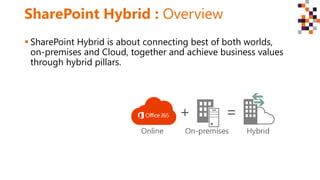
 SharePoint Hybrid is about connecting best of both worlds,
on-premises and Cloud, together and achieve business values
through hybrid pillars.
Need for Hybrid
Model
Description
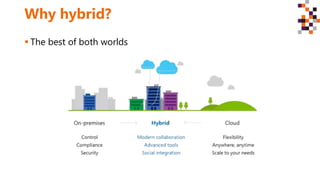
Why hybrid?
 The best of both worlds
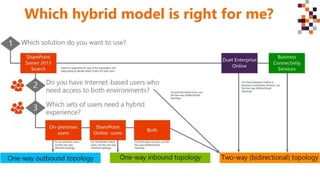
Which hybrid model is right for me?
Hybrid possibilities
SharePoint 2013/16
Description
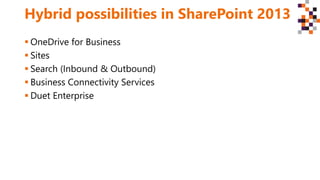
Hybrid possibilities in SharePoint 2013
 OneDrive for Business
 Sites
 Search (Inbound & Outbound)
 Business Connectivity Services
 Duet Enterprise
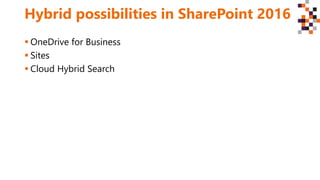
Hybrid possibilities in SharePoint 2016
 OneDrive for Business
 Sites
 Cloud Hybrid Search
Hybrid Setup –
Plan, Install & Configure
Description
Hybrid setup
 SharePoint On-premises
 Office 365
 Domain
 Security Accounts (Global Admin, AD Admin, Farm Admin etc.)
 Reverse Proxy (Inbound requests)
 Identity Management (Azure AD, ADFS, ADFS Proxy, Federated
Users, Azure AD Connect/DirSync)
Hybrid Workloads
Description
Search
 Cloud Hybrid Search
‒ represents the next generation in hybrid search and discovery.
‒ both on-premises and Office 365 crawled content is unified in a search index hosted
in Office 365.
‒ When query search index in Office 365, get search results from both on-premises and
Office 365 content.
‒ The content metadata is encrypted while transferred to the search index in Office 365,
 Federated hybrid search
‒ Scenario in which a query issued by a user is federated or distributed across on-
premises and Office 365 returning a set of results from each location as discrete
entities.
‒ On-premises crawled content is stored on-premises and Office 365 content in Office
365
‒ Federated hybrid search can be configured in inbound, outbound, or bi-directional
hybrid topologies.
Workloads contd.
 OneDrive for Business
‒ redirect users to OneDrive for Business in Office 365
‒ Users can quickly access their documents and any information that they
choose to sync from their SharePoint sites.
‒ Continue using on-premises SP environment while providing an easy
way to store, share, and collaborate in the cloud with OD4B.
 Profile Redirection
‒ Component of the hybrid Team Sites feature introduced in SP 2013 SP1
and SP 2016.
‒ Redirects cloud (hybrid) users to their profile in O365 powered by
Office Delve ensuring hybrid users have a single place for their profile
information.
Workloads contd.
 Hybrid Team Sites
‒ Provides a solution to help hybrid users reconcile and rationalize site
membership and discovery across SharePoint on-premises and Office
365.
‒ Users will have different followed lists for sites in each location. Hybrid
sites features consolidates the information from both locations into the
SharePoint Online list in Office 365.
 Duet Enterprise Online
‒ Enables interoperability between SAP applications and SP 2013 EE.
‒ Empowers employees to consume and extend SAP processes and
information from within SP 2013 and Outlook 2013.
Workloads contd.
 Extranet Sites
‒ A site that organizations create to let external users have access to
relevant content and to collaborate with them.
‒ Traditionally, involves complex configuration like security governance &
granting access inside the firewall, and expensive initial and on-going
cost.
‒ With O365 SP hybrid extranet, partners connect directly to a members-
only site in Office 365, without access to the corporate on-premises
environment or any other Office 365 site.
 Hybrid Scenario Picker
‒ Use the scenario picker wizard to redirect OneDrive for Business to
SharePoint Online, and/or to make a Server-to-Server (S2S)/OAuth
connection for your SharePoint Hybrid features.
Workloads contd.
 Yammer
‒ Provides a richer enterprise social experience.
‒ Yammer comes in two varieties: Yammer Basic and Yammer Enterprise.
Yammer Basic is free and available to all users. It lets employees
collaborate with other members of their organization. Yammer
Enterprise is a premium version that extends an organization’s basic
Yammer network.
 Document Collaboration
‒ Recently a new attachment option has been made available in Office
365. In Exchange 2016, this option, known as document collaboration,
allows on-premises users to integrate attachments stored on OneDrive
for Business directly in their Outlook on the web clients.
Workloads contd.
 Business Connectivity Services
‒ BCS hybrid deployment scenario allows to securely publish on-premises
data to an external list or app for SharePoint in SharePoint Online.
 Extensible App Launcher
‒ A familiar feature in Office and now extended to SP 2016.
‒ Provides a common location to discover new apps and navigate SP on-
premises and O365.
‒ Designed to help you get to your Office 365 apps and services from SP
2016 Beta 2.
‒ Enabled when enabling hybrid Team Sites and/or OneDrive for
Business.
Demo
Summary
SharePoint Hybrid – Overview
Need for hybrid model
Hybrid possibilities - SharePoint 2013/16
Hybrid Setup– Plan, Install & Configure
Hybrid Workloads - SharePoint
Summary
References
 http://hybrid.office.com/
 https://technet.microsoft.com/en-
us/library/jj838715(v=office.16).aspx
 https://technet.microsoft.com/en-au/library/jj838715.aspx
 http://aka.ms/PlanPrepSPHybrid/StndPDF
Thank
you to
our
sponsors!
Contact Information
Email Ashish.trivedi@kloud.com.au
Twitter @ashuetawah
LinkedIn Trivediashish
Catch me @Melbourne Office365/Azure Meetup
@Presenting in Microsoft Office Dev Camps

DWCAU SharePoint Hybrid Melbourne

  • 1.
    SharePoint Hybrid: The bestof both worlds Ashish Trivedi
  • 2.
    Who am I? Ashish (aka Ash)  Senior Consultant @ Kloud Solutions, Melbourne  P-TSP @ Microsoft  Developer by passion  Productivity focused  10 years of experience in designing solutions using Office365 / SharePoint  Community contributor
  • 3.
    Agenda SharePoint Hybrid –Overview Need for hybrid model Hybrid possibilities - SharePoint 2013/16 Hybrid Setup– Plan, Install & Configure Hybrid Workloads - SharePoint Summary
  • 4.
  • 5.
    SharePoint Hybrid :Overview  SharePoint Hybrid is about connecting best of both worlds, on-premises and Cloud, together and achieve business values through hybrid pillars.
  • 6.
  • 7.
    Why hybrid?  Thebest of both worlds
  • 8.
    Which hybrid modelis right for me?
  • 9.
  • 10.
    Hybrid possibilities inSharePoint 2013  OneDrive for Business  Sites  Search (Inbound & Outbound)  Business Connectivity Services  Duet Enterprise
  • 11.
    Hybrid possibilities inSharePoint 2016  OneDrive for Business  Sites  Cloud Hybrid Search
  • 12.
    Hybrid Setup – Plan,Install & Configure Description
  • 13.
    Hybrid setup  SharePointOn-premises  Office 365  Domain  Security Accounts (Global Admin, AD Admin, Farm Admin etc.)  Reverse Proxy (Inbound requests)  Identity Management (Azure AD, ADFS, ADFS Proxy, Federated Users, Azure AD Connect/DirSync)
  • 14.
  • 15.
    Search  Cloud HybridSearch ‒ represents the next generation in hybrid search and discovery. ‒ both on-premises and Office 365 crawled content is unified in a search index hosted in Office 365. ‒ When query search index in Office 365, get search results from both on-premises and Office 365 content. ‒ The content metadata is encrypted while transferred to the search index in Office 365,  Federated hybrid search ‒ Scenario in which a query issued by a user is federated or distributed across on- premises and Office 365 returning a set of results from each location as discrete entities. ‒ On-premises crawled content is stored on-premises and Office 365 content in Office 365 ‒ Federated hybrid search can be configured in inbound, outbound, or bi-directional hybrid topologies.
  • 16.
    Workloads contd.  OneDrivefor Business ‒ redirect users to OneDrive for Business in Office 365 ‒ Users can quickly access their documents and any information that they choose to sync from their SharePoint sites. ‒ Continue using on-premises SP environment while providing an easy way to store, share, and collaborate in the cloud with OD4B.  Profile Redirection ‒ Component of the hybrid Team Sites feature introduced in SP 2013 SP1 and SP 2016. ‒ Redirects cloud (hybrid) users to their profile in O365 powered by Office Delve ensuring hybrid users have a single place for their profile information.
  • 17.
    Workloads contd.  HybridTeam Sites ‒ Provides a solution to help hybrid users reconcile and rationalize site membership and discovery across SharePoint on-premises and Office 365. ‒ Users will have different followed lists for sites in each location. Hybrid sites features consolidates the information from both locations into the SharePoint Online list in Office 365.  Duet Enterprise Online ‒ Enables interoperability between SAP applications and SP 2013 EE. ‒ Empowers employees to consume and extend SAP processes and information from within SP 2013 and Outlook 2013.
  • 18.
    Workloads contd.  ExtranetSites ‒ A site that organizations create to let external users have access to relevant content and to collaborate with them. ‒ Traditionally, involves complex configuration like security governance & granting access inside the firewall, and expensive initial and on-going cost. ‒ With O365 SP hybrid extranet, partners connect directly to a members- only site in Office 365, without access to the corporate on-premises environment or any other Office 365 site.  Hybrid Scenario Picker ‒ Use the scenario picker wizard to redirect OneDrive for Business to SharePoint Online, and/or to make a Server-to-Server (S2S)/OAuth connection for your SharePoint Hybrid features.
  • 19.
    Workloads contd.  Yammer ‒Provides a richer enterprise social experience. ‒ Yammer comes in two varieties: Yammer Basic and Yammer Enterprise. Yammer Basic is free and available to all users. It lets employees collaborate with other members of their organization. Yammer Enterprise is a premium version that extends an organization’s basic Yammer network.  Document Collaboration ‒ Recently a new attachment option has been made available in Office 365. In Exchange 2016, this option, known as document collaboration, allows on-premises users to integrate attachments stored on OneDrive for Business directly in their Outlook on the web clients.
  • 20.
    Workloads contd.  BusinessConnectivity Services ‒ BCS hybrid deployment scenario allows to securely publish on-premises data to an external list or app for SharePoint in SharePoint Online.  Extensible App Launcher ‒ A familiar feature in Office and now extended to SP 2016. ‒ Provides a common location to discover new apps and navigate SP on- premises and O365. ‒ Designed to help you get to your Office 365 apps and services from SP 2016 Beta 2. ‒ Enabled when enabling hybrid Team Sites and/or OneDrive for Business.
  • 21.
  • 22.
    Summary SharePoint Hybrid –Overview Need for hybrid model Hybrid possibilities - SharePoint 2013/16 Hybrid Setup– Plan, Install & Configure Hybrid Workloads - SharePoint Summary
  • 23.
    References  http://hybrid.office.com/  https://technet.microsoft.com/en- us/library/jj838715(v=office.16).aspx https://technet.microsoft.com/en-au/library/jj838715.aspx  http://aka.ms/PlanPrepSPHybrid/StndPDF
  • 24.
  • 25.
    Contact Information Email Ashish.trivedi@kloud.com.au Twitter@ashuetawah LinkedIn Trivediashish Catch me @Melbourne Office365/Azure Meetup @Presenting in Microsoft Office Dev Camps