Implementing a Hybrid SharePoint
2013 and Office 365 Environment
René Modery, Office 365 MVP
1stQuad Solutions
Introduction
Who am I?
Consultant & Solution Architect
Office 365 MVP
6+ years in Singapore
Based in Zurich, Switzerland
Contact Details
Web: http://modery.net
Twitter: @modery
Email: rene@modery.net
2
OVERVIEW OF HYBRID ENVIRONMENTS
3
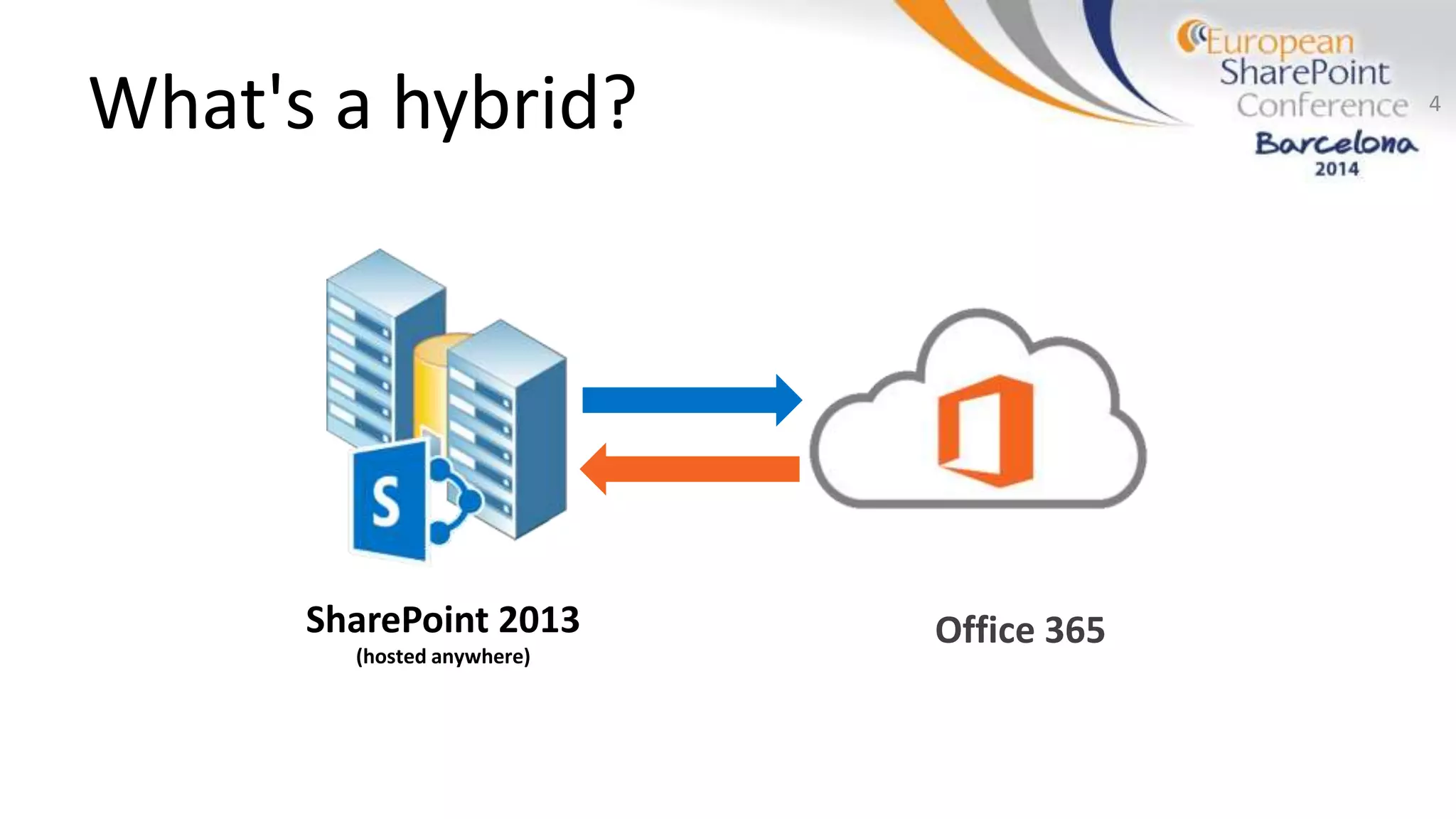
What's a hybrid?
SharePoint 2013
(hosted anywhere)
4
Office 365
Why do we want/need it?
Continue using valuable on-premises investments
Leverage the awesomeness of cloud technology
http://www.flickr.com/photos/torkildr/3462607995/
http://creativecommons.org/licenses/by-sa/2.0/deed.en
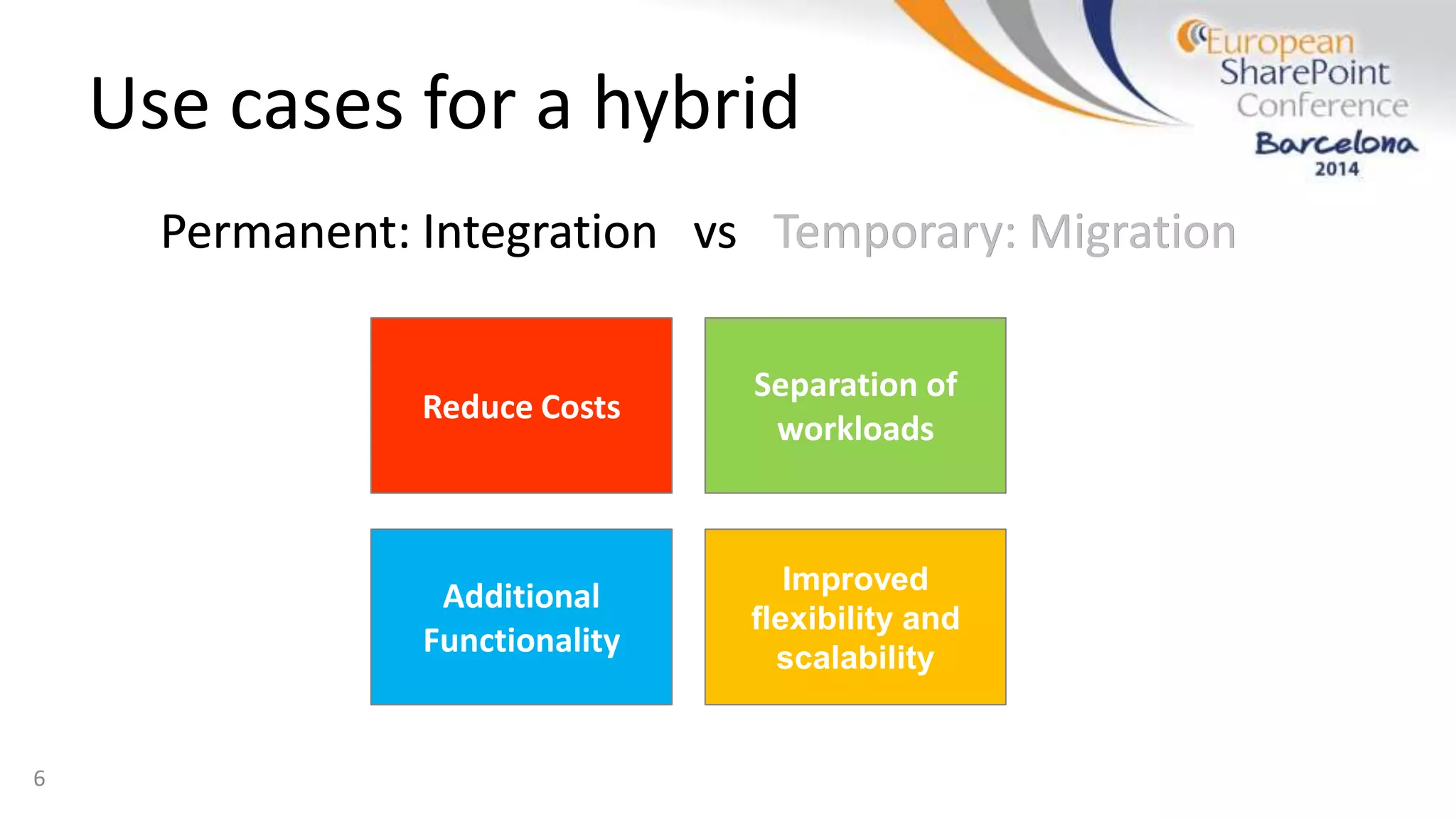
Use cases for a hybrid
Permanent: Integration vs Temporary: Migration
6
Reduce Costs
Additional
Functionality
Separation of
workloads
Improved
flexibility and
scalability
Permanent: Integration vs Temporary: Migration
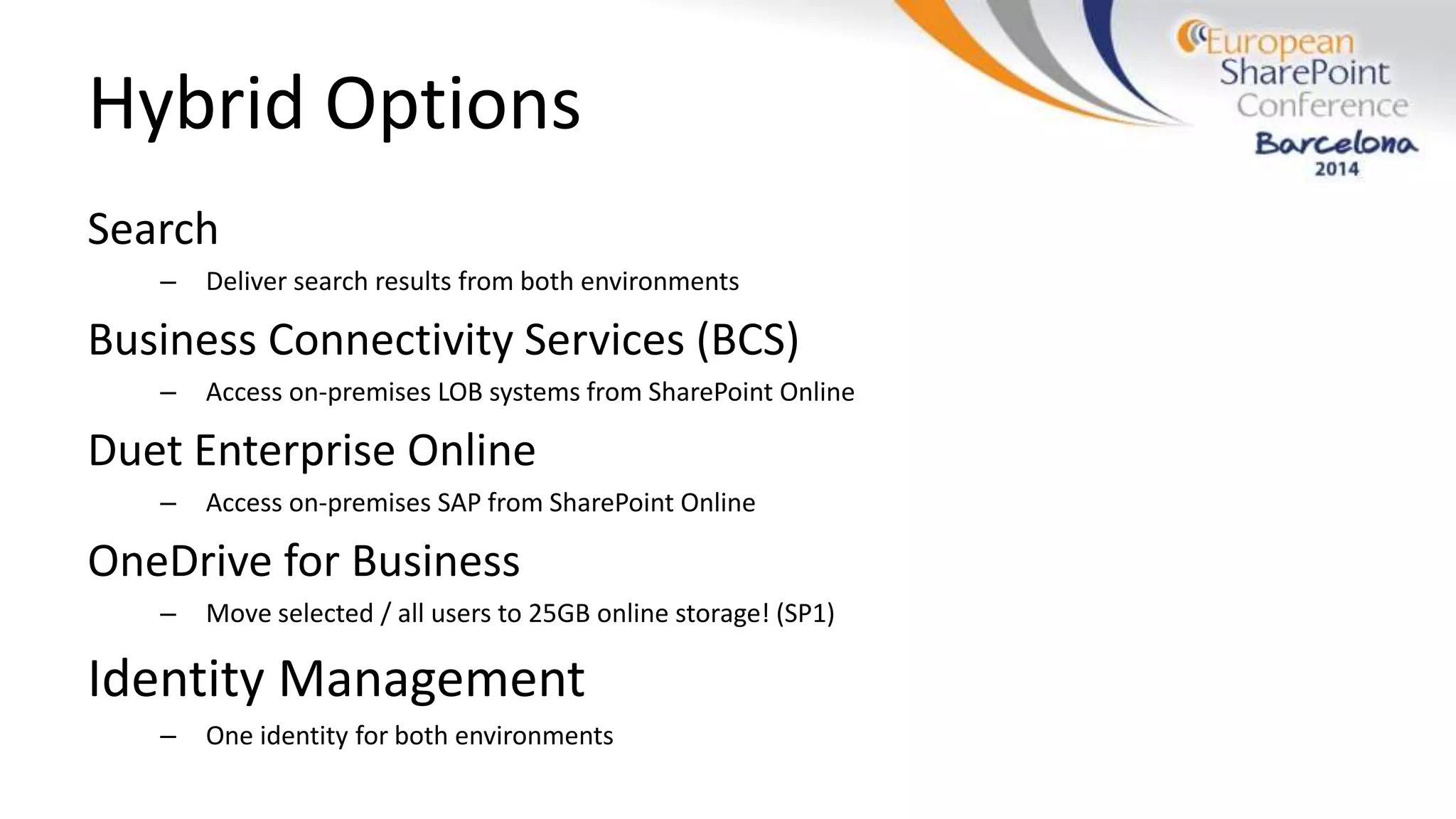
Hybrid Options
Search
– Deliver search results from both environments
Business Connectivity Services (BCS)
– Access on-premises LOB systems from SharePoint Online
Duet Enterprise Online
– Access on-premises SAP from SharePoint Online
OneDrive for Business
– Move selected / all users to 25GB online storage! (SP1)
Identity Management
– One identity for both environments
REQUIREMENTS
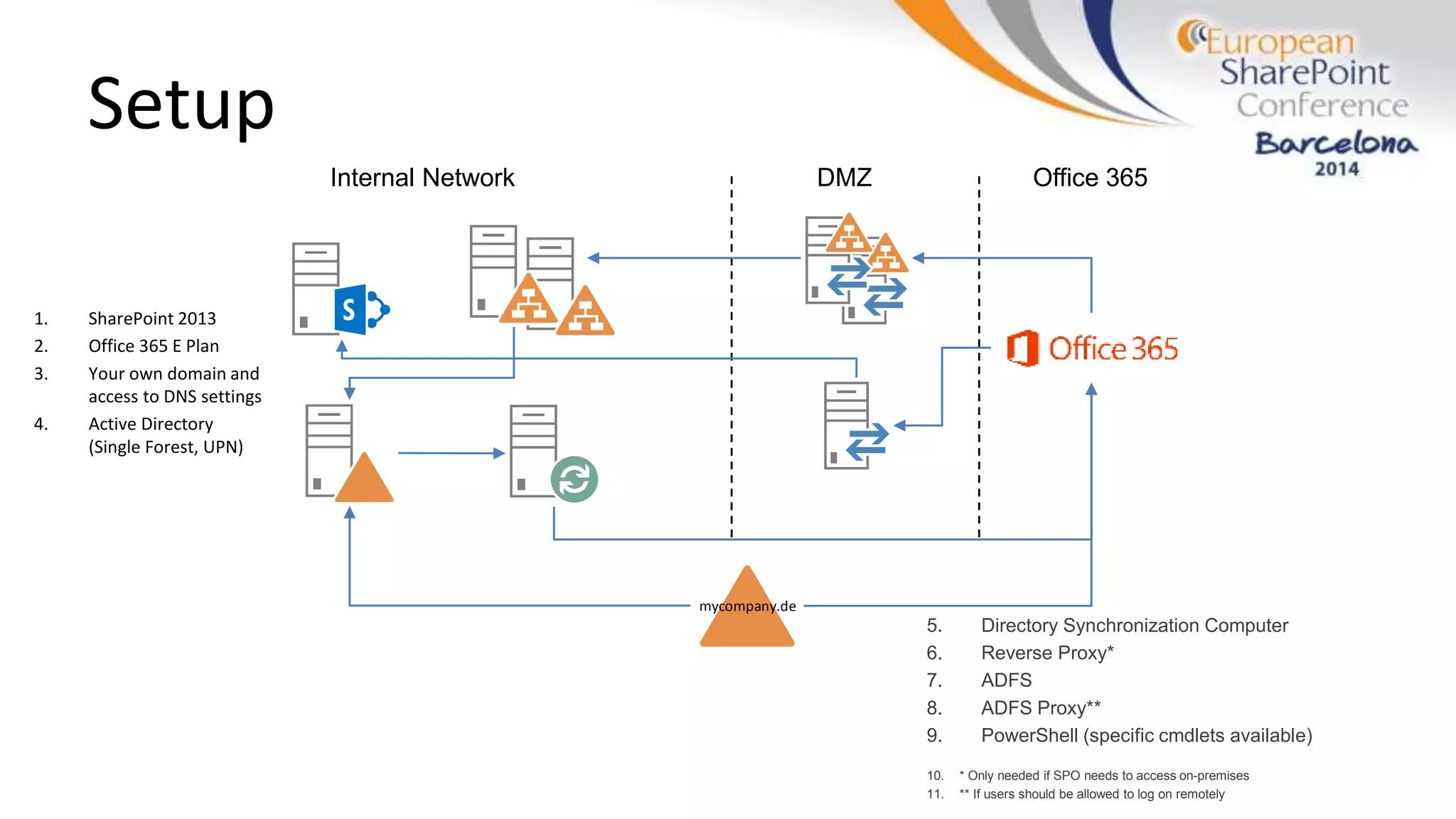
Setup
1. SharePoint 2013
2. Office 365 E Plan
3. Your own domain and
access to DNS settings
4. Active Directory
(Single Forest, UPN)
5. Directory Synchronization Computer
6. Reverse Proxy*
7. ADFS
8. ADFS Proxy**
9. PowerShell (specific cmdlets available)
10. * Only needed if SPO needs to access on-premises
11. ** If users should be allowed to log on remotely
Internal Network DMZ Office 365
mycompany.de
IMPLEMENTING A HYBRID
ENVIRONMENT
10
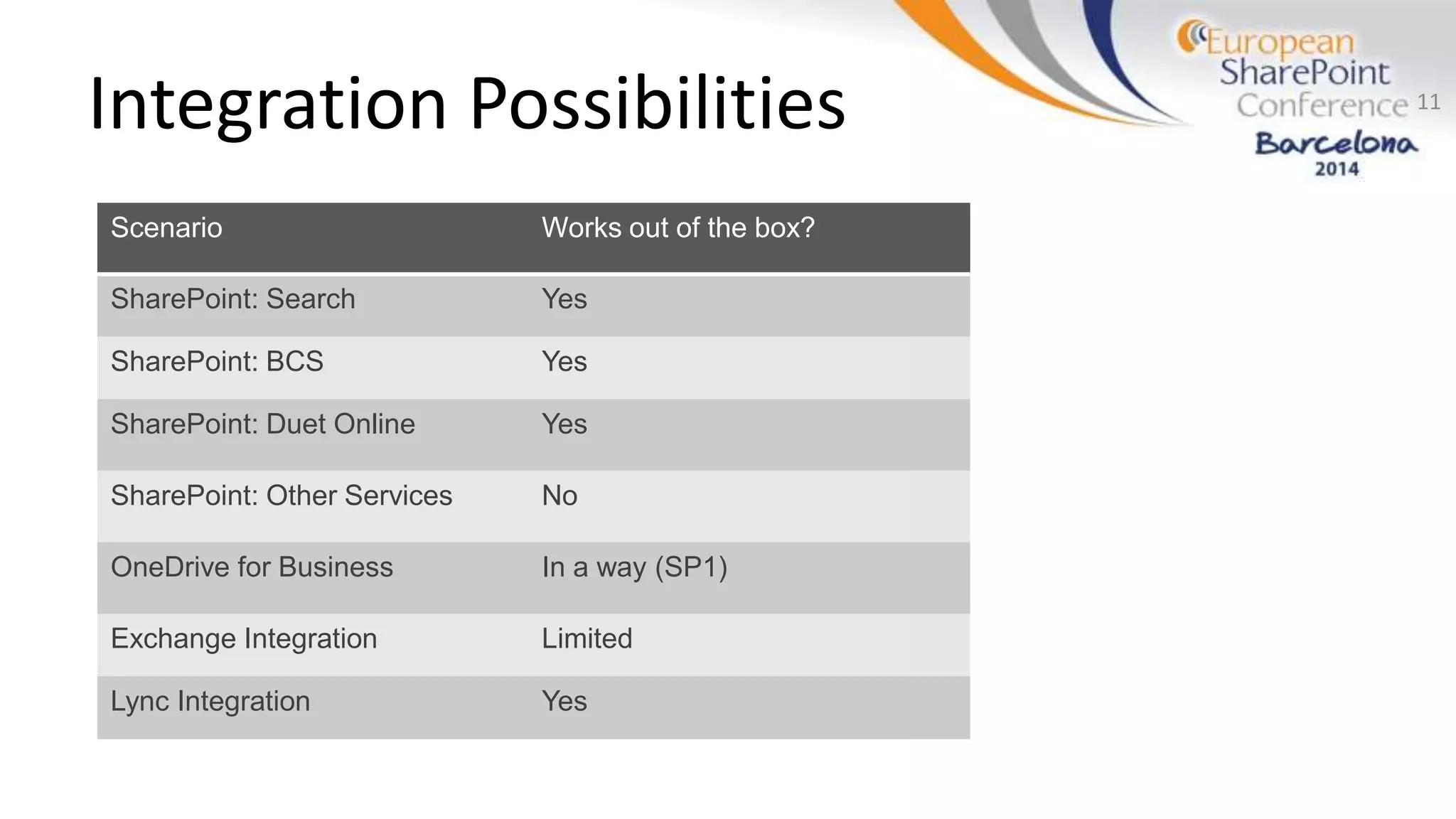
Integration Possibilities 11
Scenario Works out of the box?
SharePoint: Search Yes
SharePoint: BCS Yes
SharePoint: Duet Online Yes
SharePoint: Other Services No
OneDrive for Business In a way (SP1)
Exchange Integration Limited
Lync Integration Yes
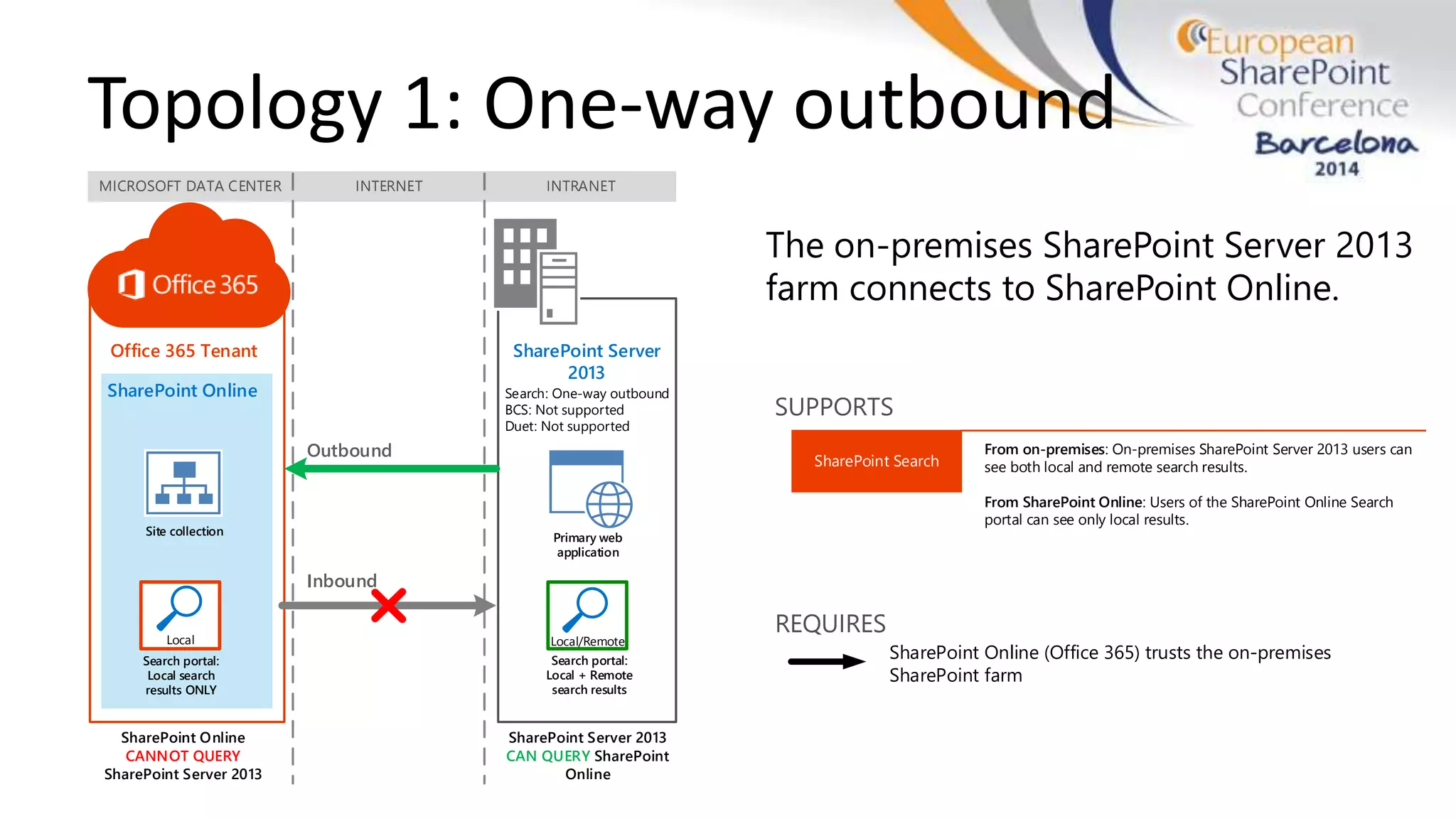
MICROSOFT DATA CENTER INTERNET INTRANET
SharePoint Online
CANNOT QUERY
SharePoint Server 2013
SharePoint Online
Site collection
Search portal:
Local search
results ONLY
Search: One-way outbound
BCS: Not supported
Duet: Not supported
SharePoint Server 2013
CAN QUERY SharePoint
Online
Primary web
application
Search portal:
Local + Remote
search results
Outbound
Inbound
Office 365 Tenant SharePoint Server
2013
Local Local/Remote
Topology 1: One-way outbound
The on-premises SharePoint Server 2013
farm connects to SharePoint Online.
SUPPORTS
SharePoint Search
From on-premises: On-premises SharePoint Server 2013 users can
see both local and remote search results.
From SharePoint Online: Users of the SharePoint Online Search
portal can see only local results.
REQUIRES
SharePoint Online (Office 365) trusts the on-premises
SharePoint farm
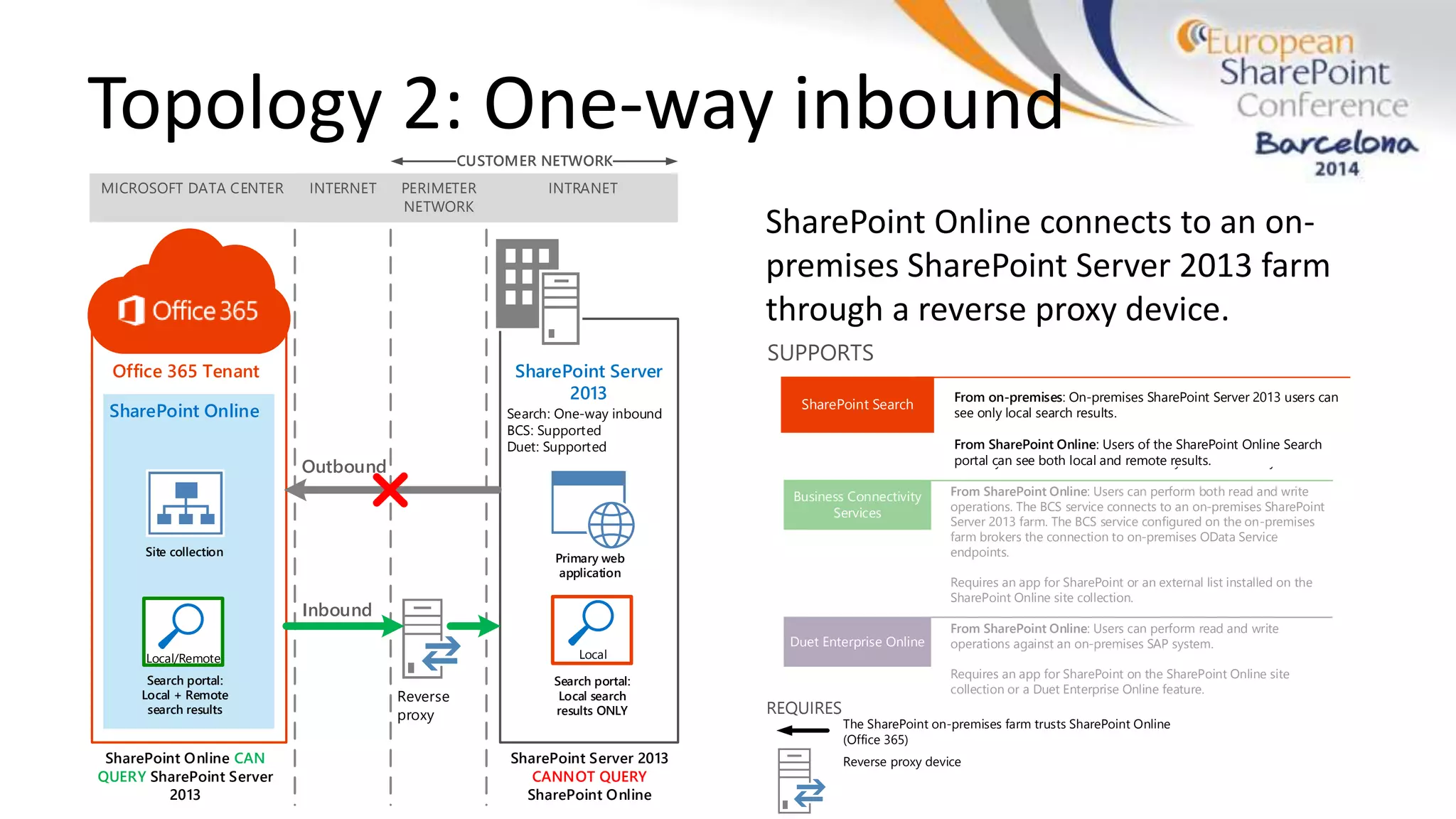
MICROSOFT DATA CENTER INTERNET INTRANET
SharePoint Online CAN
QUERY SharePoint Server
2013
SharePoint Online
Site collection
Search portal:
Local search
results ONLY
Search: One-way inbound
BCS: Supported
Duet: Supported
SharePoint Server 2013
CANNOT QUERY
SharePoint Online
Primary web
application
Office 365 Tenant SharePoint Server
2013
PERIMETER
NETWORK
Reverse
proxy
CUSTOMER NETWORK
Outbound
Inbound
Local
Search portal:
Local + Remote
search results
Local/Remote
The SharePoint on-premises farm trusts SharePoint Online
(Office 365)
Reverse proxy device
REQUIRES
SharePoint Search
From on-premises: On-premises SharePoint Server 2013 users can
see only local search results.
From SharePoint Online: Users of the SharePoint Online Search
portal can see both local and remote results.
SUPPORTS
Topology 2: One-way inbound
SharePoint Online connects to an on-
premises SharePoint Server 2013 farm
through a reverse proxy device.
Business Connectivity
Services
Duet Enterprise Online
From SharePoint Online: Users can perform both read and write
operations. The BCS service connects to an on-premises SharePoint
Server 2013 farm. The BCS service configured on the on-premises
farm brokers the connection to on-premises OData Service
endpoints.
Requires an app for SharePoint or an external list installed on the
SharePoint Online site collection.
From SharePoint Online: Users can perform read and write
operations against an on-premises SAP system.
Requires an app for SharePoint on the SharePoint Online site
collection or a Duet Enterprise Online feature.
SharePoint Search
From on-premises: On-premises SharePoint Server 2013 users can
see both local and remote results.
From SharePoint Online: Users of the SharePoint Online Search
portal can see both local and remote results.
Extranet users: If you configure extranet authentication services,
extranet users can log in remotely with an on-premises Active
Directory account and use all available hybrid functionality.
SUPPORTS
MICROSOFT DATA CENTER INTERNET INTRANET
SharePoint Online CAN
QUERY SharePoint Server
2013
SharePoint Online
Site collection
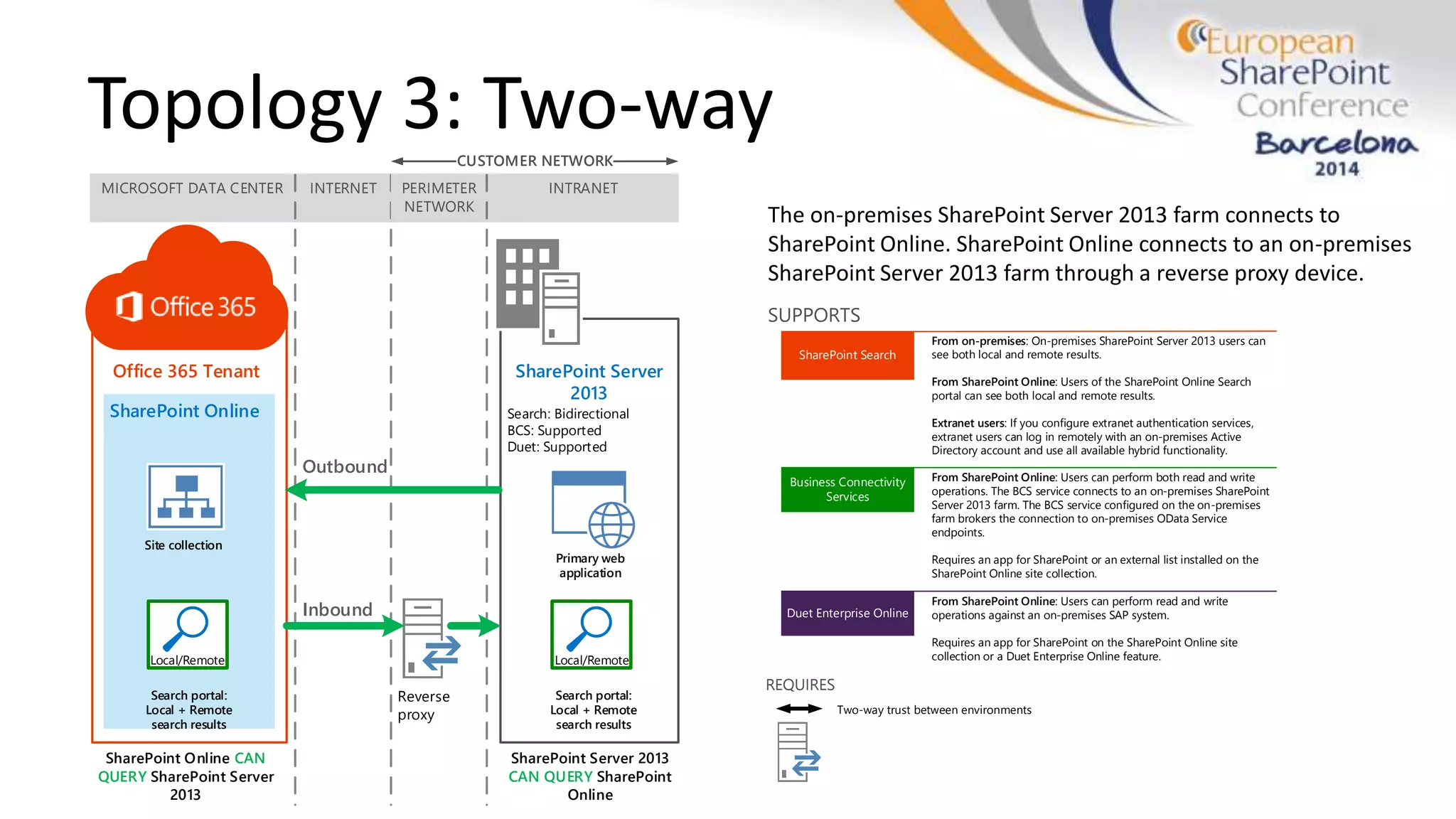
Search: Bidirectional
BCS: Supported
Duet: Supported
SharePoint Server 2013
CAN QUERY SharePoint
Online
Primary web
application
Office 365 Tenant SharePoint Server
2013
PERIMETER
NETWORK
Reverse
proxy
CUSTOMER NETWORK
Outbound
Inbound
Search portal:
Local + Remote
search results
Local/Remote
Search portal:
Local + Remote
search results
Local/Remote
Topology 3: Two-way
The on-premises SharePoint Server 2013 farm connects to
SharePoint Online. SharePoint Online connects to an on-premises
SharePoint Server 2013 farm through a reverse proxy device.
Business Connectivity
Services
Duet Enterprise Online
From SharePoint Online: Users can perform both read and write
operations. The BCS service connects to an on-premises SharePoint
Server 2013 farm. The BCS service configured on the on-premises
farm brokers the connection to on-premises OData Service
endpoints.
Requires an app for SharePoint or an external list installed on the
SharePoint Online site collection.
From SharePoint Online: Users can perform read and write
operations against an on-premises SAP system.
Requires an app for SharePoint on the SharePoint Online site
collection or a Duet Enterprise Online feature.
SharePoint Search
From on-premises: On-premises SharePoint Server 2013 users can
see both local and remote results.
From SharePoint Online: Users of the SharePoint Online Search
portal can see both local and remote results.
Extranet users: If you configure extranet authentication services,
extranet users can log in remotely with an on-premises Active
Directory account and use all available hybrid functionality.
SUPPORTS
Two-way trust between environments
REQUIRES
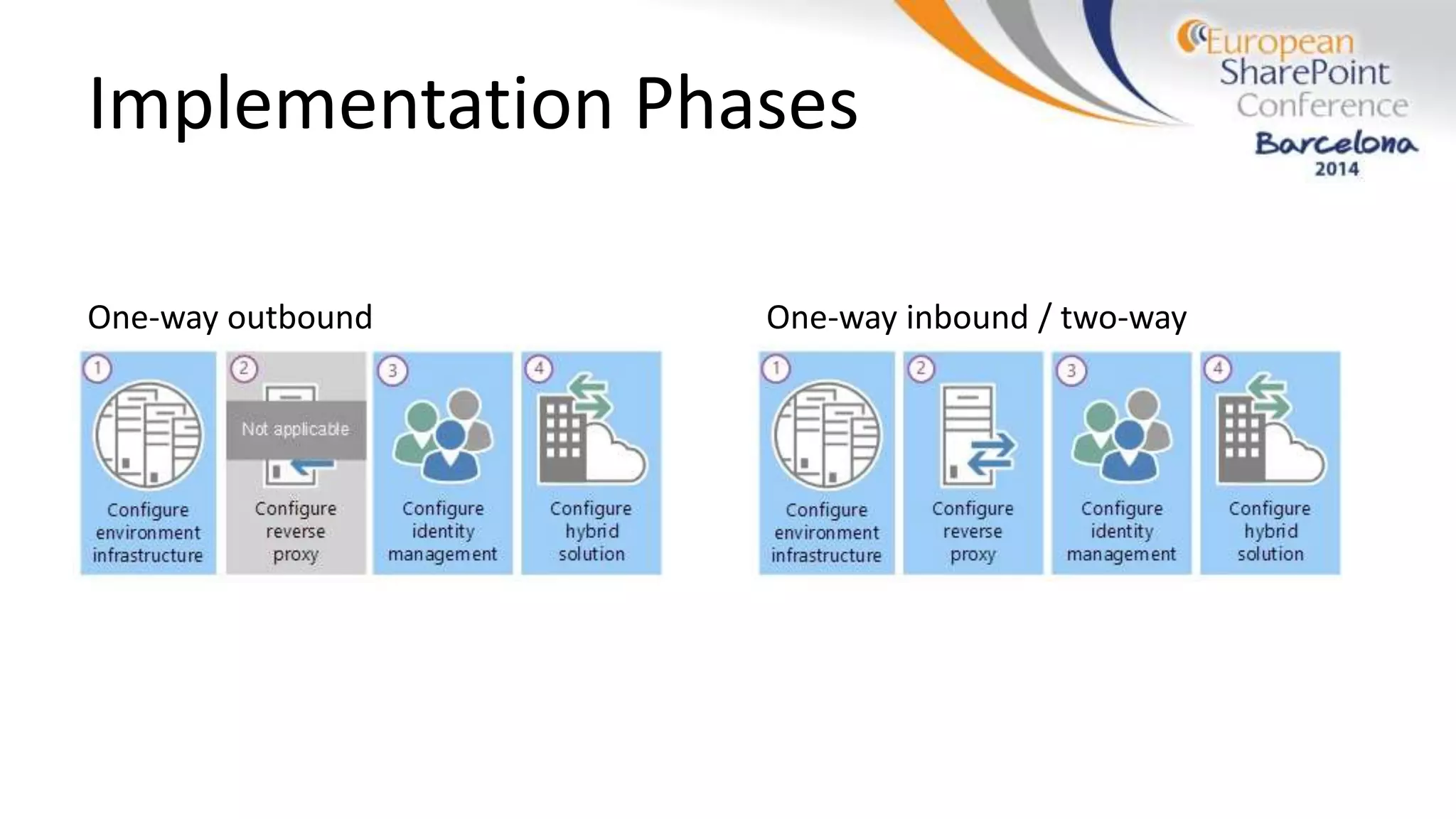
Implementation Phases
One-way outbound One-way inbound / two-way
Phase 1: Configure environment
infrastructure
1. Prepare for directory synchronisation &
identity management
2. Prepare SharePoint 2013 & Online for hybrid
features
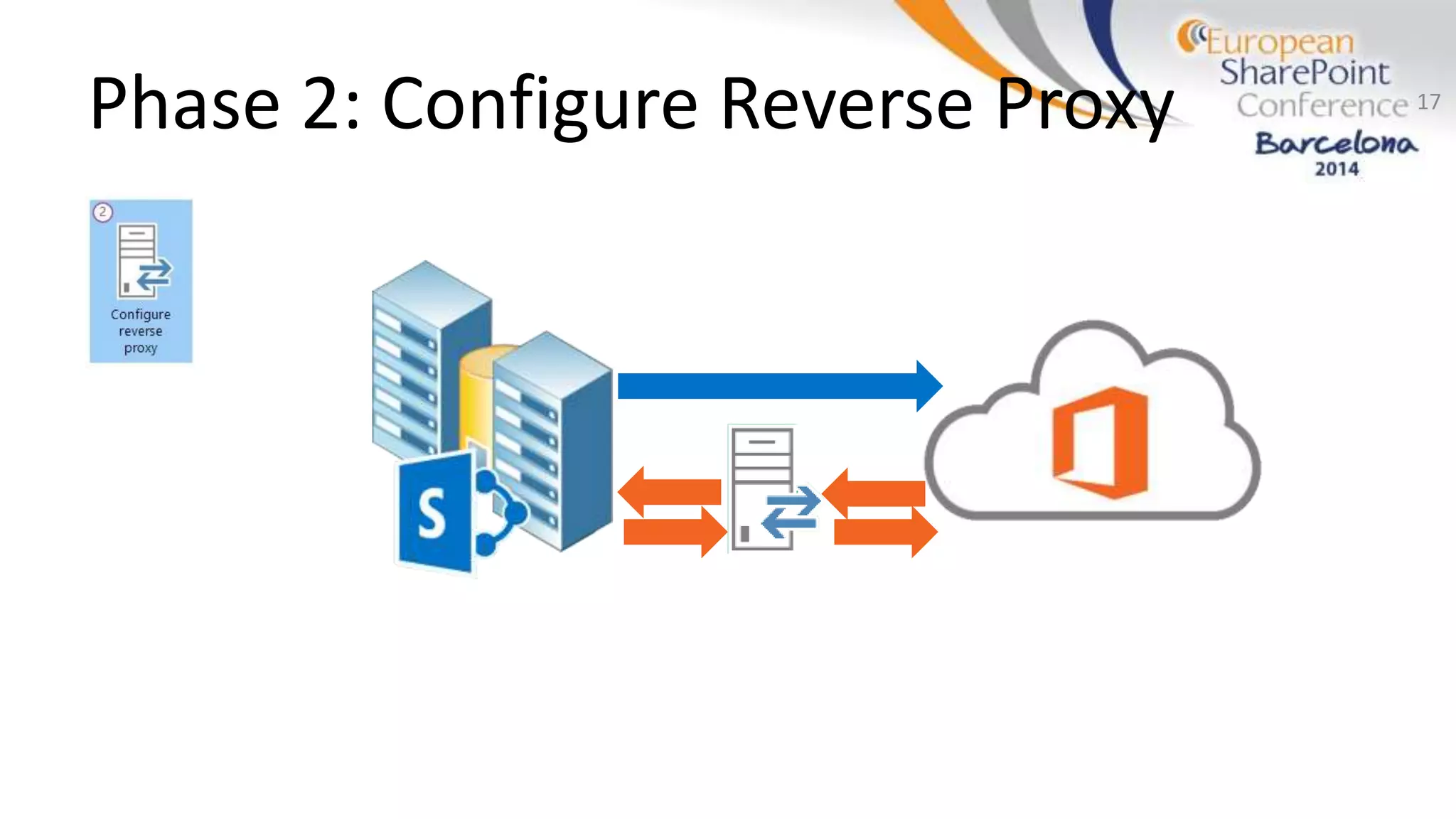
Phase 2: Configure Reverse Proxy 17
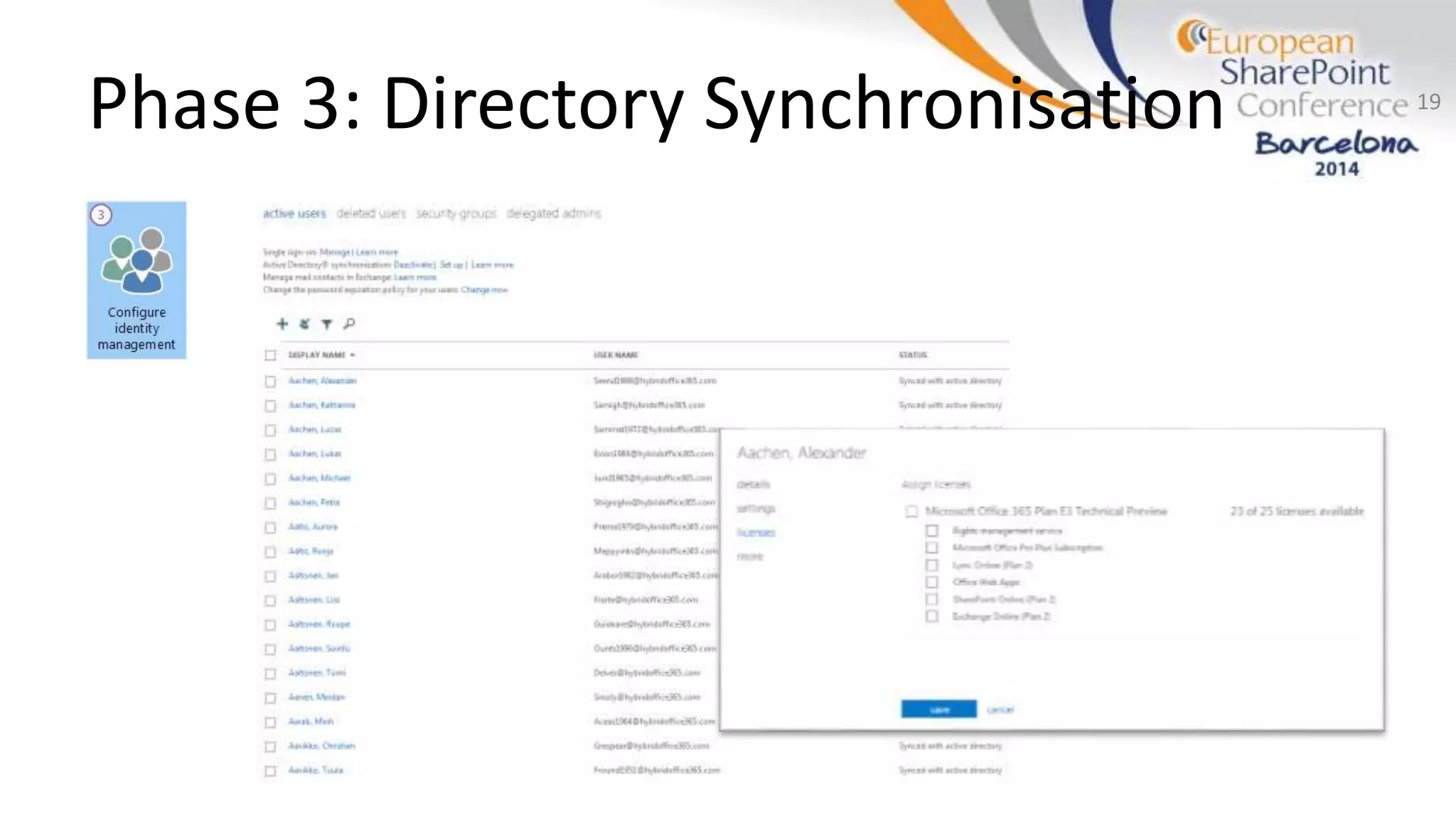
Phase 3: Directory Synchronisation
• Synchronise AD users with Office 365
• Can’t be installed on a domain controller
• Prerequisite: activated in UI
• Does not assign licenses!
18
Phase 3: Directory Synchronisation 19
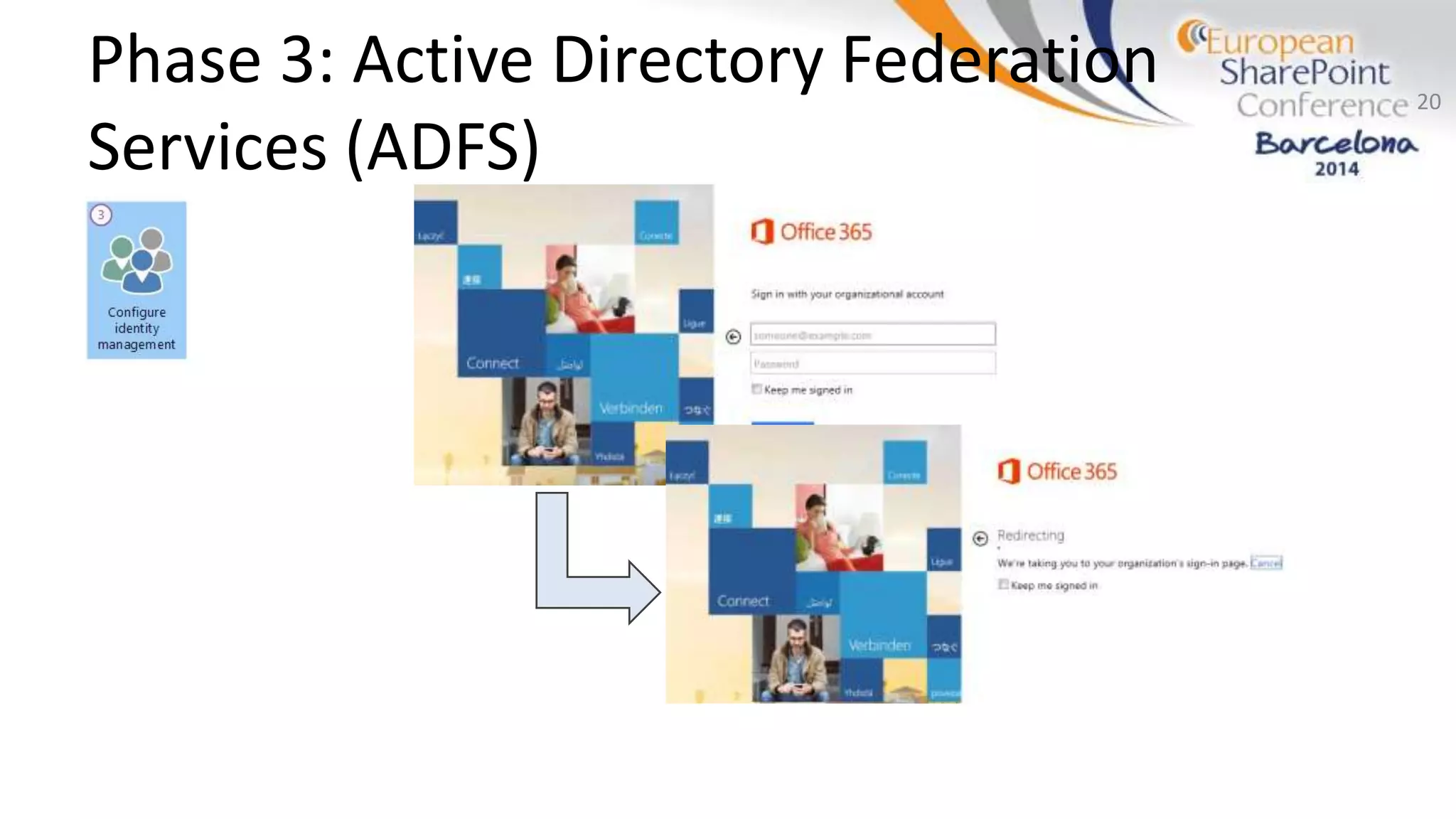
Phase 3: Active Directory Federation
Services (ADFS)
20
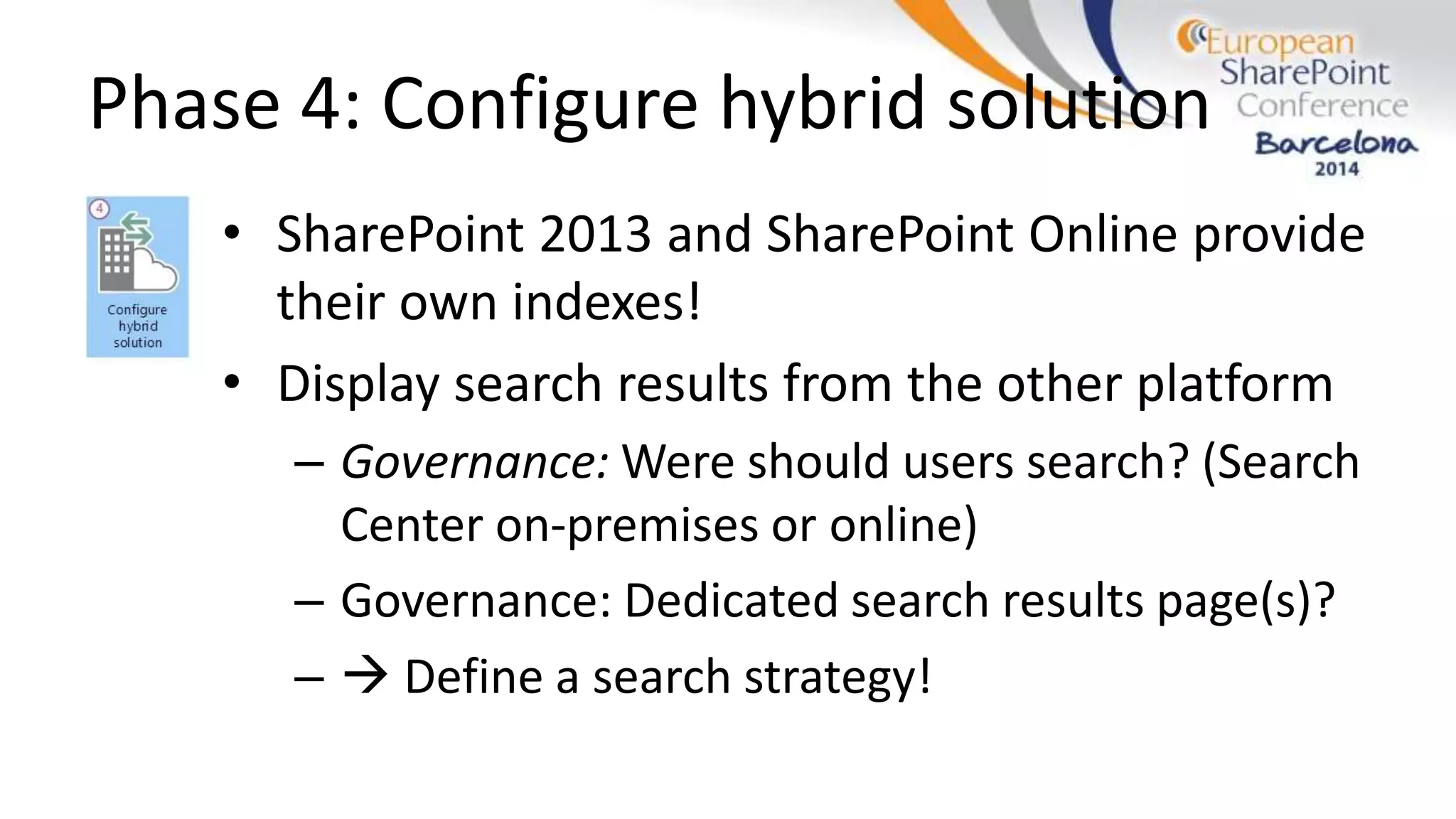
Phase 4: Configure hybrid solution
• SharePoint 2013 and SharePoint Online provide
their own indexes!
• Display search results from the other platform
– Governance: Were should users search? (Search
Center on-premises or online)
– Governance: Dedicated search results page(s)?
–  Define a search strategy!
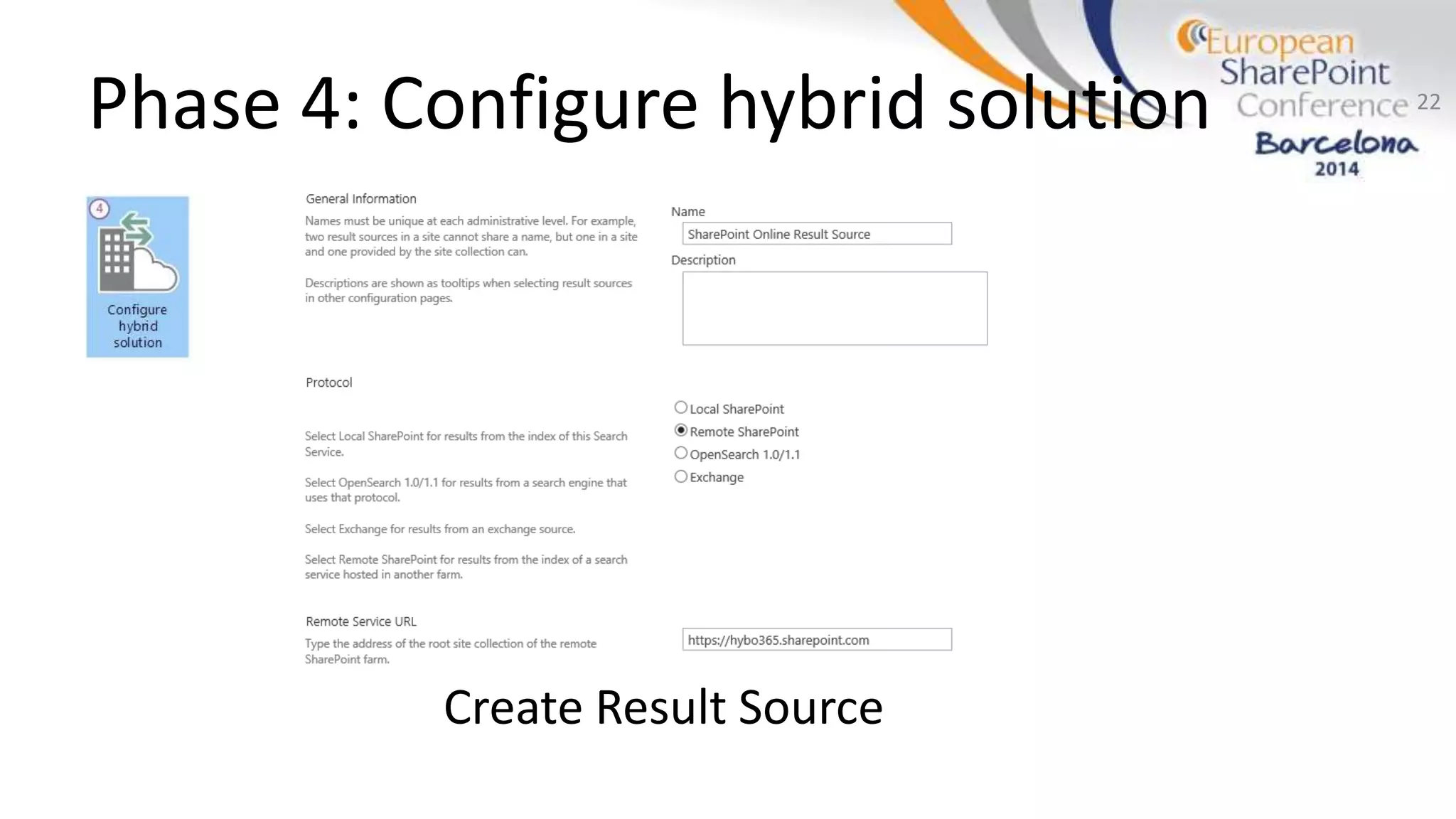
Phase 4: Configure hybrid solution
Create Result Source
22
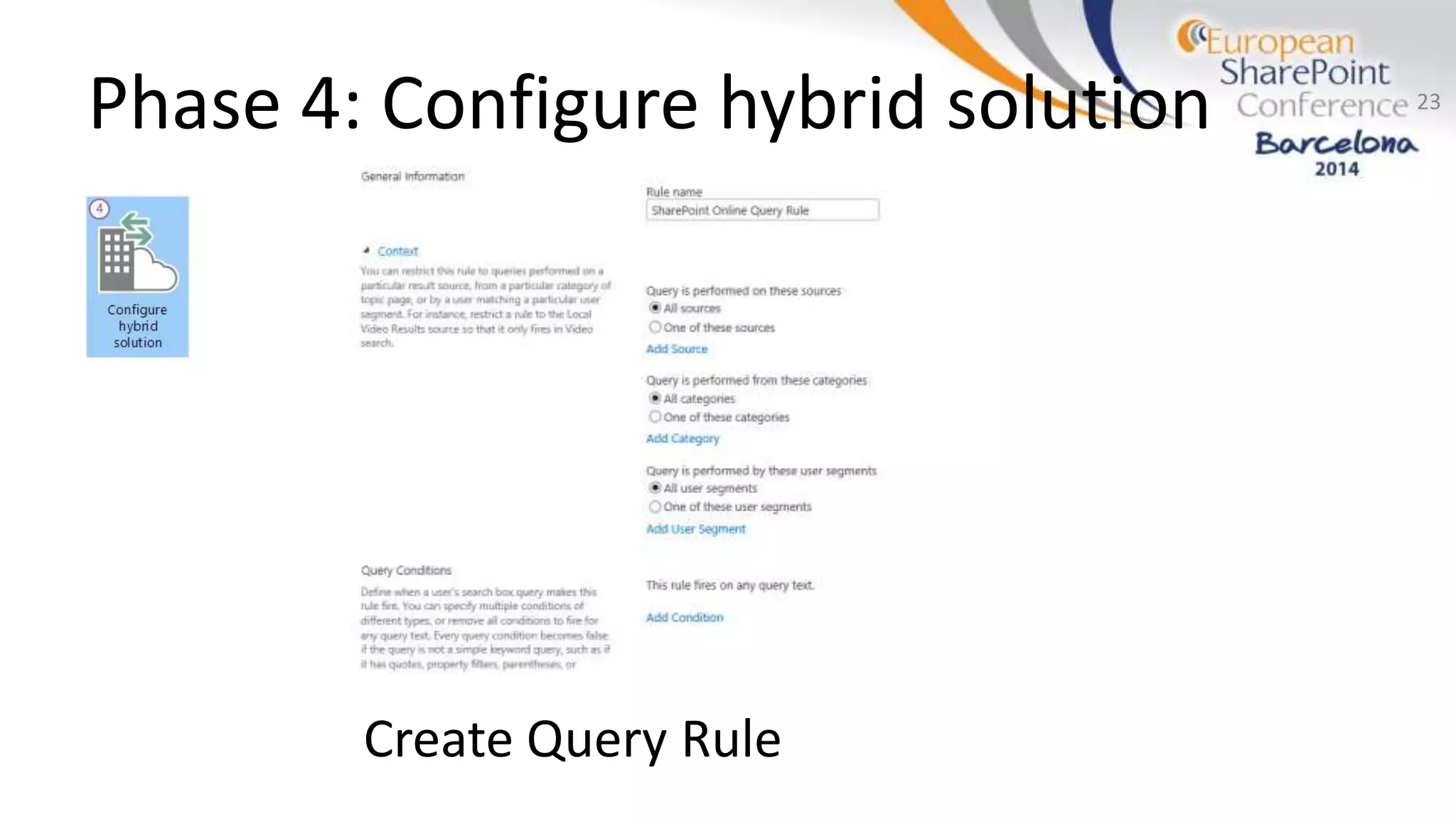
Phase 4: Configure hybrid solution
Create Query Rule
23
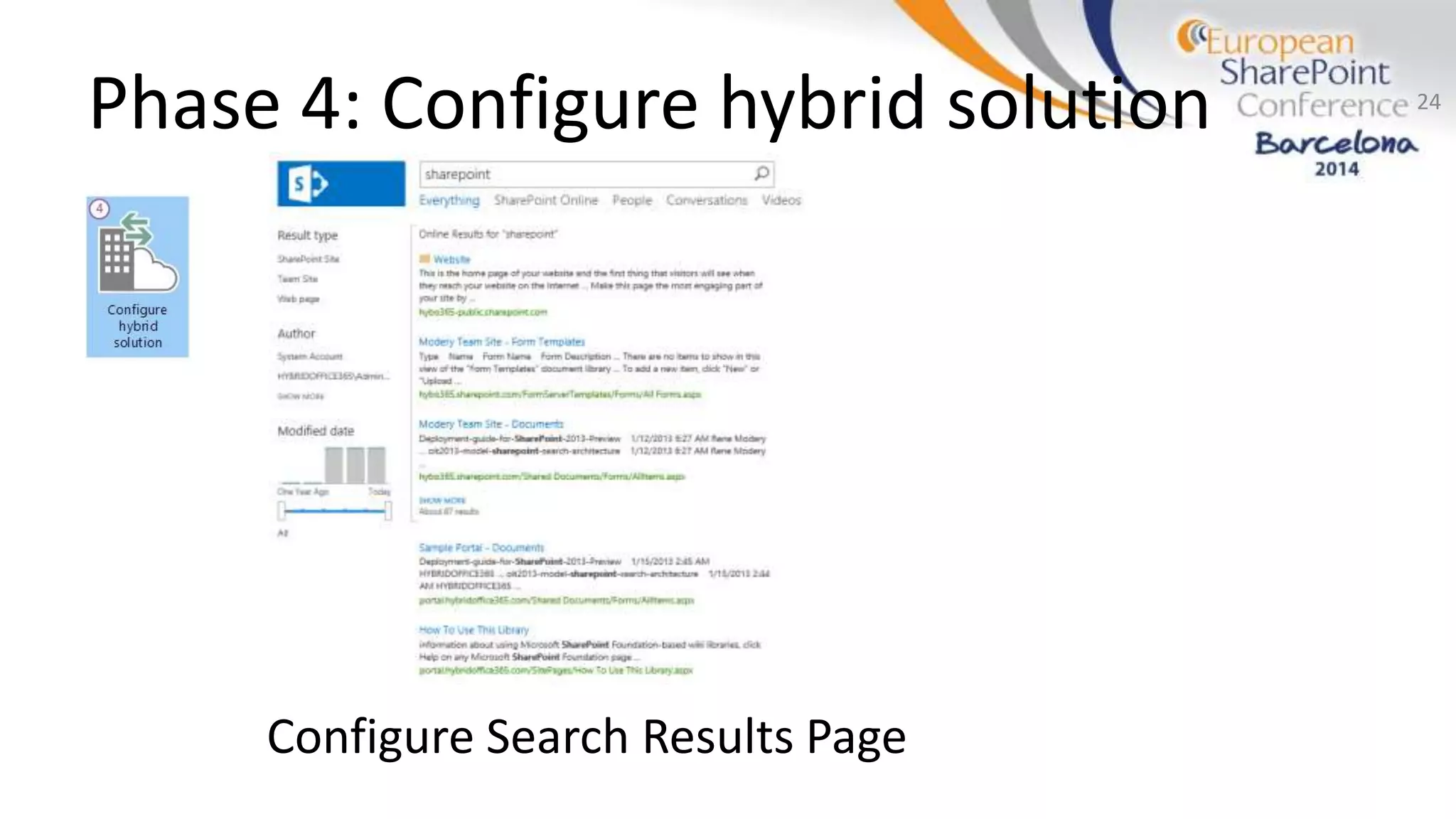
Phase 4: Configure hybrid solution
Configure Search Results Page
24
My own Hybrid!
• #1 Source: TechNet Article “Hybrid for SharePoint
Server 2013”
– http://bit.ly/sp13hybrid
• SharePoint Conference 2014:
– http://bit.ly/c9hybrid
• More Articles, Links, Whitepapers, etc.
– http://hybridoffice365.com
25

ESPC14 - T13 - Implementing a Hybrid SharePoint 2013 and Office 365 environment

  • 1.
    Implementing a HybridSharePoint 2013 and Office 365 Environment René Modery, Office 365 MVP 1stQuad Solutions
  • 2.
    Introduction Who am I? Consultant& Solution Architect Office 365 MVP 6+ years in Singapore Based in Zurich, Switzerland Contact Details Web: http://modery.net Twitter: @modery Email: rene@modery.net 2
  • 3.
    OVERVIEW OF HYBRIDENVIRONMENTS 3
  • 4.
    What's a hybrid? SharePoint2013 (hosted anywhere) 4 Office 365
  • 5.
    Why do wewant/need it? Continue using valuable on-premises investments Leverage the awesomeness of cloud technology http://www.flickr.com/photos/torkildr/3462607995/ http://creativecommons.org/licenses/by-sa/2.0/deed.en
  • 6.
    Use cases fora hybrid Permanent: Integration vs Temporary: Migration 6 Reduce Costs Additional Functionality Separation of workloads Improved flexibility and scalability Permanent: Integration vs Temporary: Migration
  • 7.
    Hybrid Options Search – Deliversearch results from both environments Business Connectivity Services (BCS) – Access on-premises LOB systems from SharePoint Online Duet Enterprise Online – Access on-premises SAP from SharePoint Online OneDrive for Business – Move selected / all users to 25GB online storage! (SP1) Identity Management – One identity for both environments
  • 8.
  • 9.
    Setup 1. SharePoint 2013 2.Office 365 E Plan 3. Your own domain and access to DNS settings 4. Active Directory (Single Forest, UPN) 5. Directory Synchronization Computer 6. Reverse Proxy* 7. ADFS 8. ADFS Proxy** 9. PowerShell (specific cmdlets available) 10. * Only needed if SPO needs to access on-premises 11. ** If users should be allowed to log on remotely Internal Network DMZ Office 365 mycompany.de
  • 10.
  • 11.
    Integration Possibilities 11 ScenarioWorks out of the box? SharePoint: Search Yes SharePoint: BCS Yes SharePoint: Duet Online Yes SharePoint: Other Services No OneDrive for Business In a way (SP1) Exchange Integration Limited Lync Integration Yes
  • 12.
    MICROSOFT DATA CENTERINTERNET INTRANET SharePoint Online CANNOT QUERY SharePoint Server 2013 SharePoint Online Site collection Search portal: Local search results ONLY Search: One-way outbound BCS: Not supported Duet: Not supported SharePoint Server 2013 CAN QUERY SharePoint Online Primary web application Search portal: Local + Remote search results Outbound Inbound Office 365 Tenant SharePoint Server 2013 Local Local/Remote Topology 1: One-way outbound The on-premises SharePoint Server 2013 farm connects to SharePoint Online. SUPPORTS SharePoint Search From on-premises: On-premises SharePoint Server 2013 users can see both local and remote search results. From SharePoint Online: Users of the SharePoint Online Search portal can see only local results. REQUIRES SharePoint Online (Office 365) trusts the on-premises SharePoint farm
  • 13.
    MICROSOFT DATA CENTERINTERNET INTRANET SharePoint Online CAN QUERY SharePoint Server 2013 SharePoint Online Site collection Search portal: Local search results ONLY Search: One-way inbound BCS: Supported Duet: Supported SharePoint Server 2013 CANNOT QUERY SharePoint Online Primary web application Office 365 Tenant SharePoint Server 2013 PERIMETER NETWORK Reverse proxy CUSTOMER NETWORK Outbound Inbound Local Search portal: Local + Remote search results Local/Remote The SharePoint on-premises farm trusts SharePoint Online (Office 365) Reverse proxy device REQUIRES SharePoint Search From on-premises: On-premises SharePoint Server 2013 users can see only local search results. From SharePoint Online: Users of the SharePoint Online Search portal can see both local and remote results. SUPPORTS Topology 2: One-way inbound SharePoint Online connects to an on- premises SharePoint Server 2013 farm through a reverse proxy device. Business Connectivity Services Duet Enterprise Online From SharePoint Online: Users can perform both read and write operations. The BCS service connects to an on-premises SharePoint Server 2013 farm. The BCS service configured on the on-premises farm brokers the connection to on-premises OData Service endpoints. Requires an app for SharePoint or an external list installed on the SharePoint Online site collection. From SharePoint Online: Users can perform read and write operations against an on-premises SAP system. Requires an app for SharePoint on the SharePoint Online site collection or a Duet Enterprise Online feature. SharePoint Search From on-premises: On-premises SharePoint Server 2013 users can see both local and remote results. From SharePoint Online: Users of the SharePoint Online Search portal can see both local and remote results. Extranet users: If you configure extranet authentication services, extranet users can log in remotely with an on-premises Active Directory account and use all available hybrid functionality. SUPPORTS
  • 14.
    MICROSOFT DATA CENTERINTERNET INTRANET SharePoint Online CAN QUERY SharePoint Server 2013 SharePoint Online Site collection Search: Bidirectional BCS: Supported Duet: Supported SharePoint Server 2013 CAN QUERY SharePoint Online Primary web application Office 365 Tenant SharePoint Server 2013 PERIMETER NETWORK Reverse proxy CUSTOMER NETWORK Outbound Inbound Search portal: Local + Remote search results Local/Remote Search portal: Local + Remote search results Local/Remote Topology 3: Two-way The on-premises SharePoint Server 2013 farm connects to SharePoint Online. SharePoint Online connects to an on-premises SharePoint Server 2013 farm through a reverse proxy device. Business Connectivity Services Duet Enterprise Online From SharePoint Online: Users can perform both read and write operations. The BCS service connects to an on-premises SharePoint Server 2013 farm. The BCS service configured on the on-premises farm brokers the connection to on-premises OData Service endpoints. Requires an app for SharePoint or an external list installed on the SharePoint Online site collection. From SharePoint Online: Users can perform read and write operations against an on-premises SAP system. Requires an app for SharePoint on the SharePoint Online site collection or a Duet Enterprise Online feature. SharePoint Search From on-premises: On-premises SharePoint Server 2013 users can see both local and remote results. From SharePoint Online: Users of the SharePoint Online Search portal can see both local and remote results. Extranet users: If you configure extranet authentication services, extranet users can log in remotely with an on-premises Active Directory account and use all available hybrid functionality. SUPPORTS Two-way trust between environments REQUIRES
  • 15.
    Implementation Phases One-way outboundOne-way inbound / two-way
  • 16.
    Phase 1: Configureenvironment infrastructure 1. Prepare for directory synchronisation & identity management 2. Prepare SharePoint 2013 & Online for hybrid features
  • 17.
    Phase 2: ConfigureReverse Proxy 17
  • 18.
    Phase 3: DirectorySynchronisation • Synchronise AD users with Office 365 • Can’t be installed on a domain controller • Prerequisite: activated in UI • Does not assign licenses! 18
  • 19.
    Phase 3: DirectorySynchronisation 19
  • 20.
    Phase 3: ActiveDirectory Federation Services (ADFS) 20
  • 21.
    Phase 4: Configurehybrid solution • SharePoint 2013 and SharePoint Online provide their own indexes! • Display search results from the other platform – Governance: Were should users search? (Search Center on-premises or online) – Governance: Dedicated search results page(s)? –  Define a search strategy!
  • 22.
    Phase 4: Configurehybrid solution Create Result Source 22
  • 23.
    Phase 4: Configurehybrid solution Create Query Rule 23
  • 24.
    Phase 4: Configurehybrid solution Configure Search Results Page 24
  • 25.
    My own Hybrid! •#1 Source: TechNet Article “Hybrid for SharePoint Server 2013” – http://bit.ly/sp13hybrid • SharePoint Conference 2014: – http://bit.ly/c9hybrid • More Articles, Links, Whitepapers, etc. – http://hybridoffice365.com 25