

Students in the
                 Director’s Seat


       Teaching and Learning across the
              School Curriculum
                     with
           Student-generated Video


                                  A Research Report
                                          by
                           Sandy Schuck and Matthew Kearney


          Teacher Learning and Development Research Group
          http://www.ed-dev.uts.edu.au/teachered/research/dvproject/home.html

          Faculty of Education
          University of Technology, Sydney

          Funded by a UTS Industry Links seeding grant with
          Apple Computer Australia

          2003 - 2004


Students in the Director’s Seat                                                 i
Acknowledgements

       We gratefully acknowledge the contributions of the five case study schools
who participated in this research. In particular, we wish to thank the many teachers,
executive staff and students who gave so willingly of their time to this project.

       The project was funded by a joint UTS Industry Links Seeding Grant and
Apple Computer Australia. Without this funding the research would not have been
possible.

        The personnel at Apple Computer Australia who were involved in the project
gave freely of their time and advice and this was greatly appreciated. We would like
to thank Feyi Akindoyeni, Andrew Powe (formerly of Apple), Cassandra
Chamberlain and David Albion for their ongoing assistance and support.

        Finally, the project was enhanced by having two superb research assistants in
the form of Mr. Gerry Foley and Dr Gilda Segal, whose organisation, patience and
insights contributed so much to the project. Our thanks also go to Kirsty Young who
contributed to our literature review and Rosemary McLellan for helping to enhance
the presentation of the final product.


        Sandy Schuck and Matthew Kearney
        September 2004


Schuck & Kearney 2004                                                                   ii
Table of Contents
          Acknowledgements ....................................................................................... i
          Table of Contents..........................................................................................1
          1         Executive Summary ......................................................................5
            1.1     Overview Of The Study ................................................................. 5
            1.2     Research Questions........................................................................ 5
            1.3     Instruments Utilised And Developed For This Study...................... 5
            1.4     Basic Assumptions......................................................................... 6
            1.5     Participating Schools...................................................................... 6
            1.6     Relation To Current Work In The Area .......................................... 7
               1.6.1 Research on new technologies and good practice........................ 7
            1.7     Key Findings ................................................................................. 7
               1.7.1 Teacher rationales for use of student-generated digital video ...... 7
               1.7.2 The role of the school and other contextual factors ..................... 8
               1.7.3 The learning outcomes of student-generated digital video tasks .. 8
               1.7.4 Pedagogical approaches.............................................................. 9
            1.8     Conclusions And Recommendations .............................................. 9
          2         Literature Review .......................................................................11
            2.1     Use Of ICT In Schools..................................................................11
            2.2     Student-Generated Digital Video ..................................................11
               2.2.1 Role of the teacher in digital video projects ...............................12
               2.2.2 Digital video and student assessment .........................................12
               2.2.3 Digital video and cross-curricula outcomes................................13
               2.2.4 Video-based laboratories in Science and Mathematics Education
                       .................................................................................................13
            2.3     Rationale For Using Student-Generated Digital Video ..................14
               2.3.1 Building new literacies ..............................................................14
               2.3.2 Creating authentic learning experiences.....................................15
               2.3.3 Developing conceptual understanding .......................................16
               2.3.4 Enhancing motivation and other affective outcomes ..................17
               2.3.5 Promoting expression and communication skills........................17
               2.3.6 Developing collaborative learning skills ....................................17
               2.3.7 Building technology skills .........................................................18
               2.3.8 Building generic learning skills .................................................18
            2.4     Implications Of Findings From The Literature ..............................18
            2.5     Recommendations From The Literature ........................................19
          3         Research Methodology And Design............................................20
            3.1     Methodology.................................................................................20
            3.2     The Research Questions................................................................21
            3.3     The Research Team.......................................................................22
            3.4     Methods........................................................................................22
               3.4.1 Data collection ..........................................................................22
               3.4.2 Analysis ....................................................................................23
            3.5     Participants ...................................................................................23
               3.5.1 Profiles of the participating schools ...........................................24
            3.6     The Use of Digital Video As A Research Tool ..............................26
               3.6.1 The use of digital video as a research tool in the literature .........26

Students in the Director’s Seat                                                                                         1
3.6.2 Ways in which digital video was used as a research tool in the
                     project ......................................................................................29
             3.6.3 Issues arising from the use of digital video as a research tool in
                     this study..................................................................................29
          3.7     Summary ......................................................................................32
        4         Overview Of Tasks Using Student-Generated Digital Video ....34
          4.1     Explaining Phases Of The Moon And Eclipses..............................34
          4.2     Using Digital Video To Film Presentations ...................................34
          4.3     Giving Presentations Through The Medium Of Digital Video .......35
          4.4     Developing Student Values ...........................................................35
          4.5     Developing Mathematics Concepts With The Aid Of Digital Video
                  And Editing ..................................................................................35
          4.6     Using Digital Videos, Stills, iMovie and Powerpoint To Develop
                  Language Other Than English Skills .............................................35
          4.7     Developing Movie-Making Skills .................................................36
          4.8     Using Digital Video To Develop Understanding Of Different
                  Cultures ........................................................................................36
          4.9     Using Digital Video In Reflection For Portfolios...........................36
          4.10 Using Digital Video And iMovie To Develop Sequencing Skills...37
          4.11 Presenting School News Using Digital Video................................37
          4.12 Developing Concepts In PDHPE Using Video Commercials.........37
          4.13 Other DV Tasks ............................................................................37
        5         Findings .......................................................................................38
          5.1     What Are Teachers’ Rationales for Using Student-Generated Digital
                  Video In Their Teaching? .............................................................38
             5.1.1 To develop understanding..........................................................38
             5.1.2 To motivate students..................................................................39
             5.1.3 To increase student autonomy....................................................40
             5.1.4 To promote active learning in their classrooms ..........................41
             5.1.5 To provide opportunities for group learning and language
                     development.............................................................................42
             5.1.6 To develop technological and digital literacies...........................42
             5.1.7 To provide feedback and records for parents, teachers and
                     students ....................................................................................43
             5.1.8 To fit with teachers’ preferred roles and approaches to teaching 44
             5.1.9 To extend teachers’ personal interest in digital movie making ...45
             5.1.10 Summary...................................................................................45
          5.2     What Is The Role Of The School In Promoting Innovative Use Of
                  The Technology? What Other Contextual Factors Constrain Or
                  Enhance The Use Of This Technology In Teaching and Learning?46
             5.2.1 Principal with vision..................................................................46
             5.2.2 Key person driving and supporting use of student-generated DV
                     in school...................................................................................47
             5.2.3 Technical support person...........................................................47
             5.2.4 School resources........................................................................48
             5.2.5 School culture ...........................................................................50
             5.2.6 Professional development on offer.............................................53
             5.2.7 Support from Apple...................................................................55
             5.2.8 Ease of use of iMovie ................................................................55
             5.2.9 Time..........................................................................................56

Schuck & Kearney 2004                                                                                              2
5.2.10 Summary...................................................................................56
            5.3     What Is The Nature Of The Learning Outcomes In Student-
                    Generated Digital Video Use In Various Key Learning Areas? .....56
               5.3.1 Movie-making skills..................................................................56
               5.3.2 Spoken and written literacies .....................................................58
               5.3.3 Media literacy skills ..................................................................59
               5.3.4 Presentation skills......................................................................60
               5.3.5 Understanding of topic: KLA curriculum outcomes...................61
               5.3.6 Autonomous behaviour..............................................................62
               5.3.7 Engagement and motivation ......................................................63
               5.3.8 Metacognitive skills ..................................................................68
               5.3.9 Summary...................................................................................69
            5.4     What Pedagogical Approaches Are Being Used With This New
                    Technology? .................................................................................69
               5.4.1 Roles .........................................................................................69
               5.4.2 Peer and group learning structures .............................................70
               5.4.3 Trial and error / discovery approach to student learning.............71
               5.4.4 Use of authentic learning opportunities......................................72
               5.4.5 Assessment................................................................................75
               5.4.6 Summary...................................................................................78
          6         Discussion Of Findings, Models Of Good Practice And
                    Conclusions .................................................................................79
            6.1     Teacher Beliefs .............................................................................79
            6.2     Modes Of Use of Student-Generated Digital Video Projects..........79
            6.3     School Support .............................................................................81
            6.4     Student Learning Outcomes ..........................................................81
            6.5     Pedagogical Approaches ...............................................................83
            6.6     Model of Good Practice for Mode 1 Digital Video Projects...........84
            6.7     Future Directions ..........................................................................87
               6.7.1 How does the presence of the camera change the ambience of a
                       classroom? ...............................................................................87
               6.7.2 How are specific learning outcomes influenced by student-
                       generated digital video?............................................................87
               6.7.3 What is the nature of ‘motivation’ in these projects and how does
                       its development interact with pedagogy? ..................................87
               6.7.4 How can use of student-generated digital video be used to develop
                       conceptual understandings and further develop reflection? .......87
               6.7.5 What emerging pedagogies are evident in student-generated
                       digital video?............................................................................88
               6.7.6 How can knowledge about student-generated digital video
                       enhance teacher education? ......................................................88
            6.8     Conclusion....................................................................................88
          7         References ...................................................................................89
          Appendix 1: Instruments Used In Study ...................................................92
            Appendix 1.1: Questionnaire For Teachers And Executive Staff ...............92
            Appendix 1.2: Interviews ..........................................................................95
            Appendix 1.3: Observation Schedules For Class Observations ..................98
            Appendix 1.4: Student Focus Group Interviews: ......................................99
          Appendix 2: Papers...................................................................................100
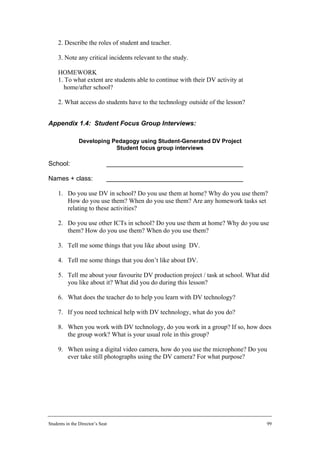
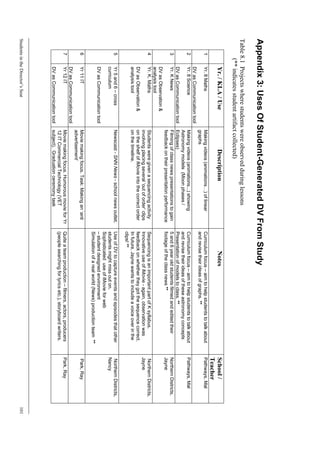
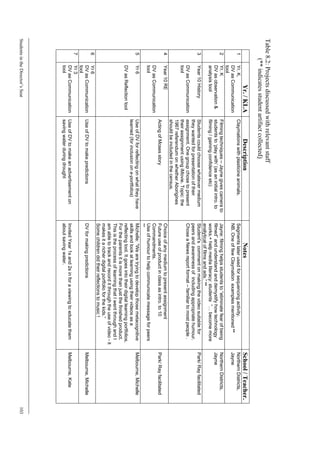
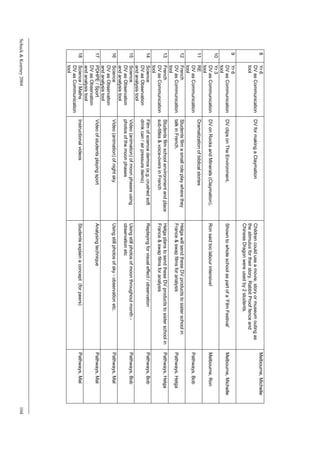
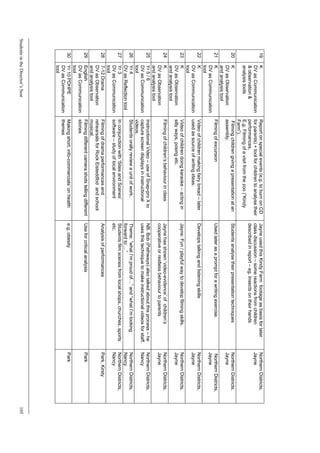
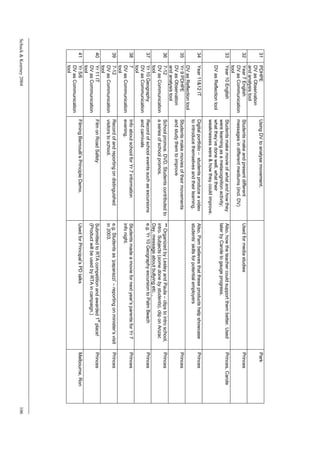
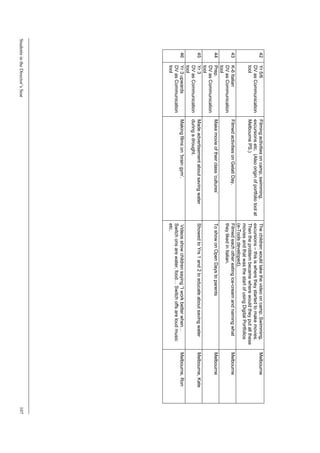
          Appendix 3: Uses Of Student-Generated DV From Study......................101

Students in the Director’s Seat                                                                                     3
List of Tables
Table 1.1: Participating schools .................................................................................6
Table 6.1: Summary of modes of use of student-generated digital video from
           study.......................................................................................................80
Table 6.2: Summary of student learning outcomes from DV projects in the study....82
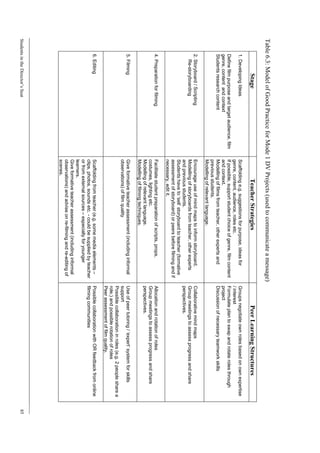
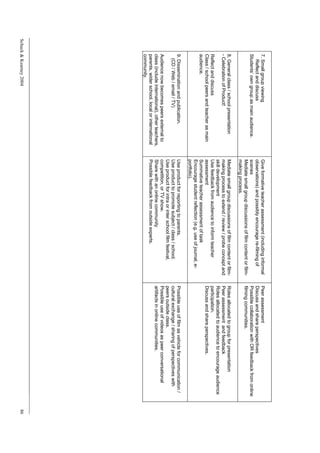
Table 6.3: Model of Good Practice for Mode 1 DV Projects (used to communicate
           a message) ..............................................................................................85
Table 8.1 Projects where students were observed during lessons...........................101
Table 8.2: Projects discussed with relevant staff ....................................................103
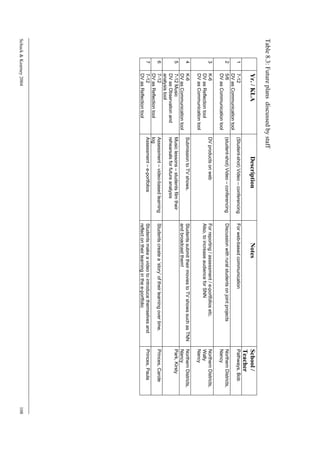
Table 8.3: Future plans discussed by staff.............................................................108


Schuck & Kearney 2004                                                                                                  4
1 Executive Summary
        1.1         Overview Of The Study
        This project is a collaboration between researchers from the Faculty of
Education, University of Technology, Sydney and Apple Computer Australia. Funded
by a UTS Industry Links Seeding Grant and Apple Computer Australia, the project
investigates the use of student-generated digital video (DV) in K-12 pedagogy. Five
case studies provide details of activities, approaches, roles and beliefs of students and
teachers in a range of K-12 schools using this technology. A focus of the study is on
the interactions between the new technology, pedagogy and the social conditions of
the classroom. The findings aim to inform teachers and teacher education institutions,
as well Apple Computer Australia, about how pedagogy may be enhanced using
digital video.
        The project involved visits to the five case study schools which ranged in
duration from two days to five days. Two researchers would participate in each visit,
and data were collected by means of questionnaires, classroom observations,
interviews with executive staff, participating teachers and other key staff, and focus
groups with students.
        Case studies were written by one member of the visiting team and checked for
accuracy by the other team member. The five case studies were then analysed for
themes related to the research questions.

        1.2         Research Questions
        There are three related foci for this study that make it different from many
previous studies in this field. Firstly, it examines pedagogy rather than the technology
per se; secondly, it focuses on student-created video rather than pre-made professional
video productions; and finally, it focuses on the process of generating the video rather
than giving undue attention to the quality of the actual product.
        The research questions include:
            • What are teachers’ rationales for using student-generated digital video
               in their classes?
            • What is the role of the school in promoting innovative use of the
               technology? What other contextual factors constrain or enhance the use
               of this technology in teaching and learning?
            • What is the nature of the learning outcomes in student-generated
               digital video use in various Key Learning Areas?
            • What pedagogical approaches are being used with this new
               technology?

        1.3         Instruments Utilised And Developed For This Study
        Instruments developed for this study were partially based on those used in the
NSW Department of Education and Training (DET) study entitled “Numeracy
Research in NSW Primary Schools” (2001-2002).
        The instruments comprised questionnaires for teachers and executive staff
about their practice (see Appendix 1.1), interview schedules (Appendix 1.2),
observation schedules (Appendix 1.3) and focus group interview schedules (Appendix
1.4).


Students in the Director’s Seat                                                         5
Interviews and observations were semi-structured to allow the capture of
relevant but extraneous data to that collected by the instruments. Observations
included free-ranging observations and filming by one of the team members, of any
relevant activity in the classroom. The instruments served more as a guide as to the
type of questions we were investigating, and to ensure that researchers shared a
certain level of consistency in their data collection.

       1.4        Basic Assumptions
        In studies of exemplary practice in schools, the selection of case schools is
often based on problematic assumptions about exemplary practice, for example, that
results of Basic Skills Tests will identify exemplary practice. The authors feel that
being directed to investigate practice which has been identified as exemplary by
others often detracts from the understanding of what is happening in the classroom, by
limiting observations. Therefore, in this study, the researchers are not looking at
practice identified as exemplary by some external criterion, but are considering
examples of pedagogy using student-generated digital video which have not been
labelled in any particular way. The researchers bring to this study their understandings
of good practice which emphasize inclusivity, engagement, encouragement of student
autonomy, collaborative learning and access to subject content. These understandings
are supplemented by knowledge of other frameworks of good practice (for example,
Newmann, 1996). The researchers are considering the pedagogies used in the cases in
the light of these understandings and also with a view to broadening their
understandings in the context of the new technology.

       1.5        Participating Schools
        The five schools studied in this research project were suggested as suitable
schools by our industry partner, Apple Computer Australia. Colleagues at Apple had
identified schools in which there was extensive activity, using Information and
Communication Technologies (henceforth to be called ICT in this study) for
pedagogical reasons, and in particular, use of student-generated digital video was
noted. Additionally, we had requested that the suggested schools fall across a range of
grades and curriculum areas.
        Accordingly we had six schools nominated but due to staff mobility in one
school, it became difficult to study that school. Table 1.1 gives a summary of the
schools that we included in the case study. (All names are pseudonyms to ensure
confidentiality of participants.)
        Across those schools, students were interviewed or observed from a range of
classes. These included: Kindergarten (K), Year 3, two Year 5/6 groups at different
schools, Year 7 LOTE (Languages other than English), two Year 7 ICT groups, Year
8 mathematics and science, Year 10 groups for Religious Education (RE) and
History, Year 11 Design and Technology and Year 12 ICT.

Table 1.1: Participating schools
NSW state primary school                     School 3: Northern Districts Primary School
NSW Catholic high schools                    Schools 1 and 2: Pathways Catholic High School
                                             and Park Catholic High School
NSW state high school                        School 4: Princes High School
Victorian state primary school               School 5: Melbourne Primary School


Schuck & Kearney 2004                                                                         6
1.6         Relation To Current Work In The Area

1.6.1 Research on new technologies and good practice
        Mason (2002) suggests that although many articles, case studies and
conferences have discussed the value of new technologies for best practice, very little
evidence has emerged from these studies. Mason suggests that we have a need for
studies that provide understanding on how to engage students affectively and how to
create exciting electronic-based learning in a variety of curriculum areas. This study
develops understanding in both of these areas.
        In general, the literature on computer-based learning makes many claims
about good practice resulting from computer technology use, but most of these claims
are untested (Schuck, 2002). It was the aim of this research to conduct an in-depth
study to provide understanding of what is happening in a set of classes using student-
generated video, and to focus on the pedagogical practices rather than the
technological ones.

1.6.1.1   Research on student-generated digital video
        Searches of contemporary research literature revealed that extremely few
studies have been conducted in Australia which focus on the learning that has
occurred in schools through the use and production of digital video by students. While
there are a number of studies that look at student-generated digital video in Australian
universities (Crean, 2001; Ludewig, 2001), few studies were found that investigated
student-generated digital video in K-12 Australian classrooms. Further, those studies
that investigated student-generated digital video in other countries tended to be
merely descriptive in nature. Most of these papers deal only with the processes used
and do not consider the role of the teacher, the learning outcomes achieved, the
perceptions of the students or other aspects of the pedagogy of using digital video in
learning. This area is the focus of our study and indicates that there is a gap in
research that would be fruitful to explore.

        1.7         Key Findings
         The key findings of this project are summarised below. While many of the
findings have been discussed in the literature, we believe that this study is one of the
first to consider all the different aspects discussed below in a K-12 Australian context.

1.7.1 Teacher rationales for use of student-generated digital video
        Major findings in this area were that teachers tended to start looking at use of
digital video for their own use, and during this process became aware of the value of
the tool for their students. They saw this value as leading to the following outcomes:
            • Developing understanding
            • Motivating students
            • Increasing student autonomy
            • Promoting active learning in their classrooms
            • Providing opportunities for group learning and language development
            • Developing technological and digital literacies
            • Providing feedback for parents, teachers and students
            • Fitting with their own preferred roles and approaches to teaching
            • Extending their personal interest in digital movie making.


Students in the Director’s Seat                                                            7
While it was clear that these reasons led to the use of student-generated digital
video in the classes observed, the researchers saw varying evidence of these outcomes
actually occurring. This is discussed further in Section 1.7.3


1.7.2 The role of the school and other contextual factors
       One of the strongest themes emerging from the study at the five school sites
concerned the role of the school and the positive influence this could provide. The
following aspects of the context were observed across all the schools:
           • The presence of a principal with vision
           • The presence of key people who drove and supported the use of
               student-generated digital video
           • In all but one case, strong technical support
           • Availability of school resources in the form of both human and
               technical resources (in all but one of the schools)
           • The school culture: this was seen to be a major factor which had a
               number of different characteristics, all seen to be influential in
               developing use of ICT and digital video in particular. These included:
               - a risk-taking culture in the school
               - an expectation that staff would use ICT in their teaching
               - goal setting initiatives (which were observed as a strong influence in
               one school in particular)
               - a supportive and open staff and parent culture
               - minimal ‘red tape’
           • Professional development (PD) on offer, and encouragement to
               participate in PD, both through attendance at external courses and
               through support at the school
           • Support from Apple Computer Australia, which was often instrumental
               in encouraging staff to explore options (Apple, 1995)
           • The ease of use of iMovie: this was seen to be a facilitating factor in
               using digital video with students
           • Time as an important affordance – both for teachers and for students to
               develop their skills and complete a body of substantial work.


1.7.3 The learning outcomes of student-generated digital video tasks
        A variety of learning outcomes were observed and others were discussed by
teachers in their interviews but did not occur during our visits to the schools. As well,
sixty-three different uses of student-generated digital video were identified by the
researchers as either arising from teacher reports of activities, observations by the
research team, or suggested as future ways of using digital video. These are provided
in Appendix 3.
        The following were outcomes that were observed by the research team. It can
be seen that many of them fit with the teacher rationales provided in Section 1.7.1, but
some were less apparent in the observations than others. The observed outcomes are
stated below:
            • Development of movie-making skills
            • Development of spoken and written literacies
            • Development of media literacy skills
            • Improvement of presentation skills

Schuck & Kearney 2004                                                                   8
•    Understanding of the subject content or topic
               •    Increase in autonomous behaviour
               •    Increased engagement and motivation. This was strongly evident and
                    was observed in the following characteristics of students’ activities:
                    - students were on-task and motivated
                    - ‘reluctant learners’ were generally engaged by student-generated
                    digital video
                    - these projects were perceived by students as different from other
                    classroom work
                    - a high level of choice and control was observed
                    - clear ownership and opportunity to project students’ own
                    personalities was evident
                    - there was evidence that motivation to learn about the topic grew from
                    the digital video task
               •    Increase of metacognitive skills

       It needs to be noted that the outcomes related to autonomy and motivation
were the most obvious ones achieved and that those outcomes related to
metacognition or to development of conceptual understanding were not as evident.

1.7.4 Pedagogical approaches
        The major areas in which pedagogical approaches tended to differ from those
in other lessons were as described below:
            • Teacher roles tended to be more instructor on technical skills than on
               content. Teachers played a facilitatory role in terms of development of
               the content and design of the movies
            • Students had more independent roles, deciding, in some cases, on
               whether to use digital video, then scripting and directing as well as
               acting in their videos. They also seemed to take responsibility for
               dissemination of the videos in presentations
            • Peer and group learning was evident in all cases, and this appeared to
               be a given aspect of each activity, possibly because of the nature of
               movie-making
            • There appeared to be a strong emphasis on discovery learning in these
               classes, with students experimenting until they got an outcome they
               liked
            • Authentic learning opportunities were strongly evident and this was a
               major finding of the study. The authenticity was apparent through the
               ability of DV to be used in real-world contexts; to develop life skills;
               and to be produced for a real audience
            • Assessment, in terms of student self-assessment and teacher
               observations, was noted as differing from more traditional assessment
               practices.


        1.8         Conclusions And Recommendations
       This project provides an in-depth view of the pedagogies, beliefs, approaches
and school contexts that exist when students are given the opportunity of using
student-generated digital video to create their own videos. While the study does not
attempt to generalise its findings, there are many rich descriptions and insights that
Students in the Director’s Seat                                                           9
are afforded by the research. Some of these insights are not new, but the authors
believe that it is the first time that they have been collected together in one study. We
have found few other studies in the literature that have considered learning outcomes,
teacher approaches and school contexts in one study and integrated these results.
         Findings of significance were the following: the authors saw clear evidence of
student-generated digital video strongly enhancing pedagogy in the area of student
engagement and autonomy. We noted the value of the audience in focusing student
activity, and also found that student voice and ownership were key factors in
enhancing the learning process. Further the school context encouraged risk-taking by
staff, and provided clear expectations that staff would participate in development of
ICT for pedagogical purposes.
         Arising out of the study was a taxonomy for use of student-generated digital
video. Three major modes of use were identified, namely:
         Mode 1: DV was used as a communication tool to facilitate students’
communication of a message, idea or information.
         Mode 2: DV was used as an observation and analysis tool to enhance
students’ observation and analysis of performance or phenomena
         Mode 3: DV was used as a reflection tool to support students’ reflection on
their own learning.
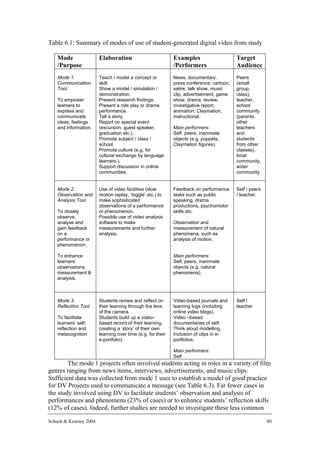
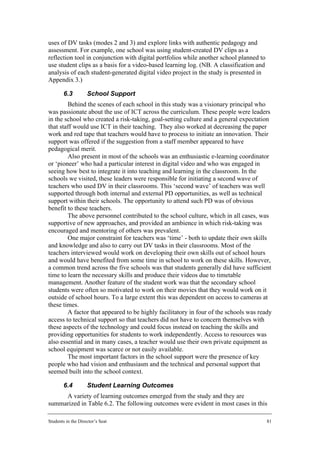
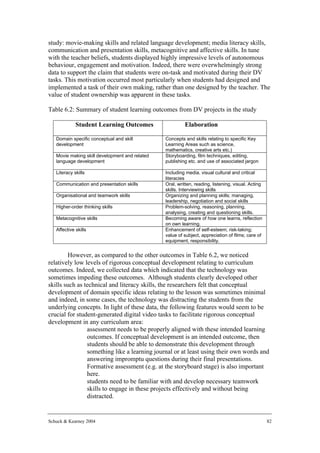
         It was found that most projects could be identified as being mode 1 usage.
Modes 2 and 3 did not seem to be used as frequently as would be expected, given
their importance in learning and teaching.
         The research study also benefited from insights into the pedagogies used in the
case studies. Principles for good practice in mode 1 projects were developed from the
data and are presented in Chapter 6. Key principles included the importance of
ongoing self, peer and teacher assessment and also the importance of celebrating
student products through presentation and discussion. Insufficient data on the other
modes of use were available for similar principles to be developed for these modes.
         Evidence of development of curriculum-specific conceptual understanding
was not strong although the authors see potential for use of digital video for this
purpose.
         Recommendations arising from this project are:
             • Further research should be conducted in a number of areas, such as
                 focussing on particular outcomes (for example, problem solving).
             • Given the finding that most of the teachers started working with their
                 classes after developing personal interest in filming, courses should be
                 offered to teachers on using digital cameras and editing software,
                 without undue emphasis on school context.
             • Professional development using digital video should provide examples
                 for teachers of how digital video can be used for developing reflection
                 and conceptual understanding
             • Principals and e-learning leaders should be supported in providing
                 direction for staff as their vision is fundamental to the staff
                 development in this area
             • Technical support and easy access to equipment is fundamental.
         The authors learned much from this project and wish to thank both UTS and
Apple Computer Australia for their support for the project.


Schuck & Kearney 2004                                                                  10
2 Literature Review
        This section examines relevant literature on the use of student-generated
digital video in schools.

        2.1         Use Of ICT In Schools
        Mason (2002) suggests that although many articles, case studies and
conferences have discussed the value of new technologies for best practice, very little
evidence has emerged from these studies. Ongoing changes in existing technologies
and development of new ones have made it difficult to study learning technologies in
a substantive way. She suggests that we have a need for studies that provide
understanding on how to engage students affectively and how to create meaningful
electronic-based learning in a variety of curriculum areas. This study develops
understanding in both of these areas.
        Selwyn (1997) suggests that case studies that analyse what is happening in a
technology-using classroom and that investigate the relationships the users develop
towards the technology are of more value than studies that predict outcomes of
technology use. His suggestion is that research should concentrate on the socio-
cultural aspects of computer-based learning, a view held by the researchers in this
study.
        In general, the literature on computer-based learning makes many claims
about good practice resulting from computer technology use, but most of these claims
are untested (Schuck, 2002). This research aimed to conduct an in-depth study to
provide understanding of what is happening in a set of classes using student-generated
video, and to focus on the pedagogical practices rather than the technological ones.


        2.2         Student-Generated Digital Video
         Few studies have been conducted in Australia which focus on the learning
that has occurred in schools through the use and production of digital video by
students across the curriculum. There are a number of studies that look at student-
generated digital video in Australian universities (Crean, 2001; Ludewig, 2001) and
these studies are of value in informing the current project. These studies consider the
learning outcomes of the activities and integrate some discussion of the process used.
However, few studies were found that investigated student-generated digital video in
K-12 Australian classrooms.
        Reid, Burn and Parker (2002) reported on their British Educational
Communications and Technology Agency (BECTA) project on the use of student-
generated digital video in fifty schools throughout the United Kingdom. This
extensive study examined student-generated digital video products for the quality of
the film-making, the final product and what the students had learnt about generating
video. They also gathered evidence on the impact of digital video projects on
students’ engagement and behaviours. This BECTA project was quite comprehensive
and provided some valuable insights into student learning during the digital video
making process (see subsequent sub-sections for further discussion of findings from
this important study).


Students in the Director’s Seat                                                       11
The literature from the United States has a number of descriptions of teachers
using student-generated digital video in K-12 classrooms. Anderson (2002), for
example, reports on the production by sixth grade students of digital videos for
orientation of new students. Another paper argues the case for use of student-
generated digital video to develop and share stories in fourth and fifth grade, with
benefits of supporting structure and development of confidence in writing
(Banaszewski, 2002). A further example deals with the production of video in science
classes (Thode, 2001). While these are interesting in identifying the potential value of
digital video in the classroom, descriptions are often anecdotal in nature and a move
toward more formal, rigorous research projects is desirable.

2.2.1 Role of the teacher in digital video projects
        Reid et al. (2002) found teacher input during digital video activity ranged from
no intervention at all through to presentation of highly structured activities. They
found that higher quality work was produced by students whose teachers had more
experience in video work and those who used a structured approach to setting the
digital video task. While it is often suggested that the teacher give up control and
allow students to experiment we must also consider the foundation skills that are
needed in the preparatory stages, that are necessary to facilitate the process
(Anderson, 2002).
        The scaffolding which may be required to achieve higher-order learning
outcomes and ensure quality digital video learning experiences also needs attention.
Davidson (2004) presented a scaffolding framework which commences with stills,
then prefabricated video clips before students progress to making full use of the
technologies independently. His proposed levels of scaffolding supports are intended
as a resource to allow students to work with limited supervision and he comments on
the use of such a scaffolded sequence with programs such as iMovie. Indeed, Gross
(1998) used her past students’ videos of human movement to model for her classes,
what worked effectively and what was ineffective in capturing the movement data
required for the task at hand.
        The teacher is an integral part of the learning experiences of students but there
is generally minimal attention paid to the teacher role in the literature on student-
generated digital video. Studies such as those of Meeks and Ilyasova (2003), Ludewig
(2001) and Gross (1998) do provide some useful insights into the experiences of
teachers at the tertiary level. However, little research is available on the expectations
of teachers or the role they play within the learning experience in the primary and
secondary years of schooling, particularly in an Australian context. As part of this
study the expectations and experiences of Australian classroom teachers will be
explored.


2.2.2 Digital video and student assessment
         Ludewig (2001) investigated the role that digital video played in the
assessment of students learning a second language at an Australian university. In this
instance a checklist of student learning objectives was developed which covered
elements of subject content, technical literacy and interpersonal communication skills.
In this study, it was clear that teachers needed to identify clear learning outcomes for
students at the initial planning stage. Hoffenberg and Handler (2001) also reported on
the use of digital video for assessment. Young students in the United States were
using digital video to capture their artworks to include in a portfolio which was also

Schuck & Kearney 2004                                                                  12
used as a means of presenting work to the community. Reid et al. (2002) raised the
problem of how to assess learners’ products. For example, should they be judged
‘creative’ merely by the nature of the visual and technological features? They
suggested that teachers explore criteria for what makes a ‘good digital video product’
and identify the ‘valuable’ components of the process and product. In general, they
found that teachers lacked the skills necessary to recognise, support and promote
high-quality work that was reflective of their students’ capabilities.
        There is generally minimal literature on the use of digital video as a tool for
self, peer and teacher assessment. Information is necessary to facilitate teachers’
understanding of exactly how student generated digital video can be used to enhance
authentic assessment in the classroom, reporting, and disseminating student work to
the broader community.

2.2.3 Digital video and cross-curricula outcomes
        Digital video is emerging as particularly powerful in its potential for cross-
curricula applications in the primary school. Witherspoon, Foster, Boddy and
Reynolds (2004) reported on the interdisciplinary nature of young students’ clay
animation activities and highlighted the value of this experience in assisting students
to be reflective. Similarly, Learmont (2003) reported on the potential of digital video
projects to facilitate multidisciplinary learning. Digital activities in their studies
integrated key learning areas such as history, science and languages in addition to
developing students’ digital production skills. However, while these anecdotal
accounts on the use of digital video to achieve cross- curricular outcomes sound
promising, sufficient empirical evidence to support such claims is lacking.

2.2.4 Video-based laboratories in Science and Mathematics Education
        There is ample research on video-based laboratories in secondary and tertiary
science and mathematics education and it often focuses on pedagogical issues.
However, the video material in these studies is often pre-made rather than generated
by students. In these computer-based activities, students use digital video
presentations to make observations, measurements and gather data about events.
When connected to spreadsheets, students can then use the video clips to efficiently
gather data and make graphs and other representations to analyse and model these
data. Studies have shown these video-based laboratories to be both motivating and
provide authentic learning experiences for students (Beichner, 1996; Gross, 1998;
Laws & Cooney, 1996; Rodrigues, Pearce, & Livett, 2001.). Indeed, Squires (1999)
described video-based laboratories as promoting open-ended exploration in an
authentic learning environment, particularly when the learner chooses and captures
his or her own film clips. Rubin, Bresnahan and Ducas (1996), developed one of the
pioneering studies in this field, introducing this notion of learner-shot video in
mathematical analysis. In their study, students used CamMotion to explore a dance
sequence and analyse the motion of their own bodies.
        Kearney (2002) recently conducted an Australian-based study, investigating a
more qualitative use of (pre-made) digital video clips that were used as stimuli for a
series of predict-observe-explain science learning tasks. One area of suggested future
research emerging from this study was indeed the use of learner-shot video clips in
these types of tasks and their possible effect on film credibility, student ownership and
task authenticity.
        These pioneering studies on video-based labs do provide a useful guide in the
design of sections of this study. However, most of the literature from this field

Students in the Director’s Seat                                                        13
involves students using pre-made digital video and is confined to secondary or tertiary
science and mathematics education in the United States.

      2.3        Rationale For Using Student-Generated Digital Video
        This section draws upon the literature to summarise the rationales presented
for using student-generated digital video projects and to identify what potential may
exist to enhance student learning through these projects. The literature on student-
made digital video incorporates a broad range of projects involving young children
through to University students in a variety of contexts from a media studies
environment to a range of other disciplines. Common claims relating to the learning
benefits for students include: development of a variety of literacies; authentic learning
experiences; motivation and engagement; expression and communication;
collaborative learning skills; and technological skills. These claims support the notion
that student-generated digital video tasks fit in well with notions of active,
collaborative and inquiry-based learning processes.

2.3.1 Building new literacies
         The potential for students’ digital video production to support the
development of emerging literacies, particularly media and visual literacies, is evident
in a number of studies. Digital video production tasks require integration of aural,
oral, textual, gestural, spatial and multimodal communications along with the
language required to communicate about images, music and film (Meeks & Ilyasova,
2003). Also, positive relationships exist between these projects and the development
of critical viewing skills (Shewbridge & Berge, 2004).
         Yildiz (2003) examined the importance of students developing media literacy
skills for the purpose of preparing a new generation for a media-rich culture. He
contends, rather than just being technical or peripheral, studies of media must be
central to the learning process to assist students in developing an understanding of
media images and the ability to evaluate media as presented in our society. Debate is
raised in this paper of how best to teach media literacy and the consensus appears to
be that media literacy can be developed through both the deconstruction of material
and during the process of students’ video production. Indeed, Yildiz reported on
teachers in the act of creating digital video themselves and their recognition of the
broad range of skills development through these projects. As they became producers
of their own media projects, these teachers recognized that they were developing
media literacy skills and becoming informed consumers and citizens of the world.
Stager (2001) also reported on the power of digital video to promote media literacy,
particularly during the editing process where children can reorder events, add
narration, dramatic music, transitions and special effects and think about ways in
which the media can manipulate a message. Developing media literacy concepts of
bias, point of view, propaganda and advertising can be achieved when students are
behind the camera and involved in the editing process. These important skills help
students to become more critical viewers and informed consumers of media
(Shewbridge & Berge, 2004).
         The development of visual literacy language is needed for students to engage
in digital video projects but, more importantly, can become a life skill which is
necessary for understanding and communicating in an increasingly visual world. Both
Hoffenberg and Handler (2001) and Witherspoon et al. (2004) raised the issue of
visual literacy with the concern that while we are capable of preparing students for
written and verbal language development, there is a pressing need to help them learn
Schuck & Kearney 2004                                                                  14
to communicate through visual means. The act of communicating effectively through
digital video is an important skill and students need to view their product and ask
themselves whether the intended audience will understand the main message and how
to avoid confusing that audience (Burn et al., 2001). Indeed, students need a working
knowledge of art, design, and technology skills in order to communicate effectively in
the 21st century (Witherspoon et al., 2004). The freedom of expression and the ability
to communicate messages in creative ways to an audience via digital video warrants
attention in current research for its potential to motivate and engage students in deep
and meaningful ways throughout the digital video production process.
        The literature suggests that students need to develop language capable of
describing a variety of visual forms of communication (Burn et al., 2001). Indeed,
Burn and Reed (1999) raise the importance of questioning what it is we need to ask
about the ‘languages of visual communication and the moving image’ with both
respect to the learners’ investment and the social and cultural context in which they
participate with these new technologies. Throughout the BECTA report, Reid et al.
(2002) stress that students’ effective use of appropriate language relating to the
‘moving image’ resulted in higher quality learning and products. This extra control of
appropriate language gave students a certain power of expression to enhance their use
of the technology. It is important that we continue to build on these findings to further
interpret the relationship that exists between student-generated video projects and
students’ development of related literacies.

2.3.2 Creating authentic learning experiences
        There is evidence in the literature of the potential for digital video to promote
authentic learning experiences for students. In these studies, students engage in real-
world problems and situations (Jonassen, Peck & Wilson, 1999) rather than abstract
and hypothetical examples that can be difficult to put into practice. One such
experience is the use of digital video to create news and current affairs programs.
Examples of such use can be seen in a range of studies investigating this, from the
primary grade level through to University student level, where usage occurs in a
journalism course (Cameron, 2003). For students completing a journalism course the
real-world applications are obvious, as they develop the skills for later employment.
However, these projects also provide a unique opportunity, across all stages, for
constructivist learning approaches to be implemented in a variety of disciplines, and
result in the creation of a product that is appropriate for a real audience. In addition to
creating a product for an audience, students can also compile work which is relevant
to issues in their school or community and they can reflect on their experiences in
order to build meaning from them. They can discuss their product with others in their
group and possibly share different perspectives.
        Another form of authentic learning which can be experienced through the use
of digital video is the possibility of filming and analysing real situations rather than
simulations or models. A good example of this is Gross’ (1998) motion analysis
project with undergraduate students to develop their understanding of human
movement. Outcomes included the development of technologically-related skills,
greater understanding of content and pleasure in publishing work for a public
audience. Indeed, this final aspect makes the project of Gross (1998) even more
interesting. This project captures and enhances the authentic learning experiences of
the students who created for a real audience when their works were published on the
Internet. This idea is also discussed by Shewbridge and Berge (1994) who advocate
students bringing their work to the web and benefiting from the feedback of a wider

Students in the Director’s Seat                                                          15
audience. In this type of online forum, students can share ideas and develop
collaborative relationships with a wider online community.
         Ludewig (2001) also discussed the authenticity of creating for a real audience
as his university students created short iMovies in the process of learning a second
language. They acknowledged the importance of having a ‘physical product’ at the
end of this process which can be presented to a range of people for a range of useful
purposes. Indeed, Anderson (2002) reported on students capturing scenes of school
life as an orientation video for new students or modifying movie trailers to become an
8th grade farewell to be broadcast school-wide on the last day of school. Finally,
Learmont (2003) discussed the possibility of promoting authentic learning by entering
video productions into competitions to get feedback from outside the classroom.
Students in this project also produced public service announcements to help students
develop their persuasive techniques and identify audiences.

2.3.3 Developing conceptual understanding
        The use of digital video technology to develop deep conceptual
understandings is a further benefit raised in some of the literature. This is an
important consideration when evaluating the effectiveness of this medium in a variety
of discipline areas for student learning in Australian classrooms.
        A study, mentioned previously, which examines the possibilities of digital
video to facilitate conceptual understanding is that of Gross (1998). This study
examined undergraduate University students conducting small-scale scientific
experiments of human movement. The results suggest that for most students it was a
powerful experience as they contemplated the quality of their own data collection
processes (i.e. videotaping the movement) and the results it produced under scientific
study. Here, not only did learning of human movement take place, but the students
gained significant insight into the need for quality scientific data in general. The
feedback from students indicated the visual representation of the concept under study
was valuable in developing their understanding.
        Ross, Yerrick and Molebash (2003) spent two years working with students,
teachers, principals and parents investigating ways digital video production can
enhance learning for primary-aged children. They found that students’ digital video
work was invaluable in developing scientific skills such as observation, investigating
variables, comparing trials and drawing conclusions based on this evidence. For
example, one class was investigating the life cycle of plants and using their digital
cameras to closely observe and record changes over time. Students came to appreciate
the importance of consistency in scientific exploration and, by the conclusion of the
project, were able to accurately describe the lifecycle of plants and evaluate the
accuracy of different research methods (e.g. hand drawn versus video-based records
of plant growth). A further example which highlights the possibilities of digital video
in building conceptual understanding was evidenced in a fourth grade class where the
excitement of the experiment (i.e. forces in physical science) reduced the children’s
capacity for focusing on the data. However, their digital video footage allowed them
to analyse and graph the recorded data upon return to the classroom and even
manipulate some variables to examine concepts of force.
        The Reid et al. (2002) study concurs with the findings above, particularly that
digital video technology helps pupils assimilate scientific concepts effectively and
quickly. It is claimed that digital video is often the most appropriate medium for
learning and embedding new subject knowledge and understanding and for reflecting
on and reinforcing and extending that knowledge. What is clearly lacking, however,

Schuck & Kearney 2004                                                                16
is research which examines other areas outside the field of science and this current
study will look at both science-related and non-science related projects.

2.3.4 Enhancing motivation and other affective outcomes
         Increased motivation and engagement is one of the most heralded benefits of
student-generated digital video tasks. For example, Burn et al. (2001) found Year 8
boys were keen to spend every lunchtime as well as several after-school sessions
working on their digital video projects. The motivation evident in the Year 10
students from the study appeared to stem from the sense of ‘control’ they had in these
tasks, particularly in the editing phase. This sense of control also was found to be
facilitated by the students’ perceived independence from the classroom teacher.
Similarly, Reid et al. (2002) found that students engaged in digital video projects were
likely to invest time outside lessons to work on their projects. It was felt that student
ownership of the product contributed to this and teachers involved reported enhanced
self-esteem and self-perceptions in some students as a direct result. The digital video
projects often enabled students to transform both their own identities and their views
of the world – indeed, these outcomes may prove the most significant potential for
digital video tasks.
         Students themselves have reported one advantage of working with digital
video is the ability to take risks and change their mind. Specifically, they found they
experimented more and when working in a group situation, were willing to trial
different ideas (Burn et al., 2001). Students perceived one of the main advantages of
digital video is its ability to be reshaped and revised over and over which allowed
them to experiment and take risks in a confident manner (Reid et al., 2002).

2.3.5 Promoting expression and communication skills
        Another common claim from the literature is that student-generated digital
video tasks can enhance students’ written and other communication skills. For
example, Banaszewski (2002) investigated the use of personal digital video stories
amongst young children and found these projects to be instrumental in helping them
find voice, confidence and structure in their writing. Similarly, Reid et al. (2002)
found that digital video production offered alternative avenues to students who were
less able or reluctant to write about their work. Indeed, the ubiquitous nature of
today’s digital technologies make them a tool which can ‘level the field’ for students
with culturally and linguistically diverse backgrounds (Ross, Yerrick & Molebash,
2003) and can both compensate for difficulties (e.g. written expression) and allow
strengths to be further developed.

2.3.6 Developing collaborative learning skills
        Almost all studies discussed to this point had students working in pairs or
small groups to create their digital video products. Many reported on the positive
benefits of these peer learning environments in terms of developing key collaborative
and communicative skills, appropriate language development and effective teamwork
skills such as negotiation and reaching a consensus. These benefits are raised by
researchers and classroom teachers throughout the literature as one of the most
important outcomes of the digital video production process. For example, Ludewig
(2001) found the students’ peer learning environment was socially challenging and
demanded collaboration. In this study, a shift in these university students’ intellectual
development was evident as they learn to articulate their point of view and listen to
the view of others. Furthermore, they found that grouping students according to
Students in the Director’s Seat                                                        17
ability (i.e. one student with greater content knowledge and the other with technical
skills) was appropriate in allowing each student to shine in their stronger role. Indeed,
Reid et al. (2002) found that while the use of digital video was initially seen by
teachers as having particular benefits for students’ technological skill development,
they eventually prioritised the potential development of students’ social skills,
communication skills, teamwork and decision-making skills.
         One focus of this study is the impact of these collaborative relationships and
co-operative demands on students in K-12 during their engagement in digital video
activities.


2.3.7 Building technology skills
         As suggested before, it appears that teachers initially view digital video
activities as having most relevance to the development of students’ information and
communication technology skills. However, many studies report that building
technology skills is eventually viewed as a secondary outcome by classroom teachers.
The consensus appears to be that many technical movie-making skills can be mastered
by students independently or collaboratively with a more knowledgeable peer
(Banaszewski, 2002; Burn et al., 2001). Nevertheless, some educators remain
concerned that the technical side of these projects may limit the learning outcomes of
some students (Gross, 1998). Through structured research we need to develop an
understanding of the technical skills that students need to have to work effectively
with digital video, and the sequence in which these may be developed – particularly if
we consider that not all students will be effective planners and producers of digital
video naturally and may require some structured skill development to maximise their
potential.

2.3.8 Building generic learning skills
        Throughout the literature a range of generic learning skills are identified as
being developed during the digital video experience. In addition to those discussed
above, such as communication and collaboration, Reid et al. (2002) identified other
generic skills reported by teachers, including problem-solving skills, project
management and organisational skills, planning skills, as well as thinking, reasoning
and risk-taking skills. A more comprehension overview of potential generic skills
learned during digital video activity is presented by Theodosakis (2002), who
discussed the visioning skills, research skills, problem-solving skills, planning skills
and analytical skills necessary to create digital video.


      2.4        Implications Of Findings From The Literature
        In summary, we have explored a range of potential benefits which have been
reported in a variety of research projects, anecdotal reports and discussion papers on
the use of digital video in classrooms. Clearly, there is a small but growing body of
literature which assists us in our attempts to understand the pedagogical implications
for digital video, but what is missing from this literature is specific reference to digital
video usage in Australian K-12 schools and a deeper understanding of the nature of
these learning outcomes and support mechanisms to achieve them. Importantly, to
continue to build upon the literature, studies need to consider the findings of Reid et
al. (2002) which clearly suggest that the introduction of digital video technologies
does not necessarily translate into increased student achievement in any of these
Schuck & Kearney 2004                                                                      18
areas. Instead, what is required is further consideration of when these experiences are
more fruitful and what underpins this success. This study sets out to gain a deeper
insight into the learning experiences of students which will guide us in identifying a
range of technological, social, academic and affective related outcomes.

        2.5         Recommendations From The Literature
         Throughout the broad body of literature which has been examined above, there
are predominant themes which emerge as necessary for further research. These
recommendations for future research can be broadly categorised into four areas:
digital literacy; evaluating students’ digital video work; the role of the teacher
throughout digital video projects; and the learning outcomes (across the curriculum)
achieved through student-generated digital video tasks.
         In the digital literacy area, research is needed on a further understanding of the
use and role of appropriate language in the film making process and the development
of life skills associated with media and visual literacy. Criteria and standards for
evaluating students’ digital video work need further development and other problems
with assessment of students’ projects (everything deemed creative) need
investigation. For example, the notion of ‘creativity’ in relation to these projects needs
further exploration. Roles of the teacher throughout each phase of the digital video
activities need to be further clarified including the level of structure required to
support effective learning. Finally, despite numerous anecdotal reports of a range of
learning outcomes from students’ digital video work, further formal investigations are
needed to identify the nature and extent of these outcomes (social, academic,
technical, skills, affective etc), innovative teaching strategies that can support these
outcomes, and the potential for this type of work to fit into Australian school
curricula.


Students in the Director’s Seat                                                          19
3 Research Methodology And Design
      3.1        Methodology
         The study seeks to gain an understanding of the way that teachers and students
interact and learn in classrooms in which practice using student-generated digital
video occurs. The focus of the study is on what happens when teachers in K-12
classrooms use this technology to develop their students’ understanding of curriculum
content. A qualitative research paradigm is used in this interpretive study (Erickson,
1986; Lincoln & Guba, 1985) to develop a deep understanding of these types of
practices occurring in five case study classrooms.
         As noted above, the selection of case studies schools in which exemplary
practice exists is often problematic. Also, the number of schools using student-
generated digital video is limited. Therefore, schools were selected for this study,
firstly because Apple had identified them as schools using student-generated video for
pedagogical reasons, and secondly because there is widespread use of the technology
in the school. This second factor prevented cases from becoming unsuitable because
of teacher transfer or individual difficulties with timetabling of observations. Schools
were further selected so that there were both primary and secondary schools and a
range of curriculum areas and pedagogical contexts for the use of the technology.
         As both researchers are proponents of socio-cultural theories of learning, the
historical-social-cultural contexts of the students and teachers were of interest and
were probed in observations, interviews and document or material study. Data on the
practices of the teachers and students were collected and analysed from a socio-
cultural perspective, in which the interactions of the group, their past experiences and
beliefs, and the impact of being researched, are all seen as part of the research data.
This builds on previous research by both Schuck (1996) and Kearney (2002).
         Our methodology is supported by educational technology theorists such as
Neuman (1989) and Salomon et al. (1991) who have advocated more naturalistic
studies that provide appropriate data about relevant social and cognitive processes in
order to explore the affordances of innovative technologies. By developing an
understanding of ways in which teachers’ beliefs, pedagogical approaches, and
contextual factors inhibit or encourage good practice (as delineated above) in the use
of student-generated digital video the researchers will be able to describe some
models that indicate good practice in using this technology for pedagogical purposes.
         In each case study from our project, permission was obtained from the school,
the relevant education authority, teachers, parents and students to video the lessons
observed, and to use data collected in this way in our analysis of the study. The
researchers also promised to maintain confidentiality of the students and other
participants, and gave assurances that images of students or teachers would not be
shown in any publications on the research in ways that might identify the participant,
unless they had the participant’s permission to do so.
         The research team, comprising the authors as principal researchers and two
highly experienced research assistants, visited schools in pairs. As well as data
collected through the use of questionnaires, interviews and focus groups, lessons
related to the classes’ use of digital video were observed. Observations were based on
an observation schedule the team had developed, but also focused on any interesting
activities in which the students were engaged. One member of the team filmed the
student activity and general classroom environment, while the other member of the
Schuck & Kearney 2004                                                                 20
team made field notes according to the observation schedule and supplemented these
with relevant observations that had not been captured by the schedule. This way of
using video for data collection is supported by Bogdan and Biklen (1998) who
recommend a collaboration of researchers in the field to supplement video data with
participant observation and field notes. They believe that film “isolates and freezes
relationships or behaviours in a way that cannot be created verbally; but a human
observer can give a sense of the entire fabric of events that cannot be conveyed
photographically” (p. 103). Goldman-Segall (1990) supports this view: “…I cannot
observe, participate in meaningful conversations, write notes, notice a full range of
ambience in the environment, and reflect upon it – all at the same time” (p. 234).
Additionally, examples of student-generated video produced by the classes were
provided to the researchers on CD or DVD, with permission to use in the study.
        After the field trips for each case study were completed, the researchers who
had been involved in the data collection at that school transcribed the data from notes,
audio tapes, and video tapes. These transcriptions were sent to all members of the
team who had been researchers on that case study, for verification. In the case of
disagreement, the researchers revisited the raw data on the audio and video tapes.
After all data from a case had been transcribed, a member of the research team took
responsibility for writing up the case study. The case studies followed a template that
the principal researchers had developed to capture the case of the first school visited.
The template considered the data and categorised the findings into a number of areas
that had been suggested by the research questions for the study. Additional discussion
occurred as appropriate. Finally, a member of the research team went through the
digital video tapes and used editing software to compile a set of relevant clips as a
library of illustratory video. He then went through the case and linked selected clips to
sections of the report so that the researchers would have examples and illustrations of
various phenomena described textually in the report
        The next stage after all the case studies were complete, was to collaboratively
consider the five cases and look for common trends, discrete differences and
influences that might have caused these differences. This analysis contributed to this
final summative report. This report is to be shared with the funding bodies (UTS and
Apple Computer Australia), and also will be sent to each participating school and to
the major employing authority of the case schools under its administration (NSW
DET). A number of papers have been written and disseminated and further papers
will be prepared for publication.

        3.2         The Research Questions
       The following are the research questions that directed the data collection and
served as a framework for the interpretation of the data in the findings:
           • What are teachers’ rationales for using student-generated digital video
               in their classes?
           • What is the role of the school in promoting innovative use of the
               technology? What other contextual factors constrain or enhance the use
               of this technology in teaching and learning?
           • What is the nature of the learning outcomes in student-generated
               digital video use in various Key Learning Areas?
           • What pedagogical approaches are being used with this new
               technology?


Students in the Director’s Seat                                                        21
3.3        The Research Team
        The research team comprised the two authors of this report, Dr Sandy Schuck
and Dr Matthew Kearney, who are both teacher educators in the Faculty of Education
at UTS and also belong to the research group Teacher Learning and Development.
Areas in which they teach include mathematics education, computer-based learning,
mentoring in the workplace and research development. Their research projects are in
the area of teacher learning and classroom practice.
        Research assistants were Dr Gilda Segal and Mr Gerry Foley, both former
colleagues in the Faculty of Education, UTS. Both have extensive experience in both
research and teaching in the area of ICT and pedagogy. The two research assistants
collected data and wrote case studies as well as managing the administration of the
project.

      3.4        Methods

3.4.1 Data collection
        Data were collected in a number of ways:
        a. Initial open-ended questionnaires for teachers and administrators to collect
demographic information and views about administrative structures.
        b. Observation using a semi-structured observation schedule.
        c. Interviews with teachers and administrators and selected students in focus
groups. Students were selected for these interviews by means of purposeful sampling
(Bogdan & Biklen, 1998).
        d. Document and Resource Collection: Artifacts made by the students were
collected as well as school documentation about ICT management, rationale and use.
        The instruments used in a – c above can be found in Appendix 1.

3.4.1.1 Initial open-ended questionnaires for teachers and administrators
       These were used to collect demographic information and probe participants’
views about administrative structures. They also probed teachers’ thinking about their
pedagogical approaches and their goals for their students.

3.4.1.2 Observation
         The researchers acted as observers in the classrooms to develop an
understanding of what actually occurred there. The roles of the teacher, students and
sometimes school administration were considered in these observations. A semi-
structured observation schedule was used to enable the observers to have some
uniformity in their observations of the teaching and learning and at the same time be
flexible enough to allow observation of the unexpected. Of interest were peer learning
structures and ways that the students interacted within these structures, who initiated
activities and directed them, the nature of learning tasks and the ways in which
learning outcomes were achieved, and the ambience of the classroom. For example,
researchers observed the interactions in the classroom, noting whether they were
teacher-student interactions or student-student interactions. The types of interaction,
such as question by teacher or by student and the purpose of the interaction were
noted.
         Also of interest was whether observed practices matched the theories of
learning articulated by the teachers. Video clips of the classrooms were used to
support the written data in the analysis, interpretation and reporting of the cases.

Schuck & Kearney 2004                                                                 22
3.4.1.3 Interviews
        Teachers and administrators were interviewed. Selected students also were
interviewed. They were selected for these interviews by means of purposeful
sampling (Bogdan & Biklen, 1998) based on researcher observations and teacher
recommendations.
        A semi-structured interview schedule was developed, loosely based on those
used in the NSW Department of Education and Training (DET) study entitled
“Numeracy Research in NSW Primary Schools” (2001-2002).
        Attitudes towards the use of digital video and purposes of its use were probed.
Questions to teachers probed rationales for using this technology and for clarification
of how the technology fitted with the teacher’s beliefs about teaching and learning.

3.4.1.4 Document and resource collection
         The curriculum documents pertaining to the lessons were examined and the
desired learning outcomes noted. The activities and resources were discussed with
students and teachers to ascertain whether they felt learning outcomes had been
achieved and these were also evaluated by the researchers to this end. Student
artifacts, for example, student movies, were also explored for evidence of technical
ability, purposes, and learning.

3.4.2 Analysis
        The story of each case school was constructed and developed from the
multiple sources of data on that case. These followed a proforma developed by the
chief investigators for the first case school, which ensured that data related to the
research questions was captured. Each case study was constructed by one researcher
and then shared with the researchers who had collected the data. Those researchers
checked the case study for veracity and accuracy, referring to the audio and video
tapes in case of disparities in understandings. The case studies were then collected
together by the chief researchers. They were then collectively examined for trends and
differences amongst the case schools. Each case was examined by the chief
researchers for what it said about practice, pedagogy and beliefs about pedagogy and
educational technology. Both researchers developed a framework of themes in
response to the research questions from the data, and then engaged in critical
collaborative reflection (Bullough & Gitlin, 1991). This reflection enabled the
researchers to modify the framework so that it fitted both their interpretations of the
data.

        3.5         Participants
        Apple Computer Australia is highly involved in professional development (see
for example, the Apple Classrooms of Tomorrow, Apple 1995). Therefore, our
industry partners have observed schools using student-generated digital video for
pedagogical purposes in a variety of curriculum areas. They provided the UTS team
with a list of such schools. Schools that are using digital video technology to achieve
learning outcomes with greater scope than merely learning to use this technology,
were of interest as case schools. Schools in which strong support from the
administration and a whole-school interest in using the technology exists were
favoured for selection. As noted above, schools were further selected so that there are
both primary and secondary schools and a range of curriculum areas and pedagogical
contexts for the use of the technology.

Students in the Director’s Seat                                                        23
Within each school, recommendations by the principal and willingness by
teachers and students (and their parents) to participate in the study provided a basis
for the selection of up to three teachers and their classes for in-depth study.

3.5.1 Profiles of the participating schools
        Table 1.1 gave a summary of the schools that participated in this study. What
follows is a description of the schools, with details about the classes and teachers
participating in the study. All names are pseudonyms to ensure confidentiality of
participants.

3.5.1.1 School 1: Pathways Catholic High School

3.5.1.1.1 Context of school
       Pathways school is a Year 7-12 Catholic School in the Parramatta Diocese. It
was an Apple Distinguished School, the first in the Asia-Pacific region, from 1998.
(Apple Distinguished Schools are able to nominate themselves and are chosen by
Apple if they are active ICT users).
       There are approximately 1260 students in Years 7-12 and 116 staff members.
The school has a Middle School arrangement whereby Years 7 have 3 teachers only
and Year 8 only have four teachers. Each of the teachers in the Middle School takes
their Year 7 or 8 class for a particular strand which comprises a combination of
subjects, for example, a strand comprising English and RE and HSIE is taken by one
teacher, and a second strand comprising Mathematics and Science by another teacher.
       Students are from a range of SES backgrounds from low SES to high.

3.5.1.1.2 Data collected from the school
        Given that this was the first case study school, it was deemed important for the
entire research team to have visited the school and spent some time in observation and
interviews there. This allowed the team to compare data collected and ensure that
there was a shared understanding of our purpose in being there and our ways of
collecting data. Consequently, the school was visited on five days, by different pairs
from the research team, so that after the first day (on which three of the team visited
the school), at least one member of the visiting pair had been to the school previously.
        At Pathways, the ICT manager, Bob was our contact and he introduced us to
the two teachers whose classes we observed. We observed Mal’s Year 8 class over
two lessons, one in science and one in mathematics. We observed Helga’s Year 7
class in LOTE. We conducted interviews with Bob, Mal and Helga and with students
from the classes we observed.

3.5.1.2 School 2: Park Catholic High School

3.5.1.2.1 Context of school
        Park Catholic High School is a Year 7-12 Catholic School in the Wollongong
Diocese. The students are largely from a lower to middle class SES. There are rural
areas that feed the school, and it is quasi-rural around the fringes of the school in the
southern areas. There are also small towns, and suburbs nearby. Students have good
access to computers from home (about 95% have computers at home) and the Internet
seems very readily available (eighteen months ago, about 70% were connected to the
Internet at home). Students’ parents seem to value the use of technology and
encourage it. Wollongong Catholic Education Office set up email accounts for every
Schuck & Kearney 2004                                                                    24
student in the diocese and they have free access for that because it is being sponsored.
There are 977 students in the school.

3.5.1.2.2 Data collected from the school
        Two team members spent two consecutive days at the school. We were
introduced to the ICT teacher, Ray, who is regarded as the main instigator of digital
video use in the school. We observed Ray’s year 11 Design and Technology class,
and his Year 12 ICT class and also collected work done by Year 10. We interviewed
groups who had produced digital movies for Religious Education and for History and
observed students working in Ray’s lab during lunch and after school on other movie
projects. We conducted interviews with the principal, Ray and the library coordinator.

3.5.1.3 School 3: Northern Districts Primary School

3.5.1.3.1 Context of school
        Northern Districts Primary School is a Kindergarten to Year 6 (Ages 5 to 12)
co-educational facility on the North Shore of Sydney. It was built in 1961 and
currently caters for over 600 students. The school is in a middle to high socio-
economic area. Over 40% of these students have relatives living overseas. The school
has a strong technology focus and is an Apple Distinguished School. The school is a
public school in New South Wales. It has a website which is kept up-to-date and is a
good resource for information about the school and the classes.
        The school’s physical environment was well cared for and maintained. The
staff appear to be highly motivated and professional and the school’s staff room was
friendly and convivial.

3.5.1.3.2 Data collected from the school
        Three members of the team participated in visits to this school. Two site visits
were conducted and an additional interview was conducted with a key staff member
about one aspect of the data.
        The principal of the school introduced us to the K teacher, Jayne. We observed
her class and talked informally to some of her students. We also collected some of
their artifacts. We also met the school librarian who was facilitating a school project
that had been set up by a staff member, Nancy, who was on study leave at time of our
visit. Nancy had gained support from Apple Computer Australia to supply laptops and
software to students to form a school news editorial team. The students in the news
team collected news items, filmed relevant events and presented the news on the
school website. These students were selected from Years 5 and 6 at the school. We
interviewed the students, Nancy, the school principal and the school librarian and also
were shown examples of the Year 5 and 6 team’s work.

3.5.1.4 School 4: Princes High School

3.5.1.4.1 Context of school
        Princes High School is a NSW government comprehensive school with about
1220 students from Year 7 to 12. The school draws students from suburbs around
Parramatta and surrounding areas and is non-selective. The school population is
diverse, with more than 80% of students coming from backgrounds with a language
other than English. With over forty different cultures represented in the school

Students in the Director’s Seat                                                       25
population, the school is strongly multicultural. Parents are highly aspirational for
their children’s success and will facilitate what the children need.
         Princes High School has a strong technology focus but is not richly endowed
as it is government-funded. It is not a technology high school. The school was
awarded the Director-General's award for excellence in teaching and learning
programs and its technology programs were singled out for their innovation. These
programs operate across several curriculum areas and have led to the school winning
other awards for multimedia design and web page design. In addition, Princes High
School has been chosen as an Apple Distinguished School.

3.5.1.4.2 Data collected from the school
        Two members of the UTS team visited this school on three days. They met
with, and interviewed, the principal, and two of the IT staff, Paula and Carole. They
observed Paula and Carole’s Year 7 IT classes and also interviewed students from
these classes.

3.5.1.5 School 5: Melbourne Primary School

3.5.1.5.1 Context of school
        Melbourne Primary School is a Year K-6 Category 2 public school in
Melbourne. There are approximately 500 students Year K-6 and 27 staff members (17
female; 10 male). Twenty-four staff members are competent with ICT according to
the principal; 10 of these 24 are highly competent. Students are from a range of SES
backgrounds and there are 22 different nationalities in the school. The school does not
have any students not meeting the government benchmark. Parental support is high
and the school is in the top 25% for Victorian Government schools in terms of
parental satisfaction. The school has a strong focus on learning and student welfare.
There is a website for the school which is about to be expanded.

3.5.1.5.2 Data collected from the school
       Two team members visited this school over a period of three consecutive days.
They observed a Year 3 class, interviewed the students, and interviewed the teacher,
Kate. They also interviewed one of the leaders in IT at the school, Ron. They were
shown work samples by Year 5 and 6 students and interviewed those students about
the work. They also interviewed a Year 4 teacher and the principal.


      3.6         The Use of Digital Video As A Research Tool
        In this study, digital video and video editing software were used to provide a
means of capturing, analysing and disseminating data and results. In so doing, various
issues regarding the use of digital video as a research tool emerged. These will be
discussed in the report. What follows is firstly an analysis of how digital video has
been used in research in other studies.

3.6.1 The use of digital video as a research tool in the literature

3.6.1.1 Data collection and analysis
        The advantages of video-based data to a study are their permanence as a
record, their retrievability, and their availability to other researchers to check findings,

Schuck & Kearney 2004                                                                     26
with the possibility of reinterpretation (Plowman 1999). Digital video adds to the
value of video-based data collection, with the ability to annotate clips, find them
easily, select clips for future use and edit the video. For example, Mousley (1998)
coded relevant snippets of video and linked them to a spreadsheet. Included on the
spreadsheet were notes of the clips’ origins, categorisations and short descriptors. She
subsequently made transcriptions that provided an easily navigable and searchable
resource for re-visiting later, and a basis for careful data analysis. Plowman (1999)
also carefully labelled and logged videos to help future searching and emphasized the
flexible nature of the data with the ability to go back and review material repeatedly.
She did, however, acknowledge the problem of video being relatively inaccessible
and even in digital format, it needs to be viewed and coded in real time.

3.6.1.1.1 Triangulation of Data
        The use of video-based data can be seen as a method of supplementing other
data. Williams and Clarke (2002) take up this issue of triangulation in classroom
video research, in particular, the contribution of the ‘student voice’ to research
methodology. They believe that validity is improved by providing extra sources of
data to supplement video-based observation. In their study, they explored the teaching
and learning of mathematics as viewed from the perspective of the learner, using
videotape of a sequence of lessons, post-lesson video-stimulated student and teacher
interviews, collections of student work and teacher questionnaires as data. Although
the video data were sometimes interpreted by the researchers in different ways,
corroborating evidence from other data sources was used to revise these
interpretations (or indeed retain alternative interpretations). Plowman (1999) also
used a range of other data sources to triangulate with her video-based data, pointing
out that video does not capture unobservable processes such as thoughts, attitudes,
feelings and perceptions. Thus, copious field notes, questionnaires, interviews,
informal discussions and video-based, stimulated recall sessions were used to collect
information and check on validity of findings. Finally, Walker (2002) believes video-
based data helps the reader to perform their own validity checks: “… access to the
video … shifts our gaze, exercises our capacity to triangulate and amplifies our
appreciation of the complexities of classroom interaction” (p. 119).

3.6.1.1.2 Video-Stimulated Interviews
        Video or photographic data from the field can also be used in interviews to
stimulate good conversation and produce rich data. This technique may help
interviewees decipher more quickly the meaning of researcher questions, provide a
focus for their responses and prompt their memory of past events. Indeed, Mousley
(1998) has handed teachers video snippets to think about in preparation for an
interview but noted that some complexities of classroom interactions presented by
video data can be distracting for research participants. For example, she found
teachers in video-stimulated interviews were distracted by their own looks, clothing,
expressions, vocal tenor etc. To help solve this problem she used still photograph-
stimulated interviews by extracting the photos from the original digital video footage.

3.6.1.1.3 Split-Screen Displays
        For studies involving computer-based learning environments, Plowman
(1999) discussed the possibility of combining video footage of the computer users
with a recording of their ‘on-screen’ interactions. In her study of students using a CD-
ROM, she used video to collect data about the language and interactions in the
Students in the Director’s Seat                                                       27
classroom. She also wanted to investigate how students navigate through the software
and how design features interact with students’ learning strategies. Hence she used
two video recordings: one showing the group of students at the computer, positioned
to capture talk, movement, gesture and interactions with the computer; and the second
taken from the computer screen via a ‘scan converter’ (i.e. the signal from the
computer is recorded directly on to video.) Both recordings were synchronized and
presented as valuable data in a ‘split-screen’ display for analysis.

3.6.1.1.4 Use of Video for ‘Thick Description’
        One major discussion point for Goldman-Segall (1990) in her study exploring
children’s thinking in a Logo constructionist culture, was the use of video as a
primary source of data. In this doctoral study, the researcher built up video-based
‘thick descriptions’ (Geertz 1983) of participants and their actions and created
different ‘video slices’ of events. Video clips provide the researcher with a way of
articulating what is seen, although, like all interpretive research, it is “imprisoned in
its own immediacy or detail” (p. 32). Indeed, every reader will access the data
differently and will view the same data ‘through different eyes’. However, an
appropriate ‘thickness’ of description will hopefully mediate the extent of these
interpretations: “The thickness of the description of the act, event, or process may
provide a measure to ensure that conclusions, although not the same, fall in the same
range” (p. 33).

3.6.1.2 Presentation and Dissemination of Research
        Illustrative digital media can be presented with text as part of a multimedia
document in the dissemination stage of the research process (Pea 1999). Indeed,
Walker (2002) believes we need to move beyond textual forms of research
dissemination to make visual evidence available to the reader in this new genre. He
discusses the advantages of multimedia environments to present educational research
where the reader reads the text of the case in combination with other digital media-
based source material.
        Mousley (1998) discussed the interesting technique of ‘extracting’ important
frames of video data and using them as photographs in her research. She made the
point that transcriptions can unintentionally ‘take out’ important factors such as
gesture, facial expression, bodily presence, and pauses. However, photographs
extracted from the original digital video data can be useful in providing the reader
with some of this valuable information in conjunction with text-based transcriptions.
Goodyear and Steeples (1999) also comment on the potential of placing video-clips
from research studies on the Internet. These clips can be used to support material
presented in the associated articles. In this instance, each of the clips can be
considered data from the research while additional data can emerge from the
statements of those making the clips both before and after the events. Here members
of the research team can discuss aspects of the video clip, define its key attributes and
use this discussion to construct analytical categories.
        In our study, we used video in some of the ways described above. For
example, we used digital video data for triangulation with other data sources, we
extracted still photographs from the raw video and we constructed multimedia
documents to report on our research. The next sections describe our use of digital
video as a research tool and raise pertinent issues that have surrounded this use. These
issues mainly concerned data collection and presentation using digital video.


Schuck & Kearney 2004                                                                   28
3.6.2 Ways in which digital video was used as a research tool in the
        project
        As can be seen from the description of methodology above, the researchers
used digital video in a number ways in the research process. Firstly, it was used to
collect data in classrooms to supplement the data collected in observation. Students
were filmed working collaboratively at computers editing their films, they were
filmed in the playgrounds when they were shooting video and examples of their work
were filmed as they demonstrated these to the research team. In the analysis stage of
the research, digital video was used to confirm or refute findings that researchers had
tentatively proposed. Video was also used in cases where researchers disagreed about
a finding. Students’ digital video artifacts were also used to inform analysis. Finally,
the findings of the study were illustrated clearly by sequences from the video footage
collected and this footage greatly enhanced the presentation and dissemination
process.
        As the research team worked with digital video as a research tool, it became
apparent that there were a number of areas in which issues arose as a direct result of
this use. These are discussed in the next section.

3.6.3 Issues arising from the use of digital video as a research tool in
        this study
        A number of methodological and ethical issues emerged as we collected and
analysed our video-based data and used them to disseminate findings. These issues
arose in two main areas of the research process, the data collection stage and the
dissemination and presentation stage. Consequently, these are the two areas which are
discussed below. Some of these issues have been discussed in the literature, so the
following accounts are not meant to provide a panacea for related problems but rather,
extend the boundaries of discussion.

3.6.3.1 Data Collection Issues

3.6.3.1.1 Choosing What to Film and Edit: Subjectivity Issues
        Collecting and analysing video-based data is prone to the same issue of
subjectivity as selection and analysis of non-video-based data, both when collecting
the data and when analysing them. For example, decisions about what to record and
how to record it are not neutral. To address this issue, Mousley (1998) suggests the
need to discuss the selection process itself in the research whilst Goldman-Segall
(1990) suggests that interpretive researchers need to tread carefully between what
may be labelled as ‘bias’ reporting and their own interpretations. Indeed, she makes
the point that too much educational research in the past has tried to avoid a personal,
subjective and interpretive approach and video-based data cannot be without a point
of view: “… video ethnography is the ethnographer’s perspective of what takes place
in front of the camera when the camera is turned on” (p. 29). As a result, the reader
“is put in a role that requires active engagement with the evidence and critical
attention to its shortcomings and bias …” (Walker 2002, p. 120).
        Discussion amongst research team members about what we should film, both
before and during filming, was valuable. Before filming, the research team had a
shared understanding of what they were investigating so that the researcher who was
filming was able to capture material relevant to the study. While at a case school, the
filmer often consulted with the other researcher in the classroom to gain agreement
about what should be filmed. We also ensured that the whole team worked on the
Students in the Director’s Seat                                                       29
initial case and collectively shared their reasons for choosing to film certain incidents
or events. This process helped to make the data collection more transparent to the
whole team.
         Selection of classroom events from the raw video data for representation,
analysis and writing up involves a series of value judgments. This includes any
decisions on what video frames might make suitable photographs (see previous
section for details on how we used this technique) and how much of these
photographs need to be edited (e.g. how much background to ‘crop’ from a photo).
Mousley (1998) cautions that “… the greater the reduction (the more that the result is
decontextualised over area and time), the greater the potential for biased choice.” (p.
402)
         Of equal concern were the possible factors that may influence the selection
decision, such as clarity of the video, evocativeness of the incident, confidentiality
issues (are children’s faces clearly visible and identifiable), and the researcher’s
interests and biases. In some cases, the decision, therefore, to include a video clip may
not be because it will enrich the understanding of the case, but rather because it is
expedient to include it. In this study, we were aware of this potential bias and
selection of video-based data was done collaboratively by the research team so that
consensus was reached on what was kept and what was discarded in the analysis and
dissemination of results.


3.6.3.2 Changing The Research Environment – Authenticity Issues

3.6.3.2.1 Impact of Filming on Participants and Learning Environment
        Although video is often associated with a naturalistic approach to data
collection, the presence of a video camera inevitably intrudes on the ‘natural’
environment being studied. Bogdan and Biklen (1998) note that the presence of an
observer changes any setting to be observed, however, a photographer or filmer can
change it in more noticeable ways. For instance, a researcher may need to ask a class
to minimize background noise levels and other distractions relating to the filming of
participants. We were very aware as we conducted the study that many of the teachers
in the classes we visited, had gone to great lengths to ensure that we could have
access to lessons using student-generated video. This often meant that the research
situation had changed to achieve the goals of the research, that is, the research was
influencing the researched. Further, bringing video cameras into classrooms usually
gained some attention from the students, who often behaved differently for the camera
than they might have had we just been observers sitting in the classroom.
        This problem can be minimized though. Bogdan and Biklen note that the
novelty of a filmer in the classroom can quickly disappear after a short time.
However, this ‘extinction time’ needs to be considered in a study’s design and enough
time must be allowed for it. Participants should also be informed of the nature and
purpose of the filming to help them ‘act naturally’ and avoid distraction. Indeed, in
our study, we asked the classroom teacher to introduce us and explain why we were
there and often the teacher would give us the opportunity to tell the students
something about the research and what we intended to do. Also, the students in our
study were using cameras and video editing software themselves and so the novelty of
seeing us filming in their classroom (and the subsequent ‘extinction time’) was
significantly reduced.


Schuck & Kearney 2004                                                                  30
3.6.3.2.2 Impact of Film Editing on Data
         A well-discussed and obvious affordance of digital video-based data is its
malleable nature—it can be easily edited and re-presented in a multimedia document.
However, the extent to which such editing changes the original meaning of the raw
data is problematic. Pea (1999) mentions this limitation: “An … issue is the integrity
of video data that are being reported, where the concern is time sequence or time
compression alterations distorting ‘the way it was’”(p. 353). A scene filmed in one of
our case studies recorded two children arguing at the keyboard of a computer and
captured the students pulling and pushing each other’s hands away from the keyboard.
The two children were from different racial backgrounds and the final scene
beautifully captured the dark-pigmented hand of one child over the white-pigmented
hand of her partner. This image was the final frame of the selected clip and conveyed
quite a powerful image of inter-racial harmony, implying that the two students had
reconciled their differences. In fact this was not the case but only the researcher who
observed this incident was aware that the differences still existed; the other
researchers interpreted the video clip of the incident as one ending in reconciliation
between the students. Hence the presence of a clip illustrating a seemingly poignant
moment, without providing information about the pressure that the one hand was
exerting on the other, led to misinterpretations by some of the researchers. Williams
and Clarke (2002) report on similar misleading representations from the video data.
On numerous occasions we worked with a relevant section of raw video footage and
selected a series of shorter but pertinent clips from this recording. The irrelevant
material ‘between’ these clips was deleted and the remaining clips were ‘stitched’
together by transition effects that effectively acted as ‘video ellipses’ in our
multimedia document reports. (Indeed, the particular type of video transition chosen
for this ‘ellipsis’ effect was repeated throughout the research report to provide
consistency.) However, as in the equivalent text situation where a quotation is edited
and ellipses are inserted to replace certain words, this video editing possibly changed
the original meaning and context of the original unedited footage.

3.6.3.3 Dissemination and Presentation Issues

3.6.3.3.1 Concealing Identities: Confidentiality Issues
        A major constraint in the use of digital video in qualitative educational
research is that of confidentiality. While addition of video clips to papers and reports
undoubtedly enriches the cases, as researchers we were ethically bound to keep
identities confidential. This constraint meant that if we wished to use a clip in which
children could be clearly identified, we had to disguise the identity of their faces. We
used digital video editing software in two main ways to preserve anonymity. Firstly,
we used ‘masking’ effects on video shots of students’ faces, to conceal their identities.
Secondly, where there were too many faces to conceal, we extracted a digital
photograph from an appropriate scene in the relevant video clip in which the activities
rather than the students’ identities were visible. We then used the editing software to
extract associated audio (e.g. a learning conversation) from the same footage to
present as a supplement to the photograph and surrounding text. This use of digital
photographs and digital audio data gets around the issues of confidentiality but still
makes available much of the rich data available in the audio (e.g. expression and tones
of voices, general ambience of environment etc.). A small issue that has emerged here
is the need to provide text which relates the voices in the audio recording to the
context shown in the associated photograph. We have also inserted audio annotations
Students in the Director’s Seat                                                        31
to clarify incidents in which we extracted audio clips but could not use the
corresponding visual clips for confidentiality reasons.
         Given that the purpose of the video clip is to share the data from the case with
the reader in as realistic a way as possible, the masking of faces or extraction of
appropriate digital photographs or audio data is a limitation to this use of video and
possibly presents a distraction to the reader/viewer. Hence, as we became aware of the
difficulties of portraying faces in a convincing manner using the above techniques, we
changed some data collection techniques using the video camera. We concentrated on
getting video footage of the activity, rather than the students, and if students were
included, we tried to film them from behind so that they could not be identified. This
way of filming has allowed us to present video clips in our dissemination in a way
that is more faithful to the case.

3.6.3.4 Collected Student Documents in Digital Video Format: Ownership
          Issues
        Another issue that we wish to raise is that of ownership of student-generated
digital video-based documents that were collected as a data source in this study. Often
the teachers would provide us with CDs or DVDs of the students’ work using digital
video. These artifacts were very useful in demonstrating how the video had been
created by students for their learning. Accordingly, it was desirable to use some of
these examples by extracting clips from them to include in our multimedia-based
research reports. However, an issue of our right to use material that has been
generated by students, with the support or leadership of their teachers, arises. The
intellectual property belonged to the class or school from which it came, and we were
not able to attribute it to the producers because of the need for confidentiality. Our
solution to this problem was to show only a very small segment of such artifacts, in
our papers and presentations. However, as with the edited researcher video clips (see
previous section), cut-down, edited versions of these student artifacts may have
changed the intended meaning of the original collected documents.

      3.7        Summary
         In this study, selected video clips were added to the case studies that illustrated
various findings in evocative, compelling and succinct ways. The clips clarified points
of discussion, brought the cases to life and enhanced understanding of the results.
However, methodological and ethical matters relating to the use of digital video as a
research tool emerged during our study and warrant further discussion. These matters
include issues of confidentiality, subjectivity, authenticity and ownership. In some
ways, the increasingly malleable nature of digital video-based data is changing the
landscape of these issues and pointing to the need for greater development of skills in
critically “reading” multimedia-based research.
         The ease of editing video-based data presents both benefits and problems for
researchers. For example, the increasing number of ways to use video editing software
to conceal students’ identities is helping to solve the issue of confidentiality when
using video data. Ways of extracting appropriate photographs and associated audio to
present in a multimedia document have been discussed here. However, edited video
data may be misinterpreted in a way that is not congruent with the original meaning of
the raw footage. This authenticity problem also applies to video-based collected
documents that are edited for inclusion in research analysis and reporting. Indeed, the
selection and editing of these clips (or other digital media extracted from the raw

Schuck & Kearney 2004                                                                    32
digital video) can involve highly subjective judgements and these processes need to
be both discussed thoroughly and made transparent by researchers.
Despite advances in the ease and cost of using digital video to enhance data collection
and analysis, interpretation, description and dissemination of qualitative studies,
issues relating to the use of digital video as a research tool need further explication
and debate. Further, although the issues discussed here are paralleled in text-based
discussion of research, the richness of video data makes the evidence seem
seductively real and compelling and can lead the reader to suspend critical judgement
more easily than in text-based cases.


Students in the Director’s Seat                                                      33
4 Overview Of Tasks Using Student-Generated Digital
  Video
         The following is a summary of the DV tasks that we observed and the
activities on which students and teachers reported or showed us examples. Many other
uses (over sixty) of DV across the K-12 curriculum were discussed during the project
and are described in Appendix 3. The large majority of DV tasks throughout the study
were designed to encourage children to tell a story or communicate a message to a
target audience. A much smaller number of tasks were initiated to use DV either as an
observation or reflection tool (see Section 6.2 for further discussion of this
classification). Tasks were structured in an open-ended way with minimal parameters
and encouraged an experiential, ‘play’ approach. They were always done in small
groups ranging from 2 to 5 students and involved all students in the group taking an
active part in the learning process. A key feature of the projects was the students’
initiative and input into the direction of their projects.

      4.1        Explaining Phases Of The Moon And Eclipses
        At Pathways School we had the opportunity to observe a lesson in which Year
8 students reported to their classmates on their understandings of the phases of the
moon and solar and lunar eclipses. Year 8’s science and mathematics teacher, Mal,
had asked the students to form groups and film a presentation in which they used
models they had made to explain either the phases of the moon, or eclipses. Students
used globes, torches and other objects to explain these phenomena. These movies
were then showed to the class on the day we were present. Students were chosen to
evaluate each of the presentations. During this lesson, some discussion of the
evaluations occurred but there was no discussion of the scientific phenomena being
presented. Discussion of the concepts appeared to have occurred during the creation
of the videos.

      4.2        Using Digital Video To Film Presentations
        During the lesson described in Section 4.1 at Pathways School, Year 8 were
also required to present posters on the same topics as above. These presentations were
filmed by two students on the request of the teacher, Mal, so that their presentation
skills could be improved, and to motivate them to do their work well.
        At Northern Districts Primary School, students in K were given the
opportunity to film other students presenting their news to the class. The teacher,
Jayne, had started filming the children herself so she had a record of their activities
and so that she could show parents their work. This led to class interest in filming and
so Jayne developed a few protocols so that K students could participate in the filming.
She let them balance the camera on an upturned tote tray and showed them how to
film. Students giving their news were shown the video so that they could see how
they were presenting. We observed a lesson from Jayne’s Kindergarten class in which
the children were telling their news to the class and a child (the ‘Director’) filmed
these news presentations. Children later edited the footage and analysed their
presentations.


Schuck & Kearney 2004                                                                 34
4.3         Giving Presentations Through The Medium Of Digital Video
         At Park CHS students were given the opportunity to present a project in the
medium of their choice, in two subjects. In Religious Education (RE), the students in
Year 10 were required to present the story of Moses and the Exodus in whatever way
they wished, to the class. One group chose to act the story and film it and use iMovie
to add special effects and titles to it. The movie was put onto a DVD and presented to
the class in this form.
         In History, Year 10 students had to research the 1967 Referendum and the
issue of Aboriginal voting and again, were given a choice as to method of
presentation. One group (some of whom were in the Moses video group) chose to
present a movie of the Referendum. They prepared a script, acted out the parts of a
newsreader, interviewer and members of the public and used music, and ideas from
the commercial TV news channels to prepare the movie. Again, they used iMovie to
put in titles and special effects, such as a scratched effect to show age, and the sound
of an old-style movie projector running. The resulting DVD was then shown to their
history class at presentation time.

        4.4         Developing Student Values
        At Melbourne PS, students in Year 3 were studying a program on values,
called the Virtues program. Students formed groups and each group chose a
particular virtue to storyboard and then act out and film. Students would role play an
instance of the virtue or lack thereof, and then deliver a simple message about the
implications. At time of observation, students were preparing to show their completed
movies to the Year 2 and other Year 3 classes, to introduce them to the concept of
virtues. Kate, their teacher, was helping them plan how to do the presentation.
        In preparation for filming the virtue, students were taught how to make digital
video and how to edit it. Kate would take each group for a day and teach them how to
story board, film and then use iMovie to edit, while a student teacher took the rest of
the class.

    4.5    Developing Mathematics Concepts With The Aid Of Digital
Video And Editing
        Mal, the mathematics and science teacher at Pathways School also gave his
students an activity on their weekly contract which involved using digital video to
develop some mathematical concepts on graphing. Students worked in groups and had
a number of activities on their weekly contract to complete. One of these was the
digital video activity. They were studying the motion of cars and learning how to
graph this motion. First Mal visited each of the groups working on the animation and
briefly demonstrated the technique for filling out a table of values for an equation, and
did a rough sketch of the graph. He explained how they were to plot one point at a
time with a line interval joining successive plots, and take a picture of each plot, so
that the subsequent video animation would show the linear graphs building up. Those
groups working on this activity spent the entire lesson on this work.

    4.6    Using Digital Videos, Stills, iMovie and Powerpoint To
Develop Language Other Than English Skills
       Here students in Year 7 at Pathways were studying French and had created
some PowerPoint slides with photographs of themselves on them. We observed them
placing bubbles onto the slides with dialogue in French. Students were creating stories
Students in the Director’s Seat                                                        35
in which the dialogue appeared on the slide. They have also filmed role plays in
which they acted out a story in French, or they filmed native speakers doing the role
plays. They have also filmed the school and classrooms and other parts of the
environment and put in a narration in French to describe what was on the film.
Helga’s plan for the future is to send PowerPoint slides with voice-overs in French to
a school in France, introducing the students and their school.
        Other uses by this Year 7 class studying LOTE were filming each other
talking in French and then playing back the footage to analyse their speech. Students
work in groups of 2, 3 or 4. Last year her students made PowerPoint presentations,
including some iMovie clips and still photos. Helga used some of these examples to
show the students when they were deciding on subject choices.

      4.7        Developing Movie-Making Skills
        At Princes HS, we observed one lesson from a well-planned sequence of
lessons designed to develop digital video shooting and iMovie skills in two different
Year 7 ICT classes. The task was to make a 30 second film that would be a preview
for a main film. The context for the task was continually related to how professionals
go about producing movies. Initial perfection of the story board was not demanded as
the teachers assumed that students would learn from mistakes when they reviewed
their movies. This process was presented as part of professional practice, as scenes
often need to be re-shot. Students were encouraged to realise that they could edit out
any unnecessary footage later – again this step was related to editing in a professional
editing suite.
        At Park CHS we observed students in Year 11 making advertisements which
were a spoof on commercial advertisements. They prepared their storyboards at time
of the observations and were then going to film and edit their advertisements.
        Year 12 at the same school were making a skit for the end of year assembly.
They had prepared their storyboards, and at time of observation were filming the skit,
which concerned a school protocol.
        Other students were observed preparing movies on aspects of the Health
syllabus such as obesity or fitness.
        At Melbourne PS students in Year 3, 4, 5 and 6 all learnt how to make
Claymations. They made clay figures and then filmed them, moving them for each
clip to present an animation.

     4.8         Using Digital Video To Develop Understanding Of Different
Cultures
        At Melbourne PS, claymations were used by Year 5 and 6 students to retell a
story. These were either stories from films students had watched, or from books they
had read. They also used the claymations to present items they had seen in museums.

      4.9        Using Digital Video In Reflection For Portfolios
        At Melbourne PS, students from Years 3 – 6 used videos of events they had
attended, excursions they had gone on, or learning of particular phenomena to
describe what they had learnt and what they needed to spend more time on. These
reflections and clips were placed in their electronic portfolios.


Schuck & Kearney 2004                                                                 36
4.10          Using Digital Video And iMovie To Develop Sequencing
Skills
        We observed six children in Jayne’s K class at Northern Districts Primary
School doing a sequencing activity using iMovie. Jayne and her students had
previously made claymations of animals out of plasticine and Jayne had placed
approx 10 clips from this work ‘out of order’ on the ‘shelf’ in iMovie. The students
had to try and sequence the clips in order on the timeline by dragging the clips from
the ‘shelf’ so that the resulting movie would tell a sensible story. Jayne said that
sequencing was an important skill to learn in Kindergarten.

        4.11        Presenting School News Using Digital Video
        A selected group of twenty Year 5 and 6 students from Northern Districts PS
were involved in preparing and publishing a weekly newsletter on the Web as part of
their Student News Network (SNN). The project was started a few years ago by their
teacher Nancy. Each year, the students are selected for the project after interviews
(assessing interest levels, enthusiasm etc.) and assessment of their writing and
computer skills. There are 20 students involved in total and they form a news-
gathering and editorial team for the newsletter. However, the idea is that any student
in the school can be an author in this multimedia newspaper. They write about the
things that are happening in the school and conduct interviews and film relevant
footage. Video clips are designed to capture events or episodes that other students
might miss out on, such as excursions, sporting and musical events.


        4.12        Developing Concepts In PDHPE Using Video Commercials
        At Park CHS, PDHPE teachers gave students a project on advertisements
promoting an awareness of a healthy lifestyle or promoting a healthy alternative. We
observed a couple of student groups working on that, using student-generated digital
video. One group we observed was working on a video on obesity. The videos were
“info commercials” of about 30 secs to 2 mins. Both Year 10 classes were working on
such advertisements.


        4.13        Other DV Tasks
         Many other uses of student-generated digital video projects across the K-12
curriculum were reported by teachers, students and school leaders, during the project
and are described and analysed in further detail in Appendix 3. Student artifacts were
also collected. The large majority of these tasks were set up to encourage children to
tell a story or communicate a message to a target audience. A much smaller number of
tasks were set up to use these tasks either as an observation or measurement tool and a
few were designed to enhance students’ reflection. This is discussed more fully in
Chapter 6. Other ways of using DV were noted but these were not student-generated
uses.


Students in the Director’s Seat                                                         37
5 Findings
        The following framework was developed by the chief researchers as they
individually worked through the case studies and noted findings from each case in
different categories that appeared to explicate the research questions. The researchers
met after a first draft of their frameworks had been developed, and discussed how
they differed or overlapped. Some changes were made to each of the individual
frameworks so that from this point on, both researchers were using the same
framework. However, it remained a dynamic process in which new themes were
added when a finding did not fit existing ones and some themes were eliminated in
later meetings as they could be subsumed in other themes.
        The data were extremely rich and some of the themes are worthy of a great
deal of further analysis. This is being done in the form of publications which will
address individual themes and develop these further in the light of the findings. Some
papers that have already been presented are cited at the back of this report (see
Appendix 2), and others will be developed after completion of this report.
        The themes are grouped under the five research questions described at the
beginning of the report.

    5.1    What Are Teachers’ Rationales for Using Student-
Generated Digital Video In Their Teaching?
        Teachers offered a variety of reasons for using DV in their classes. The hands-
on, collaborative nature of these tasks fitted well with many teachers’ aspirations for
active, student-centred learning in their classrooms, among numerous other perceived
benefits. The major resources for the data interpreted in this section were teacher
questionnaires, interviews and observations. The learning process was the focus for
most of the rationales discussed.

5.1.1 To develop understanding
        A variety of views were presented by teachers about the value of using
student-generated digital video. One of the common themes was that it could be used
to develop understanding.
        Data that indicated this idea was an important rationale for use of student-
generated digital video included Mal’s (Pathways CHS) view that the quality of the
product was not very important but the learning process was. He felt that to make the
videos, the students had to think about how to explain the concept. Even though he
found that the tasks take more time than other learning experiences, they also led to
good quality learning. One aim of the phases of the moon/eclipses animations was to
develop understanding of the content. Mal felt that they developed pretty good
understanding about day and night although they were still finding eclipses difficult.
        Bob, from Pathways CHS, felt that students ‘learn by doing’. He particularly
liked the ability of digital video to allow people to communicate. He suggested that
the process encourages students to think differently about how to present and do their
work. He liked the ‘hands-on’ and experiential nature of digital video production and
noted that the process of making digital video is very important.
        Jayne (Northern Districts Primary School) felt that the potential for self-
analysis by children was a strong rationale for using student-generated digital video.
She also saw its value in developing understanding in the use of recording to recall
events; this included sequencing, organising, planning and reinforcement, social and

Schuck & Kearney 2004                                                                 38
personal development benefits. Jayne suggested that ICT motivates new ideas and
creative thinking, increases student involvement and improves assessment. She felt
ICT increased awareness of each student’s individuality and their participation in
learning. In particular, use of student-generated digital video in K class helped
children to develop a focus, and become more analytical of films and advertisements.
        Jayne also used iMovies of the class excursions to develop ideas in writing.
She recently suggested an interesting digital video activity to a student teacher who
had been assigned to her class. The student took digital video of a visit to the school
by Kindy Farm. Back in the classroom the student was able to use the video as a basis
for discussion about the animals.
        Finally, Kate (Melbourne PS) felt that use of student-generated digital video
developed more habits of the mind, for example, working in groups – students
problem solve together, use clarifying language, work at being creative. Student-
generated digital video gets them to use all of those things at the same time, where
doing a poster might only use some of these things at the same time.
        Although we saw some evidence of understanding being developed through
the use of student-generated digital video, we did not feel that this was one of the
more compelling reasons for its use in the case studies. We did not see strong
evidence of conceptual understanding that arose purely as a result of such video use,
although at Melbourne PS there was some evidence of metacognitive skills being
enhanced by this use.

5.1.2 To motivate students
         Almost every teacher expressed a strong belief in the motivational outcomes
from student-generated DV projects. Bob (Pathways) expressed it succinctly: "Video
[production]is very magical…" and Ray mentioned that DV work is “exciting and
easy. It can turn kids on to computers and what they have to offer.” Paula gave a more
elaborate explanation: “It excites and interests them and captures their imagination,
absolutely and completely. And you have to bring them back to earth and say I want
the story board first before you have the camera in your hands…” She believed that
the real world focus of DV work was a main source of motivation and the quality of
their final tasks was a pleasing by-product of this enhanced motivation.
         Another strong belief of the teachers was that there was enhanced motivation
for reluctant learners, in this type of work. Mal (Pathways) believed that group work,
problem-solving and the roles involved in DV projects can help ‘slow learners’ and
help children present their own ideas and explanations. He expressed a major concern
for these types of learners and a strong desire to use DV tasks to “motivate kids and
break down barriers”. Paula (Princes) thought that DV work gave students with
learning difficulties a chance to be on an equal footing as compared to academic
subjects: “They become so much more confident in what they are doing. It doesn’t
matter if they have a reading disability or learning difficulties – they are all equal.”
Kirsty (ICT Coordinator at Park CHS ) believed that DV work could be a way of
getting reluctant students involved while Kate (Melbourne) expressed similar
sentiments:
      Doing DV seems to bring the quieter students out of shell sometimes. It is good to see
      children who are lacking in confidence or skills having something to offer. It also gives a
      positive way for children who might like to play the class clown – lets their personality
      come out, but not in a disruptive way. They are able to use this medium to be boisterous
      without being disruptive. It was hard to keep a lid on enthusiasm so that children did not
      get hyper. [From interview with Kate]


Students in the Director’s Seat                                                                     39
Finally, Colin (Melbourne PS) mentioned that
     Kids that normally struggle with reading or writing – this [DV work] gives them another
     avenue to succeed, where it does not involve a lot of reading or writing. So you see kids
     come out of their shell a bit more with these sorts of activities.
         A number of the teachers expressed a desire to explore new ways of teaching
using contemporary tools they knew would appeal to students. Nancy (Northern
Districts) said that she wanted to use digital media and all new technologies “for new
ideas, new things to do and new ways to do it. I don’t want to being doing textbooks
on screens etc.” Helga (Pathways) said her students were bored with tapes and
textbooks and she initially got interested in DV because of her perceived need to
make her lessons more interesting. (She saw samples on Apple’s web site of what
teachers had done) Her subsequent use of DV was motivating for many, particularly
in Year 7: "It makes the lessons more exciting." She thought that the DV projects she
has used gave students a strong purpose and a reason for studying a language and this
was motivational. She has observed this extra motivation through students' questions
to her and their general 'on-task' behaviour and obvious enjoyment of the lesson. They
asked her to do it again and while she believed that initially there was a strong novelty
factor, the students were genuinely interested in the use of film. Similarly, Carole
(Princes HS) mentioned that DV projects were “a way of engaging kids, getting them
to use technology in a different way” while Colin (Melbourne) immersed his students
in DV work because it was “doing something new that was fun … to get another view
of a topic, looking at another area of the topic they were doing instead of doing
written work or reading about it. The children love it.” Finally, Kate (Melbourne)
believed that DV work was motivating “rather than doing a poster or something. They
are far more engaged in what they are doing.”
         There was ample data to support the teachers’ beliefs that this type of work
enhances student motivation and engagement. This data will be explored further in
section 5.3.7.

5.1.3 To increase student autonomy
        Another important rationale for use of student-generated digital video was that
teachers believed it developed student autonomy and helped students to work
independently. Discussion of teachers’ views on autonomy follows.
        Mal (Pathways) seemed to place a strong emphasis on making the students
responsible for their products and their learning in general. Mal felt the teacher’s role
is to ease back from the teaching and let students take more responsibility, and learn
from their mistakes. In a brief interview after the second lesson, Mal said it was the
“hardest thing to do, to decide when to step in and when not to step in.” Use of digital
video seemed to be useful in developing this autonomy in Mal’s opinion.
        Helga (Pathways) felt strongly that the students should do the learning
themselves and take the initiative and responsibility in her language classes. Although
she initially used teacher centred strategies to start students on their projects, she
emphasised that she liked the way the DV projects became student-centred and
allowed them to be ‘centre stage’.
        Nancy, at Northern Districts, started by showing Year 6 students her filming –
she had made a digital video showing computer-mediated learning tasks. She thought:
     I shouldn’t have been filming it. That’s when I started to think – what would be possible if
     this was in the hands of the kids?


Schuck & Kearney 2004                                                                               40
You can’t figure out how kids are going to use learning technologies if the teacher hangs
      on to it! E.g. Can’t figure out what kids are going to do with the web by doing teacher-
      designed WebQuests. Better to get them to learn how to design their own environments.
      Kids often have bigger ideas than a ‘scope and sequence’ so you don’t want to restrict
      them – digital video is a new way of talking about ideas, setting scenes, influencing
      people, emotional … pulling music into it etc. - big ideas for kids to work with.
        Paula (Princes HS) saw herself as a mentor. She recognised that she did not
play this role all the time, as “some of the time, obviously with things like rule of
thirds etc, you are teaching them things they don’t know, but no, with technology, I
consider myself to be a mentor.” As part of this role, she wants to make students
responsible for their learning: “they have to ask three before me. They need to look at
the help files, or ask someone else.” Rather than telling students not to do something,
she said she preferred to ask them why they wanted to do it. Paula’s teaching
colleague, Carole, held similar aspirations for her ESL students. When asked about
the roles that her students play, Carole’s hope was that “they will be independent
learners – independent creators of their own movie. Some groups might not quite get
there yet, but that’s the aim. Part of her questioning with the group entails their going
back to find their own answer. This group [the ESL class] in particular learn by doing
rather than by being told.”
        We will comment later on the role that use of student-generated digital video
appeared to play in the development of student autonomy. It was certainly the case,
that many of the classes and groups that we observed were engaged in independent
work in which they had set the agenda and were working to a particular goal. The
concept of autonomy is developed further in Section 5.3.6 where we examine the
learning outcomes that support teachers’ views on developing autonomy.

5.1.4 To promote active learning in their classrooms
        Most teachers and principals expressed a belief that DV work facilitated
stronger student participation in their learning. They generally advocated active
participation of their students and a hands-on, experiential, ‘play’ approach with the
student-generated digital video projects.
        The use of student-generated digital video supported Bob’s views of good
learning. He felt that children “learn by doing”. He particularly liked the ability of
student-generated digital video to allow people to communicate and indicated his
belief that children are given an opportunity to think differently about how to present
and do their work. He likes the ‘hands-on’ and experiential nature of DV production
and thinks the process of making DV is very important.
        Nancy’s introduction to DV in education involved her filming the students
working with computers and showing it to them – she had made a little (teacher
authored) DV showing computer-mediated learning tasks. She has since developed a
strong belief that this type of work is inherently student-centred and fits her ‘learner
as designer’ philosophy (see quotation in previous section).
        Jayne felt that DV work increases awareness of each student’s individuality
and their participation in learning. Similarly Carole stated that she views DV work as
“a teaching tool that assists students to become more engaged in their learning and
achieving learning outcomes.” She likes the students to be creative in their planning
and filming of the videos and use topics in which they had an interest. Her
philosophy, as expressed in her interview, is that students learn best by doing rather
than by being told.


Students in the Director’s Seat                                                                   41
5.1.5 To provide opportunities for group learning and language
        development
        Although all teachers placed an emphasis on group structures in their DV
projects, only a few teachers mentioned the group learning aspects as a main force
behind their rationale for using student-generated DV projects. Perhaps it was simply
assumed that when students undertake these kinds of projects, teamwork skills and
other related group learning benefits will develop. However, despite a heavy emphasis
on group structures in the lessons (see section 5.4.2), only a few teachers articulated
peer learning outcomes as their main reason for doing DV work in their classrooms.
Ray (Park CHS) was one exception, stating that he intended to develop his Year 11
students’ knowledge about working cooperatively in groups. Also, Nancy (Northern
Districts PS) commented on some recent unexpected outcomes from her SNN project.
She had noticed an improvement in the way students worked together on their shared
projects such as in the way they managed roles and responsibilities, their discussion of
what they were doing, and general negotiating skills. She had often observed students
sharing and cooperating and encouraging each other and arguments or tensions
between students had become rare.
        Kirsty (librarian at Park HS) stressed the importance of language development
as a prime reason for her students to engage in DV work. She believed there was great
value for children with poor language skills to immerse themselves in these DV
projects where they must use language and talk to their peers in order to complete the
project. Similarly, Kate (Melbourne PS) also valued the peer talk needed to participate
effectively in these collaborative projects to enhance deep learning:
     Doing a [paper-based] poster to explain a virtue [the topic of her students’ DV work – see
     section 4.4] means that it is visual and that’s fine, but it’s over within an hour – they do not
     necessarily need to talk to anyone else to get feedback or negotiate or modify what they are
     doing. This process with digital video extends their creativity. The depth is what I am
     getting at. There is more depth in using DV than something traditional.
        Kate mentioned that: “working in groups, problem solving together, using
clarifying language, being creative - it is getting them to use all of those things at the
same time.” Colin thought the group ownership was a powerful factor:
     This is a team thing and they get ownership by seeing it on the screen and they can put it
     on their CD and take it home to show their parents. It goes on their digital portfolio. It is
     one of those things that is so different to what kids normally do.

5.1.6 To develop technological and digital literacies
         A number of the teachers stressed the importance of students developing
contemporary movie making skills. Carole stated: “It has the added bonus of
preparing for the real world as they acquire technology skills that they will be able to
utilise in their post-school years.” Similarly, Paula mentioned that DV work increases
students’ skills so they can participate in various work-related activities on leaving
school. Both Paula and Carole were also aware of their responsibilities as ‘ICT
teachers’ in the school for preparing students with these skills before they could use
them in other KLAs. In Term 2 of their Year 7 program, for example, iMovie is
introduced in their classes, so that the English teachers can use it in Term 3.
Paula taught the skills in making iMovie so that “the skills can roll over to any other
lesson.” Ray (teacher at Park CHS) described his belief that student-generated digital
video work can act as a catalyst for improving students’ general attitude to ICT. He
believes that because children find student-generated digital video exciting and easy,
they can “turn kids on to computers and what they have to offer.”
Schuck & Kearney 2004                                                                                   42
Nancy (Northern Districts ) stressed the importance of this skill development
in her interview and expanded on her teaching approach in this area. She always starts
with a new application or concept like database design or video production and
presents a set of basic new skills to help them feel secure before letting them ‘grow’
and work with these new skills. She has identified a few technical challenges with
iMovie and deliberately targets these skills (for example, when students highlight a
clip and press ‘play’ only the clip itself plays.) She presents solutions to these
problems directly to the students so they can take them away in their ‘baskets’.
        Many teachers emphasised the process (rather than the product) of movie
making for developing new literacies. For example, Ron mentioned new literacy skills
developed through the intricate processes involved in making digital movies:
      They do not just rush off and say film that, think as you go. There is a process the children
      have to go through – the thinking, the background, the characters, what they are going to
      do. They have to develop storyboarding ideas. They use graphic organisers (see examples).
      This is for clay animation. They need to think about the nature of the message… Digital
      literacy is becoming bigger in the upper school. They need think of shots, their settings,
      pan… The merit of children generating digital video is that they have to reflect: what do I
      do, how do I set it up. They develop digital literacies. They look at the camera shots and
      what they tell them…One of the aims is to prepare children to be productive in this
      technological world.
        Indeed, Michelle (Melbourne PS) has looked at the whole ‘multi-literacies’
field and identified links between English syllabus outcomes and digital literacy
outcomes. She has married those learning outcomes as an integral part of her English
program.

5.1.7 To provide feedback and records for parents, teachers and
         students
         Nancy (Northern Districts) thought that DV can give parents access to things
they cannot see: showing children in action doing their work, their own reports on
what they are proud of and what they are looking forward to. She also thought these
kinds of clips can inform the teacher and help them plan their next challenges while
also serving as a record for students.
         Jayne expressed similar sentiments and often emphasised the possibilities of
using DV work for assessment purposes. She thought that her students’ DV work had
provided fantastic feedback for her and also included the potential for self-analysis by
the children. Last year Jayne’s children were filmed taking assembly and the idea
was to put together a CD for the parents. This year, students were filmed doing news
to give them feedback. She would connect to the TV and let the children watch
themselves. There were two boys who didn’t want to present news before she did that
but they did after she started filming. Further, Jayne noticed that when you look at the
videos you notice little things like social interactions which you would not notice in
class. It is useful to show parents too and indeed, she has used clips as stimulus
material during parent /teacher interviews to show parents aspects of their children’s
learning and behaviour. For example, she was able to show one parent how well her
child was speaking (somewhat to the parent’s surprise). On another occasion she was
able to point out “restless” behaviour of a child to a parent, who was convinced that
her child would not act in such a way. She has found that parents are interested and
enthusiastic about the use of DV in the classroom.
         Teachers at Melbourne PS are using the students’ DV work to document their
learning. They use digital video to present the children and their work to their parents

Students in the Director’s Seat                                                                       43
and to other children. The use of DV work as part of student portfolios at this school
will be discussed further in section 5.4.5.1.1.

5.1.8 To fit with teachers’ preferred roles and approaches to teaching
        Most teachers perceived their main role in these DV classes as mentor, guide
and facilitator. Nancy (Northern Districts) thinks of herself as a ‘sounding board’ for
stories and ideas, helping students to link ideas and form stories. She explained her
role further:
     To ensure that students have great opportunities to use these things, support them in
     developing their skills, to encourage them to continually assess and enhance what they are
     doing, to hear what they really want to do and figure out what they can do to make this
     happen.
         She thought that DV work “fitted in well with the way I teach – the way I like
to work with students.” She talked passionately about students being involved in the
design of products. For example, she wants “computers to respond to what the kids
want to do, not kids responding to a computer’s application – now ‘click here’ etc.”
She saw DV work as fitting into this philosophy perfectly.
         Helga (Pathways) varies her role in her language classes. She starts by giving
quite teacher-focused lessons, when the students initially start learning the language.
However, during DV projects, she finds that she can take a lesser role and help them
rather than be on centre stage. Helga sets the goals of the lesson; she models for the
students; she does the filming with them and assesses it with them. She makes an
effort to help students with technical aspects as the need arises and hence sees herself
as facilitator.
         Jayne (Northern Districts) expanded on this facilitator theme by describing a
variety of other roles, including director, editor, producer as well as facilitator. Some
of these adopted roles no doubt are adopted due to the young age group of her
students and their need for her to scaffold the DV process for them. Paula (Princes
High) also used the term ‘producer’ in her description of her perceived role. She
stated: “It is being an advisor. I haven’t said to them ‘No you can’t have a fight
movie’. I say to them: ‘What are you doing? We did discuss the being drunk thing
[their topic at the time] and we decided we wouldn’t have that’, with a bit more
pressure. But it is in an advising role. It is by asking questions, like ‘how far through
the story board are you?’”
         Like many other teachers in the study, Carole (Princes HS) was not afraid to
use and acknowledge more experienced or technically capable students from her
classes. As part of her perceived role as a facilitator / guide, she believes that “many
students have more skills than I do and as such deserve the opportunity to share them
with myself and other students.” Like Helga, she told us that her role can vary. She
tries to work alongside the students, allowing them to make their mistakes and then go
back and fix them. Students can choose their own topic, setting, and characters. These
are their own creations, so they need to have ownership over them. However, she
outlined a more didactic teaching role (she called it ‘teacher as a director’) where she
shows students skills such as how to use the camera. Additionally, she was aware of
another more disciplinary aspect of her role where she needed to explain
requirements, then check the students’ work and possibly make them do it again.
         Many of these teacher beliefs were consistent with lesson observations as
described in Section 5.4.1.


Schuck & Kearney 2004                                                                             44
5.1.9 To extend teachers’ personal interest in digital movie making
         Almost all teachers had a personal passion for digital video production before
applying this interest to their teaching. They were self-regulated in their quest to keep
informed of new developments and keep their skills up to date. They generally had an
exploratory approach to their own learning in this field and they seemed to encourage
a similar approach with their own students.
         Both teachers and Bob at Pathways HS mentioned that they like to “play and
experiment’ with technology and this attribute combined with the school’s support
structures, seems to have lead them into using DV in their teaching. Mal saw it as
important to immerse himself in the DV technology; he also mentioned the need for
time to experiment with it. He said that it took a lot of time at first but then became
easier. Jayne’s (Northern Districts) interest in DV also grew from playing with the
technology. She is an enthusiastic user of ICT in her classroom, and initially started
using the school’s digital stills camera to take photos of “anything interesting”
relating to her students’ activities, and put them into PowerPoint presentations. The
children loved viewing these and subsequently she got involved in using the school’s
digital video camera for similar purposes. She would take photos and footage of
anything that happened and play with it.
         Nancy is self-motivated and keeps up to date with DV and ICT in general
when the ‘need’ rises. She learns new DV skills when the need arises with her Year 5
and 6 SNN class and now her own research often requires her to learn a new skill. She
also described a playful approach to her learning of these new skills: “I have a play,
have a look and talk to someone.” Ray (Park CHS) ‘fell in love’ with DV and was
initially doing projects for his family. He made a package to teach video-editing as
part of his Master of Education in IT and this gave him ideas for his teaching, showed
him the potential of this new technology and was the seed of what he is doing now.
Finally, Carole (Princes High) mentioned that the knowledge and experiences of ICT
(particularly DV) had the following impact on her teaching: “I try to apply the same
hands-on approach in my classroom as I learn with. Students need to learn from their
mistakes and need time to master skills so I need to provide them with time and space
to do so. Learning also needs to be purpose driven. I learn to use ICT for a purpose
and so do students in my classes.”
         Most teachers recognised that their learning in this field would be a constant
challenge and ongoing. Paula (Princes High) described own experiences of learning
with DV as “forever a steep learning curve”, while Carole (Princes HS) similarly
described her learning experiences as “a climb up a very steep mountain that I never
reach the top of.” DV production is now an important part of their teaching in English
and History and Year 7 IT (see section 5.3.1).

5.1.10 Summary
        The teachers in the study were passionate about the use of DV tasks in their
classroom for numerous reasons. Most expressed a strong desire for independent co-
learners in their classrooms and there was a strong perception that DV tasks supported
this type of learning. Indeed, most teachers employed a ‘play’ approach to their own
learning and perceived DV tasks as an opportunity for students to be similarly active
and experiential in their learning. The teachers all felt that the use of student-
generated digital video was highly motivating for students. There was a feeling that
DV tasks used ‘current’ technology, thus making associated skills relevant for
students, and products appealing and motivating. Finally, many teachers perceived

Students in the Director’s Seat                                                        45
these tasks as a unique opportunity for students to be creative and innovative in the
classroom while providing a meaningful record of student learning for parents.

    5.2     What Is The Role Of The School In Promoting Innovative
Use Of The Technology? What Other Contextual Factors Constrain Or
Enhance The Use Of This Technology In Teaching and Learning?
       The major resources for the data interpreted in this section were interviews
with the executive staff, the key staff members involved in supporting use of ICT in
learning, and the participating teachers. We also looked at school policy documents.
Data from our observations also were useful here.

5.2.1 Principal with vision
         A major characteristic of all the schools we visited was that the principal
displayed great leadership in the area of teaching with technology, and initiated the
processes that led to innovation in the school. In most cases the principal was
responsible for directing much-needed resources into this area, and was supportive of
initiatives that staff members would suggest.
         For example, at Pathways CHS, the principal who employed Bob allocated
funds from a teaching position to employ Bob, so that he could function as a full-time
ICT support person for staff as well as being responsible for building up the hardware
and software. At Park CHS, the principal was prepared to put large amounts of
resources into upgrading the computer labs, as well as being committed to giving Ray
additional time to support students, and for professional development for staff.
         At Princes High School, the only state high school in the project, staff once
again gave full credit to the principal for their innovation in this area. They believe
that the principal leads by example, joins in the ICT activities and ensures that there is
also financial support for developments.
         Northern Districts’ principal was very supportive of any staff member who
expressed interest in developing an innovation. He would ask teachers to justify the
use of any new technology (especially if it involves financial support) in terms of the
benefits it might provide to teaching and learning. If they present a compelling
argument he tries to resource their request. He also ensured every teacher has an iMac
in the classroom, connected to internet and intranet. He also tried to give staff
opportunities to do exciting things with ICT by creating time for them to develop their
ideas and by providing opportunities to attend conferences.
         At Melbourne PS, the other primary school in our study, similar questions
were asked of staff who initiate an innovation. Added to this, there is a climate of
innovation in the school engendered mainly by the principal’s vision. The researchers
and most other teachers thought the principal was THE main driving force behind the
school’s innovative e-learning practices. He was a dynamo, filled with enthusiasm
and ideas which he put into practice.
         It was clear to the research team that in each of the case study schools, great
enthusiasm, drive and support was available from the principal (or from the principal
who was at the school at the time that the process was initiated). An important
outcome of this interest by the principal was that resourcing was largely available for
initiatives in the ICT area, provided that they could be seen to have a benefit for
teaching and learning.


Schuck & Kearney 2004                                                                   46
5.2.2 Key person driving and supporting use of student-generated DV
        in school
        In four of the schools, as well as having the principal as a key person driving
ICT innovation in general, and student-generated digital video in particular, there
were particular staff members who seemed to be responsible for generating interest,
among both staff and students, in student-generated digital video and who were
clearly supportive of others’ work in this respect. These key people had all worked
with digital video in personal or professional capacities, or had gained further
academic qualifications in the area of educational technology.
        At Pathways, Bob, the ICT manager, was a major influence in the school use
of IT. Bob, himself, believed that his support and enthusiasm are the major reasons
for developments in the school with respect to ICT. He is the initiator of all
innovations. He appeared very knowledgeable about the use of DV in the classroom.
He mentioned that he had completed a Masters Thesis in education. He was also an
Apple Educator of Excellence.
        When asked why the school had started working with student-generated DV at
Park CHS, the principal replied simply, “Ray”. Ray was one of the ICT teachers, but
had a special interest and expertise in digital video. It was clear to us that Ray’s
enthusiasm and passion for this medium and his willingness to support student
learning in the area was a major factor in the use of digital video at the school. Ray
had used digital video outside of school and brought his passion into his classroom.
He also had studied educational technology for a further degree at university. He
owned a very sophisticated camera which he allowed students to use under
supervision.
        At the two primary schools, there were also key people who had supported
others in use of digital video in learning. Nancy, at Northern Districts, was working in
the role of “e-learning coordinator”, a position created in 2001. At the time of the
study she was enrolled in doctoral studies in the area of e-learning. She would help
staff develop units of work, and also put in recommendations for cabling, software
applications for the school. She set up the news team of Year 5 and 6 students who
used student-generated digital video for capturing the school news. At Melbourne P.S.
Ron had the role of assisting others with ICT requirements, but Kate had worked in
the media area before teaching at the school and so was very proficient in using
digital video for her teaching. She was also a mentor to other staff members who were
interested in this area. Melbourne P.S. had an expert system, where staff were
expected to mentor others in any skills they had developed.
        The role of the key person was most noticeable at Pathways CHS and Park
CHS where it seemed to the research team that the innovations with digital video
would not have occurred without the two people mentioned in this section.

5.2.3 Technical support person
         Four of the five case schools had excellent technical support and staff in these
schools believed that this was an important factor in the school’s innovative use of
student-generated digital video and other technologies. However, the one school in
which there was no technical support, Northern Districts, seemed to manage without
it, although, as Jayne told us, if the server stopped working or there were other
technical difficulties, she would have to try to fix it herself, which certainly increased
her workload. It can be seen that although technical support is desirable, it is not a
necessary factor for innovation to occur. Indeed, the principal held a firm view that


Students in the Director’s Seat                                                          47
technical support is not a key factor in his school's innovative use of ICT. Rather, the
emphasis is more on pedagogical support.
        All the other schools had a person who was dedicated to ensuring that the
hardware and software were fully functioning and not presenting any technical
problems. In each case this person had a full-time role in this regard. Princes High
also had a student come in twice a week to assist in this technical support. It was
Bob’s belief that a key component of the success of the Pathways school ICT program
was that staff did not have to deal with any technical problems, so that their use of the
technology was seamless. At Melbourne PS the technical officer also created a library
of copyright-free music and video clips generated at the school, which students could
use in their electronic portfolios.

5.2.4 School resources
        All the schools we visited were well-resourced in a number of ways. We have
distinguished between human resources, or the people who were available to support
any use of student-generated digital video, and technical resources, which include
hardware and software.

5.2.4.1 Human resources
         Human resources were those people whose presence assisted teachers in using
student-generated digital video. At Pathways CHS, Bob was a valuable resource in
that he would go in and take a lesson to model use, and then assist the teachers when
they took lessons.
         At Park CHS, a valuable resource was the Catholic Education Office (CEO).
The CEO director for the local Diocese, was very supportive and had significant input
in skilling up teachers in computer technology. Philosophically, he and the CEO
provided an enormous amount of support to the school. There is also a librarian who
downloads photos, looks after the cameras and edits films and the school magazine
using Adobe InDesign and Photoshop and Illustrator with the publishing component.
         At Melbourne PS Kate was able to implement lessons with student-generated
digital video because of the available technical support and because there was a
student teacher in the class at the time, freeing her to work with the group using
digital video. She felt that the key at this early stage was making sure there was
another person in the classroom, so that the rest of the class could be looked after
while she worked with one group. She had previously tried making movies with all
five groups doing storyboarding and making movies at the same time and found it
“was a nightmare”. Needing to go outside with one group to film makes it difficult to
manage the rest of the class. So having another adult there to give her time to focus
and concentrate is essential for the first time the class is doing the whole process.
         The following year, Kate noted that she would be next door to a grade 5
containing children she had taught previously. She hopes to be able to use those
children as mentors, so it may not be necessary to have another adult.
         Use of students is also a resource used at Princes High where the student
helpers are some of the Year 11 IT students who are doing their work experience at
their own school. It is an essential component of the syllabus that students do two
weeks of 35 hours work experience. The students enter data and help fix the
computers. We saw two students at work in the staff room and were told the work was
genuine, as without the students, the IT technical person would have to do it himself.


Schuck & Kearney 2004                                                                  48
5.2.4.2 Technical resources
         Pathways CHS was very impressively resourced in the area of ICT. They used
a laptop pod model. There are 8 laptops (iBooks) on a trolley and these have wireless
connection (airport). There are 4 trolleys which travel around the school. As well,
50% of the staff have their own laptops so can investigate and play with these. Their
laptops must be on the school premises everyday to take to class. The school has the
intention to equip the other 50% of staff as well and at time of writing, this may well
have occurred. The computing facilities constitute a $2,000,000 resource, with over
200 computers and seven file servers.
         Three classrooms have data projectors in them. There are also two labs for
skills teaching for whole class and for IT classes. Every second classroom has a
monitor to which laptops can be connected.
         Similarly at Park CHS the principal has dedicated large amounts of funding to
ICT and student-generated digital video. He was prepared to put large amounts of
resources into upgrading the computer labs, as well as being committed to giving Ray
additional time to support students, and for professional development for staff.
Previously Ray had older Mac computers without USB ports or Firewire in his lab so
could not connect DV or capture stills. But last year he was given a lampshade iMac
computer with DVD burner. That led to a huge learning curve to learn the software
that came with it eg iDVD. At that point all the projects would be put on that one
machine. Now new opportunities have arisen with the new eMacs.
         Ray has two cameras that he owns personally, one of which is very
sophisticated. He allows students to use them under his close supervision. The library
and TAS faculty also have a camera each. Kirsty (the IT co-ordinator) said that with
only two digital video cameras for a school of 1000, use is limited. The cameras are
managed in the library and go onto the catalogue system in a similar manner to their
laptops. They will be able to be borrowed out over weekends. The school hopes to get
some more cameras, some of which will have to stay in the IT room but others will be
able to be borrowed.
         Finally, in Ray’s lab, he has provided one “blue wall” in the room – a special
blue wall with special chromatic super flat, non-reflective paint on it which absorbs
light, so that you can delete the blue background and superimpose other backgrounds
in iMovie. The paint is not easily available. This wall is used by students when
filming, to put in special effects. The idea is to film students in front of that and then
they can delete the blue and superimpose other backgrounds.
         Northern Districts had a different set-up with the donation of four laptops from
Apple for the news team, and also use of a digital movie camera and editing using
iMovie in many classes. The Years 5 and 6 also have access to 'pods' at all times near
their classrooms.
         Finally, there is a new resource centre which opened in the past two years.
There are 4 sets of 5 computers around tables. On tables near the perimeter of the
room are 3 more iMacs, 7 Mac Power PCs and 2 Performas. Computers are used in
the school for research. The children also produce material on the computer using
PowerPoint, iMovie, Microworlds.
         The school has one video camera but had three others on order at time of our
visits. Teachers supply their own video tapes. However, when the team spoke to Jayne
about the resources she told us that they were limited. Although Jayne has computers
in her class (for example, an iMac which is “full” and four older Mac Performas as
well as use of the school’s iBook for DV related work) the resources are limited. The
classroom has Airport wireless networking, but the iBook doesn’t have an Airport
Students in the Director’s Seat                                                         49
card. Therefore Jayne has to transfer DV clips onto the school server in the staffroom,
and do editing on the iBook at home. When an iMovie is completed she deletes the
DV material from the server because of storage limitation. Both Jayne and Nancy felt
that the lack of equipment was a definite constraint for their work.
         It was interesting for the research team to see that innovative uses have
occurred at Northern Districts with a fairly limited technical infrastructure -e.g. only
one camera , one CD burner, simple iMacs (no dedicated, higher end machines) and
limited server space.
         Princes High seemed well resourced and the research team felt this availability
of equipment was a strong affordance. Within the school there are over 400 computers
(PC and Mac), a network channelled into six labs (three PC and three Mac) and most
classrooms and the library (IT Centre). The school has 78 laptops and seven file
servers. There is also an Internet café. Extensive equipment includes digital cameras,
digital /DV video equipment, scanners and much of the latest software (Apple,
Adobe, Microsoft, subject-specific software). In addition, there is Intranet and Internet
access for students at over 200 sites across the school.
         In the class we observed, each group had a camcorder, so the teacher could
allow students to film when they were ready, as opposed to waiting for scarce
equipment. When students were learning how to use iMovie initially, students had a
laptop each. According to the Principal, the use of laptops and wireless technology
emerged as one of the most positive change agents for technology across the
curriculum. Rather than tying down computers to classrooms, the laptops mean any
classroom can access technology for specific lessons as the additional laptops can
supplement the 4-6 computers in most classrooms.
         At Melbourne PS, computers are rolled out every three years. They are online
in the classroom, through wireless connections. The whole school is wireless. The
principal sees it as a priority and dedicates budget to equipment and support.

5.2.5 School culture
        The school culture in the five schools shared various characteristics which
appeared to encourage innovation in those schools. Common to all schools were the
following: a risk-taking culture, an expectation that staff would be innovative, an
encouragement of achievement of technological and professional goals, and an effort
by the executive to minimise the bureaucracy when resources were sought for an
innovation.
        Each of these is discussed in further detail below:

5.2.5.1 Risk-taking culture
         Of note here is the mention made in a number of schools of the importance of
encouraging risk-taking in nurturing innovation in the school. A key feature of the
school culture is that it is acceptable to ‘take risks’. Bob, at Pathways CHS, suggested
that at this school innovation occurred because “The staff is not conservative – it boils
down to being risk-takers”. This ethos came mainly from the previous two principals
and also the IT department in the school. Helga confirmed this view and said that the
school had a ‘trial and error’ approach to new initiatives: only half of the projects
tried actually are successful. The approach is to ‘have a go’. She felt that the school
was very encouraging, and gave staff freedom to experiment.
         The principal at Northern Districts saw this sort of risk-taking as important: he
noted that he would like to see more staff trying new things, challenging themselves


Schuck & Kearney 2004                                                                   50
with new technologies in their teaching, “playing with the technology and being
adventurous!”
        In contrast, the principal at Park saw the need for teachers to overcome their
fear of new technologies and encouraged this by seeing that each staff member had a
laptop.
        Finally, at Princes High, the fact that the principal agrees for the school to
participate in numerous cutting-edge projects, appears to generate a risk-taking
culture in the school.

5.2.5.2 Expectation that staff would use ICT in their teaching
         At all these schools, there seemed to be a clear expectation as part of the
culture of the school, that all staff would be technologically literate and would use
ICT in their teaching. For example, at Pathways, there was an expectation that staff
would use ICT and increasingly this is becoming unavoidable. For example, student
reports, staff communication, timetables and class lists all require ICT skills now.
         Similarly, the principal at Northern Districts saw this expectation as being
important. Everyone now uses ICT e.g. one teacher marks homework on email using
‘track changes’ in Word. The children’s names and photos are on the intranet. As
many students have relatives overseas and the school is in a high SES area, the
expectation is that students will interact with overseas family members by email and
other IT. Therefore it is essential for staff to use ICT in their teaching.
         Melbourne PS had a culture in which staff and students are empowered to take
their own initiatives. “Innovation and hard work is rewarded” (principal). There is no
policy at Melbourne PS that dictates that teachers must use electronic portfolios, but it
is part of the culture – it is expected. The school provides the support, release time
and technical support.
         At Princes High, Paula thought that there was innovative use of technology in
all courses across the curriculum, and added that the Year 10 students taking the ICT
test is a further incentive for staff to ensure these skills are taught.
         Although this expectation regarded the use of ICT in general, it seemed to the
research team that such an expectation was necessary before further developments in
more specific areas such as student-generated digital video could be expected.
         The principal at Melbourne PS saw himself as a resource principal. He gives
all the inputs – he “gives staff the tools, training, good environment”. He has
expectations of staff - they must tell him what they have done with the inputs. Now
scrutiny of what has been achieved by teachers is part of the culture at the school and
everyone is accountable in a non-threatening way.

5.2.5.3 Goal setting
        Melbourne PS was a good example of a school in which clear goal setting was
obvious. Staff and students are empowered to take their own initiatives. The principal
initiated a Professional Recognition Program (PRP) for staff. Students also set and
monitor their own goals.
        The Professional Recognition Program is operated on an annual basis. Staff
are required to set three goals annually for themselves. One is a professional goal, one
a personal goal and one a technological goal. One staff member has the role of mentor
or professional development officer for the staff. She meets with them and supports
their efforts to attain the goals. With the technological goal, staff are also encouraged
to ask staff members who have achieved that goal previously, to act as mentors for
them. This process has definitely contributed to the development of initiatives in the
Students in the Director’s Seat                                                        51
student-generated digital video area. It also demonstrated the importance of ICT in the
school culture.
       Colin (Melbourne PS) commented on the process:
     You have to be able to make your goal realistic to reduce stress. No-one really feels any
     pressure. It is just a matter of thinking what do I want to do this year and discuss it with
     [the school PD officer]. She does this with all the staff on a one to one basis. [The
     principal] has meetings at the end of year – what they [staff] have done, their goals, his
     view of how they have done in the year. [The PD officer] is at the start of the year. They
     have suggestions for goals but it is up to us.
        The research team observed that staff took the setting and achievement of
these goals very seriously and that this contributed to a culture in the school in which
innovation was encouraged and then shared with colleagues. Staff members became
expert in a particular field and then acted as mentor to others in this area.

5.2.5.4 Supportive and open staff and parent culture
        The schools in the project all seemed to enjoy a school culture that was
supportive of new initiatives and that had an interested and supportive parent body.
        Jayne mentioned this feature at Northern Districts: Interest in student-
generated digital video came from staff themselves and this was sustained by collegial
networking and support. The principal encouraged staff sharing expertise and this was
certainly evident in the school. An example was given by Jayne who said that she
helped other teachers with DV. So, support is informal, by 'word of mouth' and as the
need / interest arises. The researchers felt that the principal had fostered an
environment where there is a mostly informal but highly effective peer support system
where staff support and inspire each other with new ideas and innovative use of ICT.
There are some formal in-services but more often staff needs in this area are
addressed as the interest arises. There are more senior teachers involved in the
innovative use of ICT than younger teachers
        At Park CHS the supportive parent body was mentioned: although this is not a
wealthy community, the vast majority of students have the Internet at home. A lot of
assessment tasks use the Internet. For example, in Year 8 music, students were asked
if anyone would have trouble with an Internet project, and no-one objected and there
were no phone calls from parents - all could do it. So parents obviously prioritise the
access of computers and Internet. Regarding school expenditure in this area, parents
are also very supportive: they understand the importance of the technology. 50 – 60
people attended the last two P&F meetings and granted the principal significant
amounts of money towards technology.
        The researchers were very struck by the supportive community existing at
Melbourne PS. There appeared to be an enthusiastic and innovative core group of
teachers and excellent, ongoing PD opportunities. Teachers have a “yellow pages” of
experts in every area in the school, so everyone knows who to go to for help. Colin
told us
      … there is a real big push on PD here. Lesley [PD officer] is very supportive of anything
     you might want to do – if you want to go to another part of the city to do PD or just get
     some resources in, she will back you up all the way and try to help. They might try to get a
     particular person here, so everyone can benefit. With the iMovie, they sent me away to
     Sydney and Wollongong. Lesley came to me and said you know about iMovie now, go
     away and teach these people how to do it. It was daunting at first, but now I have done it
     twice, I have had no worries. It builds confidence and is good for my CV. I teach a staff of
     about 30, or 28.


Schuck & Kearney 2004                                                                               52
He added:
      All the teachers who have been here longer than I have are very supportive as well.
      Comfortable asking any other teacher – do it all the time. They realize it can be quite
      daunting learning about all these things.
       Teachers at Princes High also agreed that there was good support there from
the School Executive and other means in relation to teaching with ICT. She said:
      There’s a lot of hands-on support. Staff development days usually involve some sort of
      technology training. There is also a weekend away each year, where you take along a
      project, and people are there to help you. Various staff members are very willing to assist.
        Finally Helga, at Pathways, felt that the school is very encouraging and also
gives them freedom. At staff meetings, others will encourage the innovators. There is
general encouragement to share ideas, show things at assemblies

5.2.5.5 Minimal ‘red tape’
        In general, there appeared to be fewer bureaucratic procedures in operation in
these schools, than are usually apparent. This was thought to be a facilitating factor
for the development of student-generated digital video. A case in point was Northern
Districts where the principal is willing to spend money on appropriate resources with
minimal paper work / red tape. The researchers observed that there seemed to be very
few formal policies and this seemed to give rise to an impressive level of autonomy
and self-regulation amongst the staff in regards to innovative practice with ICT.
        Similarly at Melbourne PS the principal stated that documentation could go
“over the top and could cap what kids did” with technology.

       We are talking about learning, not capping what children can do. It is about acquiring and
      using those skills and sharing the products as a celebration.
        Hence, it is expected that children will develop as they progress throughout
the school, but the principal does not believe in pre-setting outcomes as that places a
limit on what children are expected to do. He wants to leave things open-ended so that
they stretch the children. He expects each teacher to provide a range of opportunities
in digital video and if children want to take it further in private projects, they can seek
out the experts within the school to take themselves to another level.

5.2.6 Professional development on offer
        One characteristic of the schools in this study was the support that teachers got
for conference attendance. There was also often an expectation that teachers would
attend relevant conferences or courses to develop their expertise in a particular
technology.

5.2.6.1 External courses
        Melbourne PS has an arrangement with a school in New Zealand where
innovative work is being done with technology. Over the last six years, half the staff
has had the opportunity to spend a week in New Zealand at the other school. This is
seen as a reward for hard work and innovation. As well, staff members have been sent
to courses at various universities on FinalCut Pro, iMovie, Claymations etc.
        Similarly at Princes High, Paula has attended a conference in Wollongong in
December 2002 that was concerned with DV production. She keeps up to date with
ICT in education (both technical skills and new pedagogy) through the use of list
serves, conferences and her professional teachers association. Paula stated that the
Students in the Director’s Seat                                                                      53
most effective form of professional development which has supported her in her use
of ICT (particularly DV) in her teaching is project based learning, where a long time
is spent at a project.
        At Park CHS, apart from the course run by the Catholic Education Office,
those who have been involved in digital video have been to a course by an outside
consultant (Wesley Field). He looks at design of films – how you can create sets using
paper and cardboard and also goes into the techniques of filming.
        Bob, at Pathways, mentioned that he attends some overseas conferences to
ensure that he keeps up to date, although he has to finance 80% of the travel himself.
He told us that he felt that it was part of his own professional development to attend
such conferences.
        Jayne at Northern Districts has attended some information evenings at
Macquarie University, and also used DET resources to develop her knowledge.

5.2.6.2 Internal support
        At Pathways CHS the whole staff is required to attend between 1.5 and 4
hours of ICT PD per term. There is a balance between technical and pedagogical foci;
sessions on digital video, claymations or use of spreadsheets are often conducted.
Additionally, in terms 1 and 4 they run optional ‘breakfast tutes’ around pedagogical
issues with ICT. DV production has been the focus of these tutorials too. DV PD
sessions are conducted at both introductory and advanced levels and include editing,
storyboarding and how to ‘connect it all together’. Bob finds out what people want
and offers that.
        Staff Development is a focus of the ICT initiatives at Park CHS. One of the
four Staff Development days is usually given over to ICT. Staff are encouraged to do
courses online through the CEO and other organisations, by Kirsty, ICT Coordinator.
The CEO also offers in-services during the day and after school. Staff development
has become more oriented towards ICT over the last two years and is still
accelerating. The level of staff skills has developed considerably over the last 18
months. Kirsty has charted staff capabilities to see where people’s needs are. So
courses are offered at different levels. Staff development days are organised so that
different KLAs do different things and different groups do different things. The
principal believes that the whole perspective of staff development sessions should be
on what to do in the classroom – not just making sure of teachers’ own skills.
        At Northern Districts, Jayne has kept up to date with ICT by attending in-
services (supported by Apple) run by Nancy at the school, but most of her learning
has been by trial and error. She particularly likes 1-1 demonstrations by colleagues
followed by time to practise the skills learned.
        At Princes School, Carole reported that she sees that it is vital to keep up to
date with ICT in education (both technical skills and new pedagogy) as it is an
integral part of her job as HT Teaching and Learning. Her methods of keeping up to
date include:
            • Doing most of her learning in a ‘hands-on’, project based fashion i.e.
                she learns as she needs to.
            • Completing her Masters degree and ICT is a part of that so she is able
                to keep updated on readings etc.
            • Staff development days at Princes High usually include an ICT focus
                at the school as well.


Schuck & Kearney 2004                                                                54
For her, the most effective forms of professional development which have
supported her in her use of ICT (particularly DV) in her teaching are: “Hands-on,
project and purpose driven professional development.”
         Melbourne PS also runs “techie brekkies” before school on Friday mornings.
Interested staff members arrive at school at 7.30 and have toast, eggs, and
professional development. Ron might say “I’m doing digital video” as he is the guru
in this area.
         Mentors get time release of one hour a week. The principal teaches for three
hours per week to provide support to release mentors. Team leaders (to be called team
reps next year) run the school. They meet with the Assistant Principal. They know
everything that goes on, and suggest suitable actions to the principal. It is based upon
trust and core values that everyone has agreed are important. All this has been a
process that has been acquired and thought through and reviewed.

5.2.7 Support from Apple
        As Apple were our partner in this project, all the schools that we studied had
been proposed by Apple Computer Australia. Therefore, all the schools had had some
connection with Apple in their development of digital video and other ICT skills and
usage.
        At Pathways, this meant that Apple support had contributed to the school use
of IT. Bob had close ties with Apple and trialled new software and hardware from
them. He displayed a firm belief that Macs are easier to use, user-friendly and ‘easy to
do’!
        At Northern Districts, the news team project had been supported by Apple in
that they supplied four lap top computers for the team to use. Also Nancy was an
Apple Distinguished Teacher. Her links to Apple also helped her to attend relevant
conferences and gain ideas for the school.

5.2.8 Ease of use of iMovie
        Bob, at Pathways, mentioned that the ease of use of iMovie was a motivator in
use of digital video. Jayne used iMovie with her K class and some of the comments
that the students made illustrate how easy they found it to use.
      “It's actually quite simple, you just have to drop it in the folder."
      "Once you've done it, it just gets easier and easier- like it's automatic"
      "Once you've learned how to do it, after that you can do it whenever you want"
         At Park CHS use of digital video at school has been aided because it is a
school supported by Apple. The use has been aided because digital video has been
incorporated through iMovie, iPhoto, iLife, iDVD, iTunes – which, according to
Kirsty, made it easy to use.
         Ron, at Melbourne PS thought that it was the development of iMovie that led
to their widespread use of digital video at the school, as previous software had been
too difficult for the students to use.
         At Princes High Paula has used iMovie with her classes and she considers that
      the editing is very easy to use. Once they get onto it, they can get a product instantly. If
      you go the next level, which is Final Cut Pro, the task is much harder, you will get some
      who get a product, but some who wouldn’t. With this, everyone will create a movie, with
      titles, the whole bit.


Students in the Director’s Seat                                                                      55
5.2.9 Time
        We believe that time is an important affordance for the development of
student-generated digital video. Teachers needed time to learn and students needed
time to develop their projects.

5.2.9.1 For teachers
        The teachers at a number of the schools talked about having time to play (Bob,
Mal, Jayne, Nancy). Lack of time was also mentioned as a constraint that prevented
further development of ideas.

5.2.9.2 For students (in their lessons)
       At Park CHS, lessons were of 44 minutes in duration which seemed helpful in
allowing time for development of skills and concepts, particularly when a double
period occurred.
       Paula at Princes High agreed about the importance of time:
     A strong affordance for this class is time. It would not be easy to send off small groups of
     Year 7 students to take footage, sandwiched between a lesson beginning and ending in the
     classroom, unless the period was extended.
        Kate mentioned the value of learning how to film in Year 3 over the duration
of a day. Each group works on the whole process over the course of a day, from
filming to editing and putting in final touches.
        Lessons at Pathways CHS seemed to be longer as well, allowing the activities
with digital video to be well developed during lessons.

5.2.10 Summary
        It can be seen that there are several common factors in the school culture that
will promote and encourage innovative and appropriate use of student-generated
digital video. These are: the presence of a supportive and enthusiastic principal who
will resource initiatives if they are deemed to enhance learning, a collegial
atmosphere in which risk-taking and mentoring of one another is encouraged. Key
people in the school who have a special interest in the technology also tend to help
promote its use. Finally time is an important factor: time for professional
development, time for teachers to play and learn, and time for students to develop
skills.

    5.3    What Is The Nature Of The Learning Outcomes In Student-
Generated Digital Video Use In Various Key Learning Areas?
        In this section, we discuss a variety of learning outcomes that emerged from
the case study classes. The major resources for the data interpreted in this section
were researcher’s observations, teacher and student interviews and surveys.
Noteworthy outcomes included traditional and new literacies, autonomous behaviour,
intrinsic motivation and metacognitive skills.

5.3.1 Movie-making skills
        Movie-making skills were high on the list of teachers’ major learning
outcomes for their lessons. Students also perceived the development of these skills as
important and they adopted an experiential approach to their learning of these skills.
        A main outcome of Paula’s (Princes High) lesson was filming techniques. She
noted: “Once the movie is finished, then we will be able to look back and say, where
Schuck & Kearney 2004                                                                               56
is your hot spot, your rule of thirds....” She encouraged students to view their own
products (on camera LCD panel) for immediate feedback on their own filming
techniques and was keen for the students to discover their mistakes and learn from
them (see also discussion of on autonomous learning in section 5.3.6):
      With the girls out the front, I noticed their lighting wasn’t good, they were in shadows.
      They will discover that when we look at the movies … It’s only when they start to replay
      their movies that they see how jerky they are. It’s interesting that the kids still want to
      zoom. In the movies they don’t zoom. They do a far shot and then a close shot. We can cut
      out the bit in between. They always want to try the zoom, but that might be the part we cut
      out. They also want longer than 30s, but they don’t realise that a lot has to be cut out.
      They’ll only learn that by experience.
        Carole stressed that this immediate feedback often helped students realise the
importance of the storyboard: “…when some of them viewed their film footage, and
saw some of the shortcomings, they would become very aware of the importance of
preparing the story boards well before starting to shoot the video.” Carole was not
very concerned that the product might not be as good as it could be, because the
students would learn from their mistakes, and see the importance of spending the time
to get the story board right.
        Technical skills sometimes dominated teachers’ thinking. For example, a
major aim of Mal’s Year 8 mathematics lesson was to acquire the skills necessary to
take a series of pictures which can be made into a video animation of the graphs of
linear equations. An important requirement here was that both the camera and the
graph paper had to be kept in exactly the same position throughout the procedure.
Also, the camera had to be placed at a suitable angle to give a satisfactory picture of
the graphs.
        Teachers often placed emphasis on discussing film techniques during and after
presentations. For example, during students’ class presentations (on the TV monitor),
Mal openly encouraged students to provide feedback on others’ filming techniques
and later told us that he wanted them to learn from their mistakes. Indeed, the students
in both Paula and Carole’s class viewed each other’s work, and there was discussion
about movie-making techniques.
        Students also perceived the development of their movie making skills as an
obvious and high priority learning outcome of their projects. When asked in their
interviews about their learning, often the first aspect discussed was this skill
development. For example, Child 4 from Kate’s Year 3 class (Melbourne PS) said she
learned “how to use a camera. Just learned how to make a movie. That is about it and
the virtues and how it felt to be teased and encouragement and stuff.” The actual focus
of the video clips (their ‘virtues’ program) seem to be a secondary ‘after-thought’ for
her.
        Students also seemed to appreciate the skills involved in professional
productions after doing their own projects. This was especially the case for
animations. For example, a boy from Michelle’s Year 5/6 class (Melbourne PS)
revealed his new found appreciation for professional animations:
       … we got everything ready and made the characters out of the clay. Well that takes a
      while. The first time I did one we thought we would just make one and just move it up and
      down. But then we figured out that we had to do lots of them and switch them and then
      take pictures. With Chicken Run that would have been really hard because there were just
      so many of them.
       Students were generally confident in their learning of movie skills and either
learned from each other or taught themselves. For example, as Tom (from Jayne’s K

Students in the Director’s Seat                                                                     57
class at Northern Districts) looked at what he had filmed, Les told Tom he was
panning too much. “You have to wait”, he kept saying to Tom. Indeed, the SNN
Students expressed supreme confidence when it came to learning new skills. When
asked about camera techniques in their group interview, students replied in unison:
"It's quite easy!" Others replied: “I just picked it up really" and "I just taught myself.”
Indeed, Nancy expressed a belief that educators generally underestimate the ability of
children when it comes to learning new skills. She used the example of her students
using Dreamweaver to make their web-based newsletter and she also plans to move
them from using iMovie to Final Cut Pro in the near future.

5.3.2 Spoken and written literacies
         A number of teachers said they had noticed students speaking with increased
confidence as a result of their work with student-generated digital video projects. For
example, Ron (Melbourne) was very impressed with the children at his school,
regarding what they could do with technology and the way they spoke about it with
confidence. He has noticed their self-esteem and their assurance have improved
tremendously as have their leadership and technology skills.
         As mentioned previously, a major outcome of Carole’s lesson (Princes High)
lesson with her Year 7 ESL students was to practise oral and written English. The way
these students engaged in the various aspects of the lesson was quite impressive. The
technology afforded the students the chance to practise their oral English through
interacting with peers and adopting roles that required their understanding of language
that differed from their own everyday speech. The story boarding also mandated their
recording of written descriptions, again affording English practice. (Indeed, some of
the Year 7 students mentioned the confidence they developed in public speaking
through their DV work in English.)
         Kate (Melbourne PS) liked to focus on modelling appropriate language during
the students’ DV work. For example, we observed her deliberately using and
explaining appropriate technical jargon during her demonstration of basic movie
making skills in her class. She later told us that she makes informal (formative)
assessments of student’s progress in their DV work by observing their use of
appropriate language regarding the content they were covering (see discussion on
assessment in section 5.4.5): “You can see that children have taken on board the
content of the Virtues and the language in what they say.”
         Nancy (Northern Districts PS) and Colin (Melbourne PS) emphasised the
confidence that their students developed in public speaking. For example, Nancy
mentioned an education conference that the students had attended in which they had
presented to a group of teachers. She was most impressed that they could have the
self-assurance to speak in such a situation and thought this was definitely related to
the type of work they had been doing as part of SNN.
         Jayne (Northern Districts) mentioned that she used iMovies of class
excursions to develop ideas in writing. She recently suggested an interesting activity
to a student teacher who had been assigned to her class. The student took DV of a
visit to the school by Kindy Farm. Back in the classroom the students were able to use
the video as a basis for discussion about the animals. The students were highly
motivated by this approach. Indeed, two upper primary students from the SNN focus
group also mentioned a similar use of DV to stimulate their writing. Madeleine
mentioned that she puts pictures and video clips of herself 'dressed up' as part of her
e-stories and projects. For example, in Year 3 she dressed up as a convict and filmed
herself as part of a history project. She uses these clips to write books because she

Schuck & Kearney 2004                                                                    58
likes writing. Also, Ajeet said that he has used pictures of interesting things (like
number plates) from his personal DV work as stimulus material for his own creative
story writing.

5.3.3 Media literacy skills
         Many teachers thought that a major reason for using DV tasks in their
classrooms was the subsequent development of students’ ability to make sense of the
video medium and to critically analyse different film genres from the world around
them (see section 5.1.6 ). For example, at Park HS, there was a big focus on
developing students’ media literacy through the use of DV Projects as a mandatory
part of the English Syllabus. They used it for critical analysis, for example, looking at
different camera shots telling different stories. (They often follow the theme ‘nothing
is as it seems’!) In his interview, Ray mentioned an awareness of the advertising
genre as a literacy outcome for his IT students. He believed that his students’
productions of advertisements helped them to understand how advertisements convey
messages.
         Michelle (Melbourne PS) worked heavily on immersing the students in ‘what
is great video’. For them to be able to make their own great videos, she believes they
need to know about the elements of great video. She did expose the students to a
range of commercial videos, and videos other children had made. Her students then
used graphic organizers to record their thoughts on the elements of effective video
before discussing criteria for these. Her students developed rubrics so they could
indicate the features of ‘great video’ and they used these rubrics to guide their own
work. Kate (Melbourne PS) talked with her students about the fine details of what
needs to be included in their storyboards, including discussion of dialogue, what
people are doing, where the camera will be, how long it is in shot, and, in some cases
titles and transitions. In her interview, she mentioned that in the future she would like
to do some pre-sessions looking at the composition of ads and trailers for movies –
particularly as a vehicle for discussing camera angles, point of view shots etc. During
the lesson she prompted students to not just consider full body shots in every scene
but also consider appropriate close-up face shots.
         Many teachers used real Hollywood films and TV shows as models and
sources of inspiration for their students. For example, Paula used sections of the
movie Toy Story to point out special effects and make students aware of ways to
produce acceptable movies. Ray’s Year 10 class used the film Monsters Inc. in their
lesson on storyboarding. This film has its own storyboard at the end of it and the
students looked at the storyboard of the film and discussed reactions to it. The
influence of a commercial channel’s news bulletin was obvious in the Year 10 History
students’ production at Park CHS. A Year 10 RE class in Park CHS received ideas for
their dramatization of the Moses story from old films on this subject.
         Nancy (Northern Districts PS) talked enthusiastically about an unexpected
learning outcome from her Year 5 and 6 involvement with the SNN News project.
She had noticed over a period of time that many students had developed an increased
awareness of the style of presentation of information in video. For example, the
children had shown numerous professional ‘touches’ in their recent review of a
movie, including the tone of their voice, the order the clips were presented, the
reference to the movies, to the music, to the actors etc. Nancy mentioned: “They
really made sense of that [movie review] and that was great. Their sensitivity to what
was appropriate and when … it was a very different tone to last year’s video (about an
oil spill). Students are very aware of reshaping their clips and packaging it, making it
Students in the Director’s Seat                                                         59
more sophisticated etc”. Nancy gave further examples of different video filming
techniques recently used by her SNN students. They had used ‘split audio’ – where
video is edited so it is synchronised with commentary – to make their news footage
more professional. Hence, there were not always just ‘talking heads’ on the screen but
footage that reflected what the commentator is saying, as in a professional TV New
production.
        Similarly, Carole mentioned unexpected learning outcomes from her students’
projects. She has noted that “some students have been able to think very critically
about how they framed their shots to create specific effects on the audience, others
have mastered skills that I was not intending them to…it depends very much on the
students and the task.”
        Jayne (Northern Districts) also noticed that the DV projects in her K class had
helped them become more comfortable and familiar with the medium, helping them to
“eliminate students’ fear of being filmed and helping them to understand and
demystify how technology works”. She also believes that her students have become
more analytical of films and advertisements.
        The Year 10 students who created the ‘Moses’ film in their RE class
commented on how they might improve their production during their interview. They
said that they might get different views of the characters for example, different
camera shots ‘looking up’ (they were shown this in RE by Ray.). Also they would get
more shots that evoke emotion by getting better shots of the face and the body. For
example, they wanted to make a film about David and Goliath but said they’d have to
shoot ‘from below’ so Goliath looks bigger. They were quite critical of the limited
range of camera shots they had used in their Moses film, especially their overuse of
the third person view. Phillip (one of the students) said they needed to match the
filming with the idea and needed to convey what was happening in the film more
effectively.

5.3.4 Presentation skills
         There was a strong emphasis on the students’ presentation skills in Mal’s Year
8 science lesson (Pathways HS). Quite a lot of emphasis in this lesson was on the
students’ DV products (shown on a TV monitor). In the preceding lessons the
emphasis was more on the process and on the learning about local astronomy. In this
lesson, the students were filmed while making their presentations and Mal would later
use these videos to develop students’ ideas on how to present effectively. The learning
about local astronomy was almost incidental to the films of their presentations – when
the videos were shown, other students peer evaluated them on given criteria (about the
product and presentation style) and there was no discussion about the subject matter
itself or any attempts to draw out understanding from the videos. However, in his
interview, Mal emphasized that he wanted students to learn how they look when they
present and to motivate them to do their best work.
         DV also was used in Jayne’s Kindergarten class (Northern PS) to help
students develop their presentation skills. In this lesson, children presented their news
to the class and were filmed by one student whilst giving their news. For example,
one student brought in some eggs and proceeded to show the class an interesting
science demonstration showing the surprising amount of weight that a group of eggs
can support on top of them. The footage was later used to show children their
presentations and critique their performance with their teacher.
         A significant number of students from most schools expressed a preference for
avoiding ‘live’ class presentations and instead using DV as a medium for presenting
Schuck & Kearney 2004                                                                  60
to their peers. For example, Abbey, a Year 7 student in Helga’s French class
(Pathways HS) thought that “digital video was better for presentations as just reading
in front of the class can get pretty boring!” She pointed out that the presenters do not
need to get nervous, as initially the presentation is just in front of their friends for the
camera. She continued: “People are a lot better at doing them, as they are in front of
the camera and not in front of the whole class.” She appreciated that everything could
be prepared before the product is displayed to the class while other members of this
group thought this extra time for rehearsal allowed them to feel more comfortable,
creative and more easily use appropriate humour. Adrienne, a Year 5 student from
Michelle’s class (Melbourne PS), was asked in her interview how she thought DV
projects help her to understand her work better. She thought the main aspect of her
DV work was “how we present our work. We have all this technology to use to
present our work to show what we have learned.” This emphasis on ‘presenting their
learning’ was in tune with (her teacher) Michelle’s focus on metacognition (see
section 5.3.8). The Year 10 focus group at Park HS also appreciated the alternative to
use DV as a presentation medium rather than a traditional written report or a live class
presentation. For example, Drake suggested that the reason they chose to present in
this way [using DV] was that “they would not have to do it on the day but could
prepare in advance. They would have it all prepared”, diminishing anxiety on the
presentation day.

5.3.5 Understanding of topic: KLA curriculum outcomes
         There were some cases of students demonstrating impressive conceptual
development during the study. For example, The Year 10 RE students (Park HS) who
made the Moses video appeared to increase their understanding and appreciation of
this bible story in the context of their RE program. One of the students in the film
talked enthusiastically about the power of acting in such a role play: “It made me
think – by playing roles you have to get into the story to understand. You can’t just
read about it.” They thought that making their video gave them a ‘big picture’ view of
the whole story, adding that “you can’t miss bits out in the video or it [the story]
won’t make any sense”. Indeed, Kate’s Year 3 students (Melbourne PS) seemed to
deepen their understanding of virtues through their DV work. One child in the focus
group interview spoke about her chosen virtue of honesty. She said that she learned
that you should always tell the truth – you get into less trouble that way. She said that
her learning from this project made quite a bit of difference to her and showed her that
it was important to tell the truth more often instead of other people getting into
trouble.
         Students thought that being aware their peers were going to watch their film
was an incentive for them to understand the material to be filmed. Sarah, from
Helga’s Year 7 French class (Pathways), said: “It helps you to learn because if it [your
video production] goes up on the TV then the people really have to read it to
understand what you’re saying.” Amanda, a Year 10 student from Park CHS, valued
the process of filmmaking as an opportunity to review her learning. She said her
group “learnt as they went along. It got stuck in her head as you had to keep repeating
it (when making the movie)”.
         However, in terms of meeting curriculum-related, KLA-specific learning
outcomes, it sometimes seemed difficult to warrant the amount of time spent on some
activities observed in the study. For example, some projects were designed to develop
students’ conceptual understanding, however, we saw little evidence of such
conceptual development either during the lessons or during focus group interviews.

Students in the Director’s Seat                                                           61
Students’ presentations often showed little evidence of any meaningful understanding
of targeted concepts as they read from notes during the presentations and very few
students used their own words to explain the concepts. Unfortunately, in some cases
there were opportunities to develop ideas and responses during the discussion of the
students’ DV products but this did not occur for various reasons (including lesson
time constraints).
        Assessment criteria often provided little incentive for students to use their own
words and demonstrate what they had learned and too often had a focus on either the
product quality or the quality of class presentation of the product. We did assume that
some conceptual learning may have occurred during the process of making some
videos, however, the students in the focus group interviews had to be prompted by a
researcher to say what they had learnt, and it was not clear that they had developed
much understanding of related concepts.
        Indeed, students’ lack of technical expertise before their use of the DV in
some classes was regarded as a constraint (i.e. the technology became a distraction.)
In other schools students were deliberately taught in Year 7 IT studies how to use
iMovie in an artistic sense as well as a technical sense before being used in other
KLAs. Finally, students’ lack of experience in organising time and tasks in a large
group sometimes inhibited learning. For example, in her interview, Abbey mentioned
that she prefers to work by herself when the work is hard, as she recognises she can
become distracted in a group situation.

5.3.6 Autonomous behaviour
        Almost all DV tasks that we investigated were student-driven and required a
high degree of student initiative. Students often enjoyed a ‘play and experiment’
learning approach and the opportunity to direct their own tasks. Generally students
thought the whole DV production process was “fun” because they could use and
control the camera, make their own movies and play and experiment by themselves.
This heavy emphasis on student initiative was congruent with the teachers’
perceptions of the tasks.
        Many of the tasks observed were open-ended and required a high degree of
student input and direction. Many students were given a broad directive and were
required to choose the content of their film and on few occasions, the film genre and
intended audience. They wrote their own scripts and storyboards and were creative
with their filming. For example, students were driving the activity in Kate’s Year 3
class at Melbourne HS. The children chose their groups and what virtue (‘virtues’ was
the topic of their films) they would use in their project before working together on a
rough plan and detailed storyboard. These students also chose their audience. Kate
also welcomed ideas from the children for the format of their film presentations. For
example, one child suggested that they get the audience to give them notes on
‘virtues’ they have seen and another child suggested they develop cue cards to help
with the talking.
        In Ray’s Year 10 RE students (Park HS), ideas also were coming from the
students as they wrote their own scripts, filmed and edited their clips with minimal
intervention from their teacher. Indeed, Ray thinks of himself as an ‘advisor ‘about
best filming and ‘the rest’ is to done by his students. Nancy (Northern Districts PS)
also mentioned how much she values student independence during her interview: “A
great compliment was last year when she told the students that she’ll be on study
leave – many kids said we can do it without you – they owned it and thought they
were independent enough to do it.”

Schuck & Kearney 2004                                                                  62
In Carole’s (Princes HS) class, ideas relating to story lines and techniques of
using a DV camera were developed as students independently prepared their
storyboards and undertook the filming. The mindmaps, used to brainstorm ideas,
appeared quite extensive and were a pointer to the encouragement of creative
thinking. (She told us that she likes the students to be creative in their planning and
filming of the videos.) Blank storyboard sheets from Apple had been duplicated for
each group, but students did not seem restricted by having to film a set number of
scenes. But within that framework there was a fair degree of independence in choice
of topics and approach to the storyboards and filming. Groups of students chose their
own interests for their video productions; for example, bullying in the playground;
soccer and sport at Princes HS. At the later stage of editing and viewing the film,
further development of ideas and responses occurred, especially as the students
become aware of their mistakes.

5.3.7 Engagement and motivation
        Students displayed a high degree of motivation and on-task behaviour in their
DV projects. Indeed, many teachers observed that normally less motivated, reluctant
learners in their classes were frequently engaged and interested in their work. A
number of factors seemed to contribute to these outcomes. Firstly, there was a strong
perception from many students and a few teachers that DV projects were a ‘change’
from commonly experienced paper-based class tasks. Secondly, there seemed to be
high levels of choice, challenge, self-pace, ownership and prompt feedback built into
the DV tasks

5.3.7.1 Students were on-task and motivated
        There was ample evidence, mainly from researchers’ and teachers’
observations, that students were genuinely interested and engaged in their projects in
the large majority of cases during the study. For example, the following is an extract
from the researcher’s observation notes in Jayne’s K Class:
      The children’s interest in filming was evident and they obviously enjoyed using the
      iMovies as well. Students working at the computers could frequently be seen pointing at
      and gesticulating around the computer screens, obviously excited and captivated by what
      they could see on the screens… In particular, Les (autistic student) was very excited by,
      and interested in, the process. [Extract from researcher notes from Jayne’s class]
        Extracts from the researchers' observation notes in Kate’s Year 3 class
(Melbourne PS) show similar on-task behaviour: “All were highly engaged and task
directed and worked at a highly autonomous level.” These students modeled the
virtues in their filmed role plays with the intention of showing the footage to other
classes – indeed, this was a major motivation for them. The researcher noted that the
culture of this class was significant: most students had a strong desire to model the
virtues appropriately to their film’s intended audience (other classes).
        Carole’s Year 7 class environment (Princes HS) was similarly impressive:
“The classroom environment was conducive to working. There was a buzz in the
room as students discussed their tasks.” Indeed, Colin (Year 4 teacher at Melbourne
PS) reported the following observations after his class:
      The kids were saying ‘wow, this is fantastic’ indicating they were enjoying it and taking a
      real interest in it and that they did not want it to end. They just wanted to carry on. They
      showed their work to others. That was the main thing that stood out. One group couldn’t
      finish because the camera broke and they were upset. [Extract from Colin’s interview.]


Students in the Director’s Seat                                                                      63
5.3.7.2 ‘Reluctant learners’ were generally engaged
         Teachers and researchers noted that some students who were often not easily
engaged in ‘normal’ class activities worked on-task in their DV projects. Paula
claimed that DV projects helped her to see another side of her students: “…you see
things you wouldn’t normally see. For example, David, who was working in the
group of three [in the lessons we observed] – it is difficult to keep him on task. When
you look at his folder, his academic work is not complete, but this [DV project] will
be.” Paula told us that David was a non-reader who usually gets withdrawn from his
lesson for reading but she had requested that he stay with his normal class for the next
two weeks during their movie project. He was on-task and worked well with his group
during the lessons we observed. Jayne mentioned similar observations from her K
class (Northern PS). She had noticed two boys who didn’t want to present class news
at the start of the day. However, after she started filming the class news to give them
feedback (she’d replay the news via the TV monitor), she noticed a dramatic reversal
of this attitude and they suddenly wanted to present their news. Judy also had an
autistic student (Les) in her class who was very excited by, and interested in, the
process of digital video production. Les was described by his teachers as: “bright but
with poor language skills, is very good with the computer, and will ‘get into files’”.
During our visit, great interest was shown by Les during the movie-making process as
he often shouted out instructions to the others as to how to operate the iMovie to show
the video. He was also seen watching the filming rather than the news during news
time.
         Indeed, Mal (Year 8 teacher at Pathways HS) thought the whole astronomy
DV project in his science class helped 'disguise the science' for unmotivated students.
As discussed previously, one of his major aims for the students’ DV work in his
classes was to help them 'let go', explore and learn from their mistakes. Finally, the
researcher at Park CHS made the following summary in her case report: “Often
students became engaged who were not engaged in other aspects of school or
classes.”

5.3.7.3 DV projects were perceived as different to ‘normal’ classroom work
        Numerous students mentioned that they perceived DV projects as very
different in nature to other tasks they do in class that were often embedded in a paper-
based medium. They often used the word ‘fun’ when describing the tasks and did not
perceive DV projects as ‘work’ or ‘study’ as such, but seemed to relate written, paper-
based tasks more to ‘schoolwork’ or ‘homework’!
        Mal’s Year 8 students said that they learned better through DV projects as
they were ‘not just copying’ and they were proud of their work. For example, when
asked how they liked their DV projects, Sam said: “Oh this is fun” and Jake replied:
“Better than working.” When queried about whether this was working, Sam said: “It’s
not out of a text book” and Jake said: “Well it doesn’t involve writing or things like
that.” Nick (from Helga’s 7 French class at Pathways HS) thought DV work was
“different” and “you don’t have to write,” while Paul thought the exercise was a
"break from work". Older students had a similar view. Five boys from Ray’s Year 11
IT class (Park CHS) said they liked DV projects because it is “different from school
work”. They liked the active participation, being able to walk around the school with
cameras, use drawings and work together in their own part of the room. Kelly (Ray’s
Year 12 IT class at Park CHS) thought DV tasks were fun and Sharon also thought it
was a change from written work. Finally, Derek from Ray’s Year 10 (Moses) group

Schuck & Kearney 2004                                                                 64
mentioned that he thought DV tasks were more fun than other ways of doing a
project. He liked making a script and mentioned: “It wasn’t like doing homework.”
        The following researcher observation notes were made during Ray’s Year 11
class where students (Park HS) were developing their own advertisements:

       They were very involved and having lots of fun. What was noteworthy was the
      enthusiasm of the students, who were all mostly on-task and working independently.
      Students appeared to be enjoying the task and a few mentioned that it was different from
      their usual schoolwork tasks of writing and they saw it as ‘non-work’.
        Like the students, Colin (Year 4 teacher at Melbourne PS) also perceived the
DV tasks as very different and more motivating for students: “They’re doing
something new that is fun, to get another view of a topic, looking at another area of
the topic they were doing instead of doing written work or reading about it. The
children love it.”
        Some students gave an insight into how these tasks might be ‘different’ for
them (apart from the contrast with customary, paper-based tasks). A few of Ray’s
Year 11 IT students mentioned the social nature of their learning in these types of
projects. For example, they said it was particularly motivating to film their peers and
make a film with their peers as the target audience [see section 5.4.4.3]. They said that
this particular scenario provided a wonderful incentive to use appropriate humour and
relevant language. Cindy and Mary from Year 10 at Park CHS liked the fact that you
could edit the footage and thought this also allowed them to add humour: “You can
alter everything and make it funny.” Derek and Jill agreed and appreciated the
flexible, malleable nature of the DV medium:

      Derek:        I like it because you can make it change, make people going backwards….
      Jill:         I like it because if you make a mistake you can rewind and refilm it.


       Indeed, a Year 3 student from Melbourne PS mentioned that making the
movie with people with whom she does not usually work provided excellent
experience for her. None of the people in her group were children she usually played
with. She also liked the idea of people having turns in a variety of roles.
       Many students used DV technologies at home and were obviously comfortable
working with the hardware and software. For example, a focus group of Year 7
students were asked in their interview: “Do you use DV at home?” They replied that
they use it for birthdays, weddings, school concerts and other special occasions.
Indeed, many students perceived themselves as working with ‘current’ technology
and saw this as useful and interesting. Again, one of the Year 7 students liked the
following about her DV work: “You get to learn about the latest technology and
stuff….”

5.3.7.4 Choice, challenge, and dimensions of control
        High levels of choice, challenge, and various dimensions of control, such as
students being able to pace themselves and get prompt feedback, were a feature of
many DV tasks used in the study. Students worked at their own pace within the time
constraints of the project and generally followed their own unique pathway through
their tasks. Tasks were often designed to offer students a choice of topic and role and
sometimes also required students to choose the mode of presentation and target
audience. These latter choices were particularly motivating for students. For example,

Students in the Director’s Seat                                                                  65
Ray’s Year 11 students (Park HS) enjoyed the freedom of choosing what to film and
how to script it and Year 10 classes from Park CHS were given choice of medium to
conduct their assignments. (i.e. they did not have to choose a DV medium to present
their assignments but the ones that did choose DV seemed to be highly motivated.)
        Although students did not perceive their DV projects as ‘work’ (see previous
section), they did report a sense of challenge at various stages of their projects. For
example, the Year 10 RE students (Park CHS) discussed challenges in their drama
production of the Moses story. They said that they had to be careful with the script of
the story or the production could have lost coherency: “You can’t miss bits out in the
video or it won’t make any sense… . This stuff takes effort and this was something
we wanted to do.”
        Four students (Erica, Jean, Dave, Saul) from Mal’s Year 8 class said their use
and control of the camera was a major appealing aspect for them, as well as the notion
of making their own movies. Saul mentioned that he likes “running and moving with
the camera”. They also emphasized the ability to play and experiment by themselves
but found the editing hard and didn’t like it when the computer crashed. However,
they said they felt a sense of satisfaction when the video was completed and they were
proud of their products.
        This aspect of choice had a positive influence on the perceptions of task
ownership. When students chose their topic, they were naturally engaged and a sense
of ownership was heightened. For example, in her interview, Carole was asked about
the main things that help her to use DV effectively in her teaching. She responded:
“Firstly, linking tasks to particular outcomes, and making sure these outcomes are
clear to the students up front. Secondly, students should learn more effectively in the
process of making their movie if they initially choose a topic they are interested in.”
Indeed, Joanne, a student from Carole’s class, valued her project topic before starting
and this added to her interest and project ownership. In her interview, she was asked
what she liked about her project and replied: “Learning the way people speak. That’s
what I believe in. I believed in what the movie was about before making the movie. It
was really fun ....”
        Prompt feedback was an inherent but easily overlooked feature of these DV
projects. Students had ample opportunities to closely observe and review their footage
and receive immediate feedback on their filming techniques, acting etc. For example,
Paul (a Year 7 French student from Pathways HS) said it was the "self-feedback"
aspect of DV tasks that was significant for him: “You can replay video easily and see
what you've done and how you can improve…” Paul also said it was fun filming
themselves talking and acting in French: “You can see yourself and get 'feedback' on
your pronunciation and use of French.” Indeed, another French student, Melanie, said
she liked using DV cameras to see how “good I am in doing it”. She said she liked
watching what she is filming as she films: “Anything that has a screen on it – a video
camera or a little camera… .” Boys from Paula’s Year 7 class (Princes High) were
totally engrossed in their activity for the full time they were observed. They spent
quite a bit of time observing replays, and were keen to refine their product, re-
shooting each clip several times. This claim is supported by the researcher’s
observation notes from Paula’s class: “The boys started their outside filming activity
by sitting down near the clump of trees and reviewing some footage from the previous
lesson … The boys appeared to enjoy watching themselves on film.”


Schuck & Kearney 2004                                                                66
5.3.7.5 Ownership and an opportunity to project one’s personality
       Students enjoyed seeing themselves in their productions and displayed a high
degree of ownership of their products. For example, a group of three Year 7 French
students (Pathways HS) were closely observed by one of the researchers as they
filmed and edited their footage.
      All 3 students were highly engaged in this exercise. Their body language, tone of voice etc.
      indicated a high degree of motivation and enjoyment in taking these shots. .. They seem to
      be quite excited about seeing themselves in each photo. For example, after one photo, Joe
      commented: "Can you see me in the picture too?" They had obviously planned what they
      were doing and seemed to be quite excited about actually photographing their well planned
      scenes. … They became highly excited when they initially viewed their photos on the
      computer. For example, Mark said: " Wow ! That's us, that's us! Oh!" Everyone smiled as
      Ray exclaimed: "That's me!" [From researcher’s observation notes in Helga’s Year 7
      French class.]
       The ownership that the students felt for their products was evident in the pride
they showed when discussing their artifacts with us. Teachers also commented on the
ownership aspect of student-generated digital video. For example Colin noted:
      This is a team thing and they get ownership by seeing it on the screen and they can put it
      on their CD and take it home to show their parents. It goes on their digital portfolio. It is
      one of those things that is so different to what kids normally do.
        The researchers noted the ownership evident when students displayed their
work in the lesson observed at Pathways. Students would point at the video
presentation, sit up straight in their seats and look proud but faintly embarrassed,
when their video was shown. At Melbourne PS, the ownership that the children felt
was indicated by the way that the children suggested their presentation should work.
The children suggested that they would write a virtue note to the audience about
someone they saw using one of the virtues.
        The students enjoyed the opportunity to ‘find a voice’ and project their
personalities through their films. They particularly enjoyed acting in their own dramas
and in tasks where some human acting was involved, and all students delighted in
being characters in their own movie. The researchers observed many filming episodes
through the five case studies which covered footage of both people and inanimate
objects, but students were generally far more motivated when filming their peers. The
adopted roles in these dramas seemed to enhance the students’ sense of ownership of
their tasks and they were acutely aware of filming their peers.
        Two Year 7 students from Helga’s French class (Pathways School) made the
following perceptive comments about the opportunity they received to project their
personas in their projects:
      Sue:         The pictures represent you … It’s better ‘cause it’s a picture of you, and you
      also have fun as well doing it on the camera.
      Jane:         Yes - they [the pictures] show your own personality.


        Also, in the words of one of Ray’s Year 10 students: “Our own personalities
lead to some ideas.” This potential to creatively ‘illuminate’ one’s own character via
these DV projects and associated ownership benefits, seems to contrast with many
traditional, paper-based class tasks (at least, as perceived by students) and may help
explain why many students told us how this type of work contrasts with their usual
class experiences.


Students in the Director’s Seat                                                                       67
5.3.7.6 Development of intrinsic interest
        We observed that DV work initially provides extrinsic motivation for students,
especially ‘reluctant learners’, to engage in these tasks. For example, the novelty of
using ‘new’ and current equipment and the perception of DV work as ‘fun’ would add
to the extrinsic nature of this initial interest. However, inherent in the DV projects we
observed were classic elements of ‘situated motivation’ (as discussed by Paris and
Turner 1994) such as choice, challenge, control (see 5.3.7.4) and collaboration (see
5.4.2). Consequently, we believe learners became motivated and interested in the
actual content and topics being studied as the projects progressed. For example, we
observed some abstract and possibly unappealing topics to teenage learners: ‘Moses’
(Year 10 RE class, Park HS) and ‘Virtues’ (Year 3 class, Melbourne PS) topics.
However, by the end of these lessons, we observed a significant degree of personal
interest in these topics amongst the students. We believe that an integral factor in this
development of motivation was their heightened sense of ownership, especially the
opportunity for students to project ‘a little bit of themselves’ into their projects.

5.3.8 Metacognitive skills
        The majority of DV tasks observed and discussed in this study related to
students’ use of DV as a communication tool (see discussion in section 6.2).
However, we did see some innovative DV tasks aimed at developing students’
metacognitive skills.
        Two teachers at Melbourne PS, Michelle and Kate, were particularly
interested in developing children’s metacognitive skills. Michelle went into some
detail about her endeavours to use DV in this way:
     Lots of the things we have been doing this year in terms of the videos the kids have been
     making have been more as a reflecting tool for them to actually measure: this is what the
     activity was, this is what I did, this is what I would do next time if I had to repeat it to
     make it even better. We are trying to develop those metacognitive skills and look at
     learning to use their videos as a reflecting tool. [From interview with Michelle]
        She went on to describe how students then incorporate these reflective video
clips into their digital portfolios (see also section 5.4.5.1.1) to allow them to clearly
display a video-based record of their learning journey. Indeed, Kate (Year 3 teacher)
said she sometimes helps students think about their learning by asking them to draw a
bubble with text to show what someone is thinking, or alternatively having a person
looking as though they are thinking and then later placing a voice-over that conveys
their thoughts. She said the children like this approach; it helps their understanding
and helps them to come up with their own ideas.
        Carole (teacher from Princes HS) also had a strong interest in student
metacognition and wanted her students to be able to articulate how they have
completed a task, why they have chosen that particular method and then evaluate how
well they completed the task/final product. In her interview, Carole discussed with us
the importance of students being aware of how they learn, and being able to articulate
this process. A metacognitive strategy Carole used was to encourage students to film
movies that were relevant to their own school days. One group we observed chose to
make their movie about learning. In exploring this topic, questions such as “What is
learning?”, “Where does learning take place in school and out of school?” and “How
do I learn best?” arose naturally during the small group discussion and planning. The
class presentation from this group later presented opportunities for class discussion on
the same topic. She later described a similar session with her Year 10 English class,
who had to make a film of what and how they were learning – what they had done
Schuck & Kearney 2004                                                                               68
well, what their weaknesses were, how the teacher could support them better and what
they needed to do to improve. According to Carole, it was ‘really telling’. She also
was impressed by the filming techniques they were talking about as they were filming
(e.g. positioning of faces to the camera, etc.). At the end of the term she said they
would go back and look at it and see whether the students have done what they
needed to do and whether the teacher has done what she needed to do. Hence, the
students’ reflective clips also served as a guide and source of feedback for the teacher.

5.3.9 Summary
         The data presented in this section support a strong argument that the children
in this study were developing important literacy and metacognitive skills. The DV
tasks also encouraged autonomous, on-task behaviour. Students perceived their DV
work as appropriately challenging and enjoyed prompt and informative feedback
during the film making process. The high levels of choice and control built into their
DV tasks, and the opportunity to project their personalities into their films, enhanced
perceived levels of ownership of students’ video products and facilitated a
development of motivation in the concepts being studied.


    5.4   What Pedagogical Approaches Are Being Used With This
New Technology?
        The major resources for the data interpreted in this section were observations,
interviews with teachers, students and executives, and student artifacts. We examine
different aspects of pedagogical approaches in this section, by considering the roles of
teachers and students in lessons using student-generated digital video, the ways in
which collaborative learning occurred, the ways in which approaches encouraged
authentic learning and the types and nature of assessment tasks.

5.4.1 Roles
       In this section we look at the different roles played by teachers and students in
student-generated digital video lessons. Most of the data here are gained from our
observations.

5.4.1.1 Teacher roles
         In many of the lessons we observed, the teacher had a number of roles in the
student-generated digital video lessons. These roles included instructing the students
in the use of the camera and the editing software, providing the topic to be studied,
facilitating lessons in which students would work on their movies, and providing
opportunities for the students to present their work on digital video. In most of the
lessons observed, once the students knew how to use the camcorder and how to edit
with iMovie, teachers took a facilitatory role. They did not direct the lesson, but set up
the task, and environment for the task, and then allowed the students to work as
required. They were on hand to provide guidance on filming or editing, but did not
seem to have a large role in the concept development, where the video concerned a
curriculum topic. For example, Mal did not explain the concepts in the science lesson
that we observed regarding phases of the moon and eclipses, and students told us they
developed understanding from the textbook and their modelling of the concept. Kate
allowed the students to choose the virtue they wished to film and did not direct the
content development. The students at Park CHS filmed their religious education and

Students in the Director’s Seat                                                         69
history stories, that they had scripted and researched by themselves and that they had
chosen to present as a video. It appeared, therefore, that we were seeing teachers
assume a particular type of role in these lessons, one of technical support, and coach
in the technology, while acting as facilitator on concept development in ways that are
not as commonly used in other lessons. The nature of student-generated digital video
seems to encourage this type of facilitatory approach by the teacher.

5.4.1.2 Student roles
        As indicated in the above section, students appeared to take more independent
roles in the student-generated digital video lessons than they might have in other
lessons on science, mathematics or history. For example, in Mal’s science lesson, the
Year 8 students worked out how to model the eclipses of the moon, using materials
that Mal had supplied, as well as some that they brought in. It appeared that the
models were a result of the problem-solving activity in which they participated.
        In the two DVDs produced by the Year 10 students at Park CHS, students
chose the medium in which to present their assignments and then had full
responsibility for producing the material for the videos. This meant they chose how to
present the material, they wrote the scripts, they researched the topic and they came to
Ray when they needed to ask questions about the technology. The student autonomy
shown here was considerable.
        Even in K at Northern Districts School, students in the role of “director”
filmed the news session without much intervention from Jayne.
        As noted in the previous section, students at Melbourne PS chose the virtue
they wished to film, they wrote the script and then filmed it. Teacher roles were
confined to showing them how to film and edit, and providing the topic and
environment. Students had roles of directors, scriptwriters, presenters and camera
people.

5.4.2 Peer and group learning structures
        All the work we observed was done by groups. The group learning structure
appeared to be a given, not discussed explicitly in the rationales of teachers for the
use of student-generated digital video but occurring in all the examples of student-
generated digital video lessons that we observed or were told about (see section 5.1).
It appears that the nature of student-generated digital video dictates a group, or peer
learning structure, perhaps because of the size of the productions and the need to have
a team working on them, but also perhaps because the teachers who promote learning
through student-generated digital video embrace a philosophy of learning that
recognises the importance of collaborative work.
        Generally, in the groups, there were two ways that students divided the tasks
to be done. In some cases, students chose the area to which they wished to contribute,
for example, scriptwriting or acting in the video. In other cases, such as the Park Year
10 DVDs, the students told us that they all had a turn at doing the different tasks
although it seemed to us that certain tasks were owned by certain students, for
example, the student who owned the camera seemed to have a major role in filming.
In some cases students indicated that they did not like filming or editing, others
indicated that they did not want to ‘act’ in the video. In all cases, a workable
arrangement seemed to develop through the students’ negotiations with each other.
Conflicts appeared to be readily resolved, and in many cases, such as at Park CHS, the
friendship groups that formed to make the video worked extremely well together,
sharing their goals and often working out of school time to complete the task. In

Schuck & Kearney 2004                                                                 70
Helga’s lessons, the students also worked in friendship groups and many of the
students were interested in each other’s attempts, and they were willing to assist each
other with construction of their French phrases and various difficulties with the
software.
        Where groups were allocated by the teacher, as opposed to the friendship
groups discussed in the previous paragraph, they were often formed purposefully for
least disruption. For example, Mal formed the groups so that ‘the bad apples’ were
together which made it easier to work with them and minimise their disruptions.
When he placed them in different groups, he found that all the groups were disrupted.
        The news team at Northern Districts was formed by selection of students and
students were allocated particular roles depending on the expertise and interests they
had indicated during the selection process. For example, one student acts as technical
officer, another conducts interviews and another writes reviews. The team work well
together and support each other to achieve the best possible outcomes. The shared
goal is again an important feature of this team.
        An interesting case of peer learning was evident at Melbourne PS, where an
‘expert system’ was in place. The teachers felt it was vital that students should be
empowered to become leaders in the classroom and in the school. Consequently, as
students became experts in the various applications and equipment, they became a
resource for others. The idea was to ask three other people before asking the teacher.
The children were supplied with a ‘yellow pages’ of experts.


5.4.3 Trial and error / discovery approach to student learning
        Congruent with teachers’ beliefs about the autonomous nature of DV projects
(see section 5.1.3), many of the tasks we observed were deliberately left open-ended
and required students to make and learn from their mistakes. For example, many
teachers hoped that their students would learn in this way during the filming stage.
        Carole (Princes HS) realised that several groups still needed to work on their
storyboards but she allowed them to go out and make their own mistakes to realize
that they needed more in their storyboard (rather than simply telling them herself).
Students looked at their footage in small groups and the teacher circulated and
assisted. They learned from their filming mistakes and re-filmed if necessary. Carole
hoped that they would be better prepared for next time, but she recognised that “it’s a
learning experience for them. At the end of the lesson they’ve learnt how to use the
camera, but by the beginning of the next lesson they’ll know they’ve made a big
mistake.” Paula (Princes HS) had seen the students using the zoom during her lesson,
after they had been told to use a long shot, then a short shot. However, like Carole,
she expected that the students would see for themselves that the zoom makes the
picture look too jerky. Similarly, she was pleased that one group had asked for a
tripod. This meant that they had taken in the instruction that the camera had to be held
steady,
        Jayne (K class teacher at Northern Districts PS) also did not play an active role
during her K class’s News time. Tom (K child) was given total autonomy in his
filming role apart from occasional suggestions from Jayne or the relief teacher to
move the camera, or switch it off. Jayne assumed they knew how to use the camera
and that they would ask questions if they needed help. The children who used the
technology in this lesson seemed to be most competent ICT users and enjoyed a
considerable level of freedom when using the camera, the computers and DV
software. At the same time, they seemed to 'respect' it and handled the technology

Students in the Director’s Seat                                                        71
with care. They seemed to have a lot of confidence in what they were doing. Jayne
thinks of her students as “directors” and in this way, she let students “realise
themselves that smoother filming is better”. More recently, other students also have
started to notice aspects relating to sound recording and use of the camera’s
microphone.
        Finally, Colin found that an experiential, unstructured approach to students
filming helped him to identify often unexpected problems. He made the following
observations about his students learning:
     They did not realize that moving the camera in a slight way was going to affect the shot
     and the fact that some of them made characters that could not stand up. So they had to
     stick pins in them through the cardboard of the set and move them that way. So now they
     know that it is much easier to move characters that can stand up. And I didn’t even think of
     that at the start, because I assumed they would know that anyway.
        He commented further on the students’ learning how to do animation:
     I think that seeing that they had to learn that they had to move every creature slightly, then
     take a photo and then a bit more movement etc so they had to learn that and not real big
     steps – that was enjoyable. Some kids learned that if you want to have something flying
     through the air, you have to have string or something. You just can’t throw it and try to
     film it…the kids thought, OK we need a close up now, so they went straight into a close
     up, rather than very gradually. The kids realized how to fix this when they were viewing
     the movies – we need to move it in slowly to make it more fluid. So that was a good
     learning experience as well.
        Colin’s detailed concern for the general aesthetic qualities of his students’
films was typical of the effective teachers we saw in the study. As espoused in the
BECTA study (Reid et al., 2002)., these teachers were concerned about the fine detail
of the ‘moving image’ and other related learning outcomes often hinged on this
awareness.

5.4.4 Use of authentic learning opportunities
         One main theme to emerge from the project’s data from all five schools was
the ‘real world’, authentic nature of students’ learning when they produce their own
digital video products. We believe that authentic learning comprises learning in ways
that fit with real world contexts, where the learning is motivated and developed by the
context, and is also learning that develops skills and concepts for effective living in
contemporary society now and in the future. The students’ sense of audience was a
key aspect of their authentic learning experiences.

5.4.4.1 Real-world contexts
       Many teachers talked about DV as a new vehicle for providing real world
contexts in the curriculum and providing unique opportunities for communication.
Nancy (teacher from Northern Districts) suggested that the emergence of DV
technology has enabled students to produce high quality video clips:
     Digital Media is ‘the real stuff’! Kids can make use of software and tools to create things
     that are of a professional standard. It starts with things they’ve seen within the world or
     within the media that they’re wanting to model or they’re wanting to put their ideas and
     experiences into that style of a presentation – a great thing for them to be able to do.
        She also mentioned that students’ video-based products were very much ‘in
tune’ with the real world and as such, could be utilized in relevant ways. Other
teachers suggested that they used DV in their teaching was because “it is part of the


Schuck & Kearney 2004                                                                                 72
world”. Nancy also saw fresh advantages of using DV for communicating students’
ideas in new ways:
      Digital video is a new way of talking about ideas, setting scenes, influencing people,
      emotional … pulling music into it etc. It can contain big ideas for kids to work with.
        Bob (ICT coordinator at Pathways CHS) stressed that one reason he likes to
use DV in his teaching is because it allows students to communicate a message in a
unique way. For example, Helga (Pathways) helps her Year 9 students to film small
drama scenes in class and place their own French commentary in the background of
the clips. She plans to send this work to a French school for feedback and as a basis
for communication.
        Many teachers in the study took advantage of the students’ familiarity with the
medium, using real Hollywood films and TV shows as models and sources of
inspiration for their students. Colin and others discussed such use of real-world
examples on which students could model their work. For example, he showed the
children Wallace and Grommit so that they could analyse the techniques used in
Claymation. The groups of students at Park CHS who made the DVD on Moses for
Religious Education, watched an old film, Moses: Prince of the Nile, and used ideas
from that for their video. They also included an interview of Moses, in which the
interviewer took the role of Jerry Springer. Similarly the group working on the
Referendum put in items that their peers would recognise from their everyday
experiences, such as a commercial channel’s opening music and format for a news
item. Paula used sections of the movie Toy Story to point out special effects and make
students aware of ways to produce acceptable movies. Ray’s Year 10 class used the
film Monsters Inc. in their lesson on storyboarding. This film has its own storyboard
at the end of it and the students looked at the storyboard of the film and discussed
reactions to it.

5.4.4.2 Life skills
        Many teachers saw student-generated digital video as a vehicle for developing
relevant skills and contemporary media literacy. Comments from students indicated
that they too shared the view that what they learnt about making videos would be
useful in their later lives. Teachers expressed the importance of students developing
useful technical skills through student-generated digital video tasks. They often
emphasised the importance of the task process here and placed less importance on the
final product. In her interview, Paula (teacher at Princes High) noted that she could
easily observe the actual learning outcomes relating to improved filming techniques
and commented that students often learned about what techniques were appropriate
after they observed their filming. Both Paula and Carole (Princes High) emphasized
students’ movie making skill development as highly relevant to their potential work-
related activities on leaving school.
        Many teachers thought that a major reason for using DV tasks in their
classrooms was the subsequent development of students’ ability to make sense of the
video medium and to critically analyse film from the world around them. Carole had
her Year 10 English students filming and constructing an iMovie of what and how
they were learning to enhance their metacognitive skills. Jayne (Northern Districts)
used a News context for her Kindergarten students’ use of DV. She noticed that this
work “… helped eliminate students’ fear of being filmed and help them to understand
and demystify how technology works.” She also believes that her students have
become more analytical of films and advertisements.

Students in the Director’s Seat                                                                73
5.4.4.3 Audience
         Audience was an important factor in student-generated digital video. Many
students showed a noteworthy awareness of their peers as the intended audience for
their films. They commented that having their peers as the main target audience
provided them with an incentive to make a worthwhile film and an opportunity to use
appropriate humour. The group making the Moses video told us that they were trying
to get across a particular message. Jackson and Jenny’s comments were typical here.
(They were Year 10 History students in the 1967 referendum group):
     Jackson:    It was for an assignment, so we had to convey that information about the
     referendum.
     Jenny:       But we tried to do it in a way that would allow people [their peers] to
     understand, rather than just read a report. Just the way that they knew people their age
     would understand it. Also to be funny.
       Indeed, the researchers noticed this awareness was a strong influence on the
way that student authors set up their movies. For example, in the same interview,
David described the reason they chose the News genre for their movie:
     David:        … It was really flexible and there were all the different techniques we could
     use, but in the end, we used it as a news report. This was a familiar form, because a lot of
     people watch the news every night, so this would make it more interesting for them as they
     would recognise that format.
         The group knew the News format would be a familiar and comfortable one for
their peers’ viewing. Indeed, Sala (Year 8 student from Pathways) believed that
knowing her peers were going to look at her production motivated her to understand
the (French language) content of her project: “It helps you to learn because if it goes
up on the TV then the people [peers] really have to read it to understand what you’re
saying.” Students appreciated the extra time they had to edit and refine their video
presentations and this enhanced confidence as they communicated their message to
peers ‘through the lens of the camera’. Similarly, the researcher at Park CHS made the
following summary in her case report: “Students are engaged by this way of doing
work … an important point is that they are concerned that their work is appropriate
for an audience of their peers.”
         The Year 3 students making the Virtues video at Melbourne PS did not
initially make them with a target audience in mind, but once they were made, the
students were eager to show them to other students and parents and asked their
teacher if they could do so. Their aim was to share their understandings about virtues
and teach the audience about them. Jemma told us about this aspect:
     Just learned how to make a movie. That is about it and the virtues and how it felt to be
     teased and encouragement and stuff. I went through that already at soccer. I know how it
     feels. … We made these movies to tell everyone what we are trying to get through. Like
     for encouragement, we are just trying to say don’t tease people. Even if you think they are
     really bad, don’t tease them. We are going to show it to the Grade 2s and the grade 3s and
     share the movies with them.
        In their focus group interview, Paula’s Year 7 students (Princes High) stated
unanimously that their favourite DV production task at school was filming friends
acting. Carole (who also teaches Year 7) agreed with this perception and she had
noticed many times that her students love to see themselves and their friends on the
screen and this contributed to the authentic nature of the tasks.


Schuck & Kearney 2004                                                                               74
5.4.5 Assessment
        The way that assessment was conducted was in keeping with the authentic
nature of the student-generated digital video tasks. Self-assessment was a strong part
of the assessment practices and these procedures were often linked to student
development of e-portfolios. Teacher observation formed a key part of the teacher
assessment practices.

5.4.5.1 Student self-assessment practices

5.4.5.1.1 Use of student-generated video as a metacognitive tool
        Michelle (Year 5 teacher from Melbourne PS) was using her students’ video
clips as a vehicle for their reflection on their learning. Students would film themselves
and describe: ‘this is what the activity was, this is what I did, and this is what I would
do next time if I had to repeat it to make it even better.’ Michelle explained that she
aimed to develop the students’ metacognitive skills through this process:
      It goes into their digital learning portfolios. For the parents it is more than just the finished
      product. [Children will say] “This is the process of learning that I went through and I am
      able to track and record it through the use of video” - it makes it a richer digital portfolio
      for the kids.
        She wanted her children to be reflective in their learning and she believed that
inclusion of these ‘reflective clips’ made for a more meaningful e-portfolio. Alex, a
Yr 5 student from Michelle’s class (Melbourne PS) talked about the reflective
processes involved in making her portfolio as she showed the researchers various
pages from her folio:
      Our digital learning portfolio is mainly about reflecting about what we have learned. We
      have all these pages about different things – this is my home page [showing her opening
      title page] about me. … We have a process we have to go through. We have an organizer
      which is our reflecting tool, we write out our explanation of what we learned and what we
      are going to do next time to make it better. We have to set a goal. We have to recognize
      our strengths and weaknesses. … [Looking at her product] This is when we went to the
      Botanical Gardens and the day after we were filled with so much new learning that we put
      down our explanation of what we learned and our self-evaluation…. Then we did that with
      the camera and everything and then downloaded it into iMovie so we could edit it. Then
      we put it into our e-tools and wrote a reflection about it after the concert.
Two other students from Michelle’s Year 5 class, Sandy and Leah, discussed their use
of a musical video genre to facilitate their reflections:
      Researcher: So what are we going to be looking at here?
      Sandy:       Me and my friend made this one. [showing the musical reflection clip] … We
      didn’t have to do it but we wanted to. We thought about it and it was really, really good
      and we learned heaps about it. You don’t have to write down to show people what you
      have learned, you can actually sing it or say it.
      Researcher: So that actual rap is about what you learned instead of writing it as a reflection
      afterwards. Did you get that idea yourselves or was it one of the suggestions in your
      learning contract?
      Leah:         It was one of the suggestions in our learning contract.
        Carole (Princes HS) was already using text-based learning logs for students to
reflect on their own learning but mentioned that she’d like to start using video-based
learning journals in the near future with her younger classes. During her interview,
she stated:

Students in the Director’s Seat                                                                           75
I would like to explore further with my classes how they can assess their learning using
     digital video. That is, I would like them to keep a learning log in a digital video format
     rather than a Word or Inspiration document. This will enable them to create the story of
     their learning over a period of time.
        She had already tried this with her Year 10 English class (see Section 5.3.8)
who had to make an iMovie of what and how they were learning: what they had done
well, what their weaknesses were, how the teacher could support them better and what
they needed to do to improve. They filmed and constructed it. According to Carole,
their reflections were really revelatory. She found that their reflections often revealed
achievement of learning outcomes that otherwise may not have been obvious to her.
For example, some of her students reflected on quite sophisticated movie-making and
media literacy skills. It was something her students enjoyed looking at later and was
also used to help Carole evaluate her teaching. Her colleague Paula asks her students
(Princes HS) to make a video to include in the front of their portfolios to introduce
themselves. They have to say who they are, where they are from etc. The procedure
had a secondary purpose in giving the students (and Paula) feedback on their filming
techniques.

5.4.5.1.2 Use of student-generated rubrics
        Michelle’s (Melbourne PS) class also used rubrics to clarify exactly what
elements of ‘good video’ they were striving for. Her students initially used a range of
different graphic organizers to brainstorm possible elements of ‘good video’ before
collaboratively establishing and negotiating the criteria for a ‘great video’. They then
developed rubrics so they could clearly identify features of an effective video and the
children were expected to target these criteria in their own work. They used these
rubrics to ‘go up to the next level’, a reflective tool that they could use to measure
their learning and give them some direction. Kate (Melbourne PS) used students’
informal self-assessments as a barometer for evaluating the students’ work. She
believed that her children were very critical of themselves and could easily self-assess
whether they were happy with their work and felt their message had been delivered
effectively.

5.4.5.2 Peer assessment practices
        Peer assessment was not a feature of most of the cases in this study. There was
only one case of peer assessment used in the study and this was during Mal’s Year 8
science class (Pathways HS). In this class, students’ video presentations of their
models of phases of the moon and eclipses were shown to the class. A TV was
brought into the classroom and the videos that students had made were shown to the
class. After each video, five students were chosen by the teacher to evaluate the video
on a written proforma that addressed film quality (sound, effects etc.) and the quality
of the actual class presentation. These forms, including comments and an overall
mark on a scale from 1 (lowest) to 5 were completed and handed to teacher at end of
class.

5.4.5.3 Teacher assessment practices
       Teachers generally relied on their own observations for informal assessment of
many learning outcomes. The emphasis here was on both the process and the final
product. For example, Paula expressed a strong belief that the process, more so than
the product, was an important indicator of student learning: “At the end of this, I don’t
know what the standard of iMovie will be, but that won’t indicate how much they

Schuck & Kearney 2004                                                                             76
have learned. If I were only to judge it on their product, I would be doing them an
injustice.”


5.4.5.3.1 Use of observation for assessing movie making skills and technical
          competence development
        Teachers used informal observations during the process of students making
their own videos and also a more formal assessment of the final products to assess
students’ movie-making and technical skill development. In Paula’s view the main
purpose for student-generated digital video tasks in her lessons was her students
learning the skills of filming. She noted that these types of learning outcomes, through
informal observations during the process of students building their products, related to
the improved filming techniques she observed the students using. (She also
commented that she expected students would gain additional learning about what
techniques were appropriate after they observed and self-assessed their own filming.)
        Kate (Melbourne PS) placed some emphasis on her observations of audience
feedback during the presentation stage of students’ products. She was interested in
observing if students from other grades could understand what the movies were about.
For example, the children in her class knew that their movies were about the ‘virtues’,
but she was interested in observing how well children from other grades understood
these main messages. She also would listen to audience responses during feedback
sessions, often prompted by her own questions.

5.4.5.3.2 Use of observation for assessing language development and
          conceptual understanding
        Kate (Melbourne PS) commented on the language used by students during and
after their projects and also observed behaviour changes. She was very aware of the
importance of modelling of language and jargon. As mentioned previously, she saw
great value in students involved in these projects developing their language skills. She
also had noticed behaviour modifications as a result of the projects. For example, she
noted that the children respond to positive comments that she made in her classroom
and believed that the children had responded well to the Virtues program. She also
believed that it is important to discuss projects to gauge if children do understand
concepts covered in them; and if children do not understand at first, the discussion
might draw their attention to critical points. For example, she observed increased
student understanding of their ‘Virtues’ topic by listening to the children’s
conversations: “You can see that children have taken on board the content of the
Virtues [the topic of their project] and the language in what they say.” Helga (French
teacher in Pathways HS) also observed her students during the process and post-
project presentations. Indicators of LOTE-related learning outcomes for her were
students articulating sentences with meaning. She also observed children showing
teamwork skills such as helping others in their group.
        Ron (Melbourne PS) also placed emphasis on observing students’
conversations and their general use of relevant language in assessing their conceptual
development. The focus of his class DV tasks was rocks and minerals and he
observed evidence of students’ conceptual development in this area emerging from
the way students spoke about the material. Another indicator was seen when they had
a grandparent come out who was a geologist and he was talking about relevant
geology concepts. During this session, Ron realized that they knew the content and

Students in the Director’s Seat                                                       77
understood all the concepts. He could also observe and gauge their learning in the
pieces of writing they did after their projects.


5.4.5.3.3 Use of observation for assessing affective outcomes
        Many teachers observed students’ engagement and general motivation
outcomes through observing their on-task behaviour and listening to their
conversations. For example, Mal (Pathways HS) knew his Year 8 students were
motivated by listening to their dialogue about the moon.
        Carole’s practice was probably one of the best examples of innovative practice
in assessment of students’ learning outcomes from their DV projects. She judged
whether students had achieved her desired learning outcomes by evaluating both the
quality of their final product and also by using her informal observations of their
learning in the classroom and student entries in their learning logs. She valued the
final products in terms of the quality of their final production as a whole, as well as
smaller components such as the use of music, framing of shots, use of special effects
and how effectively it communicated the intended message. She would look at how
the message was constructed through aspects such as colour and setting. She also
placed an equally strong emphasis on the process of the creation of the DV by
assessing their storyboards and her observations in the classroom. She made informal
observations of student behaviour and listened to students’ conversations. She focused
here on aspects such as how well groups were working together, reflecting and
looking back and fixing mistakes. For example, she discussed one of the groups we
observed in her lesson: “The fact that they were talking together about how they’re
doing things … this group talked about which shots they were going to use, and why,
referring back to the sheet the teacher had given them. That shows learning.” Finally,
her students made peer and self assessments of their work in their learning logs (see
section 5.4.4.1 above).

5.4.6 Summary
         In examining the pedagogical approaches evident in this section, it is clear that
student and teacher roles reflected current approaches to learning and teaching, in that
the teacher appeared more as a guide and the student took a more independent stance
in their learning. Clear evidence of the valuing and benefits of authentic learning tasks
was seen in the way that students conducted these tasks.
         Students also seemed to appreciate the opportunity to communicate with their
peers via the video medium as an alternative to a ‘live’, whole class presentation.
They believed that the video alternative reduced the anxiety of a live class
presentation in front of their peers and improved their performance (see section 5.3.4).
         Further, some new ways of assessing work were observed, both in terms of
self-assessment of students and also strategies employed by teachers, which involved
observation.


Schuck & Kearney 2004                                                                   78
6 Discussion Of Findings, Models Of Good Practice
  And Conclusions
        The findings from this study indicate that well-designed, student-generated
digital video projects are strongly aligned with principles of independent, authentic
learning. These tasks are inherently student-centred, context-rich and encourage
active group participation. They provide students with flexibility and choice, often
creating a strong sense of ownership, self-regulation and self-esteem benefits and
personal interest in topics. Students can project their personalities in unique, creative
ways, particularly when they are aware of their peers as the target audience for their
productions. These findings were informed by a variety of data sources in a range of
K-12 Australian contexts. Principal, teacher and student perceptions (mainly
interview and survey data), were used as well as classroom observation and artifact
collections.

        6.1         Teacher Beliefs
        There was a strong teacher belief that DV work could lead to independent,
active group learning and facilitate student creativity and an experiential approach to
learning. Indeed, many teachers had a personal interest in DV production and were
aware of a ‘play’ approach used in their own learning. They were mindful of the
seductive nature of the video medium for students and the potential for subsequent
engagement when students generate their own productions (particularly amongst
reluctant learners). They were also aware of new digital literacy skills learned through
DV work as well as the potential for authentic assessment and informative reporting.
These expectations were generally strongly aligned with the students’ learning
outcomes from their lessons.

        6.2         Modes Of Use of Student-Generated Digital Video Projects
         The study has identified three main modes for using student-generated digital
video projects. Over sixty different student-generated digital video projects were part
of the data in the study (see Appendix 3) and these projects were used as a learning
tool in three distinct modes (see Table 6.1):

        Mode 1: DV was used as a communication tool to facilitate students’
communication of a message, idea or information.
        Mode 2: DV was used as an observation and analysis tool to enhance
students’ observation and analysis of performance or phenomena
        Mode 3: DV was used as a reflection tool to support students’ reflection on
their own learning.

         The majority of projects from the data in the study (65% of cases) involved
students’ use of DV as a communication tool: students built their videos to basically
‘tell a story’ or relay a message, ideas or information.


Students in the Director’s Seat                                                         79
Table 6.1: Summary of modes of use of student-generated digital video from study

    Mode                Elaboration                          Examples                     Target
    /Purpose                                                 /Performers                  Audience
    Mode 1:             Teach / model a concept or           News, documentary,           Peers
    Communication       skill.                               press conference, cartoon,   (small
    Tool                Show a model / simulation /          satire, talk show, music     group,
                        demonstration.                       clip, advertisement, game    class),
    To empower          Present research findings.           show, drama, review,         teacher,
    learners to         Present a role play or drama         investigative report,        school
    express and         performance.                         animation, Claymation,       community
    communicate         Tell a story.                        instructional.               (parents,
    ideas, feelings     Report on special event                                           other
    and information.    (excursion, guest speaker,           Main performers:             teachers
                        graduation etc.).                    Self, peers, inanimate       and
                        Promote subject / class /            objects (e.g. puppets,       students
                        school.                              Claymation figures).         from other
                        Promote culture (e.g. for                                         classes),
                        cultural exchange by language                                     local
                        learners ).                                                       community,
                        Support discussion in online                                      wider
                        communities.                                                      community.


    Mode 2:             Use of video facilities (slow        Feedback on performance      Self / peers
    Observation and     motion replay, ‘toggle’ etc.) to     tasks such as public         / teacher.
    Analysis Tool       make sophisticated                   speaking, drama
                        observations of a performance        productions, psychomotor
    To closely          or phenomenon.                       skills etc.
    observe,            Possible use of video analysis
    analyse and         software to make                     Observation and
    gain feedback       measurements and further             measurement of natural
    on a                analysis.                            phenomena, such as
    performance or                                           analysis of motion.
    phenomenon.

    To enhance                                               Main performers:
    learners’                                                Self, peers, inanimate
    observations,                                            objects (e.g. natural
    measurement &                                            phenomena).
    analysis.


    Mode 3:             Students review and reflect on       Video-based journals and     Self /
    Reflection Tool     their learning through the lens      learning logs (including     teacher
                        of the camera.                       online video blogs).
    To facilitate       Students build up a video-           Video –based
    learners’ self-     based record of their learning,      documentaries of self.
    reflection and      creating a ‘story’ of their own      Think aloud modelling.
    metacognition       learning over time (e.g. for their   Inclusion of clips in e-
                        e-portfolio).                        portfolios.

                                                             Main performers:
                                                             Self
        The mode 1 projects often involved students acting in roles in a variety of film
genres ranging from news items, interviews, advertisements, and music clips.
Sufficient data was collected from mode 1 uses to establish a model of good practice
for DV Projects used to communicate a message (see Table 6.3). Far fewer cases in
the study involved using DV to facilitate students’ observation and analysis of
performances and phenomena (23% of cases) or to enhance students’ reflection skills
(12% of cases). Indeed, further studies are needed to investigate these less common

Schuck & Kearney 2004                                                                                    80
uses of DV tasks (modes 2 and 3) and explore links with authentic pedagogy and
assessment. For example, one school was using student-created DV clips as a
reflection tool in conjunction with digital portfolios while another school planned to
use student clips as a basis for a video-based learning log. (NB. A classification and
analysis of each student-generated digital video project in the study is presented in
Appendix 3.)

        6.3         School Support
        Behind the scenes of each school in this study was a visionary principal who
was passionate about the use of ICT across the curriculum. These people were leaders
in the school who created a risk-taking, goal-setting culture and a general expectation
that staff would use ICT in their teaching. They also worked at decreasing the paper
work and red tape that teachers would have to process to initiate an innovation. Their
support was offered if the suggestion from a staff member appeared to have
pedagogical merit.
        Also present in most of the schools was an enthusiastic e-learning coordinator
or ‘pioneer’ who had a particular interest in digital video and who was engaged in
seeing how best to integrate it into teaching and learning in the classroom. In the
schools we visited, these leaders were responsible for initiating a second wave of
teachers who used DV in their classrooms. This ‘second wave’ of teachers was well
supported through both internal and external PD opportunities, as well as technical
support within their schools. The opportunity to attend such PD was of obvious
benefit to these teachers.
        The above personnel contributed to the school culture, which in all cases, was
supportive of new approaches, and provided an ambience in which risk-taking was
encouraged and mentoring of others was prevalent.
        One major constraint for teachers was ‘time’ - both to update their own skills
and knowledge and also to carry out DV tasks in their classrooms. Most of the
teachers interviewed would work on developing their own skills out of school hours
and would have benefited from some time in school to work on these skills. However,
a common trend across the five schools was that students generally did have sufficient
time to learn the necessary skills and produce their videos due to timetable
management. Another feature of the student work was that the secondary school
students were often so motivated to work on their movies that they would work on it
outside of school hours. To a large extent this was dependent on access to cameras at
these times.
        A factor that appeared to be highly facilitatory in four of the schools was ready
access to technical support so that teachers did not have to concern themselves with
these aspects of the technology and could focus instead on teaching the skills and
providing opportunities for students to work independently. Access to resources was
also essential and in many cases, a teacher would use their own private equipment as
school equipment was scarce or not easily available.
        The most important factors in the school support were the presence of key
people who had vision and enthusiasm and the technical and personal support that
seemed built into the school context.

        6.4         Student Learning Outcomes
     A variety of learning outcomes emerged from the study and they are
summarized in Table 6.2. The following outcomes were evident in most cases in this

Students in the Director’s Seat                                                          81
study: movie-making skills and related language development; media literacy skills,
communication and presentation skills, metacognitive and affective skills. In tune
with the teacher beliefs, students displayed highly impressive levels of autonomous
behaviour, engagement and motivation. Indeed, there were overwhelmingly strong
data to support the claim that students were on-task and motivated during their DV
tasks. This motivation occurred most particularly when students had designed and
implemented a task of their own making, rather than one designed by the teacher. The
value of student ownership was apparent in these tasks.

Table 6.2: Summary of student learning outcomes from DV projects in the study

             Student Learning Outcomes                   Elaboration

   Domain specific conceptual and skill         Concepts and skills relating to specific Key
   development                                  Learning Areas such as science,
                                                mathematics, creative arts etc.)
   Movie making skill development and related   Storyboarding, film techniques, editing,
   language development                         publishing etc. and use of associated jargon

   Literacy skills                              Including media, visual cultural and critical
                                                literacies
   Communication and presentation skills        Oral, written, reading, listening, visual. Acting
                                                skills. Interviewing skills
   Organisational and teamwork skills           Organizing and planning skills; managing,
                                                leadership, negotiation and social skills
   Higher-order thinking skills                 Problem-solving, reasoning, planning,
                                                analysing, creating and questioning skills.
   Metacognitive skills                         Becoming aware of how one learns, reflection
                                                on own learning.
   Affective skills                             Enhancement of self-esteem; risk-taking;
                                                value of subject, appreciation of films; care of
                                                equipment, responsibility.


        However, as compared to the other outcomes in Table 6.2, we noticed
relatively low levels of rigorous conceptual development relating to curriculum
outcomes. Indeed, we collected data which indicated that the technology was
sometimes impeding these outcomes. Although students clearly developed other
skills such as technical and literacy skills, the researchers felt that conceptual
development of domain specific ideas relating to the lesson was sometimes minimal
and indeed, in some cases, the technology was distracting the students from the
underlying concepts. In light of these data, the following features would seem to be
crucial for student-generated digital video tasks to facilitate rigorous conceptual
development in any curriculum area:
            • assessment needs to be properly aligned with these intended learning
                outcomes. If conceptual development is an intended outcome, then
                students should be able to demonstrate this development through
                something like a learning journal or at least using their own words and
                answering impromptu questions during their final presentations.
                Formative assessment (e.g. at the storyboard stage) is also important
                here.
            • students need to be familiar with and develop necessary teamwork
                skills to engage in these projects effectively and without being
                distracted.


Schuck & Kearney 2004                                                                               82
• students need some movie-making skills and a basic understanding of
                 the ‘language of the medium’ for the technology to be seamlessly
                 integrated into the learning process. School ICT coordinators need to
                 confront this issue using some sort of development program in younger
                 years before endorsing use of student-generated DV tasks across the
                 curriculum for concept development.
             • students need an opportunity to discuss (in their own words) or
                 celebrate their learning in the crucial presentation stage of the project
                 (see Table 6.3).
         When these conditions were met, the DV tasks would ‘sharpen the focus’ of
students on underlying concepts in the film and related curriculum outcomes ensued.
This development was often concurrent with a similar progression of students’
personal interest in the topic. The DV tasks facilitated the expansion of students’
initial, extrinsic interests (including novelty), to deeper, personal interests in the topic.
         Important factors in the development of situated motivation were the high
levels of choice, challenge, collaboration and control built into the DV tasks, and the
opportunity to project students’ personalities through their projects – particularly
when their peers were the target audience. This potential to creatively ‘illuminate their
own characters’ via these DV projects seems to contrast with many traditional, paper-
based class tasks (at least, as perceived by students) and may help explain why many
students told us how this type of work contrasts with their usual class experiences.
         In summary, students in this study enjoyed unique opportunities to ‘find a
voice’ and creatively project their personalities through their DV tasks. They were
acutely aware of the target audience and seemed to be most motivated by their peers
as the target audience. A range of learning outcomes were evident in the study,
including strong indications that students were developing movie-making skills, some
forms of digital literacy such as media literacy skills, communication and presentation
skills, metacognitive skills and some affective outcomes such as self esteem
development. We did collect some data relating to student demonstration of visual
literacy skills, organizational and teamwork skills and higher-order thinking skills.
However, further investigation of these outcomes is needed before any claims can be
strongly supported. Development of strategies for curriculum-related conceptual
development via these DV tasks also needs attention.

        6.5         Pedagogical Approaches
        Many teachers encouraged the students to take a playful approach to their
filming and editing and set up very open-ended activities for them to discover their
own mistakes and learn from them. The immediate feedback students received when
they reviewed their films, as well as the ability to later edit their mistakes, helped
students and teachers feel comfortable with this open-ended approach to learning. The
autonomous style of learning supported by these open-ended tasks required a
significant degree of flexibility from the teacher as students created their own learning
pathways at their own pace. Indeed, most of the effective lessons we observed
involved the teacher displaying a high degree of flexibility in the classroom to support
student-initiatives and self-direction.
        A strong theme to emerge in the study was the authentic nature of the DV
tasks given to students. These tasks were designed to encourage students to consider
real-world, interesting contexts and also develop useful, current skills and
communicate through a contemporary medium. Once again, the awareness of peers as
the target audience was motivating for students, encouraged them to use their own
Students in the Director’s Seat                                                            83
humour and generally enhanced the authentic nature of their learning experiences.
Indeed, in light of this awareness of their peers as the intended audience, many
students appreciated using DV as a medium for their class presentations, allowing
them to feel more relaxed and confident in their presentation. Assessment also was
underpinned by this authentic theme and included self assessment practices, and use
of e-portfolios. Teacher observation and frequent feedback throughout the production
process was also important (see Table 6.3).

      6.6        Model of Good Practice for Mode 1 Digital Video Projects
        Ample data were collected from a variety of stages in the production process
of Mode 1 DV Tasks (see section 6.2) as students made movies to communicate a
message. These stages ranged from the initial brainstorm and storyboard stages
through to the important presentation and dissemination stages. Principles of good
practice have emerged from this data as summarized in Table 6.3. This summary
includes suggestions for teaching strategies and peer support structures at each stage
of the mode 1 DV production process. However, insufficient data were collected from
modes 2 and 3 uses of DV to support claims of good practice and this should become
a direction for future research.
        At the initial development of ideas and storyboarding stages, teacher
scaffolding and modelling are important. For example, some teachers in the study
used segments of past students’ work or commercial movies to make pertinent points,
spark ideas for new projects and model appropriate language. A wide degree of choice
here can enhance student ownership of their projects as discussed previously. Choices
of content, roles and if possible, film genre, can be motivating. The choice of student
peers as the target audience appears to be a source of major motivation and
encourages use of humour and appropriate language use in their final production.
Mind maps and other organizers can be used as a planning tool to brainstorm ideas
and for the storyboard. Students need to be accountable for their final storyboard and
should be prepared for ‘re-storyboarding’: editing and re-editing their plan before
filming. For example, students in one class in the study had a requirement that they
had to ‘sell’ their storyboard to their teacher (the director) (i.e. persuade their teacher
of its worth) before they could start filming.
        In the filming and editing stages, roles can be rotated and a peer expert system
can be useful for students in the sometimes technically challenging editing stage.
Indeed, at this stage, teachers of younger children may need to give extra scaffolding
such as supplying the children with teacher-made ‘media elements’ for their films.
For example, Jayne lent considerable help to her K children at this stage of the
process. Small group reflection and informal peer assessment of films needs to be
encouraged at this stage to encourage quality products.
        Perhaps the most important data in this part of the study concerned the final
stages of the DV project: ‘celebrating’ and sharing the students’ final products and
conducting discussion around these artifacts. These presentations provide significant
opportunities for meaningful class discussions centred on the intended learning
outcomes of the projects. The importance of the teacher’s role here in mediating and
directing this discussion cannot be over-emphasised; potentially these discussions
(and subsequent reflection) determine the overall quality of project learning
outcomes. Dissemination and publishing of student products needs serious
consideration and there are an increasing number of outlets at this final stage
including school film festivals, external film competitions, international cultural
exchanges and even TV shows. Finally, formative assessment procedures are
Schuck & Kearney 2004                                                                    84
Table 6.3: Model of Good Practice for Mode 1 DV Projects (used to communicate a message)
                  Stage                                          Teacher Strategies                                           Peer Learning Structures
        1. Developing Ideas                             Scaffolding e.g. suggestions for purpose, ideas for          Groups negotiate own roles based on own expertise
                                                        genre, content, audience, roles etc.                         / interest
        Define film purpose and target audience, film   If possible, support student choice of genre, film content   Formulate plan to swap and rotate roles through
        genre, content and context                      and context.                                                 project
        Students research content                       Modelling of films from teacher, other experts and           Discussion of necessary teamwork skills
                                                        previous students.
                                                        Modelling of relevant language.
        2. Storyboard / Scripting                       Encourage use of mind maps to inform storyboard.             Collaborative mind maps
           Re-storyboarding                             Modelling of storyboards from teacher, other experts         Group meetings to assess progress and share
                                                        and previous students.                                       perspectives.
                                                        Students have to ‘sell’ storyboard to teacher (formative
                                                        assessment of storyboard) or peers before filming and if
                                                        necessary, edit it.
        4. Preparation for filming                      Facilitate student preparation of scripts, props,            Allocation and rotation of roles
                                                        costumes, lighting etc.                                      Group meetings to assess progress and share
                                                        Modelling of relevant language.                              perspectives.
                                                        Modelling of filming techniques.
        5. Filming                                      Give formative teacher assessment (including informal        Use of peer tutoring / ‘expert’ system for skills
                                                        observations) of film quality                                support
                                                                                                                     Possible collaboration in roles (e.g. 2 people share a
                                                                                                                     role.) and possible rotation of roles
                                                                                                                     Peer assessment of film quality.
        6. Editing                                      Scaffolding from teacher (e.g. some media elements –         Possible collaboration with OR feedback from online
                                                        clips, photos, sounds etc. - could be supplied by teacher    filming communities
                                                        or from external sources – especially for younger
                                                        learners.
                                                        Give formative teacher assessment (including informal
                                                        observations) and advise on re-filming and re-editing of
                                                        scenes.
Students in the Director’s Seat                                                                                                                                               85
7. Small group viewing                           Give formative teacher assessment (including informal      Peer assessment
         Reflect and discuss                           observations) and possibly encourage re-filming of         Discuss and share perspectives
      Students’ own group as main audience.            scenes                                                     Possible collaboration with OR feedback from online
                                                       Mediate small group discussions of film content or film-   filming communities.
                                                       making process.
      8. General class / school presentation           Mediate small group discussions of film content or film-   Roles allocated to group for presentation
      - Celebration of Product!                        making process to extend / review / probe concept and      Peer assessment and feedback
                                                       skill development                                          Roles allocated to audience to encourage audience
      Reflect and discuss                              Use feedback from audience to inform teacher               participation.
      Class / school peers and teacher as main         assessment                                                 Discuss and share perspectives.
      audience.                                        Summative teacher assessment of task
                                                       Encourage student reflection (e.g. use of journal, e-
                                                       portfolio).
      9. Dissemination and publication.                Use product for reporting to parents.                      Possible use of film as vehicle for communication /
        (CD / Web / email / TV)                        Use product to promote subject / class / school.           cultural exchange / sharing of perspectives with
                                                       Use product for intra or inter school film festival,       peers outside class.
      Audience now becomes peers external to           competition, or TV show.                                   Possible use of videos as peer conversational
      class (include international), other teachers,   Share with an online community                             artifacts in online communities.
      parents, wider school, local or international    Possible feedback from outside experts.
      community.
Schuck & Kearney 2004                                                                                                                                                   86
recommended in almost every stage of this model to address learning outcomes.
These include peer assessment and encouragement of group discussion and sharing of
perspectives at all stages of the process, including the use of online filming
communities for this purpose. Teacher observation and feedback is also crucial,
especially in the important early stages of the process. For example, to assess
language development, teachers need to be active observers of students’ learning
conversations and writings.


        6.7         Future Directions
       There are a number of areas in which future research would be fruitful. The
richness of data found in this relatively small-scale study of five schools in which
student-generated digital video was being used, suggests other aspects of research on
student-generated digital video would be worthwhile. These include the following
areas.

6.7.1 How does the presence of the camera change the ambience of a
      classroom?

        A point of conjecture in our study was that the mere presence in the classroom
of a camera and a (student) filmer might affect the general ambience of the classroom.
For example, we collected anecdotal evidence that when students’ news or other
presentations were filmed (e.g. Jayne’s K class at Northern Districts PS or Mal’s Year
8 class at Pathways school), the presence of the audience appeared to sharpen the
focus of the activity and indeed, student presentations were more polished. Further
research is needed here.

6.7.2 How are specific learning outcomes influenced by student-
         generated digital video?
         Further investigation into targeted learning outcomes such as cooperative
skills, problem-solving, and visual literacy skills is needed. There was little data in
our study which highlighted these areas in particular, but their centrality in current
teaching and learning indicates that these are important topics to investigate further.


6.7.3 What is the nature of ‘motivation’ in these projects and how does
         its development interact with pedagogy?
         The area of motivation is extremely broad. We had evidence that motivation
was developed or enhanced by the use of student-generated digital video but believe
that a study that focused only on this area would be of value.


6.7.4 How can use of student-generated digital video be used to
        develop conceptual understandings and further develop
        reflection?
        Further case studies of modes 2 and 3 uses of DV are needed. For example,
studies should examine Mode 3 use as a reflection tool with clear links to authentic
assessments such as e-portfolios and video-based learning logs (including video based
web logs). The use of different genres of film to enhance reflection also warrants


Students in the Director’s Seat                                                           87
attention. In our study, one innovative teacher asked students to construct their
reflections using a music video genre.

6.7.5 What emerging pedagogies are evident in student-generated
         digital video?
         Pedagogies surrounding students’ use of emerging technologies such as
annotated digital video (Bouras, Gkamas & Sevasti, 2002; Chong & Sosakul, 2003)
and multimedia-based conferencing systems (Goodyear & Steeples, 1999) are only
becoming obvious now, as the technologies develop. Investigations of how these
emerging technologies can contribute to the formation of new pedagogies is vital if
we are to use them to their fullest potential.
         Relationships between models of good practice and other constructionist
activities (Papert, 1991), including the emerging digital music and photo authoring
process and more generally, multimedia authoring procedures, need thorough
investigation.

6.7.6 How can knowledge about student-generated digital video
       enhance teacher education?
       Given that student teachers will be teaching their future students through a
range of increasingly user-friendly technologies, such as iMovie, having an
understanding of how student-generated digital video can enhance learning across the
school curriculum is essential. Research considering the implications for student
teachers, and the ways in which they can be best prepared to teach in a technology
rich world would be of benefit.

      6.8        Conclusion
         This project provided an in-depth view of the pedagogies, beliefs, approaches
and school contexts that exist when students are given the opportunity of using
student-generated digital video to create their own videos. While the study does not
attempt to generalise its findings, there are many rich descriptions and insights that
were afforded by it. Some of these insights are not new, but the authors believe that it
is the first time that they have been collected together in one study. We have found
few other studies in the literature that have considered learning outcomes, teacher
approaches and school contexts in one study and integrated these results.
         Findings of significance were the following: the authors saw clear evidence of
student-generated digital video strongly enhancing pedagogy in the area of student
engagement and autonomy. We noted the value of the audience in focusing student
activity, and also found that student voice and ownership were key factors in
enhancing the learning process.
         Areas in which the authors see potential of digital video but did not observe
strong evidence in the cases, are the following: use of student-generated digital video
for reflection, observation and analysis of performance or phenomena, and for
developing curriculum-specific conceptual ideas. We have indicated how further
research would shed new light on these areas and others, in the section above.
         Examples of pedagogical use of student-generated digital video are provided
in Appendix 3. The authors learned much from this project and wish to thank both
UTS and Apple Computer Australia for their support for the project.


Schuck & Kearney 2004                                                                 88
7 References
Anderson, M. A. (2002). The evolution of a curriculum: Yes, you can manage iMovies with 170 kids!
   Multimedia schools Sep. 9(4), 17-19.
Apple. (1995). Changing the Conversation About Teaching, Learning & Technology: A report on 10
   years of ACOT research.
Banaszewski, T. (2002). Digital storytelling finds its place in the classroom. Multimedia schools
   Jan/Feb. 9(1) 32-35.
Beichner, R. (1996). The impact of video motion analysis on kinematics graph interpretation skills.
   AAPT Announcer, 26, 86.
Bogdan, R., & Biklen, S. (1998). Qualitative research for education. An introduction to theory and
   methods. Boston: Allyn and Bacon.
Bouras, C., Gkamas, A., & Sevasti, A. (2002). An environment for the annotation of multimedia
   material by younger children. Journal of Educational Multimedia and Hypermedia, 11(4), 363-385.
Bullough, R. V. & Gitlin, A. D. (1991). Educative communities and the development of the reflective
   practitioner. In R. Tabachnich & K. Zeichner (Eds.), Issues and practices in inquiry-oriented
   teacher education (pp. 35-55). Bristol, PA: Falmer.
Burn, A. & Reed, K. (1999). Digi-teens: media Literacies and digital technologies in the secondary
   classroom. English in Education 33(3), 4-9.
Burn, A., Brindley, S., Durran, J., Kelsall, C., Sweetlove, K. (2001). The rush of images: A research
   report into digital editing and the moving image. English in Education 35(2), 34-48.
Cameron, D. (2003, September). Small screen, big picture: Students explore TV journalism with
   streaming media.. Paper presented at the Apple University Consortium (AUC) conference,
   Adelaide, Australia.
Chong, N., & Sosakul, T. (2003). A Framework for Video-centered Discussions on the Web. World
   Conference on Educational Multimedia, Hypermedia and Telecommunications 2003(1), 620-626.
Crean, D. (2001). QuickTime streaming: a gateway to multi-modal social analyses. In N. Smythe (Ed.)
   e-Xplore 2001: A face-to-face odyssey. Proceedings of the Apple University Consortium
   Conference, James Cook University, Townsville, 23-26 Sep, Chapter 3.
Davidson, H. (2004). Meaningful Digital Video for Every Classroom - A strategic guide to integrating
   digital video into your lessons. tech-LEARNING April 5, 2004.
   www.techlearning.com/story/show/Article.jhtml?articleID=18700330
Erickson, F. (1986). Qualitative methods in research on teaching. In M. Wittrock (Ed.), Handbook of
   research on teaching, (3rd ed. pp. 119-161). New York: Macmillan.
Geertz, C. (1983). Local knowledge: Further essays in interpretive anthropology. NY: Basic Books.
Goldman-Segall, R. (1990). Learning Constellations: A multimedia ethnographic research environment
   using video technology to explore children’s thinking. Doctoral dissertation, Massachusetts Institute
   of Technology, Cambridge.
Goodyear, P. & Steeples, C. (1999) Asynchronous multimedia conferencing in continuing professional
   development: issues in the representation of practice through user-created videoclips. Journal of
   Distance Education, 20 (1) 31-48.
Gross, M. (1998). Analysis of human movement using digital video. Journal of Educational
   Multimedia and Hypermedia, 7(4), 375–395.
Hoffenberg, H., & Handler, M. (2001). Digital video goes to school. Learning & Leading with
   Technology, 29 (2), 10-15.
Jonassen, D., Peck, K., & Wilson, B. (1999). Learning with technology. A constructivism perspective.
   New Jersey: Prentice Hall.
Kearney, M. (2002). Classroom Use of multimedia-supported predict-observe-explain tasks to elicit
   and promote discussion about students’ physics conceptions. Unpublished PhD dissertation, Perth:
   Curtin University of Technology.
Laws, P., & Cooney, P. (1996). Constructing spreadsheet models of MBL and video data. AAPT
   Announcer, 25, 32.
Learmont, D. (2003). Collaborating for Success: Classroom teachers and video specialists. Cable in the
   Classroom. June issue. (Accessed 24 May 2004 from
   http://www.ciconline.org/Enrichment/Teaching/learningwithtechnology/magarticles/mag_0603_col
   laborating_for_success.htm
Lincoln, Y., & Guba, E. (1985). Naturalistic inquiry. Newbury Park: Sage Publications.


Students in the Director’s Seat                                                                        89
Ludewig, A. (2001). iMovie. A student project with many side-effects. In N. Smythe (Ed.) e-Xplore
   2001: A face-to-face odyssey. Proceedings of the Apple University Consortium Conference, James
   Cook University, Townsville, 23-26 Sep, Chapter 12
Mason, R. (2002).E-learning: What have we learnt? In C. Rust (Ed.) Improving Student Learning 9:
   Improving Student Learning Using Learning Technology pp. 27-34. Oxford: The Oxford Centre for
   Staff and Learning Development.
Meeks, M. & Ilyasova, A. (2003) A Review of Digital Video Production in Post-Secondary English
   Classrooms at Three Universities. Kairos. Volume 8, Issue 2, Fall 2003
   http://english.ttu.edu/kairos/8.2/reviews/meeksilyasova/index.htm
Mousley, J. (1998). Ethnographic research in mathematics education: Using different types of visual
   data refined from videotapes. In C. Kanes, M. Goos & E. Warren (Eds.), Teaching mathematics in
   new times. (pp. 397-403). Brisbane: Mathematics Education Research Group of Australasia Inc.
Newmann, F. (1996) Authentic achievement: Restructuring schools for intellectual quality. San
   Francisco: Jossey Bass.
Neuman, D. (1989). Naturalistic inquiry and computer-based instruction: rationale, procedures and
   potential. Educational Technology, Research and Development, 37(3), 39–51.
Papert, S. (1991). Situating constructionism. In I. Harel and S. Papert (Eds.) Constructionism.
   Norwood, NJ: Ablex Publishing.
Paris, S.G. & Turner, J.C. (1994). Situated motivation. In P.R. Pintrich, D.R. Brown, & C.E. Weinstein
   (Eds.), Student Motivation: Cognition and Learning (pp.213-237). Mahwah, NJ: Erlbaum.
Pea, R. (1999). New media communications forums for improving education research and practice. In
   E. Lagemann & L. Shulman (Eds.), Issues in educational research: Problems and possibilities (pp.
   336–370). San Francisco: Jossey-Bass.
Plowman, L. (1999). Using Video for Observing Interaction in the Classroom. Spotlight 72, Scottish
   Council for Research in Education. Retrieved 28 November 2003 from
   http://www.scre.ac.uk/spotlight/spotlight72.html.
Reid, M., Burn, A., & Parker, D. (2002). Evaluation Report of the Becta digital video pilot project. UK:
   BECTA.
Rodrigues, S., Pearce, J., & Livett, M. (2001). Using Video-Analysis or data loggers during practical
   work in first year physics. Educational Studies, 27(1), 31–43.
Ross, D. L., Yerrick, R, & Molebash, P. (2003). Lights! Camera! Science? Learning and Leading with
   Technology. Vol. 31, No.3, pp. 18-21.
Rubin, A., Bresnahan, S., & Ducas, T. (1996). Cartwheeling through CamMotion. Communications of
   the ACM, 39(8), 84–85.
Salomon, G., Perkins, D., & Globerson, T. (1991). Partners in cognition: Extending human intelligence
   with intelligent technologies. Educational Researcher, 20(3), 2–9.
Schuck, S. (2002). Walking the electronic tightrope: questions surrounding infusion of IT into
   education subjects. In C. Rust (Ed.) Improving Student Learning 9: Improving Student Learning
   Using Learning Technology pp. 186-194. Oxford: The Oxford Centre for Staff and Learning
   Development.
Schuck, S. (1996). Learning and teaching mathematics: interpreting student teachers’ voices.
   Unpublished PhD dissertation, Sydney: UTS.
Schuck, S., Foley, G., Johnston, B. & Barnsley, G. (2002). Numeracy in NSW Primary Schools
   Project.
Selwyn, N. (1997). The continuing weakness of educational computing research. British Journal of
   Educational Technology 28(4), 305-307.
Shewbridge, W., & Berge, Z. (2004). The role of theory and technology in learning video production:
   The challenge of change. International Journal of E-Learning 3(1), 31-39.
Squires, D. (1999). Educational software for constructivism learning environments: Subversive use and
   volatile design. Educational Technology, 39(3), 48–54.
Stager, G. (2001). The digital video revolution: digital video production, editing and publishing offer
   genuine opportunities for students to learn and express their knowledge in new ways. District
   Administration, December 2001, 37, p46. Retrieved April 19, 2004 from
   http://www.districtadministration.com/page.cfm?p=149
Theodosakis, N. (2002). Video Production: Amazing Tools for Teaching and Learning. Media and
   Methods, 38(5), 14-15. Retrieved April 12, 2004, from Professional Development Collection Full
   Text database
Thode, T. (2001). Designing a video production: Lights! Camera! Action! Technology and Children
   Sep. 6(1) 13.


Schuck & Kearney 2004                                                                                  90
Walker, R. (2002). Case study, case records and multimedia. Cambridge Journal of Education 32(1),
   109-127.
Williams, G. & Clarke, D. (2002). The contribution of student voice in classroom research. Paper
   presented at the annual meeting of the South African Association for Research in Mathematics,
   Science and Technology Education. Durban: South Africa.
Witherspoon, T., Foster, M., Boddy G., & Reynolds K. (2004). Clay animation: encouraging visual
   literacy. Proceedings of ED-MEDIA 2004, World Conf. on Educational Multimedia, Hypermedia &
   Telecommunications. Lugano, Switzerland.
Yildiz, M. N. (2003). . Teaching media literacy through video production. Proceedings of ED-MEDIA
   2003, World Conf. on Educational Multimedia, Hypermedia & Telecommunications. Waikiki,
   Hawaii.


Students in the Director’s Seat                                                                 91
Appendix 1: Instruments Used In Study
        The instruments comprised questionnaires for teachers and executive staff
about their practice (see Appendix 1.1), interview schedules (Appendix 1.2),
observation schedules (Appendix 1.3) and focus group interview schedules (Appendix
1.4).


Appendix 1.1: Questionnaire For Teachers And Executive Staff

             Developing Pedagogy using Student-Generated DV Project
                             Teacher Questionnaire

School:                 ______________________________________

Name + Year:            ______________________________________


        1. How long have you been a teacher?

        2. How long have you been teaching in this school?

        3. What classes have you taught over the last five years? (including this year)

                 a. Describe your own experiences learning with ICT.

        4. Has DV production been a part of any of these experiences?

        5. How do you keep up to date with ICT in education (both technical skills
           and new pedagogy)?

        6. What impact does your knowledge and experiences of ICT (particularly
           DV) have on your teaching?


        7. How would you describe your expertise with DV production and editing?


        8. What are the most effective forms of professional development which have
           supported you in your use of ICT (particularly DV) in your teaching.

                a. In what ways do you believe students’ learning is enhanced by ICT
        (particularly DV)?

        9. What types of learning outcomes do you value most? E.g. development of
           technical skills, enhanced attitudes towards subject area, development of
           subject-specific knowledge and understanding.


Schuck & Kearney 2004                                                                92
10. Describe your general philosophy on using ICT (particularly DV) in your
              teaching.

          11. How are ICTs used?

          12. What peer learning structures do you use (if any)?

          13. How frequently are ICTs used?

                    a. For what purpose?

                    b. By whom?

                    c. What is your role?

                    d. What role does the Internet have in your philosophy?

          14. How do you know whether students have achieved your desired learning
              outcomes?

          15. Do students ever achieve unexpected outcomes in their use of DV?

          16. How do you assess students' DV productions? What emphasis is given to
              the process of creating these DVs?

          17. How do you display or publish students' DV productions?

          18. Do students use other resources (e.g. web sites, reference books etc.) in
              your lessons to support their learning with ICT / DV?

     Yes c No c

     If so:

          •    Why?

          •    which ones?

          •    how do you use them?

          •    how often do you use them?


        19. Do you ask students to use ICT / DV in their homework?

     Yes c No c
     If so,
                            (a) how often?
                            (b) how much?
                            (c) for what purpose?

Students in the Director’s Seat                                                       93
(d) what types of tasks?


    20. In what ways is your current use of ICT / DV innovative? What plans do you
       have for future innovative uses of DV in your lessons?
    --------------------------------------------------------------------------------------------

             Developing Pedagogy using Student-Generated DV Project
                         School Executive Questionnaire

School:                          ______________________________________

Position (name optional):        ______________________________________


        1. Please describe briefly the context of the school (geographic location, size,
           school population, number of teachers, whether or not it is rural / remote /
           city / metropolitan / high ATSI population... and any other relevant
           features).

        2. Please describe the overall computer literacy of the staff in this school?

        3. In what ways does the School Executive support effective use of ICT in
           teaching and learning, and in particular in the use of student-generated
           digital video?

        4. In what other ways is effective use of ICT in teaching, and in particular in
           the use of student-generated digital video, supported in this school?

        5. Do you have a school developed policy for use of ICT in your school (e.g.
           for the implementation of Departmental guidelines/directives)?

             Yes c No c

        6. Who developed it, and how was it done?

                 a. When?

                 b. Describe the process of implementing this policy into the classroom

                 c. Does the implementation persist after key personnel leave the
                 school?

       To what extent has the school's ICT policy contributed to the use of student-
generated digital video in your school?

    If available, please attach a copy of this policy.

    7. How is the issue of staff computer literacy addressed in your school?


Schuck & Kearney 2004                                                                          94
8. How prevalent is the use of student-generated digital video in your school?
     9. Please identify any socio-cultural factors specific to your school community.
        For example:
           • socio-economic, and/or
           • linguistic, and/or
           • cultural, and/or
           • geographic, and/or
           • demographic nature

     9. Describe the emphasis that the school places on student-generated DV
       practices in the curriculum.


Appendix 1.2: Interviews
        Interviews followed these schedules broadly, but deviated from them as
needed in individual interviews. Hence they were semi-structured.

                Developing Pedagogy using Student-Generated DV Project
                                  Teacher Interview

School:                       ______________________________________

Name + Year:                  ______________________________________

PART A
     1. Describe the structure of your typical student-generated DV based lesson

     2. In your lessons, what role does:
     the teacher play?

     the student play?

     3. What do you regard as important indicators of student learning?

     4. Describe one or two DV based lessons that you felt were very effective and
       innovative.

     5. Describe any specific resources you use for planning and teaching with DV.

     6. a) Overall, what do you think are the main things that help you to use DV
       effectively in your teaching?

        Is there anything hindering you from using DV more effectively? If so, what is
it and what support would you need to address this?

       7. a) Is there any school based policy that impacts on your classroom ICT-
based teaching practices?


Students in the Director’s Seat                                                      95
b) What input do you have in the development of these policies?

       8. a) What support do you get from the School Executive in relation to
teaching with ICT?

b) What other means of support are there?

        9. Overall, what do you think are the reasons, or the factors, that led to your
use of student-generated digital video teaching practices?

        PART B
        Focus on the lesson(s)

       1. What was the nature of the students' learning task(s)?
What led you to use student-generated dv in this lesson?

        2. What was your role in the lesson(s)?

        3. How do you think the lesson proceeded?

        4. What were your intended learning outcomes?

           What were the actual learning outcomes?

        5. What was the main role of the student-generated DV in the lesson?

       6. Please comment on the students' use of DV editing software? What were the
affordances and constraints of this software in relation to the student learning
outcomes?

        7. What are your plans for subsequent lessons on this topic?

        8. What changes would you make if you gave this lesson again?

        ------------------------------------------------------------------------------------------
             Developing Pedagogy using Student-Generated DV Project
                           School Executive Interview

School:                           ______________________________________

Position (name optional):         ______________________________________


    1. What support does the School Executive provide for teachers in their use of
       ICT in their lessons?

    2. Overall, what do you think assists or enables your school to be involved in the
       use of ICT, and digital video in particular, in teaching and learning,?


Schuck & Kearney 2004                                                                                96
3. Is someone in charge of ICT within the school? (e.g. an ICT coordinator?) or
        do teachers work individually (or cooperatively) in this area?

               a) is there an ICT in education committee? Yes r No r

               b) If so, how is it constituted? (who and how)
               c) Is there any other committee whose focus includes ICT matters?
      Yes c         No c

          If so, how is it constituted? (who and how)

          d) What is the brief of this committee?

          4. What is the procedure for review of the school's ICT related policies?

5. Have you had any ICT related initiatives in your school?

6. Is there any other policy which might impact on teaching and learning with ICTs?

7. How prevalent is out of school use of ICT?

8. Are there distinctive cultural aspects in the school community’s attitudes to
  schooling in general, and attitudes to ICT in particular? (i.e. are there different
  expectations for different cultures?)

9. What factors led to the use of student-generated digital video in your school?

10. How prevalent is this use?

11. What are parental reactions to the use of student-generated digital video?

12. What benefits do you see student-generated digital video providing to the

a) students

b) teachers

c) parents

13. What ideas do you have for use of student-generated digital video in the future?


Students in the Director’s Seat                                                         97
Appendix 1.3: Observation Schedules For Class Observations
  DEVELOPING PEDAGOGY USING STUDENT–GENERATED DIGITAL
           VIDEO: A CASE STUDY OF FIVE SCHOOLS.
                            Classroom observation

School:                 ______________________________________

Teacher + class:        ______________________________________

    CLASSROOM ENVIRONMENT
    1. Description of the environment in which teaching and learning is occurring
      (classroom climate)
    2. Describe the technology infrastructure in the classroom.

    LESSON STRUCTURE
    1. Describe the overall structure of the lesson.

    2. What appear to be the expected learning outcomes for the lesson? Do these
      learning outcomes link more with the DV production process or the final DV
      product? How do they link with syllabus documents?

    3. What is the nature of the students' participation in the lesson?
    What level of technical expertise is assumed?
    What are the contexts for the task? Does the task involve any 'out of classroom'
      activities?
    To what extent do students have an input into the design?
    How open-ended is the task?
    In what ways does the task demand innovative use of the DV camera?
    How is DV editing software used in the task
    How will the students' final DV production be presented? Will there be a practical
      use for this product (apart from assessment purposes)?

    4. Are any metacognitive strategies used in the lesson(s)?

    GROUPING
    1. What is the organisation used by the teacher with respect to grouping?

    2. What are the group sizes?

    3. What roles are allocated to group members?

    COMMUNICATION / INTERACTION
    Comment on interactions in the classroom.

    PEDAGOGY
    1. To what extent does the teacher use the digital video resource to develop ideas
      and responses?


Schuck & Kearney 2004                                                                98
2. Describe the roles of student and teacher.

     3. Note any critical incidents relevant to the study.

     HOMEWORK
     1. To what extent are students able to continue with their DV activity at
       home/after school?

     2. What access do students have to the technology outside of the lesson?


Appendix 1.4: Student Focus Group Interviews:

                Developing Pedagogy using Student-Generated DV Project
                            Student focus group interviews

School:                       ______________________________________

Names + class:                ______________________________________

     1. Do you use DV in school? Do you use them at home? Why do you use them?
        How do you use them? When do you use them? Are any homework tasks set
        relating to these activities?

     2. Do you use other ICTs in school? Do you use them at home? Why do you use
        them? How do you use them? When do you use them?

     3. Tell me some things that you like about using DV.

     4. Tell me some things that you don’t like about DV.

     5. Tell me about your favourite DV production project / task at school. What did
        you like about it? What did you do during this lesson?

     6. What does the teacher do to help you learn with DV technology?

     7. If you need technical help with DV technology, what do you do?

     8. When you work with DV technology, do you work in a group? If so, how does
        the group work? What is your usual role in this group?

     9. When using a digital video camera, how do you use the microphone? Do you
        ever take still photographs using the DV camera? For what purpose?


Students in the Director’s Seat                                                     99
Appendix 2: Papers
       The following papers from the study have been presented at international and
national conferences:

Kearney, M. & Schuck, S. (2003, Sep). Focus on pedagogy: The use of digital video
  and iMovie in K-12 schools. In N. Smythe (Ed.) Proceedings of the Apple
  University Consortium Conference. Sydney: Apple Computer Australia.

Schuck, S. & Kearney, M. (2004). Digital video as a tool in research projects:
  Zooming in on current issues. In L. Cantoni & C.McLoughlin (Eds.) Proceedings
  of Ed-Media 2003 World Conference on Educational Multimedia, Hypermedia and
  Telecommunications pp. 2085-2092. Norfolk, VA, USA: Association for the
  Advancement of Computing in Education.
Kearney, M. & Schuck, S. (2004). Authentic learning through the use of digital video.
  In W. Au & B. White (Eds.) Proceedings of the Australian Computers in
  Education Conference, Adelaide July 2004. CD-ROM.


Schuck & Kearney 2004                                                             100
Appendix 3: Uses Of Student-Generated DV From Study
Table 8.1 Projects where students were observed during lessons
       (** indicates student artifact collected)
              Yr. / KLA / Use                     Description                                      Notes                                            School /
                                                                                                                                                    Teacher
       1      Yr. 8 Maths                Making videos (animations…) of linear            Curriculum focus – aim to help students to talk about     Pathways, Mal
                                         graphs                                           and revise their ideas of graphs. **
              DV as Communication tool
       2      Yr. 8 Science              Making videos (animations...) showing            Curriculum focus – aim to help students to talk about     Pathways, Mal
                                         Astronomy models (Moon phases /                  and revise their ideas of these astronomy concepts
              DV as Communication tool   Eclipses)                                        Presentation of models to class. **
       3      Yr. K News                 Filming of class news presentations to gain      5 and 6 year old students filmed and edited their         Northern Districts,
                                         feedback on their presentation performance       footage of the class news **                              Jayne
              DV as Observation &
              analysis tool
       4      Yr. K. Maths               Students were given a sequencing activity        Sequencing is an important part of K syllabus.             Northern Districts,
                                         involving placing several ‘out of order’ clips   Innovative use of iMovie - again, observation was         Jayne
              DV as Observation &        on the shelf of iMovie into the correct order    feedback on whether they got the sequence correct.
              analysis tool              on the timeline.                                 In future, Jayne wants to include a voice over in the
                                                                                          clips! **
       5      Yr 5 and 6 – cross         Newscast - SNN News - school news outlet.        Use of DV to capture events and episodes that other       Northern Districts,
              curriculum                                                                  students might miss out on.                               Nancy
                                                                                          Sophisticated use of iMovie for web
              DV as Communication tool                                                    – student designed environment
                                                                                          Simulation of a real world (News) production team **
       6      Yr 11 IT                   Movie making focus. Task: Making an ‘anti                                                                  Park, Ray
                                         advertisement’
              DV as Communication tool
       7      Yr 12 IT                   Movie making focus. Humorous movie for Yr        Quite a team production – filmers, actors, producers      Park, Ray
                                         12 IT Commercial Technology (VET                 (people searching for lyrics etc.), storyboard writers.
              DV as Communication tool   subject). Graduation ceremony task
Students in the Director’s Seat                                                                                                                                            101
8     Yr 7 IT                    Movie making focus. Skills focus in prep. for    Modelling of professional movie (Toy Story) for pre-          Princes, Paula
                                       use in other KLAs.                               lesson demo & analysis
            DV as Communication tool   Task: Students make a 30 sec film to act as      Students choose own topic, film techniques and editing
                                       a preview to a main Hollywood film.              features
                                                                                        Non-negotiable: use of storyboard and task briefing –
                                                                                        indeed, students had to ‘sell’ their storyboard in order to
                                                                                        obtain the camera!
                                                                                        Reviewing films as feedback on skills development!
                                                                                        Students view each other’s work as impetus for
                                                                                        discussion about techniques.
      9     Yr 7 IT (ESL class)        Movie making focus. Skills focus in prep. for    One group chose to make a movie about ‘learning’ –            Princes, Carole
                                       use in other KLAs. Also, chance for ESL          reflected teacher’s strong interest in metacognition!
            DV as Communication tool   students to practise oral and written English.   These students explored questions such as ‘what is
            DV as Reflection tool      Task: Students make a 30 sec film to act as      learning?’, ‘how do I learn best?’, ‘where do I learn’ etc.
                                       a preview to a main film.                        i.e. DV production as a vehicle for metacognition!
                                                                                        Modelling of exemplary previous students’ work
                                                                                        Use of Mind Maps to help storyboard creation
                                                                                        Students choose own topics (e.g. Bullying, soccer,
                                                                                        learning, sport), film techniques and editing features
                                                                                        Students chose own roles and topics and characters .
      10.   Yr 3                       Making videos relating to Virtues Program.       Filming of role plays on chosen virtue.                       Melbourne, Kate
            DV as Communication tool
Schuck & Kearney 2004                                                                                                                                                   102
Table 8.2: Projects discussed with relevant staff
       (** indicates student artifact collected)
                        Yr. / KLA              Description                                         Notes                                                    School / Teacher.
       1      Yr. K.                  Claymations with plasticine animals.               Segments later used for sequencing activity.                       Northern Districts,
              DV as Communication                                                        NB. One of few Claymation examples mentioned **                    Jayne
              tool
       2      Yr. K                   Filming techniques – Jayne gives camera to         Jayne: filming helps students to “eliminate fear of being          Northern Districts,
              DV as observation &     students to ‘play with’ (as an initial intro. to   filmed” and understand and demystify how technology                Jayne
              analysis tool           filming / gaining confidence etc)                  works.+ help media literacy: students ”… become more
                                                                                         analytical of films and ads.” **
       3      Year 10 History         Students could choose whatever medium              Student’s comment on making the video suitable for                 Park/ Ray facilitated
                                      they wanted for presentation of their              peers and awareness of including appropriate humour.
              DV as Communication     assignment. One group chose to present             Chose a News report format – familiar to most people .
              tool                    their assignment using iMovie. Topic: the
                                      1967 referendum on whether Aborigines
                                      should be included in the census.
       4      Year 10 RE                                                                 Choice of any medium to present assignment
                                      Acting of Moses story                              Future use of product in class as intro. to 10                     Park/ Ray facilitated
              DV as Communication                                                        Commandments.
              tool                                                                       Use of humour to help communicate message for peers
                                                                                         **
       5      Yr 6                    Use of DV for reflecting on what they have         Michelle: “We are trying to develop those metacognitive            Melbourne, Michelle
                                      learned (for inclusion on e-portfolios)            skills and look at learning using their videos as a
              DV as Reflection tool                                                      reflecting tool. It goes into their digital learning portfolios.
                                                                                         For the parents it is more than just the finished product.
                                                                                         This is the process of learning that I went through and I
                                                                                         am able to track and record it through the use of video - it
                                                                                         makes it a richer digital portfolio for the kids.”
                                                                                         Some children did their reflections to music !
       6      Yr 6
              DV as Communication     Use of DV to make predictions                      DV for making predictions                                          Melbourne, Michelle
              tool
       7      Yr 3
              DV as Communication     Use of DV to make an advertisement on              Invited Year 1s and 2s in for a viewing to educate them            Melbourne, Kate
              tool                    saving water during drought                        about saving water.
Students in the Director’s Seat                                                                                                                                                     103
8    Yr 6                                                                                                                           Melbourne, Michelle
           DV as Communication   DV for making a Claymation                   Children could use a movie, story or museum outing as
           tool                                                               the stimulus for their story. Rabbit Proof fence and
                                                                              Chinese Dragon were used by 2 students.
      9    Yr 6
           DV as Communication   DV clips on The Environment.                 Shown to whole school as part of a ‘Film Festival’          Melbourne, Michelle
           tool
      10   Yr 3
           DV as Communication   DV on Rocks and Minerals (Claymation).       Ron said too labour intensive!                              Melbourne, Ron
           tool
      11   RE                    Dramatization of biblical stories
           DV as Communication                                                                                                            Pathways, Bob
           tool
      12   French                Students film a small role play where they   Helga will send these DV products to sister school in
           DV as Communication   talk in French.                              France & swap films for analysis                            Pathways, Helga
           tool
      13   French                Students film school environment and place   Helga plans to send these DV products to sister school in   Pathways, Helga
           DV as Communication   sub-titles & voice-overs in French           France & swap films for analysis
           tool
      14   Science               Film of science demos (e.g. crushed soft     Replaying for visual effect / observation                   Pathways, Bob
           DV as Observation     drink can / air pressure demo)
           and analysis tool
      15   Science               Video (animation) of moon phases using       Using still photos of moon throughout month -               Pathways, Bob
           DV as Observation     photos of the moon phases                    observation etc
           and analysis tool
      16   Science               Video (animation) of night sky               Using still photos of sky - observation etc.                Pathways, Mal
           DV as Observation
           and analysis tool
      17   PDHPE / Sport         Video of students playing sport              Analysing technique                                         Pathways, Mal
           DV as Observation
           and analysis tool
      18   Science / Maths       Instructional videos                         Students explain a concept (for peers)                      Pathways, Mal
           DV as Communication
           tool
Schuck & Kearney 2004                                                                                                                                           104
19     K                       Report on special events (e.g. to burn on CD        Jayne used this Kindy Farm footage as basis for later         Northern Districts,
              DV as Communication     for parents) + tool for children to analyse their   class discussion – some reactions from children               Jayne
              & observation &         performances,                                       described in report – eg. Insects on their hands
              analysis tools          E.g. Filming of a visit from the zoo (“Kindy
                                      Farm”).
       20     K                        Filming children giving a presentation at an       Students analyse their presentation techniques                Northern Districts,
              DV as Observation       assembly.                                                                                                         Jayne
              and analysis tool
       21     K                       Filming of excursion                                Used later as a prompt for a writing exercise.                 Northern Districts,
              DV as Communication                                                                                                                       Jayne
              tool
       22     K                       Video of children making fairy bread – later        Develops talking and listening skills                         Northern Districts,
              DV as Communication     used as source of writing ideas.                                                                                  Jayne
              tool
       23     K                       Video of children doing karaoke – acting in         Jayne: Fun / playful way to develop filming skills.           Northern Districts,
              DV as Observation       silly ways, posing etc.                                                                                           Jayne
              and analysis tool
       24     K                       Filming of children’s behaviour in class            Jayne has shown ‘video-evidence’ of children’s                Northern Districts,
              DV as Observation                                                           cooperative or restless behaviour to parents                  Jayne
              and analysis tool
       25     Yr 5 / 6                Instructional Video – use of Snap-pro X to          NB. Bob (Pathways) also talked about this process – he        Northern Districts,
              DV as Communication     capture screen displays in instructional            uses this technique to make instructional videos for staff.   Nancy
              tool                    videos.
       26     Yr 4                    Students orally review a unit of work.              Theme: “what I’m proud of…” and “what I’m looking             Northern Districts,
              DV as Reflection tool                                                       forward to …”                                                 Nancy
       27     Yr 3                    In conjunction with ‘Sites and Scenes’              Students film scenes from local shops, churches, sports       Northern Districts,
              DV as Communication     software – study of local environment               etc.                                                          Nancy
              tool
       28     7-12 Drama              Filming of drama performances and                   Analysis of performances                                      Park, Kirsty
              DV as Observation       rehearsals for Rock Eisteddfod and school
              and analysis tool       musical.
       29     English                 Filming different camera shots telling different    Use for critical analysis                                     Park
              DV as Communication     stories
              tool
       30     Yr 10 PDHPE             Making short. info-commercials’ on health           e.g. obesity                                                  Park
              DV as Communication     themes
              tool
Students in the Director’s Seat                                                                                                                                                105
31   PDHPE                   Using DV to analyse movement.                                                                                 Park
           DV as Observation
           and analysis tool
      32   Year 7 English          Students make and present different            Used for media studies                                         Princes
           DV as Communication     messages in different mediums (incl. DV)
           tool
      33   Year 10 English         Students make movie of what and how they       Also, how the teacher could support them better. Used          Princes, Carole
                                   were learning as a metacognition activity;     later by Carole to gauge progress.
           DV as Reflection tool   what they’ve done well, what their
                                   weaknesses were & how they could improve.
      34   Year 11&12 IT           Digital portfolio – students produce a video   Also, Pam believes that these products help showcase           Princes
                                   to introduce themselves and their learning.    students’ skills for potential employers
           DV as Reflection tool
      35   Yr 9 PDHPE              Students make movies of their movements                                                                       Princes
           DV as Observation       and study them to improve
           and analysis tool
      36   7-12                    School promos. DVD. Students contributed to    ** Organized by Lesley and Paula – clips to intro school,      Princes
           DV as Communication     a series of school promos.                     intro. Subjects (some done by students), clip on Anzac
           tool                                                                   Day, message about bullying etc. ,
      37   Yr 10 Geography         Record of school events such as excursions     e.g. Yr 10 Geography excursion to Palm Beach                   Princes
           DV as Communication     and carnivals
           tool
      38   7                       Info about school for Yr 7 information         Students made a movie for next year’s parents for Yr 7         Princes
           DV as Communication     evening.                                       info night.
           tool
      39   7-12                    Record of and reporting on distinguished       e.g. Students as ‘paparazzi’ – reporting on minister’s visit   Princes
           DV as Communication     visitors to school.                            in 2003.
           tool
                                                                                                                                 st
      40   Yr 11 IT                Film on Road Safety                            Submitted to RTA competition and awarded 1 place!              Princes
           DV as Communication                                                    (Product will be used by RTA in campaign.)
           tool
      41   Yr 5/6                  Filming Bernoulli’s Principle Demo.            Used for Principal’s PD talks                                  Melbourne, Ron
           DV as Communication
           tool
Schuck & Kearney 2004                                                                                                                                              106
42     Yr 5/6                Filming activities on camp, swimming,               The children would take the video on camp. Swimming,        Melbourne
              DV as Communication   excursions etc. (Also origin of portfolio tool at   excursions – this is where they started to make movies.
              tool                  Melbourne PS.)                                      Then the problem became where would they put all these
                                                                                        movies and that was the start of using Digital Portfolios
                                                                                        (e-Tools developed).
       43     K-6 Italian           Filmed activities on Gelati Day.                    Filmed each other eating ice-cream and naming what          Melbourne
              DV as Communication                                                       they liked in Italian.
              tool
       44     Prep.                 Make movie of their class ‘cultures’                To show on Open Days to parents                             Melbourne
              DV as Communication
              tool
       45     Yr 3                  Made advertisement about saving water               Showed to Yrs 1 and 2 to educate about saving water         Melbourne, Kate
              DV as Communication   during a drought.
              tool
       46     Yr 3 upwards          Making films on ‘brain gym’.                        Videos show children saying “I work better when…            Melbourne, Ron
              DV as Communication                                                       Switch ons are water, food… Switch offs are loud music
              tool                                                                      etc.
Students in the Director’s Seat                                                                                                                                       107
Table 8.3: Future plans discussed by staff
               Yr. / KLA                           Description                           Notes                                           School /
                                                                                                                                         Teacher
         1     7-12                       (Student-shot) Video – conferencing   For web-based communication                              Pathways, Bob
               DV as Communication tool
         2     5/6                        (student-shot) Video – conferencing   Discussion with rural students on joint projects         Northern Districts,
               DV as Communication tool                                                                                                  Nancy
         3     K-6                        DV products on web                    For reporting / assessment / e-portfolios etc.           Northern Districts,
               DV as Reflection tool                                            Also, to increase audience for SNN                       Wally
               DV as Communication tool                                                                                                  Nancy
         4     K-6                        Submission to TV shows.               Students submit their movies to TV shows such as TNN     Northern Districts,
               DV as Communication tool                                         and broadcast them!                                      Nancy
         5     7-12 Music                 Music lessons – students film their                                                            Park, Kirsty
               DV as Observation and      rehearsals for future analysis
               analysis tool
         6     7-12                       Assessment – video-based learning     Students create a ‘story’ of their learning over time.   Princes, Carole
               DV as Reflection tool      log
         7     7-12                       Assessment – e-portfolios             Students make a video to introduce themselves and        Princes, Paula
               DV as Reflection tool                                            reflect on their learning in the e-portfolio
Schuck & Kearney 2004                                                                                                                                          108

Students in the director's seat: Teaching and learning across the school curriculum with student-generated video.

  • 1.
    Students in the Director’s Seat Teaching and Learning across the School Curriculum with Student-generated Video A Research Report by Sandy Schuck and Matthew Kearney Teacher Learning and Development Research Group http://www.ed-dev.uts.edu.au/teachered/research/dvproject/home.html Faculty of Education University of Technology, Sydney Funded by a UTS Industry Links seeding grant with Apple Computer Australia 2003 - 2004 Students in the Director’s Seat i
  • 2.
    Acknowledgements We gratefully acknowledge the contributions of the five case study schools who participated in this research. In particular, we wish to thank the many teachers, executive staff and students who gave so willingly of their time to this project. The project was funded by a joint UTS Industry Links Seeding Grant and Apple Computer Australia. Without this funding the research would not have been possible. The personnel at Apple Computer Australia who were involved in the project gave freely of their time and advice and this was greatly appreciated. We would like to thank Feyi Akindoyeni, Andrew Powe (formerly of Apple), Cassandra Chamberlain and David Albion for their ongoing assistance and support. Finally, the project was enhanced by having two superb research assistants in the form of Mr. Gerry Foley and Dr Gilda Segal, whose organisation, patience and insights contributed so much to the project. Our thanks also go to Kirsty Young who contributed to our literature review and Rosemary McLellan for helping to enhance the presentation of the final product. Sandy Schuck and Matthew Kearney September 2004 Schuck & Kearney 2004 ii
  • 3.
    Table of Contents Acknowledgements ....................................................................................... i Table of Contents..........................................................................................1 1 Executive Summary ......................................................................5 1.1 Overview Of The Study ................................................................. 5 1.2 Research Questions........................................................................ 5 1.3 Instruments Utilised And Developed For This Study...................... 5 1.4 Basic Assumptions......................................................................... 6 1.5 Participating Schools...................................................................... 6 1.6 Relation To Current Work In The Area .......................................... 7 1.6.1 Research on new technologies and good practice........................ 7 1.7 Key Findings ................................................................................. 7 1.7.1 Teacher rationales for use of student-generated digital video ...... 7 1.7.2 The role of the school and other contextual factors ..................... 8 1.7.3 The learning outcomes of student-generated digital video tasks .. 8 1.7.4 Pedagogical approaches.............................................................. 9 1.8 Conclusions And Recommendations .............................................. 9 2 Literature Review .......................................................................11 2.1 Use Of ICT In Schools..................................................................11 2.2 Student-Generated Digital Video ..................................................11 2.2.1 Role of the teacher in digital video projects ...............................12 2.2.2 Digital video and student assessment .........................................12 2.2.3 Digital video and cross-curricula outcomes................................13 2.2.4 Video-based laboratories in Science and Mathematics Education .................................................................................................13 2.3 Rationale For Using Student-Generated Digital Video ..................14 2.3.1 Building new literacies ..............................................................14 2.3.2 Creating authentic learning experiences.....................................15 2.3.3 Developing conceptual understanding .......................................16 2.3.4 Enhancing motivation and other affective outcomes ..................17 2.3.5 Promoting expression and communication skills........................17 2.3.6 Developing collaborative learning skills ....................................17 2.3.7 Building technology skills .........................................................18 2.3.8 Building generic learning skills .................................................18 2.4 Implications Of Findings From The Literature ..............................18 2.5 Recommendations From The Literature ........................................19 3 Research Methodology And Design............................................20 3.1 Methodology.................................................................................20 3.2 The Research Questions................................................................21 3.3 The Research Team.......................................................................22 3.4 Methods........................................................................................22 3.4.1 Data collection ..........................................................................22 3.4.2 Analysis ....................................................................................23 3.5 Participants ...................................................................................23 3.5.1 Profiles of the participating schools ...........................................24 3.6 The Use of Digital Video As A Research Tool ..............................26 3.6.1 The use of digital video as a research tool in the literature .........26 Students in the Director’s Seat 1
  • 4.
    3.6.2 Ways inwhich digital video was used as a research tool in the project ......................................................................................29 3.6.3 Issues arising from the use of digital video as a research tool in this study..................................................................................29 3.7 Summary ......................................................................................32 4 Overview Of Tasks Using Student-Generated Digital Video ....34 4.1 Explaining Phases Of The Moon And Eclipses..............................34 4.2 Using Digital Video To Film Presentations ...................................34 4.3 Giving Presentations Through The Medium Of Digital Video .......35 4.4 Developing Student Values ...........................................................35 4.5 Developing Mathematics Concepts With The Aid Of Digital Video And Editing ..................................................................................35 4.6 Using Digital Videos, Stills, iMovie and Powerpoint To Develop Language Other Than English Skills .............................................35 4.7 Developing Movie-Making Skills .................................................36 4.8 Using Digital Video To Develop Understanding Of Different Cultures ........................................................................................36 4.9 Using Digital Video In Reflection For Portfolios...........................36 4.10 Using Digital Video And iMovie To Develop Sequencing Skills...37 4.11 Presenting School News Using Digital Video................................37 4.12 Developing Concepts In PDHPE Using Video Commercials.........37 4.13 Other DV Tasks ............................................................................37 5 Findings .......................................................................................38 5.1 What Are Teachers’ Rationales for Using Student-Generated Digital Video In Their Teaching? .............................................................38 5.1.1 To develop understanding..........................................................38 5.1.2 To motivate students..................................................................39 5.1.3 To increase student autonomy....................................................40 5.1.4 To promote active learning in their classrooms ..........................41 5.1.5 To provide opportunities for group learning and language development.............................................................................42 5.1.6 To develop technological and digital literacies...........................42 5.1.7 To provide feedback and records for parents, teachers and students ....................................................................................43 5.1.8 To fit with teachers’ preferred roles and approaches to teaching 44 5.1.9 To extend teachers’ personal interest in digital movie making ...45 5.1.10 Summary...................................................................................45 5.2 What Is The Role Of The School In Promoting Innovative Use Of The Technology? What Other Contextual Factors Constrain Or Enhance The Use Of This Technology In Teaching and Learning?46 5.2.1 Principal with vision..................................................................46 5.2.2 Key person driving and supporting use of student-generated DV in school...................................................................................47 5.2.3 Technical support person...........................................................47 5.2.4 School resources........................................................................48 5.2.5 School culture ...........................................................................50 5.2.6 Professional development on offer.............................................53 5.2.7 Support from Apple...................................................................55 5.2.8 Ease of use of iMovie ................................................................55 5.2.9 Time..........................................................................................56 Schuck & Kearney 2004 2
  • 5.
    5.2.10 Summary...................................................................................56 5.3 What Is The Nature Of The Learning Outcomes In Student- Generated Digital Video Use In Various Key Learning Areas? .....56 5.3.1 Movie-making skills..................................................................56 5.3.2 Spoken and written literacies .....................................................58 5.3.3 Media literacy skills ..................................................................59 5.3.4 Presentation skills......................................................................60 5.3.5 Understanding of topic: KLA curriculum outcomes...................61 5.3.6 Autonomous behaviour..............................................................62 5.3.7 Engagement and motivation ......................................................63 5.3.8 Metacognitive skills ..................................................................68 5.3.9 Summary...................................................................................69 5.4 What Pedagogical Approaches Are Being Used With This New Technology? .................................................................................69 5.4.1 Roles .........................................................................................69 5.4.2 Peer and group learning structures .............................................70 5.4.3 Trial and error / discovery approach to student learning.............71 5.4.4 Use of authentic learning opportunities......................................72 5.4.5 Assessment................................................................................75 5.4.6 Summary...................................................................................78 6 Discussion Of Findings, Models Of Good Practice And Conclusions .................................................................................79 6.1 Teacher Beliefs .............................................................................79 6.2 Modes Of Use of Student-Generated Digital Video Projects..........79 6.3 School Support .............................................................................81 6.4 Student Learning Outcomes ..........................................................81 6.5 Pedagogical Approaches ...............................................................83 6.6 Model of Good Practice for Mode 1 Digital Video Projects...........84 6.7 Future Directions ..........................................................................87 6.7.1 How does the presence of the camera change the ambience of a classroom? ...............................................................................87 6.7.2 How are specific learning outcomes influenced by student- generated digital video?............................................................87 6.7.3 What is the nature of ‘motivation’ in these projects and how does its development interact with pedagogy? ..................................87 6.7.4 How can use of student-generated digital video be used to develop conceptual understandings and further develop reflection? .......87 6.7.5 What emerging pedagogies are evident in student-generated digital video?............................................................................88 6.7.6 How can knowledge about student-generated digital video enhance teacher education? ......................................................88 6.8 Conclusion....................................................................................88 7 References ...................................................................................89 Appendix 1: Instruments Used In Study ...................................................92 Appendix 1.1: Questionnaire For Teachers And Executive Staff ...............92 Appendix 1.2: Interviews ..........................................................................95 Appendix 1.3: Observation Schedules For Class Observations ..................98 Appendix 1.4: Student Focus Group Interviews: ......................................99 Appendix 2: Papers...................................................................................100 Appendix 3: Uses Of Student-Generated DV From Study......................101 Students in the Director’s Seat 3
  • 6.
    List of Tables Table1.1: Participating schools .................................................................................6 Table 6.1: Summary of modes of use of student-generated digital video from study.......................................................................................................80 Table 6.2: Summary of student learning outcomes from DV projects in the study....82 Table 6.3: Model of Good Practice for Mode 1 DV Projects (used to communicate a message) ..............................................................................................85 Table 8.1 Projects where students were observed during lessons...........................101 Table 8.2: Projects discussed with relevant staff ....................................................103 Table 8.3: Future plans discussed by staff.............................................................108 Schuck & Kearney 2004 4
  • 7.
    1 Executive Summary 1.1 Overview Of The Study This project is a collaboration between researchers from the Faculty of Education, University of Technology, Sydney and Apple Computer Australia. Funded by a UTS Industry Links Seeding Grant and Apple Computer Australia, the project investigates the use of student-generated digital video (DV) in K-12 pedagogy. Five case studies provide details of activities, approaches, roles and beliefs of students and teachers in a range of K-12 schools using this technology. A focus of the study is on the interactions between the new technology, pedagogy and the social conditions of the classroom. The findings aim to inform teachers and teacher education institutions, as well Apple Computer Australia, about how pedagogy may be enhanced using digital video. The project involved visits to the five case study schools which ranged in duration from two days to five days. Two researchers would participate in each visit, and data were collected by means of questionnaires, classroom observations, interviews with executive staff, participating teachers and other key staff, and focus groups with students. Case studies were written by one member of the visiting team and checked for accuracy by the other team member. The five case studies were then analysed for themes related to the research questions. 1.2 Research Questions There are three related foci for this study that make it different from many previous studies in this field. Firstly, it examines pedagogy rather than the technology per se; secondly, it focuses on student-created video rather than pre-made professional video productions; and finally, it focuses on the process of generating the video rather than giving undue attention to the quality of the actual product. The research questions include: • What are teachers’ rationales for using student-generated digital video in their classes? • What is the role of the school in promoting innovative use of the technology? What other contextual factors constrain or enhance the use of this technology in teaching and learning? • What is the nature of the learning outcomes in student-generated digital video use in various Key Learning Areas? • What pedagogical approaches are being used with this new technology? 1.3 Instruments Utilised And Developed For This Study Instruments developed for this study were partially based on those used in the NSW Department of Education and Training (DET) study entitled “Numeracy Research in NSW Primary Schools” (2001-2002). The instruments comprised questionnaires for teachers and executive staff about their practice (see Appendix 1.1), interview schedules (Appendix 1.2), observation schedules (Appendix 1.3) and focus group interview schedules (Appendix 1.4). Students in the Director’s Seat 5
  • 8.
    Interviews and observationswere semi-structured to allow the capture of relevant but extraneous data to that collected by the instruments. Observations included free-ranging observations and filming by one of the team members, of any relevant activity in the classroom. The instruments served more as a guide as to the type of questions we were investigating, and to ensure that researchers shared a certain level of consistency in their data collection. 1.4 Basic Assumptions In studies of exemplary practice in schools, the selection of case schools is often based on problematic assumptions about exemplary practice, for example, that results of Basic Skills Tests will identify exemplary practice. The authors feel that being directed to investigate practice which has been identified as exemplary by others often detracts from the understanding of what is happening in the classroom, by limiting observations. Therefore, in this study, the researchers are not looking at practice identified as exemplary by some external criterion, but are considering examples of pedagogy using student-generated digital video which have not been labelled in any particular way. The researchers bring to this study their understandings of good practice which emphasize inclusivity, engagement, encouragement of student autonomy, collaborative learning and access to subject content. These understandings are supplemented by knowledge of other frameworks of good practice (for example, Newmann, 1996). The researchers are considering the pedagogies used in the cases in the light of these understandings and also with a view to broadening their understandings in the context of the new technology. 1.5 Participating Schools The five schools studied in this research project were suggested as suitable schools by our industry partner, Apple Computer Australia. Colleagues at Apple had identified schools in which there was extensive activity, using Information and Communication Technologies (henceforth to be called ICT in this study) for pedagogical reasons, and in particular, use of student-generated digital video was noted. Additionally, we had requested that the suggested schools fall across a range of grades and curriculum areas. Accordingly we had six schools nominated but due to staff mobility in one school, it became difficult to study that school. Table 1.1 gives a summary of the schools that we included in the case study. (All names are pseudonyms to ensure confidentiality of participants.) Across those schools, students were interviewed or observed from a range of classes. These included: Kindergarten (K), Year 3, two Year 5/6 groups at different schools, Year 7 LOTE (Languages other than English), two Year 7 ICT groups, Year 8 mathematics and science, Year 10 groups for Religious Education (RE) and History, Year 11 Design and Technology and Year 12 ICT. Table 1.1: Participating schools NSW state primary school School 3: Northern Districts Primary School NSW Catholic high schools Schools 1 and 2: Pathways Catholic High School and Park Catholic High School NSW state high school School 4: Princes High School Victorian state primary school School 5: Melbourne Primary School Schuck & Kearney 2004 6
  • 9.
    1.6 Relation To Current Work In The Area 1.6.1 Research on new technologies and good practice Mason (2002) suggests that although many articles, case studies and conferences have discussed the value of new technologies for best practice, very little evidence has emerged from these studies. Mason suggests that we have a need for studies that provide understanding on how to engage students affectively and how to create exciting electronic-based learning in a variety of curriculum areas. This study develops understanding in both of these areas. In general, the literature on computer-based learning makes many claims about good practice resulting from computer technology use, but most of these claims are untested (Schuck, 2002). It was the aim of this research to conduct an in-depth study to provide understanding of what is happening in a set of classes using student- generated video, and to focus on the pedagogical practices rather than the technological ones. 1.6.1.1 Research on student-generated digital video Searches of contemporary research literature revealed that extremely few studies have been conducted in Australia which focus on the learning that has occurred in schools through the use and production of digital video by students. While there are a number of studies that look at student-generated digital video in Australian universities (Crean, 2001; Ludewig, 2001), few studies were found that investigated student-generated digital video in K-12 Australian classrooms. Further, those studies that investigated student-generated digital video in other countries tended to be merely descriptive in nature. Most of these papers deal only with the processes used and do not consider the role of the teacher, the learning outcomes achieved, the perceptions of the students or other aspects of the pedagogy of using digital video in learning. This area is the focus of our study and indicates that there is a gap in research that would be fruitful to explore. 1.7 Key Findings The key findings of this project are summarised below. While many of the findings have been discussed in the literature, we believe that this study is one of the first to consider all the different aspects discussed below in a K-12 Australian context. 1.7.1 Teacher rationales for use of student-generated digital video Major findings in this area were that teachers tended to start looking at use of digital video for their own use, and during this process became aware of the value of the tool for their students. They saw this value as leading to the following outcomes: • Developing understanding • Motivating students • Increasing student autonomy • Promoting active learning in their classrooms • Providing opportunities for group learning and language development • Developing technological and digital literacies • Providing feedback for parents, teachers and students • Fitting with their own preferred roles and approaches to teaching • Extending their personal interest in digital movie making. Students in the Director’s Seat 7
  • 10.
    While it wasclear that these reasons led to the use of student-generated digital video in the classes observed, the researchers saw varying evidence of these outcomes actually occurring. This is discussed further in Section 1.7.3 1.7.2 The role of the school and other contextual factors One of the strongest themes emerging from the study at the five school sites concerned the role of the school and the positive influence this could provide. The following aspects of the context were observed across all the schools: • The presence of a principal with vision • The presence of key people who drove and supported the use of student-generated digital video • In all but one case, strong technical support • Availability of school resources in the form of both human and technical resources (in all but one of the schools) • The school culture: this was seen to be a major factor which had a number of different characteristics, all seen to be influential in developing use of ICT and digital video in particular. These included: - a risk-taking culture in the school - an expectation that staff would use ICT in their teaching - goal setting initiatives (which were observed as a strong influence in one school in particular) - a supportive and open staff and parent culture - minimal ‘red tape’ • Professional development (PD) on offer, and encouragement to participate in PD, both through attendance at external courses and through support at the school • Support from Apple Computer Australia, which was often instrumental in encouraging staff to explore options (Apple, 1995) • The ease of use of iMovie: this was seen to be a facilitating factor in using digital video with students • Time as an important affordance – both for teachers and for students to develop their skills and complete a body of substantial work. 1.7.3 The learning outcomes of student-generated digital video tasks A variety of learning outcomes were observed and others were discussed by teachers in their interviews but did not occur during our visits to the schools. As well, sixty-three different uses of student-generated digital video were identified by the researchers as either arising from teacher reports of activities, observations by the research team, or suggested as future ways of using digital video. These are provided in Appendix 3. The following were outcomes that were observed by the research team. It can be seen that many of them fit with the teacher rationales provided in Section 1.7.1, but some were less apparent in the observations than others. The observed outcomes are stated below: • Development of movie-making skills • Development of spoken and written literacies • Development of media literacy skills • Improvement of presentation skills Schuck & Kearney 2004 8
  • 11.
    Understanding of the subject content or topic • Increase in autonomous behaviour • Increased engagement and motivation. This was strongly evident and was observed in the following characteristics of students’ activities: - students were on-task and motivated - ‘reluctant learners’ were generally engaged by student-generated digital video - these projects were perceived by students as different from other classroom work - a high level of choice and control was observed - clear ownership and opportunity to project students’ own personalities was evident - there was evidence that motivation to learn about the topic grew from the digital video task • Increase of metacognitive skills It needs to be noted that the outcomes related to autonomy and motivation were the most obvious ones achieved and that those outcomes related to metacognition or to development of conceptual understanding were not as evident. 1.7.4 Pedagogical approaches The major areas in which pedagogical approaches tended to differ from those in other lessons were as described below: • Teacher roles tended to be more instructor on technical skills than on content. Teachers played a facilitatory role in terms of development of the content and design of the movies • Students had more independent roles, deciding, in some cases, on whether to use digital video, then scripting and directing as well as acting in their videos. They also seemed to take responsibility for dissemination of the videos in presentations • Peer and group learning was evident in all cases, and this appeared to be a given aspect of each activity, possibly because of the nature of movie-making • There appeared to be a strong emphasis on discovery learning in these classes, with students experimenting until they got an outcome they liked • Authentic learning opportunities were strongly evident and this was a major finding of the study. The authenticity was apparent through the ability of DV to be used in real-world contexts; to develop life skills; and to be produced for a real audience • Assessment, in terms of student self-assessment and teacher observations, was noted as differing from more traditional assessment practices. 1.8 Conclusions And Recommendations This project provides an in-depth view of the pedagogies, beliefs, approaches and school contexts that exist when students are given the opportunity of using student-generated digital video to create their own videos. While the study does not attempt to generalise its findings, there are many rich descriptions and insights that Students in the Director’s Seat 9
  • 12.
    are afforded bythe research. Some of these insights are not new, but the authors believe that it is the first time that they have been collected together in one study. We have found few other studies in the literature that have considered learning outcomes, teacher approaches and school contexts in one study and integrated these results. Findings of significance were the following: the authors saw clear evidence of student-generated digital video strongly enhancing pedagogy in the area of student engagement and autonomy. We noted the value of the audience in focusing student activity, and also found that student voice and ownership were key factors in enhancing the learning process. Further the school context encouraged risk-taking by staff, and provided clear expectations that staff would participate in development of ICT for pedagogical purposes. Arising out of the study was a taxonomy for use of student-generated digital video. Three major modes of use were identified, namely: Mode 1: DV was used as a communication tool to facilitate students’ communication of a message, idea or information. Mode 2: DV was used as an observation and analysis tool to enhance students’ observation and analysis of performance or phenomena Mode 3: DV was used as a reflection tool to support students’ reflection on their own learning. It was found that most projects could be identified as being mode 1 usage. Modes 2 and 3 did not seem to be used as frequently as would be expected, given their importance in learning and teaching. The research study also benefited from insights into the pedagogies used in the case studies. Principles for good practice in mode 1 projects were developed from the data and are presented in Chapter 6. Key principles included the importance of ongoing self, peer and teacher assessment and also the importance of celebrating student products through presentation and discussion. Insufficient data on the other modes of use were available for similar principles to be developed for these modes. Evidence of development of curriculum-specific conceptual understanding was not strong although the authors see potential for use of digital video for this purpose. Recommendations arising from this project are: • Further research should be conducted in a number of areas, such as focussing on particular outcomes (for example, problem solving). • Given the finding that most of the teachers started working with their classes after developing personal interest in filming, courses should be offered to teachers on using digital cameras and editing software, without undue emphasis on school context. • Professional development using digital video should provide examples for teachers of how digital video can be used for developing reflection and conceptual understanding • Principals and e-learning leaders should be supported in providing direction for staff as their vision is fundamental to the staff development in this area • Technical support and easy access to equipment is fundamental. The authors learned much from this project and wish to thank both UTS and Apple Computer Australia for their support for the project. Schuck & Kearney 2004 10
  • 13.
    2 Literature Review This section examines relevant literature on the use of student-generated digital video in schools. 2.1 Use Of ICT In Schools Mason (2002) suggests that although many articles, case studies and conferences have discussed the value of new technologies for best practice, very little evidence has emerged from these studies. Ongoing changes in existing technologies and development of new ones have made it difficult to study learning technologies in a substantive way. She suggests that we have a need for studies that provide understanding on how to engage students affectively and how to create meaningful electronic-based learning in a variety of curriculum areas. This study develops understanding in both of these areas. Selwyn (1997) suggests that case studies that analyse what is happening in a technology-using classroom and that investigate the relationships the users develop towards the technology are of more value than studies that predict outcomes of technology use. His suggestion is that research should concentrate on the socio- cultural aspects of computer-based learning, a view held by the researchers in this study. In general, the literature on computer-based learning makes many claims about good practice resulting from computer technology use, but most of these claims are untested (Schuck, 2002). This research aimed to conduct an in-depth study to provide understanding of what is happening in a set of classes using student-generated video, and to focus on the pedagogical practices rather than the technological ones. 2.2 Student-Generated Digital Video Few studies have been conducted in Australia which focus on the learning that has occurred in schools through the use and production of digital video by students across the curriculum. There are a number of studies that look at student- generated digital video in Australian universities (Crean, 2001; Ludewig, 2001) and these studies are of value in informing the current project. These studies consider the learning outcomes of the activities and integrate some discussion of the process used. However, few studies were found that investigated student-generated digital video in K-12 Australian classrooms. Reid, Burn and Parker (2002) reported on their British Educational Communications and Technology Agency (BECTA) project on the use of student- generated digital video in fifty schools throughout the United Kingdom. This extensive study examined student-generated digital video products for the quality of the film-making, the final product and what the students had learnt about generating video. They also gathered evidence on the impact of digital video projects on students’ engagement and behaviours. This BECTA project was quite comprehensive and provided some valuable insights into student learning during the digital video making process (see subsequent sub-sections for further discussion of findings from this important study). Students in the Director’s Seat 11
  • 14.
    The literature fromthe United States has a number of descriptions of teachers using student-generated digital video in K-12 classrooms. Anderson (2002), for example, reports on the production by sixth grade students of digital videos for orientation of new students. Another paper argues the case for use of student- generated digital video to develop and share stories in fourth and fifth grade, with benefits of supporting structure and development of confidence in writing (Banaszewski, 2002). A further example deals with the production of video in science classes (Thode, 2001). While these are interesting in identifying the potential value of digital video in the classroom, descriptions are often anecdotal in nature and a move toward more formal, rigorous research projects is desirable. 2.2.1 Role of the teacher in digital video projects Reid et al. (2002) found teacher input during digital video activity ranged from no intervention at all through to presentation of highly structured activities. They found that higher quality work was produced by students whose teachers had more experience in video work and those who used a structured approach to setting the digital video task. While it is often suggested that the teacher give up control and allow students to experiment we must also consider the foundation skills that are needed in the preparatory stages, that are necessary to facilitate the process (Anderson, 2002). The scaffolding which may be required to achieve higher-order learning outcomes and ensure quality digital video learning experiences also needs attention. Davidson (2004) presented a scaffolding framework which commences with stills, then prefabricated video clips before students progress to making full use of the technologies independently. His proposed levels of scaffolding supports are intended as a resource to allow students to work with limited supervision and he comments on the use of such a scaffolded sequence with programs such as iMovie. Indeed, Gross (1998) used her past students’ videos of human movement to model for her classes, what worked effectively and what was ineffective in capturing the movement data required for the task at hand. The teacher is an integral part of the learning experiences of students but there is generally minimal attention paid to the teacher role in the literature on student- generated digital video. Studies such as those of Meeks and Ilyasova (2003), Ludewig (2001) and Gross (1998) do provide some useful insights into the experiences of teachers at the tertiary level. However, little research is available on the expectations of teachers or the role they play within the learning experience in the primary and secondary years of schooling, particularly in an Australian context. As part of this study the expectations and experiences of Australian classroom teachers will be explored. 2.2.2 Digital video and student assessment Ludewig (2001) investigated the role that digital video played in the assessment of students learning a second language at an Australian university. In this instance a checklist of student learning objectives was developed which covered elements of subject content, technical literacy and interpersonal communication skills. In this study, it was clear that teachers needed to identify clear learning outcomes for students at the initial planning stage. Hoffenberg and Handler (2001) also reported on the use of digital video for assessment. Young students in the United States were using digital video to capture their artworks to include in a portfolio which was also Schuck & Kearney 2004 12
  • 15.
    used as ameans of presenting work to the community. Reid et al. (2002) raised the problem of how to assess learners’ products. For example, should they be judged ‘creative’ merely by the nature of the visual and technological features? They suggested that teachers explore criteria for what makes a ‘good digital video product’ and identify the ‘valuable’ components of the process and product. In general, they found that teachers lacked the skills necessary to recognise, support and promote high-quality work that was reflective of their students’ capabilities. There is generally minimal literature on the use of digital video as a tool for self, peer and teacher assessment. Information is necessary to facilitate teachers’ understanding of exactly how student generated digital video can be used to enhance authentic assessment in the classroom, reporting, and disseminating student work to the broader community. 2.2.3 Digital video and cross-curricula outcomes Digital video is emerging as particularly powerful in its potential for cross- curricula applications in the primary school. Witherspoon, Foster, Boddy and Reynolds (2004) reported on the interdisciplinary nature of young students’ clay animation activities and highlighted the value of this experience in assisting students to be reflective. Similarly, Learmont (2003) reported on the potential of digital video projects to facilitate multidisciplinary learning. Digital activities in their studies integrated key learning areas such as history, science and languages in addition to developing students’ digital production skills. However, while these anecdotal accounts on the use of digital video to achieve cross- curricular outcomes sound promising, sufficient empirical evidence to support such claims is lacking. 2.2.4 Video-based laboratories in Science and Mathematics Education There is ample research on video-based laboratories in secondary and tertiary science and mathematics education and it often focuses on pedagogical issues. However, the video material in these studies is often pre-made rather than generated by students. In these computer-based activities, students use digital video presentations to make observations, measurements and gather data about events. When connected to spreadsheets, students can then use the video clips to efficiently gather data and make graphs and other representations to analyse and model these data. Studies have shown these video-based laboratories to be both motivating and provide authentic learning experiences for students (Beichner, 1996; Gross, 1998; Laws & Cooney, 1996; Rodrigues, Pearce, & Livett, 2001.). Indeed, Squires (1999) described video-based laboratories as promoting open-ended exploration in an authentic learning environment, particularly when the learner chooses and captures his or her own film clips. Rubin, Bresnahan and Ducas (1996), developed one of the pioneering studies in this field, introducing this notion of learner-shot video in mathematical analysis. In their study, students used CamMotion to explore a dance sequence and analyse the motion of their own bodies. Kearney (2002) recently conducted an Australian-based study, investigating a more qualitative use of (pre-made) digital video clips that were used as stimuli for a series of predict-observe-explain science learning tasks. One area of suggested future research emerging from this study was indeed the use of learner-shot video clips in these types of tasks and their possible effect on film credibility, student ownership and task authenticity. These pioneering studies on video-based labs do provide a useful guide in the design of sections of this study. However, most of the literature from this field Students in the Director’s Seat 13
  • 16.
    involves students usingpre-made digital video and is confined to secondary or tertiary science and mathematics education in the United States. 2.3 Rationale For Using Student-Generated Digital Video This section draws upon the literature to summarise the rationales presented for using student-generated digital video projects and to identify what potential may exist to enhance student learning through these projects. The literature on student- made digital video incorporates a broad range of projects involving young children through to University students in a variety of contexts from a media studies environment to a range of other disciplines. Common claims relating to the learning benefits for students include: development of a variety of literacies; authentic learning experiences; motivation and engagement; expression and communication; collaborative learning skills; and technological skills. These claims support the notion that student-generated digital video tasks fit in well with notions of active, collaborative and inquiry-based learning processes. 2.3.1 Building new literacies The potential for students’ digital video production to support the development of emerging literacies, particularly media and visual literacies, is evident in a number of studies. Digital video production tasks require integration of aural, oral, textual, gestural, spatial and multimodal communications along with the language required to communicate about images, music and film (Meeks & Ilyasova, 2003). Also, positive relationships exist between these projects and the development of critical viewing skills (Shewbridge & Berge, 2004). Yildiz (2003) examined the importance of students developing media literacy skills for the purpose of preparing a new generation for a media-rich culture. He contends, rather than just being technical or peripheral, studies of media must be central to the learning process to assist students in developing an understanding of media images and the ability to evaluate media as presented in our society. Debate is raised in this paper of how best to teach media literacy and the consensus appears to be that media literacy can be developed through both the deconstruction of material and during the process of students’ video production. Indeed, Yildiz reported on teachers in the act of creating digital video themselves and their recognition of the broad range of skills development through these projects. As they became producers of their own media projects, these teachers recognized that they were developing media literacy skills and becoming informed consumers and citizens of the world. Stager (2001) also reported on the power of digital video to promote media literacy, particularly during the editing process where children can reorder events, add narration, dramatic music, transitions and special effects and think about ways in which the media can manipulate a message. Developing media literacy concepts of bias, point of view, propaganda and advertising can be achieved when students are behind the camera and involved in the editing process. These important skills help students to become more critical viewers and informed consumers of media (Shewbridge & Berge, 2004). The development of visual literacy language is needed for students to engage in digital video projects but, more importantly, can become a life skill which is necessary for understanding and communicating in an increasingly visual world. Both Hoffenberg and Handler (2001) and Witherspoon et al. (2004) raised the issue of visual literacy with the concern that while we are capable of preparing students for written and verbal language development, there is a pressing need to help them learn Schuck & Kearney 2004 14
  • 17.
    to communicate throughvisual means. The act of communicating effectively through digital video is an important skill and students need to view their product and ask themselves whether the intended audience will understand the main message and how to avoid confusing that audience (Burn et al., 2001). Indeed, students need a working knowledge of art, design, and technology skills in order to communicate effectively in the 21st century (Witherspoon et al., 2004). The freedom of expression and the ability to communicate messages in creative ways to an audience via digital video warrants attention in current research for its potential to motivate and engage students in deep and meaningful ways throughout the digital video production process. The literature suggests that students need to develop language capable of describing a variety of visual forms of communication (Burn et al., 2001). Indeed, Burn and Reed (1999) raise the importance of questioning what it is we need to ask about the ‘languages of visual communication and the moving image’ with both respect to the learners’ investment and the social and cultural context in which they participate with these new technologies. Throughout the BECTA report, Reid et al. (2002) stress that students’ effective use of appropriate language relating to the ‘moving image’ resulted in higher quality learning and products. This extra control of appropriate language gave students a certain power of expression to enhance their use of the technology. It is important that we continue to build on these findings to further interpret the relationship that exists between student-generated video projects and students’ development of related literacies. 2.3.2 Creating authentic learning experiences There is evidence in the literature of the potential for digital video to promote authentic learning experiences for students. In these studies, students engage in real- world problems and situations (Jonassen, Peck & Wilson, 1999) rather than abstract and hypothetical examples that can be difficult to put into practice. One such experience is the use of digital video to create news and current affairs programs. Examples of such use can be seen in a range of studies investigating this, from the primary grade level through to University student level, where usage occurs in a journalism course (Cameron, 2003). For students completing a journalism course the real-world applications are obvious, as they develop the skills for later employment. However, these projects also provide a unique opportunity, across all stages, for constructivist learning approaches to be implemented in a variety of disciplines, and result in the creation of a product that is appropriate for a real audience. In addition to creating a product for an audience, students can also compile work which is relevant to issues in their school or community and they can reflect on their experiences in order to build meaning from them. They can discuss their product with others in their group and possibly share different perspectives. Another form of authentic learning which can be experienced through the use of digital video is the possibility of filming and analysing real situations rather than simulations or models. A good example of this is Gross’ (1998) motion analysis project with undergraduate students to develop their understanding of human movement. Outcomes included the development of technologically-related skills, greater understanding of content and pleasure in publishing work for a public audience. Indeed, this final aspect makes the project of Gross (1998) even more interesting. This project captures and enhances the authentic learning experiences of the students who created for a real audience when their works were published on the Internet. This idea is also discussed by Shewbridge and Berge (1994) who advocate students bringing their work to the web and benefiting from the feedback of a wider Students in the Director’s Seat 15
  • 18.
    audience. In thistype of online forum, students can share ideas and develop collaborative relationships with a wider online community. Ludewig (2001) also discussed the authenticity of creating for a real audience as his university students created short iMovies in the process of learning a second language. They acknowledged the importance of having a ‘physical product’ at the end of this process which can be presented to a range of people for a range of useful purposes. Indeed, Anderson (2002) reported on students capturing scenes of school life as an orientation video for new students or modifying movie trailers to become an 8th grade farewell to be broadcast school-wide on the last day of school. Finally, Learmont (2003) discussed the possibility of promoting authentic learning by entering video productions into competitions to get feedback from outside the classroom. Students in this project also produced public service announcements to help students develop their persuasive techniques and identify audiences. 2.3.3 Developing conceptual understanding The use of digital video technology to develop deep conceptual understandings is a further benefit raised in some of the literature. This is an important consideration when evaluating the effectiveness of this medium in a variety of discipline areas for student learning in Australian classrooms. A study, mentioned previously, which examines the possibilities of digital video to facilitate conceptual understanding is that of Gross (1998). This study examined undergraduate University students conducting small-scale scientific experiments of human movement. The results suggest that for most students it was a powerful experience as they contemplated the quality of their own data collection processes (i.e. videotaping the movement) and the results it produced under scientific study. Here, not only did learning of human movement take place, but the students gained significant insight into the need for quality scientific data in general. The feedback from students indicated the visual representation of the concept under study was valuable in developing their understanding. Ross, Yerrick and Molebash (2003) spent two years working with students, teachers, principals and parents investigating ways digital video production can enhance learning for primary-aged children. They found that students’ digital video work was invaluable in developing scientific skills such as observation, investigating variables, comparing trials and drawing conclusions based on this evidence. For example, one class was investigating the life cycle of plants and using their digital cameras to closely observe and record changes over time. Students came to appreciate the importance of consistency in scientific exploration and, by the conclusion of the project, were able to accurately describe the lifecycle of plants and evaluate the accuracy of different research methods (e.g. hand drawn versus video-based records of plant growth). A further example which highlights the possibilities of digital video in building conceptual understanding was evidenced in a fourth grade class where the excitement of the experiment (i.e. forces in physical science) reduced the children’s capacity for focusing on the data. However, their digital video footage allowed them to analyse and graph the recorded data upon return to the classroom and even manipulate some variables to examine concepts of force. The Reid et al. (2002) study concurs with the findings above, particularly that digital video technology helps pupils assimilate scientific concepts effectively and quickly. It is claimed that digital video is often the most appropriate medium for learning and embedding new subject knowledge and understanding and for reflecting on and reinforcing and extending that knowledge. What is clearly lacking, however, Schuck & Kearney 2004 16
  • 19.
    is research whichexamines other areas outside the field of science and this current study will look at both science-related and non-science related projects. 2.3.4 Enhancing motivation and other affective outcomes Increased motivation and engagement is one of the most heralded benefits of student-generated digital video tasks. For example, Burn et al. (2001) found Year 8 boys were keen to spend every lunchtime as well as several after-school sessions working on their digital video projects. The motivation evident in the Year 10 students from the study appeared to stem from the sense of ‘control’ they had in these tasks, particularly in the editing phase. This sense of control also was found to be facilitated by the students’ perceived independence from the classroom teacher. Similarly, Reid et al. (2002) found that students engaged in digital video projects were likely to invest time outside lessons to work on their projects. It was felt that student ownership of the product contributed to this and teachers involved reported enhanced self-esteem and self-perceptions in some students as a direct result. The digital video projects often enabled students to transform both their own identities and their views of the world – indeed, these outcomes may prove the most significant potential for digital video tasks. Students themselves have reported one advantage of working with digital video is the ability to take risks and change their mind. Specifically, they found they experimented more and when working in a group situation, were willing to trial different ideas (Burn et al., 2001). Students perceived one of the main advantages of digital video is its ability to be reshaped and revised over and over which allowed them to experiment and take risks in a confident manner (Reid et al., 2002). 2.3.5 Promoting expression and communication skills Another common claim from the literature is that student-generated digital video tasks can enhance students’ written and other communication skills. For example, Banaszewski (2002) investigated the use of personal digital video stories amongst young children and found these projects to be instrumental in helping them find voice, confidence and structure in their writing. Similarly, Reid et al. (2002) found that digital video production offered alternative avenues to students who were less able or reluctant to write about their work. Indeed, the ubiquitous nature of today’s digital technologies make them a tool which can ‘level the field’ for students with culturally and linguistically diverse backgrounds (Ross, Yerrick & Molebash, 2003) and can both compensate for difficulties (e.g. written expression) and allow strengths to be further developed. 2.3.6 Developing collaborative learning skills Almost all studies discussed to this point had students working in pairs or small groups to create their digital video products. Many reported on the positive benefits of these peer learning environments in terms of developing key collaborative and communicative skills, appropriate language development and effective teamwork skills such as negotiation and reaching a consensus. These benefits are raised by researchers and classroom teachers throughout the literature as one of the most important outcomes of the digital video production process. For example, Ludewig (2001) found the students’ peer learning environment was socially challenging and demanded collaboration. In this study, a shift in these university students’ intellectual development was evident as they learn to articulate their point of view and listen to the view of others. Furthermore, they found that grouping students according to Students in the Director’s Seat 17
  • 20.
    ability (i.e. onestudent with greater content knowledge and the other with technical skills) was appropriate in allowing each student to shine in their stronger role. Indeed, Reid et al. (2002) found that while the use of digital video was initially seen by teachers as having particular benefits for students’ technological skill development, they eventually prioritised the potential development of students’ social skills, communication skills, teamwork and decision-making skills. One focus of this study is the impact of these collaborative relationships and co-operative demands on students in K-12 during their engagement in digital video activities. 2.3.7 Building technology skills As suggested before, it appears that teachers initially view digital video activities as having most relevance to the development of students’ information and communication technology skills. However, many studies report that building technology skills is eventually viewed as a secondary outcome by classroom teachers. The consensus appears to be that many technical movie-making skills can be mastered by students independently or collaboratively with a more knowledgeable peer (Banaszewski, 2002; Burn et al., 2001). Nevertheless, some educators remain concerned that the technical side of these projects may limit the learning outcomes of some students (Gross, 1998). Through structured research we need to develop an understanding of the technical skills that students need to have to work effectively with digital video, and the sequence in which these may be developed – particularly if we consider that not all students will be effective planners and producers of digital video naturally and may require some structured skill development to maximise their potential. 2.3.8 Building generic learning skills Throughout the literature a range of generic learning skills are identified as being developed during the digital video experience. In addition to those discussed above, such as communication and collaboration, Reid et al. (2002) identified other generic skills reported by teachers, including problem-solving skills, project management and organisational skills, planning skills, as well as thinking, reasoning and risk-taking skills. A more comprehension overview of potential generic skills learned during digital video activity is presented by Theodosakis (2002), who discussed the visioning skills, research skills, problem-solving skills, planning skills and analytical skills necessary to create digital video. 2.4 Implications Of Findings From The Literature In summary, we have explored a range of potential benefits which have been reported in a variety of research projects, anecdotal reports and discussion papers on the use of digital video in classrooms. Clearly, there is a small but growing body of literature which assists us in our attempts to understand the pedagogical implications for digital video, but what is missing from this literature is specific reference to digital video usage in Australian K-12 schools and a deeper understanding of the nature of these learning outcomes and support mechanisms to achieve them. Importantly, to continue to build upon the literature, studies need to consider the findings of Reid et al. (2002) which clearly suggest that the introduction of digital video technologies does not necessarily translate into increased student achievement in any of these Schuck & Kearney 2004 18
  • 21.
    areas. Instead, whatis required is further consideration of when these experiences are more fruitful and what underpins this success. This study sets out to gain a deeper insight into the learning experiences of students which will guide us in identifying a range of technological, social, academic and affective related outcomes. 2.5 Recommendations From The Literature Throughout the broad body of literature which has been examined above, there are predominant themes which emerge as necessary for further research. These recommendations for future research can be broadly categorised into four areas: digital literacy; evaluating students’ digital video work; the role of the teacher throughout digital video projects; and the learning outcomes (across the curriculum) achieved through student-generated digital video tasks. In the digital literacy area, research is needed on a further understanding of the use and role of appropriate language in the film making process and the development of life skills associated with media and visual literacy. Criteria and standards for evaluating students’ digital video work need further development and other problems with assessment of students’ projects (everything deemed creative) need investigation. For example, the notion of ‘creativity’ in relation to these projects needs further exploration. Roles of the teacher throughout each phase of the digital video activities need to be further clarified including the level of structure required to support effective learning. Finally, despite numerous anecdotal reports of a range of learning outcomes from students’ digital video work, further formal investigations are needed to identify the nature and extent of these outcomes (social, academic, technical, skills, affective etc), innovative teaching strategies that can support these outcomes, and the potential for this type of work to fit into Australian school curricula. Students in the Director’s Seat 19
  • 22.
    3 Research MethodologyAnd Design 3.1 Methodology The study seeks to gain an understanding of the way that teachers and students interact and learn in classrooms in which practice using student-generated digital video occurs. The focus of the study is on what happens when teachers in K-12 classrooms use this technology to develop their students’ understanding of curriculum content. A qualitative research paradigm is used in this interpretive study (Erickson, 1986; Lincoln & Guba, 1985) to develop a deep understanding of these types of practices occurring in five case study classrooms. As noted above, the selection of case studies schools in which exemplary practice exists is often problematic. Also, the number of schools using student- generated digital video is limited. Therefore, schools were selected for this study, firstly because Apple had identified them as schools using student-generated video for pedagogical reasons, and secondly because there is widespread use of the technology in the school. This second factor prevented cases from becoming unsuitable because of teacher transfer or individual difficulties with timetabling of observations. Schools were further selected so that there were both primary and secondary schools and a range of curriculum areas and pedagogical contexts for the use of the technology. As both researchers are proponents of socio-cultural theories of learning, the historical-social-cultural contexts of the students and teachers were of interest and were probed in observations, interviews and document or material study. Data on the practices of the teachers and students were collected and analysed from a socio- cultural perspective, in which the interactions of the group, their past experiences and beliefs, and the impact of being researched, are all seen as part of the research data. This builds on previous research by both Schuck (1996) and Kearney (2002). Our methodology is supported by educational technology theorists such as Neuman (1989) and Salomon et al. (1991) who have advocated more naturalistic studies that provide appropriate data about relevant social and cognitive processes in order to explore the affordances of innovative technologies. By developing an understanding of ways in which teachers’ beliefs, pedagogical approaches, and contextual factors inhibit or encourage good practice (as delineated above) in the use of student-generated digital video the researchers will be able to describe some models that indicate good practice in using this technology for pedagogical purposes. In each case study from our project, permission was obtained from the school, the relevant education authority, teachers, parents and students to video the lessons observed, and to use data collected in this way in our analysis of the study. The researchers also promised to maintain confidentiality of the students and other participants, and gave assurances that images of students or teachers would not be shown in any publications on the research in ways that might identify the participant, unless they had the participant’s permission to do so. The research team, comprising the authors as principal researchers and two highly experienced research assistants, visited schools in pairs. As well as data collected through the use of questionnaires, interviews and focus groups, lessons related to the classes’ use of digital video were observed. Observations were based on an observation schedule the team had developed, but also focused on any interesting activities in which the students were engaged. One member of the team filmed the student activity and general classroom environment, while the other member of the Schuck & Kearney 2004 20
  • 23.
    team made fieldnotes according to the observation schedule and supplemented these with relevant observations that had not been captured by the schedule. This way of using video for data collection is supported by Bogdan and Biklen (1998) who recommend a collaboration of researchers in the field to supplement video data with participant observation and field notes. They believe that film “isolates and freezes relationships or behaviours in a way that cannot be created verbally; but a human observer can give a sense of the entire fabric of events that cannot be conveyed photographically” (p. 103). Goldman-Segall (1990) supports this view: “…I cannot observe, participate in meaningful conversations, write notes, notice a full range of ambience in the environment, and reflect upon it – all at the same time” (p. 234). Additionally, examples of student-generated video produced by the classes were provided to the researchers on CD or DVD, with permission to use in the study. After the field trips for each case study were completed, the researchers who had been involved in the data collection at that school transcribed the data from notes, audio tapes, and video tapes. These transcriptions were sent to all members of the team who had been researchers on that case study, for verification. In the case of disagreement, the researchers revisited the raw data on the audio and video tapes. After all data from a case had been transcribed, a member of the research team took responsibility for writing up the case study. The case studies followed a template that the principal researchers had developed to capture the case of the first school visited. The template considered the data and categorised the findings into a number of areas that had been suggested by the research questions for the study. Additional discussion occurred as appropriate. Finally, a member of the research team went through the digital video tapes and used editing software to compile a set of relevant clips as a library of illustratory video. He then went through the case and linked selected clips to sections of the report so that the researchers would have examples and illustrations of various phenomena described textually in the report The next stage after all the case studies were complete, was to collaboratively consider the five cases and look for common trends, discrete differences and influences that might have caused these differences. This analysis contributed to this final summative report. This report is to be shared with the funding bodies (UTS and Apple Computer Australia), and also will be sent to each participating school and to the major employing authority of the case schools under its administration (NSW DET). A number of papers have been written and disseminated and further papers will be prepared for publication. 3.2 The Research Questions The following are the research questions that directed the data collection and served as a framework for the interpretation of the data in the findings: • What are teachers’ rationales for using student-generated digital video in their classes? • What is the role of the school in promoting innovative use of the technology? What other contextual factors constrain or enhance the use of this technology in teaching and learning? • What is the nature of the learning outcomes in student-generated digital video use in various Key Learning Areas? • What pedagogical approaches are being used with this new technology? Students in the Director’s Seat 21
  • 24.
    3.3 The Research Team The research team comprised the two authors of this report, Dr Sandy Schuck and Dr Matthew Kearney, who are both teacher educators in the Faculty of Education at UTS and also belong to the research group Teacher Learning and Development. Areas in which they teach include mathematics education, computer-based learning, mentoring in the workplace and research development. Their research projects are in the area of teacher learning and classroom practice. Research assistants were Dr Gilda Segal and Mr Gerry Foley, both former colleagues in the Faculty of Education, UTS. Both have extensive experience in both research and teaching in the area of ICT and pedagogy. The two research assistants collected data and wrote case studies as well as managing the administration of the project. 3.4 Methods 3.4.1 Data collection Data were collected in a number of ways: a. Initial open-ended questionnaires for teachers and administrators to collect demographic information and views about administrative structures. b. Observation using a semi-structured observation schedule. c. Interviews with teachers and administrators and selected students in focus groups. Students were selected for these interviews by means of purposeful sampling (Bogdan & Biklen, 1998). d. Document and Resource Collection: Artifacts made by the students were collected as well as school documentation about ICT management, rationale and use. The instruments used in a – c above can be found in Appendix 1. 3.4.1.1 Initial open-ended questionnaires for teachers and administrators These were used to collect demographic information and probe participants’ views about administrative structures. They also probed teachers’ thinking about their pedagogical approaches and their goals for their students. 3.4.1.2 Observation The researchers acted as observers in the classrooms to develop an understanding of what actually occurred there. The roles of the teacher, students and sometimes school administration were considered in these observations. A semi- structured observation schedule was used to enable the observers to have some uniformity in their observations of the teaching and learning and at the same time be flexible enough to allow observation of the unexpected. Of interest were peer learning structures and ways that the students interacted within these structures, who initiated activities and directed them, the nature of learning tasks and the ways in which learning outcomes were achieved, and the ambience of the classroom. For example, researchers observed the interactions in the classroom, noting whether they were teacher-student interactions or student-student interactions. The types of interaction, such as question by teacher or by student and the purpose of the interaction were noted. Also of interest was whether observed practices matched the theories of learning articulated by the teachers. Video clips of the classrooms were used to support the written data in the analysis, interpretation and reporting of the cases. Schuck & Kearney 2004 22
  • 25.
    3.4.1.3 Interviews Teachers and administrators were interviewed. Selected students also were interviewed. They were selected for these interviews by means of purposeful sampling (Bogdan & Biklen, 1998) based on researcher observations and teacher recommendations. A semi-structured interview schedule was developed, loosely based on those used in the NSW Department of Education and Training (DET) study entitled “Numeracy Research in NSW Primary Schools” (2001-2002). Attitudes towards the use of digital video and purposes of its use were probed. Questions to teachers probed rationales for using this technology and for clarification of how the technology fitted with the teacher’s beliefs about teaching and learning. 3.4.1.4 Document and resource collection The curriculum documents pertaining to the lessons were examined and the desired learning outcomes noted. The activities and resources were discussed with students and teachers to ascertain whether they felt learning outcomes had been achieved and these were also evaluated by the researchers to this end. Student artifacts, for example, student movies, were also explored for evidence of technical ability, purposes, and learning. 3.4.2 Analysis The story of each case school was constructed and developed from the multiple sources of data on that case. These followed a proforma developed by the chief investigators for the first case school, which ensured that data related to the research questions was captured. Each case study was constructed by one researcher and then shared with the researchers who had collected the data. Those researchers checked the case study for veracity and accuracy, referring to the audio and video tapes in case of disparities in understandings. The case studies were then collected together by the chief researchers. They were then collectively examined for trends and differences amongst the case schools. Each case was examined by the chief researchers for what it said about practice, pedagogy and beliefs about pedagogy and educational technology. Both researchers developed a framework of themes in response to the research questions from the data, and then engaged in critical collaborative reflection (Bullough & Gitlin, 1991). This reflection enabled the researchers to modify the framework so that it fitted both their interpretations of the data. 3.5 Participants Apple Computer Australia is highly involved in professional development (see for example, the Apple Classrooms of Tomorrow, Apple 1995). Therefore, our industry partners have observed schools using student-generated digital video for pedagogical purposes in a variety of curriculum areas. They provided the UTS team with a list of such schools. Schools that are using digital video technology to achieve learning outcomes with greater scope than merely learning to use this technology, were of interest as case schools. Schools in which strong support from the administration and a whole-school interest in using the technology exists were favoured for selection. As noted above, schools were further selected so that there are both primary and secondary schools and a range of curriculum areas and pedagogical contexts for the use of the technology. Students in the Director’s Seat 23
  • 26.
    Within each school,recommendations by the principal and willingness by teachers and students (and their parents) to participate in the study provided a basis for the selection of up to three teachers and their classes for in-depth study. 3.5.1 Profiles of the participating schools Table 1.1 gave a summary of the schools that participated in this study. What follows is a description of the schools, with details about the classes and teachers participating in the study. All names are pseudonyms to ensure confidentiality of participants. 3.5.1.1 School 1: Pathways Catholic High School 3.5.1.1.1 Context of school Pathways school is a Year 7-12 Catholic School in the Parramatta Diocese. It was an Apple Distinguished School, the first in the Asia-Pacific region, from 1998. (Apple Distinguished Schools are able to nominate themselves and are chosen by Apple if they are active ICT users). There are approximately 1260 students in Years 7-12 and 116 staff members. The school has a Middle School arrangement whereby Years 7 have 3 teachers only and Year 8 only have four teachers. Each of the teachers in the Middle School takes their Year 7 or 8 class for a particular strand which comprises a combination of subjects, for example, a strand comprising English and RE and HSIE is taken by one teacher, and a second strand comprising Mathematics and Science by another teacher. Students are from a range of SES backgrounds from low SES to high. 3.5.1.1.2 Data collected from the school Given that this was the first case study school, it was deemed important for the entire research team to have visited the school and spent some time in observation and interviews there. This allowed the team to compare data collected and ensure that there was a shared understanding of our purpose in being there and our ways of collecting data. Consequently, the school was visited on five days, by different pairs from the research team, so that after the first day (on which three of the team visited the school), at least one member of the visiting pair had been to the school previously. At Pathways, the ICT manager, Bob was our contact and he introduced us to the two teachers whose classes we observed. We observed Mal’s Year 8 class over two lessons, one in science and one in mathematics. We observed Helga’s Year 7 class in LOTE. We conducted interviews with Bob, Mal and Helga and with students from the classes we observed. 3.5.1.2 School 2: Park Catholic High School 3.5.1.2.1 Context of school Park Catholic High School is a Year 7-12 Catholic School in the Wollongong Diocese. The students are largely from a lower to middle class SES. There are rural areas that feed the school, and it is quasi-rural around the fringes of the school in the southern areas. There are also small towns, and suburbs nearby. Students have good access to computers from home (about 95% have computers at home) and the Internet seems very readily available (eighteen months ago, about 70% were connected to the Internet at home). Students’ parents seem to value the use of technology and encourage it. Wollongong Catholic Education Office set up email accounts for every Schuck & Kearney 2004 24
  • 27.
    student in thediocese and they have free access for that because it is being sponsored. There are 977 students in the school. 3.5.1.2.2 Data collected from the school Two team members spent two consecutive days at the school. We were introduced to the ICT teacher, Ray, who is regarded as the main instigator of digital video use in the school. We observed Ray’s year 11 Design and Technology class, and his Year 12 ICT class and also collected work done by Year 10. We interviewed groups who had produced digital movies for Religious Education and for History and observed students working in Ray’s lab during lunch and after school on other movie projects. We conducted interviews with the principal, Ray and the library coordinator. 3.5.1.3 School 3: Northern Districts Primary School 3.5.1.3.1 Context of school Northern Districts Primary School is a Kindergarten to Year 6 (Ages 5 to 12) co-educational facility on the North Shore of Sydney. It was built in 1961 and currently caters for over 600 students. The school is in a middle to high socio- economic area. Over 40% of these students have relatives living overseas. The school has a strong technology focus and is an Apple Distinguished School. The school is a public school in New South Wales. It has a website which is kept up-to-date and is a good resource for information about the school and the classes. The school’s physical environment was well cared for and maintained. The staff appear to be highly motivated and professional and the school’s staff room was friendly and convivial. 3.5.1.3.2 Data collected from the school Three members of the team participated in visits to this school. Two site visits were conducted and an additional interview was conducted with a key staff member about one aspect of the data. The principal of the school introduced us to the K teacher, Jayne. We observed her class and talked informally to some of her students. We also collected some of their artifacts. We also met the school librarian who was facilitating a school project that had been set up by a staff member, Nancy, who was on study leave at time of our visit. Nancy had gained support from Apple Computer Australia to supply laptops and software to students to form a school news editorial team. The students in the news team collected news items, filmed relevant events and presented the news on the school website. These students were selected from Years 5 and 6 at the school. We interviewed the students, Nancy, the school principal and the school librarian and also were shown examples of the Year 5 and 6 team’s work. 3.5.1.4 School 4: Princes High School 3.5.1.4.1 Context of school Princes High School is a NSW government comprehensive school with about 1220 students from Year 7 to 12. The school draws students from suburbs around Parramatta and surrounding areas and is non-selective. The school population is diverse, with more than 80% of students coming from backgrounds with a language other than English. With over forty different cultures represented in the school Students in the Director’s Seat 25
  • 28.
    population, the schoolis strongly multicultural. Parents are highly aspirational for their children’s success and will facilitate what the children need. Princes High School has a strong technology focus but is not richly endowed as it is government-funded. It is not a technology high school. The school was awarded the Director-General's award for excellence in teaching and learning programs and its technology programs were singled out for their innovation. These programs operate across several curriculum areas and have led to the school winning other awards for multimedia design and web page design. In addition, Princes High School has been chosen as an Apple Distinguished School. 3.5.1.4.2 Data collected from the school Two members of the UTS team visited this school on three days. They met with, and interviewed, the principal, and two of the IT staff, Paula and Carole. They observed Paula and Carole’s Year 7 IT classes and also interviewed students from these classes. 3.5.1.5 School 5: Melbourne Primary School 3.5.1.5.1 Context of school Melbourne Primary School is a Year K-6 Category 2 public school in Melbourne. There are approximately 500 students Year K-6 and 27 staff members (17 female; 10 male). Twenty-four staff members are competent with ICT according to the principal; 10 of these 24 are highly competent. Students are from a range of SES backgrounds and there are 22 different nationalities in the school. The school does not have any students not meeting the government benchmark. Parental support is high and the school is in the top 25% for Victorian Government schools in terms of parental satisfaction. The school has a strong focus on learning and student welfare. There is a website for the school which is about to be expanded. 3.5.1.5.2 Data collected from the school Two team members visited this school over a period of three consecutive days. They observed a Year 3 class, interviewed the students, and interviewed the teacher, Kate. They also interviewed one of the leaders in IT at the school, Ron. They were shown work samples by Year 5 and 6 students and interviewed those students about the work. They also interviewed a Year 4 teacher and the principal. 3.6 The Use of Digital Video As A Research Tool In this study, digital video and video editing software were used to provide a means of capturing, analysing and disseminating data and results. In so doing, various issues regarding the use of digital video as a research tool emerged. These will be discussed in the report. What follows is firstly an analysis of how digital video has been used in research in other studies. 3.6.1 The use of digital video as a research tool in the literature 3.6.1.1 Data collection and analysis The advantages of video-based data to a study are their permanence as a record, their retrievability, and their availability to other researchers to check findings, Schuck & Kearney 2004 26
  • 29.
    with the possibilityof reinterpretation (Plowman 1999). Digital video adds to the value of video-based data collection, with the ability to annotate clips, find them easily, select clips for future use and edit the video. For example, Mousley (1998) coded relevant snippets of video and linked them to a spreadsheet. Included on the spreadsheet were notes of the clips’ origins, categorisations and short descriptors. She subsequently made transcriptions that provided an easily navigable and searchable resource for re-visiting later, and a basis for careful data analysis. Plowman (1999) also carefully labelled and logged videos to help future searching and emphasized the flexible nature of the data with the ability to go back and review material repeatedly. She did, however, acknowledge the problem of video being relatively inaccessible and even in digital format, it needs to be viewed and coded in real time. 3.6.1.1.1 Triangulation of Data The use of video-based data can be seen as a method of supplementing other data. Williams and Clarke (2002) take up this issue of triangulation in classroom video research, in particular, the contribution of the ‘student voice’ to research methodology. They believe that validity is improved by providing extra sources of data to supplement video-based observation. In their study, they explored the teaching and learning of mathematics as viewed from the perspective of the learner, using videotape of a sequence of lessons, post-lesson video-stimulated student and teacher interviews, collections of student work and teacher questionnaires as data. Although the video data were sometimes interpreted by the researchers in different ways, corroborating evidence from other data sources was used to revise these interpretations (or indeed retain alternative interpretations). Plowman (1999) also used a range of other data sources to triangulate with her video-based data, pointing out that video does not capture unobservable processes such as thoughts, attitudes, feelings and perceptions. Thus, copious field notes, questionnaires, interviews, informal discussions and video-based, stimulated recall sessions were used to collect information and check on validity of findings. Finally, Walker (2002) believes video- based data helps the reader to perform their own validity checks: “… access to the video … shifts our gaze, exercises our capacity to triangulate and amplifies our appreciation of the complexities of classroom interaction” (p. 119). 3.6.1.1.2 Video-Stimulated Interviews Video or photographic data from the field can also be used in interviews to stimulate good conversation and produce rich data. This technique may help interviewees decipher more quickly the meaning of researcher questions, provide a focus for their responses and prompt their memory of past events. Indeed, Mousley (1998) has handed teachers video snippets to think about in preparation for an interview but noted that some complexities of classroom interactions presented by video data can be distracting for research participants. For example, she found teachers in video-stimulated interviews were distracted by their own looks, clothing, expressions, vocal tenor etc. To help solve this problem she used still photograph- stimulated interviews by extracting the photos from the original digital video footage. 3.6.1.1.3 Split-Screen Displays For studies involving computer-based learning environments, Plowman (1999) discussed the possibility of combining video footage of the computer users with a recording of their ‘on-screen’ interactions. In her study of students using a CD- ROM, she used video to collect data about the language and interactions in the Students in the Director’s Seat 27
  • 30.
    classroom. She alsowanted to investigate how students navigate through the software and how design features interact with students’ learning strategies. Hence she used two video recordings: one showing the group of students at the computer, positioned to capture talk, movement, gesture and interactions with the computer; and the second taken from the computer screen via a ‘scan converter’ (i.e. the signal from the computer is recorded directly on to video.) Both recordings were synchronized and presented as valuable data in a ‘split-screen’ display for analysis. 3.6.1.1.4 Use of Video for ‘Thick Description’ One major discussion point for Goldman-Segall (1990) in her study exploring children’s thinking in a Logo constructionist culture, was the use of video as a primary source of data. In this doctoral study, the researcher built up video-based ‘thick descriptions’ (Geertz 1983) of participants and their actions and created different ‘video slices’ of events. Video clips provide the researcher with a way of articulating what is seen, although, like all interpretive research, it is “imprisoned in its own immediacy or detail” (p. 32). Indeed, every reader will access the data differently and will view the same data ‘through different eyes’. However, an appropriate ‘thickness’ of description will hopefully mediate the extent of these interpretations: “The thickness of the description of the act, event, or process may provide a measure to ensure that conclusions, although not the same, fall in the same range” (p. 33). 3.6.1.2 Presentation and Dissemination of Research Illustrative digital media can be presented with text as part of a multimedia document in the dissemination stage of the research process (Pea 1999). Indeed, Walker (2002) believes we need to move beyond textual forms of research dissemination to make visual evidence available to the reader in this new genre. He discusses the advantages of multimedia environments to present educational research where the reader reads the text of the case in combination with other digital media- based source material. Mousley (1998) discussed the interesting technique of ‘extracting’ important frames of video data and using them as photographs in her research. She made the point that transcriptions can unintentionally ‘take out’ important factors such as gesture, facial expression, bodily presence, and pauses. However, photographs extracted from the original digital video data can be useful in providing the reader with some of this valuable information in conjunction with text-based transcriptions. Goodyear and Steeples (1999) also comment on the potential of placing video-clips from research studies on the Internet. These clips can be used to support material presented in the associated articles. In this instance, each of the clips can be considered data from the research while additional data can emerge from the statements of those making the clips both before and after the events. Here members of the research team can discuss aspects of the video clip, define its key attributes and use this discussion to construct analytical categories. In our study, we used video in some of the ways described above. For example, we used digital video data for triangulation with other data sources, we extracted still photographs from the raw video and we constructed multimedia documents to report on our research. The next sections describe our use of digital video as a research tool and raise pertinent issues that have surrounded this use. These issues mainly concerned data collection and presentation using digital video. Schuck & Kearney 2004 28
  • 31.
    3.6.2 Ways inwhich digital video was used as a research tool in the project As can be seen from the description of methodology above, the researchers used digital video in a number ways in the research process. Firstly, it was used to collect data in classrooms to supplement the data collected in observation. Students were filmed working collaboratively at computers editing their films, they were filmed in the playgrounds when they were shooting video and examples of their work were filmed as they demonstrated these to the research team. In the analysis stage of the research, digital video was used to confirm or refute findings that researchers had tentatively proposed. Video was also used in cases where researchers disagreed about a finding. Students’ digital video artifacts were also used to inform analysis. Finally, the findings of the study were illustrated clearly by sequences from the video footage collected and this footage greatly enhanced the presentation and dissemination process. As the research team worked with digital video as a research tool, it became apparent that there were a number of areas in which issues arose as a direct result of this use. These are discussed in the next section. 3.6.3 Issues arising from the use of digital video as a research tool in this study A number of methodological and ethical issues emerged as we collected and analysed our video-based data and used them to disseminate findings. These issues arose in two main areas of the research process, the data collection stage and the dissemination and presentation stage. Consequently, these are the two areas which are discussed below. Some of these issues have been discussed in the literature, so the following accounts are not meant to provide a panacea for related problems but rather, extend the boundaries of discussion. 3.6.3.1 Data Collection Issues 3.6.3.1.1 Choosing What to Film and Edit: Subjectivity Issues Collecting and analysing video-based data is prone to the same issue of subjectivity as selection and analysis of non-video-based data, both when collecting the data and when analysing them. For example, decisions about what to record and how to record it are not neutral. To address this issue, Mousley (1998) suggests the need to discuss the selection process itself in the research whilst Goldman-Segall (1990) suggests that interpretive researchers need to tread carefully between what may be labelled as ‘bias’ reporting and their own interpretations. Indeed, she makes the point that too much educational research in the past has tried to avoid a personal, subjective and interpretive approach and video-based data cannot be without a point of view: “… video ethnography is the ethnographer’s perspective of what takes place in front of the camera when the camera is turned on” (p. 29). As a result, the reader “is put in a role that requires active engagement with the evidence and critical attention to its shortcomings and bias …” (Walker 2002, p. 120). Discussion amongst research team members about what we should film, both before and during filming, was valuable. Before filming, the research team had a shared understanding of what they were investigating so that the researcher who was filming was able to capture material relevant to the study. While at a case school, the filmer often consulted with the other researcher in the classroom to gain agreement about what should be filmed. We also ensured that the whole team worked on the Students in the Director’s Seat 29
  • 32.
    initial case andcollectively shared their reasons for choosing to film certain incidents or events. This process helped to make the data collection more transparent to the whole team. Selection of classroom events from the raw video data for representation, analysis and writing up involves a series of value judgments. This includes any decisions on what video frames might make suitable photographs (see previous section for details on how we used this technique) and how much of these photographs need to be edited (e.g. how much background to ‘crop’ from a photo). Mousley (1998) cautions that “… the greater the reduction (the more that the result is decontextualised over area and time), the greater the potential for biased choice.” (p. 402) Of equal concern were the possible factors that may influence the selection decision, such as clarity of the video, evocativeness of the incident, confidentiality issues (are children’s faces clearly visible and identifiable), and the researcher’s interests and biases. In some cases, the decision, therefore, to include a video clip may not be because it will enrich the understanding of the case, but rather because it is expedient to include it. In this study, we were aware of this potential bias and selection of video-based data was done collaboratively by the research team so that consensus was reached on what was kept and what was discarded in the analysis and dissemination of results. 3.6.3.2 Changing The Research Environment – Authenticity Issues 3.6.3.2.1 Impact of Filming on Participants and Learning Environment Although video is often associated with a naturalistic approach to data collection, the presence of a video camera inevitably intrudes on the ‘natural’ environment being studied. Bogdan and Biklen (1998) note that the presence of an observer changes any setting to be observed, however, a photographer or filmer can change it in more noticeable ways. For instance, a researcher may need to ask a class to minimize background noise levels and other distractions relating to the filming of participants. We were very aware as we conducted the study that many of the teachers in the classes we visited, had gone to great lengths to ensure that we could have access to lessons using student-generated video. This often meant that the research situation had changed to achieve the goals of the research, that is, the research was influencing the researched. Further, bringing video cameras into classrooms usually gained some attention from the students, who often behaved differently for the camera than they might have had we just been observers sitting in the classroom. This problem can be minimized though. Bogdan and Biklen note that the novelty of a filmer in the classroom can quickly disappear after a short time. However, this ‘extinction time’ needs to be considered in a study’s design and enough time must be allowed for it. Participants should also be informed of the nature and purpose of the filming to help them ‘act naturally’ and avoid distraction. Indeed, in our study, we asked the classroom teacher to introduce us and explain why we were there and often the teacher would give us the opportunity to tell the students something about the research and what we intended to do. Also, the students in our study were using cameras and video editing software themselves and so the novelty of seeing us filming in their classroom (and the subsequent ‘extinction time’) was significantly reduced. Schuck & Kearney 2004 30
  • 33.
    3.6.3.2.2 Impact ofFilm Editing on Data A well-discussed and obvious affordance of digital video-based data is its malleable nature—it can be easily edited and re-presented in a multimedia document. However, the extent to which such editing changes the original meaning of the raw data is problematic. Pea (1999) mentions this limitation: “An … issue is the integrity of video data that are being reported, where the concern is time sequence or time compression alterations distorting ‘the way it was’”(p. 353). A scene filmed in one of our case studies recorded two children arguing at the keyboard of a computer and captured the students pulling and pushing each other’s hands away from the keyboard. The two children were from different racial backgrounds and the final scene beautifully captured the dark-pigmented hand of one child over the white-pigmented hand of her partner. This image was the final frame of the selected clip and conveyed quite a powerful image of inter-racial harmony, implying that the two students had reconciled their differences. In fact this was not the case but only the researcher who observed this incident was aware that the differences still existed; the other researchers interpreted the video clip of the incident as one ending in reconciliation between the students. Hence the presence of a clip illustrating a seemingly poignant moment, without providing information about the pressure that the one hand was exerting on the other, led to misinterpretations by some of the researchers. Williams and Clarke (2002) report on similar misleading representations from the video data. On numerous occasions we worked with a relevant section of raw video footage and selected a series of shorter but pertinent clips from this recording. The irrelevant material ‘between’ these clips was deleted and the remaining clips were ‘stitched’ together by transition effects that effectively acted as ‘video ellipses’ in our multimedia document reports. (Indeed, the particular type of video transition chosen for this ‘ellipsis’ effect was repeated throughout the research report to provide consistency.) However, as in the equivalent text situation where a quotation is edited and ellipses are inserted to replace certain words, this video editing possibly changed the original meaning and context of the original unedited footage. 3.6.3.3 Dissemination and Presentation Issues 3.6.3.3.1 Concealing Identities: Confidentiality Issues A major constraint in the use of digital video in qualitative educational research is that of confidentiality. While addition of video clips to papers and reports undoubtedly enriches the cases, as researchers we were ethically bound to keep identities confidential. This constraint meant that if we wished to use a clip in which children could be clearly identified, we had to disguise the identity of their faces. We used digital video editing software in two main ways to preserve anonymity. Firstly, we used ‘masking’ effects on video shots of students’ faces, to conceal their identities. Secondly, where there were too many faces to conceal, we extracted a digital photograph from an appropriate scene in the relevant video clip in which the activities rather than the students’ identities were visible. We then used the editing software to extract associated audio (e.g. a learning conversation) from the same footage to present as a supplement to the photograph and surrounding text. This use of digital photographs and digital audio data gets around the issues of confidentiality but still makes available much of the rich data available in the audio (e.g. expression and tones of voices, general ambience of environment etc.). A small issue that has emerged here is the need to provide text which relates the voices in the audio recording to the context shown in the associated photograph. We have also inserted audio annotations Students in the Director’s Seat 31
  • 34.
    to clarify incidentsin which we extracted audio clips but could not use the corresponding visual clips for confidentiality reasons. Given that the purpose of the video clip is to share the data from the case with the reader in as realistic a way as possible, the masking of faces or extraction of appropriate digital photographs or audio data is a limitation to this use of video and possibly presents a distraction to the reader/viewer. Hence, as we became aware of the difficulties of portraying faces in a convincing manner using the above techniques, we changed some data collection techniques using the video camera. We concentrated on getting video footage of the activity, rather than the students, and if students were included, we tried to film them from behind so that they could not be identified. This way of filming has allowed us to present video clips in our dissemination in a way that is more faithful to the case. 3.6.3.4 Collected Student Documents in Digital Video Format: Ownership Issues Another issue that we wish to raise is that of ownership of student-generated digital video-based documents that were collected as a data source in this study. Often the teachers would provide us with CDs or DVDs of the students’ work using digital video. These artifacts were very useful in demonstrating how the video had been created by students for their learning. Accordingly, it was desirable to use some of these examples by extracting clips from them to include in our multimedia-based research reports. However, an issue of our right to use material that has been generated by students, with the support or leadership of their teachers, arises. The intellectual property belonged to the class or school from which it came, and we were not able to attribute it to the producers because of the need for confidentiality. Our solution to this problem was to show only a very small segment of such artifacts, in our papers and presentations. However, as with the edited researcher video clips (see previous section), cut-down, edited versions of these student artifacts may have changed the intended meaning of the original collected documents. 3.7 Summary In this study, selected video clips were added to the case studies that illustrated various findings in evocative, compelling and succinct ways. The clips clarified points of discussion, brought the cases to life and enhanced understanding of the results. However, methodological and ethical matters relating to the use of digital video as a research tool emerged during our study and warrant further discussion. These matters include issues of confidentiality, subjectivity, authenticity and ownership. In some ways, the increasingly malleable nature of digital video-based data is changing the landscape of these issues and pointing to the need for greater development of skills in critically “reading” multimedia-based research. The ease of editing video-based data presents both benefits and problems for researchers. For example, the increasing number of ways to use video editing software to conceal students’ identities is helping to solve the issue of confidentiality when using video data. Ways of extracting appropriate photographs and associated audio to present in a multimedia document have been discussed here. However, edited video data may be misinterpreted in a way that is not congruent with the original meaning of the raw footage. This authenticity problem also applies to video-based collected documents that are edited for inclusion in research analysis and reporting. Indeed, the selection and editing of these clips (or other digital media extracted from the raw Schuck & Kearney 2004 32
  • 35.
    digital video) caninvolve highly subjective judgements and these processes need to be both discussed thoroughly and made transparent by researchers. Despite advances in the ease and cost of using digital video to enhance data collection and analysis, interpretation, description and dissemination of qualitative studies, issues relating to the use of digital video as a research tool need further explication and debate. Further, although the issues discussed here are paralleled in text-based discussion of research, the richness of video data makes the evidence seem seductively real and compelling and can lead the reader to suspend critical judgement more easily than in text-based cases. Students in the Director’s Seat 33
  • 36.
    4 Overview OfTasks Using Student-Generated Digital Video The following is a summary of the DV tasks that we observed and the activities on which students and teachers reported or showed us examples. Many other uses (over sixty) of DV across the K-12 curriculum were discussed during the project and are described in Appendix 3. The large majority of DV tasks throughout the study were designed to encourage children to tell a story or communicate a message to a target audience. A much smaller number of tasks were initiated to use DV either as an observation or reflection tool (see Section 6.2 for further discussion of this classification). Tasks were structured in an open-ended way with minimal parameters and encouraged an experiential, ‘play’ approach. They were always done in small groups ranging from 2 to 5 students and involved all students in the group taking an active part in the learning process. A key feature of the projects was the students’ initiative and input into the direction of their projects. 4.1 Explaining Phases Of The Moon And Eclipses At Pathways School we had the opportunity to observe a lesson in which Year 8 students reported to their classmates on their understandings of the phases of the moon and solar and lunar eclipses. Year 8’s science and mathematics teacher, Mal, had asked the students to form groups and film a presentation in which they used models they had made to explain either the phases of the moon, or eclipses. Students used globes, torches and other objects to explain these phenomena. These movies were then showed to the class on the day we were present. Students were chosen to evaluate each of the presentations. During this lesson, some discussion of the evaluations occurred but there was no discussion of the scientific phenomena being presented. Discussion of the concepts appeared to have occurred during the creation of the videos. 4.2 Using Digital Video To Film Presentations During the lesson described in Section 4.1 at Pathways School, Year 8 were also required to present posters on the same topics as above. These presentations were filmed by two students on the request of the teacher, Mal, so that their presentation skills could be improved, and to motivate them to do their work well. At Northern Districts Primary School, students in K were given the opportunity to film other students presenting their news to the class. The teacher, Jayne, had started filming the children herself so she had a record of their activities and so that she could show parents their work. This led to class interest in filming and so Jayne developed a few protocols so that K students could participate in the filming. She let them balance the camera on an upturned tote tray and showed them how to film. Students giving their news were shown the video so that they could see how they were presenting. We observed a lesson from Jayne’s Kindergarten class in which the children were telling their news to the class and a child (the ‘Director’) filmed these news presentations. Children later edited the footage and analysed their presentations. Schuck & Kearney 2004 34
  • 37.
    4.3 Giving Presentations Through The Medium Of Digital Video At Park CHS students were given the opportunity to present a project in the medium of their choice, in two subjects. In Religious Education (RE), the students in Year 10 were required to present the story of Moses and the Exodus in whatever way they wished, to the class. One group chose to act the story and film it and use iMovie to add special effects and titles to it. The movie was put onto a DVD and presented to the class in this form. In History, Year 10 students had to research the 1967 Referendum and the issue of Aboriginal voting and again, were given a choice as to method of presentation. One group (some of whom were in the Moses video group) chose to present a movie of the Referendum. They prepared a script, acted out the parts of a newsreader, interviewer and members of the public and used music, and ideas from the commercial TV news channels to prepare the movie. Again, they used iMovie to put in titles and special effects, such as a scratched effect to show age, and the sound of an old-style movie projector running. The resulting DVD was then shown to their history class at presentation time. 4.4 Developing Student Values At Melbourne PS, students in Year 3 were studying a program on values, called the Virtues program. Students formed groups and each group chose a particular virtue to storyboard and then act out and film. Students would role play an instance of the virtue or lack thereof, and then deliver a simple message about the implications. At time of observation, students were preparing to show their completed movies to the Year 2 and other Year 3 classes, to introduce them to the concept of virtues. Kate, their teacher, was helping them plan how to do the presentation. In preparation for filming the virtue, students were taught how to make digital video and how to edit it. Kate would take each group for a day and teach them how to story board, film and then use iMovie to edit, while a student teacher took the rest of the class. 4.5 Developing Mathematics Concepts With The Aid Of Digital Video And Editing Mal, the mathematics and science teacher at Pathways School also gave his students an activity on their weekly contract which involved using digital video to develop some mathematical concepts on graphing. Students worked in groups and had a number of activities on their weekly contract to complete. One of these was the digital video activity. They were studying the motion of cars and learning how to graph this motion. First Mal visited each of the groups working on the animation and briefly demonstrated the technique for filling out a table of values for an equation, and did a rough sketch of the graph. He explained how they were to plot one point at a time with a line interval joining successive plots, and take a picture of each plot, so that the subsequent video animation would show the linear graphs building up. Those groups working on this activity spent the entire lesson on this work. 4.6 Using Digital Videos, Stills, iMovie and Powerpoint To Develop Language Other Than English Skills Here students in Year 7 at Pathways were studying French and had created some PowerPoint slides with photographs of themselves on them. We observed them placing bubbles onto the slides with dialogue in French. Students were creating stories Students in the Director’s Seat 35
  • 38.
    in which thedialogue appeared on the slide. They have also filmed role plays in which they acted out a story in French, or they filmed native speakers doing the role plays. They have also filmed the school and classrooms and other parts of the environment and put in a narration in French to describe what was on the film. Helga’s plan for the future is to send PowerPoint slides with voice-overs in French to a school in France, introducing the students and their school. Other uses by this Year 7 class studying LOTE were filming each other talking in French and then playing back the footage to analyse their speech. Students work in groups of 2, 3 or 4. Last year her students made PowerPoint presentations, including some iMovie clips and still photos. Helga used some of these examples to show the students when they were deciding on subject choices. 4.7 Developing Movie-Making Skills At Princes HS, we observed one lesson from a well-planned sequence of lessons designed to develop digital video shooting and iMovie skills in two different Year 7 ICT classes. The task was to make a 30 second film that would be a preview for a main film. The context for the task was continually related to how professionals go about producing movies. Initial perfection of the story board was not demanded as the teachers assumed that students would learn from mistakes when they reviewed their movies. This process was presented as part of professional practice, as scenes often need to be re-shot. Students were encouraged to realise that they could edit out any unnecessary footage later – again this step was related to editing in a professional editing suite. At Park CHS we observed students in Year 11 making advertisements which were a spoof on commercial advertisements. They prepared their storyboards at time of the observations and were then going to film and edit their advertisements. Year 12 at the same school were making a skit for the end of year assembly. They had prepared their storyboards, and at time of observation were filming the skit, which concerned a school protocol. Other students were observed preparing movies on aspects of the Health syllabus such as obesity or fitness. At Melbourne PS students in Year 3, 4, 5 and 6 all learnt how to make Claymations. They made clay figures and then filmed them, moving them for each clip to present an animation. 4.8 Using Digital Video To Develop Understanding Of Different Cultures At Melbourne PS, claymations were used by Year 5 and 6 students to retell a story. These were either stories from films students had watched, or from books they had read. They also used the claymations to present items they had seen in museums. 4.9 Using Digital Video In Reflection For Portfolios At Melbourne PS, students from Years 3 – 6 used videos of events they had attended, excursions they had gone on, or learning of particular phenomena to describe what they had learnt and what they needed to spend more time on. These reflections and clips were placed in their electronic portfolios. Schuck & Kearney 2004 36
  • 39.
    4.10 Using Digital Video And iMovie To Develop Sequencing Skills We observed six children in Jayne’s K class at Northern Districts Primary School doing a sequencing activity using iMovie. Jayne and her students had previously made claymations of animals out of plasticine and Jayne had placed approx 10 clips from this work ‘out of order’ on the ‘shelf’ in iMovie. The students had to try and sequence the clips in order on the timeline by dragging the clips from the ‘shelf’ so that the resulting movie would tell a sensible story. Jayne said that sequencing was an important skill to learn in Kindergarten. 4.11 Presenting School News Using Digital Video A selected group of twenty Year 5 and 6 students from Northern Districts PS were involved in preparing and publishing a weekly newsletter on the Web as part of their Student News Network (SNN). The project was started a few years ago by their teacher Nancy. Each year, the students are selected for the project after interviews (assessing interest levels, enthusiasm etc.) and assessment of their writing and computer skills. There are 20 students involved in total and they form a news- gathering and editorial team for the newsletter. However, the idea is that any student in the school can be an author in this multimedia newspaper. They write about the things that are happening in the school and conduct interviews and film relevant footage. Video clips are designed to capture events or episodes that other students might miss out on, such as excursions, sporting and musical events. 4.12 Developing Concepts In PDHPE Using Video Commercials At Park CHS, PDHPE teachers gave students a project on advertisements promoting an awareness of a healthy lifestyle or promoting a healthy alternative. We observed a couple of student groups working on that, using student-generated digital video. One group we observed was working on a video on obesity. The videos were “info commercials” of about 30 secs to 2 mins. Both Year 10 classes were working on such advertisements. 4.13 Other DV Tasks Many other uses of student-generated digital video projects across the K-12 curriculum were reported by teachers, students and school leaders, during the project and are described and analysed in further detail in Appendix 3. Student artifacts were also collected. The large majority of these tasks were set up to encourage children to tell a story or communicate a message to a target audience. A much smaller number of tasks were set up to use these tasks either as an observation or measurement tool and a few were designed to enhance students’ reflection. This is discussed more fully in Chapter 6. Other ways of using DV were noted but these were not student-generated uses. Students in the Director’s Seat 37
  • 40.
    5 Findings The following framework was developed by the chief researchers as they individually worked through the case studies and noted findings from each case in different categories that appeared to explicate the research questions. The researchers met after a first draft of their frameworks had been developed, and discussed how they differed or overlapped. Some changes were made to each of the individual frameworks so that from this point on, both researchers were using the same framework. However, it remained a dynamic process in which new themes were added when a finding did not fit existing ones and some themes were eliminated in later meetings as they could be subsumed in other themes. The data were extremely rich and some of the themes are worthy of a great deal of further analysis. This is being done in the form of publications which will address individual themes and develop these further in the light of the findings. Some papers that have already been presented are cited at the back of this report (see Appendix 2), and others will be developed after completion of this report. The themes are grouped under the five research questions described at the beginning of the report. 5.1 What Are Teachers’ Rationales for Using Student- Generated Digital Video In Their Teaching? Teachers offered a variety of reasons for using DV in their classes. The hands- on, collaborative nature of these tasks fitted well with many teachers’ aspirations for active, student-centred learning in their classrooms, among numerous other perceived benefits. The major resources for the data interpreted in this section were teacher questionnaires, interviews and observations. The learning process was the focus for most of the rationales discussed. 5.1.1 To develop understanding A variety of views were presented by teachers about the value of using student-generated digital video. One of the common themes was that it could be used to develop understanding. Data that indicated this idea was an important rationale for use of student- generated digital video included Mal’s (Pathways CHS) view that the quality of the product was not very important but the learning process was. He felt that to make the videos, the students had to think about how to explain the concept. Even though he found that the tasks take more time than other learning experiences, they also led to good quality learning. One aim of the phases of the moon/eclipses animations was to develop understanding of the content. Mal felt that they developed pretty good understanding about day and night although they were still finding eclipses difficult. Bob, from Pathways CHS, felt that students ‘learn by doing’. He particularly liked the ability of digital video to allow people to communicate. He suggested that the process encourages students to think differently about how to present and do their work. He liked the ‘hands-on’ and experiential nature of digital video production and noted that the process of making digital video is very important. Jayne (Northern Districts Primary School) felt that the potential for self- analysis by children was a strong rationale for using student-generated digital video. She also saw its value in developing understanding in the use of recording to recall events; this included sequencing, organising, planning and reinforcement, social and Schuck & Kearney 2004 38
  • 41.
    personal development benefits.Jayne suggested that ICT motivates new ideas and creative thinking, increases student involvement and improves assessment. She felt ICT increased awareness of each student’s individuality and their participation in learning. In particular, use of student-generated digital video in K class helped children to develop a focus, and become more analytical of films and advertisements. Jayne also used iMovies of the class excursions to develop ideas in writing. She recently suggested an interesting digital video activity to a student teacher who had been assigned to her class. The student took digital video of a visit to the school by Kindy Farm. Back in the classroom the student was able to use the video as a basis for discussion about the animals. Finally, Kate (Melbourne PS) felt that use of student-generated digital video developed more habits of the mind, for example, working in groups – students problem solve together, use clarifying language, work at being creative. Student- generated digital video gets them to use all of those things at the same time, where doing a poster might only use some of these things at the same time. Although we saw some evidence of understanding being developed through the use of student-generated digital video, we did not feel that this was one of the more compelling reasons for its use in the case studies. We did not see strong evidence of conceptual understanding that arose purely as a result of such video use, although at Melbourne PS there was some evidence of metacognitive skills being enhanced by this use. 5.1.2 To motivate students Almost every teacher expressed a strong belief in the motivational outcomes from student-generated DV projects. Bob (Pathways) expressed it succinctly: "Video [production]is very magical…" and Ray mentioned that DV work is “exciting and easy. It can turn kids on to computers and what they have to offer.” Paula gave a more elaborate explanation: “It excites and interests them and captures their imagination, absolutely and completely. And you have to bring them back to earth and say I want the story board first before you have the camera in your hands…” She believed that the real world focus of DV work was a main source of motivation and the quality of their final tasks was a pleasing by-product of this enhanced motivation. Another strong belief of the teachers was that there was enhanced motivation for reluctant learners, in this type of work. Mal (Pathways) believed that group work, problem-solving and the roles involved in DV projects can help ‘slow learners’ and help children present their own ideas and explanations. He expressed a major concern for these types of learners and a strong desire to use DV tasks to “motivate kids and break down barriers”. Paula (Princes) thought that DV work gave students with learning difficulties a chance to be on an equal footing as compared to academic subjects: “They become so much more confident in what they are doing. It doesn’t matter if they have a reading disability or learning difficulties – they are all equal.” Kirsty (ICT Coordinator at Park CHS ) believed that DV work could be a way of getting reluctant students involved while Kate (Melbourne) expressed similar sentiments: Doing DV seems to bring the quieter students out of shell sometimes. It is good to see children who are lacking in confidence or skills having something to offer. It also gives a positive way for children who might like to play the class clown – lets their personality come out, but not in a disruptive way. They are able to use this medium to be boisterous without being disruptive. It was hard to keep a lid on enthusiasm so that children did not get hyper. [From interview with Kate] Students in the Director’s Seat 39
  • 42.
    Finally, Colin (MelbournePS) mentioned that Kids that normally struggle with reading or writing – this [DV work] gives them another avenue to succeed, where it does not involve a lot of reading or writing. So you see kids come out of their shell a bit more with these sorts of activities. A number of the teachers expressed a desire to explore new ways of teaching using contemporary tools they knew would appeal to students. Nancy (Northern Districts) said that she wanted to use digital media and all new technologies “for new ideas, new things to do and new ways to do it. I don’t want to being doing textbooks on screens etc.” Helga (Pathways) said her students were bored with tapes and textbooks and she initially got interested in DV because of her perceived need to make her lessons more interesting. (She saw samples on Apple’s web site of what teachers had done) Her subsequent use of DV was motivating for many, particularly in Year 7: "It makes the lessons more exciting." She thought that the DV projects she has used gave students a strong purpose and a reason for studying a language and this was motivational. She has observed this extra motivation through students' questions to her and their general 'on-task' behaviour and obvious enjoyment of the lesson. They asked her to do it again and while she believed that initially there was a strong novelty factor, the students were genuinely interested in the use of film. Similarly, Carole (Princes HS) mentioned that DV projects were “a way of engaging kids, getting them to use technology in a different way” while Colin (Melbourne) immersed his students in DV work because it was “doing something new that was fun … to get another view of a topic, looking at another area of the topic they were doing instead of doing written work or reading about it. The children love it.” Finally, Kate (Melbourne) believed that DV work was motivating “rather than doing a poster or something. They are far more engaged in what they are doing.” There was ample data to support the teachers’ beliefs that this type of work enhances student motivation and engagement. This data will be explored further in section 5.3.7. 5.1.3 To increase student autonomy Another important rationale for use of student-generated digital video was that teachers believed it developed student autonomy and helped students to work independently. Discussion of teachers’ views on autonomy follows. Mal (Pathways) seemed to place a strong emphasis on making the students responsible for their products and their learning in general. Mal felt the teacher’s role is to ease back from the teaching and let students take more responsibility, and learn from their mistakes. In a brief interview after the second lesson, Mal said it was the “hardest thing to do, to decide when to step in and when not to step in.” Use of digital video seemed to be useful in developing this autonomy in Mal’s opinion. Helga (Pathways) felt strongly that the students should do the learning themselves and take the initiative and responsibility in her language classes. Although she initially used teacher centred strategies to start students on their projects, she emphasised that she liked the way the DV projects became student-centred and allowed them to be ‘centre stage’. Nancy, at Northern Districts, started by showing Year 6 students her filming – she had made a digital video showing computer-mediated learning tasks. She thought: I shouldn’t have been filming it. That’s when I started to think – what would be possible if this was in the hands of the kids? Schuck & Kearney 2004 40
  • 43.
    You can’t figureout how kids are going to use learning technologies if the teacher hangs on to it! E.g. Can’t figure out what kids are going to do with the web by doing teacher- designed WebQuests. Better to get them to learn how to design their own environments. Kids often have bigger ideas than a ‘scope and sequence’ so you don’t want to restrict them – digital video is a new way of talking about ideas, setting scenes, influencing people, emotional … pulling music into it etc. - big ideas for kids to work with. Paula (Princes HS) saw herself as a mentor. She recognised that she did not play this role all the time, as “some of the time, obviously with things like rule of thirds etc, you are teaching them things they don’t know, but no, with technology, I consider myself to be a mentor.” As part of this role, she wants to make students responsible for their learning: “they have to ask three before me. They need to look at the help files, or ask someone else.” Rather than telling students not to do something, she said she preferred to ask them why they wanted to do it. Paula’s teaching colleague, Carole, held similar aspirations for her ESL students. When asked about the roles that her students play, Carole’s hope was that “they will be independent learners – independent creators of their own movie. Some groups might not quite get there yet, but that’s the aim. Part of her questioning with the group entails their going back to find their own answer. This group [the ESL class] in particular learn by doing rather than by being told.” We will comment later on the role that use of student-generated digital video appeared to play in the development of student autonomy. It was certainly the case, that many of the classes and groups that we observed were engaged in independent work in which they had set the agenda and were working to a particular goal. The concept of autonomy is developed further in Section 5.3.6 where we examine the learning outcomes that support teachers’ views on developing autonomy. 5.1.4 To promote active learning in their classrooms Most teachers and principals expressed a belief that DV work facilitated stronger student participation in their learning. They generally advocated active participation of their students and a hands-on, experiential, ‘play’ approach with the student-generated digital video projects. The use of student-generated digital video supported Bob’s views of good learning. He felt that children “learn by doing”. He particularly liked the ability of student-generated digital video to allow people to communicate and indicated his belief that children are given an opportunity to think differently about how to present and do their work. He likes the ‘hands-on’ and experiential nature of DV production and thinks the process of making DV is very important. Nancy’s introduction to DV in education involved her filming the students working with computers and showing it to them – she had made a little (teacher authored) DV showing computer-mediated learning tasks. She has since developed a strong belief that this type of work is inherently student-centred and fits her ‘learner as designer’ philosophy (see quotation in previous section). Jayne felt that DV work increases awareness of each student’s individuality and their participation in learning. Similarly Carole stated that she views DV work as “a teaching tool that assists students to become more engaged in their learning and achieving learning outcomes.” She likes the students to be creative in their planning and filming of the videos and use topics in which they had an interest. Her philosophy, as expressed in her interview, is that students learn best by doing rather than by being told. Students in the Director’s Seat 41
  • 44.
    5.1.5 To provideopportunities for group learning and language development Although all teachers placed an emphasis on group structures in their DV projects, only a few teachers mentioned the group learning aspects as a main force behind their rationale for using student-generated DV projects. Perhaps it was simply assumed that when students undertake these kinds of projects, teamwork skills and other related group learning benefits will develop. However, despite a heavy emphasis on group structures in the lessons (see section 5.4.2), only a few teachers articulated peer learning outcomes as their main reason for doing DV work in their classrooms. Ray (Park CHS) was one exception, stating that he intended to develop his Year 11 students’ knowledge about working cooperatively in groups. Also, Nancy (Northern Districts PS) commented on some recent unexpected outcomes from her SNN project. She had noticed an improvement in the way students worked together on their shared projects such as in the way they managed roles and responsibilities, their discussion of what they were doing, and general negotiating skills. She had often observed students sharing and cooperating and encouraging each other and arguments or tensions between students had become rare. Kirsty (librarian at Park HS) stressed the importance of language development as a prime reason for her students to engage in DV work. She believed there was great value for children with poor language skills to immerse themselves in these DV projects where they must use language and talk to their peers in order to complete the project. Similarly, Kate (Melbourne PS) also valued the peer talk needed to participate effectively in these collaborative projects to enhance deep learning: Doing a [paper-based] poster to explain a virtue [the topic of her students’ DV work – see section 4.4] means that it is visual and that’s fine, but it’s over within an hour – they do not necessarily need to talk to anyone else to get feedback or negotiate or modify what they are doing. This process with digital video extends their creativity. The depth is what I am getting at. There is more depth in using DV than something traditional. Kate mentioned that: “working in groups, problem solving together, using clarifying language, being creative - it is getting them to use all of those things at the same time.” Colin thought the group ownership was a powerful factor: This is a team thing and they get ownership by seeing it on the screen and they can put it on their CD and take it home to show their parents. It goes on their digital portfolio. It is one of those things that is so different to what kids normally do. 5.1.6 To develop technological and digital literacies A number of the teachers stressed the importance of students developing contemporary movie making skills. Carole stated: “It has the added bonus of preparing for the real world as they acquire technology skills that they will be able to utilise in their post-school years.” Similarly, Paula mentioned that DV work increases students’ skills so they can participate in various work-related activities on leaving school. Both Paula and Carole were also aware of their responsibilities as ‘ICT teachers’ in the school for preparing students with these skills before they could use them in other KLAs. In Term 2 of their Year 7 program, for example, iMovie is introduced in their classes, so that the English teachers can use it in Term 3. Paula taught the skills in making iMovie so that “the skills can roll over to any other lesson.” Ray (teacher at Park CHS) described his belief that student-generated digital video work can act as a catalyst for improving students’ general attitude to ICT. He believes that because children find student-generated digital video exciting and easy, they can “turn kids on to computers and what they have to offer.” Schuck & Kearney 2004 42
  • 45.
    Nancy (Northern Districts) stressed the importance of this skill development in her interview and expanded on her teaching approach in this area. She always starts with a new application or concept like database design or video production and presents a set of basic new skills to help them feel secure before letting them ‘grow’ and work with these new skills. She has identified a few technical challenges with iMovie and deliberately targets these skills (for example, when students highlight a clip and press ‘play’ only the clip itself plays.) She presents solutions to these problems directly to the students so they can take them away in their ‘baskets’. Many teachers emphasised the process (rather than the product) of movie making for developing new literacies. For example, Ron mentioned new literacy skills developed through the intricate processes involved in making digital movies: They do not just rush off and say film that, think as you go. There is a process the children have to go through – the thinking, the background, the characters, what they are going to do. They have to develop storyboarding ideas. They use graphic organisers (see examples). This is for clay animation. They need to think about the nature of the message… Digital literacy is becoming bigger in the upper school. They need think of shots, their settings, pan… The merit of children generating digital video is that they have to reflect: what do I do, how do I set it up. They develop digital literacies. They look at the camera shots and what they tell them…One of the aims is to prepare children to be productive in this technological world. Indeed, Michelle (Melbourne PS) has looked at the whole ‘multi-literacies’ field and identified links between English syllabus outcomes and digital literacy outcomes. She has married those learning outcomes as an integral part of her English program. 5.1.7 To provide feedback and records for parents, teachers and students Nancy (Northern Districts) thought that DV can give parents access to things they cannot see: showing children in action doing their work, their own reports on what they are proud of and what they are looking forward to. She also thought these kinds of clips can inform the teacher and help them plan their next challenges while also serving as a record for students. Jayne expressed similar sentiments and often emphasised the possibilities of using DV work for assessment purposes. She thought that her students’ DV work had provided fantastic feedback for her and also included the potential for self-analysis by the children. Last year Jayne’s children were filmed taking assembly and the idea was to put together a CD for the parents. This year, students were filmed doing news to give them feedback. She would connect to the TV and let the children watch themselves. There were two boys who didn’t want to present news before she did that but they did after she started filming. Further, Jayne noticed that when you look at the videos you notice little things like social interactions which you would not notice in class. It is useful to show parents too and indeed, she has used clips as stimulus material during parent /teacher interviews to show parents aspects of their children’s learning and behaviour. For example, she was able to show one parent how well her child was speaking (somewhat to the parent’s surprise). On another occasion she was able to point out “restless” behaviour of a child to a parent, who was convinced that her child would not act in such a way. She has found that parents are interested and enthusiastic about the use of DV in the classroom. Teachers at Melbourne PS are using the students’ DV work to document their learning. They use digital video to present the children and their work to their parents Students in the Director’s Seat 43
  • 46.
    and to otherchildren. The use of DV work as part of student portfolios at this school will be discussed further in section 5.4.5.1.1. 5.1.8 To fit with teachers’ preferred roles and approaches to teaching Most teachers perceived their main role in these DV classes as mentor, guide and facilitator. Nancy (Northern Districts) thinks of herself as a ‘sounding board’ for stories and ideas, helping students to link ideas and form stories. She explained her role further: To ensure that students have great opportunities to use these things, support them in developing their skills, to encourage them to continually assess and enhance what they are doing, to hear what they really want to do and figure out what they can do to make this happen. She thought that DV work “fitted in well with the way I teach – the way I like to work with students.” She talked passionately about students being involved in the design of products. For example, she wants “computers to respond to what the kids want to do, not kids responding to a computer’s application – now ‘click here’ etc.” She saw DV work as fitting into this philosophy perfectly. Helga (Pathways) varies her role in her language classes. She starts by giving quite teacher-focused lessons, when the students initially start learning the language. However, during DV projects, she finds that she can take a lesser role and help them rather than be on centre stage. Helga sets the goals of the lesson; she models for the students; she does the filming with them and assesses it with them. She makes an effort to help students with technical aspects as the need arises and hence sees herself as facilitator. Jayne (Northern Districts) expanded on this facilitator theme by describing a variety of other roles, including director, editor, producer as well as facilitator. Some of these adopted roles no doubt are adopted due to the young age group of her students and their need for her to scaffold the DV process for them. Paula (Princes High) also used the term ‘producer’ in her description of her perceived role. She stated: “It is being an advisor. I haven’t said to them ‘No you can’t have a fight movie’. I say to them: ‘What are you doing? We did discuss the being drunk thing [their topic at the time] and we decided we wouldn’t have that’, with a bit more pressure. But it is in an advising role. It is by asking questions, like ‘how far through the story board are you?’” Like many other teachers in the study, Carole (Princes HS) was not afraid to use and acknowledge more experienced or technically capable students from her classes. As part of her perceived role as a facilitator / guide, she believes that “many students have more skills than I do and as such deserve the opportunity to share them with myself and other students.” Like Helga, she told us that her role can vary. She tries to work alongside the students, allowing them to make their mistakes and then go back and fix them. Students can choose their own topic, setting, and characters. These are their own creations, so they need to have ownership over them. However, she outlined a more didactic teaching role (she called it ‘teacher as a director’) where she shows students skills such as how to use the camera. Additionally, she was aware of another more disciplinary aspect of her role where she needed to explain requirements, then check the students’ work and possibly make them do it again. Many of these teacher beliefs were consistent with lesson observations as described in Section 5.4.1. Schuck & Kearney 2004 44
  • 47.
    5.1.9 To extendteachers’ personal interest in digital movie making Almost all teachers had a personal passion for digital video production before applying this interest to their teaching. They were self-regulated in their quest to keep informed of new developments and keep their skills up to date. They generally had an exploratory approach to their own learning in this field and they seemed to encourage a similar approach with their own students. Both teachers and Bob at Pathways HS mentioned that they like to “play and experiment’ with technology and this attribute combined with the school’s support structures, seems to have lead them into using DV in their teaching. Mal saw it as important to immerse himself in the DV technology; he also mentioned the need for time to experiment with it. He said that it took a lot of time at first but then became easier. Jayne’s (Northern Districts) interest in DV also grew from playing with the technology. She is an enthusiastic user of ICT in her classroom, and initially started using the school’s digital stills camera to take photos of “anything interesting” relating to her students’ activities, and put them into PowerPoint presentations. The children loved viewing these and subsequently she got involved in using the school’s digital video camera for similar purposes. She would take photos and footage of anything that happened and play with it. Nancy is self-motivated and keeps up to date with DV and ICT in general when the ‘need’ rises. She learns new DV skills when the need arises with her Year 5 and 6 SNN class and now her own research often requires her to learn a new skill. She also described a playful approach to her learning of these new skills: “I have a play, have a look and talk to someone.” Ray (Park CHS) ‘fell in love’ with DV and was initially doing projects for his family. He made a package to teach video-editing as part of his Master of Education in IT and this gave him ideas for his teaching, showed him the potential of this new technology and was the seed of what he is doing now. Finally, Carole (Princes High) mentioned that the knowledge and experiences of ICT (particularly DV) had the following impact on her teaching: “I try to apply the same hands-on approach in my classroom as I learn with. Students need to learn from their mistakes and need time to master skills so I need to provide them with time and space to do so. Learning also needs to be purpose driven. I learn to use ICT for a purpose and so do students in my classes.” Most teachers recognised that their learning in this field would be a constant challenge and ongoing. Paula (Princes High) described own experiences of learning with DV as “forever a steep learning curve”, while Carole (Princes HS) similarly described her learning experiences as “a climb up a very steep mountain that I never reach the top of.” DV production is now an important part of their teaching in English and History and Year 7 IT (see section 5.3.1). 5.1.10 Summary The teachers in the study were passionate about the use of DV tasks in their classroom for numerous reasons. Most expressed a strong desire for independent co- learners in their classrooms and there was a strong perception that DV tasks supported this type of learning. Indeed, most teachers employed a ‘play’ approach to their own learning and perceived DV tasks as an opportunity for students to be similarly active and experiential in their learning. The teachers all felt that the use of student- generated digital video was highly motivating for students. There was a feeling that DV tasks used ‘current’ technology, thus making associated skills relevant for students, and products appealing and motivating. Finally, many teachers perceived Students in the Director’s Seat 45
  • 48.
    these tasks asa unique opportunity for students to be creative and innovative in the classroom while providing a meaningful record of student learning for parents. 5.2 What Is The Role Of The School In Promoting Innovative Use Of The Technology? What Other Contextual Factors Constrain Or Enhance The Use Of This Technology In Teaching and Learning? The major resources for the data interpreted in this section were interviews with the executive staff, the key staff members involved in supporting use of ICT in learning, and the participating teachers. We also looked at school policy documents. Data from our observations also were useful here. 5.2.1 Principal with vision A major characteristic of all the schools we visited was that the principal displayed great leadership in the area of teaching with technology, and initiated the processes that led to innovation in the school. In most cases the principal was responsible for directing much-needed resources into this area, and was supportive of initiatives that staff members would suggest. For example, at Pathways CHS, the principal who employed Bob allocated funds from a teaching position to employ Bob, so that he could function as a full-time ICT support person for staff as well as being responsible for building up the hardware and software. At Park CHS, the principal was prepared to put large amounts of resources into upgrading the computer labs, as well as being committed to giving Ray additional time to support students, and for professional development for staff. At Princes High School, the only state high school in the project, staff once again gave full credit to the principal for their innovation in this area. They believe that the principal leads by example, joins in the ICT activities and ensures that there is also financial support for developments. Northern Districts’ principal was very supportive of any staff member who expressed interest in developing an innovation. He would ask teachers to justify the use of any new technology (especially if it involves financial support) in terms of the benefits it might provide to teaching and learning. If they present a compelling argument he tries to resource their request. He also ensured every teacher has an iMac in the classroom, connected to internet and intranet. He also tried to give staff opportunities to do exciting things with ICT by creating time for them to develop their ideas and by providing opportunities to attend conferences. At Melbourne PS, the other primary school in our study, similar questions were asked of staff who initiate an innovation. Added to this, there is a climate of innovation in the school engendered mainly by the principal’s vision. The researchers and most other teachers thought the principal was THE main driving force behind the school’s innovative e-learning practices. He was a dynamo, filled with enthusiasm and ideas which he put into practice. It was clear to the research team that in each of the case study schools, great enthusiasm, drive and support was available from the principal (or from the principal who was at the school at the time that the process was initiated). An important outcome of this interest by the principal was that resourcing was largely available for initiatives in the ICT area, provided that they could be seen to have a benefit for teaching and learning. Schuck & Kearney 2004 46
  • 49.
    5.2.2 Key persondriving and supporting use of student-generated DV in school In four of the schools, as well as having the principal as a key person driving ICT innovation in general, and student-generated digital video in particular, there were particular staff members who seemed to be responsible for generating interest, among both staff and students, in student-generated digital video and who were clearly supportive of others’ work in this respect. These key people had all worked with digital video in personal or professional capacities, or had gained further academic qualifications in the area of educational technology. At Pathways, Bob, the ICT manager, was a major influence in the school use of IT. Bob, himself, believed that his support and enthusiasm are the major reasons for developments in the school with respect to ICT. He is the initiator of all innovations. He appeared very knowledgeable about the use of DV in the classroom. He mentioned that he had completed a Masters Thesis in education. He was also an Apple Educator of Excellence. When asked why the school had started working with student-generated DV at Park CHS, the principal replied simply, “Ray”. Ray was one of the ICT teachers, but had a special interest and expertise in digital video. It was clear to us that Ray’s enthusiasm and passion for this medium and his willingness to support student learning in the area was a major factor in the use of digital video at the school. Ray had used digital video outside of school and brought his passion into his classroom. He also had studied educational technology for a further degree at university. He owned a very sophisticated camera which he allowed students to use under supervision. At the two primary schools, there were also key people who had supported others in use of digital video in learning. Nancy, at Northern Districts, was working in the role of “e-learning coordinator”, a position created in 2001. At the time of the study she was enrolled in doctoral studies in the area of e-learning. She would help staff develop units of work, and also put in recommendations for cabling, software applications for the school. She set up the news team of Year 5 and 6 students who used student-generated digital video for capturing the school news. At Melbourne P.S. Ron had the role of assisting others with ICT requirements, but Kate had worked in the media area before teaching at the school and so was very proficient in using digital video for her teaching. She was also a mentor to other staff members who were interested in this area. Melbourne P.S. had an expert system, where staff were expected to mentor others in any skills they had developed. The role of the key person was most noticeable at Pathways CHS and Park CHS where it seemed to the research team that the innovations with digital video would not have occurred without the two people mentioned in this section. 5.2.3 Technical support person Four of the five case schools had excellent technical support and staff in these schools believed that this was an important factor in the school’s innovative use of student-generated digital video and other technologies. However, the one school in which there was no technical support, Northern Districts, seemed to manage without it, although, as Jayne told us, if the server stopped working or there were other technical difficulties, she would have to try to fix it herself, which certainly increased her workload. It can be seen that although technical support is desirable, it is not a necessary factor for innovation to occur. Indeed, the principal held a firm view that Students in the Director’s Seat 47
  • 50.
    technical support isnot a key factor in his school's innovative use of ICT. Rather, the emphasis is more on pedagogical support. All the other schools had a person who was dedicated to ensuring that the hardware and software were fully functioning and not presenting any technical problems. In each case this person had a full-time role in this regard. Princes High also had a student come in twice a week to assist in this technical support. It was Bob’s belief that a key component of the success of the Pathways school ICT program was that staff did not have to deal with any technical problems, so that their use of the technology was seamless. At Melbourne PS the technical officer also created a library of copyright-free music and video clips generated at the school, which students could use in their electronic portfolios. 5.2.4 School resources All the schools we visited were well-resourced in a number of ways. We have distinguished between human resources, or the people who were available to support any use of student-generated digital video, and technical resources, which include hardware and software. 5.2.4.1 Human resources Human resources were those people whose presence assisted teachers in using student-generated digital video. At Pathways CHS, Bob was a valuable resource in that he would go in and take a lesson to model use, and then assist the teachers when they took lessons. At Park CHS, a valuable resource was the Catholic Education Office (CEO). The CEO director for the local Diocese, was very supportive and had significant input in skilling up teachers in computer technology. Philosophically, he and the CEO provided an enormous amount of support to the school. There is also a librarian who downloads photos, looks after the cameras and edits films and the school magazine using Adobe InDesign and Photoshop and Illustrator with the publishing component. At Melbourne PS Kate was able to implement lessons with student-generated digital video because of the available technical support and because there was a student teacher in the class at the time, freeing her to work with the group using digital video. She felt that the key at this early stage was making sure there was another person in the classroom, so that the rest of the class could be looked after while she worked with one group. She had previously tried making movies with all five groups doing storyboarding and making movies at the same time and found it “was a nightmare”. Needing to go outside with one group to film makes it difficult to manage the rest of the class. So having another adult there to give her time to focus and concentrate is essential for the first time the class is doing the whole process. The following year, Kate noted that she would be next door to a grade 5 containing children she had taught previously. She hopes to be able to use those children as mentors, so it may not be necessary to have another adult. Use of students is also a resource used at Princes High where the student helpers are some of the Year 11 IT students who are doing their work experience at their own school. It is an essential component of the syllabus that students do two weeks of 35 hours work experience. The students enter data and help fix the computers. We saw two students at work in the staff room and were told the work was genuine, as without the students, the IT technical person would have to do it himself. Schuck & Kearney 2004 48
  • 51.
    5.2.4.2 Technical resources Pathways CHS was very impressively resourced in the area of ICT. They used a laptop pod model. There are 8 laptops (iBooks) on a trolley and these have wireless connection (airport). There are 4 trolleys which travel around the school. As well, 50% of the staff have their own laptops so can investigate and play with these. Their laptops must be on the school premises everyday to take to class. The school has the intention to equip the other 50% of staff as well and at time of writing, this may well have occurred. The computing facilities constitute a $2,000,000 resource, with over 200 computers and seven file servers. Three classrooms have data projectors in them. There are also two labs for skills teaching for whole class and for IT classes. Every second classroom has a monitor to which laptops can be connected. Similarly at Park CHS the principal has dedicated large amounts of funding to ICT and student-generated digital video. He was prepared to put large amounts of resources into upgrading the computer labs, as well as being committed to giving Ray additional time to support students, and for professional development for staff. Previously Ray had older Mac computers without USB ports or Firewire in his lab so could not connect DV or capture stills. But last year he was given a lampshade iMac computer with DVD burner. That led to a huge learning curve to learn the software that came with it eg iDVD. At that point all the projects would be put on that one machine. Now new opportunities have arisen with the new eMacs. Ray has two cameras that he owns personally, one of which is very sophisticated. He allows students to use them under his close supervision. The library and TAS faculty also have a camera each. Kirsty (the IT co-ordinator) said that with only two digital video cameras for a school of 1000, use is limited. The cameras are managed in the library and go onto the catalogue system in a similar manner to their laptops. They will be able to be borrowed out over weekends. The school hopes to get some more cameras, some of which will have to stay in the IT room but others will be able to be borrowed. Finally, in Ray’s lab, he has provided one “blue wall” in the room – a special blue wall with special chromatic super flat, non-reflective paint on it which absorbs light, so that you can delete the blue background and superimpose other backgrounds in iMovie. The paint is not easily available. This wall is used by students when filming, to put in special effects. The idea is to film students in front of that and then they can delete the blue and superimpose other backgrounds. Northern Districts had a different set-up with the donation of four laptops from Apple for the news team, and also use of a digital movie camera and editing using iMovie in many classes. The Years 5 and 6 also have access to 'pods' at all times near their classrooms. Finally, there is a new resource centre which opened in the past two years. There are 4 sets of 5 computers around tables. On tables near the perimeter of the room are 3 more iMacs, 7 Mac Power PCs and 2 Performas. Computers are used in the school for research. The children also produce material on the computer using PowerPoint, iMovie, Microworlds. The school has one video camera but had three others on order at time of our visits. Teachers supply their own video tapes. However, when the team spoke to Jayne about the resources she told us that they were limited. Although Jayne has computers in her class (for example, an iMac which is “full” and four older Mac Performas as well as use of the school’s iBook for DV related work) the resources are limited. The classroom has Airport wireless networking, but the iBook doesn’t have an Airport Students in the Director’s Seat 49
  • 52.
    card. Therefore Jaynehas to transfer DV clips onto the school server in the staffroom, and do editing on the iBook at home. When an iMovie is completed she deletes the DV material from the server because of storage limitation. Both Jayne and Nancy felt that the lack of equipment was a definite constraint for their work. It was interesting for the research team to see that innovative uses have occurred at Northern Districts with a fairly limited technical infrastructure -e.g. only one camera , one CD burner, simple iMacs (no dedicated, higher end machines) and limited server space. Princes High seemed well resourced and the research team felt this availability of equipment was a strong affordance. Within the school there are over 400 computers (PC and Mac), a network channelled into six labs (three PC and three Mac) and most classrooms and the library (IT Centre). The school has 78 laptops and seven file servers. There is also an Internet café. Extensive equipment includes digital cameras, digital /DV video equipment, scanners and much of the latest software (Apple, Adobe, Microsoft, subject-specific software). In addition, there is Intranet and Internet access for students at over 200 sites across the school. In the class we observed, each group had a camcorder, so the teacher could allow students to film when they were ready, as opposed to waiting for scarce equipment. When students were learning how to use iMovie initially, students had a laptop each. According to the Principal, the use of laptops and wireless technology emerged as one of the most positive change agents for technology across the curriculum. Rather than tying down computers to classrooms, the laptops mean any classroom can access technology for specific lessons as the additional laptops can supplement the 4-6 computers in most classrooms. At Melbourne PS, computers are rolled out every three years. They are online in the classroom, through wireless connections. The whole school is wireless. The principal sees it as a priority and dedicates budget to equipment and support. 5.2.5 School culture The school culture in the five schools shared various characteristics which appeared to encourage innovation in those schools. Common to all schools were the following: a risk-taking culture, an expectation that staff would be innovative, an encouragement of achievement of technological and professional goals, and an effort by the executive to minimise the bureaucracy when resources were sought for an innovation. Each of these is discussed in further detail below: 5.2.5.1 Risk-taking culture Of note here is the mention made in a number of schools of the importance of encouraging risk-taking in nurturing innovation in the school. A key feature of the school culture is that it is acceptable to ‘take risks’. Bob, at Pathways CHS, suggested that at this school innovation occurred because “The staff is not conservative – it boils down to being risk-takers”. This ethos came mainly from the previous two principals and also the IT department in the school. Helga confirmed this view and said that the school had a ‘trial and error’ approach to new initiatives: only half of the projects tried actually are successful. The approach is to ‘have a go’. She felt that the school was very encouraging, and gave staff freedom to experiment. The principal at Northern Districts saw this sort of risk-taking as important: he noted that he would like to see more staff trying new things, challenging themselves Schuck & Kearney 2004 50
  • 53.
    with new technologiesin their teaching, “playing with the technology and being adventurous!” In contrast, the principal at Park saw the need for teachers to overcome their fear of new technologies and encouraged this by seeing that each staff member had a laptop. Finally, at Princes High, the fact that the principal agrees for the school to participate in numerous cutting-edge projects, appears to generate a risk-taking culture in the school. 5.2.5.2 Expectation that staff would use ICT in their teaching At all these schools, there seemed to be a clear expectation as part of the culture of the school, that all staff would be technologically literate and would use ICT in their teaching. For example, at Pathways, there was an expectation that staff would use ICT and increasingly this is becoming unavoidable. For example, student reports, staff communication, timetables and class lists all require ICT skills now. Similarly, the principal at Northern Districts saw this expectation as being important. Everyone now uses ICT e.g. one teacher marks homework on email using ‘track changes’ in Word. The children’s names and photos are on the intranet. As many students have relatives overseas and the school is in a high SES area, the expectation is that students will interact with overseas family members by email and other IT. Therefore it is essential for staff to use ICT in their teaching. Melbourne PS had a culture in which staff and students are empowered to take their own initiatives. “Innovation and hard work is rewarded” (principal). There is no policy at Melbourne PS that dictates that teachers must use electronic portfolios, but it is part of the culture – it is expected. The school provides the support, release time and technical support. At Princes High, Paula thought that there was innovative use of technology in all courses across the curriculum, and added that the Year 10 students taking the ICT test is a further incentive for staff to ensure these skills are taught. Although this expectation regarded the use of ICT in general, it seemed to the research team that such an expectation was necessary before further developments in more specific areas such as student-generated digital video could be expected. The principal at Melbourne PS saw himself as a resource principal. He gives all the inputs – he “gives staff the tools, training, good environment”. He has expectations of staff - they must tell him what they have done with the inputs. Now scrutiny of what has been achieved by teachers is part of the culture at the school and everyone is accountable in a non-threatening way. 5.2.5.3 Goal setting Melbourne PS was a good example of a school in which clear goal setting was obvious. Staff and students are empowered to take their own initiatives. The principal initiated a Professional Recognition Program (PRP) for staff. Students also set and monitor their own goals. The Professional Recognition Program is operated on an annual basis. Staff are required to set three goals annually for themselves. One is a professional goal, one a personal goal and one a technological goal. One staff member has the role of mentor or professional development officer for the staff. She meets with them and supports their efforts to attain the goals. With the technological goal, staff are also encouraged to ask staff members who have achieved that goal previously, to act as mentors for them. This process has definitely contributed to the development of initiatives in the Students in the Director’s Seat 51
  • 54.
    student-generated digital videoarea. It also demonstrated the importance of ICT in the school culture. Colin (Melbourne PS) commented on the process: You have to be able to make your goal realistic to reduce stress. No-one really feels any pressure. It is just a matter of thinking what do I want to do this year and discuss it with [the school PD officer]. She does this with all the staff on a one to one basis. [The principal] has meetings at the end of year – what they [staff] have done, their goals, his view of how they have done in the year. [The PD officer] is at the start of the year. They have suggestions for goals but it is up to us. The research team observed that staff took the setting and achievement of these goals very seriously and that this contributed to a culture in the school in which innovation was encouraged and then shared with colleagues. Staff members became expert in a particular field and then acted as mentor to others in this area. 5.2.5.4 Supportive and open staff and parent culture The schools in the project all seemed to enjoy a school culture that was supportive of new initiatives and that had an interested and supportive parent body. Jayne mentioned this feature at Northern Districts: Interest in student- generated digital video came from staff themselves and this was sustained by collegial networking and support. The principal encouraged staff sharing expertise and this was certainly evident in the school. An example was given by Jayne who said that she helped other teachers with DV. So, support is informal, by 'word of mouth' and as the need / interest arises. The researchers felt that the principal had fostered an environment where there is a mostly informal but highly effective peer support system where staff support and inspire each other with new ideas and innovative use of ICT. There are some formal in-services but more often staff needs in this area are addressed as the interest arises. There are more senior teachers involved in the innovative use of ICT than younger teachers At Park CHS the supportive parent body was mentioned: although this is not a wealthy community, the vast majority of students have the Internet at home. A lot of assessment tasks use the Internet. For example, in Year 8 music, students were asked if anyone would have trouble with an Internet project, and no-one objected and there were no phone calls from parents - all could do it. So parents obviously prioritise the access of computers and Internet. Regarding school expenditure in this area, parents are also very supportive: they understand the importance of the technology. 50 – 60 people attended the last two P&F meetings and granted the principal significant amounts of money towards technology. The researchers were very struck by the supportive community existing at Melbourne PS. There appeared to be an enthusiastic and innovative core group of teachers and excellent, ongoing PD opportunities. Teachers have a “yellow pages” of experts in every area in the school, so everyone knows who to go to for help. Colin told us … there is a real big push on PD here. Lesley [PD officer] is very supportive of anything you might want to do – if you want to go to another part of the city to do PD or just get some resources in, she will back you up all the way and try to help. They might try to get a particular person here, so everyone can benefit. With the iMovie, they sent me away to Sydney and Wollongong. Lesley came to me and said you know about iMovie now, go away and teach these people how to do it. It was daunting at first, but now I have done it twice, I have had no worries. It builds confidence and is good for my CV. I teach a staff of about 30, or 28. Schuck & Kearney 2004 52
  • 55.
    He added: All the teachers who have been here longer than I have are very supportive as well. Comfortable asking any other teacher – do it all the time. They realize it can be quite daunting learning about all these things. Teachers at Princes High also agreed that there was good support there from the School Executive and other means in relation to teaching with ICT. She said: There’s a lot of hands-on support. Staff development days usually involve some sort of technology training. There is also a weekend away each year, where you take along a project, and people are there to help you. Various staff members are very willing to assist. Finally Helga, at Pathways, felt that the school is very encouraging and also gives them freedom. At staff meetings, others will encourage the innovators. There is general encouragement to share ideas, show things at assemblies 5.2.5.5 Minimal ‘red tape’ In general, there appeared to be fewer bureaucratic procedures in operation in these schools, than are usually apparent. This was thought to be a facilitating factor for the development of student-generated digital video. A case in point was Northern Districts where the principal is willing to spend money on appropriate resources with minimal paper work / red tape. The researchers observed that there seemed to be very few formal policies and this seemed to give rise to an impressive level of autonomy and self-regulation amongst the staff in regards to innovative practice with ICT. Similarly at Melbourne PS the principal stated that documentation could go “over the top and could cap what kids did” with technology. We are talking about learning, not capping what children can do. It is about acquiring and using those skills and sharing the products as a celebration. Hence, it is expected that children will develop as they progress throughout the school, but the principal does not believe in pre-setting outcomes as that places a limit on what children are expected to do. He wants to leave things open-ended so that they stretch the children. He expects each teacher to provide a range of opportunities in digital video and if children want to take it further in private projects, they can seek out the experts within the school to take themselves to another level. 5.2.6 Professional development on offer One characteristic of the schools in this study was the support that teachers got for conference attendance. There was also often an expectation that teachers would attend relevant conferences or courses to develop their expertise in a particular technology. 5.2.6.1 External courses Melbourne PS has an arrangement with a school in New Zealand where innovative work is being done with technology. Over the last six years, half the staff has had the opportunity to spend a week in New Zealand at the other school. This is seen as a reward for hard work and innovation. As well, staff members have been sent to courses at various universities on FinalCut Pro, iMovie, Claymations etc. Similarly at Princes High, Paula has attended a conference in Wollongong in December 2002 that was concerned with DV production. She keeps up to date with ICT in education (both technical skills and new pedagogy) through the use of list serves, conferences and her professional teachers association. Paula stated that the Students in the Director’s Seat 53
  • 56.
    most effective formof professional development which has supported her in her use of ICT (particularly DV) in her teaching is project based learning, where a long time is spent at a project. At Park CHS, apart from the course run by the Catholic Education Office, those who have been involved in digital video have been to a course by an outside consultant (Wesley Field). He looks at design of films – how you can create sets using paper and cardboard and also goes into the techniques of filming. Bob, at Pathways, mentioned that he attends some overseas conferences to ensure that he keeps up to date, although he has to finance 80% of the travel himself. He told us that he felt that it was part of his own professional development to attend such conferences. Jayne at Northern Districts has attended some information evenings at Macquarie University, and also used DET resources to develop her knowledge. 5.2.6.2 Internal support At Pathways CHS the whole staff is required to attend between 1.5 and 4 hours of ICT PD per term. There is a balance between technical and pedagogical foci; sessions on digital video, claymations or use of spreadsheets are often conducted. Additionally, in terms 1 and 4 they run optional ‘breakfast tutes’ around pedagogical issues with ICT. DV production has been the focus of these tutorials too. DV PD sessions are conducted at both introductory and advanced levels and include editing, storyboarding and how to ‘connect it all together’. Bob finds out what people want and offers that. Staff Development is a focus of the ICT initiatives at Park CHS. One of the four Staff Development days is usually given over to ICT. Staff are encouraged to do courses online through the CEO and other organisations, by Kirsty, ICT Coordinator. The CEO also offers in-services during the day and after school. Staff development has become more oriented towards ICT over the last two years and is still accelerating. The level of staff skills has developed considerably over the last 18 months. Kirsty has charted staff capabilities to see where people’s needs are. So courses are offered at different levels. Staff development days are organised so that different KLAs do different things and different groups do different things. The principal believes that the whole perspective of staff development sessions should be on what to do in the classroom – not just making sure of teachers’ own skills. At Northern Districts, Jayne has kept up to date with ICT by attending in- services (supported by Apple) run by Nancy at the school, but most of her learning has been by trial and error. She particularly likes 1-1 demonstrations by colleagues followed by time to practise the skills learned. At Princes School, Carole reported that she sees that it is vital to keep up to date with ICT in education (both technical skills and new pedagogy) as it is an integral part of her job as HT Teaching and Learning. Her methods of keeping up to date include: • Doing most of her learning in a ‘hands-on’, project based fashion i.e. she learns as she needs to. • Completing her Masters degree and ICT is a part of that so she is able to keep updated on readings etc. • Staff development days at Princes High usually include an ICT focus at the school as well. Schuck & Kearney 2004 54
  • 57.
    For her, themost effective forms of professional development which have supported her in her use of ICT (particularly DV) in her teaching are: “Hands-on, project and purpose driven professional development.” Melbourne PS also runs “techie brekkies” before school on Friday mornings. Interested staff members arrive at school at 7.30 and have toast, eggs, and professional development. Ron might say “I’m doing digital video” as he is the guru in this area. Mentors get time release of one hour a week. The principal teaches for three hours per week to provide support to release mentors. Team leaders (to be called team reps next year) run the school. They meet with the Assistant Principal. They know everything that goes on, and suggest suitable actions to the principal. It is based upon trust and core values that everyone has agreed are important. All this has been a process that has been acquired and thought through and reviewed. 5.2.7 Support from Apple As Apple were our partner in this project, all the schools that we studied had been proposed by Apple Computer Australia. Therefore, all the schools had had some connection with Apple in their development of digital video and other ICT skills and usage. At Pathways, this meant that Apple support had contributed to the school use of IT. Bob had close ties with Apple and trialled new software and hardware from them. He displayed a firm belief that Macs are easier to use, user-friendly and ‘easy to do’! At Northern Districts, the news team project had been supported by Apple in that they supplied four lap top computers for the team to use. Also Nancy was an Apple Distinguished Teacher. Her links to Apple also helped her to attend relevant conferences and gain ideas for the school. 5.2.8 Ease of use of iMovie Bob, at Pathways, mentioned that the ease of use of iMovie was a motivator in use of digital video. Jayne used iMovie with her K class and some of the comments that the students made illustrate how easy they found it to use. “It's actually quite simple, you just have to drop it in the folder." "Once you've done it, it just gets easier and easier- like it's automatic" "Once you've learned how to do it, after that you can do it whenever you want" At Park CHS use of digital video at school has been aided because it is a school supported by Apple. The use has been aided because digital video has been incorporated through iMovie, iPhoto, iLife, iDVD, iTunes – which, according to Kirsty, made it easy to use. Ron, at Melbourne PS thought that it was the development of iMovie that led to their widespread use of digital video at the school, as previous software had been too difficult for the students to use. At Princes High Paula has used iMovie with her classes and she considers that the editing is very easy to use. Once they get onto it, they can get a product instantly. If you go the next level, which is Final Cut Pro, the task is much harder, you will get some who get a product, but some who wouldn’t. With this, everyone will create a movie, with titles, the whole bit. Students in the Director’s Seat 55
  • 58.
    5.2.9 Time We believe that time is an important affordance for the development of student-generated digital video. Teachers needed time to learn and students needed time to develop their projects. 5.2.9.1 For teachers The teachers at a number of the schools talked about having time to play (Bob, Mal, Jayne, Nancy). Lack of time was also mentioned as a constraint that prevented further development of ideas. 5.2.9.2 For students (in their lessons) At Park CHS, lessons were of 44 minutes in duration which seemed helpful in allowing time for development of skills and concepts, particularly when a double period occurred. Paula at Princes High agreed about the importance of time: A strong affordance for this class is time. It would not be easy to send off small groups of Year 7 students to take footage, sandwiched between a lesson beginning and ending in the classroom, unless the period was extended. Kate mentioned the value of learning how to film in Year 3 over the duration of a day. Each group works on the whole process over the course of a day, from filming to editing and putting in final touches. Lessons at Pathways CHS seemed to be longer as well, allowing the activities with digital video to be well developed during lessons. 5.2.10 Summary It can be seen that there are several common factors in the school culture that will promote and encourage innovative and appropriate use of student-generated digital video. These are: the presence of a supportive and enthusiastic principal who will resource initiatives if they are deemed to enhance learning, a collegial atmosphere in which risk-taking and mentoring of one another is encouraged. Key people in the school who have a special interest in the technology also tend to help promote its use. Finally time is an important factor: time for professional development, time for teachers to play and learn, and time for students to develop skills. 5.3 What Is The Nature Of The Learning Outcomes In Student- Generated Digital Video Use In Various Key Learning Areas? In this section, we discuss a variety of learning outcomes that emerged from the case study classes. The major resources for the data interpreted in this section were researcher’s observations, teacher and student interviews and surveys. Noteworthy outcomes included traditional and new literacies, autonomous behaviour, intrinsic motivation and metacognitive skills. 5.3.1 Movie-making skills Movie-making skills were high on the list of teachers’ major learning outcomes for their lessons. Students also perceived the development of these skills as important and they adopted an experiential approach to their learning of these skills. A main outcome of Paula’s (Princes High) lesson was filming techniques. She noted: “Once the movie is finished, then we will be able to look back and say, where Schuck & Kearney 2004 56
  • 59.
    is your hotspot, your rule of thirds....” She encouraged students to view their own products (on camera LCD panel) for immediate feedback on their own filming techniques and was keen for the students to discover their mistakes and learn from them (see also discussion of on autonomous learning in section 5.3.6): With the girls out the front, I noticed their lighting wasn’t good, they were in shadows. They will discover that when we look at the movies … It’s only when they start to replay their movies that they see how jerky they are. It’s interesting that the kids still want to zoom. In the movies they don’t zoom. They do a far shot and then a close shot. We can cut out the bit in between. They always want to try the zoom, but that might be the part we cut out. They also want longer than 30s, but they don’t realise that a lot has to be cut out. They’ll only learn that by experience. Carole stressed that this immediate feedback often helped students realise the importance of the storyboard: “…when some of them viewed their film footage, and saw some of the shortcomings, they would become very aware of the importance of preparing the story boards well before starting to shoot the video.” Carole was not very concerned that the product might not be as good as it could be, because the students would learn from their mistakes, and see the importance of spending the time to get the story board right. Technical skills sometimes dominated teachers’ thinking. For example, a major aim of Mal’s Year 8 mathematics lesson was to acquire the skills necessary to take a series of pictures which can be made into a video animation of the graphs of linear equations. An important requirement here was that both the camera and the graph paper had to be kept in exactly the same position throughout the procedure. Also, the camera had to be placed at a suitable angle to give a satisfactory picture of the graphs. Teachers often placed emphasis on discussing film techniques during and after presentations. For example, during students’ class presentations (on the TV monitor), Mal openly encouraged students to provide feedback on others’ filming techniques and later told us that he wanted them to learn from their mistakes. Indeed, the students in both Paula and Carole’s class viewed each other’s work, and there was discussion about movie-making techniques. Students also perceived the development of their movie making skills as an obvious and high priority learning outcome of their projects. When asked in their interviews about their learning, often the first aspect discussed was this skill development. For example, Child 4 from Kate’s Year 3 class (Melbourne PS) said she learned “how to use a camera. Just learned how to make a movie. That is about it and the virtues and how it felt to be teased and encouragement and stuff.” The actual focus of the video clips (their ‘virtues’ program) seem to be a secondary ‘after-thought’ for her. Students also seemed to appreciate the skills involved in professional productions after doing their own projects. This was especially the case for animations. For example, a boy from Michelle’s Year 5/6 class (Melbourne PS) revealed his new found appreciation for professional animations: … we got everything ready and made the characters out of the clay. Well that takes a while. The first time I did one we thought we would just make one and just move it up and down. But then we figured out that we had to do lots of them and switch them and then take pictures. With Chicken Run that would have been really hard because there were just so many of them. Students were generally confident in their learning of movie skills and either learned from each other or taught themselves. For example, as Tom (from Jayne’s K Students in the Director’s Seat 57
  • 60.
    class at NorthernDistricts) looked at what he had filmed, Les told Tom he was panning too much. “You have to wait”, he kept saying to Tom. Indeed, the SNN Students expressed supreme confidence when it came to learning new skills. When asked about camera techniques in their group interview, students replied in unison: "It's quite easy!" Others replied: “I just picked it up really" and "I just taught myself.” Indeed, Nancy expressed a belief that educators generally underestimate the ability of children when it comes to learning new skills. She used the example of her students using Dreamweaver to make their web-based newsletter and she also plans to move them from using iMovie to Final Cut Pro in the near future. 5.3.2 Spoken and written literacies A number of teachers said they had noticed students speaking with increased confidence as a result of their work with student-generated digital video projects. For example, Ron (Melbourne) was very impressed with the children at his school, regarding what they could do with technology and the way they spoke about it with confidence. He has noticed their self-esteem and their assurance have improved tremendously as have their leadership and technology skills. As mentioned previously, a major outcome of Carole’s lesson (Princes High) lesson with her Year 7 ESL students was to practise oral and written English. The way these students engaged in the various aspects of the lesson was quite impressive. The technology afforded the students the chance to practise their oral English through interacting with peers and adopting roles that required their understanding of language that differed from their own everyday speech. The story boarding also mandated their recording of written descriptions, again affording English practice. (Indeed, some of the Year 7 students mentioned the confidence they developed in public speaking through their DV work in English.) Kate (Melbourne PS) liked to focus on modelling appropriate language during the students’ DV work. For example, we observed her deliberately using and explaining appropriate technical jargon during her demonstration of basic movie making skills in her class. She later told us that she makes informal (formative) assessments of student’s progress in their DV work by observing their use of appropriate language regarding the content they were covering (see discussion on assessment in section 5.4.5): “You can see that children have taken on board the content of the Virtues and the language in what they say.” Nancy (Northern Districts PS) and Colin (Melbourne PS) emphasised the confidence that their students developed in public speaking. For example, Nancy mentioned an education conference that the students had attended in which they had presented to a group of teachers. She was most impressed that they could have the self-assurance to speak in such a situation and thought this was definitely related to the type of work they had been doing as part of SNN. Jayne (Northern Districts) mentioned that she used iMovies of class excursions to develop ideas in writing. She recently suggested an interesting activity to a student teacher who had been assigned to her class. The student took DV of a visit to the school by Kindy Farm. Back in the classroom the students were able to use the video as a basis for discussion about the animals. The students were highly motivated by this approach. Indeed, two upper primary students from the SNN focus group also mentioned a similar use of DV to stimulate their writing. Madeleine mentioned that she puts pictures and video clips of herself 'dressed up' as part of her e-stories and projects. For example, in Year 3 she dressed up as a convict and filmed herself as part of a history project. She uses these clips to write books because she Schuck & Kearney 2004 58
  • 61.
    likes writing. Also,Ajeet said that he has used pictures of interesting things (like number plates) from his personal DV work as stimulus material for his own creative story writing. 5.3.3 Media literacy skills Many teachers thought that a major reason for using DV tasks in their classrooms was the subsequent development of students’ ability to make sense of the video medium and to critically analyse different film genres from the world around them (see section 5.1.6 ). For example, at Park HS, there was a big focus on developing students’ media literacy through the use of DV Projects as a mandatory part of the English Syllabus. They used it for critical analysis, for example, looking at different camera shots telling different stories. (They often follow the theme ‘nothing is as it seems’!) In his interview, Ray mentioned an awareness of the advertising genre as a literacy outcome for his IT students. He believed that his students’ productions of advertisements helped them to understand how advertisements convey messages. Michelle (Melbourne PS) worked heavily on immersing the students in ‘what is great video’. For them to be able to make their own great videos, she believes they need to know about the elements of great video. She did expose the students to a range of commercial videos, and videos other children had made. Her students then used graphic organizers to record their thoughts on the elements of effective video before discussing criteria for these. Her students developed rubrics so they could indicate the features of ‘great video’ and they used these rubrics to guide their own work. Kate (Melbourne PS) talked with her students about the fine details of what needs to be included in their storyboards, including discussion of dialogue, what people are doing, where the camera will be, how long it is in shot, and, in some cases titles and transitions. In her interview, she mentioned that in the future she would like to do some pre-sessions looking at the composition of ads and trailers for movies – particularly as a vehicle for discussing camera angles, point of view shots etc. During the lesson she prompted students to not just consider full body shots in every scene but also consider appropriate close-up face shots. Many teachers used real Hollywood films and TV shows as models and sources of inspiration for their students. For example, Paula used sections of the movie Toy Story to point out special effects and make students aware of ways to produce acceptable movies. Ray’s Year 10 class used the film Monsters Inc. in their lesson on storyboarding. This film has its own storyboard at the end of it and the students looked at the storyboard of the film and discussed reactions to it. The influence of a commercial channel’s news bulletin was obvious in the Year 10 History students’ production at Park CHS. A Year 10 RE class in Park CHS received ideas for their dramatization of the Moses story from old films on this subject. Nancy (Northern Districts PS) talked enthusiastically about an unexpected learning outcome from her Year 5 and 6 involvement with the SNN News project. She had noticed over a period of time that many students had developed an increased awareness of the style of presentation of information in video. For example, the children had shown numerous professional ‘touches’ in their recent review of a movie, including the tone of their voice, the order the clips were presented, the reference to the movies, to the music, to the actors etc. Nancy mentioned: “They really made sense of that [movie review] and that was great. Their sensitivity to what was appropriate and when … it was a very different tone to last year’s video (about an oil spill). Students are very aware of reshaping their clips and packaging it, making it Students in the Director’s Seat 59
  • 62.
    more sophisticated etc”.Nancy gave further examples of different video filming techniques recently used by her SNN students. They had used ‘split audio’ – where video is edited so it is synchronised with commentary – to make their news footage more professional. Hence, there were not always just ‘talking heads’ on the screen but footage that reflected what the commentator is saying, as in a professional TV New production. Similarly, Carole mentioned unexpected learning outcomes from her students’ projects. She has noted that “some students have been able to think very critically about how they framed their shots to create specific effects on the audience, others have mastered skills that I was not intending them to…it depends very much on the students and the task.” Jayne (Northern Districts) also noticed that the DV projects in her K class had helped them become more comfortable and familiar with the medium, helping them to “eliminate students’ fear of being filmed and helping them to understand and demystify how technology works”. She also believes that her students have become more analytical of films and advertisements. The Year 10 students who created the ‘Moses’ film in their RE class commented on how they might improve their production during their interview. They said that they might get different views of the characters for example, different camera shots ‘looking up’ (they were shown this in RE by Ray.). Also they would get more shots that evoke emotion by getting better shots of the face and the body. For example, they wanted to make a film about David and Goliath but said they’d have to shoot ‘from below’ so Goliath looks bigger. They were quite critical of the limited range of camera shots they had used in their Moses film, especially their overuse of the third person view. Phillip (one of the students) said they needed to match the filming with the idea and needed to convey what was happening in the film more effectively. 5.3.4 Presentation skills There was a strong emphasis on the students’ presentation skills in Mal’s Year 8 science lesson (Pathways HS). Quite a lot of emphasis in this lesson was on the students’ DV products (shown on a TV monitor). In the preceding lessons the emphasis was more on the process and on the learning about local astronomy. In this lesson, the students were filmed while making their presentations and Mal would later use these videos to develop students’ ideas on how to present effectively. The learning about local astronomy was almost incidental to the films of their presentations – when the videos were shown, other students peer evaluated them on given criteria (about the product and presentation style) and there was no discussion about the subject matter itself or any attempts to draw out understanding from the videos. However, in his interview, Mal emphasized that he wanted students to learn how they look when they present and to motivate them to do their best work. DV also was used in Jayne’s Kindergarten class (Northern PS) to help students develop their presentation skills. In this lesson, children presented their news to the class and were filmed by one student whilst giving their news. For example, one student brought in some eggs and proceeded to show the class an interesting science demonstration showing the surprising amount of weight that a group of eggs can support on top of them. The footage was later used to show children their presentations and critique their performance with their teacher. A significant number of students from most schools expressed a preference for avoiding ‘live’ class presentations and instead using DV as a medium for presenting Schuck & Kearney 2004 60
  • 63.
    to their peers.For example, Abbey, a Year 7 student in Helga’s French class (Pathways HS) thought that “digital video was better for presentations as just reading in front of the class can get pretty boring!” She pointed out that the presenters do not need to get nervous, as initially the presentation is just in front of their friends for the camera. She continued: “People are a lot better at doing them, as they are in front of the camera and not in front of the whole class.” She appreciated that everything could be prepared before the product is displayed to the class while other members of this group thought this extra time for rehearsal allowed them to feel more comfortable, creative and more easily use appropriate humour. Adrienne, a Year 5 student from Michelle’s class (Melbourne PS), was asked in her interview how she thought DV projects help her to understand her work better. She thought the main aspect of her DV work was “how we present our work. We have all this technology to use to present our work to show what we have learned.” This emphasis on ‘presenting their learning’ was in tune with (her teacher) Michelle’s focus on metacognition (see section 5.3.8). The Year 10 focus group at Park HS also appreciated the alternative to use DV as a presentation medium rather than a traditional written report or a live class presentation. For example, Drake suggested that the reason they chose to present in this way [using DV] was that “they would not have to do it on the day but could prepare in advance. They would have it all prepared”, diminishing anxiety on the presentation day. 5.3.5 Understanding of topic: KLA curriculum outcomes There were some cases of students demonstrating impressive conceptual development during the study. For example, The Year 10 RE students (Park HS) who made the Moses video appeared to increase their understanding and appreciation of this bible story in the context of their RE program. One of the students in the film talked enthusiastically about the power of acting in such a role play: “It made me think – by playing roles you have to get into the story to understand. You can’t just read about it.” They thought that making their video gave them a ‘big picture’ view of the whole story, adding that “you can’t miss bits out in the video or it [the story] won’t make any sense”. Indeed, Kate’s Year 3 students (Melbourne PS) seemed to deepen their understanding of virtues through their DV work. One child in the focus group interview spoke about her chosen virtue of honesty. She said that she learned that you should always tell the truth – you get into less trouble that way. She said that her learning from this project made quite a bit of difference to her and showed her that it was important to tell the truth more often instead of other people getting into trouble. Students thought that being aware their peers were going to watch their film was an incentive for them to understand the material to be filmed. Sarah, from Helga’s Year 7 French class (Pathways), said: “It helps you to learn because if it [your video production] goes up on the TV then the people really have to read it to understand what you’re saying.” Amanda, a Year 10 student from Park CHS, valued the process of filmmaking as an opportunity to review her learning. She said her group “learnt as they went along. It got stuck in her head as you had to keep repeating it (when making the movie)”. However, in terms of meeting curriculum-related, KLA-specific learning outcomes, it sometimes seemed difficult to warrant the amount of time spent on some activities observed in the study. For example, some projects were designed to develop students’ conceptual understanding, however, we saw little evidence of such conceptual development either during the lessons or during focus group interviews. Students in the Director’s Seat 61
  • 64.
    Students’ presentations oftenshowed little evidence of any meaningful understanding of targeted concepts as they read from notes during the presentations and very few students used their own words to explain the concepts. Unfortunately, in some cases there were opportunities to develop ideas and responses during the discussion of the students’ DV products but this did not occur for various reasons (including lesson time constraints). Assessment criteria often provided little incentive for students to use their own words and demonstrate what they had learned and too often had a focus on either the product quality or the quality of class presentation of the product. We did assume that some conceptual learning may have occurred during the process of making some videos, however, the students in the focus group interviews had to be prompted by a researcher to say what they had learnt, and it was not clear that they had developed much understanding of related concepts. Indeed, students’ lack of technical expertise before their use of the DV in some classes was regarded as a constraint (i.e. the technology became a distraction.) In other schools students were deliberately taught in Year 7 IT studies how to use iMovie in an artistic sense as well as a technical sense before being used in other KLAs. Finally, students’ lack of experience in organising time and tasks in a large group sometimes inhibited learning. For example, in her interview, Abbey mentioned that she prefers to work by herself when the work is hard, as she recognises she can become distracted in a group situation. 5.3.6 Autonomous behaviour Almost all DV tasks that we investigated were student-driven and required a high degree of student initiative. Students often enjoyed a ‘play and experiment’ learning approach and the opportunity to direct their own tasks. Generally students thought the whole DV production process was “fun” because they could use and control the camera, make their own movies and play and experiment by themselves. This heavy emphasis on student initiative was congruent with the teachers’ perceptions of the tasks. Many of the tasks observed were open-ended and required a high degree of student input and direction. Many students were given a broad directive and were required to choose the content of their film and on few occasions, the film genre and intended audience. They wrote their own scripts and storyboards and were creative with their filming. For example, students were driving the activity in Kate’s Year 3 class at Melbourne HS. The children chose their groups and what virtue (‘virtues’ was the topic of their films) they would use in their project before working together on a rough plan and detailed storyboard. These students also chose their audience. Kate also welcomed ideas from the children for the format of their film presentations. For example, one child suggested that they get the audience to give them notes on ‘virtues’ they have seen and another child suggested they develop cue cards to help with the talking. In Ray’s Year 10 RE students (Park HS), ideas also were coming from the students as they wrote their own scripts, filmed and edited their clips with minimal intervention from their teacher. Indeed, Ray thinks of himself as an ‘advisor ‘about best filming and ‘the rest’ is to done by his students. Nancy (Northern Districts PS) also mentioned how much she values student independence during her interview: “A great compliment was last year when she told the students that she’ll be on study leave – many kids said we can do it without you – they owned it and thought they were independent enough to do it.” Schuck & Kearney 2004 62
  • 65.
    In Carole’s (PrincesHS) class, ideas relating to story lines and techniques of using a DV camera were developed as students independently prepared their storyboards and undertook the filming. The mindmaps, used to brainstorm ideas, appeared quite extensive and were a pointer to the encouragement of creative thinking. (She told us that she likes the students to be creative in their planning and filming of the videos.) Blank storyboard sheets from Apple had been duplicated for each group, but students did not seem restricted by having to film a set number of scenes. But within that framework there was a fair degree of independence in choice of topics and approach to the storyboards and filming. Groups of students chose their own interests for their video productions; for example, bullying in the playground; soccer and sport at Princes HS. At the later stage of editing and viewing the film, further development of ideas and responses occurred, especially as the students become aware of their mistakes. 5.3.7 Engagement and motivation Students displayed a high degree of motivation and on-task behaviour in their DV projects. Indeed, many teachers observed that normally less motivated, reluctant learners in their classes were frequently engaged and interested in their work. A number of factors seemed to contribute to these outcomes. Firstly, there was a strong perception from many students and a few teachers that DV projects were a ‘change’ from commonly experienced paper-based class tasks. Secondly, there seemed to be high levels of choice, challenge, self-pace, ownership and prompt feedback built into the DV tasks 5.3.7.1 Students were on-task and motivated There was ample evidence, mainly from researchers’ and teachers’ observations, that students were genuinely interested and engaged in their projects in the large majority of cases during the study. For example, the following is an extract from the researcher’s observation notes in Jayne’s K Class: The children’s interest in filming was evident and they obviously enjoyed using the iMovies as well. Students working at the computers could frequently be seen pointing at and gesticulating around the computer screens, obviously excited and captivated by what they could see on the screens… In particular, Les (autistic student) was very excited by, and interested in, the process. [Extract from researcher notes from Jayne’s class] Extracts from the researchers' observation notes in Kate’s Year 3 class (Melbourne PS) show similar on-task behaviour: “All were highly engaged and task directed and worked at a highly autonomous level.” These students modeled the virtues in their filmed role plays with the intention of showing the footage to other classes – indeed, this was a major motivation for them. The researcher noted that the culture of this class was significant: most students had a strong desire to model the virtues appropriately to their film’s intended audience (other classes). Carole’s Year 7 class environment (Princes HS) was similarly impressive: “The classroom environment was conducive to working. There was a buzz in the room as students discussed their tasks.” Indeed, Colin (Year 4 teacher at Melbourne PS) reported the following observations after his class: The kids were saying ‘wow, this is fantastic’ indicating they were enjoying it and taking a real interest in it and that they did not want it to end. They just wanted to carry on. They showed their work to others. That was the main thing that stood out. One group couldn’t finish because the camera broke and they were upset. [Extract from Colin’s interview.] Students in the Director’s Seat 63
  • 66.
    5.3.7.2 ‘Reluctant learners’were generally engaged Teachers and researchers noted that some students who were often not easily engaged in ‘normal’ class activities worked on-task in their DV projects. Paula claimed that DV projects helped her to see another side of her students: “…you see things you wouldn’t normally see. For example, David, who was working in the group of three [in the lessons we observed] – it is difficult to keep him on task. When you look at his folder, his academic work is not complete, but this [DV project] will be.” Paula told us that David was a non-reader who usually gets withdrawn from his lesson for reading but she had requested that he stay with his normal class for the next two weeks during their movie project. He was on-task and worked well with his group during the lessons we observed. Jayne mentioned similar observations from her K class (Northern PS). She had noticed two boys who didn’t want to present class news at the start of the day. However, after she started filming the class news to give them feedback (she’d replay the news via the TV monitor), she noticed a dramatic reversal of this attitude and they suddenly wanted to present their news. Judy also had an autistic student (Les) in her class who was very excited by, and interested in, the process of digital video production. Les was described by his teachers as: “bright but with poor language skills, is very good with the computer, and will ‘get into files’”. During our visit, great interest was shown by Les during the movie-making process as he often shouted out instructions to the others as to how to operate the iMovie to show the video. He was also seen watching the filming rather than the news during news time. Indeed, Mal (Year 8 teacher at Pathways HS) thought the whole astronomy DV project in his science class helped 'disguise the science' for unmotivated students. As discussed previously, one of his major aims for the students’ DV work in his classes was to help them 'let go', explore and learn from their mistakes. Finally, the researcher at Park CHS made the following summary in her case report: “Often students became engaged who were not engaged in other aspects of school or classes.” 5.3.7.3 DV projects were perceived as different to ‘normal’ classroom work Numerous students mentioned that they perceived DV projects as very different in nature to other tasks they do in class that were often embedded in a paper- based medium. They often used the word ‘fun’ when describing the tasks and did not perceive DV projects as ‘work’ or ‘study’ as such, but seemed to relate written, paper- based tasks more to ‘schoolwork’ or ‘homework’! Mal’s Year 8 students said that they learned better through DV projects as they were ‘not just copying’ and they were proud of their work. For example, when asked how they liked their DV projects, Sam said: “Oh this is fun” and Jake replied: “Better than working.” When queried about whether this was working, Sam said: “It’s not out of a text book” and Jake said: “Well it doesn’t involve writing or things like that.” Nick (from Helga’s 7 French class at Pathways HS) thought DV work was “different” and “you don’t have to write,” while Paul thought the exercise was a "break from work". Older students had a similar view. Five boys from Ray’s Year 11 IT class (Park CHS) said they liked DV projects because it is “different from school work”. They liked the active participation, being able to walk around the school with cameras, use drawings and work together in their own part of the room. Kelly (Ray’s Year 12 IT class at Park CHS) thought DV tasks were fun and Sharon also thought it was a change from written work. Finally, Derek from Ray’s Year 10 (Moses) group Schuck & Kearney 2004 64
  • 67.
    mentioned that hethought DV tasks were more fun than other ways of doing a project. He liked making a script and mentioned: “It wasn’t like doing homework.” The following researcher observation notes were made during Ray’s Year 11 class where students (Park HS) were developing their own advertisements: They were very involved and having lots of fun. What was noteworthy was the enthusiasm of the students, who were all mostly on-task and working independently. Students appeared to be enjoying the task and a few mentioned that it was different from their usual schoolwork tasks of writing and they saw it as ‘non-work’. Like the students, Colin (Year 4 teacher at Melbourne PS) also perceived the DV tasks as very different and more motivating for students: “They’re doing something new that is fun, to get another view of a topic, looking at another area of the topic they were doing instead of doing written work or reading about it. The children love it.” Some students gave an insight into how these tasks might be ‘different’ for them (apart from the contrast with customary, paper-based tasks). A few of Ray’s Year 11 IT students mentioned the social nature of their learning in these types of projects. For example, they said it was particularly motivating to film their peers and make a film with their peers as the target audience [see section 5.4.4.3]. They said that this particular scenario provided a wonderful incentive to use appropriate humour and relevant language. Cindy and Mary from Year 10 at Park CHS liked the fact that you could edit the footage and thought this also allowed them to add humour: “You can alter everything and make it funny.” Derek and Jill agreed and appreciated the flexible, malleable nature of the DV medium: Derek: I like it because you can make it change, make people going backwards…. Jill: I like it because if you make a mistake you can rewind and refilm it. Indeed, a Year 3 student from Melbourne PS mentioned that making the movie with people with whom she does not usually work provided excellent experience for her. None of the people in her group were children she usually played with. She also liked the idea of people having turns in a variety of roles. Many students used DV technologies at home and were obviously comfortable working with the hardware and software. For example, a focus group of Year 7 students were asked in their interview: “Do you use DV at home?” They replied that they use it for birthdays, weddings, school concerts and other special occasions. Indeed, many students perceived themselves as working with ‘current’ technology and saw this as useful and interesting. Again, one of the Year 7 students liked the following about her DV work: “You get to learn about the latest technology and stuff….” 5.3.7.4 Choice, challenge, and dimensions of control High levels of choice, challenge, and various dimensions of control, such as students being able to pace themselves and get prompt feedback, were a feature of many DV tasks used in the study. Students worked at their own pace within the time constraints of the project and generally followed their own unique pathway through their tasks. Tasks were often designed to offer students a choice of topic and role and sometimes also required students to choose the mode of presentation and target audience. These latter choices were particularly motivating for students. For example, Students in the Director’s Seat 65
  • 68.
    Ray’s Year 11students (Park HS) enjoyed the freedom of choosing what to film and how to script it and Year 10 classes from Park CHS were given choice of medium to conduct their assignments. (i.e. they did not have to choose a DV medium to present their assignments but the ones that did choose DV seemed to be highly motivated.) Although students did not perceive their DV projects as ‘work’ (see previous section), they did report a sense of challenge at various stages of their projects. For example, the Year 10 RE students (Park CHS) discussed challenges in their drama production of the Moses story. They said that they had to be careful with the script of the story or the production could have lost coherency: “You can’t miss bits out in the video or it won’t make any sense… . This stuff takes effort and this was something we wanted to do.” Four students (Erica, Jean, Dave, Saul) from Mal’s Year 8 class said their use and control of the camera was a major appealing aspect for them, as well as the notion of making their own movies. Saul mentioned that he likes “running and moving with the camera”. They also emphasized the ability to play and experiment by themselves but found the editing hard and didn’t like it when the computer crashed. However, they said they felt a sense of satisfaction when the video was completed and they were proud of their products. This aspect of choice had a positive influence on the perceptions of task ownership. When students chose their topic, they were naturally engaged and a sense of ownership was heightened. For example, in her interview, Carole was asked about the main things that help her to use DV effectively in her teaching. She responded: “Firstly, linking tasks to particular outcomes, and making sure these outcomes are clear to the students up front. Secondly, students should learn more effectively in the process of making their movie if they initially choose a topic they are interested in.” Indeed, Joanne, a student from Carole’s class, valued her project topic before starting and this added to her interest and project ownership. In her interview, she was asked what she liked about her project and replied: “Learning the way people speak. That’s what I believe in. I believed in what the movie was about before making the movie. It was really fun ....” Prompt feedback was an inherent but easily overlooked feature of these DV projects. Students had ample opportunities to closely observe and review their footage and receive immediate feedback on their filming techniques, acting etc. For example, Paul (a Year 7 French student from Pathways HS) said it was the "self-feedback" aspect of DV tasks that was significant for him: “You can replay video easily and see what you've done and how you can improve…” Paul also said it was fun filming themselves talking and acting in French: “You can see yourself and get 'feedback' on your pronunciation and use of French.” Indeed, another French student, Melanie, said she liked using DV cameras to see how “good I am in doing it”. She said she liked watching what she is filming as she films: “Anything that has a screen on it – a video camera or a little camera… .” Boys from Paula’s Year 7 class (Princes High) were totally engrossed in their activity for the full time they were observed. They spent quite a bit of time observing replays, and were keen to refine their product, re- shooting each clip several times. This claim is supported by the researcher’s observation notes from Paula’s class: “The boys started their outside filming activity by sitting down near the clump of trees and reviewing some footage from the previous lesson … The boys appeared to enjoy watching themselves on film.” Schuck & Kearney 2004 66
  • 69.
    5.3.7.5 Ownership andan opportunity to project one’s personality Students enjoyed seeing themselves in their productions and displayed a high degree of ownership of their products. For example, a group of three Year 7 French students (Pathways HS) were closely observed by one of the researchers as they filmed and edited their footage. All 3 students were highly engaged in this exercise. Their body language, tone of voice etc. indicated a high degree of motivation and enjoyment in taking these shots. .. They seem to be quite excited about seeing themselves in each photo. For example, after one photo, Joe commented: "Can you see me in the picture too?" They had obviously planned what they were doing and seemed to be quite excited about actually photographing their well planned scenes. … They became highly excited when they initially viewed their photos on the computer. For example, Mark said: " Wow ! That's us, that's us! Oh!" Everyone smiled as Ray exclaimed: "That's me!" [From researcher’s observation notes in Helga’s Year 7 French class.] The ownership that the students felt for their products was evident in the pride they showed when discussing their artifacts with us. Teachers also commented on the ownership aspect of student-generated digital video. For example Colin noted: This is a team thing and they get ownership by seeing it on the screen and they can put it on their CD and take it home to show their parents. It goes on their digital portfolio. It is one of those things that is so different to what kids normally do. The researchers noted the ownership evident when students displayed their work in the lesson observed at Pathways. Students would point at the video presentation, sit up straight in their seats and look proud but faintly embarrassed, when their video was shown. At Melbourne PS, the ownership that the children felt was indicated by the way that the children suggested their presentation should work. The children suggested that they would write a virtue note to the audience about someone they saw using one of the virtues. The students enjoyed the opportunity to ‘find a voice’ and project their personalities through their films. They particularly enjoyed acting in their own dramas and in tasks where some human acting was involved, and all students delighted in being characters in their own movie. The researchers observed many filming episodes through the five case studies which covered footage of both people and inanimate objects, but students were generally far more motivated when filming their peers. The adopted roles in these dramas seemed to enhance the students’ sense of ownership of their tasks and they were acutely aware of filming their peers. Two Year 7 students from Helga’s French class (Pathways School) made the following perceptive comments about the opportunity they received to project their personas in their projects: Sue: The pictures represent you … It’s better ‘cause it’s a picture of you, and you also have fun as well doing it on the camera. Jane: Yes - they [the pictures] show your own personality. Also, in the words of one of Ray’s Year 10 students: “Our own personalities lead to some ideas.” This potential to creatively ‘illuminate’ one’s own character via these DV projects and associated ownership benefits, seems to contrast with many traditional, paper-based class tasks (at least, as perceived by students) and may help explain why many students told us how this type of work contrasts with their usual class experiences. Students in the Director’s Seat 67
  • 70.
    5.3.7.6 Development ofintrinsic interest We observed that DV work initially provides extrinsic motivation for students, especially ‘reluctant learners’, to engage in these tasks. For example, the novelty of using ‘new’ and current equipment and the perception of DV work as ‘fun’ would add to the extrinsic nature of this initial interest. However, inherent in the DV projects we observed were classic elements of ‘situated motivation’ (as discussed by Paris and Turner 1994) such as choice, challenge, control (see 5.3.7.4) and collaboration (see 5.4.2). Consequently, we believe learners became motivated and interested in the actual content and topics being studied as the projects progressed. For example, we observed some abstract and possibly unappealing topics to teenage learners: ‘Moses’ (Year 10 RE class, Park HS) and ‘Virtues’ (Year 3 class, Melbourne PS) topics. However, by the end of these lessons, we observed a significant degree of personal interest in these topics amongst the students. We believe that an integral factor in this development of motivation was their heightened sense of ownership, especially the opportunity for students to project ‘a little bit of themselves’ into their projects. 5.3.8 Metacognitive skills The majority of DV tasks observed and discussed in this study related to students’ use of DV as a communication tool (see discussion in section 6.2). However, we did see some innovative DV tasks aimed at developing students’ metacognitive skills. Two teachers at Melbourne PS, Michelle and Kate, were particularly interested in developing children’s metacognitive skills. Michelle went into some detail about her endeavours to use DV in this way: Lots of the things we have been doing this year in terms of the videos the kids have been making have been more as a reflecting tool for them to actually measure: this is what the activity was, this is what I did, this is what I would do next time if I had to repeat it to make it even better. We are trying to develop those metacognitive skills and look at learning to use their videos as a reflecting tool. [From interview with Michelle] She went on to describe how students then incorporate these reflective video clips into their digital portfolios (see also section 5.4.5.1.1) to allow them to clearly display a video-based record of their learning journey. Indeed, Kate (Year 3 teacher) said she sometimes helps students think about their learning by asking them to draw a bubble with text to show what someone is thinking, or alternatively having a person looking as though they are thinking and then later placing a voice-over that conveys their thoughts. She said the children like this approach; it helps their understanding and helps them to come up with their own ideas. Carole (teacher from Princes HS) also had a strong interest in student metacognition and wanted her students to be able to articulate how they have completed a task, why they have chosen that particular method and then evaluate how well they completed the task/final product. In her interview, Carole discussed with us the importance of students being aware of how they learn, and being able to articulate this process. A metacognitive strategy Carole used was to encourage students to film movies that were relevant to their own school days. One group we observed chose to make their movie about learning. In exploring this topic, questions such as “What is learning?”, “Where does learning take place in school and out of school?” and “How do I learn best?” arose naturally during the small group discussion and planning. The class presentation from this group later presented opportunities for class discussion on the same topic. She later described a similar session with her Year 10 English class, who had to make a film of what and how they were learning – what they had done Schuck & Kearney 2004 68
  • 71.
    well, what theirweaknesses were, how the teacher could support them better and what they needed to do to improve. According to Carole, it was ‘really telling’. She also was impressed by the filming techniques they were talking about as they were filming (e.g. positioning of faces to the camera, etc.). At the end of the term she said they would go back and look at it and see whether the students have done what they needed to do and whether the teacher has done what she needed to do. Hence, the students’ reflective clips also served as a guide and source of feedback for the teacher. 5.3.9 Summary The data presented in this section support a strong argument that the children in this study were developing important literacy and metacognitive skills. The DV tasks also encouraged autonomous, on-task behaviour. Students perceived their DV work as appropriately challenging and enjoyed prompt and informative feedback during the film making process. The high levels of choice and control built into their DV tasks, and the opportunity to project their personalities into their films, enhanced perceived levels of ownership of students’ video products and facilitated a development of motivation in the concepts being studied. 5.4 What Pedagogical Approaches Are Being Used With This New Technology? The major resources for the data interpreted in this section were observations, interviews with teachers, students and executives, and student artifacts. We examine different aspects of pedagogical approaches in this section, by considering the roles of teachers and students in lessons using student-generated digital video, the ways in which collaborative learning occurred, the ways in which approaches encouraged authentic learning and the types and nature of assessment tasks. 5.4.1 Roles In this section we look at the different roles played by teachers and students in student-generated digital video lessons. Most of the data here are gained from our observations. 5.4.1.1 Teacher roles In many of the lessons we observed, the teacher had a number of roles in the student-generated digital video lessons. These roles included instructing the students in the use of the camera and the editing software, providing the topic to be studied, facilitating lessons in which students would work on their movies, and providing opportunities for the students to present their work on digital video. In most of the lessons observed, once the students knew how to use the camcorder and how to edit with iMovie, teachers took a facilitatory role. They did not direct the lesson, but set up the task, and environment for the task, and then allowed the students to work as required. They were on hand to provide guidance on filming or editing, but did not seem to have a large role in the concept development, where the video concerned a curriculum topic. For example, Mal did not explain the concepts in the science lesson that we observed regarding phases of the moon and eclipses, and students told us they developed understanding from the textbook and their modelling of the concept. Kate allowed the students to choose the virtue they wished to film and did not direct the content development. The students at Park CHS filmed their religious education and Students in the Director’s Seat 69
  • 72.
    history stories, thatthey had scripted and researched by themselves and that they had chosen to present as a video. It appeared, therefore, that we were seeing teachers assume a particular type of role in these lessons, one of technical support, and coach in the technology, while acting as facilitator on concept development in ways that are not as commonly used in other lessons. The nature of student-generated digital video seems to encourage this type of facilitatory approach by the teacher. 5.4.1.2 Student roles As indicated in the above section, students appeared to take more independent roles in the student-generated digital video lessons than they might have in other lessons on science, mathematics or history. For example, in Mal’s science lesson, the Year 8 students worked out how to model the eclipses of the moon, using materials that Mal had supplied, as well as some that they brought in. It appeared that the models were a result of the problem-solving activity in which they participated. In the two DVDs produced by the Year 10 students at Park CHS, students chose the medium in which to present their assignments and then had full responsibility for producing the material for the videos. This meant they chose how to present the material, they wrote the scripts, they researched the topic and they came to Ray when they needed to ask questions about the technology. The student autonomy shown here was considerable. Even in K at Northern Districts School, students in the role of “director” filmed the news session without much intervention from Jayne. As noted in the previous section, students at Melbourne PS chose the virtue they wished to film, they wrote the script and then filmed it. Teacher roles were confined to showing them how to film and edit, and providing the topic and environment. Students had roles of directors, scriptwriters, presenters and camera people. 5.4.2 Peer and group learning structures All the work we observed was done by groups. The group learning structure appeared to be a given, not discussed explicitly in the rationales of teachers for the use of student-generated digital video but occurring in all the examples of student- generated digital video lessons that we observed or were told about (see section 5.1). It appears that the nature of student-generated digital video dictates a group, or peer learning structure, perhaps because of the size of the productions and the need to have a team working on them, but also perhaps because the teachers who promote learning through student-generated digital video embrace a philosophy of learning that recognises the importance of collaborative work. Generally, in the groups, there were two ways that students divided the tasks to be done. In some cases, students chose the area to which they wished to contribute, for example, scriptwriting or acting in the video. In other cases, such as the Park Year 10 DVDs, the students told us that they all had a turn at doing the different tasks although it seemed to us that certain tasks were owned by certain students, for example, the student who owned the camera seemed to have a major role in filming. In some cases students indicated that they did not like filming or editing, others indicated that they did not want to ‘act’ in the video. In all cases, a workable arrangement seemed to develop through the students’ negotiations with each other. Conflicts appeared to be readily resolved, and in many cases, such as at Park CHS, the friendship groups that formed to make the video worked extremely well together, sharing their goals and often working out of school time to complete the task. In Schuck & Kearney 2004 70
  • 73.
    Helga’s lessons, thestudents also worked in friendship groups and many of the students were interested in each other’s attempts, and they were willing to assist each other with construction of their French phrases and various difficulties with the software. Where groups were allocated by the teacher, as opposed to the friendship groups discussed in the previous paragraph, they were often formed purposefully for least disruption. For example, Mal formed the groups so that ‘the bad apples’ were together which made it easier to work with them and minimise their disruptions. When he placed them in different groups, he found that all the groups were disrupted. The news team at Northern Districts was formed by selection of students and students were allocated particular roles depending on the expertise and interests they had indicated during the selection process. For example, one student acts as technical officer, another conducts interviews and another writes reviews. The team work well together and support each other to achieve the best possible outcomes. The shared goal is again an important feature of this team. An interesting case of peer learning was evident at Melbourne PS, where an ‘expert system’ was in place. The teachers felt it was vital that students should be empowered to become leaders in the classroom and in the school. Consequently, as students became experts in the various applications and equipment, they became a resource for others. The idea was to ask three other people before asking the teacher. The children were supplied with a ‘yellow pages’ of experts. 5.4.3 Trial and error / discovery approach to student learning Congruent with teachers’ beliefs about the autonomous nature of DV projects (see section 5.1.3), many of the tasks we observed were deliberately left open-ended and required students to make and learn from their mistakes. For example, many teachers hoped that their students would learn in this way during the filming stage. Carole (Princes HS) realised that several groups still needed to work on their storyboards but she allowed them to go out and make their own mistakes to realize that they needed more in their storyboard (rather than simply telling them herself). Students looked at their footage in small groups and the teacher circulated and assisted. They learned from their filming mistakes and re-filmed if necessary. Carole hoped that they would be better prepared for next time, but she recognised that “it’s a learning experience for them. At the end of the lesson they’ve learnt how to use the camera, but by the beginning of the next lesson they’ll know they’ve made a big mistake.” Paula (Princes HS) had seen the students using the zoom during her lesson, after they had been told to use a long shot, then a short shot. However, like Carole, she expected that the students would see for themselves that the zoom makes the picture look too jerky. Similarly, she was pleased that one group had asked for a tripod. This meant that they had taken in the instruction that the camera had to be held steady, Jayne (K class teacher at Northern Districts PS) also did not play an active role during her K class’s News time. Tom (K child) was given total autonomy in his filming role apart from occasional suggestions from Jayne or the relief teacher to move the camera, or switch it off. Jayne assumed they knew how to use the camera and that they would ask questions if they needed help. The children who used the technology in this lesson seemed to be most competent ICT users and enjoyed a considerable level of freedom when using the camera, the computers and DV software. At the same time, they seemed to 'respect' it and handled the technology Students in the Director’s Seat 71
  • 74.
    with care. Theyseemed to have a lot of confidence in what they were doing. Jayne thinks of her students as “directors” and in this way, she let students “realise themselves that smoother filming is better”. More recently, other students also have started to notice aspects relating to sound recording and use of the camera’s microphone. Finally, Colin found that an experiential, unstructured approach to students filming helped him to identify often unexpected problems. He made the following observations about his students learning: They did not realize that moving the camera in a slight way was going to affect the shot and the fact that some of them made characters that could not stand up. So they had to stick pins in them through the cardboard of the set and move them that way. So now they know that it is much easier to move characters that can stand up. And I didn’t even think of that at the start, because I assumed they would know that anyway. He commented further on the students’ learning how to do animation: I think that seeing that they had to learn that they had to move every creature slightly, then take a photo and then a bit more movement etc so they had to learn that and not real big steps – that was enjoyable. Some kids learned that if you want to have something flying through the air, you have to have string or something. You just can’t throw it and try to film it…the kids thought, OK we need a close up now, so they went straight into a close up, rather than very gradually. The kids realized how to fix this when they were viewing the movies – we need to move it in slowly to make it more fluid. So that was a good learning experience as well. Colin’s detailed concern for the general aesthetic qualities of his students’ films was typical of the effective teachers we saw in the study. As espoused in the BECTA study (Reid et al., 2002)., these teachers were concerned about the fine detail of the ‘moving image’ and other related learning outcomes often hinged on this awareness. 5.4.4 Use of authentic learning opportunities One main theme to emerge from the project’s data from all five schools was the ‘real world’, authentic nature of students’ learning when they produce their own digital video products. We believe that authentic learning comprises learning in ways that fit with real world contexts, where the learning is motivated and developed by the context, and is also learning that develops skills and concepts for effective living in contemporary society now and in the future. The students’ sense of audience was a key aspect of their authentic learning experiences. 5.4.4.1 Real-world contexts Many teachers talked about DV as a new vehicle for providing real world contexts in the curriculum and providing unique opportunities for communication. Nancy (teacher from Northern Districts) suggested that the emergence of DV technology has enabled students to produce high quality video clips: Digital Media is ‘the real stuff’! Kids can make use of software and tools to create things that are of a professional standard. It starts with things they’ve seen within the world or within the media that they’re wanting to model or they’re wanting to put their ideas and experiences into that style of a presentation – a great thing for them to be able to do. She also mentioned that students’ video-based products were very much ‘in tune’ with the real world and as such, could be utilized in relevant ways. Other teachers suggested that they used DV in their teaching was because “it is part of the Schuck & Kearney 2004 72
  • 75.
    world”. Nancy alsosaw fresh advantages of using DV for communicating students’ ideas in new ways: Digital video is a new way of talking about ideas, setting scenes, influencing people, emotional … pulling music into it etc. It can contain big ideas for kids to work with. Bob (ICT coordinator at Pathways CHS) stressed that one reason he likes to use DV in his teaching is because it allows students to communicate a message in a unique way. For example, Helga (Pathways) helps her Year 9 students to film small drama scenes in class and place their own French commentary in the background of the clips. She plans to send this work to a French school for feedback and as a basis for communication. Many teachers in the study took advantage of the students’ familiarity with the medium, using real Hollywood films and TV shows as models and sources of inspiration for their students. Colin and others discussed such use of real-world examples on which students could model their work. For example, he showed the children Wallace and Grommit so that they could analyse the techniques used in Claymation. The groups of students at Park CHS who made the DVD on Moses for Religious Education, watched an old film, Moses: Prince of the Nile, and used ideas from that for their video. They also included an interview of Moses, in which the interviewer took the role of Jerry Springer. Similarly the group working on the Referendum put in items that their peers would recognise from their everyday experiences, such as a commercial channel’s opening music and format for a news item. Paula used sections of the movie Toy Story to point out special effects and make students aware of ways to produce acceptable movies. Ray’s Year 10 class used the film Monsters Inc. in their lesson on storyboarding. This film has its own storyboard at the end of it and the students looked at the storyboard of the film and discussed reactions to it. 5.4.4.2 Life skills Many teachers saw student-generated digital video as a vehicle for developing relevant skills and contemporary media literacy. Comments from students indicated that they too shared the view that what they learnt about making videos would be useful in their later lives. Teachers expressed the importance of students developing useful technical skills through student-generated digital video tasks. They often emphasised the importance of the task process here and placed less importance on the final product. In her interview, Paula (teacher at Princes High) noted that she could easily observe the actual learning outcomes relating to improved filming techniques and commented that students often learned about what techniques were appropriate after they observed their filming. Both Paula and Carole (Princes High) emphasized students’ movie making skill development as highly relevant to their potential work- related activities on leaving school. Many teachers thought that a major reason for using DV tasks in their classrooms was the subsequent development of students’ ability to make sense of the video medium and to critically analyse film from the world around them. Carole had her Year 10 English students filming and constructing an iMovie of what and how they were learning to enhance their metacognitive skills. Jayne (Northern Districts) used a News context for her Kindergarten students’ use of DV. She noticed that this work “… helped eliminate students’ fear of being filmed and help them to understand and demystify how technology works.” She also believes that her students have become more analytical of films and advertisements. Students in the Director’s Seat 73
  • 76.
    5.4.4.3 Audience Audience was an important factor in student-generated digital video. Many students showed a noteworthy awareness of their peers as the intended audience for their films. They commented that having their peers as the main target audience provided them with an incentive to make a worthwhile film and an opportunity to use appropriate humour. The group making the Moses video told us that they were trying to get across a particular message. Jackson and Jenny’s comments were typical here. (They were Year 10 History students in the 1967 referendum group): Jackson: It was for an assignment, so we had to convey that information about the referendum. Jenny: But we tried to do it in a way that would allow people [their peers] to understand, rather than just read a report. Just the way that they knew people their age would understand it. Also to be funny. Indeed, the researchers noticed this awareness was a strong influence on the way that student authors set up their movies. For example, in the same interview, David described the reason they chose the News genre for their movie: David: … It was really flexible and there were all the different techniques we could use, but in the end, we used it as a news report. This was a familiar form, because a lot of people watch the news every night, so this would make it more interesting for them as they would recognise that format. The group knew the News format would be a familiar and comfortable one for their peers’ viewing. Indeed, Sala (Year 8 student from Pathways) believed that knowing her peers were going to look at her production motivated her to understand the (French language) content of her project: “It helps you to learn because if it goes up on the TV then the people [peers] really have to read it to understand what you’re saying.” Students appreciated the extra time they had to edit and refine their video presentations and this enhanced confidence as they communicated their message to peers ‘through the lens of the camera’. Similarly, the researcher at Park CHS made the following summary in her case report: “Students are engaged by this way of doing work … an important point is that they are concerned that their work is appropriate for an audience of their peers.” The Year 3 students making the Virtues video at Melbourne PS did not initially make them with a target audience in mind, but once they were made, the students were eager to show them to other students and parents and asked their teacher if they could do so. Their aim was to share their understandings about virtues and teach the audience about them. Jemma told us about this aspect: Just learned how to make a movie. That is about it and the virtues and how it felt to be teased and encouragement and stuff. I went through that already at soccer. I know how it feels. … We made these movies to tell everyone what we are trying to get through. Like for encouragement, we are just trying to say don’t tease people. Even if you think they are really bad, don’t tease them. We are going to show it to the Grade 2s and the grade 3s and share the movies with them. In their focus group interview, Paula’s Year 7 students (Princes High) stated unanimously that their favourite DV production task at school was filming friends acting. Carole (who also teaches Year 7) agreed with this perception and she had noticed many times that her students love to see themselves and their friends on the screen and this contributed to the authentic nature of the tasks. Schuck & Kearney 2004 74
  • 77.
    5.4.5 Assessment The way that assessment was conducted was in keeping with the authentic nature of the student-generated digital video tasks. Self-assessment was a strong part of the assessment practices and these procedures were often linked to student development of e-portfolios. Teacher observation formed a key part of the teacher assessment practices. 5.4.5.1 Student self-assessment practices 5.4.5.1.1 Use of student-generated video as a metacognitive tool Michelle (Year 5 teacher from Melbourne PS) was using her students’ video clips as a vehicle for their reflection on their learning. Students would film themselves and describe: ‘this is what the activity was, this is what I did, and this is what I would do next time if I had to repeat it to make it even better.’ Michelle explained that she aimed to develop the students’ metacognitive skills through this process: It goes into their digital learning portfolios. For the parents it is more than just the finished product. [Children will say] “This is the process of learning that I went through and I am able to track and record it through the use of video” - it makes it a richer digital portfolio for the kids. She wanted her children to be reflective in their learning and she believed that inclusion of these ‘reflective clips’ made for a more meaningful e-portfolio. Alex, a Yr 5 student from Michelle’s class (Melbourne PS) talked about the reflective processes involved in making her portfolio as she showed the researchers various pages from her folio: Our digital learning portfolio is mainly about reflecting about what we have learned. We have all these pages about different things – this is my home page [showing her opening title page] about me. … We have a process we have to go through. We have an organizer which is our reflecting tool, we write out our explanation of what we learned and what we are going to do next time to make it better. We have to set a goal. We have to recognize our strengths and weaknesses. … [Looking at her product] This is when we went to the Botanical Gardens and the day after we were filled with so much new learning that we put down our explanation of what we learned and our self-evaluation…. Then we did that with the camera and everything and then downloaded it into iMovie so we could edit it. Then we put it into our e-tools and wrote a reflection about it after the concert. Two other students from Michelle’s Year 5 class, Sandy and Leah, discussed their use of a musical video genre to facilitate their reflections: Researcher: So what are we going to be looking at here? Sandy: Me and my friend made this one. [showing the musical reflection clip] … We didn’t have to do it but we wanted to. We thought about it and it was really, really good and we learned heaps about it. You don’t have to write down to show people what you have learned, you can actually sing it or say it. Researcher: So that actual rap is about what you learned instead of writing it as a reflection afterwards. Did you get that idea yourselves or was it one of the suggestions in your learning contract? Leah: It was one of the suggestions in our learning contract. Carole (Princes HS) was already using text-based learning logs for students to reflect on their own learning but mentioned that she’d like to start using video-based learning journals in the near future with her younger classes. During her interview, she stated: Students in the Director’s Seat 75
  • 78.
    I would liketo explore further with my classes how they can assess their learning using digital video. That is, I would like them to keep a learning log in a digital video format rather than a Word or Inspiration document. This will enable them to create the story of their learning over a period of time. She had already tried this with her Year 10 English class (see Section 5.3.8) who had to make an iMovie of what and how they were learning: what they had done well, what their weaknesses were, how the teacher could support them better and what they needed to do to improve. They filmed and constructed it. According to Carole, their reflections were really revelatory. She found that their reflections often revealed achievement of learning outcomes that otherwise may not have been obvious to her. For example, some of her students reflected on quite sophisticated movie-making and media literacy skills. It was something her students enjoyed looking at later and was also used to help Carole evaluate her teaching. Her colleague Paula asks her students (Princes HS) to make a video to include in the front of their portfolios to introduce themselves. They have to say who they are, where they are from etc. The procedure had a secondary purpose in giving the students (and Paula) feedback on their filming techniques. 5.4.5.1.2 Use of student-generated rubrics Michelle’s (Melbourne PS) class also used rubrics to clarify exactly what elements of ‘good video’ they were striving for. Her students initially used a range of different graphic organizers to brainstorm possible elements of ‘good video’ before collaboratively establishing and negotiating the criteria for a ‘great video’. They then developed rubrics so they could clearly identify features of an effective video and the children were expected to target these criteria in their own work. They used these rubrics to ‘go up to the next level’, a reflective tool that they could use to measure their learning and give them some direction. Kate (Melbourne PS) used students’ informal self-assessments as a barometer for evaluating the students’ work. She believed that her children were very critical of themselves and could easily self-assess whether they were happy with their work and felt their message had been delivered effectively. 5.4.5.2 Peer assessment practices Peer assessment was not a feature of most of the cases in this study. There was only one case of peer assessment used in the study and this was during Mal’s Year 8 science class (Pathways HS). In this class, students’ video presentations of their models of phases of the moon and eclipses were shown to the class. A TV was brought into the classroom and the videos that students had made were shown to the class. After each video, five students were chosen by the teacher to evaluate the video on a written proforma that addressed film quality (sound, effects etc.) and the quality of the actual class presentation. These forms, including comments and an overall mark on a scale from 1 (lowest) to 5 were completed and handed to teacher at end of class. 5.4.5.3 Teacher assessment practices Teachers generally relied on their own observations for informal assessment of many learning outcomes. The emphasis here was on both the process and the final product. For example, Paula expressed a strong belief that the process, more so than the product, was an important indicator of student learning: “At the end of this, I don’t know what the standard of iMovie will be, but that won’t indicate how much they Schuck & Kearney 2004 76
  • 79.
    have learned. IfI were only to judge it on their product, I would be doing them an injustice.” 5.4.5.3.1 Use of observation for assessing movie making skills and technical competence development Teachers used informal observations during the process of students making their own videos and also a more formal assessment of the final products to assess students’ movie-making and technical skill development. In Paula’s view the main purpose for student-generated digital video tasks in her lessons was her students learning the skills of filming. She noted that these types of learning outcomes, through informal observations during the process of students building their products, related to the improved filming techniques she observed the students using. (She also commented that she expected students would gain additional learning about what techniques were appropriate after they observed and self-assessed their own filming.) Kate (Melbourne PS) placed some emphasis on her observations of audience feedback during the presentation stage of students’ products. She was interested in observing if students from other grades could understand what the movies were about. For example, the children in her class knew that their movies were about the ‘virtues’, but she was interested in observing how well children from other grades understood these main messages. She also would listen to audience responses during feedback sessions, often prompted by her own questions. 5.4.5.3.2 Use of observation for assessing language development and conceptual understanding Kate (Melbourne PS) commented on the language used by students during and after their projects and also observed behaviour changes. She was very aware of the importance of modelling of language and jargon. As mentioned previously, she saw great value in students involved in these projects developing their language skills. She also had noticed behaviour modifications as a result of the projects. For example, she noted that the children respond to positive comments that she made in her classroom and believed that the children had responded well to the Virtues program. She also believed that it is important to discuss projects to gauge if children do understand concepts covered in them; and if children do not understand at first, the discussion might draw their attention to critical points. For example, she observed increased student understanding of their ‘Virtues’ topic by listening to the children’s conversations: “You can see that children have taken on board the content of the Virtues [the topic of their project] and the language in what they say.” Helga (French teacher in Pathways HS) also observed her students during the process and post- project presentations. Indicators of LOTE-related learning outcomes for her were students articulating sentences with meaning. She also observed children showing teamwork skills such as helping others in their group. Ron (Melbourne PS) also placed emphasis on observing students’ conversations and their general use of relevant language in assessing their conceptual development. The focus of his class DV tasks was rocks and minerals and he observed evidence of students’ conceptual development in this area emerging from the way students spoke about the material. Another indicator was seen when they had a grandparent come out who was a geologist and he was talking about relevant geology concepts. During this session, Ron realized that they knew the content and Students in the Director’s Seat 77
  • 80.
    understood all theconcepts. He could also observe and gauge their learning in the pieces of writing they did after their projects. 5.4.5.3.3 Use of observation for assessing affective outcomes Many teachers observed students’ engagement and general motivation outcomes through observing their on-task behaviour and listening to their conversations. For example, Mal (Pathways HS) knew his Year 8 students were motivated by listening to their dialogue about the moon. Carole’s practice was probably one of the best examples of innovative practice in assessment of students’ learning outcomes from their DV projects. She judged whether students had achieved her desired learning outcomes by evaluating both the quality of their final product and also by using her informal observations of their learning in the classroom and student entries in their learning logs. She valued the final products in terms of the quality of their final production as a whole, as well as smaller components such as the use of music, framing of shots, use of special effects and how effectively it communicated the intended message. She would look at how the message was constructed through aspects such as colour and setting. She also placed an equally strong emphasis on the process of the creation of the DV by assessing their storyboards and her observations in the classroom. She made informal observations of student behaviour and listened to students’ conversations. She focused here on aspects such as how well groups were working together, reflecting and looking back and fixing mistakes. For example, she discussed one of the groups we observed in her lesson: “The fact that they were talking together about how they’re doing things … this group talked about which shots they were going to use, and why, referring back to the sheet the teacher had given them. That shows learning.” Finally, her students made peer and self assessments of their work in their learning logs (see section 5.4.4.1 above). 5.4.6 Summary In examining the pedagogical approaches evident in this section, it is clear that student and teacher roles reflected current approaches to learning and teaching, in that the teacher appeared more as a guide and the student took a more independent stance in their learning. Clear evidence of the valuing and benefits of authentic learning tasks was seen in the way that students conducted these tasks. Students also seemed to appreciate the opportunity to communicate with their peers via the video medium as an alternative to a ‘live’, whole class presentation. They believed that the video alternative reduced the anxiety of a live class presentation in front of their peers and improved their performance (see section 5.3.4). Further, some new ways of assessing work were observed, both in terms of self-assessment of students and also strategies employed by teachers, which involved observation. Schuck & Kearney 2004 78
  • 81.
    6 Discussion OfFindings, Models Of Good Practice And Conclusions The findings from this study indicate that well-designed, student-generated digital video projects are strongly aligned with principles of independent, authentic learning. These tasks are inherently student-centred, context-rich and encourage active group participation. They provide students with flexibility and choice, often creating a strong sense of ownership, self-regulation and self-esteem benefits and personal interest in topics. Students can project their personalities in unique, creative ways, particularly when they are aware of their peers as the target audience for their productions. These findings were informed by a variety of data sources in a range of K-12 Australian contexts. Principal, teacher and student perceptions (mainly interview and survey data), were used as well as classroom observation and artifact collections. 6.1 Teacher Beliefs There was a strong teacher belief that DV work could lead to independent, active group learning and facilitate student creativity and an experiential approach to learning. Indeed, many teachers had a personal interest in DV production and were aware of a ‘play’ approach used in their own learning. They were mindful of the seductive nature of the video medium for students and the potential for subsequent engagement when students generate their own productions (particularly amongst reluctant learners). They were also aware of new digital literacy skills learned through DV work as well as the potential for authentic assessment and informative reporting. These expectations were generally strongly aligned with the students’ learning outcomes from their lessons. 6.2 Modes Of Use of Student-Generated Digital Video Projects The study has identified three main modes for using student-generated digital video projects. Over sixty different student-generated digital video projects were part of the data in the study (see Appendix 3) and these projects were used as a learning tool in three distinct modes (see Table 6.1): Mode 1: DV was used as a communication tool to facilitate students’ communication of a message, idea or information. Mode 2: DV was used as an observation and analysis tool to enhance students’ observation and analysis of performance or phenomena Mode 3: DV was used as a reflection tool to support students’ reflection on their own learning. The majority of projects from the data in the study (65% of cases) involved students’ use of DV as a communication tool: students built their videos to basically ‘tell a story’ or relay a message, ideas or information. Students in the Director’s Seat 79
  • 82.
    Table 6.1: Summaryof modes of use of student-generated digital video from study Mode Elaboration Examples Target /Purpose /Performers Audience Mode 1: Teach / model a concept or News, documentary, Peers Communication skill. press conference, cartoon, (small Tool Show a model / simulation / satire, talk show, music group, demonstration. clip, advertisement, game class), To empower Present research findings. show, drama, review, teacher, learners to Present a role play or drama investigative report, school express and performance. animation, Claymation, community communicate Tell a story. instructional. (parents, ideas, feelings Report on special event other and information. (excursion, guest speaker, Main performers: teachers graduation etc.). Self, peers, inanimate and Promote subject / class / objects (e.g. puppets, students school. Claymation figures). from other Promote culture (e.g. for classes), cultural exchange by language local learners ). community, Support discussion in online wider communities. community. Mode 2: Use of video facilities (slow Feedback on performance Self / peers Observation and motion replay, ‘toggle’ etc.) to tasks such as public / teacher. Analysis Tool make sophisticated speaking, drama observations of a performance productions, psychomotor To closely or phenomenon. skills etc. observe, Possible use of video analysis analyse and software to make Observation and gain feedback measurements and further measurement of natural on a analysis. phenomena, such as performance or analysis of motion. phenomenon. To enhance Main performers: learners’ Self, peers, inanimate observations, objects (e.g. natural measurement & phenomena). analysis. Mode 3: Students review and reflect on Video-based journals and Self / Reflection Tool their learning through the lens learning logs (including teacher of the camera. online video blogs). To facilitate Students build up a video- Video –based learners’ self- based record of their learning, documentaries of self. reflection and creating a ‘story’ of their own Think aloud modelling. metacognition learning over time (e.g. for their Inclusion of clips in e- e-portfolio). portfolios. Main performers: Self The mode 1 projects often involved students acting in roles in a variety of film genres ranging from news items, interviews, advertisements, and music clips. Sufficient data was collected from mode 1 uses to establish a model of good practice for DV Projects used to communicate a message (see Table 6.3). Far fewer cases in the study involved using DV to facilitate students’ observation and analysis of performances and phenomena (23% of cases) or to enhance students’ reflection skills (12% of cases). Indeed, further studies are needed to investigate these less common Schuck & Kearney 2004 80
  • 83.
    uses of DVtasks (modes 2 and 3) and explore links with authentic pedagogy and assessment. For example, one school was using student-created DV clips as a reflection tool in conjunction with digital portfolios while another school planned to use student clips as a basis for a video-based learning log. (NB. A classification and analysis of each student-generated digital video project in the study is presented in Appendix 3.) 6.3 School Support Behind the scenes of each school in this study was a visionary principal who was passionate about the use of ICT across the curriculum. These people were leaders in the school who created a risk-taking, goal-setting culture and a general expectation that staff would use ICT in their teaching. They also worked at decreasing the paper work and red tape that teachers would have to process to initiate an innovation. Their support was offered if the suggestion from a staff member appeared to have pedagogical merit. Also present in most of the schools was an enthusiastic e-learning coordinator or ‘pioneer’ who had a particular interest in digital video and who was engaged in seeing how best to integrate it into teaching and learning in the classroom. In the schools we visited, these leaders were responsible for initiating a second wave of teachers who used DV in their classrooms. This ‘second wave’ of teachers was well supported through both internal and external PD opportunities, as well as technical support within their schools. The opportunity to attend such PD was of obvious benefit to these teachers. The above personnel contributed to the school culture, which in all cases, was supportive of new approaches, and provided an ambience in which risk-taking was encouraged and mentoring of others was prevalent. One major constraint for teachers was ‘time’ - both to update their own skills and knowledge and also to carry out DV tasks in their classrooms. Most of the teachers interviewed would work on developing their own skills out of school hours and would have benefited from some time in school to work on these skills. However, a common trend across the five schools was that students generally did have sufficient time to learn the necessary skills and produce their videos due to timetable management. Another feature of the student work was that the secondary school students were often so motivated to work on their movies that they would work on it outside of school hours. To a large extent this was dependent on access to cameras at these times. A factor that appeared to be highly facilitatory in four of the schools was ready access to technical support so that teachers did not have to concern themselves with these aspects of the technology and could focus instead on teaching the skills and providing opportunities for students to work independently. Access to resources was also essential and in many cases, a teacher would use their own private equipment as school equipment was scarce or not easily available. The most important factors in the school support were the presence of key people who had vision and enthusiasm and the technical and personal support that seemed built into the school context. 6.4 Student Learning Outcomes A variety of learning outcomes emerged from the study and they are summarized in Table 6.2. The following outcomes were evident in most cases in this Students in the Director’s Seat 81
  • 84.
    study: movie-making skillsand related language development; media literacy skills, communication and presentation skills, metacognitive and affective skills. In tune with the teacher beliefs, students displayed highly impressive levels of autonomous behaviour, engagement and motivation. Indeed, there were overwhelmingly strong data to support the claim that students were on-task and motivated during their DV tasks. This motivation occurred most particularly when students had designed and implemented a task of their own making, rather than one designed by the teacher. The value of student ownership was apparent in these tasks. Table 6.2: Summary of student learning outcomes from DV projects in the study Student Learning Outcomes Elaboration Domain specific conceptual and skill Concepts and skills relating to specific Key development Learning Areas such as science, mathematics, creative arts etc.) Movie making skill development and related Storyboarding, film techniques, editing, language development publishing etc. and use of associated jargon Literacy skills Including media, visual cultural and critical literacies Communication and presentation skills Oral, written, reading, listening, visual. Acting skills. Interviewing skills Organisational and teamwork skills Organizing and planning skills; managing, leadership, negotiation and social skills Higher-order thinking skills Problem-solving, reasoning, planning, analysing, creating and questioning skills. Metacognitive skills Becoming aware of how one learns, reflection on own learning. Affective skills Enhancement of self-esteem; risk-taking; value of subject, appreciation of films; care of equipment, responsibility. However, as compared to the other outcomes in Table 6.2, we noticed relatively low levels of rigorous conceptual development relating to curriculum outcomes. Indeed, we collected data which indicated that the technology was sometimes impeding these outcomes. Although students clearly developed other skills such as technical and literacy skills, the researchers felt that conceptual development of domain specific ideas relating to the lesson was sometimes minimal and indeed, in some cases, the technology was distracting the students from the underlying concepts. In light of these data, the following features would seem to be crucial for student-generated digital video tasks to facilitate rigorous conceptual development in any curriculum area: • assessment needs to be properly aligned with these intended learning outcomes. If conceptual development is an intended outcome, then students should be able to demonstrate this development through something like a learning journal or at least using their own words and answering impromptu questions during their final presentations. Formative assessment (e.g. at the storyboard stage) is also important here. • students need to be familiar with and develop necessary teamwork skills to engage in these projects effectively and without being distracted. Schuck & Kearney 2004 82
  • 85.
    • students needsome movie-making skills and a basic understanding of the ‘language of the medium’ for the technology to be seamlessly integrated into the learning process. School ICT coordinators need to confront this issue using some sort of development program in younger years before endorsing use of student-generated DV tasks across the curriculum for concept development. • students need an opportunity to discuss (in their own words) or celebrate their learning in the crucial presentation stage of the project (see Table 6.3). When these conditions were met, the DV tasks would ‘sharpen the focus’ of students on underlying concepts in the film and related curriculum outcomes ensued. This development was often concurrent with a similar progression of students’ personal interest in the topic. The DV tasks facilitated the expansion of students’ initial, extrinsic interests (including novelty), to deeper, personal interests in the topic. Important factors in the development of situated motivation were the high levels of choice, challenge, collaboration and control built into the DV tasks, and the opportunity to project students’ personalities through their projects – particularly when their peers were the target audience. This potential to creatively ‘illuminate their own characters’ via these DV projects seems to contrast with many traditional, paper- based class tasks (at least, as perceived by students) and may help explain why many students told us how this type of work contrasts with their usual class experiences. In summary, students in this study enjoyed unique opportunities to ‘find a voice’ and creatively project their personalities through their DV tasks. They were acutely aware of the target audience and seemed to be most motivated by their peers as the target audience. A range of learning outcomes were evident in the study, including strong indications that students were developing movie-making skills, some forms of digital literacy such as media literacy skills, communication and presentation skills, metacognitive skills and some affective outcomes such as self esteem development. We did collect some data relating to student demonstration of visual literacy skills, organizational and teamwork skills and higher-order thinking skills. However, further investigation of these outcomes is needed before any claims can be strongly supported. Development of strategies for curriculum-related conceptual development via these DV tasks also needs attention. 6.5 Pedagogical Approaches Many teachers encouraged the students to take a playful approach to their filming and editing and set up very open-ended activities for them to discover their own mistakes and learn from them. The immediate feedback students received when they reviewed their films, as well as the ability to later edit their mistakes, helped students and teachers feel comfortable with this open-ended approach to learning. The autonomous style of learning supported by these open-ended tasks required a significant degree of flexibility from the teacher as students created their own learning pathways at their own pace. Indeed, most of the effective lessons we observed involved the teacher displaying a high degree of flexibility in the classroom to support student-initiatives and self-direction. A strong theme to emerge in the study was the authentic nature of the DV tasks given to students. These tasks were designed to encourage students to consider real-world, interesting contexts and also develop useful, current skills and communicate through a contemporary medium. Once again, the awareness of peers as the target audience was motivating for students, encouraged them to use their own Students in the Director’s Seat 83
  • 86.
    humour and generallyenhanced the authentic nature of their learning experiences. Indeed, in light of this awareness of their peers as the intended audience, many students appreciated using DV as a medium for their class presentations, allowing them to feel more relaxed and confident in their presentation. Assessment also was underpinned by this authentic theme and included self assessment practices, and use of e-portfolios. Teacher observation and frequent feedback throughout the production process was also important (see Table 6.3). 6.6 Model of Good Practice for Mode 1 Digital Video Projects Ample data were collected from a variety of stages in the production process of Mode 1 DV Tasks (see section 6.2) as students made movies to communicate a message. These stages ranged from the initial brainstorm and storyboard stages through to the important presentation and dissemination stages. Principles of good practice have emerged from this data as summarized in Table 6.3. This summary includes suggestions for teaching strategies and peer support structures at each stage of the mode 1 DV production process. However, insufficient data were collected from modes 2 and 3 uses of DV to support claims of good practice and this should become a direction for future research. At the initial development of ideas and storyboarding stages, teacher scaffolding and modelling are important. For example, some teachers in the study used segments of past students’ work or commercial movies to make pertinent points, spark ideas for new projects and model appropriate language. A wide degree of choice here can enhance student ownership of their projects as discussed previously. Choices of content, roles and if possible, film genre, can be motivating. The choice of student peers as the target audience appears to be a source of major motivation and encourages use of humour and appropriate language use in their final production. Mind maps and other organizers can be used as a planning tool to brainstorm ideas and for the storyboard. Students need to be accountable for their final storyboard and should be prepared for ‘re-storyboarding’: editing and re-editing their plan before filming. For example, students in one class in the study had a requirement that they had to ‘sell’ their storyboard to their teacher (the director) (i.e. persuade their teacher of its worth) before they could start filming. In the filming and editing stages, roles can be rotated and a peer expert system can be useful for students in the sometimes technically challenging editing stage. Indeed, at this stage, teachers of younger children may need to give extra scaffolding such as supplying the children with teacher-made ‘media elements’ for their films. For example, Jayne lent considerable help to her K children at this stage of the process. Small group reflection and informal peer assessment of films needs to be encouraged at this stage to encourage quality products. Perhaps the most important data in this part of the study concerned the final stages of the DV project: ‘celebrating’ and sharing the students’ final products and conducting discussion around these artifacts. These presentations provide significant opportunities for meaningful class discussions centred on the intended learning outcomes of the projects. The importance of the teacher’s role here in mediating and directing this discussion cannot be over-emphasised; potentially these discussions (and subsequent reflection) determine the overall quality of project learning outcomes. Dissemination and publishing of student products needs serious consideration and there are an increasing number of outlets at this final stage including school film festivals, external film competitions, international cultural exchanges and even TV shows. Finally, formative assessment procedures are Schuck & Kearney 2004 84
  • 87.
    Table 6.3: Modelof Good Practice for Mode 1 DV Projects (used to communicate a message) Stage Teacher Strategies Peer Learning Structures 1. Developing Ideas Scaffolding e.g. suggestions for purpose, ideas for Groups negotiate own roles based on own expertise genre, content, audience, roles etc. / interest Define film purpose and target audience, film If possible, support student choice of genre, film content Formulate plan to swap and rotate roles through genre, content and context and context. project Students research content Modelling of films from teacher, other experts and Discussion of necessary teamwork skills previous students. Modelling of relevant language. 2. Storyboard / Scripting Encourage use of mind maps to inform storyboard. Collaborative mind maps Re-storyboarding Modelling of storyboards from teacher, other experts Group meetings to assess progress and share and previous students. perspectives. Students have to ‘sell’ storyboard to teacher (formative assessment of storyboard) or peers before filming and if necessary, edit it. 4. Preparation for filming Facilitate student preparation of scripts, props, Allocation and rotation of roles costumes, lighting etc. Group meetings to assess progress and share Modelling of relevant language. perspectives. Modelling of filming techniques. 5. Filming Give formative teacher assessment (including informal Use of peer tutoring / ‘expert’ system for skills observations) of film quality support Possible collaboration in roles (e.g. 2 people share a role.) and possible rotation of roles Peer assessment of film quality. 6. Editing Scaffolding from teacher (e.g. some media elements – Possible collaboration with OR feedback from online clips, photos, sounds etc. - could be supplied by teacher filming communities or from external sources – especially for younger learners. Give formative teacher assessment (including informal observations) and advise on re-filming and re-editing of scenes. Students in the Director’s Seat 85
  • 88.
    7. Small groupviewing Give formative teacher assessment (including informal Peer assessment Reflect and discuss observations) and possibly encourage re-filming of Discuss and share perspectives Students’ own group as main audience. scenes Possible collaboration with OR feedback from online Mediate small group discussions of film content or film- filming communities. making process. 8. General class / school presentation Mediate small group discussions of film content or film- Roles allocated to group for presentation - Celebration of Product! making process to extend / review / probe concept and Peer assessment and feedback skill development Roles allocated to audience to encourage audience Reflect and discuss Use feedback from audience to inform teacher participation. Class / school peers and teacher as main assessment Discuss and share perspectives. audience. Summative teacher assessment of task Encourage student reflection (e.g. use of journal, e- portfolio). 9. Dissemination and publication. Use product for reporting to parents. Possible use of film as vehicle for communication / (CD / Web / email / TV) Use product to promote subject / class / school. cultural exchange / sharing of perspectives with Use product for intra or inter school film festival, peers outside class. Audience now becomes peers external to competition, or TV show. Possible use of videos as peer conversational class (include international), other teachers, Share with an online community artifacts in online communities. parents, wider school, local or international Possible feedback from outside experts. community. Schuck & Kearney 2004 86
  • 89.
    recommended in almostevery stage of this model to address learning outcomes. These include peer assessment and encouragement of group discussion and sharing of perspectives at all stages of the process, including the use of online filming communities for this purpose. Teacher observation and feedback is also crucial, especially in the important early stages of the process. For example, to assess language development, teachers need to be active observers of students’ learning conversations and writings. 6.7 Future Directions There are a number of areas in which future research would be fruitful. The richness of data found in this relatively small-scale study of five schools in which student-generated digital video was being used, suggests other aspects of research on student-generated digital video would be worthwhile. These include the following areas. 6.7.1 How does the presence of the camera change the ambience of a classroom? A point of conjecture in our study was that the mere presence in the classroom of a camera and a (student) filmer might affect the general ambience of the classroom. For example, we collected anecdotal evidence that when students’ news or other presentations were filmed (e.g. Jayne’s K class at Northern Districts PS or Mal’s Year 8 class at Pathways school), the presence of the audience appeared to sharpen the focus of the activity and indeed, student presentations were more polished. Further research is needed here. 6.7.2 How are specific learning outcomes influenced by student- generated digital video? Further investigation into targeted learning outcomes such as cooperative skills, problem-solving, and visual literacy skills is needed. There was little data in our study which highlighted these areas in particular, but their centrality in current teaching and learning indicates that these are important topics to investigate further. 6.7.3 What is the nature of ‘motivation’ in these projects and how does its development interact with pedagogy? The area of motivation is extremely broad. We had evidence that motivation was developed or enhanced by the use of student-generated digital video but believe that a study that focused only on this area would be of value. 6.7.4 How can use of student-generated digital video be used to develop conceptual understandings and further develop reflection? Further case studies of modes 2 and 3 uses of DV are needed. For example, studies should examine Mode 3 use as a reflection tool with clear links to authentic assessments such as e-portfolios and video-based learning logs (including video based web logs). The use of different genres of film to enhance reflection also warrants Students in the Director’s Seat 87
  • 90.
    attention. In ourstudy, one innovative teacher asked students to construct their reflections using a music video genre. 6.7.5 What emerging pedagogies are evident in student-generated digital video? Pedagogies surrounding students’ use of emerging technologies such as annotated digital video (Bouras, Gkamas & Sevasti, 2002; Chong & Sosakul, 2003) and multimedia-based conferencing systems (Goodyear & Steeples, 1999) are only becoming obvious now, as the technologies develop. Investigations of how these emerging technologies can contribute to the formation of new pedagogies is vital if we are to use them to their fullest potential. Relationships between models of good practice and other constructionist activities (Papert, 1991), including the emerging digital music and photo authoring process and more generally, multimedia authoring procedures, need thorough investigation. 6.7.6 How can knowledge about student-generated digital video enhance teacher education? Given that student teachers will be teaching their future students through a range of increasingly user-friendly technologies, such as iMovie, having an understanding of how student-generated digital video can enhance learning across the school curriculum is essential. Research considering the implications for student teachers, and the ways in which they can be best prepared to teach in a technology rich world would be of benefit. 6.8 Conclusion This project provided an in-depth view of the pedagogies, beliefs, approaches and school contexts that exist when students are given the opportunity of using student-generated digital video to create their own videos. While the study does not attempt to generalise its findings, there are many rich descriptions and insights that were afforded by it. Some of these insights are not new, but the authors believe that it is the first time that they have been collected together in one study. We have found few other studies in the literature that have considered learning outcomes, teacher approaches and school contexts in one study and integrated these results. Findings of significance were the following: the authors saw clear evidence of student-generated digital video strongly enhancing pedagogy in the area of student engagement and autonomy. We noted the value of the audience in focusing student activity, and also found that student voice and ownership were key factors in enhancing the learning process. Areas in which the authors see potential of digital video but did not observe strong evidence in the cases, are the following: use of student-generated digital video for reflection, observation and analysis of performance or phenomena, and for developing curriculum-specific conceptual ideas. We have indicated how further research would shed new light on these areas and others, in the section above. Examples of pedagogical use of student-generated digital video are provided in Appendix 3. The authors learned much from this project and wish to thank both UTS and Apple Computer Australia for their support for the project. Schuck & Kearney 2004 88
  • 91.
    7 References Anderson, M.A. (2002). The evolution of a curriculum: Yes, you can manage iMovies with 170 kids! Multimedia schools Sep. 9(4), 17-19. Apple. (1995). Changing the Conversation About Teaching, Learning & Technology: A report on 10 years of ACOT research. Banaszewski, T. (2002). Digital storytelling finds its place in the classroom. Multimedia schools Jan/Feb. 9(1) 32-35. Beichner, R. (1996). The impact of video motion analysis on kinematics graph interpretation skills. AAPT Announcer, 26, 86. Bogdan, R., & Biklen, S. (1998). Qualitative research for education. An introduction to theory and methods. Boston: Allyn and Bacon. Bouras, C., Gkamas, A., & Sevasti, A. (2002). An environment for the annotation of multimedia material by younger children. Journal of Educational Multimedia and Hypermedia, 11(4), 363-385. Bullough, R. V. & Gitlin, A. D. (1991). Educative communities and the development of the reflective practitioner. In R. Tabachnich & K. Zeichner (Eds.), Issues and practices in inquiry-oriented teacher education (pp. 35-55). Bristol, PA: Falmer. Burn, A. & Reed, K. (1999). Digi-teens: media Literacies and digital technologies in the secondary classroom. English in Education 33(3), 4-9. Burn, A., Brindley, S., Durran, J., Kelsall, C., Sweetlove, K. (2001). The rush of images: A research report into digital editing and the moving image. English in Education 35(2), 34-48. Cameron, D. (2003, September). Small screen, big picture: Students explore TV journalism with streaming media.. Paper presented at the Apple University Consortium (AUC) conference, Adelaide, Australia. Chong, N., & Sosakul, T. (2003). A Framework for Video-centered Discussions on the Web. World Conference on Educational Multimedia, Hypermedia and Telecommunications 2003(1), 620-626. Crean, D. (2001). QuickTime streaming: a gateway to multi-modal social analyses. In N. Smythe (Ed.) e-Xplore 2001: A face-to-face odyssey. Proceedings of the Apple University Consortium Conference, James Cook University, Townsville, 23-26 Sep, Chapter 3. Davidson, H. (2004). Meaningful Digital Video for Every Classroom - A strategic guide to integrating digital video into your lessons. tech-LEARNING April 5, 2004. www.techlearning.com/story/show/Article.jhtml?articleID=18700330 Erickson, F. (1986). Qualitative methods in research on teaching. In M. Wittrock (Ed.), Handbook of research on teaching, (3rd ed. pp. 119-161). New York: Macmillan. Geertz, C. (1983). Local knowledge: Further essays in interpretive anthropology. NY: Basic Books. Goldman-Segall, R. (1990). Learning Constellations: A multimedia ethnographic research environment using video technology to explore children’s thinking. Doctoral dissertation, Massachusetts Institute of Technology, Cambridge. Goodyear, P. & Steeples, C. (1999) Asynchronous multimedia conferencing in continuing professional development: issues in the representation of practice through user-created videoclips. Journal of Distance Education, 20 (1) 31-48. Gross, M. (1998). Analysis of human movement using digital video. Journal of Educational Multimedia and Hypermedia, 7(4), 375–395. Hoffenberg, H., & Handler, M. (2001). Digital video goes to school. Learning & Leading with Technology, 29 (2), 10-15. Jonassen, D., Peck, K., & Wilson, B. (1999). Learning with technology. A constructivism perspective. New Jersey: Prentice Hall. Kearney, M. (2002). Classroom Use of multimedia-supported predict-observe-explain tasks to elicit and promote discussion about students’ physics conceptions. Unpublished PhD dissertation, Perth: Curtin University of Technology. Laws, P., & Cooney, P. (1996). Constructing spreadsheet models of MBL and video data. AAPT Announcer, 25, 32. Learmont, D. (2003). Collaborating for Success: Classroom teachers and video specialists. Cable in the Classroom. June issue. (Accessed 24 May 2004 from http://www.ciconline.org/Enrichment/Teaching/learningwithtechnology/magarticles/mag_0603_col laborating_for_success.htm Lincoln, Y., & Guba, E. (1985). Naturalistic inquiry. Newbury Park: Sage Publications. Students in the Director’s Seat 89
  • 92.
    Ludewig, A. (2001).iMovie. A student project with many side-effects. In N. Smythe (Ed.) e-Xplore 2001: A face-to-face odyssey. Proceedings of the Apple University Consortium Conference, James Cook University, Townsville, 23-26 Sep, Chapter 12 Mason, R. (2002).E-learning: What have we learnt? In C. Rust (Ed.) Improving Student Learning 9: Improving Student Learning Using Learning Technology pp. 27-34. Oxford: The Oxford Centre for Staff and Learning Development. Meeks, M. & Ilyasova, A. (2003) A Review of Digital Video Production in Post-Secondary English Classrooms at Three Universities. Kairos. Volume 8, Issue 2, Fall 2003 http://english.ttu.edu/kairos/8.2/reviews/meeksilyasova/index.htm Mousley, J. (1998). Ethnographic research in mathematics education: Using different types of visual data refined from videotapes. In C. Kanes, M. Goos & E. Warren (Eds.), Teaching mathematics in new times. (pp. 397-403). Brisbane: Mathematics Education Research Group of Australasia Inc. Newmann, F. (1996) Authentic achievement: Restructuring schools for intellectual quality. San Francisco: Jossey Bass. Neuman, D. (1989). Naturalistic inquiry and computer-based instruction: rationale, procedures and potential. Educational Technology, Research and Development, 37(3), 39–51. Papert, S. (1991). Situating constructionism. In I. Harel and S. Papert (Eds.) Constructionism. Norwood, NJ: Ablex Publishing. Paris, S.G. & Turner, J.C. (1994). Situated motivation. In P.R. Pintrich, D.R. Brown, & C.E. Weinstein (Eds.), Student Motivation: Cognition and Learning (pp.213-237). Mahwah, NJ: Erlbaum. Pea, R. (1999). New media communications forums for improving education research and practice. In E. Lagemann & L. Shulman (Eds.), Issues in educational research: Problems and possibilities (pp. 336–370). San Francisco: Jossey-Bass. Plowman, L. (1999). Using Video for Observing Interaction in the Classroom. Spotlight 72, Scottish Council for Research in Education. Retrieved 28 November 2003 from http://www.scre.ac.uk/spotlight/spotlight72.html. Reid, M., Burn, A., & Parker, D. (2002). Evaluation Report of the Becta digital video pilot project. UK: BECTA. Rodrigues, S., Pearce, J., & Livett, M. (2001). Using Video-Analysis or data loggers during practical work in first year physics. Educational Studies, 27(1), 31–43. Ross, D. L., Yerrick, R, & Molebash, P. (2003). Lights! Camera! Science? Learning and Leading with Technology. Vol. 31, No.3, pp. 18-21. Rubin, A., Bresnahan, S., & Ducas, T. (1996). Cartwheeling through CamMotion. Communications of the ACM, 39(8), 84–85. Salomon, G., Perkins, D., & Globerson, T. (1991). Partners in cognition: Extending human intelligence with intelligent technologies. Educational Researcher, 20(3), 2–9. Schuck, S. (2002). Walking the electronic tightrope: questions surrounding infusion of IT into education subjects. In C. Rust (Ed.) Improving Student Learning 9: Improving Student Learning Using Learning Technology pp. 186-194. Oxford: The Oxford Centre for Staff and Learning Development. Schuck, S. (1996). Learning and teaching mathematics: interpreting student teachers’ voices. Unpublished PhD dissertation, Sydney: UTS. Schuck, S., Foley, G., Johnston, B. & Barnsley, G. (2002). Numeracy in NSW Primary Schools Project. Selwyn, N. (1997). The continuing weakness of educational computing research. British Journal of Educational Technology 28(4), 305-307. Shewbridge, W., & Berge, Z. (2004). The role of theory and technology in learning video production: The challenge of change. International Journal of E-Learning 3(1), 31-39. Squires, D. (1999). Educational software for constructivism learning environments: Subversive use and volatile design. Educational Technology, 39(3), 48–54. Stager, G. (2001). The digital video revolution: digital video production, editing and publishing offer genuine opportunities for students to learn and express their knowledge in new ways. District Administration, December 2001, 37, p46. Retrieved April 19, 2004 from http://www.districtadministration.com/page.cfm?p=149 Theodosakis, N. (2002). Video Production: Amazing Tools for Teaching and Learning. Media and Methods, 38(5), 14-15. Retrieved April 12, 2004, from Professional Development Collection Full Text database Thode, T. (2001). Designing a video production: Lights! Camera! Action! Technology and Children Sep. 6(1) 13. Schuck & Kearney 2004 90
  • 93.
    Walker, R. (2002).Case study, case records and multimedia. Cambridge Journal of Education 32(1), 109-127. Williams, G. & Clarke, D. (2002). The contribution of student voice in classroom research. Paper presented at the annual meeting of the South African Association for Research in Mathematics, Science and Technology Education. Durban: South Africa. Witherspoon, T., Foster, M., Boddy G., & Reynolds K. (2004). Clay animation: encouraging visual literacy. Proceedings of ED-MEDIA 2004, World Conf. on Educational Multimedia, Hypermedia & Telecommunications. Lugano, Switzerland. Yildiz, M. N. (2003). . Teaching media literacy through video production. Proceedings of ED-MEDIA 2003, World Conf. on Educational Multimedia, Hypermedia & Telecommunications. Waikiki, Hawaii. Students in the Director’s Seat 91
  • 94.
    Appendix 1: InstrumentsUsed In Study The instruments comprised questionnaires for teachers and executive staff about their practice (see Appendix 1.1), interview schedules (Appendix 1.2), observation schedules (Appendix 1.3) and focus group interview schedules (Appendix 1.4). Appendix 1.1: Questionnaire For Teachers And Executive Staff Developing Pedagogy using Student-Generated DV Project Teacher Questionnaire School: ______________________________________ Name + Year: ______________________________________ 1. How long have you been a teacher? 2. How long have you been teaching in this school? 3. What classes have you taught over the last five years? (including this year) a. Describe your own experiences learning with ICT. 4. Has DV production been a part of any of these experiences? 5. How do you keep up to date with ICT in education (both technical skills and new pedagogy)? 6. What impact does your knowledge and experiences of ICT (particularly DV) have on your teaching? 7. How would you describe your expertise with DV production and editing? 8. What are the most effective forms of professional development which have supported you in your use of ICT (particularly DV) in your teaching. a. In what ways do you believe students’ learning is enhanced by ICT (particularly DV)? 9. What types of learning outcomes do you value most? E.g. development of technical skills, enhanced attitudes towards subject area, development of subject-specific knowledge and understanding. Schuck & Kearney 2004 92
  • 95.
    10. Describe yourgeneral philosophy on using ICT (particularly DV) in your teaching. 11. How are ICTs used? 12. What peer learning structures do you use (if any)? 13. How frequently are ICTs used? a. For what purpose? b. By whom? c. What is your role? d. What role does the Internet have in your philosophy? 14. How do you know whether students have achieved your desired learning outcomes? 15. Do students ever achieve unexpected outcomes in their use of DV? 16. How do you assess students' DV productions? What emphasis is given to the process of creating these DVs? 17. How do you display or publish students' DV productions? 18. Do students use other resources (e.g. web sites, reference books etc.) in your lessons to support their learning with ICT / DV? Yes c No c If so: • Why? • which ones? • how do you use them? • how often do you use them? 19. Do you ask students to use ICT / DV in their homework? Yes c No c If so, (a) how often? (b) how much? (c) for what purpose? Students in the Director’s Seat 93
  • 96.
    (d) what typesof tasks? 20. In what ways is your current use of ICT / DV innovative? What plans do you have for future innovative uses of DV in your lessons? -------------------------------------------------------------------------------------------- Developing Pedagogy using Student-Generated DV Project School Executive Questionnaire School: ______________________________________ Position (name optional): ______________________________________ 1. Please describe briefly the context of the school (geographic location, size, school population, number of teachers, whether or not it is rural / remote / city / metropolitan / high ATSI population... and any other relevant features). 2. Please describe the overall computer literacy of the staff in this school? 3. In what ways does the School Executive support effective use of ICT in teaching and learning, and in particular in the use of student-generated digital video? 4. In what other ways is effective use of ICT in teaching, and in particular in the use of student-generated digital video, supported in this school? 5. Do you have a school developed policy for use of ICT in your school (e.g. for the implementation of Departmental guidelines/directives)? Yes c No c 6. Who developed it, and how was it done? a. When? b. Describe the process of implementing this policy into the classroom c. Does the implementation persist after key personnel leave the school? To what extent has the school's ICT policy contributed to the use of student- generated digital video in your school? If available, please attach a copy of this policy. 7. How is the issue of staff computer literacy addressed in your school? Schuck & Kearney 2004 94
  • 97.
    8. How prevalentis the use of student-generated digital video in your school? 9. Please identify any socio-cultural factors specific to your school community. For example: • socio-economic, and/or • linguistic, and/or • cultural, and/or • geographic, and/or • demographic nature 9. Describe the emphasis that the school places on student-generated DV practices in the curriculum. Appendix 1.2: Interviews Interviews followed these schedules broadly, but deviated from them as needed in individual interviews. Hence they were semi-structured. Developing Pedagogy using Student-Generated DV Project Teacher Interview School: ______________________________________ Name + Year: ______________________________________ PART A 1. Describe the structure of your typical student-generated DV based lesson 2. In your lessons, what role does: the teacher play? the student play? 3. What do you regard as important indicators of student learning? 4. Describe one or two DV based lessons that you felt were very effective and innovative. 5. Describe any specific resources you use for planning and teaching with DV. 6. a) Overall, what do you think are the main things that help you to use DV effectively in your teaching? Is there anything hindering you from using DV more effectively? If so, what is it and what support would you need to address this? 7. a) Is there any school based policy that impacts on your classroom ICT- based teaching practices? Students in the Director’s Seat 95
  • 98.
    b) What inputdo you have in the development of these policies? 8. a) What support do you get from the School Executive in relation to teaching with ICT? b) What other means of support are there? 9. Overall, what do you think are the reasons, or the factors, that led to your use of student-generated digital video teaching practices? PART B Focus on the lesson(s) 1. What was the nature of the students' learning task(s)? What led you to use student-generated dv in this lesson? 2. What was your role in the lesson(s)? 3. How do you think the lesson proceeded? 4. What were your intended learning outcomes? What were the actual learning outcomes? 5. What was the main role of the student-generated DV in the lesson? 6. Please comment on the students' use of DV editing software? What were the affordances and constraints of this software in relation to the student learning outcomes? 7. What are your plans for subsequent lessons on this topic? 8. What changes would you make if you gave this lesson again? ------------------------------------------------------------------------------------------ Developing Pedagogy using Student-Generated DV Project School Executive Interview School: ______________________________________ Position (name optional): ______________________________________ 1. What support does the School Executive provide for teachers in their use of ICT in their lessons? 2. Overall, what do you think assists or enables your school to be involved in the use of ICT, and digital video in particular, in teaching and learning,? Schuck & Kearney 2004 96
  • 99.
    3. Is someonein charge of ICT within the school? (e.g. an ICT coordinator?) or do teachers work individually (or cooperatively) in this area? a) is there an ICT in education committee? Yes r No r b) If so, how is it constituted? (who and how) c) Is there any other committee whose focus includes ICT matters? Yes c No c If so, how is it constituted? (who and how) d) What is the brief of this committee? 4. What is the procedure for review of the school's ICT related policies? 5. Have you had any ICT related initiatives in your school? 6. Is there any other policy which might impact on teaching and learning with ICTs? 7. How prevalent is out of school use of ICT? 8. Are there distinctive cultural aspects in the school community’s attitudes to schooling in general, and attitudes to ICT in particular? (i.e. are there different expectations for different cultures?) 9. What factors led to the use of student-generated digital video in your school? 10. How prevalent is this use? 11. What are parental reactions to the use of student-generated digital video? 12. What benefits do you see student-generated digital video providing to the a) students b) teachers c) parents 13. What ideas do you have for use of student-generated digital video in the future? Students in the Director’s Seat 97
  • 100.
    Appendix 1.3: ObservationSchedules For Class Observations DEVELOPING PEDAGOGY USING STUDENT–GENERATED DIGITAL VIDEO: A CASE STUDY OF FIVE SCHOOLS. Classroom observation School: ______________________________________ Teacher + class: ______________________________________ CLASSROOM ENVIRONMENT 1. Description of the environment in which teaching and learning is occurring (classroom climate) 2. Describe the technology infrastructure in the classroom. LESSON STRUCTURE 1. Describe the overall structure of the lesson. 2. What appear to be the expected learning outcomes for the lesson? Do these learning outcomes link more with the DV production process or the final DV product? How do they link with syllabus documents? 3. What is the nature of the students' participation in the lesson? What level of technical expertise is assumed? What are the contexts for the task? Does the task involve any 'out of classroom' activities? To what extent do students have an input into the design? How open-ended is the task? In what ways does the task demand innovative use of the DV camera? How is DV editing software used in the task How will the students' final DV production be presented? Will there be a practical use for this product (apart from assessment purposes)? 4. Are any metacognitive strategies used in the lesson(s)? GROUPING 1. What is the organisation used by the teacher with respect to grouping? 2. What are the group sizes? 3. What roles are allocated to group members? COMMUNICATION / INTERACTION Comment on interactions in the classroom. PEDAGOGY 1. To what extent does the teacher use the digital video resource to develop ideas and responses? Schuck & Kearney 2004 98
  • 101.
    2. Describe theroles of student and teacher. 3. Note any critical incidents relevant to the study. HOMEWORK 1. To what extent are students able to continue with their DV activity at home/after school? 2. What access do students have to the technology outside of the lesson? Appendix 1.4: Student Focus Group Interviews: Developing Pedagogy using Student-Generated DV Project Student focus group interviews School: ______________________________________ Names + class: ______________________________________ 1. Do you use DV in school? Do you use them at home? Why do you use them? How do you use them? When do you use them? Are any homework tasks set relating to these activities? 2. Do you use other ICTs in school? Do you use them at home? Why do you use them? How do you use them? When do you use them? 3. Tell me some things that you like about using DV. 4. Tell me some things that you don’t like about DV. 5. Tell me about your favourite DV production project / task at school. What did you like about it? What did you do during this lesson? 6. What does the teacher do to help you learn with DV technology? 7. If you need technical help with DV technology, what do you do? 8. When you work with DV technology, do you work in a group? If so, how does the group work? What is your usual role in this group? 9. When using a digital video camera, how do you use the microphone? Do you ever take still photographs using the DV camera? For what purpose? Students in the Director’s Seat 99
  • 102.
    Appendix 2: Papers The following papers from the study have been presented at international and national conferences: Kearney, M. & Schuck, S. (2003, Sep). Focus on pedagogy: The use of digital video and iMovie in K-12 schools. In N. Smythe (Ed.) Proceedings of the Apple University Consortium Conference. Sydney: Apple Computer Australia. Schuck, S. & Kearney, M. (2004). Digital video as a tool in research projects: Zooming in on current issues. In L. Cantoni & C.McLoughlin (Eds.) Proceedings of Ed-Media 2003 World Conference on Educational Multimedia, Hypermedia and Telecommunications pp. 2085-2092. Norfolk, VA, USA: Association for the Advancement of Computing in Education. Kearney, M. & Schuck, S. (2004). Authentic learning through the use of digital video. In W. Au & B. White (Eds.) Proceedings of the Australian Computers in Education Conference, Adelaide July 2004. CD-ROM. Schuck & Kearney 2004 100
  • 103.
    Appendix 3: UsesOf Student-Generated DV From Study Table 8.1 Projects where students were observed during lessons (** indicates student artifact collected) Yr. / KLA / Use Description Notes School / Teacher 1 Yr. 8 Maths Making videos (animations…) of linear Curriculum focus – aim to help students to talk about Pathways, Mal graphs and revise their ideas of graphs. ** DV as Communication tool 2 Yr. 8 Science Making videos (animations...) showing Curriculum focus – aim to help students to talk about Pathways, Mal Astronomy models (Moon phases / and revise their ideas of these astronomy concepts DV as Communication tool Eclipses) Presentation of models to class. ** 3 Yr. K News Filming of class news presentations to gain 5 and 6 year old students filmed and edited their Northern Districts, feedback on their presentation performance footage of the class news ** Jayne DV as Observation & analysis tool 4 Yr. K. Maths Students were given a sequencing activity Sequencing is an important part of K syllabus. Northern Districts, involving placing several ‘out of order’ clips Innovative use of iMovie - again, observation was Jayne DV as Observation & on the shelf of iMovie into the correct order feedback on whether they got the sequence correct. analysis tool on the timeline. In future, Jayne wants to include a voice over in the clips! ** 5 Yr 5 and 6 – cross Newscast - SNN News - school news outlet. Use of DV to capture events and episodes that other Northern Districts, curriculum students might miss out on. Nancy Sophisticated use of iMovie for web DV as Communication tool – student designed environment Simulation of a real world (News) production team ** 6 Yr 11 IT Movie making focus. Task: Making an ‘anti Park, Ray advertisement’ DV as Communication tool 7 Yr 12 IT Movie making focus. Humorous movie for Yr Quite a team production – filmers, actors, producers Park, Ray 12 IT Commercial Technology (VET (people searching for lyrics etc.), storyboard writers. DV as Communication tool subject). Graduation ceremony task Students in the Director’s Seat 101
  • 104.
    8 Yr 7 IT Movie making focus. Skills focus in prep. for Modelling of professional movie (Toy Story) for pre- Princes, Paula use in other KLAs. lesson demo & analysis DV as Communication tool Task: Students make a 30 sec film to act as Students choose own topic, film techniques and editing a preview to a main Hollywood film. features Non-negotiable: use of storyboard and task briefing – indeed, students had to ‘sell’ their storyboard in order to obtain the camera! Reviewing films as feedback on skills development! Students view each other’s work as impetus for discussion about techniques. 9 Yr 7 IT (ESL class) Movie making focus. Skills focus in prep. for One group chose to make a movie about ‘learning’ – Princes, Carole use in other KLAs. Also, chance for ESL reflected teacher’s strong interest in metacognition! DV as Communication tool students to practise oral and written English. These students explored questions such as ‘what is DV as Reflection tool Task: Students make a 30 sec film to act as learning?’, ‘how do I learn best?’, ‘where do I learn’ etc. a preview to a main film. i.e. DV production as a vehicle for metacognition! Modelling of exemplary previous students’ work Use of Mind Maps to help storyboard creation Students choose own topics (e.g. Bullying, soccer, learning, sport), film techniques and editing features Students chose own roles and topics and characters . 10. Yr 3 Making videos relating to Virtues Program. Filming of role plays on chosen virtue. Melbourne, Kate DV as Communication tool Schuck & Kearney 2004 102
  • 105.
    Table 8.2: Projectsdiscussed with relevant staff (** indicates student artifact collected) Yr. / KLA Description Notes School / Teacher. 1 Yr. K. Claymations with plasticine animals. Segments later used for sequencing activity. Northern Districts, DV as Communication NB. One of few Claymation examples mentioned ** Jayne tool 2 Yr. K Filming techniques – Jayne gives camera to Jayne: filming helps students to “eliminate fear of being Northern Districts, DV as observation & students to ‘play with’ (as an initial intro. to filmed” and understand and demystify how technology Jayne analysis tool filming / gaining confidence etc) works.+ help media literacy: students ”… become more analytical of films and ads.” ** 3 Year 10 History Students could choose whatever medium Student’s comment on making the video suitable for Park/ Ray facilitated they wanted for presentation of their peers and awareness of including appropriate humour. DV as Communication assignment. One group chose to present Chose a News report format – familiar to most people . tool their assignment using iMovie. Topic: the 1967 referendum on whether Aborigines should be included in the census. 4 Year 10 RE Choice of any medium to present assignment Acting of Moses story Future use of product in class as intro. to 10 Park/ Ray facilitated DV as Communication Commandments. tool Use of humour to help communicate message for peers ** 5 Yr 6 Use of DV for reflecting on what they have Michelle: “We are trying to develop those metacognitive Melbourne, Michelle learned (for inclusion on e-portfolios) skills and look at learning using their videos as a DV as Reflection tool reflecting tool. It goes into their digital learning portfolios. For the parents it is more than just the finished product. This is the process of learning that I went through and I am able to track and record it through the use of video - it makes it a richer digital portfolio for the kids.” Some children did their reflections to music ! 6 Yr 6 DV as Communication Use of DV to make predictions DV for making predictions Melbourne, Michelle tool 7 Yr 3 DV as Communication Use of DV to make an advertisement on Invited Year 1s and 2s in for a viewing to educate them Melbourne, Kate tool saving water during drought about saving water. Students in the Director’s Seat 103
  • 106.
    8 Yr 6 Melbourne, Michelle DV as Communication DV for making a Claymation Children could use a movie, story or museum outing as tool the stimulus for their story. Rabbit Proof fence and Chinese Dragon were used by 2 students. 9 Yr 6 DV as Communication DV clips on The Environment. Shown to whole school as part of a ‘Film Festival’ Melbourne, Michelle tool 10 Yr 3 DV as Communication DV on Rocks and Minerals (Claymation). Ron said too labour intensive! Melbourne, Ron tool 11 RE Dramatization of biblical stories DV as Communication Pathways, Bob tool 12 French Students film a small role play where they Helga will send these DV products to sister school in DV as Communication talk in French. France & swap films for analysis Pathways, Helga tool 13 French Students film school environment and place Helga plans to send these DV products to sister school in Pathways, Helga DV as Communication sub-titles & voice-overs in French France & swap films for analysis tool 14 Science Film of science demos (e.g. crushed soft Replaying for visual effect / observation Pathways, Bob DV as Observation drink can / air pressure demo) and analysis tool 15 Science Video (animation) of moon phases using Using still photos of moon throughout month - Pathways, Bob DV as Observation photos of the moon phases observation etc and analysis tool 16 Science Video (animation) of night sky Using still photos of sky - observation etc. Pathways, Mal DV as Observation and analysis tool 17 PDHPE / Sport Video of students playing sport Analysing technique Pathways, Mal DV as Observation and analysis tool 18 Science / Maths Instructional videos Students explain a concept (for peers) Pathways, Mal DV as Communication tool Schuck & Kearney 2004 104
  • 107.
    19 K Report on special events (e.g. to burn on CD Jayne used this Kindy Farm footage as basis for later Northern Districts, DV as Communication for parents) + tool for children to analyse their class discussion – some reactions from children Jayne & observation & performances, described in report – eg. Insects on their hands analysis tools E.g. Filming of a visit from the zoo (“Kindy Farm”). 20 K Filming children giving a presentation at an Students analyse their presentation techniques Northern Districts, DV as Observation assembly. Jayne and analysis tool 21 K Filming of excursion Used later as a prompt for a writing exercise. Northern Districts, DV as Communication Jayne tool 22 K Video of children making fairy bread – later Develops talking and listening skills Northern Districts, DV as Communication used as source of writing ideas. Jayne tool 23 K Video of children doing karaoke – acting in Jayne: Fun / playful way to develop filming skills. Northern Districts, DV as Observation silly ways, posing etc. Jayne and analysis tool 24 K Filming of children’s behaviour in class Jayne has shown ‘video-evidence’ of children’s Northern Districts, DV as Observation cooperative or restless behaviour to parents Jayne and analysis tool 25 Yr 5 / 6 Instructional Video – use of Snap-pro X to NB. Bob (Pathways) also talked about this process – he Northern Districts, DV as Communication capture screen displays in instructional uses this technique to make instructional videos for staff. Nancy tool videos. 26 Yr 4 Students orally review a unit of work. Theme: “what I’m proud of…” and “what I’m looking Northern Districts, DV as Reflection tool forward to …” Nancy 27 Yr 3 In conjunction with ‘Sites and Scenes’ Students film scenes from local shops, churches, sports Northern Districts, DV as Communication software – study of local environment etc. Nancy tool 28 7-12 Drama Filming of drama performances and Analysis of performances Park, Kirsty DV as Observation rehearsals for Rock Eisteddfod and school and analysis tool musical. 29 English Filming different camera shots telling different Use for critical analysis Park DV as Communication stories tool 30 Yr 10 PDHPE Making short. info-commercials’ on health e.g. obesity Park DV as Communication themes tool Students in the Director’s Seat 105
  • 108.
    31 PDHPE Using DV to analyse movement. Park DV as Observation and analysis tool 32 Year 7 English Students make and present different Used for media studies Princes DV as Communication messages in different mediums (incl. DV) tool 33 Year 10 English Students make movie of what and how they Also, how the teacher could support them better. Used Princes, Carole were learning as a metacognition activity; later by Carole to gauge progress. DV as Reflection tool what they’ve done well, what their weaknesses were & how they could improve. 34 Year 11&12 IT Digital portfolio – students produce a video Also, Pam believes that these products help showcase Princes to introduce themselves and their learning. students’ skills for potential employers DV as Reflection tool 35 Yr 9 PDHPE Students make movies of their movements Princes DV as Observation and study them to improve and analysis tool 36 7-12 School promos. DVD. Students contributed to ** Organized by Lesley and Paula – clips to intro school, Princes DV as Communication a series of school promos. intro. Subjects (some done by students), clip on Anzac tool Day, message about bullying etc. , 37 Yr 10 Geography Record of school events such as excursions e.g. Yr 10 Geography excursion to Palm Beach Princes DV as Communication and carnivals tool 38 7 Info about school for Yr 7 information Students made a movie for next year’s parents for Yr 7 Princes DV as Communication evening. info night. tool 39 7-12 Record of and reporting on distinguished e.g. Students as ‘paparazzi’ – reporting on minister’s visit Princes DV as Communication visitors to school. in 2003. tool st 40 Yr 11 IT Film on Road Safety Submitted to RTA competition and awarded 1 place! Princes DV as Communication (Product will be used by RTA in campaign.) tool 41 Yr 5/6 Filming Bernoulli’s Principle Demo. Used for Principal’s PD talks Melbourne, Ron DV as Communication tool Schuck & Kearney 2004 106
  • 109.
    42 Yr 5/6 Filming activities on camp, swimming, The children would take the video on camp. Swimming, Melbourne DV as Communication excursions etc. (Also origin of portfolio tool at excursions – this is where they started to make movies. tool Melbourne PS.) Then the problem became where would they put all these movies and that was the start of using Digital Portfolios (e-Tools developed). 43 K-6 Italian Filmed activities on Gelati Day. Filmed each other eating ice-cream and naming what Melbourne DV as Communication they liked in Italian. tool 44 Prep. Make movie of their class ‘cultures’ To show on Open Days to parents Melbourne DV as Communication tool 45 Yr 3 Made advertisement about saving water Showed to Yrs 1 and 2 to educate about saving water Melbourne, Kate DV as Communication during a drought. tool 46 Yr 3 upwards Making films on ‘brain gym’. Videos show children saying “I work better when… Melbourne, Ron DV as Communication Switch ons are water, food… Switch offs are loud music tool etc. Students in the Director’s Seat 107
  • 110.
    Table 8.3: Futureplans discussed by staff Yr. / KLA Description Notes School / Teacher 1 7-12 (Student-shot) Video – conferencing For web-based communication Pathways, Bob DV as Communication tool 2 5/6 (student-shot) Video – conferencing Discussion with rural students on joint projects Northern Districts, DV as Communication tool Nancy 3 K-6 DV products on web For reporting / assessment / e-portfolios etc. Northern Districts, DV as Reflection tool Also, to increase audience for SNN Wally DV as Communication tool Nancy 4 K-6 Submission to TV shows. Students submit their movies to TV shows such as TNN Northern Districts, DV as Communication tool and broadcast them! Nancy 5 7-12 Music Music lessons – students film their Park, Kirsty DV as Observation and rehearsals for future analysis analysis tool 6 7-12 Assessment – video-based learning Students create a ‘story’ of their learning over time. Princes, Carole DV as Reflection tool log 7 7-12 Assessment – e-portfolios Students make a video to introduce themselves and Princes, Paula DV as Reflection tool reflect on their learning in the e-portfolio Schuck & Kearney 2004 108