
The

DUAL IMMERSION PROJECT
Guide for Teachers & Students
Index

VIRTUAL DUAL IMMERSION PROJECT
✦
✦
✦

✦

What is Dual Immersion?
What are the Benefits?
How does it work?
✦
In-classroom
✦
Out-of-classroom
Dual Immersion Project
Hierarchy & Communications
2

✦
✦
✦
✦
✦
✦
✦

Time allocation examples
Teacher Procedures
Student Procedures
What not to do
Troubleshooting
Dual Immersion Links
Credits
3
hat
W

IS DUAL IMMERSION?
ative aker
N pe
anish S

✦

✦

50% Spanish

Sp

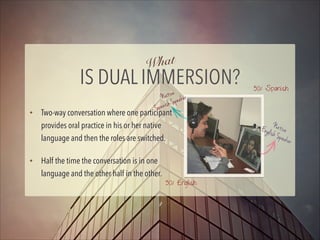
Two-way conversation where one participant
provides oral practice in his or her native
language and then the roles are switched.
Half the time the conversation is in one
language and the other half in the other.
4

50% English

Engli Native
sh Sp
eaker
hat
W

ARE THE BENEFITS?
✦
✦
✦
✦
✦
✦
✦

Mutual Learning Partnership
Linguistic Proficiency
Intercultural Communication Competency
Enhancement in Beliefs and Perspectives
Attitude Toward Learning
Active Participation in a Global Community
Professional Development: Better Teaching
5
How

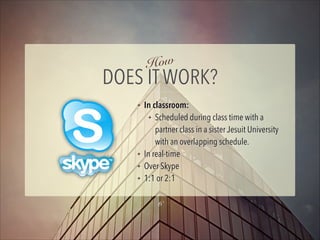
DOES IT WORK?
✦

✦
✦
✦

In classroom:
✦ Scheduled during class time with a
partner class in a sister Jesuit University
with an overlapping schedule.
In real-time
Over Skype
1:1 or 2:1
6
✦

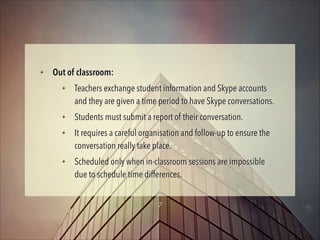
Out of classroom:
✦

✦
✦

✦

Teachers exchange student information and Skype accounts
and they are given a time period to have Skype conversations.
Students must submit a report of their conversation.
It requires a careful organisation and follow-up to ensure the
conversation really take place.
Scheduled only when in-classroom sessions are impossible
due to schedule time differences.
7
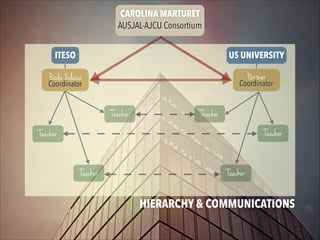
CAROLINA MARTURET
AUSJAL-AJCU Consortium
ITESO

US UNIVERSITY

Paula Zulaica

Partner

Coordinator

Coordinator

Teacher

Teacher
Teacher

Teacher

Teacher

Teacher
8
HIERARCHY & COMMUNICATIONS
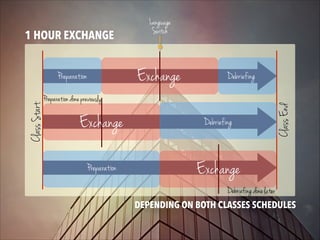
Class Start

Preparation

Exchange

Debriefing

Preparation done previously

Exchange

Debriefing

Preparation

Class End

1 HOUR EXCHANGE

Language
Switch

Exchange
Debriefing done later
9
DEPENDING ON BOTH CLASSES SCHEDULES
10
TEACHER PROCEDURES
✦
✦
✦
✦
✦
✦

✦

✦

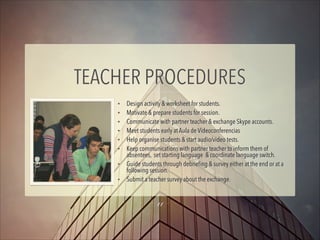
Design activity & worksheet for students.
Motivate & prepare students for session.
Communicate with partner teacher & exchange Skype accounts.
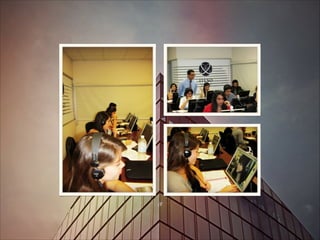
Meet students early at Aula de Videoconferencias
Help organise students & start audio/video tests.
Keep communications with partner teacher to inform them of
absentees, set starting language & coordinate language switch.
Guide students through debriefing & survey either at the end or at a
following session.
Submit a teacher survey about the exchange.

11
US Class

ITESO Class
✦

Teacher plans what students
need to do during the English
portion: topic, grammar,
report/questionnaire.

✦

Teacher plans what students
need to do during the
Spanish portion.

Both teachers exchange their lesson plans as courtesy.
12
STUDENT PROCEDURES
✦
✦
✦
✦

✦

✦
✦

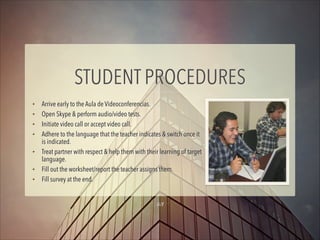
Arrive early to the Aula de Videoconferencias.
Open Skype & perform audio/video tests.
Initiate video call or accept video call.
Adhere to the language that the teacher indicates & switch once it
is indicated.
Treat partner with respect & help them with their learning of target
language.
Fill out the worksheet/report the teacher assigns them.
Fill survey at the end.
13
hat
W

NOT TO DO
✦

Students can exchange contact & social media information for further
communications when both parties agree, but they must not make
romantic or sexual advances to their Skype partners that could
constitute harassment.

14
TROUBLESHOOTING
If there are problems with communications:
✦

Hang-up call and call again.

✦

Disable video & continue just with audio.

✦

Ask for help from Tech Support Technician present during the session
or call Soporte at extension 3500.
15
DUAL IMMERSION LINKS
✦

AUSJAL-AJCU Consortium

✦

Video about Virtual Dual Immersion Project by AUSJAL-AJCU

✦

Dual Immersion at ITESO Webpage:

✦

Video about Dual Immersion at ITESO (password: pci)

✦

Article in CRUCE & ITESO Portal

✦

Student Survey

✦

Teacher Survey
16
f or
you ing!
nk at
Tha ici p
art
p
17
CREDITS
✦

✦
✦

✦

Suggestions for Project Organization & Materials:
Aydee Horton, Ibero León
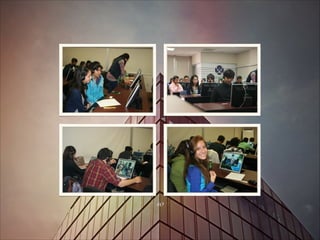
Photos by Lorena Sota & Paula Zulaica
Participating teachers depicted in photos: Robert
Amorelli, Martha Cabrera & Lety Ceseña
Coordination & video by AUSJAL-AJCU Consortium
18

Dual Immersion Introduction

  • 1.
    The DUAL IMMERSION PROJECT Guidefor Teachers & Students
  • 2.
    Index VIRTUAL DUAL IMMERSIONPROJECT ✦ ✦ ✦ ✦ What is Dual Immersion? What are the Benefits? How does it work? ✦ In-classroom ✦ Out-of-classroom Dual Immersion Project Hierarchy & Communications 2 ✦ ✦ ✦ ✦ ✦ ✦ ✦ Time allocation examples Teacher Procedures Student Procedures What not to do Troubleshooting Dual Immersion Links Credits
  • 3.
  • 4.
    hat W IS DUAL IMMERSION? ativeaker N pe anish S ✦ ✦ 50% Spanish Sp Two-way conversation where one participant provides oral practice in his or her native language and then the roles are switched. Half the time the conversation is in one language and the other half in the other. 4 50% English Engli Native sh Sp eaker
  • 5.
    hat W ARE THE BENEFITS? ✦ ✦ ✦ ✦ ✦ ✦ ✦ MutualLearning Partnership Linguistic Proficiency Intercultural Communication Competency Enhancement in Beliefs and Perspectives Attitude Toward Learning Active Participation in a Global Community Professional Development: Better Teaching 5
  • 6.
    How DOES IT WORK? ✦ ✦ ✦ ✦ Inclassroom: ✦ Scheduled during class time with a partner class in a sister Jesuit University with an overlapping schedule. In real-time Over Skype 1:1 or 2:1 6
  • 7.
    ✦ Out of classroom: ✦ ✦ ✦ ✦ Teachersexchange student information and Skype accounts and they are given a time period to have Skype conversations. Students must submit a report of their conversation. It requires a careful organisation and follow-up to ensure the conversation really take place. Scheduled only when in-classroom sessions are impossible due to schedule time differences. 7
  • 8.
    CAROLINA MARTURET AUSJAL-AJCU Consortium ITESO USUNIVERSITY Paula Zulaica Partner Coordinator Coordinator Teacher Teacher Teacher Teacher Teacher Teacher 8 HIERARCHY & COMMUNICATIONS
  • 9.
    Class Start Preparation Exchange Debriefing Preparation donepreviously Exchange Debriefing Preparation Class End 1 HOUR EXCHANGE Language Switch Exchange Debriefing done later 9 DEPENDING ON BOTH CLASSES SCHEDULES
  • 10.
  • 11.
    TEACHER PROCEDURES ✦ ✦ ✦ ✦ ✦ ✦ ✦ ✦ Design activity& worksheet for students. Motivate & prepare students for session. Communicate with partner teacher & exchange Skype accounts. Meet students early at Aula de Videoconferencias Help organise students & start audio/video tests. Keep communications with partner teacher to inform them of absentees, set starting language & coordinate language switch. Guide students through debriefing & survey either at the end or at a following session. Submit a teacher survey about the exchange. 11
  • 12.
    US Class ITESO Class ✦ Teacherplans what students need to do during the English portion: topic, grammar, report/questionnaire. ✦ Teacher plans what students need to do during the Spanish portion. Both teachers exchange their lesson plans as courtesy. 12
  • 13.
    STUDENT PROCEDURES ✦ ✦ ✦ ✦ ✦ ✦ ✦ Arrive earlyto the Aula de Videoconferencias. Open Skype & perform audio/video tests. Initiate video call or accept video call. Adhere to the language that the teacher indicates & switch once it is indicated. Treat partner with respect & help them with their learning of target language. Fill out the worksheet/report the teacher assigns them. Fill survey at the end. 13
  • 14.
    hat W NOT TO DO ✦ Studentscan exchange contact & social media information for further communications when both parties agree, but they must not make romantic or sexual advances to their Skype partners that could constitute harassment. 14
  • 15.
    TROUBLESHOOTING If there areproblems with communications: ✦ Hang-up call and call again. ✦ Disable video & continue just with audio. ✦ Ask for help from Tech Support Technician present during the session or call Soporte at extension 3500. 15
  • 16.
    DUAL IMMERSION LINKS ✦ AUSJAL-AJCUConsortium ✦ Video about Virtual Dual Immersion Project by AUSJAL-AJCU ✦ Dual Immersion at ITESO Webpage: ✦ Video about Dual Immersion at ITESO (password: pci) ✦ Article in CRUCE & ITESO Portal ✦ Student Survey ✦ Teacher Survey 16
  • 17.
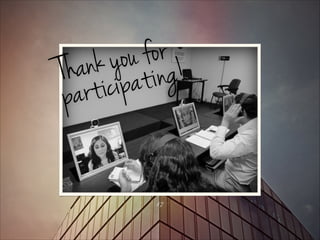
    f or you ing! nkat Tha ici p art p 17
  • 18.
    CREDITS ✦ ✦ ✦ ✦ Suggestions for ProjectOrganization & Materials: Aydee Horton, Ibero León Photos by Lorena Sota & Paula Zulaica Participating teachers depicted in photos: Robert Amorelli, Martha Cabrera & Lety Ceseña Coordination & video by AUSJAL-AJCU Consortium 18