Drupal Intro
An overview of the architecture, features and
  basic site-building workflow of the CMS.

          Chris Neglia and Lisa Forgan
           Copyright 2009 Page1solutions, LLC
What is Drupal?


• Open Source software written in php.

• A CMS or content-management system.

• A sophisticated web application building tool.
What is a CMS?
• Simply put, a CMS is a website you build using
  the website itself.

• Wikipedia definition: A content management system (CMS)
  such as a document management system (DMS) is a
  computer application used to manage work flow needed to
  collaboratively create, edit, review, index, search, publish and
  archive various kinds of digital media and electronic text.[1]
What can Drupal be?
•   blog
•   Forum
•   Online newspaper, Portal / Directory
•   Brocure site, portfolio, flickr like photo drop
•   Social community site, job post board
•   Video site like youtube
•   Project management site
•   CRM, ERP, SCM, Wiki
•   Shopping cart system
•   E-learning, training site
•   Dating site
•   Anything you can think of…
Why use a CMS?
• It helps manage complexity.

• It provides a user interface (UI) for adding,
  editing and publishing content.

• It provides a means for collaboration among
  many to perform the above tasks.
Why use Drupal over Wordpress?
•   Wordpress was designed only to be a blog with some easy add-ons.

•   Drupal was designed to be more of a generalist: it’s for making ‘anything’ and is far
    more robust.

•   Wordpress could be the better choice for blogs since it is better at being a blog than
    Drupal. This is something of debate.

•   Wordpress is still a sound choice of CMS for SEO and security; so if wordpress satisfies
    a simpler project’s requirements then by all means use it- it is easier and faster to set
    up than Drupal.

•   Wordpress is not designed to be highly scalable to many simultaneous users, nor does
    it have flexible roles, permissions, extensible content types, nor does it have plentiful
    well-tested, quality add-ons. It has a few and a lot of really poor plugins.

•   Caveat: Trying to force Wordpress to do something it cannot do easily with very
    popular plug-ins can be worse than suffering the learning curve of Drupal.
Why use Drupal over Joomla? (or other CMS)
•   It has superior session handling for a CMS.

•   It has superior security.

•   It is a more consistent, reliable and flexible framework for development.

•   It is considered better for SEO from our research.

•   It uses a ‘separation of concerns’ architecture to cleanly and consistently separate
    structure, function, form, and presentation in layers (ie: php from data as db/xml,
    layout and presentation as html and css).

•   It heavily uses ‘defaults overrides’ in code in the form of hooks and in themes in
    the form of templates. This makes it extremely flexible.

•   Other CMS’es do a very very bad job of at least one of the above.
Downsides to the Druup
• Drupal has a steeper learning curve than
  wordpress or Joomla.

• Drupal and it’s developers make no excuse for
  this fact- it is a robust, flexible tool

• That said, the drupal community is constantly
  addressing usability and user-experience issues
  because they want the industry market share.
What is a UI?
• UI is a user-interface, which is a general term
  for the layout of options, widgets and settings
  used to configure the system or manage
  content.

• ‘Site-building’ activities refer to configuring
  settings or managing content through the UI,
  such as building navigation menus.
Drupal Structure
• Drupal is a database-driven (‘dynamic’)
  application. It requires a database.

• Drupal has a core filesystem whose
  functionality can be extended using the UI
  itself, modules and themes.

• The UI settings are stored in the database.
Modules
• Packages of files in a directory that you upload
  into drupal’s module space (/sites/all/modules)

• Add functionality to drupal

• ‘Core’ Modules come shipped with drupal

• ‘Contributed’ Modules are downloads from
  drupal.org
Themes
• Packages of files in a directory that you upload
  into drupal’s theme space (/sites/all/themes)

• Themes adjust the site layout and style. Like
  ‘skinning’ your media player.

• Themes can be easily changed in the UI.
Drupal Database
Drupal’s database tracks things like :

•   Site and Module settings,
•   User’s information,
•   Access information,
•   Logging information,
•   Permissions and User Roles,
•   System Paths
•   Content and content metadata
Nodes
• A node is the primary form of content in a
  drupal site. At a minimum it is a title and a
  body, and can be ‘specialized’.

• A ‘page’ and ‘story’ for example are node
  types that have a specific node settings.

• A node type is a blueprint for creating
  instances of content of a particular type.
Nodes (cont)
• Not everything in Drupal is a node.
• This is important!!
• Ex: A user is not a node. A taxonomy is not a
  node. An account is not a node.
• Knowing this is important for evaluation of
  what can and cannot be easily done through
  the UI, without additional programming.
Layout and Regions
• A Region is an area in a layout, such as a header,
  footer, content, left/right sidebar into which blocks can
  be placed and arranged.

• A block is a box containing some information

• A node resides only in the content area of the layout
  (except in special circumstances).

• Think of the content region as a big ‘node’ block that
  allows other blocks in it but the node itself can’t move.
Blocks
• Blocks are added by modules.

• Blocks can contain views, widgets, menus,
  nodes (in special circumstances), and panels.

• Blocks can be moved around through the UI

• Blocks can be styled individually.
Additional Terminology
• Views – an interface for making customized
  lists of the data contained in the drupal
  database.
• Panels – an interface for making customized
  layouts of nodes available to the panels
  module.
• Widgets – a general term for interactive form
  elements or graphs that are enabled by
  modules.
Admin Menu
• The administrative menu is a part of the UI
  that allows one to configure Drupal’s settings.

• The settings available depend on which
  modules are installed and enabled.

• Permissions allow users to have
  ‘administrative’ access to module settings.
Users
• All CMSes (wordpress, Joomla, Drupal) have a
  user login system; users have a username/pw.

• Drupal also supports the concepts of 1) Roles
  and 2) Permissions.

• Roles are user designations to groups having
  the same set of permissions.
Anonymous User
• A (not-logged-in) site visitor is called a ‘guest’,
  ‘visitor’ or ‘anonymous user’.

• Has a user-id (uid) of 0 (zero).

• All anonymous users belong to the
  ‘anonymous user role’ (a role ID of 1) and
  have a set of permissions assigned to them.
Authenticated User
• A user in drupal may belong to one or more
  roles.

• Every registered user in Drupal belongs to at
  least the ‘authenticated user’ role.

• Authenticated user role has a role ID of 2
Root ‘Admin’ User
• The ‘root’ user or ‘root admin’ has the ability
  to do anything on the site and is a special
  user.

• The ‘root’ user has a user-id (uid) of 1.

• The ‘root’ user does NOT have role-
  permissions to set because they are
  effectively gods within Drupal.
Managing Permissions
• KEY concept: if you grant permission to an
  authenticated user, it applies to ALL roles
  except the anonymous user.

• To grant a permission to everyone on a site,
  you must grant the permission to both the
  anonymous user and authenticated user.
Managing Permissions
• To grant permission to only a newly created
  ‘dentist role’, tick the permission on that role.

• Leave all the other roles deselected.

• If you grant to both the ‘dentist role’ AND the
  ‘authenticated user’ role, you would be doing
  it wrong. Drupal assumes you know this.
Recipe: Change Site Information
• In Administer > Site Configuration > Site
  Information:
• Change the information to suit your site
  following the help text.
• Don’t change the ‘Default front page’ just yet.
• Click ‘Save configuration’
Recipe: Change Date and Time
• In Administer > Site Configuration > Date and
  Time:
• Change the timezone to the correct time for
  America/Denver (-0600 UTC)
• Change the time formats
• Click ‘Save Configuration’
Recipe: Clean Urls
Clean URLs remove the ?q= from the location
  bar in your web browser.

• In Administer > Site Configuration > Clean
  Urls:
• Tick ‘Enabled’
• Click ‘Save Configuration’
Clean Urls Issue
• If ‘Clean URLs’ is an unchangeable option,
  then there is a misconfiguration of the drupal
  site hosting environment.

• Contact your local IT support for assistance or
  consult the drupal handbook for more info.

• For the purposes of this demo, it’s not
  important but it -is- important to enable later.
Recipe: Add a user
•   Go to Administer > User Management > Users
•   Click ‘Add user’
•   Choose options.
•   Click ‘Create New Account’
Recipe: Add a user
• A user can also add themselves by registering, if
  the root user has allowed this option.

• Go to Administer > User Management > User
  Settings

• Tick ‘Visitors can create accounts and no
  administrator approval is required’

• Click ‘Save Configuration’
Recipe: Add Roles
• You will note that ‘anonymous’ and
  ‘authenticated’ users are there by default,
  undeletable.
• Type in the box below the roles in the ‘Name’
  column. Click ‘add role’. That’s it.
Recipe: Edit / Delete role
• Click ‘edit’ next to the role name.
• Here you can change the name or delete the
  role.
• Warning: If you click ‘delete role’, there is NO
  confirmation. This can be bad.
Recipe: Assign multiple roles to User
• In Administer > User Management > Users:

• Click the ‘edit’ link under operations for a user
• Under Roles, Tick an additional role you
  created.
• You will notice ‘authenticated user’ is locked.
• Scroll to the bottom and click ‘Save’
Recipe: Altering Permissions
• Under Administer > User Management > Permissions: you will see
  there is a permissions column and role columns.


• Scroll down to the user module section.


• Tick ‘change own username’ in the ‘authenticated user’ column.


• Tick ‘Save Permissions’
Recipe: Build Menu
•   Under Administer > Site Building > Menus:


•   Click Primary Links

•   On the Primary Links ‘List Items’ page, click ‘Add Item’

•   In Path, type ‘contact’. In Menu link title, type ‘Contact Form’.

•   Change weight to ‘50’ (drupal 6.x; ‘10’ in drupal 5.x)

•   Click Save.

•   You will notice that ‘Contact Form’ appears now on the far right of your
    primary links. Click it to go to the contact form.
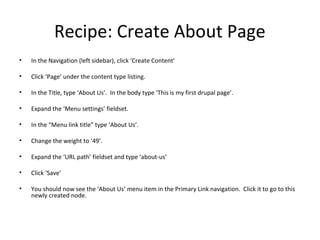
Recipe: Create About Page
•   In the Navigation (left sidebar), click ‘Create Content’

•   Click ‘Page’ under the content type listing.

•   In the Title, type ‘About Us’. In the body type ‘This is my first drupal page’.

•   Expand the ‘Menu settings’ fieldset.

•   In the “Menu link title” type ‘About Us’.

•   Change the weight to ‘49’.

•   Expand the ‘URL path’ fieldset and type ‘about-us’

•   Click ‘Save’

•   You should now see the ‘About Us’ menu item in the Primary Link navigation. Click it to go to this
    newly created node.
Recipe: Get modules
• Default Drupal installs can only do so much.

• Go to http://drupalmodules.com to find a module that
  supports what you are trying to do.

• Do rely on the ratings here as they are tied to download /
  popularity metrics from http://drupal.org
Recipe : Change Site (Admin) Email
• Note: There are multiple places to change the email address for a
  site ‘root user’ administrator. You may have to dig around for
  them in admin menu when logged in as the root user. Get login
  info from Salesforce.
• In site information : admin/settings/site-information

• Site-wide contact form settings : admin/build/contact (edit
  operation)
• Mass contact settings (if used) : admin/build/mass_contact/settings

• Mail settings (different places, ex uses mimemail) :
  admin/settings/mimemail
• User register notify : admin/settings/register_notify
Recipe: Halp! The site is messed up
• If the login disappears and you can’t login, go to
  www.yourdomain.com/user or
  www.yourdomain.com/index.php?q=user

• If clean URLs is not working, substitute the first forward slash
  (‘/’) after the domain/host with ‘/index.php?q=‘ without the
  quotes.

• If all else fails, call Chris or Alex to build a GUI interface in
  Visual Basic to track down the perpetrator in realtime.
Installing Modules
• Download (from drupal.or) and Unpack module ‘tarballs’
  (*.tar.gz) files to the folder inside.

• Upload the module folder to <drupal_root>
  /sites/all/modules.

• Create the ‘modules’ and ‘themes’ directories if they are
  not there.

• Go to Administer > Site Building > Modules : and tick
  ‘Enabled’ next to the module to enable it and click ‘Save
  Configuration’
Using Modules
• A newly enabled module will add an
  administration menu.

• Go to that module and read the help before
  changing anything.

• Play around and learn it’s feature set.

• Install the ‘Advanced Help’ module to get more
  verbose help with modules.
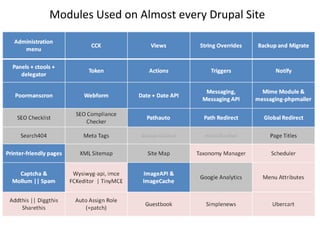
Modules Used on Almost every Drupal Site
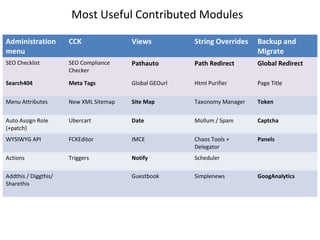
Most Useful Contributed Modules

Administration        CCK               Views           String Overrides   Backup and
menu                                                                       Migrate
SEO Checklist         SEO Compliance    Pathauto        Path Redirect      Global Redirect
                      Checker

Search404             Meta Tags         Global GEOurl   Html Purifier      Page Title


Menu Attributes       New XML Sitemap   Site Map        Taxonomy Manager   Token


Auto Assign Role      Ubercart          Date            Mollum / Spam      Captcha
(+patch)
WYSIWYG API           FCKEditor         IMCE            Chaos Tools +      Panels
                                                        Delegator
Actions               Triggers          Notify          Scheduler

Addthis / Diggthis/                     Guestbook       Simplenews         GoogAnalytics
Sharethis
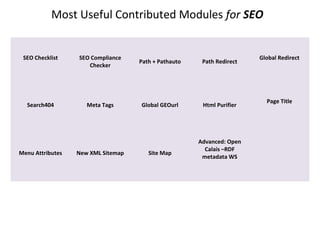
Most Useful Contributed Modules for SEO


 SEO Checklist    SEO Compliance                                       Global Redirect
                                    Path + Pathauto    Path Redirect
                     Checker


                                                                         Page Title
  Search404          Meta Tags      Global GEOurl      Html Purifier


                                                      Advanced: Open
                                                        Calais –RDF
Menu Attributes   New XML Sitemap      Site Map
                                                       metadata WS
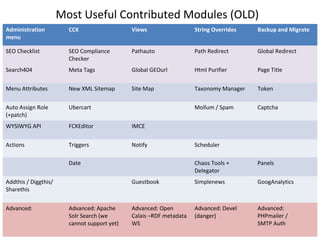
Most Useful Contributed Modules (OLD)
Administration          CCK                   Views                  String Overrides   Backup and Migrate
menu

SEO Checklist           SEO Compliance        Pathauto               Path Redirect      Global Redirect
                        Checker
Search404               Meta Tags             Global GEOurl          Html Purifier      Page Title


Menu Attributes         New XML Sitemap       Site Map               Taxonomy Manager   Token


Auto Assign Role        Ubercart                                     Mollum / Spam      Captcha
(+patch)
WYSIWYG API             FCKEditor             IMCE


Actions                 Triggers              Notify                 Scheduler

                        Date                                         Chaos Tools +      Panels
                                                                     Delegator
Addthis / Diggthis/                           Guestbook              Simplenews         GoogAnalytics
Sharethis


Advanced:               Advanced: Apache      Advanced: Open         Advanced: Devel    Advanced:
                        Solr Search (we       Calais –RDF metadata   (danger)           PHPmailer /
                        cannot support yet)   WS                                        SMTP Auth
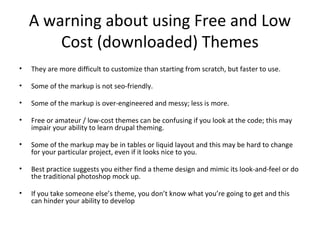
A warning about using Free and Low
        Cost (downloaded) Themes
•   They are more difficult to customize than starting from scratch, but faster to use.

•   Some of the markup is not seo-friendly.

•   Some of the markup is over-engineered and messy; less is more.

•   Free or amateur / low-cost themes can be confusing if you look at the code; this may
    impair your ability to learn drupal theming.

•   Some of the markup may be in tables or liquid layout and this may be hard to change
    for your particular project, even if it looks nice to you.

•   Best practice suggests you either find a theme design and mimic its look-and-feel or do
    the traditional photoshop mock up.

•   If you take someone else’s theme, you don’t know what you’re going to get and this
    can hinder your ability to develop
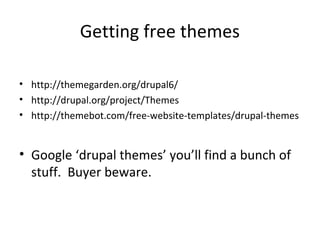
Getting free themes

• http://themegarden.org/drupal6/
• http://drupal.org/project/Themes
• http://themebot.com/free-website-templates/drupal-themes


• Google ‘drupal themes’ you’ll find a bunch of
  stuff. Buyer beware.
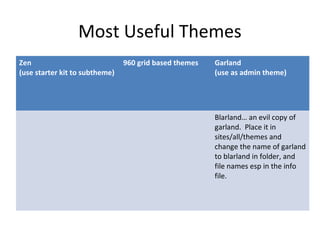
Most Useful Themes
Zen                             960 grid based themes   Garland
(use starter kit to subtheme)                           (use as admin theme)


                                                        Blarland… an evil copy of
                                                        garland. Place it in
                                                        sites/all/themes and
                                                        change the name of garland
                                                        to blarland in folder, and
                                                        file names esp in the info
                                                        file.

Drupal intro

  • 1.
    Drupal Intro An overviewof the architecture, features and basic site-building workflow of the CMS. Chris Neglia and Lisa Forgan Copyright 2009 Page1solutions, LLC
  • 2.
    What is Drupal? •Open Source software written in php. • A CMS or content-management system. • A sophisticated web application building tool.
  • 3.
    What is aCMS? • Simply put, a CMS is a website you build using the website itself. • Wikipedia definition: A content management system (CMS) such as a document management system (DMS) is a computer application used to manage work flow needed to collaboratively create, edit, review, index, search, publish and archive various kinds of digital media and electronic text.[1]
  • 4.
    What can Drupalbe? • blog • Forum • Online newspaper, Portal / Directory • Brocure site, portfolio, flickr like photo drop • Social community site, job post board • Video site like youtube • Project management site • CRM, ERP, SCM, Wiki • Shopping cart system • E-learning, training site • Dating site • Anything you can think of…
  • 5.
    Why use aCMS? • It helps manage complexity. • It provides a user interface (UI) for adding, editing and publishing content. • It provides a means for collaboration among many to perform the above tasks.
  • 6.
    Why use Drupalover Wordpress? • Wordpress was designed only to be a blog with some easy add-ons. • Drupal was designed to be more of a generalist: it’s for making ‘anything’ and is far more robust. • Wordpress could be the better choice for blogs since it is better at being a blog than Drupal. This is something of debate. • Wordpress is still a sound choice of CMS for SEO and security; so if wordpress satisfies a simpler project’s requirements then by all means use it- it is easier and faster to set up than Drupal. • Wordpress is not designed to be highly scalable to many simultaneous users, nor does it have flexible roles, permissions, extensible content types, nor does it have plentiful well-tested, quality add-ons. It has a few and a lot of really poor plugins. • Caveat: Trying to force Wordpress to do something it cannot do easily with very popular plug-ins can be worse than suffering the learning curve of Drupal.
  • 7.
    Why use Drupalover Joomla? (or other CMS) • It has superior session handling for a CMS. • It has superior security. • It is a more consistent, reliable and flexible framework for development. • It is considered better for SEO from our research. • It uses a ‘separation of concerns’ architecture to cleanly and consistently separate structure, function, form, and presentation in layers (ie: php from data as db/xml, layout and presentation as html and css). • It heavily uses ‘defaults overrides’ in code in the form of hooks and in themes in the form of templates. This makes it extremely flexible. • Other CMS’es do a very very bad job of at least one of the above.
  • 8.
    Downsides to theDruup • Drupal has a steeper learning curve than wordpress or Joomla. • Drupal and it’s developers make no excuse for this fact- it is a robust, flexible tool • That said, the drupal community is constantly addressing usability and user-experience issues because they want the industry market share.
  • 9.
    What is aUI? • UI is a user-interface, which is a general term for the layout of options, widgets and settings used to configure the system or manage content. • ‘Site-building’ activities refer to configuring settings or managing content through the UI, such as building navigation menus.
  • 10.
    Drupal Structure • Drupalis a database-driven (‘dynamic’) application. It requires a database. • Drupal has a core filesystem whose functionality can be extended using the UI itself, modules and themes. • The UI settings are stored in the database.
  • 11.
    Modules • Packages offiles in a directory that you upload into drupal’s module space (/sites/all/modules) • Add functionality to drupal • ‘Core’ Modules come shipped with drupal • ‘Contributed’ Modules are downloads from drupal.org
  • 12.
    Themes • Packages offiles in a directory that you upload into drupal’s theme space (/sites/all/themes) • Themes adjust the site layout and style. Like ‘skinning’ your media player. • Themes can be easily changed in the UI.
  • 13.
    Drupal Database Drupal’s databasetracks things like : • Site and Module settings, • User’s information, • Access information, • Logging information, • Permissions and User Roles, • System Paths • Content and content metadata
  • 14.
    Nodes • A nodeis the primary form of content in a drupal site. At a minimum it is a title and a body, and can be ‘specialized’. • A ‘page’ and ‘story’ for example are node types that have a specific node settings. • A node type is a blueprint for creating instances of content of a particular type.
  • 15.
    Nodes (cont) • Noteverything in Drupal is a node. • This is important!! • Ex: A user is not a node. A taxonomy is not a node. An account is not a node. • Knowing this is important for evaluation of what can and cannot be easily done through the UI, without additional programming.
  • 16.
    Layout and Regions •A Region is an area in a layout, such as a header, footer, content, left/right sidebar into which blocks can be placed and arranged. • A block is a box containing some information • A node resides only in the content area of the layout (except in special circumstances). • Think of the content region as a big ‘node’ block that allows other blocks in it but the node itself can’t move.
  • 17.
    Blocks • Blocks areadded by modules. • Blocks can contain views, widgets, menus, nodes (in special circumstances), and panels. • Blocks can be moved around through the UI • Blocks can be styled individually.
  • 18.
    Additional Terminology • Views– an interface for making customized lists of the data contained in the drupal database. • Panels – an interface for making customized layouts of nodes available to the panels module. • Widgets – a general term for interactive form elements or graphs that are enabled by modules.
  • 19.
    Admin Menu • Theadministrative menu is a part of the UI that allows one to configure Drupal’s settings. • The settings available depend on which modules are installed and enabled. • Permissions allow users to have ‘administrative’ access to module settings.
  • 20.
    Users • All CMSes(wordpress, Joomla, Drupal) have a user login system; users have a username/pw. • Drupal also supports the concepts of 1) Roles and 2) Permissions. • Roles are user designations to groups having the same set of permissions.
  • 21.
    Anonymous User • A(not-logged-in) site visitor is called a ‘guest’, ‘visitor’ or ‘anonymous user’. • Has a user-id (uid) of 0 (zero). • All anonymous users belong to the ‘anonymous user role’ (a role ID of 1) and have a set of permissions assigned to them.
  • 22.
    Authenticated User • Auser in drupal may belong to one or more roles. • Every registered user in Drupal belongs to at least the ‘authenticated user’ role. • Authenticated user role has a role ID of 2
  • 23.
    Root ‘Admin’ User •The ‘root’ user or ‘root admin’ has the ability to do anything on the site and is a special user. • The ‘root’ user has a user-id (uid) of 1. • The ‘root’ user does NOT have role- permissions to set because they are effectively gods within Drupal.
  • 24.
    Managing Permissions • KEYconcept: if you grant permission to an authenticated user, it applies to ALL roles except the anonymous user. • To grant a permission to everyone on a site, you must grant the permission to both the anonymous user and authenticated user.
  • 25.
    Managing Permissions • Togrant permission to only a newly created ‘dentist role’, tick the permission on that role. • Leave all the other roles deselected. • If you grant to both the ‘dentist role’ AND the ‘authenticated user’ role, you would be doing it wrong. Drupal assumes you know this.
  • 26.
    Recipe: Change SiteInformation • In Administer > Site Configuration > Site Information: • Change the information to suit your site following the help text. • Don’t change the ‘Default front page’ just yet. • Click ‘Save configuration’
  • 27.
    Recipe: Change Dateand Time • In Administer > Site Configuration > Date and Time: • Change the timezone to the correct time for America/Denver (-0600 UTC) • Change the time formats • Click ‘Save Configuration’
  • 28.
    Recipe: Clean Urls CleanURLs remove the ?q= from the location bar in your web browser. • In Administer > Site Configuration > Clean Urls: • Tick ‘Enabled’ • Click ‘Save Configuration’
  • 29.
    Clean Urls Issue •If ‘Clean URLs’ is an unchangeable option, then there is a misconfiguration of the drupal site hosting environment. • Contact your local IT support for assistance or consult the drupal handbook for more info. • For the purposes of this demo, it’s not important but it -is- important to enable later.
  • 30.
    Recipe: Add auser • Go to Administer > User Management > Users • Click ‘Add user’ • Choose options. • Click ‘Create New Account’
  • 31.
    Recipe: Add auser • A user can also add themselves by registering, if the root user has allowed this option. • Go to Administer > User Management > User Settings • Tick ‘Visitors can create accounts and no administrator approval is required’ • Click ‘Save Configuration’
  • 32.
    Recipe: Add Roles •You will note that ‘anonymous’ and ‘authenticated’ users are there by default, undeletable. • Type in the box below the roles in the ‘Name’ column. Click ‘add role’. That’s it.
  • 33.
    Recipe: Edit /Delete role • Click ‘edit’ next to the role name. • Here you can change the name or delete the role. • Warning: If you click ‘delete role’, there is NO confirmation. This can be bad.
  • 34.
    Recipe: Assign multipleroles to User • In Administer > User Management > Users: • Click the ‘edit’ link under operations for a user • Under Roles, Tick an additional role you created. • You will notice ‘authenticated user’ is locked. • Scroll to the bottom and click ‘Save’
  • 35.
    Recipe: Altering Permissions •Under Administer > User Management > Permissions: you will see there is a permissions column and role columns. • Scroll down to the user module section. • Tick ‘change own username’ in the ‘authenticated user’ column. • Tick ‘Save Permissions’
  • 36.
    Recipe: Build Menu • Under Administer > Site Building > Menus: • Click Primary Links • On the Primary Links ‘List Items’ page, click ‘Add Item’ • In Path, type ‘contact’. In Menu link title, type ‘Contact Form’. • Change weight to ‘50’ (drupal 6.x; ‘10’ in drupal 5.x) • Click Save. • You will notice that ‘Contact Form’ appears now on the far right of your primary links. Click it to go to the contact form.
  • 37.
    Recipe: Create AboutPage • In the Navigation (left sidebar), click ‘Create Content’ • Click ‘Page’ under the content type listing. • In the Title, type ‘About Us’. In the body type ‘This is my first drupal page’. • Expand the ‘Menu settings’ fieldset. • In the “Menu link title” type ‘About Us’. • Change the weight to ‘49’. • Expand the ‘URL path’ fieldset and type ‘about-us’ • Click ‘Save’ • You should now see the ‘About Us’ menu item in the Primary Link navigation. Click it to go to this newly created node.
  • 38.
    Recipe: Get modules •Default Drupal installs can only do so much. • Go to http://drupalmodules.com to find a module that supports what you are trying to do. • Do rely on the ratings here as they are tied to download / popularity metrics from http://drupal.org
  • 39.
    Recipe : ChangeSite (Admin) Email • Note: There are multiple places to change the email address for a site ‘root user’ administrator. You may have to dig around for them in admin menu when logged in as the root user. Get login info from Salesforce. • In site information : admin/settings/site-information • Site-wide contact form settings : admin/build/contact (edit operation) • Mass contact settings (if used) : admin/build/mass_contact/settings • Mail settings (different places, ex uses mimemail) : admin/settings/mimemail • User register notify : admin/settings/register_notify
  • 40.
    Recipe: Halp! Thesite is messed up • If the login disappears and you can’t login, go to www.yourdomain.com/user or www.yourdomain.com/index.php?q=user • If clean URLs is not working, substitute the first forward slash (‘/’) after the domain/host with ‘/index.php?q=‘ without the quotes. • If all else fails, call Chris or Alex to build a GUI interface in Visual Basic to track down the perpetrator in realtime.
  • 41.
    Installing Modules • Download(from drupal.or) and Unpack module ‘tarballs’ (*.tar.gz) files to the folder inside. • Upload the module folder to <drupal_root> /sites/all/modules. • Create the ‘modules’ and ‘themes’ directories if they are not there. • Go to Administer > Site Building > Modules : and tick ‘Enabled’ next to the module to enable it and click ‘Save Configuration’
  • 42.
    Using Modules • Anewly enabled module will add an administration menu. • Go to that module and read the help before changing anything. • Play around and learn it’s feature set. • Install the ‘Advanced Help’ module to get more verbose help with modules.
  • 43.
    Modules Used onAlmost every Drupal Site
  • 44.
    Most Useful ContributedModules Administration CCK Views String Overrides Backup and menu Migrate SEO Checklist SEO Compliance Pathauto Path Redirect Global Redirect Checker Search404 Meta Tags Global GEOurl Html Purifier Page Title Menu Attributes New XML Sitemap Site Map Taxonomy Manager Token Auto Assign Role Ubercart Date Mollum / Spam Captcha (+patch) WYSIWYG API FCKEditor IMCE Chaos Tools + Panels Delegator Actions Triggers Notify Scheduler Addthis / Diggthis/ Guestbook Simplenews GoogAnalytics Sharethis
  • 45.
    Most Useful ContributedModules for SEO SEO Checklist SEO Compliance Global Redirect Path + Pathauto Path Redirect Checker Page Title Search404 Meta Tags Global GEOurl Html Purifier Advanced: Open Calais –RDF Menu Attributes New XML Sitemap Site Map metadata WS
  • 46.
    Most Useful ContributedModules (OLD) Administration CCK Views String Overrides Backup and Migrate menu SEO Checklist SEO Compliance Pathauto Path Redirect Global Redirect Checker Search404 Meta Tags Global GEOurl Html Purifier Page Title Menu Attributes New XML Sitemap Site Map Taxonomy Manager Token Auto Assign Role Ubercart Mollum / Spam Captcha (+patch) WYSIWYG API FCKEditor IMCE Actions Triggers Notify Scheduler Date Chaos Tools + Panels Delegator Addthis / Diggthis/ Guestbook Simplenews GoogAnalytics Sharethis Advanced: Advanced: Apache Advanced: Open Advanced: Devel Advanced: Solr Search (we Calais –RDF metadata (danger) PHPmailer / cannot support yet) WS SMTP Auth
  • 47.
    A warning aboutusing Free and Low Cost (downloaded) Themes • They are more difficult to customize than starting from scratch, but faster to use. • Some of the markup is not seo-friendly. • Some of the markup is over-engineered and messy; less is more. • Free or amateur / low-cost themes can be confusing if you look at the code; this may impair your ability to learn drupal theming. • Some of the markup may be in tables or liquid layout and this may be hard to change for your particular project, even if it looks nice to you. • Best practice suggests you either find a theme design and mimic its look-and-feel or do the traditional photoshop mock up. • If you take someone else’s theme, you don’t know what you’re going to get and this can hinder your ability to develop
  • 48.
    Getting free themes •http://themegarden.org/drupal6/ • http://drupal.org/project/Themes • http://themebot.com/free-website-templates/drupal-themes • Google ‘drupal themes’ you’ll find a bunch of stuff. Buyer beware.
  • 49.
    Most Useful Themes Zen 960 grid based themes Garland (use starter kit to subtheme) (use as admin theme) Blarland… an evil copy of garland. Place it in sites/all/themes and change the name of garland to blarland in folder, and file names esp in the info file.