UP & RUNNING WITH
By MOHAMMED ZAGHLOUL
WHO AREYOU ?
■ Senior Front-End Developer @OPENCOAST
■ FormerTeam Lead Developer @ GLOBAL IMPACT
GitHub : msalahz
Twitter : msalahz
Linkedin : msalahz
Background….
■ C# & ASP.NET : 2008 – 2012
■ Angular & Jquery : 2012 – 2014
■ Ember : 2014 – Now
Let me ask you
■ Who knows about Docker ?
■ Who uses Docker for development ?
■ Who uses Docker in production ?
■ Who tried but could not do it ?
■ Who usesWindows ?
■ Who uses mac OS ?
■ Who uses Linux ?
What is covered in the workshop ?
1. Quick introduction to Docker
2. Run our first HelloWorld Docker Container
3. Build our first Docker image
4. Create ContainerizedWeb Application
WHAT IS DOCKER ?
What is Docker ?
Docker is an open platform for developing,
shipping, and running applications.
Docker allows you to package an application with
all of its dependencies into a standardized unit for
software development.
DOCKER ARCHITECTURE
Docker Components
■ Docker daemon
■ Docker client
■ Docker registries
■ Docker objects
• IMAGES
• CONTAINERS
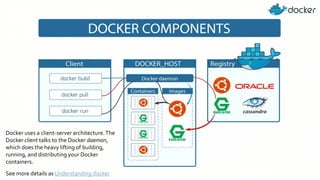
Docker uses a client-server architecture.The
Docker client talks to the Docker daemon,
which does the heavy lifting of building,
running, and distributing your Docker
containers.
See more details as Understanding docker
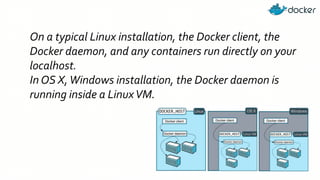
On a typical Linux installation, the Docker client, the
Docker daemon, and any containers run directly on your
localhost.
In OS X,Windows installation, the Docker daemon is
running inside a LinuxVM.
IMPORTANT CONCEPTS
DOCKER IMAGE
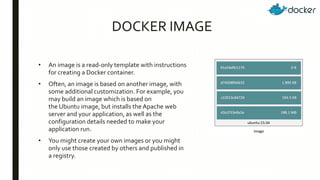
• An image is a read-only template with instructions
for creating a Docker container.
• Often, an image is based on another image, with
some additional customization. For example, you
may build an image which is based on
the Ubuntu image, but installs the Apache web
server and your application, as well as the
configuration details needed to make your
application run.
• You might create your own images or you might
only use those created by others and published in
a registry.
DOCKER CONTAINER
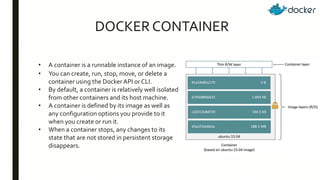
• A container is a runnable instance of an image.
• You can create, run, stop, move, or delete a
container using the Docker API or CLI.
• By default, a container is relatively well isolated
from other containers and its host machine.
• A container is defined by its image as well as
any configuration options you provide to it
when you create or run it.
• When a container stops, any changes to its
state that are not stored in persistent storage
disappears.
Run our first HelloWorld Docker
Container
Build our first Docker image
Create ContainerizedWeb Application
References
■ Docker for Developers - Introduction
■ Docker Documentation
■ Learn DockerTechnologies for DevOps and
Developers (Udemy Course)
■ Docker for .Net Developers:
Docker’s Architecture
Resources
■ Docker Samples
■ Play with docker classroom
■ docker-cheat-sheet

Up & Running with Docker

  • 1.
    UP & RUNNINGWITH By MOHAMMED ZAGHLOUL
  • 2.
    WHO AREYOU ? ■Senior Front-End Developer @OPENCOAST ■ FormerTeam Lead Developer @ GLOBAL IMPACT GitHub : msalahz Twitter : msalahz Linkedin : msalahz
  • 3.
    Background…. ■ C# &ASP.NET : 2008 – 2012 ■ Angular & Jquery : 2012 – 2014 ■ Ember : 2014 – Now
  • 4.
    Let me askyou ■ Who knows about Docker ? ■ Who uses Docker for development ? ■ Who uses Docker in production ? ■ Who tried but could not do it ? ■ Who usesWindows ? ■ Who uses mac OS ? ■ Who uses Linux ?
  • 5.
    What is coveredin the workshop ? 1. Quick introduction to Docker 2. Run our first HelloWorld Docker Container 3. Build our first Docker image 4. Create ContainerizedWeb Application
  • 6.
  • 7.
    What is Docker? Docker is an open platform for developing, shipping, and running applications. Docker allows you to package an application with all of its dependencies into a standardized unit for software development.
  • 13.
  • 14.
    Docker Components ■ Dockerdaemon ■ Docker client ■ Docker registries ■ Docker objects • IMAGES • CONTAINERS
  • 15.
    Docker uses aclient-server architecture.The Docker client talks to the Docker daemon, which does the heavy lifting of building, running, and distributing your Docker containers. See more details as Understanding docker
  • 16.
    On a typicalLinux installation, the Docker client, the Docker daemon, and any containers run directly on your localhost. In OS X,Windows installation, the Docker daemon is running inside a LinuxVM.
  • 17.
  • 18.
    DOCKER IMAGE • Animage is a read-only template with instructions for creating a Docker container. • Often, an image is based on another image, with some additional customization. For example, you may build an image which is based on the Ubuntu image, but installs the Apache web server and your application, as well as the configuration details needed to make your application run. • You might create your own images or you might only use those created by others and published in a registry.
  • 19.
    DOCKER CONTAINER • Acontainer is a runnable instance of an image. • You can create, run, stop, move, or delete a container using the Docker API or CLI. • By default, a container is relatively well isolated from other containers and its host machine. • A container is defined by its image as well as any configuration options you provide to it when you create or run it. • When a container stops, any changes to its state that are not stored in persistent storage disappears.
  • 20.
    Run our firstHelloWorld Docker Container
  • 21.
    Build our firstDocker image
  • 22.
  • 23.
    References ■ Docker forDevelopers - Introduction ■ Docker Documentation ■ Learn DockerTechnologies for DevOps and Developers (Udemy Course) ■ Docker for .Net Developers: Docker’s Architecture
  • 24.
    Resources ■ Docker Samples ■Play with docker classroom ■ docker-cheat-sheet