Docker Container
Presented by Naveen Kumar Auvusali 02-06-2018
Virtual Machines Explained
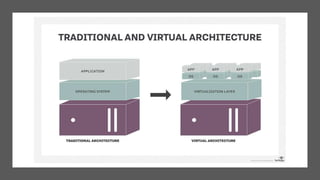
• A virtual computer system is known as a “virtual machine” (VM): a
tightly isolated software container with an operating system and
application inside.
• Each self-contained VM is completely independent. Putting multiple
VMs on a single computer enables several operating systems and
applications to run on just one physical server, or “host.”
• A thin layer of software called a “hypervisor” decouples the virtual
machines from the host and dynamically allocates computing
resources to each virtual machine as needed.
Docker
Size
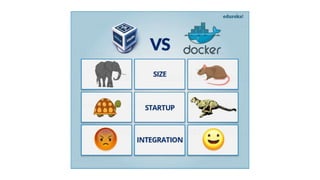
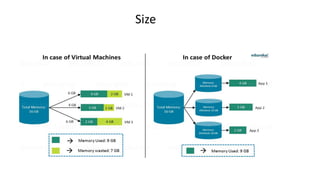
• The following image explains how Virtual Machine and Docker Container utilizes the resources
allocated to them.
Size
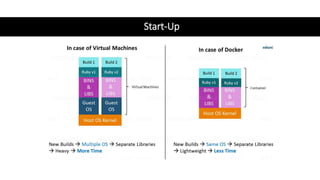
Start-Up
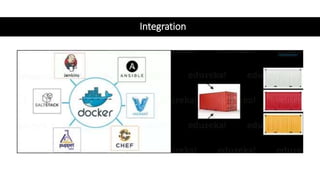
Integration
What is
Docker?
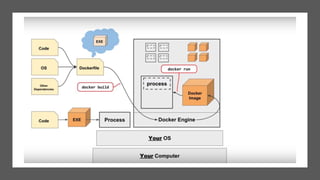
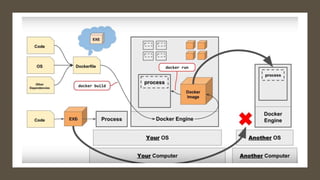
• Docker is a tool that allows developers, sys-admins
etc. to easily deploy their applications in a sandbox
(called containers) to run on the host operating
system i.e. Linux. The key benefit of Docker is that it
allows users to package an application with all of its
dependencies into a standardized unit for software
development
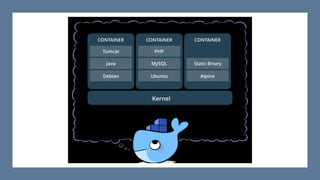
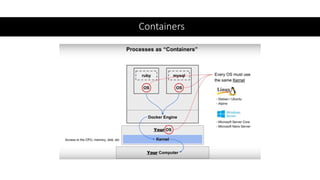
• Docker containers are lightweight alternatives to
virtual machines and it uses the host OS.
• You don’t have to pre-allocate any RAM in
containers.
CONTAINERS ?
Containers
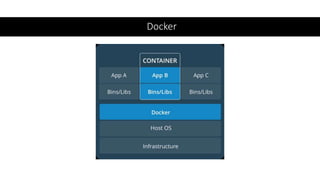
Containers are an abstraction at the app layer
that packages code and dependencies together.
Multiple containers can run on the same machine
and share the OS kernel with other containers,
each running as isolated processes in user space.
Containers take up less space than VMs
(container images are typically tens of MBs in
size), and start almost instantly.
Containers
Sample Docker file
• FROM node:9.11.1-alpine // Base image alpine
• WORKDIR /app
• ADD . /app
• CMD["node","server.js"] // Entry point
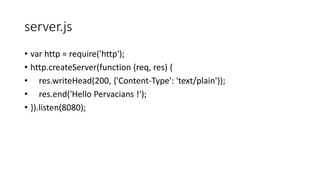
server.js
• var http = require('http');
• http.createServer(function (req, res) {
• res.writeHead(200, {'Content-Type': 'text/plain'});
• res.end('Hello Pervacians !');
• }).listen(8080);
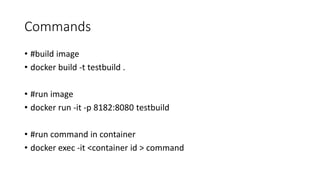
Commands
• #build image
• docker build -t testbuild .
• #run image
• docker run -it -p 8182:8080 testbuild
• #run command in container
• docker exec -it <container id > command
References
• https://github.com/docker/labs/tree/master/beginner/
• https://examples.javacodegeeks.com/devops/docker/docker-hello-
world-example/
• https://rominirani.com/docker-tutorial-series-writing-a-dockerfile-
ce5746617cd

Docker container

  • 1.
    Docker Container Presented byNaveen Kumar Auvusali 02-06-2018
  • 3.
    Virtual Machines Explained •A virtual computer system is known as a “virtual machine” (VM): a tightly isolated software container with an operating system and application inside. • Each self-contained VM is completely independent. Putting multiple VMs on a single computer enables several operating systems and applications to run on just one physical server, or “host.” • A thin layer of software called a “hypervisor” decouples the virtual machines from the host and dynamically allocates computing resources to each virtual machine as needed.
  • 4.
  • 6.
    Size • The followingimage explains how Virtual Machine and Docker Container utilizes the resources allocated to them. Size
  • 7.
  • 8.
  • 9.
    What is Docker? • Dockeris a tool that allows developers, sys-admins etc. to easily deploy their applications in a sandbox (called containers) to run on the host operating system i.e. Linux. The key benefit of Docker is that it allows users to package an application with all of its dependencies into a standardized unit for software development • Docker containers are lightweight alternatives to virtual machines and it uses the host OS. • You don’t have to pre-allocate any RAM in containers.
  • 11.
  • 12.
    Containers Containers are anabstraction at the app layer that packages code and dependencies together. Multiple containers can run on the same machine and share the OS kernel with other containers, each running as isolated processes in user space. Containers take up less space than VMs (container images are typically tens of MBs in size), and start almost instantly.
  • 13.
  • 16.
    Sample Docker file •FROM node:9.11.1-alpine // Base image alpine • WORKDIR /app • ADD . /app • CMD["node","server.js"] // Entry point
  • 17.
    server.js • var http= require('http'); • http.createServer(function (req, res) { • res.writeHead(200, {'Content-Type': 'text/plain'}); • res.end('Hello Pervacians !'); • }).listen(8080);
  • 18.
    Commands • #build image •docker build -t testbuild . • #run image • docker run -it -p 8182:8080 testbuild • #run command in container • docker exec -it <container id > command
  • 19.